

Page 1
Upright
®
VACUUM CLEANER
Household Type
OWNER’S GUIDE
1950 SERIES
IMPORTANT
Do not return this product to the
store.
For assembly problems or
questions contact: Eureka’s
Customer Service Division toll free at
1-800-282-2886*, 8 a.m. to 7:30 p.m.,
(CST), Monday - Friday and 10 a.m.
to 6:30 p.m. Saturday.
For replacement of broken or
missing items to be shipped direct
to you, call 1-800-438-7352*, 8 a.m.
to 4:45 p.m., (CST), Monday - Friday.
Index
Important Information ...2
Assemble.................. 2-3
Use ........................... 3-4
Dust Bag ...................... 4
Brush Roll Belt ......... 4-5
Brush Roll.....................5
Warranty .......................5
To order replacement parts and
accessories call 1-800-438-7352*, 8
a.m. to 7:30 p.m., (CST), Monday Friday and 10 a.m. to 6:30 p.m.
Saturday or visit our web site,
www.eureka.com.
*En Mexico llame al 5670-6169.
Please Retain
We suggest you record the model, type and serial numbers
below. They are located on the silver rating plate on your
cleaner. For prompt and complete service information, always
refer to these numbers when inquiring about service.
Model& Type___________________________
Serial No. ______________________
It is also important to keep your receipt as proof of date of
purchase.
Part No. 73194 (7/03)
©2003 White Consolidated, Ltd.
Printed in U.S.A.
Page 2

IMPORTANT SAFEGUARDS
When using an electrical appliance, basic precautions should always be followed, including the following:
READ ALL INSTRUCTIONS BEFORE USING THIS VACUUM CLEANER.
WARNING
To reduce the risk of fire, electric shock, or injury:
Do not use outdoors or on wet surfaces.
•
Do not leave vacuum cleaner when plugged in. Tu r n
•
off the switch and unplug the electrical cord when not in
use and before servicing.
Do not allow to be used as a toy. Close attention is
•
necessary when used by or near children.
Use only as described in this manual. Use only
•
manufacturer’s recommended attachments.
Do not use with damaged cord or plug. If vacuum cleaner
•
is not working as it should, has been dropped, damaged,
left outdoors, or dropped into water, return it to a service
center before using.
Do not pull or carry by cord, use cord as a handle, close
•
door on cord, or pull cord around sharp edges or corners.
Do not run vacuum cleaner over cord. Keep cord away
from heated surfaces.
Do not use extension cords or outlets with inadequate
•
current carrying capacity.
Turn off all controls before unplugging.
•
Do not unplug by pulling on cord. To unplug, grasp the
•
plug, not the cord.
Do not handle plug or vacuum cleaner with wet hands.
•
Do not put any object into openings. Do not use with any
•
opening blocked; keep free of dust, lint, hair, and anything
that may reduce airflow.
This vacuum cleaner creates suction and contains a
•
revolving brush roll. Keep hair, loose clothing, fingers, and
all parts of body away from openings and moving parts.
Do not pick up anything that is burning or smoking, such
•
as cigarettes, matches, or hot ashes.
Do not use without dust bag in place.
•
Belt pulleys can become hot during normal use. To prevent
•
burns, avoid touching the belt pulley when servicing the
drive belt.
Use extra care when cleaning on stairs.
•
Do not use to pick up flammable or combustible liquids
•
such as gasoline, or use in areas where they may be
present.
Store your cleaner indoors in a cool, dry area.
•
Keep your work area well lighted.
•
Unplug electrical appliances before vacuuming them.
•
SAVE THESE INSTRUCTIONS
To reduce the risk of electric shock, this appliance has a
polarized plug (one blade is wider than the other). This plug
will fit in a polarized outlet only one way. If the plug does not fit
fully into the outlet, reverse the plug. If it still does not fit, contact
a qualified electrician to install the proper outlet. Do not change
the plug in any way.
GENERAL INFORMATION
Use the cleaner to pick up dirt and dust particles. Avoid picking
up hard or sharp objects that could damage the vacuum
cleaner.
Service Information
The instructions in this booklet serve as a guide to routine
maintenance. For additional service information, telephone
our toll free number for the nearest Eureka Authorized
Warranty Station. You should know the model, type and
serial number or date code when you call:
USA: 1-800-282-2886 Mexico: 5670-6169
Canada: 1-800-282-2886
DO NOT OIL the motor or the brush roll. The motor
and brush roll are permanently sealed and
lubricated.
HOW TO ASSEMBLE
Assembly Packet
The assembly packet is with the owner’s guide. The packet
contains two 2-part bolts and two cord hooks. An extra drive
belt is also included with some models.
If you prefer, you can write to The Eureka Company, Service
Division, 807 North Main St., Bloomington, Illinois 61701, USA.
In Canada, write to The Eureka Company, 866 Langs Drive,
Cambridge, Ontario N3H 2N7. Refer to The Eureka Warranty
for complete service information.
2
A
2-Part Handle
Bolts
B
Lower
Cord
Hook
C
Upper
Cord
Hook
D
Two
Screws
Page 3
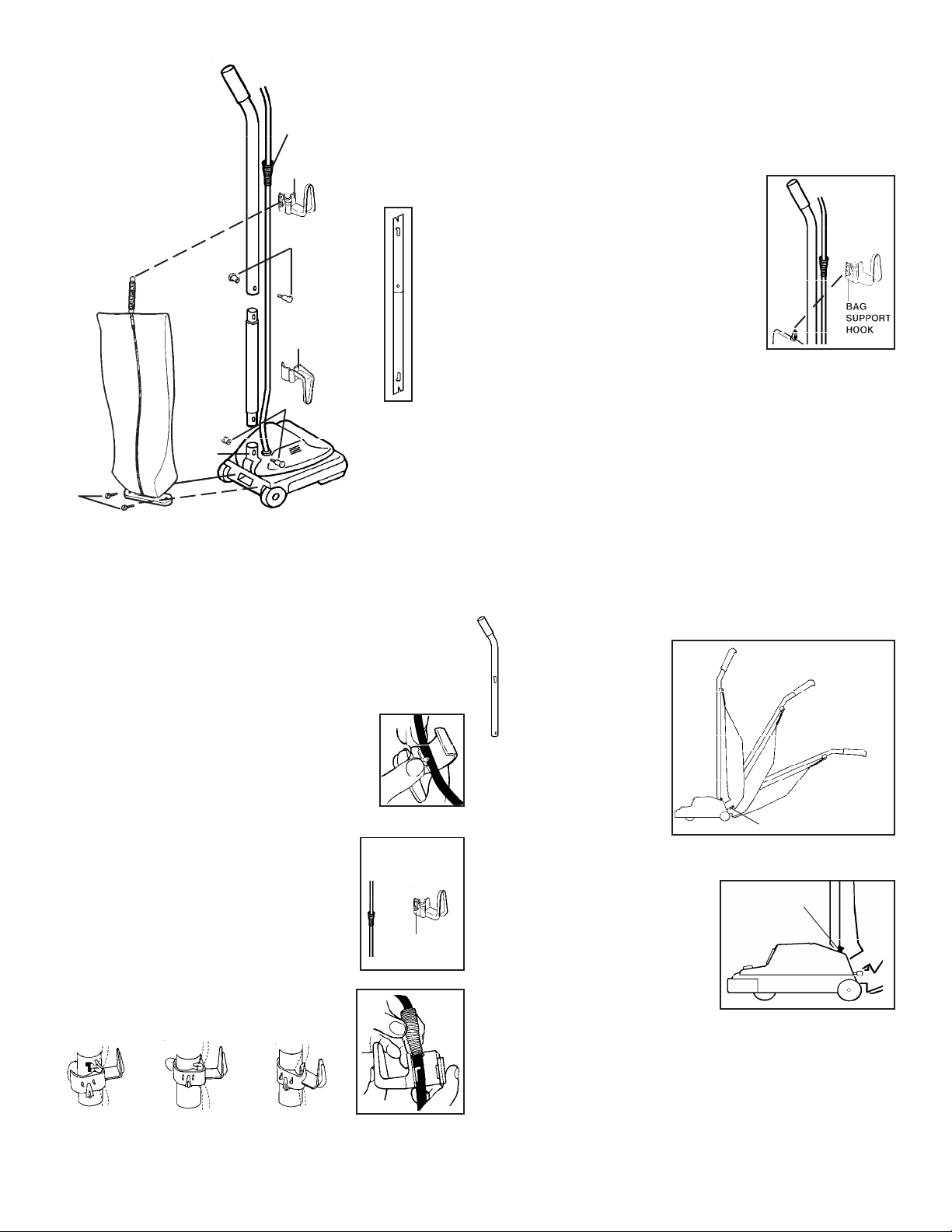
HOW TO ASSEMBLE
Step 4 - Outer Bag
Hold outer bag with zipper away from handle.
provide a good gasket seal, the bag coupling must seat
F
firmly against the motor base.
Start the bag screws by hand,
then tighten with a screwdriver.
C
Important: To
Step 5 - Bag Support
A
B
Slip the ring at the top of the cloth bag
over the bag support hook on the back
of the cord hook.
A
Fig. 1
E
D
Step 1 - Assemble the Handle
Slip the upper handle and the lower handle together so the
handle bolt holes align and the slots in the handle are
positioned as shown in Fig. 1. Insert a 2-part bolt (A) in the
center of the handle and tighten.
Hold the assembled handle so it curves away from the cleaner.
Then push the handle into the handle socket (E) at the rear of
the cleaner. Align the holes, insert the other 2-part bolt (A),
and tighten.
Step 2 - Attach Lower Cord Hook
Insert the power cord into the lower cord hook
(B), as shown. Snap the hook into the lower
handle. Pull up on the cord to tighten but leave
enough slack near the base so the cord is not
strained when the handle is lowered.
HOW TO USE
The upright vacuum cleaner is designed to be used on
multiple types of carpeting. Do not attempt to use the
upright vacuum cleaner on bare floors, as damage to the
floor covering may result.
Handle Adjustment
With the tip of the foot,
press down to release
the handle lock located
at the left rear side of
the cleaner. Move the
handle and adjust it to
the desired position for
(1) storing upright, (2)
operating the cleaner
at a comfortable height
for the user, and (3)
cleaning underneath
low furniture.
1. Store
2. Use
3.Clean
Underneath
Handle Lock
Step 3 - Attach Upper Cord Hook
Pull the sleeve (F) on the electrical cord
upward toward the top of the handle. Make
sure slots in handle are positioned properly,
Fig 1.
Insert the lower half of the sleeve (F) into
the upper cord hook (C) as shown. Snap
the hook into the upper handle, directions
below.
1. Place inner
tab into
slot
2. Press hook
around
handle
3. SNAP opposite
inner tab into
place
BAG
SUPPORT
Power Switch
The power switch is mounted
on the motor hood near the
handle. Switch style varies by
model and may differ from the
illustration. A push with the
foot turns the motor ON; push
again to turn the motor OFF.
ON/OFF
Cord Storage
The cleaner has two convenient cord storage hooks attached
to the handle.Wind the cord around the hooks for storage.
Fasten the plug to the cord to prevent unwinding.
3
Page 4
Cleaner Height Setting
WARNING: Avoid injury. Keep loose clothing, hair,
fingers, and all other parts of body away from
any moving part (such as the revolving
brush). Turn off the switch and unplug the
cleaner before changing the cleaner height
setting.
Recommended
Setting Example of Carpet
Position 1 Low pile as kitchen, indoor,
Position 2 Sculptured
Position 3 Plush or thick sculptured
Position 4 Thick plush
If the cleaner has additional height settings, they are for thicker
carpets or where easier pushing is desired.
outdoor
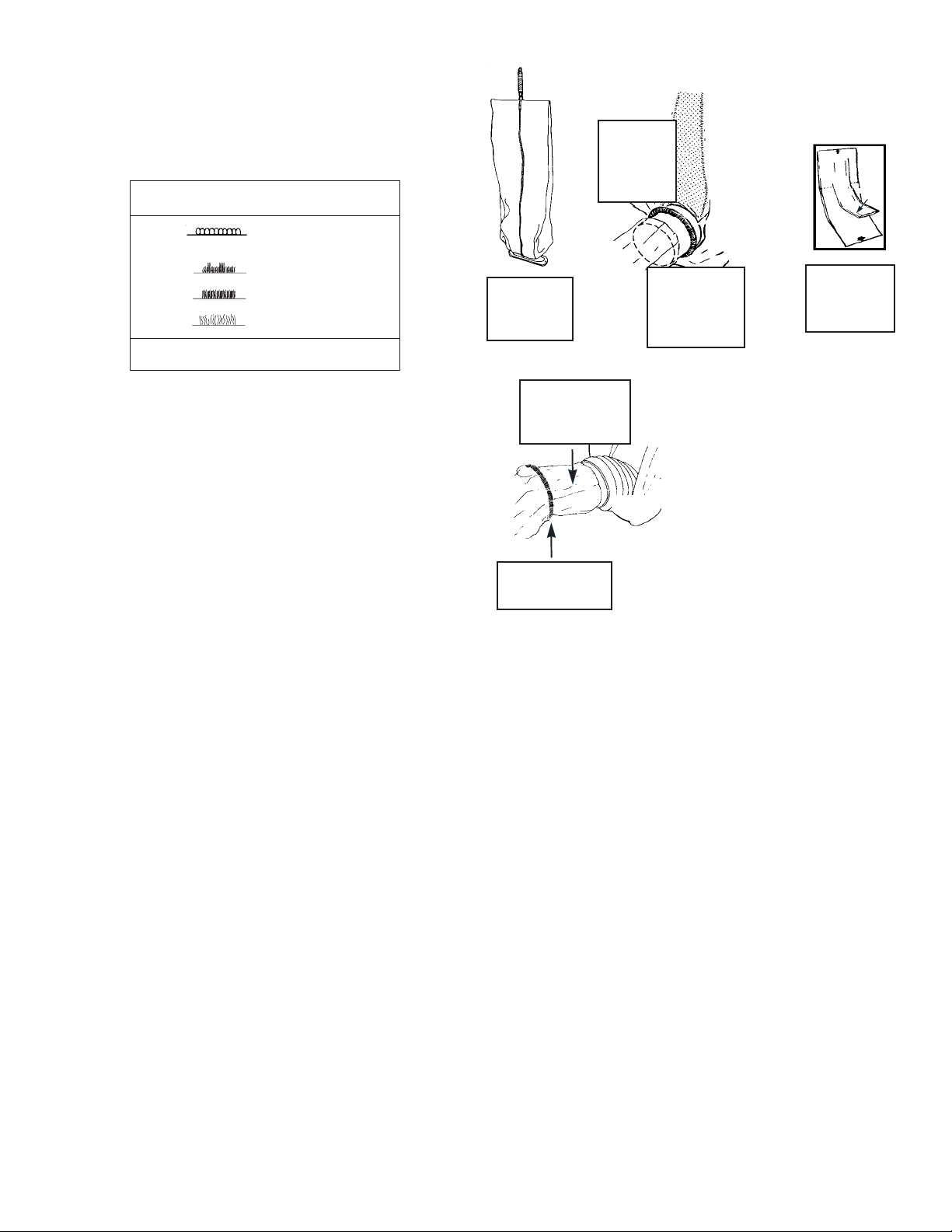
1. Pull
zipper
down
2. Roll
down
coil
spring
3. Pull bag
throat
off
sleeve
TOP
THROAT
BOTTOM
4. Unfold
new
bag
Adjust the vacuum cleaner height setting to match the carpet
pile height. Refer to the following chart of recommended
settings for carpet types.
The front of the cleaner has either a knob or slide adjustment
which raises or lowers the cleaner base to match the type of
carpet. With the cleaner cord unplugged, set the adjustment
according to the table as a starting point. While the cleaner
is off and disconnected from the outlet, place the handle
in the operating position, tilt the cleaner back to remove the
weight from the wheels, and adjust the setting. Then plug the
cleaner into the electrical outlet, turn on the switch, lower the
handle, and pass the cleaner over the carpet. If the cleaner
is still difficult to push, follow the procedure and test the
cleaner at the next higher setting. Continue testing the setting
until the cleaner is comfortable to move. Moving the knob or
slide to the next higher setting raises the brush roll slightly,
making the cleaner easier to push. However, the brush roll
must make contact with the carpet for effective cleaning.
HOW TO MAINTAIN
The instructions given in this booklet serve as a guide to
routine maintenance. To avoid unnecessary service calls,
check the bag, belt and brush roll often.
Disposable Dust Bags
Paper bags play a very important role in the efficiency of a
vacuum cleaner. The purpose of a paper bag is to trap dirt.
But at the same time the bag must be porous enough to allow
air to pass through. If the paper bag becomes clogged, no air
can pass through the cleaner and no cleaning can take place,
regardless of how powerful the unit is. Change the dust bag
frequently. Some fine particles can restrict airflow very quickly
and will decrease performance even before the bag appears
to be full. For that reason, when vacuuming carpet fresheners
or cleaners, powder, plaster dust, or similar fine substances,
the bag may need to be changed more often.
How To Change Disposable Dust Bag –
Style F & G
NOTE: Turn off the switch and unplug the electrical cord
before changing dust bag. Never operate the
vacuum cleaner without the dust bag.
5. Place bag
throat on
sleeve
7. Place paper bag into outer
bag.
NOTE:Be certain there are
no folds at the top or
bottom of the paper
bag.
8. Lift zipper
6. Roll up
coil spring
Ask for GENUINE EUREKA
dust bags–Style F & G.
Cleaner Care
NOTE: Turn off the switch and unplug the electrical cord
before cleaning unit.
To keep the vacuum cleaner looking new, it can be wiped
with a damp cloth and a mild soap solution, then thoroughly
dried. Never use any type of chemical as chemicals can
damage the cleaner. When not in use, the cleaner should be
stored in a clean, dry place.
Brush Roll Belt
The brush roll belt on the upright vacuum cleaner drives the
brush to agitate, sweep, and comb the carpet nap. The belt
should be checked regularly to be sure it is in good condition.
Replace the belt if it is stretching, cracking, or slipping. Cut
away any hair or thread wound around the brush roll or the
belt pulley because the buildup could cause the belt to rotate
unevenly.
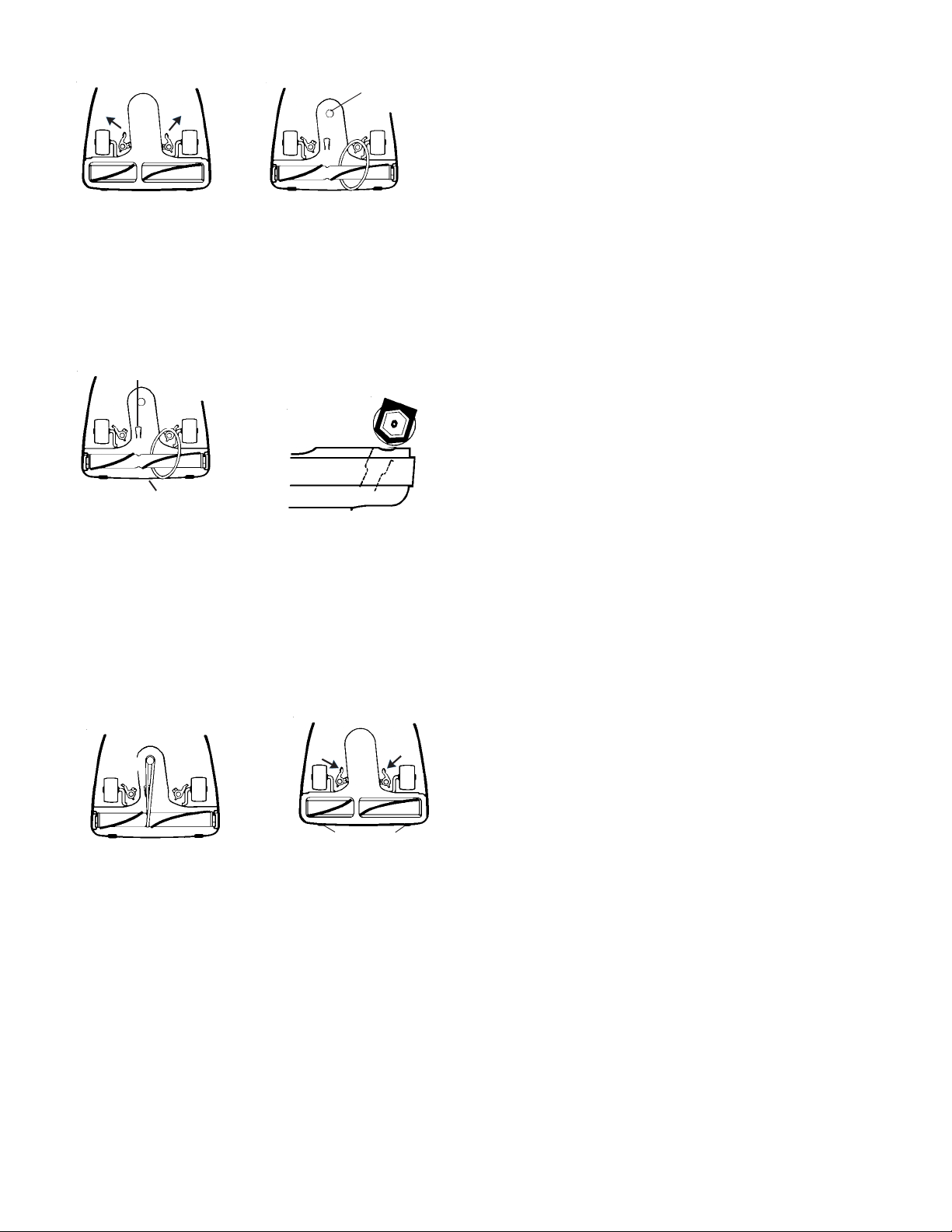
How To Replace A Worn Belt
NOTE: Turn off the switch and unplug the electrical cord
before replacing belt. Belt pulleys can become
hot during normal use. To prevent injury, avoid
touching the belt pulley when servicing the drive
belt.
IMPORTANT:Improper installation of the brush roll or
brush roll belt could cause carpet or
cleaner damage.
4
Page 5
Motor
2
1
1
1. Release cam locks.
2. Pull up on belt to rotate it off
Pulley
the motor pulley. Lift up on
brush roll and remove worn
belt.
Belt
Guide
5
6
Brush Roll
Pulley
Check for brush wear, see
Brush Roll instructions.
3. Place new belt around
brush roll.
4. Align brush roll pulley
with belt guide.
5. Then, slant brush roll forward
so end caps are in line with
slots in cleaner base.
6. Push brush roll into base
9
9
7
7. Place lower side of belt
into belt guide and pull
to stretch the belt
around the left side of
8
8. Place slots of bottom plate
over tabs of cleaner base.
9. Seat and secure cam locks
8
the motor pulley. Rotate
pulley to secure belt into
groove.
Ask for GENUINE EUREKA
replacement belts No. 52100.
Brush Roll
The rotating brush roll sweeps and combs the carpet nap. Keep
the brush roll free from hair and threads so it will continue brushing. When the bristles of the brush roll no longer touch a straight
edge held against the bottom plate, the brush roll is ineffective
because the bristles no longer touch the carpet nap. To maintain
the most effective cleaning, the brush roll should be replaced.
THE EUREKA LIMITED WARRANTY
hat This Warranty Covers
W
Your Eureka cleaner is warranted to be free from all defects in material and
workmanship in normal household use for a period of one year. The warranty
is granted only to the original purchaser and members of his or her immediate
household. The warranty is subject to the following provisions.
hat This Warranty Does Not Cover
W
• Parts of the cleaner that require replacement under normal use, such as
disposable dust bags, filters, drive belts, light bulbs, brush roll bristles,
impellers and cleaning.
• Damages or malfunctions caused by negligence, abuse, or use not in
accordance with the Owner’s Guide.
• Defects or damages caused by unauthorized service or the use of other than
Genuine Eureka parts.
hat The Eureka Company Will Do
W
The Eureka Company will, at its option, repair or replace a defective cleaner
or cleaner part that is covered by this warranty. As a matter of warranty policy,
the Eureka Company will not refund the consumer’s purchase price.
arranty Registration
W
Please fill out and return the warranty registration card accompanying your
cleaner.
btaining Warranty Service
O
To obtain warranty service you must return the defective cleaner or cleaner
part along with proof of purchase to any Eureka Authorized Warranty Station.
You will find the nearest location in the Yellow Pages, under “Vacuum Cleaners–
Service and Repair.” Be certain that the Warranty Station is “Eureka
Authorized.”
For the location of the nearest Eureka Authorized Warranty Station or for
service information visit www.eureka.com, or telephone toll free: USA: 1800-282-2886, Mexico: 5670-6169, Canada: 1-800-282-2886.
If you prefer, you can write to The Eureka Company, Service Division, 807
North Main Street, Bloomington, Illinois 61701, USA. In Canada write to
The Eureka Company, 866 Langs Drive, Cambridge, Ontario N3H 2N7.
If it is necessary to ship the cleaner outside your community to obtain warranty
repair, you must pay the shipping charges to the Eureka Authorized Warranty
Station.
Return shipping charges will be paid by the Warranty Station. When returning
parts for repair, please include the model, type, and serial number from the
data plate on the cleaner.
urther Limitations and Exclusions
F
Any warranty that may be implied in connection with your purchase or use of
the cleaner, including any warranty of Merchantability or any warranty for
Fitness For A Particular Purpose is limited to the duration of this warranty.
Some states do not allow limitations on how long an implied warranty lasts,
so the above limitations may not apply to you.
Your relief for the breach of this warranty is limited to the relief expressly
provided above. In no event shall Eureka be liable for any consequential or
incidental damages you may incur in connection with your purchase or use
of the cleaner. Some states do not allow the exclusion or limitation of
incidental or consequential damages, so the above limitation or
exclusion may not apply to you.
This warranty gives you specific legal rights. You may also have other rights
which vary by state.
uestions & Answers about Genuine Eureka Products
Q
Q:
Why should I use only Genuine Eureka paper bags, belts, and parts in my Eureka
vacuum cleaner?
A:
Using Genuine Eureka Products, which are made to our exacting specifications
and engineered with emphasis on quality, performance, and customer
satisfaction, ensures the long life and cleaning efficiency of your vacuum cleaner.
Q:
How can I be sure I am using only genuine Eureka products in my vacuum cleaner?
Typically, packaged products and paper bags are labeled “Genuine Eureka
A:
Product”.
Q:
Are there any differences between “made to fit” or “imitation” and Genuine Eureka
paper bags, belts, and parts?
A:
Yes, there are some very important differences in materials, quality, and
reliability.
For Genuine Eureka Value, Accept No Imitations!
THE EUREKA COMPANY
Bloomington, Illinois 61701
5
 Loading...