

Page 1
User Guide
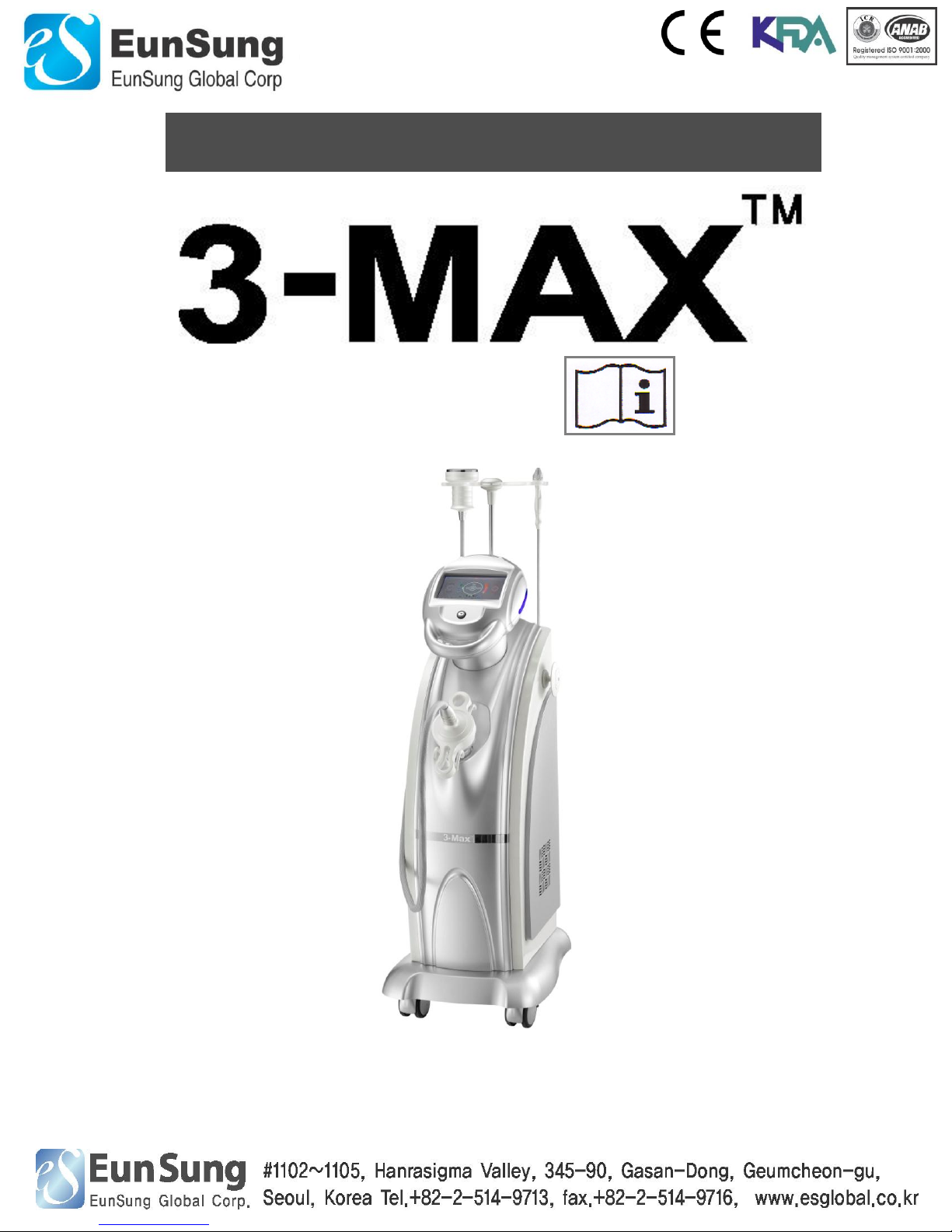
Ultrasonic Cavitation and RF with Vacuum System
Page 2

Operating Manual
www.esglobal.co.kr
2
Ⅰ. Structure of 3-MAX
Ⅰ-1. General Structure
Ⅰ-2. Description of Applicator
Ⅰ-3. Operating Board
Ⅰ-4. Operation
Ⅰ-5. Filter Cleaning
Ⅱ. Operation
Ⅱ-1. Operation LED screen
Ⅱ-2. Cavitation (Body)
Ⅱ-3. RF & Vacuum (Body)-1Mhz
Ⅱ-4. RF & Vacuum (Face)-3Mhz
Ⅲ. Practical Application
Ⅲ-1. Abdomen/ Waist Side line
Ⅲ-2. Front & Back Thigh/ Hip/ Calf
Ⅲ-3. Back/ Arm
Ⅲ-4. Face
Ⅳ. Cautions
Ⅳ-1. Contraindication
Ⅳ-2. Cautions
Ⅳ-3. Maintenance
Ⅳ-4. Solution
Ⅴ. Warranty
Ⅴ-1. Warranty Coverage
Ⅴ-2. Exclusions
Ⅵ. Specification
Ⅶ. Manufacturer information
Ⅶ-1 Contact information
3~6
…………………………………… 3
…………………………………… 4
…………………………………… 5
…………………………………… 6
…………………………………… 7
8~15
…………………………………… 8
…………………………………… 9~11
…………………………………… 12~13
…………………………………… 13~15
16~23
…………………………………… 16~17
…………………………………… 18~20
…………………………………… 21~22
…………………………………… 23
24~26
…………………………………… 24
…………………………………… 24
…………………………………… 25
…………………………………… 26
27
…………………………………… 27
…………………………………… 27
…………………………………… 28
…………………………………… 29
Contents
Operating Manual
Appendix
Page 3
Operating Manual
www.esglobal.co.kr
3
Ⅰ. Structure of 3-MAX
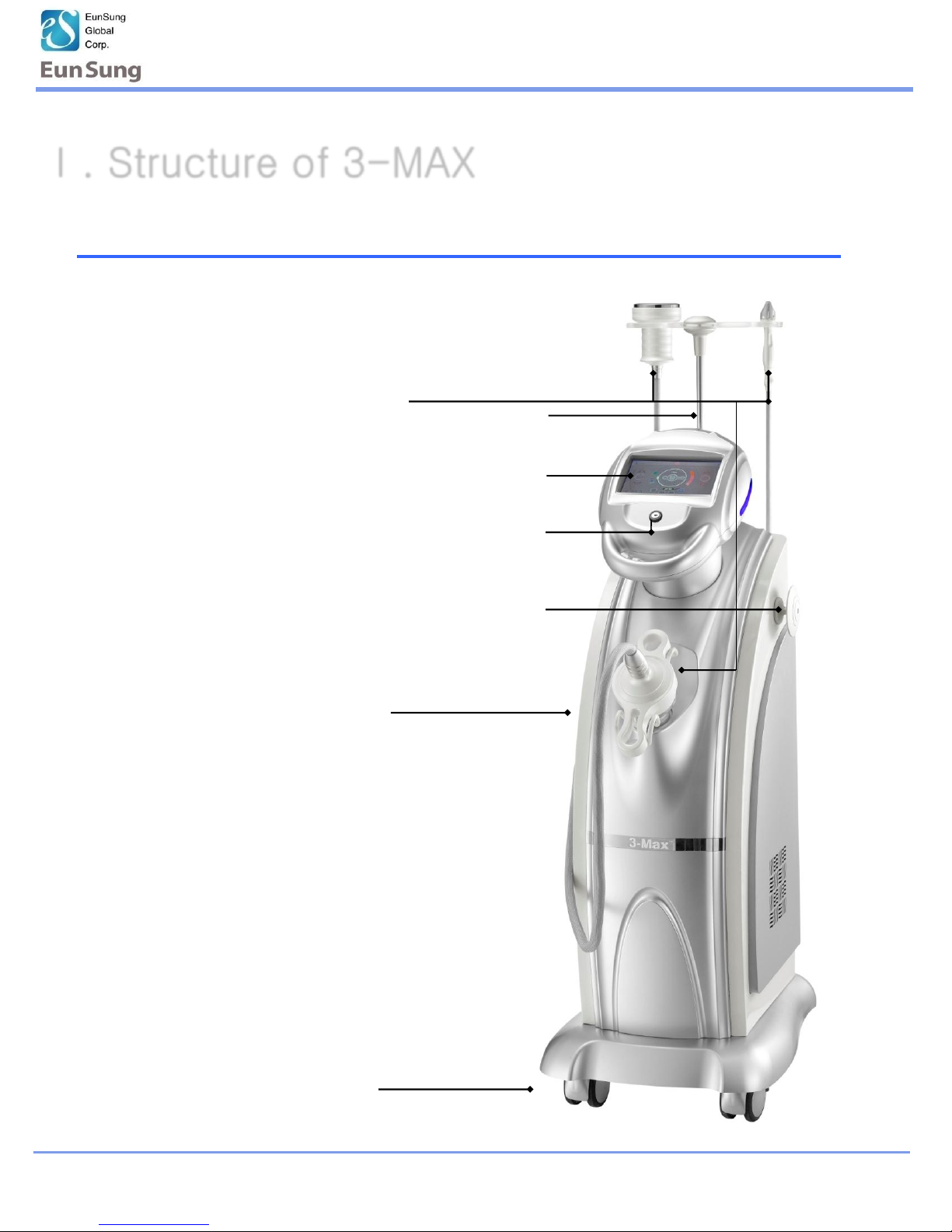
Ⅰ-1. General Structure
Body
LCD
Hand-piece
Start Key
Wheels
Hand-piece Holder
Hand-piece Hose Holder
Page 4
Operating Manual
www.esglobal.co.kr
4
Ⅰ. Structure of 3-MAX
Ⅰ-2. Description of Applicator
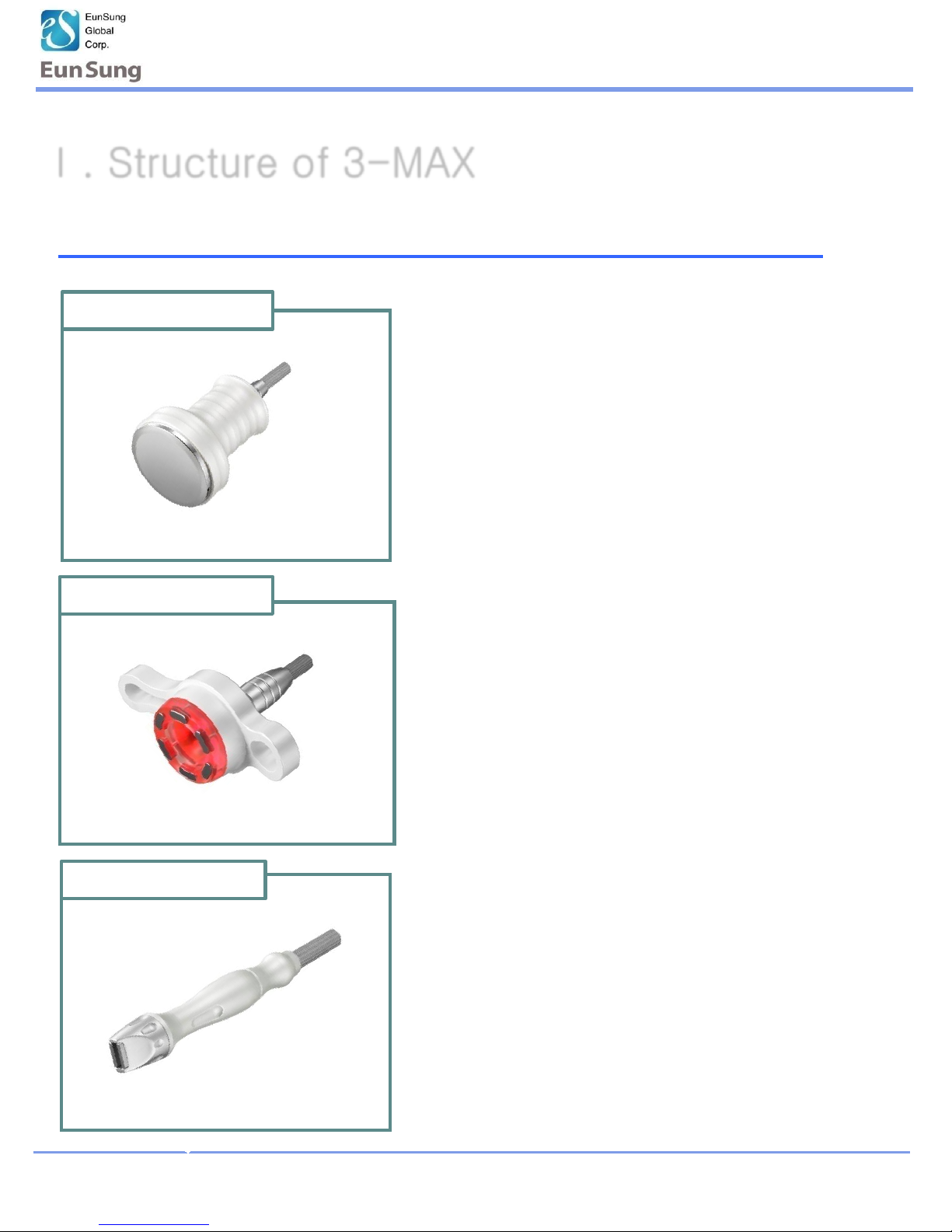
• Treaded on abdomen, leg, back and waist
• Simultaneously operate RF and Vacuum.
• Dynamic pulse function
• Developed Muti-Polar RF Technology
• Include RED LED
• Treated on face, eye and neck for lifting
• Lymph drainage technology
• Simultaneously operate RF and Vacuum
• Dynamic vibration
• Negative pressure with 4 types of pulse
Body(RF& Vacuum )
RF : 1MHz
Face(RF& Vacuum)
RF : 2MHz
• Treatment of fat and cellulite area
• 80Φ Hand-piece
• Safe BLT mode
• 4 types of pulse function
• Light signal function
Body (Cavitation)
Page 5
Operating Manual
www.esglobal.co.kr
5
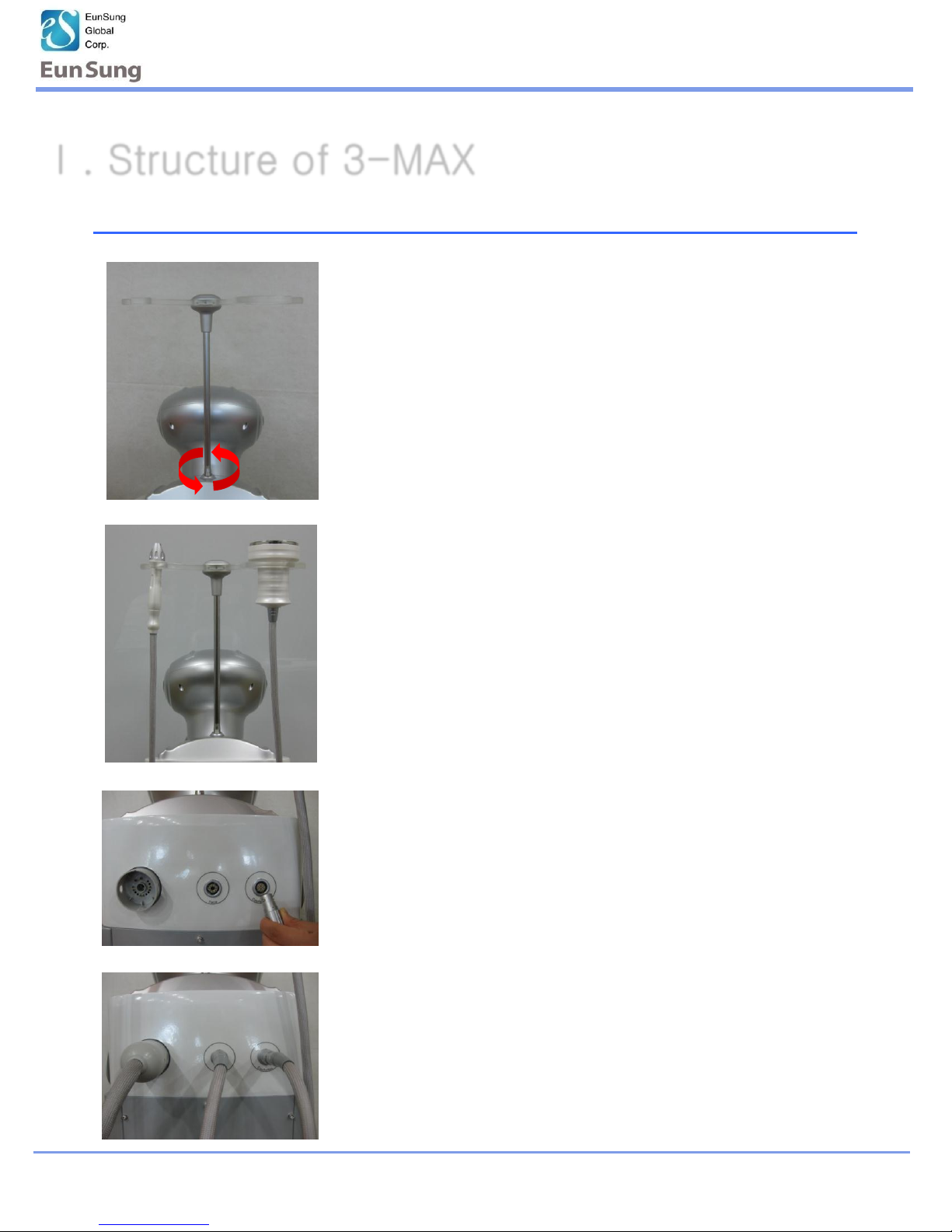
Ⅰ-3 : Installation
1.Put and turn the accessory holder into the machine
4. Put connector of Cavitation, Face, Body
Ⅰ. Structure of 3-MAX
* If the accessory holder doesn’t parallel the machine,
release 3 screws on the top and set the direction
correctly.
2. Hold hand-pieces to the accessory holder
3. Put in the hand-piece connector to the machine tightly
*Put the connector to the hole correctly.
It may cause serious problem to the pin inside of
the connector.
Page 6
Operating Manual
www.esglobal.co.kr
6
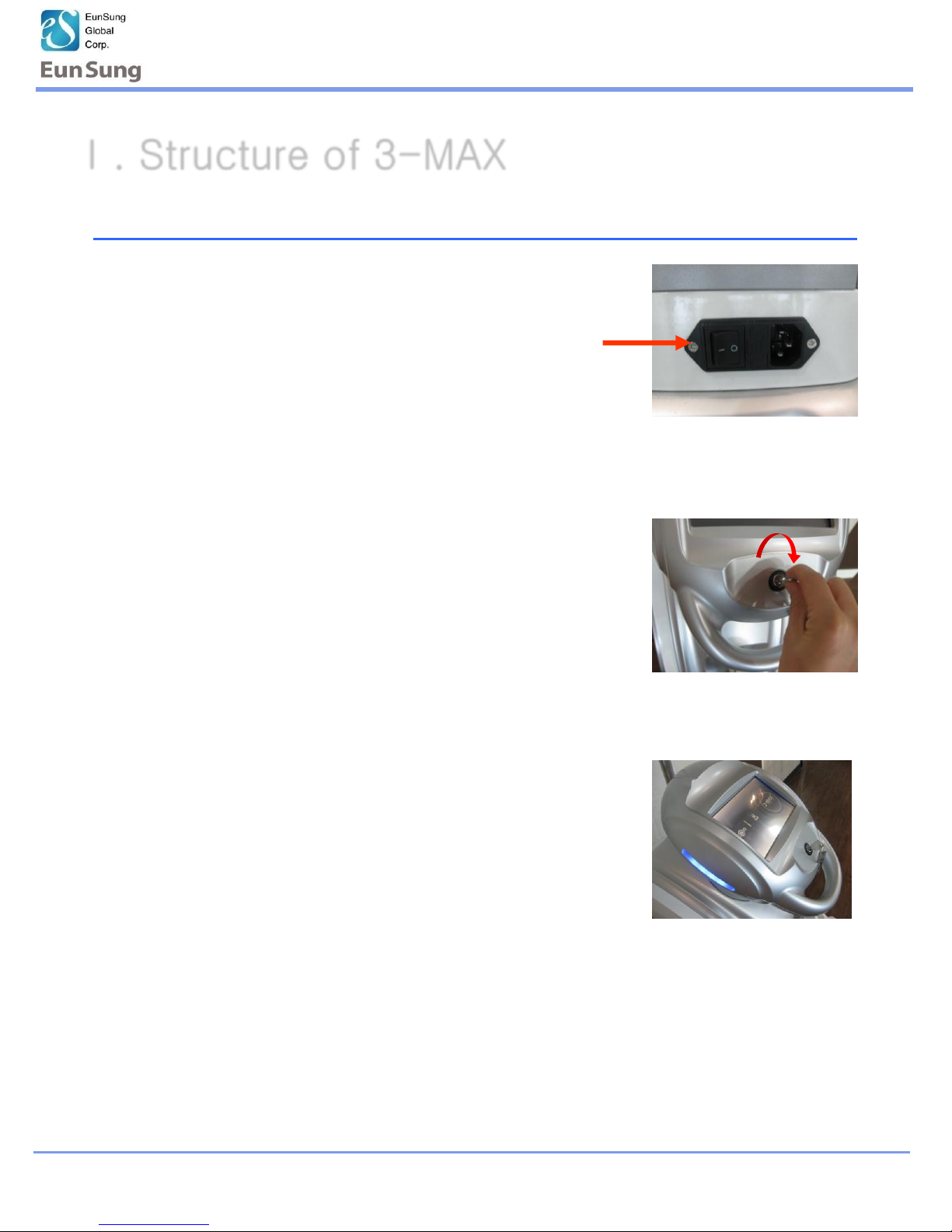
Press
2.Turn the power switch key.
• The blue LED will be lightened
on the side of head
Ⅰ. Structure of 3-MAX
Ⅰ-4 . Operation
1. Press the power switch
Page 7
Operating Manual
www.esglobal.co.kr
7
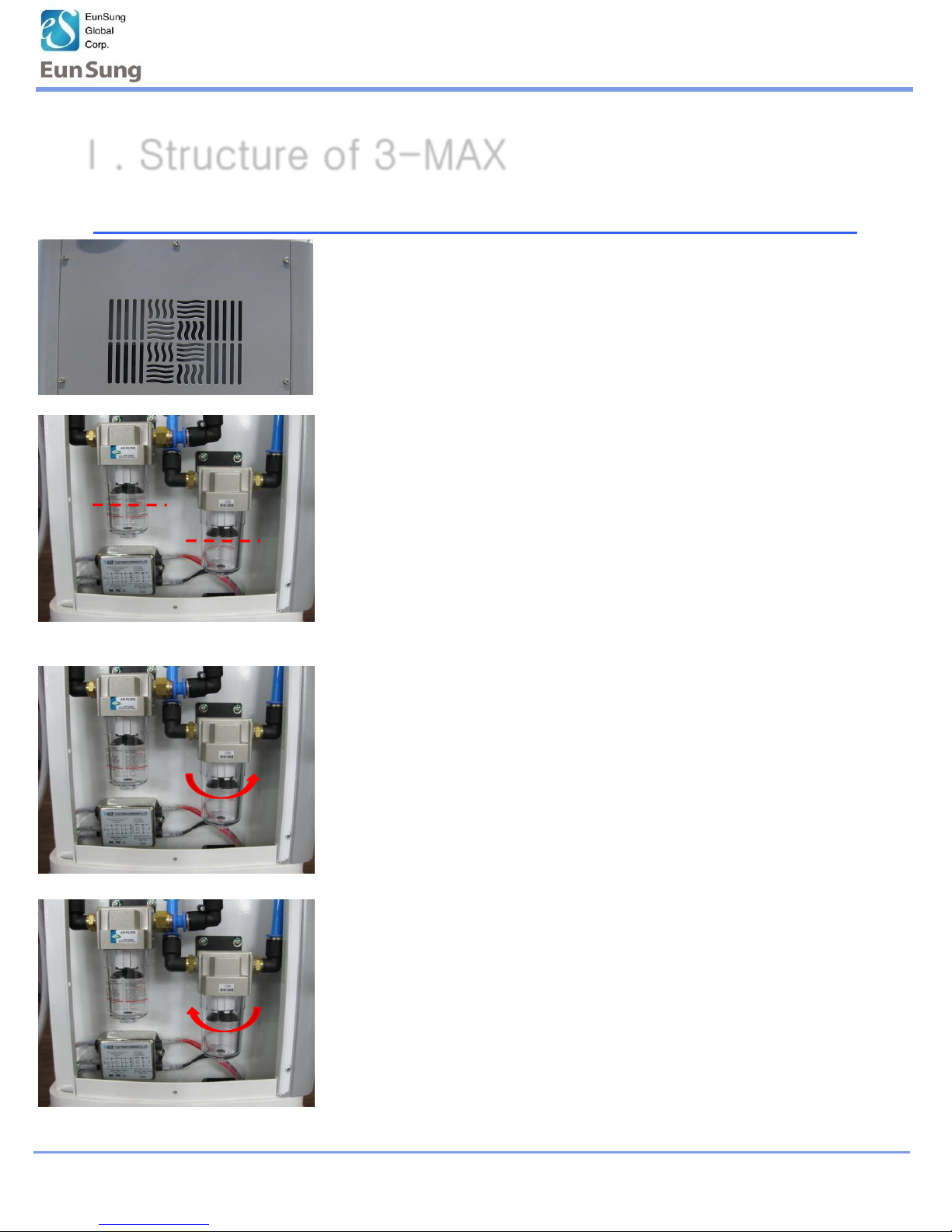
Ⅰ-5 : Filter Cleaning
Ⅰ. Structure of 3-MAX
1.Open the hexagonal screw on the back side of machine
with wrench.
2. Empty the filter container when the oil filled till
red line.
3. Open the lid of filter container as arrow direction.
* Empty the filter container.
4. After cleaning, put the container as arrow direction.
Page 8
Operating Manual
www.esglobal.co.kr
8
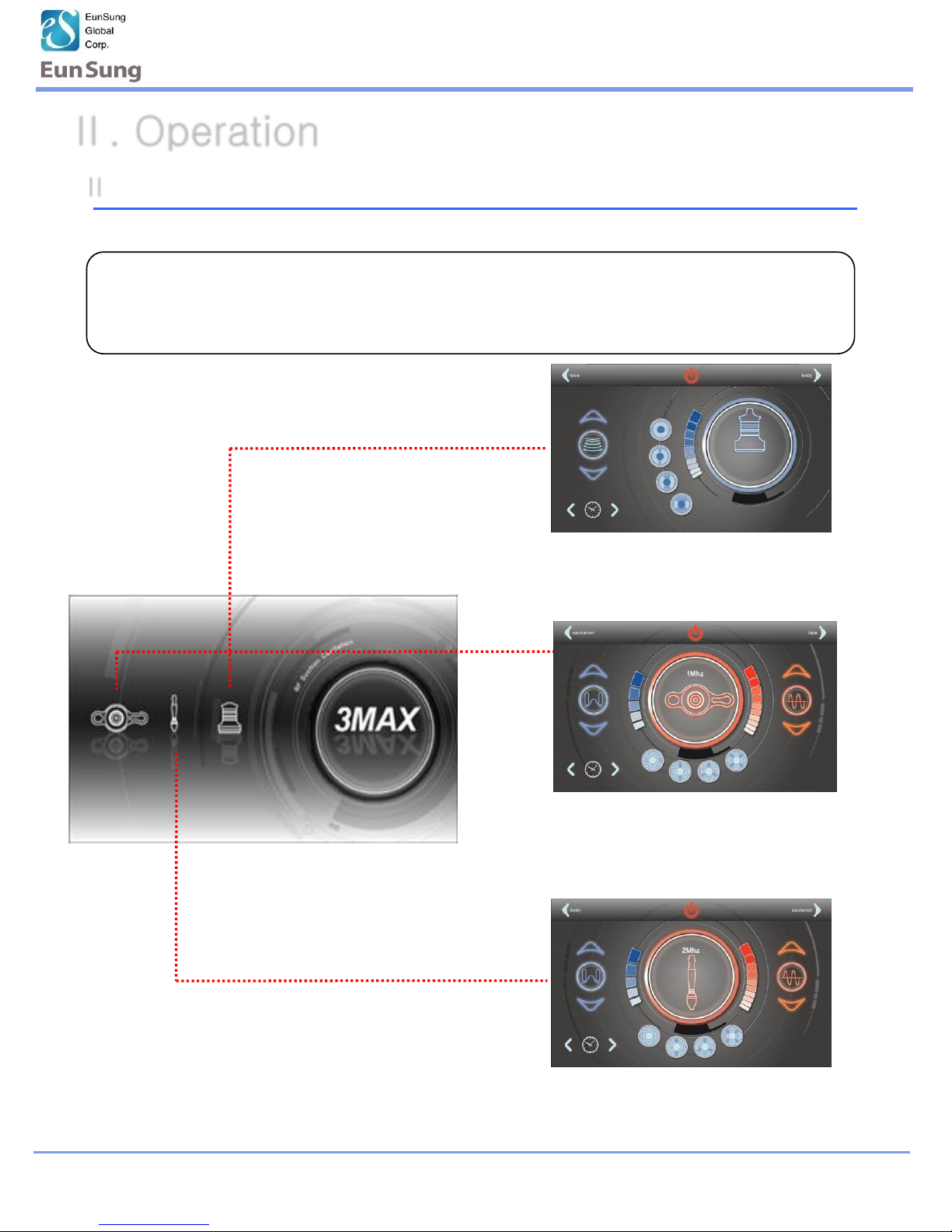
Ⅱ -1. Operation LCD screen
RF& Vacuum (Face)
RF& Vacuum (Body)
Cavitation (Body)
Ⅱ. Operation
* Select and press the handpiece from LCD screen
Choose Cavitation / RF & Vacuum for body treatment.
Choose RF & Vacuum for face treatment.
Page 9
Operating Manual
www.esglobal.co.kr
9
Ⅱ. Operation
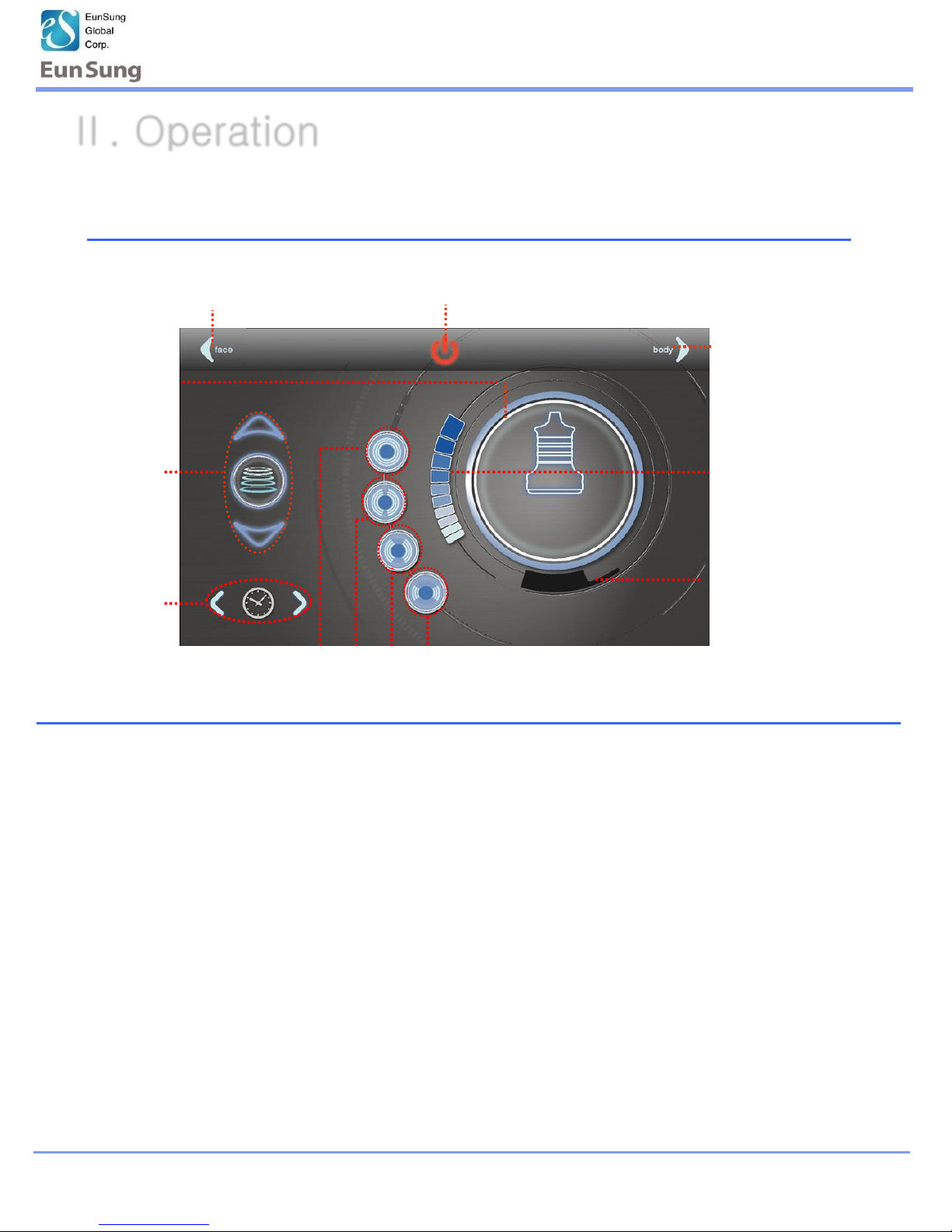
II -2. Cavitation (Body)
⑧ Start Button
① Type of
Handpiece
⑨ Select Handpiece Type
⑦ Select
Hapdpiece Type
② Cavitation
③ Control
Time Button
⑤ Preset Timer
① Type of handpiece: Displays the current operation handpiece.
② Cavitation : Cavitation operating button (Level : 1~10 step)
③ Control Time Button: Adjusts operation time button (1~30 min)
④ Pulse Program Button: Selects the pulse program. (4 mode: C , P1 ,P2 ,P3)
⑤ Preset Timer : Shows total treatment time
⑥ Display Power Level: Shows the current power level of cavitation.
⑦ Select Handpiece Type
⑧ Start Button : Start/Stop Button
⑨ Select Handpeiece Type
⑥ Display Power Level
15:00
④ Pulse Program Button < C , P1 ,P2 ,P3 >
Page 10

Operating Manual
www.esglobal.co.kr
10
15:00
Set
Cavitation
the level
Control time
Preset time
Choose the program
* Selecting the Cavitation Mode, it has a preset function.
level Program Time
5 C 15 min
II -2-1. Cavitation Operation (Body)
1. Use to the preset program and change to mode, level and time as your convenient
2.Apply gel to the treatment area
Press
3.Press the Power button on the handpiece to start operation
Ⅱ. Operation
* The preset function is basically set up to each mode for users. If the level of
preset is not suitable for user, then the user can adjust to level to use
Page 11

Operating Manual
www.esglobal.co.kr
11
※ Foot switch can e used as start/stop button.
II -2-2. Cavitation Operation (Body)
*User can use the foot switch all operation modes, the Cavitation and RF & Vacuum
1.When finishes the treatment, press“Power”on the LCD board.
(Basically, it will be finished the function after finishing the time set)
2.Keep the power on 2~3 min before off the power, more to cool down
the inside heat.
3.Turn off the power Key.
4.Turn off the power switch backside of the machine.
5.Clean the accessories after treatment and keep them in order
II-2-3. Finish the Cavitation (Body)
•Finish mode is same as Cavitation and RF & Vacuum operation
Ⅱ. Operation
Page 12
Operating Manual
www.esglobal.co.kr
12
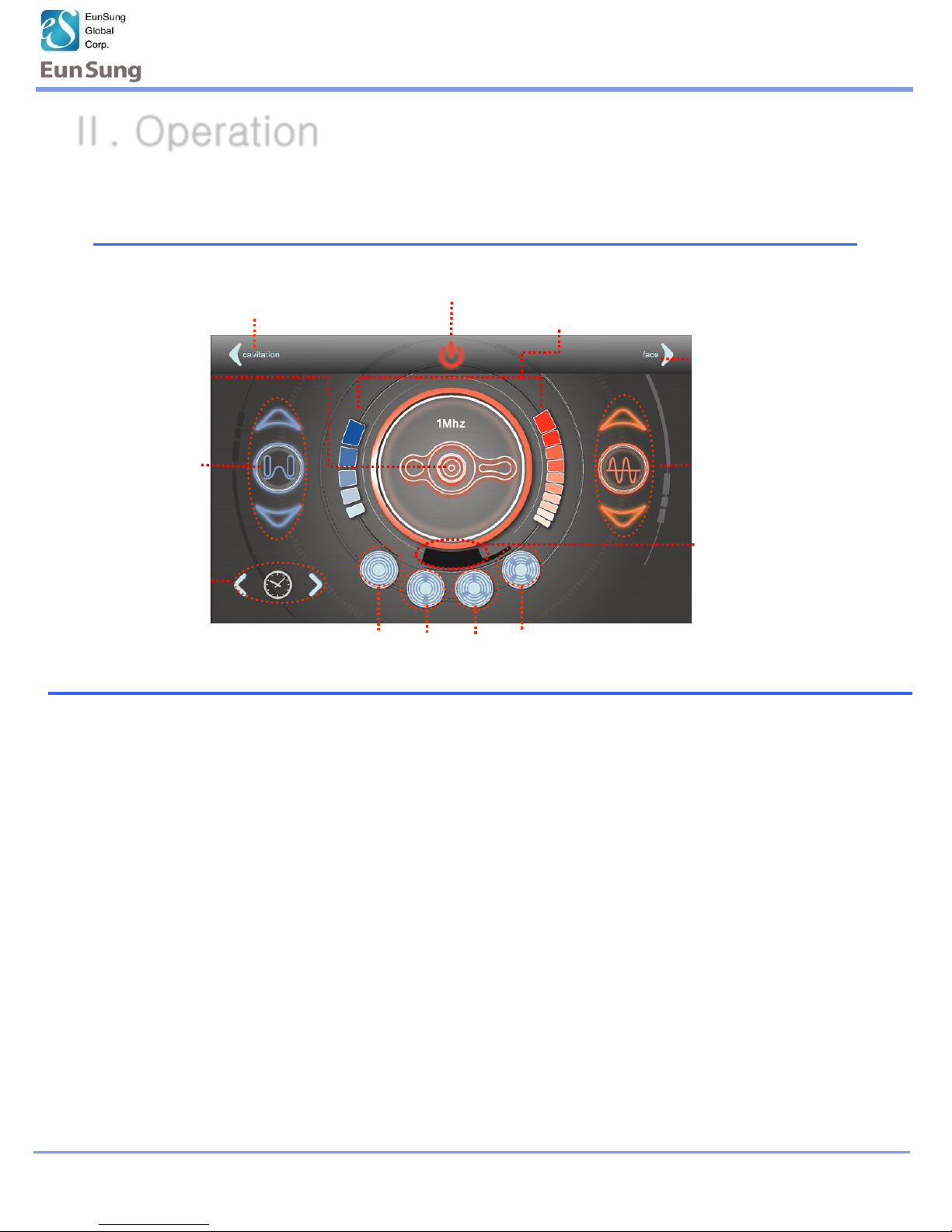
II-3. RF & Vacuum (Body)-1Mhz
⑨ Start Button
① Type of
handpiece
④ Vacuum Pulse < C , P1 , P2 , P3 >
⑩ Select Handpiece Type
② Set Vacuum
level
⑥ Bipolar RF
⑤ Preset Timer
① Type of Handpiece : Displays the current handpiece type.
② Vacuum : Operating Vacuum/Control the button (Level : 1~ 5 step)
③ Control Time Button : Operation time control button (1~30 Min)
④ Vacuum Pulse : Choose the pulse (5 modes).
* Pulse type < C:Continous P1:Slow Pulse P2:Midium Pulse P3:Fast Pulse >
⑤ Preset Timer : Shows total treatment time
⑥ Bipolar RF : RF operating button (Level : 1~10 step)
⑦ Select Handpiece Type
⑧ Display Power Level: Shows the current power level of Vacuum and RF
⑨ Start Button : Start/Stop Button
③ Control
Time Button
⑧ Display Power Level
20:00
⑦ Select Handpiece Type
Ⅱ. Operation
Page 13
Operating Manual
www.esglobal.co.kr
13
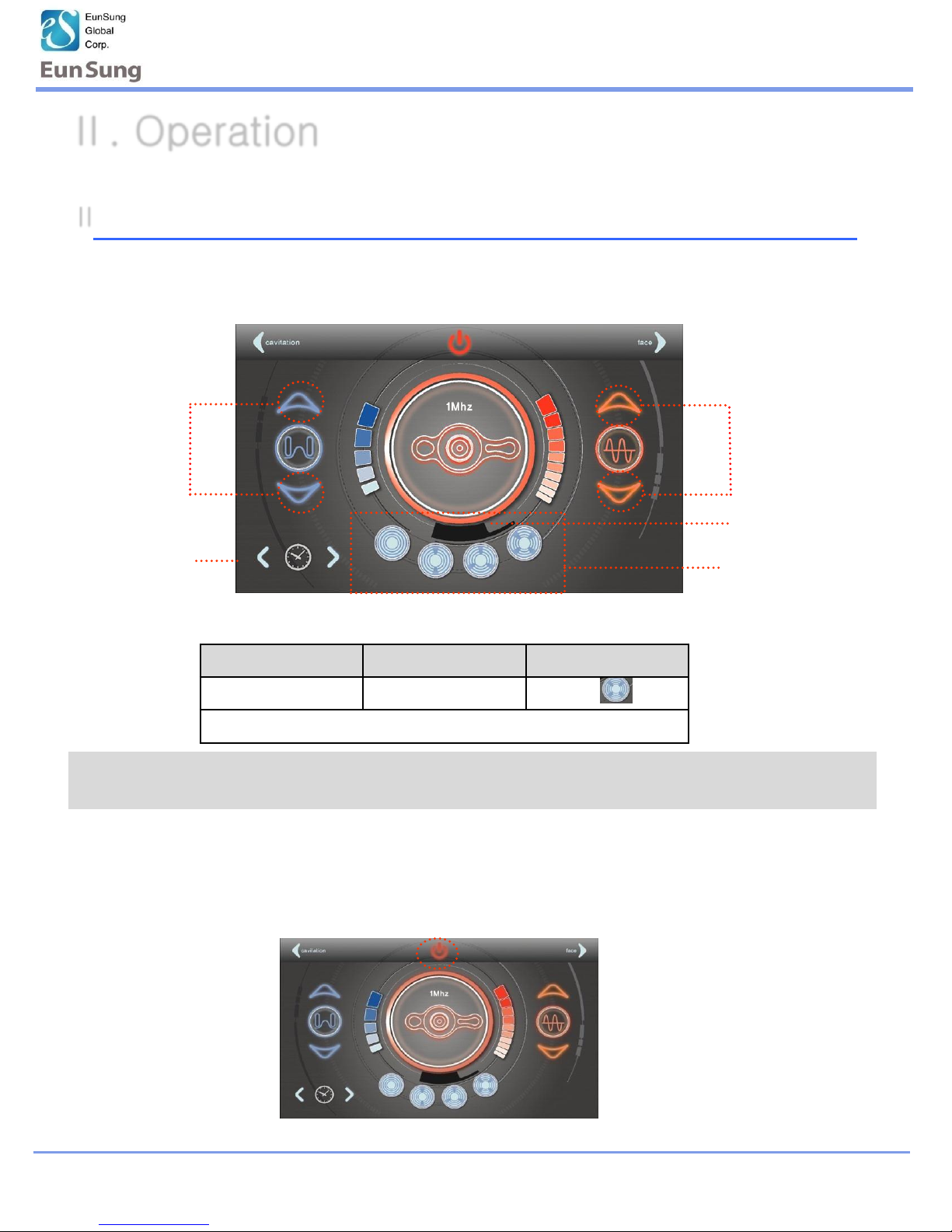
Ⅱ -3-1. RF & Vacuum Operation(Body)-1Mhz
Press
Ⅱ. Operation
Vacuum level RF level Vacuum Pulse
3 5 P3
Time: Body 20min
Set Vacuum
level
Vacuum Pulse
Set RF level
20:00
Preset Timer
Control Time
Button
4. Finish is same as Cavitation (Refer to Cavitation finish mode)
1. Use to the preset program and change to mode, level and time as your convenient
* Selecting the RF & Vacuum Mode, it has a preset function.
* The preset function is basically set up to each mode for users. If the preset of
level is not suitable for user, then the user can adjust to level to use
2.Apply the RF Lotion to the treatment area
3.Press the Power button on the handpiece to start operation
Page 14
Operating Manual
www.esglobal.co.kr
14
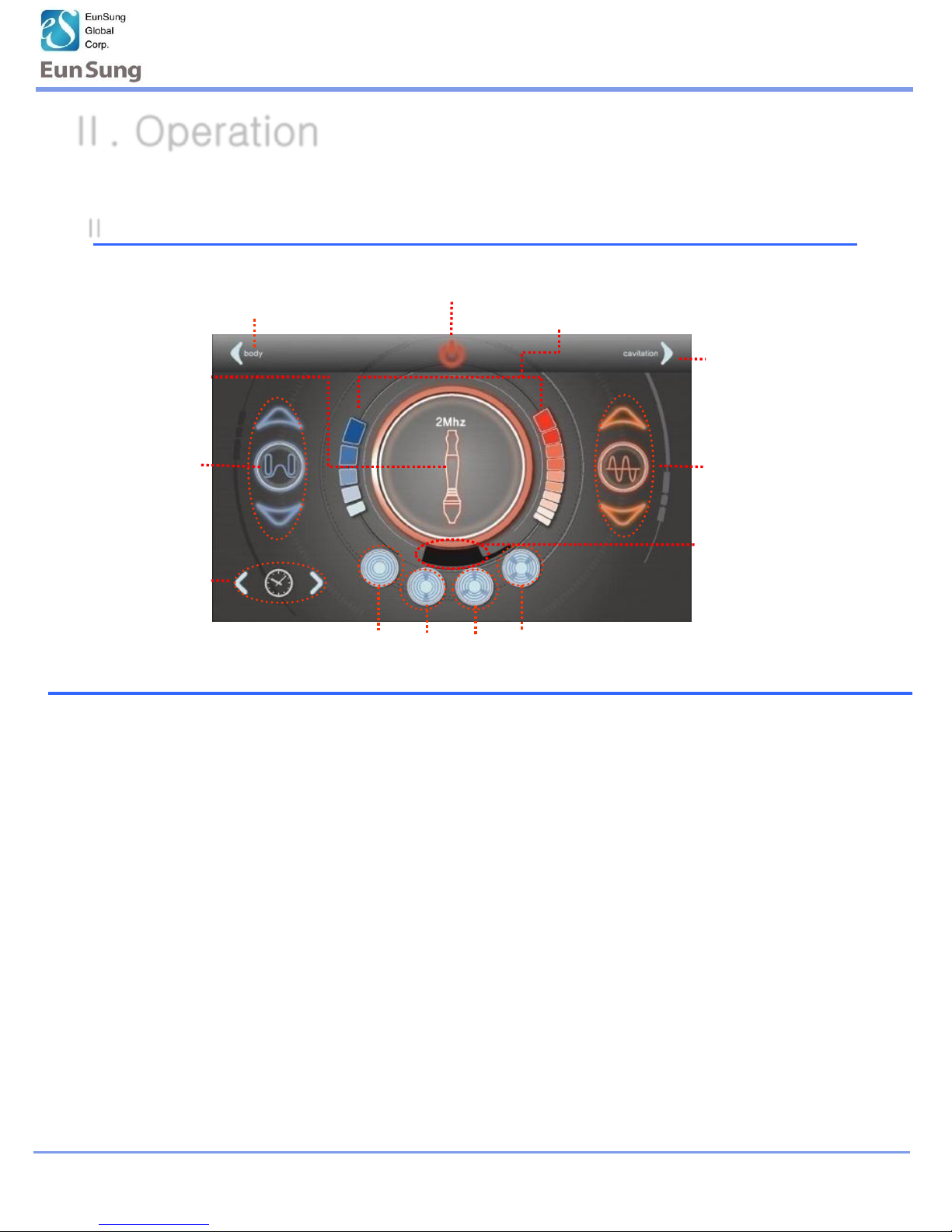
Ⅱ -4. RF & Vacuum (Face)-2Mhz
Ⅱ. Operation
⑨ Start Button
① Type of
handpiece
④ Vacuum Pulse < C , P1 , P2 , P3 >
⑩ Select Handpiece Type
② Set Vacuum
level
⑥ Set Bipolar RF
level
⑤ Preset Timer
③ Control
Time Button
⑧ Display Power Level
20:00
⑦ Select Handpiece
Type
① Type of Handpiece : Displays the current handpiece type.
② Vacuum : Operating Vacuum/Control the button (Level : 1~ 5step)
③ Control Time Button : Operation time control button (1~30 Min)
④ Vacuum Pulse : Choose the pulse (5 modes).
* Pulse type < C:Continous P1:Slow Pulse P2:Midium Pulse P3:Fast Pulse >
⑤ Preset Timer : Shows total treatment time
⑥ Bipolar RF : RF operating button (Level : 1~10 step)
⑦ Select Handpiece Type
⑧ Display Power Level: Shows the current power level of Vacuum and RF
⑨ Start Button : Start/Stop Button
Page 15
Operating Manual
www.esglobal.co.kr
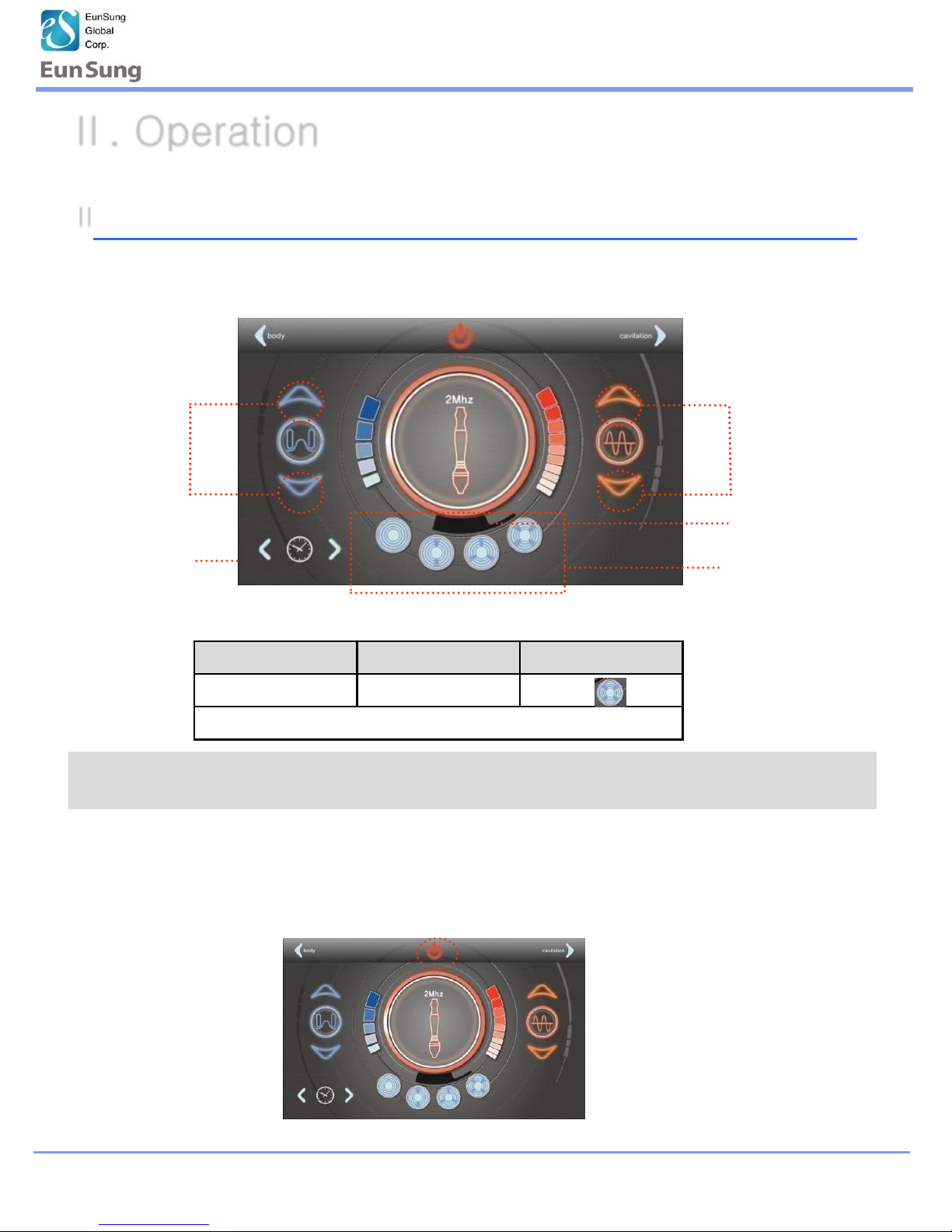
Vacuum level RF level Vacuum Pulse
3 5 P3
Time: Face 15min
15
Ⅱ -4-1. RF & Vacuum Operation(Face) -2Mhz
Ⅱ. Operation
Set Vacuum
level
Vacuum Pulse
Set RF level
20:00
Preset Timer
Control Time
Button
* Selecting the RF & Vacuum Mode, it has a preset function.
1. Use to the preset program and change to mode, level and time as your convenient
4. Finish is same as Cavitation (Refer to Cavitation finish mode)
* The preset function is basically set up to each mode for users. If the preset of
level is not suitable for user, then the user can adjust to level to use
2.Apply the RF Lotion to the treatment area
3.Press the Power button on the handpiece to start operation
Press
Page 16
Operating Manual
16
www.esglobal.co.kr
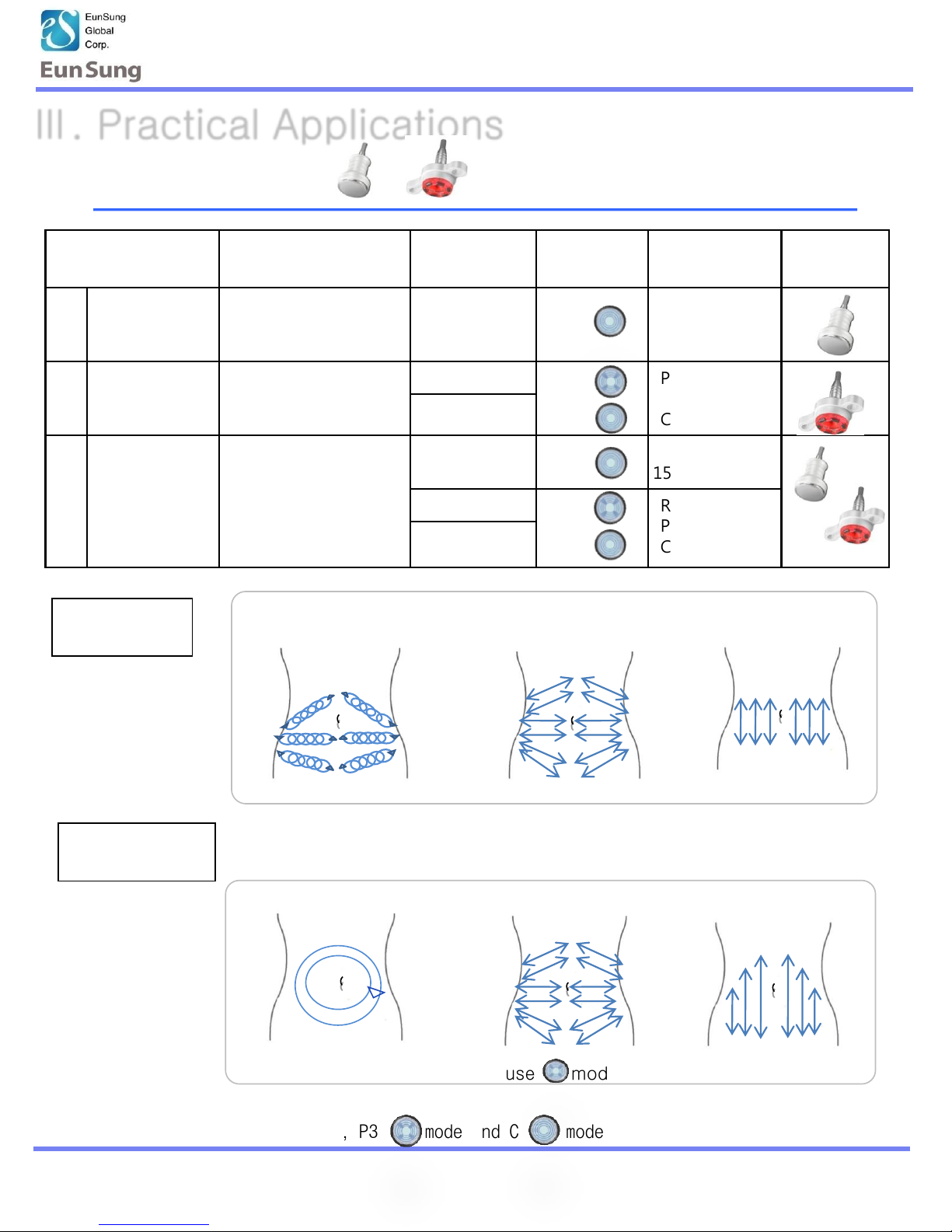
Treatment
program
Application Level Mode Time Hand-
piece
1 Only for
Cavitation
(15 min)
Excessive edema, fat
and cellulite
5
C
15min
2 Only for RF
& Vacuum
(20min)
Large fat and
contouring body line
RF: 5 P3
-> C
P3 15min
C 5min
Vaccum: 3
3 Cavitation +
RF&Vacuum
(35min)
Total remodeling fat,
cellulite and
contouring body line
Cavitation: 5 C Cavitation
15min
RF: 5 P3
-> C
RF&Vacuum
P3 15min
C 5min
Vacuum: 3
Ⅲ. Practical Applications
Ⅲ-1: Abdomen
※ Basically, P3 mode and C mode are same action
① ② ③
①Action is an exception to use mode to P1~3
① ② ③
Cavitation
Practice
RF & Vacuum
Practice
Page 17
Operating Manual
17
www.esglobal.co.kr
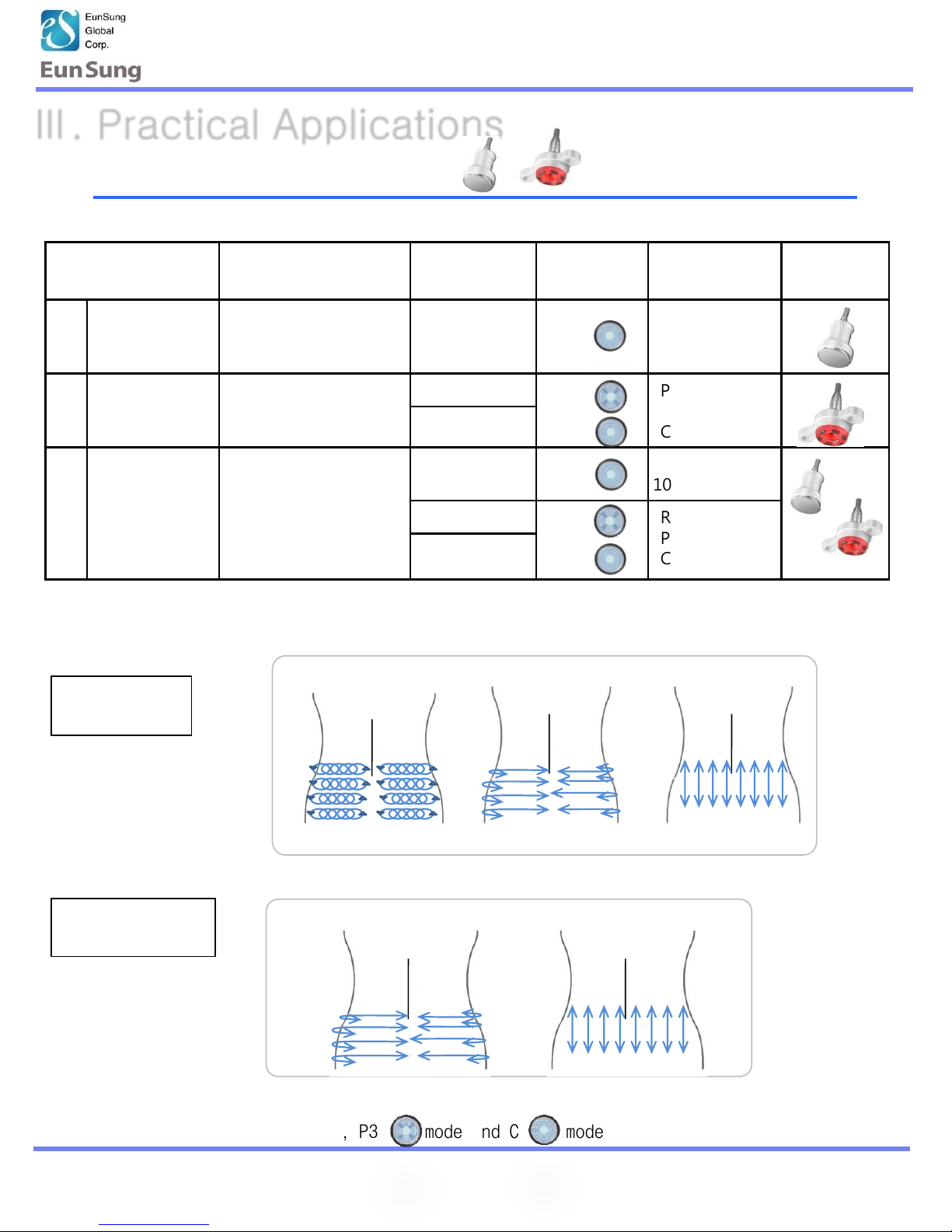
Treatment
program
Application Level Mode Time Hand-
piece
1 Only for
Cavitaion
(10min)
Excessive edema, fat
and cellulite
5
C
10min
2 Only for RF
& Vacuum
(10min)
Large fat and
contouring body line
RF: 5 P3
-> C
P3 7min
C 3min
Vacuum: 3
3 Cavitation +
RF&Vacuum
(20min)
Total remodeling fat,
cellulite and
contouring body line
Cavitation: 5 C Cavitation
10min
RF: 5 P3
-> C
RF & Vacuum
P3 7min
C 3min
Vacuum: 3
Ⅲ. Practical Applications
Ⅲ-1: Waist Side Line
※ Basically, P3 mode and C mode are same action
Cavitation
Practice
RF & Vaccum
Practice
① ② ③
① ②
Page 18
Operating Manual
18
www.esglobal.co.kr
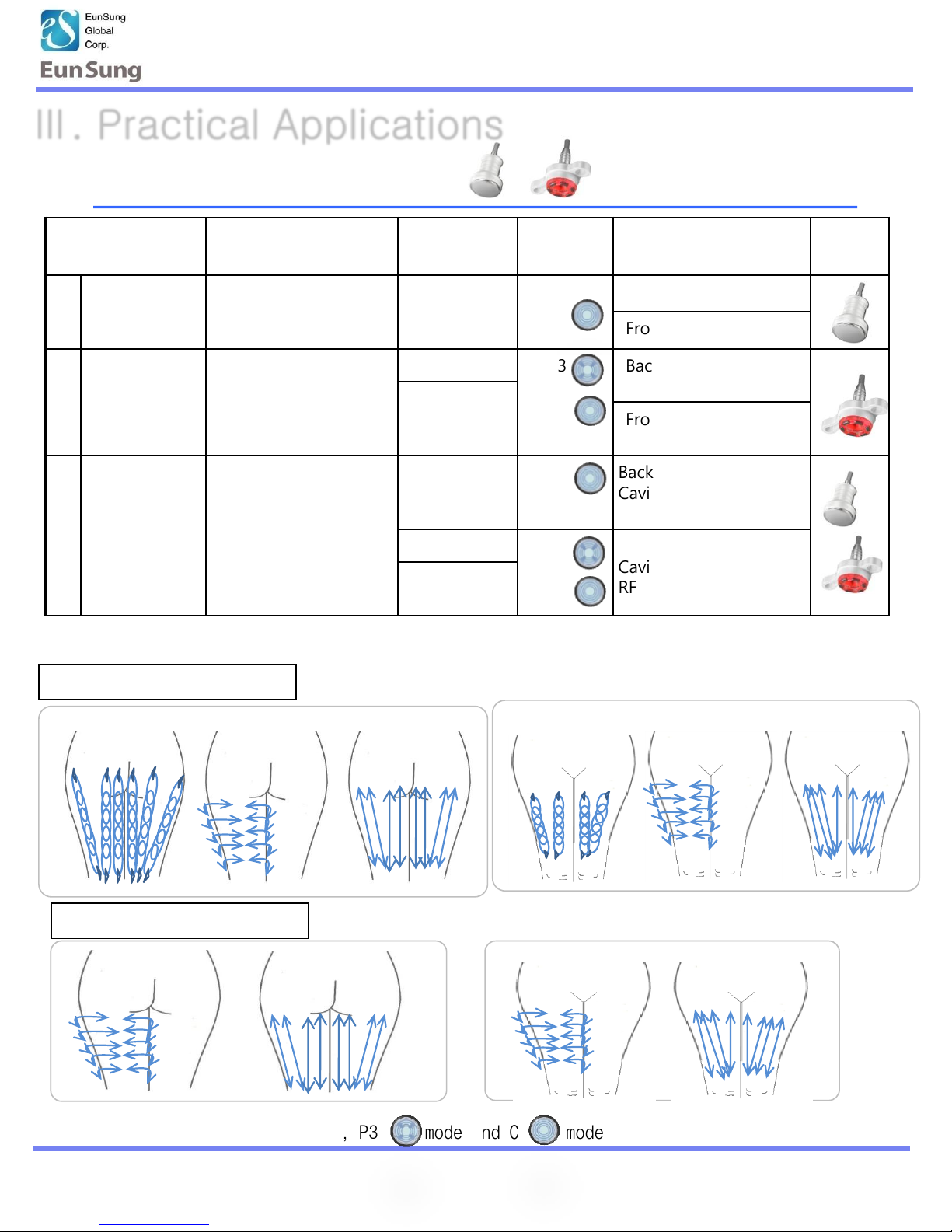
Ⅲ. Practical Applications
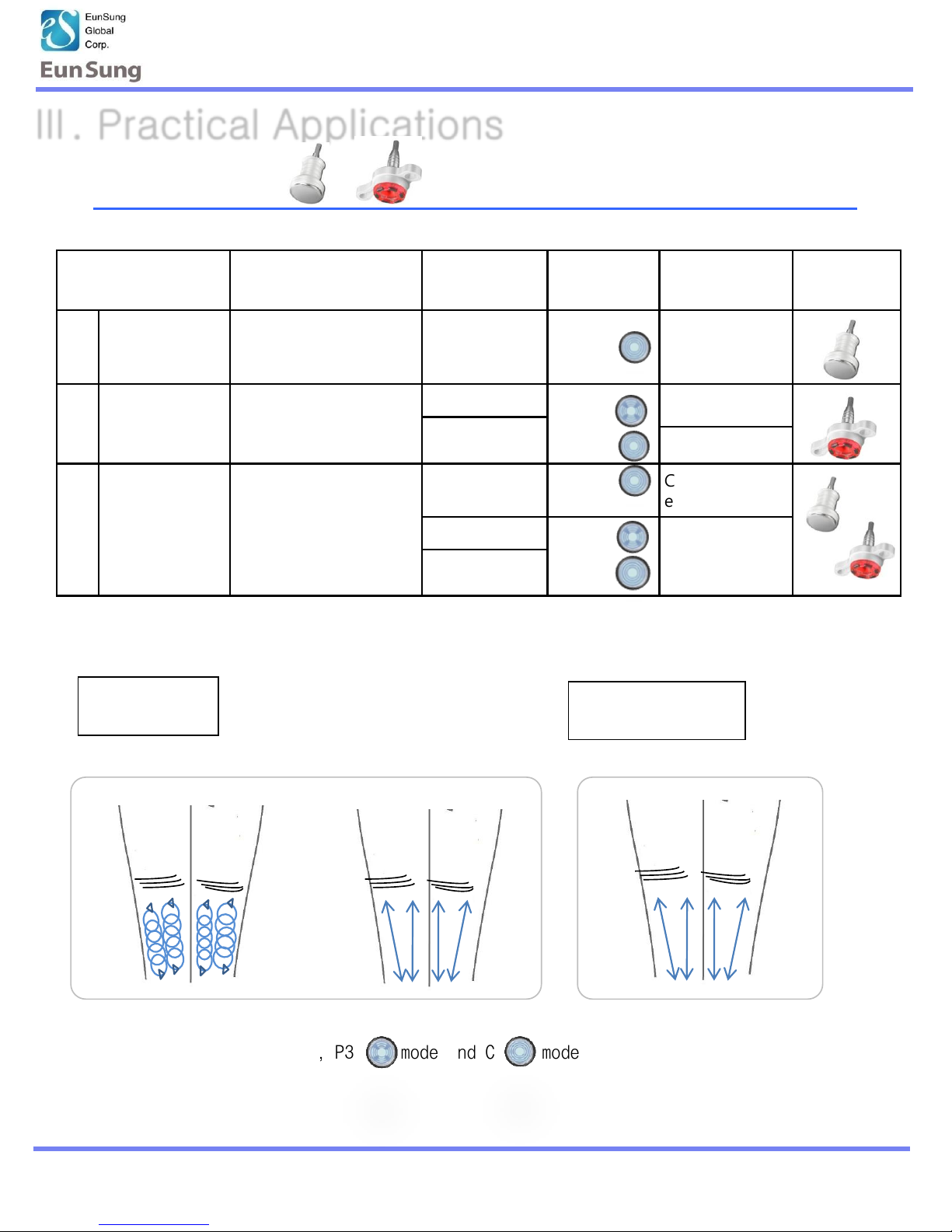
RF &Vaccum Practice
Ⅲ-2 : Front & Back Thigh
① ② ③
① ②
① ② ③
① ②
Front
Back
Front
Back
Treatment
program
Application Level Mode Time Hand-
piece
1 Only for
Cavitation
(30min)
Excessive edema, fat
and cellulite
5
C
Back : 10min each
Front : 5min each
2 Only for RF
& Vacuum
(30min)
Large fat and
contouring body line
RF: 5 P3
-> C
Back: P3 7min each
C 3min each
Vacuum
: 3->1 Front:P3 7min each
C 3min each
3 Cavitation
+
RF&Vacuum
(60min)
Total remodeling fat,
cellulite and
contouring body line
Cavitation:
5
C Back:
Cavitation 10min each
RF & V P3 3min C 2min
RF: 5 P3
-> C
Front:
Cavitation 10min each
RF & V P3 3min/C 2min
Vacuum:
3->1
※ Basically, P3 mode and C mode are same action
Cavitation Practice
* Same practice for both legs.
※ Treat with vacuum level 1 for thigh 안쪽 during RF&Vaccum C mode .
Page 19
Operating Manual
19
www.esglobal.co.kr
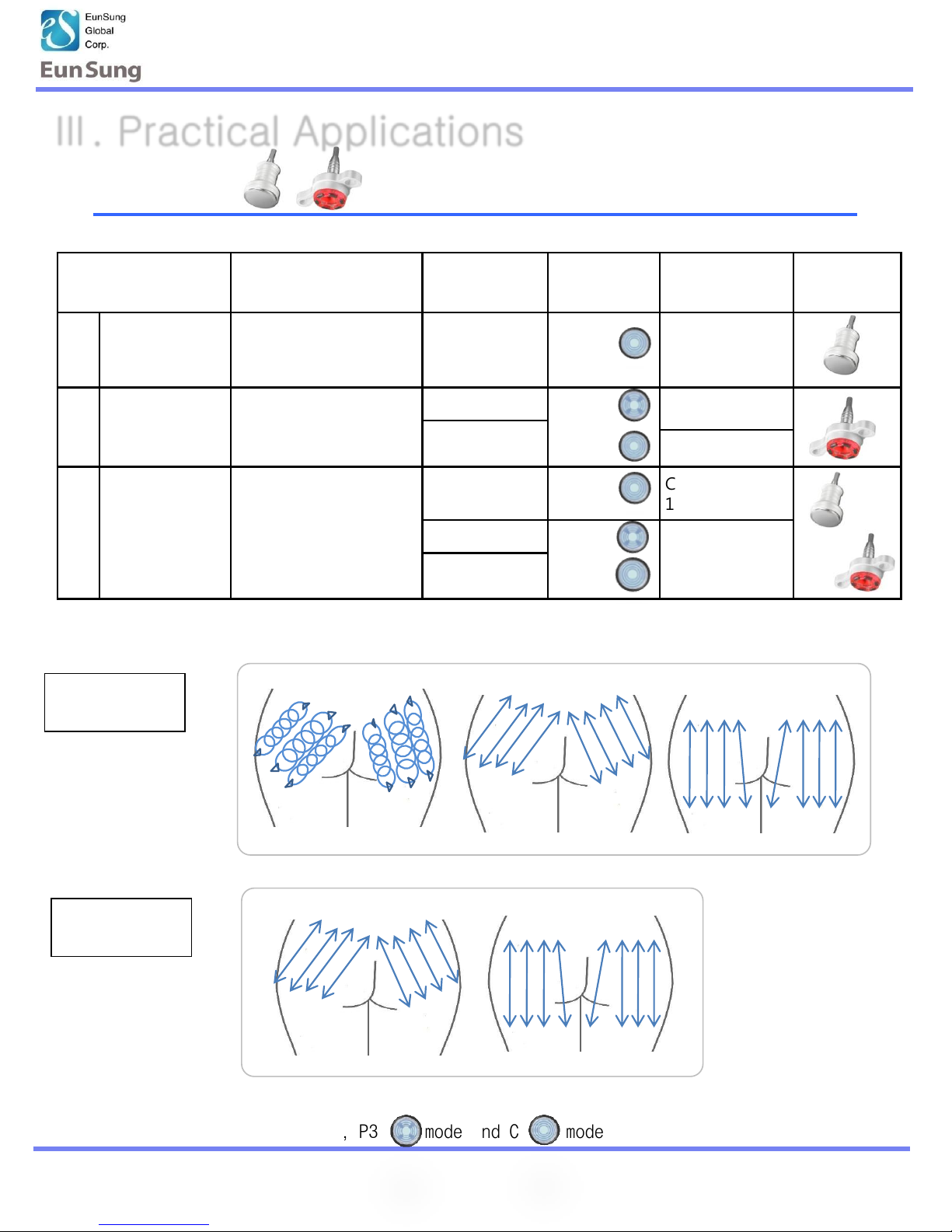
Treatment
program
Application Level Mode Time Hand-piece
1 Only for
Cavitation
(10min)
Excessive edema, fat
and cellulite
5
C
10min
2 Only for RF
& Vacuum
(10min)
Large fat and
contouring body line
RF: 5 P3
-> C
P3 7min
Vacuum: 3
C 3min
3 Cavitation +
RF&Vacuum
(20min)
Total remodeling fat,
cellulite and
contouring body line
Cavitation: 5 C Cavitation
10min
RF: 5 P3
-> C
RF&Vacuum
P3 7min
C 3min
Vaccum: 3
Ⅲ-2: Hip
Cavitation
Practice
RF &Vaccum
Practice
① ②
① ② ③
※ Basically, P3 mode and C mode are same action
Ⅲ. Practical Applications
Page 20
Operating Manual
20
www.esglobal.co.kr
Treatment
program
Application Level Mode Time Hand-piece
1 Only for
Cavitation
(10min)
Excessive edema, fat
and cellulite
5
C
5min each
2 Only for RF
& Vacuum
(10min)
Large fat and
contouring body line
RF: 5 P3
-> C
P3 3min each
Vacuum: 3
C 2min
3 Cavitation +
RF&Vacuum
(20min)
Total remodeling fat,
cellulite and
contouring body line
Cavitation: 5 C Cavitation 5min
each
RF: 5 P3
-> C
RF&Vacuum
P3 3min
C 2min
Vacuum: 3
Ⅲ. Practical Applications
Cavitation
Practice
RF & Vacuum
Practice
Ⅲ-2 : Calf
* Same practice for both calves
① ②
①
※ Basically, P3 mode and C mode are same action
Page 21
Operating Manual
21
www.esglobal.co.kr
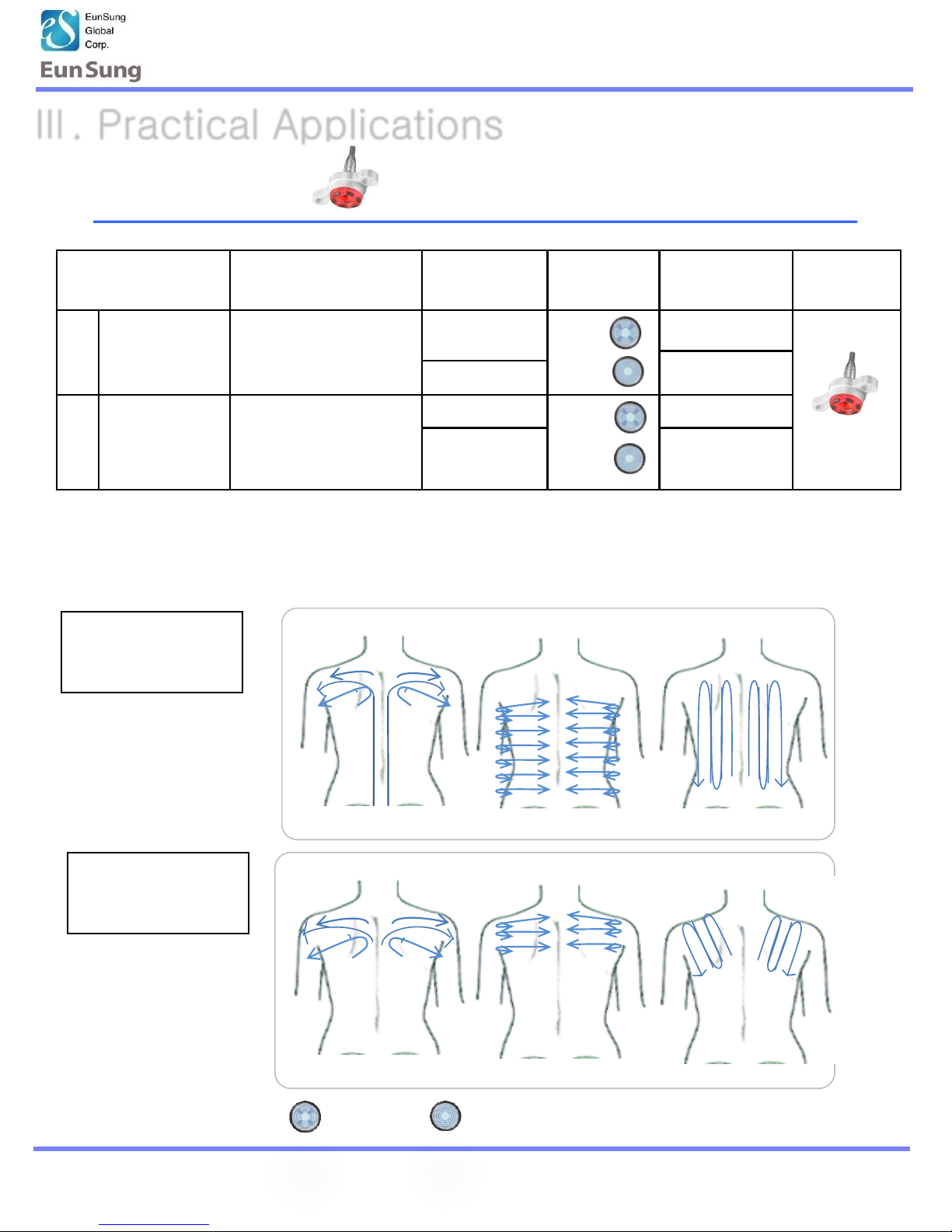
Treatment
program
Application Level Mode Time Hand-piece
1 RF &Vacuum
(whole part)
(20min)
Excessive edema, fat
and cellulite
And muscle stiffness
RF: 5
P3
-> C
P3 15min
C 5min
Vacuum: 3
2 RF &Vacuum
(Partial
treatment)
(10min)
stiff and painful shou
lders, Total
remodeling brassiere
line
RF: 5 P3
-> C
P3 7min
Vacuum: 3 C 3min
Ⅲ. Practical Applications
RF &Vaccum
Practice
(Whole Part)
Ⅲ-3 : Back
① ② ③
* No cavitation for back.
① ② ③
RF &Vaccum
Practice
(partial treatment)
※ Basically, P3 mode and C mode are same action
Page 22
Operating Manual
22
www.esglobal.co.kr
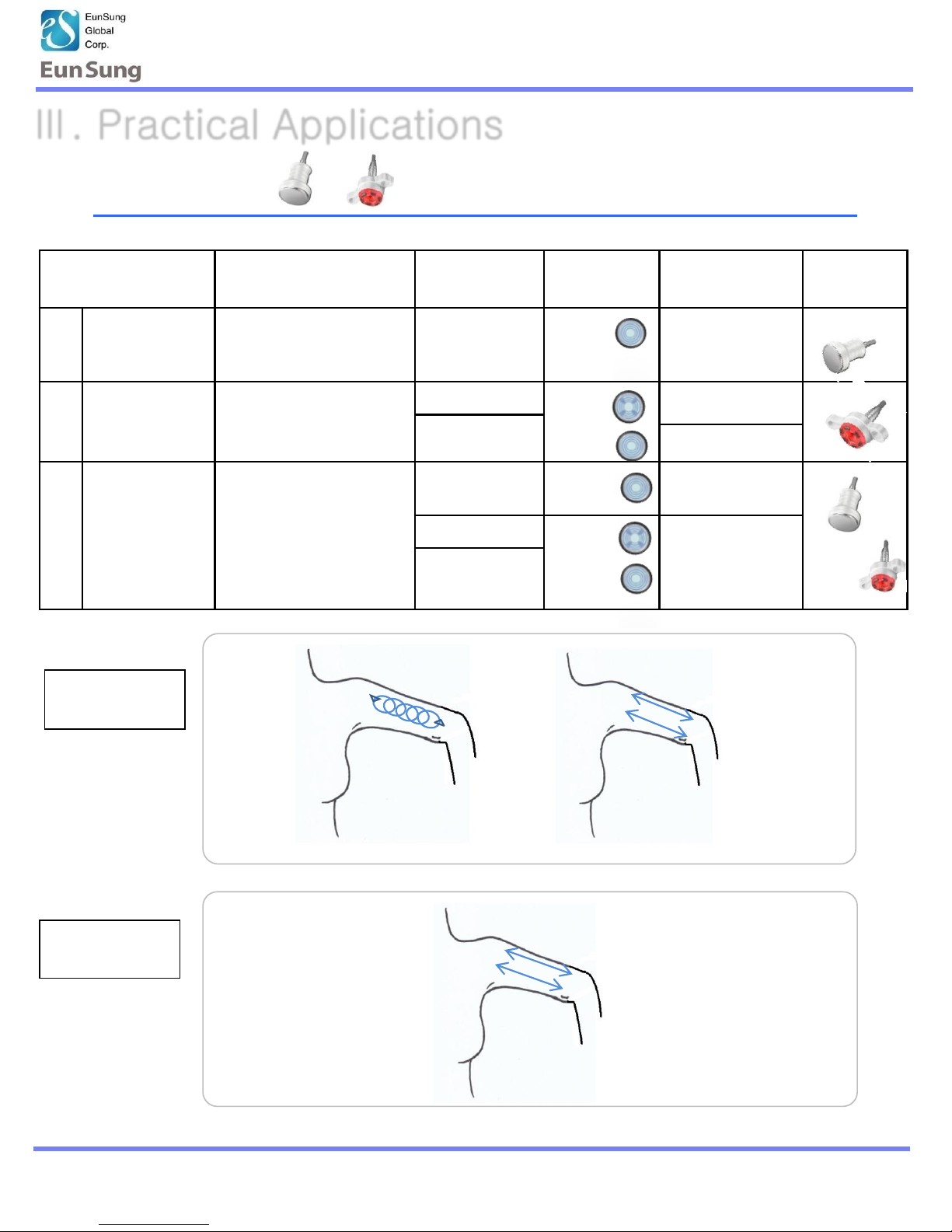
Ⅲ-3 : Arm
Treatment
program
Application Level Mode Time Hand-
piece
1 Only for
Cavitation
(10min)
Excessive edema, fat
and cellulite
5 C
5min each
2 Only for RF
& Vacuum
(10min)
Large fat and
contouring body line
RF: 5 P3
-> C
P3 3min each
Vacuum: 3
C 2min
3 Cavitation +
RF&Vaccum
(20min)
Total remodeling fat,
cellulite and
contouring body line
Cavitation: 5 C Cavitation 5min
each
RF: 5 P3
-> C
RF&Vacuum
P3 3min C 2min
each
Vaccum: 3
Cavitation
Practice
RF &Vaccum
Practice
① ②
③
Ⅲ. Practical Applications
Page 23
Operating Manual
23
www.esglobal.co.kr
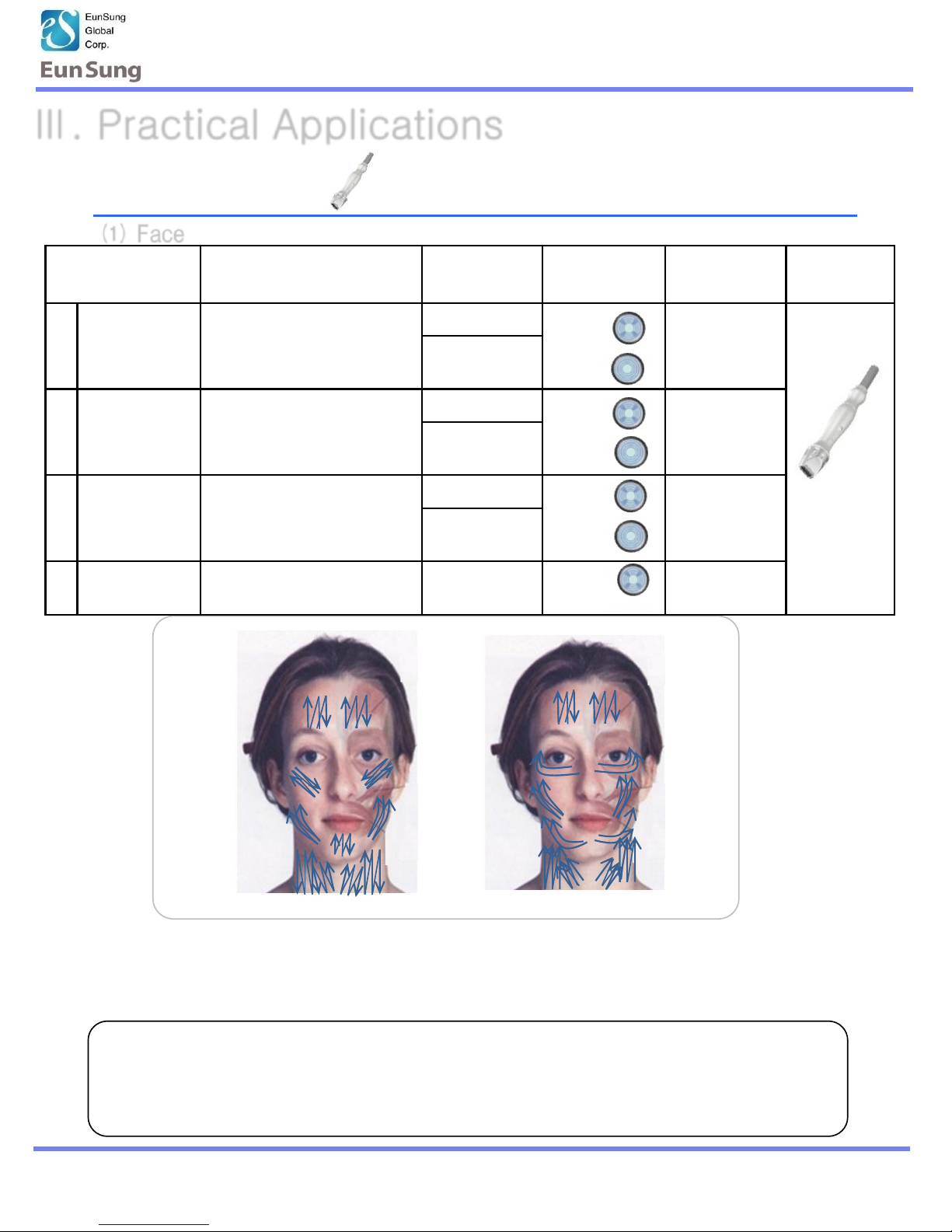
⑴ Face
23
• Treat around the neck & face along the muscle line
• Control the Vacuum Level.
(Recommend 1~2Level for Vacuum C mode)
Ⅲ-4 : Face
P3 Mode
C Mode
Caution!!
Make sure that the hand-piece is securely contacted on the body
If not, it may cause static electricity or damage to the machine.
Treatment
program
Application Level Mode Time Hand-piece
1 RF&Vacuum Face Lifting
- regeneration, elasticity, ,
circulation treatment
RF: 5 P3
-> C
P3 10min
C 5min
Vacuum:
3->1
2 RF&Vacuum Eye Lifting RF: 3
P3
-> C
P3 7min
C 3min
Vacuum: 1
3 RF&Vacuum Neck & Chin Lifting RF: 3
P3
-> C
P3 7min
C 3min
Vacuum: 1
4 Vacuum Lymph drainage
treatment
Vacuum: 1 P3 15 min
Ⅲ. Practical Applications
Page 24

Operating Manual
24
www.esglobal.co.kr
1. Please do not use a lotion and oil too much, it causes of blocking the tube. (Minimum usage of
moving handpiece)
2. The electrode is made by special material to accept higher electric current in body. If any
scratch occurs, change the electrode to prevent any electronic shock.
3. Please don’t use this machine with the electric products such as electric blanket
or the other products which have an electric conductor.
4. This equipment should be used by the person who took a equipment training.
5 In case of resting during treatment, please “Power” off to avoid over-output of the machine.
6 If it can’t operate in normal condition, please turn off the power and contact our distributor
as soon as possible.
Ⅳ-1 : Contraindication
Ⅳ. Caution
Ⅳ-2 : Caution when use
Please avoid the treatment from these people or part as below,
a. Pregnancy
b. Scarring, infection of the treatment area
c. History of keloid scarring
d. Patients with a pacemaker or internal defibrillator
e. Use of medication known to induce photosensitivity
f. Use of accutane within the past 6 months
g. Diabetes (Type I or II)
h. Fragile skin
i. Patients undergoing the surgical procedure without consulting with a surgeon
j. Patients with tumors
Page 25

Operating Manual
www.esglobal.co.kr
25
Ⅳ. CAUTION
Ⅳ-3 : Maintenance
1. After treatment, keep the power on about 3 minutes to make inner board cooling.
2. Please keep the machine in the shade, avoiding direct lay of light.
3. Moving the machine, be careful not to drop applicators
4. Please clean the hand-piece with alcohol after use.
5. Clean the Body (RF& Vacuum) ,Face (RF& Vacuum) hand-pieces with brush. Clean the
hand-pieces after operation.
Using too much lotion can be cause of broken down of machine.
6. Please check the filter inside of the machine from time to time and if it is filled out with
the oil, clean it and reattached.
a. Please check oil condition for every six months.
b. If you feel vacuum pressure is low, please check the oil filter.
Page 26

Operating Manual
www.esglobal.co.kr
26
Ⅳ-4 : Solution
Ⅳ. CAUTION
Light of power switch is not on although turn the power switch
a. Please check whether power cord is put to plug on the machine
No calorification although in normal condition
b. Please check whether fuse has been broken down.
a. Please check whether fuse has been broken down.
※ If fuse has been broken, please change it into the same standard fuse.
Page 27
Operating Manual
www.esglobal.co.kr
27
Ⅴ-1 : Warranty Coverage
Ⅴ. Warranty
Ⅴ-2 : Exclusions
This warranty is void and invalid in case of ;
a. ES Global warrants defects in materials and workmanship for a period
of 1 year from the date of original purchase.
b. ES Global will repair these products at no charge or refurnish the parts
if it has any abnormal condition.
a. Damage caused by service performed by anyone who is not technician or qualified
by ES Global.
b. A product or part that has been modified without any permission of ES.
it will be repaired with repair fee
c. A Product that has no serial number.
d. In case of damage caused by accident, abuse, misuse or misapplication,
Page 28
Operating Manual
www.esglobal.co.kr
28
Ⅵ. Specification
General Specifications
Technical Specifications
Model Name : 3Max
Power Input : AC100~230V,50/60Hz (Free voltage)
Dimensions : 1330mm(H)×405mm(D)×505mm(W)
Weight : about 52.2Kg
Handpieces1(Body)
- RF Frequncy : 1MHz (Multipolar)
- Max Vaccum : 650mmHg
Handpieces2(Face)
- RF Frequncy : 2MHz (Bipolar)
- Max Vaccum : 650mmHg
Handpieces3(Cavitation)
- 80Φ / Area : 50.2cm²
- Ultrasonic Frequency : 36~38KHz
User Interface : 7inch LCD & Touch screen , Foot SW
Page 29
Operating Manual
www.esglobal.co.kr
29
Ⅶ-1 : Contact Info
Ⅶ. Contact Info
Repair or any enquiry for this, it shall be back to manufacturer,
following addresses :
Company Name : EunSung Global Corp.
• Head office : #1102~1105, hanrasigma Valley, 345-90, Gasan-Dong, Geumcheon-
Gu, Seoul, Korea, tel. +82-2-514-9713, fax. +82-2-514-9716
• R & D Division : #1316, 12 Cha, Daeryung Techno Town, 327-32, Gasan-Dong,
Geumcheon-Gu, Seoul, Korea, tel. +82-2-2029-7760, fax. +82-2-2029-7766
• Website : www.esglobal.co.kr
• E-Mail address : [email protected]
 Loading...