

Page 1

Page 2

Tabel of Content
What’s in the Box 01
Feature Introduction 02
Setting Up the Camera and Monitor 03
Replacing the Camera lens 11
Safety 12
Customer service 15
Page 3

01 02
What’s in the Box
Baby Camera
(T8300-M)
Baby Monitor
(T8300-C)
Camera Adapter
(5V 2A)
Monitor Adapter
(5V 2A)
Wall Mount
Wide-Angle Lens
Monitor Micro-USB
Power Cable (1.5 m)
Camera Micro-USB
Power Cable (3 m)
Mounting
Screws
User manual
Feature Introduction
Monitor Features:
6
5
2
1
3
4
9
10
8
12
11
13
7
1
Volume controls
8
microSD card slot
2
Screen
9
Support stand
3
Power button
10
Micro USB charging port
4
Menu button
11
LED indicator
5
Navigation buttons
12
Microphone
6
Return to previous level
of menu / Talk button
13
Speaker
7
Monitor Antenna
Press and hold the Talk button to speak to the
camera. When Menu is opened, press Talk button
once to return to previous level of menu.
Press Power button to switch on / off the monitor
screen. Press and hold the Power button for 2
seconds to switch on / off the monitor.
Power adapter varies by region.
Page 4
03 04
microSD memory card can only be used for firmware
upgrade, it cannot be used to store video recordings.
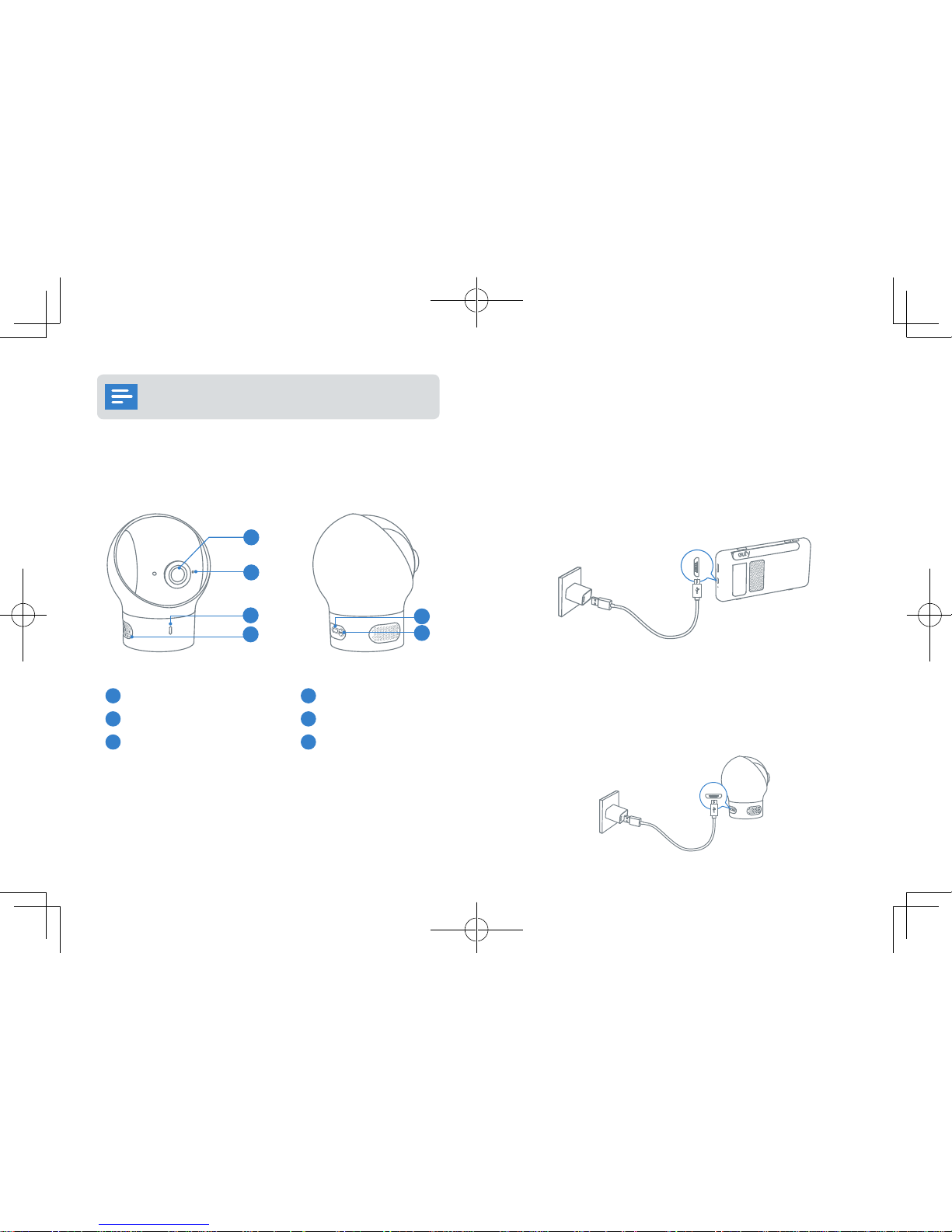
Camera Features:
2
1
3
4
5
6
1
Standard camera lens
4
Speaker
2
Microphone
5
Micro USB port
3
Power LED Status indicator
6
Pairing button
Setting Up the Camera and Monitor
Monitor Installation
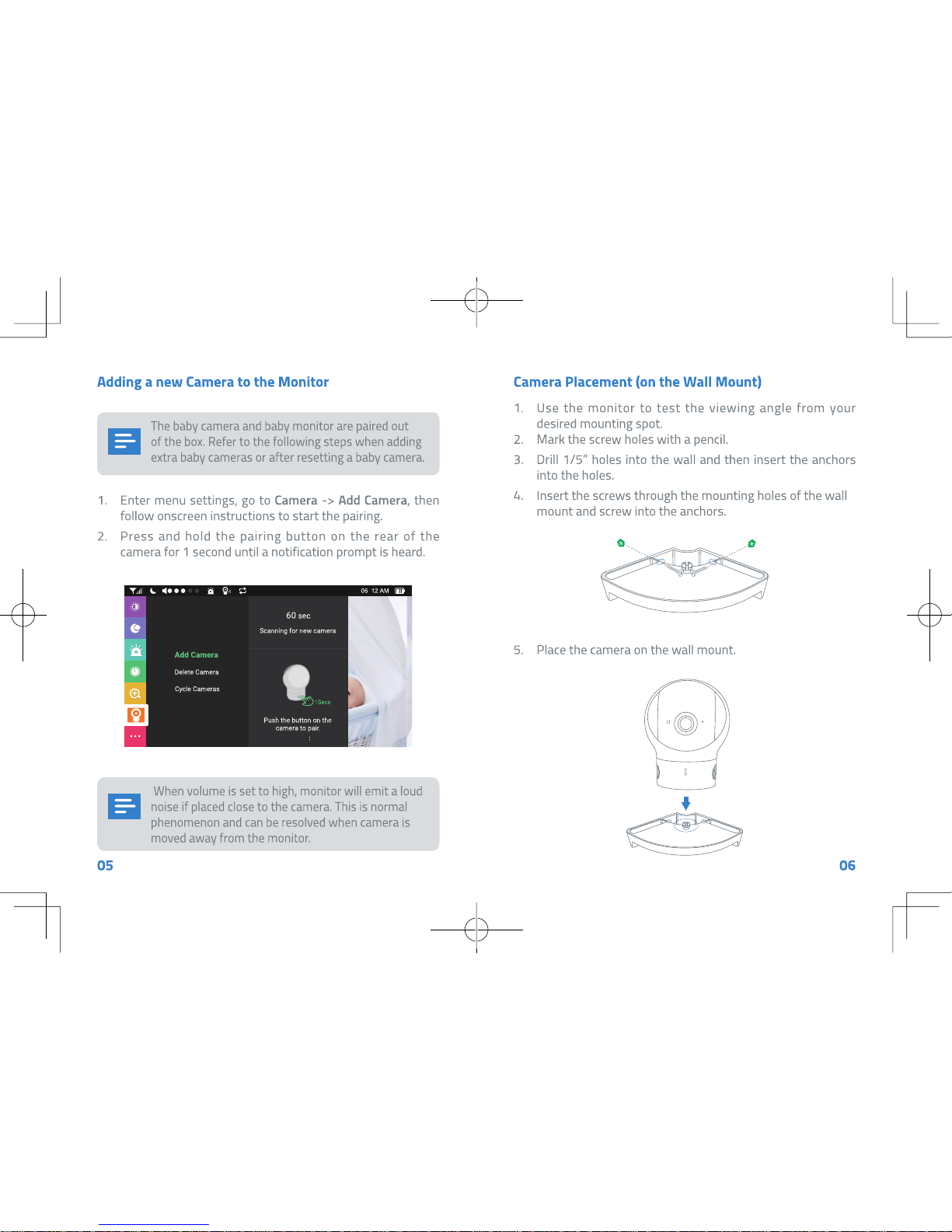
Fully charge the monitor before use. To charge:
Connect the baby monitor to the monitor adapter with the Micro
USB cable, and then connect the adapter to a power outlet.
Connect the other end of the baby monitor’s Micro USB power
cable to the Micro USB port in the monitor to charge it. Press and
hold the power button for 2 seconds to turn the baby monitor on.
Camera Installation
Connect the baby camera’s Micro USB power cable to the camera
adapter (5V 2A), and then connect the adapter to a power outlet.
Finally, connect the other end of the baby camera’s micro USB
power cable to the micro USB port in the camera.
Page 5
Page 6
07 08
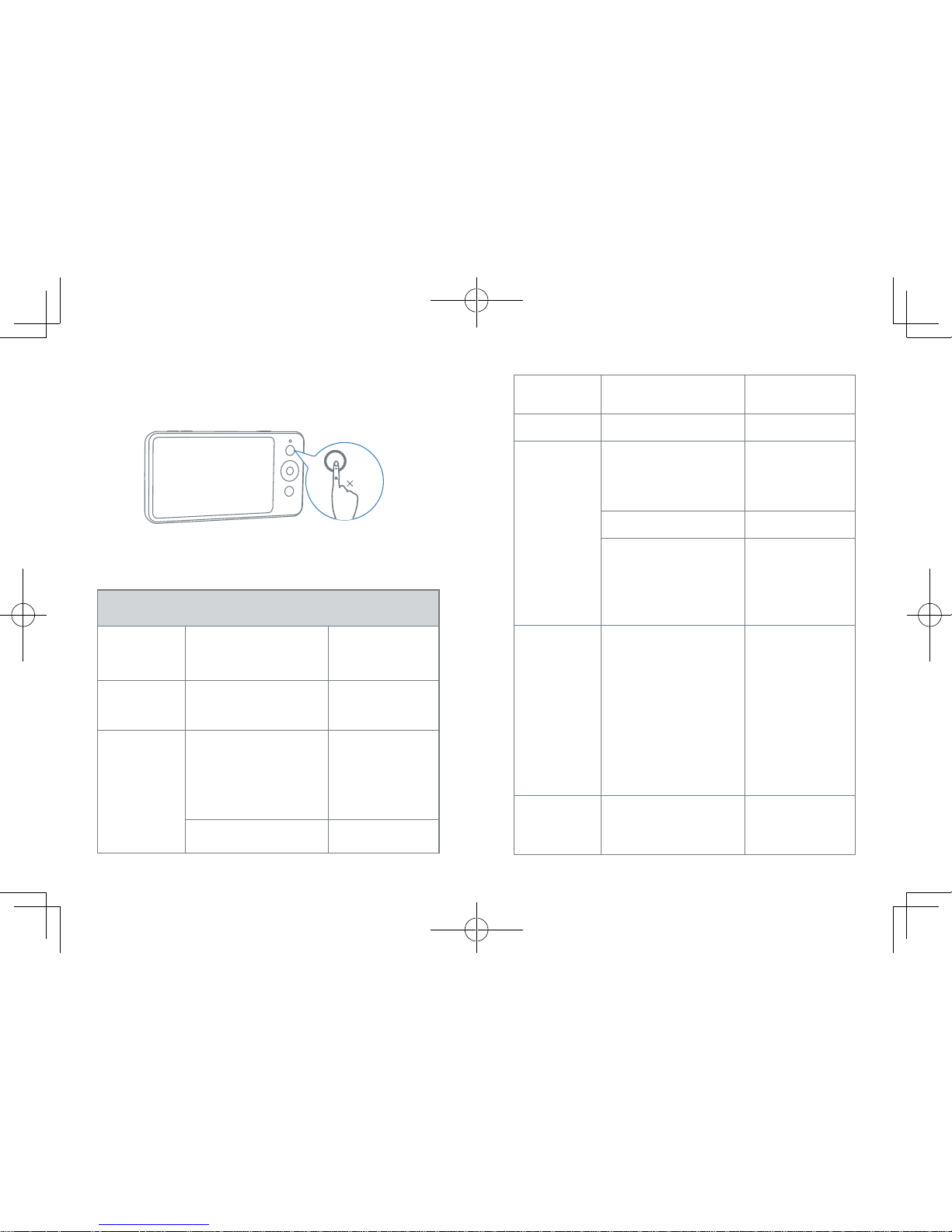
Press and hold the power button to power on the monitor.
Press the menu button to open Menu Settings.
1
Monitor Menu Settings
Menu Options Description Available Options
Brightness
Set the brightness of the
screen.
Use the navigation
buttons to adjust
the brightness
level
Sleep Mode
Select to turn off the
screen after 1 min, 3 min,
or 5 min.
Off / 1 min / 3 min
/ 5 min
Sound Alert
Sound Level
Note: You can set the
baby monitor to alert you
when a specific noise
level is detected.
Off / Level 1 / Level
2 / Level 3 / Level
4 / Level 5
Note: Level 1 has
the best sensitivity.
Alert Duration
10 Secs / 20 Secs /
30 Secs / 60 Secs
Time
Set the time on the
monitor.
Zoom
Set the zoom level. Off / 1.5x / 2x
Camera
Add Camera
Note: You can add up
to 4 cameras per baby
monitor.
Delete Camera Delete / Cancel
Cycle Cameras
Note: Cycles through the
list of connected baby
cameras according to
preset intervals.
Off / 5 Secs / 10
Secs / 15 Secs / 30
Secs
Night Vision
Mode
When enabled, the camera
will change the screen
color accordingly to the
light conditions in the
room. When disabled,
the camera will stick to
daylight screen color and
will not change when the
surrounding environment
is getting dark.
On / Off
Anti-Screen
Flicker
Changes the refresh rate
of the screen to prevent
flickering.
Mode A / Mode B
Page 7
Page 8
12
11
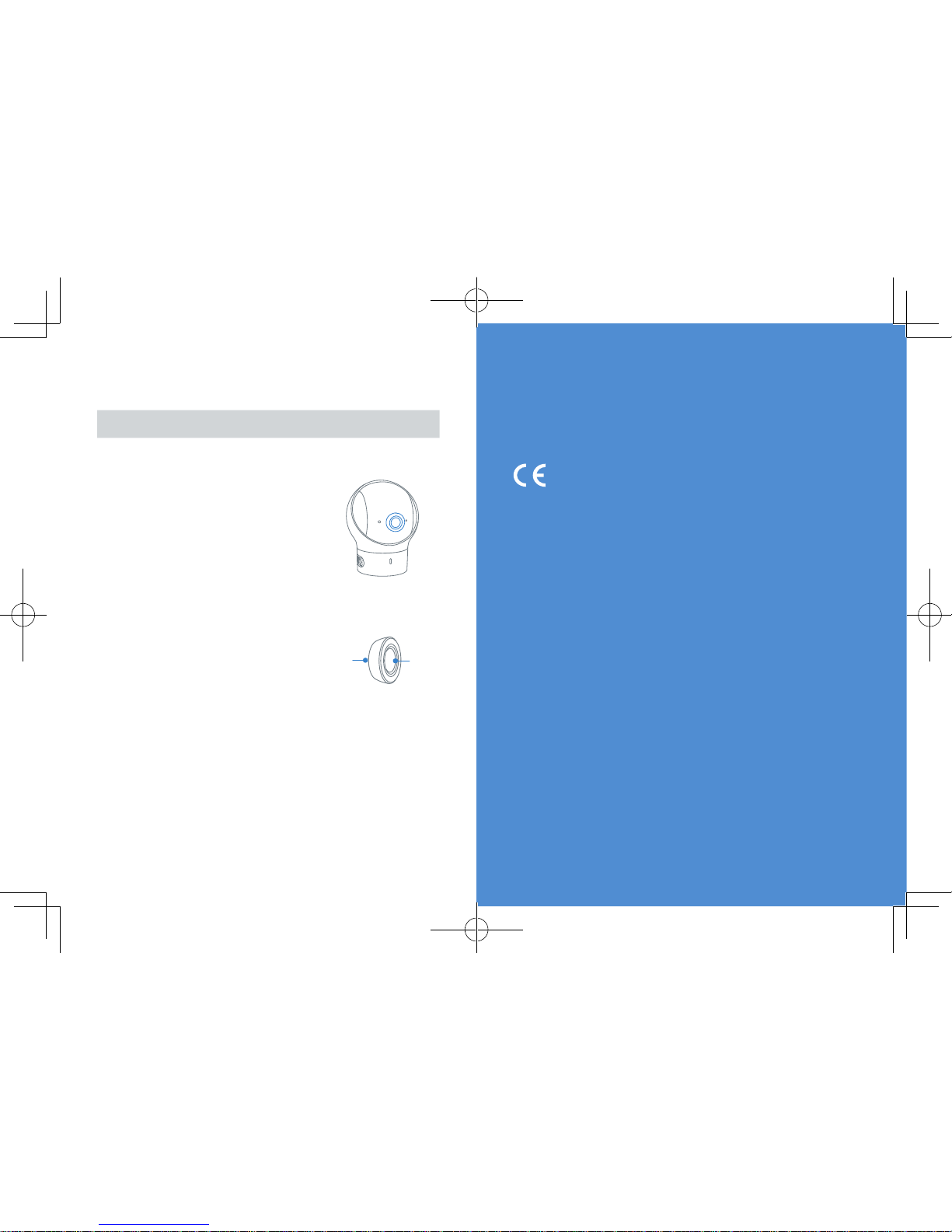
Replacing the Camera lens
Lens type Usage Lens
Standard camera
lens (default lens)
This lens is
recommended for
general viewing;
infants are clearly
seen within a 2~3m
range.
The lens angle of
view for standard
camera lens is 62°.
Wide-angle lens This lens provides a
wide-angle view of
the room. The lens
angle of view for
wide-angle lens is
110°.
Back
Front
The standard camera lens is not removable. When you want
to use the wide-angle lens, simply place it over the standard
camera lens and fasten.
Safety
Warning
Strangulation Hazard: Children have STRANGLED in cords. Keep this cord out
of the reach of children (more than 1m (3ft) away). Never use extension cords
with AC Adapters. Only use the AC Adapters provided.
This product complies with the radio interference requirements of
the European Community.
Declaration of Conformity
Hereby, Anker Innovations Limited declares that this device is in compliance
with the essential requirements and other relevant provisions of Directive
2014/53/EU.For the declaration of conformity, visit the Web site https://
www.eufylife.com/.
This product can be used across EU member states.
Due to the used enclosure material, the product shall only be connected to a
USB Interface of version 2.0 or higher. The connection to so called power USB
is prohibited.
A statement regarding the AC/DC adapter as disconnect device is missing in
the user manual.
The statement shall require a socket outlet that is installed near equipment
and that shall be easily accessible.
The adapter shall be installed near the equipment and shall be easily
accessible.
Do not use the Device in the environment at too high or too low temperature,
never expose the Device under strong sunshine or too wet environment.
The suitable temperature for the product and accessories is -20°C-60°C.
When charging, please place the device in an environment that has a normal
room temperature and good ventilation.
It is recommended to charge the device in an environment with a
temperature that ranges from -10°C~40°C.
Please ensure to use only the charger offered by the manufacturer. Using
unauthorized charger may cause danger and violate the authorization of the
projecter and the guarantee article.
The charger output voltage/current is 5Vdc/2A. The plug considered as
Page 9
1413
disconnect device of adapter.
If you use a third-party charger, the recommended outputvoltage/current of
the adaptor is 5Vdc/2A,and the adapter shall be CE approval type.
CAUTION RISK OF EXPLOSION IF BATTERY IS REPLACED BY AN INCORRECT
TYPE. DISPOSE OF USED BATTERIES ACCORDING TO THE INSTRUCTIONS
RF exposure information: The Maximum Permissible Exposure (MPE) level
has been calculated based on a distance of d=20 cm between the device and
the human body. To maintain compliance with RF exposure requirement, use
product that maintain a 20cm distance between the device and human body.
Operating Frequency Range: 2410-2477MHz
CE SAR:
The SAR limit of Europe is 2.0 W/kg. Device types T8300-M has also been
tested against this SAR limit. The highest SAR value reported under this
standard. This device was tested for typical hand held operations with the
back of the device kept 0mm from the Limb.
The following importer is the responsible party (contact for EU matters only)
Importer:Anker Technology (UK) Ltd
Importer Address:Suite B, Fairgate House, 205 Kings Road, Tyseley,
Birmingham,United Kingdom B11 2AA
This product is designed and manufactured with high quality
materials and components, which can be recycled and reused.
This symbol means the product must not be discarded as household
waste, and should be delivered to an appropriate collection facility for
recycling. Proper disposal and recycling helps protect natural resources,
human health and the environment. For more information on disposal and
recycling of this product, contact your local municipality, disposal service, or
the shop where you bought this product.
FCC Statement
This device complies with Part 15 of the FCC Rules. Operation is subject
to the following two conditions: (1) this device may not cause harmful
interference, and (2) this device must accept any interference received,
including interference that may cause undesired operation.
Warning:
Changes or modifications not expressly approved by the party
responsible for compliance could void the user's authority to operate the
equipment.
Note:
This equipment has been tested and found to comply with the limits
for a Class B digital device, pursuant to Part 15 of the FCC Rules. These limits
are designed to provide reasonable protection against harmful interference
in a residential installation.
This equipment generates uses and can radiate radio frequency energy and, if
not installed and used in accordance with the instructions, may cause harmful
interference to radio communications. However, there is no guarantee that
interference will not occur in a particular installation. If this equipment does
cause harmful interference to radio or television reception, which can be
determined by turning the equipment off and on, the user is encouraged to
try to correct the interference by one or more of the following measures:
(1) Reorient or relocate the receiving antenna. (2) Increase the separation
between the equipment and receiver. (3) Connect the equipment into an outlet
on a circuit different from that to which the receiver is connected. (4) Consult
the dealer or an experienced radio/TV technician for help.
FCC Radio Frequency Exposure Statement
The T8300-C device has been evaluated to meet general RF exposure
requirements. The T8300-C can be used in fixed exposure condition. The min
separation distance is 20cm.
This T8300-M was tested for typical body‐worn operations with the back of
the handset kept 0 mm from the body.
RF Exposure Information(SAR)
The Extremity SAR limit of FCC for Hand held is 4.0W/kg.
Device is recommended to use in hand held only and SAR when hand held is
1.804W/kg
Worn on body will have unexpected RF exposure RISK.
The following importer is the responsible partyCompany Name:
POWER MOBILE LIFE, LLC
Address: 400 108th Ave NE Ste 400, Bellevue, WA 98004-5541
Telephone:1-206-383-8247
Page 10
 Loading...