

Page 1
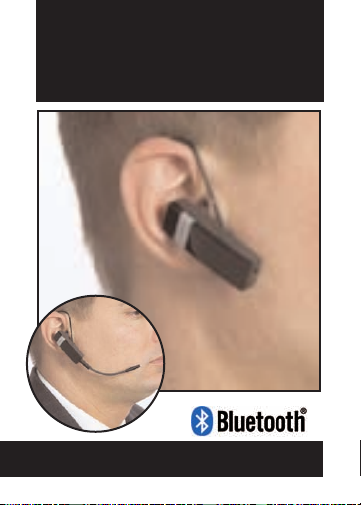
etyBLU
Bluetooth Headset
User Manual
Detachable
Boom Mic
Page 2
Page 3

Introduction
The Etymotic etyBlu™ headset contains two microphones.
One microphone is located at the end of the earpiece;the other,
a highly-directional, noise-rejecting microphone is located at the
tip of the boom.The combination of an in-ear noise-isolating
earphone and a directional microphone placed close to the
mouth provides exceptional sound quality and clear
communication at both ends of the conversation.The etyBlu
headset was developed by Etymotic Research for use in high
levels of background noise. The boom is detachable. Another
Etymotic first.
The etyBlu headset utilizes Bluetooth® 2.0 + EDR
extended data rate wireless technology.
Page 4

Features
• etyBlu Bluetooth® headset
• Detachable directional microphone boom
• Highest isolation and noise rejection of any headset—
with boom mic in place
• Optional adjustable earloop that can be worn on either ear
• 5-6 hours talk time; 70 hours standby
• Lightweight (< .5 oz)
• Charges from USB port (cable included)
Included
• etyBlu Bluetooth headset
• Earloop
• Detachable Boom mic
• Leather storage case
• Assorted eartips
• Filter changing tool with replacement filters
• USB charging cable
Page 5
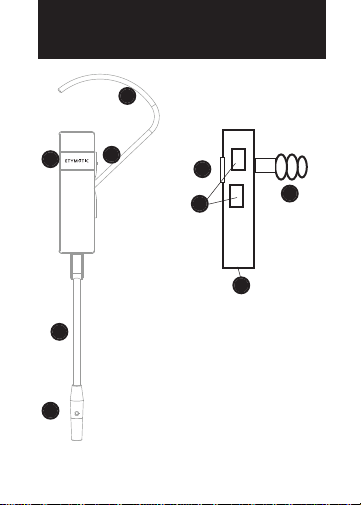
Identification
A
D
B
E
A. Earloop
Side view—
no boom,no earhook
D
B
C
F
B.Volume
C. Microphone
C
D.Multifunction Button
E. Detachable Boom Mic
F. Eartip/ Speaker
Page 6

Getting Started
Before using the etyBlu headset:
• Fully charge the headset.Typical charging time from empty is
2-3 hours; 80% charge in 1 hour
• Pair the headset with a Bluetooth-enabled device,e.g.,
cell phone,PDA, computer
Selecting an Eartip
When properly inserted,the headset is self-suppor ting in the ear
canal. An optional earloop is supplied with the headset. The
earloop can be used on either ear.Sound quality and noise
isolation depend on a good eartip seal.
Page 7

Insertion
• Carefully insert the earpiece while
pulling up and out on the back of
the ear.
• Twist the earpiece while inserting
until outside noise is blocked out.
• Position the earpiece for best fit
and comfort.
Flanged eartip: Moistening eases insertion.
•
Foam eartip: Roll down or compress foam eartip before
•
inserting. Hold the eartip in place for about 5 seconds while
the foam expands to create a tight seal in the ear canal.
For a video on proper earphone insertion go to
www.etymotic.com.
Removal
To avoid discomfort,remove the headset slowly with a twisting
motion to gradually break the seal.Open jaw slightly to equalize
pressure,because suction can occur when the ear tip is removed.
Page 8
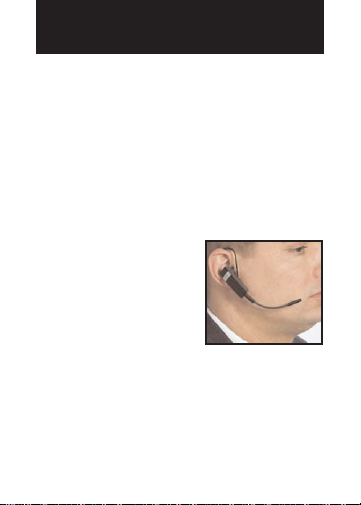
Wearing the EtyBlu
Important: To insure optimal performance it is important that
the eartip seals the ear canal.
• Choose an eartip that fits.
• Push the earloop through the earloop hole and adjust it to fit
comfortably on the ear. The earpiece is designed to be
self-supporting in the ear canal, so the earhook is optional.
• When using the boom, there is
only one way to attach it to the
headset. Bend the gooseneck
so that the tip of the microphone
is close to the mouth.
• The etyBlu headset can be worn
on either ear.
Page 9

Boom Mic—When to use
Without Boom Mic
For quiet /low noise
environments.
With Boom Mic
For noisy environments.
- Gives up to 25 dB more
noise rejection than
microphones that are
not close to the mouth,
which can mean a
critical difference in
understanding and
being understood.
Page 10

Boom Mic — Connect
Connect
The plug on the boom is designed to connect to the headset only
one way.
1. Gently snap the connector
into the socket.
2. Do not force the plug into the
socket; it should insert easily.
3. When the boom is connected
correctly, the opening at the
tip of the microphone is
closest to the mouth and the
opening at the middle of the
mic tip is facing away from
the mouth.
Page 11

Boom Mic —Disconnect
Disconnect
1. Hold the boom where it
connects to the headset and
gently pull downward.
2. Keep the boom in the
storage case for easy access.
Page 12

LED Chart
Power ON Blue and yellow LEDs are solid for
Power OFF Blue and yellow LEDs are solid for
Pairing Mode Blue blinking
Active call Blue LED blinks once per second
No active call Blue LED blinks every 3 seconds
Charging Solid yellow LED
Low battery Blinking yellow LED
Charge complete Yellow LED off
3 seconds while turning on
3 seconds while turning off then
all LEDs off
Page 13

Battery Life
The etyBlu comes with an integrated lithium polymer
(rechargeable) battery.Charge the headset for at least one hour
before first use.
Battery life
External BT device with EDR support > 5 hours
External BT device with basic rate support 4 hours
Standby time 70 hours
Low Battery Indicator
The software monitors the battery voltage level. When there is
less than five minutes of use left,the LED blinks yellow.
Page 14

Charging
Typical charging time
From empty:2-3 hours
80% charge:1 hour
Charging with the USB connecter (included)
• Plug the charging cable into a computer
USB port.
• Plug the boom connector into the etyBlu
headset as shown; it should slide in easily.
• The solid yellow LED will indicate that the
headset is charging.
• When charging is complete the yellow LED
turns OFF.
Charging with a wall charger (not included)
• Plug the charger adapter into an AC wall outlet.
• Plug the USB end of the etyBlu charging cable into the adapter.
• Plug the boom connector on the etyBlu charging cable into the
headset as shown; it should slide in easily.
• The solid yellow LED will indicate that the headset is
charging.
• When charging is complete the yellow LED turns OFF.
Page 15

Pairing
Pairing varies by device
The headset is discoverable for five minutes after Power On.
• Turn the phone OFF and then back ON.
• Turn on the mobile phone’s Bluetooth function.
• Press and hold the Multifunction Button (MFB) for 5 seconds.
• The blue LED will flash rapidly when ready for pairing.The
etyBlu stays in pairing mode for 5 minutes.
• Activate the search for BT and/or audio devices on the phone
• When the etyBlu is found,the phone will display
“ER89 etyBlu.” Scroll to it and press OK to confirm pairing.
• If a passkey is requested,enter 0000.
Note: Bluetooth transmitter pairing varies.For best results,
consult the user instructions for the specific device being paired
with the etyBlu. Some mobile phones require a security setting
change for automatic headset-phone pairing.
Page 16

Multifunction Button
Some features depend on phone support.
Power ON
Power OFF Press the On/Play/Pause button for 4 seconds
Volume Press the UP (+) and DOWN (-) buttons on
Answer a Call Press once quickly (short press) on when
End a Call Press once quickly (short press) to disconnect
Reject a call Press and hold (long press) for one second to
Press the On/Play/Pause button for 4 seconds
to Power On.The blue LED blinks when the
headset is ON.
to Power Off.The blue LED turns off when the
headset is OFF.
the side of the headset to increase or
decrease volume.The exact number of
volume levels is set and maintained by the
phone.
phone rings to connect the call.
the call.
reject an incoming call (if supported by the
phone)
Page 17

Multifunction Button
Redial Press and hold (long press) for one second
Transfer Audio Double press (2 quick presses < 1 second)
to the Handset
(during a call)
Call Waiting • Press and hold MFB for 1 second to put a
Answer an
incoming call
while on a call
(if supported by the phone)
call on hold to answer another (if phone
is HFP supported)
• Press the MFB for 1 second to switch
between calls
• Press MFB to end the current active call
3-Way Calling • Put active call on hold: Press and hold
(if supported by
phone)
(long press) for one second to put the
active call on hold.
• Add another caller: Press quickly (short
press) to add the held call to the conference
or hold the call based on the call state
• End: Double press (two quick presses of
less than 1 second) to release all parties.
Page 18

Earpiece Filter
The earphone in the etyBlu headset has a special filter that
smoothes the frequency response and prevents earwax from
entering the earphone.The filter is located at the end of the earphone and is visible when the eartip is removed.A dirt y filter will
reduce earphone output.Change the filter if loudness decreases or
the sound quality declines.
Note: Filters are not reusable.
Filter Removal
1. Remove Eartip. 2. Insert tool into
the filter.
Filter Replacement
1. Insert a new filter and press
gently against a hard surface
to secure it in place.
3. Remove filter.
2. Re-attach eartip.
Page 19

Proper Care
• Do not expose the headset to extreme temperatures.
• Avoid dropping and strong impact.
• Leave an eartip on the headset for shock protection.
Cleaning/replacement of eartip
• Clean or replace a flanged eartip prior to use by others.
• Replace a foam eartip prior to use by others.
• Clean a flanged eartip by simply wiping it off with a soft cloth.
If water and mild soap are used,dry the eartip before replacing
it on the headset.
• Replace disposable foam eartips regularly.
• Replace flanged eartips every 6-12 months.
Page 20

Caution
Consult an audiologist or physician if you have excessive ear
wax, difficulty inserting the eartips,or discomfor t after
prolonged use.The etyBlu headset excludes most external
sounds. Always use extreme caution while using any headset
when operating a motorized vehicle.
Do not use the headset at excessively loud levels.Research
confirms that earphones that seal the ear canal allow listeners
to listen at safer levels.Noise-induced hearing loss is a function
of exposure time,the average sound level and the peak of very
loud sounds. A sealed eartip and lower listening levels allow for
longer periods of safe listening time.
Page 21

Specifications
Battery Life (Estimated)
External BT device with EDR support > 5 hours
External BT device with basic rate support 4 hours
Standby time 70 hours
Duration of low battery indicator 5 minutes
Environmental Performance
Operating/charging temperature 0 to +60º
Storage temperature -20 to +70º
Radio Performance:
Range should exceed 20 meters in free space.Real-life performance will vary based on position of the two BT devices relative to
the user’s body,including other obstacles and the per formance of
the other device.
Weight
Headset 9 grams
Headset with boom < 13 grams
Headset with boom and earloop 14 grams
The earphone complies with the Bluetooth 2.0 specification
and implements the following protocols:
• Radio including EDR. EDR certification may be deferred.
• HSP profile 1.1
• HFP profile 1.5
Conforms to FCC,Industry Canada, and EU (CE mark) regulations.
Page 22

Etymotic Research, Inc.
Etymotic Research has spent twenty-five years developing in-ear
technology for auditory research,precision monitoring and critical
listening.Etymotic has developed many innovative hearing
technologies available today. Etymotic’s products are used by
musicians and others who insist on superior sound quality.
Etymotic means “true to the ear.”
etyBlu is a trademark of Etymotic Research, Inc.The Bluetooth
word,mark and logos are owned by the Bluetooth SIG, Inc.etyBlu
is covered by US patents xxxxxxxx,xxxxxxxxxx and other patents
applied for and pending.
Warranty
Etymotic Research, Inc.warrants this product against defects in
material or workmanship for a period of two years from the date
of original purchase from an authorized Etymotic distributor or
reseller.Etymotic will repair or replace the defective product at its
option if returned within the warranty period to our designated
service facility.This warranty is in lieu of all other warranties,
expressed or implied,including, but not limited to,any implied
warranty of merchantability or fitness for a particular purpose.
Page 23

FCC & Other Information
This equipment has been tested and found to comply with the
limits for a Class B digital device,pursuant to Part 15 of the FCC
Rules. Operation is subject to the following two conditions:
1.This device may not cause harmful interference, and
2.This device must accept any interference received,including
interference that may cause undesired operation.These limits
are designed to provide reasonable protection against harmful
interference in a residential installation.Some equipment operates at frequencies that may cause interference to nearby TVs
and VCRs;to minimize or prevent such interference, the system
base should not be placed near or on top of a TV,PC monitor, or
VCR; and, if interference is experienced, moving the desk station
farther away from the TV or VCR will often reduce or eliminate
the interference.However, there is no guarantee that interference will not occur in a particular installation. If this equipment
does cause harmful interference to radio or television reception,
which can be determined by turning the system off and on,the
user is encouraged to try to correct the interference by one or
more of the following measures:
1. Increase the separation between the equipment and receiver.
2. Consult the dealer or an experienced radio TV technician for
help.
Page 24

FCC & Other Information
FCC Health and Safety Information
Your device is a radio transmitter and receiver.It is designed and
manufactured not to exceed the emission limits for exposure to
radio frequency (RF) energy set by the Federal Communications
Commission of the U.S.Government. The FCC has established
criteria for the amount of radio frequency energy various products
may produce depending on their intended usage.This product has
been evaluated and found to comply with the FCC’s exposure
criteria.For body worn operation, the FCC RF exposure guidelines
were also met when used with the accessories supplied or
designed for this product. Use of other accessories may not ensure
compliance with FCC RF exposure guidelines and should be
avoided.Caution: Any changes or modifications not expressly
approved by the party responsible for compliance could void the
user’s authority to operate this device.This device must not be
colocated with other transmitters.
Page 25

ETYMOTIC RESEARCH INC.
61 Martin Lane • Elk Grove Village, IL 60007
etymotic.com • 1-888-ETYMOTIC
www.
©2008. etyBlu is a trademark of Etymotic Research, Inc..
 Loading...