

Page 1
Quuiicckk SSttaarrtt
Q
Guuiiddee
G
MMeeddiiccaall AAlleerrtt SSyysstteemm EESS00005
5
Kindly Tips
The product can provide limited protection, and reduce tragedy to be occurred, but it's can ensure this perfectly
safe. For your safety, not only need well use this product, but also need guard every security issues occur in
your daily life;
When encounter danger, emergency issue, don't worry, press the big red button on ES005, or press the button
on Panic Button, to get help;
Please use the device at least once per month.
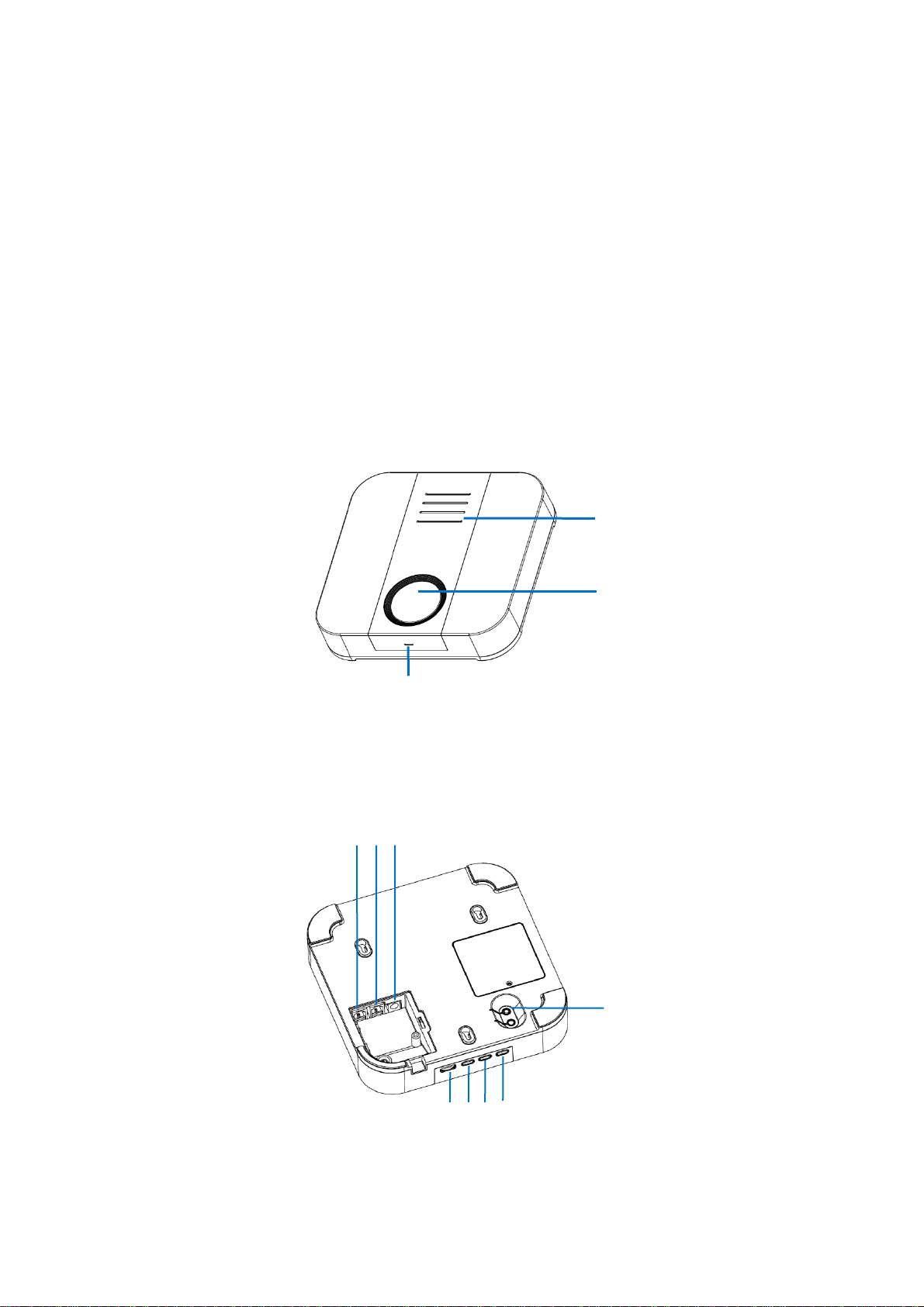
I. Interface Description
Top View:
2
1
1. HELP/Panic Button(Dial Emergency Call)
2. Speaker
3. Microphone
Back View:
6 5 4
9
10
11
4. DC Power Supply Port
5. Line
6. Telephone
7. Volume Button
7 8 9 10
3
Page 2
8. UP
9. Mode
10. UP Down
11. Wireless Pair
LED Lamp Indication:
1. Green: Normal standby / Everything fine
2. Green flash very slow: low battery standby
3. Green flash: calling
4. Green and red flash alternately: Detect Hardware Error, such as not plug adapter
5. Red flash quickly: No telephone line
6. Green and yellow flash shortly: Intrusion mode have enabled
7. Green flash quickly: Inactivity detect mode have enabled
8. White: wireless pare mode
9. Blue: Away mode is enable, and under normal standby
10. Blue flash very slow: Away mode is enable, and low battery standby
11.
Blue and red flash alternately: Away mode is enable, and detect Hardware Error, such as not plug adapter
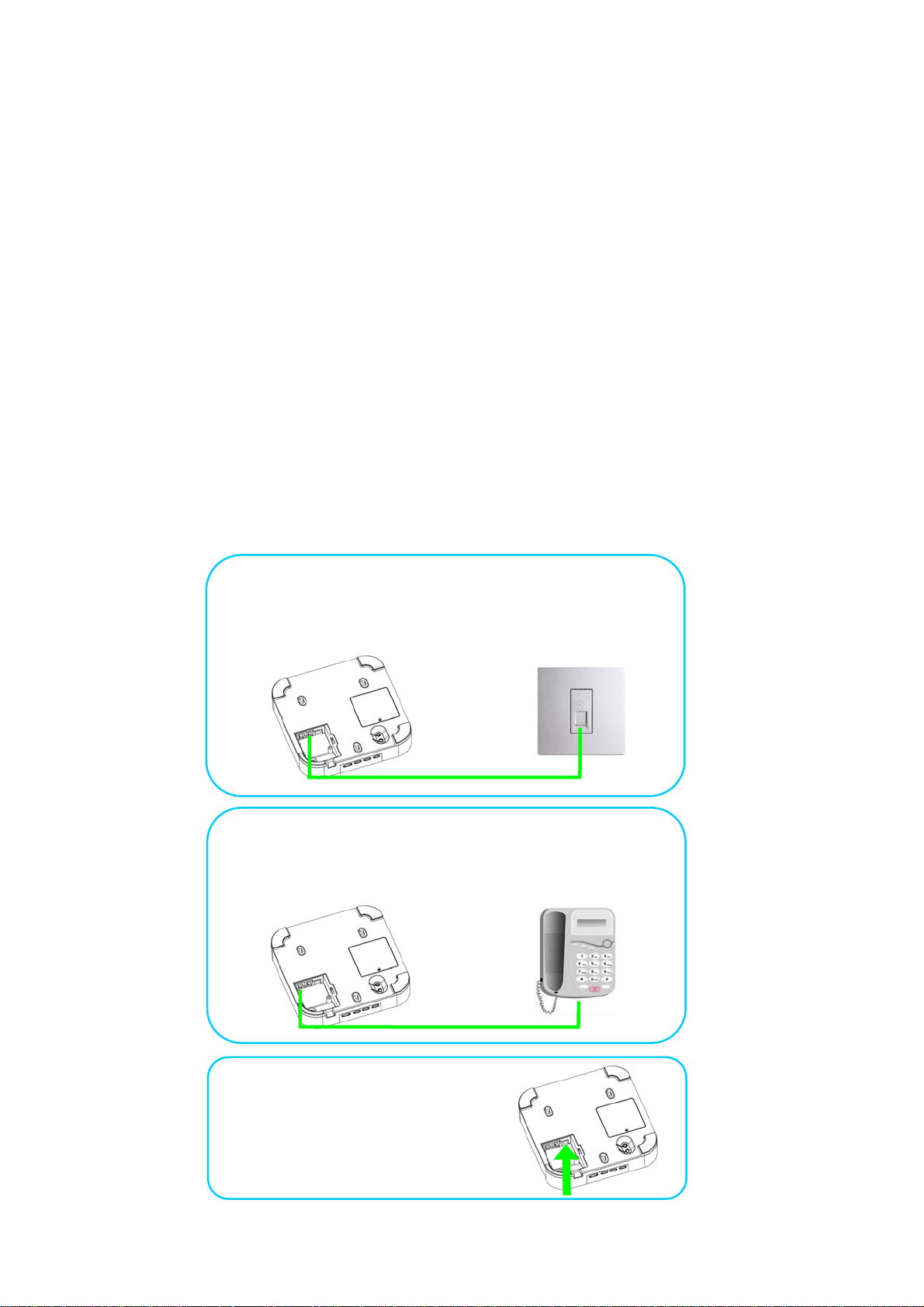
Initial Operation and Installation
IIII..
Step 1
Connect the Line port of the device to land line socket port
via an extend telephone wire.
Step 2
Connect the Telephone port of the device to normal
telephones via an extend telephone wire.
Step 3
Plug the DC adapter to the
Power Supply Port.
Page 3
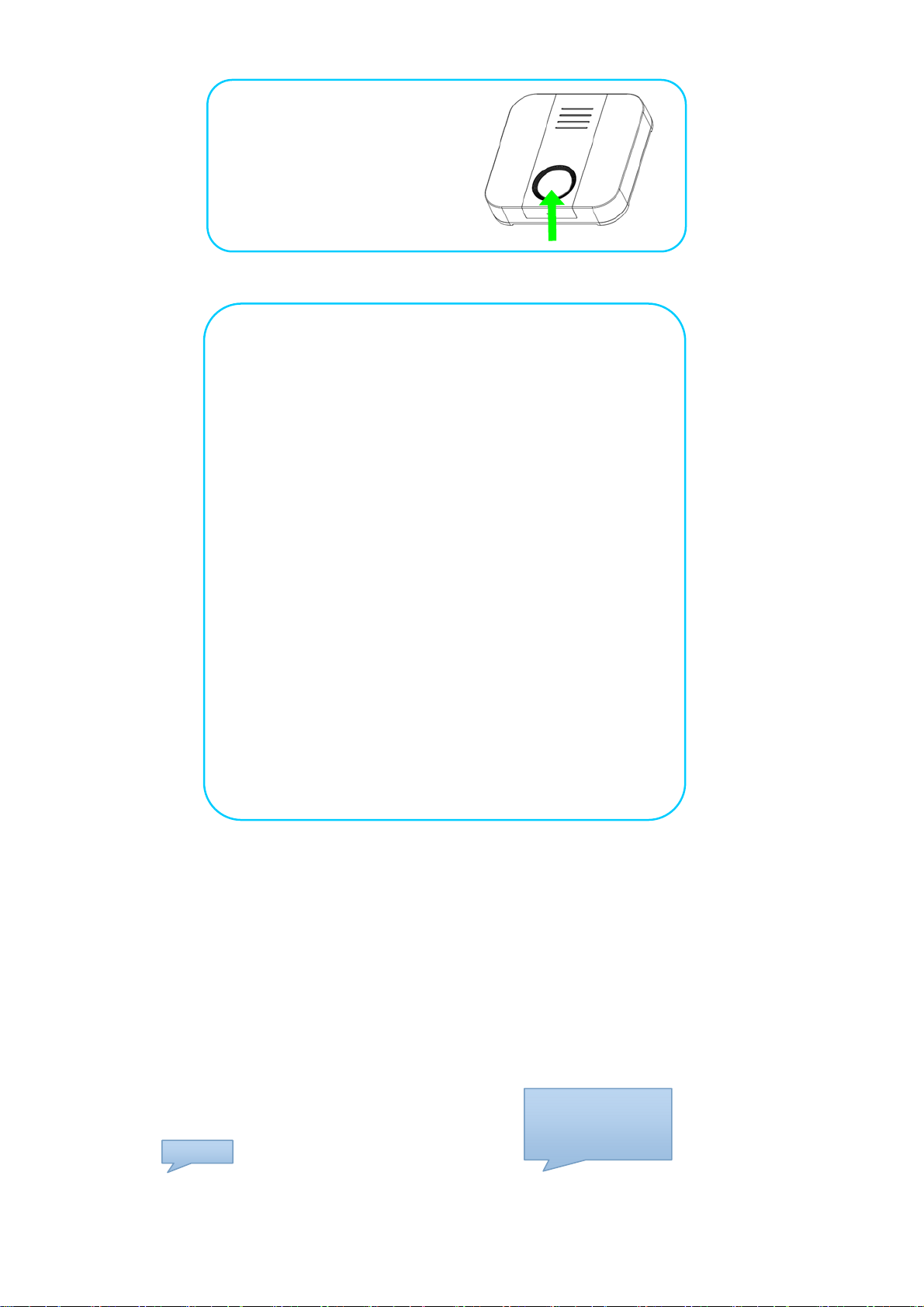
greg
Long Press Red Button
(for about 4 seconds)
to power on it.
Step 5
Step 4
Set the emergency help dial phone numbers.
Here, for initial test, use your cell phone to dial a call to
number of the landline When device detect there are
incoming call, it will ring and read the incoming telephone
number, you can press the Red button to accept the call.
After the calling is contacted, you can start some configure
setting via press the keys on your cell phone, as following:
A). Enter configure mode
#**# (it will say “OK”)
st
B). Modify the 1
configured for panic alerts
#0301#12345678*0012345678901##
(12345678*0012345678901 is the 2 sets telephone
numbers you want it dial. It will say”Group 1,Telephone
number will be 12345678,0012345678901”)
C). press buttons: # (it will play voice: OK)
Now, Hang up the call, Press the Help button, It will dial
emergency call to the numbers.
Con
ation, it works well and enjoy it.
group telephone numbers which is default
III. Telephone Numbers Setting
Commands:
#030x#
:
Kindly Tips
function need. #030x#, where x is the group item number, 1-8; Can be setting multiple phone number items, use * to
separate each item.
Examples:
A). Check parameter
User press buttons: ES005 play voice:
This command is used to check or pre-set telephone numbers, which can be choi ce for alert calls a nd so on
Group 1 telephone is
33612720,3361721,00
#0301##
86137685955
Page 4

Note:
1.If no telephone numbers in group 1, ES005 will feedback “Not set”;
2. the 1 inside the command, that means Group 1, and it maybe 2,3 and so on, means Gro up 2,3 and so on.
#0301##
B). Change parameter
#0305#0086137685955*
33612720*3361721##
Group 5 telephone is
0086137685955,336127
20,3361721
User press buttons: ES005 play voice:
Note: If enter format has error, ES005 will feedback “Failure”;
#
OK
User press buttons: ES005 play voice:
Note: If User press button *,or ES005 save setting has error,ES005 will feedback “Failure”.
Operation Warning Items
Don”t unplug the DC adapter, and please adopt the original one provided by factory as a power supply;
Don”t disassemble the device without any instruction or approval from our technology support personnel;
Please use and inspect the devices timely, please talk to related personnel when you find some abnormity issue.
FCC Caution:
Any Changes or modifications not expressly approved by the party responsible for compliance could void the user's authority to operate the equipment.
This equipment has been tested and found to comply with the limits for a Class B digital device, pursuant to part 15 of the FCC Rules. These limits are
designed to provide reasonable protection against harmful interference in a residential installation. This equipment generates, uses and can radiate radio
frequency energy and, if not installed and used in accordance with the instructions, may cause harmful interference to radio communications. However,
there is no guarantee that interference will not occur in a particular installation. If this equipment does cause harmful interference to radio or television
reception, which can be determined by turning the equipment off and on, the user is encouraged to try to correct the interference by one or more of the
following measures:
—Reorient or relocate the receiving antenna.
—Increase the separation between the equipment and receiver.
—Connect the equipment into an outlet on a circuit different from that to which the receiver is connected.
—Consult the dealer or an experienced radio/TV technician for help.
 Loading...