

Page 1

www.etiger.com
ES-CAM2A
IP Camera
EN
Page 2

2
Box content
- ES-CAM2A x1
- Mounting bracket x1
- AC Adaptor x1
- User Manual x1
Android and iOS apps
Before using the ES-CAM2A, download the
app iSecurity+ on the App Store or Google
Play.
Plug the camera
Plug the AC adaptor to your ES-CAM2A, and plug the former into the mains.
Switch the Wi-Fi of your camera on
Make sure the Wi-Fi switch at the back of your
camera is on “ON”.
When the LED turns green, your camera is ready
to be set up. This step can take up to 2 minutes
when started for the rst time.
OFF
ON
Page 3

3
Connect your smartphone to the camera
iOS Android
Go to the Wi-Fi
settings of your
smartphone,
select the network
“ES-CAM2A XXXX”
(the last 4 gures
represent the last 4
gures of the MAC
ID at the back of
your camera).
Launch the app iSecurity+
iOS Android
Once the
connection
has been made
(after around
30 seconds),
launch iSecurity+.
iSecurity+ detects
automatically your
camera.
Select ‘Yes’ to start
the setup of your
camera.
Page 4

4
Conguration of the camera
1
Select “Continue”
and follow the
instructions of the
installation assistant.
iOS Android
2
Preview of the
camera
What your camera
views appears in
the interface : your
camera is connected
Select “Connect
camera to Internet”.
iOS Android
Page 5

5
Connection of the camera to the Internet
1
Select the Wi-Fi
network to which
your camera will be
connected.
iOS Android
2
Enter the password
of the Wi-Fi network
selected and press
“Continue”.
Note
It may take a few
minutes for the
camera to access the
Internet.
iOS Android
Page 6
6
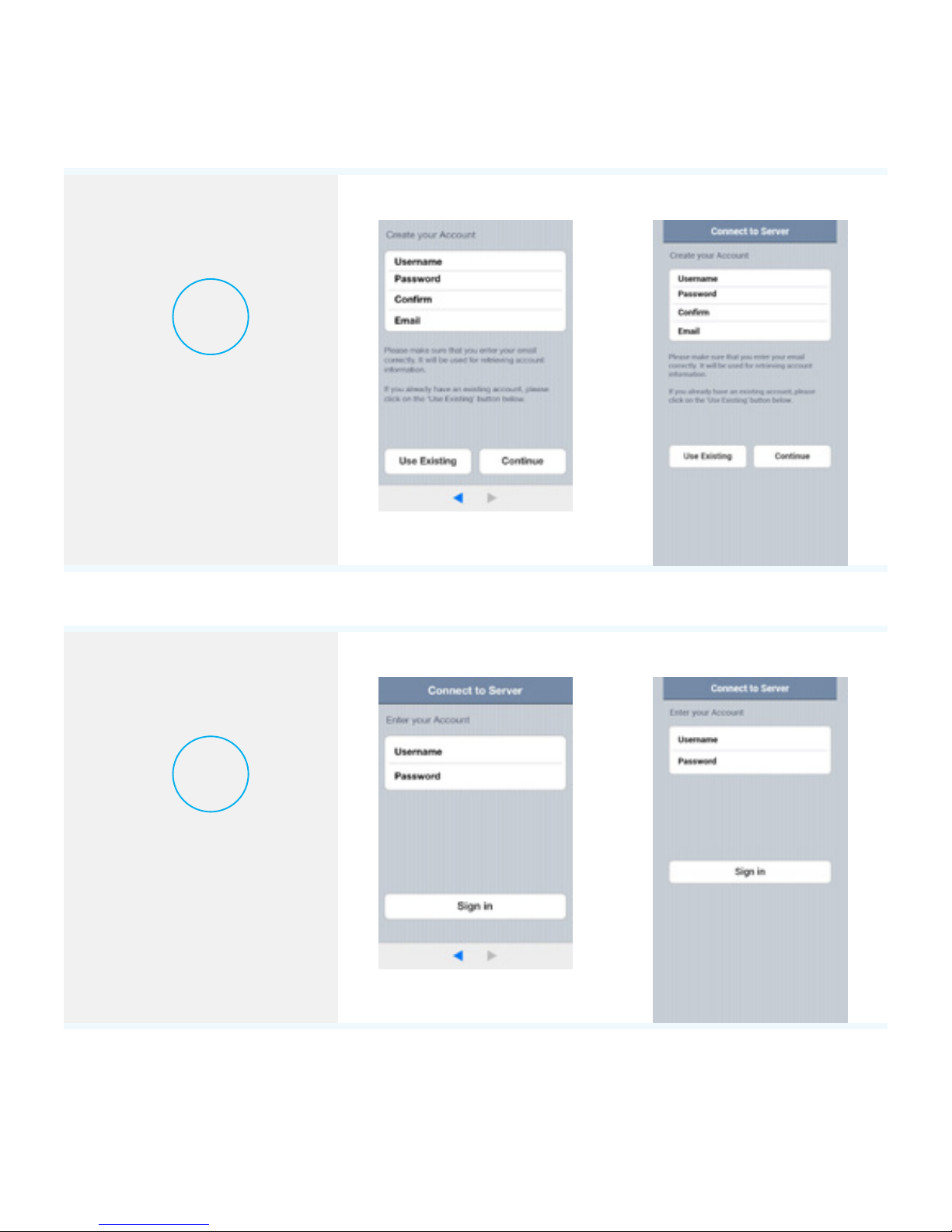
Connection to iSecurity+
1
Create an iSecurity+
account by lling in
the elds.
iOS Android
2
Enter your iSecurity+
username and
password to log in.
iOS Android
Page 7
7
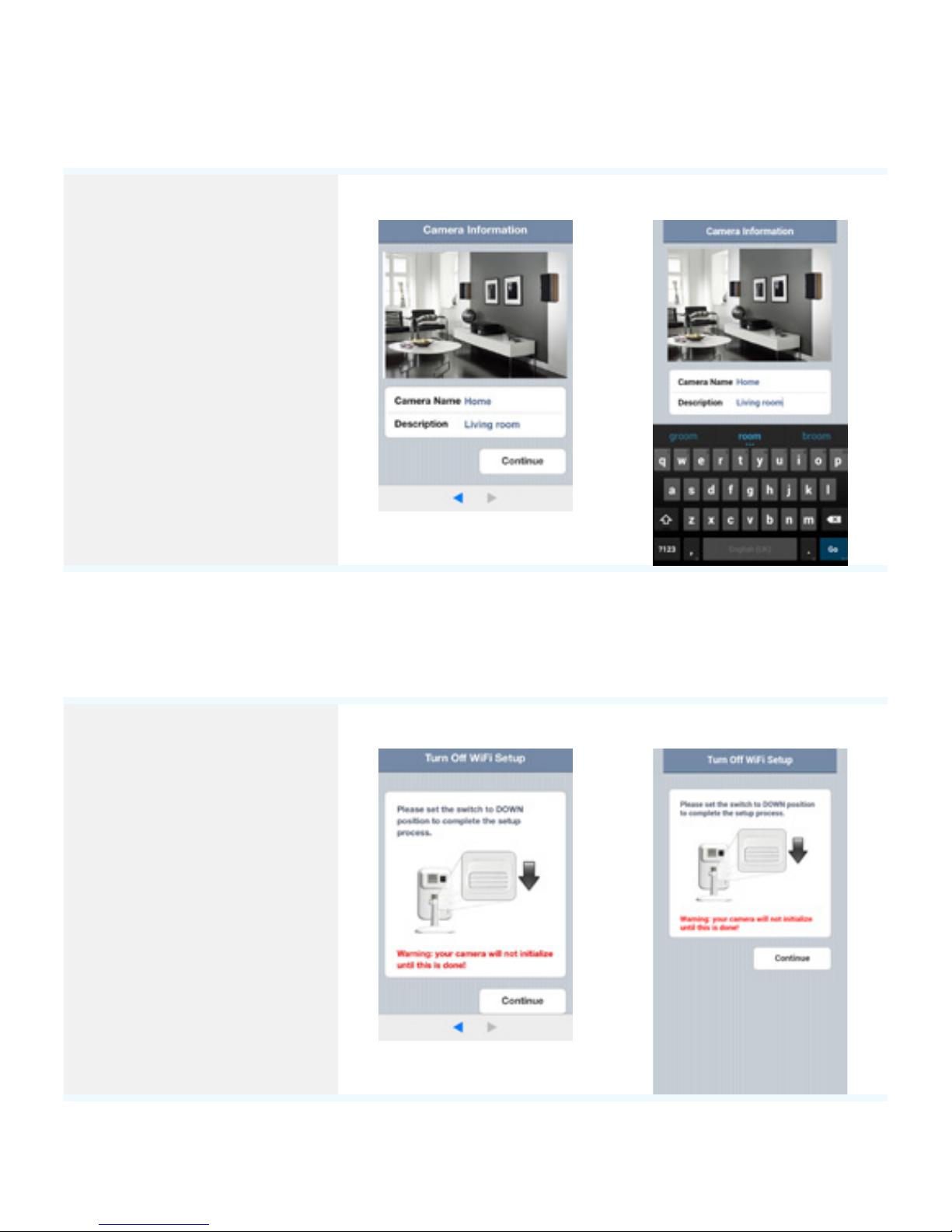
Creation of the prole of your camera
Choose a name and
a description for your
camera and press
“Continue”.
Note
The registration of
your camera on the
iSecurity+ server
will only take a few
seconds.
iOS Android
Finalization of the installation
The installation is
complete. Exit the
connection mode
by placing the Wi-Fi
switch at the back of
the camera on “OFF”.
The camera
automatically
reconnects to your
Wi-Fi network.
iOS Android
Page 8
8
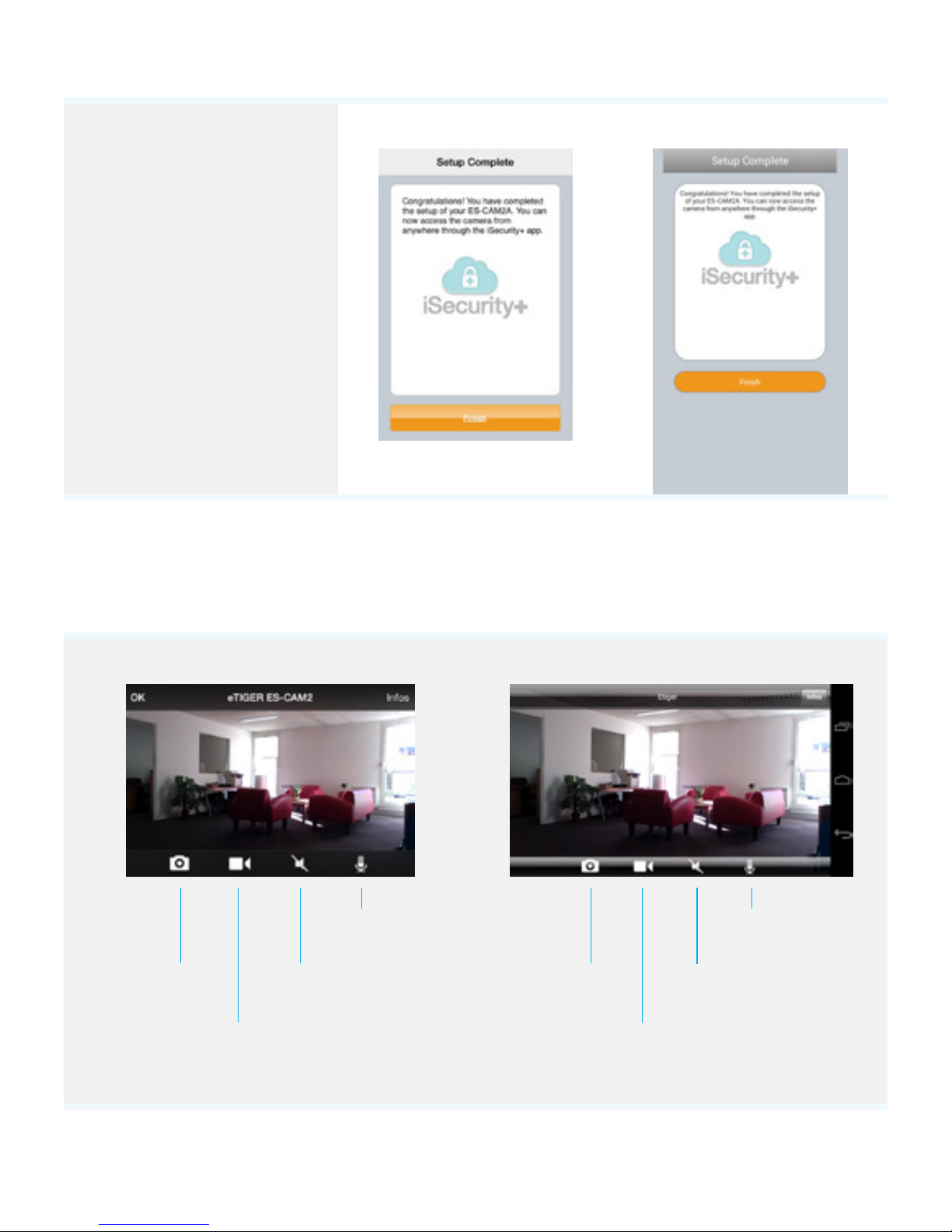
Quit and restart
iSecurity+.
You can use your
Android or iOS
smartphone / tablet
to access your camera
using an Internet
connection (Wi-Fi
or 4G).
iOS Android
Controls on the camera
iOS Android
Take a picture
Record a video
Sound On / O
Hold and talk
Take a picture
Record a video
Sound On / O
Hold and talk
Page 9
9
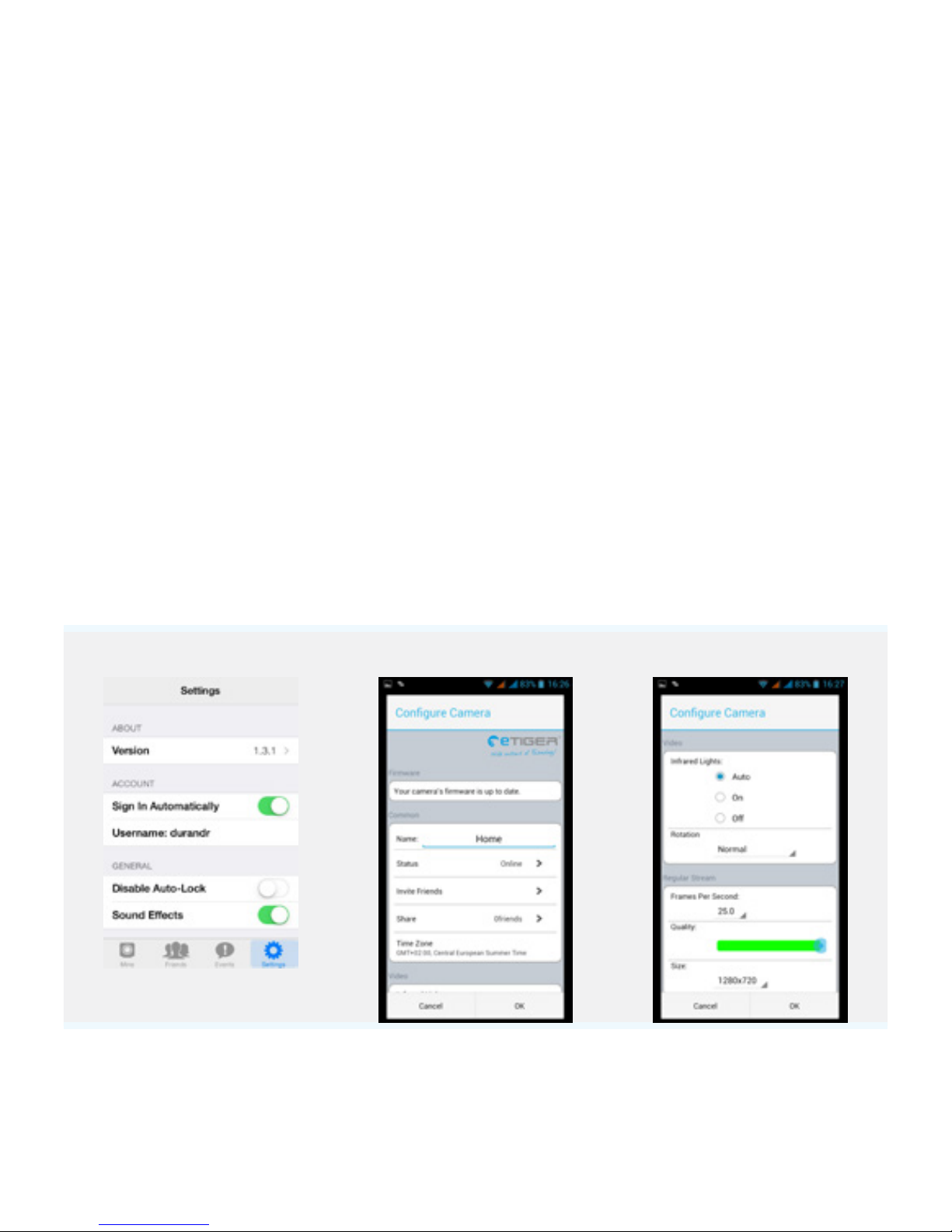
Conguration of iSecurity+
Name
Rename your camera
Share
Share your camera with your friends
using your web browser
Status
Change the status of your camera to
appear online, oine, or in private.
Rotation
Normal or reverse view
IR
Set up the infrared LEDs
Picture frequency
Up to 25fps
Quality
1~ 5 (5 being the highest quality)
Video size
320x180, 640x360, or 1280x720
Microphone
Activate / deactivate the
microphone
iOS Android Android
Page 10
10
Motion Detection and Notications
When the camera is on, the iSecurity+ app informs you when the camera detects
an intrusion or a movement. iSecurity+ is available for download on Google Play
and the App Store.
Access your camera from a computer
Follow the link below to access your camera from a computer :
https://app.isecurityplus.com/app/c/login.html
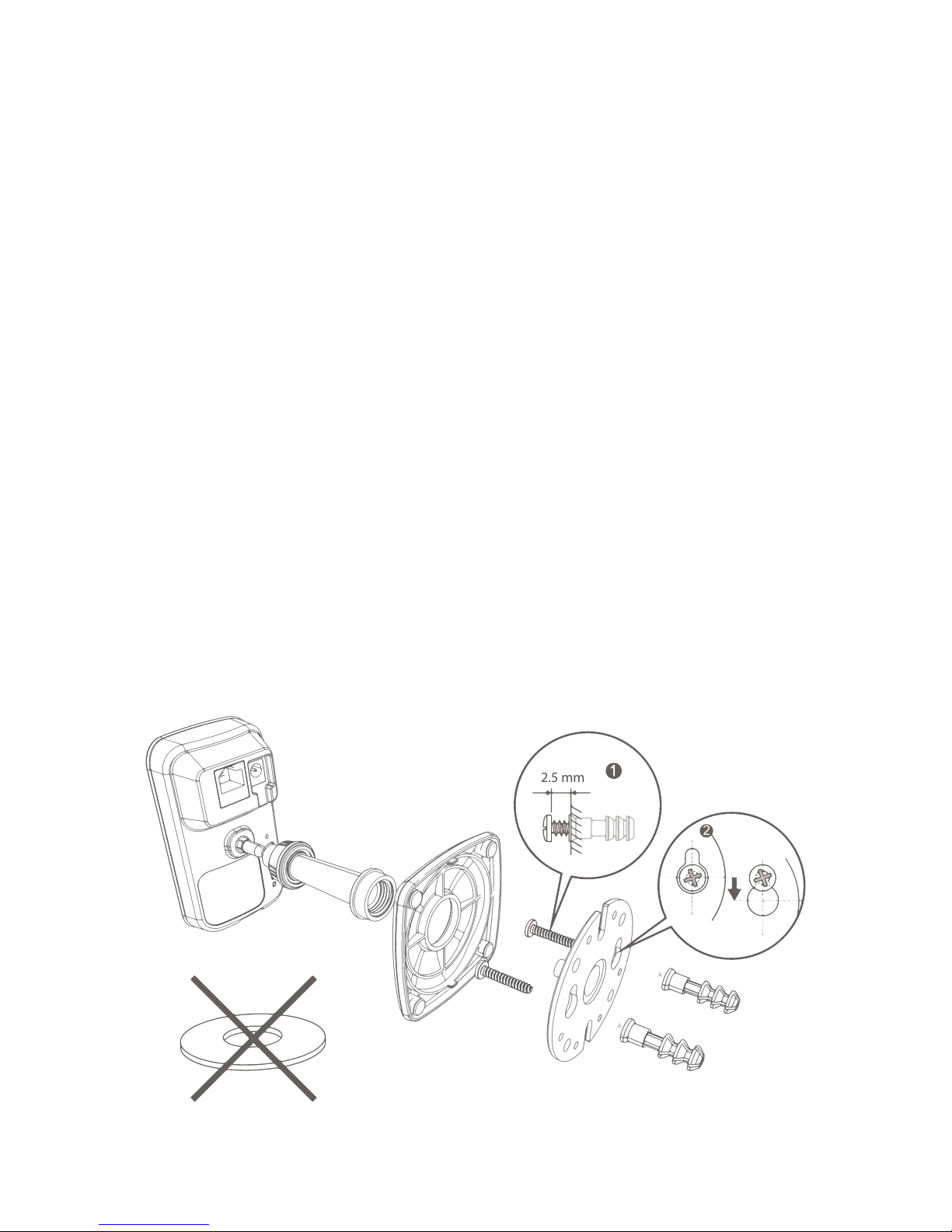
Installation
To install the ES-CAM2A on a wall, unscrew the base of the camera and remove
the metal plate.
Fasten the mounting bracket to the wall with the screws and anchors included in
the box. Reattach the base cover and screw the stand to the mounting bracket
(see drawing on the opposite page).
2.5 mm
Page 11
11
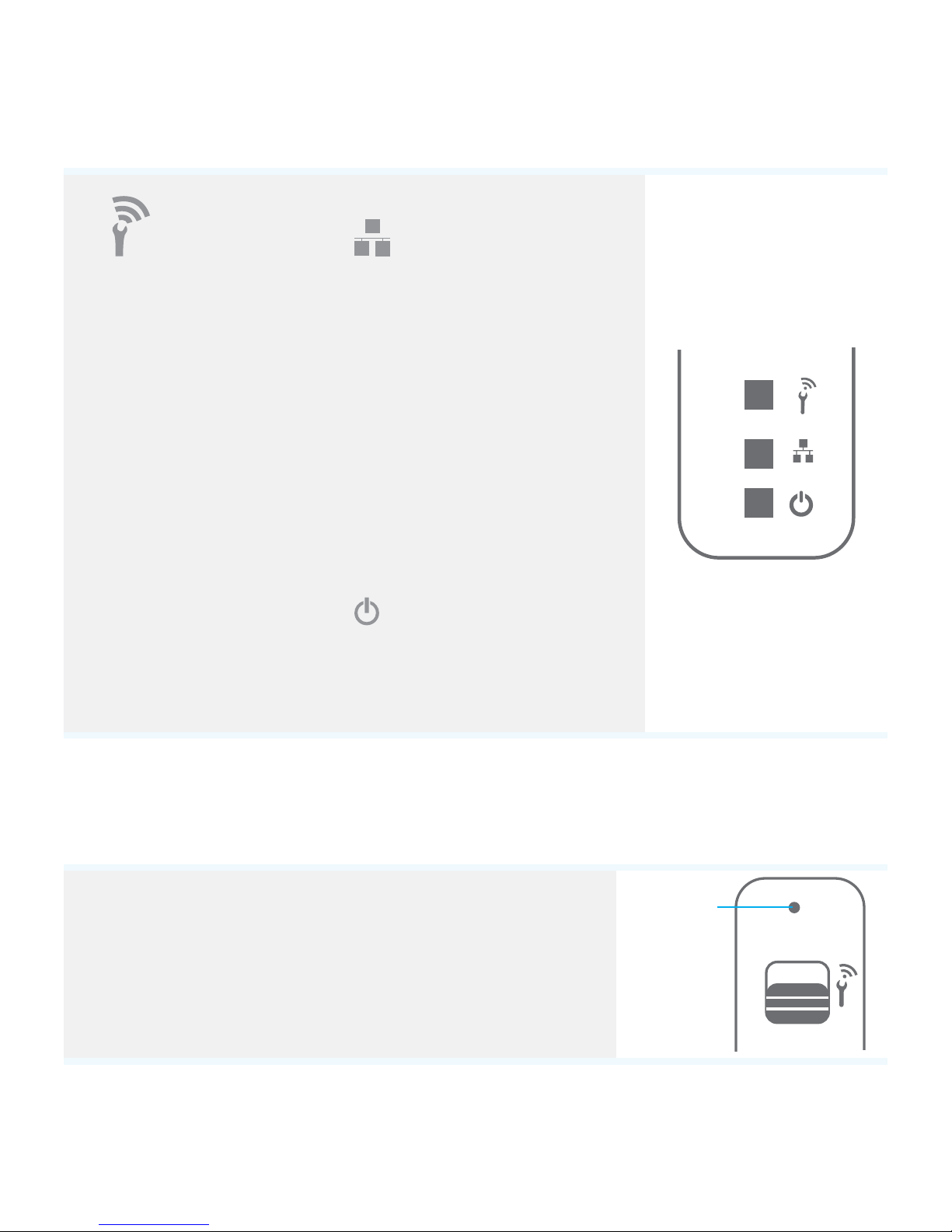
LED lights indications
Wi-Fi Conguration
Green: In
conguration mode
Orange: Initialization
of the conguration
mode
Switched o: Not in
conguration mode
Network
Green: Connected to
iSecurity+
Orange: Connected to the
local network
Orange (blinking):
Not connected
Power
Green: On
Reset
Make sure the Wi-Fi switch is on “OFF”. Use a pin to
reset your camera; the reset button is indicated on
the opposite drawing.
OFF
ON
Reset
button
Page 12

12
Specications
- Image sensor: 1/3” CMOS
- Sensor resolution: 1600x1200 CMOS
- Video resolution up to 1280x720p (H.264)
- Photo resolution up to 1280x720px (JPEG)
- Focal: 3mm, Aperture: F2.0
- 8 infrared LEDs for night vision
- Vision scope: Horizontal: 90° / Vertical: 45° / Diagonal: 78°
- Shutter speed: 1/5 – 1/16000 sec.
- Refresh frequency : up to 25 pictures/sec.
- Wi-Fi: IEEE 802.11 b/g/n
- Built-in microphone, noise reduction
- Power supply: 5V 1A, 110~240V/ DC Jack
- Compatible with smartphones under iOS 5.0 (or higher) and Android / Tablets /
PC / Mac
Safety instructions
- Do not point the camera directly at the sun to prevent damaging the image sensor.
- Keep the camera away from heat to avoid electric shocks.
- Keep the camera away from rain or moisture.
- Do not attempt to open, dismantle, repair, or service the camera. Doing so may
cause electric shocks and other hazards.
- Any evidence of misuse, abuse, or tampering will void the Warranty.
- To maintain compliance with FCC’s RF exposure guidelines, this equipment
should be installed and operated with minimum distance of 20 cm between the
radiator and your body. Use only the supplied antenna.
Page 13
13
Warnings
ATTENTION
RISK OF ELECTRIC
SHOCK
DO NOT OPEN
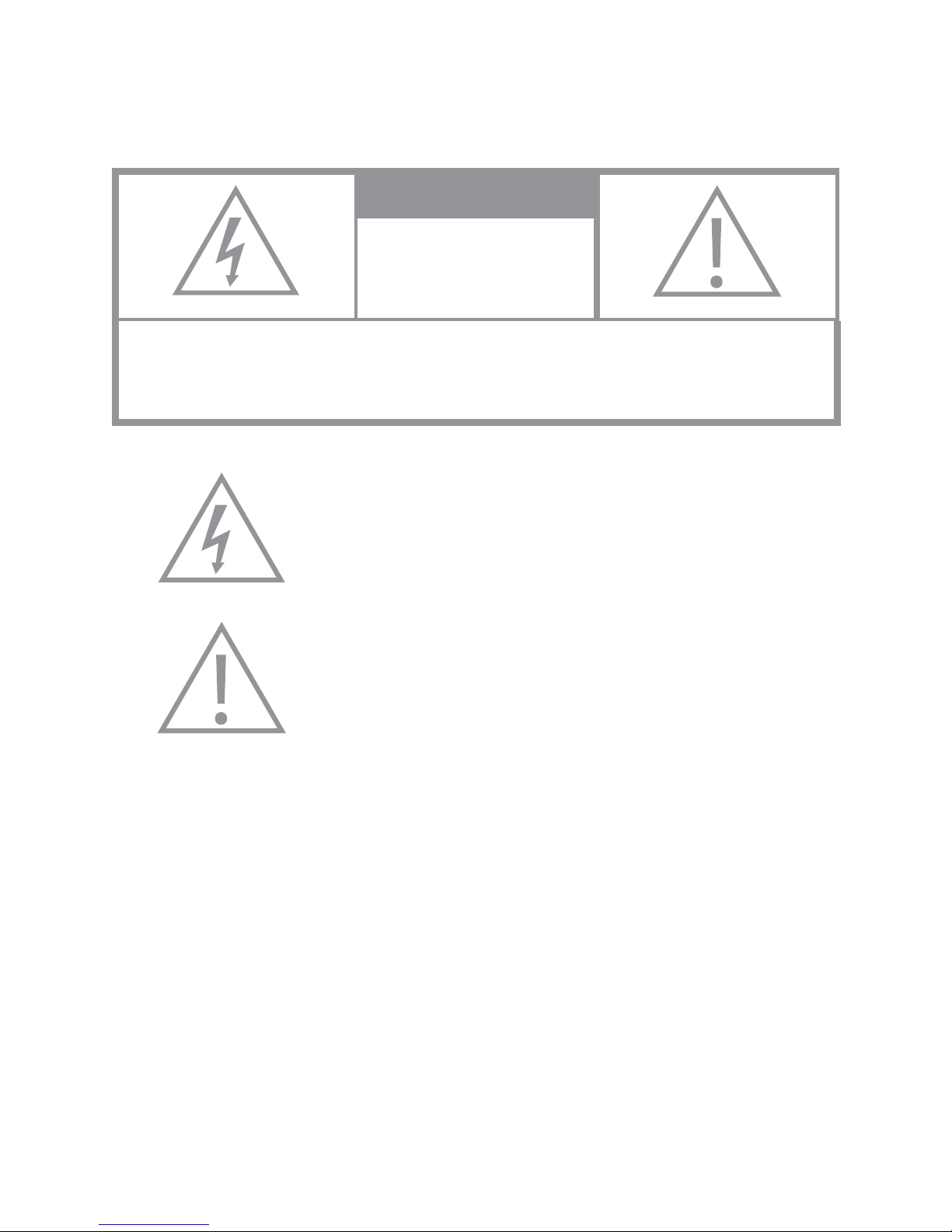
CAUTION TO REDUCE THE RISK OF ELECTRIC SHOCK,DO NOT REMOVE
COVER (OR BACK). NO USER SERVICEABLE PARTS INSIDE, REFER
SERVICING TO QUALIFIED SERVICE PERSONNEL.
This symbol is intended to alert the user to the presence
of uninsulated “dangerous voltage” within the product’s
enclosure that may be of sucient magnitude to
constitute a risk of electric shock to persons.
The exclamation point within an equilateral triangle is
intended to alert the user to the presence of important
operating and maintenance (servicing) instructions in
the literature accompanying the product.
To prevent Fire or Shock Hazards, Do Not Expose This PRODUCT to Rain or
Moisture.
Apparatus shall not be exposed to dripping or splashing and no object lled with
liquids, such as vases, shall be placed on the apparatus.
To avoid electrical shock, do not open the cabinet. Refer servicing to qualied
personnel only.
Regulatory Notices for USA
This equipment has been tested and found to comply with the limits for a digital
device, pursuant to Part 15 of the FCC Rules. These limits are designed to provide
reasonable protection against harmful interference in a residential installation.
This equipment generates, uses, and can radiate radio frequency energy and, if
not installed and used in accordance with the instructions, may cause harmful
interference to radio communications.
Page 14
14
However, there is no guarantee that interference will not occur in a particular
installation. If this equipment does cause harmful interference to radio or
television reception, which can be determined by turning the equipment o and
on, the user is encouraged to try to correct the interference by one or more of the
following measures:
- Reorient or relocate the receiving antenna.
- Increase the separation between the equipment and receiver.
- Connect the equipment into an outlet on a circuit dierent from that to which the
receiver is connected.
- Consult the dealer or an experienced radio / TV technician for help.
This product bears the selective sorting symbol for waste electrical and electronic
equipment (WEEE). This means that this product must be handled pursuant to
European Directive 2002/96/EC in order to be recycled or dismantled to minimize
its impact on the environment.
For further information, please contact your local or regional authorities.
Electronic products not included in the selective sorting process are potentially
dangerous for the environment and human health due to the presence of
hazardous substances.
In compliance with European laws. This product is in compliance with the essential
requirements and other relevant provisions of Directive 1999/5/EC (R&TTE).
This product was designed and manufactured in compliance with Directive
2002/95/EC of the European Parliament and of the Council on the restriction of
use of certain hazardous substances in electrical and electronic equipment (RoHS
Directive - RoHS) and is deemed to comply with the maximum concentration
values set by the European Technical Adaptation Committee (TAC).
For more information
For more information on the app and to download latest updates (rmware or
app), visit iSecurity+’s website : http://www.isecurityplus.com
ES-CAM2A-UM-EN20150211-2.4-W
Page 15

 Loading...