

Page 1

ED3538 www.etherwan.com
Quick Start Guide
This quick start guide describes how to install and use the Hardened
Ethernet Extender. This is the Hardened Ethernet Extender of choice for
harsh environments constrained by space.
Installation
ED3538T (Transmitter): This is a PoL (Power over Link) transmitter. Data and power
can be delivered at the same time through one pair copper wire to turn on and
communicate with ED3538R (Receiver) via RJ-11 phone jack or 2-pin Terminal Block
interface.
ED3538R (Receiver): This is a PoL (Power over Link) Receiver. ED3538R (Receiver)
can be powered either by ED3538T (Transmitter) through one pair copper wire or power
supply. The Ethernet port supports IEEE802.3at PoE/PSE for fulfilling PoE/PD
application.
<Warning>
Removes the device power before installation.
Removes the device power before any I/O and DIP switch configuration.
Do not connect ED3538T and ED3538R to the same power source. Devices
may be damaged due to power loop back through the PoL linked via copper
wire.
PoL (Power over Link) Mode Enable Installation
Ensures all power sources are disconnected from ED3538T and ED3538R.
Ensures ED3538T PoL (Power over Link) DIP switch is in On posi tion (Up po sition) .
Sets ED3538T Type DIP switch to Perf (Performance, Up posi tion) to acquire better
Line Speed (but poor noise immunity). Or sets Type DIP switch of ED3538T to Std
(Standard, Down position) to acquire standard Line Speed (but better noise
immunity).
Checks if ED3538R Mode is set to Rmt on DIP switch (Remote, Up position).
Connects one end of the one pair copper wire to RJ-11 phone jack or 2-pin
Terminal Block interface of the ED3538T and the other end to RJ-11 phone jack or
2-pin Terminal Block interface of the ED3538R.
Connects power source to ED3538T.
Data and power can be delivered from ED3538T, and at the same time through one
pair copper wire to turn on and communicate with ED3538R.
<Note> The equipment is designed for building installation and not intended to be
connected to exposed (outside plant) networks including campus environment or
equivalent.
PoL (Power over Link) Mode Disable Installation
For longer distance (e.g. over 1.4km) extension application, ED3538R may not be
able to receive power from ED3538T. A separate power may be applied on
ED3538R.
Ensures all power sources are disconnected from ED3538T and ED3538R.
Ensures ED3538T PoL (Power over Link) DIP switch is in Off position (Down
position).
Sets ED3538T Type DIP switch to Perf (Performance, Up posi tion) to acquire better
Line Speed (but poor noise immunity). Or sets Type DIP switch of ED3538T to Std
User’s Manual 1
Page 2
ED3538 www.etherwan.com
(Standard, Down position) to acquire standard Line Speed (but better noise
immunity).
Connects power source to ED3538T.
Checks if ED3538R Mode is set to Rmt on DIP switch (Remote, Up position).
Connects power source to ED3538R.
Connects one end of the one pair copper wire to RJ-11 phone jack or 2-pin
Terminal Block interface of the ED3538T and the other end to RJ-11 phone jack or
2-pin Terminal Block interface of the ED3538R.
Data can be transmitted between ED3538T and ED3538R via copper wire.
Physical Description
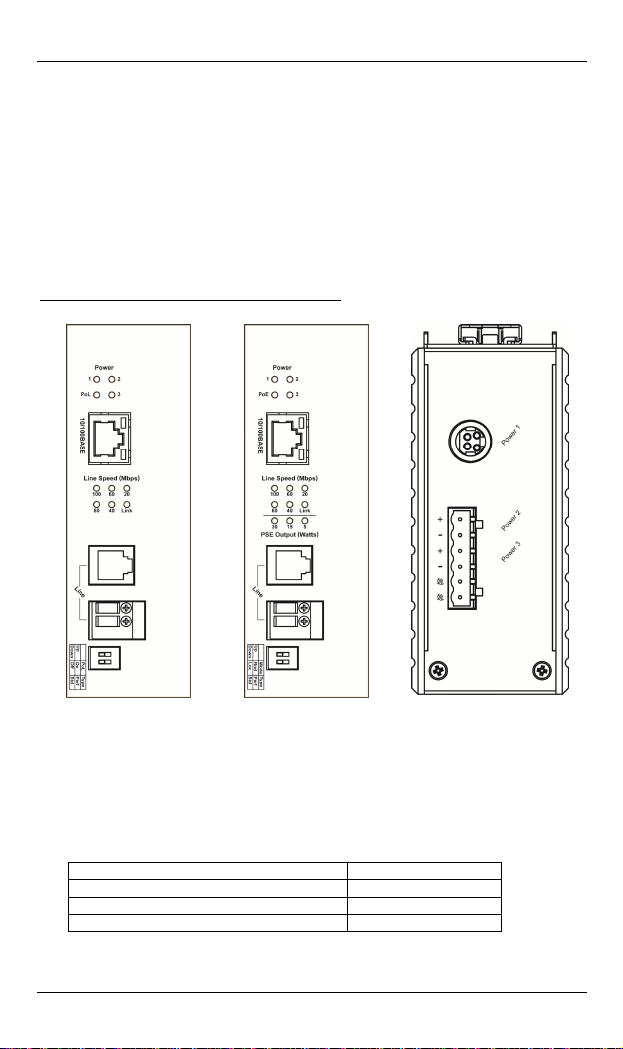
The Port Status LEDs and Power Inputs
ED3538T ED3538R
DC Terminal Block Power Inputs: 2.5A @ 48VDC (Peak current 3.26A).
two pairs of power inputs can be used to power up this Ethernet Extender.
Redundant power supplies function is supported. You only need to have one power
input connected to run the Ethernet Extender.
DC JACK Power input: 2.5A @ 48VDC (Peak current 3.26A).
Power supply suggestion 30 watts application
SDR-120-48 / DR-120-48 (120W 48VDC) For one pair
SDR-240-48 (240W 48VDC) For three pairs
SDR-480-48 (480W 48VDC) For seven pairs
There are
User’s Manual 2
Page 3
ED3538 www.etherwan.com
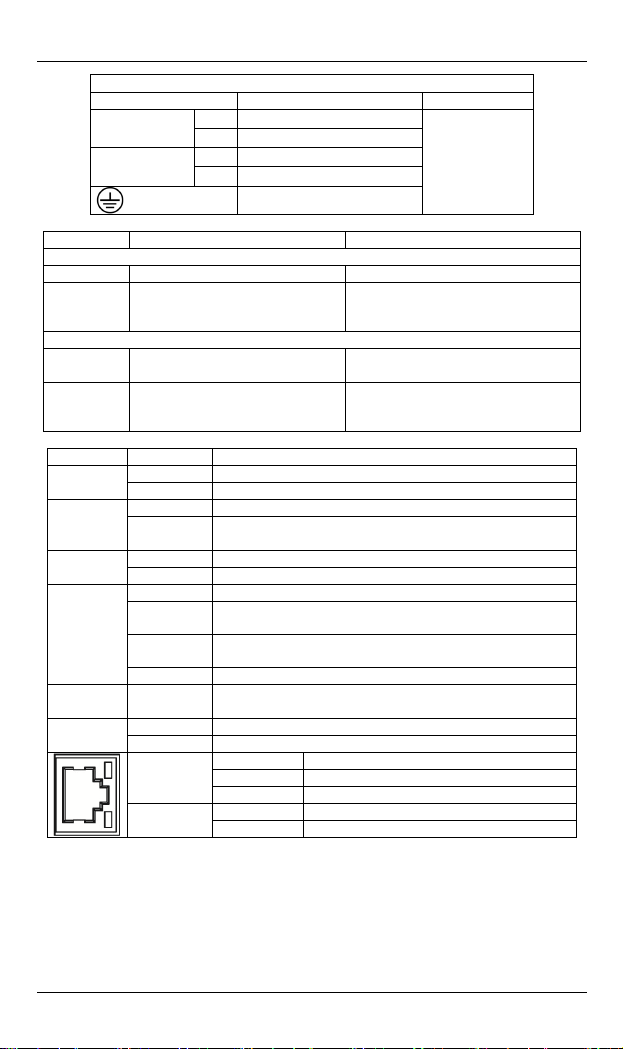
Power Input Assignment
Power1 48VDC DC Jack
Power2
Power3
DIP Switch Down Up
ED3538T
PoL Disable Power over Link Enable Power over Link
Type
ED3538R
Mode
Type
LEDs State Indication
1/2/3
PoL
PoE
Link
Line
Speed
Output
Std (Standard)
Standard line speed
Better noise im m unity
Loc (Local)
Set ED3538R to Local Mode
Std (Standard)
Standard line speed
Better noise im m unity
Steady Power received Power
Off Power off
Steady Power Ethernet extension interface function is enabled
Off
Steady Powered device (PD) is connected
Off Powered device (PD) is disconnected
Steady A valid Extender connection established
Fast
Flashing
Slow
Flashing
Off Extender interface connection is not established
Steady Displays the link speed in Mbps
Steady PoE power can be transmitted for PD PSE
All off No PoE power can be transmitted for PD
Green
Yellow
+
T:46-57V / R:46-57V DC
-
Power Ground
+
T:46-57V / R:46-57V DC
-
Power Ground
Earth Ground
Perf (Performance)
Better line speed
Poor noise immunity
Rmt (Remote)
Set ED3538R to Remote Mode
Perf (Performance)
Better line speed
Poor noise immunity
No power is transmitted over Ethernet extension
interface
Data transmission or receiving
Extender port under negotiation mode
Steady A valid Ethernet connection established
Flashing Data transmission or receiving
Off Non-Ethernet connection is established
Steady Link speed at 100Mbps
Off Link speed at 10Mbps
Terminal
Block
User’s Manual 3
Page 4
ED3538 www.etherwan.com
Power over Link (PoL) Enabled
Distance Data Rate ED3538R PoE Output
300M 100Mbps 30.0W
400M 90Mbps 15.4W
600M 60Mbps 14.0W
800M 45Mbps 9.5W
1000M 35Mbps 7.0W
1200M 20Mbps 5.0W
Power over Link (PoL) Disabled
Power Supply Applied on ED3538R
Distance Data Rate ED3538R PoE Output
1400M 15Mbps 30.0W
1600M 10Mbps 30.0W
1800M 3Mbps 30.0W
Up to 2200M 1Mbps 30.0W
<Note> The Reference Performance is tested on 24AWG Telephone wire (0.5mm
diameter, 1-pair wire, Cable impedance: 100ohm).
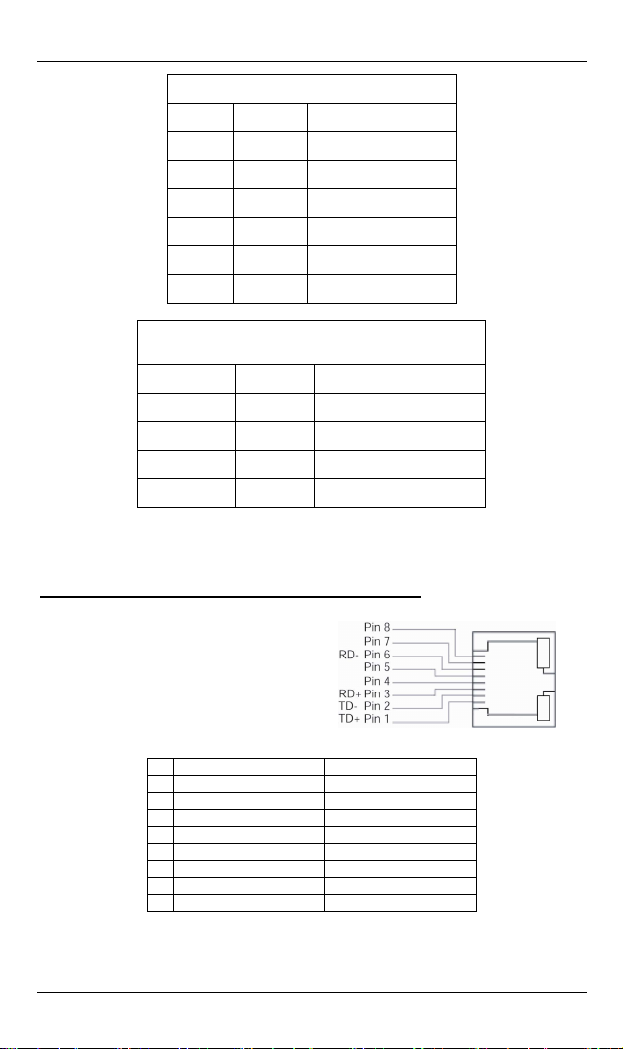
10/100Base-TX and Ethernet Extender Connectors
10/100Base-TX Connection
The following lists the pinouts of
10/100Base-TX RJ-45 port.
Pin Regular Port PoE Port
1 Output Transmit Data + Output Transmit Data +
2 Output Transmit Data - Output Transmit Data 3 Input Receive Data + Input Receive Data +
4 Positive (VCC+)
5 Positive (VCC+)
6 Input Receive Data - Input Receive Data 7 Negative (VCC-)
8 Negative (VCC-)
User’s Manual 4
Page 5

ED3538 www.etherwan.com
Ethernet Extender Connection
The RJ-11 and Terminal Block port pinouts
Pin 3: Tip, Pin 4: Ring.
Use a telephone line to connect two
RJ-11 or Terminal Block ports between
two Hardened Ethernet Extenders.
Functional Description
Meets EN61000-6-2 & EN61000-6-4 EMC Generic Standard Immunity
for industrial environment.
Ethernet port: Supports IEEE802.3/802.3u/802.3x. Auto-negotiation:
10/100Mbps, full/half-duplex; Auto MDI/MDIX.
Auto data rate negotiation for Ethernet extension interface.
Six speeds with speed indicator LEDs on front panel of unit, up to
100Mbps @ about 300meters (984ft.), down to 1Mbps @ about
2,200meters (7,218ft.).
Supports Power over Ethernet application up to 1,200meters (3,937ft.)
for Max. 5 watts power consumed PoE powered devices.
Power consumption:
- Enable Power over Link (PoL) function: Max. 65Watts
- Disable Power over Link (PoL) function: ED3538T: Max. 5W.
ED3538R: Max. 35W with PoE output, Max. 5W without PoE
Power Supply: Redundant T:46-57V / R:46-57V DC Terminal Block
Operating temperature range @ -40 to 75 (℃℃-40℉ to 167℉). Tested
Supports Din-Rail or Panel Mounting installation.
output.
power inputs and 48VDC Latched DC JACK interface.
for functional operation @ -40 to 85 (℃℃-40℉ to 185℉).
User’s Manual 5
Page 6

ED3538 www.etherwan.com
Preface
This manual describes how to install and use the Hardened Ethernet
Extender. The Hardened Ethernet Extender introduced here provides one
channel for Ethernet over existing voice grade copper wire.
The Hardened Ethernet Extender fully complies with IEEE802.3 10Base-T
and IEEE802.3u 100Base-TX standards.
In this manual, you will find:
Product overview
Features on the Hardened Ethernet Extender
Illustrative LED functions
Installation instructions
Specifications
User’s Manual 6
Page 7

ED3538 www.etherwan.com
Table of Contents
Quick Start Guide.........................................................................1
Installation....................................................................................1
Physical Description .................................................................... 2
The Port Status LEDs and Power Inputs....................................2
10/100Base-TX and Ethernet Extender Connectors..................4
Functional Description................................................................. 5
Preface............................................................................................6
Table of Contents .......................................................................... 7
Introduction................................................................................... 8
Product Overview.........................................................................8
Product Features.......................................................................... 8
Packing List.................................................................................. 9
One-Channel Hardened Ethernet Extender ............................. 10
Ports...........................................................................................10
Ethernet Extender Mode Settings...............................................10
DIP Switch.................................................................................. 10
Front Panel & LEDs .................................................................. 11
LED Indicators.........................................................................11
10/100Base-TX and Ethernet Extender Connectors................12
Installation...................................................................................13
Selecting a Site for the Equipment.............................................. 13
DIN Rail Mounting..................................................................... 13
Connecting to Power..................................................................15
Redundant DC Terminal Block Power Inputs.........................15
48VDC DC Jack......................................................................15
Specifications...............................................................................17
User’s Manual 7
Page 8

ED3538 www.etherwan.com
Introduction
The Hardened Ethernet Extender provides one channel for Ethernet over
existing voice grade copper wire. This Hardened Ethernet Extender
solution is perfectly fitted in the industrial applications or rugged
environment.
Product Overview
ED3538T ED3538R
Product Features
Meets EN61000-6-2 & EN61000-6-4 EMC Generic Standard Immunity
for industrial environment.
Ethernet port: Supports IEEE802.3/802.3u/802.3x. Auto-negotiation:
10/100Mbps, full/half-duplex; Auto MDI/MDIX.
Auto data rate negotiation for Ethernet extension interface.
Six speeds with speed indicator LEDs on front panel of unit, up to
100Mbps @ about 300meters (984ft.), down to 1Mbps @ about
2,200meters (7,218ft.).
User’s Manual 8
Page 9

ED3538 www.etherwan.com
Supports Power over Ethernet application up to 1,200meters (3,937ft.)
for Max. 5 watts power consumed PoE powered devices.
Power consumption:
- Enable Power over Link (PoL) function: Max. 65Watts
- Disable Power over Link (PoL) function: ED3538T: Max. 5W.
ED3538R: Max. 35W with PoE output, Max. 5W without PoE
output.
Power Supply: Redundant T:46-57V / R:46-57V DC Terminal Block
power inputs and 48VDC Latched DC JACK interface.
Operating temperature range @ -40 to 75 (℃℃-40℉ to 167℉). Tested
for functional operation @ -40 to 85 (℃℃-40℉ to 185℉).
Supports Din-Rail or Panel Mounting installation.
Packing List
When you unpack this product package, you will find the items listed below.
Please inspect the contents, and report any apparent damage or missing
items immediately to our authorized reseller.
The Hardened Ethernet Extender
User’s Manual
AC to DC Power Adaptor and Power Cable (optional)
User’s Manual 9
Page 10

ED3538 www.etherwan.com
One-Channel Hardened Ethernet Extender
Ports
The Hardened Ethernet Extender provides TX ports and one Ethernet
Extender port.
For the TX ports, it uses RJ-45 connector and auto senses the speed of
10/100Mbps.
For the Ethernet Extender port, it uses RJ-11 and Terminal Block
connectors and auto senses the speed of Link (below
20)/20/40/60/80/100Mbps.
Ethernet Extender Mode Settings
Ethernet Extender mode settings are made very simple by means of a DIP
(Dual Inline Package) switch on the top panel of the Hardened Ethernet
Extender.
DIP Switch
DIP
Down Up
Switch
ED3538T
PoL Disable Power over Link Enable Power over Link
Type
ED3538R
Mode
Type
Std (Standard)
Standard line speed
Better noise immunity
Loc (Local)
Set ED3538R to Local Mode
Std (Standard)
Standard line speed
Better noise immunity
Perf (Performance)
Better line speed
Poor noise immunity
Rmt (Remote)
Set ED3538R to Remote Mode
Perf (Performance)
Better line speed
Poor noise immunity
User’s Manual 10
Page 11

ED3538 www.etherwan.com
Front Panel & LEDs
LED Indicators
The LED indicators give you instant feedback on status of the Hardened
Ethernet Extender:
LEDs State Indication
1/2/3
PoL
PoE
Link
Line
Speed
Output
Steady Power received Power
Off Power off
Steady
Off
Power Ethernet extension interface function is
enabled
No power is transmitted over Ethernet
extension interface
Steady Powered device (PD) is connected
Off Powered device (PD) is disconnected
Steady A valid Extender connection established
Fast
Flashing
Slow
Flashing
Data transmission or receiving
Extender port under negotiation mode
Off Extender interface connection is not established
Steady Displays the link speed in Mbps
Steady PoE power can be transmitted for PD PSE
All off No PoE power can be transmitted for PD
Steady
Green
Flashing Data transmission or receiving
Off
Yellow
Steady Link speed at 100Mbps
Off Link speed at 10Mbps
Power over Link (PoL) Enabled
Distance Data Rate ED3538R PoE Output
300M 100Mbps 30.0W
400M 90Mbps 15.4W
600M 60Mbps 14.0W
800M 45Mbps 9.5W
1000M 35Mbps 7.0W
1200M 20Mbps 5.0W
A valid Ethernet connection
established
Non-Ethernet connection is
established
User’s Manual 11
Page 12

ED3538 www.etherwan.com
Power over Link (PoL) Disabled
Power Supply Applied on ED3538R
Distance Data Rate ED3538R PoE Output
1400M 15Mbps 30.0W
1600M 10Mbps 30.0W
1800M 3Mbps 30.0W
Up to 2200M 1Mbps 30.0W
<Note> The Reference Performance is tested on 24AWG Telephone wire (0.5mm
diameter, 1-pair wire, Cable impedance: 100ohm).
10/100Base-TX and Ethernet Extender Connectors
10/100Base-TX Connection
The following lists the pinouts of
10/100Base-TX RJ-45 port.
Pin Regular Port PoE Port
1 Output Transmit Data + Output Transmit Data +
2 Output Transmit Data - Output Transmit Data 3 Input Receive Data + Input Receive Data +
4 Positive (VCC+)
5 Positive (VCC+)
6 Input Receive Data - Input Receive Data 7 Negative (VCC-)
8 Negative (VCC-)
Ethernet Extender Connection
The RJ-11 and Terminal Block port pinouts
Pin 3: Tip, Pin 4: Ring.
Use a telephone line to connect two
RJ-11 or Terminal Block ports between
two Hardened Ethernet Extenders.
User’s Manual 12
Page 13

ED3538 www.etherwan.com
Installation
This chapter gives step-by-step installation instructions for the Hardened
Ethernet Extender.
Selecting a Site for the Equipment
As with any electric device, you should place the equipment where it will
not be subjected to extreme temperatures, humidity, or electromagnetic
interference. Specifically, the site you select should meet the following
requirements:
The Surrounding Air temperature should be between -40 to 75 degrees Celsius.
The relative humidity should be less than 95 percent, non-condensing.
Surrounding electrical devices should not exceed the electromagnetic field (RFC)
standards.
Make sure that the equipment receives adequate ventilation. Do not block the
ventilation holes of the equipment.
The power outlet should be within 1.8 meters of the product.
DIN Rail Mounting
Fix the DIN rail attachment plate to the back panel of the Hardened
Ethernet Extender.
Installation: Place the Hardened Ethernet Extender on the DIN rail from
above using the slot. Push the front of the Hardened Ethernet Extender
toward the mounting surface until it audibly snaps into place.
Removal: Pull out the lower edge and then remove the Hardened Ethernet
Extender from the DIN rail.
User’s Manual 13
Page 14

ED3538 www.etherwan.com
User’s Manual 14
Page 15

ED3538 www.etherwan.com
Connecting to Power
Redundant DC Terminal Block Power Inputs or 48VDC DC Jack:
Redundant DC Terminal Block Power Inputs
There are two pairs of power inputs can be used to power up this device.
You only need to have one power input connected to run the Hardened
Ethernet Extender.
Step 1: Connect the DC power cord to the plug-able terminal block on the Hardened
Ethernet Extender, and then plug it into a standard DC outlet.
Step 2: Disconnect the power cord if you want to shut down the Hardened Ethernet
Extender.
48VDC DC Jack
Step 1: Connect the supplied AC to DC power adapter to the receptacle on the topside
of the Hardened Ethernet Extender.
Step 2: Connect the power cord to the AC to DC power adapter and attach the plug into
a standard AC outlet with the appropriate AC voltage.
User’s Manual 15
Page 16

ED3538 www.etherwan.com
Power Input Assignment
Power1 48VDC DC Jack
Power2
Power3
+
T:46-57V / R:46-57V DC
-
Power Ground
+
T:46-57V / R:46-57V DC
-
Power Ground
Earth Ground
Terminal
Block
User’s Manual 16
Page 17

ED3538 www.etherwan.com
Specifications
Applicable Standards IEEE802.3 10Base-T, IEEE802.3u 100Base-TX
Fixed Ports 10/100Mbps Ethernet ports with RJ-45 connectors
1 x Ethernet Extender port with RJ-11 and Terminal
Block connectors
Speed
10Base-T
100Base-TX
Ethernet Extender
Switching Method Store-and-Forward
Forwarding rate 14,880/148,810pps for 10/100Mbps
Cable
10Base-T
100Base-TX
Ethernet Extender
Dimensions 50mm (W) × 110mm (D) x 135mm (H)
Weight 0.77Kg (1.7lbs.)
Power
Power Consumption
10/20Mbps for half/full-duplex
100/200Mbps for half/full-duplex
Link (Below 20), 20, 40, 60, 80, 100Mbps
4-pair UTP/STP Cat. 3, 4, 5 up to 100m
4-pair UTP/STP Cat. 5 up to 100m
Telephone wires
Per Unit (3 LEDs)- Power1, Power2, Power3 LED Indicators
ED3538T-
PoL; Line Speed (Mbps): Link, 20, 40, 60, 80, 100
ED3538RPoE; Line Speed (Mbps): Link, 20, 40, 60, 80, 100;
PSE Output (Watts): 5, 15, 30
(1.97” (W) x 4.33” (D) x 5.31” (H))
Terminal Block: T:46-57V / R:46-57V DC
DC Jack: 48VDC, External AC/DC required
Terminal Block & DC Jack Power Inputs: 2.5A @
48VDC (Peak current 3.26A)
Enable PoL: Max. 65Watts
Disable PoL:
ED3538T: Max. 5W
ED3538R: Max. 35W with PoE output
Max. 5W without PoE output
User’s Manual 17
Page 18

ED3538 www.etherwan.com
Operating Temperature
Storage Temperature
Humidity 5 ~ 95%, non-condensing
EMI FCC Part 15, Class A
EMS
Environmental Test
Compliance
-40℃ ~ 75℃ (-40℉ ~ 167℉)
Tested for functional operation @
-40℃ ~ 85℃ (-40℉ ~ 185℉)
-40℃ ~ 85℃ (-40℉ ~ 185℉)
EN61000-6-4: EN55022, EN61000-3-2, EN61000-3-3
EN61000-6-2:
EN61000-4-2 (ESD Standard)
EN61000-4-3 (Radiated RFI Standards)
EN61000-4-4 (Burst Standards)
EN61000-4-5 (Surge Standards)
EN61000-4-6 (Induced RFI Standards)
EN61000-4-8 (Magnetic Field Standards)
IEC60068-2-6 Fc (Vibration Resistance)
IEC60068-2-27 Ea (Shock)
IEC60068-2-32 Ed (Free Fall)
User’s Manual 18
 Loading...