

Page 1

CE User Manual
Production Dates: September 2004 - Present
Copyright © 2008 Electronic Theatre Controls, Inc.
All Rights reserved.
Product information and specifications subject to change.
Part Number:
7062M1210-06.01
Released: June 2008
Picking# 7062M1004-B
Rev B
Page 2

Table of Contents
Declaration of Conformity . . . . . . . . . . . . . . . . . . . . . . . . . . . . . . . . . .1
Source Four jr / jr Zoom CE Guidelines . . . . . . . . . . . . . . . . . . . . . . .2
Basic Assembly . . . . . . . . . . . . . . . . . . . . . . . . . . . . . . . . . . . . . . . . .3
Luminaire information . . . . . . . . . . . . . . . . . . . . . . . . . . . . . . . . .3
Colour frame holder . . . . . . . . . . . . . . . . . . . . . . . . . . . . . . . . . . .4
Replacing the HPL lamp . . . . . . . . . . . . . . . . . . . . . . . . . . . . . . .5
Centering lamp and adjusting the field . . . . . . . . . . . . . . . . . . . .6
Focusing the beam . . . . . . . . . . . . . . . . . . . . . . . . . . . . . . . . . . .6
Shaping the beam . . . . . . . . . . . . . . . . . . . . . . . . . . . . . . . . . . . .7
Adjusting the yoke position . . . . . . . . . . . . . . . . . . . . . . . . . . . . .8
Switching lens assemblies. . . . . . . . . . . . . . . . . . . . . . . . . . . . . .9
Cleaning glass lens . . . . . . . . . . . . . . . . . . . . . . . . . . . . . . . . . . .9
Cleaning the reflector. . . . . . . . . . . . . . . . . . . . . . . . . . . . . . . . .10
Portable appliance test (PAT) . . . . . . . . . . . . . . . . . . . . . . . . . .11
ETC®, Emphasis®, Expression®, Insight™, Imagine™, Focus™, Express™, Unison®, Obsession® II, ETCNet2™,
EDMX™, Source Four
of Electronic Theatre Controls, Inc. in the United States and other countries.
All other trademarks, both marked and not marked, are the property of their respective owners.
i
®
, Revolution®, Sensor®, and WYSILink™ are either registered trademarks or trademarks
Page 3
Declaration of Conformity
We, Electronic Theatre Controls, Europe Ltd., declare under sole responsibility that the product:
Product name: Source Four fixed focus luminaries
Product type/model: S405, S410, S426, S450, S4jr26, S4jr36, Srjr50
Lot: n/a
Batch/Serial number: n/a
Item numbers: one of each model
to which this declaration relates in conformity with the following standards:
EN60598-1:2000 Luminaires, General requirements and tests
EN60598-2-17:1990 Specification for luminaires for stage lighting, television, film, and
photographic studios (outside and indoor) - equiv. BS 4533-
102.17:1990
English
following the provisions of EU LV Directive(s) 73/23/EEC
London, United Kingdom
Mr. Adam Bennette
(Place of issue) (Name of authorised person)
(Date of issue) (signature of authorised person)
Electronic Theatre Controls Europe, Ltd. Registered office:
Unit 26-28, Victoria Industrial Estate, Grant Thornton House
Victoria Road, London W3 6UU U.K. Melton St., London NW1 28W, England
Telephone (+44) (0)20 896 1000 Registered in England No. 3057796
Fax (+44) (0)20 896 2000 VAT No. 6629487 90
1
Page 4
English
0.6m
Source Four jr / jr Zoom CE Guidelines
The Source Four jr / jr Zoom CE is intended for professional use only. Read the entire User Guide
before using equipment.
WARNING:
• Do not mount the Source Four jr / jr Zoom CE on or near a flammable surface.
• Use the Source Four jr / jr Zoom CE in dry locations only, where humidity does not
• The luminaire is for indoor use only and is not intended for outdoor use.
• For temporary installations, mount and support the Source Four jr / jr Zoom CE only by
• In addition to primary suspension, attach a safety cable (ETC part #7060A1022)) or
• If the external cable is damaged, it shall be replaced by ETC or our service agents.
• Always hang the Source Four jr / jr Zoom CE with the colour frame held securely behind
• Always replace the lamp if it becomes damaged or thermally deformed.
• Disconnect the unit from power before all cleaning and maintenance.
• The Source Four jr / jr Zoom CE is suitable for indoor use with a maximum ambient
• Maximum exterior surface temperature: T
• A multilingual label sheet is included with this manual. Affix the label of the appropriate
Please note the following safety precautions.
exceed 90 percent.
the primary suspension yoke holes. Suspend the luminaire from a hook clamp or a
stand mount, using a securely tightened steel bolt (up to Ø 12 mm), flat washer and
locking washer.
chain to the secondary suspension point on the Source Four jr / jr Zoom CE.
the retaining clip.
temperature: T
language over the existing warning label on the extension yoke. Do not cover ETC
trademark or CE mark.
=45°C
a
=235ºC
max
• The Source Four jr / jr Zoom CE contains a CE safety screen that covers the lens to
prevent injury from broken glass due to lamp failure. Do not remove the safety screen.
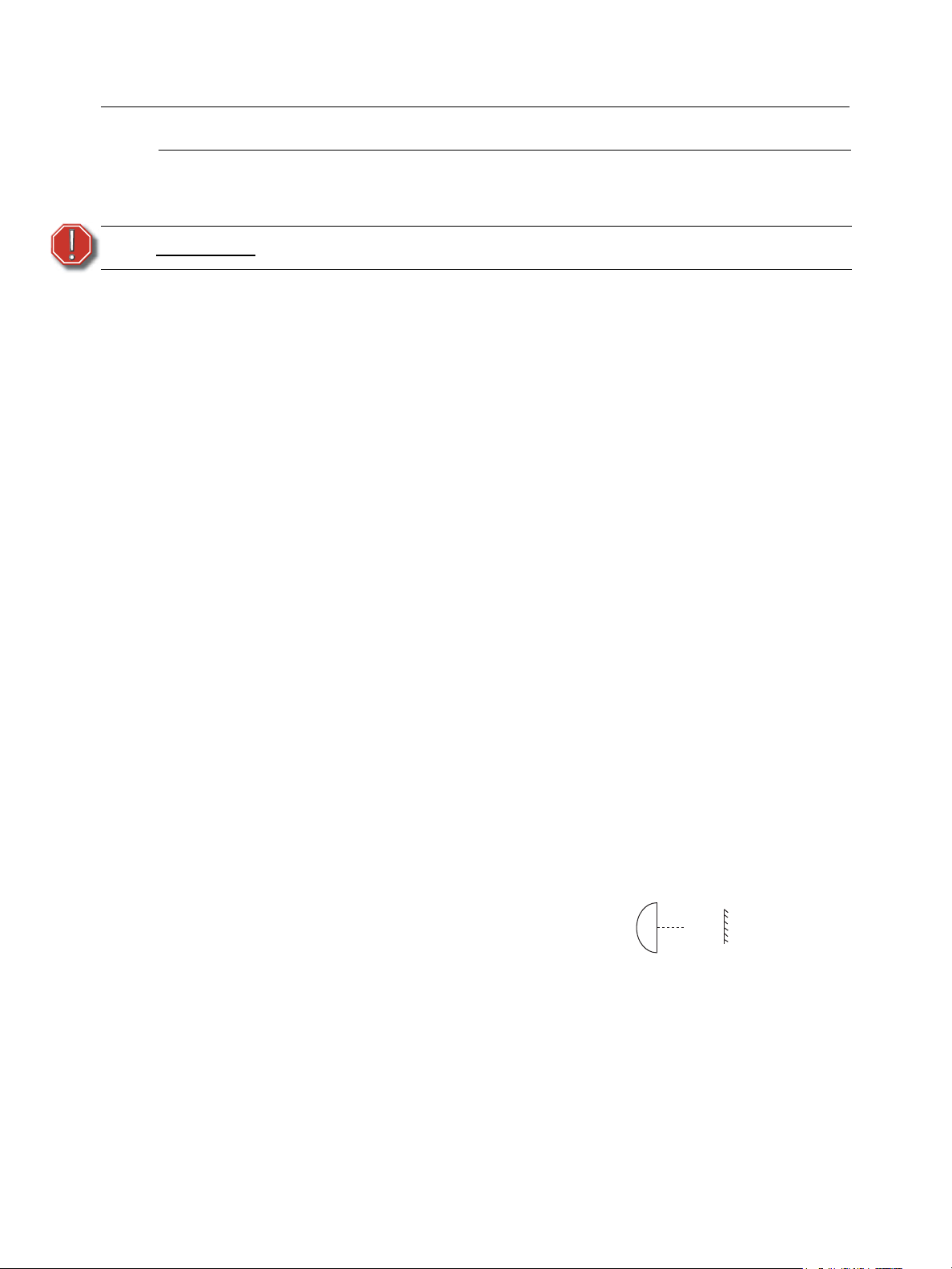
• Keep the luminaire at least 0.6 meters away from any lit surface. Lighted objects at this
distance or greater will not exceed 90ºC temperature from projected light.
2 Source Four jr/jr Zoom CE User Manual
Page 5
Basic Assembly
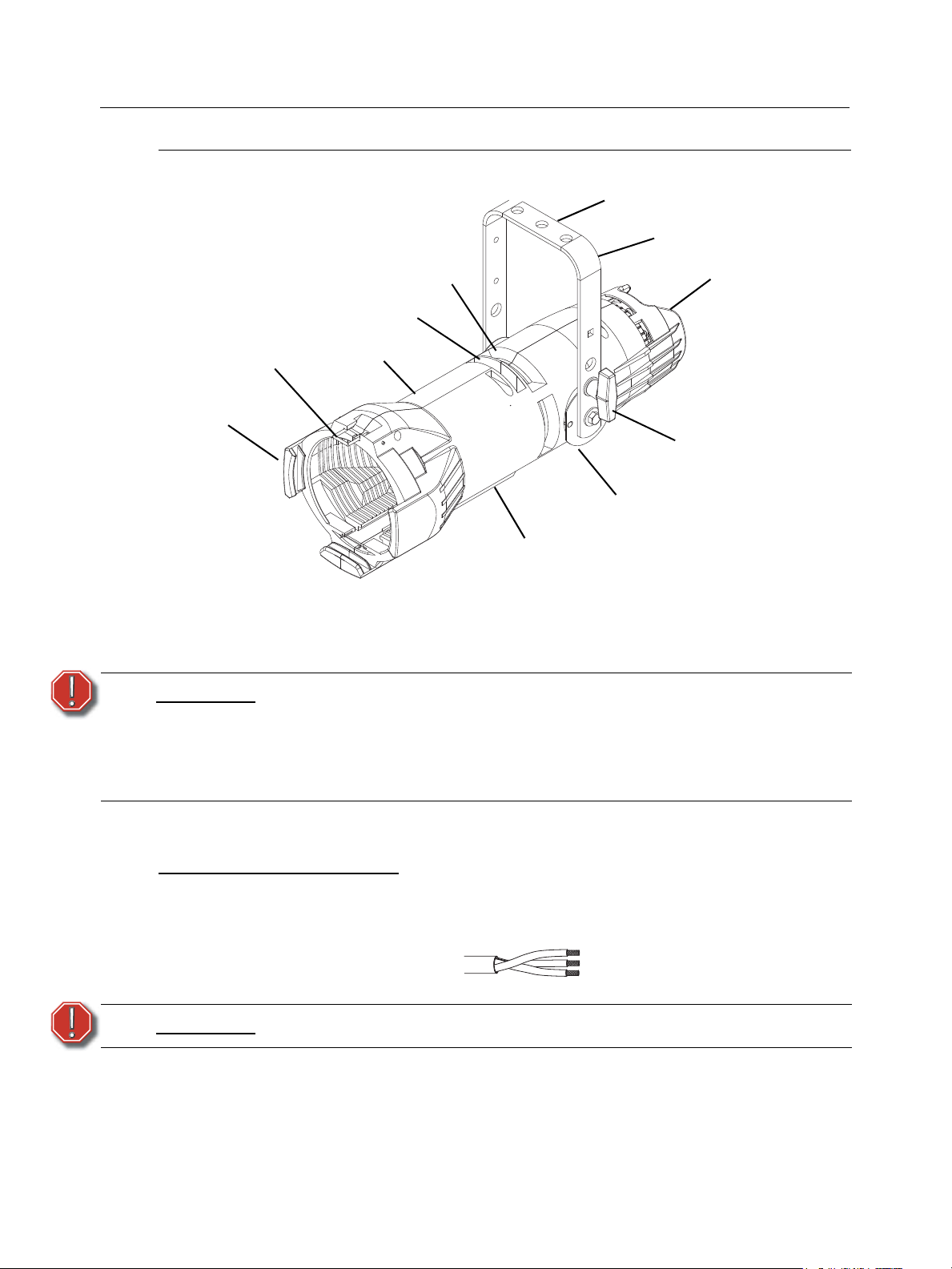
Figure 1
Lamp housing
C-clamp mounting
Barrel
Drop-in iris
slot cover
Pattern holder slot
Gel frame
Zoom rear focus knob
Beam focus knob
(Zoom front focus)
Yoke
Yoke locking knob
Color frame
retaining gel clip
t 180 °c
English
WARNING:
Luminaire information
Wiring and power information
A plug of at least 2.5 amp (220/240V) rating should be attached to the luminaire’s mains lead. The
wires in the mains lead are 1.55mm
Green and Yellow: Earth
Blue: Neutral
Brown: Live
WARNING:
Current rating: 120V/5 amp maximum
Operating frequency: 50/60 Hz
Please note the following safety warnings before use:
Do not mount the luminaire on or near combustible surfaces.
Do not operate the luminaire without a lens installed.
Always hang the luminaire with the colour frame retaining clip in the locked
position.
This luminaire must be earthed.
240V/2.5 amp maximum
2
each and coloured in accordance with the following code:
3
Page 6

English
Figure 2
Retaining clip
HPL lamp table
CAUTION:
The Source Four jr is rated for 575w maximum lamp. Do not use lamps other than
the HPL in Source Four fixtures. Use of lamps other than HPL or greater than
575w will void your warranty.
Lamp code Watts Volts Initial Lumen Colour
HPL 575/230 575 230 14,900 3,200°K 400 hours
HPL 575/230X 575 230 11,780 3,050°K 1500 hours
HPL 375/230 375 230 7,250 3,000°K 1000 hours
HPL 575/240 575 240 14,900 3,050°K 400 hours
HPL 575/240X 575 240 11,780 3,050°K 1500 hours
HPL 375/240X 375 240 19,750 3,000°K 1000 hours
Colour frame holder
Average rated life
temp.
The colour frame holder is equipped with a spring-loaded retaining clip that prevents colour frames
and accessories from falling out. See Figure 2.
WARNING:
Make sure all colour frame accessories are locked in position with the
retaining clip before hanging the Source Four jr / jr Zoom CE.
Step 1: Release the retaining clip by pushing it sideways while gently pulling backwards.
Step 2: Insert the colour frame.
Step 3: Lock the retaining clip by pushing sideways while gently pushing forward.
Note:
The performance of saturated colours may be less than desirable in any theatrical
lighting luminaire. For best results, always use high-quality colour media rated for
high-temperature use.
ETC’s optional Conical Gel Extender, part # 7060A1048, will provide maximum
colour media life. Gel Extenders are not recommended for 70° and 90° lens tubes
due to the extremely wide-angle beam.
A variety of heat shield products is also available from many colour media
manufacturers. Follow the manufacturer’s instructions for the use of these
products.
4 Source Four jr/jr Zoom CE User Manual
Page 7

Replacing the HPL lamp
HPL lamp
Lamp retention
brackets
Figure 3
Knurled bolt
Lamp housing
Lamp retaining clip
INCORRECT
CORRECT
A lamp must be installed before you use the luminaire.
English
Note:
WARNING:
Step 1: Disconnect power to the Source Four jr / jr Zoom CE before installing the lamp.
Step 2: Loosen the knurled bolt on the back of the lamp housing and pull the housing out.
Step 3: Holding by the base, remove the HPL lamp from its box.
CAUTION:
Verify that the HPL lamp you intend to install is suitable for your facility’s voltage;
115-, 120-, 230-, and 240-volt HPL lamps are available. See HPL lamp table, page
4. Operating HPL lamps above their rated voltage reduces lamp life and can cause
premature lamp failure.
Let the lamp cool before replacing.
Use caution when installing or replacing any lamp.
When installing/replacing lamp, be sure to point the lamp away from your face and
away from others before inserting it firmly into the assembly.
This may prevent injuries if the lamp should break.
Note:
Step 4: Align the flat sides of the lamp base with the retention brackets on either side of the
socket as shown in Figure 3.
To avoid premature lamp failure, do not touch the lamp glass. If you do, clean it
carefully with isopropyl alcohol and a clean lint-free cloth. Allow to dry before
operation.
5
Page 8

English
Outer Knob - lamp
center adjustment
Inner Knob peak/flat field
adjustment
Rear lamp
housing
Figure 4
Figure 5
Flat field-best adjustment
Hot spot - lamp pulled out
too far
Field with hole - lamp
pushed in too far
Beam focus knobs
Figure 6
Step 5: Push down on the lamp base until the lamp seats firmly. When properly installed, the top
of the lamp’s base will be even with he top edges of the retention brackets.
CAUTION:
Step 6: Press lamp retaining clip across lamp base to secure.
Step 7: Reinstall the lamp housing by aligning the bolt hole and tightening the knurled bolt.
Improperly installed lamps cause premature lamp failure and socket problems.
Centering lamp and adjusting the field
The two concentric knobs located on the lamp housing allow you to align the lamp and adjust its
field. See Figure 4. The outer knob centers the lamp within the reflector. The inner knob adjusts the
lamp’s field.
Step 1: Turn on the Source Four jr / jr Zoom CE and aim it at a flat surface. Adjust the barrel to
create a hard edge.
Step 2: Unlock and loosen the outer knob by turning it counterclockwise.
Step 3: Gently move the outer knob from side to side and up and down until the lamp is centered
within the reflector.
Step 4: Once the lamp is centered, turn the outer knob clockwise to lock it in place.
Step 5: Finally, turn the inner knob either clockwise or counterclockwise to achieve an optimum
flat field. See Figure 5.
6 Source Four jr/jr Zoom CE User Manual
Focusing the beam
On a fixed field angle Source Four jr., with a 26°, 36° or 50° lens, adjust the lens single beam focus
knob to focus the edge of the beam. On a Source Four jr Zoom, adjust the position of both lens
Page 9

English
Figure 7
M-Size Pattern holder
Drop-in iris slot
Iris
Figure 8
Pattern holder slot
Shutters
beam focus knobs to set the beam’s spread and to focus the edge of the beam. The Zoom lens
provide a range from 25° to 50°.
Step 1: Loosen the beam focus knob(s) on the underside of the barrel as shown in Figure 6.
Step 2: Slide the lens(es) forward or backward to achieve the desired beam edge.
Step 3: Once the luminaire is focused, tighten the beam focus knob(s).
Shaping the beam
The beam can be shaped using the shutters (see Figure 8), a pattern or an optional drop-in iris.
Pattern Projection
The pattern holder slot is on the top side of the barrel and in front of the shutters. It accommodates
an M-size pattern holder (see Figure 7). The pattern holder handle can be bent away from the
shutter handle to keep it from interfering with the action of the shutter handle.
Use an optional donut in the accessory holder to enhance pattern projection. Donut diameter range
should be 6.35 cm to 6.98 cm (2.5” to 2.75”).
Drop-In Iris Slot
The drop-in iris slot is located on the top of the barrel and in front of the pattern holder slot. It
accommodates either a drop-in iris or a motorized pattern device. When the slot is not in use, a
small sheet metal cover secured with two Phillips screws prevents light leakage (see Figure 8).
Step 1: Use a Phillips screwdriver to loosen the screws on the drop-in iris slot cover. Do not
Step 2: Slide the cover completely forward to expose the slot.
Step 3: Insert the iris with the flat side toward the shutters and make sure the iris handle extends
remove screws.
from the slot.
7
Page 10

English
Figure 9
Low clearance position
General use position
Yoke locking knob
Yoke locking knob
Figure 10
Step 4: Slide the slot cover back toward the shutters until it meets the iris handle. Leave enough
space to move the iris handle.
Step 5: Secure the drop-in iris slot cover by tightening the screws.
Adjusting the yoke position
The Source Four jr / jr Zoom provides multi-positioning capabilities within its yoke for overall
luminaire height and angle.
Setting the luminaire height within the yoke
The luminaire is equipped with a two-position yoke for modifying the overall height in which the
luminaire is mounted (see Figure 9). To change the height position, perform the following steps.
Step 1: Remove the yoke locking knobs, washers, and hex bolts from either side of the luminaire.
Step 2: Raise or lower the luminaire to the desired position within the yoke.
Step 3: Reinstall the yoke’s hex bolts, washers, and locking knobs.
Step 4: Tighten the yoke knobs to secure in position.
Setting the angle within the yoke
Step 1: Loosen the yoke locking knobs (see Figure 10). Do not remove them.
Step 2: Tilt the luminaire to the desired position.
Step 3: Tighten the yoke locking knobs to secure in position.
8 Source Four jr/jr Zoom CE User Manual
Page 11

English
Lens tray
Figure 11
Light baffle and
retaining screw
Switching lens assemblies
Follow these procedures to replace a fixed field lens with Zoom lens.
Step 1: Loosen the screw at the front of the baffle. See Figure 11.
Step 2: Pull the light baffle out of the barrel.
Step 3: Remove the beam focus knob from the bottom of the barrel and slide the lens assembly
from the barrel.
Step 4: Slide the Zoom lens rear assembly into the barrel and install its beam focus knob.
Step 5: Slide the Zoom lens front assembly into the barrel and install its beam focus knob.
Step 6: Reinstall the light baffle and secure it with the retaining screw.
Note:
Reverse steps 1-6 to replace Zoom lens with a standard lens.
Cleaning glass lens
WARNING:
Replace lens if they contain visible damage (cracks or deep scratches) that may impair their
effectiveness.
Step 1: Remove the lens assembly. See Source Four jr /jr Zoom Assembly Guide for lens
removal instructions.
Step 2: Remove dust with a blast of oil-free air or wipe with a clean, lint-free cloth. Isopropyl
alcohol, distilled water or a 50%-50% mixture of each can be used to clean the glass
surface.
Step 3: Reinstall the lens assembly.
Do not use ammonia-based or other harsh commercial cleaners. Clean lens
only as directed.
Commercially available glass cleaning agents should be avoided as they
may contain ammonia, other harsh chemical detergents or abrasive agents.
These cleaners may damage the glass surface and the Anti-Reflective
coatings. Do not immerse or soak the glass in any cleaning solution.
9
Page 12

English
Cleaning the reflector
WARNING:
WARNING:
To quickly clean the reflector, and. You may also wipe the reflector with a clean lint-free cloth. If
either method is not sufficient, follow these steps.
Step 1: To protect the lamp housing during cleaning, remove the lamp housing by loosening the
knurled bolt and pulling the housing straight out. See Figure 3.
Step 2: Remove the lens. See Source Four jr / jr Zoom Assembly Guide for full fixture
disassembly/assembly instructions.
Step 3: Remove dust with a blast of oil-free air or wipe with a clean, lint-free cloth. Isopropyl
alcohol, distilled water or a 50%-50% mixture of each can be used to clean the glass
surface.
Step 4: Reinstall the lamp housing and tighten the knurled bolt.
Step 5: Reinstall the lens.
Unplug the fixture before attempting to clean the reflector.
Do not use ammonia-based or other harsh commercial cleaners. Clean
reflector only as directed.
Commercially available glass cleaning agents should be avoided as they
may contain ammonia, other harsh chemical detergents or abrasive agents.
These cleaners may damage the glass surface and the Anti-Reflective
coatings. Do not immerse or soak the glass in any cleaning solution.
10 Source Four jr/jr Zoom CE User Manual
Page 13

English
Figure 12
PAT connection point
Portable appliance test (PAT)
The Portable Appliance Test is a set of tests that must be administered to electrical equipment in
the UK and some locations in Europe to ensure safety.The tests are typically carried out using a
small PAT device. The PAT device connects to a power source and then attaches to the product
via an electrical outlet and test probes. The PAT provides a simple pass or fail result, allowing rapid
testing of large inventories.
Source Four CE luminaires include a specific PAT point where the test clip is attached, as shown
in Figure 12. PAT tests should be performed by a qualified technician. Your local regulatory
authority has guidelines on the testing frequency.
11
Page 14

English
This page intentionally left blank.
12 Source Four jr/jr Zoom CE User Manual
Page 15

English
This page intentionally left blank.
13
Page 16

Corporate Headquarters
London, UK
Rome, IT
Unit 26-28, Victoria Industrial Estate, Victoria Road, London W3 6UU, UK Tel +44 (0)20 8896 1000 Fax +44 (0)20 8896 2000
Via Ennio Quirino Visconti, 11, 00193 Rome, Italy Tel +39 (06) 32 111 683 Fax +39 (06) 32 656 990
Holzkirchen, DE
3031 Pleasant View Road, P.O. Box 620979, Middleton, Wisconsin 53562-0979 USA Tel +608 831 4116 Fax +608 836 1736
Ohmstrasse 3, 83607 Holzkirchen, Germany Tel +49 (80 24) 47 00-0 Fax +49 (80 24) 47 00-3 00
Hong Kong Rm 1801, 18/F, Tower 1 Phase 1, Enterprise Square, 9 Sheung Yuet Road, Kowloon Bay, Kowloon, Hong Kong Tel +852 2799 1220 Fax +852 2799 9325
Service:
(Americas) service@etcconnect.com
Web:
www.etcconnect.com
7062M1210-06.01
Rev B Released 06/2008
Copyright © 2008 ETC. All Rights Reserved. Product information and specifications subject to change.
(UK) service@etceurope.com (DE) techserv-hoki@etcconnect.com
(Asia) service@etcasia.com
 Loading...