

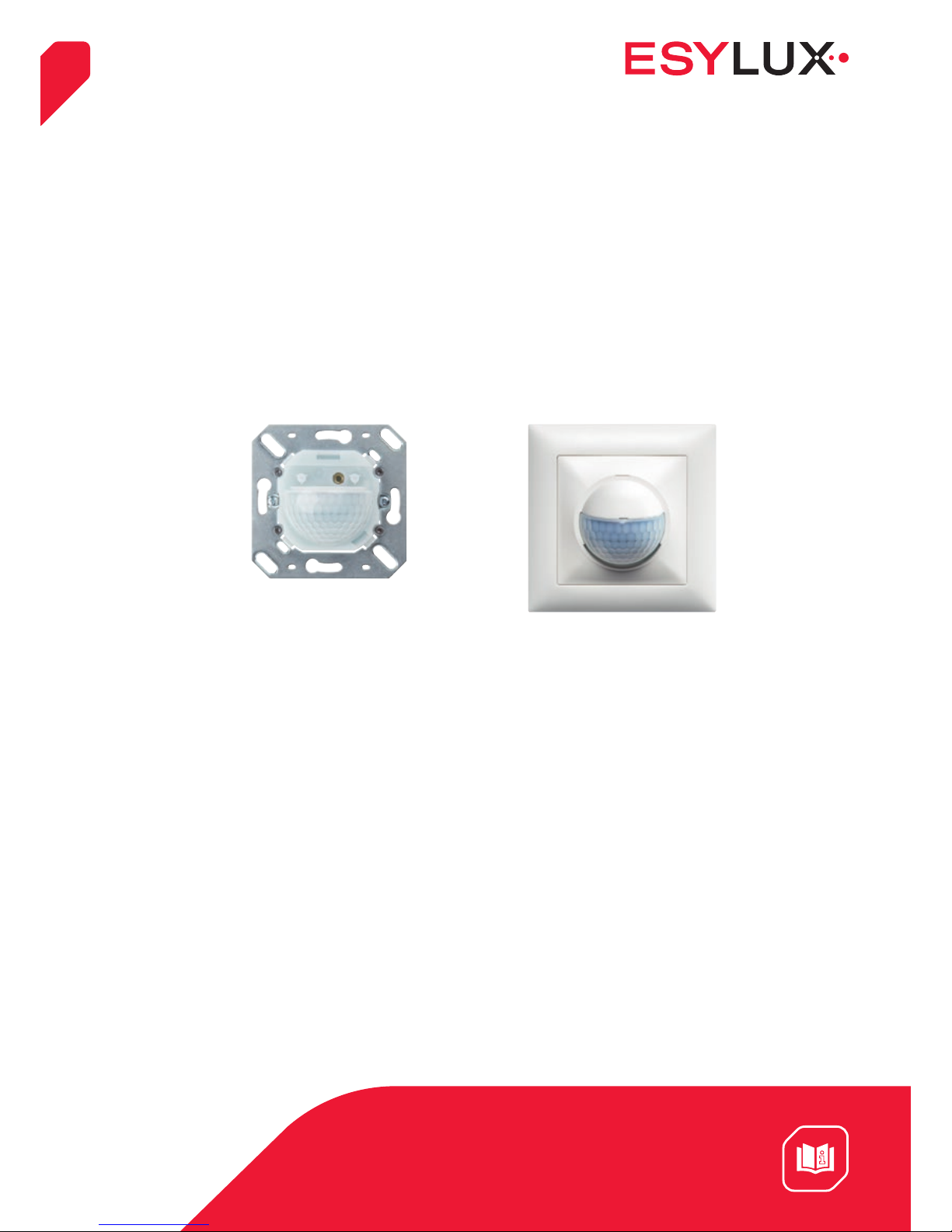
ESYLUX MD 180i/16 BASIC, EB10430459, MD 180i/16 BASIC CH, EB10430602 Operating Instructions Manual
Page 1
1
ESYLUX GmbH | An der Strusbek 40
22926 Ahrensburg | Germany
[email protected] | www.esylux.com
Operating instructions
MD 180i/16 BASIC
EB10430459
MD 180i/16 BASIC CH
EB10430602
MA00564901
06/2017
Page 2

OPERATING INSTRUCTIONS
MD 180i/16 BASIC
MD 180i/16 BASIC CH
2 / 19
GB
Table of contents
1 Description 3
2 Safety instructions 3
3 Operation / functionality 4
3.1 Conditions in which the lighting is switched on 4
3.2 Conditions in which the lighting is switched off 4
3.3 Switching delay – not in pulse mode 5
4 Installation / connection 5
4.1 Masking the field of detection 6
5 Activation 7
5.1 Overview of factory settings 7
6 Settings 7
6.1 Control via external “S” button 7
6.2 Configuring parameters via remote control 8
6.3 Mobil-PDi/MDi 8
6.4 Mobil-PDi/MDi temporary settings 9
6.5 Programming the Mobil-PDi/MDi 10
6.6 Mobil-PDi/MDi-universal 12
6.7 Mobil-PDi/MDi-universal temporary settings 12
6.8 Programming the Mobil-PDi/MDi-universal 13
6.9 “12 h ON / OFF” function 16
7 Technical data 17
8 Troubleshooting 18
8.1 Maintenance 18
8.2 Cleaning 19
9 ESYLUX manufacturer's guarantee 19
Page 3

OPERATING INSTRUCTIONS
MD 180i/16 BASIC
MD 180i/16 BASIC CH
3 / 19
GB
1 Description
The ESYLUX wall-mounted motion detector is a passive infrared presence detector
which responds to moving heat sources, such as people walking.
The motion detector is designed for areas with low levels of natural light, such as
hallways, cellars, staircases, changing rooms, toilets, garages etc.
Parameters can be configured using the ESYLUX Mobil-PDi/MDi and Mobil-PDi/MDiuniversal remote controls.
Note: Use this product only as intended (as described in the user instructions).
The device must not be changed, modified or painted – doing so will void any warranty
claims. You must check the device for damage immediately after unpacking it. If there
is any damage, you should not install the device under any circumstances.
If you suspect that safe operation of the device cannot be guaranteed, you should turn
the device off immediately and make sure that it cannot be operated unintentionally.
2 Safety instructions
• Work on the 230-V power system must be carried out by authorised personnel only,
with due regard to the applicable installation regulations / standards
• Switch off the power supply before installing the system
• On the input side, the device is to be protected against short circuits with a 10-A circuit
breaker
• Protection type IP 40 for interior use
Page 4
OPERATING INSTRUCTIONS
MD 180i/16 BASIC
MD 180i/16 BASIC CH
4 / 19
GB
3 Operation / functionality
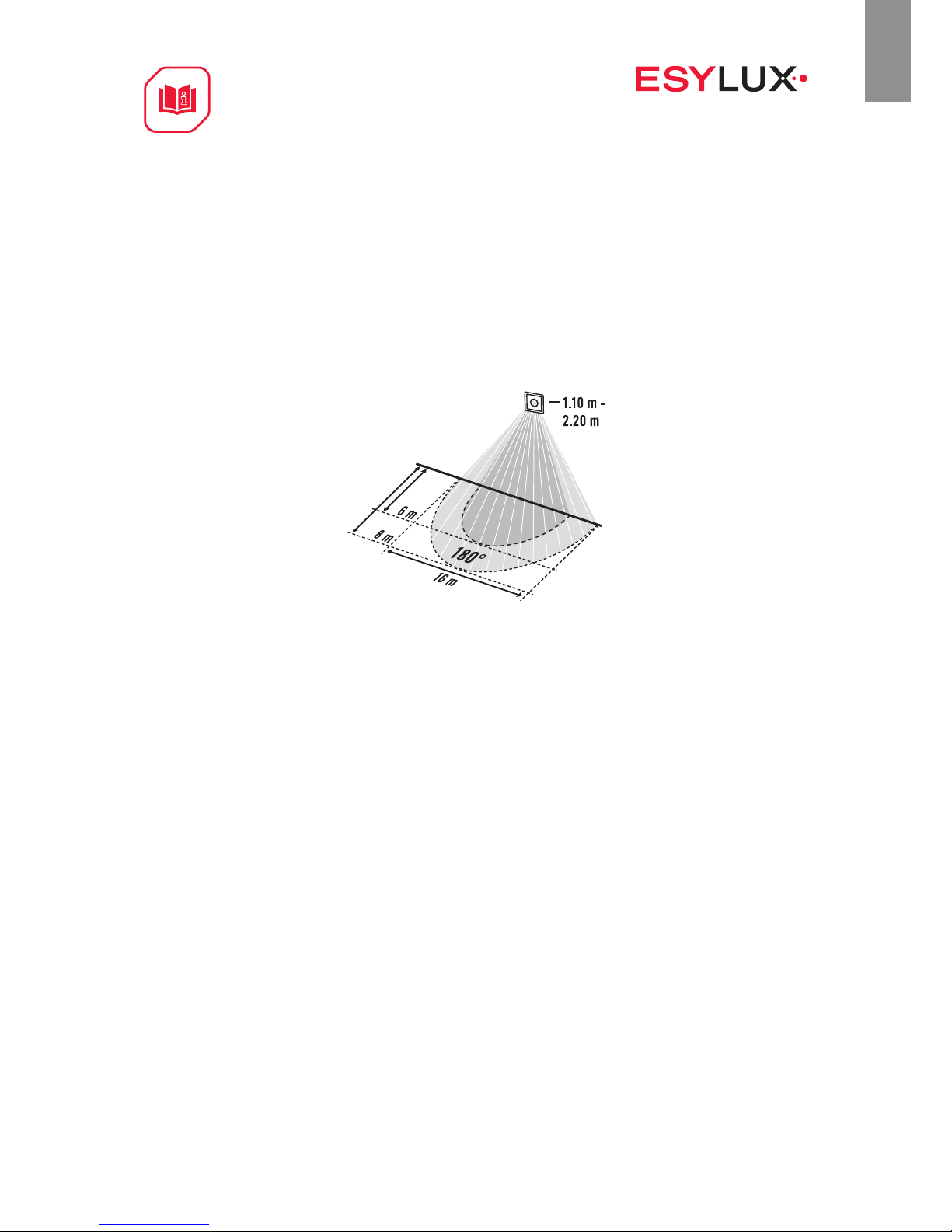
• The ESYLUX wall-mounted motion detector, which has a 180° field of detection,
is only suitable for wall mounting
• The range is up to 16 m in diameter at a recommended installation height
of 1.10 - 2.20 m
• The motion detector has one channel (C1), which is used for presence-dependent
lighting control
• The setting options can vary depending on the remote control used; please see
“Configuring parameters via remote control”
3.1 Conditions in which the lighting is switched on
The lighting is switched on if the target brightness value is below the preset lux
value and movement is detected in the field of detection. Further movement is
acknowledged by the sensor with two short flashes of the red LED (the LED can be
switched off; see “Configuring parameters via remote control”). Once the lighting has
been switched on, the sensor deactivates light measurement for this period.
3.2 Conditions in which the lighting is switched off
The lighting is switched off if no movement is detected in the field of detection and
the preset switch-off delay time has elapsed.
Page 5
OPERATING INSTRUCTIONS
MD 180i/16 BASIC
MD 180i/16 BASIC CH
5 / 19
GB
3.3 Switching delay – not in pulse mode
When persons are present, in order to avoid sudden changes in brightness caused by
undesired switching on / off of the lighting, the detector will only be triggered after a
time delay.
Example: a passing cloud could potentially cause unnecessary switching.
Time delay from light to dark: 30 sec. = red LED lights up during this period.
Time delay from dark to light: 5 min. = red LED flashes slowly during this period
4 Installation / connection
Note: Switch off the power supply before installing the system.
• The detector is designed to be installed in European flush-mounted boxes
• Specifications regarding the range of the detector relate to an ambient temperature
of approx. 20 °C
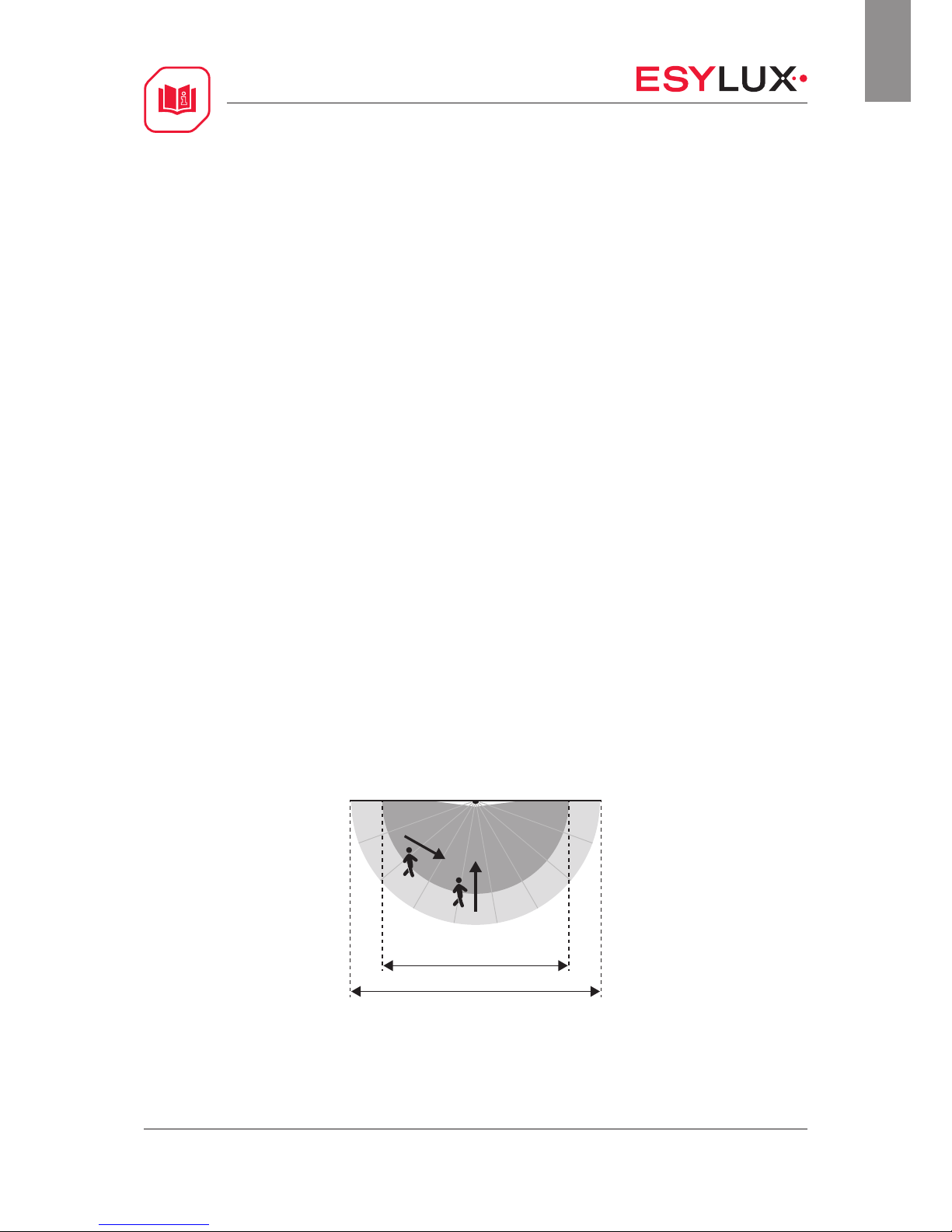
• Movement crossways to the detector is optimal for triggering the detector; head-on
approaches to the detector are more difficult to detect and therefore the range of
the detector is significantly reduced
16 m
12 m
Page 6
OPERATING INSTRUCTIONS
MD 180i/16 BASIC
MD 180i/16 BASIC CH
6 / 19
GB
• The detector should be positioned depending on the available space and usage
requirements
• Make sure that the detector has a clear line of sight, as infrared beams cannot
penetrate solid objects
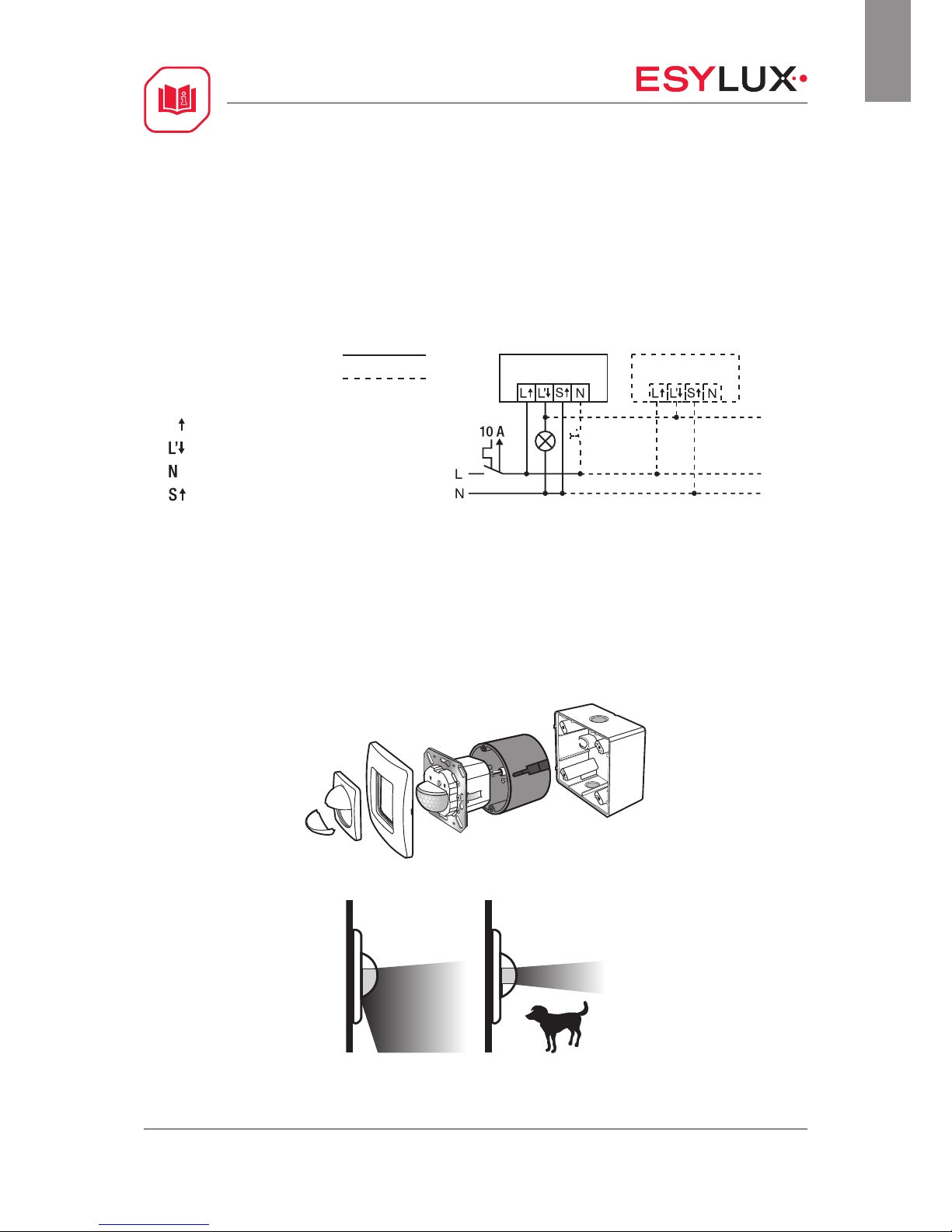
• Connect the detector in accordance with the circuit diagram
Single connection
Parallel connection
L Phase, 230 V
Lighting
Neutral conductor
Push button
4.1 Masking the field of detection
Part of the field of detection can be specifically masked off using the lens mask to
avoid false alarms being caused by e.g. pets.
Page 7

OPERATING INSTRUCTIONS
MD 180i/16 BASIC
MD 180i/16 BASIC CH
7 / 19
GB
5 Activation
Connect the power supply.
A warm-up phase of 25 seconds is initiated. The red LED (for C1) and the blue LED
flash alternately: 2 x red and 1 x blue. During this time, the lighting is switched on.
5.1 Overview of factory settings
Factory settings
Light value approx. 100lux
Switch-off delay time 5 min.
Sensitivity 100 %
6 Settings
6.1 Control via external “S” button
The wall-mounted motion detector is equipped with a connection for an external
button (S terminal). This can be used to switch the lighting on and off manually.
Modes activated by pressing the external button:
Press button for approx. 1 second: The lighting is switched on or off.
Acknowledgement: green LED
Press button for approx. 3 second: The lighting is switched on or off continuously for
4 hours
Acknowledgement: red LED
Press button for approx. 5 second: The lighting is switched on or off continuously for
12 hours
Acknowledgement: blue LED
Page 8
OPERATING INSTRUCTIONS
MD 180i/16 BASIC
MD 180i/16 BASIC CH
8 / 19
GB
The LED feedback can be used to determine the mode that the wall-mounted motion
detector is currently switched to.
Example: Please release the button after approx. 3 seconds – the red LED lights up and
the “4 h ON / OFF” mode is activated.
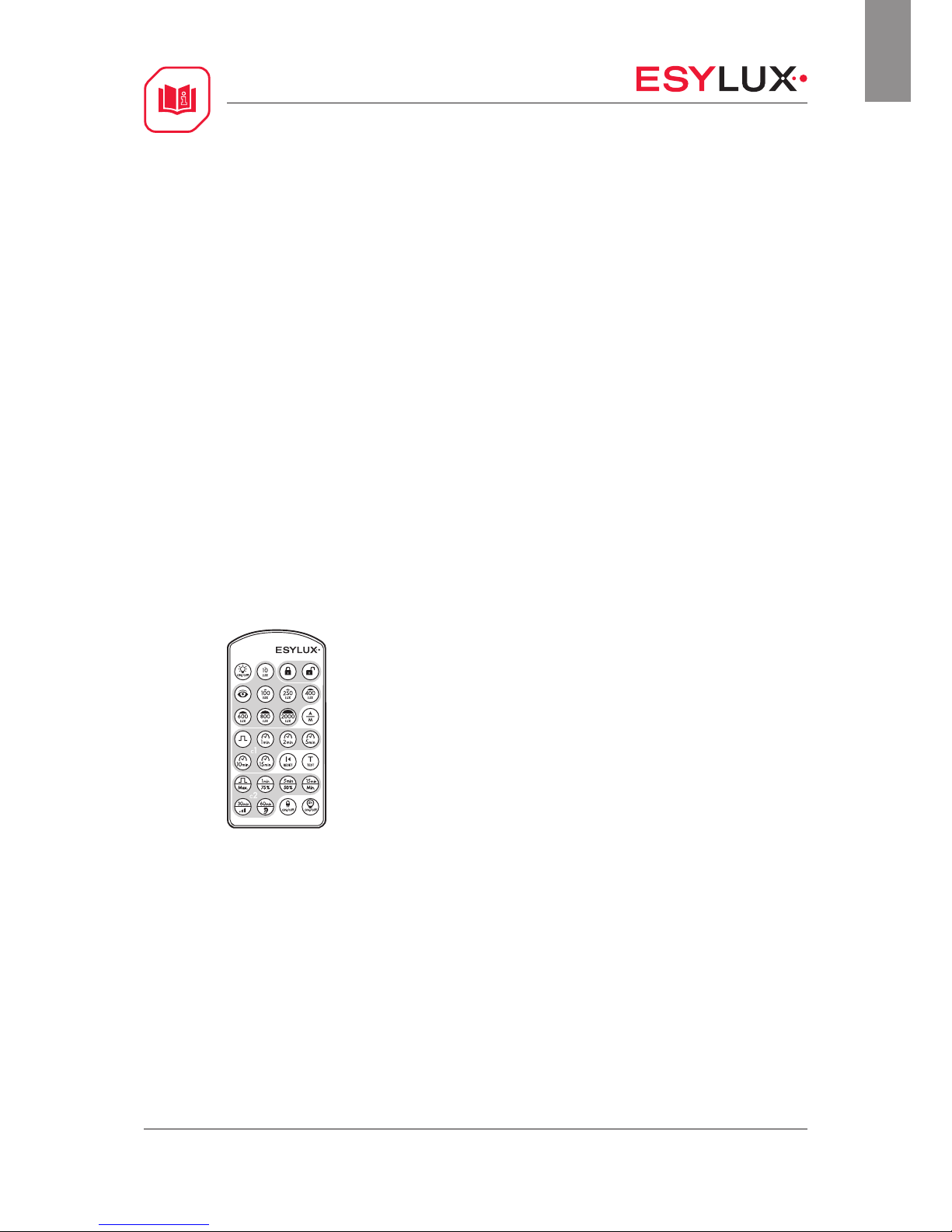
Further parameters can be configured via remote control. Remote controls can be
purchased as accessories.
6.2 Configuring parameters via remote control
Note: For optimum reception, when programming the settings, point the remote
control at the detector. Please note that if the sensor is exposed to direct sunlight, the
standard detection range of approx. 8 m may be dramatically reduced due to the sun's
infrared rays.
6.3 Mobil-PDi/MDi (EM10425509)
Page 9

OPERATING INSTRUCTIONS
MD 180i/16 BASIC
MD 180i/16 BASIC CH
9 / 19
GB
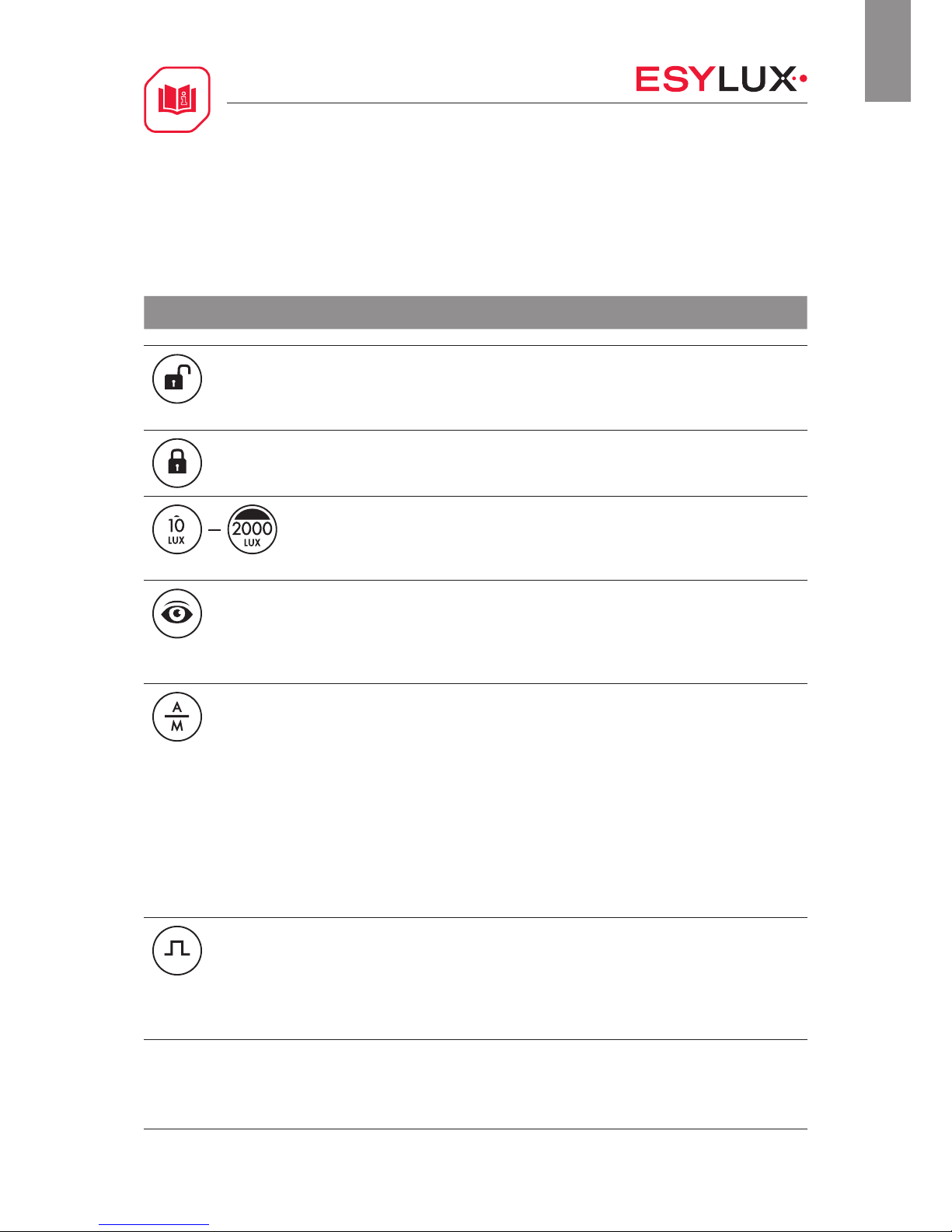
6.4 Mobil-PDi/MDi temporary settings
Parameter configurations are only temporarily applied.
Function Customised setting
ON / OFF
Switching the lighting ON / OFF manually.
Note: The “ON / OFF” mode can be cancelled by pressing the “Reset” button.
“ON” acknowledgement: Movement detected in the field of detection is
acknowledged with two short flashes of the red LED.
“OFF” acknowledgement: Movement detected in the field of detection is
acknowledged with one short flash of the red LED.
Reset / settings
Temporarily set values are cleared and the detector returns to the manually
preset operating mode.
Test
Test mode is used for testing the field of detection and takes approx. 5 min.
During this time, the lighting is switched on. Afterwards, the detector returns
to the preset operating mode.
Acknowledgement: Movement detected in the field of detection is
acknowledged with two short flashes of the blue LED.
4 h ON / OFF
The lighting is switched on or off continuously for approx. 4 hours. If no
movement is detected in the field of detection and the preset switch-off delay
time has elapsed, the detector returns to the previous operating mode.
Note: The “4 h ON / OFF” mode can be cancelled by pressing the “Reset”
button.
Page 10
OPERATING INSTRUCTIONS
MD 180i/16 BASIC
MD 180i/16 BASIC CH
10 / 19
GB
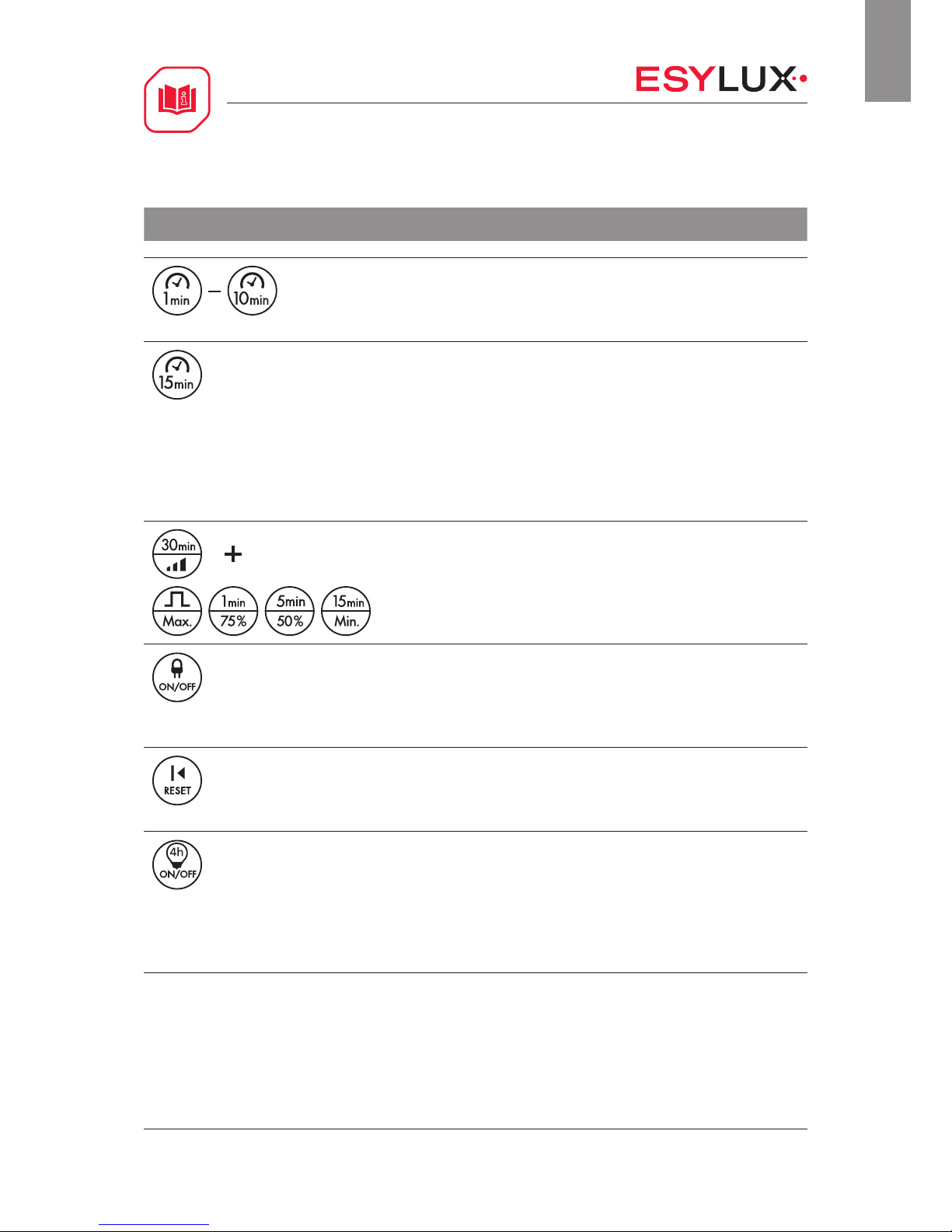
6.5 Programming the Mobil-PDi/MDi
Alterations to parameters are applied permanently.
Function Customised setting
Enter programming mode
The detector goes into programming mode.
Acknowledgement: The blue LED lights up permanently and the lighting is
switched on continuously.
Exit programming mode
The set parameters are stored on the detector.
Acknowledgement: The blue LED is switched off.
Set the brightness switching value, max. 1000 lux
The detector switches the lighting on if the target brightness value is below the
preset lux value and movement is detected in the field of detection.
Acknowledgement: The red and blue LEDs flash three times.
Take a reading of the current ambient light value
The detector switches the lighting on if the target brightness value is below the
preset lux value and movement is detected.
Acknowledgement: The blue LED and the lighting are switched off for approx.
5 seconds while the reading is taken.
Fully automatic / semi-automatic mode
The lighting can be controlled in fully automatic and semi-automatic modes.
Fully automatic: The lighting is switched on depending on the set lux value
and movement being detected. If movement is no longer detected, the preset
switch-off delay time will start. The relevant active status can be optionally
overridden using the external “S” button.
Acknowledgement: The blue LED flashes three times.
Semi-automatic: Control (activation of the lighting) via the external “S”
button. The lighting remains switched on as long as movement is detected and
the target brightness value is greater than the preset lux value.
Acknowledgement: The blue LED is switched off for approx. 2 seconds.
Short pulse
As soon as movement has been detected in the field of detection, the detector
switches the lighting on for approx. 1 second and off for approx. 9 seconds.
This function can be used to control automatic stairwell lights, for example.
Acknowledgement: The red LED is switched on for approx. 5 seconds and off
for 5 seconds.
Page 11
OPERATING INSTRUCTIONS
MD 180i/16 BASIC
MD 180i/16 BASIC CH
11 / 19
GB
Function Customised setting
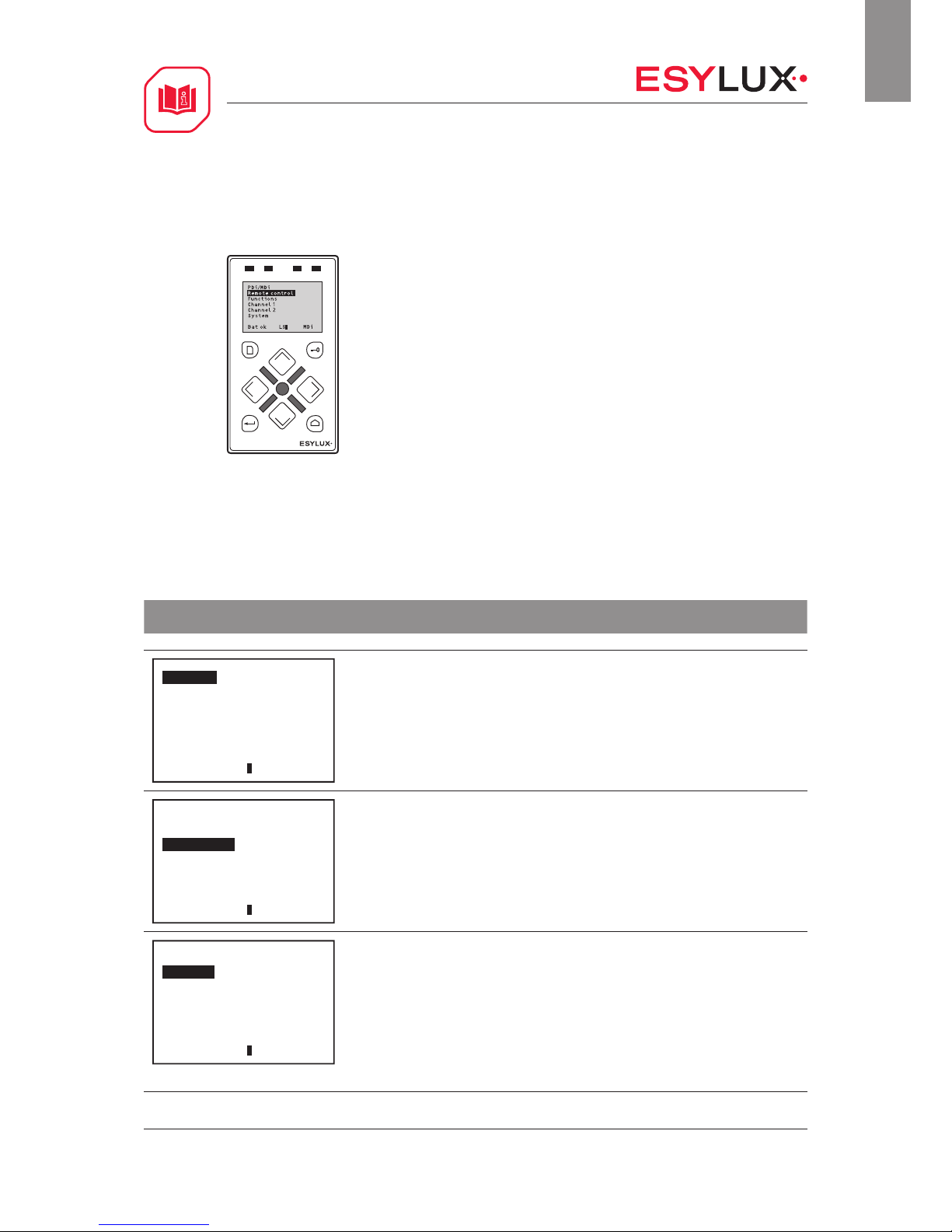
Switch-off delay time
The switch-off delay time starts once movement is no longer detected in the
field of detection.
Acknowledgement: the red and blue LEDs flash three times.
Extend the switch-off delay time; max. 60 min.
By pressing the button repeatedly, the switch-off delay time can be extended
as follows:
1 x = 15 min. Acknowledgement: The blue LED flashes once
2 x = 30 min. Acknowledgement: The blue LED flashes twice in 5-sec. cycles
3 x = 45 min. Acknowledgement: The blue LED flashes three times in 5-sec.
cycles
4 x = 60 min. Acknowledgement: The blue LED flashes four times in 5-sec.
cycles
PIR sensitivity
Settings: maximum (100 %), 75 %, 50 %, minimum (25 %)
The sensitivity of the detector for the purpose of detecting movement can be set.
Acknowledgement: the red and blue LEDs flash three times.
Detector LEDs ON / OFF
The LEDs in the detector can be switched on or off.
Acknowledgement:
LEDs OFF: The blue LED is switched off for approx. 2 seconds.
LEDs ON: The blue LED flashes three times.
Reset
The remote control settings are reset and the detector uses the manual
potentiometer values.
Acknowledgement: The red and blue LEDs flash three times.
12 h ON / OFF
The lighting is switched on or off continuously for approx. 12 hours. If no
movement is detected in the field of detection and the preset switch-off delay
time has elapsed, the detector returns to the previous operating mode.
Note: The “12 h ON / OFF” mode can only be exited by entering the
programming mode and using the “Reset” function.
Acknowledgement: The red and blue LEDs flash three times.
Page 12
OPERATING INSTRUCTIONS
MD 180i/16 BASIC
MD 180i/16 BASIC CH
12 / 19
GB
6.6 Mobil-PDi/MDi-universal (EP10433993)
6.7 Mobil-PDi/MDi-universal temporary settings
Parameter configurations are only temporarily applied.
Function Customised setting
PDi/ MDi
Remote control
Functions
Channel 1
Channel 2
System
Bat ok LS MDi
Selecting remote control:
PDi/ MDi
Remote control
Functions
Channel 1
Channel 2
System
Bat ok LS MDi
To configure temporary settings, select the sub-item “Functions” in the “PDi/MDi”
menu.
Functions
ON/OFF
Tes t
Reset
4 h ON/OFF
Bat ok LS MDi
ON / OFF
Manual switching on / off of lighting.
Note: The “4 h ON / OFF” mode cannot be interrupted using the “ON / OFF” function; it
can only be interrupted using the “Reset” function.
“ON” acknowledgement: Movement detected in the field of detection is acknowledged
with two short flashes of the red LED.
“OFF” acknowledgement: Movement detected in the field of detection is acknowledged
with one short flash of the red LED.
Page 13
OPERATING INSTRUCTIONS
MD 180i/16 BASIC
MD 180i/16 BASIC CH
13 / 19
GB
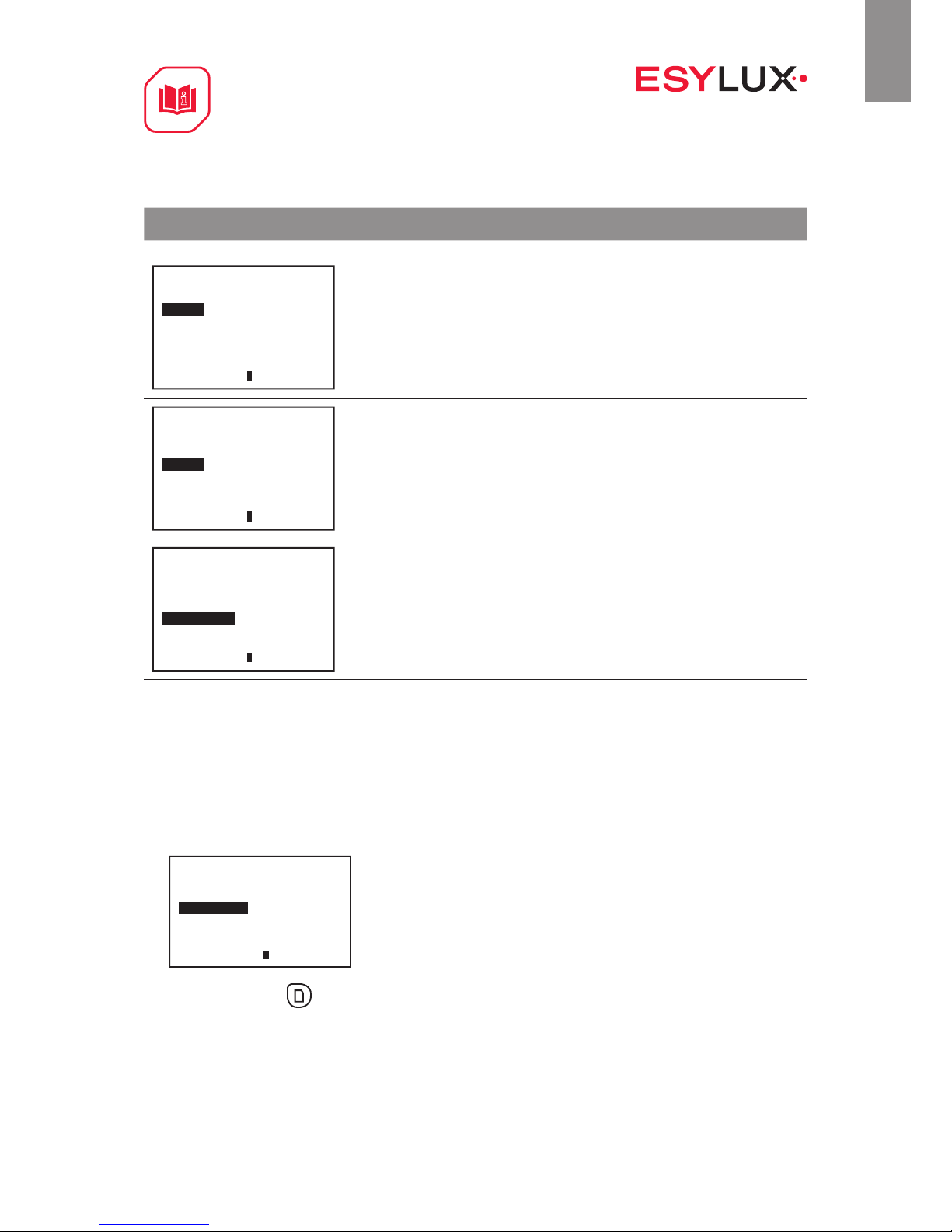
Function Customised setting
Functions
ON/OFF
Tes t
Reset
4 h ON/OFF
Bat ok LS MDi
Test
Test mode is used for testing the field of detection and takes approx. 5 min. During
this time, the lighting is switched on. Afterwards, the detector returns to the preset
operating mode.
Acknowledgement: Movement detected in the field of detection is acknowledged with
two short flashes of the blue LED.
Functions
ON/OFF
Tes t
Reset
4 h ON/OFF
Bat ok LS MDi
Reset / settings
Temporarily set values are cleared. The detector returns to the preset operating mode.
Functions
ON/OFF
Tes t
Reset
4 h ON/OFF
Bat ok LS MDi
4 h ON / OFF
The lighting is switched on or off continuously for approx. 4 hours. If no movement is
detected in the field of detection and the preset switch-off delay time has elapsed, the
detector returns to the previous operating mode.
Note: The “4 h ON / OFF” mode can be temporarily exited using the “Reset” function.
6.8 Programming the Mobil-PDi/MDi-universal
Programmed values are applied permanently.
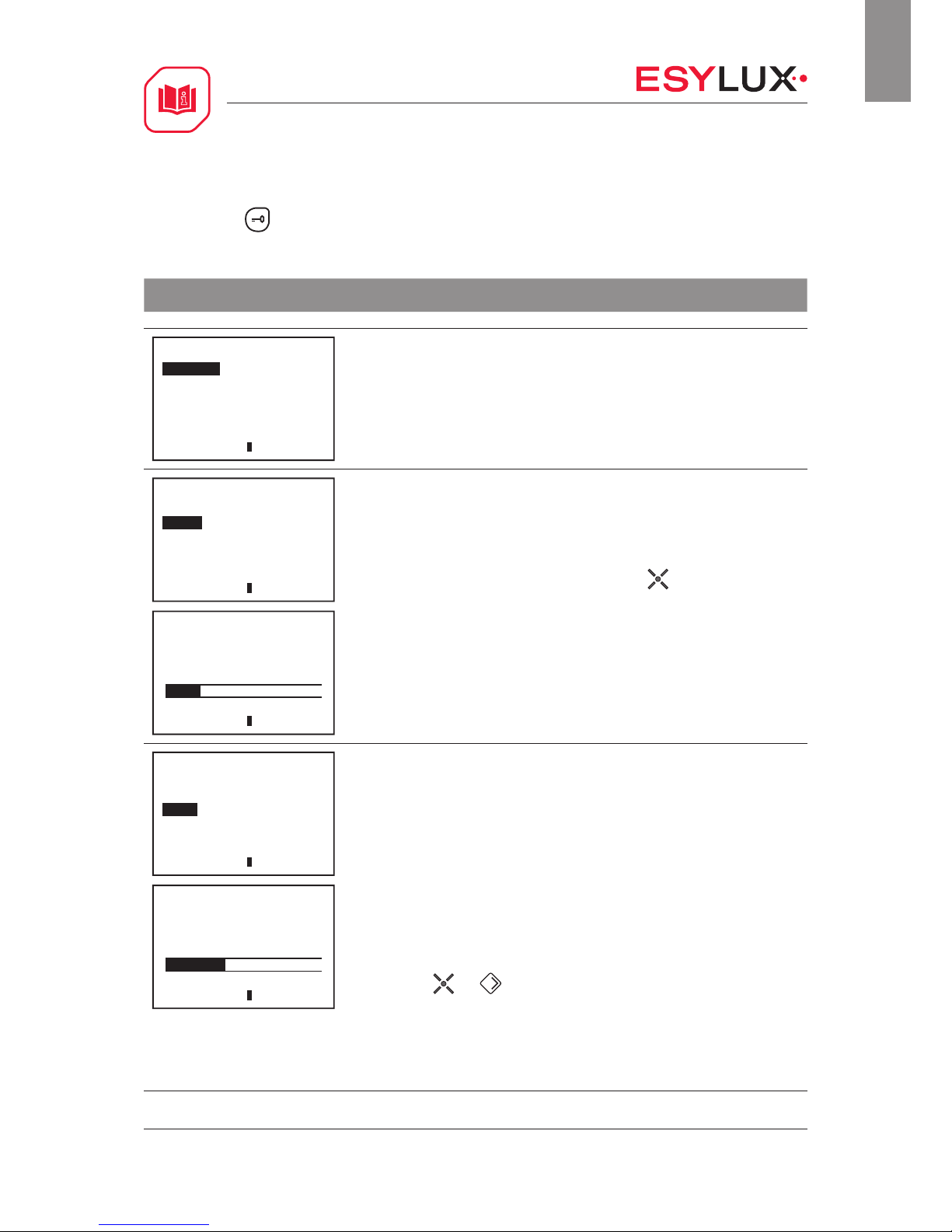
1. Select the sub-item “Channel 1” in the “PDi/MDi” menu.
PDi/ MDi
Remote control
Functions
Chan nel 1
Chan nel 2
System
Bat ok LS MDi
2. Then press the button to enter programming mode. Acknowledgement: The blue
LED lights up permanently and the lighting is switched on continuously.
Page 14
OPERATING INSTRUCTIONS
MD 180i/16 BASIC
MD 180i/16 BASIC CH
14 / 19
GB
3. Press the button to exit programming mode.
Acknowledgement: The blue LED is switched off.
Function Customised setting
Channel 1
Read-in
Lig ht
Tim e
Reset
LEDs ON/OFF
Fully/semi-automatic
Bat ok LS MDi
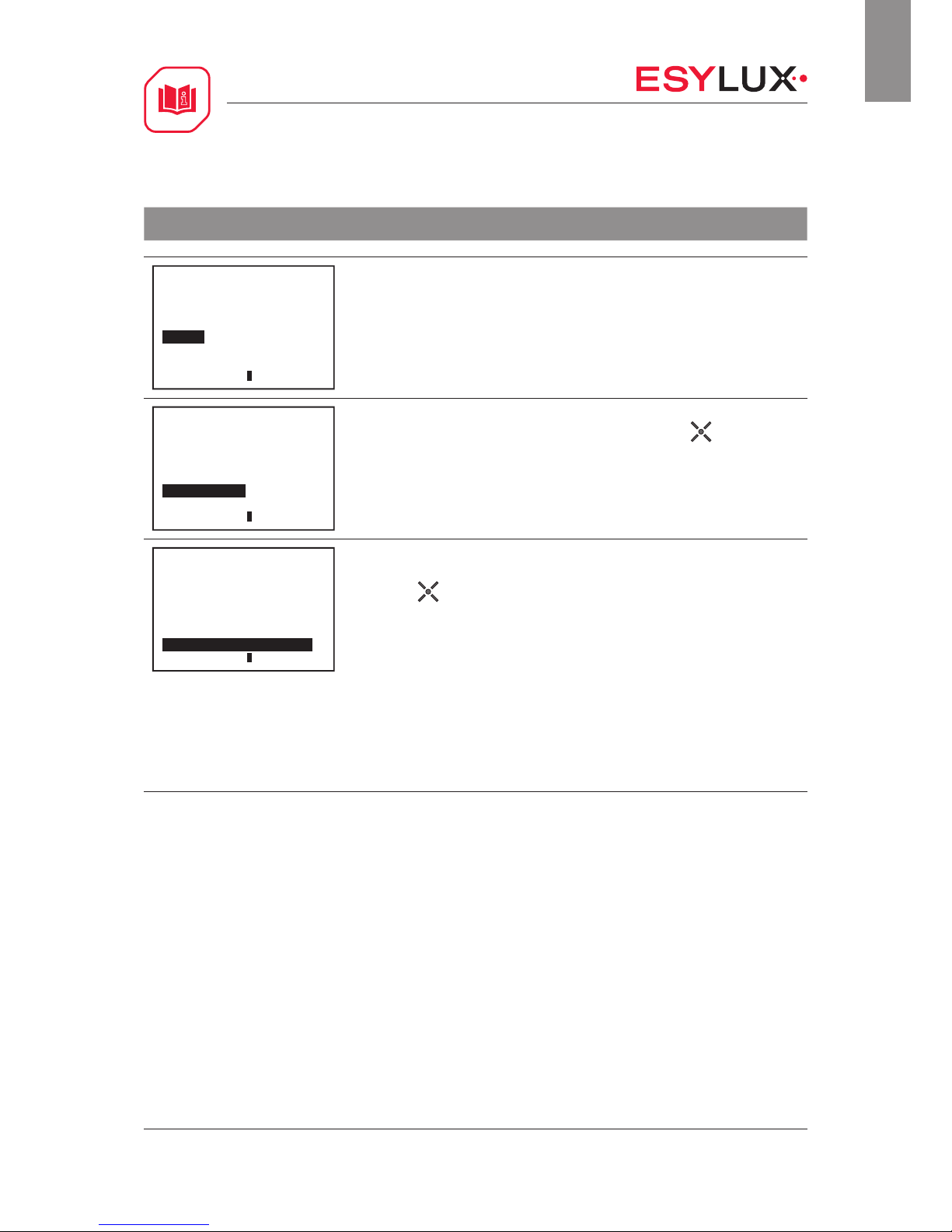
Take a reading of the current ambient light value
The detector switches the lighting on if the target brightness value is below the preset
lux value and movement is detected in the field of detection.
Acknowledgement: The blue LED and the lighting are switched off for approx. 5
seconds while the reading is taken.
Channel 1
Read-in
Lig ht
Tim e
Reset
LEDs ON/OFF
Fully/semi-automatic
Bat ok LS MDi
Lig ht
400 Lux
Bat ok LS MDi
Set the brightness switching value
Setting values: 10, 100, 250, 400, 600, 800, 2000 lux
The detector switches the lighting on if the target brightness value is below the preset
lux value and movement is detected in the field of detection.
Acknowledgement: The red and blue LEDs flash three times in cycles if the selected
brightness switching value has been confirmed using the button.
Channel 1
Read-in
Lig ht
Tim e
Reset
LEDs ON/OFF
Fully/semi-automatic
Bat ok LS MDi
Tim e
5 min
Bat ok LS MDi
Switch-off delay time
Setting values: Short pulse, 1, 2, 5, 10 min.
Short pulse
As soon as movement has been detected in the field of detection, the detector switches
the lighting on for approx. 1 second and off for approx. 9 seconds. This function can be
used for operating automatic stairwell lights, for example.
Acknowledgement: The red LED is switched on for 1 seconds and off for 9 seconds.
Switch-off delay time: 1, 2, 5, 10 min.
The switch-off delay time starts once movement is no longer detected in the field of detection.
Acknowledgement: The red and blue LEDs flash three times in cycles.
Extend the switch-off delay time; max. 60 min.
By pressing the
and buttons repeatedly (max. four times), the switch-off
delay time can be extended as follows:
1 x = 15 min. Acknowledgement: The blue LED flashes once
2 x = 30 min. Acknowledgement: The blue LED flashes twice in 5-sec. cycles
3 x = 45 min. Acknowledgement: The blue LED flashes three times in 5-sec. cycles
4 x = 60 min. Acknowledgement: The blue LED flashes four times in 5-sec. cycles
Page 15
OPERATING INSTRUCTIONS
MD 180i/16 BASIC
MD 180i/16 BASIC CH
15 / 19
GB
Function Customised setting
Channel 1
Read-in
Lig ht
Tim e
Reset
LEDs ON/OFF
Fully/semi-automatic
Bat ok LS MDi
Reset / factory settings
The remote control settings are reset and the detector reverts to the factory settings.
Acknowledgement: The red and blue LEDs flash three times in cycles.
Channel 1
Read-in
Lig ht
Tim e
Reset
LEDs ON/OFF
Fully/semi-automatic
Bat ok LS MDi
Detector LEDs ON / OFF
The LEDs in the detector can be switched on or off by pressing the button.
Acknowledgement:
LEDs OFF: The blue LED is switched off for approx. 2 seconds.
LEDs ON: The blue LED flashes three times.
Channel 1
Read-in
Lig ht
Tim e
Reset
LEDs ON/OFF
Fully/semi-automatic
Bat ok LS MDi
Fully automatic / semi-automatic mode
The lighting can be controlled in fully automatic and semi-automatic modes by
pressing the button.
Fully automatic: The lighting is switched on depending on the set lux value and
movement being detected. If movement is no longer detected, the preset switch-off
delay time will start. This mode can be optionally switched on or off using the external
“S” button.
Acknowledgement: The blue LED flashes three times.
Semi-automatic: The lighting is controlled using the external “S” button. The lighting
remains switched on as long as movement is detected and the target brightness value
is greater than the preset lux value.
Acknowledgement: The blue LED is switched off for approx. 2 seconds.
Page 16
OPERATING INSTRUCTIONS
MD 180i/16 BASIC
MD 180i/16 BASIC CH
16 / 19
GB
6.8 12 h ON / OFF function
Programmed values are applied permanently.
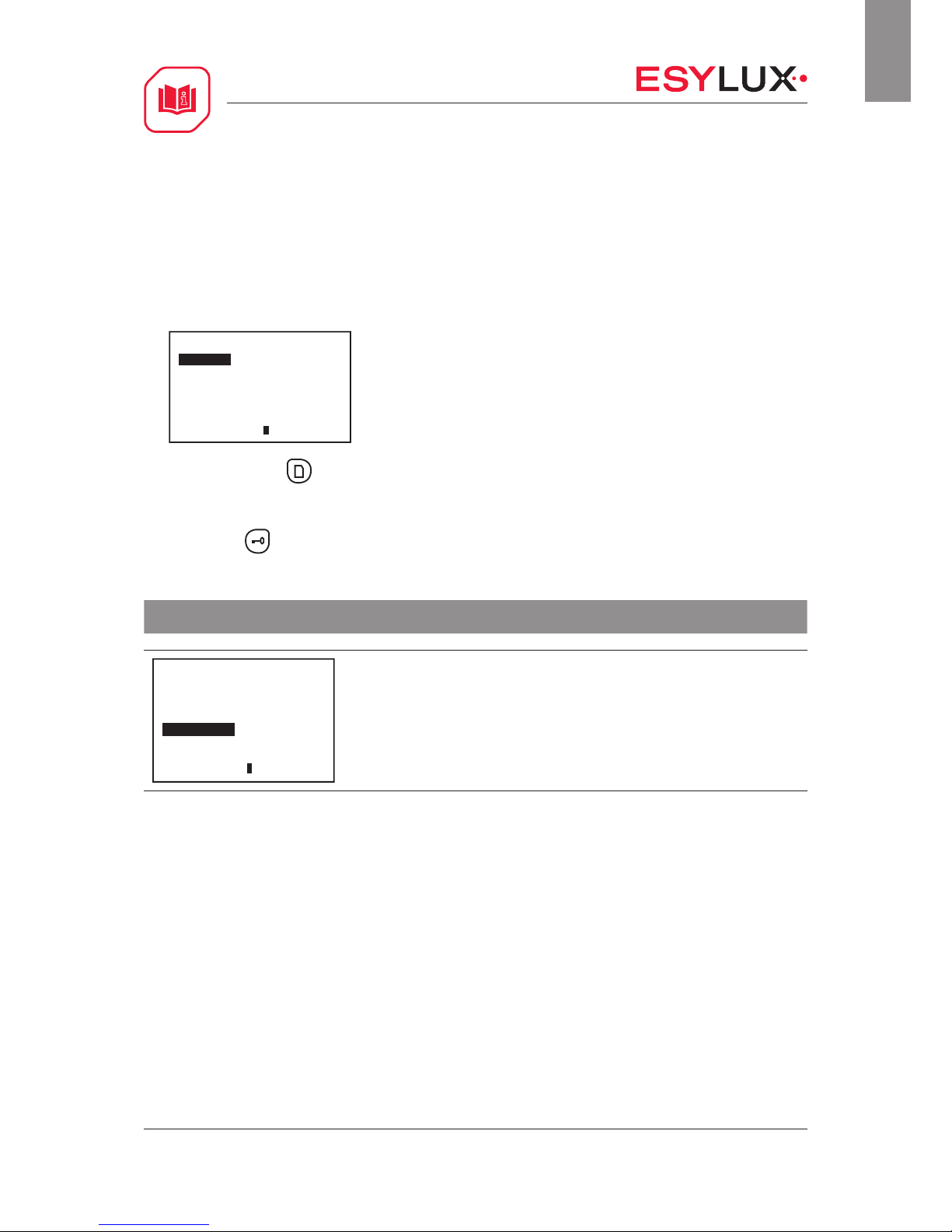
1. Select the sub-item “Functions” in the “PDi/MDi” menu.
Functions
ON/OFF
Tes t
Reset
4 h ON/O FF
Bat ok LS MDi
2. Then press the button to enter programming mode. Acknowledgement: The blue
LED lights up permanently and the lighting is switched on continuously.
3. Press the button to exit programming mode.
Acknowledgement: The blue LED is switched off.
Function Customised setting
Functions
ON/OFF
Tes t
Reset
4 h ON/OFF
Bat ok LS MDi
12 h ON / OFF
The lighting is switched on or off continuously for approx. 12 hours. If no movement is
detected in the field of detection and the preset switch-off delay time has elapsed, the
detector returns to the previous operating mode.
Note: The “12 h ON / OFF” mode can only be exited by entering programming mode and
using the “Reset” function.
Acknowledgement: The red and blue LEDs flash three times.
Page 17

OPERATING INSTRUCTIONS
MD 180i/16 BASIC
MD 180i/16 BASIC CH
17 / 19
GB
7 Technical data
Operating voltage 230 V ~
µ = contact opening width ≤ 1.2 mm
Target brightness value approx. 5 - 1000 lux
Switching capacity 2300 W / 10 A (cos phi = 1)
1150 VA / 5A (cos phi = 0.5)
Max. inrush current 800 A / 200 µs
Switch-off delay time Short pulse / approx. 9 sec. - 30 min.
Protection type / protection class IP 40 / II
Operating temperature range 0 °C to +50 °C
CE according to the following guidelines
EMC standard 2004/108/EC
LVD standard 2006/95/EC
RoHS 2011/65/EU
Page 18
OPERATING INSTRUCTIONS
MD 180i/16 BASIC
MD 180i/16 BASIC CH
18 / 19
GB
8 Troubleshooting
Fault Cause
Lighting does not switch on. - Ambient light level is above the preset target brightness value
- Lighting has been switched off manually
- There are people in the field of detection
- There are sources of thermal interference in the field of detection, such as
heating, air-conditioning or moving objects (e.g. curtains by open windows)
- The switch-off delay time has been set too short
Lighting is switched off during the hours of
darkness despite the presence of persons
- Ambient light level is above the preset target brightness value
- Lighting has been switched off manually
Lighting does not switch off or lighting
switches on spontaneously when no
persons are present.
- The switch-off delay time has not yet elapsed
- There are sources of thermal interference in the field of detection, such as
heating, air-conditioning or moving objects (e.g. curtains by open windows)
Button does not work. - Device is still in the start-up phase
- Illuminated button has been used without a neutral wire connection
- Button is not routed to the “S terminal”
Lighting switches on and off in warm-up
phase.
- Detector exposed to too much artificial light
Detector does not respond. - Check the power supply
8.1 Maintenance
The wall-mounted motion detector does not contain any components that require
maintenance. The device can only be replaced as a complete unit.
Note: This device must not be disposed of as unsorted household waste. Used
devices must be disposed of correctly. Contact your local town council for more
information.
Page 19

OPERATING INSTRUCTIONS
MD 180i/16 BASIC
MD 180i/16 BASIC CH
19 / 19
GB
8.2 Cleaning
No corrosive cleaning agents or solvents may be used for cleaning and care of the
device. Please use a lint-free cloth that is either dry or dampened only with water.
9 ESYLUX manufacturer's guarantee
ESYLUX products are tested in accordance with applicable regulations and
manufactured with the utmost care. The guarantor, ESYLUX Deutschland GmbH,
Postfach 1840, 22908 Ahrensburg, Germany (for Germany) or the relevant ESYLUX
distributor in your country (visit www.esylux.com for a complete overview) provides a
guarantee against manufacturing/material defects in ESYLUX devices for a period of
three years from the date of manufacture.
This guarantee is independent of your legal rights with respect to the seller of the
device.
The guarantee does not apply to natural wear and tear, changes/interference caused
by environmental factors or damage in transit, nor to damage caused as a result of
failure to follow the user or maintenance instructions and/or as a result of improper
installation. Any illuminants or batteries supplied with the device are not covered by
the guarantee.
The guarantee can only be honoured if the device is sent back with the invoice/
receipt, unchanged, packed and with sufficient postage to the guarantor, along with a
brief description of the fault, as soon as a defect has been identified.
If the guarantee claim proves justified, the guarantor will, within a reasonable period,
either repair the device or replace it. The guarantee does not cover further claims;
in particular, the guarantor will not be liable for damages resulting from the device’s
defectiveness. If the claim is unfounded (e.g. because the guarantee has expired or
the fault is not covered by the guarantee), then the guarantor may attempt to repair
the device for you for a fee, keeping costs to a minimum.
 Loading...