

Page 1
User Manual
sili pad
Antiskid Support With Wireless Charger
Shenzhen Esorun Technology Co.,LTD
Information to User
CAUTION
Please read this manual carefully before using this product for your safety and best product
performance. Failure to follow these instructions could result in serious injury, damage to this
product, or damage to other products.
Do not install this product in your vehicle if its location or use would obstruct the driver's clear view
of the road or the operation of any vehicle airbag. It is also the driver's responsibility to know and
comply with the laws, rules, and regulations of the driving location.
Do not place this product in direct sunlight for an extended amount of time, or where it could be exposed
to extreme temperatures. Store out of direct sunlight when not in use.
Do not allow this product to come into contact with liquids. Electrical shock could result. Also, damage
to the product, smoke, and overheating could result from contact with liquids.
If you notice smoke or odor from this product, disconnect USB cable immediately. Using the product in this
condition may result in permanent damage to the system.
Do not disassemble or modify this product as there are electronic components inside that may cause an
electric shock.
Keep this manual handy as a reference for safety information.
ACCESSORIES
Wireless charging pad x 1
●FEDERAL COMMUNICATIONS COMMISSION DECLARATION OF CONFORMITY
Product Name: Antiskid Support With Wireless Charger
Model Number: sili pad
Responsible Party Name: Shenzhen Esorun Technology Co.,LTD
Address: 10F, Mingzhuo Building, Mingzhuoxing Industrial Park,Guangming Street, Guangming District,
Shenzhen, China
●This device complies with Part 15 of the FCC Rules and RSS-Gen of IC Rules.
Operation is subject to the following two conditions:
(1) This device may not cause harmful interference, and (2) this device must accept any interference received,
including interference that may cause undesired operation.
●NOTE: This equipment has been tested and found to comply with the limits for a Class B digital device, pursuant
to Part 15 of the FCC Rules. These limits are designed to provide reasonable protection against harmful
interference in a residential installation. This equipment generates, uses and can radiate radio frequency energy
and, if not installed and used in accordance with the instructions, may cause harmful interference to radio
communications. However, there is no guarantee that interference will not occur in a particular installation. If
this equipment does cause harmful interference to radio or television reception, which can be determined by
turning the equipment off and on, the user is encouraged to try to correct the interference by one or more of the
following measures:
‒ Reorient or relocate the receiving antenna.
‒ Increase the separation between the equipment and receiver.
‒ Connect the equipment into an outlet on a circuit different from that to which the receiver is connected.
‒ Consult the dealer or an experienced radio/TV technician for help.
●Caution: Any changes or modifications to this device not explicitly approved by manufacturer could voi d your
authority to operate this equipment.
Page 2
USB Type A to USB Type C data cable 1m(39.4in.) x 1
User Manual x 1
*A USB Type-A power adapter that outputs at least 5V⎓2A is required; not included.
Compatible with Qi Certified mobile devices only. Do not use with any other
device.
SPECIFICATION
Power: 10W
Weight: 180g (6.4ounces)
Input Voltage: 5 V⎓2A; 9 V⎓1.67A
Output Voltage: 5 V⎓1A; 9 V⎓1.12A
Dimensions: 185 x 100 x 26mm (7.3in. x 3.9in. x 1.0in.)
Charging Efficiency: ≥ 70%
Transmission Distance: ≤ 6mm (0.2in.)
Operating Temperature: -20 ℃ to + 60℃ (-4℉ to + 140℉)
Note: Specifications and design are subject to possible modification without notice.
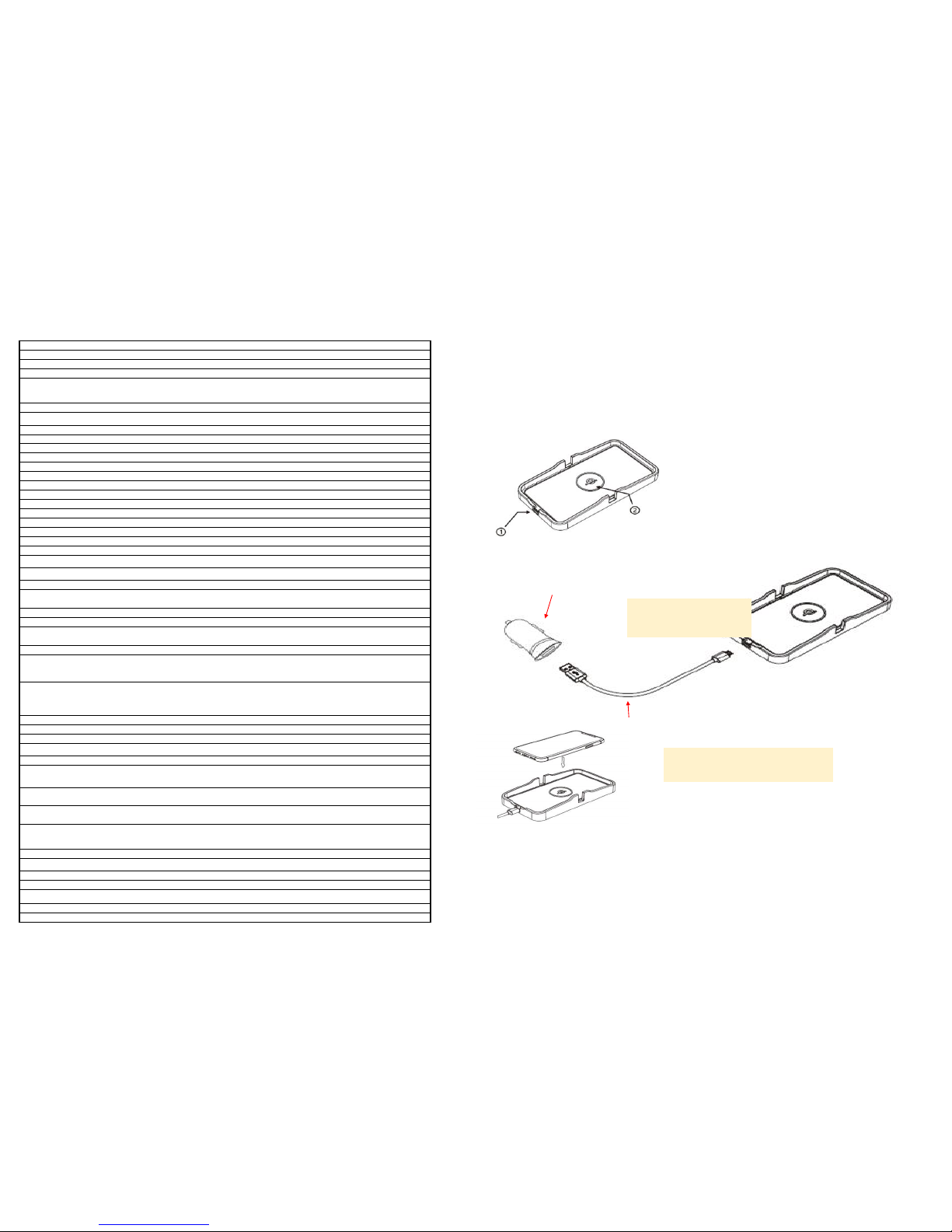
①USB Type-C input por t
②Charging a rea
HOW TO USE
Setting up your wireless charging pad
1. Connect your wireless charging pad to power adapter via included USB Type A to USB Type C data cable.
<!> Connected power adapter must output at least 5V/2A. Using an adaptor with a lower output
may result in malfunction or overheating.
<!> Never place or use this product, including the data cable, in a manner that may:
* Injure the driver or passengers if the vehicle stopped suddenly
* Interfere with the driver's safe operation of the vehicle, such as on the floor in
front of the driver's seat, or close to the steering wheel or gear stick
* Obstruct the driver's clear view of the road, or
* Impair or interfere with the performance of any of the vehicle's operating systems or
safety features, including airbags and hazard lamp buttons. Please refer to your
vehicle's owner's manual for deployment area of front and side airbags.
<!> Make sure the data cable will not interfere with or become caught in or wound around any of
the vehicle's moving parts, especially the steering wheel, gear stick, handbrake, sliding seat
tracks, doors, or vehicle controls.
2. Your wireless charging pad is ready for your mobile device.
Charging mobile device from wireless charging pad
Put your Qi Certified mobile device on the center of the wireless charging pad.
<!> Quick Charge™ 2.0, Quick Charge™ 3.0 or Quick Charge™ 4.0 power adapter required for fast
charge mode.
<!> Charging speed may vary depending on device specifications, input voltage, and environment.
<!> Phone cases or metal plates for magnetic attachment might interfere with wireless charging.
<!> Do not place magnetic stripe cards such as credit cards, driver's license, or parking
garage ticket between mobile device and this product. Doing so may demagnetize the card.
PRODUCT CARE
・Do not bend or fold the product as this will damage the internal circuit board and chips.
・Keep your wireless charging pad dry.
・Keep pad away from all types of liquids or moisture, which could corrode electronic circuits.
・Do not clean the wireless charging pad with soaps, detergents or chemicals
USB Type-A power adapter
(not included)
USB Type A to USB Type C data cable
French:
Bloc d'alimentation USB Type A
(Non-inclus)
French:
Câble USB de 1 mêtre (Type A vers Type C)
Page 3
If your wireless charging pad is not working properly
・Make sure your mobile device is Qi Certified.
・Make sure your adapter is at least 5V/2A.
・Clean any dirt or debris from the pad using a soft, dry cloth.
・The wireless charging pad may stop charging when overheated. Remove your mobile device and try charging
again when the charging pad has cooled down.
REMARKS
1. Use only the included USB data cable. Wireless charging pad may not function with another cable.
2. This wireless charging pad and your mobile device may become warm even under normal operating
conditions, especially when charging and using the device at the same time such as streaming music or
navigation. Stop using the charging pad if it or your mobile device becomes overheated.
WARRANTY
This product is covered in the United States and Canada by Pioneer's 90 day Limited Warranty. Please see
http://pioneerelectronics.com/wcwarranty for complete terms and conditions.
CUSTOMER SUPPORT
If you have any questions, please contact Pioneer Customer Service toll free at 1-800-421-1404, Monday
through Friday, 7:30 AM - 11:30 AM and 12:30 PM - 4:00 PM (Pacific Time), excluding holidays, or online
through parts.pioneerelectronics.com/contact.
Qualcomm Quick Charge is a product of Qualcomm Technologies, Inc.
 Loading...