

Page 1

User Manual
Battery remains
Operation
Enough : 70 ~ 100%
Green LED is turned on for 5 seconds
Usual : 30 ~ 70 %
Green LED blinks for 5 seconds
Short : less than 30%
No indication
Function
Operation
Power On/Off
Until blue LED is turned on/of, press the button of talk for 1 second.
Answering/ending call
Press the button of talk.
Rejecting talk
Press the button of talk two times rapidly.
Redialing last number
Press the button of talk while not talking over the phone.
Adjusting volume
Press the button of volume + or volume – on the side.
Battery status
In case bluetooth LED blinks in red, battery is in shortage.
MODEL No. : BR-20
1. Charging before use
Please charge by using USB or DC adaptor(optional).
Green light is turned on at the LED of REC/PLAY during charging and green light blinks when charging is
completed.
Check ! Battery remains can be checked at the beginning of recording or playback.
2. Turning on power
1) Connecting to bluetooth device(pairing)
A. For pairing, mobile device starts Bluetooth search.
B. Press the button of talk for 5 seconds until Bluetooth LED lights up in blue and red alternately, rapidly.
C. Select BR-20 which mobile device has searched.
Page 2

2) Recording call
A. Pair with mobile device by pressing the button of talk.(refer to “Connecting to bluetooth device”)
B. Move recording switch on side to Bluetooth(down).
C. When you receive a call or make a call, recording starts automatically and recording ends when call is
finished.
D. LED of REC/PLAY is turned on in red during recording.
Caution ! In case talking time is less than 10 seconds, recording might not start.
3) General recording
A. Move recording switch on side to VOICE(up).
B. After showing current battery remains, LED of REC/PLAY is turned on in red.
C. When you move recording switch on side to OFF(center), recording ends.
4) Playing back
A. Move recording switch on side to OFF(center).
B. Press the button of PLAY/STOP(▶/■) for 3 seconds until the LED of REC/PLAY is turned on in blue.
C. After showing current battery remains, it is played back automatically in case there are recorded files.
D. During playback, it is possible to move files by pressing the button of previous file(◁◁) or next
file(▷▷).
5) Deleting a file
A. After stopping playback, press the button of DEL long and press it one more time.
Caution ! Deleted files can not be recovered. Delete the files after checking them carefully.
Page 3
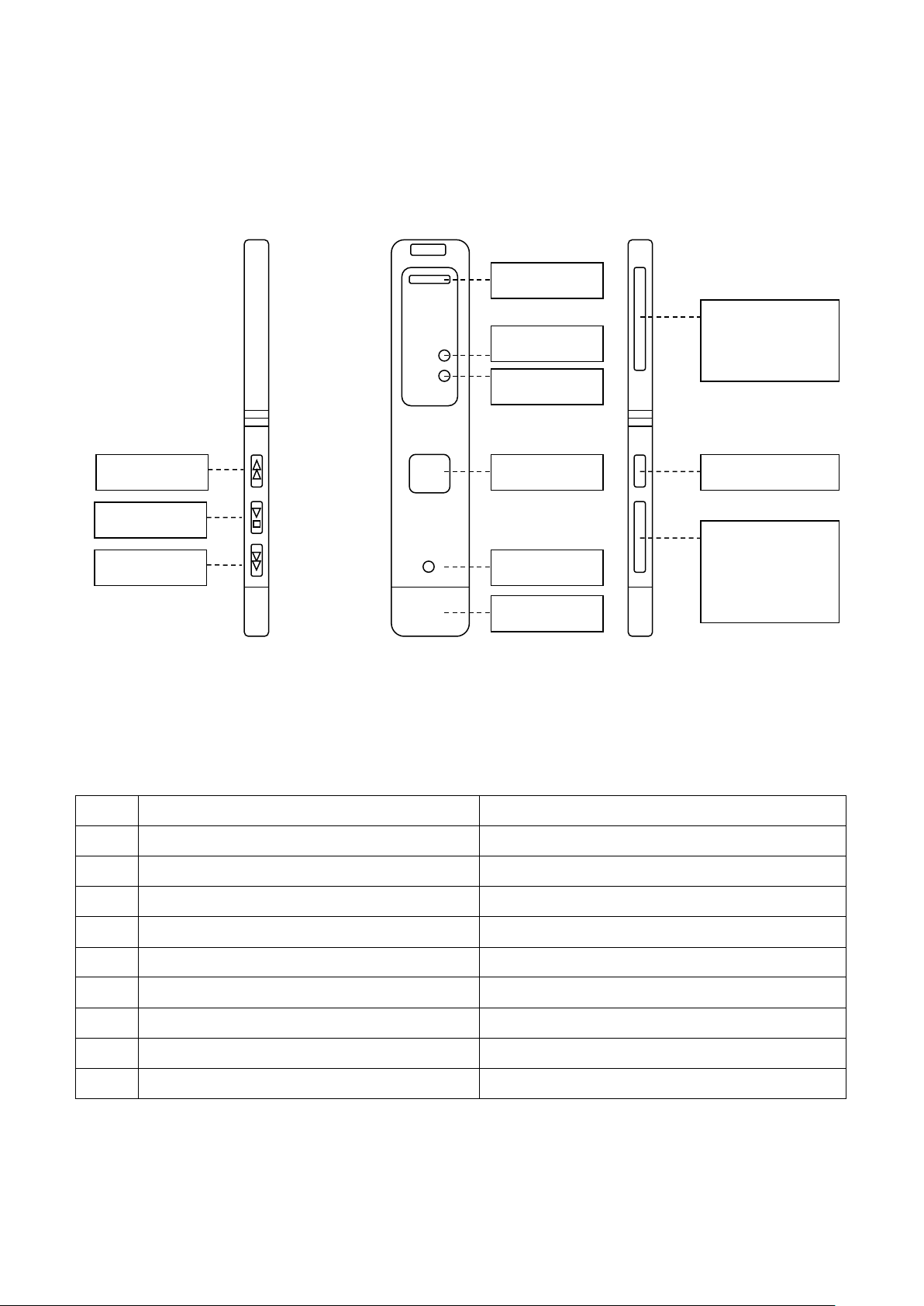
Model No.
BR-20
Bluetooth version
V 3.0 + EDR
Radio Class
Class 2/3
Supported profiles
HFP, HSP
Usage Distance
Max. 10m
Range of frequency
2.4GHz
Continuous talk/Standby time
about 13 hours / about 360 hours
General recording time
about 10 hours
Charging time
about 2.5 hours
Rechargeable Battery
150mAh Lithium Polymer
REC/PLAY LED
Bluetooth LED
Speaker
Talk Button
Microphone
Volume Button
+ Volume UP
- Volume DOWN
Deletion Button
Recording Switch
↓ Bluetooth
USB
Previous File
PLAY/STOP
Next File
3. Naming of each part
↑ VOICE
⊙ OFF
4. Specification
Page 4
Caution : Any changes or modifications in construction of this device which are not expressly
to operate the equipment.
This device complies with part 15 of the FCC Rules. Operation is subject to the following two
conditions: (1) This device may not cause harmful interference, and (2) This device must
accept any interference received, including interference that may cause undesired operation.
NOTE: This equipment has been tested and found to comply with the limits for a Class B
digital device, pursuant to Part 15 of the FCC Rules. These limits are designed to provide
reasonable protection against harmful interference in a residential installation. This equipment
generates, uses and can radiate radio frequency energy and, if not installed and used in
accordance with the instructions, any cause harmful interference to radio communications.
However, there is no guarantee that interference will not occur in a particular installation. If
this equipment does cause harmful interference to radio or television reception, which can be
determined by turning the equipment off and on, the user is encouraged to try to correct the
-- Consult the dealer or an experienced radio/TV technician for help.
Caution
This appliance and its antenna must not be co-located or operation in conjunction with any
A minimum separation distance of 20 ㎝ must be maintained between the antenna and the
person for this appliance to satisfy the RF exposure requirements.
5. Cautions
1) In case there are no battery remains, recording is not possible. Please use it after charging all the time.
2) If you remove it from PC in using, contents could be lost and please be sure to use the USB safety
removal.
3) Please undergo a back up for the files saved in internal memory all the time.
FCC notice to users and product statements
approved by the party responsible for compliance could void the user's authority
interference by one or more of the following measures:
-- Reorient or relocate the receiving antenna.
-- Increase the separation between the equipment and receiver.
-- Connect the equipment into an outlet on a circuit different
from that to which the receiver is connected.
other antenna or transmitter.
Page 5
European CE notice to users and product statements
Caution
DISPOSE OF USED BATTERIES ACCORDING TO THE INSTRUCTIONS.
RISK OF EXPLOSION IF BATTERY IS REPLACED BY AN INCORRECT TYPE.
 Loading...