

Page 1
Shenzhen Eson Technology Co., Ltd. 深圳市易顺科技有限公司
1 / 9
X9S User Instruction
一、X9S Features
1、After connected “ Wi-Fi”, Interacting a speaker with voice
2、The smart speaker included Bluetooth functions
3、The speaker can be shared together by some users, two or more speakers can be
controlled anytime, Free connected.
4、The speaker has exclusive APP to play the cloud music, Such as daily music, Shrimp
music.
5、Log in your amazon account, The speaker can be control by networking appliance to
choose the songs, news, shopping
6、The speaker can be wireless speakerphone function.
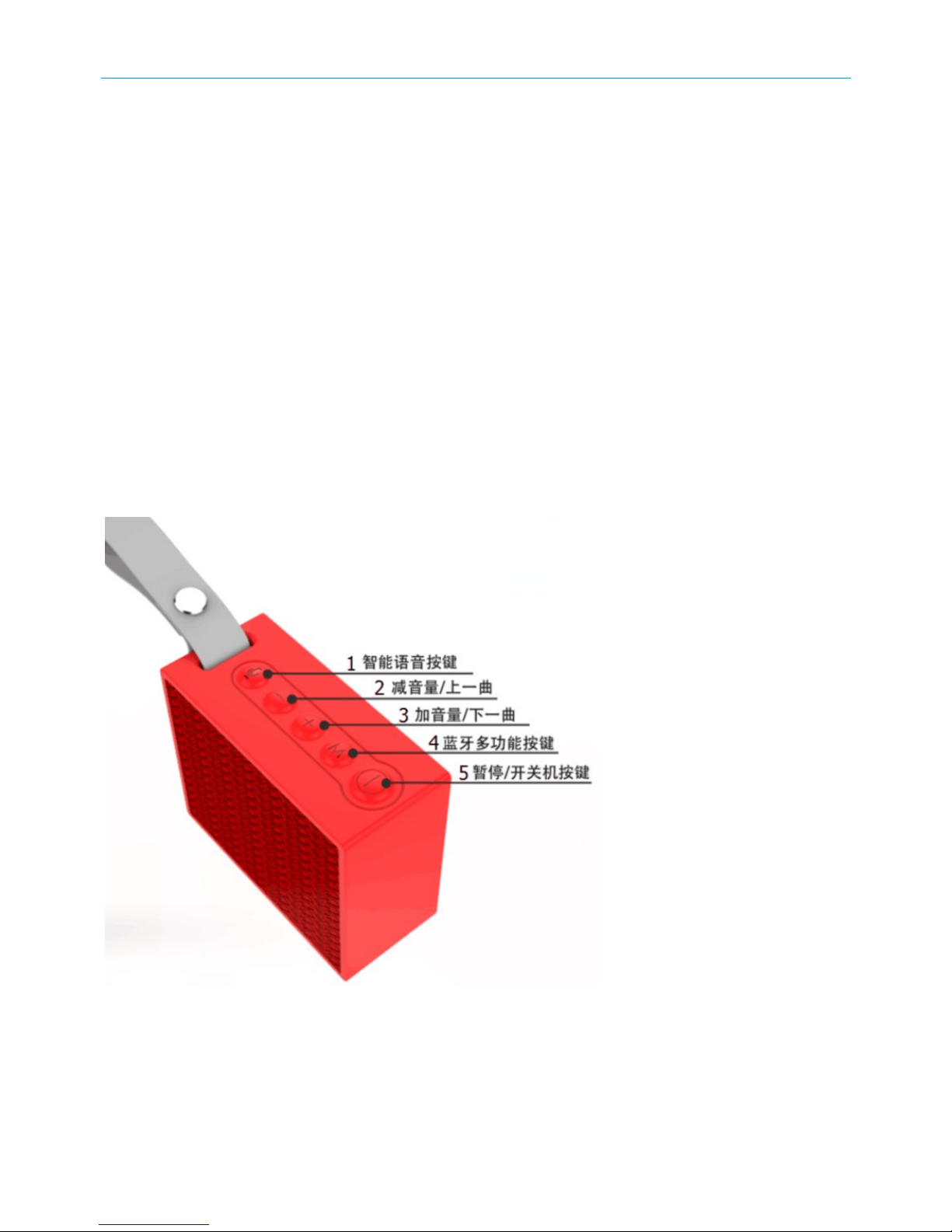
二、Button instructions overview
1、Smart voice button: On “Wi-Fi” mode, Short press to enter the voice prompt, On
“Bluetooth” mode, Short press to answer/end a call, Long press for 2 seconds to reject a
call.
2、Volume reduce/previous song: Short press to Volume down, On “Bluetooth” mode, Long
press to previous song
3、Volume increase/next song: Short press to volume up, On “Bluetooth” mode, Long press
Page 2

Shenzhen Eson Technology Co., Ltd. 深圳市易顺科技有限公司
2 / 9
to next song
4、Multi-function button: Short press to switch “Bluetooth” and “Wi-Fi”.
On “Bluetooth” mode, Long press for 2 seconds, The current Bluetooth device will be
disconnected.
On “Wi-Fi” mode, Long press for 2 seconds to connect network, Long press about 10 seconds,
the wifi will be restore factory setting.
5、Pause/On/Off button: Long press for 3 seconds to turn on/off, On “Bluetooth” “Wi-Fi” mode,
Short press to play/pause.
三、Interfaces and Indicator light overview
1、Working Indicator light: ” WIFI” mode for white light, “Bluetooth mode” for blue light
2、Charge Indicator light: Red light
3、Line port: External sound source
4、USB port: Change
四、Operation instruction:
On/Off:
Long press for 3 seconds, White LED indicator blinking with “beep”.
On power on status, Long press for 3 seconds, Working indicator turn off with “beep”.
Charge
The speaker charged by micro USB cable, the red indicator blinking, Indicator will turn off
when it fully charge.
Charge voltage: 5.0V ±0.2
Charge adapter output current: 1A.
Bluetooth mode.
1、Short press “M” button on standby mode, blue indicator blinking, Switching to Bluetooth
mode
2、Turn on your phone’s Bluetooth mode to pair.
3、Your phone’s Bluetooth can be re-connected for previous paired speaker, blue indicator is
on.
4、On Bluetooth mode, Short press “ON” button to switch play or pause.
Page 3

Shenzhen Eson Technology Co., Ltd. 深圳市易顺科技有限公司
3 / 9
5、Adjust volume:Short press “+” button to increase volume, Short press “-” button to reduce
volume
6、Change songs: Long press “+” button for 2 seconds to previous song, Long press “-” button
for 2 seconds to reduce volume.
7、Long press “M” button for 2 seconds to cancel connected Bluetooth device, Blue indicator
blinking
8、Turn on other Bluetooth device to pair.
LINE IN:
1、On power on mode, Connect 3.5mm Audio Cable and the speaker, Switch to Line in mode
automatically, the white and blue indicator blinking together
2、Short press “+”“-” button to adjust the volume
3、Short press “on/off” button to play or pause
五、Wi-Fi Mode
1、Turn on your cellphone WIFI, connected successfully with the wireless router, remember
the password
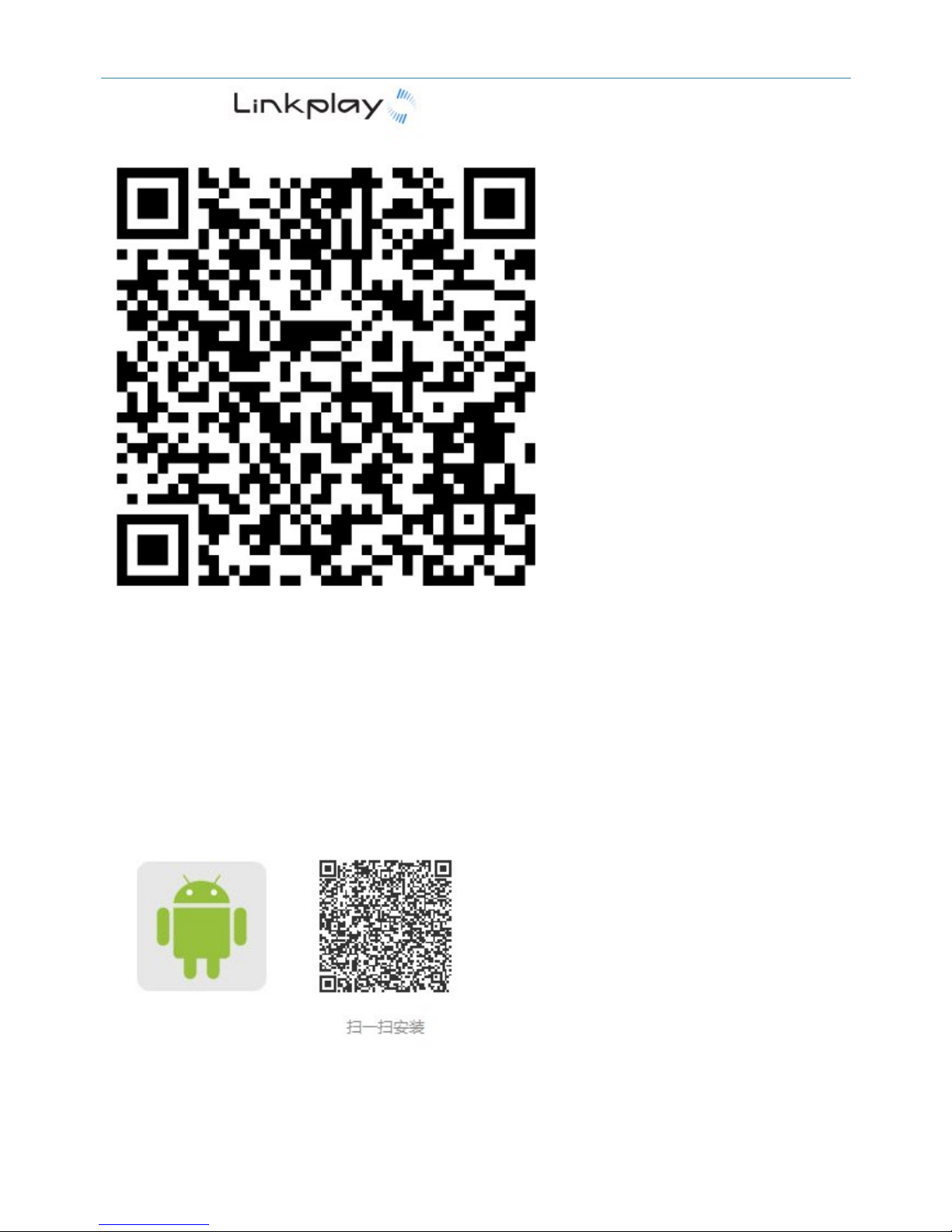
2、APP download address
iOS: https://dln.bz/I/eson/1.0.4725
Eason: https://dln.bz/a/eson/2.8.0.170825
Scan & install
IOS system install APP
Page 4
Shenzhen Eson Technology Co., Ltd. 深圳市易顺科技有限公司
4 / 9
Android system install APP
Install the Android system app successful
Page 5
Shenzhen Eson Technology Co., Ltd. 深圳市易顺科技有限公司
5 / 9
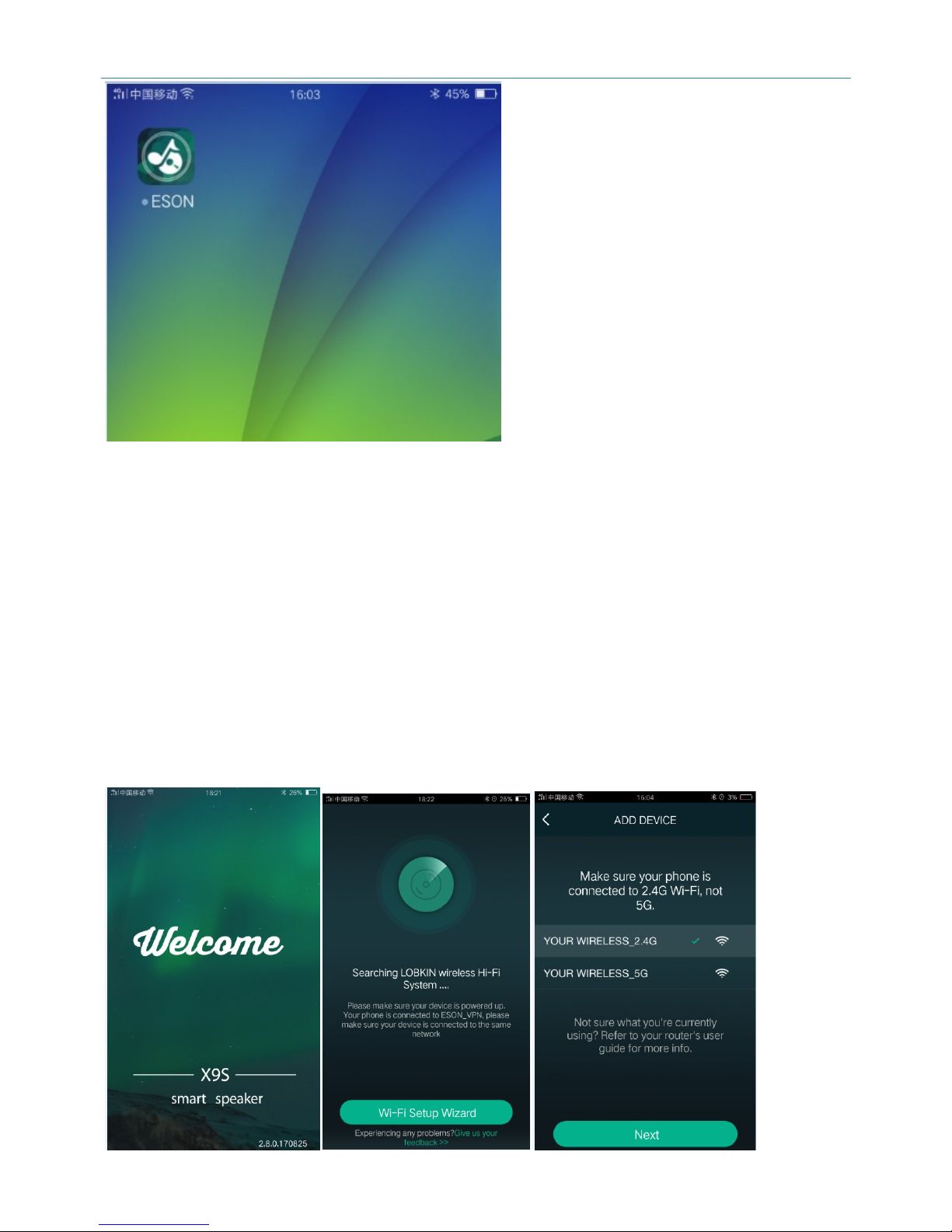
Turn on ”App’’ installation steps
Page 6
Shenzhen Eson Technology Co., Ltd. 深圳市易顺科技有限公司
6 / 9
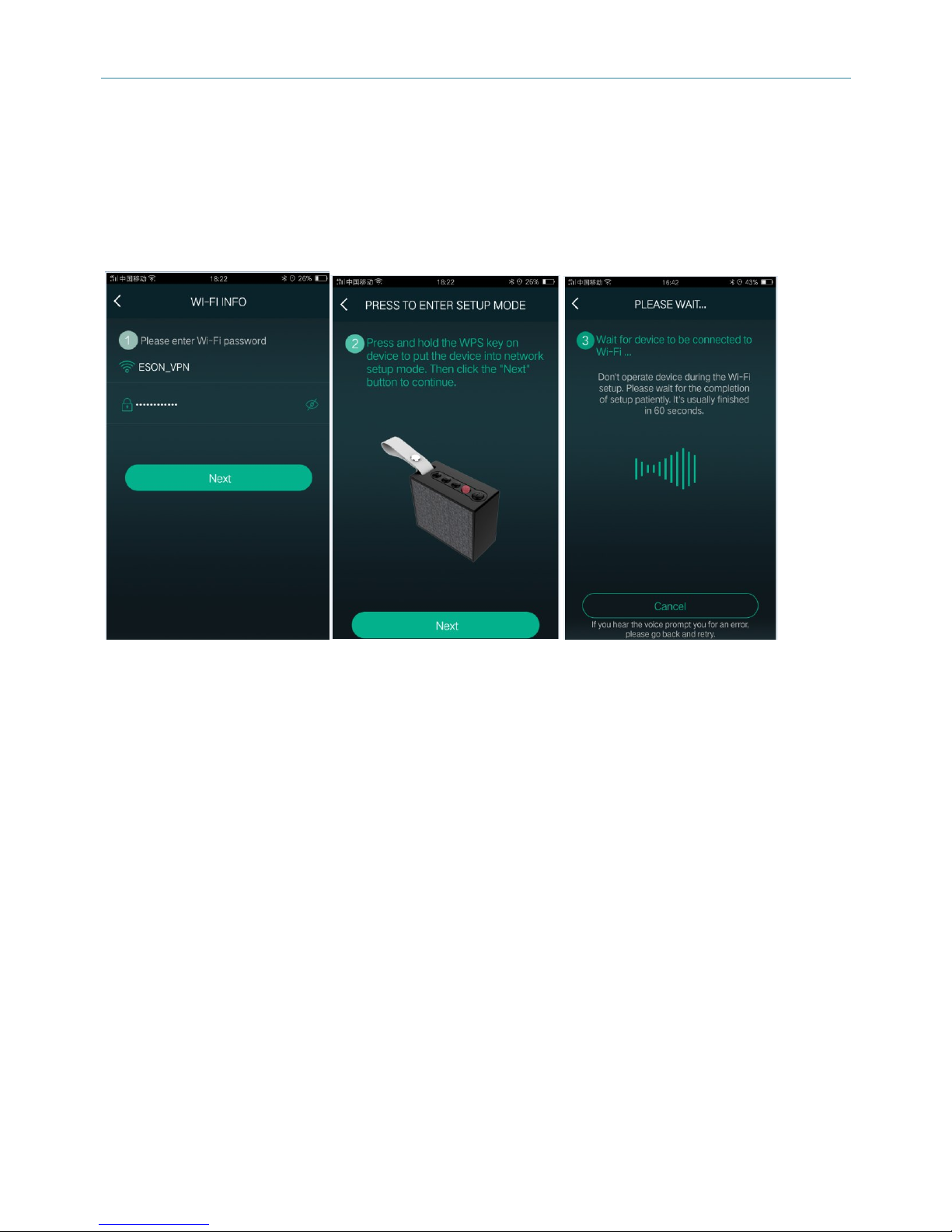
Picture 1 Picture 2 Picture 3
Screen No.2 Clicking the "WI-FI setup wizard"
Screen No.3 Clinking“NEXT”
Picture 4 Picture 5 Picture 6
Picture 4: The APP Wi-Fi name is as same as your cellphone, please enter Wi-Fi password,
Clinking the “Next” button
Picture 5: Long press the speaker “M" button for 3 seconds till you can hear the voice prompts,
Then clinking the “Next” .
Picture 6:The speaker will connect successful with voice prompts after about 1 minute
Page 7
Shenzhen Eson Technology Co., Ltd. 深圳市易顺科技有限公司
7 / 9
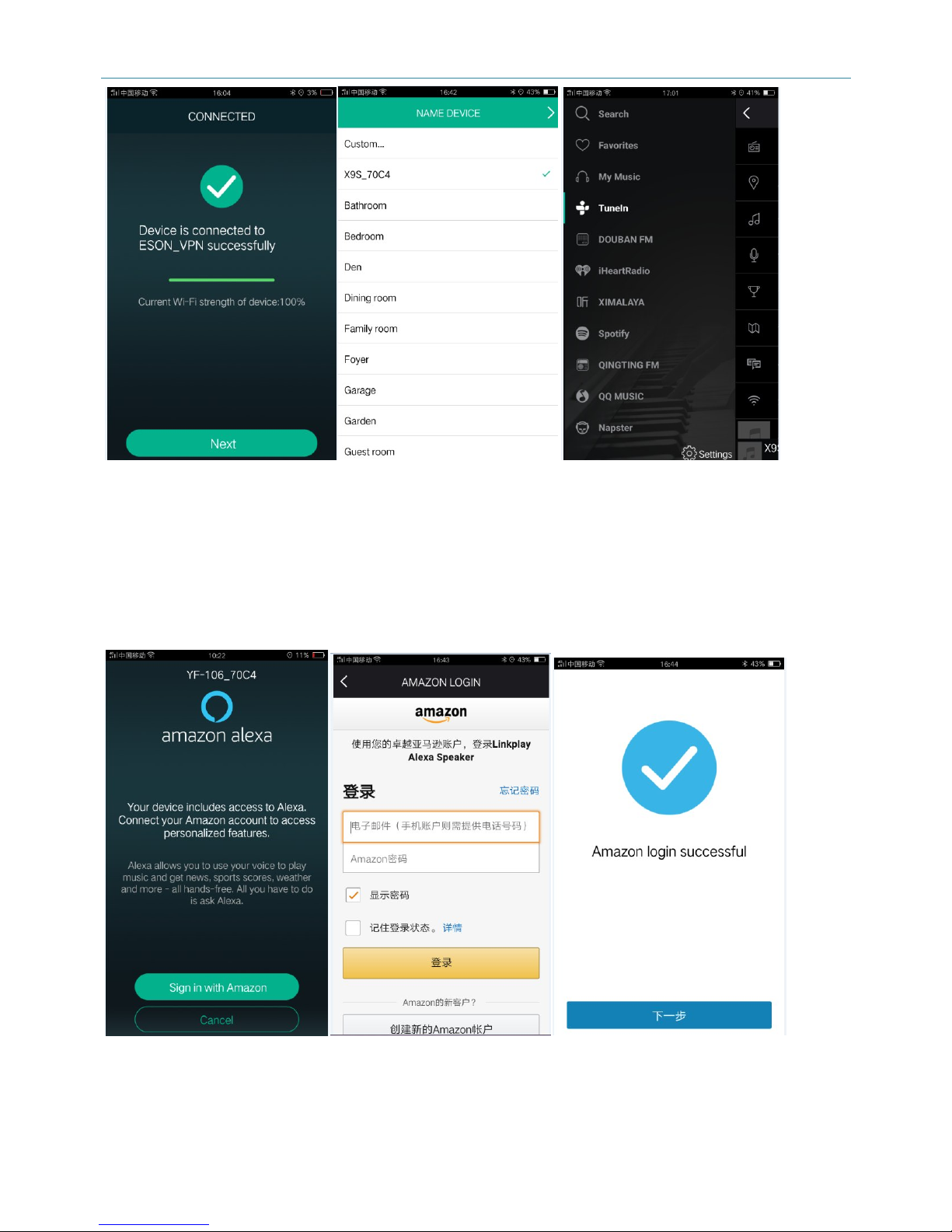
图7 图8 图9
Picture 7: After device is connected to Wi-Fi successful, then clinking “Next” to switch picture 8
Picture 8: The APP list is used to assign a smart speaker placement.
Picture 9: Entering the page, choosing other voice platform freely.
Picture 10 Picture 11 Picture 12
Picture 10: Clinking “Sign in with Amazon" to log in your amazon account to switch picture 11
page
Page 8

Shenzhen Eson Technology Co., Ltd. 深圳市易顺科技有限公司
8 / 9
Picture 11: Entering the Alexa account and password to access to Alexa service.
Picture 12: Sign in amazon successful.
六、Amazon use instruction
1、Log in Amazon successful, Interacting with a voice speaker.
Short press “Microphone” button with voice prompt,then white LED indicator is on ,Taking with
Alexa freedom, The white LED indicator blinking fast, The speaker will ready to answer your
questions.
2、The speaker can be control with voice when it connected the smart home appliances
七、Product specifications
Wireless standard:802.11b/g/n,1T1R
Support: IOS/Android/Windows7/8
Bluetooth version: 4.2
Battery capacity: 3.7V 1000mAH
Speaker Driver: 4 Ω5W
Charge time: 2h
Network work time: about 4h
x9 smart speaker streams music to your sound system. Enjoy listening to your music from cloud
music service providers and online radio without connecting your phone to speakers. Just
connect x9s speaker and use the ESON player app to play music wirelessly over your WiFi
Network.
X9S Features
1. After connected “ Wi-Fi”, Interacting a speaker with voice
2. The smart speaker included Bluetooth functions
3. The speaker can be shared together by some users, two or more speakers can be controlled
anytime, Free connected.
4. The speaker has exclusive APP to play the cloud music.
5. Log in your amazon account, The speaker can be control by networking appliance to choose
the songs, news, shopping
Page 9

Shenzhen Eson Technology Co., Ltd. 深圳市易顺科技有限公司
9 / 9
6. The speaker can be wireless speakerphone function.
Get a x9 smart speaker at www.esontech.com
Stay Tuned
We will be updating the app regularly to introduce new music service providers and features.
Sign up your email address to get updates at www.esontech.com.
FCC Caution:
This device complies with part 15 of the FCC Rules. Operation is subject to the following two
conditions: (1) This device may not cause harmful interference, and (2) this device must accept
any interference received, including interference that may cause undesired operation.
Any Changes or modifications not expressly approved by the party responsible for compliance
could void the user's authority to operate the equipment.
Note: This equipment has been tested and found to comply with the limits for a Class B digital
device, pursuant to part 15 of the FCC Rules. These limits are designed to provide reasonable
protection against harmful interference in a residential installation. This equipment generates
uses and can radiate radio frequency energy and, if not installed and used in accordance with
the instructions, may cause harmful interference to radio communications. However, there is no
guarantee that interference will not occur in a particular installation. If this equipment does cause
harmful interference to radio or television reception, which can be determined by turning the
equipment off and on, the user is encouraged to try to correct the interference by one or more of
the following measures:
- Reorient or relocate the receiving antenna.
- Increase the separation between the equipment and receiver.
- Connect the equipment into an outlet on a circuit different from that to which the receiver is
connected.
- Consult the dealer or an experienced radio/TV technician for help.
The device has been evaluated to meet general RF exposure requirement. The device can be
used in portable exposure condition without restriction.
 Loading...