

Page 1
Contact Us Settings & Preferences Controls & Features
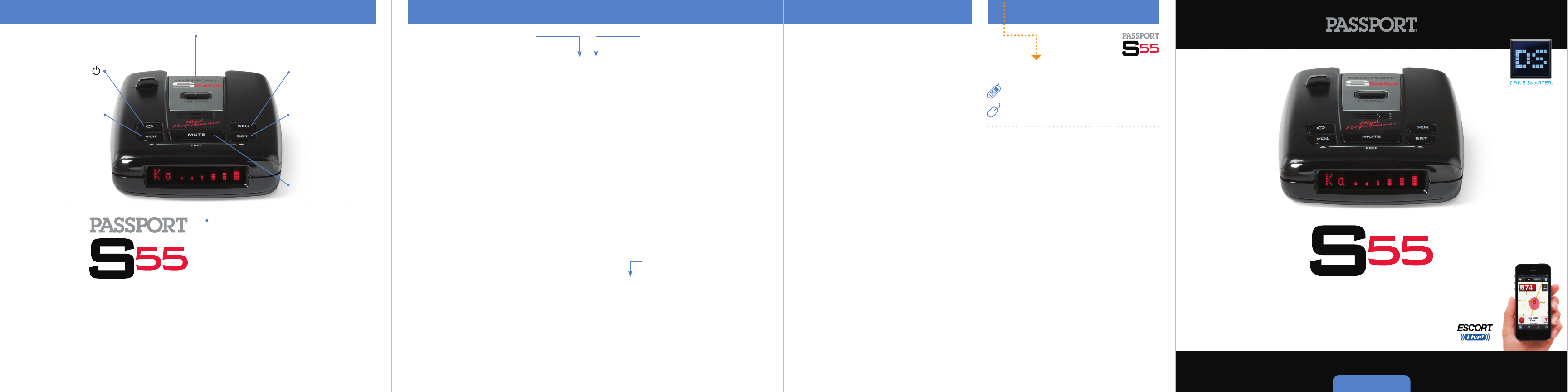
Power
Press to turn
PASSPORT S55 on or off
Volume (VOL)
Press and hold
to adjust volume
Mount Release
Press to remove device
from mounting
bracket
Display
Alert area
Sensitivity (SEN)
Press to adjust detector
sensitivity (Highway,
Auto, Auto NoX)
Brightness (BRT)
Press to adjust display
brightness (Min, Med,
Max, Dark)
MUTE
Press to mute an alert
Press the REVIEW button
to go from one category
to the next
Pilot Light
(Power-on indication)
Power-On Sequence
Signal Strength Meter
AutoMute
Language
AudioTones
Dark Mode
Bands
Press the CHANGE button
to change your setting
within a category
Pilot HWY
Pilot H
Pilot H.>
Pilot V
PwrOn FST
PwrOn STD
Meter STD
Meter EXP
Meter SPC
aMute ON
aMute OFF
ENGLISH
ESPANOL
Tone STD
Tone LOUD
DARK STD
DARK ALL
Bands DFT
Bands MOD
X ON
K ON or OFF (default is ON)
Ka ON or OFF (default is ON)
POP ON or OFF (default is OFF)
LSR ON or OFF (default is ON)
TSR ON or OFF (default is ON)
* Full word: Highway or Auto or Auto NoX
Letter: H or A or Anx
Letter, with scanning dot
Vehicle voltage
* Fast power-on sequence
Standard power-on sequence
* Standard signal strength meter
Expert Meter
SpecDisplay
* AutoMute on
AutoMute off
* English language text
Spanish language text
* Standard tones
Loud tones
* Standard Dark: shows HD, AD, AnxD
All Dark, no display
* Factory default settings
Factory default settings modified
Turn bands “ON” or “OFF” by
pressing the Mute button
or OFF (default is ON)
Notes for Settings & Preferences
For descriptions of features and functions visit
EscortRadar.com and download the PASSPORT
S55 Owner’s Manual.
Restoring the Factory Default Settings:
To restore PASSPORT S55 to its original factory
settings, press and hold BRT and VOL while
powering on detector.
display, acknowledging the reset.
Service Procedure
If your S55 ever needs service,
543-1608. We may be able to solve your problem
over the phone. If the problem requires that you
send your S55 to the factory for repair, we will
provide you with a Service Order Number, which
must be included on the outside of your shipping
box.
Enclose the following information with your
S55 and power cord:
• Your Service Order Number
• Your name and return address
• Your daytime telephone number
• A description of the problem you are
experiencing
RESET message will
call us at 1-800-
Accessories
800.433.3487
EscortRadar.com
Designed in the USA
ESCORT Inc.
5440 West Chester Road
West Chester OH 45069
Sales / Service 800.433.3487
www.EscortRadar.com
©2015 ESCORT Inc. Escort®, Passp ort®, S55, Escor t Live!™, AFR ®, TrueLock ™,
Smart Shield®, SpecDi splay™, AutoSens itivity™, Ex pertMeter™ and
Cincinn ati Microwave a re trademark s of ESCORT In c. Manufac tured in
Canada . Features, sp ecifications and prices sub ject to chan ge without
notice.
FCC NOTE: Modificatio ns not express ly approved by the manufac turer
could vo id the user’s FCC granted autho rity to ope rate the equip ment.
FCC ID: QKLL4
This device complies with part 15 o f the FCC rul es. Op eration is subj ect
to the f ollowing two co nditions : (1) This d evice may n ot cau se ha rmful
inter ference, and (2) Th is devi ce mus t accep t any interf erence received
including interf erence that may cause undesired operatio n.
Open ➜
Compatible with
6 8
7
R A D A R
•
L A S E R
Quick Reference
•
D E T E C T O R
Page 2
Installation
Controls & Features PASSPORT S55 Features
You’ve purchased the
all-new PASSPORT S55 which is one of the
most advanced high-performance radar and
laser detector on the market. The PASSPORT S55
provides long-range warning on all radar bands
and laser bands.
Our patented Digital Signal Processing (DSP)
provides extreme radar range with minimal
false alarms. Patented Mute and AutoMute
circuits keep the PASSPORT S55 quiet in even
the most populated areas.
Go to EscortRadar.com for the full featured
PASSPORT S55 Owner’s Manual.
Guía de Referencia Rápida Española traducida y
manual con todas las funciones también son
disponibles a www.EscortRadar.com
The PASSPORT S55 introduces the following
state-of-the-art performance and features:
• Long-range K and Ka-band radar performance,
including instant-on POP mode.
• Exclusive AutoSensitivity intelligently filters
out annoying false alarms, plus Highway,
Auto, and Auto No X settings.
• Exclusive ExpertMeter tracks and displays up
to 4 radar signals simultaneously.
• Exclusive SpecDisplay provides actual
numeric frequency for any radar signal and
alert bar.
• Plus, it’s compatible with ESCORT Live, our
exclusive real-time ticket-protection network,
which warns you of upcoming alerts received
and reported by other users in the area, and
gives you access to local speed limit data for
over-speed alerts.*
*Requires Optional SmartCord
Live and app subscription.
Compatible with
Windshield Mount
PASSPORT S55’s EasyMount windshield bracket is
designed for unobtrusive and hassle-free
mounting.
Mounting Tips:
• Center of windshield between driver and
passenger.
• Ensure clear view of road ahead.
• Avoid windshield wipers and heavily tinted
areas.
PASSPORT S55 Mounting Location
WARNING: ESCORT cannot anticipate the
many ways PASSPORT S55 can be mounted.
It is important that you mount PASSPORT
S55 where it will not impair your view nor
present a hazard in case of an accident.
For optimum detection performance, we
recommend the following:
• Using the Windshield Mount, mount your
PASSPORT S55 level, and high enough on your
front windshield to provide a clear view of the
road from the front and rear.
• Mount PASSPORT S55 away from windshield
wipers, other solid objects, and heavily tinted
areas that might obstruct the radar antenna or
laser lens.
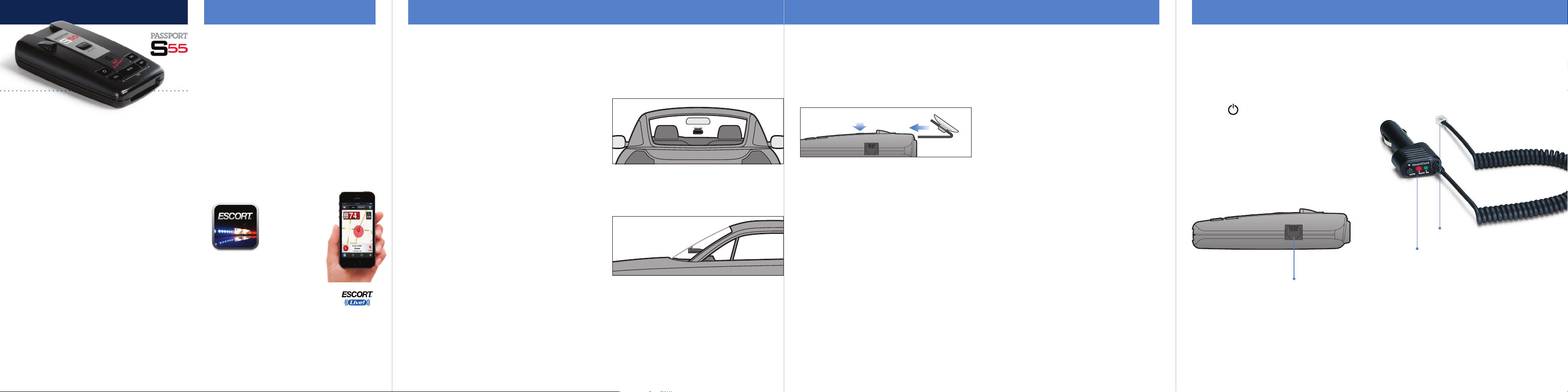
1 Depress the adjustment/release button on the
top of PASSPORT S55 (by the logo S55) and slide
the EasyMount Bracket into the slot until it is
locked into the position which best fits the angle
of your windshield (there are four settings
available). For extremely horizontal or extremely
sloped windshields, the EasyMount Bracket can
be bent.
To ensure that the suction cups adhere to the
windshield firmly, be sure to keep both your
windshield and the suction cups clean.
2 To adjust the PASSPORT S55 on your
windshield, use the EasyMount adjustment
button located on the top of the PASSPORT S55,
and slide PASSPORT S55 forward or backward to
obtain a level position.
When installed and adjusted properly, the back
top edge of the PASSPORT S55 should rest solidly
against your windshield.
User’s Tip: You can leave the EasyMount
bracket in place on your windshield, and easily
remove PASSPORT S55 by pressing the
adjustment button and sliding PASSPORT S55 off
the mount. Again, be sure to position the bracket
where it won’t present a hazard in the event of an
accident.
Additional mounts are available at EscortRadar.
com
Using PASSPORT S55
1 Plug small end of SmartCord into modular
jack on PASSPORT S55 and large end of
SmartCord into your car’s lighter/accessory
socket.
2 PASSPORT S55 should power on
automatically. If not, press the device’s power
button.
NOTE: You can easily access and customize all
of your Settings and Preferences by pressing
and holding the VOL and BRT buttons. See
Settings & Preferences for details.
Modular Jack
Connects to SmartCord for powering your device
Using SmartCord
• Mute Button: Press to mute an alert.
• Alert Light: Blinks red when receiving an
alert.
• Power Light: Lights green when receiving
power.
Modular Connector
Plugs into detector jack
Lighter Adapter
Connects to lighter/accessory socket
R A D A R
•
L A S E R
•
D E T E C T O R
Continue
5432
d ➜
 Loading...