

Page 1

HS108v2 IPPhone
www.escene.cn/en/
Escene Communication
HS108v2 Hotel Compact Type
IP Phone User Manual
EEsscceennee CCoommmmuunniiccaattiioonn CCoo..LLttd
d
Page 2

HS108v2 IPPhone
www.escene.cn/en/
Escene Communication
Tables of Contents
1.Getting Started ............................................................................................................................... 1
2.Phone overview .............................................................................................................................. 2
3. Basic Call Handling ...................................................................................................................... 3
Do Not Disturb (WEB set >SIP account>Account 1> Do Not Disturb ) .................................. 4
4. Phone Status .................................................................................................................................. 5
5 Net Work ........................................................................................................................................ 6
5.1 LAN Port ............................................................................................................................. 6
5.2Advanced ............................................................................................................................. 7
5.2.1VLAN Setting ........................................................................................................... 7
5.2.2Port Management Settings ........................................................................................ 7
5.2.3Qos ............................................................................................................................ 8
5.2.4LLDP ......................................................................................................................... 8
5.2.5CDP ........................................................................................................................... 8
5.2.6Paging Setting ........................................................................................................... 9
5.2.7Socket5 Proxy Server .............................................................................................. 10
6 SIP Account .................................................................................................................................. 11
6.1Basic ................................................................................................................................... 11
6.2 Advanced ........................................................................................................................... 13
7Programmable Keys ...................................................................................................................... 14
Function Keys ......................................................................................................................... 14
8 Phone Setting ............................................................................................................................... 15
8.1 Basic .................................................................................................................................. 15
8.1.1Ring ......................................................................................................................... 15
8.1.2Volume Settings ...................................................................................................... 16
8.2Features .............................................................................................................................. 17
8.2.1VoIP Call Forwarding .............................................................................................. 17
8.2.2Pickup function ....................................................................................................... 17
8.2.3Hot Line Function ................................................................................................... 18
8.2.4Auto Answer ........................................................................................................... 18
8.2.5Remote Control ....................................................................................................... 18
8.2.6Action URL ............................................................................................................. 18
8.2.7Other Features Settings ........................................................................................... 20
8.3Advanced ........................................................................................................................... 22
8.3.1Audio ....................................................................................................................... 22
8.3.2Ring ......................................................................................................................... 23
8.3.3Dial Plan .................................................................................................................. 24
8.3.4BLF Setting ............................................................................................................. 25
9 Phone Maintenance ...................................................................................................................... 25
9.1 Basic .................................................................................................................................. 25
9.1.1 HTTP Upgrade ....................................................................................................... 25
Page 3

HS108v2 IPPhone
www.escene.cn/en/
Escene Communication
9.1.2 FTP Upgrade .......................................................................................................... 26
9.1.3 TFTP Upgrade ........................................................................................................ 27
9.1.4 Default Setting ....................................................................................................... 27
9.1.5 Reboot .................................................................................................................... 28
9.2 Advanced ........................................................................................................................... 28
9.2.1 Log ......................................................................................................................... 28
9.2.2 Auto Provision ........................................................................................................ 28
10 Security ...................................................................................................................................... 30
10.1Password .......................................................................................................................... 30
10.2Trusted certificates ........................................................................................................... 30
10.3IP Strategy ........................................................................................................................ 31
11 WEB Other Settings or Information - Appendix ........................................................................ 31
11.1 WEB User ....................................................................................................................... 31
11.2 Multi-Language ............................................................................................................... 31
11.3 Note Tips ......................................................................................................................... 32
Tips: Please check IP address by pressing the button “*1*1*2” in the
on hook status.
Page 4

HS108v2 IPPhone
www.escene.cn/en/
Escene Communication
1.Getting Started
Technical Features
Tips: The following functions in the unit cannot operation, only operate under the WEB.
Item
Technical Features
Language
WEB support Multi-language, e.g. Chinese, English, Russian, French etc.
Line
2
Function
Keys
Flash key, Redial key, Number Keys
Voip
Protocol
SIP 2.0
Network
Protocol
HTTP、BOOTP、FTP、TFTP、IEEE 802.1Q
Codec
G.723.1 (5.3K 6.4K b/S)、G.729 A (8Kb/s)、G.711 A/U (64Kb/S)、G.722(64Kb/S)
QoS
TOS, Jiffer Buffer, VAD, CNG, G.168 (32ms)
Network
1*RJ45 10/100M Ethernet interfaces(LAN)
IP Assignment: Static IP or DHCP
Speech
Handset
Call
Processing
Call Waiting, Call Forward, Call Holding, Call Pickup, Callback
Security
Password Login Web
Management
Upgrade: HTTP/TFTP/PnP auto-provision
Configurations: Phone/Web/auto-provision
Debug: Telnet/Phone/Web
FPower
Supply
PoE(IEEE 802.af)
Specification
Storage Temperature: 0℃ ~ 60℃
Operating Humidity: 10%~90%
Size: 205mm*67mm*65mm
Net weight: 1.07kg Operating Humidity::10% ~ 90%
Page 5

HS108v2 IPPhone
www.escene.hk/en
Escene Communication
2.Phone overview
The unit keys and hardware
Page 6

HS108v2 IPPhone
www.escene.cn/en/
Escene Communication
3. Basic Call Handling
You can perform basic call-handling tasks using a range of features and services. Feature
availability can vary; see your system administrator for more information.
Note: The bold type of the following text in table signifies the phone's button.
Placing a Call
Here are some easy ways to place a call on SayHi HS108v2 IP Phone::
If you want to...
Then…
Place a call using
the handset
Pick up the handset
--1) You can hear dial tone;
--2) Enter a number;
--3) Press # button (default),-or wait 5s
(default), then it send the number
automatically.
Redial
-- press “Dialed ”
Flash a call
>During a call, press the flash key to enter the transferred pattern with d
ial tone. The call will be holding.
>When transferring the dialing, pressing the flash key can cancel the tra
nsferred function.
The call still be holding.
>Pressing the flash key can recover the on holding call
Answering a Call
You can answer a call by simply lifting the handset, or you can use other options if they are
available on SayHi HS108v2.
If you want to...
Then...
Answer with a
handset
--1) Your phone ring;
--2) Light strip is Red
and flashing;
--Pick up the handset
Auto-answer
--1) WEB>Advance Phone Setting> “Auto answer”;
--2) Select “Enable”;
--3) Your phone answers incoming calls automatically after a few rings.
Page 7

HS108v2 IPPhone
www.escene.cn/en/
Escene Communication
Ending a Call
To end a call, hang up. Here are some more details.
If you want to...
Then...
Hang up while using the
Handset
-- Return the handset to its cradle
Do Not Disturb (WEB set >SIP account>Account 1> Do Not Disturb )
To end a call, hang up. Here are some more details.
If you want to...
Then...
Turn on DND
-- web>SIPaccount>do not disturb>on
Shut down DND
-- web>SIPaccount>do not disturb>off
Page 8
HS108v2 IPPhone
www.escene.cn/en/
Escene Communication
4. Phone Status
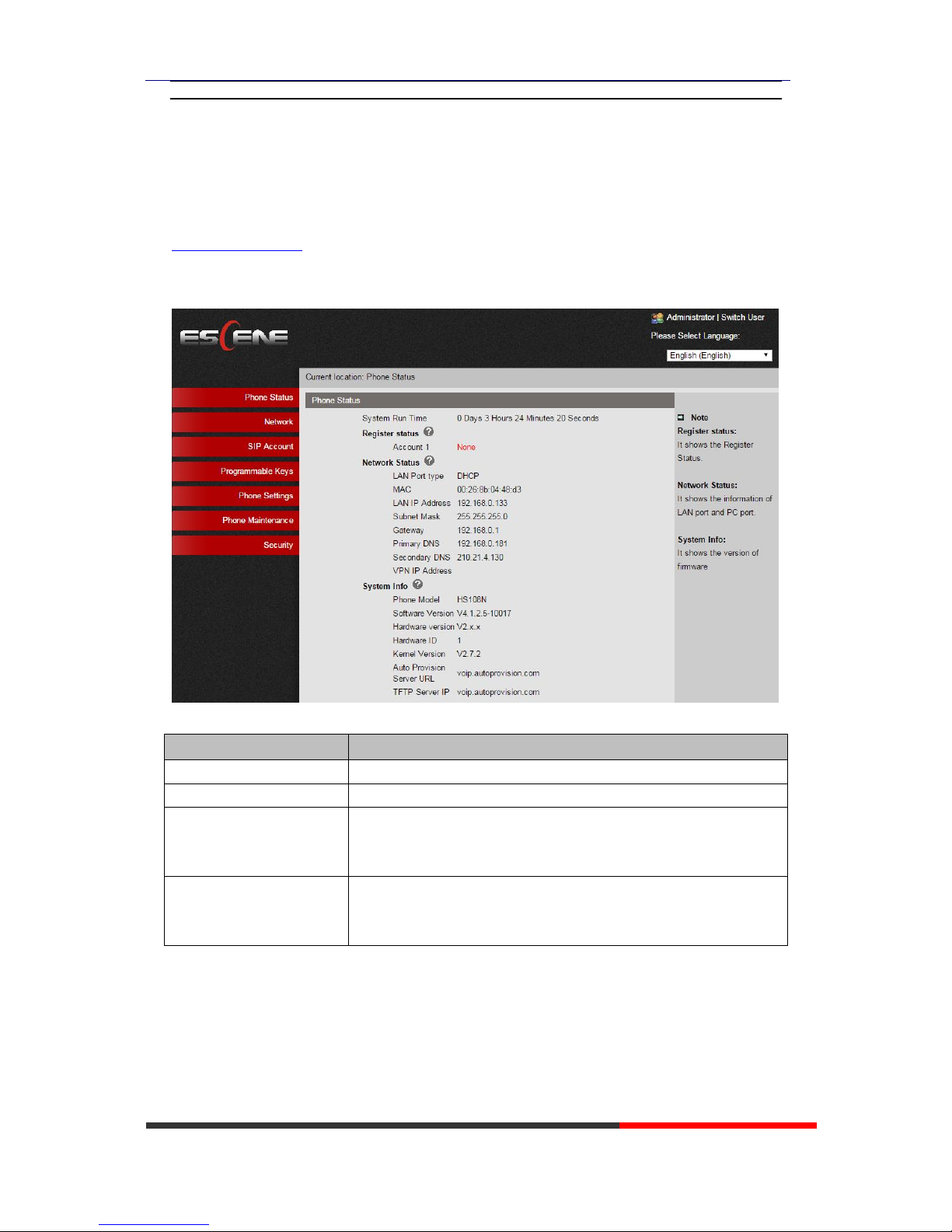
We can configure IP Phone more handy through web setting.. Enter it (for example
http://192.168.0.200) into the address bar of web browser..Tips: Please check IP address by
pressing the button ‘*1*1*2’in the on hook status. The default login name and password are
both “root”.
ITEM
DESCRIPTION
System Run Time
The phone system normal running time.
Register Status
The status with Account 1~2.
Network Status
The status with LAN, MAC, LAN IP, Net mask, Gateway, Primary
DNS, Secondary DNS, VPN IP, PC IP, PC Net mask, Device Type,
DHCP Server.
System Information
The status with Phone Model, Software Version, Hardware Version,
Hardware ID, Kernel Version, Auto-Provision Server URL, TFTP
Server IP.
Page 9
HS108v2 IPPhone
www.escene.cn/en/
Escene Communication
5 Net Work
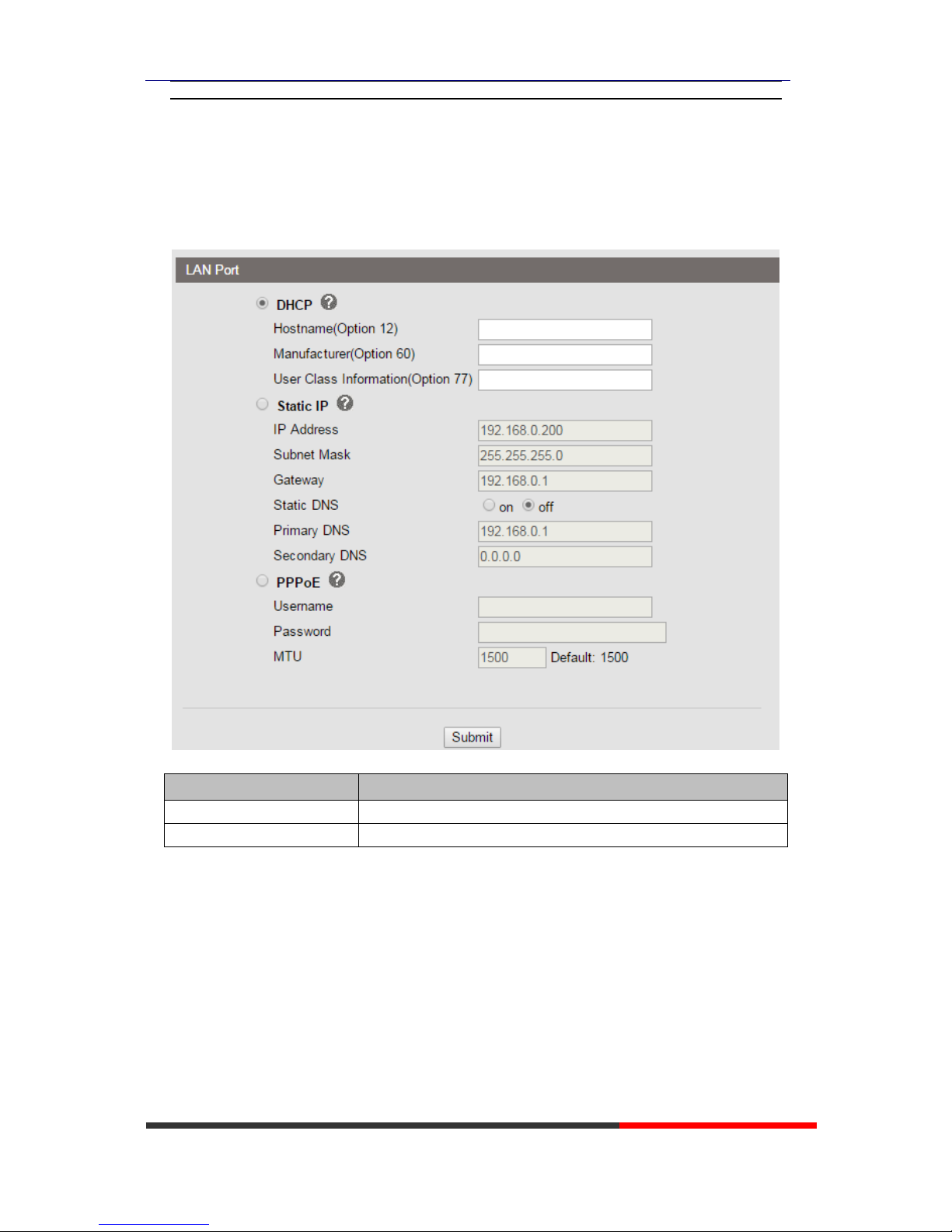
5.1 LAN Port
ITEM
DESCRIPTION
Network Connection Mode
Network Connection Mode has DHCP, Static IP, PPPoE.
DNS Settings
Select the DNS mode that you want.
Page 10
HS108v2 IPPhone
www.escene.cn/en/
Escene Communication
5.2Advanced
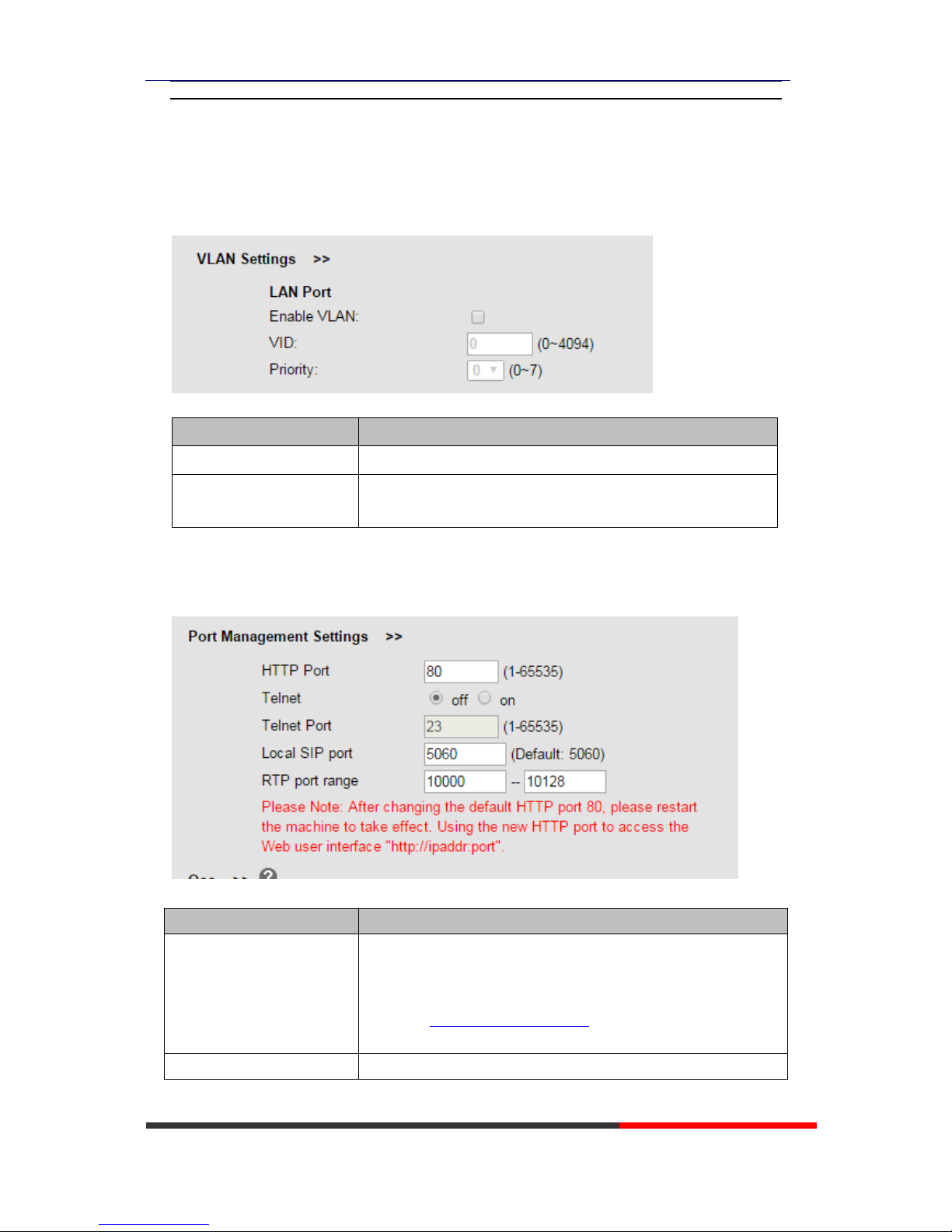
5.2.1VLAN Setting
When using VLAN Setting option, you can set several parameters as follow:
ITEM
DESCRIPTION
Enable VLAN
You can enable/disable vlan for phone and pc
VID
[LAN/PC Port]
The vlan ID you want the phone or pc to join
5.2.2Port Management Settings
ITEM
DESCRIPTION
HTTP Port
The default web port is 80,if you want to change it(for example
change it to88),
You must input IP and Web port to login the web page(for
example HTTP://192.168.0.200:88). It will take effect on next
reboot.
Telnet
Enable/Disable Telnet
Page 11
HS108v2 IPPhone
www.escene.cn/en/
Escene Communication
Telnet Port
The default Telnet port is 23,if you want to change it(for exampl e
change it to 2003). You must input IP and Telnet port to login the
manage page (for example telnet 192.168.0.200:2003).It will take
effect on next reboot.
Local SIP Port
The port range setting with SIP, default is 5060.
RTP Port Range
The port range with RTP
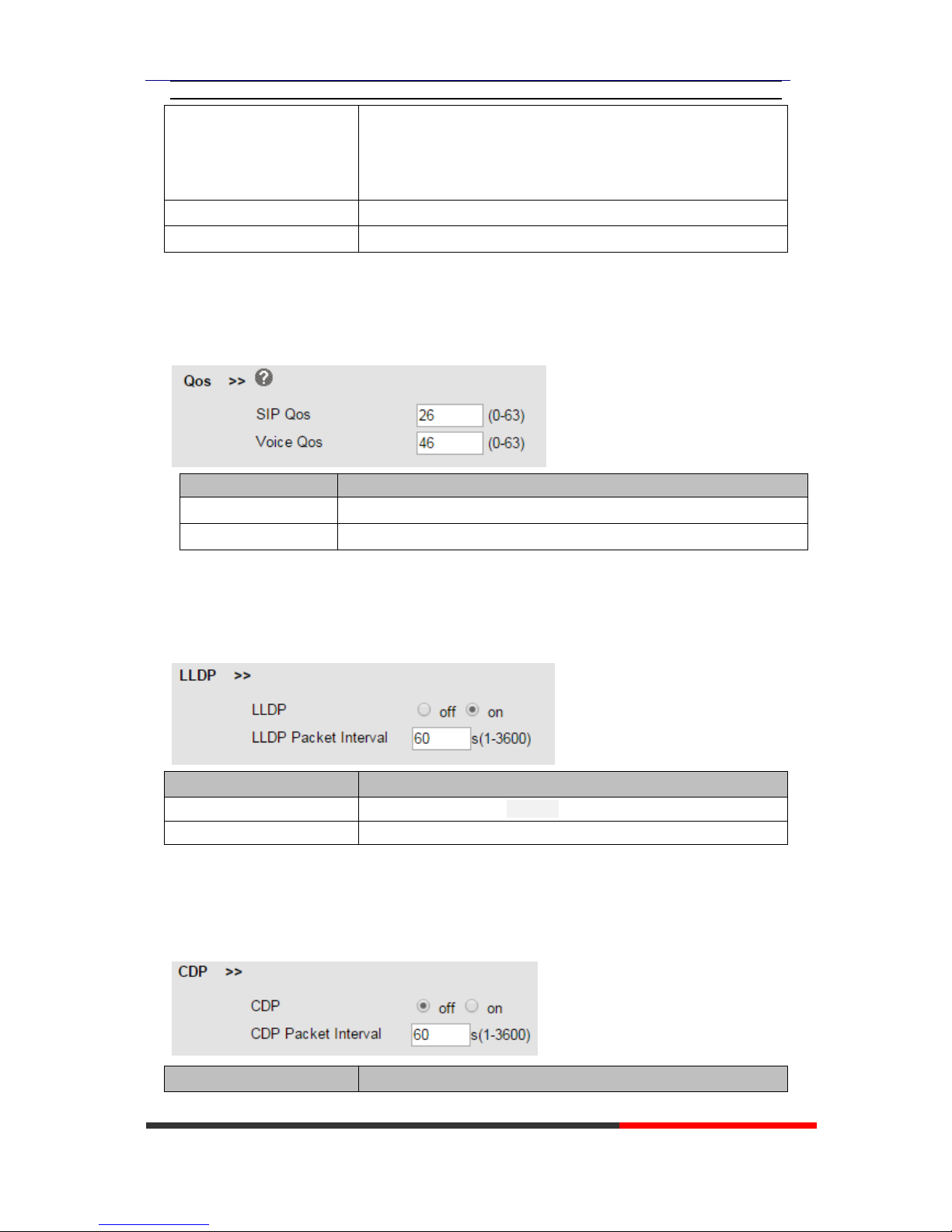
5.2.3Qos
ITEM
DECSRIPTIO
SIP QoS
The range is 0~63,default is 26
Voice QoS
The range is 0~63,default is 46
5.2.4LLDP
ITEM
DESCRIPTION
LLDP
Enable/Disable LLDP Protocol
LLDP Packet Interval
LLDP Packet Interval Time
5.2.5CDP
ITEM
DESCRIPTION
Page 12
HS108v2 IPPhone
www.escene.cn/en/
Escene Communication
CDP
Enable/Disable CDP Protocol
CDP Packet Interval
CDP Packet Interval Time
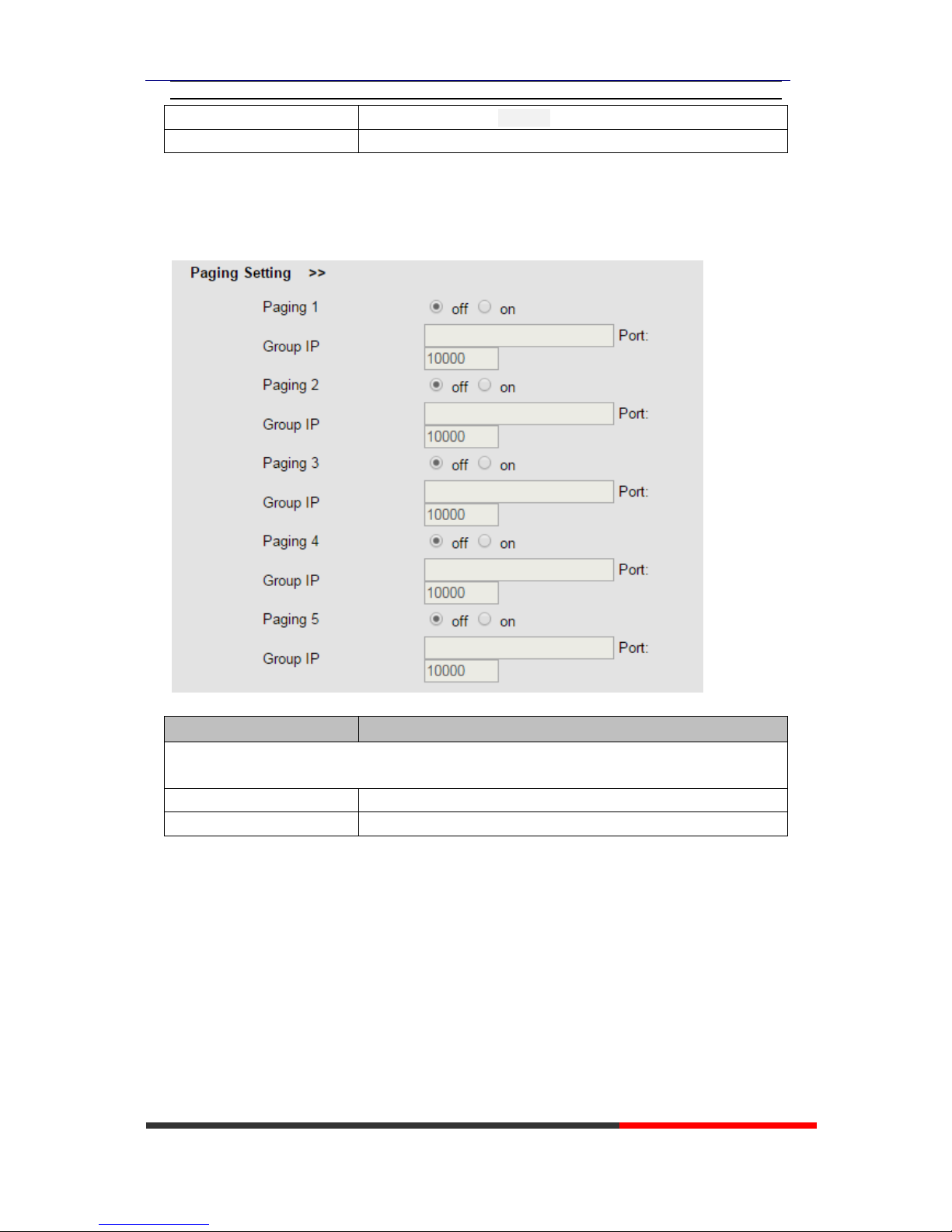
5.2.6Paging Setting
ITEM
DESCRIPTION
Paging Setting(NOTE: This feature priority is followed the serial number, In other words,
"paging 1" is the highest priority)
Paging1
Enable/Disable Paging feature.
Group IP and Port
Group IP and Port with Paging.
Page 13
HS108v2 IPPhone
www.escene.cn/en/
Escene Communication
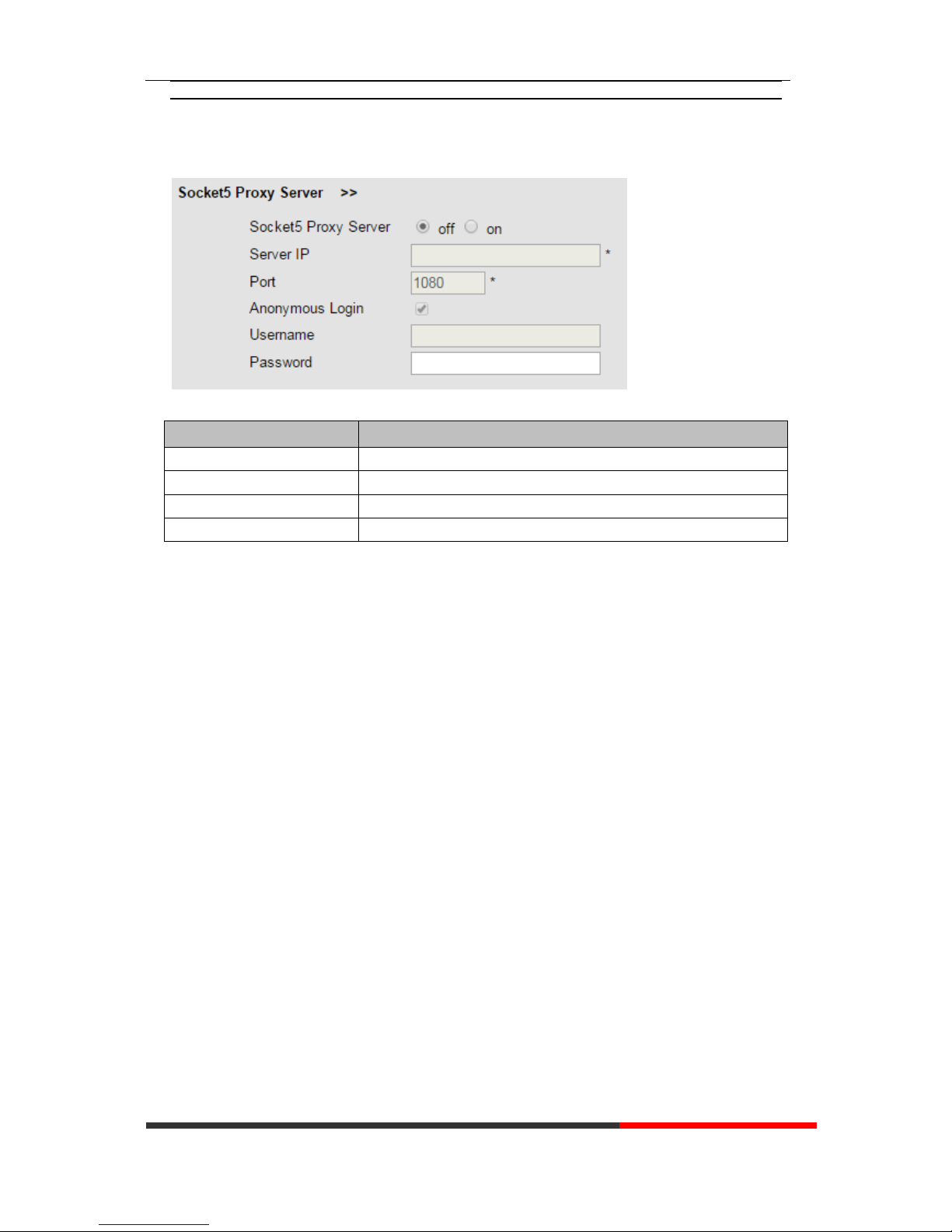
5.2.7Socket5 Proxy Server
ITEM
DESCRIPTION
Socket5 Proxy Server
Enable/Disable Socket5 Proxy Server.
Server IP
Socket5 Proxy Server IP address.
Port
Socket5 Proxy Server port, default is 1080.
Anonymous Login
Enable/Disable Socket5 Proxy Server login username.
Page 14
HS108v2 IPPhone
www.escene.cn/en/
Escene Communication
6 SIP Account
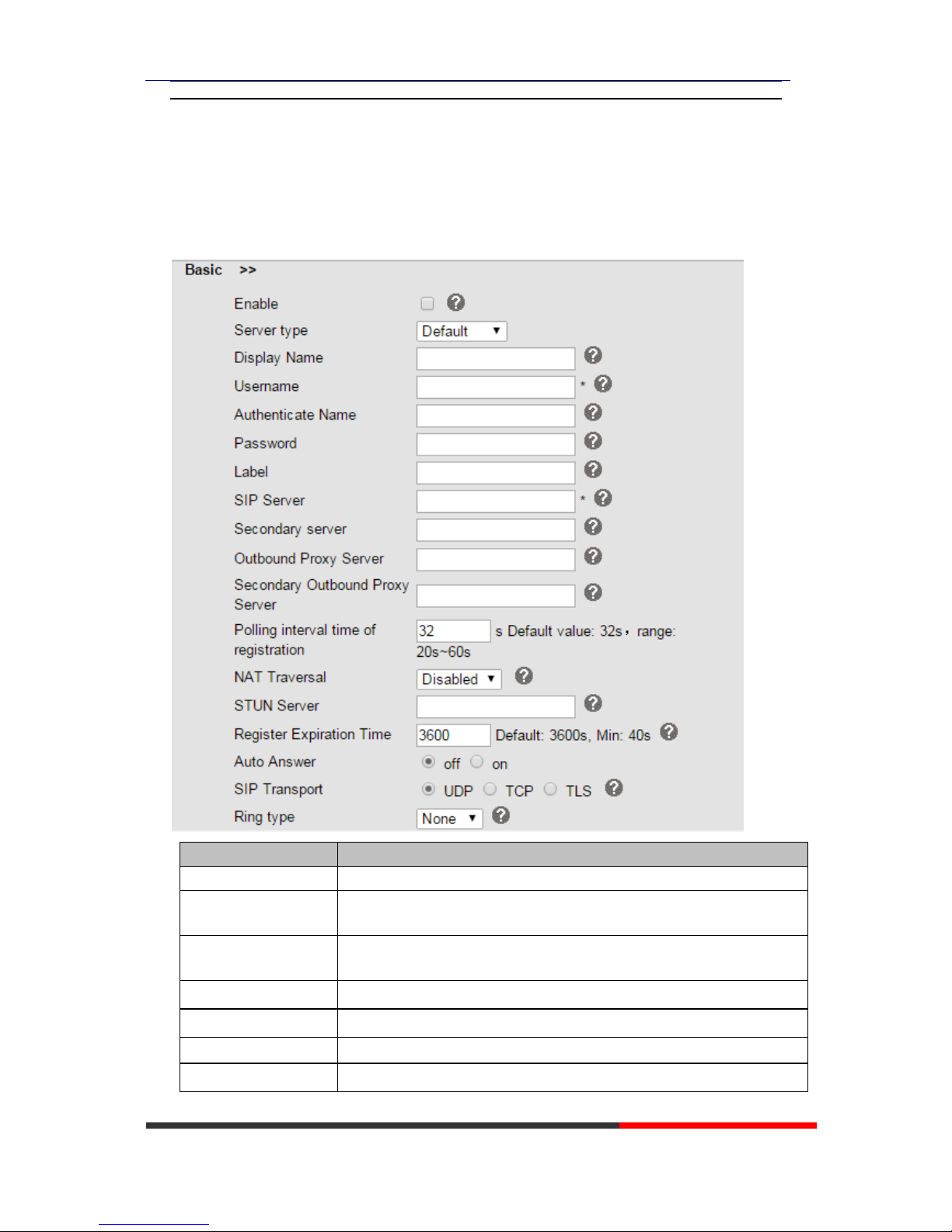
6.1Basic
ITEM
DECSRIPTIO
Enable
You can choose on/off to enable/disable the line.
Server type
You can choose Default/Broadsoft.
Display Name
It is showed as Caller ID when making a phone call
Username
It is a username provided by SIP Server
Authenticate Name
It is authenticated ID for authentication
Password
It is a password provided by SIP Server
Label
Label with this account.
Page 15

HS108v2 IPPhone
www.escene.cn/en/
Escene Communication
SIP Server
Server for registration, provided by administrator
Secondary server
When the main server can't work, it also can register in this secondary
server.
Outbound Proxy Server
Put into the address with the outbound proxy server.
Secondary Outbound
When the main out bound server can't work, it also can use this secondary
Poling Interval Time Of
Registration
Poling Interval Time Of Registration, default is 32 s.
NAT Traversal
Defines the STUN server will be active or not
STUN Server
Session traversal utilities for NAT.
BLA
Share with the line.
BLA Number
BLA Number
Subscribe Period
Subscribe expire time.
Register Expire Time
IP phone automatically registered every time
SIP Transport
There are UDP/TCP/TLS three options
Ring Type
Select this account ringing type.
Page 16
HS108v2 IPPhone
www.escene.cn/en/
Escene Communication
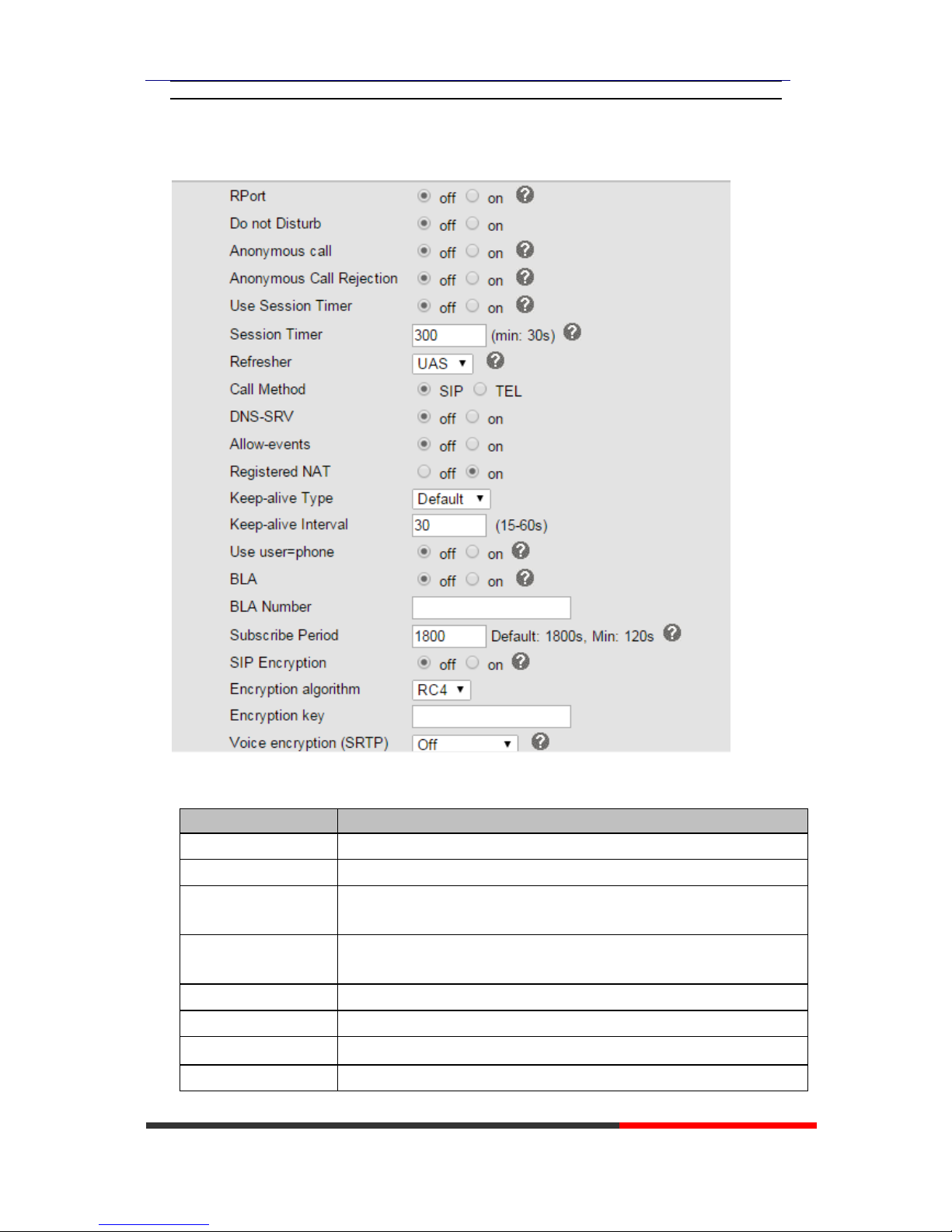
6.2 Advanced
ITEM
DECSRIPTIO
Do Not Disturb
Enable/Disable Do Not Disturb
Anonymous Call
Enable/Disable anonymous call.
Anonymous Call
Rejection
Enable/Disable anonymous call rejection.
Use Session Timer
Enable/Disable refresh session function. The device will send an Invite
packet to refresh the session during a call if it enable.
Session Timer
The refresh session time interval.
Call Method
This method include SIP and TEL.
DNS-SRV
Enable/Disable DNS-SRV.
Allow-events
Enable/Disable Allow-events.
Page 17
HS108v2 IPPhone
www.escene.cn/en/
Escene Communication
Registered NAT
Enable/Disable Registered to NAT
UDP Keep-alive
Message
The phone periodically sends a UDP packet to keep the port active and to
avoid the server to shut down the port
UDP Keep-alive
Interval
Default is 30 second.
SIP Encryption
Enable/Disable SIP encryption.
RTP Encryption
Enable/Disable RTP encryption.
Encryption Algorithm
The encryption algorithm at this time we only have RC4.
Encryption Key
The key with encryption.
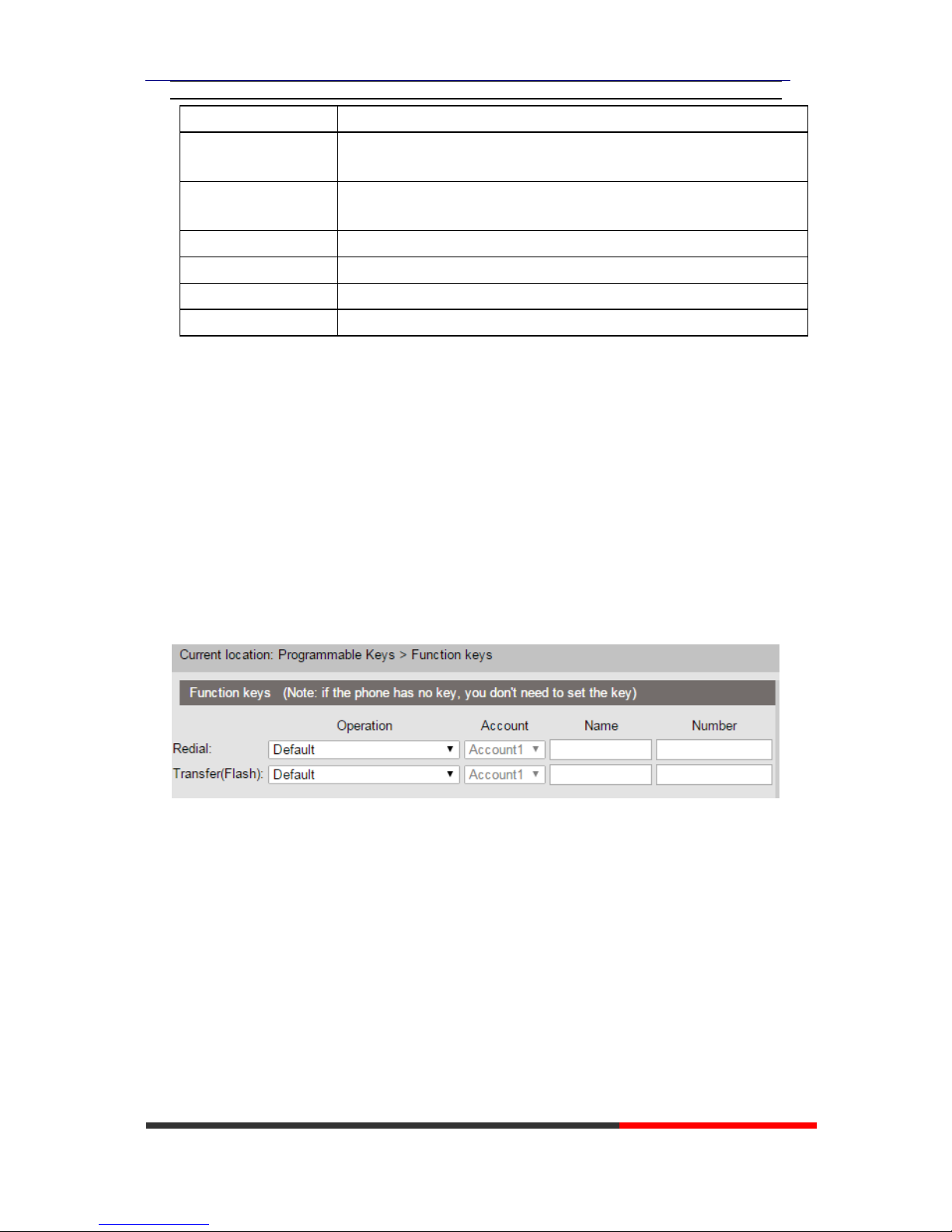
7Programmable Keys
Function Keys
Function Keys: If you do not like the default setting with the function keys feature. You can
change to whatever you like.
NOTE: IF THE PHONE WITHOUT THE KEY, YOU CAN IGNORE IT.
Page 18
HS108v2 IPPhone
www.escene.cn/en/
Escene Communication
8 Phone Setting
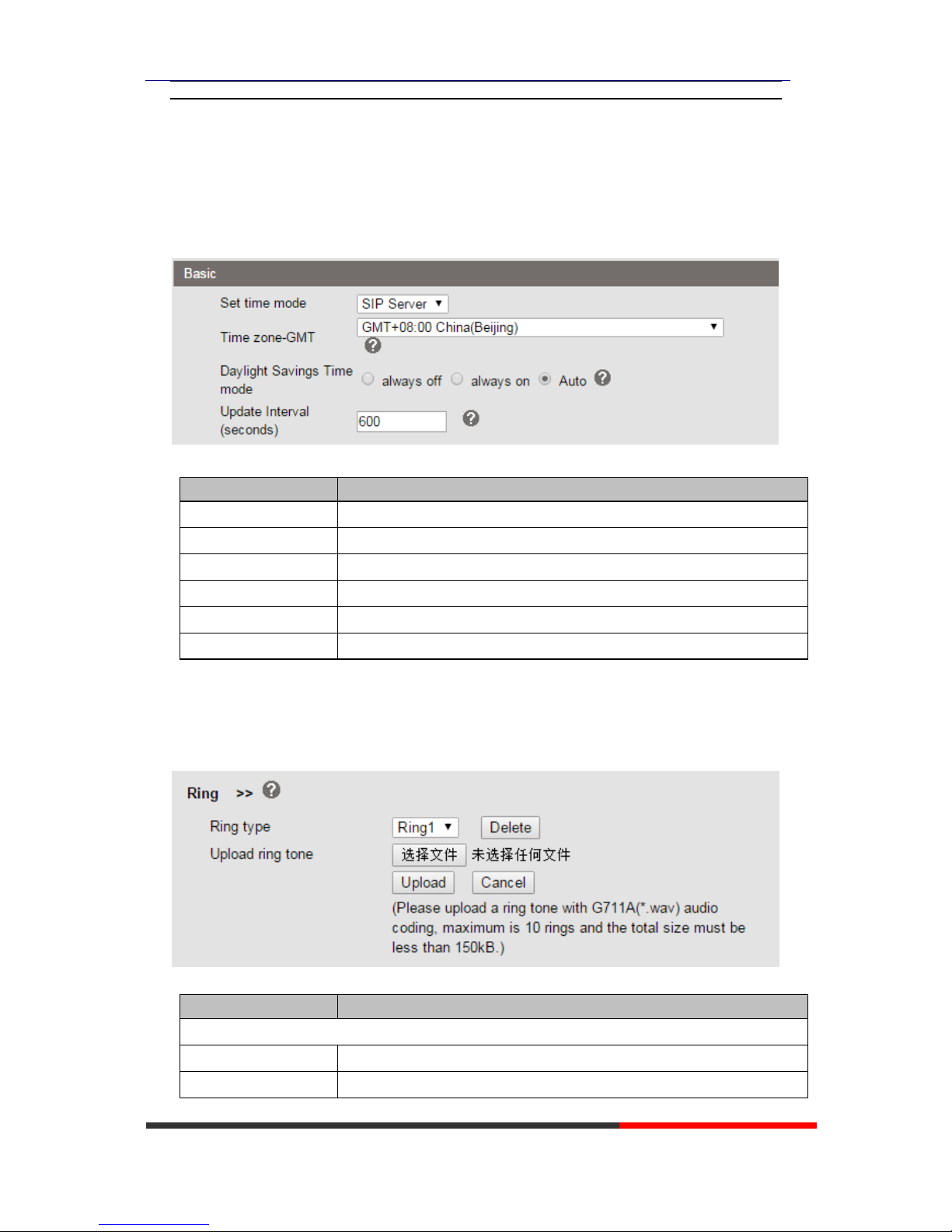
8.1 Basic
ITEM
DECSRIPTIO
Set Time Mode
Include SNTP/SIP Server/Manual
SNTP Server
You can select in the list or input owner server address.
Secondary SNTP server
You can select in the list or input owner server address.
Time Zone-GMT
You can select different time zone for the phone
Daylight Saving Time
Enable/disable the DST for the phone
Update Interval
The update interval with SNTP.
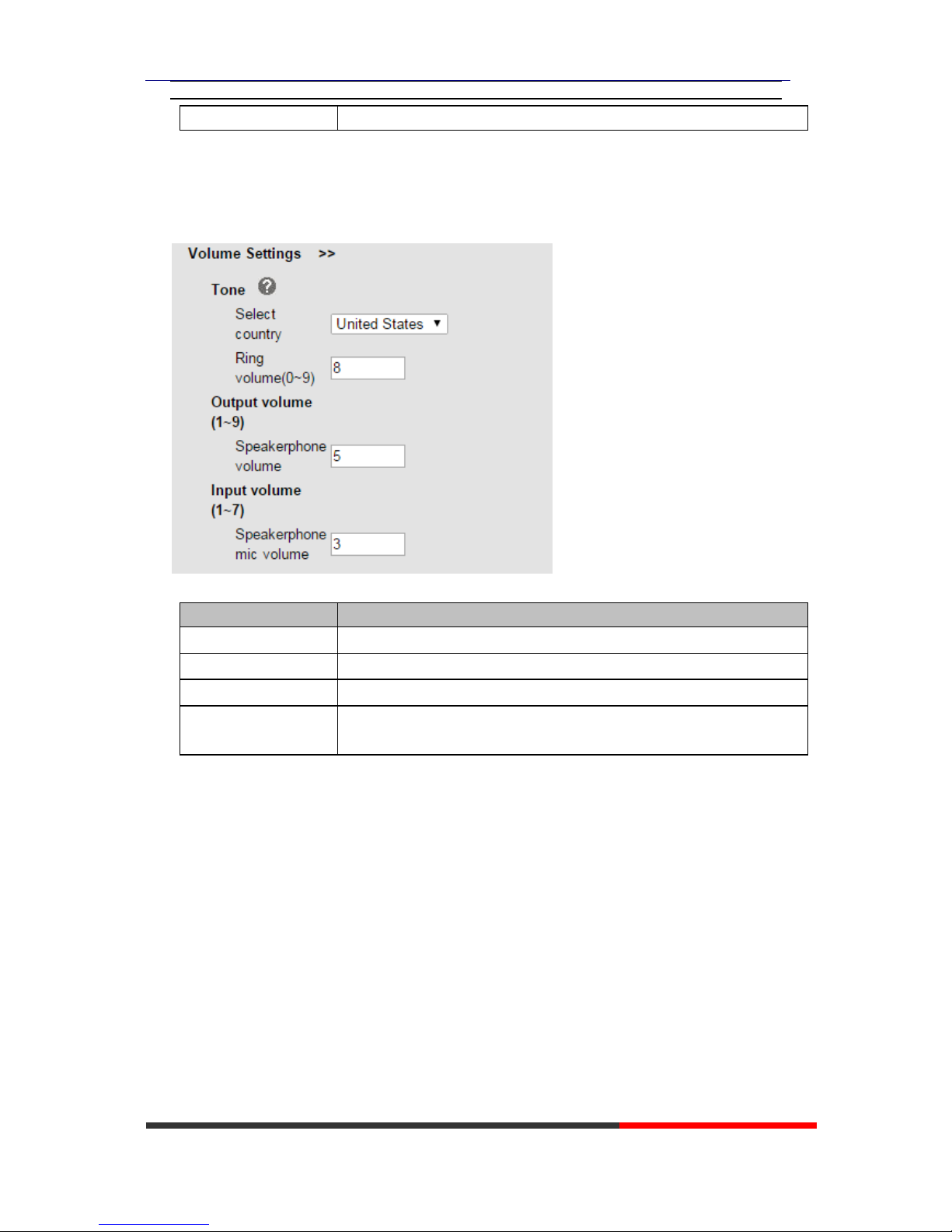
8.1.1Ring
ITEM
DECSRIPTIO
Ring
Ring Type
Select the ring type. Default is Ring 1.
Uploading Ring Tone
Please upload a ring tone with G711A audio coding, Maximum 10 rings
Page 19
HS108v2 IPPhone
www.escene.cn/en/
Escene Communication
and the total sizes must less than 150k.
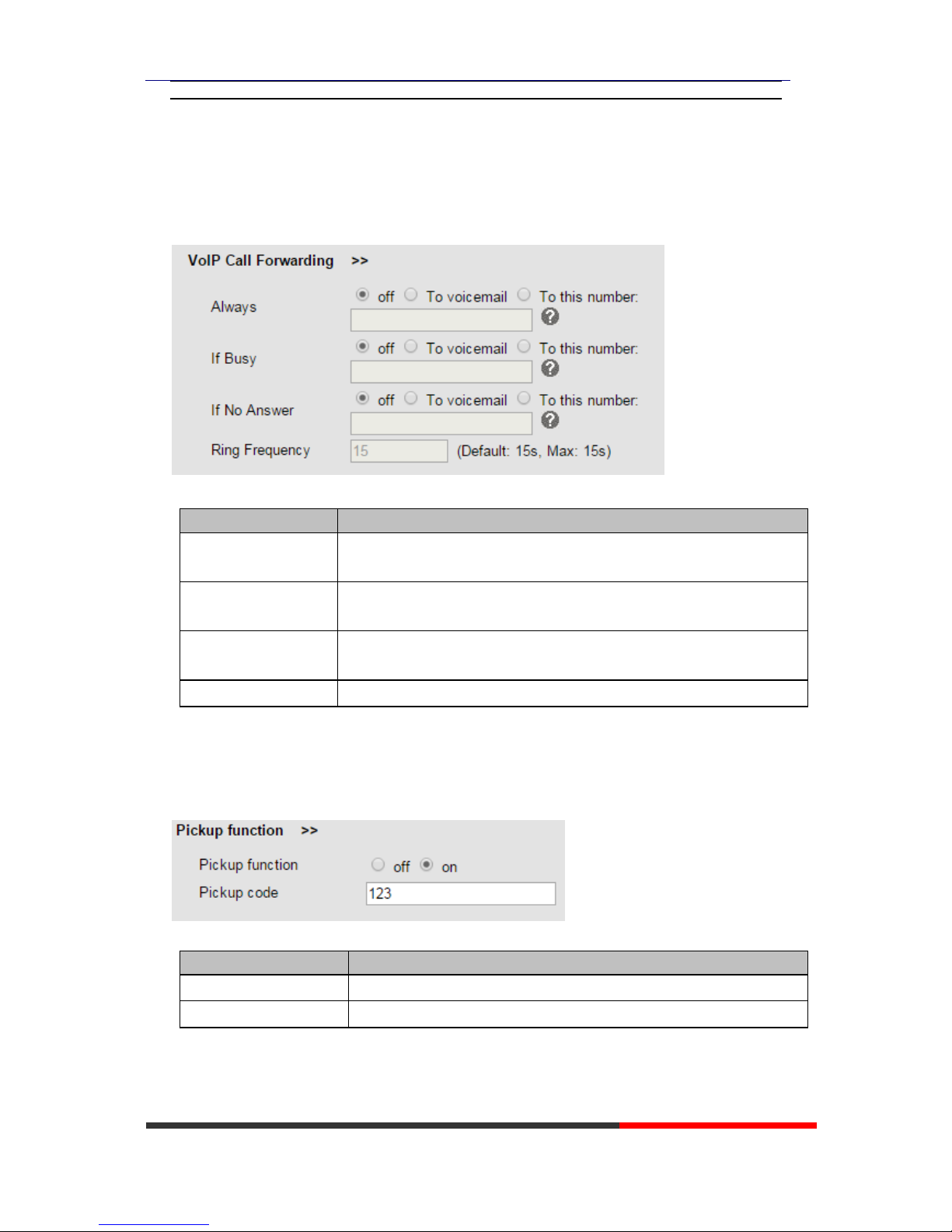
8.1.2Volume Settings
ITEM
DECSRIPTIO
Select Country
Select the country dial tone. Default is United States.
Ring Volume
The ring volume default is Lv3, the range is 0~9.
Speaker Phone Volume
The speaker volume default is Lv5, the range is 1~9.
Speaker Phone MIC
Volume
The speaker MIC volume default is Lv3, the range is 1~7
Page 20
HS108v2 IPPhone
www.escene.cn/en/
Escene Communication
8.2Features
8.2.1VoIP Call Forwarding
ITEM
DECSRIPTIO
Always
This feature allows you to forward all incoming calls to another phone
number.
If Busy
This feature allows you to forward an incoming call to another phone
number if busy.
If No Answer
This feature allows you to forward an incoming call to another phone
number if no answer.
Ring Frequency
Set ring frequency.
8.2.2Pickup function
ITEM
DECSRIPTI
Pickup Function
When you are not in the position, others can help you to answer.
Pickup Code
Fill in server's pickup code.
Page 21
HS108v2 IPPhone
www.escene.cn/en/
Escene Communication
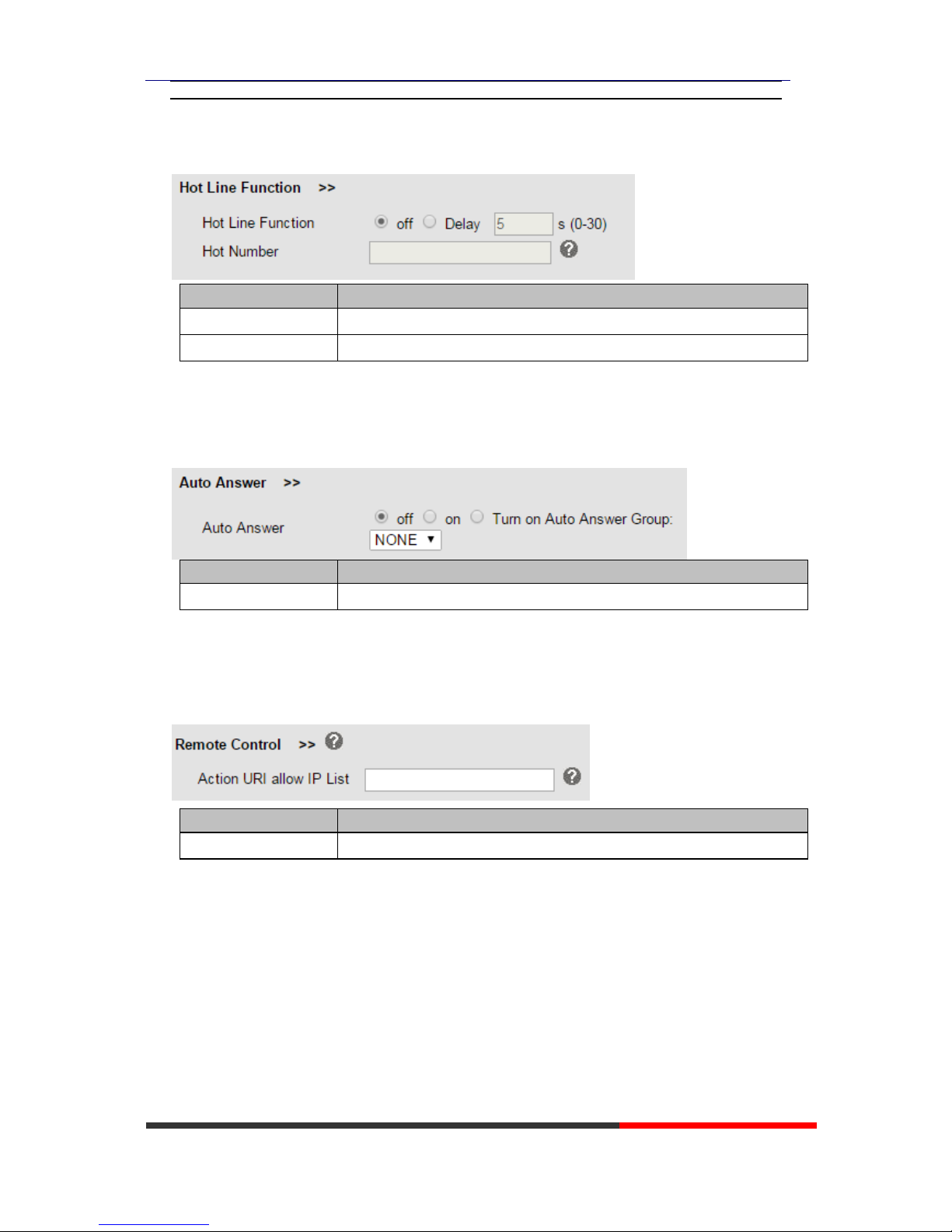
8.2.3Hot Line Function
ITEM
DECSRIPTIO
Hot Line function
When you pick up the handset, it will dial out with the hot number.
Hot Number
Input the number what you want to.
8.2.4Auto Answer
ITEM
DECSRIPTIO
Auto Answer
Auto-answer the coming call, it also can filter a contact group.
8.2.5Remote Control
ITEM
DECSRIPTIO
Remote Control
List IP address of PC,who can remote control device.
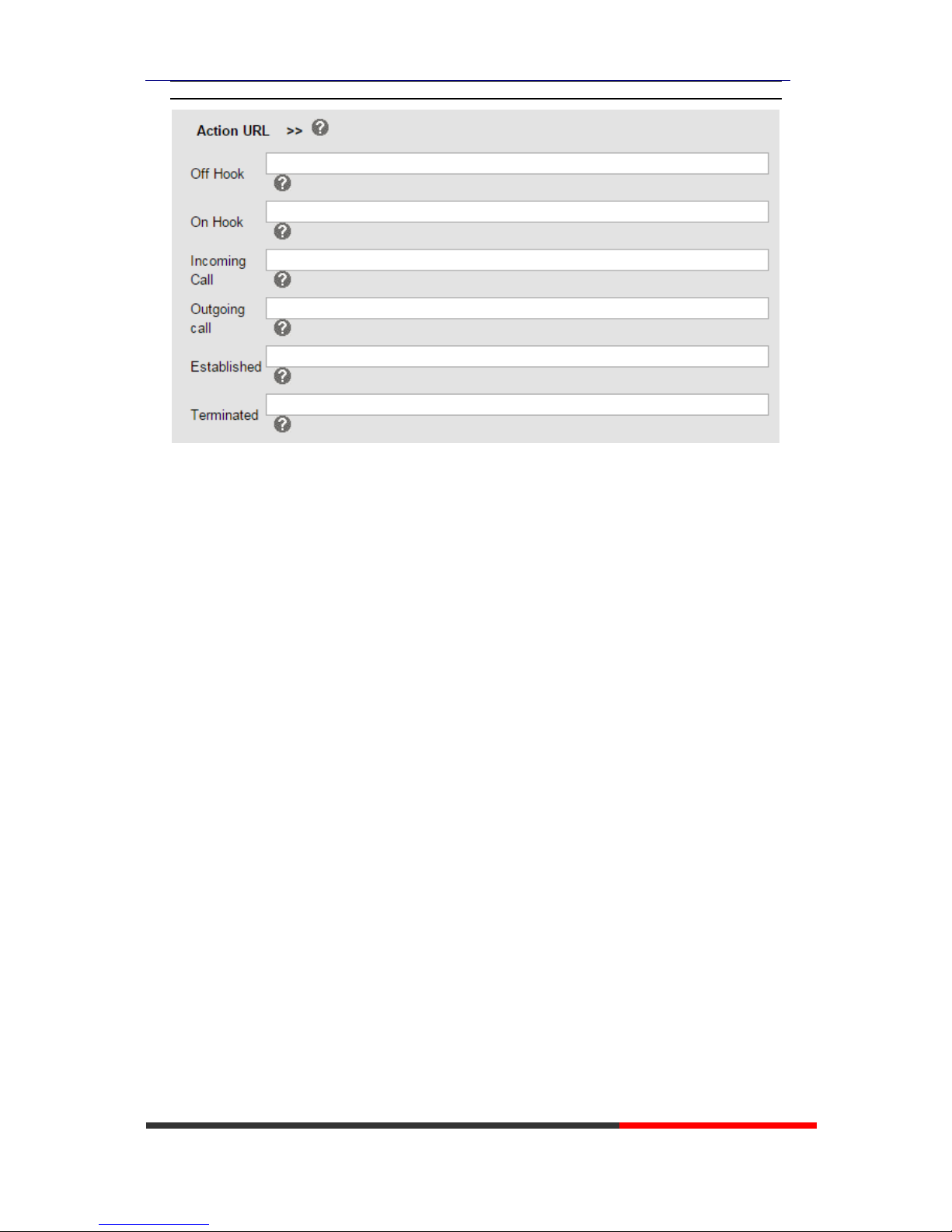
8.2.6Action URL
The action URL parameters for administrator.
Can be achieved on the server's action, the relevant parameters settings.
Page 22
HS108v2 IPPhone
www.escene.cn/en/
Escene Communication
Page 23
HS108v2 IPPhone
www.escene.cn/en/
Escene Communication
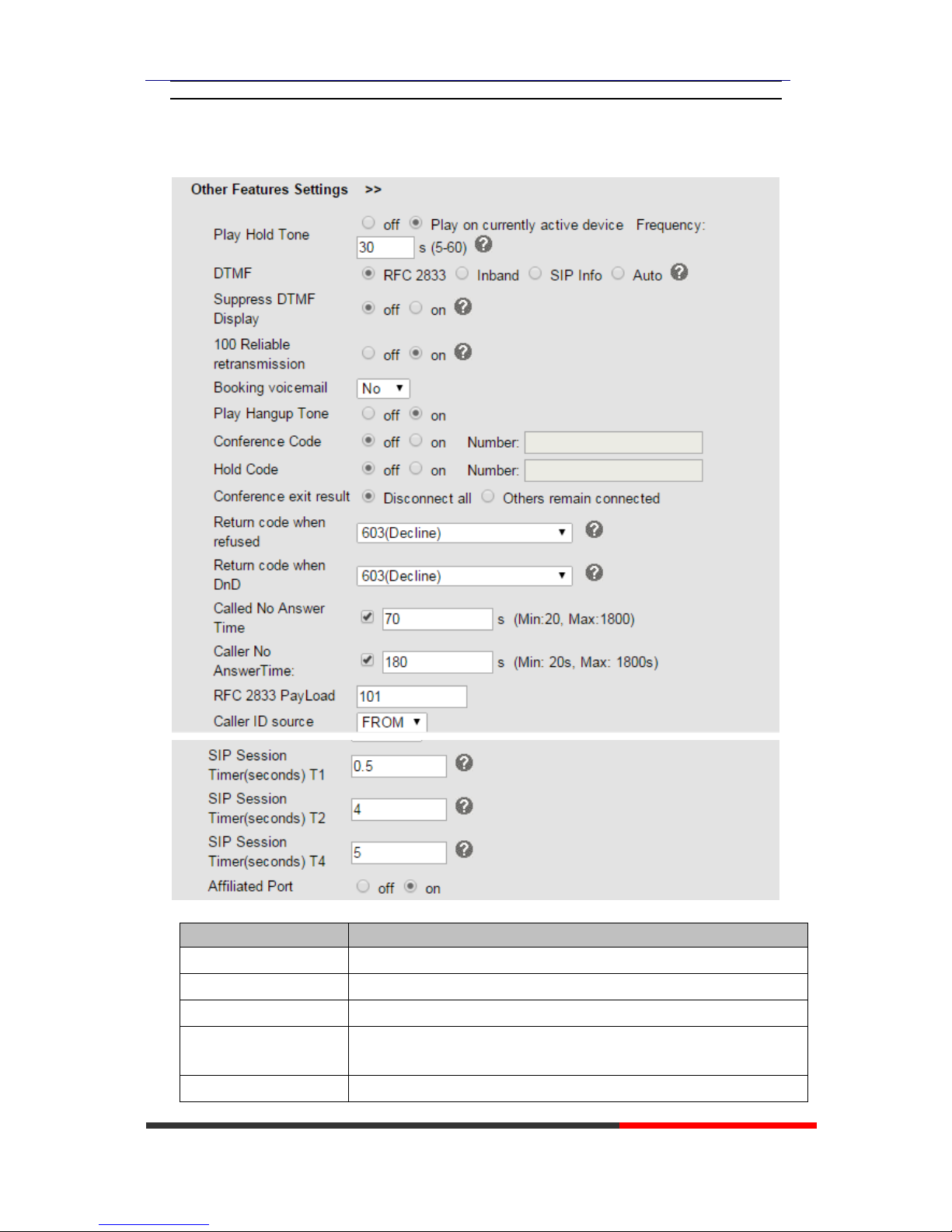
8.2.7Other Features Settings
ITEM
DECSRIPTI
Play Hold Tone
Set the time to keep the tone and prompt frequency.
DTMF
The DTMF transmitted mode, include RFC2833,Inband,SIP Info, Auto
Suppress DTMF Display
Suppress DTMF display in taking.
100 Reliable
retransmission
Enable/Disable PRACK retransmission.
Booking voicemail
Booking voicemail or not. Open this feature, the phone light(Message)
Page 24

HS108v2 IPPhone
www.escene.cn/en/
Escene Communication
will be bright when it get message.
Play Hangup Tone
The tone with hang up in busy.
Conference Code
The code with conference.
Hold Code
The code with hold.
Conference exit result
Conference originator hang up the phone, hang up two ways of it.
Return code when
refused
Select the code feedback to the server when you reject the call.
Return code when DnD
Select the code feedback to the server when you open DND function.
Called No Answer Time
When it has coming call and enable this feature, the caller will be request
time out in the stipulated time.
Caller No AnswerTime
When calling the other party no reply,the caller will be request time out
in the stipulated time.
RFC 2833 PayLoad
Default is 101, RTP Payload for DTMF Digits, Telephony Tones and
Telephony Signals
Caller ID source
SIP Session
Timer(seconds) T1
The SIP Session Timer setting.
SIP Session
Timer(seconds) T2
The SIP Session Timer setting.
SIP Session
Timer(seconds) T4
The SIP Session Timer setting.
Affiliated Port
Enable/Disable the affiliated port feature.
Page 25
HS108v2 IPPhone
www.escene.cn/en/
Escene Communication
8.3Advanced
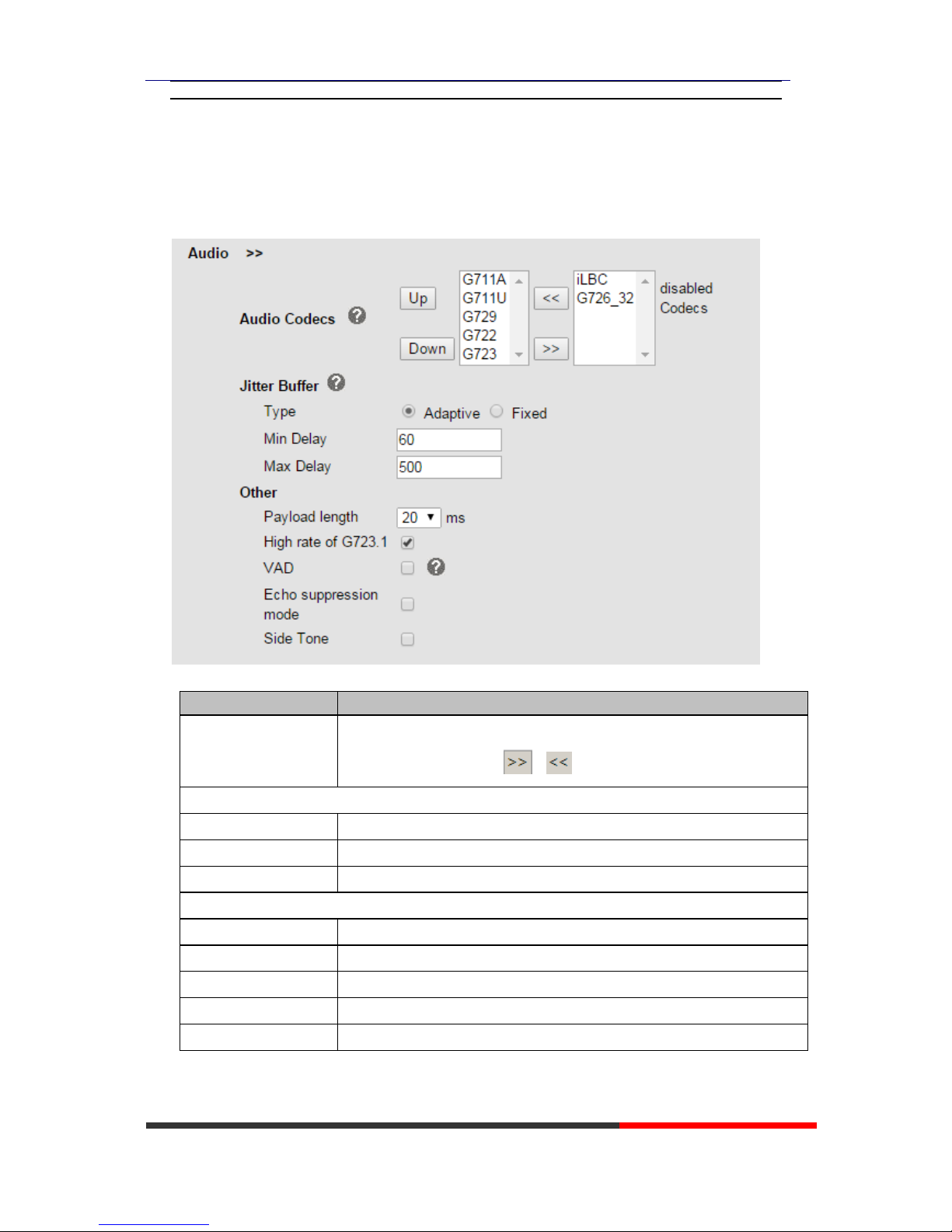
8.3.1Audio
ITEM
DECSRIPTIO
Audio Codecs
Use the navigation keys to highlight the desired one in the Enabled/Disable
Codes list, and press the / to move to the other list.
Jitter Buffer
Type
The type of Jitter Buffer is Adaptive or Fixed, default is adaptive.
Min Delay
The min delay range setting , default is 60.
Max Delay
The max delay range setting , default is 150.
Other
Play Load Length
The play load length setting, default is 30ms.
High Rate Of G723.1
Enable/Disable High Rate of G723.1 feature.
VAD
Enable/Disable VAD feature.
Echo Suppression Mode
Enable/Disable Echo Suppression Mode feature.
Side Tone
Enable/Disable Side Tone feature.
Page 26
HS108v2 IPPhone
www.escene.cn/en/
Escene Communication
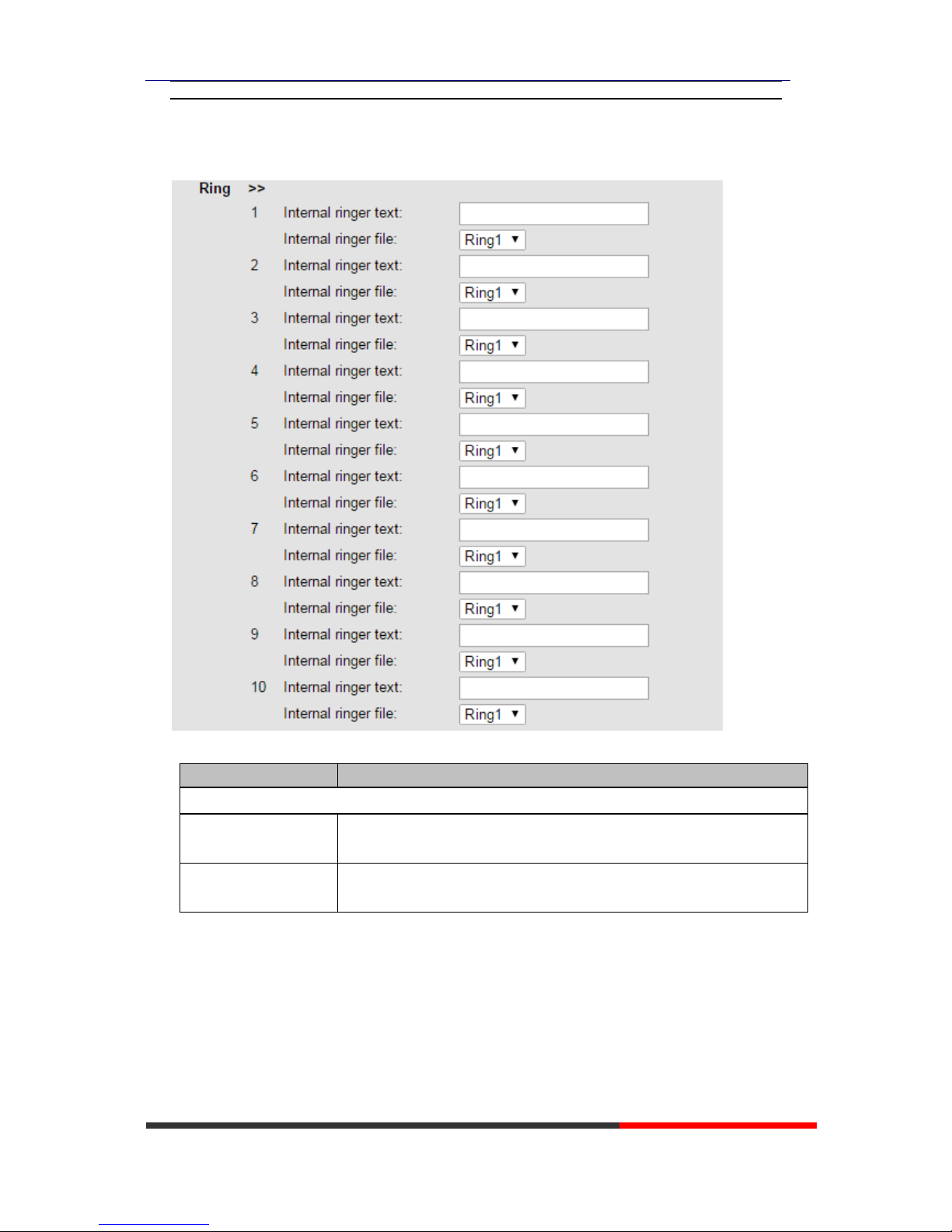
8.3.2Ring
ITEM
DECSRIPTIO
Ring
Internal ringer text
This Internal ringer text enables the server to distinguish between internal
and external rings. The trace head-info must include "Alert-Info: ;info=".
Internal ringer file
According to the defined Internal ring text, play the corresponding Internal
Ring File.
Page 27
HS108v2 IPPhone
www.escene.cn/en/
Escene Communication
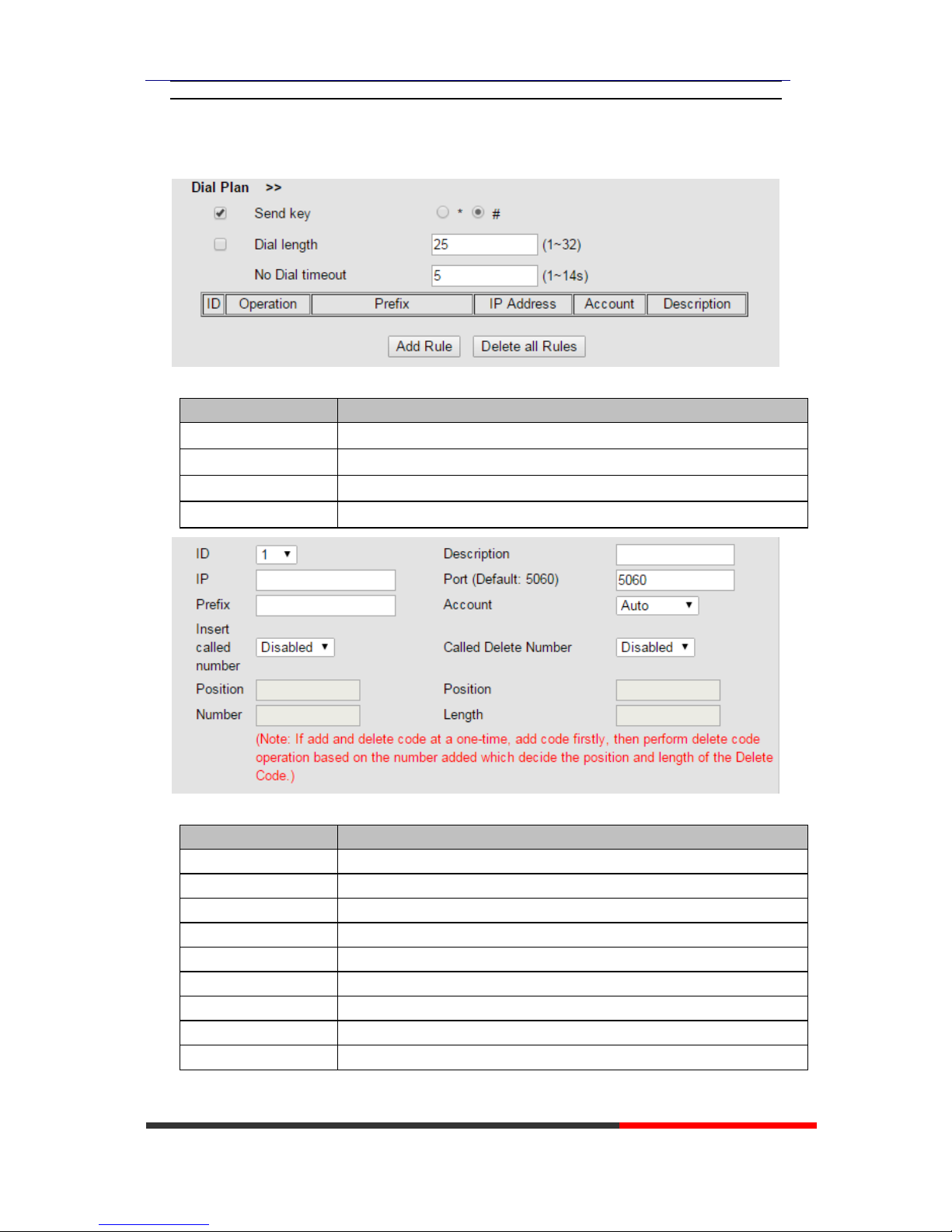
8.3.3Dial Plan
ITEM
DECSRIPTIO
Send Key
Select the default send key mode you want to use.
Dial Length
Enable this feature will limit the dial length. Default is 25.
No Dial Timeout
Setting the range with no dial timeout, default is 5.
Dial Rule
Select the Add Rule button to add dial rule, pls see as below detail.
ITEM
DECSRIPTIO
ID
Dial Plan ID
IP
The ip of a phone which you want to call
Description
Description with this dial rule.
Port
Setting the Port with this dial rule, default is 5060.
Prefix
The number which you need to press actually if you want to call the phone
Called Insert Number
There have two option, Enable or Disable.
Position
Which position you want insert the number
Number
Which number you want to insert
Called Delete Number
There have two option, Enable or Disable.
NOTES: If you want to know more detail about Dial Rule, pls find it in the official website to
Page 28
HS108v2 IPPhone
www.escene.cn/en/
Escene Communication
download the specific document. HTTP://www.escene.cn/en.
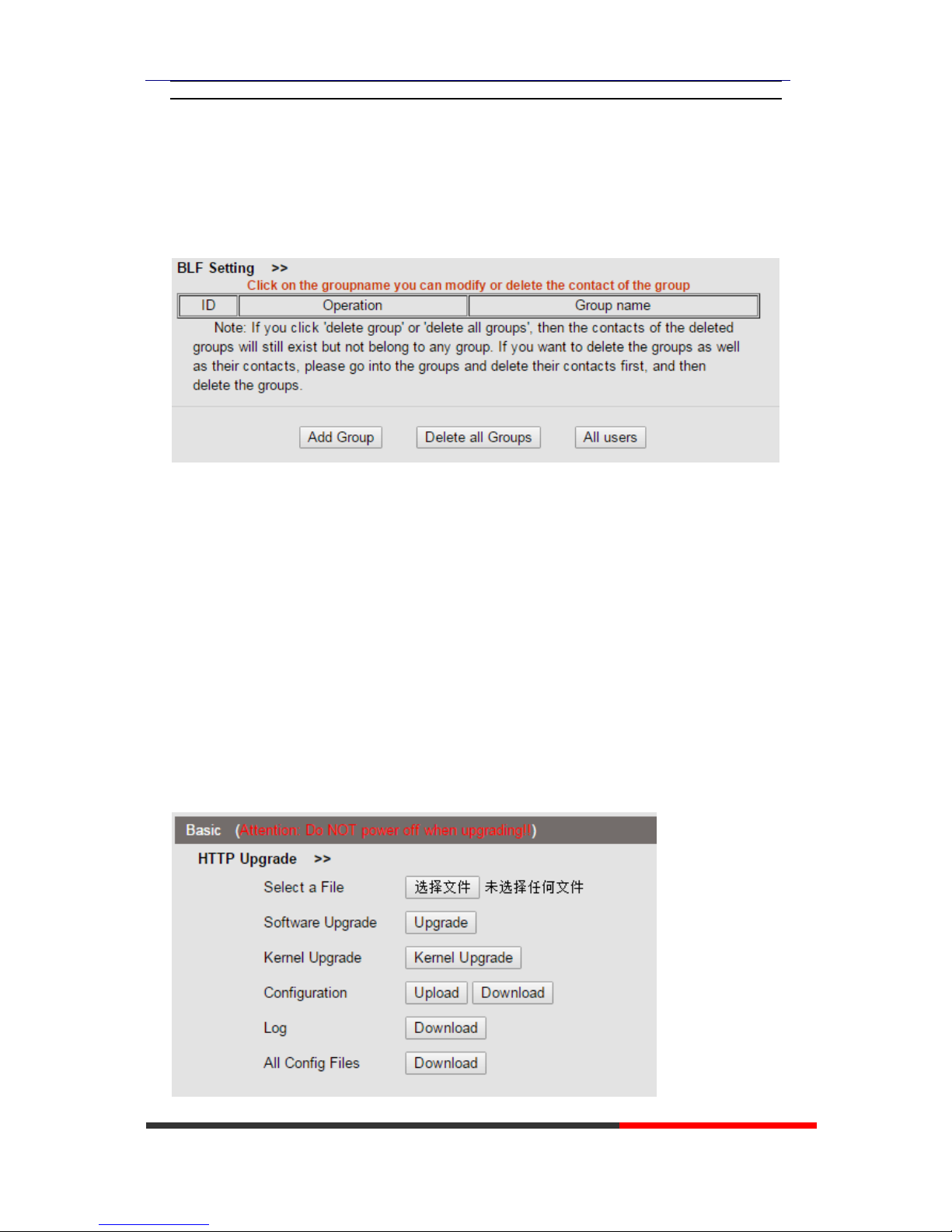
8.3.4BLF Setting
You can add and set the BLF group here.
9 Phone Maintenance
9.1 Basic
NOTES: Don't cut off the electricity or network cable when doing upgrade in the below
ways!
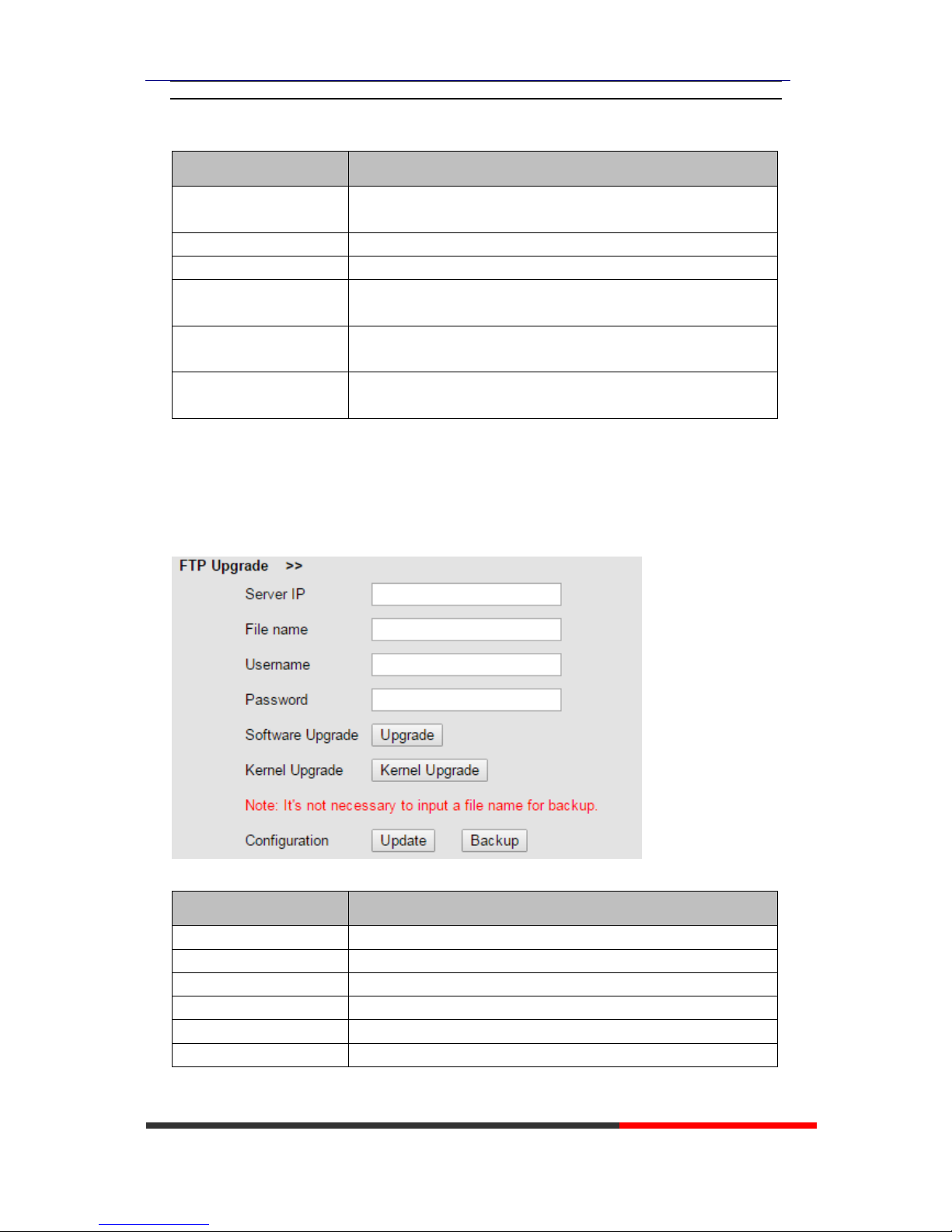
9.1.1 HTTP Upgrade
You can upgrade the software, kernel and configuration etc. files by HTTP.
Page 29
HS108v2 IPPhone
www.escene.cn/en/
Escene Communication
When using HTTP upgrade, you can set several parameters as follow:
ITEM
DECSRIPTION
Select a File
Browse the software/kernel/configuration file which you need to
upgrade from HTTP
Software Upgrade
Used for upgrading the software of the phone
Kernel Upgrade
Used for upgrading the kernel of the phone
Configuration
You can used upload/download to upload/download the configure
file of the phone
Log
Used for the administrator to find out or making sure the problem
with this equipment.
All Config File
All Config File includes: Configuration, Extern, Log, XML Phone
book, Enterprise Phone Book.
9.1.2 FTP Upgrade
You can upgrade the software, kernel and configure files by FTP.
When using FTP upgrade, you can set several parameters as follow:
ITEM
DECSRIPTION
Server IP
The IP address of the FTP server
Filename
Downloading from FTP server
Username
Providing by FTP server
Password
Providing by FTP server
Software Upgrade
Used for upgrading the software of the phone
Kernel Upgrade
Used for upgrading the kernel of the phone
Page 30
HS108v2 IPPhone
www.escene.cn/en/
Escene Communication
Configuration
Used for updating/backup to update/backup the configure file of
the phone
NOTES: It's not necessary to input filename when doing backup Configuration.
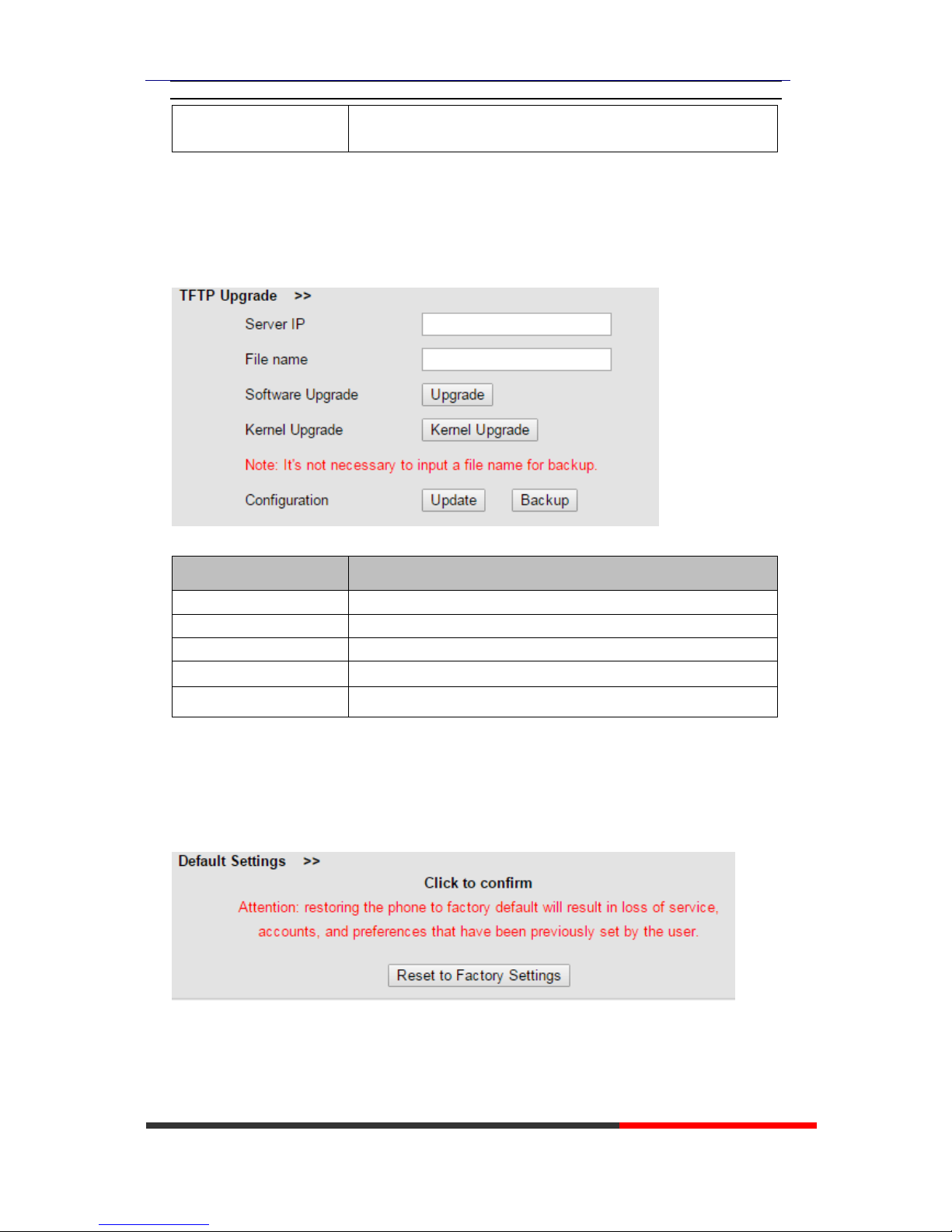
9.1.3 TFTP Upgrade
You can upgrade the software, kernel and configure files by TFTP.
When use TFTP upgrade, you can set several parameters as follow:
ITEM
DECSRIPTION
Server IP
The IP address of the TFTP server
Filename
Downloading from FTP server
Software Upgrade
Used for upgrading the software of the phone
Kernel Upgrade
Used for upgrading the kernel of the phone
Configuration
Used for updating/backup the configure file of the phone
NOTES: It's not necessary to input filename when doing backup Configuration.
9.1.4 Default Setting
You can load the phone to the factory default setting in default setting option.
Press the ‘Reset to Factory Setting’ option, the phone will load to factory default setting on next
reboot.
Page 31
HS108v2 IPPhone
www.escene.cn/en/
Escene Communication
9.1.5 Reboot
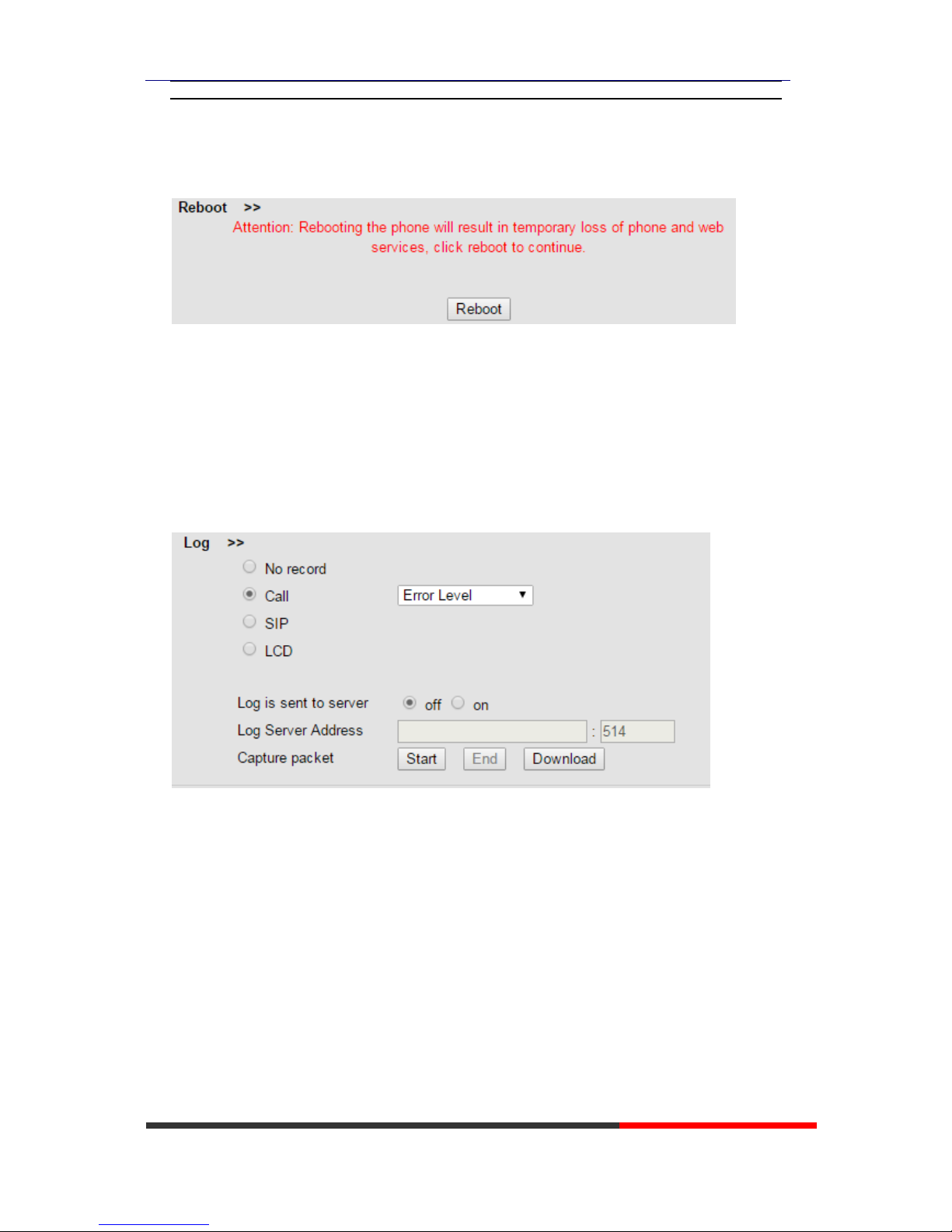
You can use reboot option to reboot the phone.
9.2 Advanced
9.2.1 Log
This feature is use for the administrator to managing the equipment, like debugging, SIP etc,. If
you need to catch a debugging Level, you need to setup on this interface.
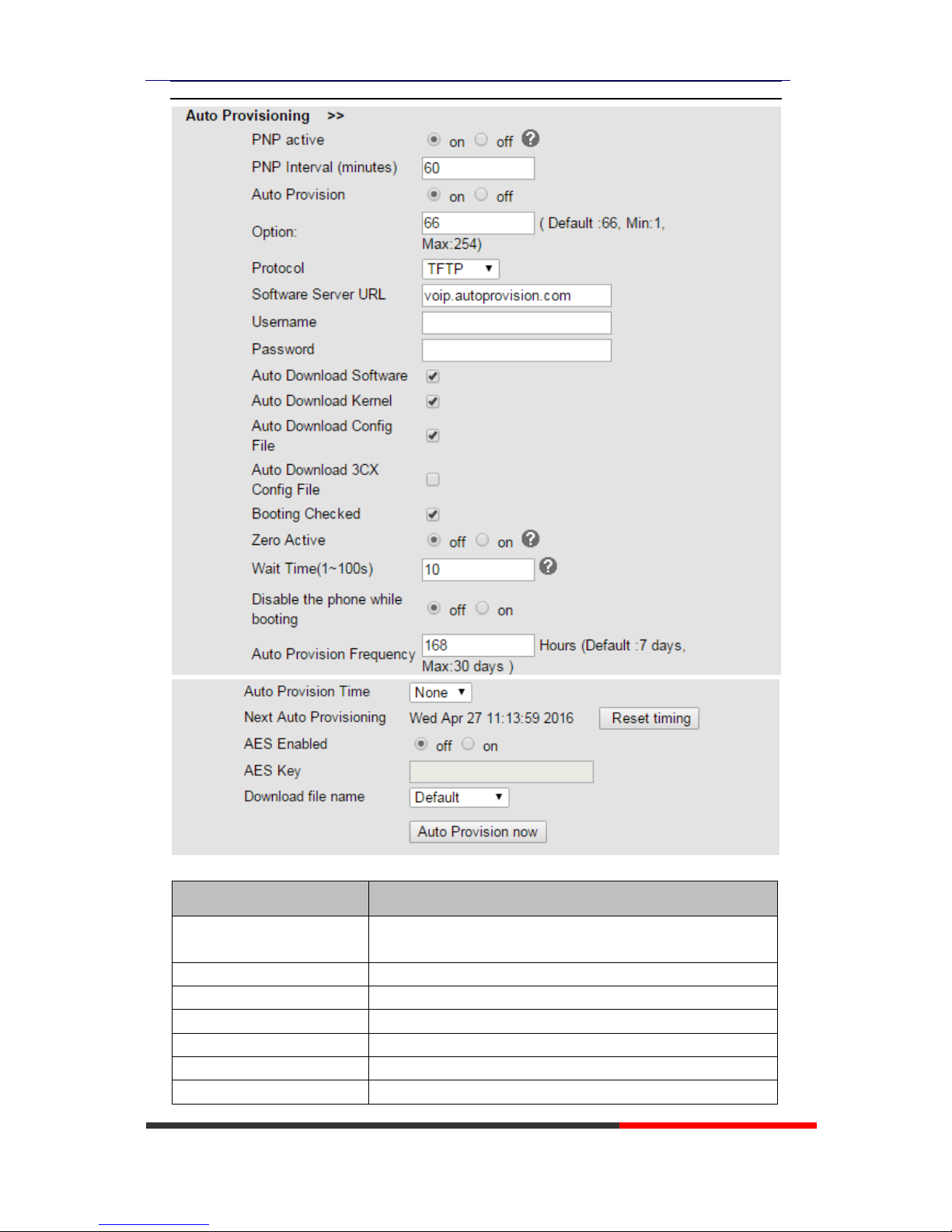
9.2.2 Auto Provision
When you open this auto provision feature, the phone will do auto provision after it detect a
different software or kernel (Higher or Lower) which are putted on the TFTP,HTTP,HTTPS,FTP,
server. For the detailed information about auto provision, you can find it in the official website:
HTTP://www.escene.cn/en
Page 32
HS108v2 IPPhone
www.escene.cn/en/
Escene Communication
When using auto provision, you can set several parameters as follow:
ITEM
DECSRIPTION
PNP active
The request to the server is to obtain a support URL for
upgrade.
PNP Interval (minutes)
PNP Interval Time.
Auto Provision
You can enable/disable auto provision by select on/off
Protocol
Used for auto provision, it includes TFTP/HTTP/FTP
Software Server URL
The server address of the auto provision
Username
Providing by provision server
Password
Providing by provision server
Page 33
HS108v2 IPPhone
www.escene.cn/en/
Escene Communication
Auto Download Software
Used for auto download software from server
Auto Download Kernel
Used for auto download kernel from server
Auto Download Config File
Used for auto download config file from server
Auto Download 3CX Config
File
Used for auto download 3CX config file from server
Booting Checked
Used for checking the auto provision when phone booting
Zero Active
Enable/Disable Zero-Sp-Touch which is used to download
configurations on the server during the phone power on.
Wait Time(1~100s)
The time when configuration interface of Zero-Sp-Touch will
show up when power on.
Disable the phone while
booting checking
Enable/Disable the booting checking feature.
Auto Provision Frequency
Used for setting the time interval for auto provision
Auto Provision Time
Used for the specific time for auto provision
Next Auto Provisioning
Reset the Auto Provision Next Upgrading time.
AES Enable
You can enable/disable AES encrypt for auto provision
AES Key
The key of the AES
Auto Provision Now
Used for doing auto provision immediately
10 Security
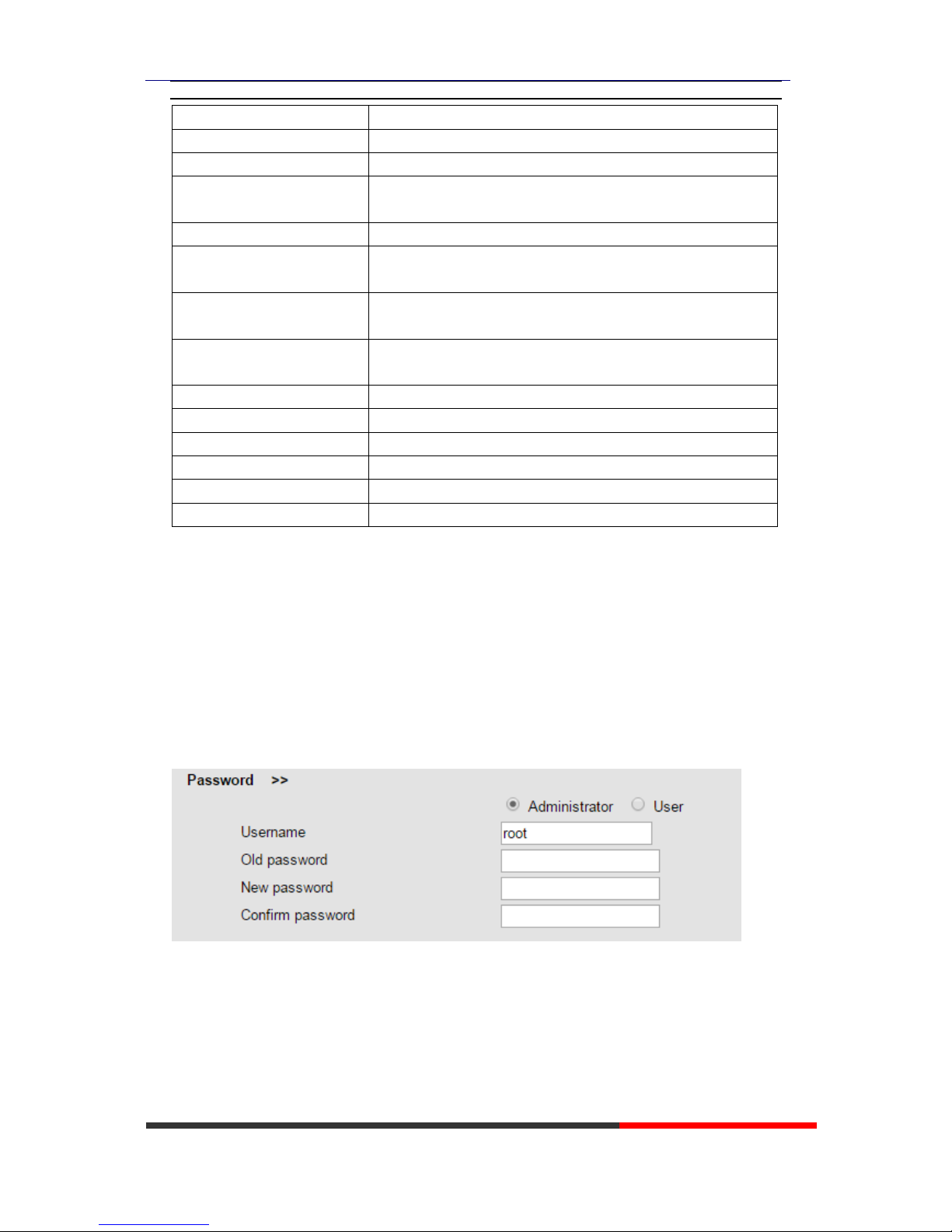
10.1Password
Here you can setting the administrator or user WEB password management. Select your type. If
you login as an administrator you can modify both the user's and admin's passwords.
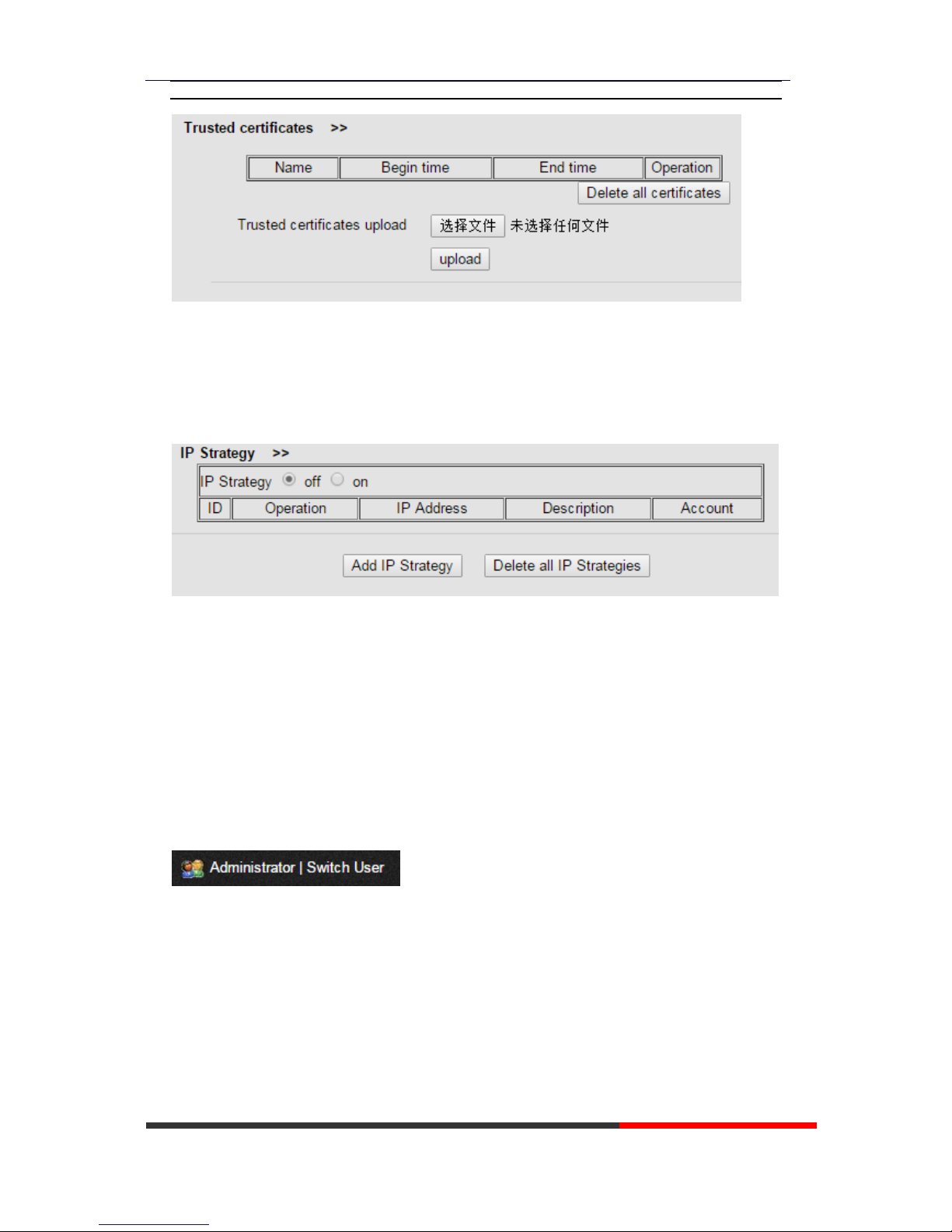
10.2Trusted certificates
Trusted certificates upload or delete.
Page 34
HS108v2 IPPhone
www.escene.cn/en/
Escene Communication
10.3IP Strategy
Add or remove IP strategy.
11 WEB Other Settings or Information Appendix
11.1 WEB User
In the upper right corner of the website page, you can switch the user.
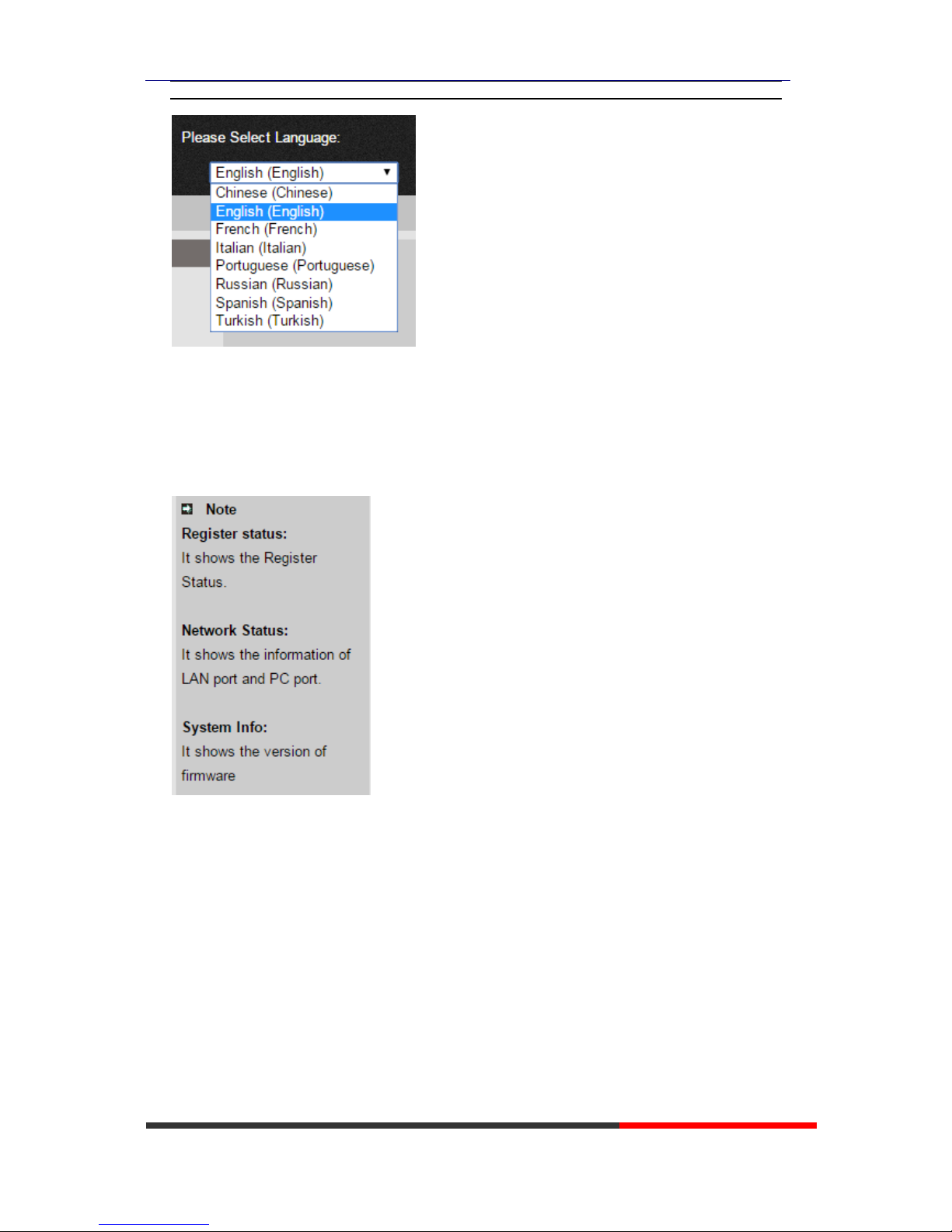
11.2 Multi-Language
In the upper right corner of the website page, you can select the language in the below list.
Page 35
HS108v2 IPPhone
www.escene.cn/en/
Escene Communication
11.3 Note Tips
In the right middle of the website page, there is a Note tips in every function page. Hope it can
help you to know something about that.
 Loading...