

Page 1
Escape
TM
P6 BT
Quick Start Guide
ENG
ES
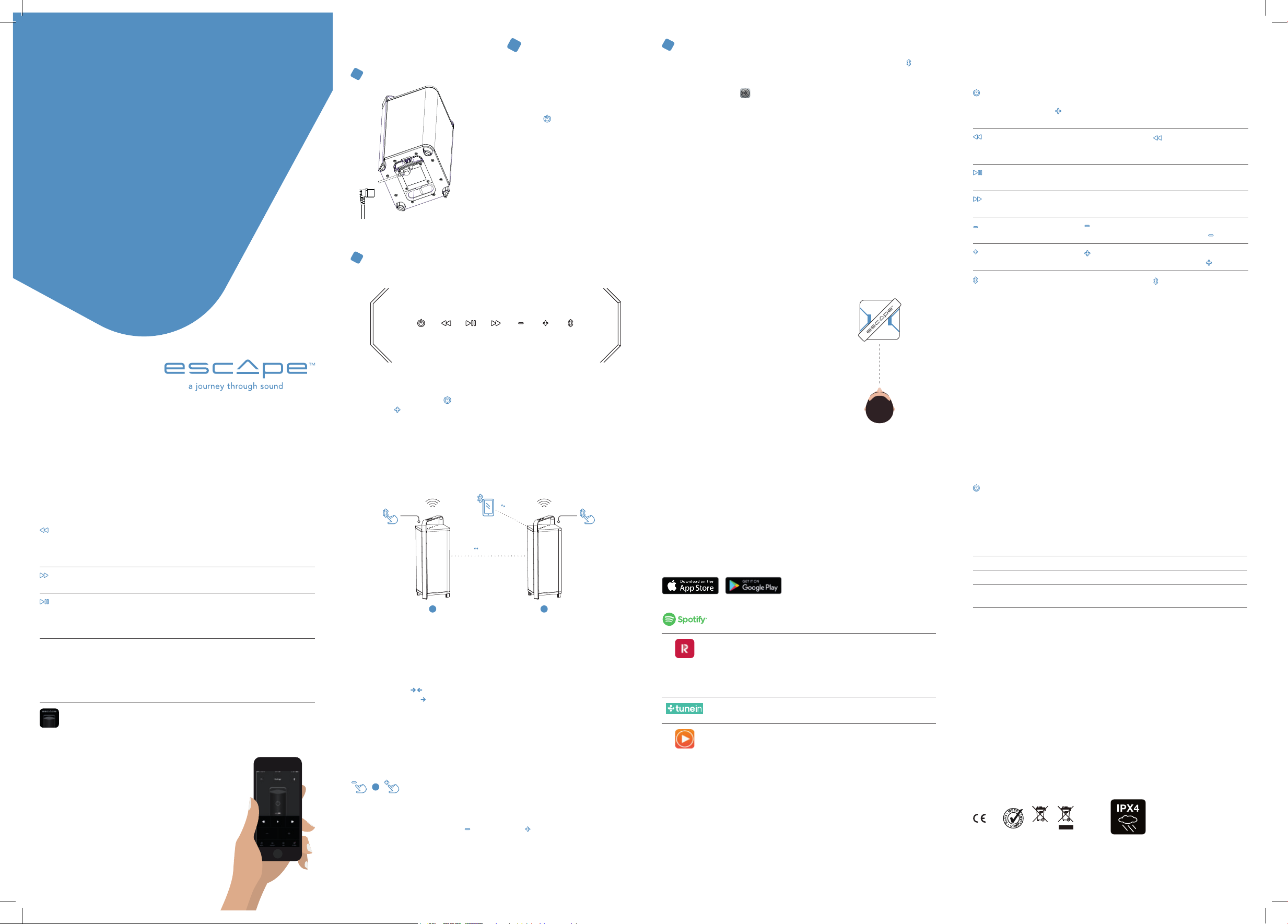
Enjoy your Escape™ P6 BT in 3 steps
CHARGING THE INTERNAL BATTERY
1
• Connect the enclosed power cord to the input
of the device (at the bottom of the unit).
• Plug the power cord into an electrical outlet.
• The red power LED [
light up to indicate that the battery is charging.
Leave the unit connected to the mains until
the red LED goes out. The battery is then fully
charged.
• Remove the power cord and close the protective
cover.
• A full charge cycle of the battery takes
approximately two to three hours. Never leave
the P6 BT unattended while charging.
TURNING ON THE UNIT
2
] on the keyboard will
STREAM MUSIC TO THE ESCAPE™ P6 BT WITH BLUETOOTH®
3
WIRELESS TECHNOLOGY.
• To start the Bluetooth® connection, briefly press the Bluetooth® button [
The white LED will start flashing blue and white followed by a double
confirmation tone.
• Go to Settings [
from the connection list and turn on Bluetooth®.
• Select Escape™ P6 BT xxxx from the device list. The xxxx represents the last
4 letter/number combination of the unique serial number of the unit. You can find
the full serial number on the label next to the battery compartment on the bottom
of the unit or on the packaging. (4 last digits are printed in bold)
• Do not select the Escape™ P6BT xxxx App from your list of devices if listed.
You cannot stream music via this link.
• The blue LED of the Bluetooth® symbol on the Escape™ P6 BT keyboard will light
up permanently as soon as the connection is established, followed by a short
confirmation tone.
Play your favorite music on the connected mobile device.
Note: If the Bluetooth® connection failed and your mobile device asks you to forget
the device, P6 BT may not reappear in the list. In that case, turn Bluetooth® off on your
mobile device and turn it on again. P6 BT will then be listed again.
] on your Apple® or Android™ device, select Bluetooth®
Overview functions of control buttons
].
BUTTON FUNCTION
Turn the Escape™ P6 BT on and off. To turn on the P6 BT, press the
On/Off button
Skip backwards
Play/pause
Skip forward
Decrease the volume
Increase volume
power button for 2 seconds until the LED of the volume up button
] lights up briefly. Briefly press the power button to turn off
[
the P6 BT.
Press the skip backwards button [
the beginning or press it twice in quick succession to go back to
the previous song.
Start or pause the music.
Play the next song.
Press the [
To decrease the volume quickly, press and hold the [
Press the [
To increase the volume quickly, press and hold the [
] briefly to decrease the volume step by step.
] briefly to increase the volume step by step.
] to replay the song from
].
].
Carefully read all safety precautions in the attached document or on the website
www.escapespeakers.com before using this product.
P6 BT QSG ENG-SP (V2021.01)
Keypad special functions
BUTTON FUNCTION
5 sec
Keypad lock
5 sec
Keypad unlock
10 sec
Factory reset
Standby mode The standby mode is activated by default. This means that when
Escape™ Remote App
Press the skip backwards button for 5 seconds until you hear a
confirmation tone. The keypad is now locked. To confirm, the skip
backwards LED starts flashing three times each time you touch
any key.
Press the skip forward button for 5 seconds until you hear a
confirmation tone. The keyboard is now unlocked.
Press and hold the play/pause button for 10 seconds until you
hear a double confirmation tone. The factory settings will be
restored. All Bluetooth® devices are deleted from the
P6 BT Bluetooth® memory and Twin mode is switched off.
the unit is turned on and does not receive any audio signal for
20 minutes, the P6 BT enters standby mode to save power. The
power button will blink and all other LEDs will turn off. Press the
power button to turn on the P6 BT again.
Download the customized “Escape™ Remote” App and use your
phone or tablet as a remote control to control your P6 BT. Make
sure your Escape™ is always up to date with the latest software
via over-the-air updates.
The user manual for the app can be
downloaded from the Escape™ website.
Press the power button [ ] for a few seconds until the LED of the volume up
button [
A few seconds later, all LEDs will light up and a short confirmation tone will indicate
that the unit is switched on.
] lights up briefly.
TWIN mode
MAX. 4M
5 sec 5 sec
MAX. 4M
A B
TWIN MODE SET UP
It is possible to connect two EscapeTM P6 BT via Twin mode. Make sure that the distance
between the two speakers and the Bluetooth® audio source is no more than 4 meters.
Range may vary depending on the brand and model of the phone, tablet or laptop. Note:
To enhance the Bluetooth® signal in Twin mode, point the antennas of the two P6 BT
towards each other
the device by an arrow
Turn on unit A and unit B. Make sure that one P6 BT is connected in Bluetooth® to your
mobile device (see Bluetooth® pairing). Then press the Bluetooth® symbol on unit A and B
for 5 seconds. All LEDs except the on/off and Bluetooth® LED start flashing and you
hear a short confirmation tone followed by a long confirmation tone when both units
are connected. Twin mode is stored in the memory and both units will automatically
reconnect after the units have been switched off and on again.
+
TWIN MODE TEMPORARILY DISABLED
If you briefly press the volume down [ ] and volume up [ ] symbols at the same time,
the Twin mode is temporarily switched off. Both P6 BT’s work as individual speakers. When
the speakers are switched off and on again, the Twin mode is activated again.
For more information, download the extended user manual from the website www.escapespeakers.com
. The direction of the antenna is indicated at the bottom of
.
White LED’s flashing simultaneously = P6 BT’s in Twin search mode
White LED’s flash one by one = Twin mode active
IDEAL LISTENING POSITION
• The P6 BT’s specially developed DSP is set to
“wide” mode for a three-dimensional sound
reproduction.
• Turn the speaker slightly towards the listening
position for optimal soundstage. This allows
the listener to hear the location of different
instruments when listening to a particular
piece of music.
• The “wide” mode can be changed to “Stereo”
if desired via the Escape™ Remote app.
L R
How can I play music on the Escape™ P6 BT
from my mobile device?
There are hundreds of free and paying music apps that can be downloaded to
your mobile device. (*)
Depending on whether you have an iOS (Apple) or Android operating system, you need to
download the app from the Apple store or Google Play.
Spotify is now free on mobile and tablet. With Spotify you have access
to a world full of music and podcasts. Registration required.
Radioplayer is the official radio app for the United Kingdom, supported
by the BBC and all major independent broadcasters. It’s easy to use, with
a number of powerful features that will help you enjoy the radio even
more. The 11 countries where Radioplayer is active are: UK, Germany,
Italy, Canada, Ireland, Austria, Norway, Belgium, Switzerland, Peru,
Denmark.
TuneIn brings you live sports, music, news, podcasts and internet radio
from all over the world.
Receiver radio (One-time) to be purchased. Receiver is an international
internet radio that includes more than 40,000 radio stations, more than
25,000 podcasts and a radio alarm clock function. Search by genre,
region, language, sound quality, popularity, etc.
+ List of channels with high sound quality
(*) Certain music services are subject to change, require individual subscriptions, software or memberships,
or may not be available in all countries. Escape™ bv cannot be held responsible for this.
Bluetooth® pairing
Briefly press the Bluetooth® logo [
device. The white LED starts flashing blue and white followed
by a double confirmation tone. The search function is activated
for 8 minutes and a confirmation tone is heard every 2 minutes.
After 8 minutes, the search function stops automatically. Briefly
press the Bluetooth® symbol again to restart the search function if
necessary. When your portable device is connected in Bluetooth™
with the P6 BT, a short confirmation tone is heard and the
Bluetooth® LED lights up permanently blue. The last 8 devices
paired in Bluetooth® with the P6 BT are stored in memory. There is
no need to pair every time the P6 BT has been turned off. The P6
BT automatically establishes a connection If your portable device
is stored in the P6 BT Bluetooth® memory. As soon as you have
established a connection with more than 8 devices and the P6 BT,
the oldest device is automatically removed.
] to start pairing with your
The power LED light indicates the status
of the internal battery.
LED APPEARANCE
Flashing red for 3
seconds and white
for 0.5 seconds
Solid Red The unit is connected to a power outlet and is charging.
White The battery is fully charged.
Rapidly flashing red
for 10 seconds
Warranty and regulations
Limited warranty for the product
The product is covered by a 1-year limited warranty (*) in accordance with the Escape™ P6BT User Manual. The warranty
includes all parts and labour required to repair the product. This warranty does not cover damage caused by misuse,
accident, misuse, negligence or improper operation or installation, products that have been altered or products whose
identification number or serial number has been altered, defaced or removed. For this warranty to apply, you must use
the product in accordance with the instructions. (*) The limited warranty on Escape™ products is not subject to change
but is subject to alternative legal regulations that may vary from country to country.
Battery Warranty Limitation
The battery is guaranteed for 6 months from date of purchase worldwide.
Returning a P6 BT for repair
Repack the speaker in its original packaging or in a corrugated carton with at least 7.5 cm of resilient material to protect
it from damage in transit. Escape™ bv is not responsible for any damage in transit.
European Union
Escape™ bv hereby declares that this product is in compliance with the essential requirements and other relevant
provisions of Directive 2014/53 / EU and all other applicable EU Directives.
EU WEEE
In accordance with the European WEEE Directive (Waste Electrical and Electronic Equipment), effective 13 August 2005,
we would like to notify you that this product may contain regulated materials which, according to the WEEE Directive,
require special re-use and recycling processing. When disposing of packaging and other related shipping materials,
we encourage you to recycle these items through the normal channels. The Escape™ P6 BT battery complies with UN38.3
regulations.
BATTERY STATUS
The battery charge has reached approximately 10%. The unit is not
connected to a power outlet and the battery needs to be charged.
Battery error, for example when the power cable is connected to a
power outlet but no battery has been installed.
The IPX4 rating of a product means it is
suitable for all weather conditions and
can withstand strong water splashes.
However, it is not resistant to immersion.
Page 2
ENG
Escape
TM
P6 BT
Guía De Inicio Rápido
Por favor, antes de utilizar este producto, consulta atentamente todas las medidas de
seguridad enumeradas en el documento adjunto o en el sitio web www.escapespeakers.com
P6 BT QSG ENG-SP (V2021.01)
ES
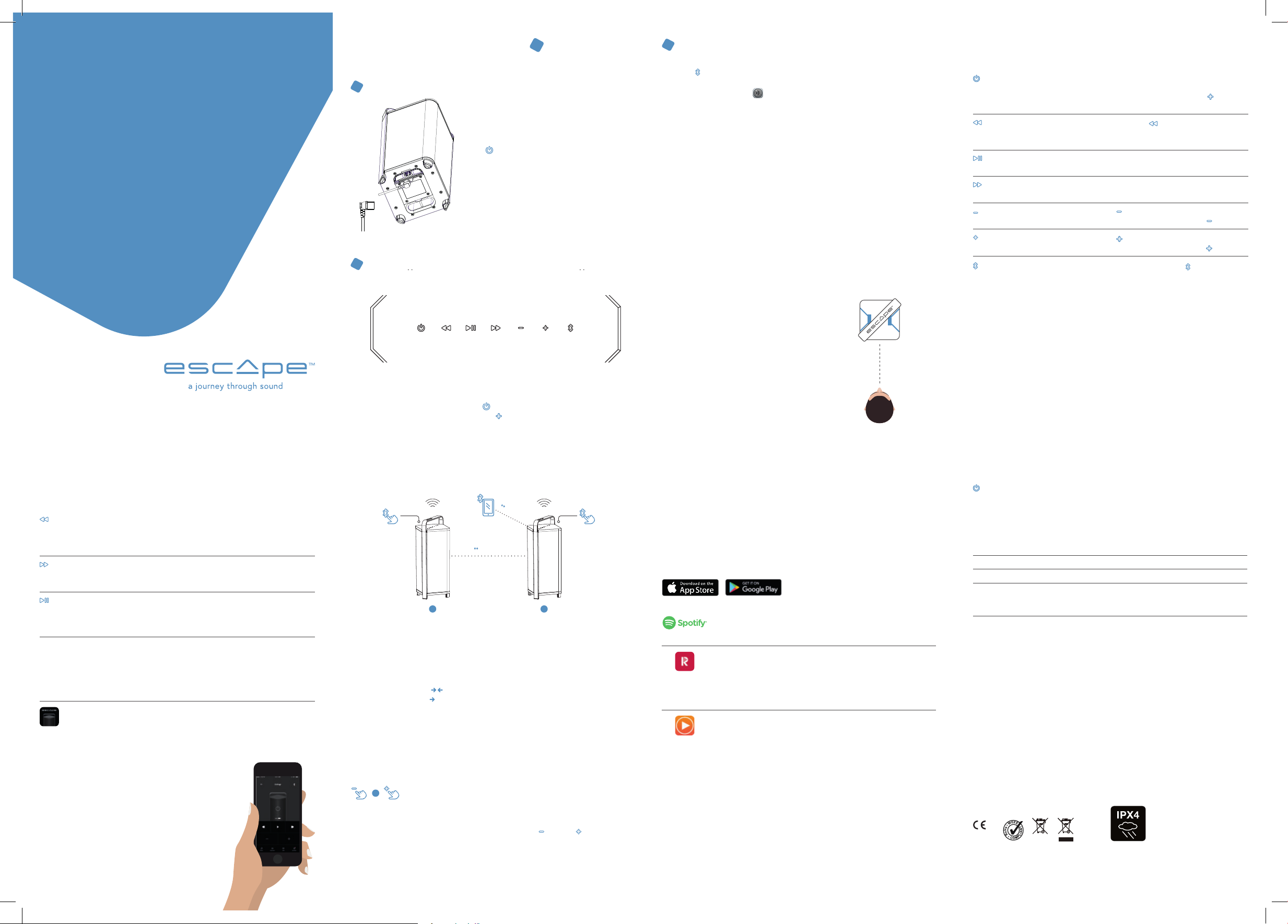
Disfruta de tu Escape™ P6 BT en 3 etapas
LA CARGA DE LA BATERÍA INTERNA.
1
• Conecta el cable de alimentación que va incluido
con el puerto de acceso del aparato
(en la parte inferior del aparato).
• Enchufa el cable de alimentación.
• En el teclado, la luz LED se iluminará en rojo
] para indicar que la batería está cargando.
[
Mantén el aparato enchufado hasta que se
apague la luz LED roja, indicando que la carga
de la batería se ha completado.
• Desconecta el cable de alimentación y cierra la
protección.
• La duración completa de la carga de la batería
es de 2-3 horas. Por favor, nunca deja el P6 BT
desatendido durante el proceso de la carga.
LA ACTIVACIÓN DEL APARATO
2
Pulsa el botón de encendido durante [ ] unos segundos hasta que brille brevemente
la luz LED del botón que sube el volumen [
Tras unos segundos, todas las luces LED brillarán y se oirá una señal corta de
afirmación para indicar que el aparato está activado.
].
LA TRANSMISIÓN DE MÚSICA AL ESCAPE™ P6 BT CON TECNOLOGÍA INALÁMBRICA
3
BLUETOOTH®.
• Para iniciar la conexión con Bluetooth®, pulsa brevemente el botón Bluetooth®
]. La luz LED blanca se pone a parpadear azul y blanco, seguido por una doble
[
señal de afirmación.
• Ve a Configuración [
en la lista de conexiones y activa Bluetooth®.
• Selecciona Escape™ P6 BT xxxx en la lista de aparatos. Los xxxx representan
las últimas 4 combinaciones de letras y números del número único de serie del
aparato. Se puede consultar el número de serie completo en la parte inferior del
aparato o en el embalaje (los últimos 4 números aparecen en negrita)
• No selecciones la app Escape™ P6BT xxxx en tu lista de aparatos cuando te lo
pidan. No puedes transmitir música a través de ese enlace.
• La luz LED azul del símbolo Bluetooth® en el teclado Escape™ P6 BT estará
activada permanentemente nada más hecha la conexión, seguido por una corta
señal de afirmación.
Escucha tu música preferida a través del aparato móvil conectado.
Nota: Cuando la conexión Bluetooth® falla y el dispositivo te pide que olvides el
aparato, es posible que el P6 BT desaparezca de la lista. En dicho caso, hay que
desactivar Bluetooth® en tu aparato móvil, luego, volver a conectarlo. Después,
el P6 BT volverá a aparecer en la lista.
POSICIÓN IDEAL PARA ESCUCHAR MÚSICA
• La especialmente desarrollada DSP del P6
BT está puesta en el modo “wide”,
lo cual es apto para una reproducción
tridimensional.
• Gira el altavoz un poquito hacia la posición
de audición para obtener un sonido
perfecto. De esta manera, al escuchar una
obra musical, el oyente será capaz de
localizar los diversos instrumentos.
• Si lo deseas, es posible modificar el modo
“wide” en “Stereo” a través de la aplicación
Escape™ Remote.
] en tu aparato Apple® o Android™, selecciona Bluetooth®
L R
Lista de los botones y de sus funciones
BOTÓN FUNCIÓN
Enciende y apaga el Escape™ P6 BT. Para encender el P6 BT,
Botón de encendido
Saltar atrás
Iniciar/pausa
Saltar adelante
Bajar el volumen
Subir el volumen
Conexión Bluetooth®
pulsa el botón de encendido durante 2 segundos hasta que brille
brevemente el LED del botón para subir el volumen [
brevemente el botón de encendido para desactivar el P6 BT.
Pulsa el botón para saltar atrás [
desde el principio, o dos veces en una secuencia corta, para
navegar de nuevo hacia la canción anterior.
Pon la música o ponla en pausa.
Reproduce la canción siguiente.
Pulsa brevemente el [
Para bajar el volumen rápidamente, sigue pulsando [
Pulsa brevemente el [
Para subir el volumen rápidamente, sigue pulsando [
Pulsa brevemente el logotipo de Bluetooth® [
la conexión con tu aparato. El LED blanco se pone a parpadear
azul y blanco, seguido por un doble sonido de confirmación. La
función de búsqueda queda activada durante 8 minutos y cada
2 minutos se oye un breve sonido recordatorio. Después de
8 minutos la función de búsqueda se apaga automáticamente.
Pulsa brevemente el logotipo Bluetooth® para iniciar la función de
búsqueda otra vez si fuera necesario. Cuando tu aparato portátil
queda conectado en Bluetooth® con el P6 BT se oye un breve
sonido afirmativo y el Bluetooth® LED brilla permanentemente
azul. Los últimos 8 aparatos que estuvieron conectados en
Bluetooth® con el P6 BT se conservan en la memoria. Es decir,
no hace falta hacer la conexión cada vez que se haya apagado el
P6 BT. Si tu aparato portátil está puesto en la memoria el P6 BT
automáticamente hará una conexión. Si haces una conexión con
más de 8 aparatos, se eliminará automáticamente la conexión más
antigua.
] para bajar el volumen gradualmente.
] para subir el volumen gradualmente.
] para reproducir la canción
]. Pulsa
].
].
] para iniciar
Funciones especiales del teclado
BOTÓN FUNCIÓN
5 sec
Bloqueo del teclado
5 sec
Desbloqueo del teclado
10 sec
Restaurar ajustes de
fábrica
Modo stand-by El modo stand-by queda activado automáticamente. Esto significa
Aplicación Escape™
Remote
Pulsa el botón para saltar atrás durante 5 segundos hasta
que oigas un sonido de confirmación. El teclado ahora queda
bloqueado. Como confirmación el LED ‘saltar atrás’ empieza a
parpadear tres veces cuando aprietas un botón cualquiera.
Pulsa el botón para saltar adelante durante 5 segundos hasta
que oigas un sonido de confirmación. El teclado ahora queda
desbloqueado.
Pulsa el botón para iniciar/pausa durante 10 segundos hasta que
oigas un doble sonido de confirmación. Los ajustes de fábrica
vuelven a instalarse. Todos los aparatos Bluetooth® se borran de la
memoria del aparato y se desactiva el modo Twin.
que, cuando el aparato ha sido activado y no recibe señales
durante 20 minutos, el P6 BT se pone en modo stand-by para
ahorrar energía. El botón de encendido se pone a parpadear y
todos los demás LED se apagan. Pulsa brevemente el botón de
encendido para reactivar el P6 BT.
Descarga la aplicación especial “Escape™ Remote” y utiliza tu
teléfono o tableta como mando a distancia para manejar tu P6 BT.
Haz que tu Escape™ siempre esté actualizado con el software
más avanzado a través de actualizaciones “over-the-air”. Se puede
bajar el manual de la aplicación en el sitio web de Escape™.
El modo TWIN
MAX. 4M
5 sec 5 sec
MAX. 4M
A B
ACTIVAR EL MODO TWIN
Se puede conectar 2 EscapeTM P6 BT a través del modo Twin. Haz que la distancia entre los
dos altavoces y la fuente de audio Bluetooth® sea de 4 metros como máximo.
El alcance puede variar según la marca y el modelo del teléfono, la tableta o la computadora
portátil. Consejo: Para mejorar la señal Bluetooth® en el modo Twin, apunta las antenas de
los dos P6 BT hacia el otro
dispositivo con una flecha
Enciende tanto el aparato A como el aparato B. Asegúrate de que un P6 BT esté conectado
en Bluetooth® a tu aparato inalámbrico (Ver Conexión Bluetooth®). A continuación, pulse
el símbolo Bluetooth® de los aparatos A y B durante 5 segundos. Todos los LED, salvo el
botón de encendido y el botón de conexión Bluetooth® se ponen a parpadear y cada vez se
oye un sonido corto seguido por uno largo de confirmación cuando ambos aparatos estén
conectados. El modo Twin se conserva en la memoria y ambos aparatos volverán
a conectarse automáticamente después de apagar y encenderlos de nuevo.
+
DESACTIVAR EL MODO TWIN TEMPORALMENTE
Si se pulsa brevemente y al mismo tiempo el botón para bajar [
se desactiva temporalmente el modo Twin. Ambos P6BT funcionarán como altavoces
individuales. Después de apagar y encender los altavoces nuevamente se vuelve a activar
el Modo Twin.
Si deseas más información, descarga el amplio manual en el sitio web www.escapespeakers.com
LEDs blancos parpadeando simultáneamente = P6 BT’s en modo de búsqueda Twin
Los LEDs blancos parpadean uno por uno = Modo Twin activo
. La dirección de la antena se indica en la parte inferior del
.
] y subir [
] el volume
Cómo transmitir la música desde mi aparato móvil al
Escape™ P6 BT?
Para escuchar música existen centenas de aplicaciones que puedes descargar en tu aparato
móvil, tanto gratuitas como de pago. (*)
Dependiendo de tu sistema operativo, sea iOS (Apple) o Android, tendrás que bajar la
aplicación en el Apple store o en Google Play.
En este momento Spotify es gratis, tanto para el móvil como para
la tableta. Spotify te facilita el acceso a un mundo de música y de
podcasts. Solamente es obligatorio registrarse en la plataforma.
Radioplayer es la aplicación oficial de radio del Reino Unido, apoyado
por la BBC y todas las grandes emisoras independientes. Es fácil de usar,
dispone de unas funciones prácticas que harán que disfrutes aún más
de la radio. Los 11 países en los cuales Radioplayer opera son: el Reino
Unido, Alemania, Italia, Canadá, Irlanda, Austria, Noruega, Bélgica, Suiza,
Perú y Dinamarca.
Receiver radio (a ser comprado – pago único) Receiver es una radio
internacional por internet que cuenta con más de 40.000 emisoras de
radio, más de 25.000 podcasts y tiene un despertador. Puedes buscar a
base de género, región, idioma, calidad de sonido, popularidad, etc.
+ Lista de emisoras con alta calidad de sonido.
(*) Algunos servicios de música están sujetos a cambios, algunos requieren suscripciones particulares, software o
afiliaciones especiales o es posible que no estén disponibles en todos los países. Escape™ bv no puede hacerse
responsable de estos servicios.
Luz LED de alta potente – indicador del nivel
de la batería
NIVEL DE LA LUZ LED
Parpadeando rojo durante
3 segundos y blanco durante
0,5 segundos
Permanentemente rojo El aparato está enchufado y está cargando.
Blanco La batería está cargada por completo
Parpadeando rojo
rápidamente durante
10 segundos
Garantía y normativa
Garantía limitada para el aparato
El aparato tiene una garantía limitada hasta 1 año (*), conforme con el manual de usuario del Escape™ P6BT. La garantía
incluye todas las piezas y todo el trabajo, necesarios para reparar el producto. Esta garantía no cubre daños causados
por mal uso, accidentes, uso inadecuado, negligencia u operación/instalación incorrecta. Esta garantía tampoco cubre
los productos modificados ni los productos con el número de identificación o el número de serie alterado, vuelto ilegible
o borrado. Para que esta garantía sea aplicable, tienes que usar el producto según las instrucciones. (*). No se puede
modificar la garantía limitada de los productos de Escape™, sin embargo, la garantía es sujeta a las diversas normativas
vigentes que pueden ser diferentes según el país.
Garantía limitada para la batería
Para la batería, es aplicable una garantía universal de 6 meses.
Devolver un P6 BT para reparaciones
Envuelve el altavoz en el embalaje original o en un embalaje de cartón ondulado, incluyendo un material elástico con
un espesor de al menos 7,5 cm para proteger el aparato contra posibles daños durante el transporte. Escape™ bv no es
responsable por cualquier forma de daño durante el transporte.
Unión Europea
Escape™ bv certifica que este producto cumple con los requisitos esenciales y con otras estipulaciones relevantes de la
directiva europea 2014/53 / EU y con todas las demás directivas de la UE que sean aplicables.
UE RAEE
Conforme a la Directiva europea de Residuos de Aparatos Eléctricos y Electrónicos, entrada en vigor el 13 de agosto de
2005, quisiéramos informarte sobre el hecho que este producto puede contener materiales regulados y que según la
Directiva RAEE requieren tratamientos especiales de reúso y de reciclaje. Cuando desechas embalajes u otros materiales
similares, te aconsejamos que recicles estos materiales a través de los canales comunes. La batería Escape™ P6 BT-
cumple con las normativas UN38.3.
NIVEL DE LA BATERÍA
La batería ha alcanzado más o menos el 10% de su capacidad.
El aparato no está enchufado y la batería tiene que ser
cargada.
Error de batería, esto ocurre cuando el cable de alimentación
está enchufado sin que esté instalada la batería.
La clasificación IPX4 de un producto
demuestra que se puede utilizar el
producto en todo tipo de situaciones
meteorológicas, incluso que el producto
es resistente a las salpicaduras
abundantes de agua, sin embargo, el
producto no es resistente a la inmersión.
 Loading...