

Page 1
Ehubo/Tubo User Guide
INTRODUCTION
This document provides a brief overview of all the Ehubo and Tubo operating modes, and explains
what to do if the Ehubo enters into an unauthorised state and what is required to have the Ehubo
authorised again.
NORMAL OPERATION
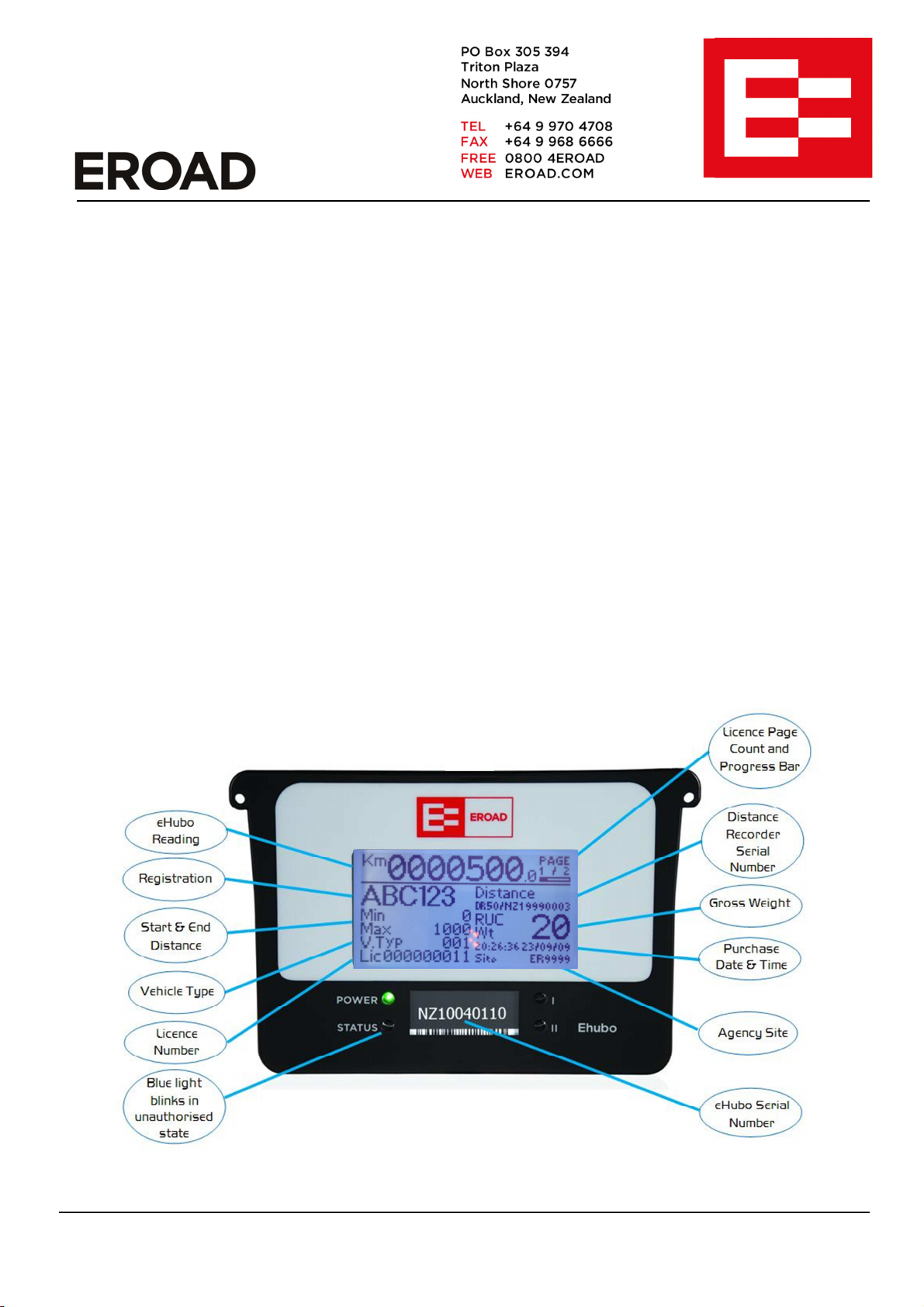
When the Ehubo/Tubo is operating normally (after being installed and registered with NZTA) the Power
LED (Green Light) will be on. This indicates that the Ehubo/Tubo has external power applied. The
LCD screen will display distance measured since install and any current RUC licences.
To aid readability of the screen, the LCD backlight will illuminate for 10 minutes when the ignition is
turned on or off and also when the vehicle comes to a stop after travelling. The Tubo backlight will
illuminate for 10 minutes when the trailer is connected or disconnected and also when the trailer comes
to a stop after travelling.
If the vehicle has more than one RUC licence e.g. a Distance and an Additional Licence then the
screen will rotate the details of each RUC Licence every 60 seconds. The progress bar will indicate
the amount of time remaining until the next page will be displayed. Licences purchased for a future
distance reading will be displayed on the “Pending Licence Screen”.
Figure 1 – Ehubo in Normal Operating Mode
This document and its contents are the confidential property of EROAD Ltd. It should not be copied, reproduced, modified, altered, or
circulated to any third party, in any form or media, without the prior written consent of EROAD Ltd.
Page 2
UNAUTHORISED MODE
If the
Ehubo/Tubo
is displaying the SUPPORT SCREEN and the bright blue LED is blinking then you
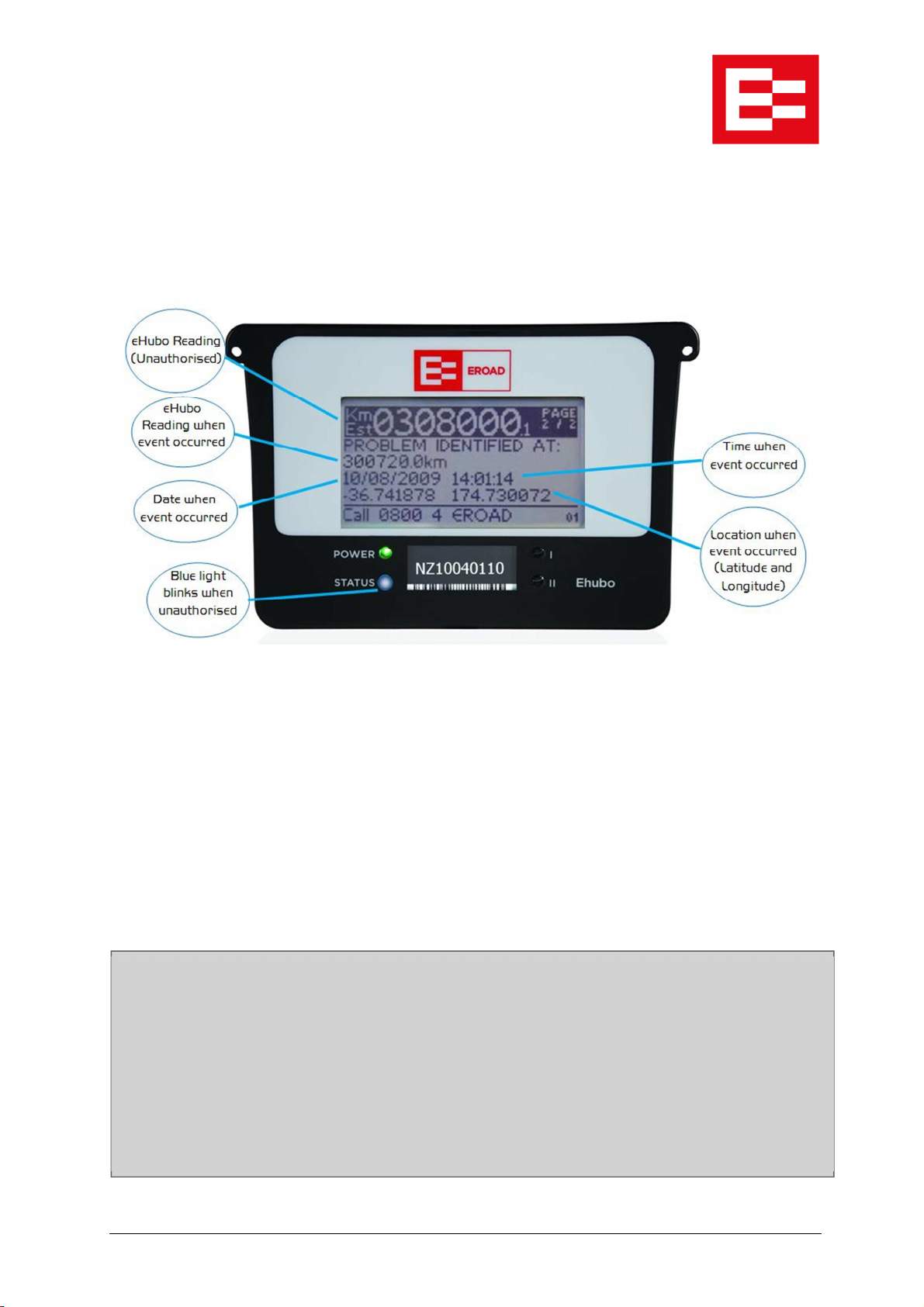
If the Ehubo/Tubo detects an installation or hardware fault, the product will enter an unauthorised
mode. This is indicated by continuously blinking the bright blue status LED, beeping three times, and
displaying the SUPPORT SCREEN. After detection, each time the ignition is turned on the Ehubo will
beep three times to inform the driver that the Ehubo is unauthorised.
Figure 2 - Ehubo in Unauthorised Mode Displaying the Support Screen
The Ehubo will display the distance, date, time and location of when the fault/tamper event occurred,
and will continue to estimate the distance travelled. The screen will rotate the details of each RUC
Licence, interleaved with the Support Screen, every minute.
The only way to resolve a tamper or fault is to contact EROAD support where you will be asked to
complete a resolution process.
must call EROAD support on 0800 4 EROAD (between 8am and 5pm Monday to Friday) and
complete a formal fault resolution process.
Until the Ehubo is returned to its NORMAL operating state, the device is not authorised as an
Electronic Distance Recorder.
The FAULT RESOLUTION process must be successfully completed to ensure your vehicles remain
compliant with RUC legislation at all times.
0010048G Ehubo_Tubo User Guide
.docx
Page 2 of 5
Page 3
LOW POWER MODE
If the
Ehubo/Tubo
is
in LOW POWER MODE
then you must
reconnect power to the product before
battery power
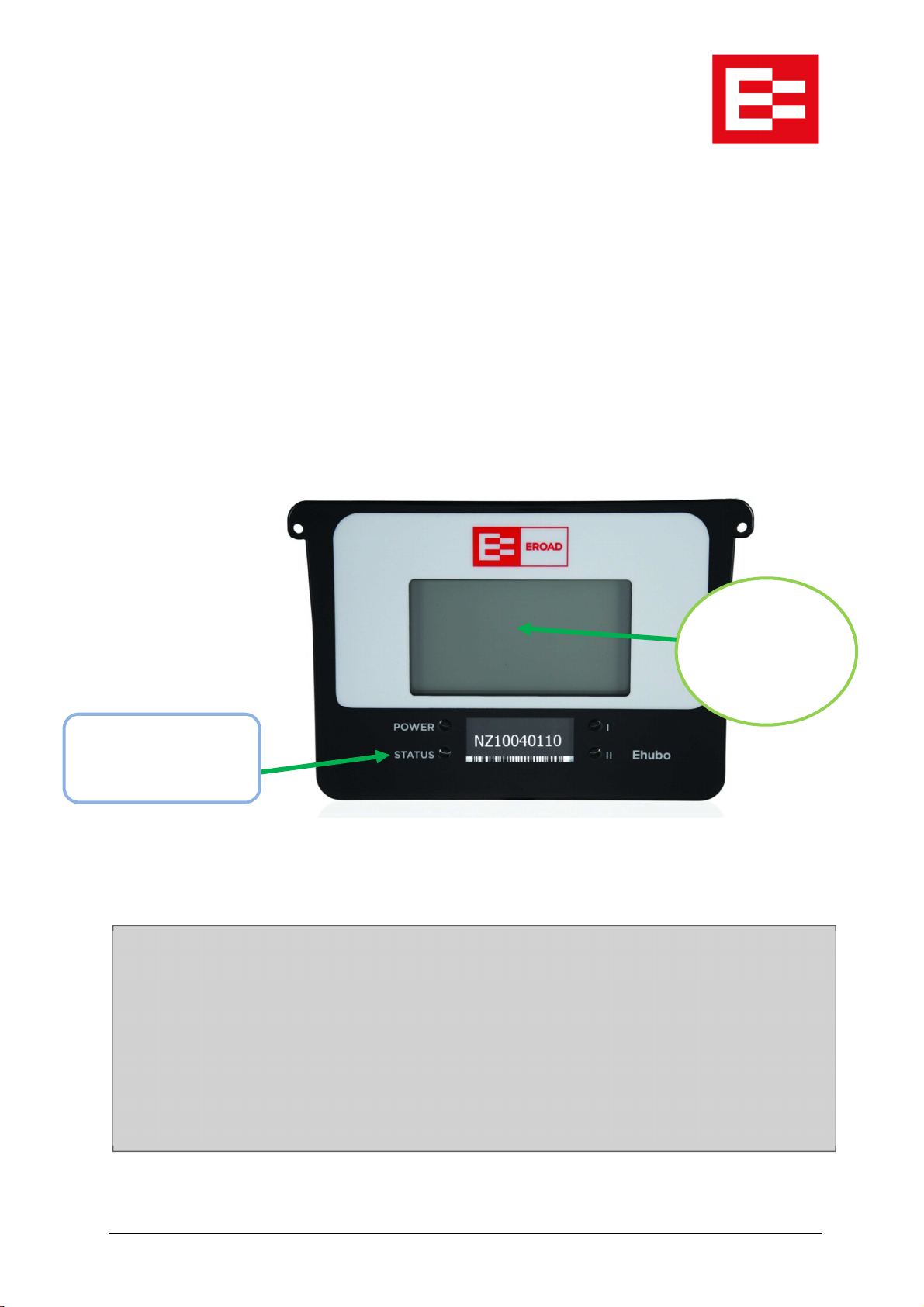
If an Ehubo or Tubo detects external power has been removed it will immediately enter “Low Power
Mode” to conserve internal battery power. In this mode the LCD screen will turn OFF and the blue
STATUS LED will blink once every 10 seconds. External power must be reconnected before the
vehicle is driven/towed or the Ehubo/Tubo will enter unauthorised mode.
If a Tubo trailer is disconnected from the towing truck or there is a connection issue with the plug, the
Tubo will continue to operate but will blink the green power LED once per second to warn that the
Tubo is running on the power from the EROAD battery box. Power connection to the truck must be
re-established soon or the Tubo will enter “Low Power Mode” when the battery box power is
exhausted. Towing the trailer without connecting to the truck power supply will result in the Tubo
entering unauthorised mode and failure to display RUC licences.
The STATUS LED will
blink briefly once every
10sec
Figure 3 - Ehubo with External Power Disconnected
the vehicle is driven/ towed. EROAD support can be contacted on 0800 4 EROAD (between
8am and 5pm Monday to Friday) if required.
Until the Ehubo is returned to its NORMAL operating state, the device is not authorised as an
Electronic Distance Recorder.
The Ehubo/Tubo
LCD Screen will
be blank to
conserve internal
The FAULT RESOLUTION process must be successfully completed to ensure your vehicles remain
compliant with RUC legislation at all times.
0010048G Ehubo_Tubo User Guide
.docx
Page 3 of 5
Page 4

FAULT RESOLUTION PROCESS
The Fault Resolution Process is a process where all details of the fault are logged in an Audit Report
available through the Depot. While the Ehubo is in an unauthorised mode and until the Audit Report
has been closed, a blue unauthorised icon will be displayed beside the vehicle in the Depot screen.
EROAD staff will ask a number of questions to establish the reason for the Ehubo having detected a
fault or tamper condition and will need to be satisfied that the Ehubo is able to be set back to
authorised mode.
It is likely that an authorised installer will be sent to investigate the Ehubo wiring and hardware. At the
completion of the fault resolution investigation, if the Ehubo is found to be faulty it will be replaced by
the approved installer. If the hardware is found to be working correctly and it was the wiring or sensors
at fault then the installer will rectify this and inform EROAD about the fault.
Once the fault/tamper has been resolved, EROAD will re-authorise the Ehubo, returning it to the
normal operating mode and record the details of the resolution process in the Audit Report. The
Ehubo will no longer beep, display the Support Screen, or blink the bright blue status LED. Distance
measurements will become authorised again.
QUESTIONS AND ANSWERS
How do I know if an Ehubo is operating correctly?
A visual inspection of a vehicle will confirm if the Ehubo is in the correct operating mode. The
Ehubo/Tubo LCD and status LEDs face out of the windscreen for this purpose. In normal operating
mode the green power LED must be on solid and the LCD display active.
In UNAUTHORISED mode the blue LED will blink and the Support Screen will be displayed if external
power is present.
Once the Ehubo/Tubo detects a fault or tamper situation, the Ehubo will enter the unauthorised state
indicated by blinking the blue status LED and displaying the Support Screen. The Support Screen
displays the distance, date, time and location the fault/tamper occurred. The Ehubo will continue to
estimate the distance travelled since the fault/tamper occurred.
Ehubo/Tubo screen is blank. What do I do?
If the LCD screen is blank this indicates that power to the Ehubo/Tubo has failed.
For Ehubo products check vehicle fuses and Ehubo wiring. For Tubo products, check that
the truck/trailer plug is connected properly. When the trailer plug is connected the GREEN
“Charging” LED on the battery box should be lit and the GREEN power LED on the Tubo
should be on continuously.
0010048G Ehubo_Tubo User Guide
.docx
Page 4 of 5
Page 5
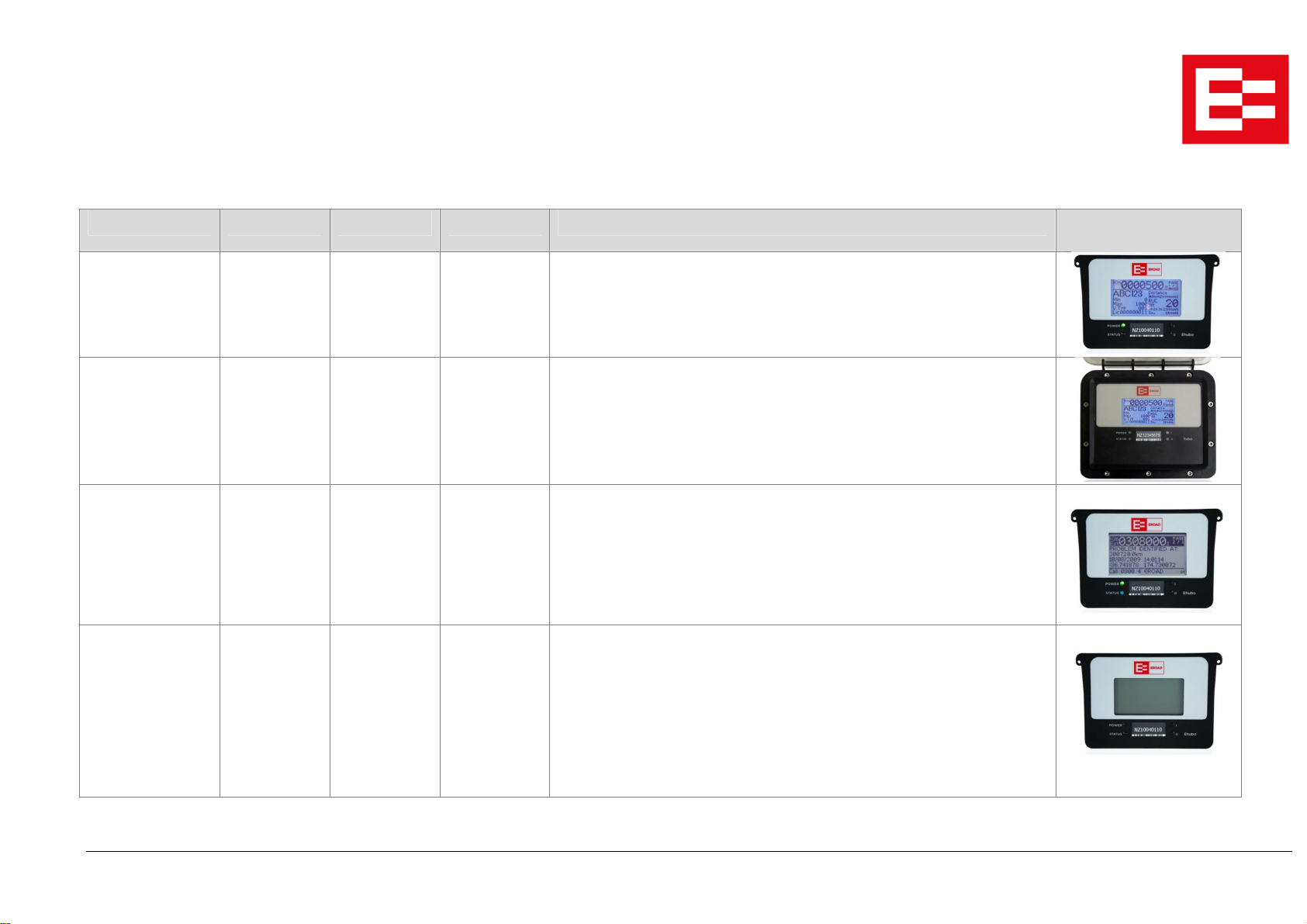
COMPLETE EHUBO and TUBO OPERATION CHART
Product Status LCD Display Power LED Status LED Action Required Diagram
Normal ON
Showing RUC
Licence
Power Warning
Mode
(TUBO Only)
Unauthorised
Mode
Low Power Mode BLANK OFF Quick BLINK
ON
Showing RUC
Licence
ON
Showing Fault
Screen
ON OFF Product is operating correctly.
BLINKING
Once per
second
ON BLINKING
OFF Tubo is running from the trailer mounted battery box and is NOT obtaining
Once per
second
every 10
seconds
No action required.
power from the truck supply.
Truck power must be reconnected to the trailer soon or the Tubo will enter
“Low Power Mode”. Check that there is a reliable connection between truck
and trailer. Contact EROAD support for assistance.
The Ehubo/Tubo has detected a fault with the product or the installation.
Contact EROAD support to begin the fault resolution process.
Until the Ehubo is returned to its NORMAL operating state, the device is not
authorised as an Electronic Distance Recorder.
This situation could occur if a vehicle is parked for a long period of time and
the truck battery has gone flat. Alternatively, a fuse could be blown or there
may be a faulty wiring connection. If a Tubo then check the trailer plug for a
reliable connection.
Reconnect power immediately before driving/towing the vehicle. Once the
product powers up it may be necessary to contact EROAD support on 0800
4 EROAD to return the product to the NORMAL operating state.
0010048G Ehubo_Tubo User Guide.docx Page 5 of 5
 Loading...