

Page 1
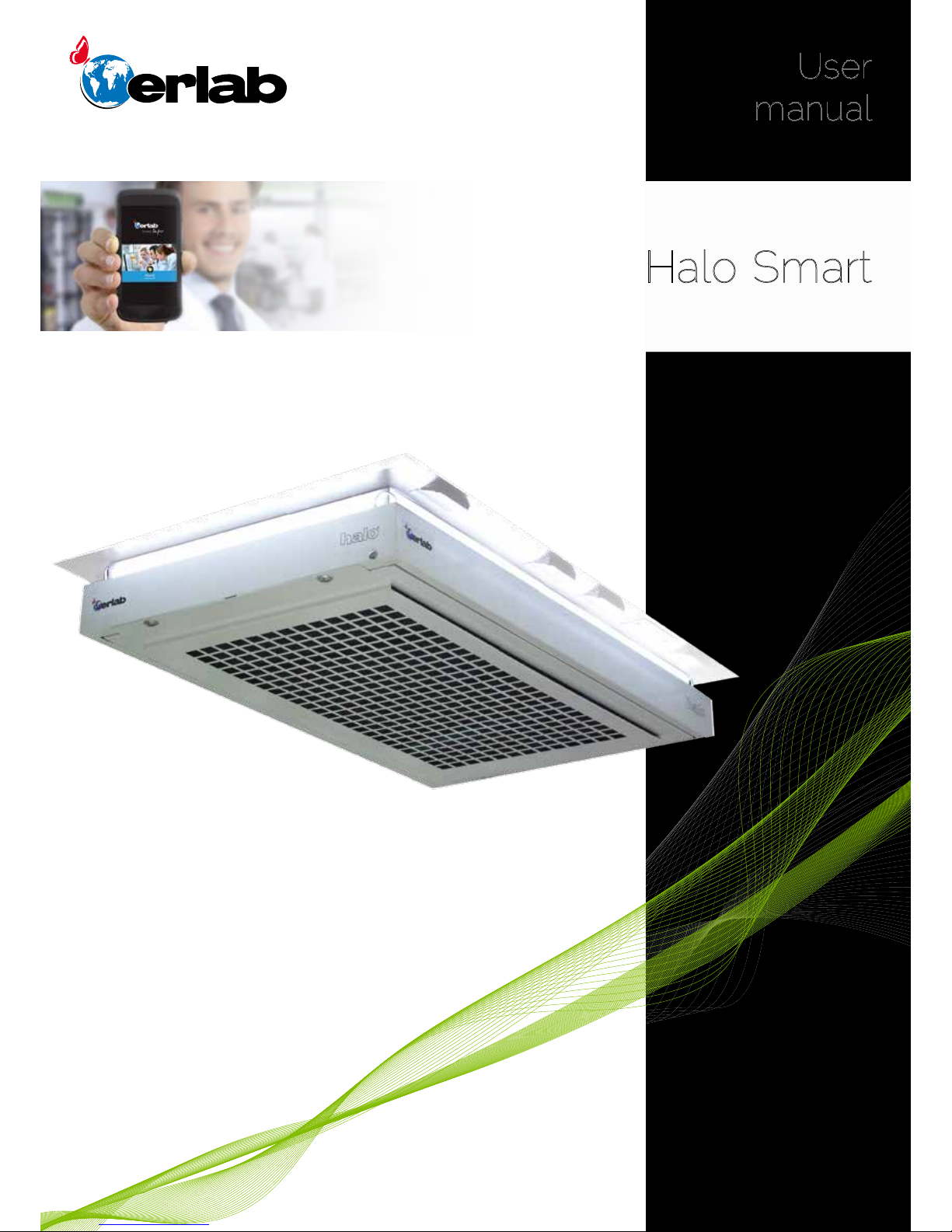
Halo Smart
Laboratory Air Filtration System
User
manual
Safer
Simpler
Page 2
Halo Smart
2
Contents
General ....................................................................................................................................3
Safety notices ................................................................................................................. 3
Product registration ...................................................................................................3
Description of the unit ...........................................................................................4
Installation ............................................................................................................................6
Connectivity principle ..............................................................................................8
Sensors sensitivity settings .............................................................................19
Replacing the filters and the Pre-filter...............................................20
Recommendations for storing
and using the filters .................................................................................................. 21
Page 3

User Manual
3
General Description
Halo safely captures chemicals of the ambient air before recirculating clean air back into the laboratory.
Easily mounted into the ceiling, HALO is totally independent of the building ventilation system.
Utilizing the power of Erlab’s advanced carbon ltration technology, Halo retains a broad range of noxious chemical vapors
while simultaneously improving the air quality of the lab.
The exclusive sensor technology continuously evaluates the laboratory air quality and can be set according to the laboratory
pollution (please check Halo’s operating mode on page 17 and sensor settings on page 19 to determine the best use for
your laboratory).
When Halo senses contaminants, the soft LED lights will pulse to let you know that the air is being cleaned.
The usage and the management of each unit is possible via an embedded webportal from a smartphone, tablet or computer.
Safety notices
The effectiveness of this device is directly dependent upon correct use and monitoring.
The equipment provided is not intended to be used in an explosive atmosphere.
Keep away from any risk of liquid splashes.
Do not installed outside of the laboratory.
Sensor replacement:
VOCs sensor: every 5 years (semiconductor sensor)
Acids (A) and Formadehyde (F) sensors: every 2 years (electrochemical sensors)
After the usage time, Erlab cannot guarantee its stability and performance.
Product registration
Take full advantage of the device’s connectivity to enhance your safety
Get up to 10 years warranty on your connected Erlab unit
Register your product online: the registration of the product will automatically give you one extra year of warranty (in addition
to the warranty mentioned in the Erlab’ general terms and conditions of sale).
Connect your unit: Once the device is connected to the Internet and congured to exchange usage data, the warranty is
extended for up to 10 years. Warranty will be successively renewed at each lters replacement and/or or at the end of lter
usage time.
In order to benet from Erlab extension of warranty offer, the following conditions shall be respected:
Warranty applicability is subject to the respect of the Erlab’ general terms and conditions of sale and following requirements:
• The registration and/or the connection of the product shall be performed within the twelve months from the purchase date;
• Filters replacement must be performed following recommendations or at the end of lter usage time ; The lter’s serial
number, used as an identication key, validates this condition, regardless of your device’s supplier (and/or the
replacement lter’s supplier for the following years);
• The device’s replacement lters must be manufactured by Erlab, as must all other spare parts.
Consumables such as lters and saturation sensors are not covered under warranty.
Page 4
Halo Smart
4
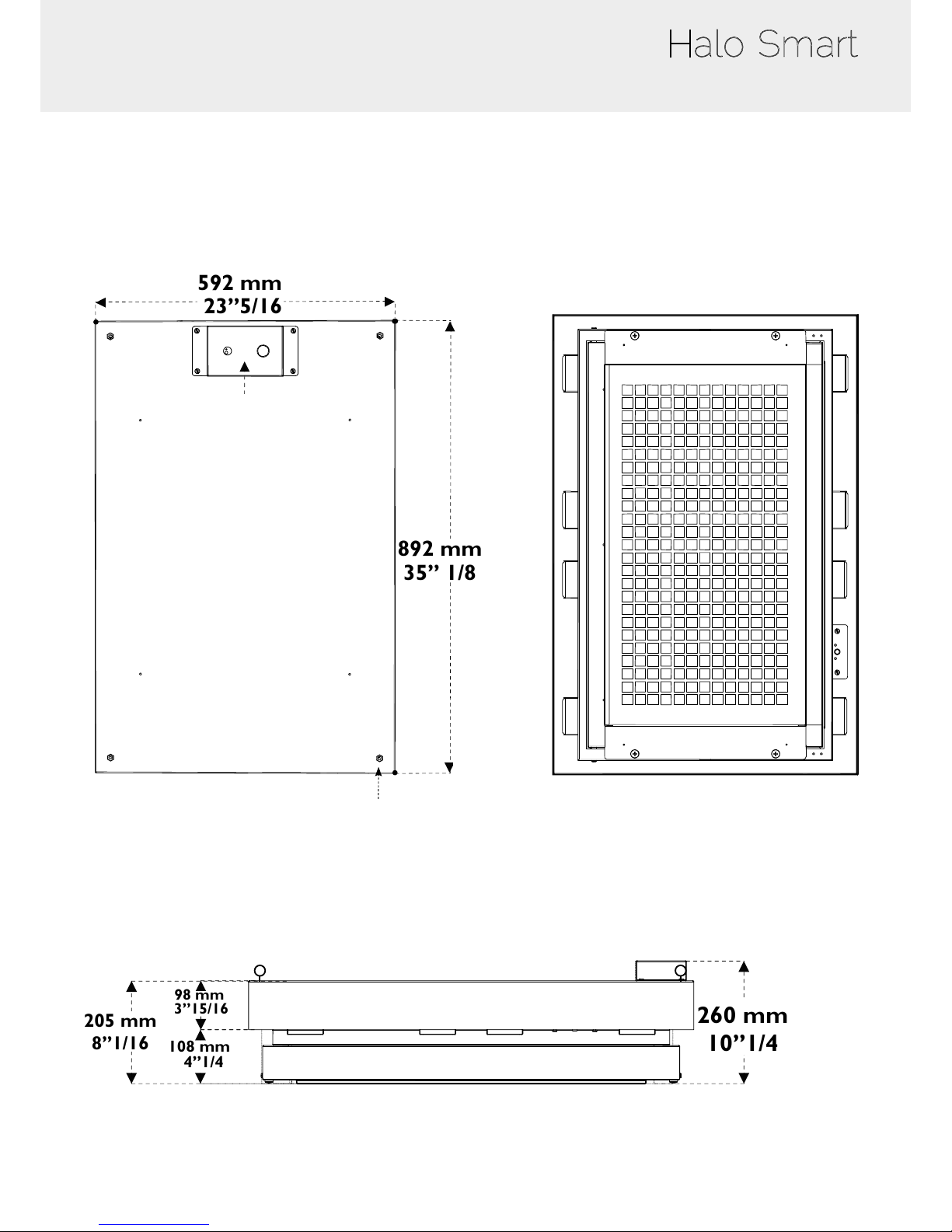
Description of the unit
892 mm
35’’ 1/8
592 mm
23’’5/16
Network and power ports
4 Attachment points
Side view
260 mm
10’’1/4
205 mm
8’’1/16
108 mm
4’’1/4
98 mm
3’’15/16
Above view
Below view
Page 5
User Manual
5
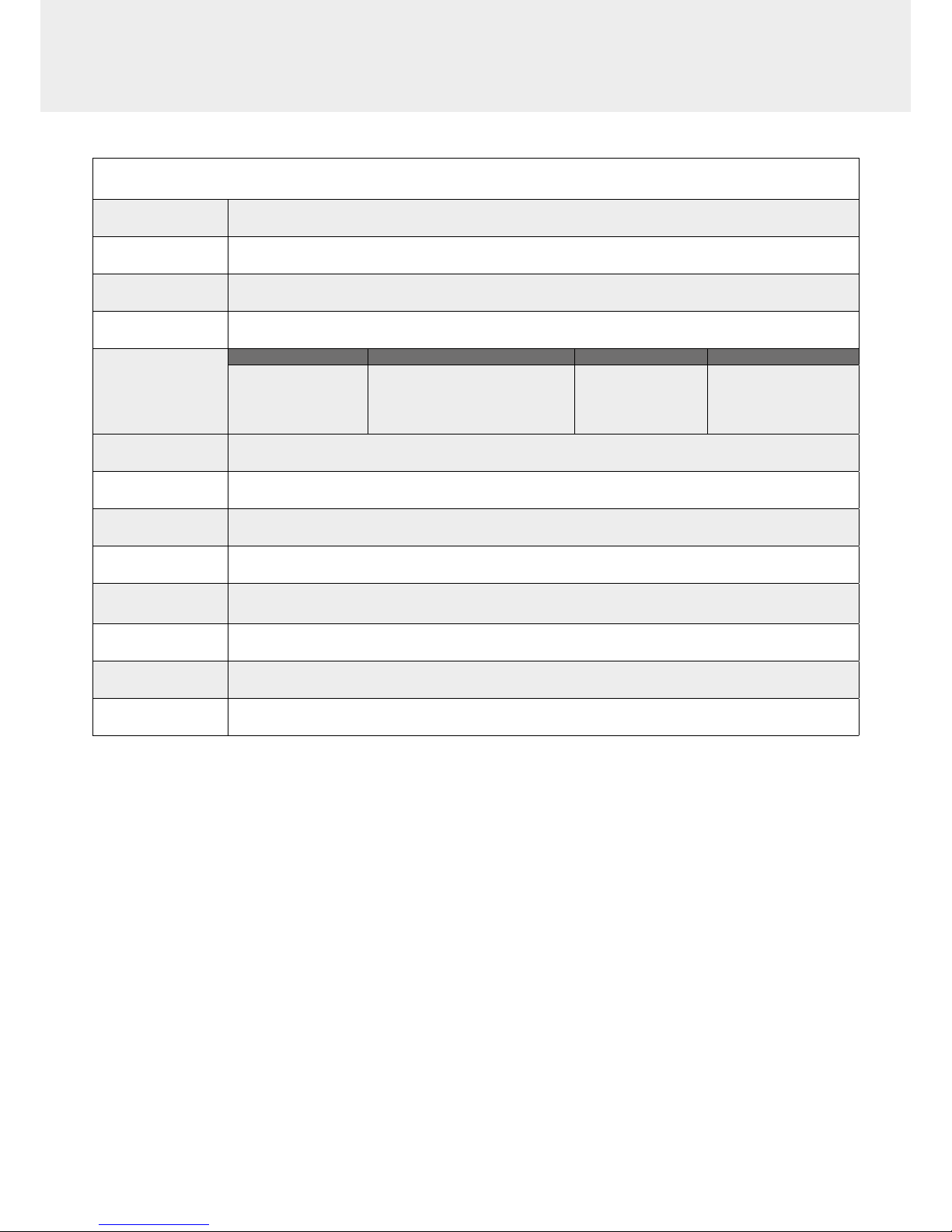
Specications
Processed
air ow
220 m3/h
Operating modes
24/7, Night/Day, Alert
Fan monitoring
Halo unit monitors the air ow and informs the user through light pulsation
communication
Pre ltration
Particulate prelter
Sensors
VOC Chemplus Acids Formaldehyde
Semiconductor for VOCs
Semiconductor of a wide array of
pollutants
Electro-chemical sensor
for acids
Electro-chemical
sensor for Formaldehyde
Smart-light
Simple communication by LED pulsation system
e-Guard
Communication
Remote control and monitoring App
Ethernet Port
1 x RJ45 (included)
Installation
Hung via 4 eye bolts (included)
Weight
31 kg (including lter)
Voltage /
frequency
80-240V 50/60hz
Amperage
0.5 A (220 V) - 1 A (110 V)
Energy
consumption
50 W
Page 6
Halo Smart
6
Installation
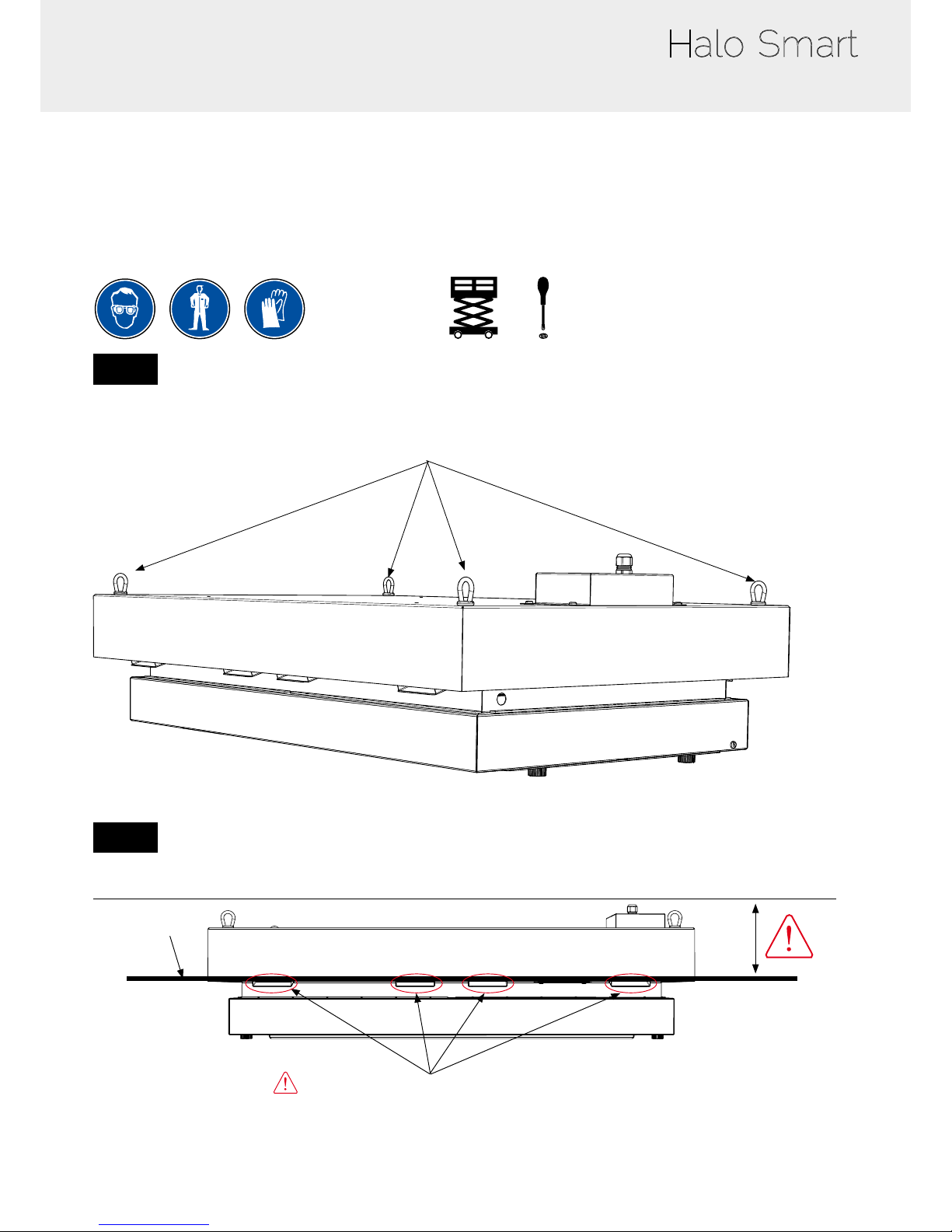
Minimum protective equipment
• One-piece overall + overshoes + bouffant cap
• Gloves
• Protective glasses
According to the local regulations
1
Fix the unit into the hard or drop ceiling trought its 4
attachment points.
2
Ceiling
Air outlets must be outside the hard or drop ceiling
Page 7
User Manual
7
3 4
5
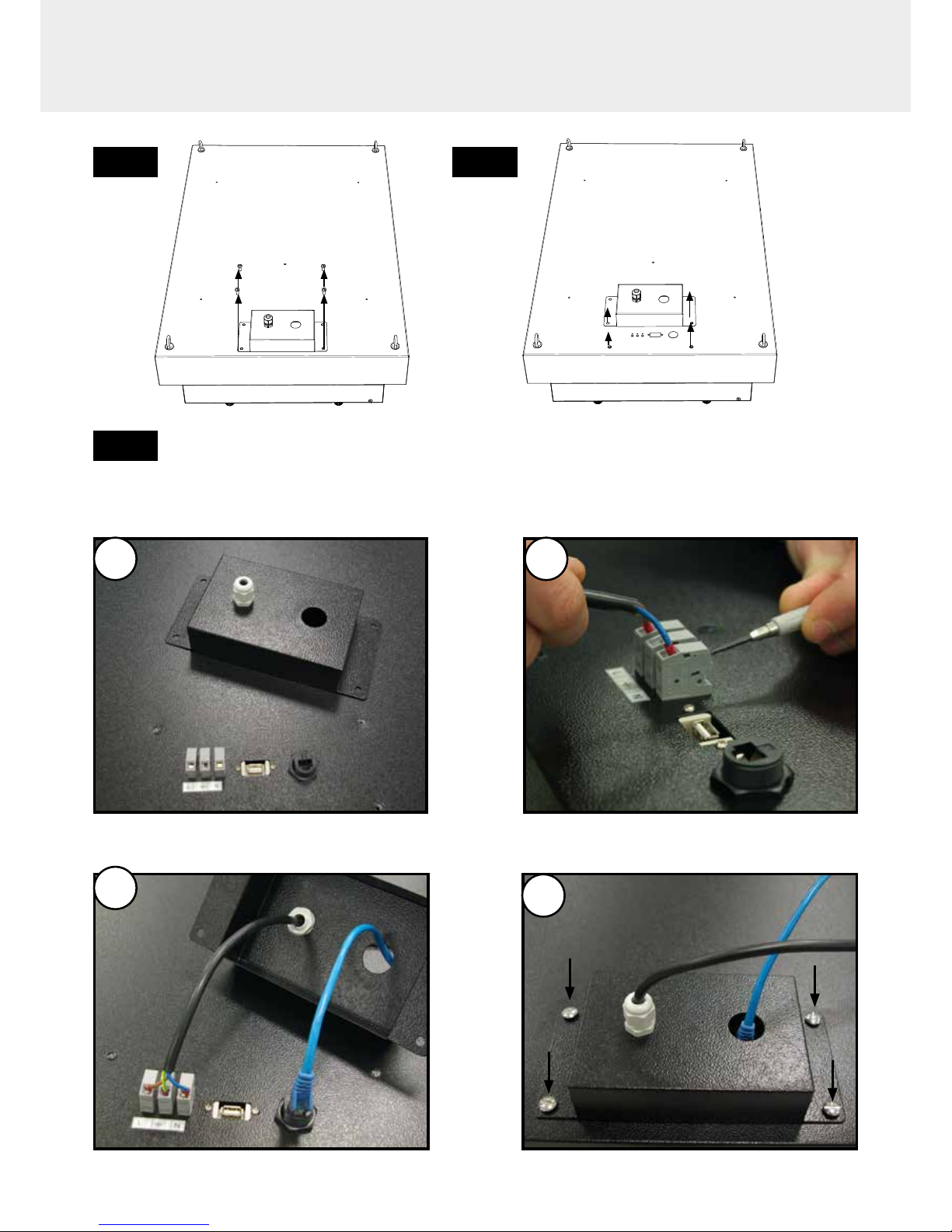
Connect the power supply and the RJ45 socket to your network
1 2
4
It is recommended to install a switch between the electrical cable and the electrical outlet
3
Page 8
Halo Smart
8
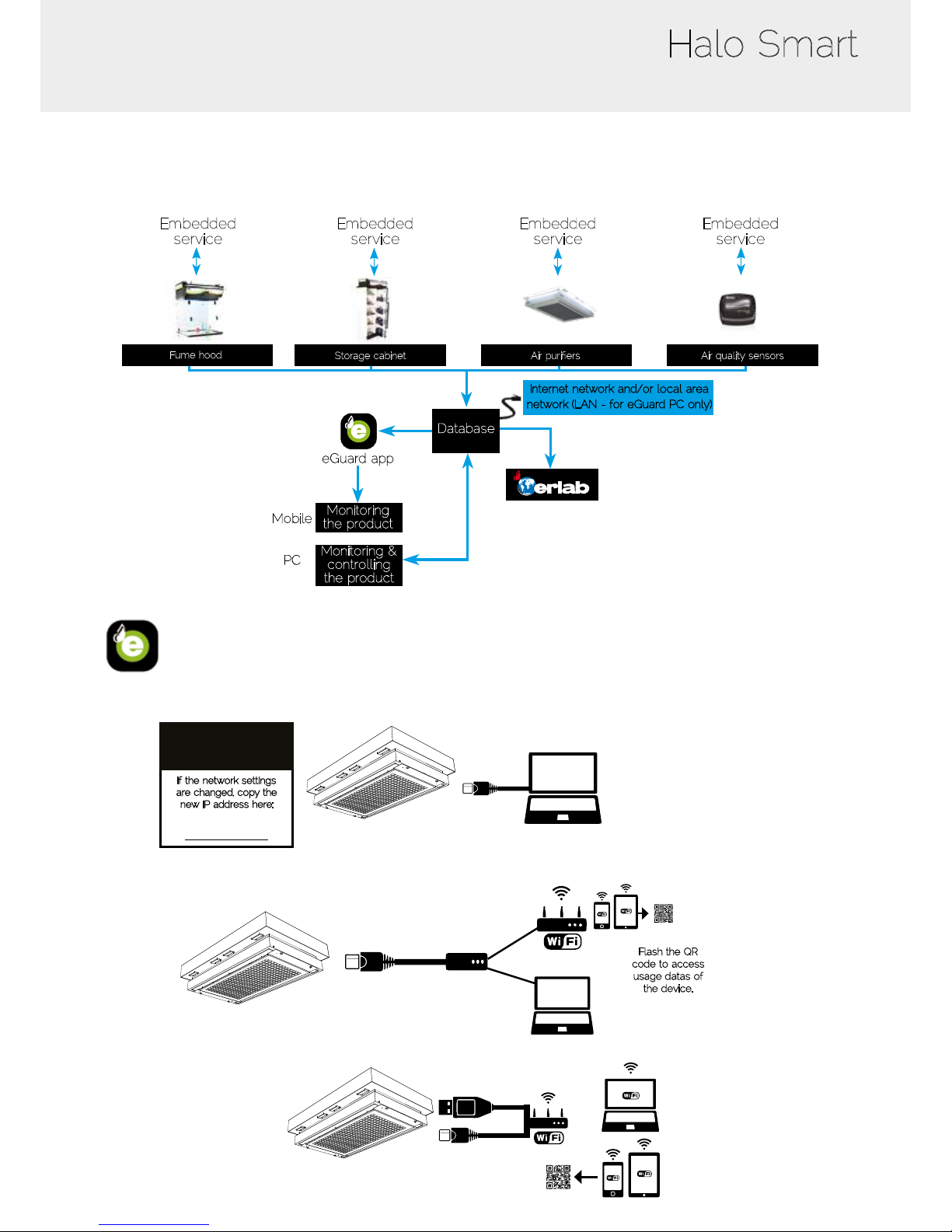
Connectivity principle
Ecosystem designed for simpler use and safer protection
Embedded
service
Embedded
service
Embedded
service
Embedded
service
Fume hood
Internet network and/or local area
network (LAN - for eGuard PC only)
Database
Monitoring
the product
Monitoring &
controlling
the product
eGuard app
Mobile
PC
Ethernet-TCP-IP
Storage cabinet Air purifiers Air quality sensors
eGuard app - Options for connection
RJ45
Access WebService
Default IP address:
192.168.0.200
If the network settings
are changed, copy the
new IP address here:
- Embedded service
Flash the QR
code to access
usage datas of
the device.
RJ45
RJ45
RJ45
Ethernet
Routeur
or/and
QRcode
RJ45
(Data)
USB
(Power 5V)
- Mobile or computer app
Page 9
User Manual
9
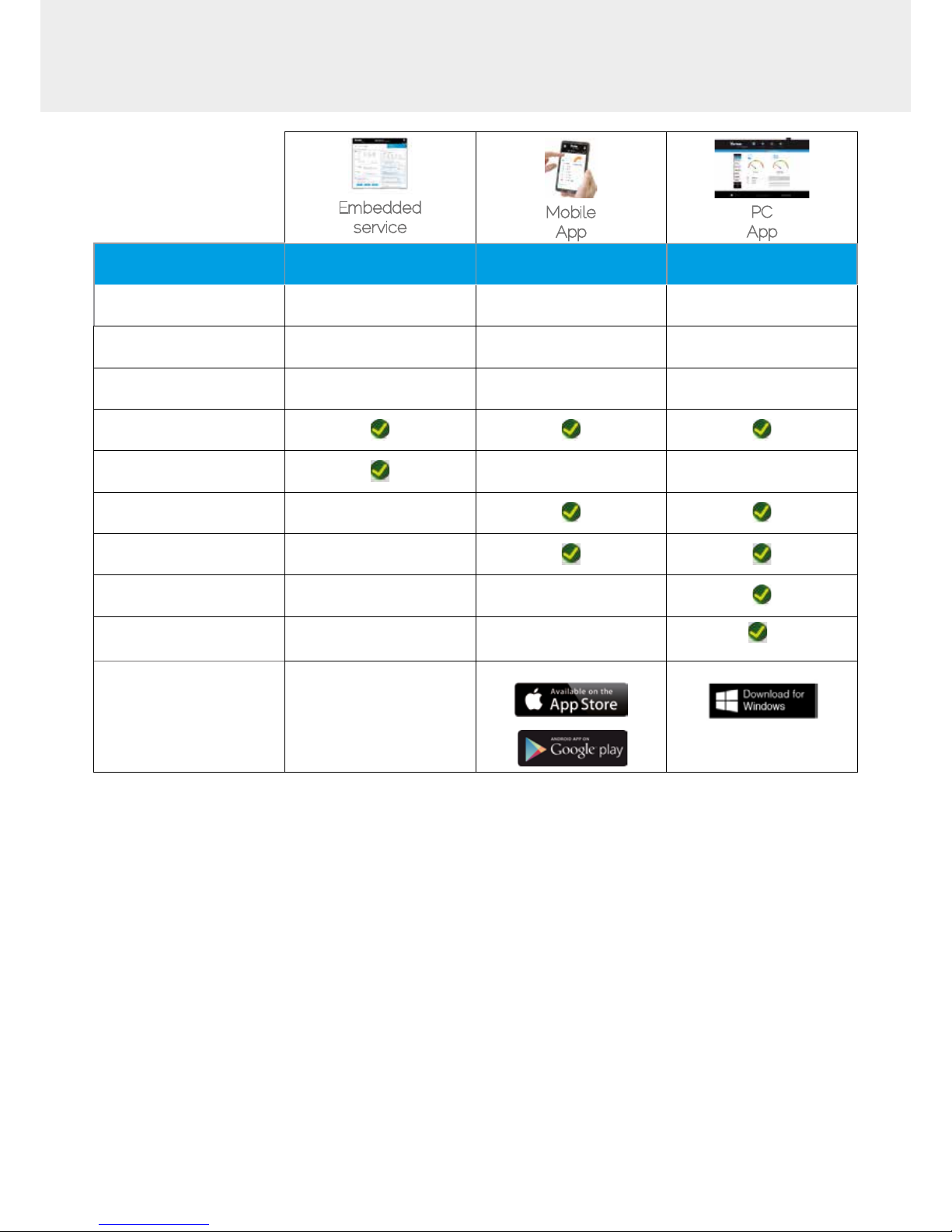
3 Options
Embedded
service
Mobile
App
PC
App
Conditions
of use
Direct connection on PC
with data cable (RJ45)
Web connection
(via 3G/4G)
Web and/or local
connection
Hardware requirements 1 PC + 1 cable
1 Apple or Android
Smartphone
1 PC connected to
Internet or local network
Parameters Monitoring + Controlling Monitoring Monitoring + Controlling
Data access One unit Multiple units Multiple units
Historical data access
Historical data download
Alerts, Notications
Multiple units monitoring
Multiple user accounts
Automatized status report
(except if local
connection)
Download
available on
www.erlab.com
Page 10
Halo Smart
10
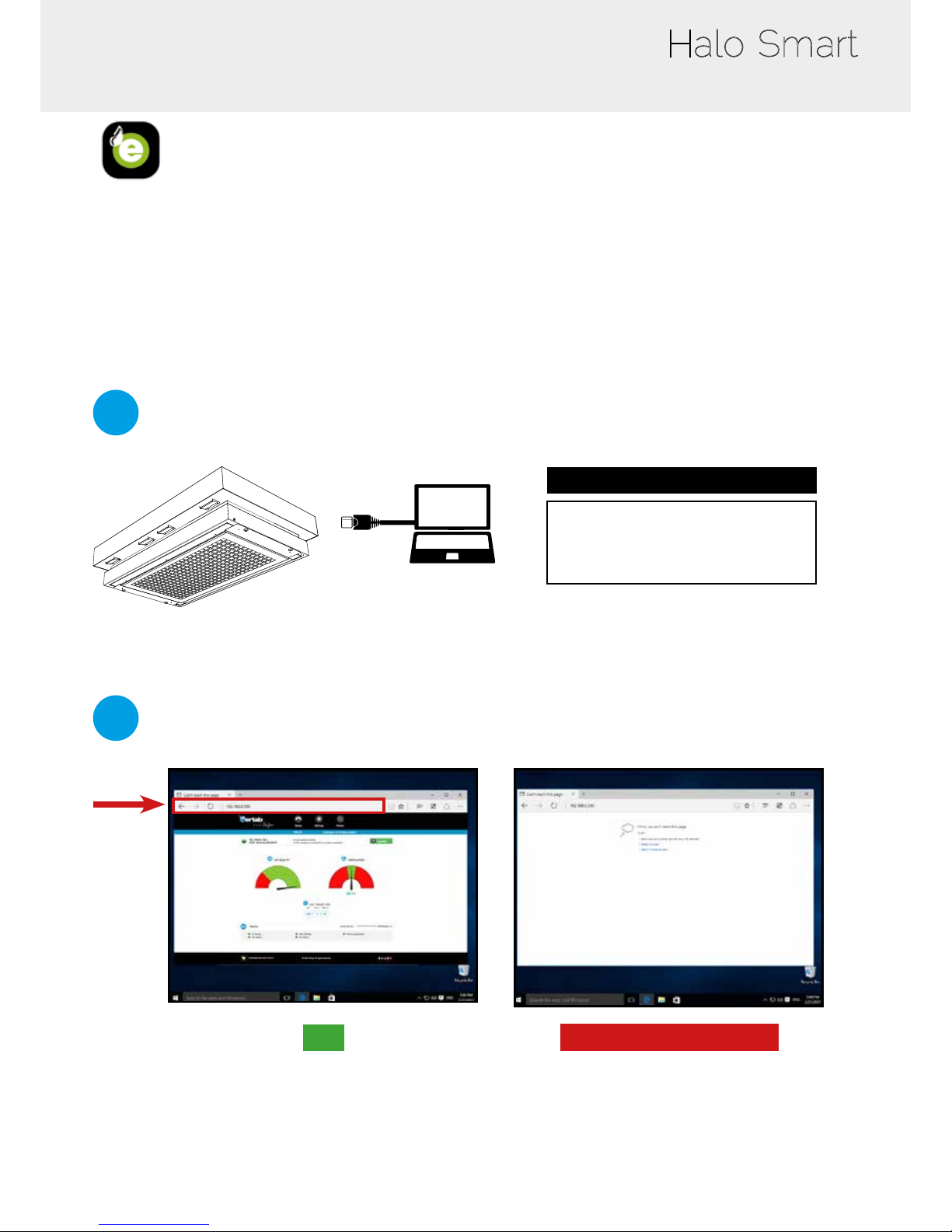
eGuard App – Embedded software
To monitor the parameters and modify the settings of the unit
In order to connect:
• Use a computer equipped with a Ethernet port (to plug the RJ45 cable)
• WIFI of the computer must be switched off
• Web browser (Internet Explorer, Edge, Chrome, Mozilla Firefox, Safari, …) must be installed on the computer
Note : RJ45 cable used to plug the unit to the computer is provided.
1
Direct connection on computer
If the network settings are
changed, copy the new IP address here:
_____________________
IP : 192.168.0.200
Default IP address
RJ45
2
Open your web browser, type the following IP address 192.168.0.200 into the address bar and validate
OK
You are connected to the embedded software
You enter the « Status » page and you can have
access to the « Settings » using the following
credentials:
Login : erlab / Password : smart
Please go to page 15
Page is not accessible
Computer network parameters are not allowing
the access to the embedded software
Apply the following procedure
• Take RJ45 cable (black) already connected on the unit and rolled at the back of the control panel.
Page 11
User Manual
11
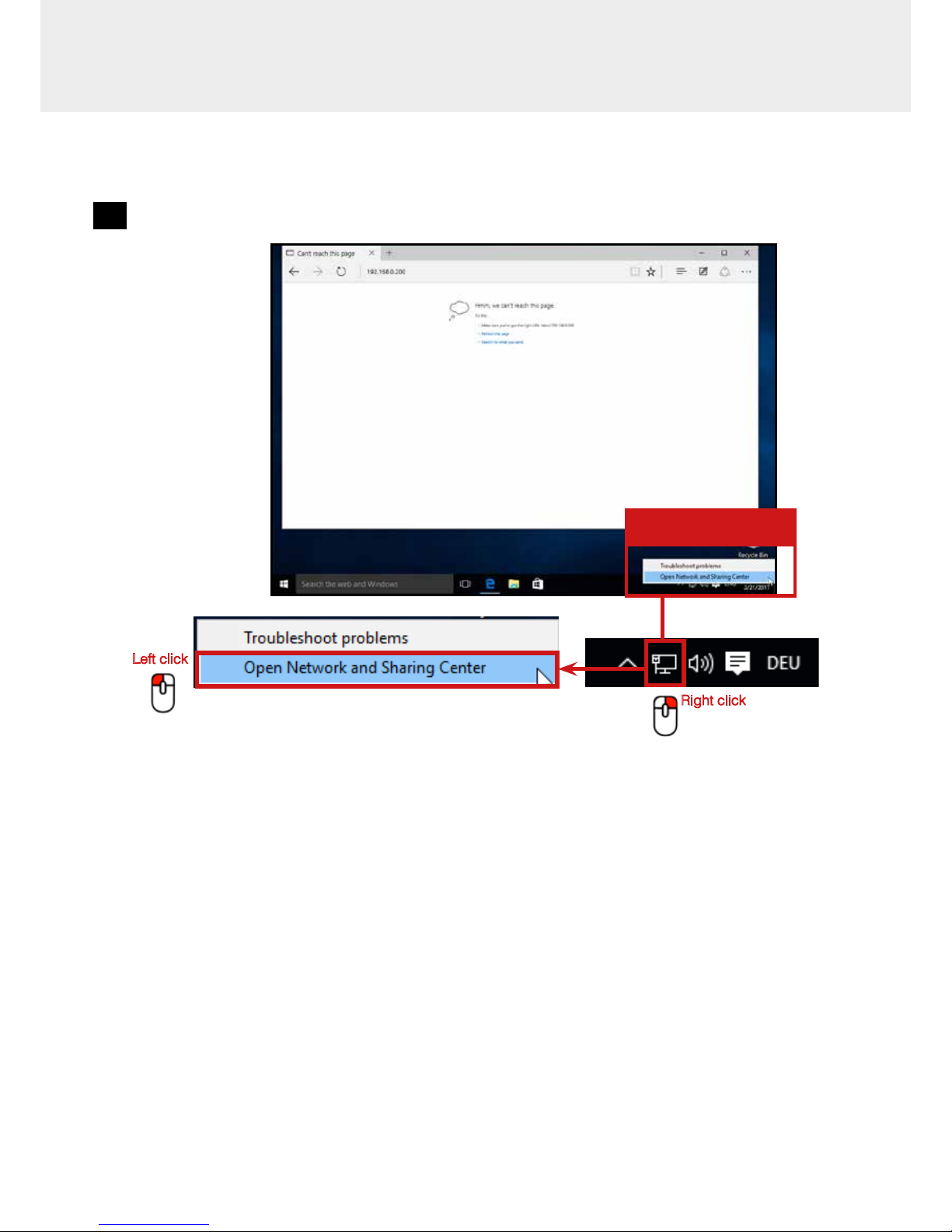
Page is not accessible
1
Modify computer network parameters
Right click
Left click
Network
parameters
Page 12
Halo Smart
12
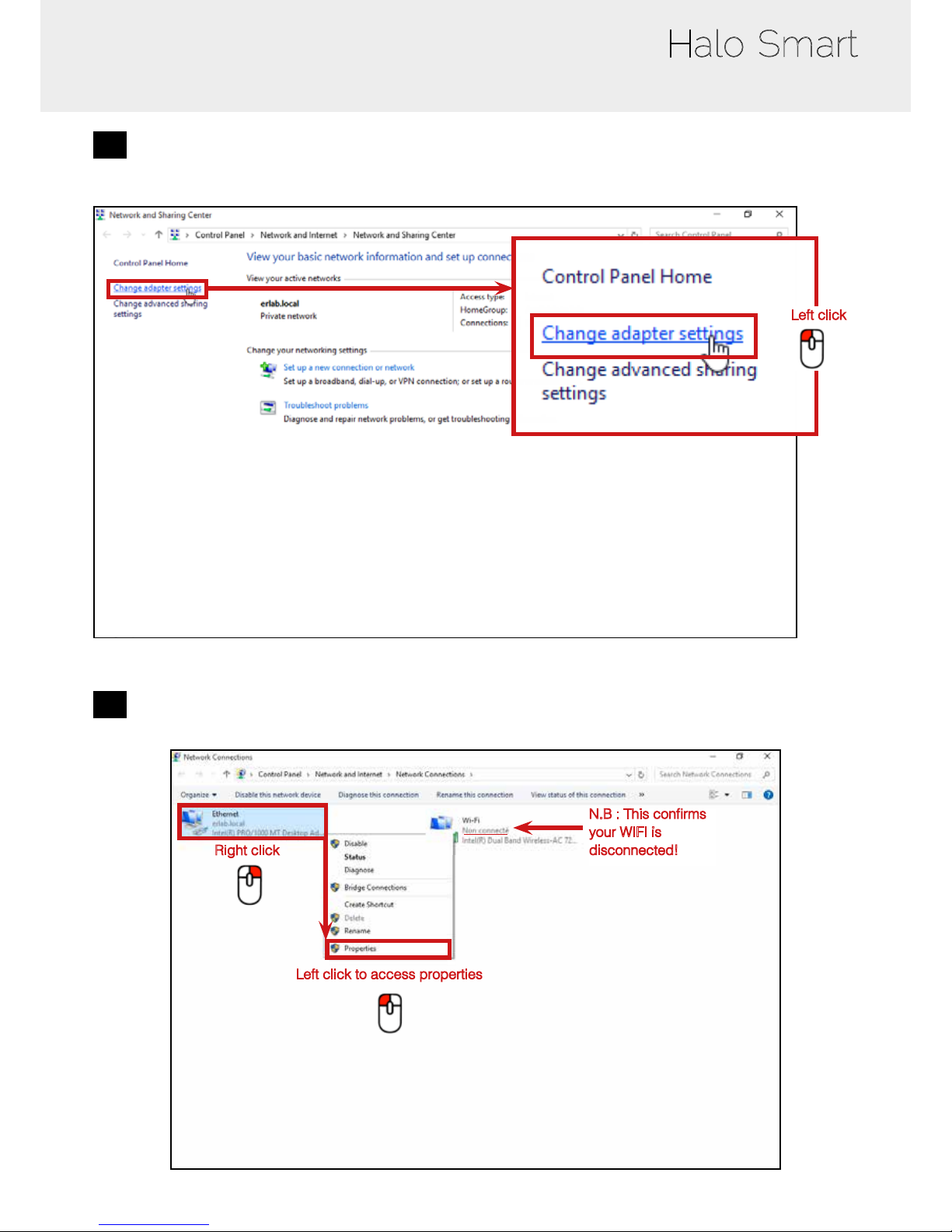
2
Access to the Network and sharing center
Left click
3
Access to the network connection
Right click
Left click to access properties
N.B : This conrms
your WIFI is
disconnected!
Page 13
User Manual
13
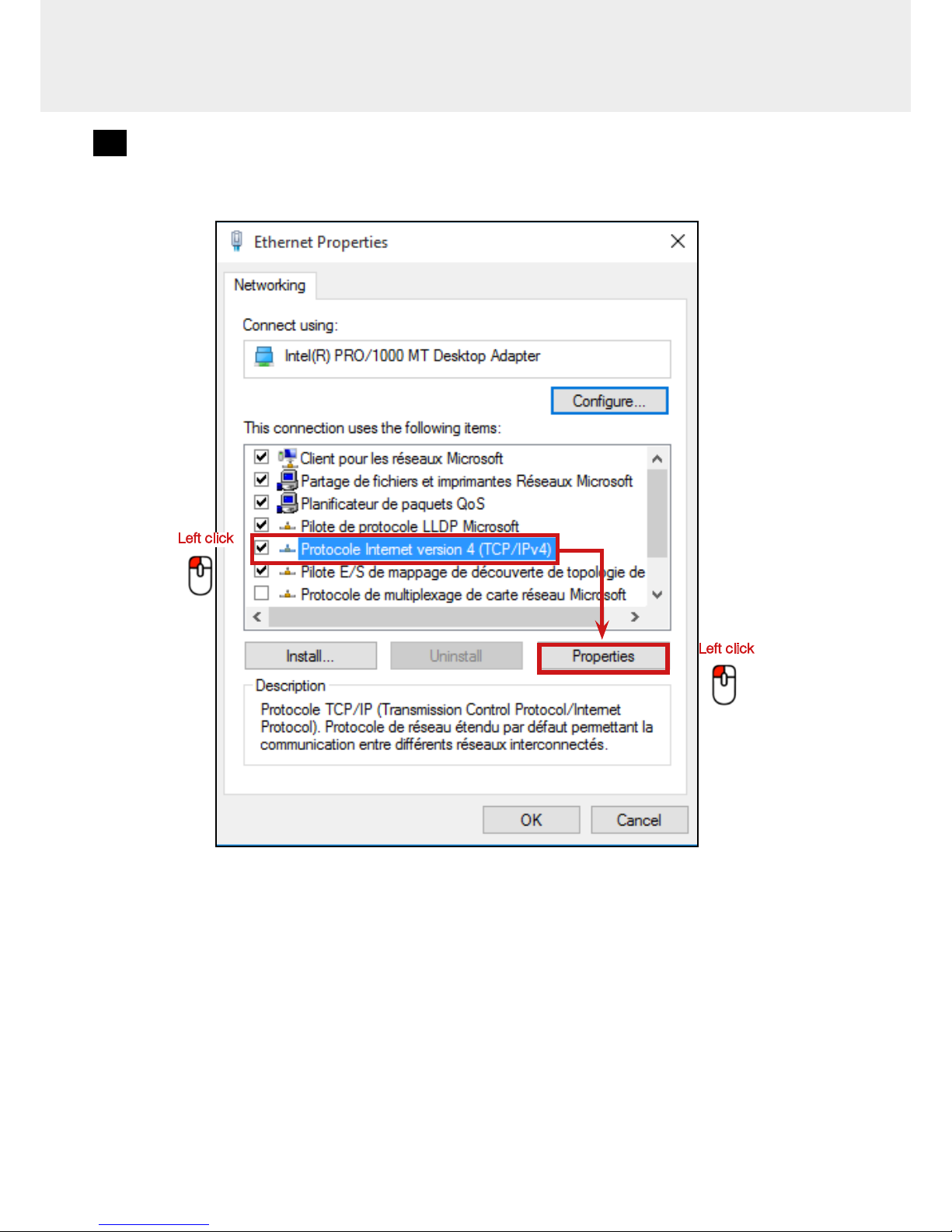
4
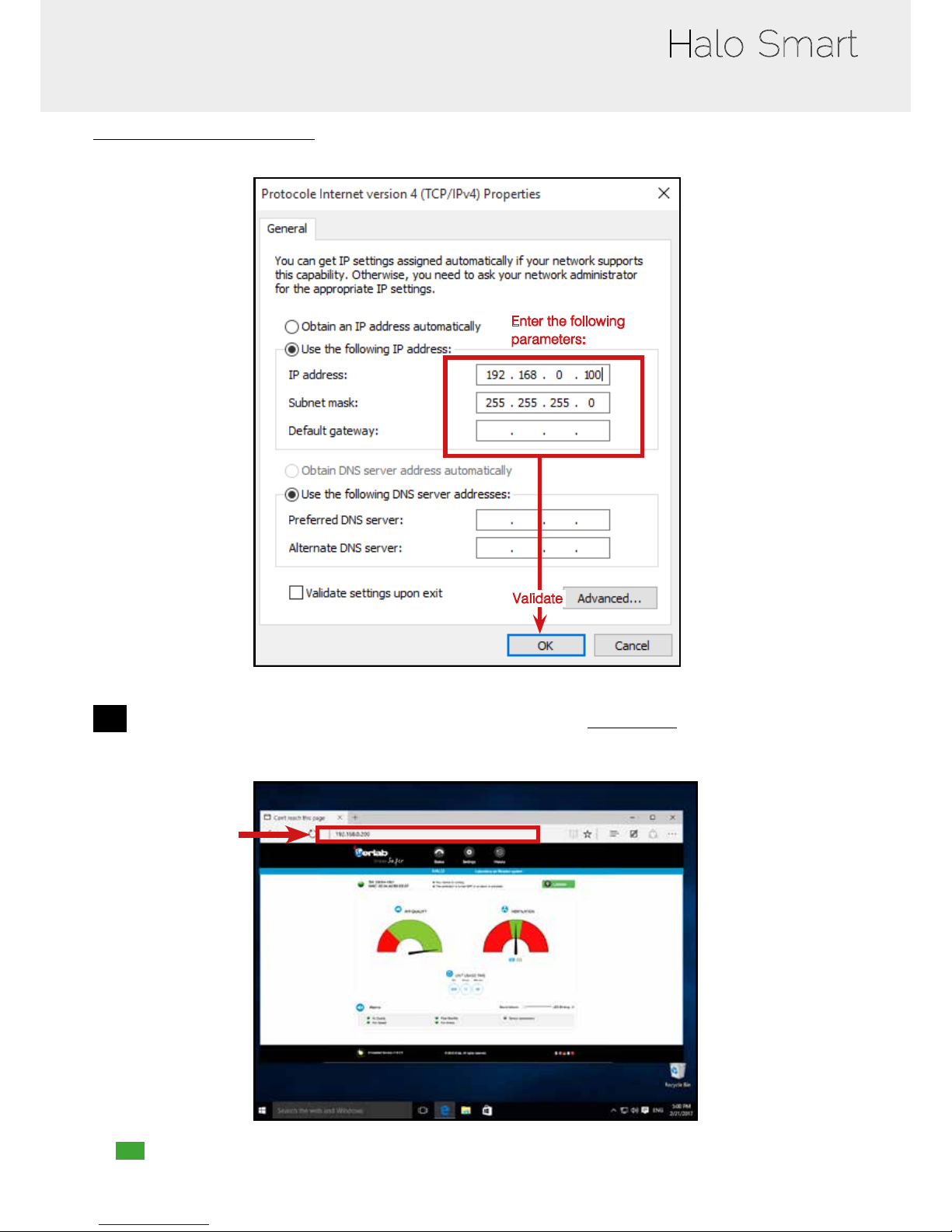
Enter compatible network parameters as indicated below
Left click
Left click
Page 14
Halo Smart
14
Write down your existing parameters before changing them in order to be able to set your initial parameters after the operation!
Enter the following
parameters:
Validate
5
Open your web browser again, type again the following IP address 192.168.0.200 and validate
• OK : You are connected to the embedded software
You enter the « Status » page and you can have access to the « Settings » using the following credentials:
Login: erlab / Password : smart
Page 15
User Manual
15
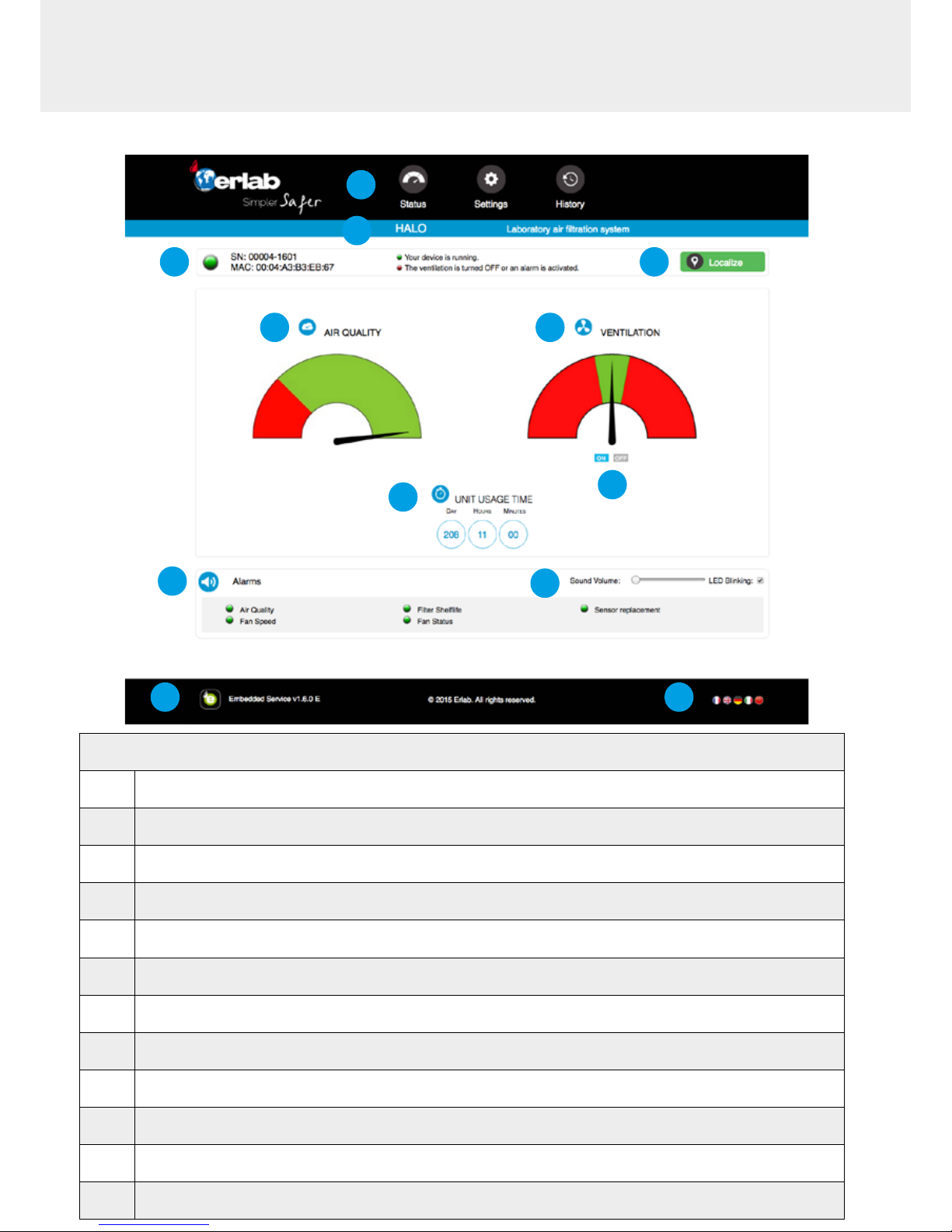
Administrator interface
Status page details
1 Choose active interface page
2 Device ID: Model
3 Device ID: serial number, MAC address, device status
4 Activates smart light to identify the unit location
5
Air quality gauge: indicates the air quality level
(green: good air quality/Red: polluted air)
6 Indicates fan status
7 ON/OFF: Turn ON/OFF fan
8 Unit usage time since since its rst usage
9 Air quality and sensor lifetime alarms
10 Volume setting
11 Embedded service version
12 Choose language
1
2
3 4
5
8
6
9
10
11
12
7
Page 16
Halo Smart
16
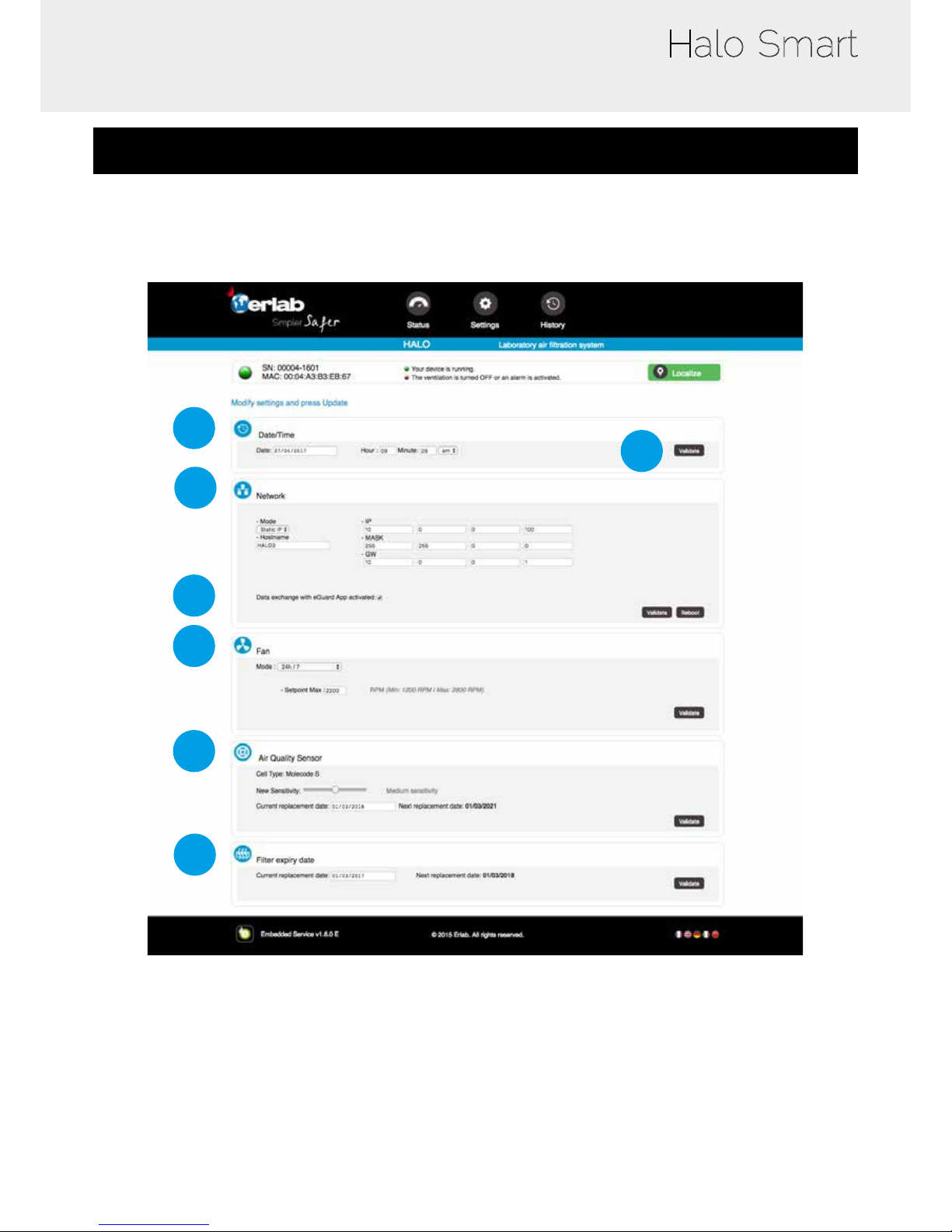
Access to the settings with the following login credentials:
User name: erlab
Password: smart
1
2
3
4
7
5
6
Page 17
User Manual
17
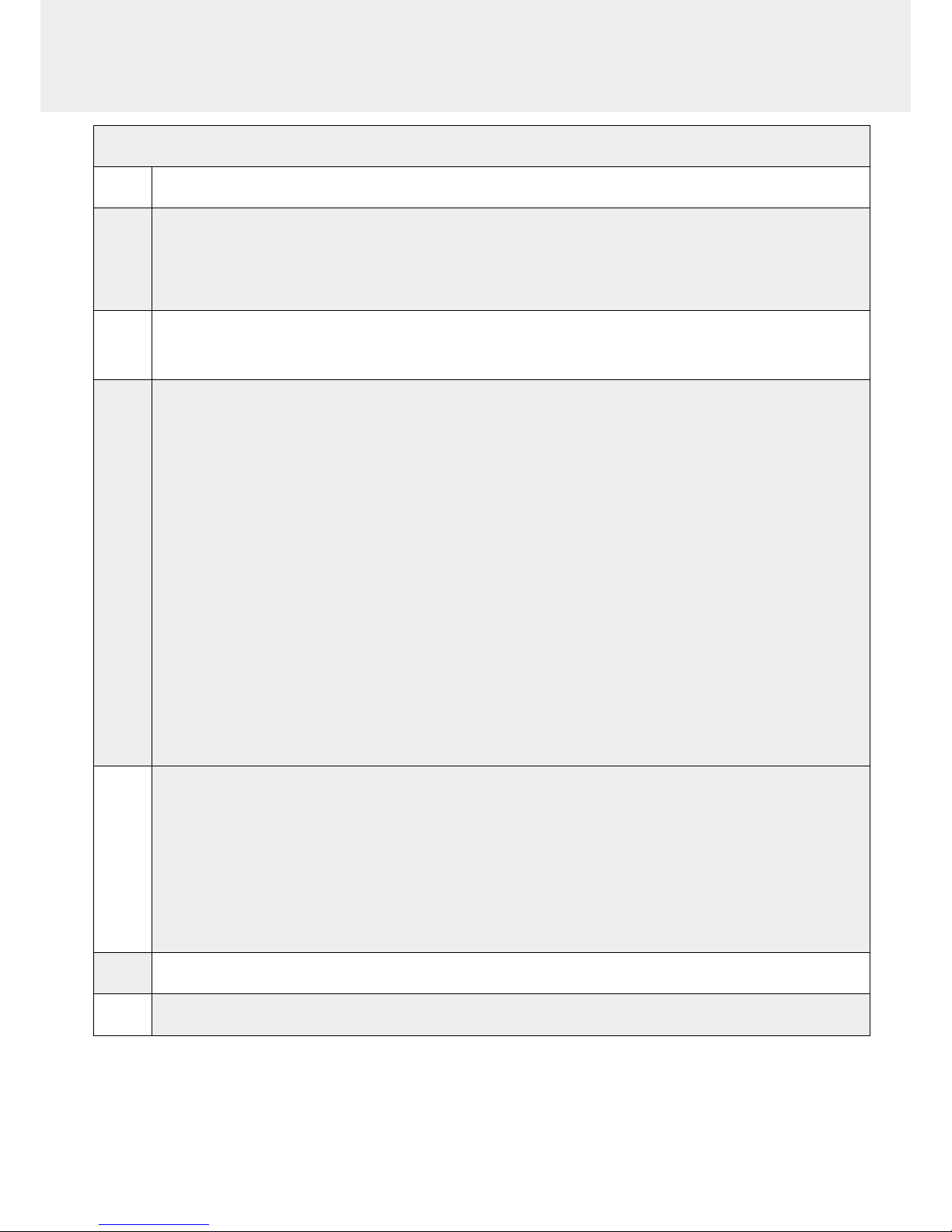
Settings details
1 Device time and date settings
2
Device network settings
Mode: Selected IP protocol
Hostname: Device name on network
IP: IP address of the device
MASK: network mask
GW: Network gateway
3
Activate/Deactivate the exchange of information
This allows the transmission of information from the device to the eGuard server for:
- remote monitoring via eGuard App (mobile &PC)
- receiving usage reports
4
Halo operation modes
Mode : 24/7
Halo is running 24/7
Mode : Min Max detection
This mode denes a min. and max. fan power
During normal operation, the fan speed is dened by the value entered into the Min. setting. The Halo reaches its
maximum fan speed if the sensor detects a pollution in the ambient air (the treshold value of the sensor has been
reached).
Mode : Detection value only
The ventilation is unactive.The fan automatically turns on its maximum if the sensor reaches its treshold value
dened in the settings
Mode : Day / Night
This operating mode sets the fan to run during: Day (8am - 8pm) or night (8pm - 8am)
Minimum Setpoint: Min. fan speed of the Min Max Detection operating mode
Maximum Setpoint: Max. fan speed for the Min. Max Detection and the Unique Detection operating modes
Unique Setpoint: fan speedt of the 24/7 operating mode
Day Setpoint: fan speed of the Day for the Day/Night operating mode
Night Setpoint: fan speed of the Night for the Day/Night operating mode
5
Air Quality Sensor
Sensor type indication (VOCs: volatile organic compounds/ A: Acids / F: Formaldehyde)
Sensor sensitivity settings:
VOCs sensor (5 settings): High sensitivity, Medium/High Sensitivity, Medium Sensitivity, Medium/Low Sensitivity,
Low Sensitivity
A and F sensors (3 settings): High sensitivity, Medium Sensitivity, Low Sensitivity
Sensor replacement
Enter replacement sensor date, display the next sensor replacement date
6
Current replacement date: last lter replacement date
Next replacement date: indicates the nest replacement date
7 Conrm settings key (please validate each setting)
Page 18
Halo Smart
18
1
2
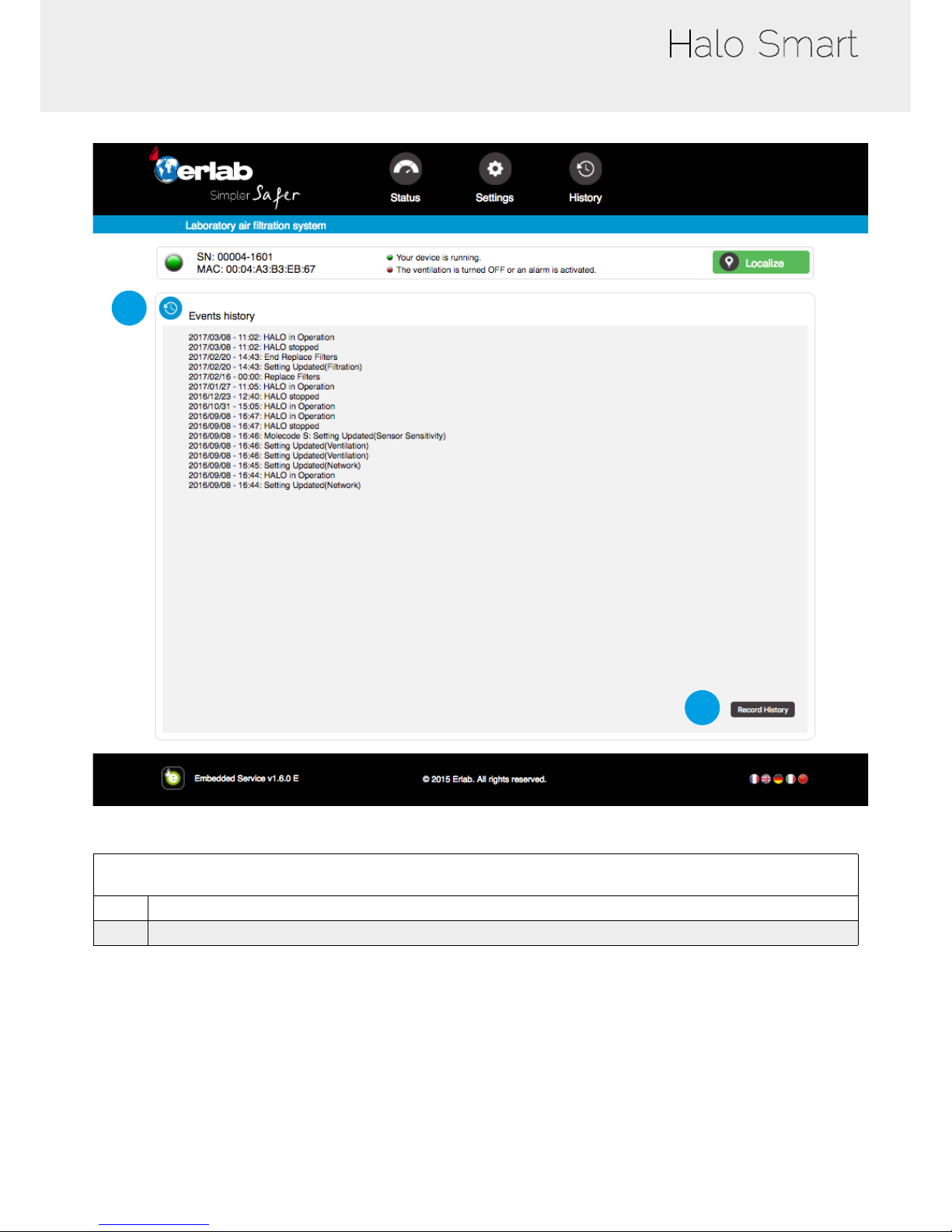
Log page details
1 Displays the device’s event log
2 Used for downloading the log in .csv format
Page 19
User Manual
19
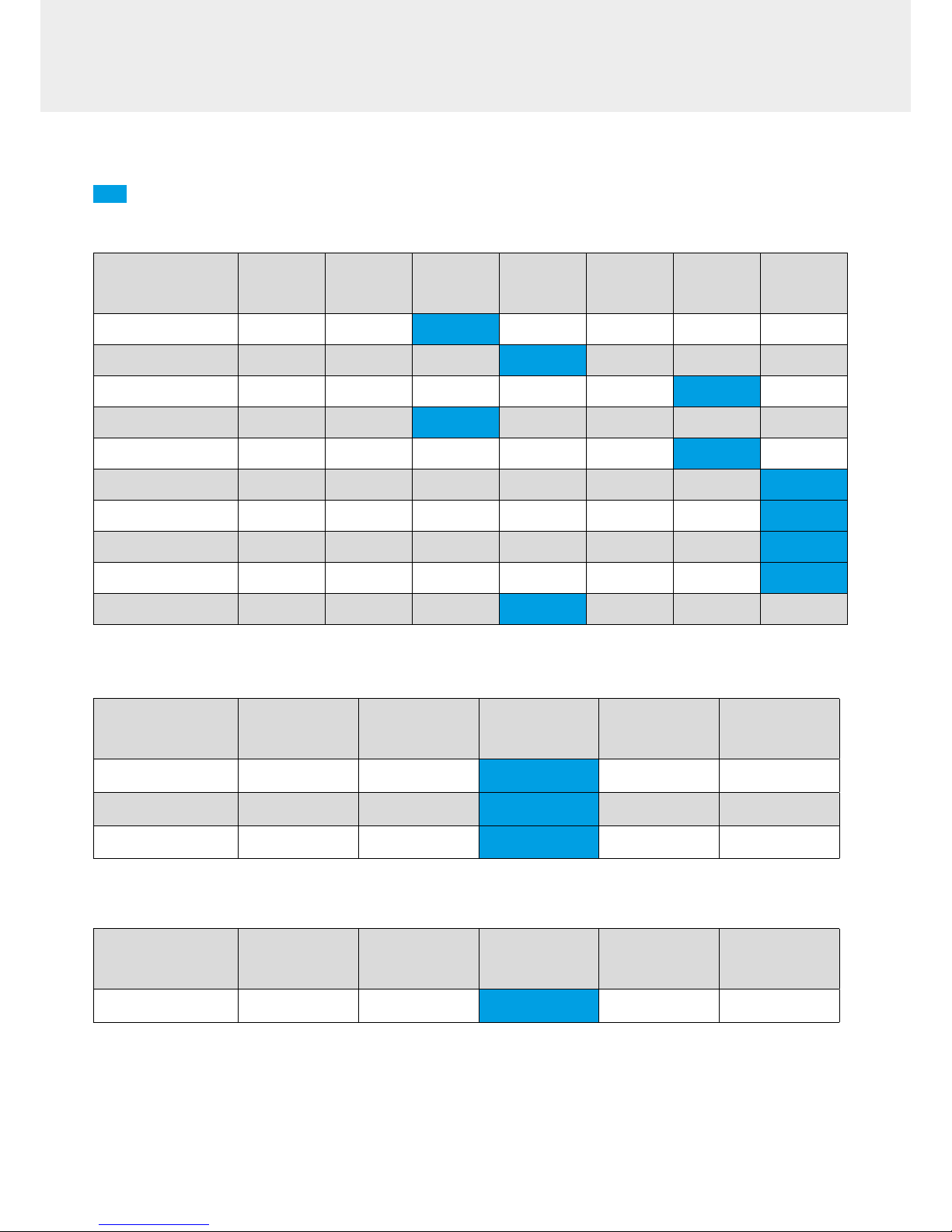
Sensors sensitivity settings
Settings recommended by Erlab
Halo Smart – VOC version
Chemical products
PEL/TWA 8H
(ppm)
PEL/STEL
(ppm)
High
sensitivity
(ppm)
Medium high
sensitivity
(ppm)
Medium
sensitivity
(ppm)
Low Medium
sensitivity
(ppm)
Low
sensitivity
(ppm)
Ammonia
10 20 10 15 25
Hexane
20 1 2 5 15 20
Xylene
50 100 0 0.3 0.5 1.5 2
Acetonitrile
40 30 40
Toluene
20 100 0 0.5 0.7 2 3
Isopropanol
400 1 1.5 2 3 5
Acetone
500 1000 1 3 5 6.5 8
Methanol
200 1000 1 2 5 10 15
Ethanol
1000 5000 1 2 5 10 15
Diethyl ether
100 200 1 2 5 8 10
Halo Smart – Acids version
Chemical products
PEL/TWA 8H
(ppm)
PEL/STEL
(ppm)
High sensitivity
(ppm)
Medium
sensitivity
(ppm)
Low sensitivity
(ppm)
Hydrochloric acid
5 ppm 0.5 ppm 1 ppm 2 ppm
Nitric acid
1 ppm 1 ppm
Hydrobromic acid
2 ppm 0.5 ppm 1 ppm
N.B: Halo Smart is not adapted to sense hydrouoric acid
Halo Smart – Formaldehyde version
Chemical products
PEL/TWA 8H
(ppm)
PEL/STEL
(ppm)
High sensitivity
(ppm)
Medium
sensitivity
(ppm)
Low sensitivity
(ppm)
Formaldehyde
0.5 ppm 1 ppm 0.1 ppm 0.5 ppm 1 ppm
Page 20
Halo Smart
20
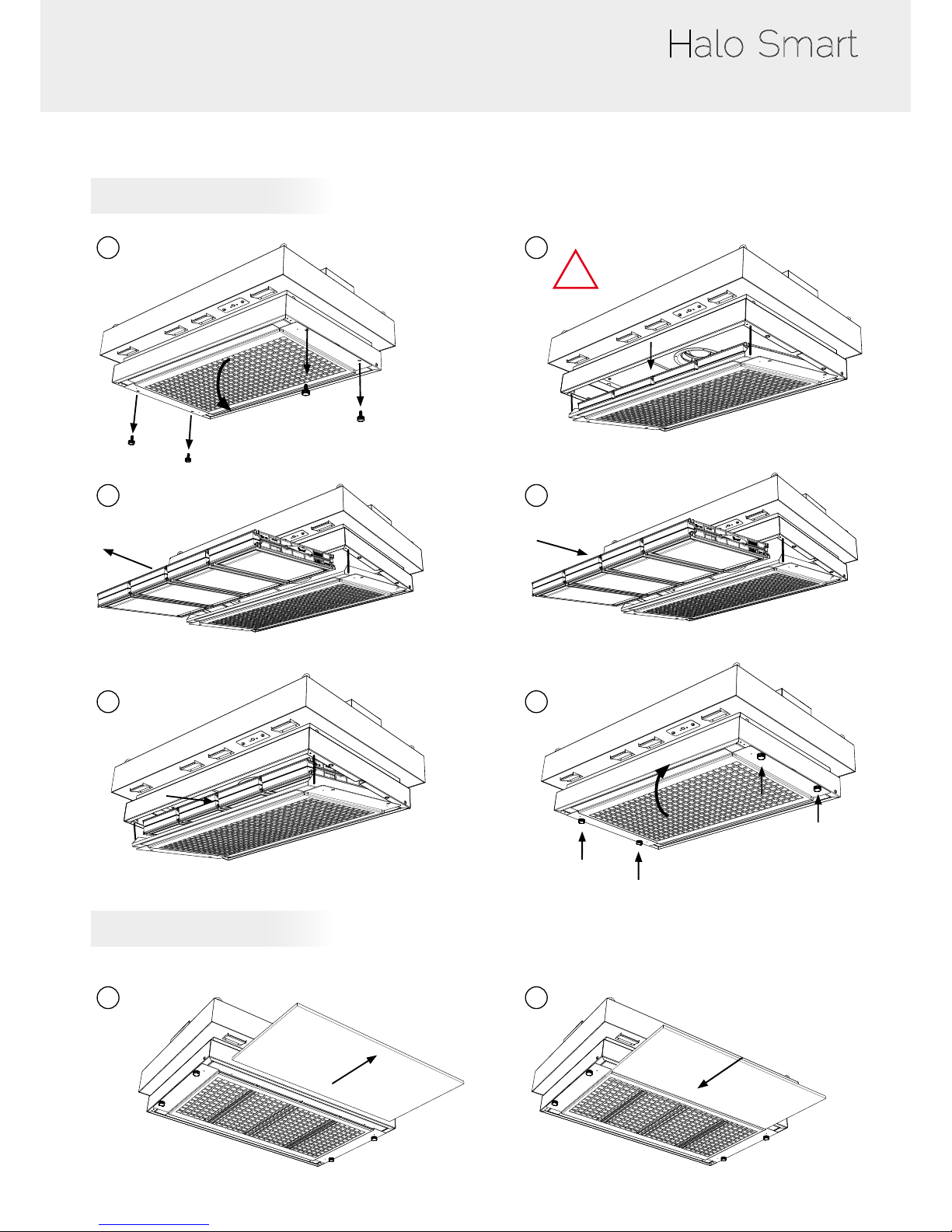
Replacing the filters and the Pre-filter
Pre-lter replacement
1 2
3 4
5 6
1 2
* US model does not have thumb screws
26.5 lbs
* US model does not have thumb screws
New lter
New pre-lter
!
Filter
12 Kg
Replacing the carbon lter
Page 21
User Manual
21
Recommendations for storing and using the filters
New lter shelf life and storage conditions:
New activated carbon molecular lters must be stored at in their original packaging at a temperature of between +10°C / 50°
F and +50°C / 120° F and a humidity level < 85% RH.
If these conditions are adhered to, the maximum time a lter can be stored before use depends on the type of carbon used:
- AS type carbon molecular lter 2 years from the date of delivery
- BE+ type carbon molecular lter 2 years from the date of delivery
- BE type carbon molecular lter 1 year from the date of delivery
- F type carbon molecular lter 1 year from the date of delivery
- K type carbon molecular lter 1 year from the date of delivery
If the maximum shelf life is reached, we recommend to not install lters.
Predicted service life of a lter once put into use:
The service life of a molecular lter depends on lab air quality as well as the conditions of the environment in which it is used.
We recommend replacing the lter annually (if used 24/7).
Failing that and/or in the absence of information regarding device usage:
ERLAB is unable to provide any guidance as to the predicted service life of the lter(s).
In such cases, we strongly recommend:
• That the molecular lters are replaced at least every 12 months and that a regular lter saturation checking protocol is put
in place (please contact us for individual advice on this subject)
Page 22
1
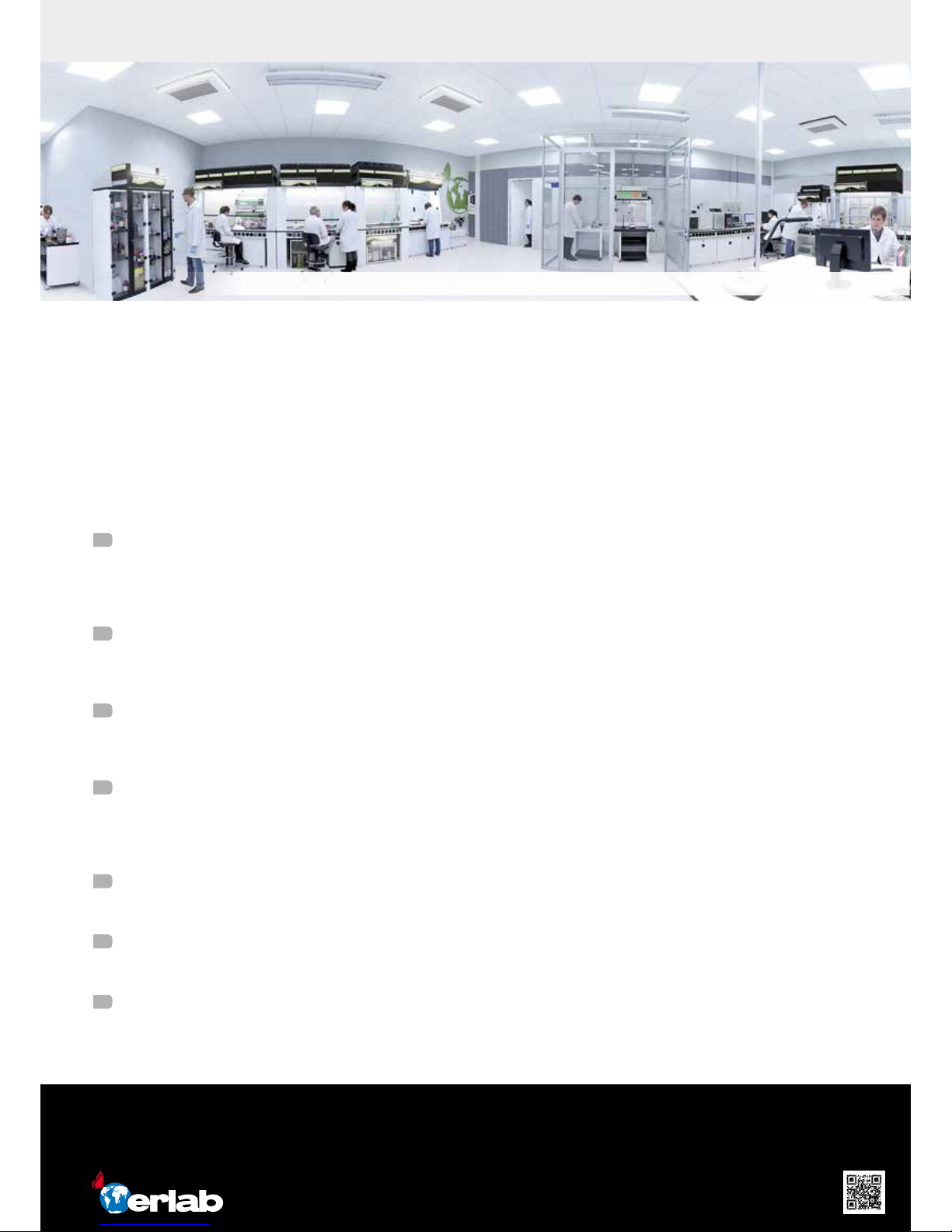
Erlab R&D Laboratory
The engineers and chemists in our state-of-the-art R&D laboratory understand molecular ltration. We are committed to
designing products that are safe and of the highest quality, strive to improve our products, and continuously develop new
products that provide greater protection in the laboratory.
2
Strict Safety Standards
We hold ourselves to the highest standard and adhere to the strict AFNOR NF X 15-211: 2009 ltration safety standard
as endorsed by ANSI Z9.5-2012.
3
A Published Chemical Listing
It all begins here. Without this listing, we are not compliant with AFNOR NFX 15-211. Our in-house laboratory tests, as well
as independent testing to verify the retention capacity of over 700 chemicals for our lters.
4
Independent Testing
Erlab lters have been independently tested multiple times at various concentrations guaranteeing that our safety
solutions all adhere to the strict performance criteria of the AFNOR NF X 15-211:2009 standard assuring that the emission
concentration at the lter exhaust will always be lower than 1% of the TLV.
5
Application Questionnaire (Valiquest)
Our laboratory specialists will recommend the appropriate ltration fume hood, type of lter, and personalized advice.
6
Certicate of Validation for the chemicals used in the hood
A certied PhD chemist issues a Certicate of Validation with a list of the chemicals approved for use in the hood.
7
Our Safety Program
We back up our products 100%. This program includes your specialized chemical evaluation, validation of your hood
upon installation, and a ltration safety specialist at your service to ensure that your hood is operating to its full potential.
We provide safety, we protect your health
Erlab invented the ductless fume hood in 1968. With more than 45 years of experience in the eld of chemical ltration and
protection of laboratory personnel; we know the formula for safety. With Erlab, you will never have to wonder or worry if our
products are safe. We build each one of the following 7 ingredients into our products, and without all of them, your health
and safety will be compromised.
France
+33 (0) 2 32 09 55 80 │ [email protected]
Germany
0800 330 47 31│ [email protected]
China
+86 (0) 512 5781 4085 │ [email protected]
Italy
+39 (0) 2 89 00 771 │ [email protected]
Malaysia
+60 (0) 7 3 555 724 │ [email protected]
Spain
+34 93 673 24 74 │ [email protected]
North America
+1 800-964-4434 │ [email protected]
United Kingdom
+44 (0) 1722 341 940 │[email protected]
www.erlab.com
About Erlab
Le laboratoire de Recherche et Développement Erlab
Halo_V04_2017_10 - Erlab France - Technical data are not contractual. Erlab
®
DFS SAS reserves the right to modify the present document without prior notice.
Erlab’s state of the art Research & Development Laboratory relying exclusively on ltration
 Loading...