

Page 1
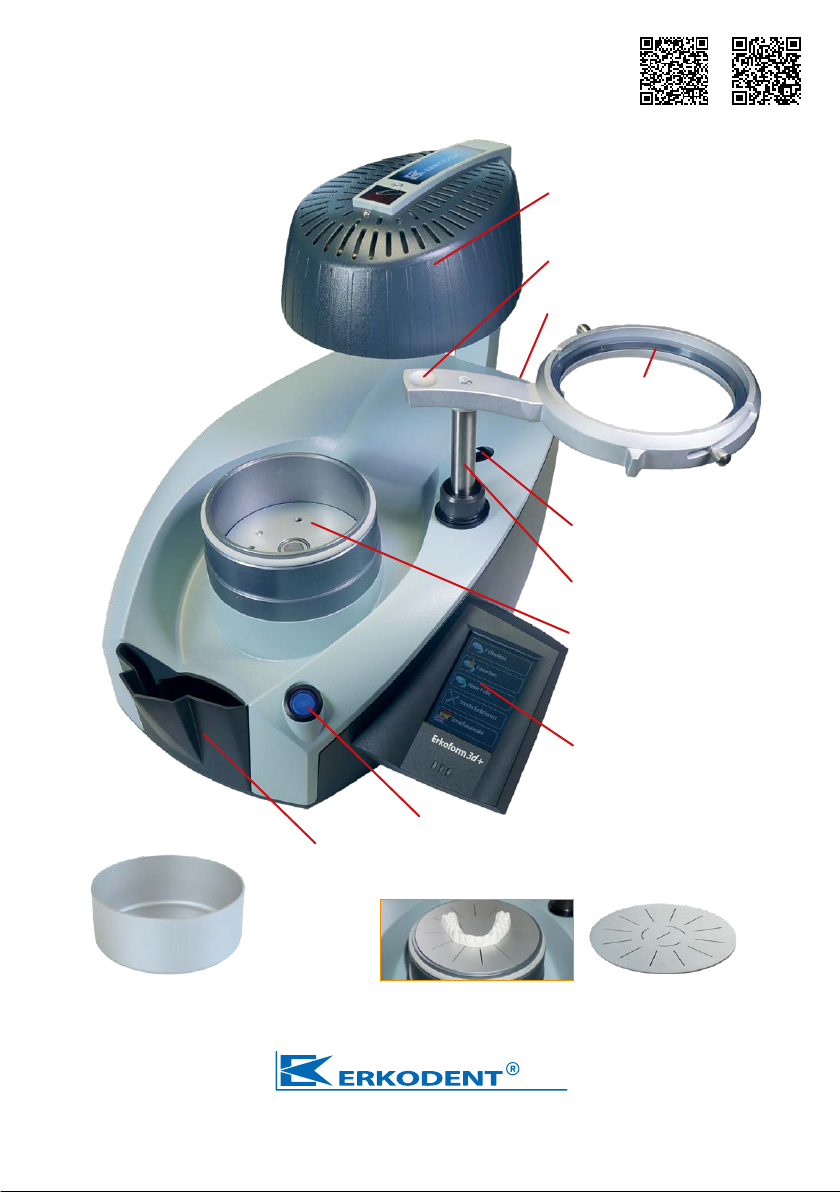
Erkoform-3d +
Instructions
VideoInstructions
Erkoform-3d +
Vacuum thermoforming
unit with touchless
temperature control
(EP 1 905 380),
pre-vacuum and
touchpanel
Medium-wave infrared
heater with cover
Foil reception handle with
cavity for good grip
Mains connection (back)
Foil reception with
foil securing ring
Sensor window for
temperature registration
Column for movement of
foil reception
Form pot for reception of
granules pot, model plate
and Occluform-3 model pot
(Occluform-3, 188 580)
Touchpanel to operate all
functions
Main switch
Granules collecting device
Granules pot*, Ø inside 97 mm
height inside 40 mm
Erkodent Erich Kopp GmbH • Siemensstraße 3 • 72285 Pfalzgrafenweiler • Germany
Tel.: +49 (0) 74 45 85 01-0 • Fax: +49 (0) 74 45 85 01-15 • www.erkodent.com • [email protected]
Model plate* for very flat trimmed models
*also included
Page 2
Technical data:
Measurement: height 315 mm
width 350 mm
depth 370 mm
weight 11,9 kg
Foil measures: diameter 120 mm
thickness 0 - 5.5 mm
Form pot: inner Ø 101 mm
inner height 42 mm
Electricity: volt: ~220 - 240 (100, 110 - 120)
watt: 340 (incl. heater)
Fuse: 2 x T- 2 A (230 / 240 V) or
2 x T- 4 A (100 /115 V)
Security
Before starting, please read instructions for use. The operator of the machine is
responsible for the complying with regulations for accident prevention concerning
technical security.
The construction of the Erkoform-3d + unit complies to the applicable legal standards.
Security hints
ATTENTION! Risk of burns, do not touch heater, housing of the heater and hot foils!
Only operate the machine under supervision. Do not keep highly inflammable materials near
the machine. Heat and work only with suitable thermoforming materials.
Usage as directed
The Erkoform-3d + unit must only be used with suitable dental thermoforming material in diam-
eter 120 mm and thickness of up to 5.5 mm for forming on suitable models. In case of non-observance we cannot take any liability or guarantee for damages.
Cleaning and maintenance
The unit should only be cleaned with a damp cloth.
Do not use any solvents or other cleaning agents. To ensure
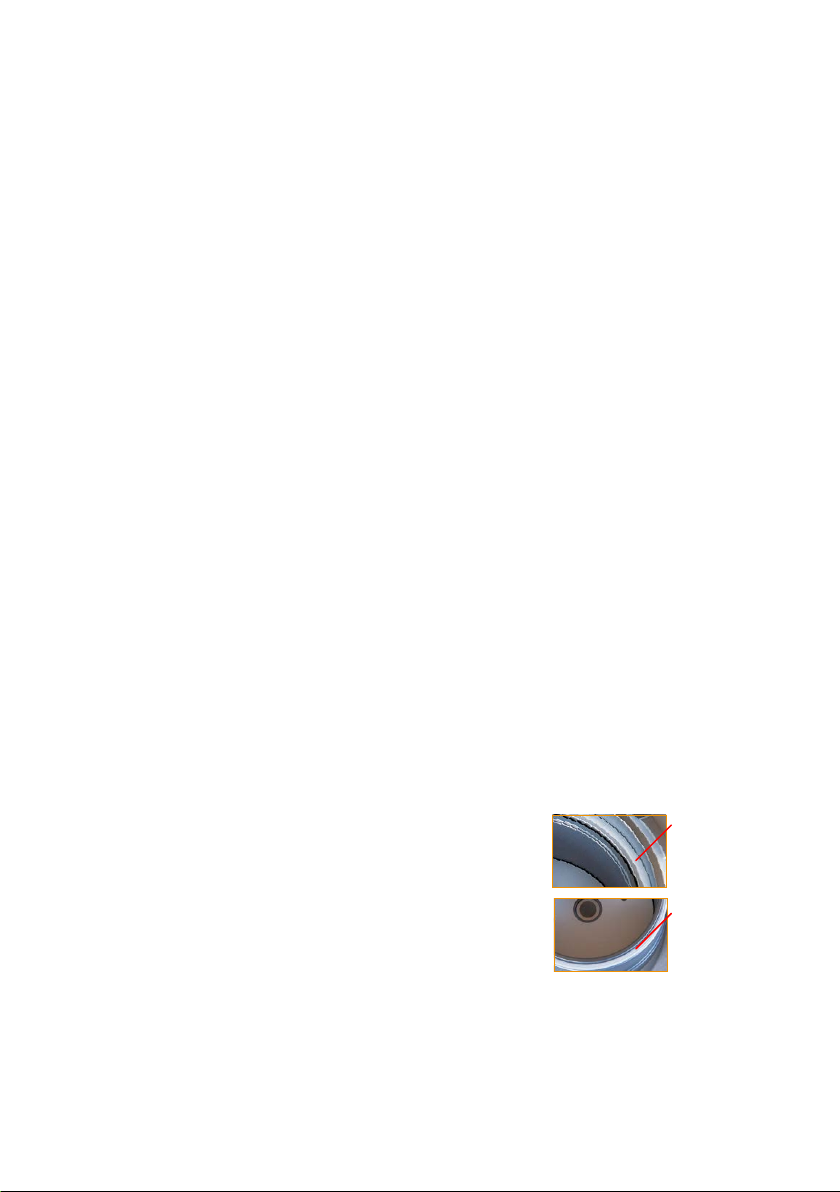
that the unit maintains its full function the sealing rings require
replacing once a year when the unit is consistently in use.
New seals should be firmly pushed into position.
Installation instructions: In order to avoid humidity and dirt
entering the unit install and store it in a dry and low-dust
environment. Allow a cold unit (after transportation, storage
or similar) to warm up for 2 hours at minimum 15 °C room temperature to avoid condensed
water.
Putting into operation
Fit in the supplied plug in the rear socket of the machine and plug in at the wall socket.
Unplug the machine when not in use.
Heater technique: medium-wave
round-pipe
infrared heater
volt: ~220 - 240 (100, 110 - 120)
watt: 280 - 300
Sensor: touchless infrared
temperature sensor, pro grammable measuring
range up to 240 °C
Vacuum technique: with pre-vacuum
vacuum 0.8 bar
litre capacity 9 l/min
noise level < 60 db(A)
Spare sealing
foil reception
188 011
Spare sealing
form pot
188 017
1
Page 3
Recommendation:
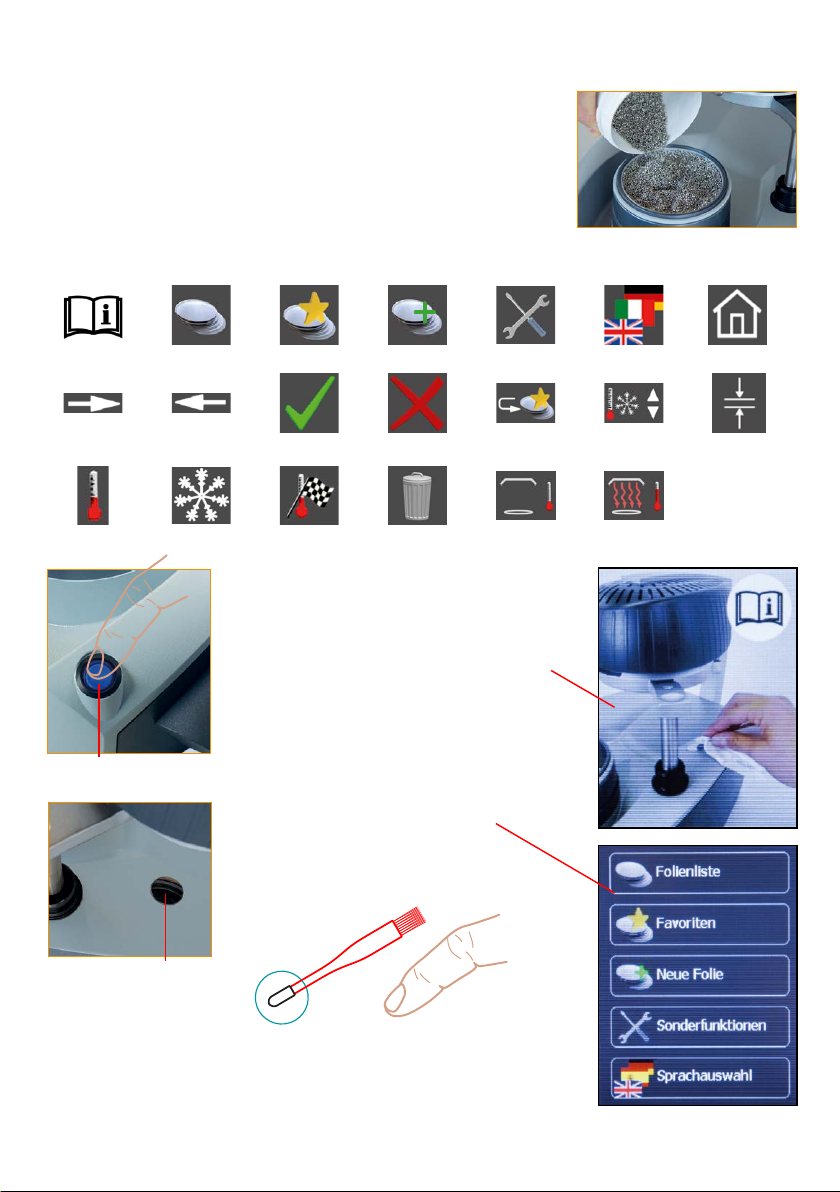
Operate the machine only with granules (illustr.) To fill the
granules pot move the foil reception in the upper right position.
Smooth the granules, excessive granules will fall in the
surrounding chanel and can be swept with the brush in the
granules collecting device. Ensure that no granules remain on
the sealings.
The symbols of the touchpanel:
refer to
instructions
continue
foil temperature
main switch
list of foils
back
cooling time
favourites
ok continue
rated temperature
new foil
abort
delete
special functions
add favourite
heating off
Switch unit on
Switch the unit on at the main switch.
A picture in the touchpanel reminds to
clean the sensor window.
A dirty sensor window leads to measurement errors. If necessary, dust off
or clean with a damp cloth (no cleaning agents!).
After a few seconds the basic display
automatically appears.
The touchpanel responds in the
framed function fields on slight
pressure.
language option
change presettings
heating on
main menue
foil thickness
sensor window
For input, the enclosed brush for
granules is equipped with a rubber cap.
Input is also possible with fingers.
2
Page 4
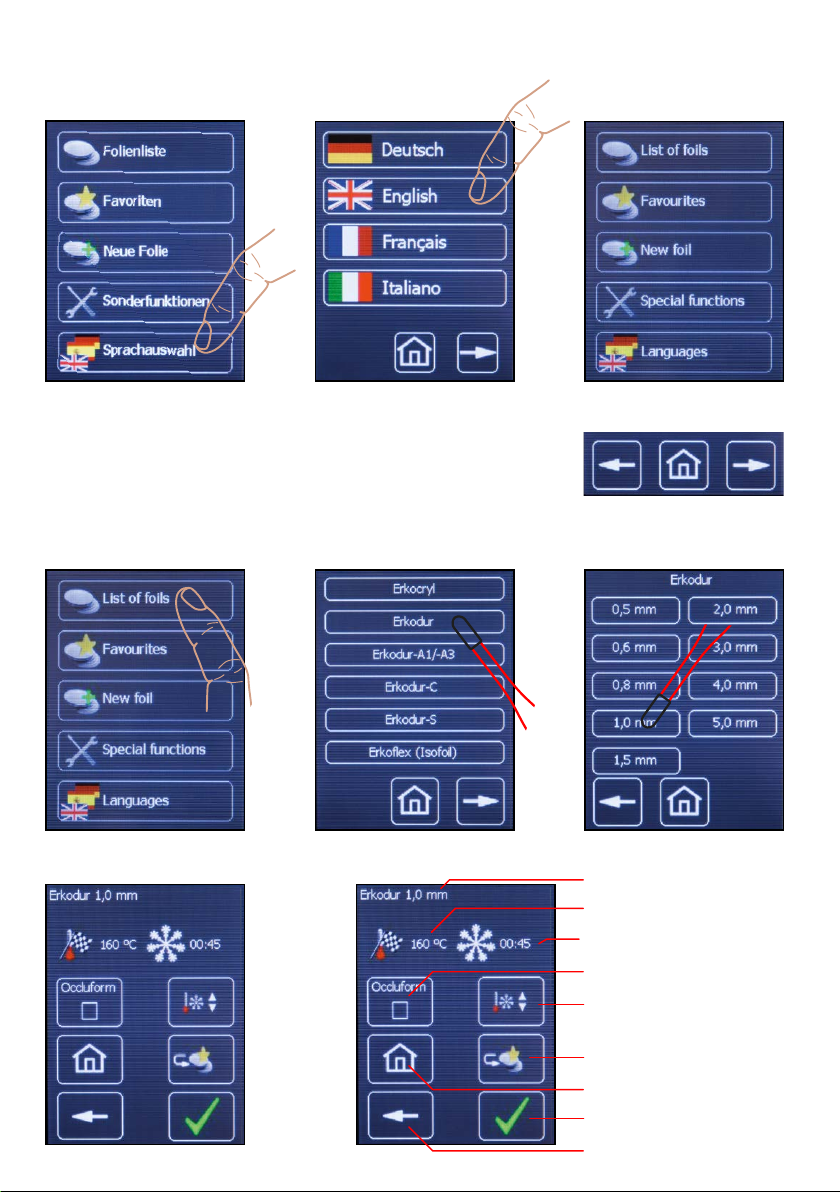
Select language: (The unit retains the language selected)
1. Select language option 2. Select language 3. Menu, selected language
Select foil example, Erkodur, thickness 1 mm
The list of foils contains all foils of the Erkodent range of
products that can be used with this machine and that have
been available at the time of production of this unit.
Add new foil, page 6 Save favourites, page 5
1. Select list of foils 3. Select 1.0 mm2. Select Erkodur
4. Selected foil
Functions of this indication
Thumb list of foils
back menu continue
selected foil
rated temperature
cooling time
work with Occluform-3
change rated temperature and cooling time
save as favourite
menu
OK, next step
one step backwards
3
Page 5
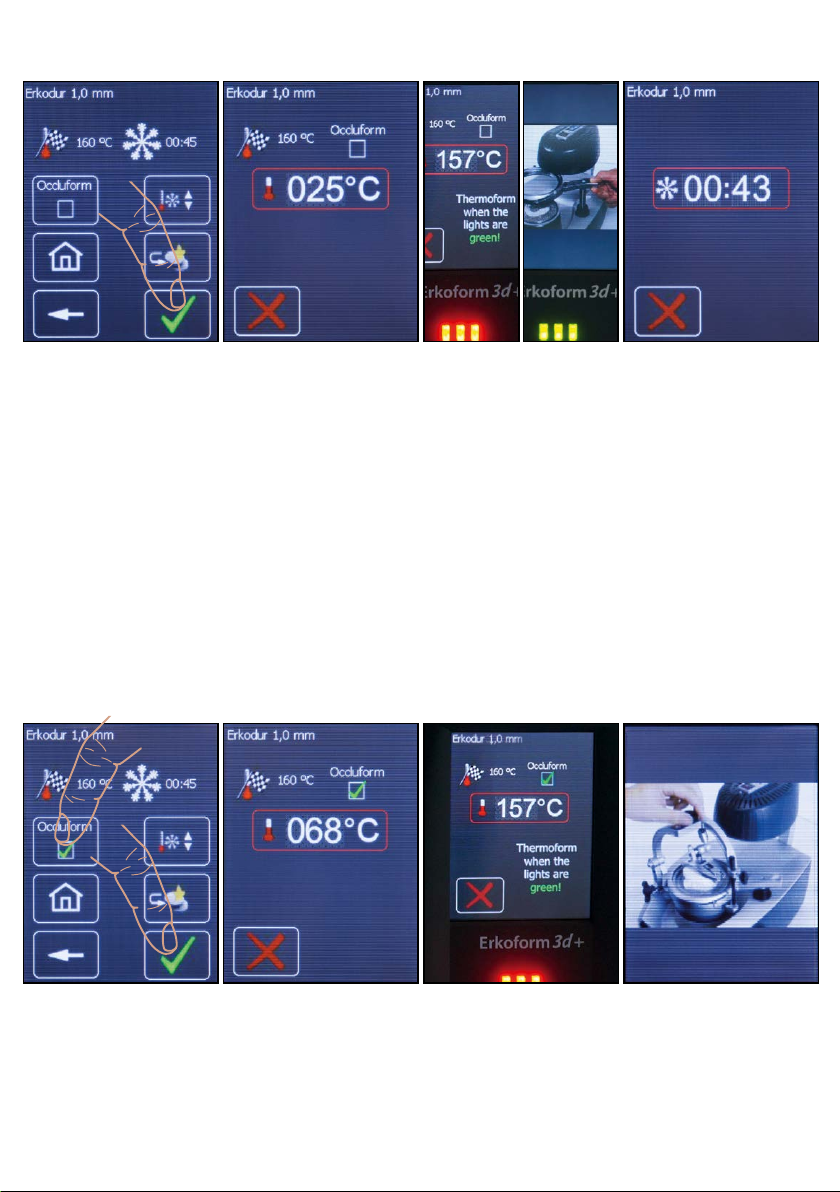
Thermoforming (see also page 10)
1. Correct foil (?),
confirm.
As soon as the foil
is confirmed the display shows the further working steps.
Further functions of
this indication (see
page 10).
Hint:
Press abort: X
2. Foil will be heated.
As soon as the foil
reception clearly
clicks into place
under the heating,
the display shows
the foil temperature.
70 °C before the
rated temperature is
reached the vacuum
pump switches on to
built up the pre-vacuum.
3. Attention!
Thermoforming process
10 °C before the
rated temperature
is reached there
will be an acoustic,
optic and written
request to thermoform, „Thermoform
when the lights are
green!“
4. Cooling time
After the thermoforming process the
cooling time runs.
to 2. and 3.
During the heating
process the foil reception can shortly (max.
3 sec.) be swivelled
towards the starting
position without interrupting the program.
1. Select Occluform-3
and confirm.
Hint: When thermoforming Playsafe triple the
machine requires to close the Occluform-3 only
1 min. after the thermoforming process.
2. As above 3. As above, the
thermoforming process runs after the
rated temperature is
reached.
4. Request to close the
Occluform-3.
Afterwards the cooling
time is indicated.
4
Page 6
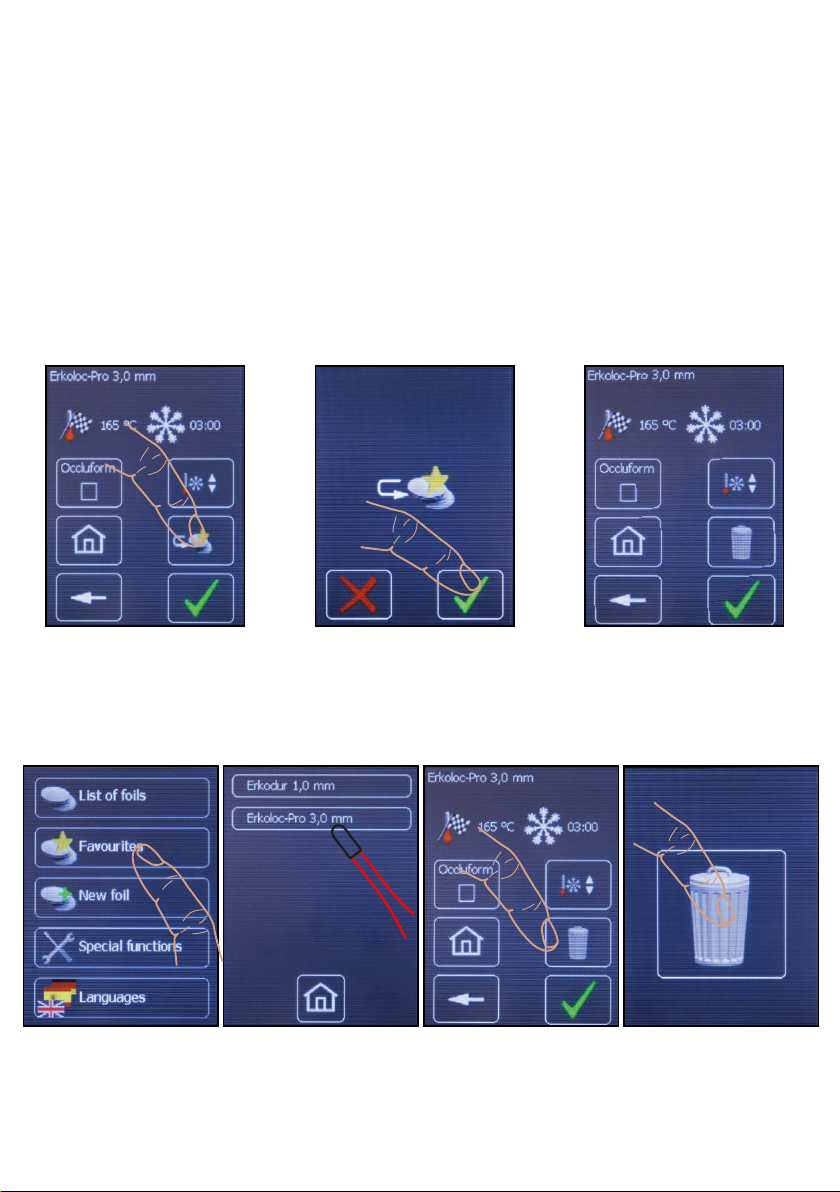
Save favourites
The list of favourites allows a quicker selection of often used foils. To save a foil in the list
of favourites, this foil is selected out of the list of foils as described under ”select foil“. New
foils, either future Erkodent foils or foreign foils, are entered with the functional field ”new
foil“ and are saved in the list of favourites.
After having selected the desired foil from the list of foils the display 1. will be visible. To
save the foil as favourite, select „to favourites“.
1. Select
add favourite
Delete favourite
1. Select
favourites
2. Select
favourite
2. Confirm
add favourite
3. Select
delete favourite
3. The favourite appears
and can be processed
4. Confirm
delete favourite
Recommendation: If an Erkodent foil will be saved with the factory parameters and as a favourite with changed parameters, the changed one should be saved as new foil with a different
name in order to avoid any mix-up.
5
Page 7
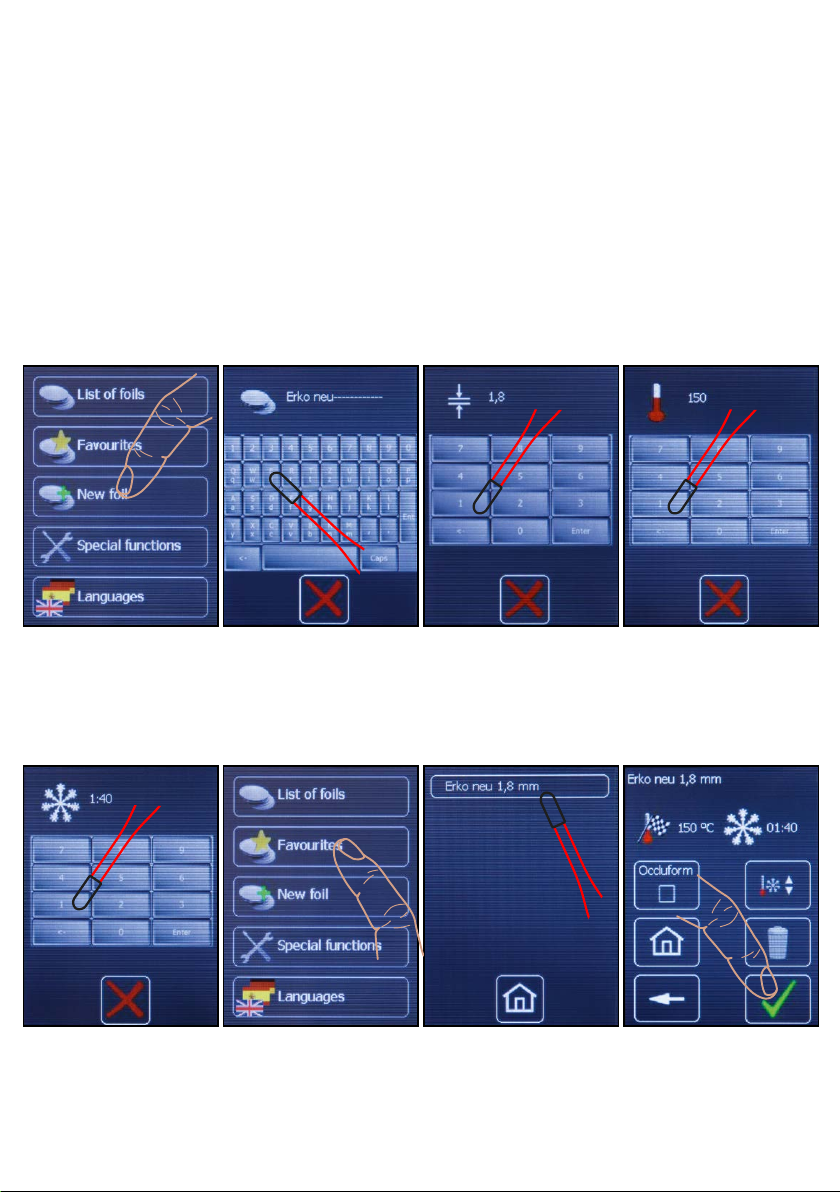
Enter new foils
New foils can be future Erkodent foils or foreign foils.
If Erkodent launches a new foil the necessary data will be found on the label
(example: Erko neu (new), thickness 1.8 mm, rated temperature 150 °C, cooling time 1:40 min.).
The foil can be saved under input „New foils“. In case of foreign foils the rated temperature
and the cooling time have to be determined with the help of the special functions.
The new foils will be saved in the list of favourites and selected via this list.
Hint: Max. 240 °C can be entered as rated temperature. The cooling time has to be at least
30 sec. Otherwise there may be malfunctions.
1. Select
new foils
5. Enter
cooling time
2. Enter
foil name
6. Select
favourite
3. Enter
foil thickness
7. Select
new foil
4. Enter
rated temperature
8. Thermoform new
foil
To 2., the new foil is saved as favourite,
the menu appears
6
Page 8
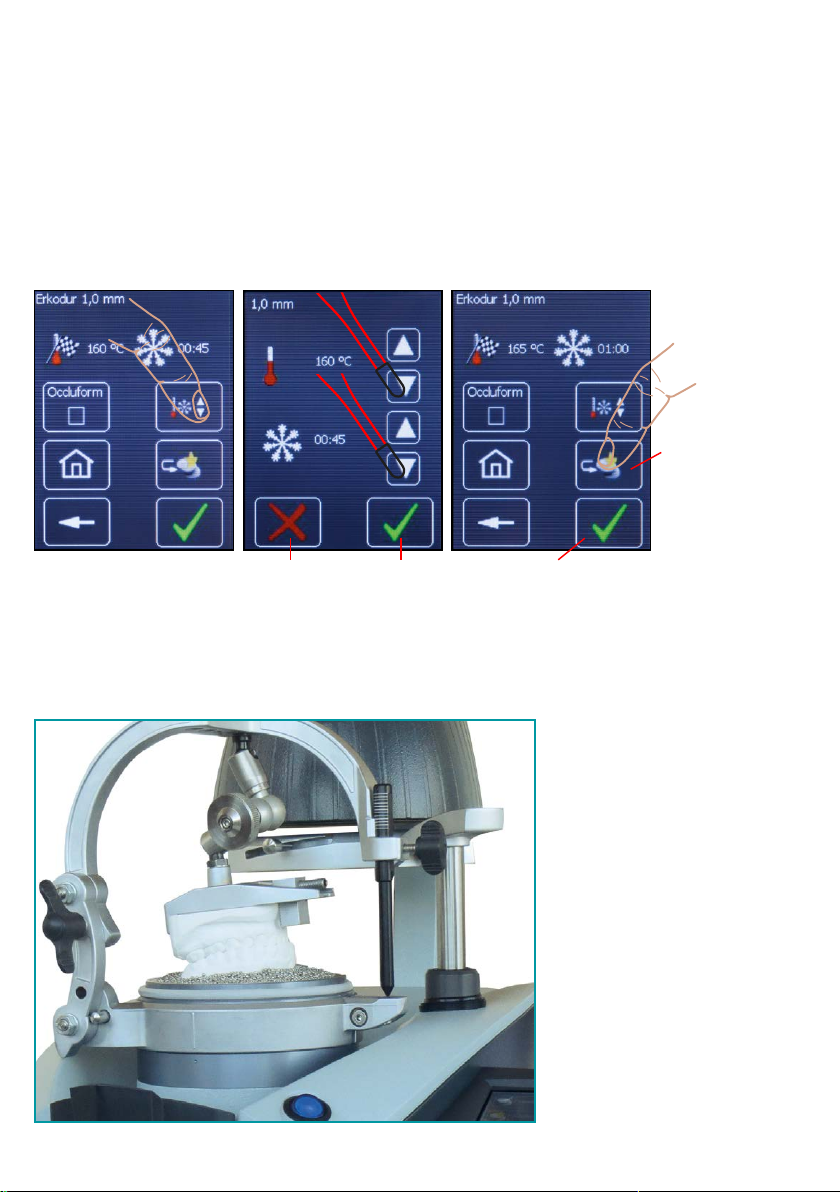
Change factory settings for foils
The rated temperature and cooling time can be changed for one single thermoforming process
or constantly as favourite. The rated temperature (factory presetting) can only be changed by
maximum +/- 5 °C. The changes are done in the window „selected foil“ or „favourite“, also see
“select foil” and “save favourite”.
1. Select change 2. Change rated
temperature and
cooling time
Abort Save Thermoform once
Occluform-3
3. Thermoform or save
as favourite
Save as favourite. As favourite
the changed
data and the
foil name will
remain.
with the changed
data
Optional Occluform-3 device
(188 580) to imprint the opposing
bite.
The construction is based on
a Bonwill triangle with a side
length of 11.5 cm and a Balkwill
angle of 20 °.
7
Page 9
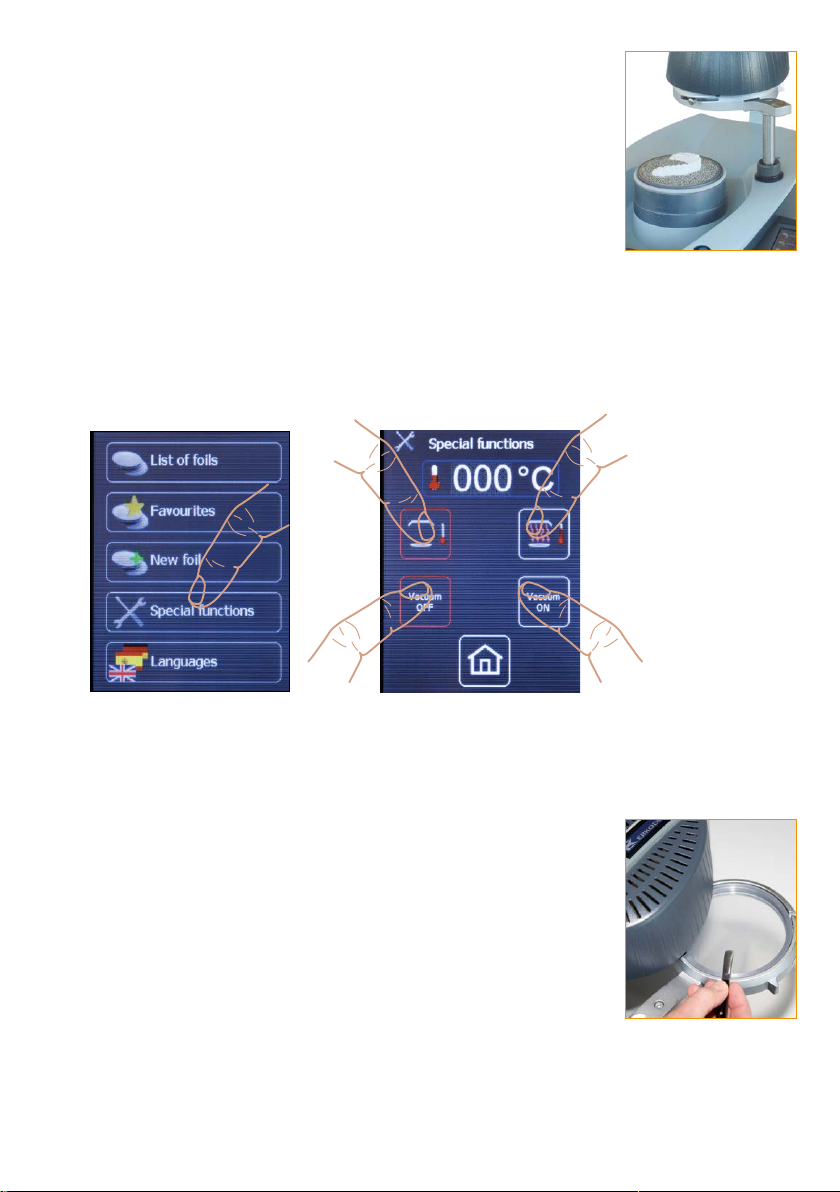
Special functions
Using special functions the heating and the vacuum pump can be
switched on and off independently of the program.
To determine the rated temperature (thermoforming temperature)
of an unknown foil, select „heating on“ and clamp the foil in the foil
frame as mentioned under „thermoforming“. As soon as the foil frame
is swivelled under the heating (a), it will be switched on and the
sensor will measure the temperature of the foil. If the foil shall be
thermoformed afterwards, select „pump on“.
Note, switch on the vacuum pump only with the foil reception in the
upper position.
Select special functions Heating off Heating on
a
Vacuum pump off Vacuum pump on
To check the thermoformability, swivel the foil towards outside (b)
and check with a blunt instrument. If permanent impressions result,
generally the foil is ready for thermoforming.
The heating switches off if the foil is swivelled out of the heating area,
“heating off“ is selected or the sensor measures > 240 °C.
The temperature shown on the display is the temperature measured
at last. If the foil is ready for thermoforming, this temperature
corresponds to the rated temperature.
To determine the cooling time, the time beginning with the adaptation
is measured. For the first time check the foil temperature manually
app. after 1 minute (earlier: risk of burning!). The correct cooling time
is achieved if the foil on the surface has app. room temperature. The
foil can now be saved as described under „enter new foil“.
b
8
Page 10

Trouble shooting:
error
machine not ready to use,
no display in the touchpanel
heating does not switch on
program reacts absurdly
absurd temperature
indication
possible reason
wall socket, machine plug or
fuses defective
foil reception not in the
correct position
heater, switch for heater or
circuit board defective
system crash,
program faulty
sensor window soiled,
sensor defective
elimination
(after sales service = ass)
check wall socket, machine plug,
fuses (at the machine plug)
foil reception has to clearly click
into place under the heating,
exchange heater, switch for
heater or circuit board (ass)
switch machine on and off,
deploy program again (ass)
clean sensor window,
exchange sensor (ass)
vacuum not sufficient
vacuum pump does not
function
granules on the sealings,
hole in the foil, sealings
used, vacuum pump soiled or
defective
membrane clotty,
menbrane too hard at room
temperature below 15 °C
remove granules from sealings,
check foils concerning holes,
exchange sealings, clean or
exchange vacuum pump (ass)
clean membrane (ass)
allow machine to warm up for
app. 2 hours at room temperature
to avoid condensed water
9
Page 11
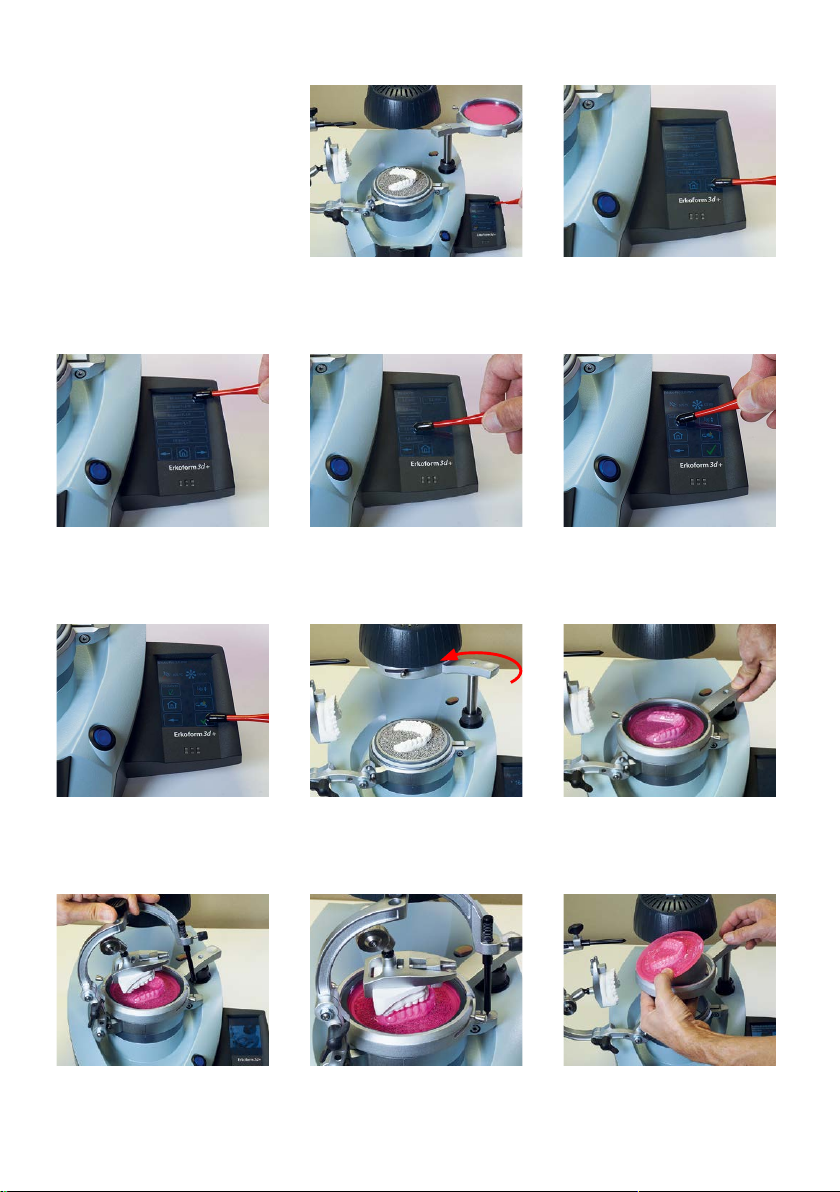
Thermoforming with Occluform-3
* the working steps
required before thermoforming will be shown in a
repeating animation.
All animations will be
stopped with the next
working step.
1. Select list of foils
2. Thumb list of foils
3. Select desired foil (in
the example Erkoloc-pro)
6. Continue, thermoforming*, swivel foil reception
under the heating ...
8. Animated request to
close the Occluform-3.
4. Select foil thickness
7. ... until it clicks into
place (!). The heating
switches on.
9. Close the Occluform-3
to the stop, wait for the
cooling time.
5. Select Occluform
8. Thermoform.
10. Release foil securing
ring, remove the Occluform
model pot with the foil.
10
Page 12

Delivery form for Erkoform-3d +
please check concerning completeness
Piece: Article: Order number:
1 Erkoform-3d + 188 600
with accessories as follows:
1 foil securing ring 188 550
to fix the foils in the foil reception
1 granules collecting device 188 470
1 centering plate (assembled) 188 095
to later on install the Occluform-3 device (188 580)
1 model plate 188 507
1 granules pot 188 593
1 brush for filling granules with rubber cap 188 530
can also be used as input pen
(in the foil trial package)
1 on-off magnet red 110 890
to collect filling granules
(in the foil trial package)
1 power supply cable 188 001
1 worktray white 222 100
1 filling granules 110 852 (1.3 kg)
(supplied with the Erkoform-3d motion 1.8 kg)
high-grade steel filling granules (magnetic) with
rounded edges
1 foil trial package
1 machine documents (folder)
instructions, thermoforming technique manual,
material card, Erkodent program,
guarantee card, declaration of conformity (if applicable)
BA-Erkoform-3d+-anl-EN-10-2022
 Loading...