

Page 1
Thank you for ordering
Erica Synths Acidbox lll !
Erica Synths AcidboxIII brings you the core of the famous
Polivoks VCF in stereo version with unique audio signal
overdrive circuit, built in LFO and envelope follower in a
compact, full aluminium case. The AcidboxIII has
adjustable input gain, therefore it works with various
sound sources – guitars, units with line level signals
(synthesizers, grooveboxes, etc.) and modular synths.
Configurable control input allows to connect a bypass
footswitch, expression pedal, external cutoff control
voltage source and LFO synchronization trigger. This
makes the Acidbox ideal companion in almost every
production or live performance setup.
FEATURES
Polivoks core stereo lowpass/bandpass VCF
with the original programmable opamps
Unique audio overdrive circuit
Versatile syncable LFO with 8 waveforms
Tap tempo button
Envelope follower with modulation level attenuverter
Master modulation control
Manual and CV control over cutoff frequency
Configurable control input for footswitch, expression
pedal and external LFO/cutoff control
Adjustable input gain
What you get
The AcidboxIII
Universal AC/DC adapter for worldwide use
User manual
SPECS
Input signal level up to 20V ptp
Input signal amplification up to +20dB
Modulation CV level up to 20Vptp
LFO Synchronization trigger level 0 - +5V
Power supply: universal mains adapter 110 – 220V
Mass: 0,7kg
Dimensions: 185x140x55mm
Page 2
PLUG and PLAY
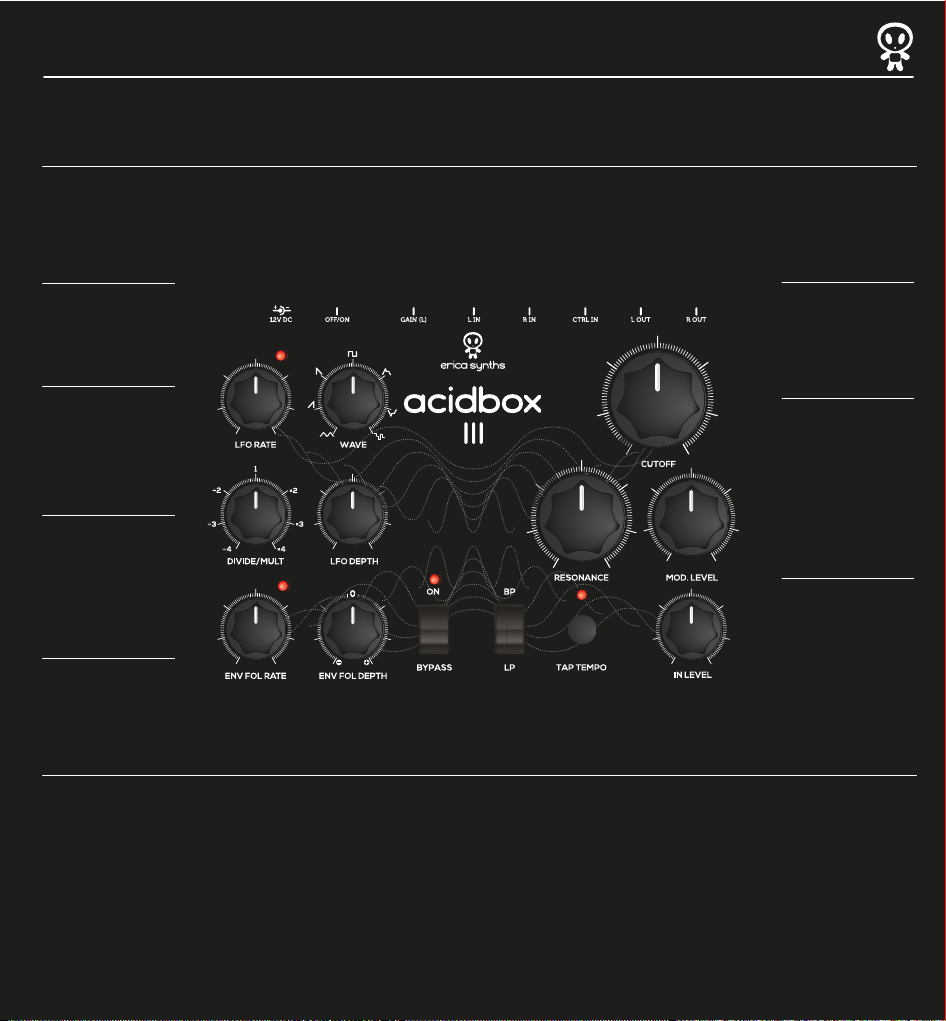
Power supply input
Use the PSU supplied with
the Acidbox III! It’s
universal PSU you can use
all over the world.
LFO Speed Knob
Set the initial LFO speed.
The LED will indicate LFO
output status.
LFO Shape Knob
Select LFO shape. The fully
clockwise setting gives you
sample and hold effect.
LFO Divider/Multiplier knob
Instantly divide of multiply
the LFO frequency. This
works especially great
when acidbox is synced to
drummachine.
LFO Depth Knob
Adjust to achieve desired
amount of LFO CV sent to
the filter cutoff!
ON-OFF switch
Slide to activate the unit!
LFO LED will go on for
visual control.
Gain knob
Adjust input gain of the
Acidbox. CW setting boosts
input signal for +20dB, so
you can use the Acidbox
with a guitar.
Left and Right Audio Inputs
The R IN is normalled to L
IN, so mono signal patched
in L IN is split to both
channels.
CTRL IN is configurable control input
Possible configurations are:
ON/Bypass footswitch
Cutoff CV input
LFO synchronization input
Expression pedal.
L OUT and R OUT
are AcidboxIII audio outputs.
These are balanced outputs
ready for stage use.
Cutoff Knob
Adjust manually initial cutoff
frequency for LP or BP filters
from completely closed to full
open. Cutoff knob affects both
VCF channels simultaneously.
Resonance Knob
Set desired resonance level
from 0 to self-oscillation. It
affects both VCF channels
simultaneously. Polivoks VCF is
famous for it’s crazy resonance
sweeps – mind your ears,
neighbours and monitor
speakers! Use this knob
responsibly!
Master Modulation Level Knob
This knob allows to control
master modulation (LFO+EG)
level. It’s useful, if you want to
play with complex modulations
during the live performance.
Otherwise set the knob full CW
and manipulate LFO Depth and
Envelope Follower depth knobs.
Envelope Follower Rate Knob
Adjust the envelope follower
decay rate. CCW setting is
maximum, CW minimum.
The LED will give visual
feedback on EF status.
Envelope Follower Depth Knob
Adjust desired amount of the
envelope follower CV sent to
the filter cutoff. 0 modulation
is at 12 o’clock. You can choose
direct or inverted envelope
follower shape by turning the
knob CW or CCW.
Bypass switch
The Acidbox II has true bypass
mode. Dry and Wet signals
have equal levels unless the
cutoff knob is fully CCW.
Filter mode switch
Switch between Lowpass
and Bandpass filter modes.
Tap tempo button
Tap the button to synchronize
the LFO to your music beat.
The LED will indicate tap
rate.
Audio Input Level Knob
Adjust desired input level! This knob has a
hidden feature – overdrive. Typically, till 12
o’clock it will gradually increase input
signal level, but over 12 o’clock will start to
overdrive the signal. The starting point of
overdrive will greatly depend on the audio
signal level and Gain setting. Experiment
with your setup for optimal response!
Page 3
Patch examples
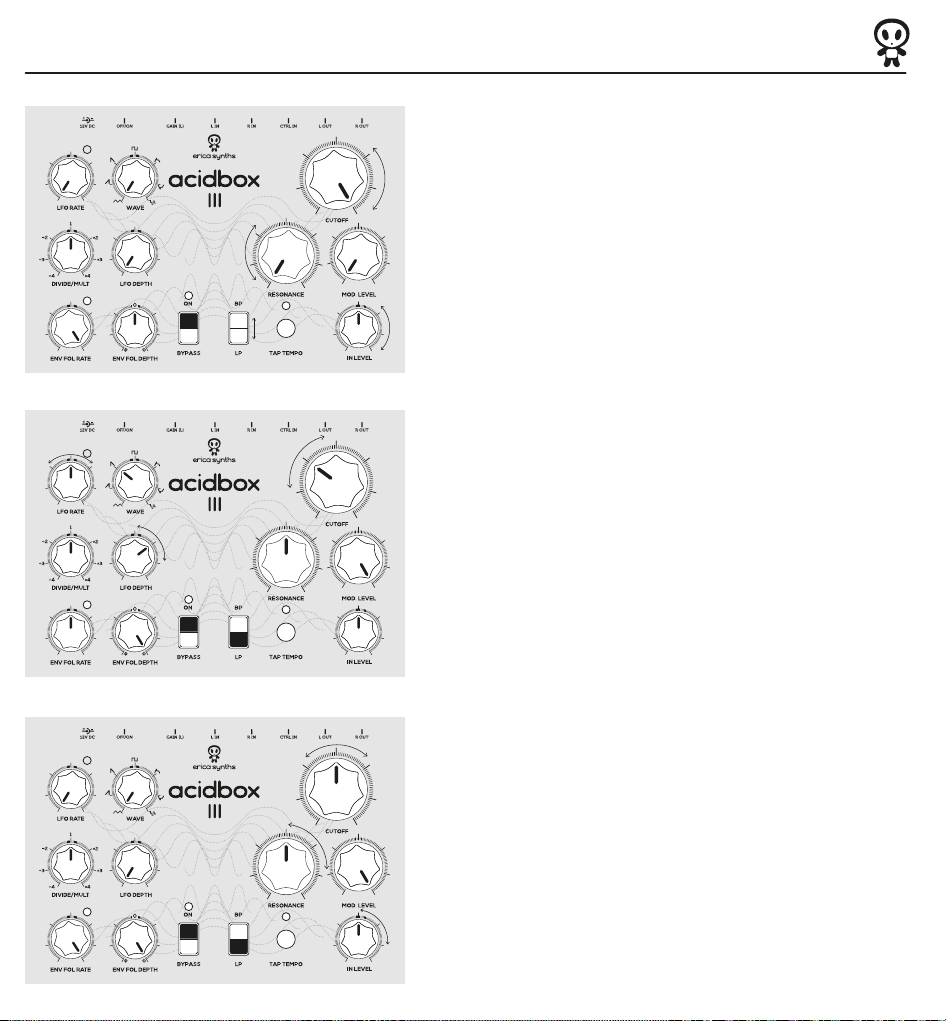
SIMPLE FILTER
With these settings Acibox III works as a simple stereo
filter without any modulation applied to the cutoff.
* Play around input setting to add saturation to the
incoming signal as the IN LEVEL knob after 12o clock
starts to overdrive it.
SYNTH FOLLOWER
With these settings the envelope follower and the LFO
are both in action therefore adding a lot of movement to
the filter.
* Try out these settings with a toy keboard organ and you
will be surprized how deep and animated the output sound
becomes.
BEAT FOLLOWER
With these settings you can really spice up your beats.
The Envelope follower is set to react really quickly to the
incoming signal therefore adding a lot of movement to
the filter.
* Play around with input settings as it affects the envelope
follower behavior.
Page 4
Patch examples
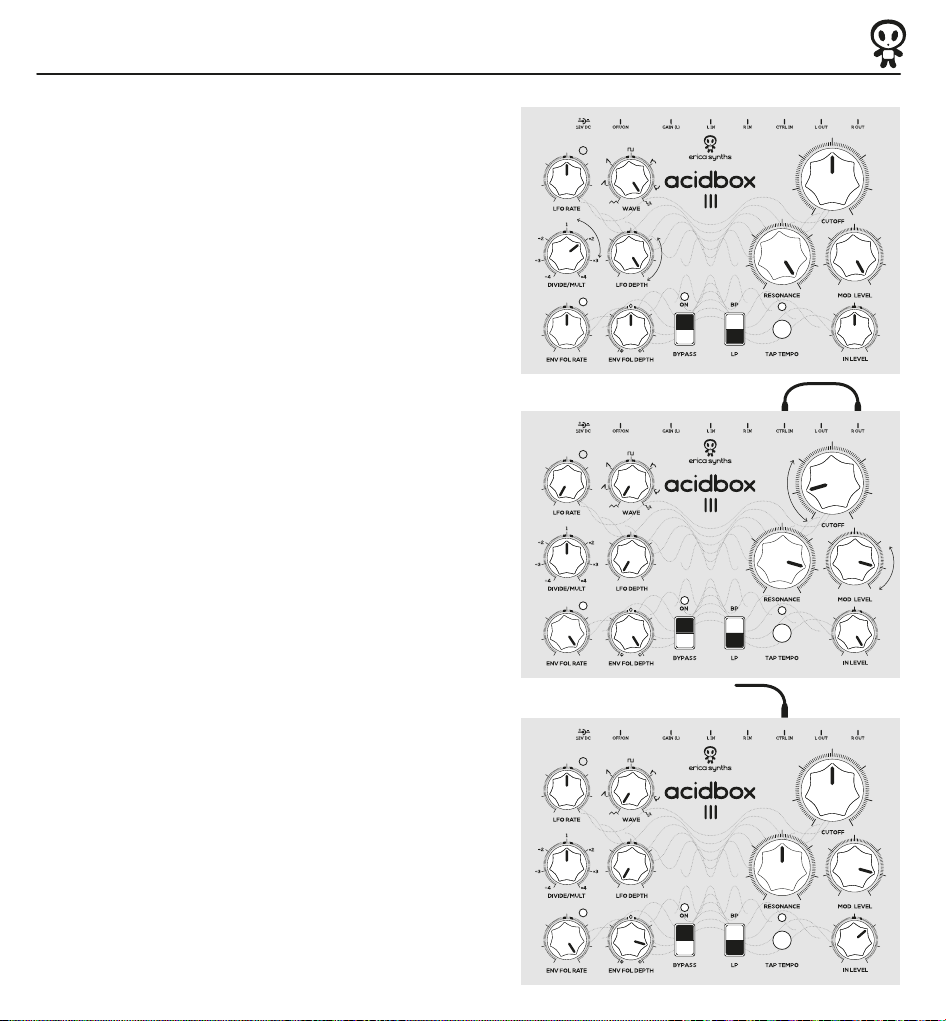
SUPER COMPUTER
With these settings you don't even need an input
source to play Acidbox! Resonance is fully cranked up
so the VCF circuit starts to self oscillate and by adding
a random modulation from the LFO you instantly get
that 70s Sci-Fi movie sound effect.
*Add different inputs and play around with envelope
follower as it can "duck" the sample and hold signal
created by the LFO.
FEEDBACK
When using a mono sound source plugged in L IN, you can
create feedback loop by patching R OUT into CTRL IN*. This
way R OUT becomes audio frequency modulation source
that results in quite unique effects.
Play around with MODULATION LEVEL as it attenuates
the signal patched into the control in.
*NB! Make sure the CTRL IN is set to "CV in for cutoff"
Classic Wah Guitar
This patch works really well with guitar and expression
pedal, because you can control the Cutoff frequency with
your foot and also envelope follower is taking action
therefore adding a lot of dynamics to the guitar sound.
Add some reverb or delay and feel like Jimi!
NB! Make sure CTRL IN is configured to work with expression pedal!
Page 5
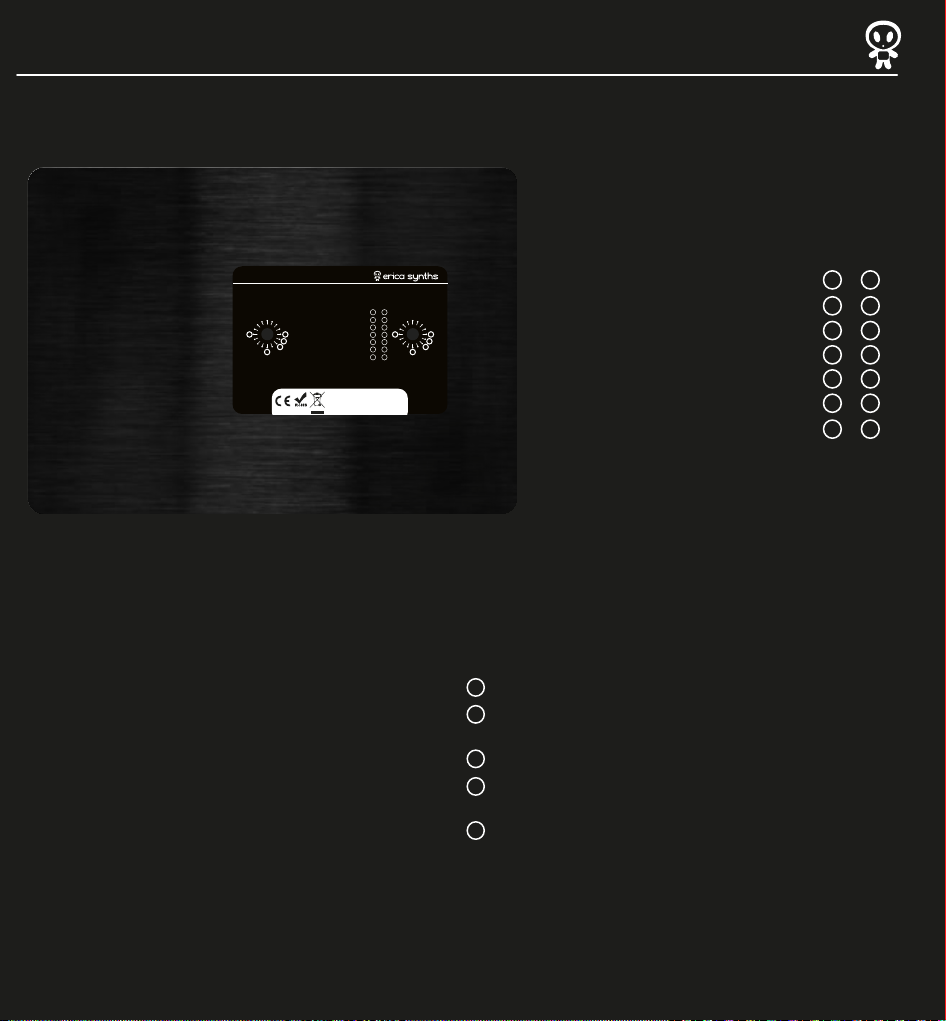
CTRL IN options
acidbox lll CTRL IN options
SINGLE FOOTSWITCH: BYPASS ON/OFF
DUAL FOOTSWITCH: BYPASS & TAP TEMPO
TRIG/GATE IN FOR LFO SYNC
0
8
1
TIP - CUTOFF CV, RING – LFO SYNC
2
EXPRESSION PEDAL, ROLAND-COMPATIBLE
4
EXPRESSION PEDAL, KORG-COMPATIBLE
PLEASE CHECK THE USER MANUAL FOR CTRL IN CONFIGURATION!
MADE IN LATVIA
SERIAL NUMBER
CV IN FOR CUTOFF
TIP
RING
SINGLE FOOTSWITCH: BYPASS ON/OFF
TIP
RING
0
1
1
1
0
4
0
8
0
2
1
4
2
2
8
2
4
2
8
DUAL FOOTSWITCH: BYPASS & TAP TEMPO
TRIG/GATE IN FOR LFO SYNC
CV IN FOR CUTOFF
TIP - CUTOFF CV, RING – LFO SYNC
EXPRESSION PEDAL, ROLAND-COMPATIBLE
EXPRESSION PEDAL, KORG-COMPATIBLE
0
1
1
1
0
4
0
2
4
2
8
2
2
8
The Control input can be configured for following applications:
- ON/Bypass footswitch
- Cutoff CV input
- LFO synchronization input
- Expression pedal. AcidboxIII is designed for use with unpowered expression pedals
from different manufacturers. These expression pedals have stereo jacks, and
most common are Roland-type expression pedals, where tip of the jack outputs
CV form the expression pedal, and ring is power supply. Korg-type expression
pedals output CV on the ring, and the tip is power supply.
Configuration is done via two rotary encoder switches accessible thru holes on
the back of the AcidboxIII. The left switch configures the tip of the CTRL IN jack,
the right switch – the ring of the CTRL IN jack. Typically you will need to
configure only left one – TIP.
Default configuration is Cutoff CV for the TIP and NO ASSIGN for the RING
On order to change the configuration, follow instructions below:
1
Disconnect the AcidboxIII from the power supply
2
Use a small flat screwdriver to access the rotary switches. Each switch has 16
positions, and active positions are indicated on the label.
3
Rotate the TIP encoder to set desired configuration.
4
If you wish to configure TIP for use with a Roland-type expression pedal, you need
to set a TIP for Cutoff CV IN (setting 2) and a RING for Power supply (setting 8).
5
If you have Korg-type expression pedal, configure TIP for Power supply (setting 8)
and Ring for Cutoff CV IN (setting 2)
Page 6
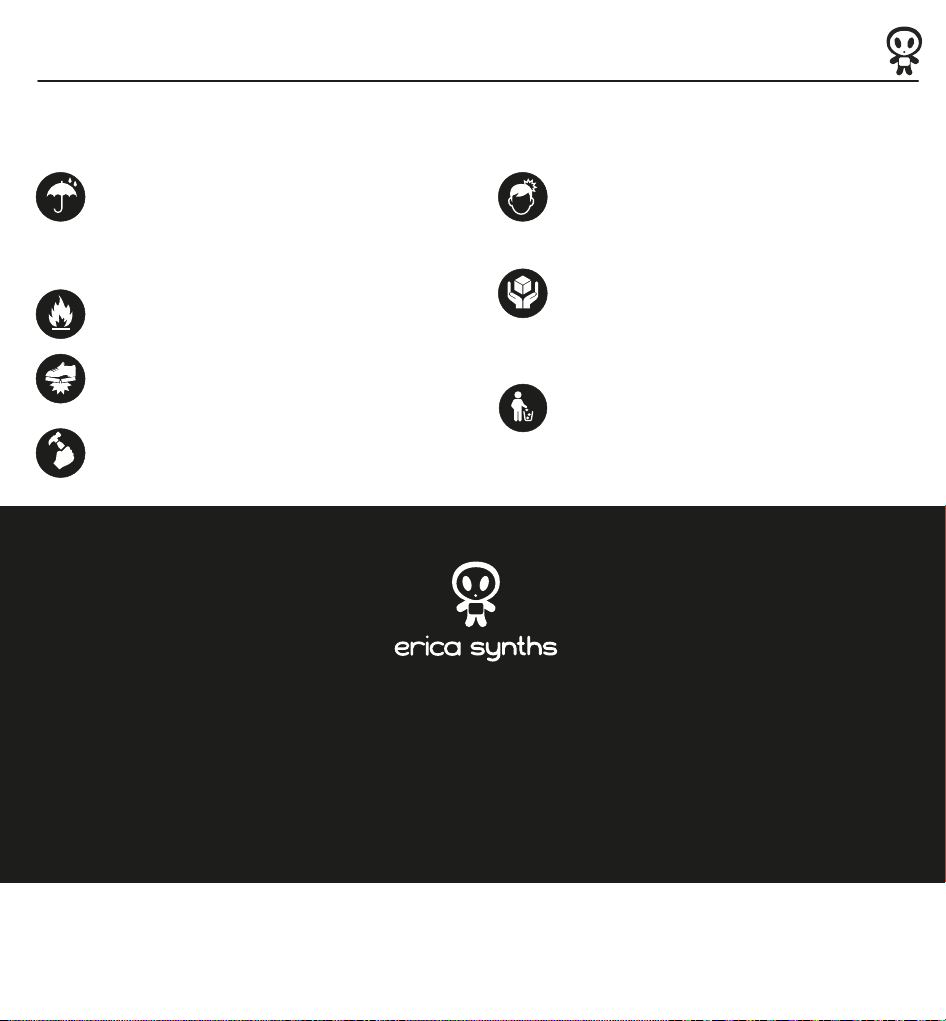
Safety Instructions
Erica Synths ACIDBOX III is plug and play device, and you must be tempted to turn it on straight away, but before you do so, we strongly recommend to read Safety Instructions
below, as well as turn this page around and take a look on the User Manual.
Please follow the instructions for use of the Erica Synths ACIDBOX III below, ‘cause only this will guarantee proper operation of the device and ensure warranty from Erica Synths.
Water is lethal for most of the electric devices, unless they are
made waterproof. Erica Synths ACIDBOX II is NOT intended for use
in a humid or wet environment. No liquids or other conducting
substances must get into the module. Should this happen, the
ACIDBOX II should be disconnected from mains power immediately,
dried, examined and cleaned by a qualified technician.
Do not expose the ACIDBOX II to temperatures above +50° C
or below -20° C.
Although the module has rigid aluminum case, so you
technically can stand on it, it’s not recommended to place
objects heavier than 10 kg on the top of the instrument.
Transport the instrument carefully, never let it drop or fall over.
Warranty does not apply to ACIDBOXES with visual damages.
You will find Erica Synths terms of warranty at www.ericasynths.lv.
Items for return, exchange and/or warranty repair have to be sent to:
Erica Synths
Andrejostas Str 12
Due to solid build and mass of 0,7kg, you can use ACIDBOX II for
self-defense, but two year warrantee applies only to the instruments
that are used for the purpose described in this User manual.
The ACIDBOX II has to be shipped in the original packaging only.
Any module shipped to us for return, exchange and/or warranty
repair has to be in its original packaging. All other deliveries will
be rejected and returned to you. Make sure you keep the original
packaging and technical documentation. In case of a destroyed
warranty seal, any warranty claim will be rejected.
This device complies to the EU guidelines and is manufactured
RoHS conforming without use of led, mercury, cadmium and chrome.
Nevertheless, this device is special waste and disposal in household
waste is not recommended.
Riga
Latvia
LV-1045
User manual by Girts Ozolins@Erica Synths
Design by www.carrebranding.com
Copying, distribution or any commercial use in any way is prohibited and needs the written permission by Erica Synths.
In case of any questions, feel free to contact us through www.ericasynths.lv or via e-mail [email protected].
Specifications are subject to change without notice.
 Loading...