

Page 1
CARDIO
O w n e r ‘ s m a n u a l
CARDIO LINE 400
CARDIO LINE 400
CARDIO LINE 400
Please read this manual carefully before use and keep it in a safe place for future reference
Page 2

Page 3

Further information on ERGO-FIT products available from:
ERGO-FIT GmbH & Co. KG
Blocksbergstraße 165
D-66955 Pirmasens
Phone: 06331/2461-0
Fax.: 06331/2461-55
E-Mail: [email protected]
http: www.ergo-fit.de
Development and production of all devices of the MED series according to the European
Medical Device Directive 93/42/EWG. They thus show the CE marking and the number of the
notified body.
© 2018 by ERGO-FIT GmbH & Co. KG. All rights reserved.
This owner‘s manual has been created with great care. Please inform us of any detail that does not correspond to your
training tool to allow for the quickest possible remedy of any possible discrepancy.
This document is protected by copyright. All rights originating from this, particularly the right of copying, duplication,
distribution as well as translation and reprint, even copies in extract, are reserved. No part of this manual may be
reproduced, manifold or distributed for any kind of purposes or in any kind of form, by any means, (print, photocopy,
microfilm, or any other information- saving mechanisms) without prior wr itten permission given by the company
ERGOFIT GmbH & Co. KG.
Trade mark:
ERGO-FIT and the ERGO-FIT Logo are registered trademarks of ERGO-FIT GmbH & Co. KG. All other trademarks
mentioned or shown in the following text are trademarks of the respective owners and are recognised as protected.
Technical and optical modifications as well as misprints reserved.
Version: CARDIO LINE 400-20180601-en
Printed in Germany
Page 4

Dear customer,
we are glad that you have decided to purchase an ERGO-FIT training tool. You are now the
owner of a sophisticated and exclusive training system that combines highest technical
standards with practice oriented ease of use.
You will find important information on the operation and use of your training machine in this
owner’s manual. We recommend that you read this owner’s manual carefully before training
in order to become familiar with your training device quickly and to understand its correct and
safe use.
Should you have any questions that are not answered in this manual, please contact us. The
ERGO-FIT team is always there for you!
Page 5
CARDIO LINE 400/400 MED
Technical and optical modifications as well as misprints reserved - © 2018 by ERGO-FIT GmbH & Co. KG
Please note:
This owner‘s manual contains information on multiple gym machines.
There may be variations in detail according to the type of machine!
Table of Contents
1 General information ...................................................................................... 1
2 Safety information ........................................................................................ 5
3 Short manual ................................................................................................ 11
4 Destination of the product ............................................................................ 13
5 Transport and set up .................................................................................... 17
6 Start up ........................................................................................................ 25
7 Operation ..................................................................................................... 31
8 Training .......................................................................................................... 47
9 Maintenance ................................................................................................. 51
10 Troubleshooting ........................................................................................... 55
A Appendix ...................................................................................................... 57
Page 6

Page 7
CARDIO LINE 400/400 MED
Technical and optical modifications as well as misprints reserved - © 2018 by ERGO-FIT GmbH & Co. KG
1
Please note:
This owner‘s manual contains information on multiple gym machines.
There may be variations in detail according to the type of machine!
Chapter 1 General information
1.1 ERGO-FIT Cardio equipment at a glance ..................................................... 2
1.2 General informaion on this manual ............................................................... 3
1.3 Scope of delivery ........................................................................................... 3
1.4 Service ........................................................................................................... 4
1.5 Disposal ......................................................................................................... 4
Page 8

General information
Technical and optical modifications as well as misprints reserved - © 2018 by ERGO-FIT GmbH & Co. KG
1 General information
1.1 Cardio equipment at a glance
ERGO-FIT‘s CARDIO LINE 400 offers you a cardio machine range dedicated to train the
cardiovascular system. It allows for training of smaller muscle groups. ERGO-FIT cardio
machines offer you best training possibilities, regardless of your age, gender or state of
fitness.
Among others, the optimal load regulation and the precise training control are highlights of
the whole product line. In addition, the quiet operation, the ease of use and the customisation
demonstrate ERGO-FIT‘s focus: A high technical standard, optimal training possibilities and
precise training control, combined with customerfriendly ease of use.
However, technology alone is not all that is required to develop outstanding training machines.
They also need to meet biomechanical and sports medical requirements. Priority is given to
the human being. Thus, a sophisticated training and testing system can only be developed
by combining technical electronic expertise with the latest advances in sports medicine and
coaching science. ERGO-FIT clearly met this target.
Our CARDIO LINE is divided in
⊗ CARDIO LINE 400: training machines especially designed for use in a gym.
⊗ CARDIO LINE 400 MED: training machines especially designed for medical
purposes.
The lifetime of the equipment is 6 years.
Advantages and benefits
Regular training on these machines reduces the risk of cardio-vascular diseases and
increases physical capacities in an optimal way - even at an advanced age. Your workout
machine represents an indispensable tool in injury prevention and rehabilitation. You will feel
fit, more agile, more attractive, and more balanced.
2
Page 9
CARDIO LINE 400/400 MED
Technical and optical modifications as well as misprints reserved - © 2018 by ERGO-FIT GmbH & Co. KG
1.2 General information on this manual
This manual provides you with helpful information, regardless of if you are already familiar or
have no experience with ERGO-FIT training machines.
It is structured in such a way that you can find the desired information in the table of contents
easily and thematically. In addition, a short manual has been produced for those users who
are already familiar with ERGO-FIT training machines. However, if you belong to this user
group and wish to read the short manual only, you should review the safety information first.
The manual will give you many hints and tips, which will familiarise you with your cardio
machine‘s features and allow you to become an experienced user very quickly.
You should always keep this manual easily accessible. This saves you from having to make
unnecessary and time-consuming queries and enables you to fix any possible error rapidly.
1.3 Scope of delivery
Please check if the delivery is complete and inform our sales department immediately of any
missing parts.
Please ensure that the following parts are included in your delivery:
1. The correct type of training machine (model, series)
2. One mains connection cable for each unit (CYCLE 407/457 MED; CYCLE 400/450‘s
mains cable is firmly connected with the machine)
Please note that accessories (e.g. POLAR-sender) are not included in the delivery and need
to be ordered separately.
3
Page 10

General information
Technical and optical modifications as well as misprints reserved - © 2018 by ERGO-FIT GmbH & Co. KG
1.4 Service
Our service comprises problem analysis, technical support, and information services.
In case of technical questions and service orders, please call us at:
Head office: Phone: +49 (6331) 2461-0
Fax: +49 (6331) 2461-55
Service und Ersatzteile: Phone: +49 (6331) 2461-20 international
or: +49 (6331) 2461-45 international
or: +49 (6331) 2461-23 national
or: +49 (6331) 2461-27 national
or: +49 (6331) 2461-29 national
1.5 Disposal
These machines are appliances according to the Electronic Equipment Act. They do not
belong into the regular household waste but must be disposed of by a certified company. For
more information on responsible bodies please see
stiftung elektro-altgeräte register (EAR)
Benno-Strauß-Straße 1
D-90763 Fürth
Phone: +49 (911) 766650
Fax: +49 (911) 7666599
Mail: [email protected]
Web: www.stiftung-ear.de
4
Page 11

CARDIO LINE 400/400 MED
Technical and optical modifications as well as misprints reserved - © 2018 by ERGO-FIT GmbH & Co. KG
5
Please note:
This owner‘s manual contains information on multiple gym machines.
There may be variations in detail according to the type of machine!
Chapter 2 Safety information
2.1 What you need to know when using your training machine .......................... 6
2.2 Operational safety - What needs to be done ................................................ 8
2.3 Caution: Risk of electric shock ...................................................................... 8
2.4 Choosing the right place of installation ......................................................... 8
2.5 What needs to be considered in case of repair ............................................. 9
2.6 What should be avoided ............................................................................... 9
2.7 Contraindications ................................................................................... 9
Page 12
Safety information
Technical and optical modifications as well as misprints reserved - © 2018 by ERGO-FIT GmbH & Co. KG
2 Safety information
Before starting to use your new ERGO-FIT equipment, please read the following chapter
carefully and respect all safety regulations.
Please keep this manual in a safe place in order to be able to provide it to future owners if
you sell your training machine.
For evidence of ownership, please fill in the following data:
Model/product line: __________________________________
Serial number: __________________________________
Date of purchase __________________________________
You will also need these data in case of guarantee claims.
The following symbols designate important information
Caution!
It is absolutely necessary to observe this warning in order to
avert any danger to your life or health.
Danger!
It is absolutely necessary to observe this warning in order to
avoid any material damage.
Danger!
Danger: It is imperative to switch off and disconnect the
training machine.
Hint!
Important information and hints are displayed here to
improve operations.
2.1 What you need to know when using your training
machine?
⊗ Please read the owner‘s manual carefully before starting to use your new ERGOFIT
equipment.
⊗ Familiarise yourself with the machine before you start it (only CARDIO LINE 400
MED, MPBetriebV).
⊗ It´s the owner´s responsibility to inform the users of all warnings and instructions
provided with the equipment.
⊗ Only use the machine after a proper function test (get more information on this in
chapter 7.3). For your own safety and before every use, please check the Imachine
for damage (loose screws, worn parts, cords etc). If the machine is damaged, do
not use it until it is repaired.
⊗ Before using the machine please check that the saddle is firmly seated by fixing
6
Page 13
CARDIO LINE 400/400 MED
Technical and optical modifications as well as misprints reserved - © 2018 by ERGO-FIT GmbH & Co. KG
the horizontal and vertical saddle adjustment (see chapter 6.3). Otherwise there is
a risk of injury.
⊗ In order to reduce any risk during training, please put on sportswear and appropriate
footwear.
⊗ In case of nausea, dizziness, pain in the chest, limbs or joints, stop training
immediately and see a doctor.
⊗ If you have a cardiac pace maker or a health condition, please see your doctor
before using the training machine. If this is the case, you should discuss the training
programme with him. In addition, you should only train in MANUAL mode.
⊗ Your training machine is not a toy! Never leave children unattended with the
machine. Children cannot always assess possible danger. Parents or other
supervisors should always be aware of their responsibility because children dispose
of a natural play instinct and eagerness to experiment that may produce situations
and behaviour the training machine is not designed for.
⊗ The machine should only be used after consulting a doctor and / or a supervisor.
The machine must not be used without the presence of a supervisor.
⊗ Make sure that persons who stand close to the machine are not hit by moving
parts.
⊗ Danger! The user‘s maximum body weight is 180 kg. Make sure not to overload the
machine.
⊗ Do not place any beverages or food on your training machine.
⊗ Do not stand on the casing of the machine and do not lean on the control panel.
⊗ Once per week, inspect the seat, the handlebar, the pedals, and the casing for
damage. If the machine is damaged, get it repaired immediately.
⊗ Tighten the pedals and the pedal arms after 3 to 5 operating hours. Otherwise, there
is a risk of damage, which can be a risk of injury to the user. Note that the left pedal
has a left-handed thread and the right pedal has a right handed thread. See Chapter
9.1 for a more detailed description.
⊗ Make sure to tighten the seat clamp after adjusting the seat. Otherwise, there is a
risk of injury.
⊗ Warm up thoroughly before training. Start the training slowly and gradually increase
the intensity until you reach the desired degree of difficulty within your range of
control
.
⊗ Do not lean over the handlebar and do not shift your body weight over the side of
the machine. There is a danger of falling over.
⊗ Do not take your feet off the pedals during training.
⊗ Do not jump from the training machine during your workout.
⊗ Do not touch the USB port, RS232 port or audio port during the training.
⊗ CAUTION! The heart rate control system may be faulty. Excessive training may
cause dangerous injury or even lead to death. Immediately stop training in case of
an unusually strong reduction of your physical performance.
⊗ Please review the additional safety and operational instructions in this manual.
All safety instructions in this manual are based on many years of experience and
selfconception.
7
Page 14

Safety information
Technical and optical modifications as well as misprints reserved - © 2018 by ERGO-FIT GmbH & Co. KG
2.2 Operational safety - what needs to be done
⊗ After delivery, make sure that the machine has not been damaged during transport.
In case of doubt, contact our customer service and do not start the machine.
⊗ Slots and openings on the machine serve as ventilation. Do not cover these
openings, because this can cause the elements to overheat.
⊗ Check if the power connection cords are damaged before starting the machine.
⊗ Switch off the machine after training and disconnect it from the grid.
⊗ Set up the training machine so that there is sufficient open space around it (at least
1 m) to avoid any danger for the user or others. The user will not collide and in
addition, this prevents interferences in heart rate measuring.
⊗ The provisions EN 60601-1-1:2001 (medical electrical equipment) are valid for
machines of the series CARDIO LINE 400 MED.
2.3 Caution: Risk of electric shock
⊗ Only connect your machine to an appropriate mains supply (see Chapter 5.4.1).
⊗ Make sure to have the right climate conditions (see Chapter 5.3).
⊗ Do not use damaged power cords.
⊗ To unplug the cord, grasp the plug and not the cord. Do not unplug by pulling on the
cord.
⊗ The machine must not be opened before it is switched off and unplugged.
⊗ If liquid gets inside the machine, disconnect the plug immediately and call the
customer service.
⊗ Do not put any objects through the ventilation slots into the machine. This may
cause a short circuit.
2.4 Choosing the right place of installation?
⊗ The machine can be set up on any level and stable floor. Make sure that it stands
firmly on the floor.
⊗ Never put wood, cardb oard or similar materials underneath the machine to
compensate for sur face unevenness. This increases the risk of an accident.
8
Page 15
CARDIO LINE 400/400 MED
Technical and optical modifications as well as misprints reserved - © 2018 by ERGO-FIT GmbH & Co. KG
2.5 What needs to be considered in case of repair
⊗ Electric parts may only be replaced by original equipment.
⊗ Repairs must be carried out by a qualif ied technician only. If you do not have the
nece ssar y qualifications, contact the ERGO-FIT Service Centre. Electrical or
mechanical modif ications or alterations per formed by unauthorize s personnel
may void the warranty.
2.6 What should be avoided
⊗ Only use the machine for the purposes it is designed for. If you use the ERGO- FIT
machine improperly, you will be charged for all damages resulting from this. Any
guarantee claim will be excluded!
⊗ Never use the machine in any way other than for those purposes described in this
manu al. Impro per use can damage the machine and be hazardous to your
health.
⊗ You should never exerc ise on a damaged machine.
⊗ The machine must not be used without electric current.
⊗ When exercising, you should never try to exceed your current performance level.
This may ser iously damage your health.
⊗ You should never prop up your body on the machine and make impro per
movements. This increases the risk of falling.
A summary of the most important safety precautions can be found in the appendix of this
manual. You should remove this summary and display it near the machine where it is clearly
visible. All users of the machine must familiarise themselves with the dangers and safety
regulations. The manufacturer will not be liable for personal injury or material damage.
2.7 Contraindications
Please note:
To avoid overstress of the athlete and subsequent serious diseases of the cardiovascular
system the following contraindications must be observed during performance of an endurance
training, i.e. if one of the following symptoms is already known before the training is started
in no case an endurance training may be performed on a machine of the CL 4000:
9
Page 16

Safety information
Technical and optical modifications as well as misprints reserved - © 2018 by ERGO-FIT GmbH & Co. KG
10
Absolute contraindications:
⊗ angina pectoris
⊗ cardiac arrhythmia and/or decompensated heart failure
⊗ distress respiratory, sense of oppression
⊗ circulatory disorder with rest pain in affected extremeties
⊗ hypertonia (constantly raised blood pressure) (in this case, please contact your
doctor)
⊗ coronarsklerosis
⊗ stress pain in your legs when walking less than 100 m
⊗ Acute respiratory infections
⊗ Feverish infections
⊗ circulatory problems, feeling of dizziness
⊗ nausea, Vomiting
⊗ Acute coronary syndrome
⊗ Acute myocardial infarction
⊗ symptomatical severe aortic stenosis
⊗ decompensated cardiac insufficiency
⊗ acute ulmonary embolism
⊗ acute carditis (Myo-, Endo-, Pericarditis)
⊗ acute phlebothrombosis of the upper extremeties
⊗ acute aortic dissection
If the following symptoms occur the training must immediately be stopped to avoid an
overstress of the human organism!
⊗ distress respiratory, sense of oppression
⊗ angina pectoris (chestpain in sudden attacks)
⊗ maximum heart rate > 200-age
⊗ nausea, emesis
⊗ circulatory problems
⊗ illness (heavily tiredness, lassitude, feeling of dizziness)
⊗ rapidly decreasing heart rate
⊗ rapidly decreasing/increasing blood pressure
⊗ main artery disease
⊗ moderate cardiac valve diseases
⊗ electrolyte imbalance
⊗ arterial hypertension (RR > 200/110mmHg)
⊗ Tachyarrhythmie oder Bradyarrhythmie
⊗ hype rtro phic-obstructive cardiom yopa thy and oth er forms of outflo w t ract
obstruction
⊗ advanced AV-blockages
⊗ anemia
⊗ physical and/or mental health problems
⊗ arrhythmias
Page 17
CARDIO LINE 400/400 MED
Technical and optical modifications as well as misprints reserved - © 2018 by ERGO-FIT GmbH & Co. KG
11
Please note:
This owner‘s manual contains information on multiple gym machines.
There may be variations in detail according to the type of machine!
Chapter 3 Short manual
Page 18

Technical and optical modifications as well as misprints reserved - © 2018 by ERGO-FIT GmbH & Co. KG
3 Short manual
After delivery of your cardio machine, please check first if the serial number (see type label)
is identical with the one indicated on the delivery note and if all components listed in chapter
1.3 („Scope of delivery“) are included in the delivery (not available on CARDIO LINE 400
MED).
After the machine has been connected to the mains and switched on, the software version is
shown on the display. Thereafter the main menu will appear.
The control panel contains the PLUS, MINUS, START and STOP buttons in this order. The
big monochrome display is illuminated and shows the elapsed training time (min:s), your
present heart rate, the performance in Watts, the speed range (1/min), the speed (km/h, not
available on CYCLE 400/407 MED), the distance (m or km) as well as calories burnt.
When you switch on your cardio machine, the main menu will always appear first on the
display. The choice „MANUAL“ is selected automatically. Press the START-button to confirm
this. You are now in the manual mode.
In this mode, you can work out for any amount of time and choose any strain level that
pleases you by pressing the PLUS and MINUS buttons. The workout parameters will be
displayed for the full training session.
If you would like to end the training session, please press the STOP-button. The training
parameters remain on the display. Press the STOP-button again to return to the main menu.
The display will also return to the main menu automatically after 2 minutes if no action is
carried out.
Danger! For workouts in other modes, please read the detailed instructions.
12
Short manual
Page 19
CARDIO LINE 400/400 MED
Technical and optical modifications as well as misprints reserved - © 2018 by ERGO-FIT GmbH & Co. KG
13
Please note:
This owner‘s manual contains information on multiple gym machines.
There may be variations in detail according to the type of machine!
Chapter 4 Destination of the product
4.1 Product lines ................................................................................................. 14
4.1.1 CARDIO LINE 400 ........................................................................................ 14
4.1.2 CARDIO LINE 400 MED ............................................................................... 14
4.2 Models .......................................................................................................... 14
4.2.1 CYCLE 400 ................................................................................................... 14
4.2.2 CYCLE 407 MED .......................................................................................... 14
4.2.3 CYCLE 450 ................................................................................................... 15
4.2.4 CYCLE 457 MED .......................................................................................... 15
Page 20

Technical and optical modifications as well as misprints reserved - © 2018 by ERGO-FIT GmbH & Co. KG
Destination of the product
4 Destination of the product
4.1 Product lines
In order to meet our customers‘ desires and to implement technical innovations, ERGOFIT
developed the following product lines.
4.1.1 CARDIO LINE 400
The machines of this product line are stationary exercise machines primarily dedicated to
train the cardiovascular system. They are especially designed for home use (EN 957 HA).
They allow for management, control, and documentation of the workout.
4.1.2 CARDIO LINE 400 MED
The machines of this product line are stationary exercise machines that are designed for
precise performance diagnostics in addition to training the cardiovascular system, diagnos-
tics and therapy of cardio-vascular diseases and performance diagnostics in competitive
sports. These product lines fulfil medical requirements and therefore need to allow for pre-
cise measuring technology besides pure fitness training. Explicit assessment of the results
provides optimisation of health training and allow for its continuous documentation. To en-
sure measuring accuracy, metrological controls need to be carried out on these machines at
regular intervals (every second year, in compliance with MPBetreibV).
4.2 Models
All models of the CARDIO LINE 400/400 MED are exercise bike ergometers designed for
cardiovascular training. A cyclic kicking movement produces the strain. The training strain is
controllable to provide optimal cardiovascular system load. The CYCLE is equipped with va-
rious features in order to attain an optimised adaptation to the customer‘s individual needs.
4.2.1 CYCLE 400
The CYCLE 400 is equipped with a manually controllable programme, a heart rate controlled
cardio exercise programme, and 5 predefined profiles as well as the option to exercise in
gearshift mode.
4.2.2 CYCLE 407 MED
The CYCLE 407 MED is equipped with a manually controllable programme, a heart rate
controlled cardio exercise programme, and 2 predefined WHO-profiles as well as the option
to do countdown training in manual or heart rate controlled mode.
14
Page 21
CARDIO LINE 400/400 MED
Technical and optical modifications as well as misprints reserved - © 2018 by ERGO-FIT GmbH & Co. KG
4.2.3 CYCLE 450
The CYCLE 450 is equipped with a manually controllable programme, a heart rate controlled
cardio exercise programme, several predefined profiles as well as individual user profiles, 3
test programmes and the option to exercise in gearshift mode.
4.2.4 CYCLE 457 MED
The CYCLE 457 MED is equipped with a manually controllable programme, a heart rate
controlled cardio exercise programme, several predefined profiles as well as individual user
profiles, 3 test programmes, 1 WHO-profile that can be modified, the option to do countdown
training in manual or heart rate controlled mode. Furthermore, the machine can be controlled
by ECG equipment. An external connection (RS 232) is standard equipment on the CYCLE
457 MED.
15
Page 22

Technical and optical modifications as well as misprints reserved - © 2018 by ERGO-FIT GmbH & Co. KG
Destination of the product
16
Page 23
CARDIO LINE 400/400 MED
Technical and optical modifications as well as misprints reserved - © 2018 by ERGO-FIT GmbH & Co. KG
17
Please note:
This owner‘s manual contains information on multiple gym machines.
There may be variations in detail according to the type of machine!
Chapter 5 Transport and set up
5.1 Transport ...................................................................................................... 18
5.2 Set up and the right place for set up ............................................................. 18
5.3 Ambient temperature .................................................................................... 21
5.4 Power connection ......................................................................................... 21
5.4.1 Power supply ................................................................................................ 22
5.4.2 Cabling ......................................................................................................... 22
5.5 Potential compensation ................................................................................ 22
5.5.1 Position of the potential compensation clamp .............................................. 22
5.6 Components ................................................................................................. 23
5.6.1 CYCLE 400 ................................................................................................... 23
5.6.2 CYCLE 407 MED........................................................................................... 23
5.6.3 CYCLE 450......... .......................................................................................... 24
5.6.4 CYCLE 457 MED .......................................................................................... 24
Page 24
Technical and optical modifications as well as misprints reserved - © 2018 by ERGO-FIT GmbH & Co. KG
Transport and set up
5 Transport and set up
5.1 Transport
In order to avoid damage, ERGO-FIT machines are transported by ERGO-FIT GmbH & Co.
KG directly or by an authorised freight forwarding company. After delivery, packaging will be
collected and disposed of professionally. If ERGO-FIT machines are delivered by a freight
forwarder, the customer must dispose of the packaging himself or can send it back to ERGO-
FIT GmbH & Co. KG. (The customer is responsible for the transportation costs).
The machines do not have any shipping locks!
To place the CYCLE at the desired location, please consider the following aspects:
1. Position yourself so that you can see the display.
2. Grasp the seat with both hands and slightly lift the machine. You can now roll it
easily to the desired position.
5.2 Set up and the right place for set up
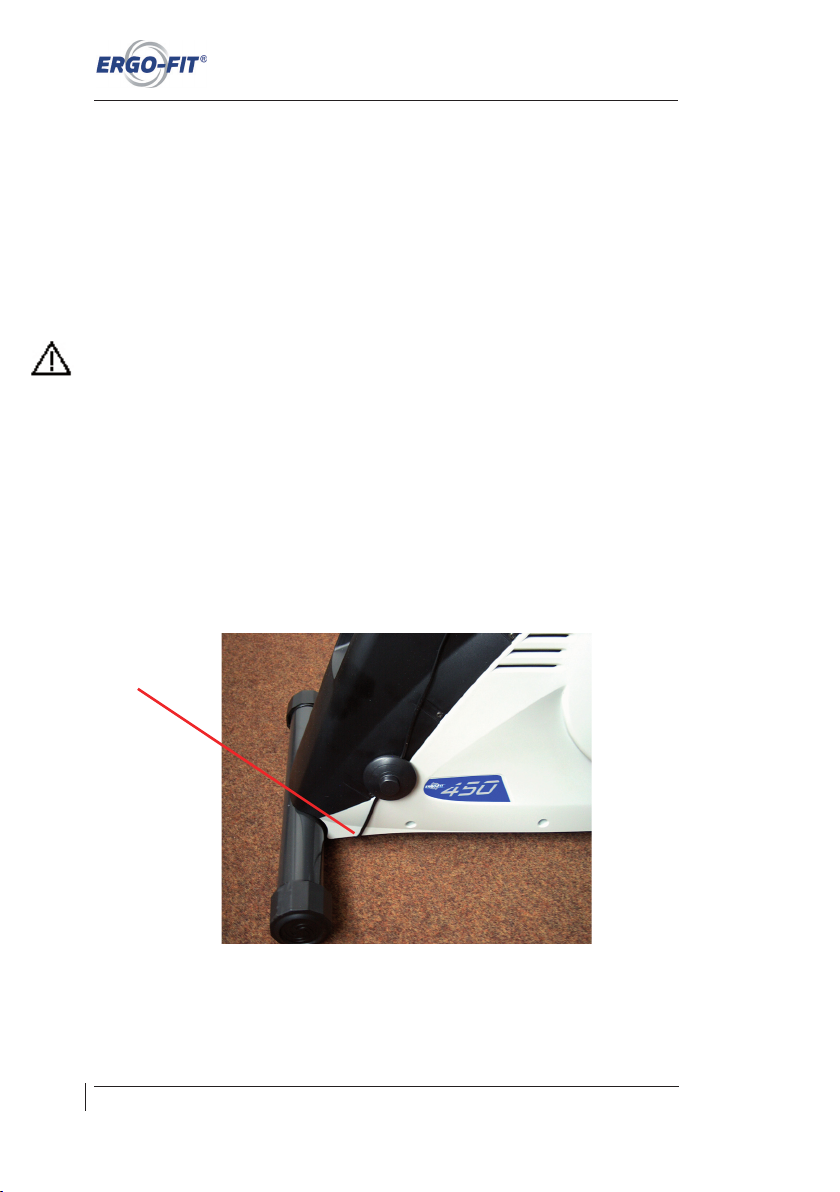
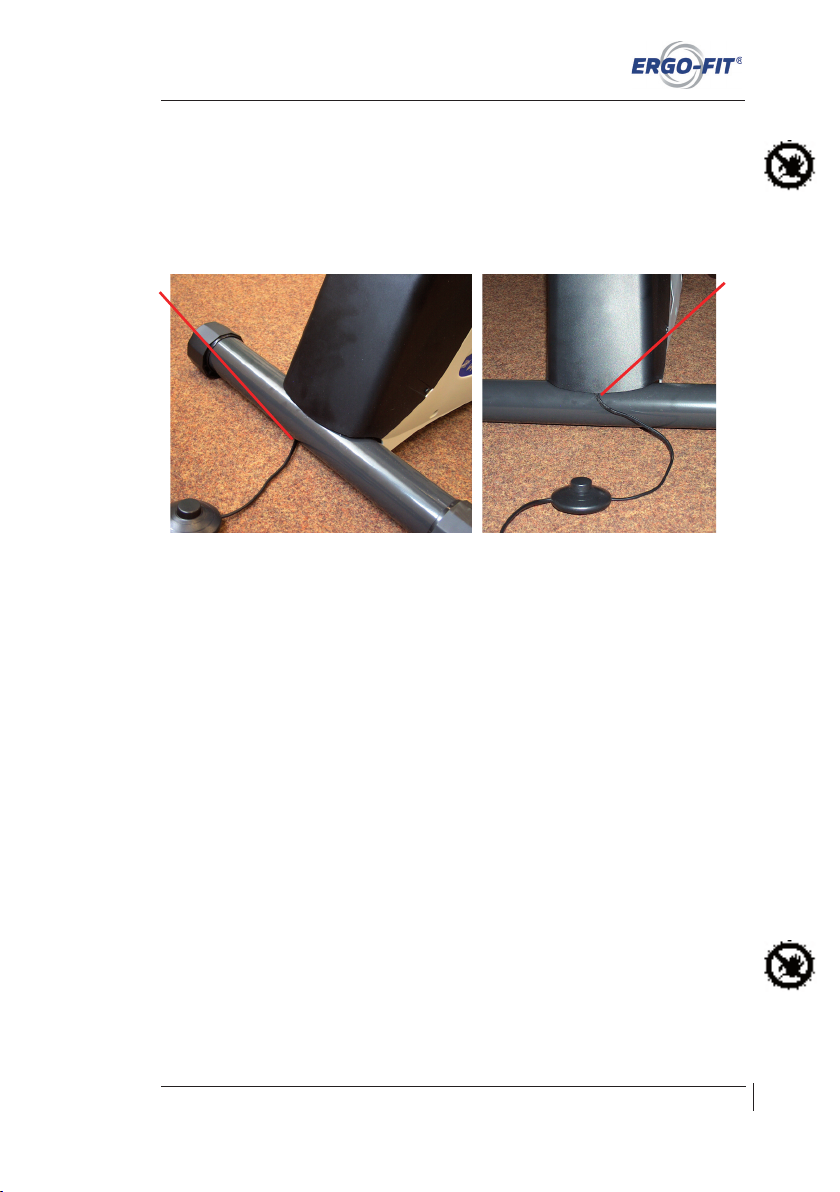
Place the mains cable between the casing and the foot frame to protect it against damage
during transport.
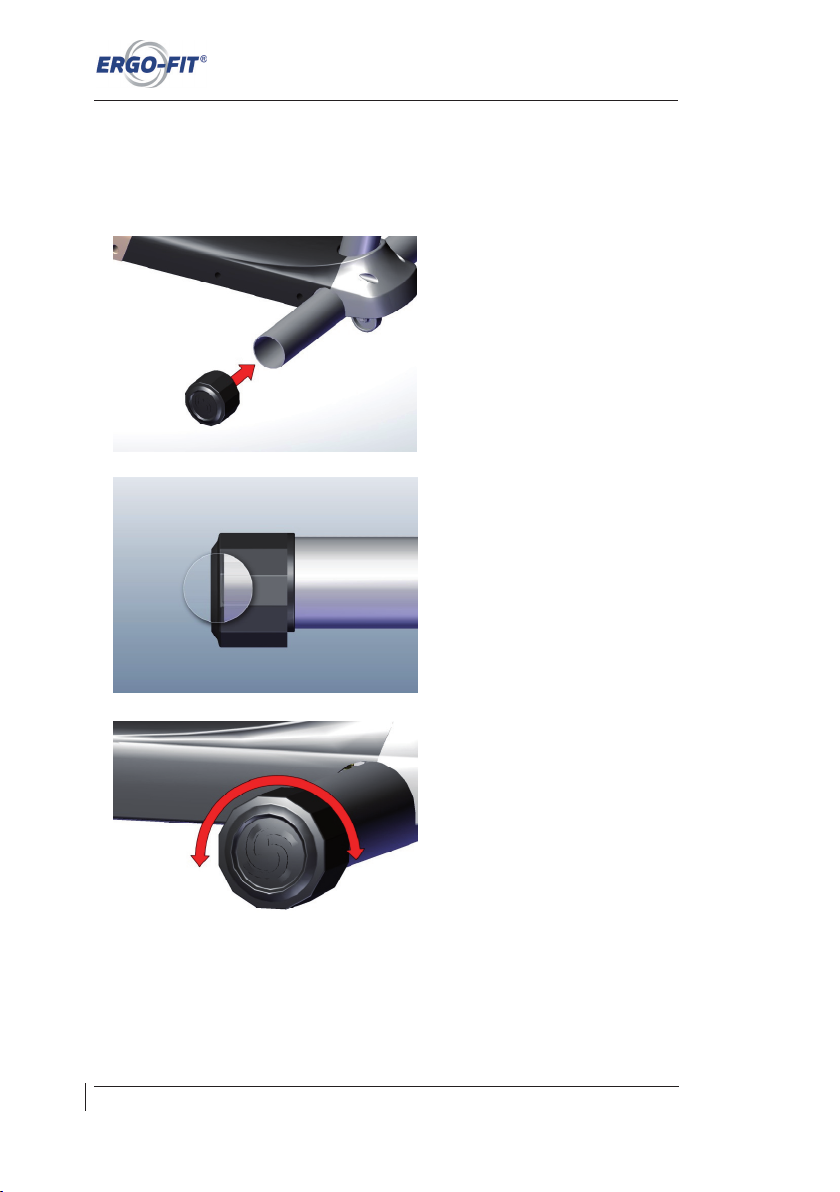
Move the machine to its future location and mount the foot caps.
18
Page 25
CARDIO LINE 400/400 MED
Technical and optical modifications as well as misprints reserved - © 2018 by ERGO-FIT GmbH & Co. KG
Danger! Mount the foot caps first before laying the cable underneath the foot frame: Lay the
cable underneath the foot frame to the rear end of the machine. Make sure not to pinch the
cable between the casing and the foot frame or between the casing and the floor!
CORRECT WRONG
⊗ Make sure that the surface underneath the machine is level and horizontal.
⊗ The adjustable feet underneath the machine are designed to compensate for minor
unevenness. Adjust these feet to attain a stable position on the floor and prevent
tilting of the machine.
⊗ Please make sure the distance between each machine is at least one metre, or you
might experience errors of the POLAR heart rate receiver.
⊗ High-frequency and magnetic disturbance signals (e.g. radios, TV sets, mobile
phones etc.) in close proximity to your cardio machine area may also interfere with
the pulse transmission.
⊗ In rare cases, strong electromagnetic fields in some locations may interfere with the
transmission of the heart rate (e.g. high voltage circuit or tramway contact wires).
⊗ In case of interference or if you suspect there is interference with the heart rate
transmission, do not, under any circumstances, use the machine for a cardio
controlled workout (in CARDIO mode).
⊗ Set up the machine so that power switch and plug can easily be disconnected.
Please note that the adjustable feet of the CYCLE are equipped with plastic protection caps.
In exceptional cases (e.g. when using strong cleaning agents), this may leave marks or
stains on the floor.
19
Page 26
Technical and optical modifications as well as misprints reserved - © 2018 by ERGO-FIT GmbH & Co. KG
Transport and set up
Niveauregulierung:
Bitte achten Sie bei der Aufstellung des Gerätes auf einen sicheren Stand. Beachten Sie
hierfür nachfolgende Schritte.
1. Attach the provided foot caps by
clipping them on the corresponding
tubes.
2. Push the foot caps all the way to the
stop.
3. Adjust the foot caps by twisting them
in either direction to avoid rocking
movements of the workout equipment .
20
Page 27
CARDIO LINE 400/400 MED
Technical and optical modifications as well as misprints reserved - © 2018 by ERGO-FIT GmbH & Co. KG
5.3 Ambient temperature
⊗ Your ERGO-FIT exercise machine may be used at an ambient temperature of
+10°C to +40°C, a relative humidity of 30 to 70% (non-condensing) and an
atmospheric pressure of 700 hPa to 1060 hPa without causing any problems.
⊗ When switched off, the ERGO-FIT machine may be stored at a temperature
between -30°C to +50°C..
5.4 Power connection
1. Carry out a visual inspection of the mains connection cable and the connectors
(power input module on CARDIO LINE 400 MED only) before starting the machine.
Damaged power cords and connectors need to be replaced immediately.
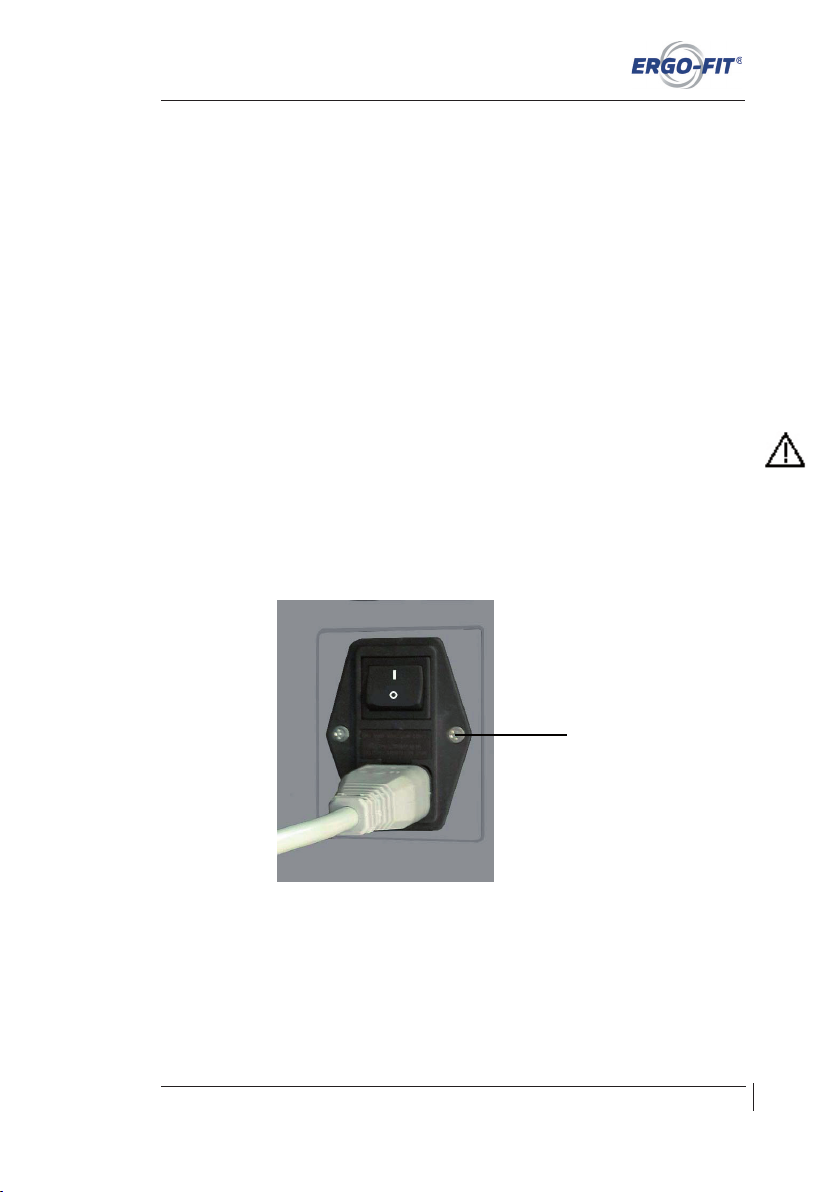
2. Damaged power cords and connectors need to be replaced immediately. Take the
mains connection cable and plug it into the appropriate power input module (see
figure, CARDIO LINE 400 MED only). Plug the other end of the cable into the mains
socket.
3. Switch on your exercise machine by pushing the button located on the power input
module (CARDIO LINE 400 MED, I = switch on, O= switch off) or by pushing the
foot actuated switch on the power cord (CARDIO LINE 400)..
4. After your exercise machine has been connected to mains and switched on, it
automatically carries out an operating check. During this operating check, you will
be able to read the software version of the unit on the display. Thereafter the main
menu will appear.
5. Stand on the side of the control panel (view onto the display) and check if the
display works. If this is not the case, make sure you followed the steps above
correctly. In addition, verify if there is electricity in the mains socket.
21
Power input module
with mains plug
Page 28
Technical and optical modifications as well as misprints reserved - © 2018 by ERGO-FIT GmbH & Co. KG
Transport and set up
22
5.4.1 Power supply
Use your exercise machine only on earthed (grounded) mains sockets with 230 V~/
50-60 Hz (see chapter A). If you have any doubts about the power supply at the setup loca-
tion, ask your electricity supplier. Only use customary 10 ampere automatic circuit breakers
(type B tripping characteristic). In the rare event that these automatic circuit breakers should
switch off when you switch on your machine, the circuit needs to be
fused with 10 A lead fuses
or with a different type of tripping characteristic. In case of doubt, ask your electrician.
Before connecting your ERGO-FIT exercise machine to your power supply system, compare
the data on the type label (next to power input module) on the allowable voltage and grid fre-
quency with your local data.
Always connect your machine directly to the power outlet. Do not use extension cables or
multi-outlet power strips unless they are EN 60601-1 certified.
We recommend DC-isolated cables for the connection of external equipment to a CARDIO
LINE 400 MED machine
.
5.4.2 Cabling
If you have connected more than one ERGO-FIT machine to one main switch, please switch
each machine on and off individually.
⊗ Install the cable in such a way that no one can step on it or trip over it.
⊗ Do not place any objects on the cable as it might become damaged.
5.5 Potential compensation
To avoid disturbances, a potential compensation cable may be attached to the machine. This
potential equalisation is not standard equipment. If required, ask the service to install this
feature. In this case, communicate with the service department or the field staff. As some
machines are already prepared for the potential compensation feature, on-site installation is
possible.
5.5.1 Position of the potential compensation clamp
The potential equalisation clamp is located underneath the front wheel cover. Never connect
the potential compensation line to the water or gas supply line or any other kind of pipe.
Always use the appropriate potential compensation connection only.
Page 29
CARDIO LINE 400/400 MED
Technical and optical modifications as well as misprints reserved - © 2018 by ERGO-FIT GmbH & Co. KG
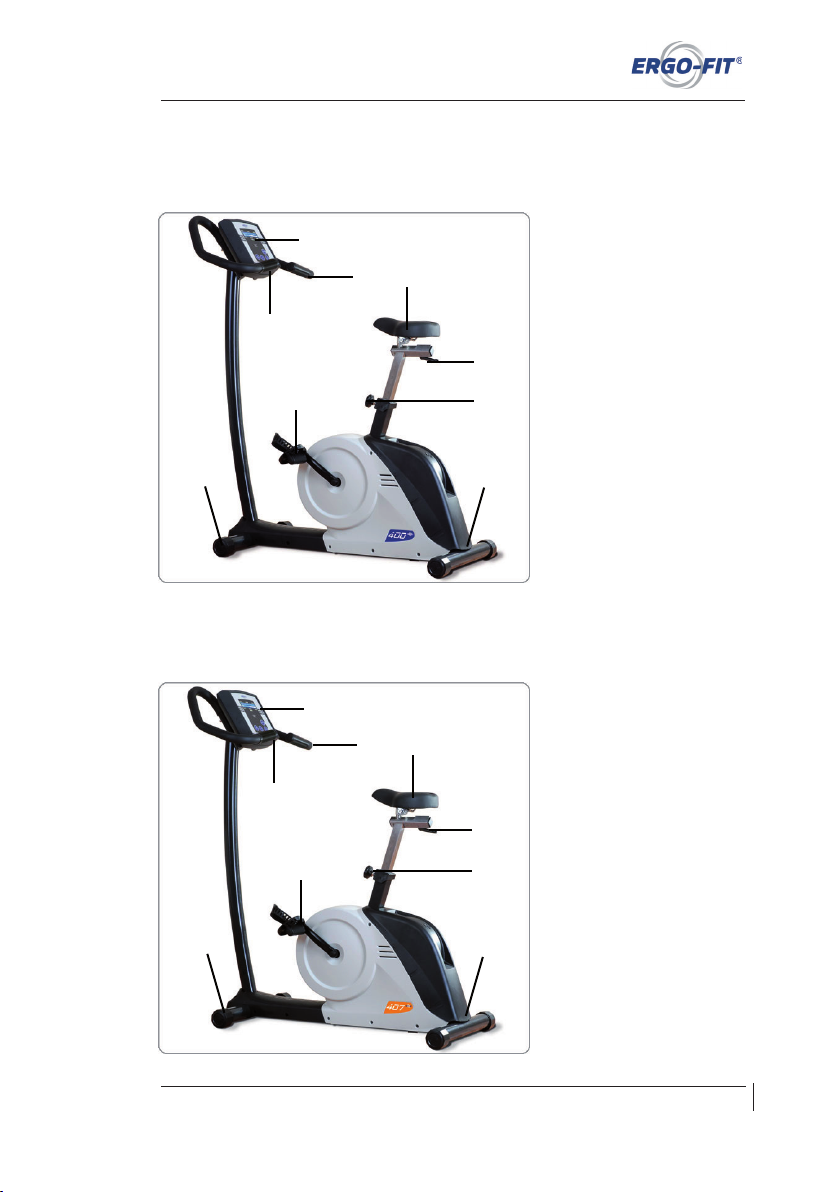
5.6 Components
5.6.1 CYCLE 400
23
1 Seat
2 horizontal seat
adjustment
3 Seat height adjustment
4 Mains cable outlet
5 Pedals
6 Adjustable feet
7 Control panel & display
8 Handlebar
(equiped with
electrodes for hand heart rate)
9 Book support
1 Seat
2 horizontal seat
adjustment
3 Seat height adjustment
4 Netzeingangsmodul
5 Pedals
6 Adjustable feet
7 Control panel & display
8 Handlebar
9 Book support
5.6.2 CYCLE 407 MED
1
4
2
3
1
4
2
3
5
5
6
6
7
8
9
7
8
9
Page 30
Technical and optical modifications as well as misprints reserved - © 2018 by ERGO-FIT GmbH & Co. KG
Transport and set up
24
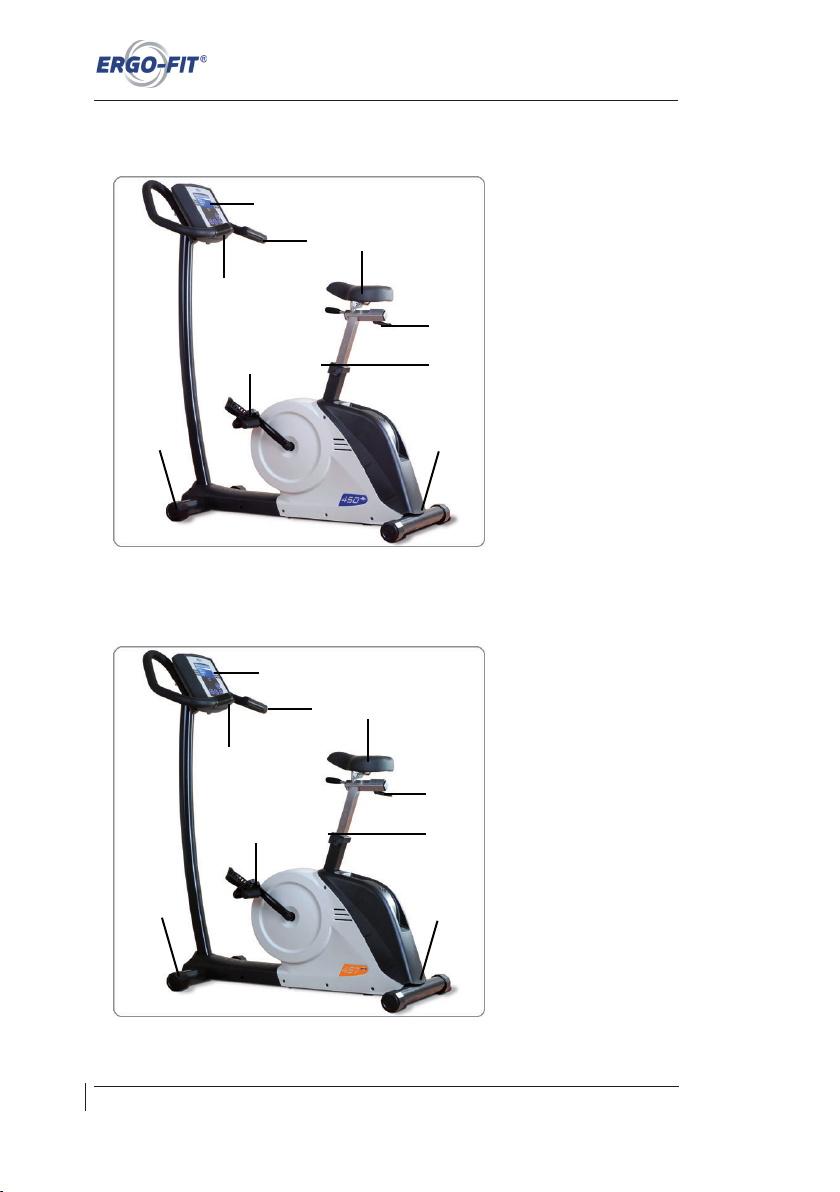
5.6.3 CYCLE 450
1 Seat
2 horizontal seat
adjustment
3 Seat height adjustment
4 Mains cable outlet
5 Pedals
6 Adjustable feet
7 Control panel & display
8 Handlebar
(equiped with
electrodes for hand heart rate)
9 Book support
1 Seat
2 horizontal seat
adjustment
3 Seat height adjustment
4 Netzeingangsmodul
5 Pedals
6 Adjustable feet
7 Control panel & display
8 Handlebar
)
9 Book support
5.6.4 CYCLE 457 MED
1
4
2
3
1
4
2
3
5
5
6
6
7
8
9
7
8
9
Page 31
CARDIO LINE 400/400 MED
Technical and optical modifications as well as misprints reserved - © 2018 by ERGO-FIT GmbH & Co. KG
25
Please note:
This owner‘s manual contains information on multiple gym machines.
There may be variations in detail according to the type of machine!
Chapter 6 Start-up
6.1 Switch on ...................................................................................................... 26
6.2 Switch off ...................................................................................................... 26
6.3 The right training technique .......................................................................... 26
6.4 The control panel .......................................................................................... 27
6.4.1 The buttons ................................................................................................... 29
6.4.2 The display ................................................................................................... 30
6.4.3 RS232 Port ................................................................................................... 30
Page 32
Technical and optical modifications as well as misprints reserved - © 2018 by ERGO-FIT GmbH & Co. KG
Start-up
6 Start-up
6.1 Switch on
⊗ Before switching on your exercise machine (CARDIO LINE 400 MED), make sure
the mains plug is connected to the mains socket.
If you have connected more than one machine to one main switch, please switch each
machine on and off individually, or technical disturbances may occur if all machines are
switched on at the same time.
⊗ Now switch on your machine by pushing the switch located on the power input
module. Push the switch into the I-position. The machine is turned off when the
switch is in the 0-position (only on CARDIO LINE 400 MED). The CARDIO LINE
400 is switched on by pushing the foot actuated switch.
⊗ The illumination of the display shows you immediately if the machine is switched
on.
6.2 Switch off
⊗ Switch off your machine by pushing the switch located on the power input module.
To do so, push the switch into the 0-position (CARDIO LINE 400 MED) or by
pushing the foot actuated switch (CARDIO LINE 400).
Make sure that the switch on/switch off intervals are longer than 30 s. Otherwise disturbances
might occur.
6.3 The right training technique
The optimal load intensity of the user is controlled by the heart rate controlled training
according to t he ERGO-FIT sys tem. However, you sho uld also t ake into a ccount
biomechanical considerations when training. This chapter provides relevant considerations
for the use of exercise bike ergometers.
When exercising with your training machine, make sure not to step on its casing. Stand on
the designated surfaces only.
1. Gauge the proper seat height first. The height of the seat is essential for your sitting
comfort and especially for the radial runout. To gauge the right seat height, sit on the
seat and put one heel on a pedal. In the lowest pedal position, you should be able
to extend your leg completely.
2.a) CYCLE 400/407: To adjust the seat, stand next to the exercise machine and turn the
knob on the seat tube anticlockwise. Now pull the knob out of the punched matrix
located on the seat tube until you can move the seat tube. To lock the seat at the
desired height, let the knob snap into the seat tube again. Lock the seat tube by
turning the knob clockwise.
26
Page 33
CARDIO LINE 400/400 MED
Technical and optical modifications as well as misprints reserved - © 2018 by ERGO-FIT GmbH & Co. KG
b) CYCLE 450/457: To adjust the seat height, stand next to the exercise machine and
pull the adjustment lever located on the seat tube upwards. The integrated
pneumatic spring will automatically lift the seat. To lower the seat, loosen the
adjustment lever and push the seat downwards into the desired position with the
help of your body weight. To lock the seat at the desired height, bring the adjustment
lever back to its initial position.
3. To adjust the seat horizontally, loosen the clamp lever underneath the seat by
turning it anticlockwise. Now the seat is continuously adjustable. Lock the seat by
turning the clamp lever clockwise.
4. During CARDIO training, make sure the number of rotations is higher than 50 rpm
(performance > 25 W); otherwise, the strain of the machine becomes too great.
Please look at the speed range (the up arrow on CYCLE 450/457 or the right arrow
on CYCLE 400/407 means you should pedal faster whereas the down arrow on
CYCLE 450/457 or the left arrow on CYLCE 400/407 asks you to pedal more
slowly). The higher the number of rotations, the lower the strain on the joints.
5. Maintain the training position described here for the whole workout.
6.4 The control panel
One of ERGO-FIT‘s main goals is to produce particularly user-friendly exercise machines.
For this reason, all the CARDIO LINE 400/400 MED machines are equipped with a user
guidance system that is simple and easy to understand. In addition, all control panels in a
series are designed homogenously to provide you with easy use and comfort. Consequently,
once you know how to operate one machine, you will know how to operate all the others of
the same series.
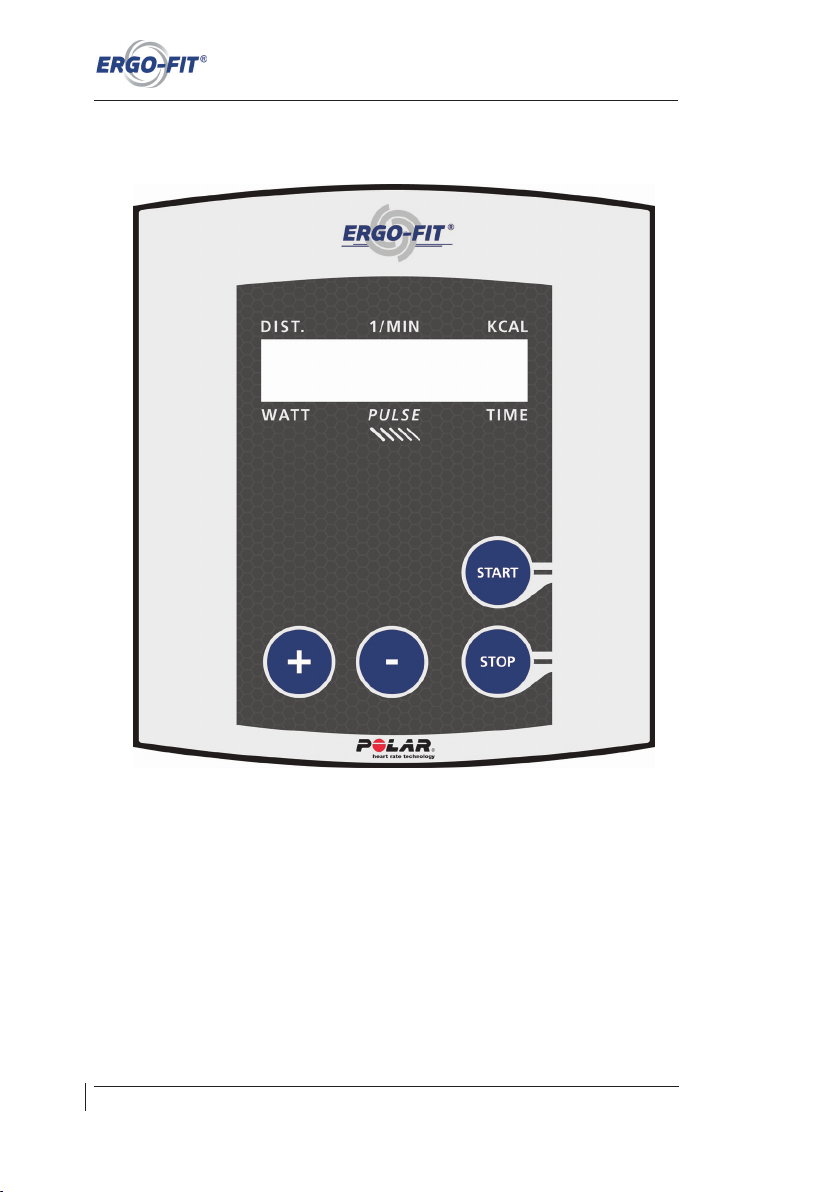
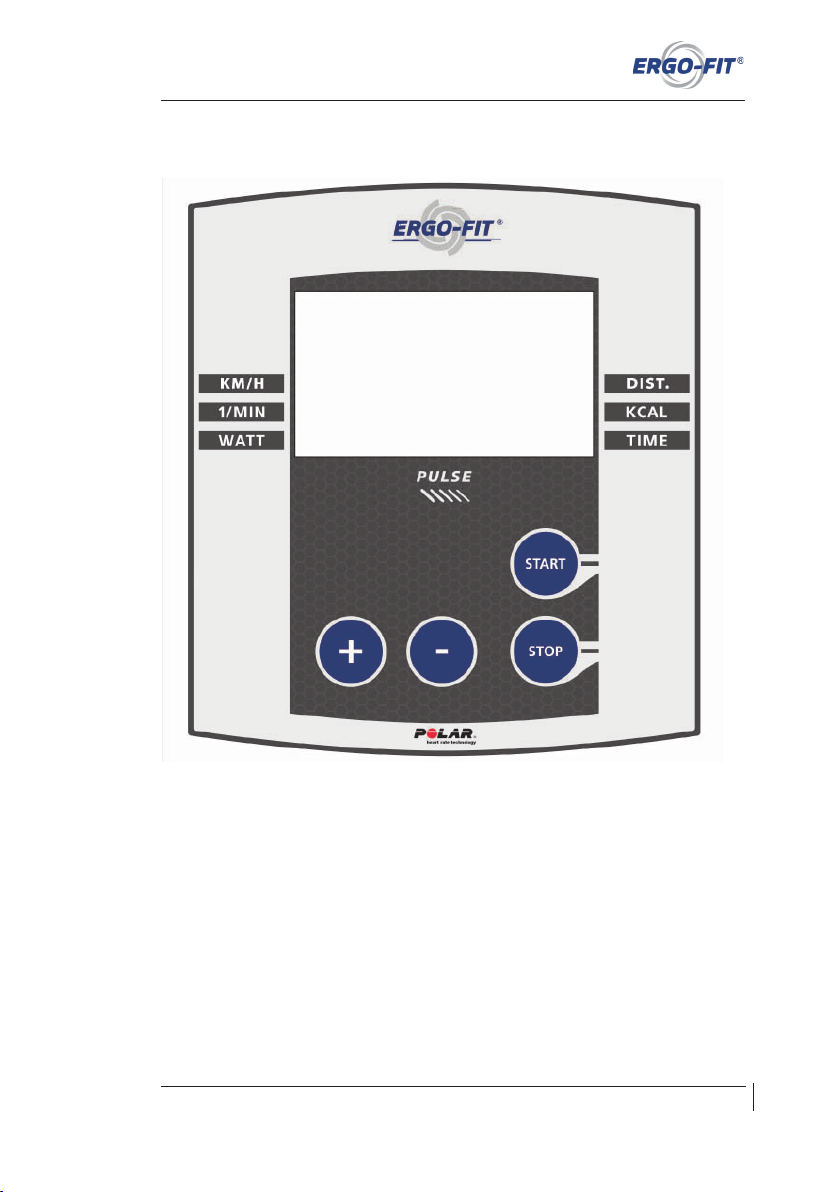
There are two different types of displays: A small monochrome display (CYCLE 400/407
MED) and a large monochrome display (CYCLE 450/457 MED).
The control panel consists of a display and buttons. Before you take a closer look at the
control panel, you should note the following aspects:
1. Do not prop up your body on the control panel or the display to avoid damage.
2. Do not exert pressure on the display.
3. Only press the buttons lightly. The button press is confirmed by a beep.
27
Page 34
Technical and optical modifications as well as misprints reserved - © 2018 by ERGO-FIT GmbH & Co. KG
Start-up
Cockpit CYCLE 400/407 MED (small monochrome display):
28
Page 35
CARDIO LINE 400/400 MED
Technical and optical modifications as well as misprints reserved - © 2018 by ERGO-FIT GmbH & Co. KG
Cockpit CYCLE 450-457 MED (large monochrome display):
6.4.1 The buttons
The following buttons are installed on the control panel:
⊗ PLUS-button: Increase the strain or change parameters..
⊗ MINUS-button: Decrease the strain or change parameters.
⊗ START-button: Change the training mode or confirm set or changed parameters.
⊗ STOP-button: Stop functions or the machine.
29
Page 36
Technical and optical modifications as well as misprints reserved - © 2018 by ERGO-FIT GmbH & Co. KG
Start-up
6.4.2 The display
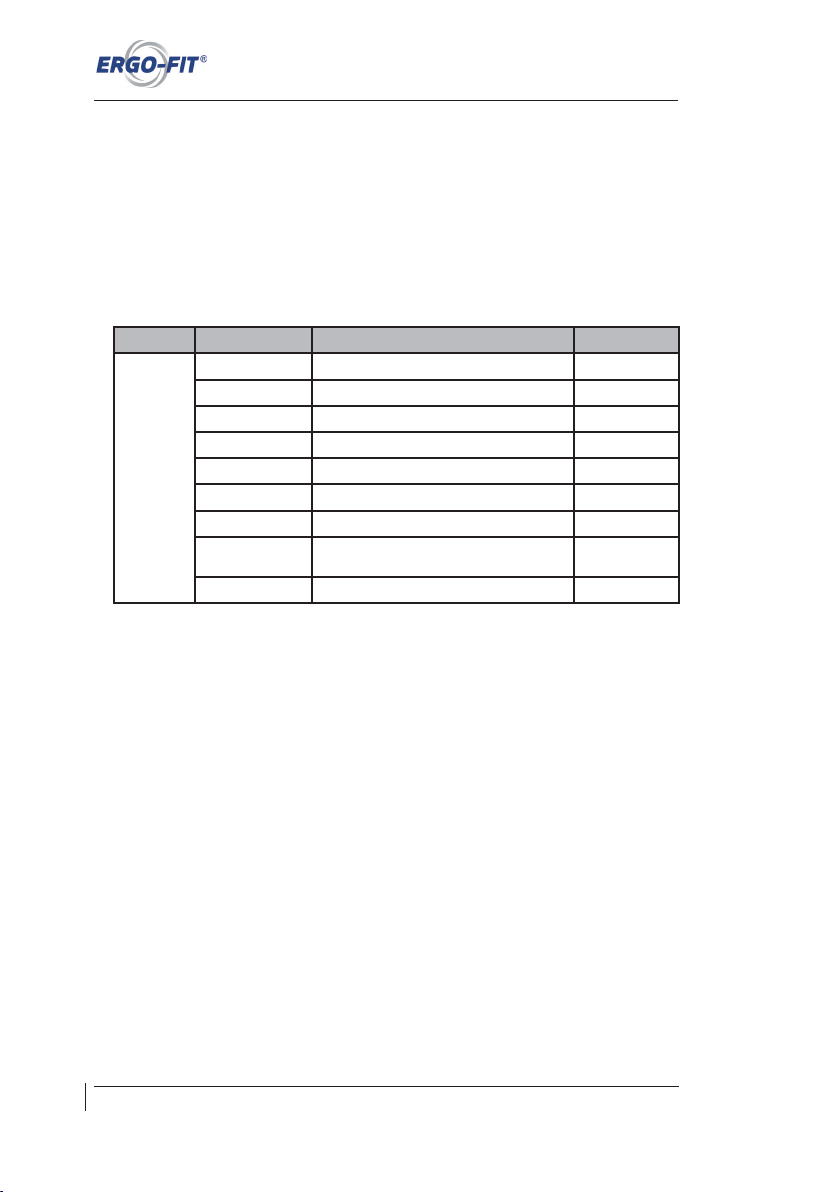
The machines of the CARDIO LINE 400/400 MED are equipped with a large (CYCLE 450/457
MED) or a small monochrome display (CYLCE 400/407 MED).
In the section below you will find - depending on the model - information on the displays,
measuring units and their meanings.
Training parameters
Model Display Meaning Unit
CYCLE
DIST. Distance covered m,km
1/MIN Number of revolutions per minute 1/min
KM/H Speed km/h*
WATT Power produced currently Watt
POINTS ERGO-FIT cardio points Points
KCAL Calories burnt (average) kcal
TIME Training time 00:00
(min:sek)
PULSE Current heart rate with POLAR-sender or hand
heart rate(only CYCLE 400/450)
1/min
Flashing heart heart rate signal received**
* Parameter „KM/H“ only CYCLE 450/457 MED
** If an „E“ is displayed instead of the heart rate the heart rate monitor does not function correctly or it
does not receive any heart rate values (see chapter 7.4)
6.4.3 RS232 Port
CYCLE 457 MED is provided with a RS232 port. This 9 pin port is located at the back of the
cockpit and is used to connect an ECG.
30
Page 37
CARDIO LINE 400/400 MED
Technical and optical modifications as well as misprints reserved - © 2018 by ERGO-FIT GmbH & Co. KG
31
Please note:
This owner‘s manual contains information on multiple gym machines.
There may be variations in detail according to the type of machine!
Chapter 7 Operation
7.1 Modes of operation ....................................................................................... 32
7.1.1 MANUAL ....................................................................................................... 32
7.1.2 PROFILES .................................................................................................... 33
7.1.3 CARDIO ........................................................................................................ 37
7.1.4 GEARSHIFT ................................................................................................. 38
7.1.5 WHO-PROFILES .......................................................................................... 39
7.1.6 COUNTDOWN ....................................................................................... 40
7.1.7 TEST ............................................................................................................. 41
7.1.8 Default Settings and ECG CHOICE.............................................................. 43
7.2 Behavior after operation ............................................................................... 44
7.3 Function control ............................................................................................ 44
7.4 Heart rate measurement ............................................................................... 44
7.4.1 Belt and Transmitter ..................................................................................... 45
7.4.2 Contact Heart Rate ....................................................................................... 45
7.4.3 Operating range of the POLAR sender ........................................................ 46
7.4.4 Battery of the POLAR sender ....................................................................... 46
7.4.5 Potential Interferences .................................................................................. 46
Page 38
Technical and optical modifications as well as misprints reserved - © 2018 by ERGO-FIT GmbH & Co. KG
Operation
7 Operation
7.1 Modes of operation
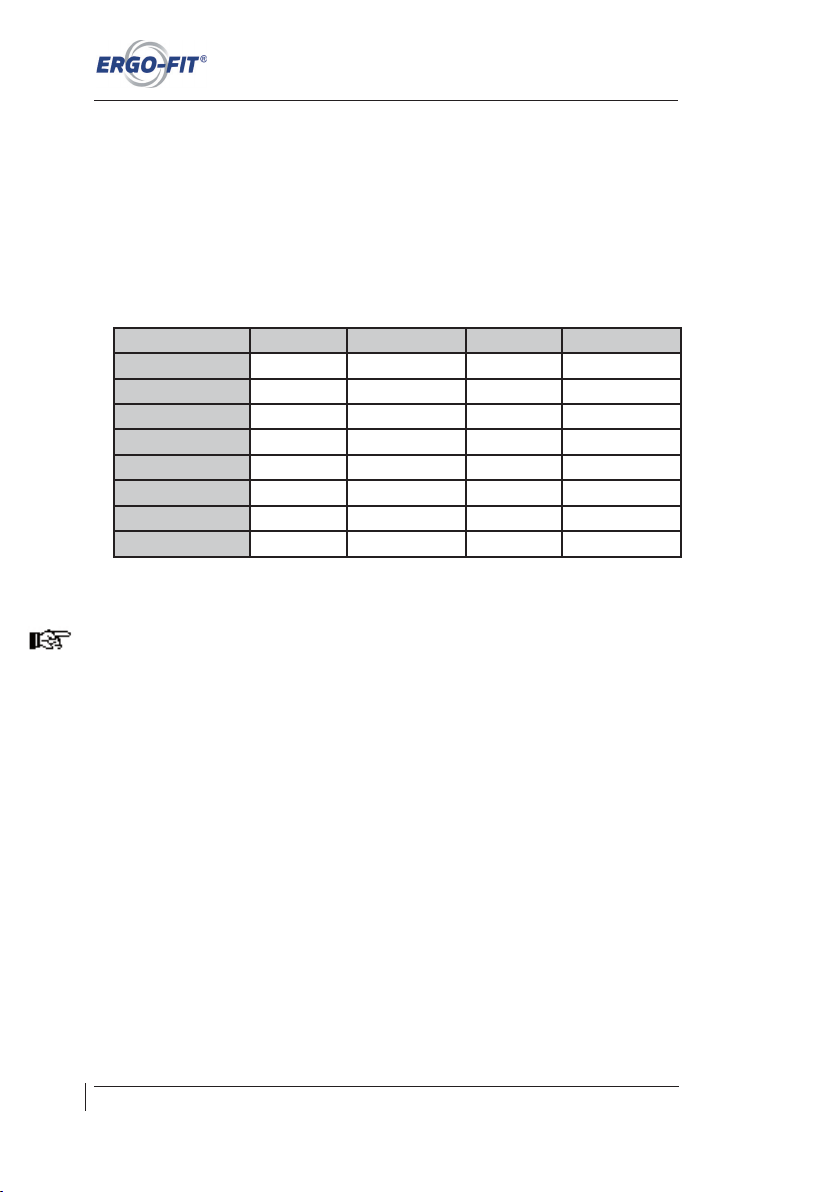
When you switch on your training machine, the main menu and the programme selection will
always appear first on the display. The choice „MANUAL“ is selected automatically. Push the
PLUS and MINUS buttons to change the training mode. Confirm this with START. The
following modes can be chosen (depending on the model):
CYCLE 400 CYCLE 407 MED CYCLE 450 CYCLE 457 MED
MANUAL X X X X
PROFILES X X X
CARDIO X X X X
GEARSHIFT X X
WHO-PROFILES X X
COUNTDOWN X X
TEST X X
ECG-CHOICE X
To return from the submenu to the main menu, just press the STOP button once or
repeatedly.
Achtung! Si nd Sie Träg er eines Her zschrit tmachers so llten Si e nur im Modu s
MANUELL trainieren!
7.1.1 MANUELL
Danger! If you have a cardiac pace maker, you should exercise in MANUAL mode only!.
1. Push the PLUS/MINUS buttons until the programme MANUAL is selected. Confirm
your choice with the START button.
2. You are now entering training mode. You may change the strain intensity in steps of
5 Watts by pushing the PLUS and MINUS buttons. If you want to change the strain
intensity substantially, press and hold the PLUS or MINUS button.
3. Stop the training by pressing the STOP button. The training parameters remain on
the display. By pushing the STOP-button one more time, you will return to the main
menu. The display will also return to the main menu automatically after 1 minute if
no action is carried out.
32
Page 39
CARDIO LINE 400/400 MED
Technical and optical modifications as well as misprints reserved - © 2018 by ERGO-FIT GmbH & Co. KG
In the MANUAL mode, you can choose any minimum/maximum strain you like. The lower/
upper strain limit is the following:
Model Power Range Steps Rotational Speed
CYCLE 400 0-400 W * 5 W 20-120 rpm
CYCLE 407 MED 0-400 W * 5 W 20-120 rpm
CYCLE 450 0-400 W * 5 W 20-120 rpm
CYCLE 457 MED 0-400 W * 5 W 20-120 rpm
* Default setting is 25 W; the strain can be reduced to a minimum of 0 W by pushing the MINUS button.
CYCLE 407/457 MED: Please note that this model does not comply with the standard DIN
VDE 0750-238 when used with a strain level below 25 W!
7.1.2 PROFILES
You can choose between performance profiles (load profiles, fixed profiles), gradient profiles
(gearshift/only on CYCLE 450) and heart rate profiles (heart rate/only on CYCLE 450 and
CYCLE 457 MED), depending on the model.
Performance profiles (CYCLE 400, CYLCE 450, CYCLE 457 MED):
Choose between five predefined profiles (fixed profiles P1 - P5) and four individual user
profiles (load profiles/only on CYCLE 450 and CYCLE 457 MED). The profiles differ in their
sequences of alternating strain levels, comparable with a hilly landscape.
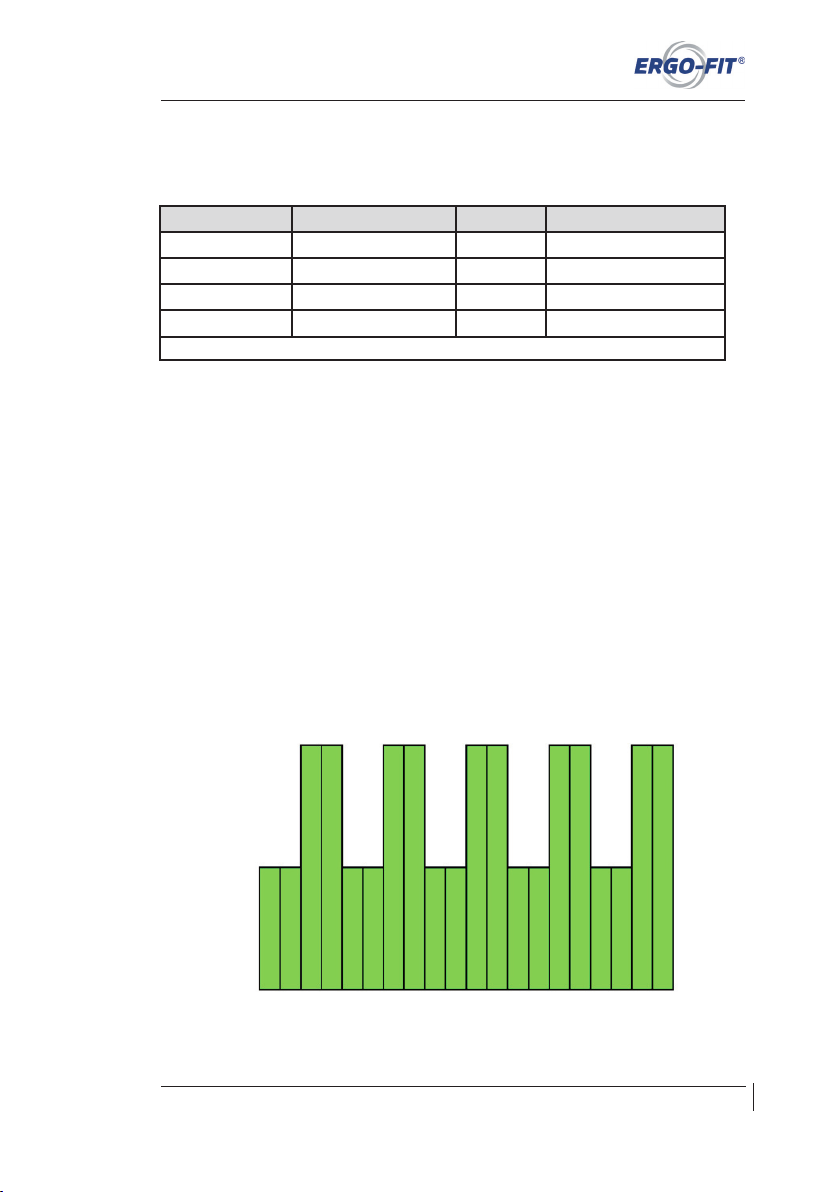
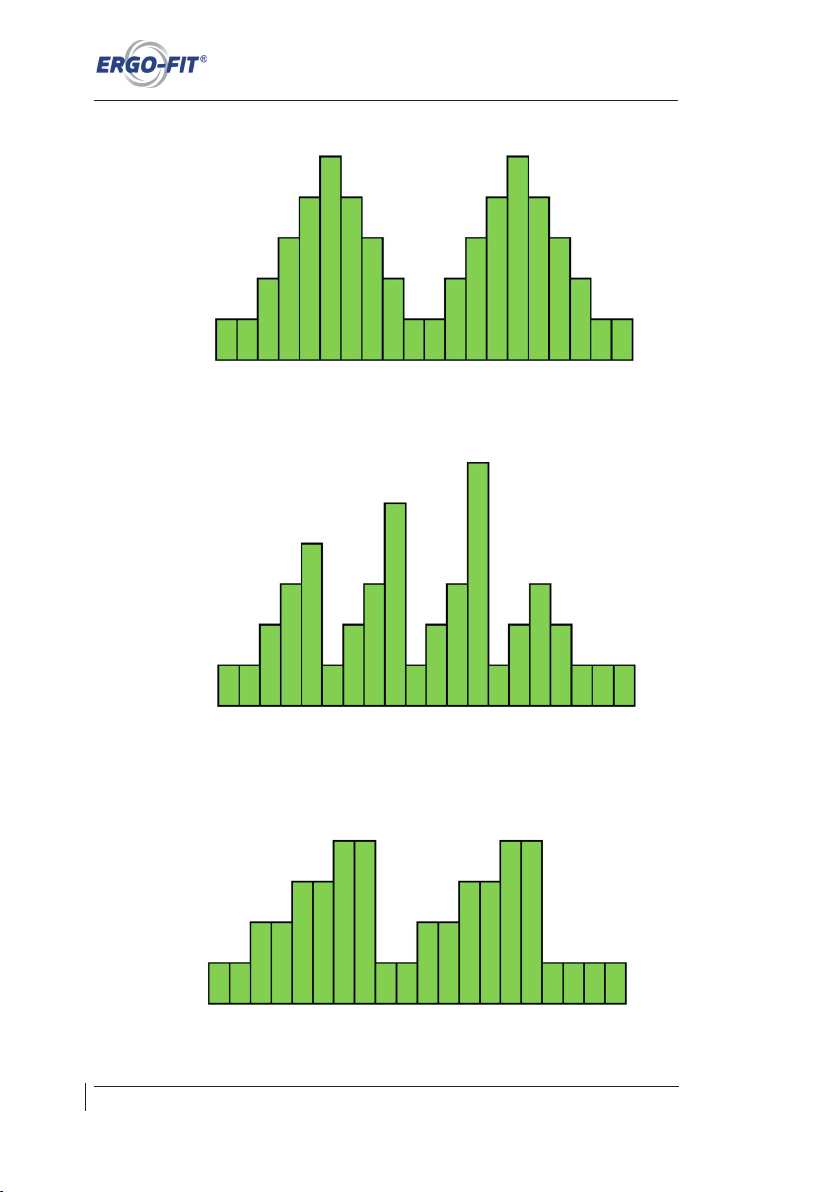
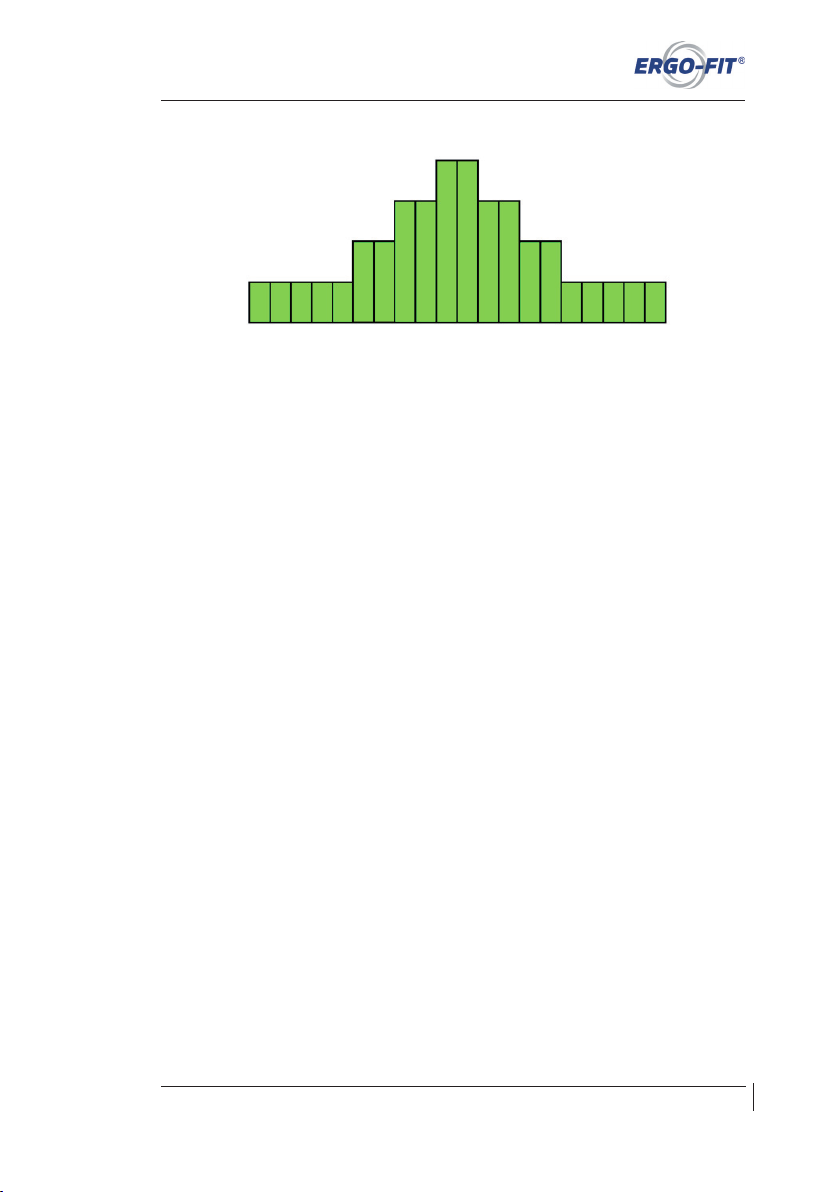
The 5 predefined profiles (P1 - P5) are:
Profile 1:
33
Strain intensity
1 2 3 4 5 6 7 8 9 10 11 12 13 14 15 16 17 18 19 20
Profile steps
Page 40
Technical and optical modifications as well as misprints reserved - © 2018 by ERGO-FIT GmbH & Co. KG
Operation
Profile 2:
Profile 3:
Profile 4:
34
Strain intensity
1 2 3 4 5 6 7 8 9 10 11 12 13 14 15 16 17 18 19 20
Profile steps
Strain intensity
Strain intensity
1 2 3 4 5 6 7 8 9 10 11 12 13 14 15 16 17 18 19 20
Profile steps
1 2 3 4 5 6 7 8 9 10 11 12 13 14 15 16 17 18 19 20
Profile steps
Page 41
CARDIO LINE 400/400 MED
Technical and optical modifications as well as misprints reserved - © 2018 by ERGO-FIT GmbH & Co. KG
Profile 5:
Gradient profiles (gearshift/CYCLE 450):
Choose between four individual user profiles.
Heart rate profiles (CYLCE 450, CYCLE 457 MED):
Choose between four individual user profiles.
How to choose a predefined user profile (P1 - P5):
1. Push the PLUS/MINUS buttons until the programme PROFILES is selected.
Confirm your choice with the START button.
2. In the submenu „PROFILES“, choose a profile with the PLUS and MINUS buttons.
Confirm your choice with the START button. Use PLUS/MINUS buttons on CYCLE
450 and CYCLE 457 MED to switch between Profile Selection and Profile Editor,
confirm with START, then select the appropriate profile type (fixed profiles, load
profiles or heart rate) using PLUS/MINUS buttons and again confirm with START.
3. Now you need to determine the maximum strain intensity. Push the PLUS and
MINUS buttons to set the strain and confirm with START.
4. Now choose the maximum training time. You can choose different training durations
of 10 to 60 minutes by pressing the PLUS and MINUS buttons (default time: 10
minutes). Confirm your choice again with the START button.
5. You are now entering training mode. You can change strain intensity within the limits
of the pre-assigned strain intensity range by pushing the PLUS and MINUS buttons
at any time.
6. The timing will also be displayed in the profile (in italic letters). The training will stop
automatically after the chosen duration has elapsed. You can also stop the training
by pressing the STOP button at any moment. On CYCLE 450 and CYCLE 457
MED, the profile distance is repeated until the workout is stopped by pushing the
STOP button. In all cases, the training parameters (dist., kcal, km etc.) remain on
the display. Pushing the STOP button again will return you to the main menu.
35
1 2 3 4 5 6 7 8 9 10 11 12 13 14 15 16 17 18 19 20
Profile steps
Strain intensity
Page 42

Technical and optical modifications as well as misprints reserved - © 2018 by ERGO-FIT GmbH & Co. KG
Operation
How to create a new user profile (A-D) (CYCLE 450 / CYLCE 457 MED only)
1. Push the PLUS/MINUS buttons until the programme PROFILES is selected.
Confirm your choice with the START button.
2. Select the Profile Editor using PLUS/MINUS buttons, confirm selection with
START.
3. Push the PLUS and MINUS buttons to choose the type of profile first (load profile,
heart rate, gearshift). Confirm this with START.
4. Now push the PLUS/MINUS buttons until the desired user profile (A-D) is selected.
Push the START button to open the changing level.
5. Press START again to change the profile.
6. On the changing level you can set the strain intensity per strain level. Push the
PLUS and MINUS buttons to set the strain (default: begin profile step 1). Press the
START and STOP buttons for choosing the profile step. Press the STOP button at
profile step 1 or press the START button at profile step 20 to enter the main menu.
Your changes are saved.
7. From the main menu, select the PROFILE program again using the PLUS or MINUS
button, confirm by pressing the START button, then confirm PROFILE SELECTION
with START. Select the desired profile with the PLUS or MINUS button and confirm
by pressing the START button. The four user profiles will appear (except for „Gear-
shift“ profile, see Point 10). Make your selection using the PLUS or MINUS button
and confirm with START. Procedures that follow are described in Points 8-10.
8. If you selected the „Load profiles“ profile type, you can change the start load using
the PLUS/MINUS buttons. Now confirm with the START button and set the
maximum exercise time. By pressing the PLUS or MINUS button, you can select
different exercise times, from 10 to 60 minutes in duration (default time - 20
minutes). Press the START button to confirm. See Point 11.
9. If you selected the „Heart rate“ profile type, you can set the maximum exercise time
here. By pressing the PLUS or MINUS button, you can select different exercise
times, from 10 to 60 minutes in duration (default time - 20 minutes). Press the
START button to confirm. Now the cardio parameters are displayed. You can also
change the start load using the PLUS/MINUS buttons. Press the START button to
confirm. See Point 11.
10. If you selected the „Gear change“ profile type (CYCLE 450 only), you can now enter
your weight using the PLUS/MINUS buttons. After you confirm with the START
button, the four user profiles will appear. Make your selection using the PLUS or
MINUS button and confirm with START. You can now set the maximum exercise
time. By pressing the PLUS or MINUS button, you can select different exercise
times, from 10 to 60 minutes in duration (default time - 20 minutes). Press the
START button to confirm. See Point 11.
36
Page 43
CARDIO LINE 400/400 MED
Technical and optical modifications as well as misprints reserved - © 2018 by ERGO-FIT GmbH & Co. KG
37
11. You are now entering training mode. You can change strain intensity within the limits
of the pre-assigned strain intensity range by pushing the PLUS and MINUS buttons
at any time. The timing will also be displayed in the profile (in italic letters).
12. On CYCLE 400, the training will end automatically when the chosen duration has
elapsed. You can also stop the training by pressing the STOP button at any moment.
On CYCLE 450 und CYCLE 457 MED, the profile distance is repeated until the
workout is stopped by pushing the STOP button. Pushing the STOP button again
will return you to the main menu.
7.1.3 CARDIO
For a CARDIO workout (heart rate controlled training) on the machines of the CARDIO LINE
400 MED, you need a chest band with a POLAR sender. This is the only way to measure your
heart rate and control the strain automatically. On models of the CARDIO LINE 400 HOME,
the heart rate can also be assessed through the hand pulse. The CARDIO mode allows for
strain control according to the actual heart rate so that the set training heart rate will be
maintained during a workout sequence.
Users who have a cardiac pace maker or take heart drugs (e.g. beta-blockers) should not
exercise in Cardio mode!
You need to set the following parameters before training:
PULSMAX = heart rate upper limit during training
PULSMIN = heart rate lower limit during training
STARTING STRAIN = initial strain at the beginning of the workout
How to proceed when training:
1. Push the PLUS/MINUS buttons until the programme CARDIO is selected. Confirm
your choice with the START button.
2. You are on Cycle 457 in the „CARDIO SELECTION“ sub-menu. Here you can
choose between CARDIO and CARDIO COUNTDOWN. If you select CARDIO
COUNTDOWN, see Section 7.1.6; otherwise go to Point 3. All other cycle versions
are located directly in the Cardio Program.
3. Now change the age using the PLUS or MINUS button and confirm with START.
4. Set the heart rate upper limit first. Modify the default value (depending on entered
age) with the PLUS and MINUS buttons (the heart rate lower limit will change
synchronously). After choosing your individual heart rate upper limit, confirm with
START.
Page 44
Technical and optical modifications as well as misprints reserved - © 2018 by ERGO-FIT GmbH & Co. KG
Operation
5. Now you can modify your heart rate lower limit with the PLUS and MINUS buttons
(default: difference of ten beats from the heart rate upper limit.). Reconfirm your
choice with START.
6. Now set the starting strain for your exercise (Preset 25W). Again, use the PLUS and
MINUS buttons and confirm with START for this purpose.
7. The display now shows the CARDIO mode. Your current heart rate is assessed.
The training starts with the first strain level. The load can be changed even during
exercise using the PLUS or MINUS button.
8. Stop the exercise by pressing the STOP button. The training parameters (Watt, 1/
min etc.) remain on the display. On the CYCLE 450/457 MED model, the gradient
of the heart rate will be shown also. The training sequence is marked by two
horizontal lines. On CYCLE 457 MED, the average speed is displayed by pressing
the START button. Pushing the STOP button again will return you to the main
menu.
7.1.4 GEARSHIFT (CYCLE 400 / 450 only)
In this mode, you can exercise for any amount of time. The integrated gearshift allows you to
adjust the strain and thus, to simulate realistic cycling.
1. Press the PLUS/MINUS buttons on the main menu until the programme GEARSHIFT
is selected. Confirm your choice with the START button.
2. Press the PLUS and MINUS buttons to enter your body weight and press the
START button.
3. You are now entering training mode. In this mode, press the PLUS and MINUS
buttons to change the gears at any time and thus, to modify the strain. The change
will be displayed for 5 seconds. Furthermore, the gradient can be displayed by
pressing the START button. You can modify the gradient settings by pressing the
PLUS and MINUS buttons. By pushing the START-button one more time, you will
return to the gear selection.
4. Stop the training by pressing the STOP button. The training parameters remain on
the display. By pushing the STOP-button one more time, you will return to the main
menu. The display will also return to the main menu automatically after 1 minute if
no action is carried out.
If the operational range of the brake is exceeded, an exclamation mark will be displayed next
to the performance display. This indicates that the displayed performance does not
correspond to the performance on the crank handle. Please modify the speed or the gear to
return to the correct performance.
38
Page 45
CARDIO LINE 400/400 MED
Technical and optical modifications as well as misprints reserved - © 2018 by ERGO-FIT GmbH & Co. KG
7.1.5 WHO-PROFILES
The WHO profiles are step profiles defined by the World Health Organization (profiles with
stepping strain increase). On CYCLE 407 MED, you can choose between two predefined
profiles; on CYCLE 457 MED, the user profile can be set individually.
Please proceed as follows (CYCLE 407 MED):
1. Push the PLUS/MINUS buttons until the programme WHO-PROFILES is selected.
Confirm your choice with the START button
2. Select the desired time in the sub-menu by pressing the PLUS or MINUS button (2
min or 3 min), confirm with the START button. Then select the load level (25 W or
50 W) and press START again. (Use STOP to switch between the lines)
3. You are now in the „WHO PROFILE“ training mode. Press the STOP button to stop
the strain phase and to proceed to the recovery phase. By pushing the STOP-
button one more time, you will return to the main menu.
Please proceed as follows (CYCLE 457 MED):
You need to set the following parameters before training:
Initial strain: Strain of the first strain level [W]
Time: Duration of each strain step [min]
Strain step: Intensity of each strain step [W]
Recovery: Strain in recovery phase [W]
1. Push the PLUS/MINUS buttons on the main menu until the programme WHO-
PROFILES is selected. Confirm your choice with the START button.
2. Press the PLUS and MINUS buttons to modify each of the parameters. Press STOP
to change to the next parameter. After setting the parameters, confirm this with
START. The modified parameters will be saved for other applications.
3. You are now in the training mode. Press the STOP button to stop the strain phase
and to proceed to the recovery phase. By pushing the STOP-button one more time,
you will return to the main menu.
The automatic strain increase in the WHO profiles can be interrupted during operation by
pressing the START button. The displayed information changes from ACTIVE to HOLD. In
the HOLD mode, the performance can be modified manually with the PLUS and MINUS
buttons. If you want to reactivate the automatic strain increase, press the START button
again. The display changes from HOLD to ACTIVE. In both modes, you can change from the
strain phase to the recovery phase by pressing the STOP button. The display changes to
PASSIVE. This allows the doctor to adjust the strain for his patient more precisely than
before.
39
Page 46

Technical and optical modifications as well as misprints reserved - © 2018 by ERGO-FIT GmbH & Co. KG
Operation
7.1.6 COUNTDOWN (CYCLE 407 MED / CYLCE 457 MED only)
In this mode you can manually customize the workout and workout time. The timer counts
down the set workout time. You can choose Manual-Countdown or Cardio-Countdown:
Manual-Countdown:
1. Push the P LUS/ MINUS buttons on t he main menu until the programme
COUNTDOWN (for 400/407 CARDIO COUNTDOWN) is selected. Confirm your
choice with the START button.
2. Reduce or increase the time to the desired training duration by pressing the PLUS
and MINUS buttons. Confirm this with START.
3. You are now entering training mode. You may change the strain intensity by pushing
the PLUS and MINUS buttons at any time.
4. The training will stop automatically after the chosen duration has elapsed. However,
you can stop the exercise at any time by pressing the STOP button. The training
parameters remain on the display. By pushing the STOP button one more time, you
will return to the main menu. The display will also return to the main menu
automatically after 1 minute if no action is carried out.
Cardio-Countdown:
1. Navigate the main menu by pressing the PLUS/MINUS buttons until the CARDIO
program (for 400/407 CARDIO COUNTDOWN) is marked. Press the START button
to confirm your selection. For Cycle 400/407, see Point 3.
2. The „Cardio Selection“ sub-menu appears. Use the PLUS/MINUS buttons to select
the CARDIO COUNTDOWN program. Press the START button to confirm your
selection.
3. Use the PLUS/MINUS buttons to change the age setting and confirm with START.
4. Reduce or increase the time to the desired training duration by pressing the PLUS
and MINUS buttons. Confirm this with START.
5. First, set the upper heart rate limit. You can change the default value (depending on
the entered age) with the PLUS or MINUS button (the heart rate lower limit changes
its value synchronously). If you set your individual heart rate upper limit for the
exercise session, confirm your entry with the START button.
6. Now you can change your heart rate lower limit using the PLUS or MINUS button
(default setting - 10-stroke difference from the upper heart rate limit). Confirm again
with the START button.
40
Page 47
CARDIO LINE 400/400 MED
Technical and optical modifications as well as misprints reserved - © 2018 by ERGO-FIT GmbH & Co. KG
7. Now you must set the start load (default 25W) for the exercise session. To do this,
press the PLUS or MINUS button and confirm with START.
8. The display changes to the CARDIO mode. Your current heart rate is determined.
Exercise session starts with the first load level.
9. Pressing the STOP button stops the exercise session early. The training parameters
(Watts, 1/min, etc.) remain for reading. CYCLE 450/457 MED also displays the
heart rate curve graphically. The exercise area is indicated by 2 horizontal lines.
When the START button is pressed, CYCLE 457 MED displays average speed. You
can return to the main menu by pressing the STOP button.
10. The training will stop automatically after the chosen duration has elapsed. The
training parameters remain on the display. By pushing the STOP-button one more
time, you will return to the main menu. The display will also return to the main menu
automatically after 1 minute if no action is carried out.
7.1.7 TEST
These tests are step tests. The data resulting from these tests are recommendations only
and not suitable for diagnostic purposes!
To carry out a test, a chest band with a POLAR sender is needed. Otherwise, the heart rate
cannot be assessed. An assessment of the hand pulse may only be carried out for monitoring
purposes!
In the training mode TEST, you can choose from three different test programmes:
Depending on your age, actual fitness or health conditions, you need to choose one of the
preset heart rates (130, 150, and 170).
41
Page 48

Technical and optical modifications as well as misprints reserved - © 2018 by ERGO-FIT GmbH & Co. KG
Operation
A PWC test is a submaximal test with a preset heart rate:
PWC 130 = heart rate: upper limit of 130, untrained test person of advanced age
PWC 150 = heart rate upper limit of 150, untrained younger test person
PWC 170 = heart rate upper limit of 170, trained test person
On PWC 130, the initial strain is 25 W; on PWC 150 and PWC 170, the initial strain is 50 W
each. The strain increases by 25 W (PWC 130) and by 50 W (PWC 150, PWC 170) every
two minutes. An assessment will only be carried out after the set heart rate has been reached
and the set strain step has been ended.
The test result will be a Watts/kg value. With this value and the PWC classification table (see
Chapter A7 „Test evaluation“), you can assess your actual fitness level.
How to carry out a test:
1. Push the PLUS/MINUS buttons until the programme TEST is selected. Confirm
your choice with the START button.
2. You are now within the „TEST selection“ submenu. Choose the desired test
programme with the PLUS and MINUS buttons and confirm this with START.
3. Now enter your body weight. For this purpose, press the PLUS and MINUS buttons.
Confirm this with START.
4. Press the PLUS and MINUS buttons to enter your age and press the START
button.
5. The display now shows the RESTING PULSE ASSESSMENT mode. Your current
resting heart rate will be assessed. This takes about 15-20 seconds. Your resting
heart rate is displayed.
6. If the assessment is successful, the test will start after a few seconds. The display
changes to operating mode and starts with the first strain step.
7. As soon as your heart rate exceeds the set upper limit (130, 150, 170), the test ends
automatically after completion of the strain level.
8. The training parameters remain on the display after the test is completed. By
pushing the STOP button one more time, you will return to the main menu.
42
Page 49
CARDIO LINE 400/400 MED
Technical and optical modifications as well as misprints reserved - © 2018 by ERGO-FIT GmbH & Co. KG
7.1.8 Default Settings and ECG CHOICE
For chancing the default settings, you can use the following buttons:
PLUS: You can you can navigate in the menu and increase settings
MINUS: You can you can navigate in the menu and decrease settings
START: You can confirm your selections or settings
STOP: You can cancel a function or leave the menu
Language settings:
In the main menu simultaneously press PLUS and MINUS to open the “Service” menu.
Select the function “Language”. Here you can change the language.
Date and Time settings:
In the main menu simultaneously press PLUS and MINUS to open the “Service” menu.
Select “Time and Date”. Here you can change the settings.
External Control of the Training Bike:
An external connection (RS 232, serial interface) is standard equipment on the CYCLE 457
MED. Connect the training bike to an external device (ECG, computer etc.) using an interface
cable.(Please note! The interface cable is not included in the delivery!) Then you must select
the data protocol.
Selecting the Data Protocol:
In the main menu simultaneously press PLUS and MINUS to open the “Service” menu.
Select “RS232”. Press PLUS/MINUS to select the protocol (00, 01, 02 etc.) and confirm with
START. The protocol selection is stored. Press STOP to return to the main menu. When the
Initialize icon appears above the interface the training bike automatically changes
to external control mode. For further control additional icons are displayed. Unknown
commands are listed as “ / “.
Please note! Some ECG devices cannot be connected with the CYCLE 457 MED. Call +49
(6331) 2461-0 for more information.
43
Page 50

Technical and optical modifications as well as misprints reserved - © 2018 by ERGO-FIT GmbH & Co. KG
Operation
7.2 Behaviour after operation
No special notices need to be observed at the end of the training on a CYCLE model of the
CARDIO LINE 400/400 MED. Just stop the training. There is no further risk due to free
rolling.
7.3 Function control
Function test: How to proceed:
Brake function
⊗ Switch on the exercise machine. The illumination of the display shows you
immediately if the machine is switched on.
⊗ Choose the MANUAL mode and increase the set performance (see Chapter
7.1.1).
⊗ Move the crank handle at the lowest speed range (observe the arrows!). The strain
increases. Increase the speed range to its maximum. The strain will decrease. If this
is the case, it may be assumed that the operation independent from the rotational
speed works fine.
Heart rate
⊗ Check the function of the heart rate measurement (see chapter 5.2). As you know,
heart rate measurement requires the POLAR sender and chest band (use the
POLAR sender kit as described in Chapter 7.6).
⊗ Check the function of the heart rate measurement by grasping the hand heart rate
electrodes with both hands. The heart rate value is displayed (only on CARDIO
LINE 400 HOME). If no heart rate value is displayed, wet your palms and check
again.
Other functions
⊗ Make sure that the seat can be adjusted easily.
7.4 Heart rate measurement
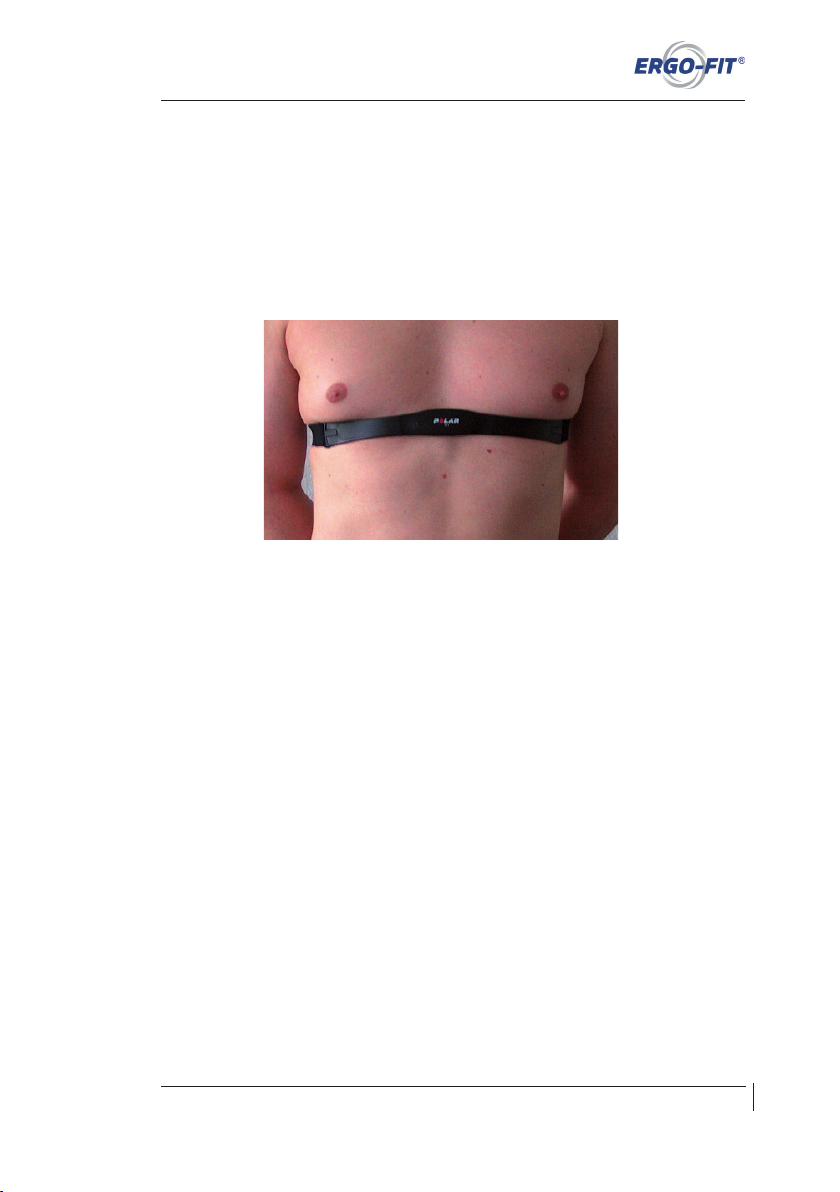
For optimal training results, we recommend controlled training by heart rate measurement. In
this regard, the POLAR sender allows for constant displaying and monitoring of the heart
rate.
Heart rate monitoring devices are tested at our factory before delivery. The displayed heart
rate is compared to the corresponding displays of a Polar heart rate monitor. Only certified
heart rate monitors and receivers are used for the test.
44
Page 51
CARDIO LINE 400/400 MED
Technical and optical modifications as well as misprints reserved - © 2018 by ERGO-FIT GmbH & Co. KG
45
7.4.1 Belt and transmitter
Wet the electrodes (the two rippled rectangular areas on the bottom side) carefully before
use. To provide optimal skin contact, you may use a contact gel as it is used in ECG
measurements. Adjust the length of the band to have a close but comfortable fit against the
skin underneath the chest muscle. The band should not loosen during exercise. Please also
make sure that the belt is fastened with the correct side up - the POLAR logo needs to be
readable correctly when looking at it. You should also make sure that the two band electrodes
are not buckled
A pulse measurement is only possible if the chest band fits correctly. Otherwise, the display
shows an „E“ on the position of the pulse indication (incorrect or no pulse transmission). In
this case, please check again the correct fit of the chest band.
The sender (the electrodes in particular) should be cleaned and dried after use with warm
water and a mild soap for hygienic reasons. Never brush the electrodes! Do not use alcohol
for cleaning!
7.4.2 Contact heart rate
CARDIO LINE 400 HOME devices provide contact heart rate measurement.
Heart rate can only be measured and displayed if both hands are on the contact heart rate
electrodes. If an „E“ is displayed instead of the heart rate the heart rate monitor does not
function correctly or it does not receive any heart rate values. Heart rate measurement is not
possible. Moisten the palms of your hand and try again.
Contact heart rate measurement might be difficult if the user has dry or rough hands or if the
contact to the electrodes is interrupted, e. g. by moving the hands.
ERGOFIT suggests telemetric heart rate measurement (POLAR belt and transmitter) for
exact values.
Page 52

Technical and optical modifications as well as misprints reserved - © 2018 by ERGO-FIT GmbH & Co. KG
Operation
46
7.4.3 Operating range of the POLAR sender
The operating range of the sender is approx. 80cm. If you have more than one ERGOFIT
exercise machine, make sure to keep a distance of at least 100 cm between them to avoid
interference of the senders.
Note: We cannot guarantee for medically correct heart rate values, but the obtained values
are a good basis for a safe workout.
7.4.4 Battery of the POLAR sender
If the heart rate transmission only works within a short distance between the sender and the
receiver or not at all after a prolonged operation, it is possible that the sender‘s battery is
depleted (the battery usually lasts for approx. 2500 hours). In this case, please send the
sender and the depleted battery to the following address.
POLAR Electro GmbH Deutschland
Am Seegraben 1
D-64572 Büttelborn/Klein-Gerau
Your sender will be returned to you with a new battery at a charge. Do not try to change the
battery yourself!
7.4.5 Potential interference
⊗ Screens, electric motors
⊗ High voltage lines (including tramway contact wires)
⊗ Fluorescent tubes in close proximity
⊗ Central heating radiators
⊗ Other electric devices (e.g. mobile phone)
The problem can usually be addressed by moving the machine a few metres away from the
source of interference. In some cases, it is sufficient to change the position of the machine
by a few degrees.
If the heart rate is displayed irregularly despite faultless technical conditions, check your
heart rate manually. In case of doubt, you should see your doctor
Page 53
CARDIO LINE 400/400 MED
Technical and optical modifications as well as misprints reserved - © 2018 by ERGO-FIT GmbH & Co. KG
47
Please note:
This owner‘s manual contains information on multiple gym machines.
There may be variations in detail according to the type of machine!
Chapter 8 Training
8.1 The effect of training ..................................................................................... 48
8.2 The effect of training ..................................................................................... 48
8.3 Strain parameters ......................................................................................... 49
8.4 Training routine - aspects to be considered .................................................. 49
8.5 Weight reduction: the benefits ...................................................................... 49
8.6 Training tips .................................................................................................. 50
Page 54

Technical and optical modifications as well as misprints reserved - © 2018 by ERGO-FIT GmbH & Co. KG
Training
8 Training
8.1 The effect of training
The demands of today‘s lifestyle in modern societies are not enough to remain in good
conditional shape. Cardiovascular diseases are still the most common cause of death.
This fact should make cardiovascular training a top priority.
All training activities during which the heart rate increases for 15 to 20 minutes or longer are
called „aerobic“.
8.2 Cardiovascular training
To get the most benefit out of your training, you should be familiar with some training
principles.
Your fitness depends to a great extent on your body‘s ability to provide your muscles with
oxygen. Oxygen is the key to the energy stored in the muscles.
Let us take a closer look at some of the factors crucial to this process: The heart and its role
as a complex pump is responsible for the smooth blood flow in the body.
Regular aerobic training will increase the heart‘s stroke volume, i.e. it will transport more
blood through your body with every beat. Accordingly, the heart works more efficiently not
only during training, but also at rest.
When oxygen enters the lungs, it will be mixed with blood in tiny „air sacs“, the socalled
alveoli. Regular aerobic training will improve the efficiency of the alveoli and thus, more
oxygen will enter the bloodstream and be transported to the muscles.
Haemoglobin is the substance of the blood that absorbs the oxygen. Regular aerobic training
will increase the part of the haemoglobin in the blood, which in turn allows your muscles to
be better supplied with oxygen.
It is a fact that heart diseases are much less common in people who train regularly.
Overall, it may be said that regular training improves the amount of oxygen supplied to the
muscles and the risk of heart disease decreases. For this reason, ERGO-FIT cardio exercise
machines are used in both gyms and rehabilitation centres.
48
Page 55
CARDIO LINE 400/400 MED
Technical and optical modifications as well as misprints reserved - © 2018 by ERGO-FIT GmbH & Co. KG
8.3 Strain parameters
The intensity of your training programme should be suitable for your heart rate. It can only be
assessed by a targeted performance evaluation. Our cardio training machines allow you to
check your heart rate constantly even during training.
If you are a training beginner, it is advisable to train in the lower part of your aerobic training
zone until your fitness begins to improve.
8.4 Training routine - aspects to be considered
If you exercise for the first time or restart training after a longer break, your training routine
should include the following stages (example):
1. Warm up: Exercise for five minutes and with little strain to prepare your body
optimally for training.
2. Stretching: Get off the exercise machine and stretch the muscle groups you are
going to target during training.
3. Main sequence: Now you are well prepared for the aerobic phase, which should
last a minimum of 15 to 20 minutes. Your target is to maintain your heart rate
continuously at the correct strain level.
8.5 Weight reduction: the benefits
Most beginners primarily wish to reduce body weight, the adipose tissue. Regular training
stimulates the metabolism, which leads to a higher burning of calories, both during training
and at rest.
Most beginners get the most aerobic benefit from a strain level of 70 % of the maximum heart
rate. Increasing fitness requires an adaptation of training intensity. However, the assumption
„The harder the training the greater the progress in fitness“ is wrong.
If a certain strain limit is exceeded, the benefits from aerobic training drop dramatically
because the body can no longer provide the muscles with oxygen and instead produces
large amounts of lactic acid, and this will make us stop training very fast.
A strain level just below the anaerobic threshold enables us to exercise substantially longer.
This way, we will burn a lot of fat and simultaneously strengthen our aerobic system
optimally.
49
Page 56

Technical and optical modifications as well as misprints reserved - © 2018 by ERGO-FIT GmbH & Co. KG
Training
8.6 Training tips
During training on our exercise machines, your heart rate should not exceed a certain upper
limit. Training in the aerobic range requires us to train below this limit. It can be set according
to a doctor‘s specifications, tests in performance diagnostics or general rules of thumb.
The heart rate upper limit is calculated using the following rule of thumb:
180 - age = Heart rate upper limit
As an example, a 50-year-old man would have a maximum heart rate of 130 beats per
minute and a 30-year-old person of 150 bpm etc.
50
Page 57
CARDIO LINE 400/400 MED
Technical and optical modifications as well as misprints reserved - © 2018 by ERGO-FIT GmbH & Co. KG
51
Please note:
This owner‘s manual contains information on multiple gym machines.
There may be variations in detail according to the type of machine!
Chapter 9 Maintenance
9.1 Care and maintenance ................................................................................. 52
9.2 Cleaning ........................................................................................................ 53
Page 58
Technical and optical modifications as well as misprints reserved - © 2018 by ERGO-FIT GmbH & Co. KG
Maintenance
9 Maintenance
All exercise machines used for commercial purposes need to undergo regular a safety
inspection/maintenance test.
Regular, thorough care and appropriate maintenance in particular contribute to preserve the
value and lifetime of your exercise machine. For this reason, we recommend regular
preventive maintenance. Once per week, inspect the casing, seat and its guiding, handlebar
and pedals for damage. In case of a damage, have it repaired immediately. These regular
inspections are essential for compliance in case of guarantee claims. In case of a malfunction,
ERGO-FIT‘s technicians and engineers are pleased to assist you.
Before switching on the machines, always make sure that mains cable, mains plug, mains
socket and power connection units are free from defects.
Immediate maintenance works are to be carried out if:
⊗ the machine has undergone extreme mechanical stress (impact, damaged cable, or
inappropriate tensile strain),
⊗ liquid has entered the machine,
⊗ cables, plug-in connectors or casings are damaged,
⊗ covers have dropped.
Maintenance of the machine may be carried out by ERGO-FIT‘s customer service department.
A maintenance contract may be concluded also.
9.1 Care and maintenance
During manufacturing of its training machines, ERGO-FIT makes every effort to reduce future
maintenance.
In the following chapters, some of the maintenance and verifications are described. You
should carry out these tasks regularly.
Switch off and unplug the machine before any maintenance is carried out or the machine is
opened.
When carrying out maintenance, consider the following:
⊗ This machine requires very little maintenance.
⊗ Moving parts need no further oiling or greasing.
⊗ Once per week, inspect the seat, the handlebar, the pedals, and the casing for
damage. If the machine is damaged, have it repaired immediately
52
Page 59
CARDIO LINE 400/400 MED
Technical and optical modifications as well as misprints reserved - © 2018 by ERGO-FIT GmbH & Co. KG
Treadle
⊗ As screws tend to loosen over time, you should check the treadles and pedals after
3 to 5 operational hours for the first time, then every month. Note that the left pedal
has a left-handed thread and the right pedal has a right handed thread.
⊗ If a treadle loosens, screw it on again tightly immediately. To do this, remove the
black cap from the crankshaft and retighten the screw underneath with a 14 mm
(1/4 inch) socket wrench. The pedal can be retightened to the crankshaft with a 15
mm open-end wrench.
9.2 Cleaning
Sweat, dust particles and dirt will damage your exercise machine. This can be observed after
only a few weeks. Metal and aluminium parts of your machine may alter its surfaces in
combination with sweat. For this reason, you should clean your machine daily.
To clean your exercise machine we recommend disinfectant „Ecolab P3-steril“ or „Scarabig“.
This product is available at:
Ecolab Deutschland GmbH
Reisholzer Werftstraße 38-42
Postfach 13 04 06
D-40554 Düsseldorf
www.ecolab.com
SCARAPHARM chem.-pharm. Produkte GmbH
Wachmannstraße 86
D-28209 Bremen
www.scarapharm.de
During cleaning, consider the following aspects:
⊗ Make sure to disconnect the mains plug before cleaning your machine.
⊗ Clean your machine with a damp cloth, mild cleaning agent or soap suds only
and dry it with a soft cloth.
⊗ Avoid any oiling or greasing of the machine‘s outside.
53
Page 60

Technical and optical modifications as well as misprints reserved - © 2018 by ERGO-FIT GmbH & Co. KG
Maintenance
54
Page 61
CARDIO LINE 400/400 MED
Technical and optical modifications as well as misprints reserved - © 2018 by ERGO-FIT GmbH & Co. KG
55
Please note:
This owner‘s manual contains information on multiple gym machines.
There may be variations in detail according to the type of machine!
Chapter 10 Troubleshooting
10.1 Identifying the cause of failure ...................................................................... 56
Page 62
Technical and optical modifications as well as misprints reserved - © 2018 by ERGO-FIT GmbH & Co. KG
Troubleshooting
10 Troubleshooting
Despite the high quality of our ERGO-FIT products, occasional disturbances might occur in
rare cases. The target of this chapter is to inform you of the possible causes of these
disturbances and to give you the possibility to avoid them. If you assume a technical defect,
the machine must no longer be used for safety reasons. If you cleared a defect yourself, it
would be very helpful for us if you communicate this defect to us immediately. This allows us
to record the failure in the model‘s documentation file, and this in turn allows for quality
improvement.
For safety reasons, unplug the machine before any work is carried out or the machine is
opened!
10.1 Identifying the cause of failure
Malfunctions often have a simple cause. However, defective components are sometimes at
fault. This chapter provides you with guidelines to resolve possible problems. If the
recommendations listed are not successful, please contact our service department
immediately. Our service team will be pleased to help you.
Please proceed as follows in case of failure:
⊗ The fuse box is located on the machine‘s power input module. Pull out the fuse box
and check if a fuse is defective (CARDIO LINE 400 MED).
⊗ Did you use an extension cable or a multi-outlet power strip? Always connect your
machine directly to the mains socket.
⊗ Check the mains socket. Plug in a different electric device to check the mains
socket.
⊗ Pull the mains plug out of the mains socket and visually inspect the mains cable.
⊗ Write down this message immediately after the appearance of the error message.
⊗ Assess the frequency of this error. If yes: when and how often does the error
occur?
⊗ Check if more electric devices were connected in parallel. If so, which?
⊗ Check if a button has been pressed when the error message was displayed.
⊗ If you were not present when the error message was displayed, ask the user about
the exact progress of events.
⊗ If an error message appears on the display, please ask our service team
56
The machine does not work (no audible sound when switching on, blank display
An error message appears on the display
Page 63
CARDIO LINE 400/400 MED
Technical and optical modifications as well as misprints reserved - © 2018 by ERGO-FIT GmbH & Co. KG
57
Please note:
This owner‘s manual contains information on multiple gym machines.
There may be variations in detail according to the type of machine!
Chapter A Appendix
A.1 Customer service .......................................................................................... 58
A.2 Spare parts ................................................................................................... 58
A.3 Technical specifications ................................................................................ 58
A.3.1 CARDIO LINE 400 ........................................................................................ 59
A.3.2 CARDIO LINE 400 MED ............................................................................... 60
A.4 Electromagnetic interference imunity ............................................................ 61
A.5 Safety regulations ......................................................................................... 64
A.5.1 Safety instructiones ...................................................................................... 64
A.5.2 Mark of conformity ........................................................................................ 65
A.5.3 Pictographs ................................................................................................... 66
A.6 Error margins ................................................................................................ 67
A.7 Test evaluation .............................................................................................. 68
A.8 Warranty clauses .......................................................................................... 69
A.9 Entry in the registry of medical devices ........................................................ 71
Safety information ......................................................................................... 75
Page 64

Technical and optical modifications as well as misprints reserved - © 2018 by ERGO-FIT GmbH & Co. KG
Appendix
A Appendix
A.1 Customer service
If you cannot correct a malfunction yourself, please get in touch with our customer service.
Service: Phone: +49 (6331) 2461-20 international
+49 (6331) 2461-45 international
+49 (6331) 2461-23 national
+49 (6331) 2461-27 national
+49 (6331) 2461-29 national
Fax: +49 (6331) 2461-55
E-Mail: [email protected]
Repairs of ERGO-FIT machines are carried out by highly qualified and competent service
technicians. Only original spare parts are used for repairs.
A.2 Spare parts
Spar e parts and curren t e xploded view s are avail able from E RGO- FIT‘s service
department:
Service: Phone: +49 (6331) 2461-20 international
+49 (6331) 2461-45 international
+49 (6331) 2461-23 national
+49 (6331) 2461-27 national
+49 (6331) 2461-29 national
Fax: +49 (6331) 2461-55
E-Mail: [email protected]
When ordering, please provide the following information:
⊗ Model
⊗ Serial number
⊗ Name of the spare part
⊗ Number of the spare part
A.3 Technical specifications
This chapter provides the technical specifications for your cardio exercise machine. The
specifications are listed in separate charts for each model of the CARDIO LINE 400 series.
58
Page 65
CARDIO LINE 400/400 MED
Technical and optical modifications as well as misprints reserved - © 2018 by ERGO-FIT GmbH & Co. KG
Model CYCLE 400 CYCLE 450
Supply voltage
48-60 Hz
220 - 240 V ~ 220 - 240 V ~
Safety standard DIN EN 60335-1 DIN EN 60335-1
Device standard EN 957 HA EN 957 HA
Protection class II II
Tested for use in Home use Home use
Accuracy 10%, EN 957 HA 10%, EN 957 HA
Brake system Eddy current brake Eddy current brake
Moment of internia 11 +/- 2kg.m² 11 +/- 2kg.m²
Dimensions in cm (L/B/H) 120/62/140 120/62/140
Weight approx. 49 kg approx. 49 kg
Speed range 20 - 120 I/min 20 - 120 I/min
Power range 0 - 400 W 0 - 400 W
Steps 5 W 5 W
Trainig programmes MANUAL, PROFILES,
CARDIO, GEARSHIFT
MANUAL, PROFILES,
CARDIO, GEARSHIFT
Test programmes - PWC 130, PWC 150 and
PWC 170
Display parameters WATT, PULSE, TIME,
KM/H, DIST., I/MIN, KCAL
WATT, PULSE, TIME,
KM/H, DIST., I/MIN, KCAL
POLAR heart rate
measuring
1 channel, acuracy of ECG 1 channel, acuracy of ECG
Heart rate dependent
strain control
with POLAR sender or
hand pulse
with POLAR sender or
hand pulse
Activation rpm-dependent rpm-dependent
Max. body weight 180 kg 180 kg
Interfaces - -
59
A.3.1 CARDIO LINE 400
Page 66
Technical and optical modifications as well as misprints reserved - © 2018 by ERGO-FIT GmbH & Co. KG
Appendix
60
Model CYCLE 407 MED CYCLE 457 MED
Supply voltage
48-60 Hz
220 - 240 V ~ 220 - 240 V ~
Safety standard DIN EN 60601-1 DIN EN 60601-1
Device standard DIN VDE 750-238 DIN VDE 750-238
Protection class I I
Tested for use in Medical therapy Medical therapy
Accuracy 5%, DIN VDE 750-238 5%, DIN VDE 750-238
Brake system Eddy current brake Eddy current brake
Moment of internia 11 +/- 2kg.m² 11 +/- 2kg.m²
Dimensions in cm (L/B/H) 120/60/140 120/60/140
Weight approx. 49 kg approx. 49 kg
Speed range 20 - 120 I/min 20 - 120 I/min
Power range 0 - 400 W 0 - 400 W
Steps 5 W 5 W
Trainig programmes MANUAL, PROFILES,
CARDIO, COUNTDOWN
MANUAL, PROFILES,
WHO-PROFILES, TEST,
CARDIO, COUNTDOWN,
ECG SELECT
Test programmes - PWC 130, PWC 150 und-
PWC 170
Display parameters WATT, PULSE, TIME,
KM/H, DIST., I/MIN, KCAL
WATT, PULSE, TIME,
KM/H, DIST., I/MIN, KCAL
POLAR heart rate
measuring
1 channel, acuracy of ECG 1 channel, acuracy of ECG
Heart rate dependent
strain control
with POLAR sender with POLAR sender
Activation rpm-independent rpm-independent
Max. body weight 180 kg 180 kg
Interfaces - RS 232
A.3.2 CARDIO LINE 400 MED
Page 67
CARDIO LINE 400/400 MED
Technical and optical modifications as well as misprints reserved - © 2018 by ERGO-FIT GmbH & Co. KG
61
A.4 Electromagnetic transmission and interference immunity
Electromagnetic transmission
Products made by ERGO-FIT are designed for use in the environments listed below. Please
make sure to use the product in the appropriate environment.
Measurement of
emitteed interference
Compli-
ance
Electromagnetic enivronment
HF emission in
compliance with
CISPR 11
Group 1 The product uses HF energy for internal function
only. For this reason, HF emission is very low
and therefore, interference with adjacent electronic devices is unlikely.
HF emission in
compliance with
CISPR 11
Class B
Emission of harmonics
in compliance with
IEC 61000-3-2
not
applicable
Emission of harmonics
in compliance with
IEC 61000-3-3
not
applicabler
Electromagnetic interference immunity for non-life support devices
Products made by ERGO-FIT are designed for use in the environments listed below. Please
make sure to use the product in the appropriate environment.
Interference immunity
test
IEC 60601-
test level
Compliance
level
Electromagnetic
enivronment
Conducted HF disturbance
in compliance with
IEC 6100-4-6
3 Veff
150 kHz to 80 MHz
3
Conducted HF disturbance
in compliance with
IEC 6100-4-3
3 V/m
80 MHz to 2,5 GHz
3
Page 68
Technical and optical modifications as well as misprints reserved - © 2018 by ERGO-FIT GmbH & Co. KG
Appendix
62
Electromagnetic interference immunity CARDIO LINE 400/400 MED
Products made by ERGO-FIT are designed for use in the environments listed below. Please
make sure to use the product in the appropriate environment.
Inerference immunity
test
IEC 60601
test level
Compliance
level
Electromagnetic
environment
Discharge of static
electricity in comliance
with IEC 61000-4-2
+/- 6 kV
contact
discharge
+/- 8 kV
air discharge
6 kV
8 kV
Floors should be made
of wood, concrete or laid
with ceramic tiles. If the
fl oor is laid with synthetic
materials, the relative
humidity must be greater
than 30 %.
Electrical fast transient
bursts in compliance
with IEC 61000-4-4
+/- 2 kV
for mains
cable
+/- 1 kV for lead
in and lead out
The quality of the supply
voltage should conform
to a typical business or
hospital environment.
Surge voltages in
compliance with
IEC 61000-4-5
+/- 1 kV
opposedmode
voltage
+/- 2 kV
common voltage
The quality of the supply
voltage should conform
to a typical business or
hospital environment.
Voltage dips, shortterm
loss and fl uctuations of
the supply voltage in
compliance with
IEC 61000-4-11
The quality of the supply
voltage should conform
to a typical business or
hospital environment.
Magnetic fi eld induced
by supply frequency
(50/60 Hz) in compliance with
IEC 61000-4-8
The magnetic fi elds
induced by the supply
frequency should conform
to typical values as they
can be found in a typical
business or hospital environment
Page 69
CARDIO LINE 400/400 MED
Technical and optical modifications as well as misprints reserved - © 2018 by ERGO-FIT GmbH & Co. KG
63
Reco mmended protectiv e distances betw een portable as well as mobile HF
telecommunication devices and the ERGO-FIT product
Products made by ERGO-FIT are designed for operation in an electromagnetic environment
where HF disturbances are controlled. To avoid electromagnetic interference, make sure to
maintain the minimum distance between portable as well as mobile HF telecommunication
devices and the ERGO-FIT product - depending on the output power - as indicated below.
Power output of
the sender / W
Protective distance depending on transmission frequency / m
150 kHz to 80 MHz
d = 3,5/V1*sqrtP
80 MHz to 800 MHz
d = 3,5/E1*sqrtP
800 MHz to 2,5 GHz
d = 7/E1*sqrtP
0,01 0,12 0,12 0,23
0,1 0,37 0,37 0,74
1 1,17 1,17 2,33
10 3,69 3,69 7,38
100 11,67 11,67 23,33
For senders whose maximum nominal output is not listed in the table shown above, the
recommended protective distance d (in metres) may be calculated by using the equation
belonging to the respective column, whereas P is the maximum nominal output of the sender
(in Watts) indicated by the manufacturer of the sender.
Please note:
⊗ With 80 MHz and 800 MHz, the higher frequency range is applied.
⊗ These guidelines may not be applicable in al l cases. The propagation of
electromagnetic parameters is influenced by absorption and reflection of buildings,
objects and persons.
Page 70
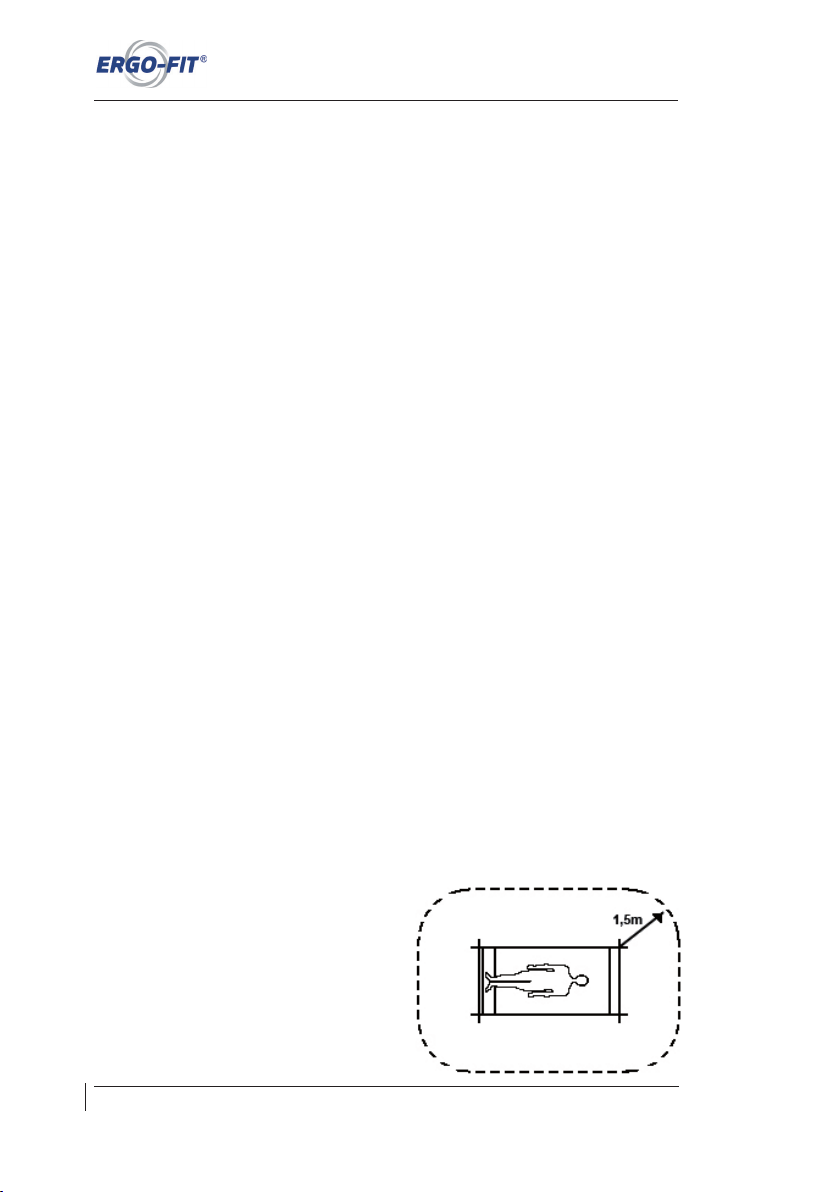
Technical and optical modifications as well as misprints reserved - © 2018 by ERGO-FIT GmbH & Co. KG
Appendix
64
A.5 Safety regulations
A.5.1 Safety instructions
To protect the user, the Verband Deutscher Elektrotechniker e.V. (VDE, German electrical
engineering technician association) published special instructions for electromedical devices
and rooms used for medical purposes.
According to these instructions, devices connected to the grid must be equipped not only with
a reliable insulation of live parts but also with an additional protective measure to protect the
user against the transfer of the supply voltage to touchable metal parts. For this purpose,
VDE subdivides so-called protection classes.
Of the protection classes allowed for electromedical devices, in most cases protection class
I (protective measures with protective earth conductor) as well as protection class II
(protective measures without protective earth conductor but double insulation) are used:
In protection class I devices, metal casing parts are connected with the protective earth
conductor of the grid through its earthing contact. In case of insulation failure, the upstream
circuit breaker will close the circuit.
The CYCLE models of the CARDIO LINE 400 are classified as protection class II devices.
The CYCLE models of the CARDIO LINE 400 MED are classified as protection class I
devices.
In the user‘s environment, parts of non-medical electric devices, which are touchable after
removing covers, connection devices etc. during routine maintenance, must operate with a
tension not exceeding 25 Volts of alternating current or 60 Volts of direct current. In addition,
the tension of the power supply must be produced by a separate power source as described
in IEC 601-1.
In this case, such a part of the device and the user must not be touched simultaneously.
The use of electromedical devices is restricted to safety-relevant innocuousness taking
account of the state of the art, health and safety regulations and accident prevention.
Protective measures must be taken to avoid both direct and indirect contact. Covers,
coatings, insulation of energized parts in combination with protective measures using
protective earth conductors (in compliance with protection class I), melting fuses as well as
the observation of distances between devices
are all part of this.
The distance to be maintained is 1.5 metres as
a practical value. With this distance, t wo
train ing devic es cannot be conn ected
conductively by a person and it is unlikely that
users will receive an electric shock while
training.
Page 71
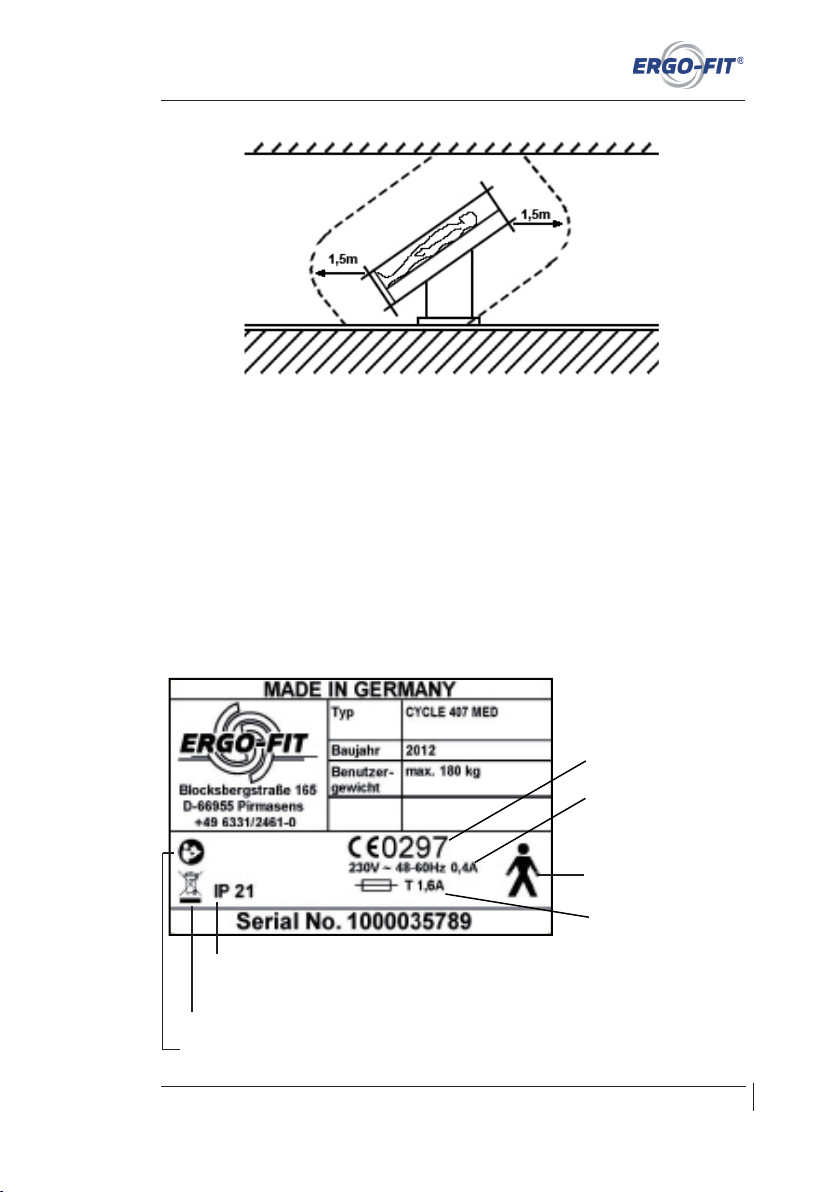
CARDIO LINE 400/400 MED
Technical and optical modifications as well as misprints reserved - © 2018 by ERGO-FIT GmbH & Co. KG
65
The instructions given in this chapter refer to the safety model as it is recognised in Germany.
These instructions may vary in other countries.
A.5.2 Mark of conformity
ERGO-FIT CARDIO LINE 400 MED devices are manufactured under the strictest safety and
quality control measures. They are designed for commercial use. CARDIO LINE 400 HOME
devices are approved for home use. Please refer to the declarations of conformity concerning
the applied standards and guidelines (please contact the ERGO-FIT team).
The type label on the device contains the information as shown in the drawing below
(example taken from CYCLE 407 MED):
Fuse model
Mains supply values
CE mark
(for medical devices)
Type B
Contact protection: with finger Foreign matter protection:
medium-sized objects (diameter greater than 12.5mm)
Water protection: Water dripping vertically
Electrical waste
Please note user manual
Page 72
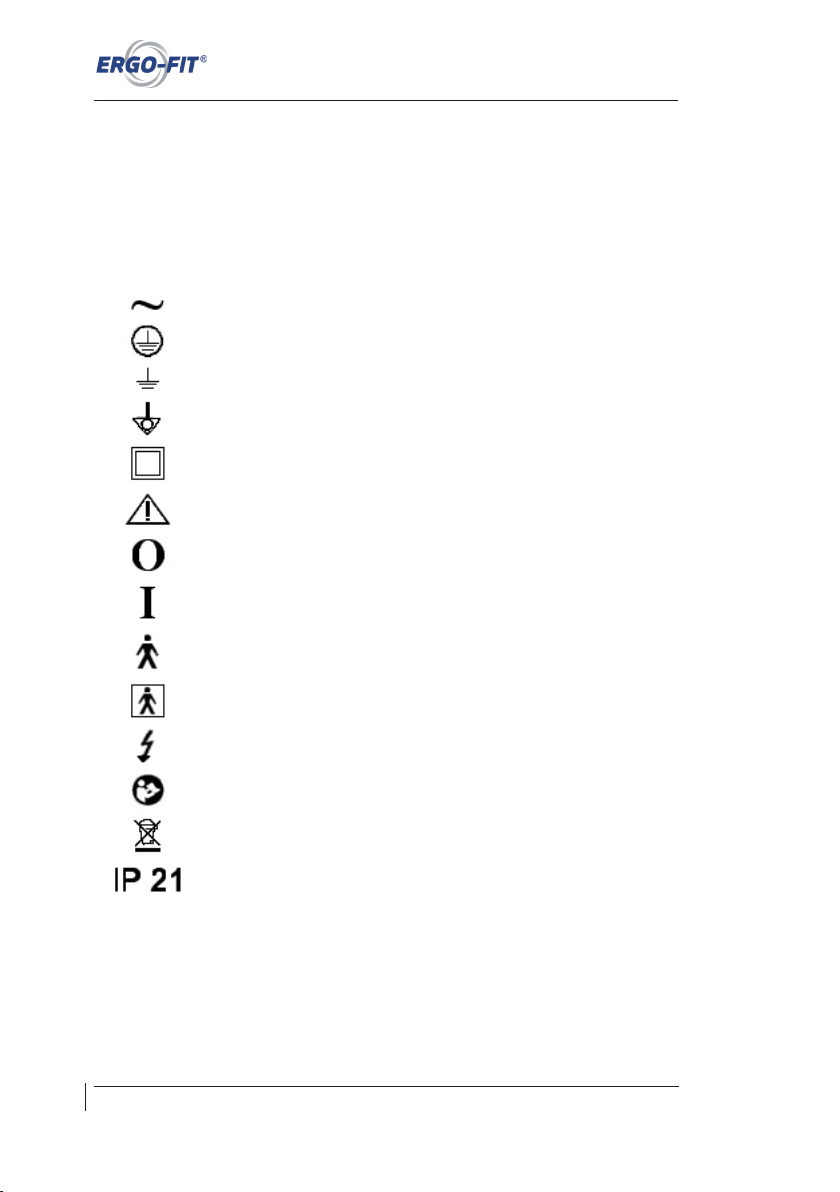
Technical and optical modifications as well as misprints reserved - © 2018 by ERGO-FIT GmbH & Co. KG
Appendix
66
A.5.3 Pictographs
The pictographs used on ERGO-FIT devices comply with the standards IEC 417 and
IEC 878.
The following pictographs are used:
Alternating current
Earthing terminal
Earthing
Potential compensation
Devives of protection class II
Danger! See accompanying documents
OFF (Power supply, connection with the grid)
ON (Power supply, connection with the grid)
Device of type B
Device of type BF
Dangerous electric tension
Please note user manual
Electrical waste
Contact protection: with finger
Foreign matter protection: medium-sized objects (diameter greater than 12.5 mm)
Water protection: Water dripping vertically
Page 73
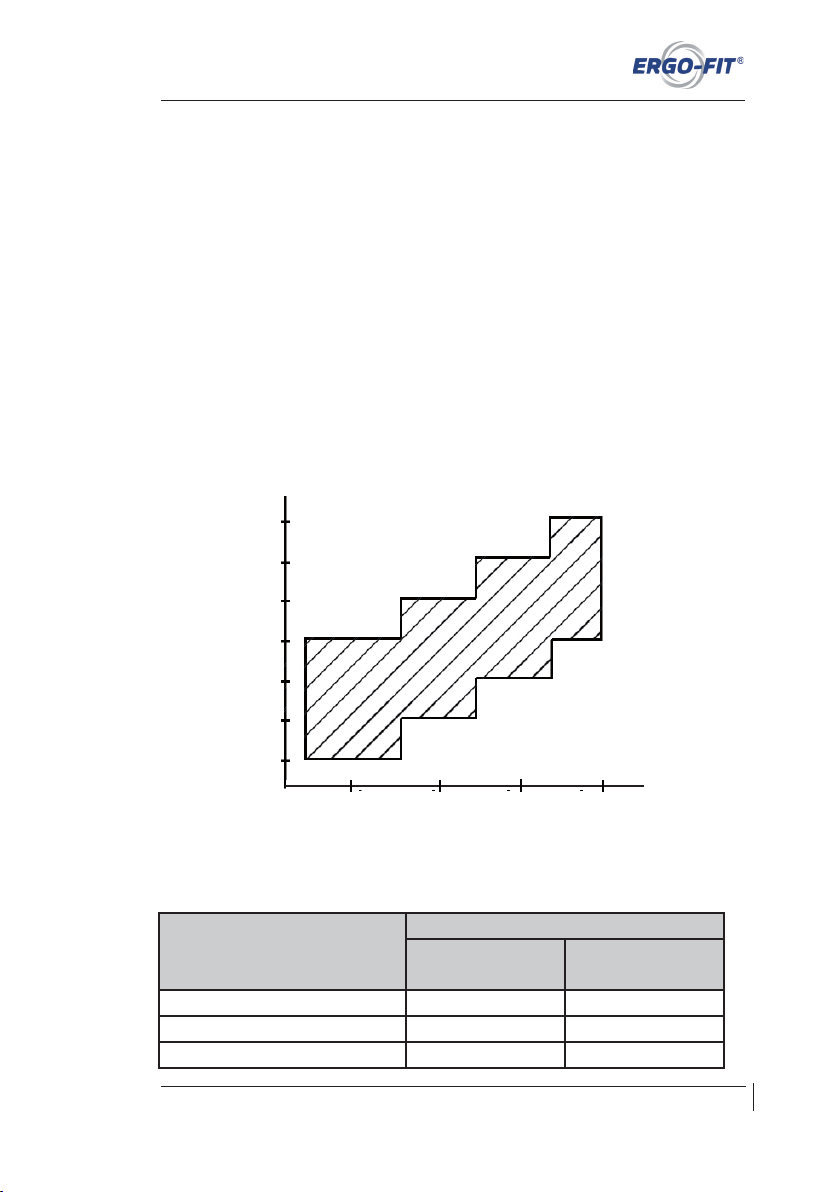
CARDIO LINE 400/400 MED
Technical and optical modifications as well as misprints reserved - © 2018 by ERGO-FIT GmbH & Co. KG
67
A.6 Error margins
The following error margins are valid for the CYCLE models of the CARDIO LINE 400 MED
series in compliance with the standard DIN VDE 750-238:
1. DThe read-out error of the wattage p must not exceed ± 5% of the displayed value.
However, the read-out error is not required to fall below ± 3W.
2. The read-out error of the rotational speed n is set to a maximum of ± 2 min-1 above
40 min-1.
3. DThe measuring device to assess the output calculated on the base of deceleration
torque and the rotational speed of the treadle ergometer must not exceed an error
margin of 1 %.
The characteristic curve family of the deceleration torque control‘s work capacity can be
assessed from the following figure:
The work capacity is shown on the display as follows:
As shown right to the rotational
speed (CYLCE 450/457)
As shown right/left to the rotational
speed (CYCLE 400/407)
Devices in compliance with
VDE 750-238 EN 957
none 5% range 10% range
Points 10% range 10% range
Arrows Deviation > 10% Deviation > 10%
Rotational speed
40 50 60 70 80 90 100
100 200 300 400
Power
Page 74
Technical and optical modifications as well as misprints reserved - © 2018 by ERGO-FIT GmbH & Co. KG
Appendix
68
A.7 Test evaluation
f
0,32
0,64
0,97
1,29
1,61
1,93
2,26
2,58
2,90
3,22
3,54
3,87
4,19
4,51
4,83
5,16
5,48
m
0,39
0,78
1,17
1,56
1,94
2,33
2,72
3,11
3,50
3,89
4,28
4,67
5,06
5,44
5,83
6,22
6,61
7,00
PWC 170
1
2
3
4
5
6
7
8
9
10
11
12
13
14
15
16
17
18
f
0,27
0,53
0,80
1,07
1,33
1,60
1,87
2,13
2,40
2,67
2,93
3,20
3,47
3,73
4,00
4,27
4,53
4,80
m
0,33
0,67
1,00
1,33
1,67
2,00
2,33
2,67
3,00
3,33
3,67
4,00
4,33
4,67
5,00
5,33
5,67
6,00
PWC 150
1
2
3
4
5
6
7
8
9
10
11
12
13
14
15
16
17
18
f
0,21
0,42
0,63
0,84
1,07
1,27
1,48
1,69
1,90
2,11
2,32
2,53
2,74
2,96
3,17
3,38
3,59
3,80
m
0,27
0,53
0,80
1,07
1,33
1,60
1,87
2,13
2,40
2,67
2,93
3,20
3,47
3,73
4,00
4,27
4,53
4,80
PWC 130
1
2
3
4
5
6
7
8
9
10
11
12
13
14
15
16
17
18
5,80
The classification in fitness level 9 corresponds to a „very good“ fitness. An Olympic champion
would have a fitness level of 18.
Page 75
CARDIO LINE 400/400 MED
Technical and optical modifications as well as misprints reserved - © 2018 by ERGO-FIT GmbH & Co. KG
69
A.8 Warranty clauses
Warranty of 2 years (see general terms an conditions, point 8.1 guarantee „ERGO-FIT grants 2 years guarantee
for its own products. In the first year the travel expenses and occurring working hours within Germany are borne in
addition to the spare parts. In the second year only the spare parts. For merchandise the guarantee provisions of the
respective manufacturer apply accordingly“)
The seller shall be liable, to the exclusion of other liability, for deficiencies of the delivery, of
which the absence of expressly affirmed properties is part, as follows:
1. All parts that are found to be unusable or restricted in use in consequence of a
circumstance dated before the transfer of risk - notably because of faulty design,
bad manufacturing material or faulty workmanship - shall be repaired or replaced
during a period of 24 months after delivery. The decision if the fault will be repaired
or should be replaced will be at the seller‘s discretion. The supplier shall only be
liable for deficiencies of drawings and materials delivered or chosen by the seller if
he would have been able to recognise the deficiency when applying professional
accuracy unless the seller notified the purchaser of the recognised deficiency
immediately.
2. The purchaser‘s right to claim ends in all cases after 24 months after transfer of the
object.
3. No guarantee shall be assumed for damage as a result of inappropriate or improper
use, faulty assembly or faulty startup carried out by the purchaser or a third party,
natural wear, faulty or careless handling, inappropriate equipment or exchange
work material, faulty construction works, chemical, electrochemical or electric
influences, except in the event that they can be traced to the fault of the seller. The
purchaser will assume all risks in connection with the delivery, even in case of free
freight ex-factory.
4. Initially, the seller has the right to two rectifications or replacements. Should these
fail, the purchaser has the right of abatement or rescission within the scope of valid
legislation. The seller will have a period of six weeks as from communicating the
notice of defect for rectification.
5. Improper modifications or repairs carried out on behalf of the purchaser or a third
party without prior permission of the seller will abrogate warranty claims.
6. If goods are exported, warranty will be restricted to the availability of loose spare
parts ex-factory within the warranty period. Packing costs, freight charge and labour
will be at the expense of the purchaser. In case the purchaser demands on-site
repair by a technician of the factory or another service address, the purchaser will
assume the costs of travelling expenses and labour.
7. All merchandise that has not been produced by the seller is subject to legal
provisions.
Page 76

Technical and optical modifications as well as misprints reserved - © 2018 by ERGO-FIT GmbH & Co. KG
Appendix
70
Wear parts are excluded from warranty specifications, e.g.:
⊗ pedal string
⊗ handle bar tube
⊗ seat
⊗ toothed belt
⊗ chains
⊗ lever to fasten the handle bar
⊗ pedals
⊗ seat, tread, handle bars
⊗ fuses
⊗ freewheel
The warranty is voided if maintenance instructions are not observed!
Page 77
CARDIO LINE 400/400 MED
Technical and optical modifications as well as misprints reserved - © 2018 by ERGO-FIT GmbH & Co. KG
71
A.9 Entry in the Registry of medical devices
In compliance with Art. 11 para. 7 and Art. 7 of the regulation on the erection, operation, and use of medical devices
(„MPBetrei bV“) as of June 29, 1998 (B GBt 1. p. 1762), the pers on who carries out me trological controls must
immediately record the measured values, the measuring method, as well as other evaluation results into the registry
of medical devices. As during metrological control of your medical device the registry of medi cal devices was not
available, we ask you to use the following data for your documentation.
Operator:
Company: __________________________________________
Contact person: __________________________________________
Street: __________________________________________
Post code, place: __________________________________________
Manufacturer:
ERGO-FIT GmbH & Co. KG, Blocksbergstraße 165, D-66955 Pirmasens
Device identification
Device designation: ___________________________________________
Model: ___________________________________________
Serial number: ___________________________________________
___________________________________________
Measuring method and evaluation:
� Leitfaden zu messtechnischen Kontrollen (LMK)
� Appendix 15 or appendix 23 of calibration regulations (EQ 15 or EQ 23)
� Remarks: _________________________________________
Applied perpendicular: ________________________________
Entry of measured results: see following page(s)
� metrological control o.k.; annual designation of sealing:
� metrological control not o.k.; old sealing oliterated
_______________________________
Signature
Page 78

Technical and optical modifications as well as misprints reserved - © 2018 by ERGO-FIT GmbH & Co. KG
Appendix
72
Measuring method and evaluation:
� Leitfaden zu messtechnischen Kontrollen (LMK)
� Appendix 15 or appendix 23 of calibration regulations (EQ 15 or EQ 23)
� Remarks: _________________________________________
Applied perpendicular: ________________________________
Entry of measured results: see following page(s)
� metrological control o.k.; annual designation of sealing:
� metrological control not o.k.; old sealing oliterated
_______________________________
Signature
________________________________________________________________________
Measuring method and evaluation:
� Leitfaden zu messtechnischen Kontrollen (LMK)
� Appendix 15 or appendix 23 of calibration regulations (EQ 15 or EQ 23)
� Remarks: _________________________________________
Applied perpendicular: ________________________________
Entry of measured results: see following page(s)
� metrological control o.k.; annual designation of sealing:
� metrological control not o.k.; old sealing oliterated
_______________________________
Signature
Page 79
CARDIO LINE 400/400 MED
Technical and optical modifications as well as misprints reserved - © 2018 by ERGO-FIT GmbH & Co. KG
73
Registration of medical devices add-in card
Operator: __________________________________________
__________________________________________
__________________________________________
1. Designation of the medical device:
_________________________________________________________________
2. Functional test and introduction:
Functional test carried out
on: ________________ by: __________________________________________
Introduction carried out
on: ________________ by: __________________________________________
Introduced person: ____________________________________________
____________________________________________
____________________________________________
3. Metrological inspection: at least every two years
Next inspection: ___________________________________________________
by (person‘s name: ________________________________________________
4. Safety inspection/maintenance test: recommendation every 12 months
Next inspection: ___________________________________________________
by (person‘s name: ________________________________________________
5. Date, type and consequence of the defect and repeated identical operating fault:
_________________________________________________________________
_________________________________________________________________
_________________________________________________________________
6. Reports of incidents to authorities and manufacturer:
_________________________________________________________________
_________________________________________________________________
Page 80

Page 81
CARDIO LINE 400/400 MED
Technical and optical modifications as well as misprints reserved - © 2018 by ERGO-FIT GmbH & Co. KG
75
Safety indications
CARDIO LINE 400
⊗ Do not start the machine before carefully reading the owner‘s manual.
⊗ Check the power connection before training.
⊗ Never use the device without current and only use after a proper functional test.
⊗ Switch off the machine after training and disconnect it from the grid.
⊗ Wear only appropriate sportswear and footwear during training.
⊗ Never lean on the control panel or the casing and make improper movements.
⊗ Never start training with the maximum strain. Increase its intensity slowly.
⊗ Check if the seat is secured in position before getting on the machine.
⊗ Do not lean over the handlebar and do not shift your body weight over the side of
the machine. There is a danger of falling over.
⊗ Children must not use the machine unsupervised and must stay away from the
machine and moving parts.
⊗ In case of nausea or dizziness, you should stop training immediately, inform the
fitness coach and / or see a doctor.
⊗ If you have a cardiac pace maker or a health condition, see your doctor before using
the training machine.
⊗ Do not jump from the training machine during your workout.
⊗ Do not take your feet off the pedals during training.
⊗ Once per week, check the moving parts and the casing for damage. If the machine
is damaged, have it repaired immediately.
⊗ The ventilation slots must not be covered. This can cause the machine to
overheat.
⊗ Only use the machine for the purposes it is designed for.
⊗ Please consider further safety and operational notices in the manual.
All safety instructions in this manual are based on many years of experience and
selfconception.
These safety precautions must be displayed where they are visible from the exercise
machine! ll users of the machine must inform themselves of the dangers and safety
regulations. The manufacturer will not be liable for personal injury or material damage.
Page 82

Technical and optical modifications as well as misprints reserved - © 2018 by ERGO-FIT GmbH & Co. KG
Appendix
76
Safety indications
CARDIO LINE 400 MED
⊗ Do not start the machine before carefully reading the owner‘s manual.
⊗ Check the power connection before training.
⊗ Never use the device without current and use only after a proper functional test.
⊗ The machine is only to be used after consulting a doctor and / or a supervisor. The
machine must not be used without the presence of a supervisor.
⊗ Switch off the machine after training and disconnect it from the grid.
⊗ Wear only appropriate sportswear and footwear during training.
⊗ Never lean on the control panel or the casing and make improper movements.
⊗ Never start training with the maximum strain. Increase its intensity slowly.
⊗ Check if the seat is secured in position before getting on the machine.
⊗ Do not lean over the handlebar and do not shift your body weight over the side of
the machine. There is a danger of falling over.
⊗ Children must not use the machine unsupervised and must stay away from the
machine and moving parts.
⊗ In case of nausea or dizziness, you should stop training immediately, inform the
fitness coach and / or see a doctor.
⊗ If you have a cardiac pace maker or a health condition, see your doctor before using
the training machine.
⊗ Do not jump from the training machine during your workout.
⊗ Do not take your feet off the pedals during training.
⊗ Once per week, check the moving parts and the casing for damage. If the machine
is damaged, have it repaired immediately.
⊗ The ventilation slots must not be covered. This can cause the machine to
overheat.
⊗ Only use the machine for the purposes it is designed for.
⊗ Please consider further safety and operational notices in the manual.
All safety instructions in this manual are based on many years of experience and
selfconception.
These safety precautions must be displayed where they are visible from the exercise
machine! ll users of the machine must inform themselves of the dangers and safety
regulations. The manufacturer will not be liable for personal injury or material damage.
Page 83

Page 84
ERGO-FIT GmbH & Co. KG
Blocksbergstraße 165 – D-66955 Pirmasens
Phone: +49 (6331) 2461-0 – Fax: +49 (6331) 2461-55
info@ergo-fi t.de – www.ergo-fi t.de
Version: CARDIO LINE 400-20180601-en • Technical and optical modifications as well as misprints reserved • Printed in Germany
 Loading...