

Page 1
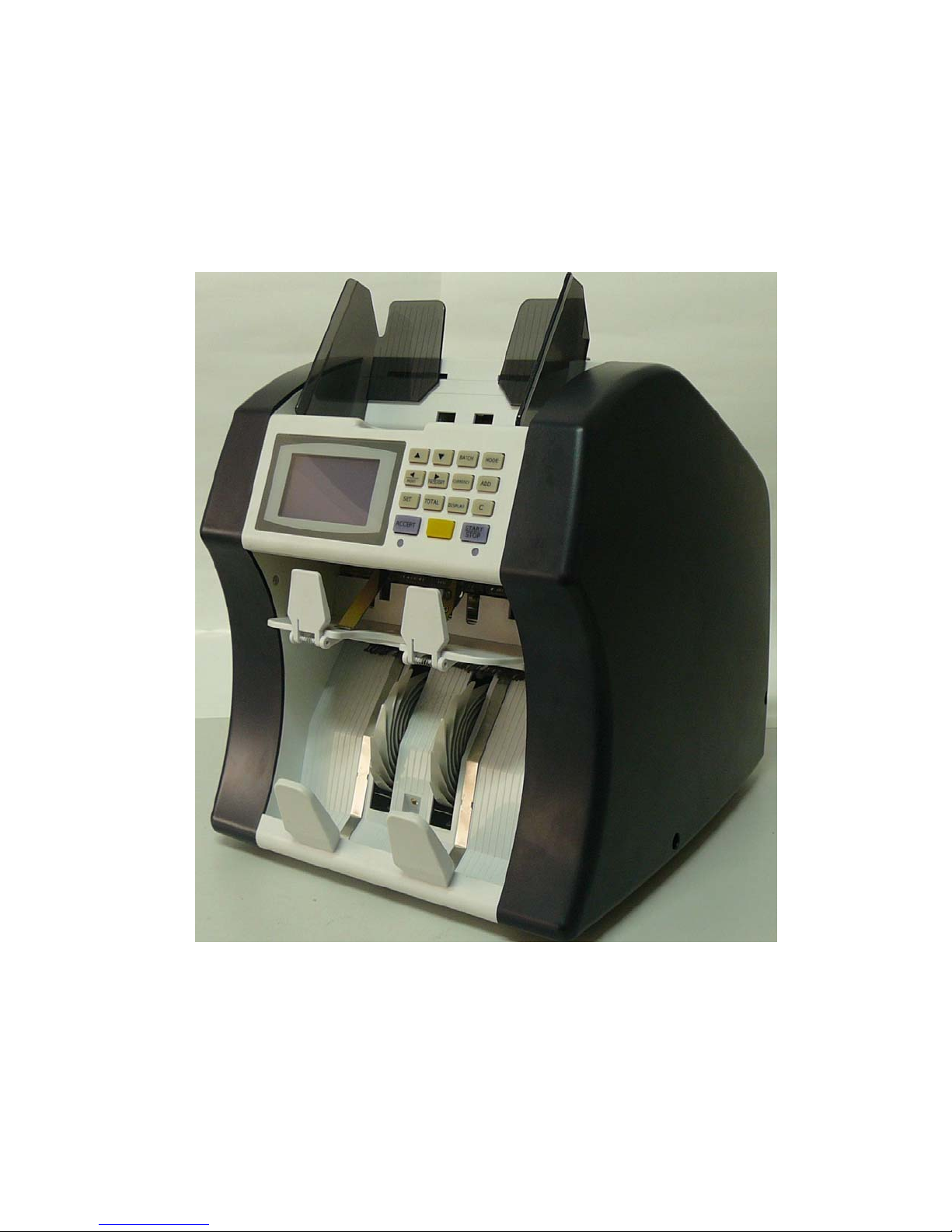
Currency Reader Counter
Page 2

content
1、USER MENU
1-1 REJECT LED
1-2 CURRENCY SELECT
1-3 DEFAULT
1-4 DUAL USAGE
1-5 AUTO START
1-6 REPEAT START
1-7 BUZZER
1-8 OFF LCD LIGHT
1-9 MODE KEY SWITCH
1-10 SPEED
1-11 REJECT FULL
1-12 REJECT CHECK
1-13 CNT MODE
1-14 CNT CF CHECK
1-15 ASSIGN OPERATOR
1-16 CURRENCY CF
1-17 MANUAL INPUT
1-18 PORT L MODE
1-19 PORT R MODE
1-20 PORT L RATE
1-21 PORT R RATE
1-22 CIS SELECT
1-23 SELECT DIGIT
1-24 EXTEMAL DISPLAY
1-25 TIME CHECK
1-26 STACKER FULL
1-27 ADD MODE (SDC)
1-28 BATCH MODE (MDC)
1-29 PRINTER CONTROL
1-30 RESERVE
2、Reject note Message
Page 3
INTRODUCTION
Introduction
Thank you for purchasing our products. The instruction manual contains the
operating procedure precautions for using machine, please read this manual
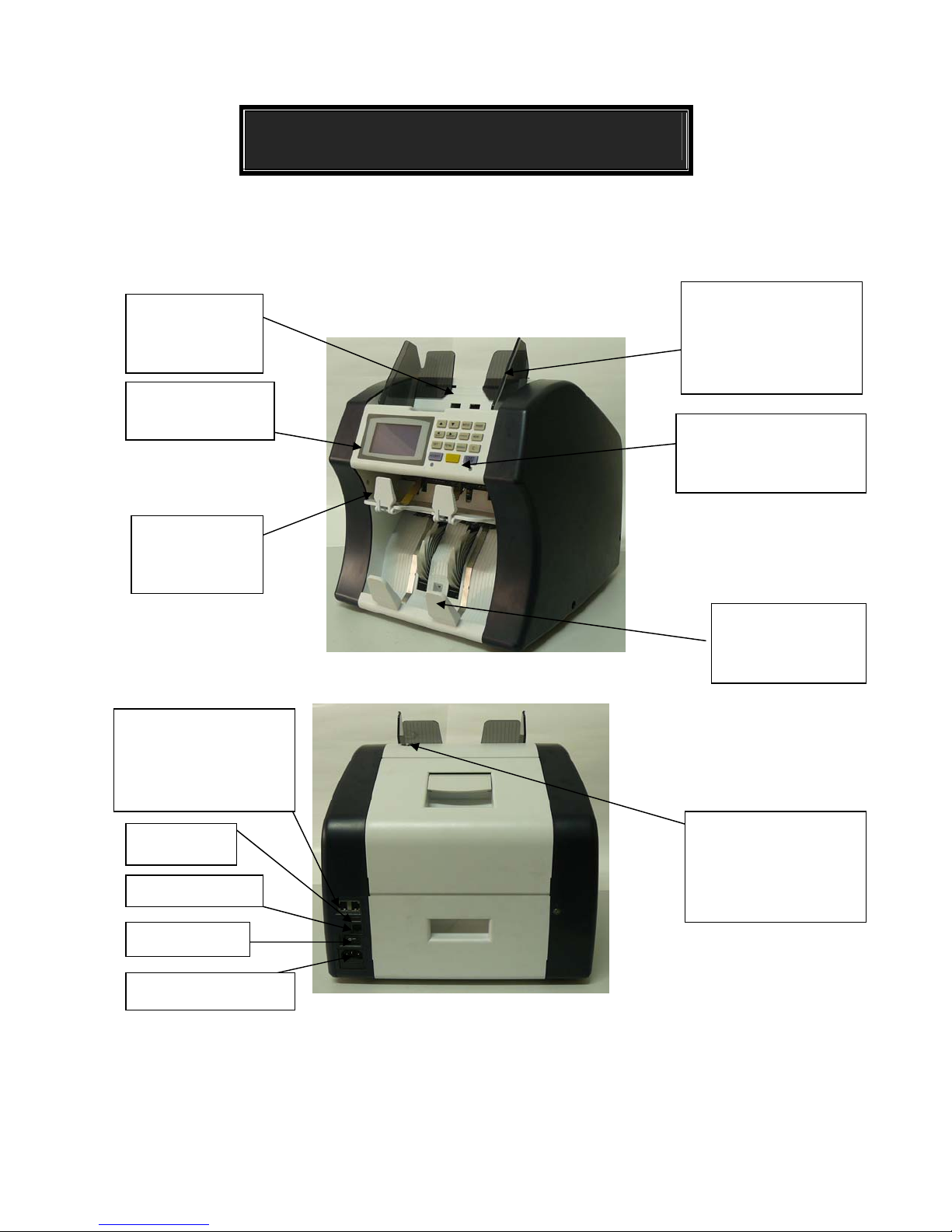
Hopper
Set notes in this
compartment
Display Panel
The LCD Panel
Reject Stacker
The rejected
notes are stacked
in detail before use
Auxiliary Hopper Plate
Guide plates for feeding
the notes to the note
feeding mechanism.
Operation keys
Used to set each
partmenters
Interface Connector
Used to connect a
computer or printer(Right
and Left).
USB
Extemal Display
Power Switch
Power Supply Socket
Stacker
The count notes are
stackeed
Gate Adjustment Screw
Adjustment Screw to
help the counting
smooth.
Page 4
Precautions for Setting Notes
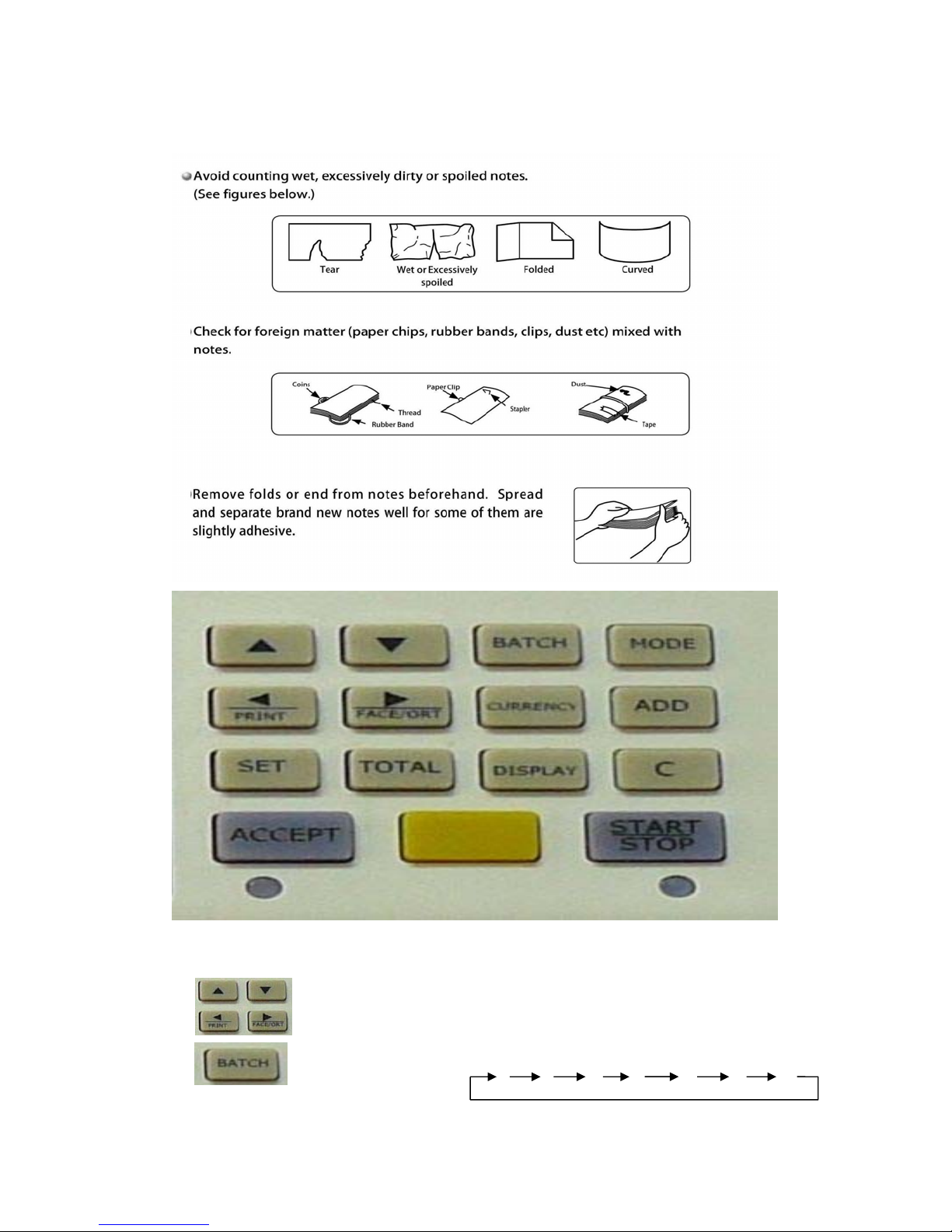
Operation Keys:
Used to move the next column ,change the value and menu selection
at the user setup or used to change the BATCH value,menu selection
at theuser setup,and move between the setup menu.
Used to select BATCH quantity in
[BATCH Value] 0 5 10 20 25 50 100 200
Page 5
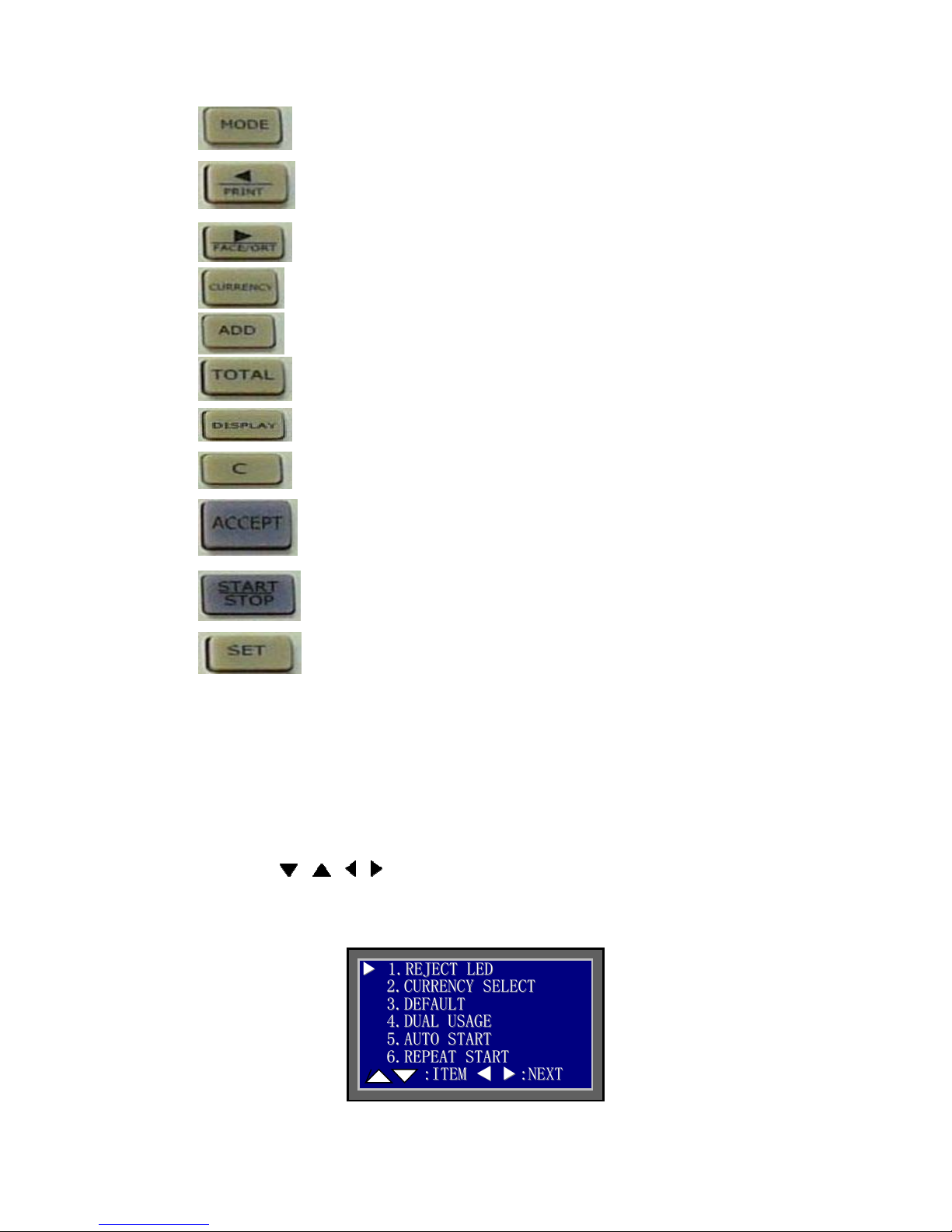
Used select from MDC、SDC and CNT Mode.
When a printer is connected,the unit printstheconfirmend data and
grand total value by pressing this key.
Used to select Face/Direction arrangement
Used to select Currency
Used to Add the quantity
Used to display the grand total
Used change the screen between normal and detail screen
Used to clear error or counting data are cleared to 0
Used to confirm the counting value and setup changes
Used to start and stop the counting or finish the user setting
Used to enter the user setup mode, press this key 6
seconds to enter the setting menu
1、USER MENU
Any change to an item in the menu will take the effect only after pressing
ACCEPT button to confirm. Press button C to return to upper level setting.
Press STAR/STOP button to exit USER MENU。
Press and hold SET button till User Menu screen shows up
Use
, , , buttons to move or change
Press ACCEPT to enter each item setting
11..RREEJJEECCTTLLEED
▼
▼
22..CCUURRRREENNCCYY SSEELLEECCTT
33..DDEEFFAAUULLTT
44..DDUUAALL UUSSAAGGEE
55..AAUUTTOO SSTTAARRTT
66..RREEPPEEAATT SSTTAARRTT
::IITTEEMM
D
▲
▼
▲
▼
::NNEEXXTT
Page 6

1、Enable/Disable Reject LED on/off Press Accept key to confirm
2、Currency can be selected/de-selected through Left Arrow or Right Arrow button.
Press Accept key to confirm
3、Reset to factory default, Press Accept key to confirm
4、Enable two operators’ sharing
5、Enable/disable Auto or Manual start
6、At Batch count, enable/disable Auto/Manual repeat start
RREEJJEECCTT LLEEDD
11..DDIISSAABBLLEE
▼
▼
22..EENNAABBLLEE
CCUURRRREENNCCYYSSEELLEECCT
11..UUSSDD ::OONN
▼
▼
22..EEUURR ::OONN
33..RRUUBB ::OOFFFF
DDEEFFAAUULLTT
11..DDIISSAABBLLEE
▼
▼
22..EENNAABBLLEE
AAUUTTOO SSTTAARRTT
▼
▼
22..110000MMSS
33..220000MMSS
44..440000MMSS
11..OOFFFF
T
Page 7

7-12
IITTEEMM
7、Buzzer On/Off, Press Accept key to confirm
8、LCD backlight On/Off ENABLE – After 5 minutes, enter into sleep mode to
9、Mode button Lock/Unlock, Press Accept key to confirm
save engergy,Press Ac cept key to confirm
RREEPPEEAATT SSTTAARRTT
11..MMAANNUUAALL
▼
▼
::IITTEEMM
11..OOFFFF
22..AAUUTTOO
▼
▼
77..BBUUZZZZEER
88..OOFFFF LLCCDD LLIIGGHHTT
99..MMOODDEE KKEEYY SSWWIITTCCHH
1100..SSPPEEEEDD
1111..RREEJJEECCTT FFUULLLL
1122..RREEJJEECCTT CCHHEECCKK
R
▲
▲
BBUUZZZZEERR
▼
▼
OOFFFF LLCCDD LLIIGGHHTT
▼
▼
22..OONN
11..DDIISSAABBLLEE
22..EENNAABBLLEE
▼
▼
::NNEEXXTT
Page 8

10、Counting Speed Selection, Press Accept key to confirm
11、Select notes to be accommodated in Reject Pocket, Press Accept key to
confirm
12、When enable this function, if there is a note inside of Reject Pocket, the
machine can’t be operated till empty Reject Pocket, Press Accept key to confirm
13-18
IITTEEM
M
MMOODDEE KKEEYY SSWWIITTCCHH
11..DDIISSAABBLLEE
22..EENNAABBLLEE
▼
▼
SSPPEEEEDD
▼
▼
RREEJJEECCTT FFUULLLL
22..5500
▼
▼
▼
▼
11..880000 PPccss//mmiinn
22..990000 PPccss//mmiinn
33..11000000 PPccss//mmiinn
11..2255
33..7755
44..110000
RREEJJEECCTT CCHHEECCKK
11..OOFFFF
22..OONN
Page 9

13、PIECE COUNT MODE enable/disable, Press Accept key to confirm
14、Counterfeit detection On/Off at CNT mode, Press Accept key to confirm
15、Assign Left and Right Operators, Press Accept key to confirm
16、Counterfeit detection sensitivity level setting for current currency count
There are the following 2 settings:
1) Switch On/Off Detections: DD/DF/UV/MG/MT/IR
1133..CCNNTTMMOODDE
▼
▼
1144..CCNNTT CCFF CCHHEECCKK
1155..AASSSSIIGGNN OOPPEERRAATTOORR
1166..CCUURRRREENNCCYY CCFF
1177..MMAANNUUAALL IINNPPUUTT
1188..PPOORRTT LL MMOODDEE
::IITTEEMM
CCNNTT MMOODDEE
22..EENNAABBLLEE
▼
▼
CCNNTT CCFF CCHHEECCKK
11..OOFFFF
▼
▼
22..OONN
AASSSSIIGGNN OOPPEERRAATTOORR
LLEEFFTT :: OOPPTT11
▼
▼
RRIIGGHHTT :: OOPPTT22
E
▲
▼
▲
▼
11..DDIISSAABBLLEE
::NNEEXXTT
Page 10

Press ACCEPT button,
Press ACCEPT button,
The above screen shows the following detections’ status:
0 - On 1 - Off
Apply to all denominations:
1. DD: Length and Width detection
2. DF: Double notes detection
3. UV: Ultra violet detection
4. MG: Magnetic detection
5. MT: Metal Thread detection
6. IR: Infrared
2) Set Each Denomination’s Sensitivity Level of Detections:
DD/DF/UV/MG/MT/IR
DDeennoommii:
DDeennoommii:
:
AAlll
:
11..DDDD 11
22..DDFF 11
33..UUVV 11
44..MMGG 11
55..MMTT 00
66..IIRR 00
AAlll
l
l
UUSSD
D
UUSSD
D
Page 11

Press button to choose denomination
Press ACCEPT button,
Sensitivity Level: 0 to 9, 0 – off, 1 – less sensitive, 9 – most sensitive
Finally, press ACCEPT button to confirm change
17、Manual Input press ACCEPT button to confirm, Press Accept key to confirm
18、RS232 Left Port Mode: Off/PC, Press Accept key to confirm
DDeennoommii:
DDeennoommii:
66..IIRR 00
:
:
11..DDDD 11
22..DDFF 11
33..UUVV 11
44..MMGG 11
55..MMTT 00
110000c
110000c
MMAANNUUAALL IINNPPUUTT
11..DDIISSAABBLLEE
22..EENNAABBLLEE
▼
▼
PPOORRTT LL MMOODDEE
11..OOFFFF
▼
▼
22..TTEERRMMIINNAALL
33..PPRRIINNTTEERR
c
c
UUSSD
UUSSD
D
D
Page 12

19-24
19、RS232 Right Port Mode: Off/Printer, Press Accept key to confirm
20、RS232 Left Port Baud Rate:9600/19200/38400/115200
21、RS232 Right Port Baud Rate: 9600/19200/38400/115200
M
IITTEEM
1199..PPOORRTTRRMMOODDE
▼
▼
2200..PPOORRTT LL RRAATTEE
2211..PPOORRTT RR RRAATTEE
2222..CCIISS SSEELLEECCTT
2233..SSEELLEECCTT DDIIGGIITT
2244..EEXXTTEEMMAALL DDIISSPPLLAAYY
::IITTEEMM
Print: Data bits:8, Stop bits:1, Parity: none
PC: Data bits:7, Stop bits:1, Parity: none
Print Data bits:8, Stop bits:1, Parity: none
PC: Data bits:7, Stop bits:1, Parity: none
PPOORRTT RR MMOODDEE
11..OOFFFF
22..TTEERRMMIINNAALL
33..PPRRIINNTTEERR
▼
▼
PPOORRTT LL RRAATTEE
11..99660000
▼
▼
22..1199220000
33..3388440000
44..111155220000
PPOORRTT RR RRAATTEE
11..99660000
▼
▼
22..1199220000
33..3388440000
44..111155220000
E
▼
▼
::NNEEXXTT
▲
▲
Page 13

22、Switch CIS On/Off at CNT mode, Press A ccept key to confirm
23、Select digit mark for display and print, Press Accept key to confirm
24、Switch external display On/Off, Press Accept key to confirm
25-30
25、Set date and time:
confirm
IITTEEM
`
M
CCIISS SSEELLEECCTT
11..OOFFFF
22..OONN
▼
▼
SSEELLEECCTT DDIIGGIITT
11..OOFFFF
▼
▼
.
22.
.
.
33..,,
44..
EEXXTTEEMMAALL DDIISSPPLLAAYY
11..OOFFFF
▼
▼
22..OONN
2255..TTIINNEECCHHEECCK
▼
▼
2266..SSTTAACCKKEERR FFUULLLL
2277..AADDDD MMOODDEE ((SSDDCC))
2288..BBAATTCCHH MMOODDEE ((MMDDCC))
2299..PPRRIINNTTEERR CCOONNTTRROOLL
.
3300.
Reserve
::IITTEEMM
plus/minus, move cursor, Press Accept key to
TTIIMMEE CCHHEECCKK
22001133--0055--1155 0088::4455
K
▲
▼
▲
▼
::NNEEXXTT
Page 14

26、 When Batch = 0, counting stops when coutning figure reaches stackker full
figure set by this item.
SSTTAACCKKEERR FFUULLLL
11..OOFFFF
▼
▼
22..110000
33..220000
27、ADD mode (SDC)
AUTO ZERO
At SDC mode, ADD function is On, when the following counting
denomination is different to previous counting denomination, the
counting figure showed on the screen is reset to Zero
MANUAL ZERO
At SDC mode, ADD function is On, when the following counting
denomination is different to previous counting denomination, the
counting figure is accumulated until is reset to zero manually
AADDDD MMOODDEE ((SSDDCC))
11..AAUUTTOO ZZEERROO
▼
▼
22..MMAANNUUAALL ZZEERROO
28、BATCH MODE (MDC)
ZERO
At MDC mode, ADD function is on, when doing Batch count, if there is/are note (s)
in Feed Table, the counting figure is rest to zero for each Batch count.
ADD
At MDC mode, ADD function is on, when doing Batch count, if there is/are note (s)
in Feed Table, the counting figure is accumulated for each Batch count.
BBAATTCCHH MMOODDEE ((MMDDCC))
11..ZZEERROO
22..AADDDD
▼
▼
Page 15

29、PRINTER CONTROL
- MODE:
Manual: Press PRINT button to print
AUTO 1:
AUTO 2: Print bundle totals from every good bundle whenever the
- REPEAT: 2 – Duplicate, 3 - Triplicate
- LINES: Number of blank lines after each print block (default =5)
- LIST: Print all denominations, or used denominations. By default
- LF: Y - LF after CR.
Print stack totals from every good bundle whenever the stacker is
emptied.
stacker and feed hopper are emptied. (Default)
only the used denominations are printed.
PPRRIINNTTEERR CCOONNTTRROOLL
11..MMOODDEE ::AAUUTTOO 22
22..RREEPPEEAATT::11
▼
▼
33..LLIINNEESS ::55
44..RREEPPEEAATT::AALLLL
55..RREEPPEEAATT::YY
2、 Reject note Message
Press key,Enter Rejrct message display, you can know
why the notes were be rejected.
EERRRR::IIMMAAGGE
TTYYPPEE11 11
SSHHEEWW 22
CCHHAAIINN 11
IIRR 22
MMTT 11
MMGG 11
E
1
1
TYPE1: Failure Communication between Image Firmware and Main
Control Firmware or Tine out.
IMAGE: CIS sensor can’t recognize the note rejected at RJ pocket.
MT: Reject due to MT abnormal.
UV: Reject due to UV abnormal.
MG: Magnetic.
Page 16

MG1: Reject due to MT abnormal.
IR: Reject due to change color ink abnormal.
DOUBLE: Reject due to double feed.
CHAIN: Reject due to chain feed. Please Adjust the knob
SKEW: Reject due to skew feed.
TYPE2: Reject when reaching Batch Number
RejDeno: Reject Denomination
JAM:PS1 Jam at PS1
JAM:PS2 Jam at PS2
JAM:PS3 Jam at PS3
JAM:PS4 Jam at PS4
JAM:CIS Jam at CIS or duty ,please clean the CIS sensor
 Loading...