

Page 1
Audio over IP decoders/mixers E411, E413,
Equitel Network Audio
E415, E417
Installation guide
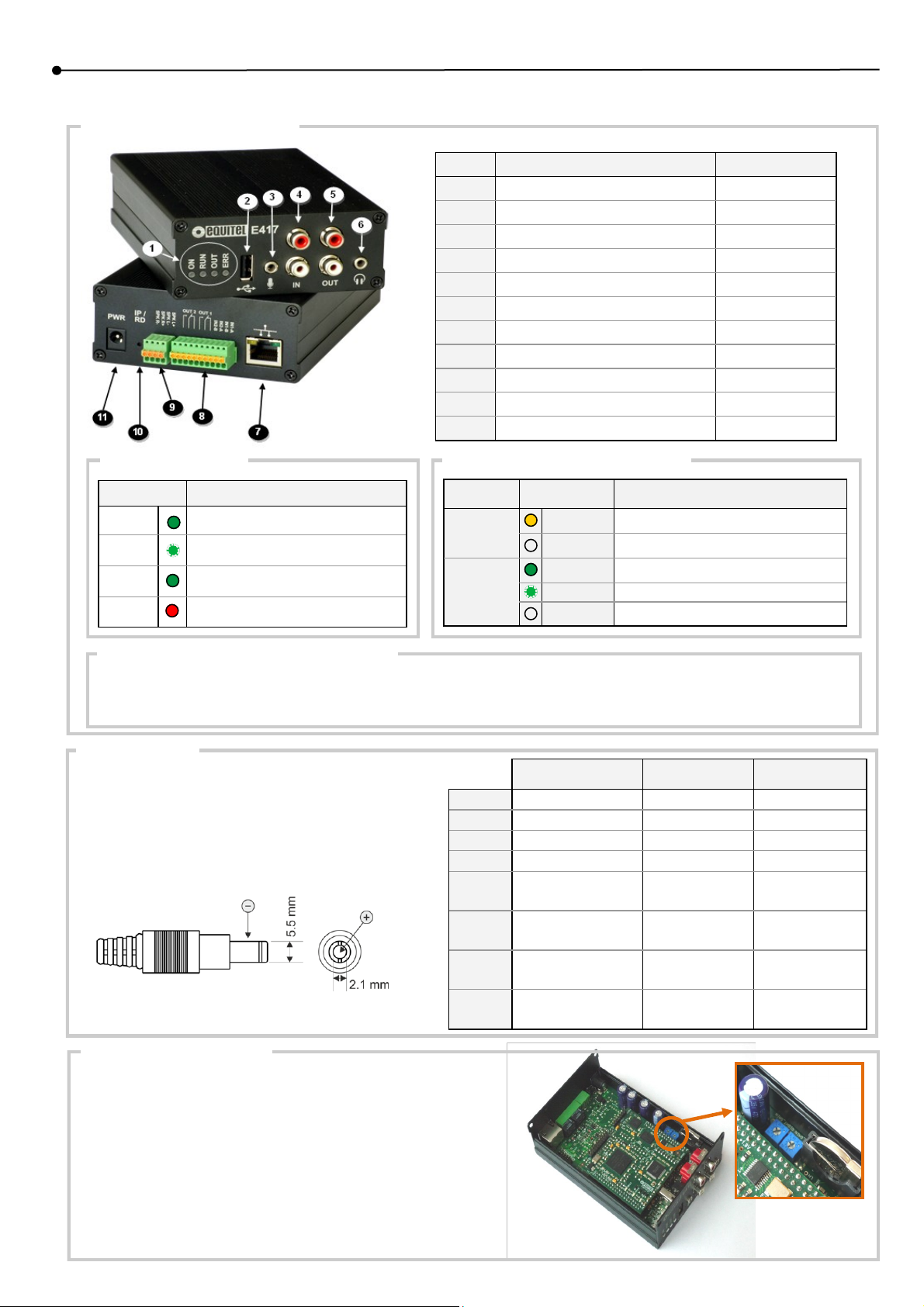
Connectors and indicators:
Element Description Applies to
1 LED’s Indicators All models
2 USB Connector E417
3 Microphone Input E417
4 Audio line input E417
5 Audio line out All models
6 Headphone out All models
7 Ethernet All models
8 Terminal for I/O contacts E413, E415, E417
9 Amplified audio output terminals E415, E417
10 IP recovery and reset default button All models
11 Power supply connector All models
LED’s indicators:
ON
RUN
OUT
ERR
Device is powered
Device is working properly
Active audio output
Indicates some kind of error
Meaning LED
LED’s indicators Ethernet port:
LED Meaning Status
SPEED
LINK/ACT
ON Link is established at 100Mb/s
OFF Link is established at 10Mb/s
ON Link in the port
Blinking Activity in the port
OFF No link in the port
IP recovery and reset default button:
The “IP/RD” button has two funtions:
Indicate IP address: When pressed momentarily (1 second), the IP adress is set via the audio outputs.
Reset to default settings: When pressed for more than 6 seconds, the default settings are restored. Network configuration is included.
Power supply:
The external power supply connector needed is 5.5x2.1mm,
with the polarity shown in the figure.
The minimum power requirements depend on the device and
the usage, as shown in the table.
E411
E413
E415
E417
E411-P
E413-P
E415-P
E417-P
Amplifier not used
12V / 1A --- --12V / 1A --- --12V / 1A 12V / 2A 24V / 2A
12V / 1A 12V / 2A 24V / 2A
12V / 1A or
PoE (802.3af)
12V / 1A or
PoE (802.3af)
12V / 1A or
PoE (802.3af)
12V / 1A or
PoE (802.3af)
Amplifier up to
7w + 7w
--- ---
--- ---
12V / 2A or
PoE+ (802.3at)
12V / 2A or
PoE+ (802.3at)
Amplifier up to
12w + 12w
24V / 2A
24V / 2A
Amplified audio output:
There are two internal potentiometers in the device to limit the maximum
output power sent to the speakers.
Devices are shipped with potentiometers sent to maximum value.
If the uses speakers power is smaller than the maximum output of the
device, the potentiometers must be adjusted in order to prevent the
speakers destruction.
For more information, consult the user manual available in www.equitel.es
Page 2
Installation guide
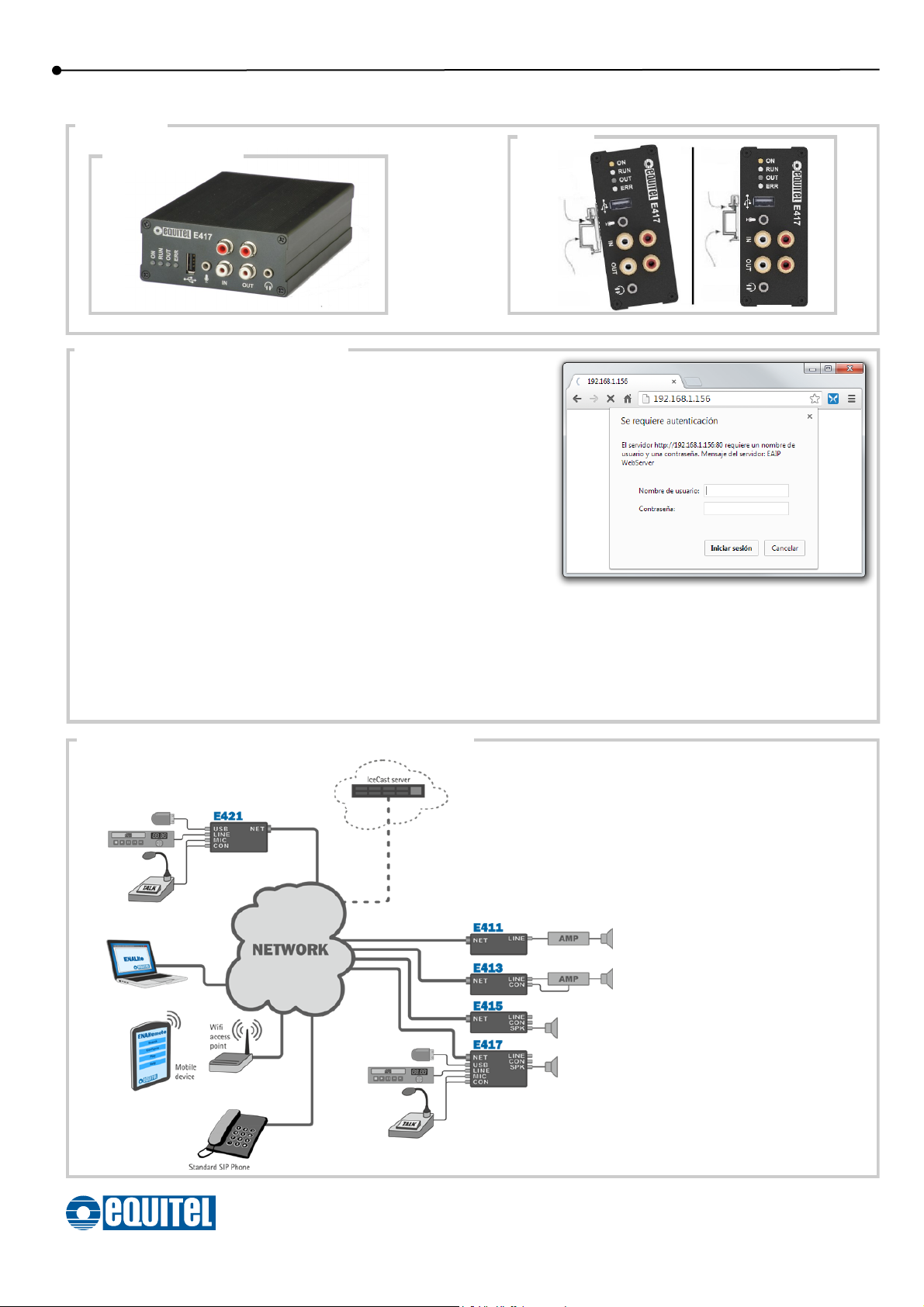
Assembly:
DIN rail:
Stand-alone box:
Configuration through web server:
By default, the devices are configured to acquire its IP by DHCP. If your network
has an DHCP server, it will assign a valid IP to the device about 40 seconds after
power the device.
If there is no DHCP server or is not accessible, after approximately 3 minutes, the
device will configure itself with these access parameters:
IP: 192.168.1.1
Subnet mask: 255.255.255.0
Gateway: 192.168.1.254
There are three methods to know the IP address of the device:
Connect to headphones to the connector (6) and momentarily press the “IP/RD”
button. The device will say its IP address though the headphones.
Using the free “EQUITEL Devices Searcher” application to locate the Equitel
devices on an Ethernet network.
Using the free “ENALite” application to access the device
Metal
spring
DIN rail
* Optional DIN rail adapter can be supply by EQUITEL
Devices are shipped with following credentials by
default:
User: admin
Password: admin
Metal
spring
DIN rail
For more detailed information about audio decoders and mixers configuration, please consult the “Technical Manual” in our web
site: www.ena.equitel.es
Sample application of this family of devices usage:
E411, E413, E415: Decoders can receive
selected channels (i.e. “streams”) from
the networks and convert it back to an
analog audio signal.
E417: Mixer besides the same features
than decoders, include the option to use
audio coming from files stored in a USB
memory or analog signals in its MIC or
LINE inputs.
The selection of the actual stream, local
file or analog signal to be sent to the
output is made based on a powerful but
very easy to configure priority schema.
EQUIPOS DE TELECOMUNICACIÓN OPTOELECTRÓNICOS, S.A.
Polígono de Malpica, calle F Oeste, G. Quejido nave 74
50057 ZARAGOZA (ESPAÑA)
Tel. +34 976 570 353 - Fax. +34 976 571 383
For more information, consult the user manual available in www.equitel.es
ENAeg01
 Loading...