

Page 1
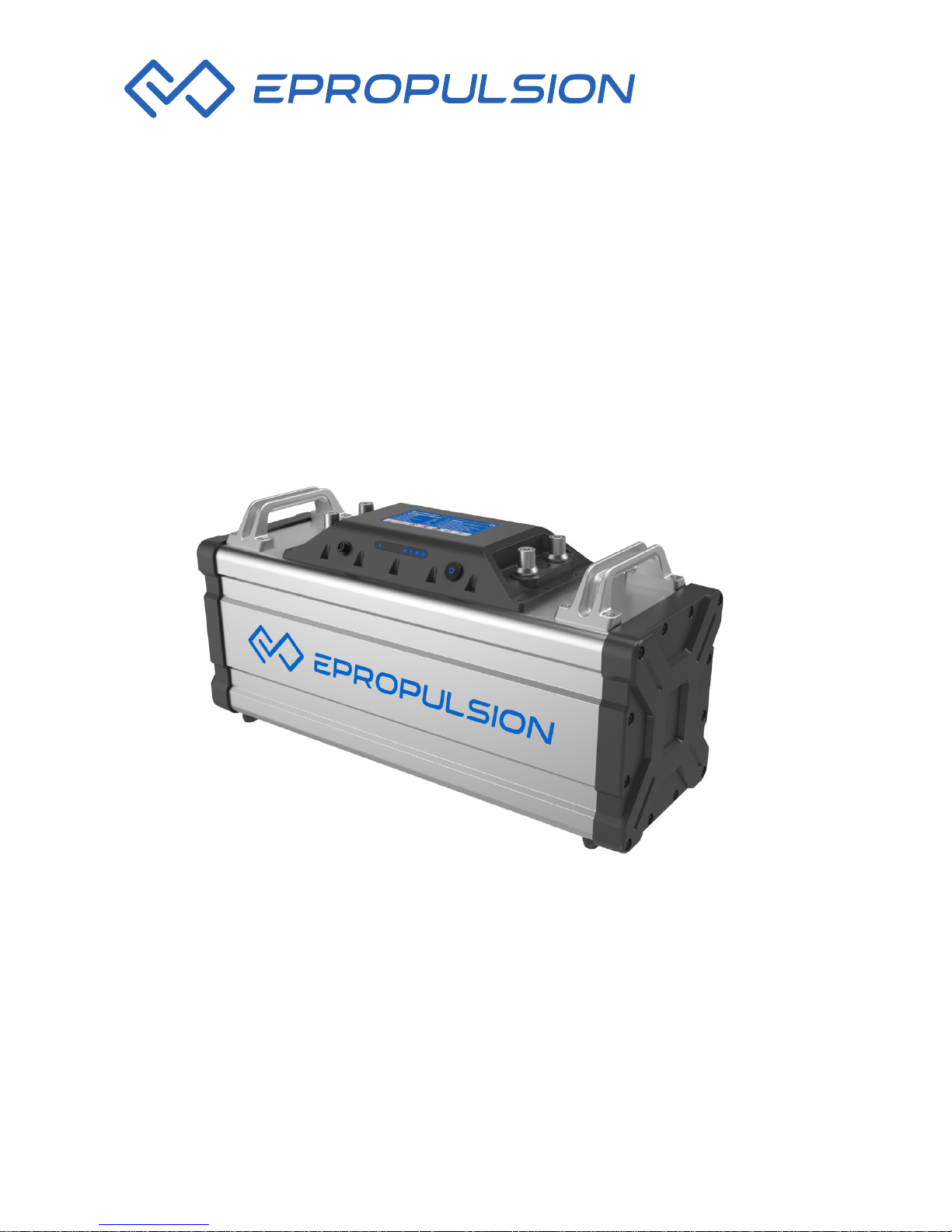
NAVY BATTERY USER MANUAL
May, 2018 Version 1.2
Copyright © ePropulsion 2014-2018 All Rights Reserved
Page 2

Page 3

1
Acknowledgements
Thanks for choosing ePropulsion products, your trust and support in our
company are sincerely appreciated. We are dedicated to providing high
performance and reliable lithium batteries as well as accessories. Welcome
to visit our website www.epropulsion.com and contact us if you have any
concerns.
Using This Manual
Before use of the product, please read this reference manual thoroughly to
understand the correct and safe operations of NAVY Battery. By using this
battery, you hereby agree that you have fully read and understood all the
contents of this manual. ePropulsion accepts no liability for any damage or
injury caused by operations that contradict this manual.
Due to ongoing optimization of our products, ePropulsion reserves the rights
of constantly adjusting the contents described in the manual. ePropulsion
also reserves the intellectual property rights and industrial property rights
including copyrights, patents, logos and designs, etc.
This manual is subject to update without notice, please visit our website
www.epropulsion.com for the latest version. If you find any discrepancy
between your products and this manual, or should you have any doubts
concerning the product or the manual, please visit www.epropulsion.com.
ePropulsion reserves the rights of nal interpretation of this manual.
This manual is multilingual, in the case of any discrepancy in interpretation
of different language versions, the English version shall prevail.
Symbols
The following symbols will help to acquire some key information.
Important instructions or warnings
Useful information or tips
Page 4

2
Table of Contents
Acknowledgements......................................................................................1
Using This Manual.........................................................................................1
Symbols.........................................................................................................1
Table of Contents..........................................................................................2
Product Identication ..................................................................................3
1. Important Safety Instructions..................................................................4
2. Product Overview......................................................................................6
2.1 In the Package...............................................................................6
2.2 Product View......................................................................................7
2.3 Technical Data.....................................................................................8
3. Operation.................................................................................................10
3.1 Connecting NAVY Battery to the Outboard........................................10
3.2 Parallel Connection of NAVY Batteries..............................................11
3.3 Switching On/Off the NAVY Battery...................................................12
3.4 Charging the NAVY Battery...............................................................13
3.5 LED Indicators ..................................................................................15
4. Troubleshooting......................................................................................17
5. Transport and Storage............................................................................19
5.1 Transport...........................................................................................19
5.2 Storage..........................................................................................20
6. Routine Maintenance..............................................................................21
7. Warranty Claim........................................................................................22
7.1 Warranty Policy..................................................................................22
7.2 Out of Warranty..............................................................................23
7.3 Warranty Claim Procedures...........................................................24
Page 5
3
Product Identication
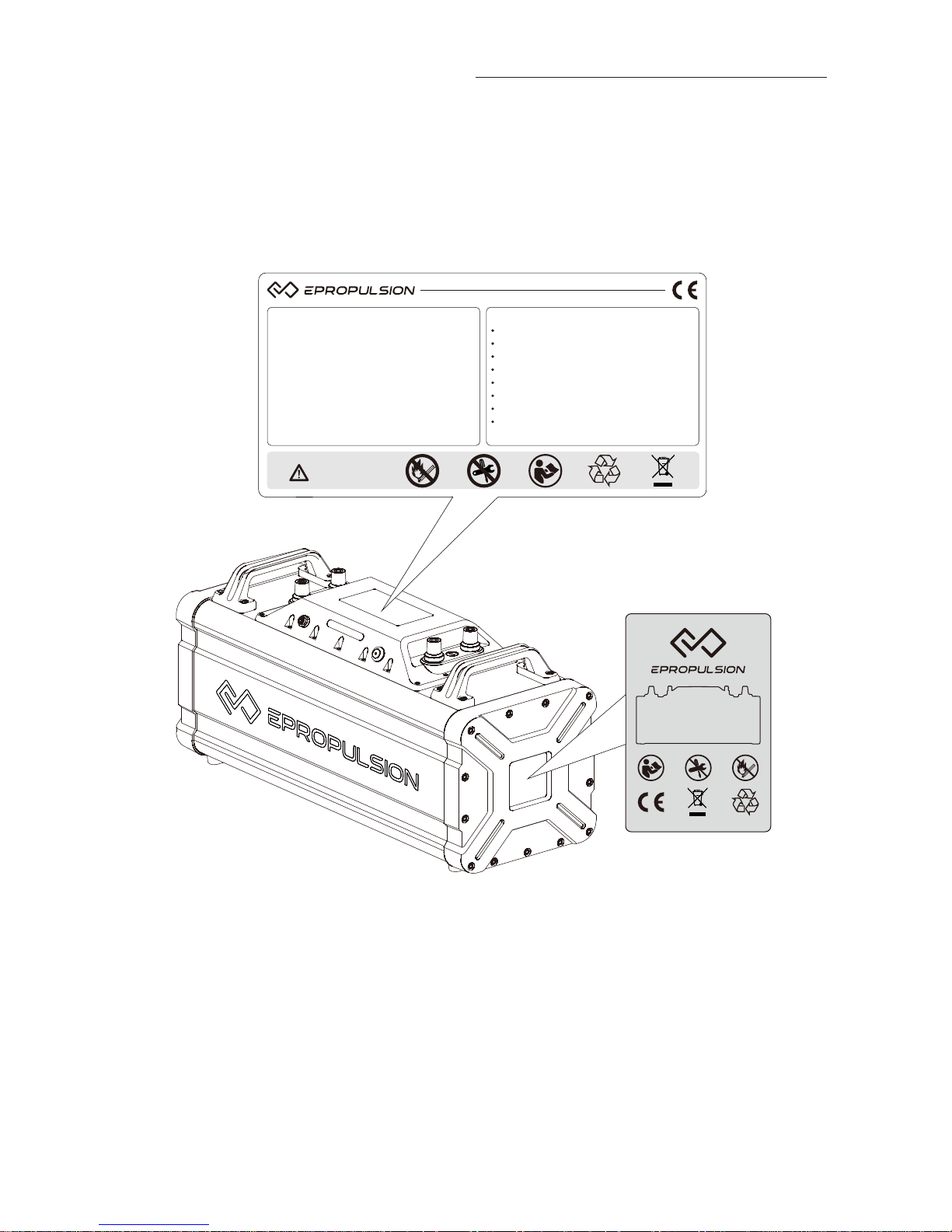
Below picture indicates the position of product labels. Please record the
serial number from the label on the right side of NAVY Battery for access to
maintenance or other after-sale services.
Nominal Voltage
Rated Capacity
Nominal Energy
Maximum Discharging Current
Charging Voltage
Charging Temperature
Discharging Temperature
Read the user manual carefully before operating
Disassembly only by the professionals
Use qualied charger
Make sure the battery is fastened before use
No squeezing or colliding during transportation
Prohibit exposing to re and heating
Do not store it under insucient voltage
Please follow the local lithium battery recycling
regulations when decommissioned
48V Lithium-ion Battery Pack CAUTION
WARNING!
Specication
46.8 V
65 Ah
3042 Wh
80 A
54.6 A
0 ~ 40°C
-20 ~ 65°C
Rechargeable Li-ion
13ICR19/66-24
Model: 48V Lithium-ion Battery
S/N:
Figure 0-1
Page 6
4
1. Important Instructions
This user manual contains important information with regard to equipment
installation and safe operations. Before you start to use the battery, please
read the following instructions carefully:
Before Use
Only adults who have fully read and understood this manual are allowed
to operate this product.
Before each use, check the condition and functionality of the battery.
Pay attention to all the warning marks before using this product.
Discharging
Do not operate the battery at too high or too low temperature for a long
time despite the discharging temperature is from -20˚C~65˚C (-4˚F~149˚F),
otherwise its service life will be shortened.
When the battery needs to be moved or reconnected, turn the power off to
make sure the power output is shut down.
Never discharge the battery below 39V. In any case of emergency, please
stop discharging the battery immediately.
Charging
Only use ePropulsion specied chargers. Do not use any third party chargers.
Only charge NAVY Battery at temperature from 0˚C~40˚C (32˚F~104˚F).
Avoid water contact and direct sun or rain exposure during the charging
process.
Keep the battery away from ammable substance like a carpet or wood
during charging process.
In any case of emergency, please stop charging the battery immediately.
Storage
It is not suggested to immerse the NAVY Battery in water or store in moist
environment.
Avoid direct sun/rain exposure or damp environment during operation or
storage.
Before long-term storage, ensure the battery level is around 50%,
and store the battery in suggested temperature range of -20˚C~20˚C
(-4˚F~68˚F).
During long-term storage, activate the battery every 3 months by charging
the battery to 50% around. This activation is very important to keep the
Page 7
5
battery in good condition.
After long-term storage, fully charge the battery before use.
Transportation
Check and ensure the package is intact without any damage.
Avoid violent vibration, strike or squeeze during transport. Get adequate
damping protection measures before transport.
Do not expose the battery to the sun or rain during transport.
Check the applicable local, national or international laws and regulations
before transport.
Handling
Place the battery in a well-ventilated area with enough safety distance.
Keep it away from water, ammable gas, corrosive and other dangerous
substance.
Dispose of unusable or damaged batteries in a container reserved for this
purpose and follow applicable local, national or international guidelines
and regulations. For further information, you can contact your local solid
waste collecting point or your dealer.
Never discard the battery as general household waste or in re.
Do not place metal tools or metal parts on the batteries in order to avoid
short-circuit.
Do not wear watch, ring or other similar metal jewelry when installing or
maintaining the battery to avoid potential accidents like shock hurts.
Do not repair it on your own or by any other unauthorized third party.
In case of re, use powder extinguisher to put it out. Water extinguisher
may cause electric shock.
Page 8
6
2. Product Overview
NAVY battery is a Lithium-ion battery with 3042Wh capacity and 46.8V
rated output voltage, specially designed for NAVY electric outboards, combining high quality with creative design. NAVY Battery adopts 18650 cells
together with the protective battery management system (BMS), ensuring its
high performance, safety and reliability.
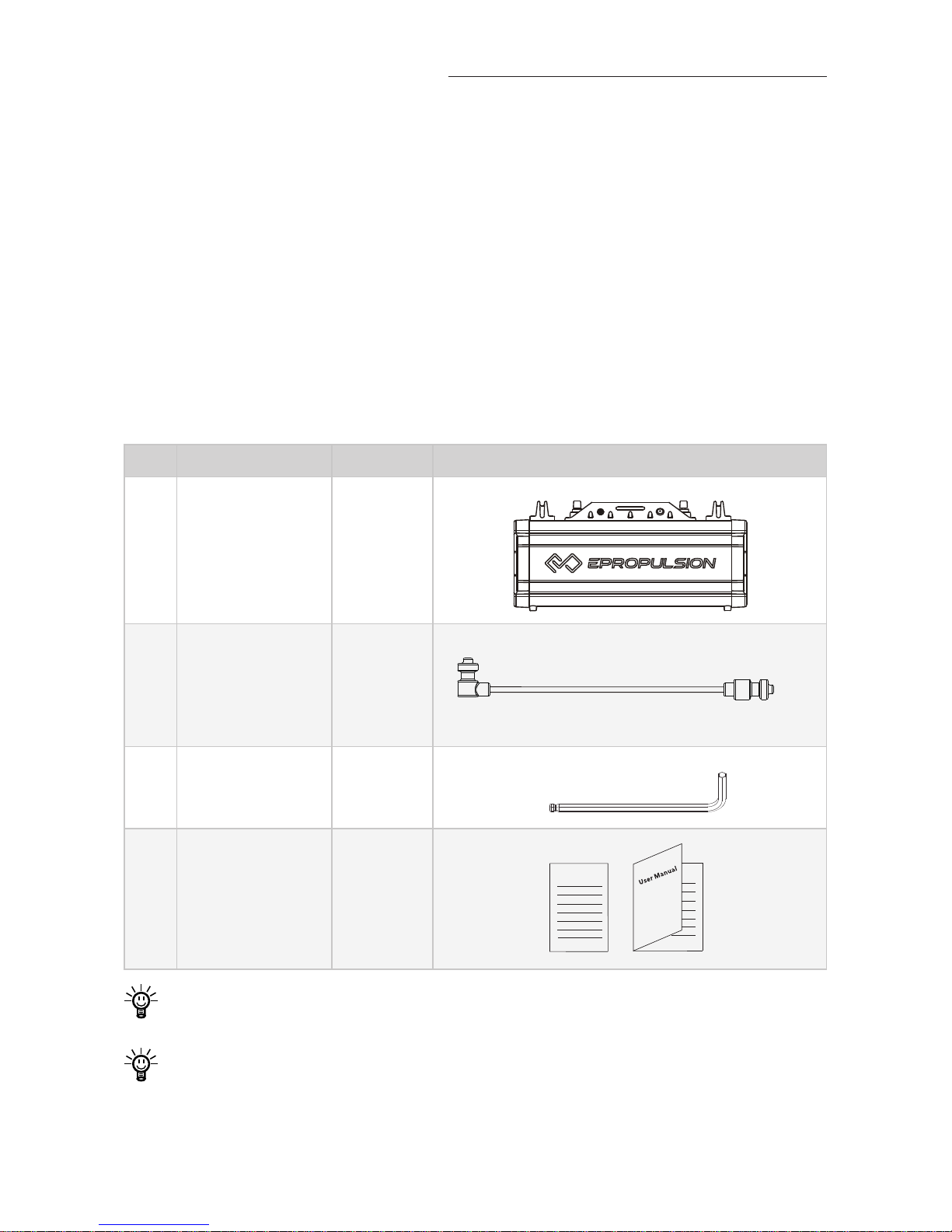
2.1 In the Package
Unpack the package and check if there is any damage caused during transport. Check all the items inside the package against the below list. If there is
any transport damage or lack of any listed item, please contact your dealer
immediately.
No. Items Qty./Unit Figure
1
NAVY
Battery
1 set
2
Communication
Cable
1 piece
5m (Default)
3
M8 Hexagon
Wrench
1 set
4
User Manual &
Warranty Claim
Form
2 copies
Warranty
Other accessories mentioned in this manual are not included in the
package. Please place additional order if you need them.
Save the ePropulsion package for battery transportation and storage.
Page 9
7
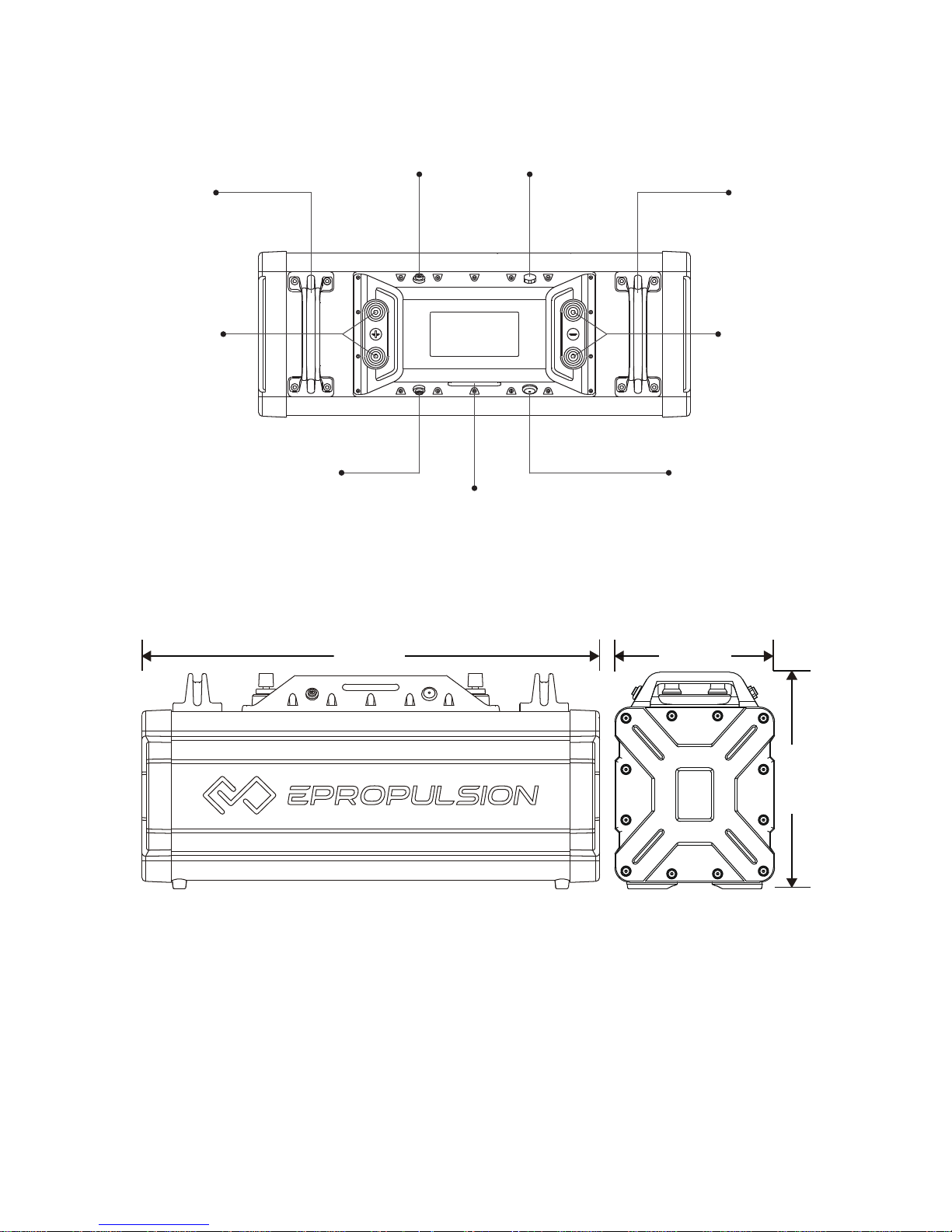
2.2 Product View
Positive
Terminals
Negative
Terminals
Communication Port
Communication Port
Indicating Panel
On/Off Switch
Battery
Handle
Vent Valve
Battery
Handle
Figure 2-1 Top View
594mm
209mm
283mm
Figure 2-2 Front View Figure 2-3 Side View
Page 10
8
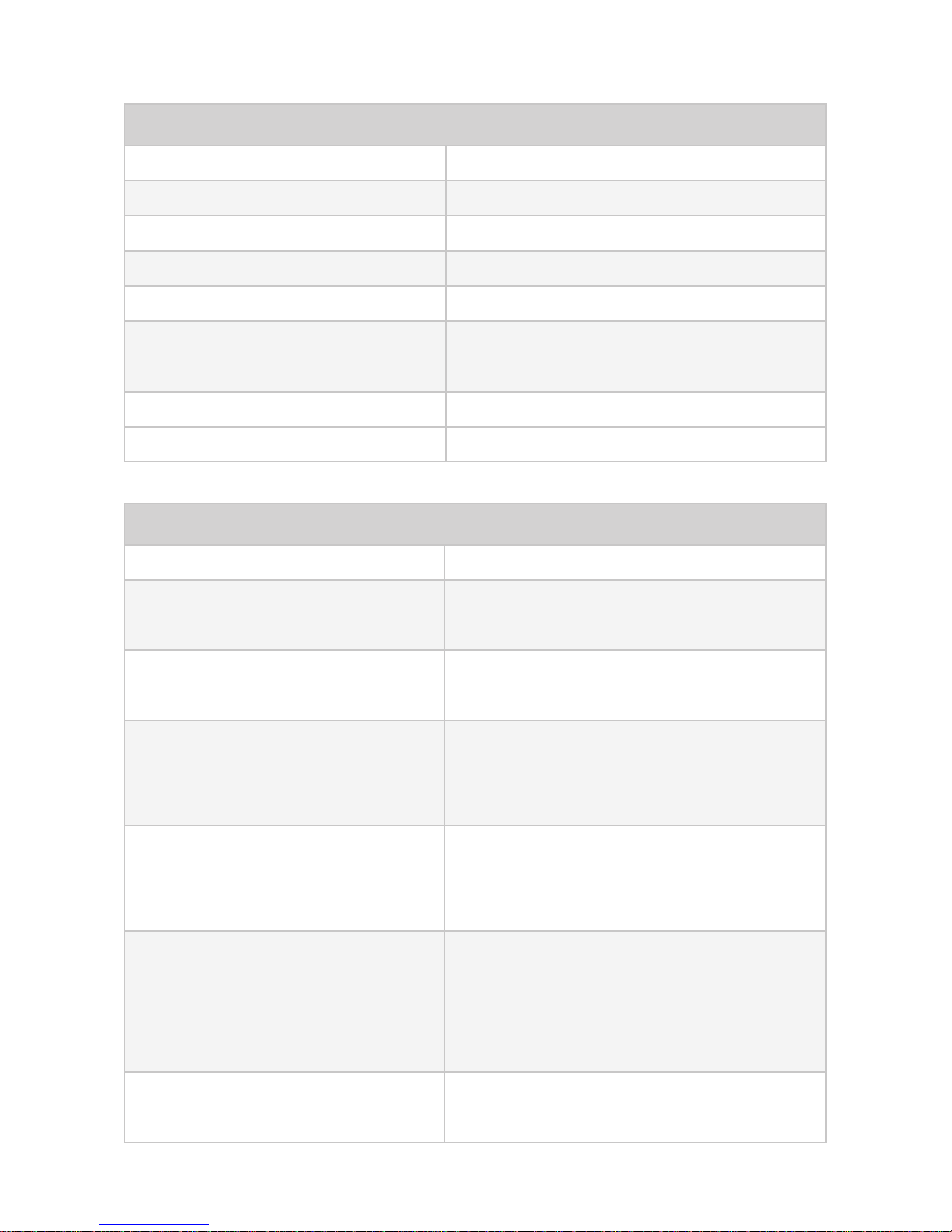
2.3 Technical Data
Charging and Discharging Characteristics
Standard Charging Method Constant current constant voltage
Charging Voltage 54.6 V
Charging Cutoff Current 1.5 A
Discharging Cutoff Voltage 39 V
Maximum Charging Current 30 A
Maximum Continuous
Discharging Current
80 A
Charging Time ~3 hrs
Parallel Support max 8 NAVY Batteries
Protective Features
Charging Overcurrent Protection 35 A
First-Class Discharging
Overcurrent Protection
The output power is cut off if the current
is over 85A for 15 seconds.
Second-Class Discharging
Overcurrent Protection
The output power is cut off if the current
is over 100A for 3 seconds.
Resume from
Overcurrent Protection
System resumes automatically after 2
seconds. Two consecutive protections
require restart.
Short-circuit Protection
The system triggers short-circuit protection with 400μs delay if the current
surpasses 200A
.
Resume from
Short-Circuit Protection
The output power is cut off. System resumes automatically after 10 seconds.
Three consecutive protections require
restart.
Intelligent Power Adjustment
If battery temperature is high, it triggers
power limitation function automatically.
Page 11
9
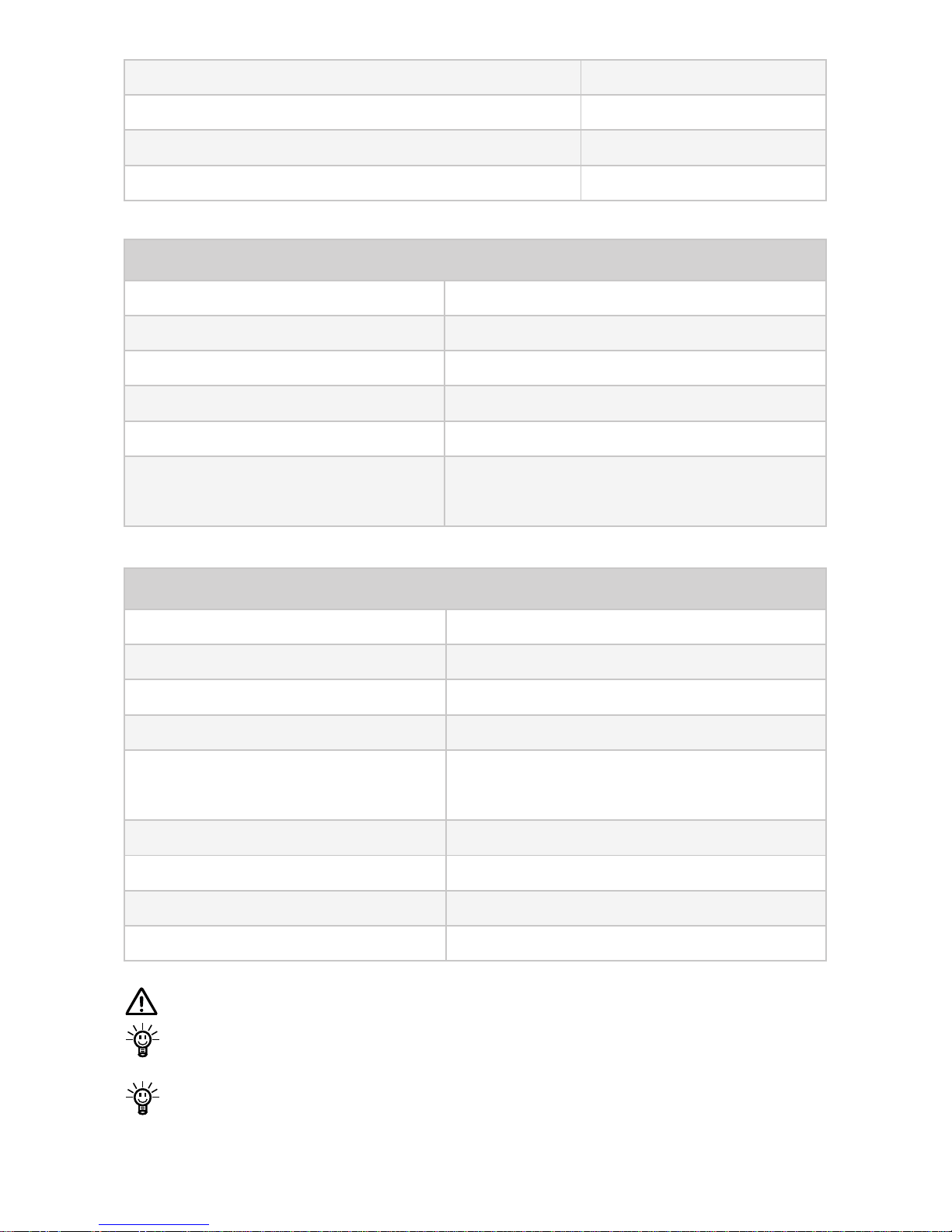
Operating Environment
Charging Temperature 0˚C~40˚C / 32˚F~104˚F
Discharging Temperature -20˚C~65˚C / -4˚F~149˚F
Suggested Storage Temperature -20˚C~20˚C / -4˚F~68˚F
Operating Humidity Range 10%RH~90%RH
Suggested Storage Humidity ≤70%RH
Suggested Storage Capacity
45%~50% (ex-factory capacity is approximately 50%)
NAVY Charger
Rated input Voltage 90~264 V AC
Input Frequency 50 Hz / 60 Hz
Maximum Input Current 10 A
Output Power 1474 W
Temperature Range
Operation: -10˚C~40˚C / 14˚F~104˚F
Storage: -40˚C~70˚C / -40˚F~158˚F
Maximum Output Voltage 54.6 V DC
Maximum Output Current 27 A
Cutoff Current 1.35 A
Efciency >92%
Before storage, make sure the battery level is around 50%.
Battery lifespan will be shortened if it works in extreme temperature
range (such as below 0˚C or above 50˚C).
As the maximum discharging power of NAVY Battery is 3000W, so
when used with NAVY 6.0 outboard motors, it’s suggested to connect
two NAVY Batteries in parallel to provide 6000W of output power.
Charging Over-Temperature Protection ≥55˚C
Discharging Over-Temperature Protection ≥65˚C
Charging Low-Temperature Protection ≤0˚C
Discharging Low-Temperature Protection ≤-20˚C
Page 12
10
3. Operation
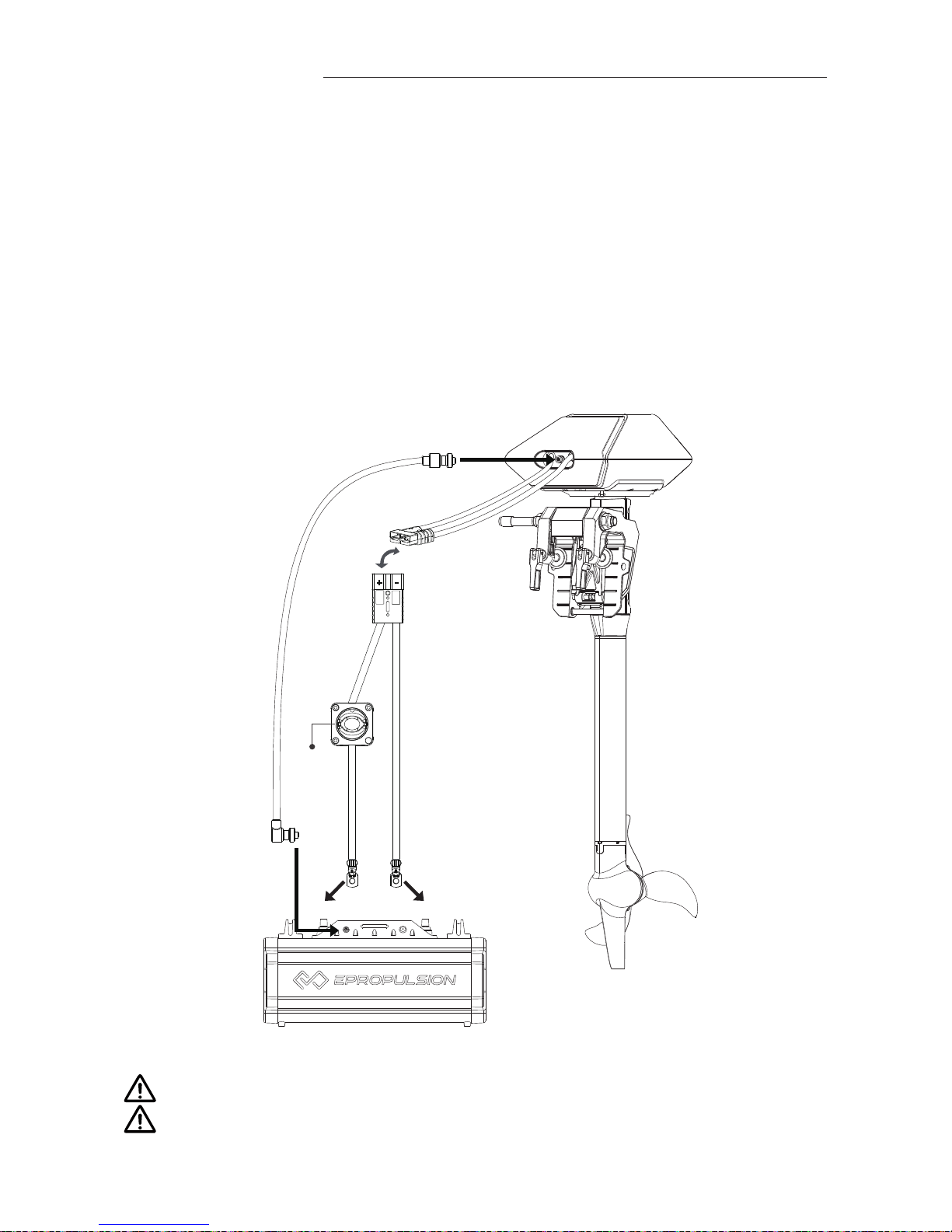
3.1 Connecting NAVY Battery to NAVY Outboard
When connecting an ePropulsion NAVY Battery to the outboard, make sure
the battery switch and the main switch on the power cable are both off.
Then refer to Figure 3-1 and follow the below procedures:
①
Connect the main switch cables to the battery. Refer to Figure 3-1.
②
Connect the main switch cables with the power cables from the outboard
motor.
③
Using the 5m communication cable to connect NAVY 6.0R outboard motor
with NAVY Battery.
+ -
Main
Switch
①
②
③
③
+ -
Figure 3-1
Avoid battery short-circuit during connection.
The outboard motor will stop working once the communication cable or
power cable disconnects.
Page 13
11
3.2 Parallel Connection of NAVY Batteries
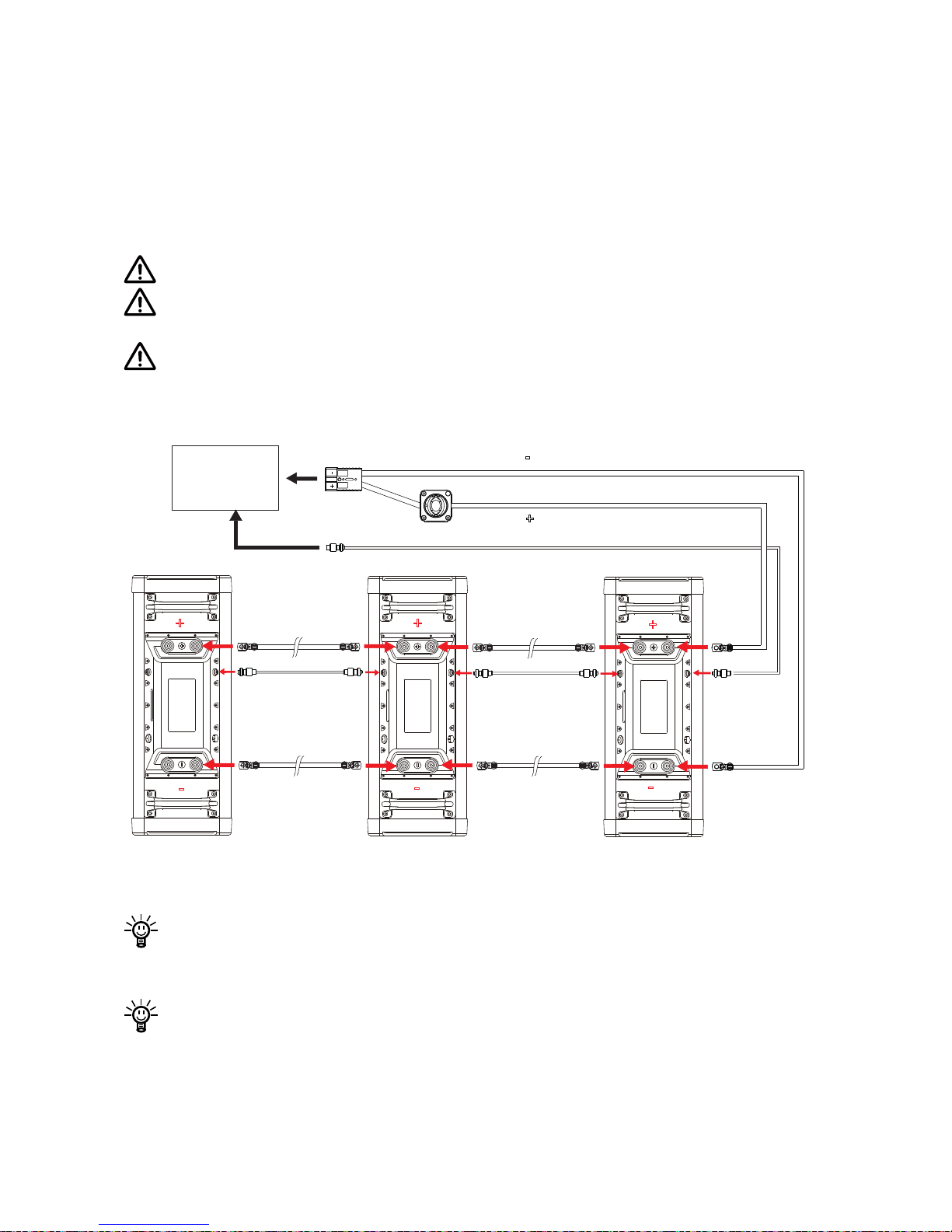
Connecting two or more sets of batteries in parallel can greatly extend the
duration time. The parallel strategy supports connecting up to eight NAVY
Batteries simultaneously in parallel. Remember to connect the communica-
tion cable(s) to every NAVY Batteries in parallel connection by referring to
Figure 3-2.
Never mix up the positive terminals with negative terminals.
Before installation, make sure the battery switch and the main switch of
power cable are both off.
Make sure the NAVY Batteries are of the same condition associated
with discharging cycles, aging, etc. Performance may reduce in case
NAVY Batteries of different conditions are connected in parallel.
Bridging Cable
Communication
Cable
Bridging Cable
Communication
Cable
Bridging Cable Bridging Cable
+ +
+
-
-
-
+
-
+ -
Navy Outboard
Motor
Connect Up to 8 Navy Batteries in Parallel
Figure 3-2
If communication between two NAVY Batteries disconnects,
the outboard motor only gets 3000W output from one battery since com munication to the other battery is lost.
If battery charge levels of the NAVY Batteries connected in parallel vary
too much, it’s suggested to get the batteries fully charged rst.
Page 14
12
3.3 Switching On/Off the NAVY Battery
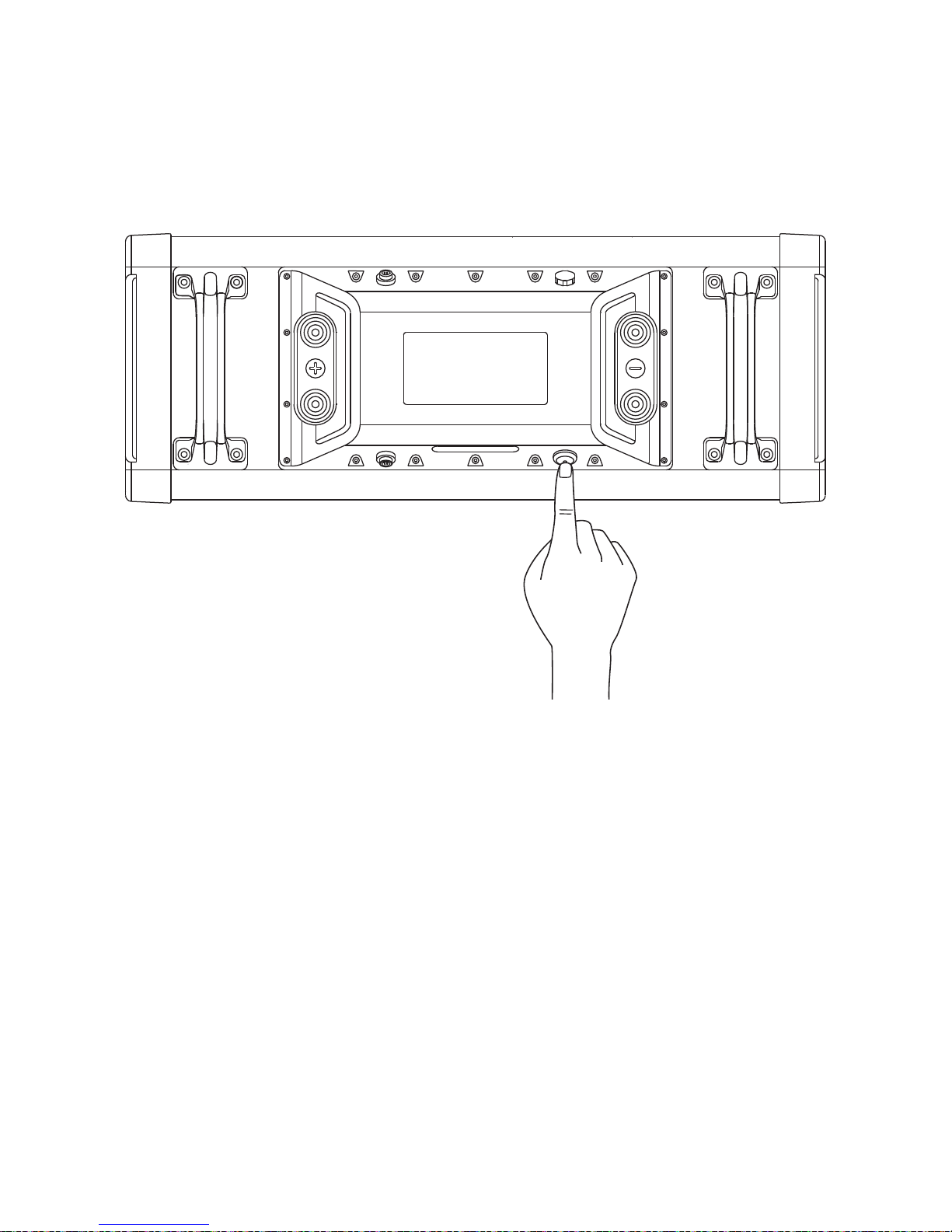
To switch on the NAVY Battery, press the on/off-switch on the NAVY Battery and the indicator on the button will light up. To switch off the NAVY Bat-
tery, press on/off-switch button again, and the indicator is light off.
Figure 3-3
Page 15
13
3.4 Charging the NAVY Battery
Read the following notes before charging a NAVY Battery:
Only use ePropulsion specified chargers. Do not use any third party
chargers.
Only charge NAVY Battery within temperature range from 0˚C~50˚C
(32˚F~122˚F).
Avoid water contact and direct sun/rain exposure during the charging
process.
Avoid touching the charger while charging as the high temperature metal surface may burn your skin.
Do not plug the charger into a power strip to avoid overload.
Do not overcharge the battery.
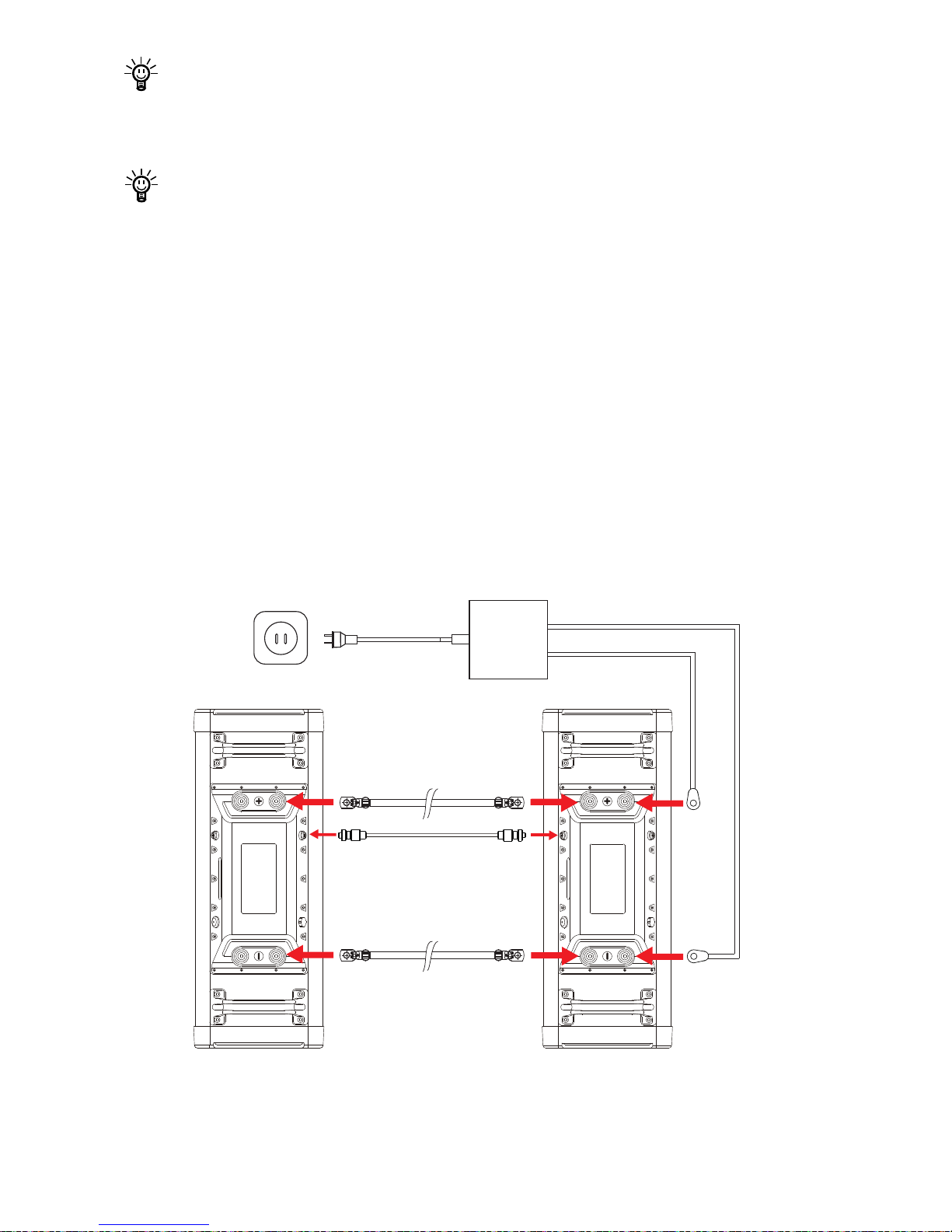
A. Charging procedures for a single NAVY Battery
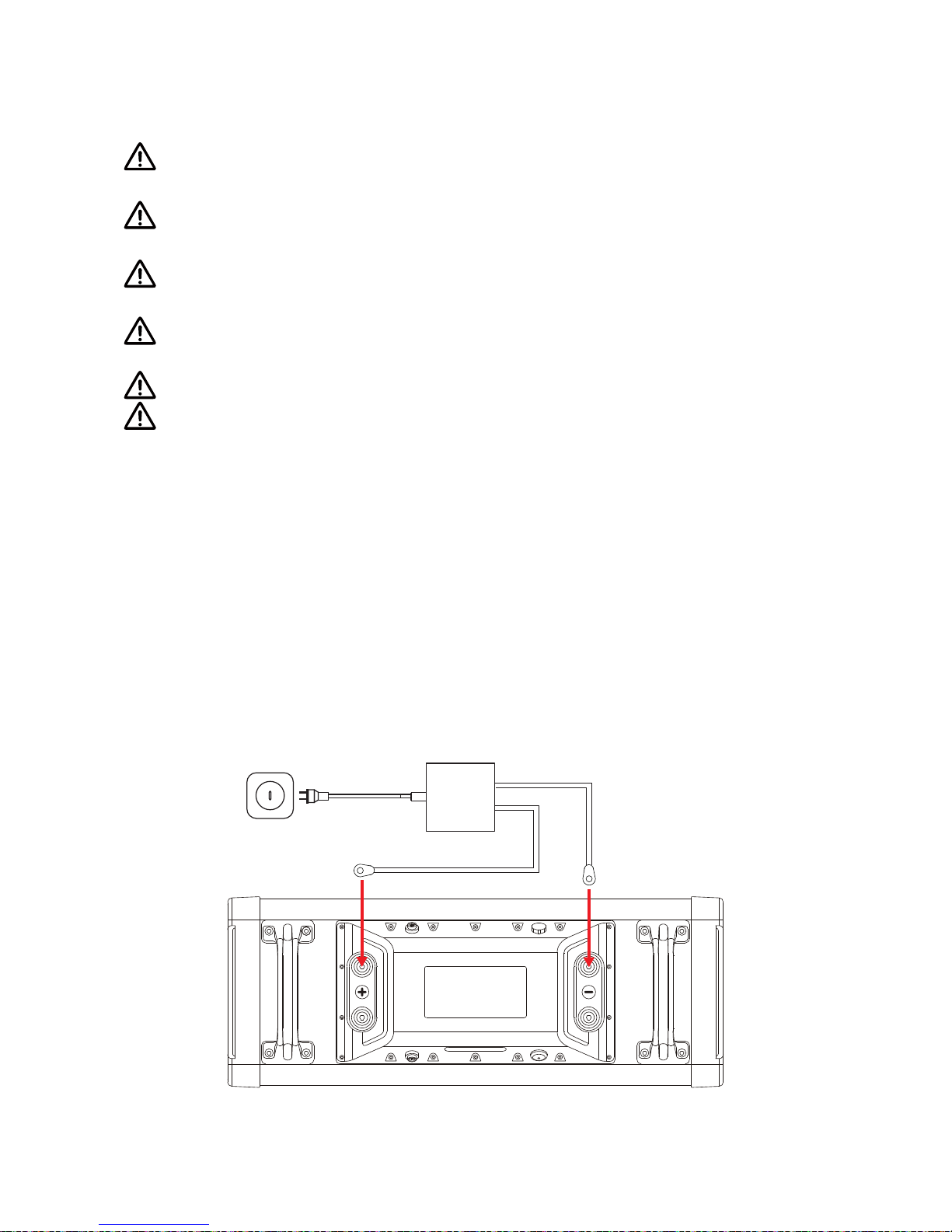
1. Turn off both battery switch and main power cable switch.
2. Connect the NAVY Battery with its charger, then plug the charger into a
wall socket.
3. Press on/off-switch to turn on the battery. The running indicator (refer to
gure 3-6) illuminates constantly while the battery level indicators will
blink when it starts to charge.
4. When the four battery indicators all illuminate constantly, it indicates the
battery is fully charged. First switch off the charger then the battery.
Disconnect the charger output cable from the battery afterwards.
Charger
Figure 3-4
Page 16
14
Self-discharge may occur in the process of transportation and storage.
Therefore, it is advised to fully charge the battery before each use. It is
recommended to charge the battery for 3 hours or more to make sure
enough backup time.
Turn off the battery when the battery is fully charged.
B. Charging procedures for NAVY Batteries connected in parallel
1. Turn all the NAVY Batteries off.
2. Connect all the NAVY Batteries (maximum 8) in parallel with both battery
communication cable(s) and bridging cables.
3. Connect one of the NAVY Batteries with an ePropulsion specied charger
with the charger in off state.
4. Connect the charger input plug to a wall socket and then turn on the
outlet. The running indicator will be constantly on and battery level
indicators will blink when the charging process start.
5. When the four battery indicators on all the NAVY Batteries light up
constantly, it indicates the batteries are fully charged. Now the charger
can be plugged out.
Bridging Cable
Battery Communication
Cable
Bridging Cable
Charger
Figure 3-5
Page 17
15
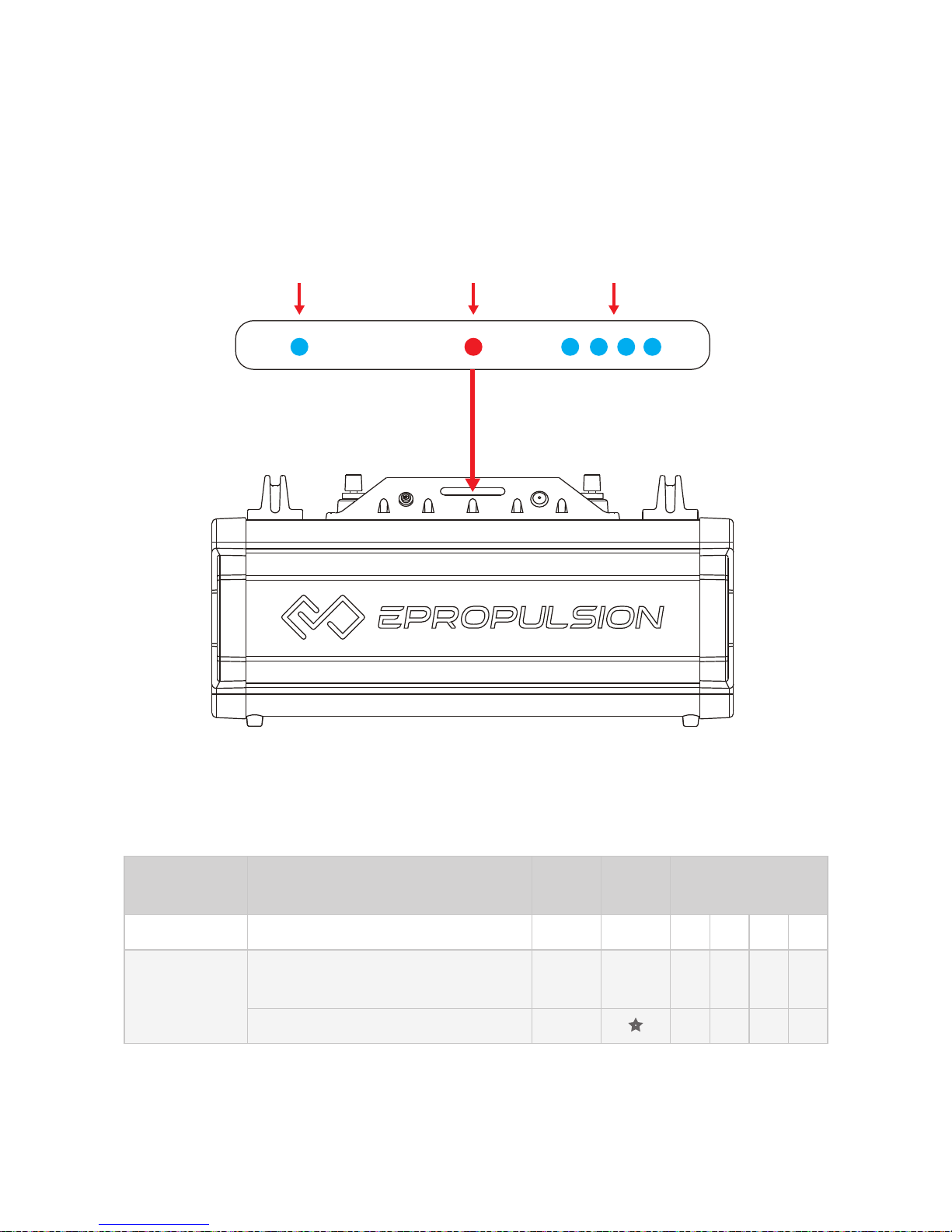
3.5 LED Indicators
Below Figure 3-6 displays the six LED indicators on the indicating panel of
NAVY Battery: one running indicator, one alarm indicator and four battery
level indicators.
Running
Indicator
Alarm
Indicator
Battery Level
Indicators
Figure 3-6
Battery
Condition
Description Run Alarm
Battery Level
(L-H)
Power off All lights are off
Standby
Normal: indicating power-
saving status
●
Alarm: low-battery
Page 18
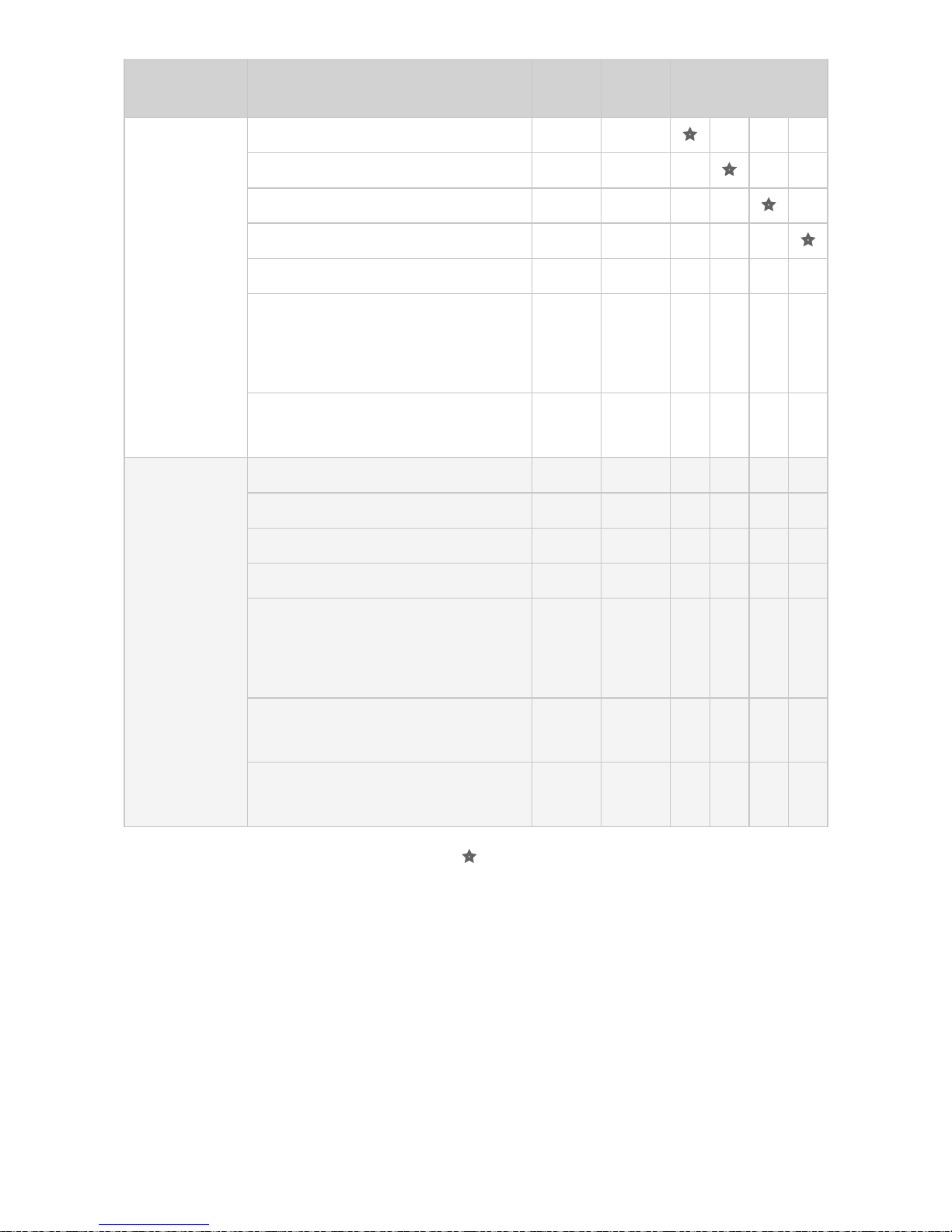
16
Battery
Condition
Description Run Alarm
Battery Level
(L-H)
Charging
0%~25%
●
26%~50%
● ●
51%~75%
● ● ●
76%~99%
● ● ● ●
100%
● ● ● ● ●
Overvoltage protection: either
single cell overvoltage or
battery pack overvoltage
● ● ● ● ● ●
Charging over-temperature
protection
● ● ●
Discharging
0%~25% battery
● ●
26%~50% battery
● ● ●
51%~75% battery
● ● ● ●
76%~100% battery
● ● ● ● ●
Under-voltage protection:
either single cell undervoltage
or battery pack undervoltage
●
Discharging over-temperature
protection
● ●
Discharging overcurrent
protection
● ● ●
Note: ● refers to steady light and
refers to flashing light with flashing
frequency of 1Hz.
Page 19

17
4. Troubleshooting
If the system fails, consult the following troubleshooting table for common
problems and corresponding solutions. If the problem persists, or repairs
are required, please consult the ePropulsion authorized dealer for further
assistance.
Problem Cause Solution
No Response
by Pressing
On/Off-Switch
Internal failure
Please contact your dealer for
assistance.
Short
Discharging
Time
Lack of enough
battery
Please fully charge the
battery before use.
Battery aging,
capacity loss
Replace a battery. Please contact your supplier for support.
Charging/
Discharging
Failure
Internal failure Please contact the dealer.
Battery
over-temperature
Rest the battery in proper
temperature until the battery
over-temperature protection
resumes.
Error Code Cause Solution
E01
Battery voltage exceeds
the operating range.
Replace a battery based on
suggested operation specications.
E06
Battery voltage level is
too low.
Charge the battery as soon as
possible.
E56
Communication
between NAVY Battery
and NAVY outboard is
broken.
Power off and reconnect the
communication cable.
Page 20
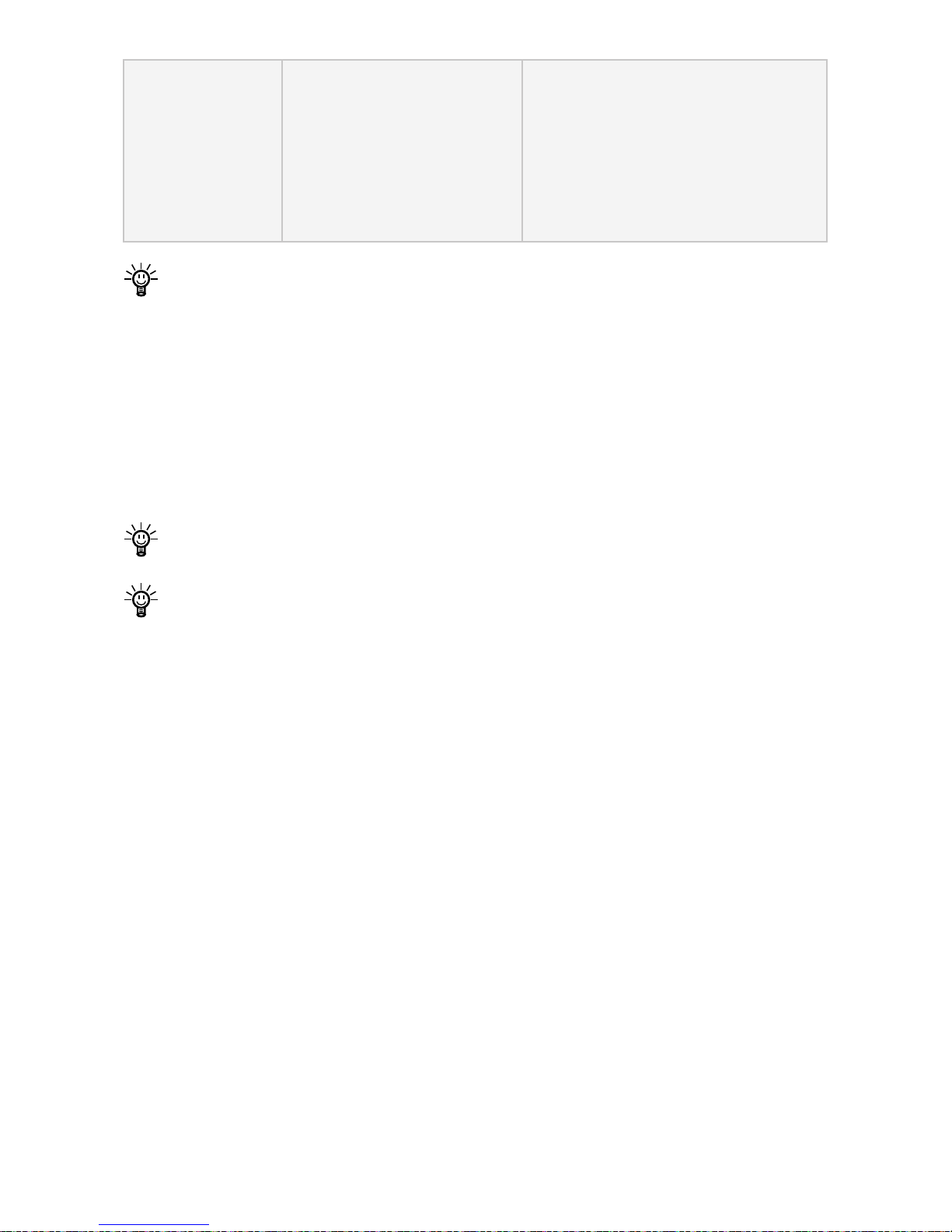
18
E57
Overcurrent protection is
triggered in one or more
NAVY Batteries.
Power off and check the battery level for all the batteries. If
there exists a large difference
in battery levels among the batteries, fully charge all of them
before use.
If the battery level displays on the LCD panel of throttle and NAVY
Battery are different, it may result from failure to connect the communication cable between NAVY Battery and NAVY outboard. In this case,
power off the system and connect the communication cable to solve the
problem. However, if the NAVY Battery and NAVY outboard have good
communication, it can be regarded as a normal phenomenon, as the
battery level displays on throttle is the average value of all the batteries
connected in parallel, therefore, the average value may differ from actual value of each battery.
The error codes in the above table display on the throttle screen once
the error occurs.
Also check if the failure is caused by other possible factors.
Page 21
19
5. Transport and Storage
5.1 Transport
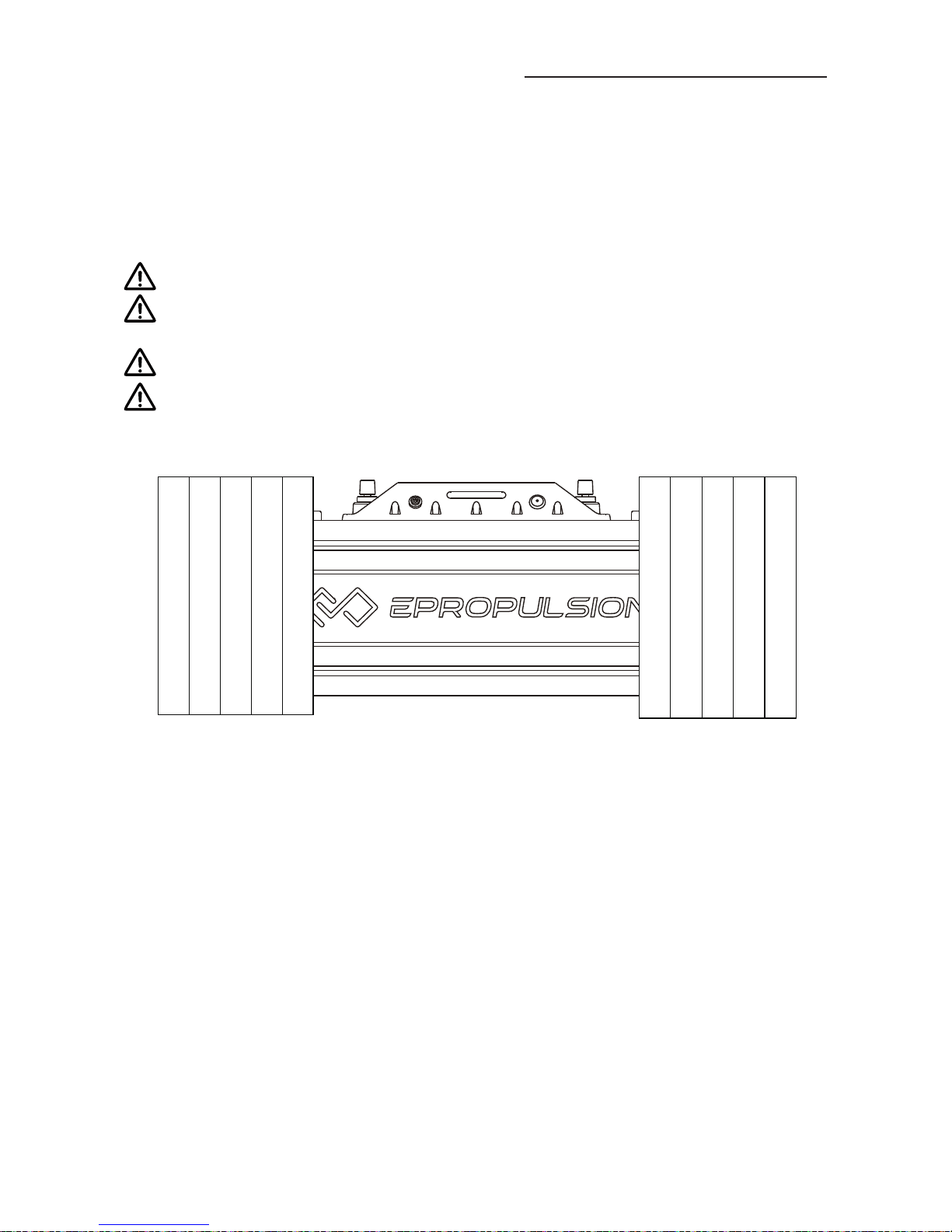
Below Figure 5-1 displays how to pack a NAVY Battery with ePropulsion
original packing material. For long-distance transport, it’s recommended to
apply ePropulsion original package to pack the outboard prior to delivery.
Check and ensure the package is intact without any damage.
Avoid violent vibration, strike or squeeze during transport. Get adequate damping protection measures before transport.
Do not expose the battery to the sun or rain during transport.
Check applicable local, national or international laws and regulations
before transport.
Figure 5-1
Page 22
20
5.2 Storage
If you are not going to use the battery for a long time, it is advised to contact
your dealer to clean and check the battery before storage. It’s suggested to
pack the battery with ePropulsion original package for storage.
Get adequate damping protection measures before storage.
For long-term storage, ensure the battery residual charge is around
50%. As slow discharge may occur during long-term storage, therefore,
check the battery level regularly and charge the battery to 50% when
the battery level is low. Usually, it is advised to charge the battery every
3 months.
Store the battery in a clean, dry and well-ventilated area without direct
sun exposure, where the relative humidity is no more than 70% and the
ideal ambient temperature is from -20°C~20°C / -4°F~68°F.
Avoid contact with corrosive substance which may cause permanent
damage, weaken or destroy the plastic of your battery pack.
Keep the battery away from any sources of re, sparks, open ame or
heat .
Use contact oil to keep battery contacts and screw connectors in good
condition on a regular basis, usually at least three months a time.
Charge the battery before use after long-time storage.
Keep the battery pack away from children or pets.
Page 23

21
6. Routine Maintenance
Various factors like operation environment (such as temperature, humidity,
dust, etc.), aging and wear of internal components, will increase the possi-
bilities of battery failure. In order to avoid this, keep your battery in optimal
operating state, and eventually extend the service lifespan of NAVY Battery.
Therefore, routine maintenance is very important.
Before the rst time use or reuse after long-term storage, charge the battery to its full capacity in order to achieve the best performance. Only use
ePropulsion charger designed for NAVY Battery. Other chargers may lead
to shortened runtime, premature battery failure, or even re or explosion.
Avoid over-charging, which may cause re or explosion.
Use the battery in moderate temperature to avoid negative effects of extreme temperature posed on battery lifespan and useful cycles. Apply
contact spay after use to keep the battery contacts in good condition.
Once a fault occurs, deal with the problem in time to avoid any further
damage. If necessary, consult the ePropulsion authorized dealer for repair
or parts replacement.
During storage, strictly follow the instructions in section 5.2 Storage. Pay
special attention to the residual charge and check the battery state in a
regular manner. Also remember to apply contact spay at least once every
3 months.
Use clean & dry towel to keep the battery surface away from oil, dirt and
water. Avoid touching metal contacts. All the contacts need to be kept
clean for best performance. When carrying batteries around, do not touch
the contacts with metal objects such as keys or tools to avoid short circuit,
battery damage, and potential re or explosion.
Always follow the instructions provided with the battery manufacturer. Refer to this user manual and nd the latest version available at www.ePropulsion.com.
To improve functionality and prolong lifespan of NAVY Battery, avoid direct sunshine or radiation exposure. Meanwhile, avoid liquid, dust or mud
entering the battery.
When the battery is getting low, please stop discharging and charge the
battery as soon as possible. It’s advised to check the battery level on a
regular basis.
Page 24
22
7. Warranty Claim
The ePropulsion limited warranty is provided for the rst end purchaser of
an ePropulsion product. Consumers are entitled to a free repair or replacement of defective parts or parts which do not conform with the sales contract. This warranty operates in addition to your statutory rights under your
local consumer law.
7.1 Warranty Policy
ePropulsion keeps its products free of defects in material and workmanship
for a limited period since the date of purchase. Once a fault is discovered,
the user has the right to make a warranty claim under the ePropulsion warranty policy.
Product Warranty Expiry Date
NAVY Battery One year after the date of purchase
Repaired/
Replaced
Parts
Three months since the date of maintenance.
Note:
If the three-month period overlaps with the original
warranty period, the warranty against the repaired/replaced parts still expire one year after the date of purchase.
If the three-month period exceeds the original warranty
period, the repaired/replaced parts expire by the end of
the third month since date of maintenance.
In order to validate the warranty, users are required to ll the Warranty
Claim Card in advance.
Keep the product label on top of battery in an intact state and record
the serial number on the label. Never tear the label off the battery. A
NAVY Battery without the original product label will not be applicable to
warranty services provided by ePropulsion.
The warranty is valid only when the information on the Warranty Card is
lled in correctly and completely.
Free warranty is only validated upon the presentation of the legal serial
number, Warranty Claim Card, and evidence of purchase from an authorized ePropulsion dealer.
Valid date of purchase should be established by the rst-hand purchas-
1.
2.
Page 25

23
er with original sales slip.
Free warranty is not transferable and will not be reissued.
7.2 Out of Warranty
Make sure the product is properly packed during delivery, the original ePropulsion package is recommended. If the product got further damaged due to
improper packing during delivery, the furtherly damaged part will be deemed
as out of warranty coverage.
In addition, faults or damages caused by the following reasons are also excluded from warranty scope within the covered period:
Dropping, improper care or storage.
Any improper operation contradicts the user manual.
Accident, misuse, wishful abuse, physical damage overcharging or unauthorized repair.
You should be noted that minor faults like normal wear and tear that
pose no inuence on the intended function of the product are also not
covered by the warranty.
The communication cables supplied with the NAVY Battery belong to
consumables, which are also out of warranty scope.
7.3 Warranty Claim Procedures
If you nd your product defective, you can make a claim to your dealer following below procedures:
Fill in the Warranty Claim Card correctly and completely in advance.
Then make your warranty claim by sending it to your authorized ePropulsion service partner together with valid proof of purchase. Usually these
documents are required when making a warranty claim: the Warranty
Claim Card, ex-factory serial number, and evidence of purchase.
Send the defective product to your authorized ePropulsion service point
after getting the conrmation. Note that the label should be kept intact.
You can also deliver the product to your authorized ePropulsion dealer
after getting conrmation.
The defective components or parts will be either repaired or replaced
according to the diagnosis made by the ePropulsion authorized service
partner.
If your warranty claim is accepted, the equipment will be repaired or re-
1.
2.
3.
4.
Page 26

24
placed free of charge.
After careful examination and confirmation by ePropulsion authorized
dealer, the defective or faulty components will be repaired or replaced
with brand new ones against the actual condition.
In case your warranty claim be rejected, an estimated repair charge with
round trip delivery cost included will be sent for conrmation. ePropulsion
authorized service point will conduct maintenance accordingly only after
your conrmation.
If warranty expires, you can still enjoy fee-based maintenance services
from authorized ePropulsion service partners with minimum mainte-
nance charge.
5.
6.
Page 27

Page 28

Thanks for reading this user manual.
If you have any concerns or nd any problems while reading,
please don’t hesitate to contact us. We are delighted to offer
service for you.
Dongguan ePropulsion Intelligence Technology Limited
Website: www.epropulsion.com
Email: [email protected]
 Loading...