

Page 1
ePOOL™ TROUBLe SHOOTING GUIDe (mODeL #4819, veRSION 2)
ImPORTANT: Prior to troubleshooting a receiver message, recycle the power FIRST.
To recycle the power, unplug the receiver, wait 10 seconds and then plug the receiver back in. If you still have the same message, check for other causes listed below.
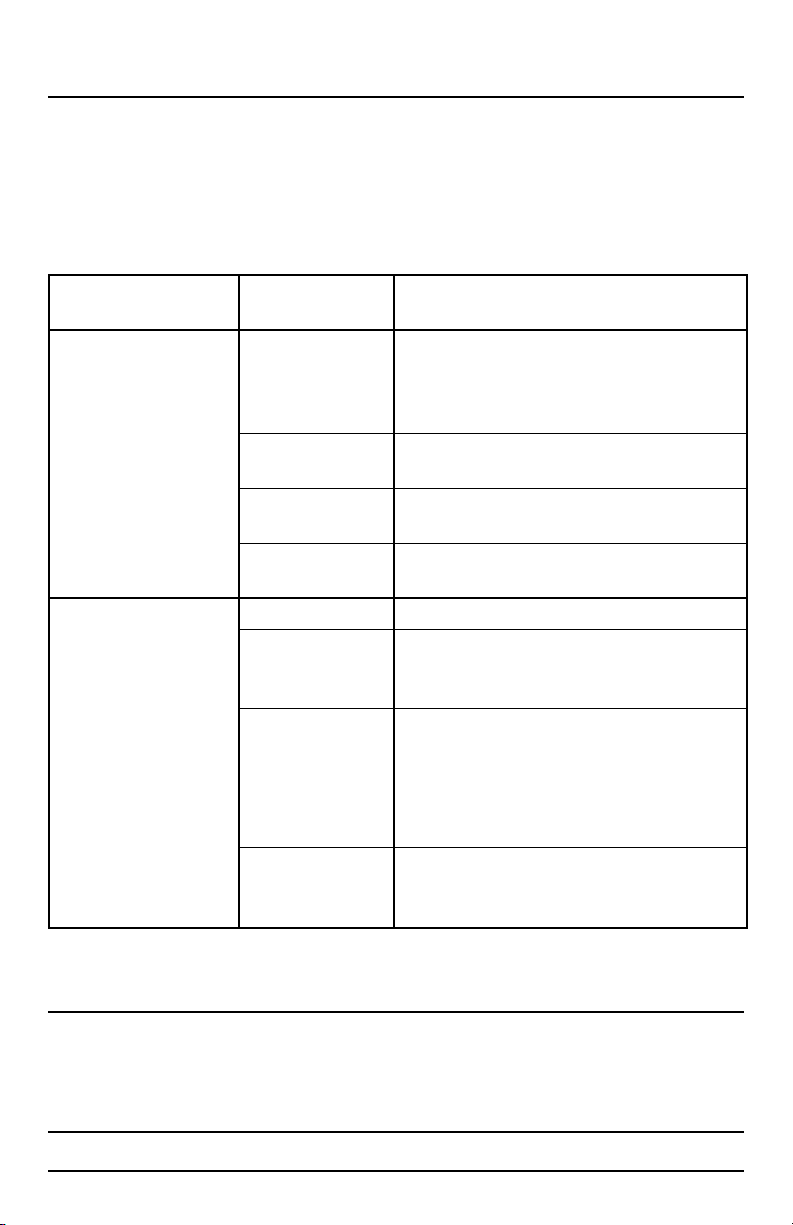
RECEIVER
MESSAGE
Communication Error Receiver is NOT within
pH Sensor Fault:
pH is above or below
measurement range
POSSIBLE
CAUSES
a 100 foot direct line
of sight of the oating
unit.
Floating unit is under
a pool cover.
Floating unit is next to
the pool edge/coping.
If you are still receiving this message.
pH reading is 0.0. Sensor glass is broken and will need replacing.
Sensor glass may be
broken and will need
replacing.
Your pool water is out
of balance.
If you are still receiving this message.
SOLUTIONS
Unplug the receiver. Move unit to within a 100 foot
direct line of sight with the receiver. See “For Best
Results” Section. Plug the receiver back in.
Unplug the receiver. Uncover the oating unit. Plug
the receiver back in.
Unplug the receiver. Move the unit to a more centralized location in your pool. Plug the receiver back in.
Contact GAME.
Remove bottom cap as instructed on page 16 of your
Owner’s Manual. Check to see if the glass sensor is
broken. If it is, contact GAME.
Take a test sample of pool water to conrm reading. If
necessary, add the appropriate chemicals to bring your
pool back into this range.
Then unplug the receiver, wait 10 seconds and plug the
receiver back in.
Contact GAME.
For technical assistance and missing parts, call Customer Service toll-free
1.888.339.2546
(press 135 at any time)
Monday through Friday, 8 am to 5:00 pm MST
1 KEEP THIS MANUAL
Page 2
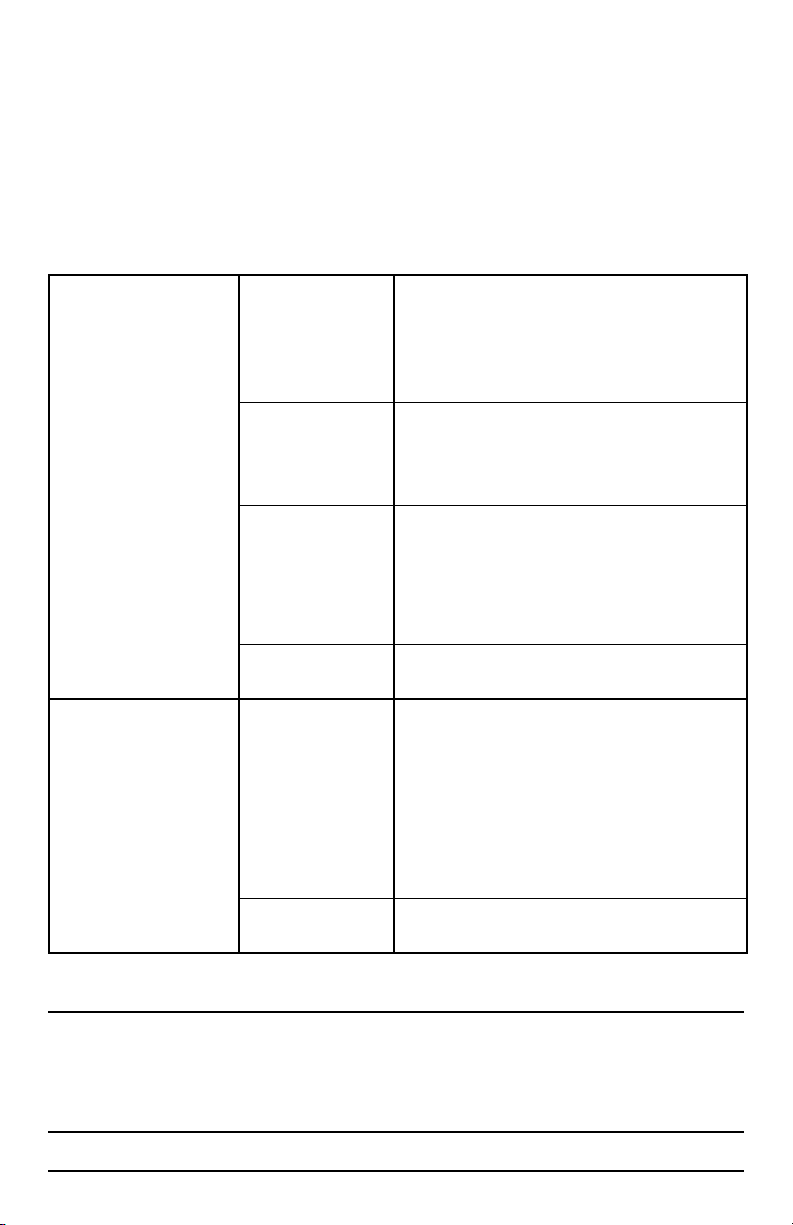
Chlorine Sensor Fault:
Sanitizer/chlorine is above
or below measurement
range
Alkalinity Sensor Fault:
Alkalinity is high (only for
Salt Water Pools)
Floating unit is in an
unbalanced location.
Floating unit may have
an air bubble covering
the sensor.
Your pool water is out
of balance.
Still receiving this
message.
Your pool may be low
on chlorine or your
alkalinity may be too
high.
If you are still receiving this message.
Make sure that the oating unit is not near your oating chlorinator which would cause higher than normal
readings. Move oating unit to a dierent part of pool.
Unplug the receiver, wait 10 seconds and plug the
receiver back in.
Unplug the receiver. Pull the oating unit out of the
water, tip on its side and place it in a dierent location
in your pool away from your return jets. Plug the
receiver back in.
Take a test sample of pool water to conrm reading. If
necessary, add the appropriate chemicals to bring your
pool back into this range.
Then unplug the receiver, wait 10 seconds and plug the
receiver back in.
Contact GAME.
Take a test sample of pool water to your local pool
store. Ask for the chlorine and alkalinity readings. The
chlorine concentration in your pool should be >2 ppm.
If it is below this, check your salt generator and adjust
to increase the chlorine concentration. If your alkalinity
is too high please follow your local pool store’s recommendations for correcting this. Unplug the receiver,
wait 10 seconds and then plug the receiver back in.
Contact GAME.
For technical assistance and missing parts, call Customer Service toll-free
1.888.339.2546
(press 135 at any time)
Monday through Friday, 8 am to 5:00 pm MST
2KEEP THIS MANUAL
 Loading...