

Page 1
IR Command Learning Procedure
R+ R- L+ L-
DIGITAL IN
SUB OUTANALOG IN
RIGHT
1 2 3 4 5
IR IN
IR OUT
+5V GND
RESET
SPEAKER OUTPUTS
STATUS
1
2
LEFT
SWITCHES
100-240V~50/60Hz 1.6A
UP
1 2
3
4
5
CONTROL
DOWN
IR
RECEIVER
RUN
LEARN
MONO
STEREO
FULL
HP 60Hz
IN 1
IN 2
SWITCH POSITION
EA-MINI-2D-35 EA-MINI-3D-35
READ ALL OF THIS SIDE FIRST - Page 1 of 2
Introduction
EPISODE® EA-MINI amplifiers feature optional IR Learning Mode, which allows control of the amplifier using
the remote for a display or any other remote on a job. After completing the learning procedure, the same
buttons for power toggle, volume up, volume down, mute toggle, and input toggle on the selected remote
will also control these settings for the amplifier.
Procedure Overview
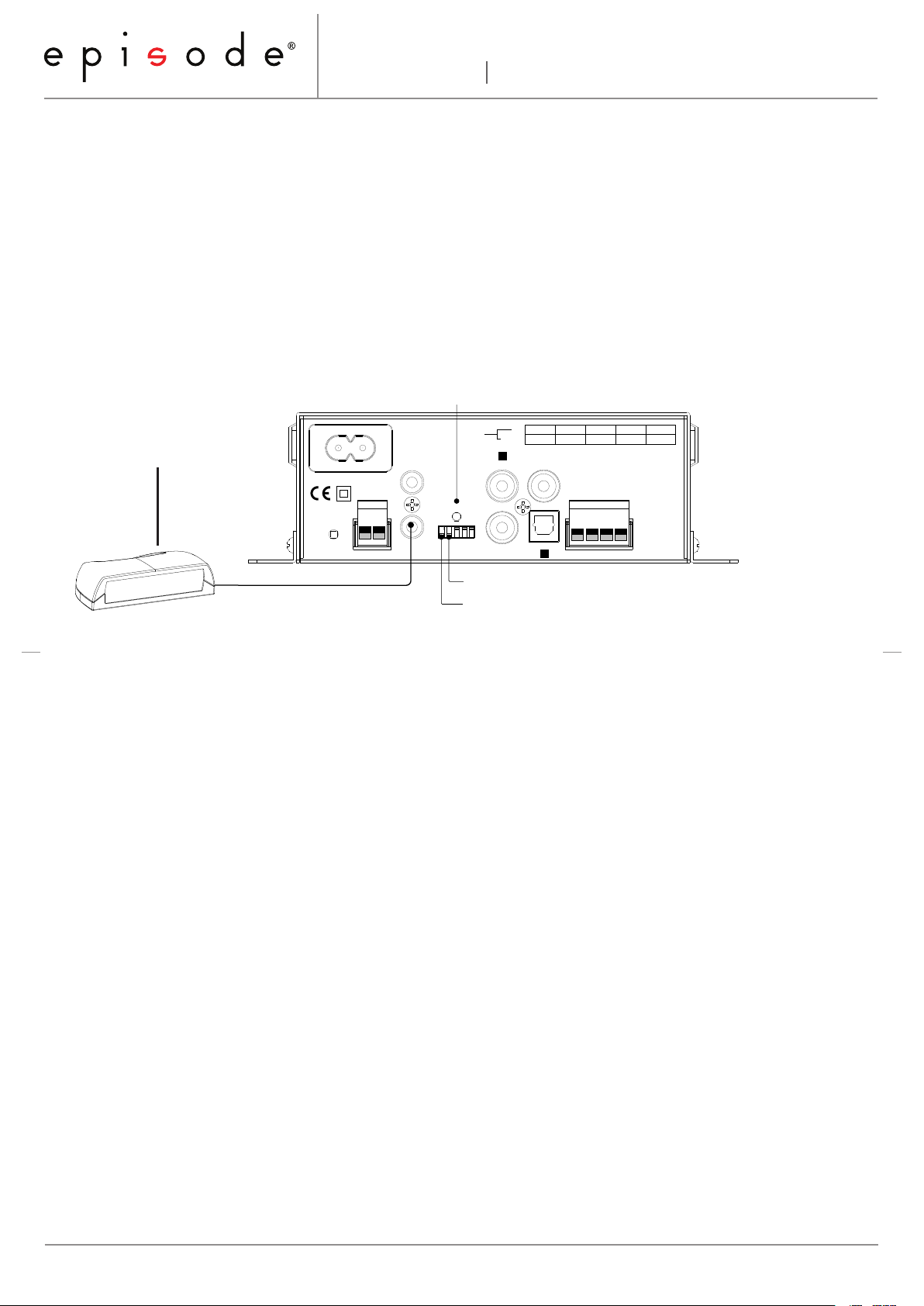
To complete IR Learning, an IR Receiver must be connected. Set up the amplifier as shown below and select
the remote that will be used for control. Then, go to the second page of the guide (flip over) and complete
the learning procedure. Note the DIP switch locations and positions before attempting the procedure.
IR RECEIVER
Status LED provides IR Learning Feedback
(Not Included)
Plugged into
IR IN Port
DIP Switch 2 DOWN for IR LEARNING MODE
DIP SWITCH 1 DOWN FOR IR RECEIVER POWER
Tips & Troubleshooting
• Make sure the source remote contains a fresh battery.
• Use only factory remotes for IR learning. A universal or programmable remote may add data to the
command that makes it unreadable by the amplifier for Learning mode. They may be used for operation
after setup.
• If commands aren’t being received correctly, try relocating the IR receiver. Interference from CFL lighting,
plasma or LED television screens, or IR from other equipment may cause issues.
• IR learning may be stopped after any command. Wait 20 seconds for Learning mode to time out. The
LED will change from flashing BLUE to solid PINK for 2 seconds, and then return to solid BLUE to indicate
RUN mode. You may unplug the IR receiver during the time out to avoid interference. Do not return the
dip switch to Run Mode before time out or the memory will be cleared.
• The same button on the remote cannot control more than one amplifier command at a time.
• If a particular command does not have a corresponding button on the remote, any other unused button
may be substituted. For example, source remotes may not have an “input toggle” button or function.
Instead, program an unused button for input switching and make note of it for the end user.
• IR learning mode will deactivate after 20 seconds of inactivity (no commands received). If IR learning
mode deactivates before learning is complete, reset the amplifier (set DIP switch 2 UP to the RUN and
press master reset while amplifier is ON) and then start the IR Learning procedure again. Any commands
learned before will be erased.
www.SnapAV.com Support: 866.838.5052 © 2013 Episode
Pa ge 1/2
®
Page 2
IR Command Learning Procedure
EA-MINI-2D-35 EA-MINI-3D-35
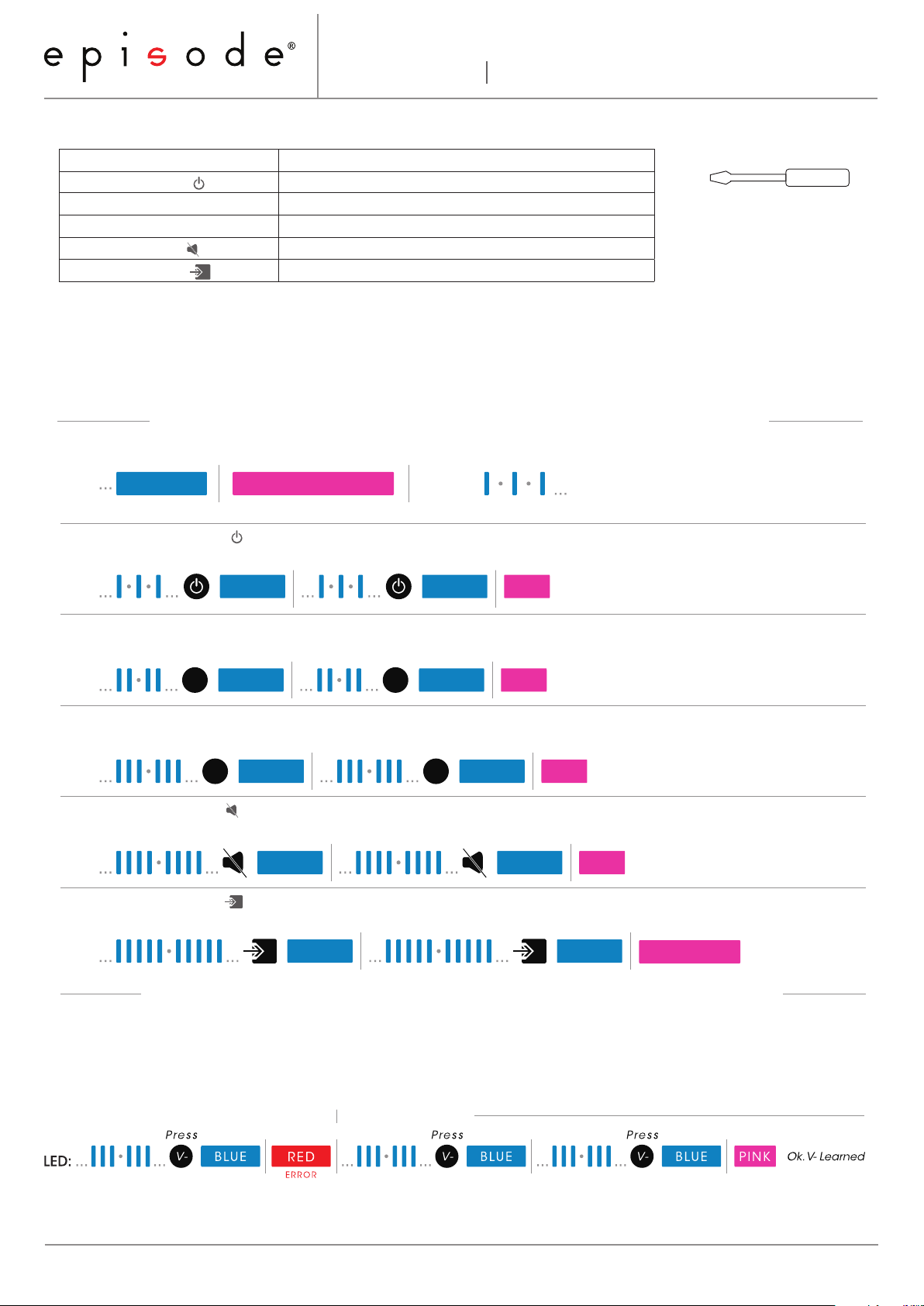
Command Learning Order (Must be learned in this order!) Tools Required
Command Description
1. Power Toggle ( ) Turn amplifier power on and off.
2. Volume Up (V+) Turn volume up (louder).
3. Volume Down (V-) Turn volume down (quieter).
4. Mute Toggle ( ) Toggle mute mode (no volume) on and off.
5. Input Toggle ( ) Switch between inputs 1 and 2.
Instructions
*It is not necessary to wait for the pictured sequence of short blue flashes before entering each
code. These flashes only indicate which code is being learned.
Flip DIP switch 2 DOWN with the tweaker to enter IR Learning Mode.
RUN Mode ... DIP Switch 2: LEARN (DOWN) Learning Mode, awaiting Command ...
Tweaker Screwdriver
(required tool for DIP Switch)
LED:
1. Learn Power Toggle ( )
Press Press
LED:
2. Learn Volume Up ( V+ )
Press Press
LED:
3. Learn Volume Down ( V- )
V+ V+
LED:
4. Learn Mute Toggle ( )
BLUE BLUE
BLUE BLUE
Press Press
V- V-
Press Press
LED:
5. Learn Input Toggle ( )
Press Press
LED:
PINKBLUE
BLUE BLUE
BLUE BLUE
PINK
PINK Ok. V+ Learned
Ok. Power Learned
PINK
Ok. V- Learned
PINKBLUE BLUE
Ok. Mute Learned
PINK
Ok. Input Toggle Learned
Return DIP switch 2 to RUN (UP) using the tweaker. Learning Complete.
Learning Errors
A red LED indicates a learning error. After an error, repeat the current command until it learns correctly. See the
example below:
Re-enter command
www.SnapAV.com | Support: 866.838.5052
Page 2/2
131017-1630
 Loading...