

Page 1
Instruction Manual
Ultra
Light
Series
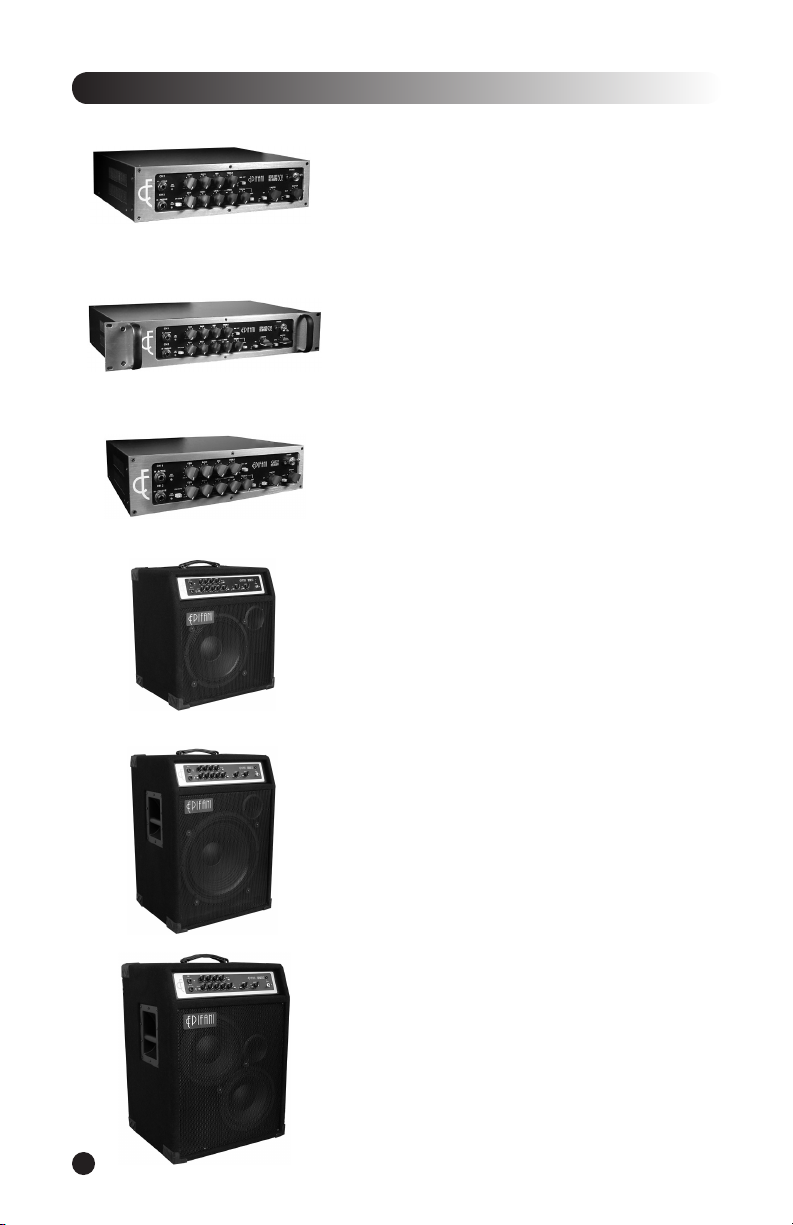
• 502 Ampli er
• 902 Ampli er
• Quest II Preamp
• UL 112 Combo
• UL 210 Combo
• UL 115 Combo
Page 2
Welcome to the Epifani family of owners and thank you for your purchase. Our sole
-- Nick Epifani
• Table of Contents
INNOVATE • EVOLVE • INSPIRE
• Welcome!
2
Page 3

• Epifani Ultra Light Series
the crossovers are made from the highest quality components - the best polypropylene capacitors, 18
Your Epifani product was originally packaged in a speci cally designed carton and
- if the packaging seems damaged, please return this item to the
• Unpacking Your Unit
3
Page 4

The lightning ash with arrowhead symbol within an
The exclamation point within an equilateral triangle is
time.
the following conditions.
that are covered by the operating
that could result in re or electric shock. The
• WARNING/CAUTION
WARNING:
CAUTION:
• Important Safety Instructions
RISK OF ELECTRIC SHOCK
DO NOT OPEN
4
Page 5
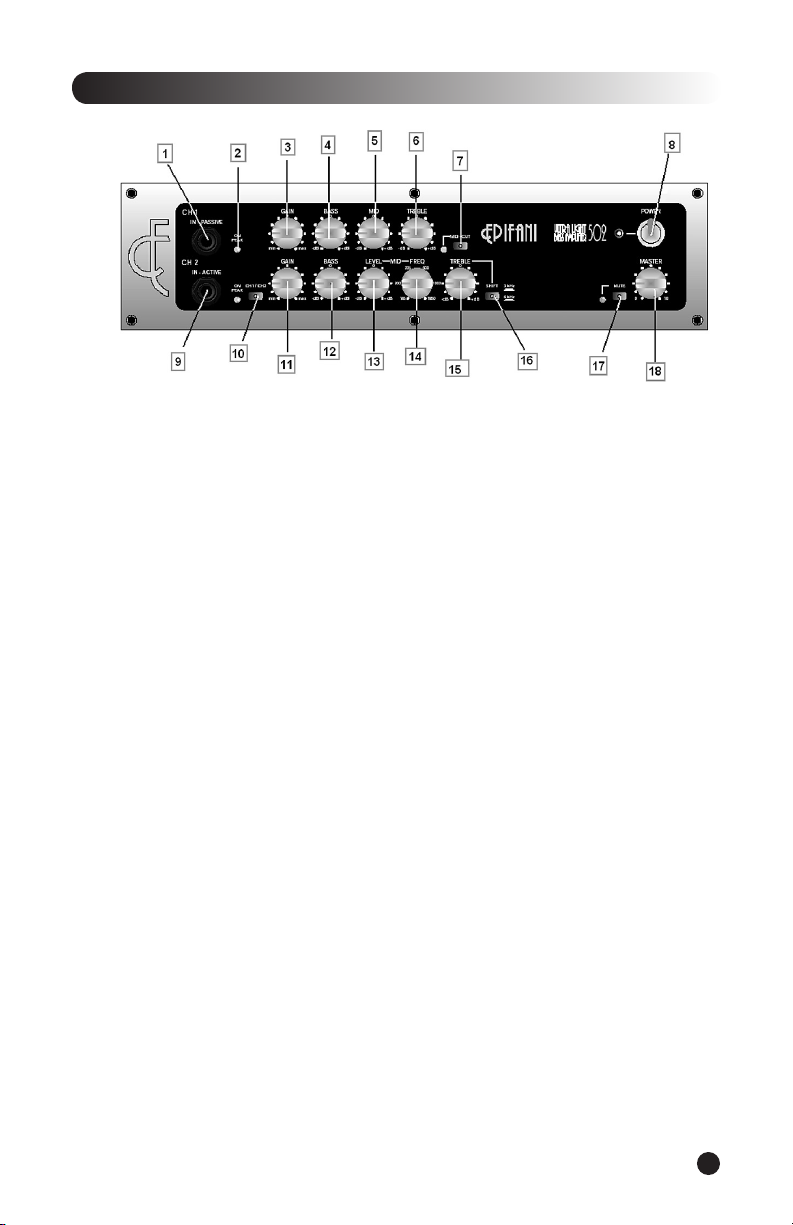
• Front Panel Features
Input jack for a passive instrument.
Indicates channel switching and gain limits.
Adjusts the input signal to the appropriate level.
Adjust the amount of low frequency
Adjusts the amount of midrange frequencies
Adjusts the amount of high frequencies
Eliminates speci c midrange frequencies
Turns the Ampli er on or off.
Active Input –
Input jack for an instrument with Active electronics.
Switches between Channel 1 and Channel 2 (engaged either manually or via
the footswitch).
Adjusts the input signal to the appropriate level.
Adjust the level accordingly to your preference. Start at the twelve o’clock position and
This feature allows you to boost or cut a
This control allows you to select a center point
Adjusts the amount of high frequencies
This feature “shifts” the treble frequency from 3 kHz to 6 kHz
Is engaged manually or via the optional footswitch. The Mute switch
Adjusts the overall output of the ampli er.
5
Page 6
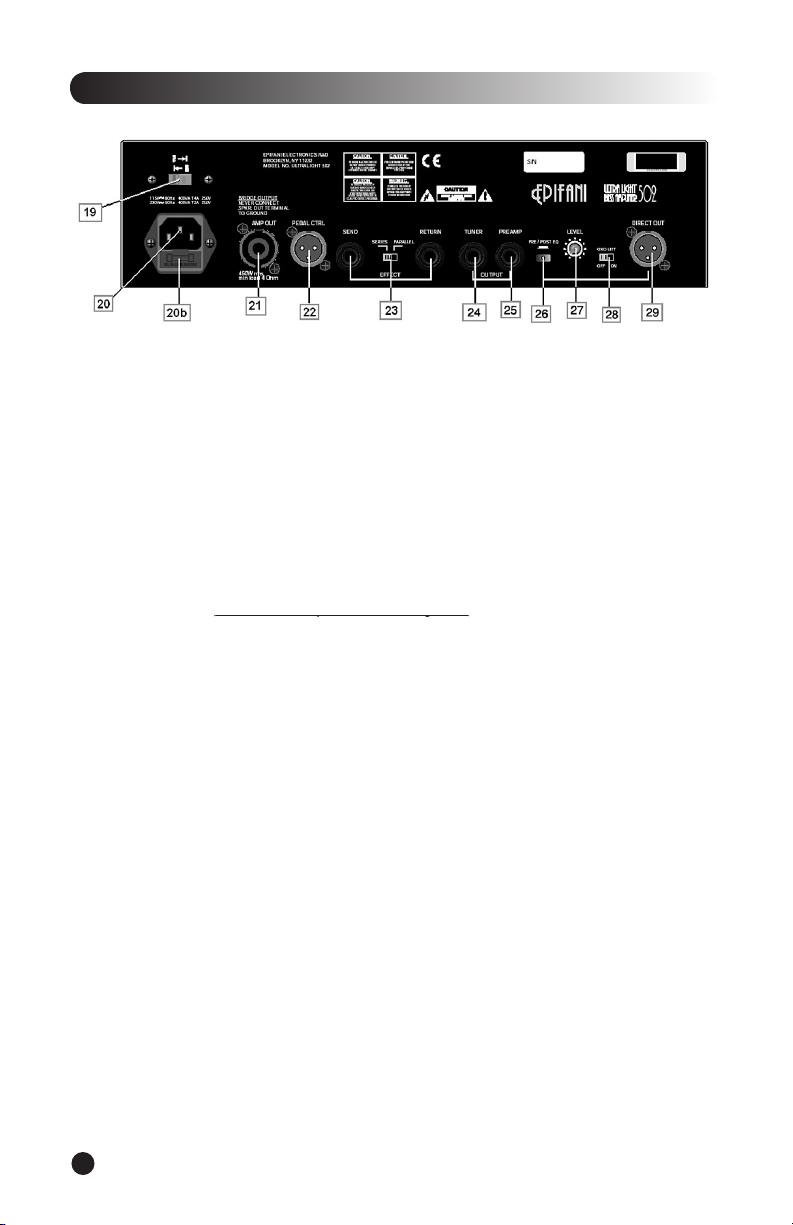
• Rear Panel Features
Select 120V for use in the U.S. Select 220V for European
AC Line-in –
Firmly plug the supplied AC power cable into the socket.
The fuse protects the ampli er from damage due to line current faults, power surges
Amp Out with Speakon™ Connector –
Connect your ampli er to the speaker cabinet using a
– (i.e. we highly recommend the use
Allows you switch between Channel 1 and Channel 2 and toggle Mute/Tuner,
This feature allows you to use outboard effects with the Ultra Light Amp.
Connect your tuner using an instrument cable. While in mute mode you can
Selects whether direct output (DI) signal comes before or after Ultra Light
Adjusts the signal coming from Direct Out (Usually kept at the twelve o’clock
Disconnects chassis ground to get rid of unwanted hiss and buzzing.
6
Page 7

• Getting Started
thoroughly.
that you are using an “unshielded” speaker cable and that the polarity of the cable is correct. Do
– (i.e. we highly recommend the use of a “Speakon™
to Speakon™” for a better connection. In the event of a Speakon™ to inch connection be sure
the connection from the amp to cabinet is made while the ampli er is OFF. Note - (If you’ve
the appropriate cables.
while turning up the Gain control of the appropriate channel (as indicated by the LED
the light turns red your input is too hot and your signal will distort. For the cleanest sounding
the system. Congratulations! You’re only a few steps away from hearing your instrument’s true,
• Connections
• Powering Up
7
Page 8

• Dialing in Your Sound
the overall volume of the system so, to compensate, you can simply turn up the gain to compensate. The
Whether you add or deduct EQ, you will have to readjust the Gain level. If you’ve
is equipped with our state of the art “Mid-Cut” Control. You can EQ this channel for a nger
is a bit different from channel 1, as it offers a semi-parametric equalizer and a unique Treble
to boost or cut that particular frequency. If you are using this type of EQ for the rst time some
When you are plugged into the PASSIVE input and you switch channels, the
the ACTIVE input and you switch channels, the input for the second channel becomes Active.
the ampli er at the same time, (one in the Active input and one in the Passive input), the inputs become
you separate gain and EQ control for each instrument and the ability to switch between them while
• Routing
8
Page 9

• Rear Panel Operation
Plug an instrument cable between this jack and your digital tuner. You can use the Mute
you happy and being in tune will help advance your career!
Using shielded instrument cables connect the “Effect send” to your effect’s
Using a shielded instrument type cable this output could be used to send a signal
to a power amp or to send an unbalanced signal to a recording device.
Using a “microphone” cable with XLR connectors you can send a balanced signal to
the house PA or for direct injection into a recording device.
You can control the volume of the Direct Out jack for the cleanest possible feed
to an external device.
By placing the switch in the “pre” position you are essentially sending an
the EQ settings you have chosen.
9
Page 10
• Speci cations
10
Page 11

• Speakers and Accessories
1 x 250w RMS Cast Aluminum Frame •100w RMS Tweeter • Freq. Response: 45Hz
1 x 300w RMS Cast Aluminum Frame • 100w RMS Tweeter • Freq. Response: 43Hz
1 x 400w RMS Cast Aluminum Frame • 100w RMS Tweeter • Freq. Response: 38Hz
2 x 250w RMS Cast Aluminum Frame • 100w RMS Tweeter • Freq. Response: 40Hz -
2 x 12” 400w RMS Cast Aluminum Frame • 100w RMS Tweeter • Freq. Response:
3 x 250w RMS Cast Aluminum Frame • 100w RMS Tweeter • Freq. Response: 40Hz
4 x 250w RMS Cast Aluminum Frame • 100w RMS Tweeter • Freq. Response: 40Hz -
6 x 250w RMS Cast Aluminum Frame •100w RMS Tweeter • Freq. Response: 40Hz
the proprietary footswitch. This footswitch allows you select either
And of course you’ll need
your Epifani gear wear.
www.epifani.com
11
Page 12
Alphonso Johnson
Anthony Jackson
Antonio Righetti
Al Improta
Anthony Wellington
Tony Lewis (Prologue)
Andy Jordan
Tony Mahone
Todd VanSelus (Ian McFeron Band)
Vashon Johnson (Shania Twain/B.B. King)
Anthony Corley
• The Epifani Family
INNOVATE • EVOLVE • INSPIRE
 Loading...