

Page 1
GBS-ECO-MF-V02
GB
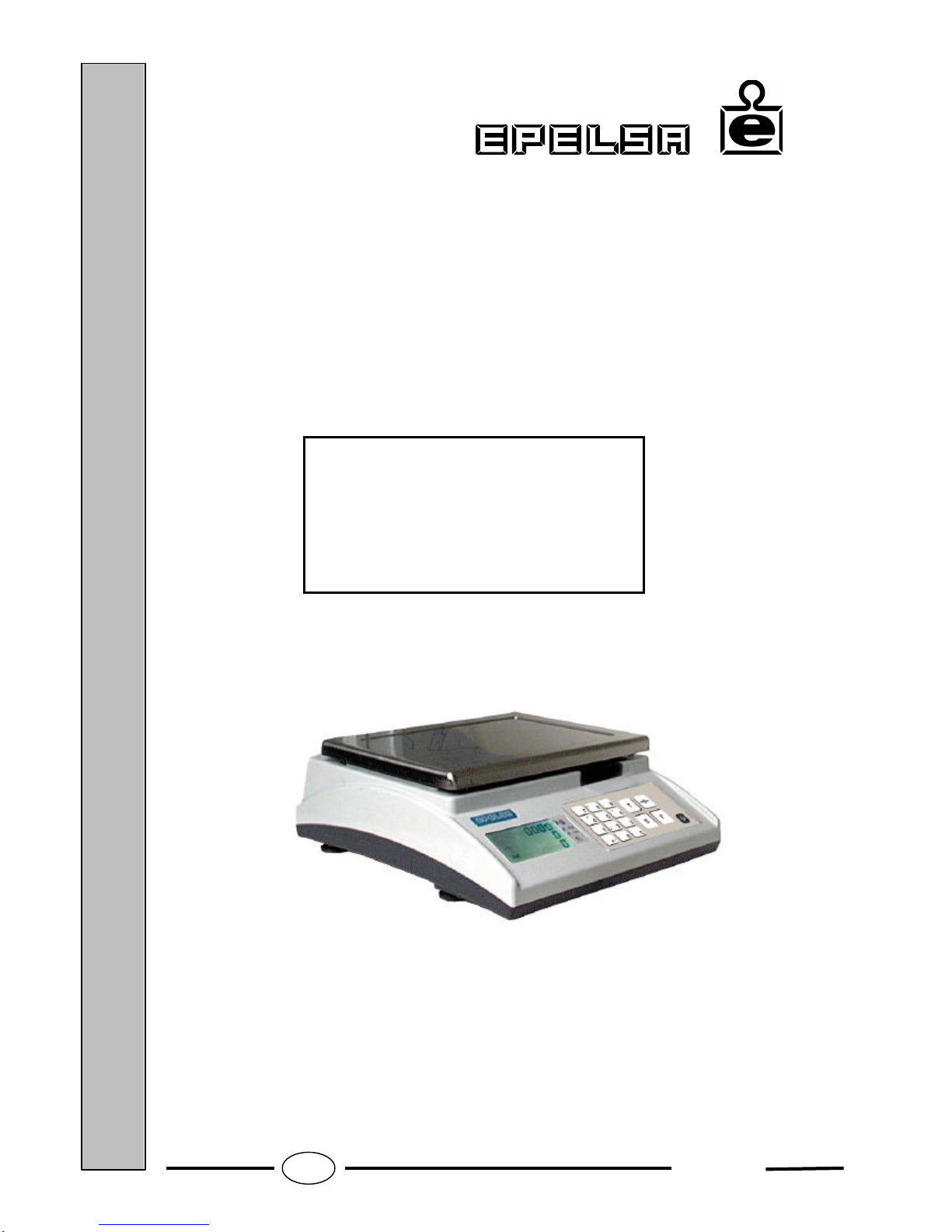
Installation Manual
ECO MULTIFUNCTION
Scale
Page 2

GBS-ECO-MF-V02
1
- CONTENTS -
1. DESCRIPTION OF THE DISPLAY..........................................................................................................................2
2. DESCRIPTION OF THE KEYPAD..........................................................................................................................3
3. TURNING ON THE SCALE AND ENTERING THE MAIN SET-UP MENU....................................................4
4. PARAMETER SET-UP MENU................................................................................................................................5
4.1. GENERAL ERASE 5
4.2. CAPACITY 5
4.3. MULTI-RANGE 6
4.4. INITIAL ZERO 7
4.5. DIGITAL FILTER 8
4.6. SPECIAL INDICATIONS 9
4.7. CUMULATIVE TARE 9
4.8. HIGH RESOLUTION 10
4.9. RS CONNECTION 11
4.10. TPV 0 TYPE (only if the connection type is 'TYPE 0') 11
4.11. TRANSMISSION MODE (only if the connection type is 'TYPE 0') 12
4.12. AUTOMATIC WEIGHT TRANSMISSION (only if the transmission mode is 'AUTOMAT') 13
4.13. TIME OUT (only if the transmission mode is 'MANUAL' and type of TPV is ‘TYPE B’) 14
4.14. TIME LIMIT (only if the transmission mode is ‘MANUAL’) 15
4.15. PROTOCOL TYPE (only if the connection type is ‘TYPE 9’) 15
4.16. BAUD RATE (only if the connection type is different from ‘NO CONX’) 16
4.17. PARITY (only if the connection type is different from ‘NO CONX’) 17
4.18. NUMBER OF BITS (only if the connection type is different from ‘NO CONX’) 17
4.19. NUMBER OF STOP BITS (only if the connection type is different from ‘NO CONX’) 18
5. TABLE OF METROLOGICAL SPECIFICATIONS................................................................................................19
6. SETTING THE ZERO AND THE WEIG HT............................................................................................................19
7. COMMUNICATION PROTOCOL..........................................................................................................................21
8. LIST OF POSSIBLE ERRORS...................................................................................................................................34
9. CONNECTIONS.........................................................................................................................................................35
10. BATTERY LIFE ...........................................................................................................................................................36
Page 3
GBS-ECO-MF-V02
2
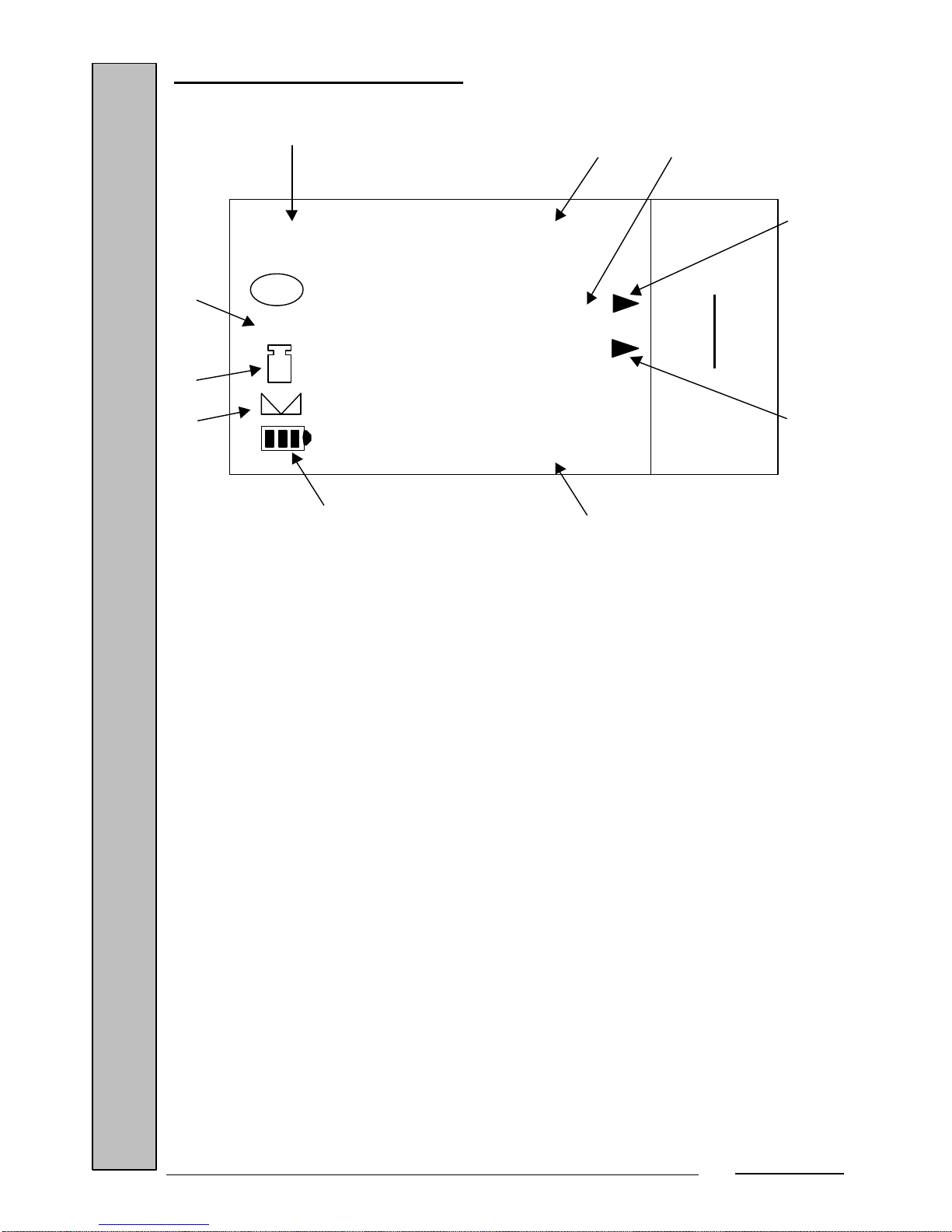
1. DESCRIPTION OF THE DISPLAY
The ECO scale's display is as shown in the figure above and consists of:
1. Weight display: 5 digits.
2. Price display: 6 digits.
3. Amount display: 7 digits.
4. Semi-automatic tare indicator.
5. Numeric or coded tare indicator.
6. Special scale indications.
7. Zero weight indicator.
8. Net weight indicator.
9. Stable weight indicator.
10. Battery status indicator.
1 2
3
4
5
6
7
8
9
10
8888888
888888
88888
Max 15 kg
Min 100 g
e= 5 g
I I I
→0←
kg
kg
Pcs
N
T
PT
Page 4
GBS-ECO-MF-V02
3
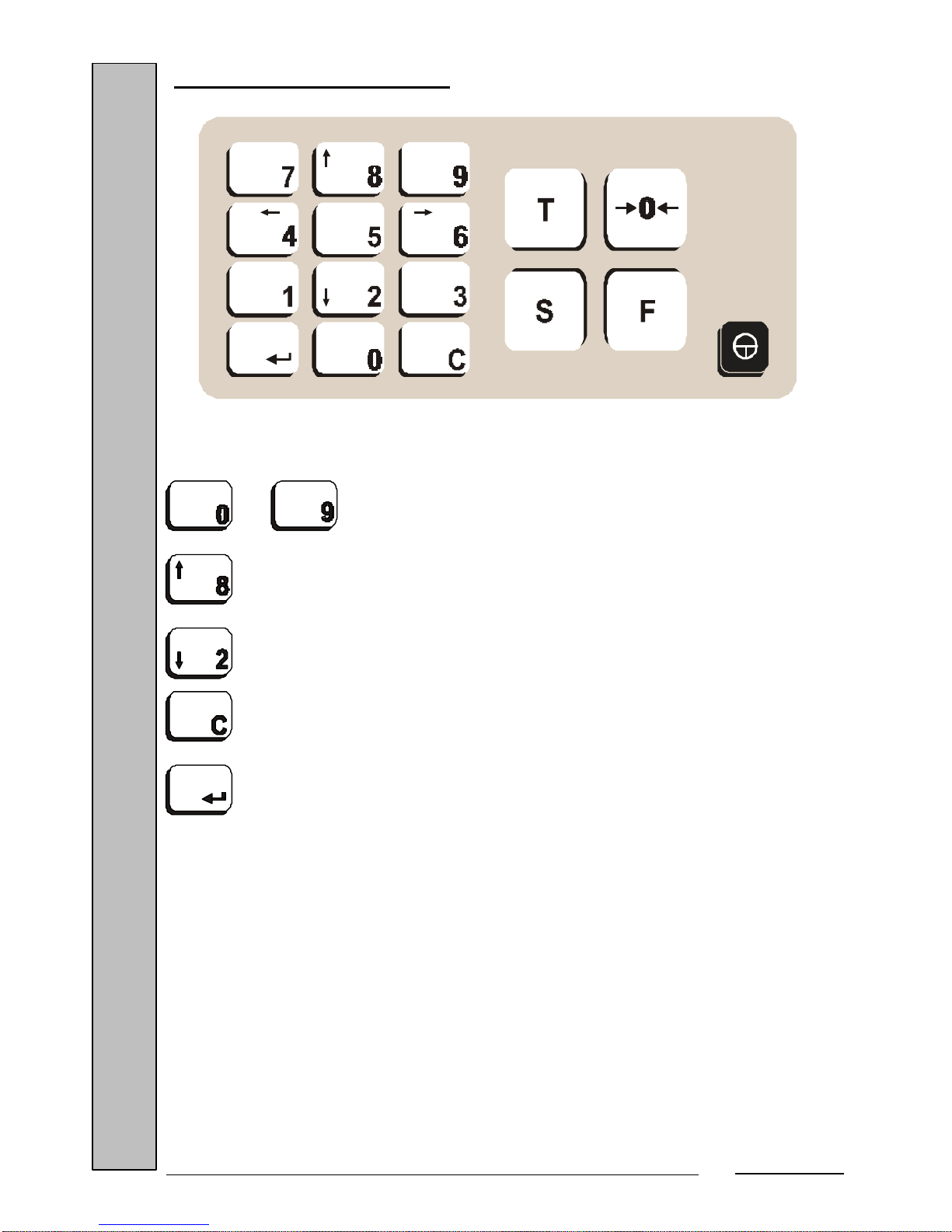
2. DESCRIPTION OF THE KEYPAD
The unit has a 17-key keypad. Of these, the following are used to set the unit:
… Numeric keys for entering numeric data.
……….. Forward cursor for options with preset values.
………. Back cursor for options with preset values.
….……. Key for erasing numeric values.
………… Key for confirming the item entered and moving to the next item
to be programmed. (When the last item has been programmed, the scale restarts
the cycle test).
Page 5
GBS-ECO-MF-V02
4
3. TURNING ON THE SCALE AND ENTERING THE MAIN SET-UP MENU
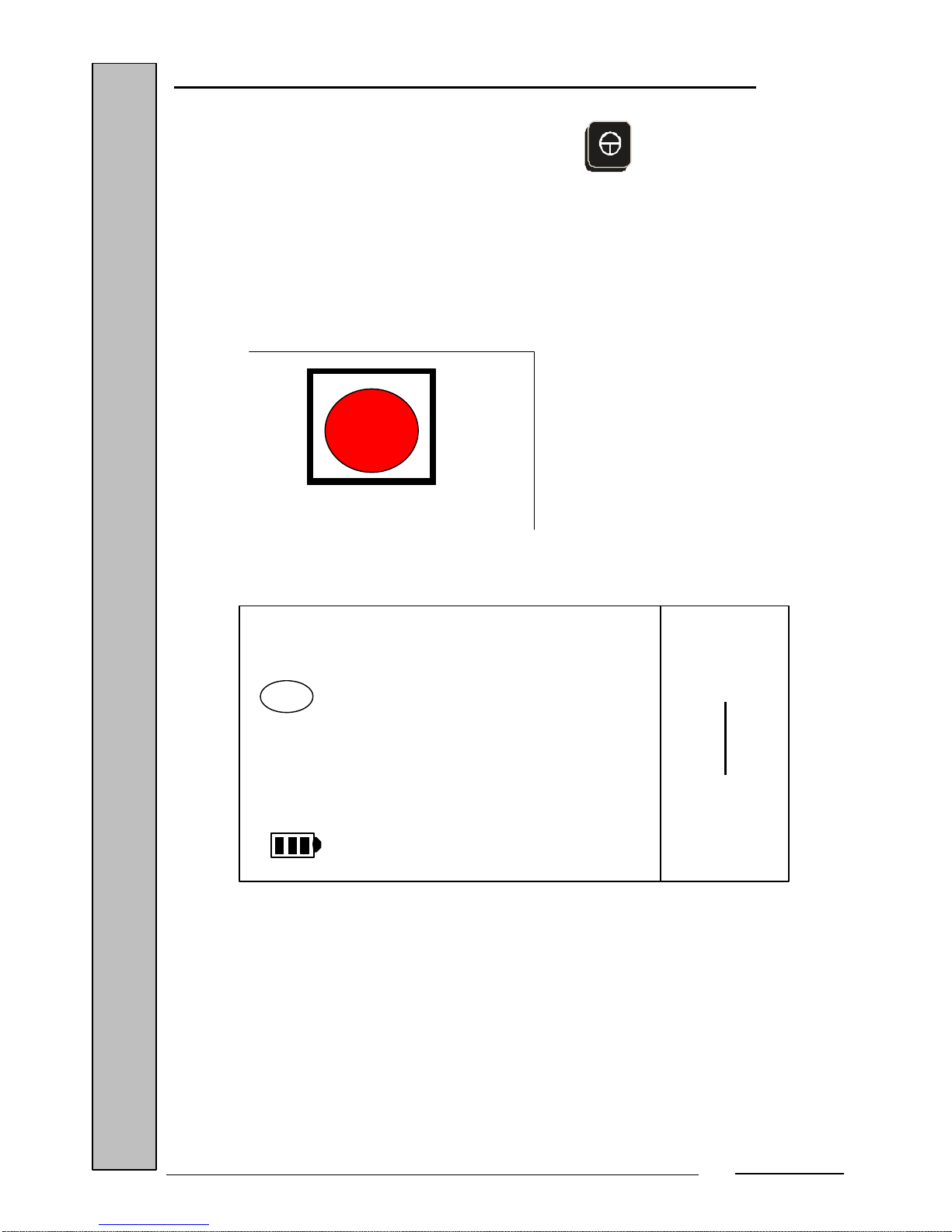
The scale is turned on and off by pressing the key. When turned on, it
starts a cycle test (it counts from 0 to 9).
During the initialization process (cycle test), you can enter the unit's set-up menu
by pressing the internal set-up key, located on the scale's main board, which is
accessed from the scale bottom (as explained in the section "Connections").
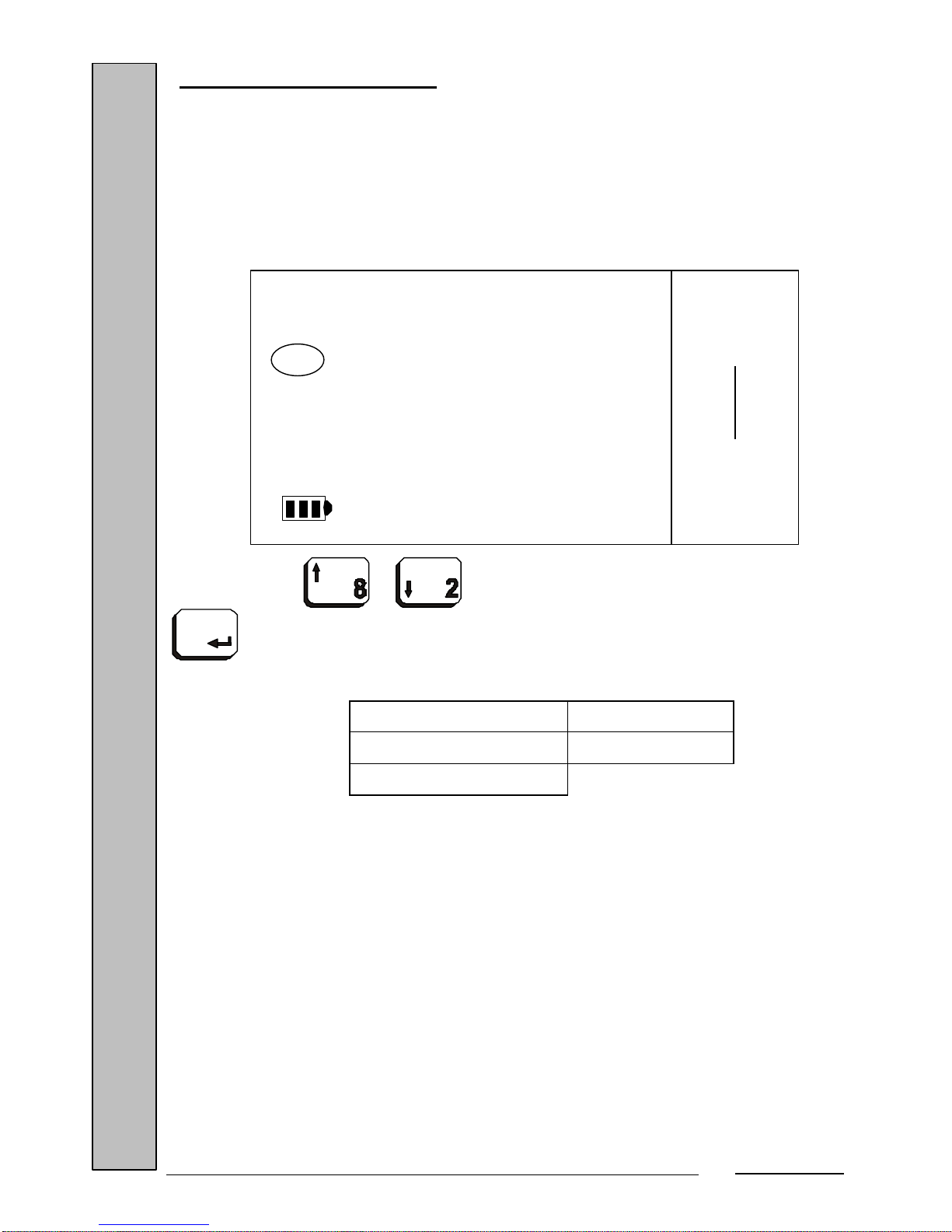
When you enter the set-up menu, the display shows:
You are now in the scale's Installation Menu. Here, you will program all the
options using the keys specified in the section "Description of the keypad".
NO
ERASE
GENER
Max 15 kg
Min 100 g
e= 5 g
I I I
kg
kg
Pcs
T
PT
Page 6
GBS-ECO-MF-V02
5
4. PARAMETER SET-UP MENU
Once within the Installation Menu, you can program all the installation
parameters, which are the following:
4.1. GENERAL ERASE
You must decide whether you wish to erase all the scale's data and settings.
Press the or keys to select the value and confirm with the
key. You will then be prompted to program the next parameter.
Possible values Default value
NO NO
YES
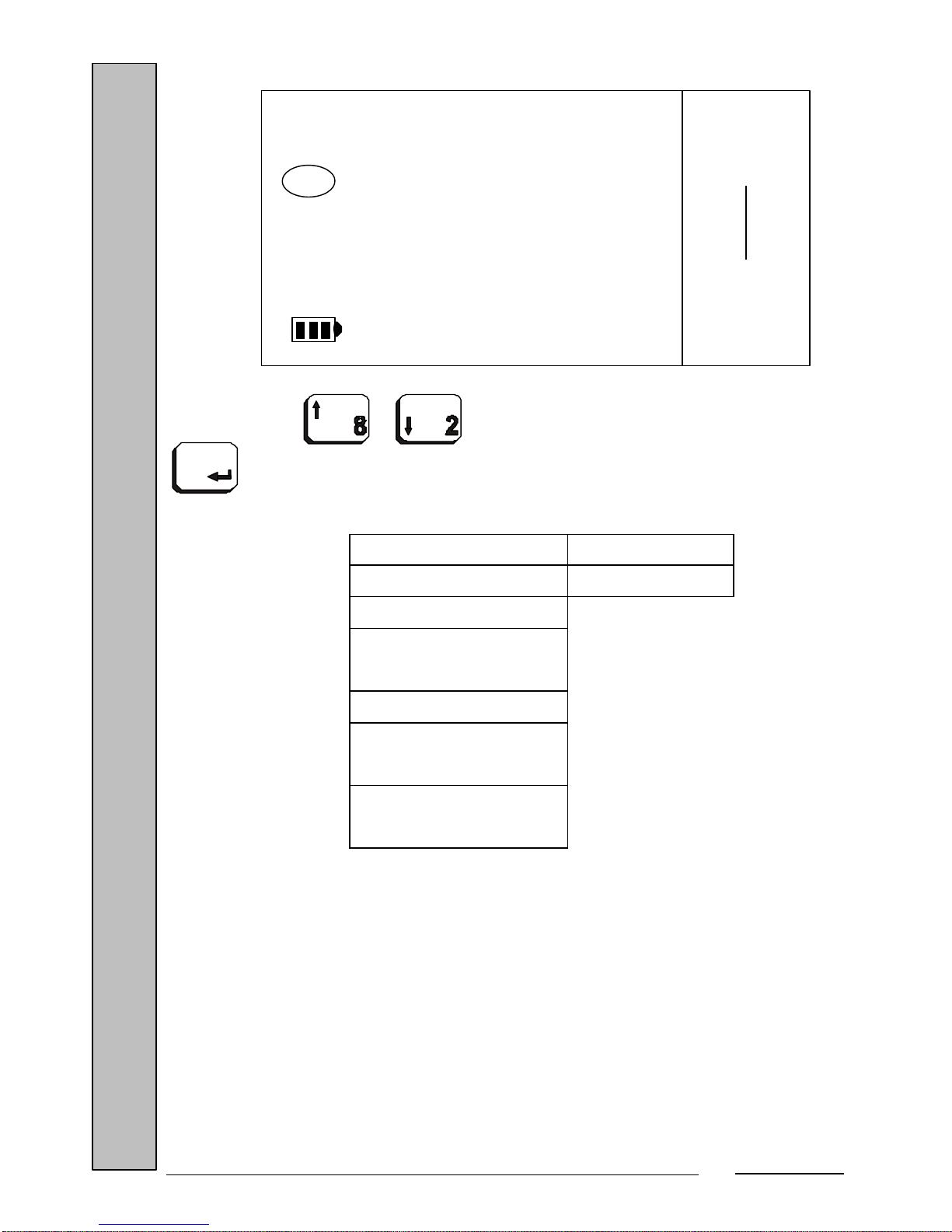
4.2. CAPACITY
This selects the maximum capacity at which the scale will operate.
NO
ERASE
GENER
Max 15 kg
Min 100 g
e= 5 g
I I I
kg
kg
Pcs
T
PT
Page 7
GBS-ECO-MF-V02
6
Press the or keys to select the value and confirm with the
key. You will then be prompted to program the next parameter.
Possible values Default value
3 kg 15 kg
6 kg
12 kg / (6000 div
7)
15 kg
30 kg A / (3000
div)
30 kg B / (6000
div)
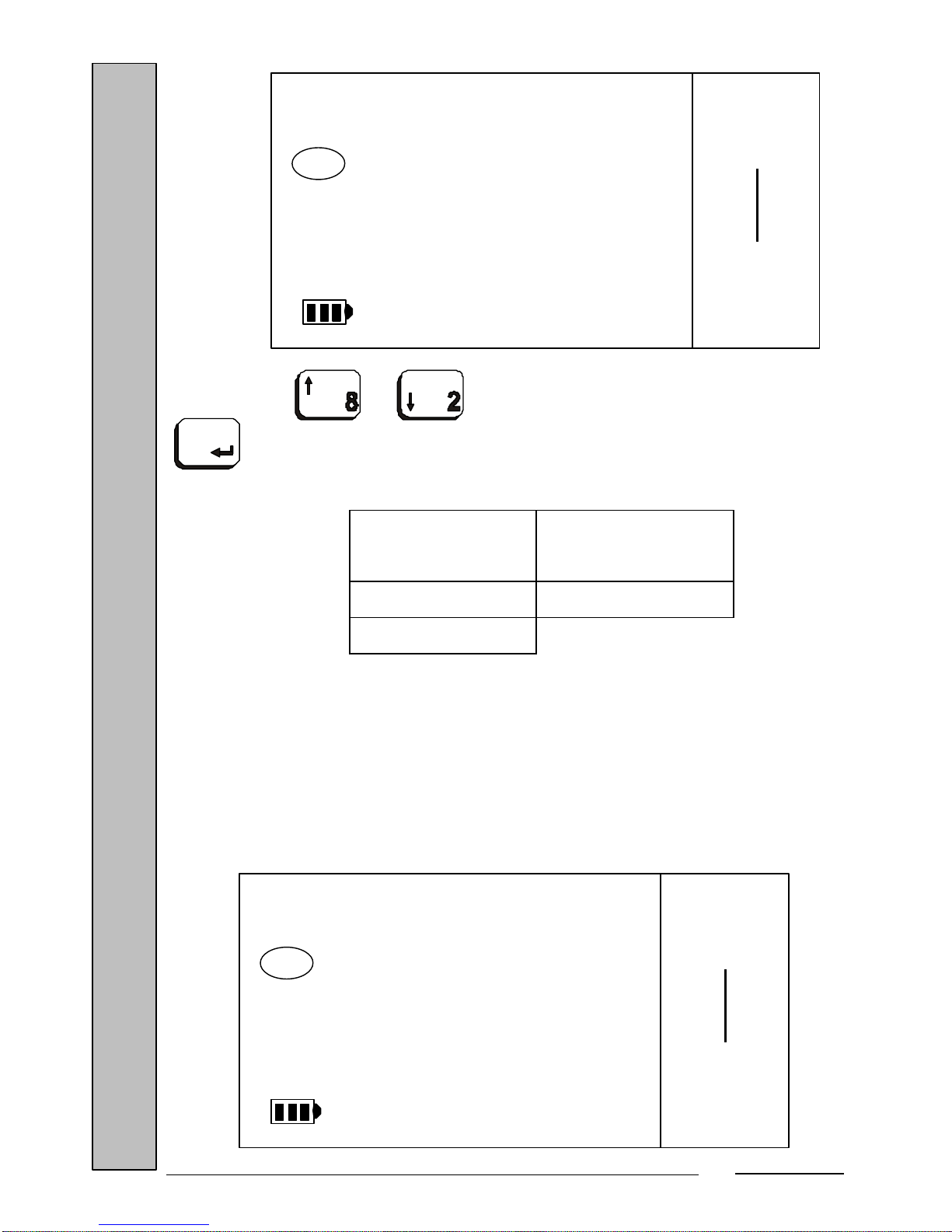
4.3. MULTI-RANGE
This selects whether the weight is to be displayed with the values marked by
the multi-range.
This option will not appear when the capacity of 3 kg, 12 kg or 30 kg B
has been selected in the previous parameter.
15.000
CAPAC
Max 15 kg
Min 100 g
e= 5 g
I I I
kg
kg
Pcs
T
PT
Page 8
GBS-ECO-MF-V02
7
Press the or keys to select the value and confirm with the
key. You will then be prompted to program the next parameter.
Possible
values
Default value
ON OFF
OFF
NOTE: The multi-range change point, when there is a tare, is performed on
the NET weight.
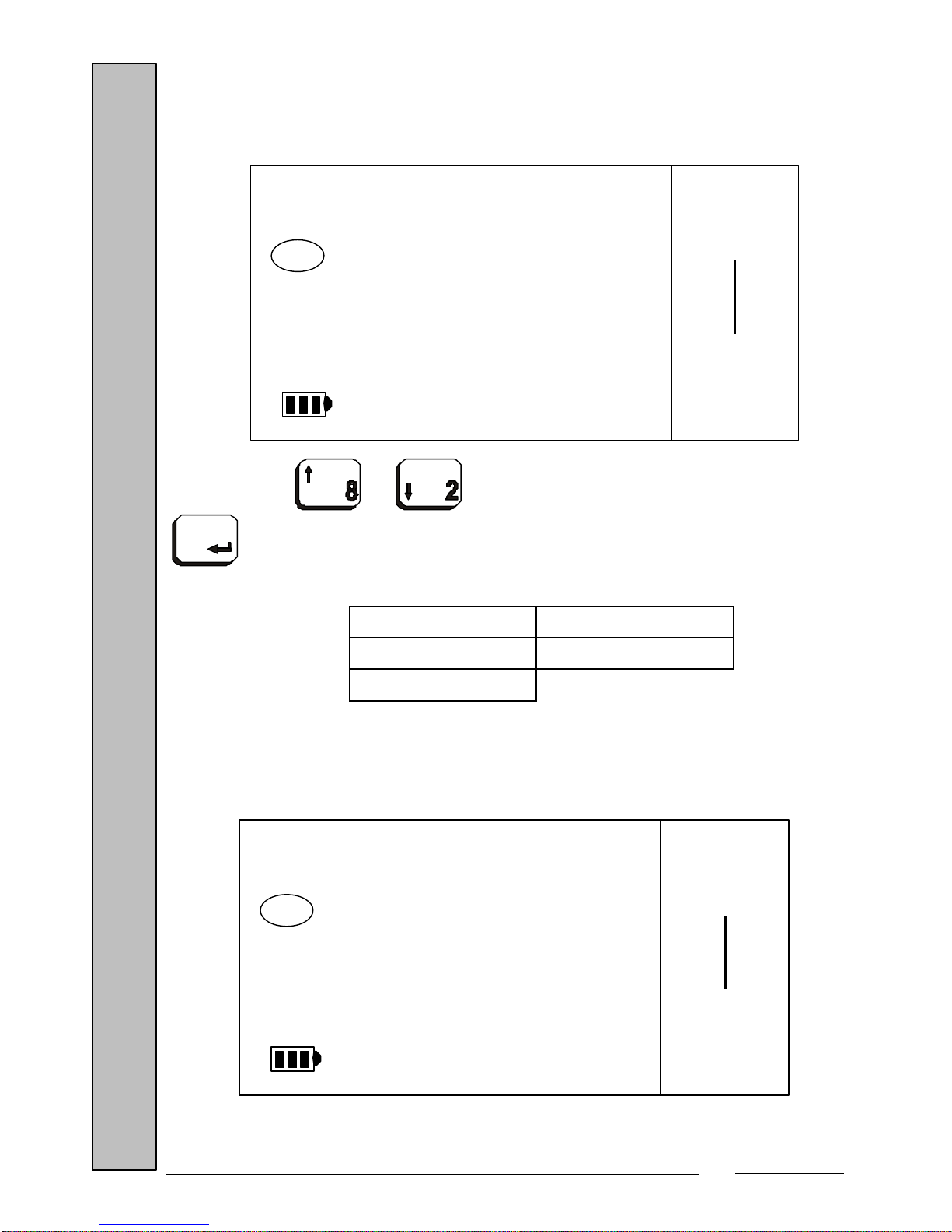
4.4. INITIAL ZERO
This selects the maximum deadweight value that the scale will take as zero
when it is powered on.
OFF
INTER
MULTI
Max 15 kg
Min 100 g
e= 5 g
I I I
kg
kg
Pcs
T
PT
20
ZERO
INIT
Max 15 kg
Min 100 g
e= 5 g
I I I
kg
kg
Pcs
T
PT
Page 9

GBS-ECO-MF-V02
8
It is expressed as a percentage of the scale's maximum capacity.
Press the or keys to select the value and confirm with the
key. You will then be prompted to program the next parameter.
Possible values Default value
10 % 20 %
20 %
4.5. DIGITAL FILTER
This selects the filtering value for the digital weight filter.
Enter the value using the numeric keys ( … ) and confirm
with the key. You will be prompted to program the next parameter.
If you make a mistake in entering the value, you can erase it by pressing the
key.
Possible
values
Default value
50 to 99 90
90
FILTR
Max 15 kg
Min 100 g
e= 5 g
I I I
kg
kg
Pcs
T
PT
Page 10
GBS-ECO-MF-V02
9
4.6. SPECIAL INDICATIONS
This selects whether it is possible to display the special indications that
appear in the display (capacity, step, minimum weigh, etc.).
Press the or keys to select the value and confirm with the
key. You will then be prompted to program the next parameter.
Possible values Default value
ON ON
OFF
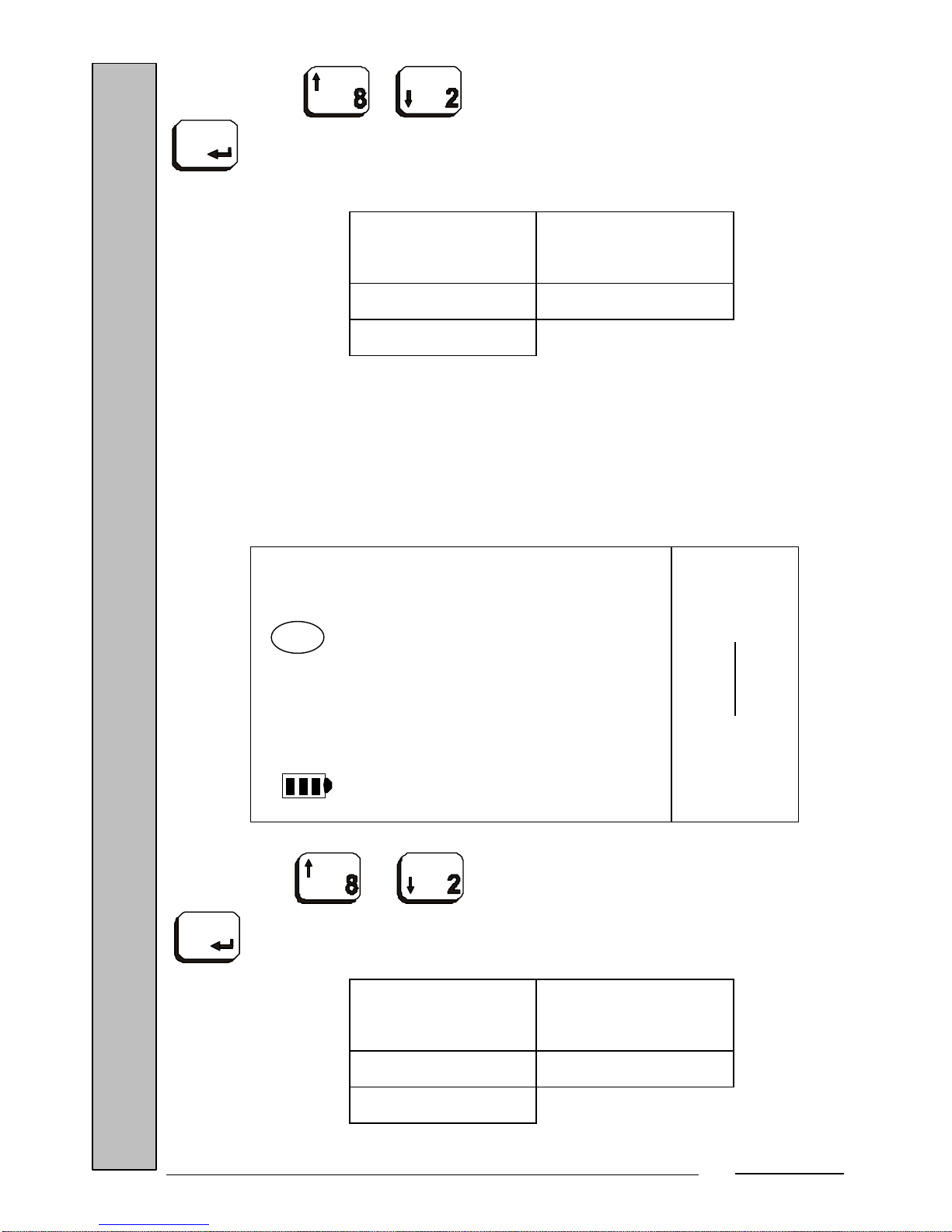
4.7. CUMULATIVE TARE
This selects whether it is possible to perform cumulative tares.
ON
INDIC
SPECL
Max 15 kg
Min 100 g
e= 5 g
I I I
kg
kg
Pcs
T
PT
ON
TARE
CUM
Max 15 kg
Min 100 g
e= 5 g
I I I
kg
kg
Pcs
T
PT
Page 11
GBS-ECO-MF-V02
10
Press the or keys to select the value and confirm with the
key. You will then be prompted to program the next parameter.
Possible
values
Default value
ON ON
OFF
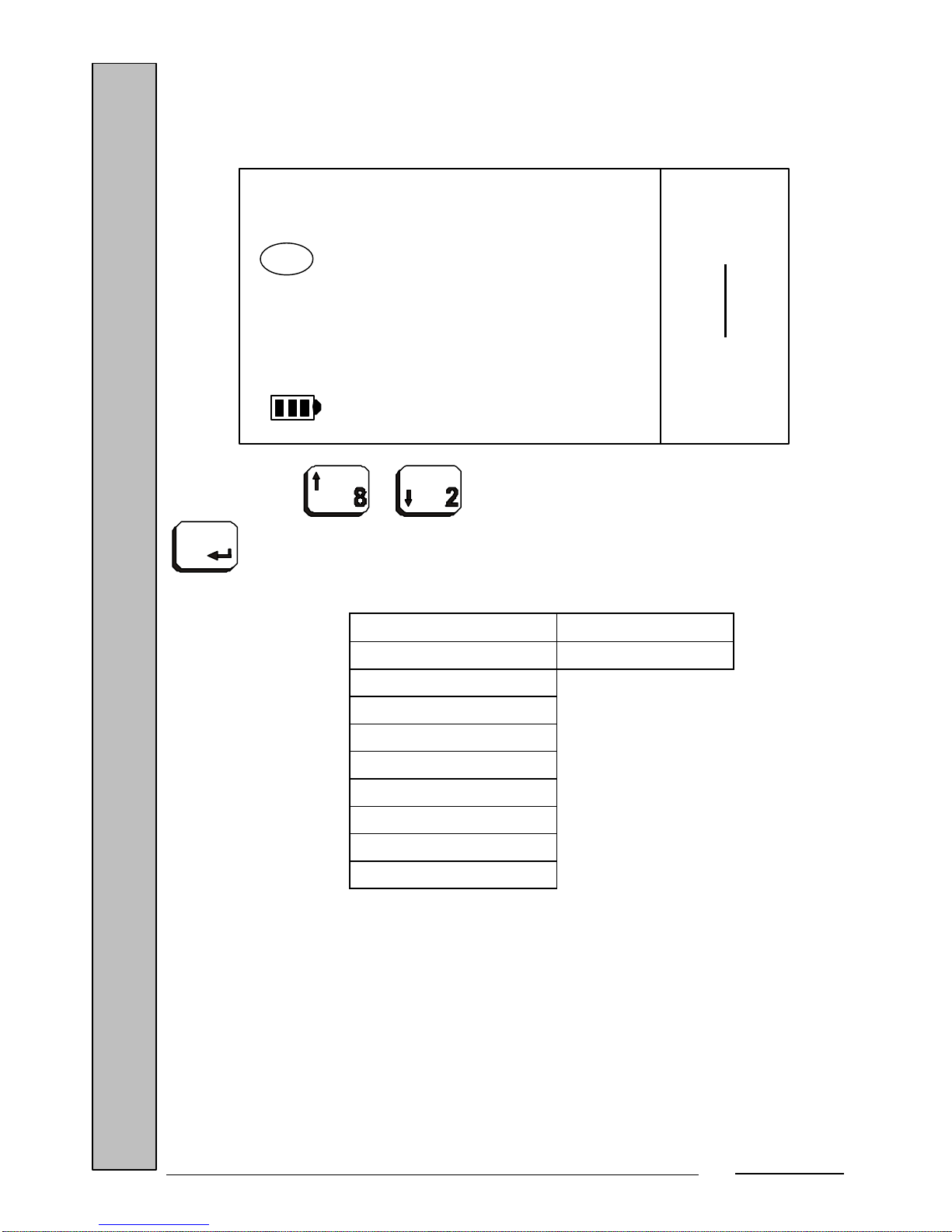
4.8. HIGH RESOLUTION
This selects whether it is possible to enable the mode by which the weight is
displayed with a precision of X10. The scale enters this mode at the end of the
initial cycle when this option is set to 'ON'. It is disabled automatically when the
scale is turned off. The Tare function is permitted in this mode.
Press the or keys to select the value and confirm with the
key. You will then be prompted to program the next parameter.
Possible
values
Default value
ON OFF
OFF
OFF
RES
HIGH
Max 15 kg
Min 100 g
e= 5 g
I I I
kg
kg
Pcs
T
PT
Page 12
GBS-ECO-MF-V02
11
4.9. RS CONNECTION
This selects the scale's RS-232 connection type.
Press the or keys to select the value and confirm with the
key. You will then be prompted to program the next parameter.
Possible values Default value
NO CONX NO CONX
TYPE 0
TYPE 1
TYPE 2A
TYPE 2B
TYPE 7
TYPE 8
TYPE 9
TYPE 10
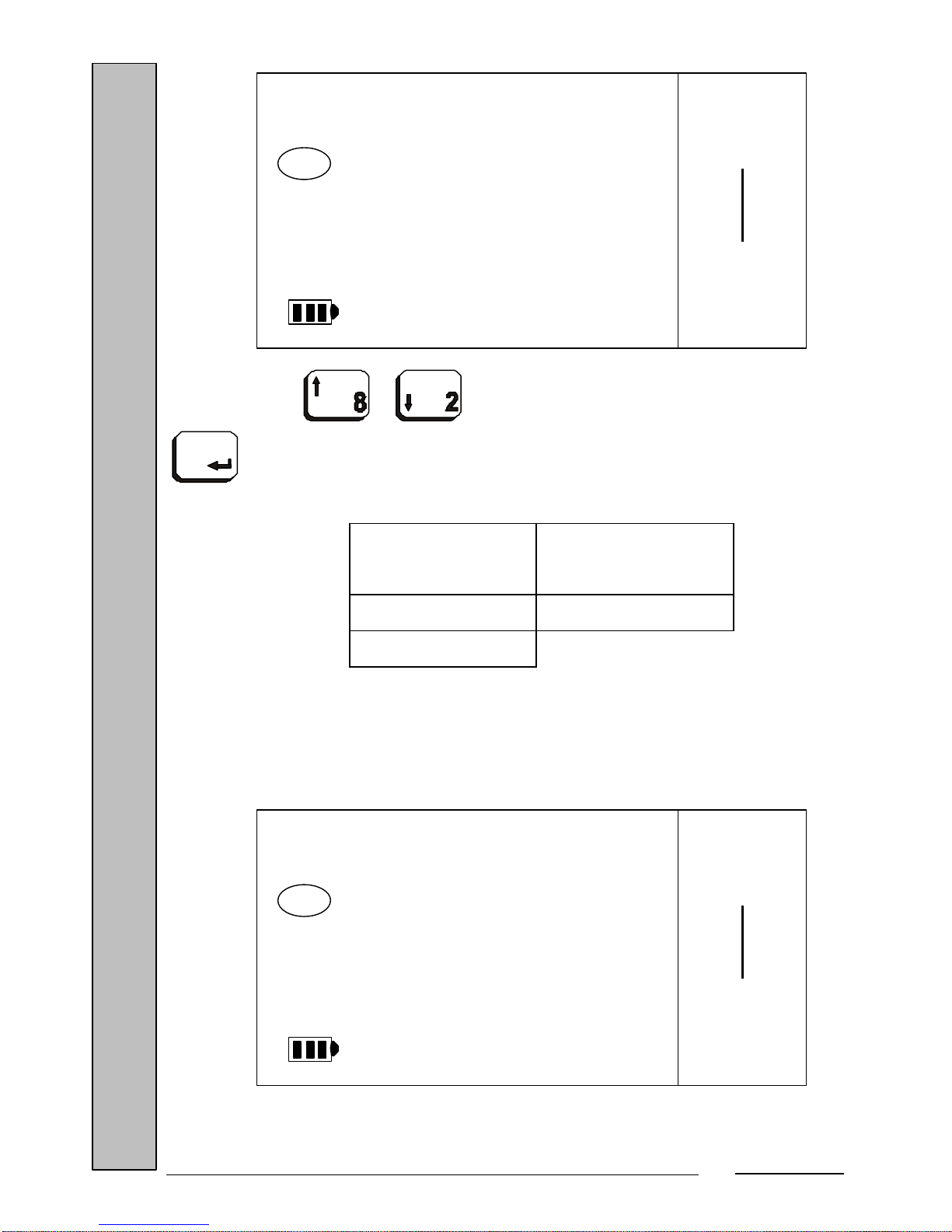
4.10. TPV 0 TYPE (only if the connection type is 'TYPE 0')
This selects the type of communication when operating with a 'TYPE 0'
connection.
NO CONX
CONEX
TPV
Max 15 kg
Min 100 g
e= 5 g
I I I
kg
kg
Pcs
T
PT
Page 13
GBS-ECO-MF-V02
12
Press the or keys to select the value and confirm with the
key. You will then be prompted to program the next parameter.
Possible
values
Default value
TYPE A TYPE A
TYPE B
4.11. TRANSMISSION MODE (only if the connection type is 'TYPE 0')
This selects the data transmission mode when operating with a 'TYPE 0'
connection.
TYPE A
TYPE 0
TPV
Max 15 kg
Min 100 g
e= 5 g
I I I
kg
kg
Pcs
T
PT
WAITING
MODE
SENDG
Max 15 kg
Min 100 g
e= 5 g
I I I
kg
kg
Pcs
T
PT
Page 14

GBS-ECO-MF-V02
13
Press the or keys to select the value and confirm with the
key. You will then be prompted to program the next parameter.
Possible
values
Default value
WAITING WAITING
AUTOMAT
MANUAL
4.12. AUTOMATIC WEIGHT TRANSMISSION (only if the transmission mode is
'AUTOMAT')
This selects automatic weight transmission when operating with the
'AUTOMAT' transmission mode.
Press the or keys to select the value and confirm with the
key. You will then be prompted to program the next parameter.
WAITING
AWT
Max 15 kg
Min 100 g
e= 5 g
I I I
kg
kg
Pcs
T
PT
Page 15

GBS-ECO-MF-V02
14
Possible
values
Default value
WAITING WAITING
MANUAL
4.13. TIME OUT (only if the transmission mode is 'MANUAL' and type of TPV is ‘TYPE
B’)
This selects the Time Out value (time waited to receive an answer after
transmitting the weight) operating with the ‘MANUAL’ transmission mode.
Press the or keys to select the value and confirm with the
key. You will then be prompted to program the next parameter.
Possible
values
Default value
1 to 10 2
2
OUT
TIME
Max 15 kg
Min 100 g
e= 5 g
I I I
kg
kg
Pcs
T
PT
Page 16
GBS-ECO-MF-V02
15
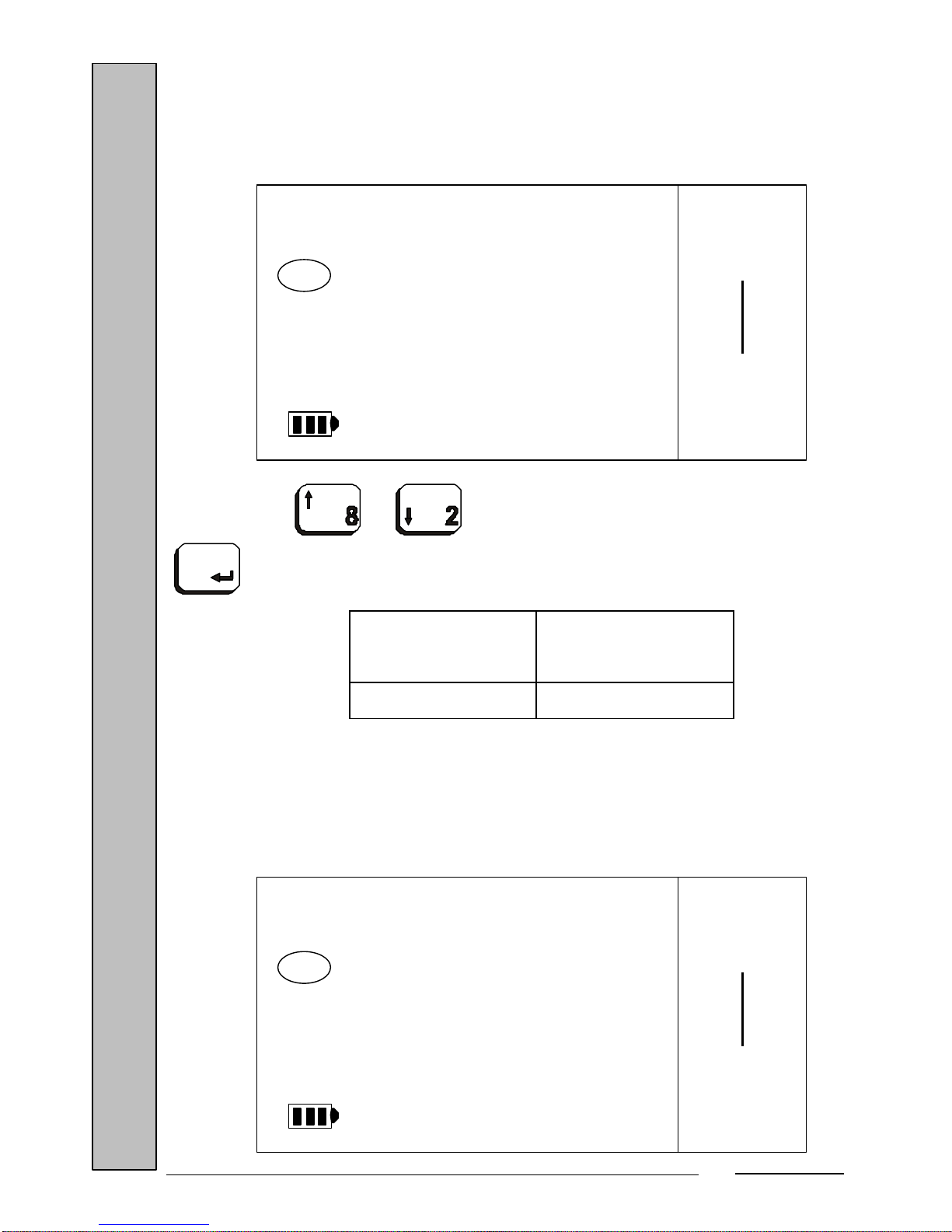
4.14. TIME LIMIT (only if the transmission mode is ‘MANUAL’)
This selects the Time Limit value (time waited for a stable weight) when
operating with the ‘MANUAL’ transmission mode.
Press the or keys to select the value and confirm with the
key. You will then be prompted to program the next parameter.
Possible
values
Default value
1 to 5 2
4.15. PROTOCOL TYPE (only if the connection type is ‘TYPE 9’)
This selects the active protocol type when operating with the ‘TYPE 9’
connection.
2
LIMIT
TIME
Max 15 kg
Min 100 g
e= 5 g
I I I
kg
kg
Pcs
T
PT
BASIC
PRTCL
Max 15 kg
Min 100 g
e= 5 g
I I I
kg
kg
Pcs
T
PT
Page 17

GBS-ECO-MF-V02
16
Press the or keys to select the value and confirm with the
key. You will then be prompted to program the next parameter.
Possible
values
Default value
BASIC BASIC
EXTEND
4.16. BAUD RATE (only if the connection type is different from ‘NO CONX’)
This selects the communication speed of the RS-232 channel.
Press the or keys to select the value and confirm with the
key. You will then be prompted to program the next parameter.
9600
RATE
BAUD
Max 15 kg
Min 100 g
e= 5 g
I I I
kg
kg
Pcs
T
PT
Page 18

GBS-ECO-MF-V02
17
Possible
values
Default value
2400 9600
4800
9600
19200
4.17. PARITY (only if the connection type is different from ‘NO CONX’)
This selects the communication’s parity type.
Press the or keys to select the value and confirm with the
key. You will then be prompted to program the next parameter.
Possible
values
Default value
NO NO
EVEN
ODD
4.18. NUMBER OF BITS (only if the connection type is different from ‘NO CONX’)
This selects the number of bits of the data transmitted and received.
NO
PARITY
Max 15 kg
Min 100 g
e= 5 g
I I I
kg
kg
Pcs
T
PT
Page 19

GBS-ECO-MF-V02
18
Press the or keys to select the value and confirm with the
key. You will then be prompted to program the next parameter.
Possible values Default value
7 8
8
4.19. NUMBER OF STOP BITS (only if the connection type is different from ‘NO CONX’)
This selects the communication’s number of stop bits.
Press the or keys to select the value and confirm with the
key. You will then be prompted to program the next parameter.
8
NUMBER
BITS
Max 15 kg
Min 100 g
e= 5 g
I I I
kg
kg
Pcs
T
PT
1
BITS
STOP
Max 15 kg
Min 100 g
e= 5 g
I I I
kg
kg
Pcs
T
PT
Page 20

GBS-ECO-MF-V02
19
Possible
values
Default value
1 1
2
After confirming this parameter with the key, all the parameters will be
considered confirmed and the scale will restart, performing the cycle test.
5. TABLE OF METROLOGICAL SPECIFICATIONS
Max Min e n Tare
6 kg 40 g 2 g 3000 - Max
12 kg 100 g 2 g 6000 - 6 kg
15 kg 100 g 5 g 3000 - Max
30 kg / A 200 g 10 g 3000 - Max
30 kg / B 200 g 5 g 6000 - 15 kg
3 / 6 kg 20 g 1 / 2 g
3000 / 3000
- 1 kg
6 / 15 kg 40 g 2 / 5 g
3000 / 3000
- 3 kg
15 / 30 kg 100 g 5 / 10 g
3000 / 3000
- 6 kg
6. SETTING THE ZERO AND THE WEIGHT
In order to make the scale's settings, press the internal setting key on the
scale's main board, which is accessed from the scale bottom (as shown in the
section 'Connections'), when the scale is in the basic work mode or when it is
displaying dashes during the initial zero.
If you press the calibration button at this time, the scale zeroes the scale with
the deadweight currently on the platform. This process may be instant or it may
Page 21

GBS-ECO-MF-V02
20
take several seconds if the weight is not stable at that time. During the time that the
scale takes to zero, the reading of the zero's value in internal points is displayed.
The scale then automatically sets a known weight value and shows the following
display:
At this time, the weight value detected by the scale is shown, even if it is an
incorrect value because it has not been adjusted (in this case '0.000', there is no
weight on the platform).
Place the known weight on the platform and enter the value of the known
standard weight (2/3 of the full-scale value is recommended). After entering the
value, press the key. It is possible to correct the weight by pressing the
key. The scale displays the reference values and the reference zero for
several seconds, which it will save as references of the setting time. It will then
show the real value of the weight set:
To return to the basic work mode, press the calibration button again. The
scale's zero and weight will now be set.
0.000
WE ADJ
0.000
Max 15 kg
Min 100 g
e= 5 g
I I I
→0←
kg
kg
Pcs
T
PT
10.000
WE ADJ
10.000
Max 15 kg
Min 100 g
e= 5 g
I I I
→0←
kg
kg
Pcs
T
PT
Page 22

GBS-ECO-MF-V02
21
7. COMMUNICATION PROTOCOL
TPV 0 (Protocol $):
To operate with this protocol, the value 'TYPE 0' must be selected in the
'TPV CONEX' option. The possible values in this option are 'TYPE A' and
'TYPE B'. The next step is to select the transmission mode: 'WAITING' (awaiting
request), 'AUTOM' (automatic) or 'MANUAL'.
TYPE A:
Awaiting request
This communication mode is compatible with the basic work modes WeightTare, Levels and Part Counting.
Communication format:
Computer
request
Scale answer
<$>(0x24, 36d)
<STX><ST><PPPP.PPP><CR><ETX>
Scale answer:
<STX> - Character 0x02, 2d
<ST> - Status byte whose value is obtained by adding the
weight flags' status (0x08 if zero weight, 0x20 if stable
weight, 0x02 if net weight, and 0x01 if gross weight) to
0x20.
<PPPP.PPP> - Value of the weight in ASCII and with 8 bytes,
including the weight's decimal point and the '-' sign when
the net weight is negative. The weight field is left-justified
with blank spaces (0x20, 32d). When the weight is out of
range, dashes are sent (character 0x2d, 45d) occupying
all 8 bytes of the weight field.
<CR> - Character 0x0d, 13d.
<ETX> - Character 0x03, 3d.
Page 23

GBS-ECO-MF-V02
22
Automatic
This communication mode is compatible with the basic work modes Weight-
Tare, Levels and Part Counting.
The scale automatically sends the weight with the trace described in the
section 'Awaiting request'.
Manual
This communication mode is compatible with the basic work mode Weight-
Tare.
When the key is pressed, if the weight is stable, the scale sends the
weight with the trace described in the section 'Awaiting request'. If the weight is
not stable, the scale starts a stable weight capture sequence. When the weight
becomes stable, the scale sends the weight. If the weight does not stabilize within a
preset time (2 seconds), the weight is not sent and the scale will display an unstable
weight error (Error 14).
TYPE B:
Awaiting request
This communication mode is compatible with the basic work modes Weight-
Tare, Levels and Part Counting.
The scale can perform a series of functions if it receives a certain request:
a.-] Scale reset:
Communication format:
Computer
request
Scale answer
<#>(0x23, 35d)
The scale restarts and, upon completing
the process, sends the string:
0000000<CR>
Page 24

GBS-ECO-MF-V02
23
Scale answer:
0000000 - 0x30, 48d
<CR> - Character 0x0d, 13d.
b.-] Autozero request:
Communication format:
Computer
request
Scale answer
<%>(0x25, 37d)
The scale performs an autozero, and, upon
completing the process (with or without
carry out autozero), sends the string:
0000000<CR>
Scale answer:
0000000 - 0x30, 48d
<CR> - Character 0x0d, 13d.
c.-] Disabling / enabling the transmission beep:
Communication format:
Computer
request
Scale answer
<'>(0x27, 39d)
The scale enables or disables the beep
each time it sends a trace. The scale does
not answer this request. When the scale is
turned on, the beep process is disabled by
default.
Page 25

GBS-ECO-MF-V02
24
d.-] Weight request:
Communication format:
Computer
request
Scale answer
<$>(0x24, 36d)
The scale transmits the weight with the
following trace:
<PPP.PPP><CR>
Scale answer:
<PPP.PPP> - Value of the net weight with 7 bytes including the
decimal point and left-justified with zeros (0x30)
<CR> - Character 0x0d.
• Special cases of this protocol:
d.1.-] Net weight zero and stable: Sends '0000000<CR>'
d.2.-] Net weight over or under: Sends 'AAAAAAA<CR>'
d.3.-] Net weight in range and stable: Sends 'PPP.PPP<CR>' (the value of
the weight with 7 bytes including the decimal point and justified with zeros
on the left.
d.4.-] Net weight in range, stable and negative: Sends the string described
in section 'd.2.-]'.
d.5.-] Net weight in range and unstable: The scale retains the weight
request indefinitely until it becomes stable, when the scale operates as
described in section 'd.3.-]'.
• Transmission started by the scale at the beginning
a.-] When the scale is powered on and the initial sequence is completed, it
indicates that it is ready by sending the sequence: '0000000<CR>', described
previously.
Page 26

GBS-ECO-MF-V02
25
Automatic
This communication mode is compatible with the basic work modes Weight-
Tare, Levels and Part Counting.
After selecting this option, the automatic transmission protocol type is
chosen. The possible values are: 'Await request' or 'Manual'. The scale
automatically sends the weight depending on the trace selected:
Await request trace: <PPP.PPP><CR>
<PPP.PPP> - Value of the weight with 7 bytes including the decimal
point and justified with zeros (0x30) on the left. If the
weight is out of range (over or under) or there is a
negative net weight, a string composed of 7 characters
'A' (0x41, 65d) is sent.
<CR> - Character 0x0d.
Manual transmission trace: <STX><ST><PPP.PPP><CR>
<STX> Character 0x02, 2d.
<ST>
Tare status. The possible values are: 'blank' (0x20, 32d)
if the weight is gross, 'T' (0x54, 84d) there is a tare, and
'F' (0x46, 70d) if there is a fixed tare.
<PPP.PPP> - Value of the weight with 7 bytes including the decimal
point and justified with (0x30) on the left. If the weight is
High, Low or negativ, it sends: <AAAAAAA>.
<CR> - Character 0x0d, 13d.
Manual
This communication mode is compatible with the basic work mode Weight-
Tare.
When the key is pressed, if the weight is stable, the scale sends the
weight with the corresponding trace. If the weight is not stable, the scale starts a
stable weight capture sequence. When the weight becomes stable, the scale sends
the weight. If the weight does not stabilize in a preset time (TIME LIMIT), the
weight is not sent and the scale displays an unstable weight error (Error 14).
The trace used in this format is that described in the Automatic transmission
format with Manual transmission trace.
Page 27

GBS-ECO-MF-V02
26
After sending the weight, the scale waits for an answer before the end of the
preset time (TIME OUT). If no answer is received when this time expires, the scale
displays 'Error 9'. If the character 'ACK ' is received before the time has elapsed
(TIME OUT), the scale beeps, displays the indication 'TXD OK' for 2 seconds
and finally beeps again, returning to the weight mode. If a negative answer is
received, 'NAK', the scale displays 'Error 10'.
TPV 1 (IBM Protocol):
In order to operate with the IBM protocol, you must select the value ''TYPE
1'' in the ''CONEX TPV'' option.
This communication mode is compatible with the basic work modes WeightTare, Levels and Part Counting.
There are 2 control functions from the TPV, Weight Request and Autozero
Request. The scale only has 2 possible answers: Weight Transmission and Invalid
Result.
Weight request
TPV Scale
<S><CR><LF>
Weight Transmission trace:
<S><SP><SP><PPPPPPPPP><UU><CR><LF>
Invalid Result trace:
<S><I><SP><CR><LF>
The scale must answer in less than 5 s. The weight trace if the weight is
stable, has varied since the last request, the weight is in range, and the scale is not
autozeroing. If these conditions are not met, the scale returns the Invalid Result
trace.
If the weight is unstable, it waits a maximum time of 3 seconds. If after this
time it is not stable it sends invalid result.
Page 28

GBS-ECO-MF-V02
27
Weight Transmission trace:
<S> - Character 0x53, 83d.
<SP> - Character 0x20, 32d.
<PPPPPPPPP> - Weight with 9 bytes, without decimal point and left-
justified with zeros (0x30).
<UU> - Units. The possible values are: (G_), (KG), (OZ),
and (LB). The scale always sends (G_).
<CR> - Character 0x0d, 13d.
<LF> - Character 0x0a, 10d.
Invalid Result trace:
<S> - Character 0x53, 83d.
<I> - Character 0x49, 73d.
<SP> - Character 0x20, 32d.
<CR> - Character 0x0d, 13d.
<LF> - Character 0x0a, 10d.
Autozero request
TPV Scale
<T><CR><LF>
<T> - Character 0x55, 85d.
<CR> - Character 0x0d, 13d.
<LF> - Character 0x0a, 10d.
When the scale receives this request, it performs an Autozero request. At the
end of the sequence, irrespective of whether or not the scale has been able to
Autozero, it sends the 'Invalid Result' trace in reply.
TPV 2A (UNIWELL-ICL Protocol):
In order to operate with the Uniwell-ICL protocol, you must select the value
''TYPE 2A'' in the ''CONEX TPV'' option.
Page 29

GBS-ECO-MF-V02
28
This communication mode is compatible with the basic work modes WeightTare, Levels and Part Counting:
TPV Scale
ENQ
NAK, if there is an error in the reception.
NULL, if the weight is unstable.
ACK, if the weight is zero or is not zero but has varied
since the last request.
CAN, if the weight has not varied since the last request.
ENQ - Character 0x05, 5d.
NACK - Character 0x15, 21d.
NULL - Character 0x00, 0d.
ACK - Character 0x06, 6d.
CAN - Character 0x18, 24d.
When the scale sends 'ACK' to the TPV:
TPV Scale
DC1
NAK, if there is an error in the reception.
<STX><ID><PPPPP><BCC><ETX>, if the weight is
in range.
<STX><ID><00000><BCC><ETX>, if the weight is
not in range.
DC1 - Character 0x11, 17d.
NACK - Character 0x15, 21d.
STX - Character 0x02, 2d.
ID (weight in
range)
- Scale type depending on the full-scale value. The
scale always sends (0x69).
ID (weight not in
range)
- Scale type depending on the OR full-scale value
with 0x10. The scale always sends (0x79).
PPPPP - Value of the weight in ASCII without decimal
point and left-justified with zeros (0x30).
00000 - Five zeros in ASCII (0x30).
BCC - XOR of all of the frame's characters except STX
and ETX.
ETX - Character (0x03, 3d).
Page 30

GBS-ECO-MF-V02
29
ID value:
HEXADECIMAL BINARY ASCII SCALE TYPE
0X68 011X1000
h
25 lb 1/8 oz
0X69 011X1001
i 15 kg 5 g
0X6a 011X1010
j 30 lb 0.01 g
0X6b 011X1011
k 6 kg 2 g
0X6c 011X1100
l 50 lb 0.01 lb
If the TPV receives the frame <STX><ID><PPPPP><BCC><ETX> (weight
in range), it resends the same frame to the scale so that it can compare the frame
sent and received.
When the scale has received the frame for comparison, it returns:
- NAK (0x15, 21d), if there is an error in the reception.
- ACK (0x06, 6d), if the frame received does not match the frame sent.
- CR (0x0d, 13d), if the frame received matches the frame sent.
End of sequence.
TPV 2B (UNIWELL-W Protocol):
In order to operate with the Uniwell-W Protocol, you must select the value
''TYPE 2b'' in the ''CONEX TPV'' option.
This communication mode is compatible with the basic work modes WeightTare, Levels and Part Counting:
TPV Scale
W
<STX><PPPPP><CR>, if the weight is in range, is
stable and has varied since the last request.
W - Character 0x57, 87d.
STX - Character 0x02, 2d.
PPPPP - Value of the weight in ASCII without decimal
point and left-justified with zeros (0x30).
CR - Character (0x0d, 13d).
Page 31

GBS-ECO-MF-V02
30
TPV 7 (SAMSUNG Protocol):
This accepts 4 commands:
TPV Scale
W<CR>
Weight: returns the weight with units and the scale's status:
<LF><PP.PPP><UU><CR><LF><'S'hh><CR><ETX>
TPV Scale
S<CR>
Scale status:
<LF><'S'hh><CR><ETX>
TPV Scale
Z<CR>
Returns the scale's status after performing an autozero:
<LF><'S'hh><CR><ETX>
TPV Scale
H<CR>
Weight in high resolution: returns the scale's status:
<LF><'S'hh><CR><ETX>
TPV Scale
Others
Unrecognized command:
<LF>?<CR><ETX>
ETX - Character (0x03, 3d).
LF - Character 0x0a, 10d.
CR - Character (0x0d, 13d).
PP.PPP - Value of the weight with decimal point and left-
justified with zeros (0x30).
UU - Measuring units in upper case (kg, oz, lb...).
'S'hh - Character 'S' + 2 status bytes.
? - Character 0x3F.
Page 32
GBS-ECO-MF-V02
31
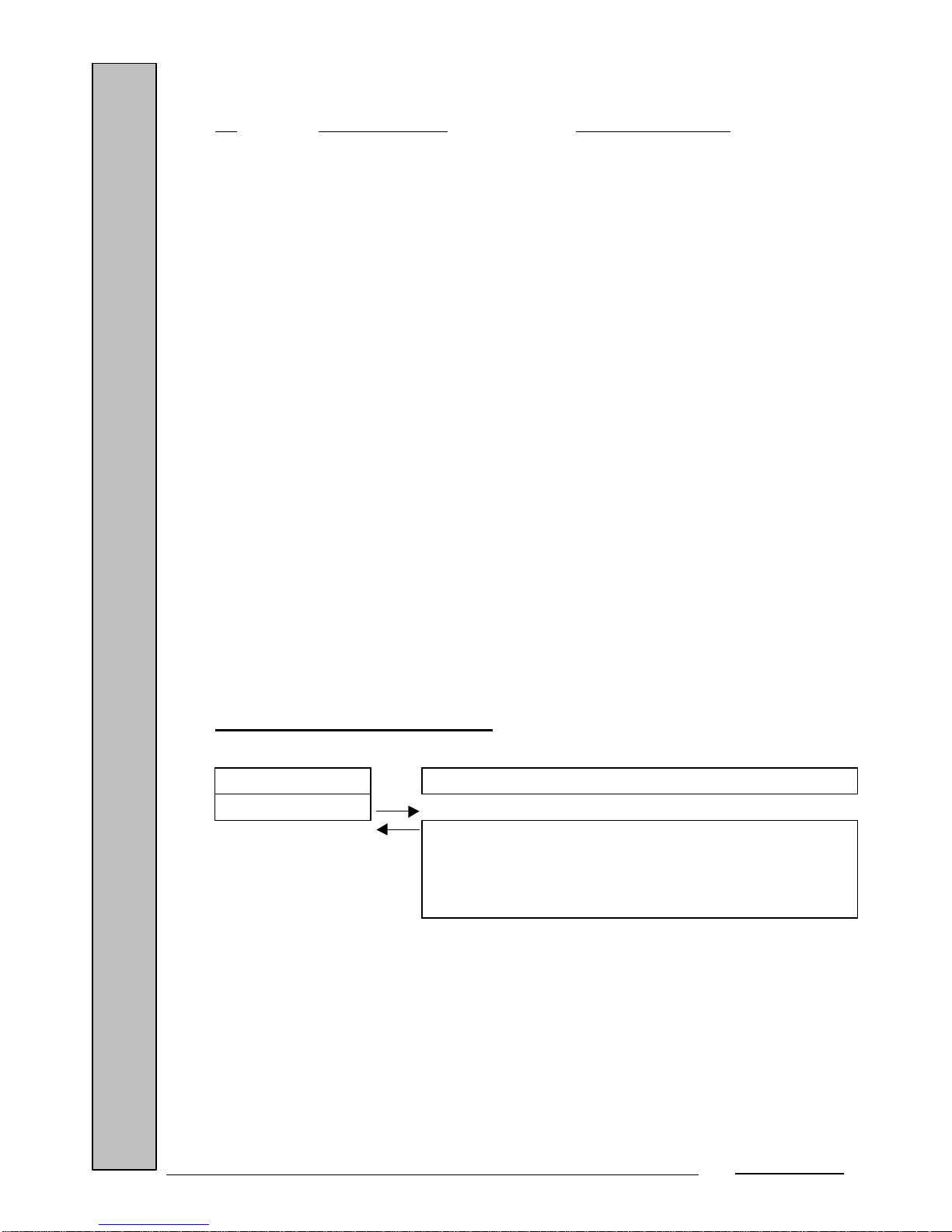
Coding of the status bytes:
Bit First status byte Second status byte
0 1 – Scale in movement 1 – Weight under
0 – Weight stable 0 – No Weight under
1 1 – Scale at zero 1 – Weight over
0 – Weight <> zero 0 – No Weight over
2 1 – Ram Error 1 – Rom Error
0 – No Ram error 0 – No Rom error
3 1 – Eeprom Error 1 – Calibration failure
0 – No Eeprom error 0 – Calibration OK
4 Always 1 Always 1
5 Always 1 Always 1
6 Always 0 1 – There is a third status byte
0 – Last byte
7 Always 0 Always 0
TPV 8 (DICENTRO Protocol):
TPV Scale
W
Weight:
<STX><PPPPP><CR>
Error:
<STX><'?'><STATUS><CR>
Page 33

GBS-ECO-MF-V02
32
W - Character 0x57, 87d.
STX - Character 0x02, 2d.
PPPPP - Value of the weight (5 bytes) in ASCII without
decimal point, without sign and justified with zeros
(0x30d).
CR - Character (0x0d, 13d).
'?' - ASCII character (question mark, 3F Hex.).
STATUS - 1 status byte:
- Bit 7: 1 if in key zero.
- Bit 2: 1 weight under.
- Bit 1: 1 weight over.
- Bit 0: 1 weight not stable.
TPV 9 (ELZAB Protocol):
The trace format is the following:
TPV Scale
<ESC><M><ETX>
<'-'><LF>
Answer in Basic Protocol:
<S><SP><PP.PPP><CR><LF>
Answer in Extended Protocol (await request):
<ESC><E><S><PP.PPP<CR><LF>
1. Request from the TPV to the scale:
ESC - Character 0x1B.
M - Character 0x4D.
ETX - Character (0x03, 3d).
'-' - Character 0x82.
LF - Character 0x0a, 10d.
Page 34

GBS-ECO-MF-V02
33
2. Answer from the scale in Basic Protocol and pulsator:
S - Sign: blank space (20h) if the result is zero, and
'minus' (2Dh) if the result is less than 0.
SP - Blank space: 20h.
PP.PPP - Value of the weight (6 bytes) with decimal point,
no sign and justified with blank spaces (0x20d).
CR - Character (0x0d, 13d).
LF - Character (0x0a, 10d).
3. Answer from the scale in Extended Protocol (await request) and pulsator:
ESC - Character 0x1B.
E - Stability: 'S' if the result is stable, and 'U' if the
result is unstable (weight negative, over or under,
always 'U').
S - Sign: blank space (20h) if the result is zero, and
'minus' (2Dh) if the result is less than 0.
PP.PPP - Value of the weight (6 bytes) with decimal point,
no sign and justified with blank spaces (0x20d).
CR - Character (0x0d, 13d).
LF - Character (0x0a, 10d).
TPV 10 (VECTRON Protocol):
The scale continuously sends the weight when the TPV enables (set) the
DTR signal. As the Eco Multifunction scale does not have DSR, the TPV's DTR is
input through RxD of the scale's RS-232 communication connector. This requires a
special cable.
The trace of the message sent by the scale to the TPV is the following:
<ID (2 bytes)><SEPARATOR (2 bytes)><DATA (6 bytes)><Units (2
bytes)><CR><LF>
Page 35
GBS-ECO-MF-V02
34
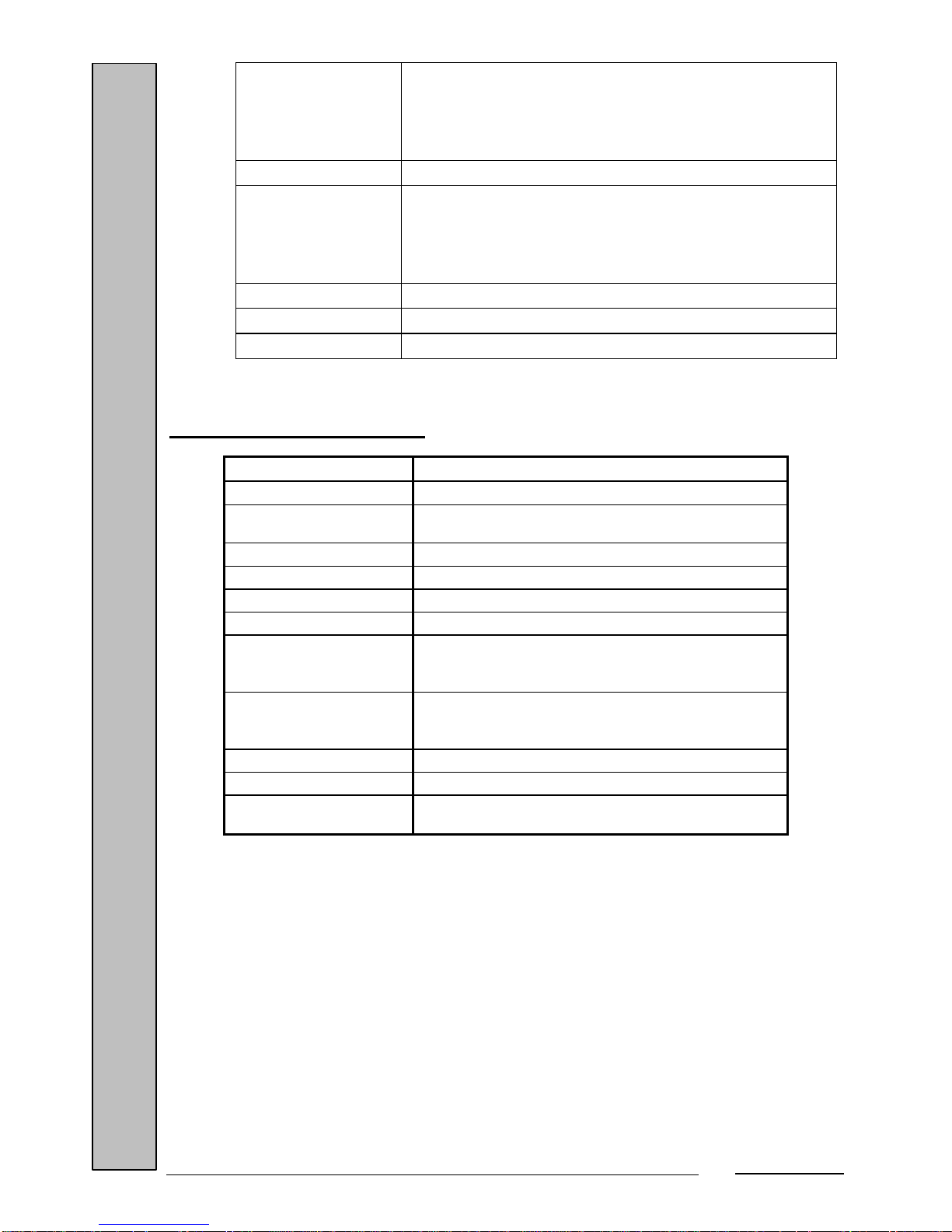
ID - 'IF' (0x53, 0x49), if the weight is out of range,
over or under.
- 'S ' (0x53, 0x20), if the weight is stable.
- 'SD' (0x53, 0x44), if the weight is unstable.
SEPARATOR - ' ' (0x20, 0x20), two blank spaces.
DATA - Weight in grams, with max. 6 characters, right-
justified and filled with zeros to complete all 6
spaces. If the weight is out of range, 6 dashes are
sent.
UNITS - 'g ' (0x67, 0x20), grams.
CR - Character (0x0d, 13d).
LF - Character 0x0a, 10d.
8. LIST OF POSSIBLE ERRORS
ERROR NUMBER CAUSE
9
TIMEOUT – Zero and reference capture time exceeded.
10
NAK reception in comunications ‘TYPE 0’, ‘TYPE B’ and
key.
14
UNSTABLE WEIGHT.
35
INCORRECT CHECKSUM– Series E2prom read error.
51
EEPROM WRITE.
60
INVALID DATA.
61
DATA TOO LARGE – If the set weight is less than 20000
net points. If a Plu greater than 100 is requested. If an
item is programmed with a value greater than that allowed.
62
DATA TOO SMALL – If the set weight is greater than
85000 net points. If Plu 0 is requested. If there is any
scale parameter with an incorrect value.
63
NULL DATA – If the set weight entered is 0.
64
WEIGHT OUT OF RANGE – Tare out of range.
65
INCORRECT WEIGHT – If the set weight entered is not
a multiple of the step.
Page 36

GBS-ECO-MF-V02
35
9. CONNECTIONS
RS-232 CONNECTOR
1 - 4 2 – Rx+ 5 – GND
3 – Tx+
Scale ON/OFF switch
External supply RS-232 connector
connector
Calibration button access hole
The scale can be powered from an external power supply through its external
connector (using the car battery, for example) as it operates with a voltage of
12Vdc.
Positive
Ground
Page 37

GBS-ECO-MF-V02
36
Lift the scale platform to access the non-rechargeable or rechargeable battery (optional)
compartment.
10. BATTERY LIFE
ECO MULTIFUNCTION Model
• With 5 alkaline batteries: up to 150 h.
• With the internal battery: 150 h.
• With the automatic Back Light option (25% of the time lit): up to 120 h.
Note: The manufacturer reserves the right to modify this unit's operation and
specifications without prior notice.
Non-rechargeable battery conector (5
batteries 1.5V R-20).
Internal battery connector (6V, 10A,
rechargeable).
Page 38

BLANCO
$GRUPO EPELSA S.L.
ALBASANZ, 6 y 8 28037 MADRID
TEL. (91) 754-30-14, FAX: (91) 754-48-26 e-mail:[email protected]
CTRA. SANTA CRUZ DE CALAFELL , 35
08830-SANT BOI DE LLOBREGAT (BARCELONA-SPAIN)
TEL. (93) 654-62-12, FAX: (93) 654-54-53 e-mail:[email protected]
http//www.epel-ind.com
BLANCO
 Loading...