

Page 1
Digital Infrared Ear Thermometer
EOC - STMBT
User Guide
Eocene Health Systems
Page 2

Dear Customer,
Thank you for choosing the Eocene Digital Infrared Ear Thermometer EOC - STMBT
For the purpose of proper usage and maintenance of the Thermometer, please read this
manual completely before operating the unit.
Please retain this instruction manual for future use. The warranty card is attached to this
manual. please retain it as well.
Note: Illustrations in this manual is solely for interpretation purposes only
Table of Content
Safety Information
What is in the Box
Description and Features
Setting measuring Unit
Direction for use
Accessing Stored Measurements
Specications
Warranty
2
3
4
4
4
5
5
6
7
Page 3

Safety Information
Contact your doctor and obtain all information about your ailment.
1.
Self diagnosis and self treatment based on the measurements obtained using this
2.
device may be dangerous.
Always follow the instructions of your physician or licensed healthcare provider.
3.
This device is intended for the use of adults to measure temperature of adults,
4.
children and infants.
Do not use the device to me3asure temperature of oven, re or other hot bodies.
5.
Do not allow children to use this device on themselves, infants and on people who
6.
have diculty in expressing their intentions.
Do not adjust medication based on measurement results from this thermometer.
7.
Take medication as prescribed by your physician. Only a physician is qualied to
diagnose and treat ailments.
The thermometer is not intended to be a diagnostic device.
8.
This device is only for use on human body for measuring body temperature.
9.
Do not use a mobile / cell phone near this device.
10.
Keep away from water and moist areas. The device is not water proof.
11.
Do not dismantle or repair the device. There is no user serviceable parts inside.
12.
Use only 1.5 V (Volt) alkaline batteries for this device. Using other type of batteries
13.
may damage the unit.
Ensure the batteries are inserted in to the battery compartment with the correct
14.
polarity.
If battery uid gets in to your eyes, rinse with plenty of water and contact a physician
15.
immediately.
When the ‘Low battery’ indicator appear on the screen, replace all 2 batteries after
16.
turning o the device.
If the device is being used after more than 3 months of inactivity, please replace the
17.
batteries.
Dispose batteries and the device in accordance with the prevailing laws and
18.
regulation of your City/county/State.
Please note that the device should be in the same room for at the least 30 minutes
19.
where, the person is whose, temperature is to be measured.
If you were out in the sun or have exercised , please wait 30 minutes to take your
20.
temperature.
Allow 20 seconds between 2 consecutive measurements.
21.
Use only a soft cloth dampened with mild soap solution to clean the device.
22.
3
Page 4
What is in the Box
Digital Infrared Ear Thermometer with protective sensor tip cap
1.
Batteries (2 x AAA batteries)
2.
User Manual
3.
Warranty card
4.
Description and Features
The Eocene digital Infrared ear thermometer has been carefully developed for a safe,
precise and rapid temperature measurement in the ear. The device is a non-invasive
ear thermometer with an infrared detector to determine the body temperature in the
auditory canal of adults and children.
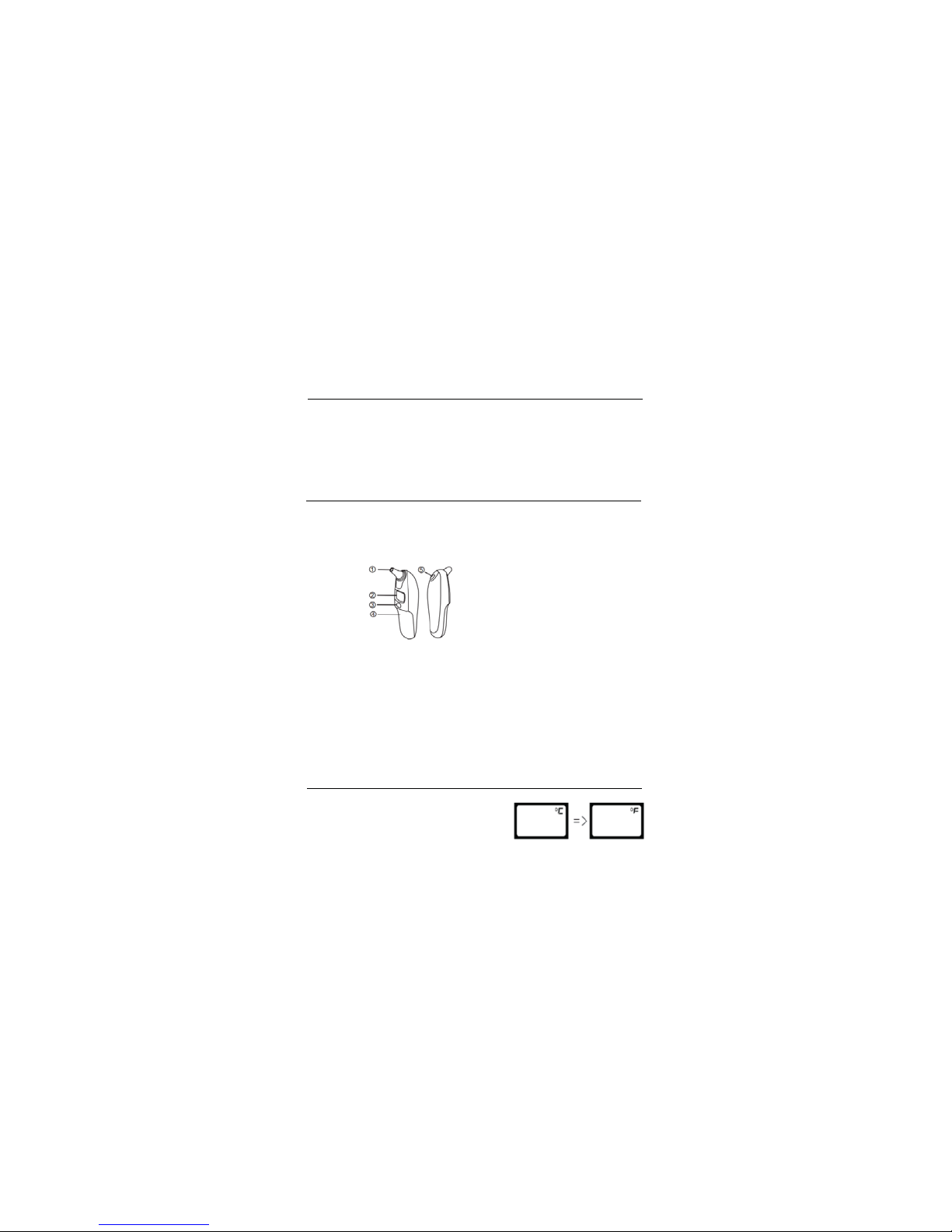
Sensor Tip
1
Display screen
2
On/O Power switch
3
Battery Cover
4
Scan and Memory button
5
The temperature measuring range is : 30C - 42.2C or 86F - 107.96F
When the temperature is lower than 30C / 86F, the device will display : LC / LF
When the temperature is higher than 42.2C / 107.96F, the device will display: HC /
HF. Other features include:
1 second measurement time
1.
10 measurement memory
2.
Fever alarm
3.
Low Battery alarm
4.
Auto turn-o after one minute of no use
5.
Setting the measuring unit
In the switch o mode, press and hold the ‘Scan/M’
button for 3 seconds until the default unit (C)
appears. Release and press again to change to F
4
Page 5
Direction for use
1.
Press on the cover of the battery compartment and slide it down. insert the 2
‘AAA’ Batteries by matching the polarities: + (positive) and - (Negative) as marked
in the battery compartment. Slide in the battery compartment cover back.
Remove the protective sensor cap
2.
Press the On/O button to power on the thermometer.
3.
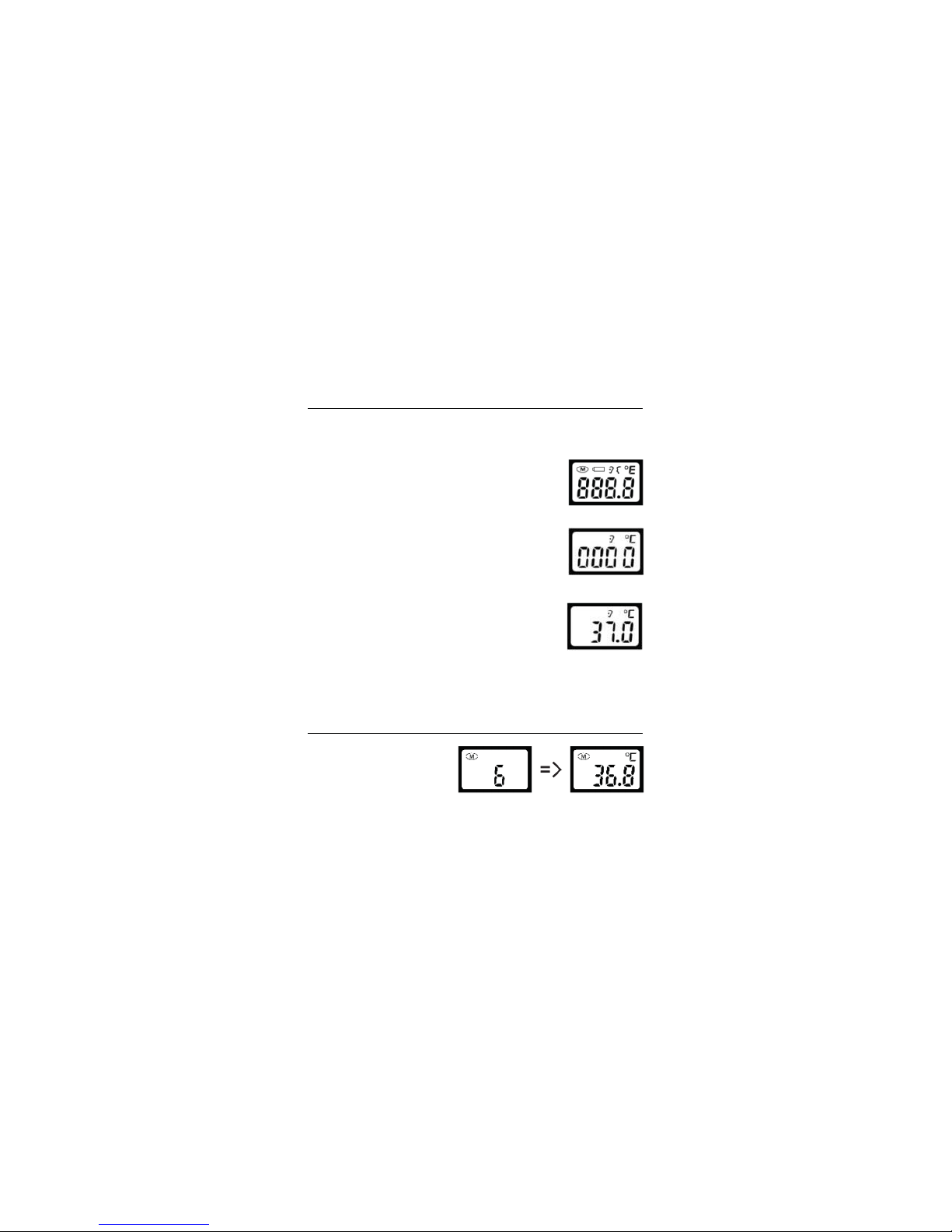
With a beep the screen will turn on and would display as
shown in gure 1 on the right
4.
In approximately 2 seconds the device will be ready for
measurement and the screen will display an image of the
ear as shown in gure 2.
Insert the probe/sensor in to the ear canal. When using on
5.
Children below 12 months, slightly pull the ear lobe back
and up to straighten the ear canal. Insert the sensor / probe
until it completely seals the ear canal.
6.
Press the Scan / M button. At this moment, the ear image will
disappear from the display screen and a short beep will be
heard.
When the measurement is over, a long beep will be heard,
7.
Release the Scan/M button and the measured reading will
8.
appear on the display screen along with the ear image Please
see Figure 3.
To re scan / measure the temperature please wait 20 seconds.
9.
Accessing Stored Measurements
While the thermometer is switched
o, press the ‘Scan/M’ button and
release it. The screen will light up.
press the ‘Scan/M’ button again to
read the memorized measurements
one by one starting from 1 to 10.
please see gure 4. Each time the ‘Scan/M’ button is pressed, the next saved
measurement will be displayed.
Figure 4
Figure 1
Figure 2
Figure 3
5
Page 6

Specication
Device:
Model:
Type:
Test time:
Temperature Measurement range:
Bluetooth Communication distance:
Test interval:
Accuracy:
Min scale :
Unit:
Batteries:
Specialties:
Bluetooth Infrared Ear thermometer
EOC - STMBT
Digital
1second
20 Seconds
89.6F - 108.5F (32C - 42.5C)
+/-0.4F/ or +/-0.2C
0.1 degree
Fahrenheit / Centigrade
2 AAA batteries
10m/30F (barrier free)
Auto shut-o, High temperature reminder,
Fever warning, safe and hygienic
6
Page 7

Warranty
One year warranty from the date of purchase. purchase invoice required
Warranty service shall not be provided if the device malfunction is because:
1. The user opened the device and or dismantled and reinstalled the device
2. User inadvertently or otherwise dropped the device
3. lack of reasonable maintenance
4. User operated the device not in accordance with the guidelines provided in the
user manual
5. Repair or maintenance done by an unauthorized personnel or establishment
Service provided outside the scope of warranty will be charged as per prevailing
regulations and stipulated rates.
For warranty services, please contact:
Eocene Systems,
2441 Bellevue Avenue,
Daytona Beach, FL 32114
Support: 321-567-0688 FAX: 321-567-0688
Warranty Card
Model Number:
Date of Purchase:
Name of Store:
Address:
Name of
Purchaser:
Address:
Zip: State:
Zip: State:
Please attached copy of purchase invoice
Phone:
7
Page 8

Eocene Systems,
2441 Bellevue Avenue,
Daytona Beach, FL 32114
 Loading...