

Page 1
© Enviroswim 2014 AUS Rev 3.1
Model ES-3
Pool Sanitizing System
Operating Manual
Page 2

Page 3

© Enviroswim 2014
AUS Rev 3.1Page 3 of 28
IMPORTANT SAFETY INSTRUCTIONS
Attention Operator: This manual contains important information about the operation
and safe use of this product.
WARNING - READ AND FOLLOW ALL INSTRUCTIONS. IMPORTANT SAFETY
INSTRUCTIONS PERTAINING TO A RISK OF FIRE, ELECTRIC SHOCK, OR
INJURY TO PERSONS
WARNING – This appliance is not intended for use by persons (including
children) with reduced physical, sensory or mental capabilities, or lack of
experience and knowledge, unless they have been given supervision or
instruction concerning the use of the appliance by a person responsible for their
safety. Children should be supervised to ensure they do not play with the
appliance.
WARNING – Children less than eight (8) years shall be kept away unless
continuously supervised. This appliance can be used by children aged from eight
(8) years and above and persons with reduced physical, sensory or mental
capabilities or lack of experience and knowledge if they have been given
supervision or instruction concerning the use of the appliance in a safe way and
understand the hazards involved. Children should not play with the appliance.
Cleaning and user maintenance should not be made by children without
supervision.
WARNING – When mixing acid with water, ALWAYS ADD ACID TO WATER,
NEVER ADD WATER TO ACID.
WARNING – Do not open Electronic Control Unit. There are no serviceable
elements in the control box. Always return to Enviroswim for repair.
WARNING – Do not operate electrolytic cell without proper flow or water
circulation. A build-up of gases will result in hazardous conditions.
CAUTION – Use of chemicals other than those recommended may be
hazardous. Follow the Chemical Manufacturer’s Instructions. Do not add
undiluted chemicals directly to the pool as staining may occur. Undiluted Calcium
Hypochlorite reacts with copper and silver and can cause staining, an alternative
such as liquid chlorine (Sodium Hypochlorite) or a non-chlorine oxidiser is
recommended if shock treatment is required. Do not use Cyanuric Acid
(Stabiliser) as this will inhibit oxidation processes.
CAUTION – This unit is for use with permanently – installed pools. Do not use
with storable pools. A permanently – installed pool is constructed in or on the
ground or in a building such that it cannot be readily disassembled for storage. A
storable pool is constructed so that it is capable of being readily disassembled for
storage and reassembled to its original integrity.
Page 4

If you employ a pool maintenance contractor,
ensure that they read and follow these
instructions as an Enviroswim System pool
differs from common chlorine/salt pools.
The best results with the Enviroswim system are obtained by
following a few simple rules:
Do not use stabilizer (Cyanuric Acid)
Do not use bromine compounds
Do not use aluminium based or any other
flocculants
Do not use Soda Ash (Sodium Carbonate)
Do not use Granular Chlorine. The use of
Granular Chlorine (Calcium Hypochlorite) may
cause black staining of the pool rendering if it is
added undiluted to a pool treated by an Enviroswim
System. Use only unstablised liquid chlorine
(Sodium Hypochlorite) or OxyShock (non chlorine
Oxidiser).
Do not throw un-dissolved chemicals into
the pool.
Clean the pool filter regularly.
Due to the many different test kits on the market, we recommend
that you follow the manufacturer’s instructions supplied with each
test kit.
SAVE ALL THESE INSTRUCTIONS
For advice phone 1300 888 457
Outside Australia phone +61 7 5546 7366
© Enviroswim 2014
AUS Rev 3.1Page 4 of 28
Outside Australia email [email protected]
Page 5
© Enviroswim 2014
AUS Rev 3.1Page 5 of 28
Page 6

© Enviroswim 2014
AUS Rev 3.1Page 6 of 28
1 Operating Instructions
Thank you for purchasing the Enviroswim ES-3. Following these basic instructions will
allow you to enjoy the benefits of low maintenance and exceptional water quality
achievable with this system. During periods of intense use or when there has been
significant water dilution or contamination more frequent testing and active
management may be required.
Warning:
It is important that the ES-3 system only be allowed to operate when the pool
pump is running so that water is flowing through the ionization/oxidation
chamber and the ultrasonic emitter when they are in operation. Ensure that
variable speed pumps maintain sufficient water flow.
1.1 System operation
Water that is totally acceptable for drinking purposes may have a definite mineral
imbalance for use in a swimming pool. In parts of the world where mineral excesses
or deficiencies exist in natural water, the pool will need initial balancing. A balanced
pool is necessary for proper disinfection and will assure freedom from staining and
scaling problems. Mineral imbalance and improper pH control can significantly
complicate maintenance and have a serious deteriorating effect on the pool itself.
After initial balancing of the water, mineral balance must be maintained within the
proper parameters to provide continued protection and ease of maintenance.
Frequency of testing is dependent on weather and pool load.
Avoid prolonged running of the pool with a high pH and or high copper levels. This is
easily avoided by regular testing. Enviroswim recommends that you test the pool
water every two weeks.
The only chemicals necessary to keep your pool balanced and healthy will be a buffer
such as sodium bicarbonate and hydrochloric acid. Naturally, you’ll continue to
remove leaves and dust as usual, as these eat up the sanitizer and provide nutrients
for algae and bacteria.
Page 7
© Enviroswim 2014
AUS Rev 3.1Page 7 of 28
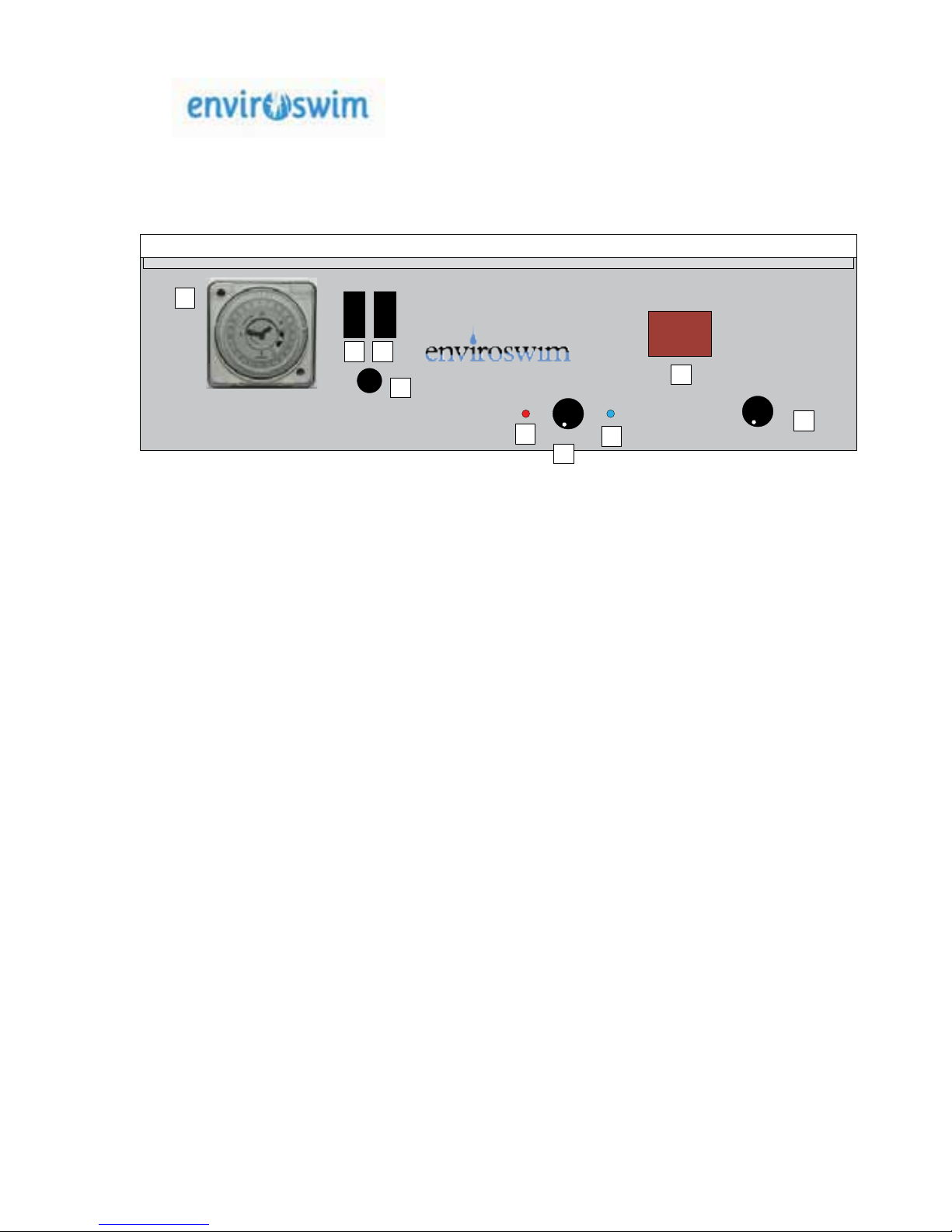
Ultrasonic indicator Ioniser indicator
ES- 3
I oniser O xidiser
Min Max
Min Max
Mains IN
fuse
10A 250V ac
Slow blow
AUTO
OFF
MANUAL
OFF
ON
www.enviroswim. com
1
2 3
4
5
7
6
9
8
1. Timer Clock
2. Off/Manual/Auto Switch
3. Enviroswim functions on/off switch
4. Fuse
5. Ultrasonics Operation Indicator
6. Ioniser timer control
7. Ioniser Polarity Indicator
8. Oxidiser Amperage display
9. Oxidiser Output Control
Oxidiser Production
(Amps)
Page 8
© Enviroswim 2014
AUS Rev 3.1Page 8 of 28
1.1.1 Controls
No.
Name
Operation
1
Timer
Clock
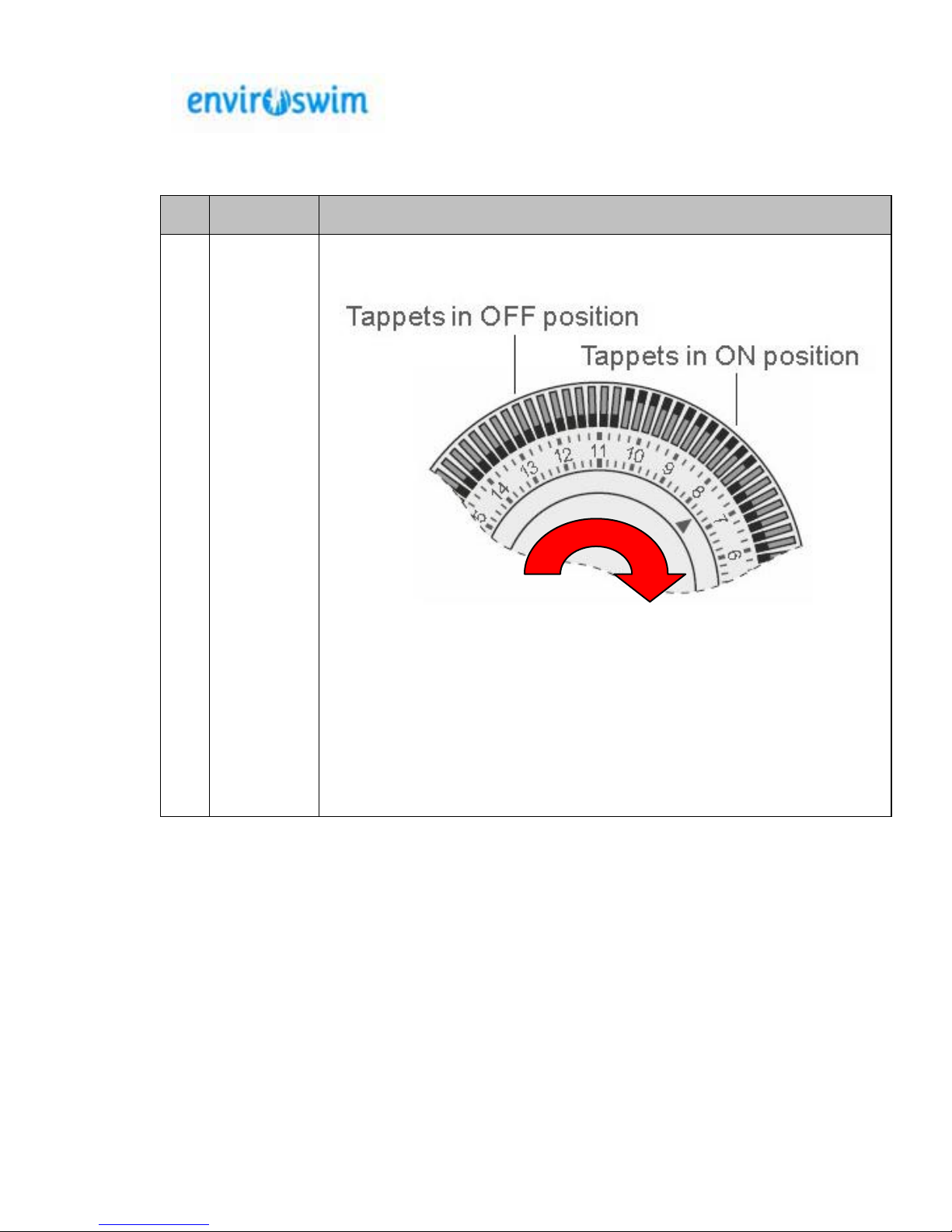
If using the timer this is set by
1. To set current time, rotate minute hand clockwise until arrow
head aligns with correct time. Note: This will need to be reset
whenever the power is disconnected from the unit and for
daylight saving time changes. Note: Only rotate clockwise
to set. Rotating incorrectly will damage the time clock.
2. To set ON/OFF times, move required tappets to appropriate
position. Inner position for OFF and outer position for ON. Note :
proper operation requires that the appropriate switch
settings below are enabled.
Page 9
No.
Name Operation
2 &
3
Enviroswim
Power and
mode
switches
These switches allow for manual or automatic (timer controlled) operation
of the Enviroswim system either in conjunction with the pump or the pump
on its own. Note : The Enviroswim processes should never be
operated unless the pump is running and the system when properly
installed should preclude this.
The following Switch Settings are possible
Switch 3 (OFF/ON)
Switch 2 (AUTO/OFF/MANUAL)
OFF (0) ON (I)
OFF
Disabled
(0).
Pump and Enviroswim
Functions disabled
regardless of timer.
On
MANUAL
untimed
settings
(I)
Pump only
operational
independent
of timer.
Pump and
Enviroswim
functions
operational
independent
of timer.
AUTO
Timed
settings
(II)
Pump only
operational
as per timer
settings.
Pump and
Enviroswim
functions
operational
as per timer
settings.
4.
Fuse Only replace with specified 240V 10A slow blow
5.
Normal
operation
indicator
This LED cycles through several colours indicating normal operation.
6.
Ioniser
Timer
Control
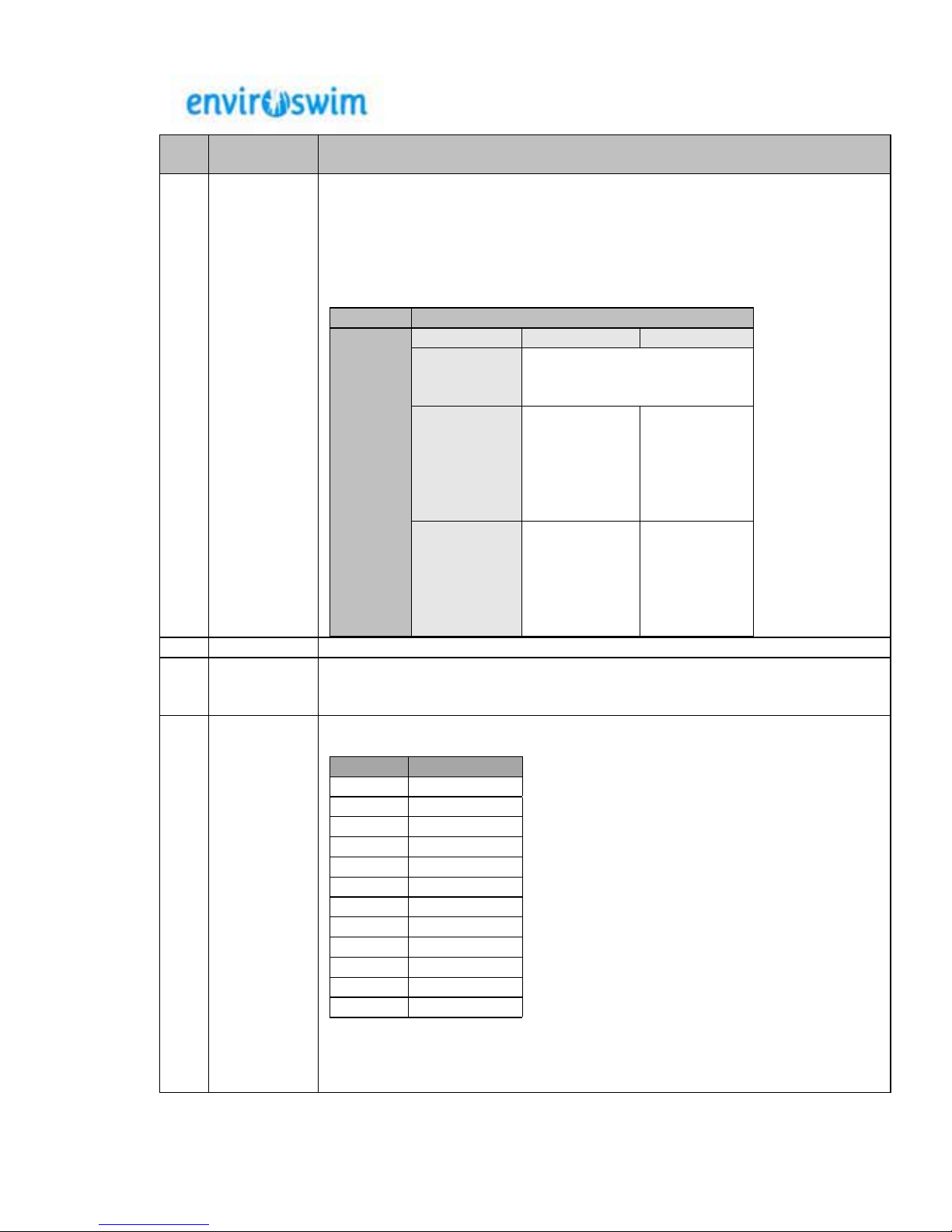
The ioniser timer control has 12 settings.
Setting % Output
1 Off
2 2
3 3
4 7
5 10
6 13
7 17
8 20
9 23
10 37
11 50
12 100
*Refer to page 12 for graph
and detailed output settings
*
© Enviroswim 2014
AUS Rev 3.1Page 9 of 28
Page 10
© Enviroswim 2014
AUS Rev 3.1Page 10 of 28
No.
Name
Operation
7.
Ioniser
Polarity
Indicator
This LED changes colour from red to green approximately every sixty
minutes to indicate that the polarity of the Ioniser electrodes has changed.
Changing the polarity assists in cleaning the electrodes and ensures that
they wear evenly.
8.
Oxidiser
production
digital
display
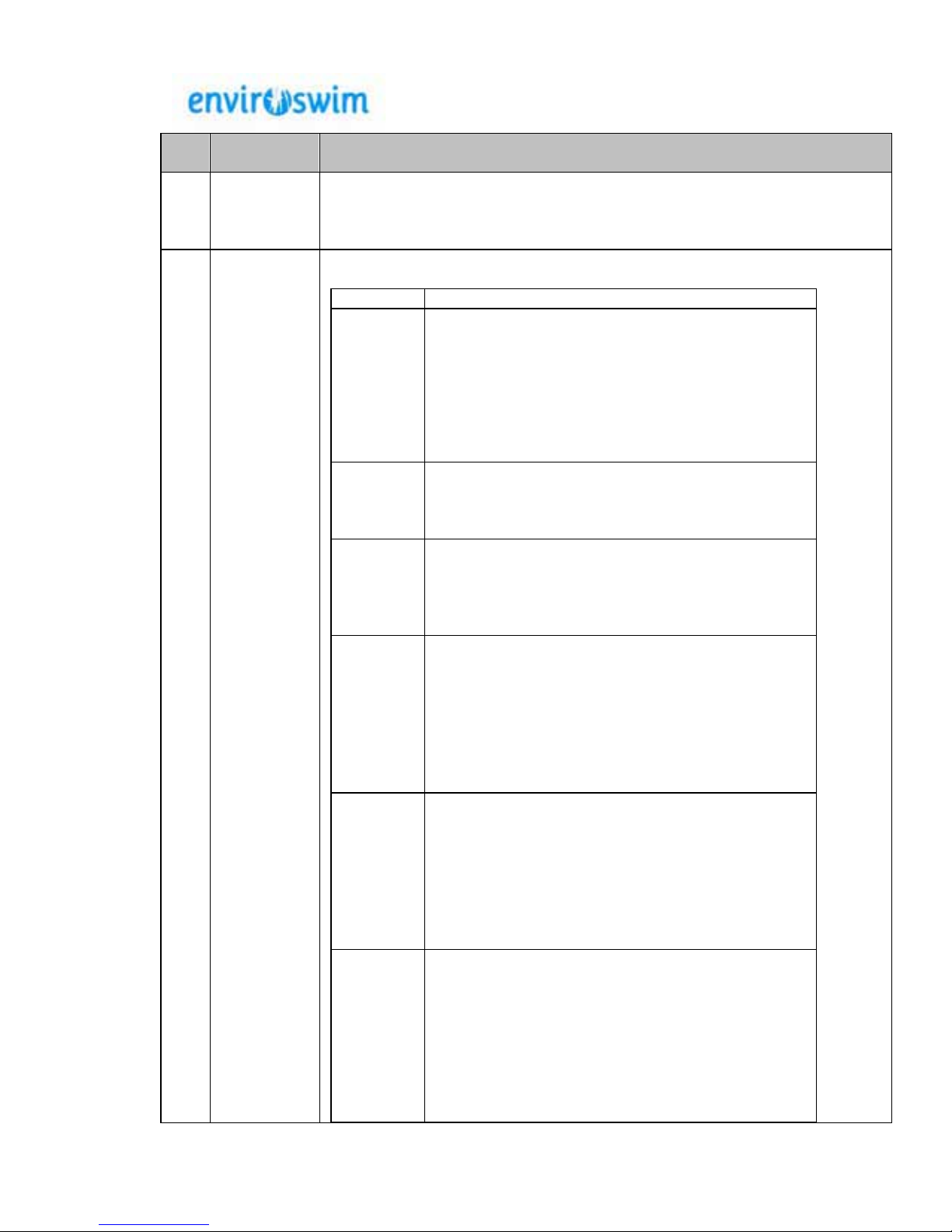
This display shows the status of the Oxidiser plates and has a range of
values.
Value
Indication
01 – 15
A value in the range of 1-15 indicates the
Amperage current being applied to the Oxidiser
plates. The Enviroswim unit is limited to a
maximum of 15 Amps. When the ORP Current
Control is at maximum the display should show 15
amps. If the display at maximum is below 15 amps
this is most likely due to a low TDS level. Refer to
section 3.
OF
The current being applied to the plates is
negligible or non-existent. This will be the most
likely reading when the ORP Current Control is set
to minimum
d6
The system is in de-gas mode. When the unit
reverses polarity approximately every 24 hrs it
goes onto the de-gas mode, (no power to the cell)
for approx 1 hour. This purges the cell before
powering up in the opposite polarity
Pb This will be a flashing display that indicates that
the system is not applying current to the oxidiser
plates due to any of
Air in the system
Insufficient water flow
Calcium build up on plates.
Water Sensor wire not attached or
loose.
OL
This will be a flashing display that indicates that
current is no longer being applied to the oxidiser
plates. This is done to protect the Enviroswim unit
due to excessive current draw that may be caused
by
Excessive TDS (greater than 3000ppm)
Undiluted chemicals added to skimmer
Short circuit across the plates.
SU Indicates the unit is in its start-up self-check
mode. The start-up mode lasts for 10 seconds
during which time the Control Unit checks and
monitors the system configuration. If any faults are
found these are shown on the display with the
appropriate indicator. If no fault is found the output
currents ramp up to their preset mode as
determined by the Ioniser and Oxidiser Current
Controls.
Page 11
© Enviroswim 2014
AUS Rev 3.1Page 11 of 28
No.
Name
Operation
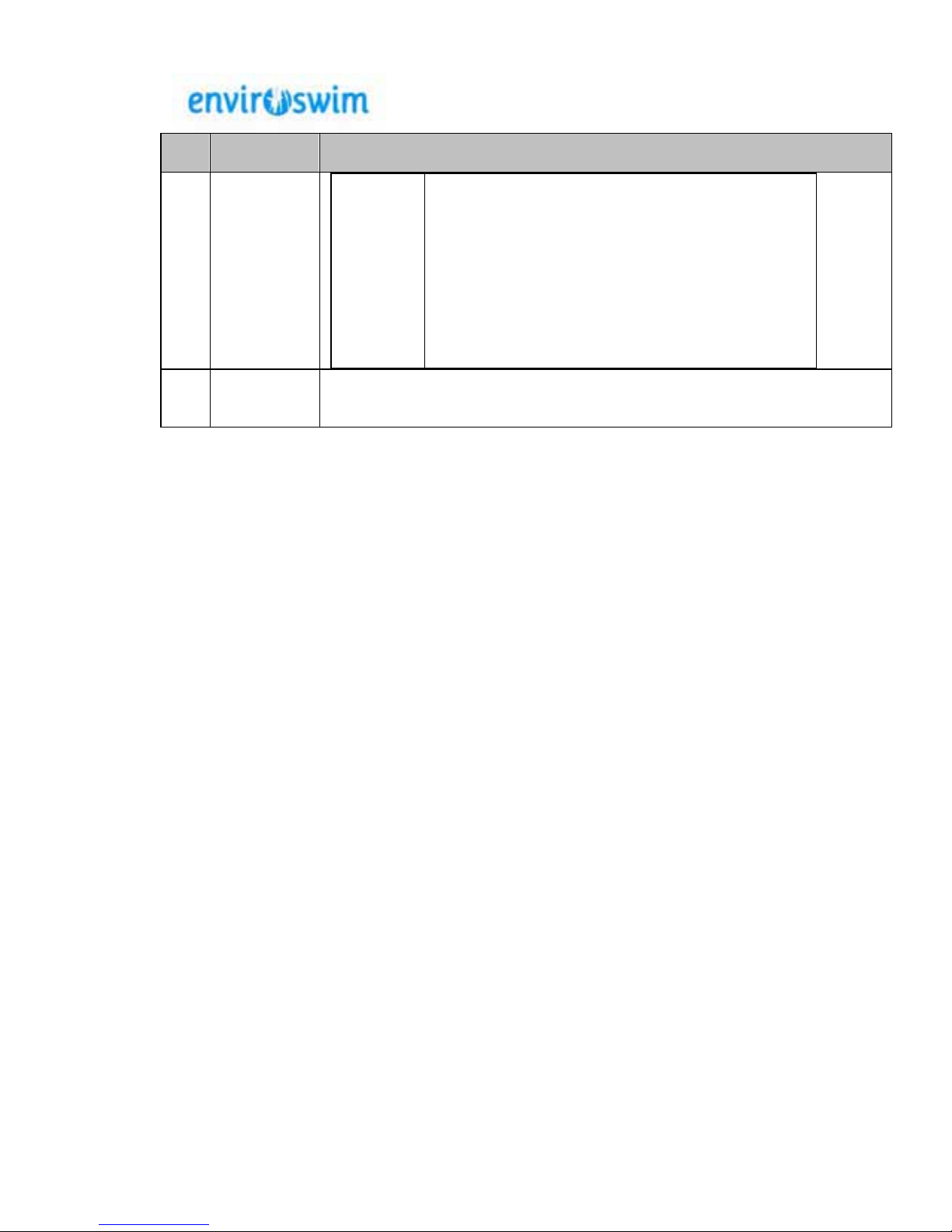
TP
This indicates an undesirable internal temperature
in the Control Unit. If this occurs the unit will
shutdown to prevent any damage to the System
Controller. Likely causes of this message are:
Excessively low TDS
Air-flow vents on the underside of the
unit are blocked
Excessive ambient temperatures
9.
ORP
Output
Control
This control is used to adjust the current being applied to the plates. The
effect of adjusting this control when the Enviroswim unit is operational will
be displayed on the Oxidiser production digital display.
Page 12
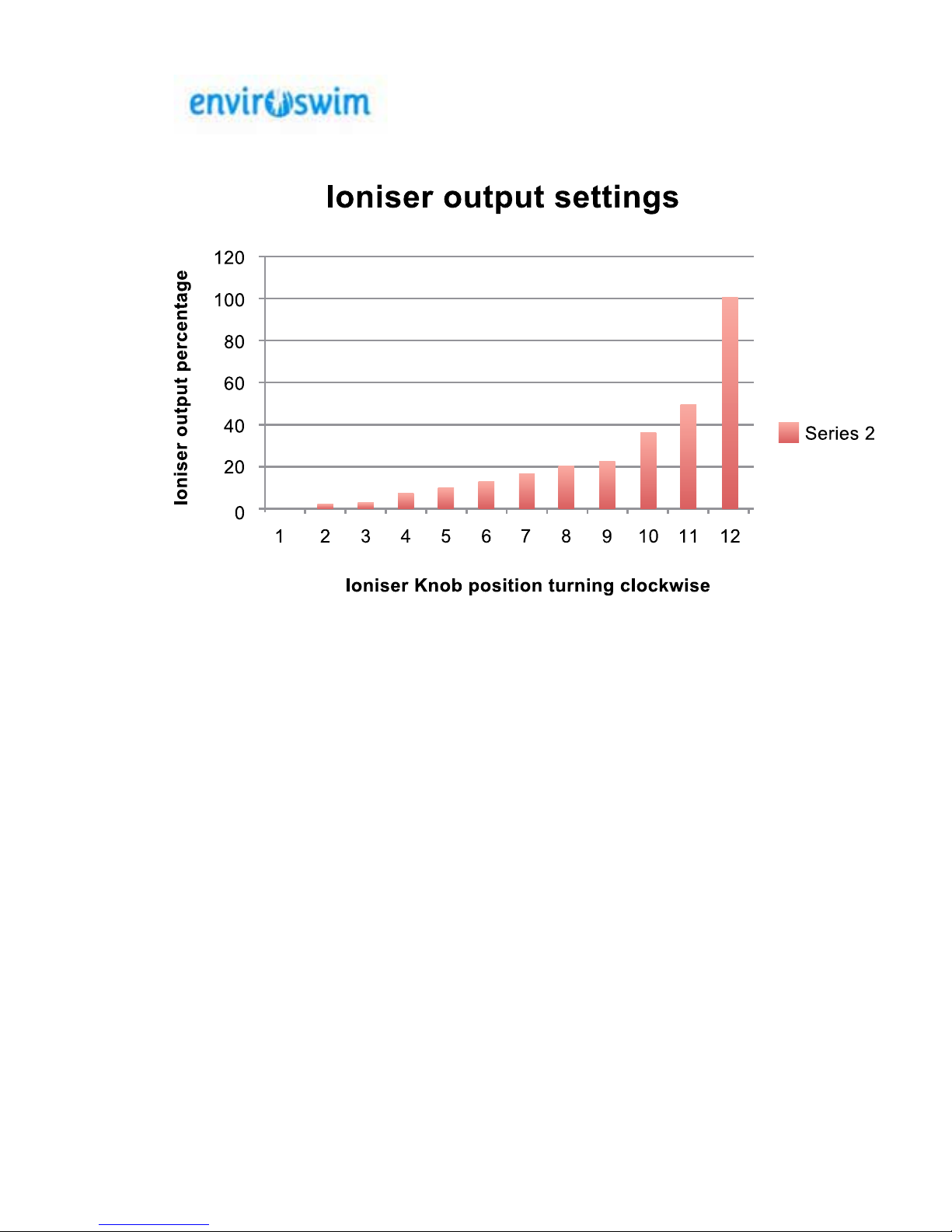
Ioniser Timer Control
Ioniser knob Position
1.
2.
3.
4.
5.
6.
7.
8.
9.
10.
11.
12.
Note: Positions 11 & 12 are mainly used to build the copper levels following initial
lling with pool water when copper levels are very low or following heavy dilution from
rainfall or oods. Use these setting with care to avoid overdosing and unnecessary
wear of electrode.
If the copper is accidentally overdosed the ioniser output can be turned off for weeks
or even months until the level drops to the recommended operating level. The system
will continue to perform 100% using just the ultrasonics & oxidiser.
The daily copper output is inuenced in two ways.
1. The daily run hours of the enviroswim system
2. The set position of the ioniser knob.
Increasing either one of the above will increase copper production likewise decreasing
either will reduce copper production.
© Enviroswim 2014
AUS Rev 3.1Page 12 of 28
(ioniser knob fully anticlockwise) off
produces copper 2% of the running time.
produces copper 3% “ “
produces copper 7% “ “
produces copper 10% “ “
produces copper 13% “ “
produces copper 17% “ “
produces copper 20% “ “
produces copper 23% “ “
produces copper 37% “ “
produces copper 50% “ “
produces copper 100% “ “
Page 13
© Enviroswim 2014
AUS Rev 3.1Page 13 of 28
1.1.2 Pool Balance
Suggested testing frequencies are recommendations only for average use domestic pools. More frequent testing may be
required.
Balance
Parameter
Symptoms
Ideal Range
Measurement
Adjustment
Alkalinity
• pH difficult to maintain
• pH bounce
• Bather discomfort
• Corrosion
• Cloudy Water
80-150 ppm Use supplied test kit or
Pool Shop Free testing.
Frequency : Monthly
Raise by using Sodium
Bicarbonate. Approx 450
grams per 10,000 litres (e.g.
2.25kg for 50,000 litres) to
raise from 60ppm to
100ppm.
pH
• Reduced sanitation
effectiveness
• Plaster and concrete
etching
• Corrosion
• Cloudy water
• Bather discomfort
pH 7.1-7.5
Use supplied test kit or
Pool Shop Free testing.
We recommend
checking the pH level of
the water every 2
weeks. New concrete
or plaster pools
require weekly checks
of the pH for 2–3
months, until the
concrete has fully
cured. Quartzone pools
should be tested daily
until stabilised. Allow the
acid to fully mix before
testing.
Frequency : Fortnightly
The pH of your pool water is
increased by adding sodium
bi-carbonate, and reduced
by adding hydrochloric acid
or sodium bisulphate (dry
acid).
• Dry acid at the rate of 50
grams per 10,000 liters.
• Hydrochloric acid add 50
ml per 10,000 liters.
• When mixing acid with
water, ALWAYS ADD
ACID TO WATER,
NEVER ADD WATER TO
ACID
Test pH again; and if it is still
high repeat until the correct
pH level is obtained.
Page 14
© Enviroswim 2014
AUS Rev 3.1Page 14 of 28
Balance
Parameter
Symptoms
Ideal Range
Measurement
Adjustment
Water
Hardness
•
Etching and Corrosion
• Cloudy Water
200-250ppm
Take sample to pool
shop.
Frequency : Monthly
In order to reduce calcium,
you will need to dilute the
pool water by draining part of
the water and adding new
water. Calcium chloride can
be added to the pool in order
to raise calcium hardness.
In order to raise calcium
hardness by 10 ppm, you
can add 150 grams of
calcium chloride per 10,000
litres of pool water.
• Total
Dissolved
Solids
(TDS)
Low
• poor ORP and Ion
dispersal
High
• Excessive current
load on ES2
• Bather discomfort
1000 - 1500 ppm Take sample to pool
shop.
Frequency : Monthly
If TDS is low adding 5kg of
pool salt per 10,000 litres of
water will raise the TDS by
around 500ppm.
If TDS is too high dilution is
required. Calculate dilution
requirement taking into
account the TDS of the
diluting water.
Page 15
© Enviroswim 2014
AUS Rev 3.1Page 15 of 28
1.1.3 Adjusting Copper/Silver Levels
The desired copper range is between 0.2 to 0.5 ppm. The Enviroswim system works
best at these levels. To increase copper levels, increase the run time and/or ionizer
output of the Enviroswim system. To reduce copper levels, turn down the ionizer
output of the Enviroswim system. As a guideline, to reduce copper levels from 0.7 to
0.4 ppm, the Enviroswim ionizer system can be left off for 7-10 days, dependent on
weather and bathing loads. Levels are easily checked by means of the supplied
copper test kits (reorder from Enviroswim). Always ensure pH is balanced before
testing copper levels in order to avoid getting a false reading.
It is very important that copper levels are not allowed to exceed 0.5 ppm for extended
periods, as copper staining may appear. Prolonged high copper and/or high pH levels
will lead to the copper coming out of suspension, and may produce a very light blue
stain on the mortar of pebble pools. This effect is not harmful to swimmers or the
pool, and if desired can be removed with some effort. Pool owners that have let this
happen find the blue tint actually enhances the pool water’s appearance.
If the copper level rises above 0.5 ppm, turn down the Enviroswim ionizer unit and
dilute the pool with fresh water to reduce the copper level to 0.4 ppm. Unlike chlorine,
copper/silver are extremely stable in water making the level very easy to maintain.
Note:
Enviroswim will not be held responsible for damage caused by excessive
copper levels.
NOTE: If you take a water sample to a pool shop for a copper test, you may get
a false reading if the pool pH has been high during the 24-hour period prior to
the sample being taken from your pool. Some types of testing equipment can
also give a false reading due to the silver content in the sample. We strongly
advise that you use the test kit and instructions provided with the Enviroswim
system to avoid misleading results that can cause high copper levels and
excessive wear of the copper/silver anodes.
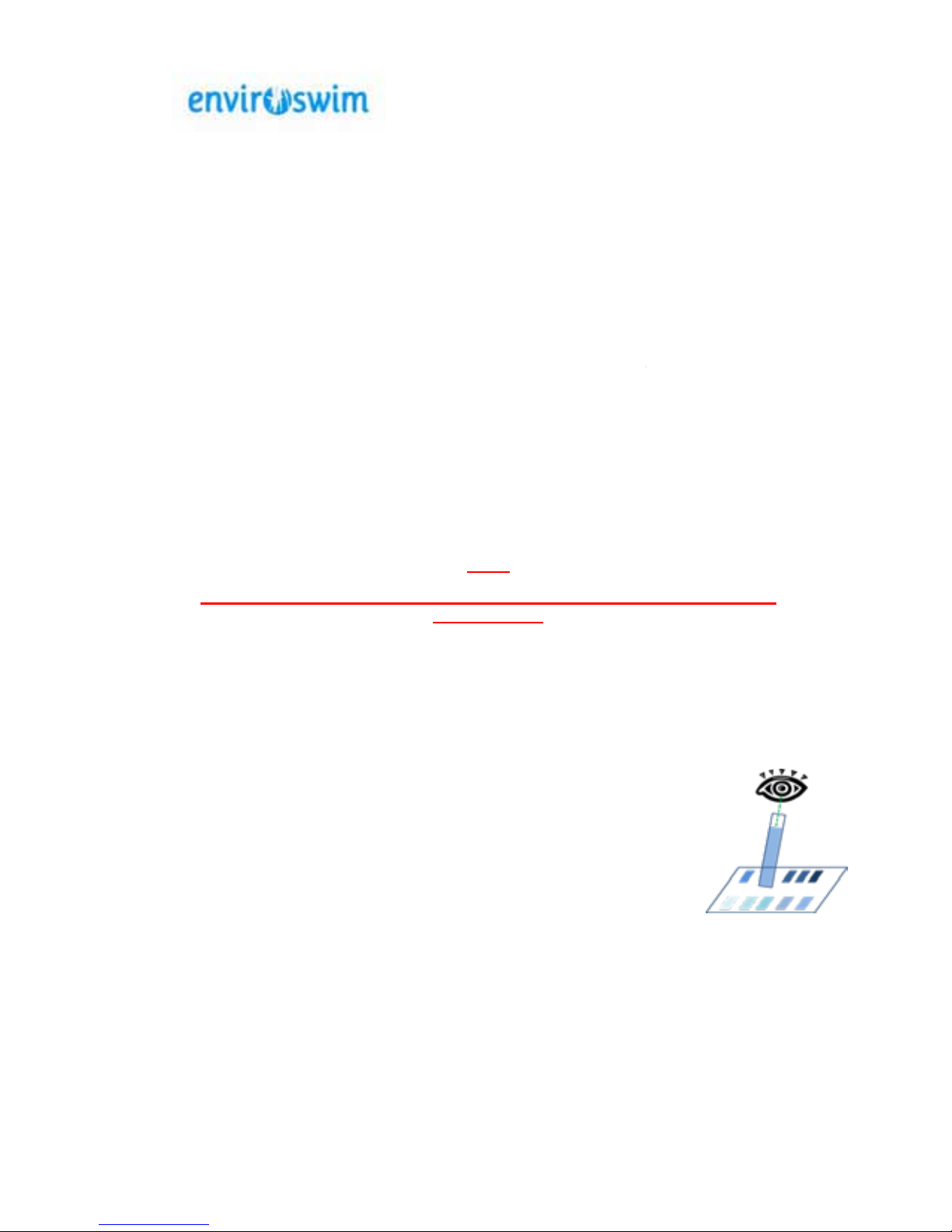
When using the supplied test kit ensure that you look down the test
tube when comparing to the colour chart. The colour is best read in the
shade.
0.4 ppm.
0.4 ppm
0.4 ppm,
Page 16
© Enviroswim 2014
AUS Rev 3.1Page 16 of 28
2 Basic Theory
There is no such thing as a maintenance-free pool. However, the Enviroswim system
requires only a few minutes each week to keep your pool in top condition while it
saves money. This section of the manual gives some basic insight into the theory of
the processes at work on your pool when using the Enviroswim system.
2.1 Ionization
The use of copper and silver to sanitise water is well documented and the process has
been used for thousands of years. Copper is a very powerful algaecide and silver is a
very powerful biocide. When the two metals are combined and introduced to the water
using electrolysis, they become a formidable sanitiser. The required residual level of
copper and silver introduced to the swimming pool is well below acceptable drinking
water standards making for a very safe residual sanitiser.
2.2 Electronic Oxidization (ORP generator)
Traditionally copper and silver
ionisation systems have
required an oxidiser to be
added to the pool water to help
burn out organic compounds
(oils, dust, leaf stains etc.). The
most common form of oxidiser
used for this purpose has been
chlorine. There is a growing
concern regarding the adverse
health effects of chlorine and its
associated by-products
(Chloramines)
Enviroswim has eliminated the need to add chlorine to the pool by incorporating an
electronic oxidising unit into the system. ORP stands for Oxidation-Reduction
Potential. In practical terms, it is a measurement of the ability to oxidise contaminants.
ORP is the only practical method we have to electronically monitor oxidiser
effectiveness. In some parts of the world, it is also known as Redox Potential. Using
electrolysis the Enviroswim system produces the oxidiser in sufficient quantities to
maintain an acceptable ORP.
2.3 Ultrasonics
Ultrasonics used in the Enviroswim system further helps to improve the water quality
by removing existing scale and preventing the
formation of scale caused by silica in the water. This
process improves the efficiency and reduces the
operating costs of the pool filtration/circulation and
heating equipment.
Page 17
© Enviroswim 2014
AUS Rev 3.1Page 17 of 28
3 Initial System Start-Up
If you employ a pool maintenance contractor, ensure that
they read and follow these instructions as an Enviroswim
System pool differs from common chlorine/salt pools.
These instructions should be followed whenever the pool
has been refilled or the Enviroswim system is restarted after
a prolonged shutdown.
For ideal operation Enviroswim requires a TDS level of between 1000 and 1500 ppm
to provide conductivity for its electronic processes. When converting Salt Water Pools
or pools where TDS exceeds 2000ppm please contact Enviroswim.
If TDS is low adding 5kg of pool salt per 10,000 litres of water will raise the TDS by
around 500ppm.
For new pools, or those that have just been refilled, add pool salt to ensure the
conductivity of the water is high enough for the ionization process to take over. If
retrofitting to an existing pool the conductivity of the water should be sufficient for the
Enviroswim system process to initiate.
Ensure that the pool water is balanced (Alkalinity, pH and calcium hardness).
When the system is initially installed, it will need to be run continuously for a time to
allow the various processes to take effect in the pool. The time taken to initialize the
system will vary, depending upon the volume and conductivity of the pool water.
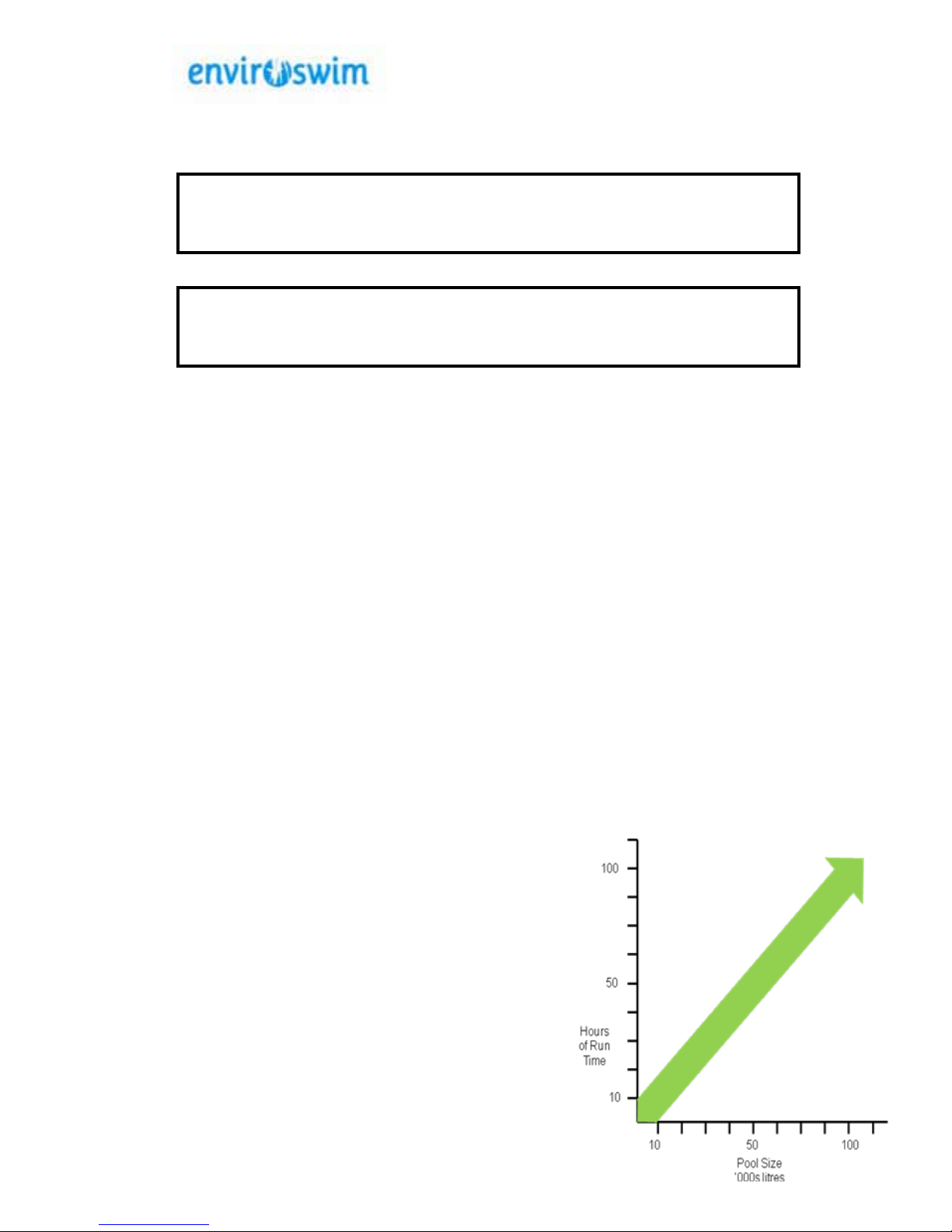
Typically a 50,000 litre pool would take 48-60 hours of operation to build up the copper
level to the required 0.25 ppm. Larger pools may take up to 2 weeks.
Perform the following steps to allow the Enviroswim system to be running in the startup mode:
1. Balance the water as per above. Ensure all Enviroswim switches are set to
OFF and variable controls (Ioniser and ORP) at minimum (fully counterclockwise).
2. Turn on the pool pump so that water is
flowing through the filtration system and
the Enviroswim ionization/oxidation
chamber and ultrasonic emitter pipe. Set
the left hand switch on the Enviroswim
unit to MANUAL. Make sure that the
ionization/oxidation chamber is filled with
water.
3. Turn on the right hand ON/OFF switch on
the control box.
4. Turn the knob on the control box under
the ORP meter slowly clockwise until the
ORP meter reads between 13 - 15 Amps.
5. Turn the ioniser switch to maximum. Run
the unit for approximately 1 hour per 1000
litres of water and test copper level.
24-48
Page 18

© Enviroswim 2014
AUS Rev 3.1Page 18 of 28
6. Perform chemical tests to determine readings for pH, ORP, alkalinity,
copper, and calcium hardness then adjust accordingly. Refer to Operating
Manual for appropriate treatments.
7. Test the copper level and when in the range 0.2-0.4 ppm set the system for
the appropriate run time and adjust the Ioniser output to around 50%.
6. Perform chemical tests to determine readings for pH, ORP, alkalinity,
copper, and calcium hardness then adjust accordingly. Refer to Operating
Manual for appropriate treatments.
7. Test the copper level and when in the range 0.2-0.4 ppm set the system for
the appropriate run time and adjust the Ioniser output to around 50%.
8.
Startup is now complete. Refer to the operating manual for a guide on run
times. Remember every pool is different. Factors that will impact runtime are
location, bather load, season, type of cover and water temperature.
When can I use the pool?
It is OK to use the pool while the Copper levels are being established
provided the Enviroswim system is processing the water continuously and
the correct water balance (pH, alkalinity and hardness) is established. The
Oxidation process will treat organic matter and as water flows through the
cell it will be being treated with concentrated Copper and Silver ions. We
recommend that the water is allowed to circulate at least once (allow 1 hour
per 10,000 litres) before swimming.
High Cyanuric Acid levels
Where a pool has been treated previously with chlorine (particularly with
tablet feeders) there may be high residual cyanuric acid levels. This can
adversely affect operation of the ES-3. Contact Enviroswim.
(see page 12) and monitor copper levels every few days to ensure copper
level is staying within the 0.2 - 0.4 ppm range. If not, adjust ioniser knob
accordingly to the ne tune the setting for your pool after which you should
routinely check copper level every 2 - 3 weeks.
knob to position 9 (23%)
Page 19
AUS Rev 3.1
© Enviroswim 2014
Page 19 of 28
4 Maintenance
4.1 Basic Maintenance
The Envirowim system is very low maintenance. Only the copper and silver electrodes
are consumable and require periodic adjustment and replacement. The oxidizer plates
and copper/silver electrodes are self-cleaning and the ultrasonic system is
maintenance free.
4.1.1 Fuse
Fuse replacement: 240 Volt, 10 Amp, Slow Blow
WARNING: There is a risk of electrical shock, fire and damage to the unit if an
incorrectly sized fuse is installed in the fuse holder.
4.1.2 Replacement of
Electrodes
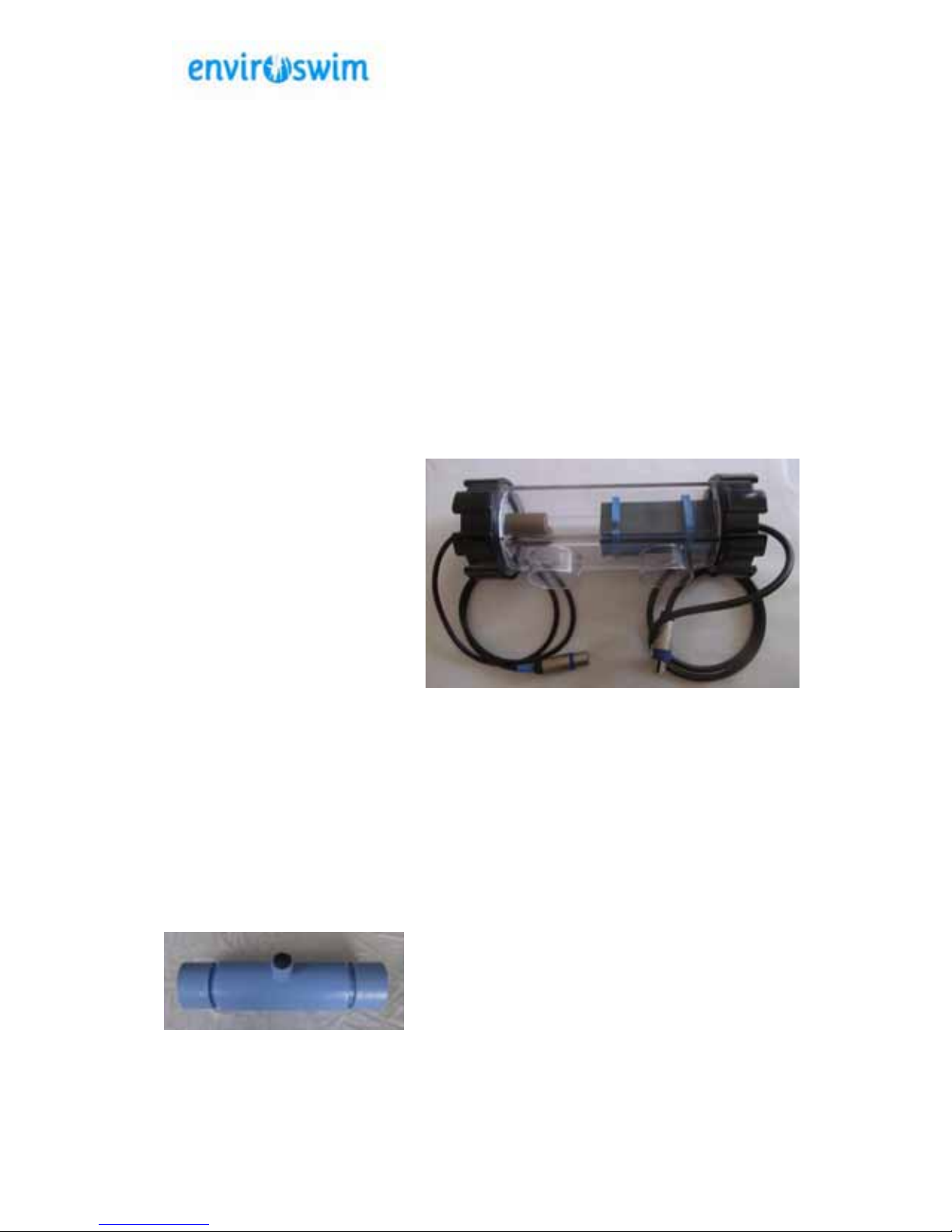
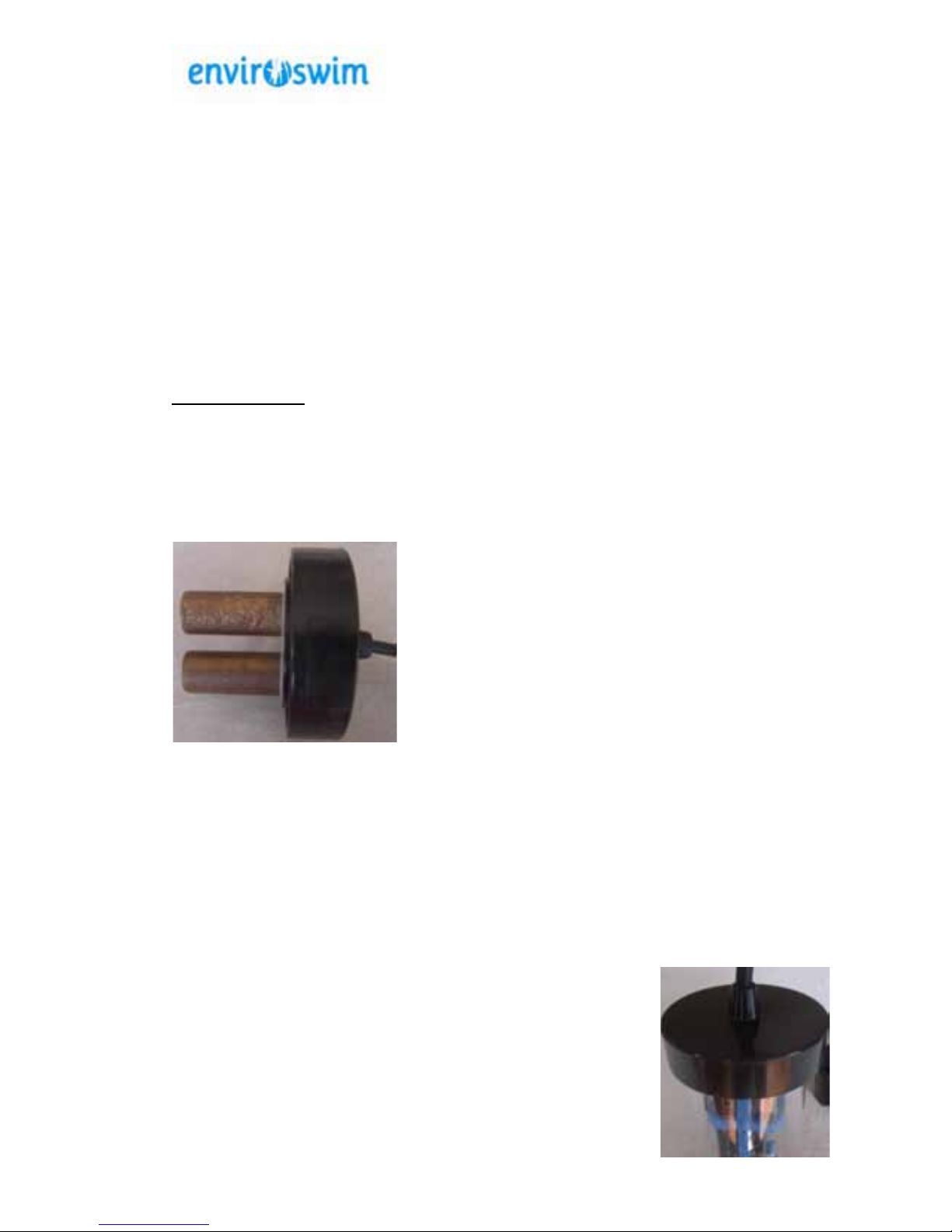
The copper/silver electrodes are a consumable and
will require periodic replacement. The life of the
electrodes will depend on many factors including
pool use, maintenance, dirt and other debris that are
allowed to build up in the pool. The electrodes
should be changed before they become so small that
they fall off the stainless steel threaded rod that
holds them in place.
Note: Replacement electrodes can only be purchased through Enviroswim.
Using any electrodes not supplied by Enviroswim will void any remaining
warranty. Enviroswim will not be held liable for the performance or
effectiveness of the system when other manufacturers’ electrodes have been
installed.
4.1.3 Cleaning Oxidiser Plates
Plates should only be cleaned if severely scaled and the ES3 is unable to draw 15
amps (as per the digital display). Scaling on the plates generally indicates that the pH
has been high for extended periods (above 7.6). Refer to section 5.1 on Langlier
Saturation Index and make sure that the pool is operated with
an appropriate LSI.
Before cleaning check the following
TDS is within range – 1000-1500 ppm
No loose connections.
Scale may be loosened by striking gently with wooden or
Page 20

© Enviroswim 2014
AUS Rev 3.1Page 20 of 28
plastic objects. Take care not to damage the plastic separators.
Once all excess scale is removed clean plates by soaking in a 75/25% ratio
water/hydrochloric acid solution. A 1.25 litre softdrink bottle with the top cut off is an
ideal size for bathing the plates. Do not leave the plates in the solution for extended
periods - 3 minutes should be sufficient if excess scale has been removed. Ensure
that the water level sensor is cleaned.
Never use metal objects to clean the plates as this will damage the coating.
Remember : Always add Acid to Water when diluting.
Page 21

© Enviroswim 2014
AUS Rev 3.1Page 21 of 28
5 Troubleshooting
Problem
Possible Cause
What to do to fix it
Blown fuse
Undiluted chemicals
added to pool or
skimmer basket
Short circuit on oxidizer
plates
Internal electrical fault
Turn off power to control box.
Replace fuse and allow clean
water to circulate through the
system before switching on.
Check for any short circuit
and clear
Contact Enviroswim
Copper level too low
Low conductivity
Excessive makeup
water added due to leak
in pool or equipment
Build up of scale on
copper/silver electrodes
Electrodes worn away
Pool system not running
long enough
pH not within 7.1 to 7.5
range for at least 12
hours before using
copper test kit.
Refer to operating
instructions
Repair leak
Clean rods and ensure that
the chemical balance of
pool water is correct
Replace with new
electrodes
Refer to operating
instructions
Stabilise pH at correct
levels.
Excessive scale
build up on plates in
oxidation chamber
1. pH to high.
2. High calcium content
(water hardness) in
pool water.
3. Langlier saturation
index at a scale
forming level.
1. Reduce pH. Refer section
1.1.2. Maintaining correct
pH should allow mild scale
build up to dissipate.
2. For severe scale build up
refer to section 4.1.4 Plate
Cleaning.
3. Check Langlier Saturation
Index – should be slightly
negative – refer to 5.1
below.
Flashing Oxidiser
Production Digital
Display
Pb This will be a flashing display
that indicates that the system is
not applying current to the
oxidiser plates due to any of
Air in the system
Insufficient water flow
Calcium build
up on
plates.
Calcium build up on
water sensor.
The wire to the water
sensor is loose.
Page 22

© Enviroswim 2014
AUS Rev 3.1Page 22 of 28
Flashing Oxidiser
Production Digital
Display
OL
This will be a flashing display
that indicates that current is no
longer being applied to the
oxidiser plates. This is done to
protect the Enviroswim unit due
to excessive current draw that
may be caused by
Excessive TDS (greater
than 3000ppm)
Undiluted chemicals
added to skimmer
Short circuit across the
oxidiser connections or
plates.
Short circuit across the
Ioniser connectio
ns or
electrodes
Short to ground on any of
the control unit outputs
Control Unit
Overheating
TP
Indicates an undesirably high
operating temperature for the
control unit. The unit will
shutdown to prevent damage
most likely caused by:
Excessively low TDS
Air-flow vents on the
underside of the unit are
blocked
Excessive ambient
temperatures
Control unit resets
Short to earth on controller
outputs
Remove all output connections
and the resetting should stop.
Check for and rectify any shorts
to earth on the output leads/wet
end components.
Cloudy Water
Insufficient run time
Poor water balance
High Bather load
Adjust runtime. Call or
email Enviroswim to
consult.
Correct water balance (pH,
alkalinity, Calcium
Hardness)
Shock with Oxyshock or
liquid chlorine.
Page 23
© Enviroswim 2014
AUS Rev 3.1Page 23 of 28
Algae in Pool
Low copper levels
Phosphates (fertiliser)
in pool
Test for copper using test
kit. Run ES-3 for required
time to achieve the required
copper levels.
Test for phosphates. Use
phosphate remover
(remember to turn off ES3
cell power if adding to
skimmer basket).
Phosphates and Algae will
both consume the copper.
It is important to restore the
copper levels by running
the ES3 continuously. After
a few days Algae should
clear. Should you wish to
clear faster shock dose with
chlorine. Avoid the use of
Algaecide.
Remember when treating to
maintain pH levels between
7.2 and 7.4.
5.1 Langlier Saturation Index
Maintaining good water balance will ensure trouble free operation, prevent scale
build up and extend plate life. Some Enviroswim users experience small amounts of
scale from the Oxidiser plates appearing in their pools (only an aesthetic issue) or in
extreme cases excessive scale build up on their plates requiring manual cleaning.
Most users do not experience this and the self cleaning plates usually have very little
scale build up.
The difference in these situations is the pool water balance across all of the balance
elements. The most volatile pool balance parameter is pH. It is also one of the easiest
to adjust. Maintaining pH only is not enough to prevent scale formation.
The Enviroswim operating manual outlines the recommended values for water
balance parameters. These are generally expressed as ranges such as pH in the
range 7.1-7.5. These balancing chemicals interact in total with each other to establish
an overall balance which is referred to as either scale forming or corrosive. Some of
the balance elements are very stable and others such as pH are very volatile. As
things are expressed in ranges – if all elements are present at the top end of their
ranges it is likely that you will have a scale forming environment. If you are
experiencing excessive scale buildup on your plates or having small flakes of scale
from the plates appearing in your pool it is likely that your pool has a balance that is
scale forming.
The Langlier Saturation Index (LSI) is a method for determining the scale forming
potential of the water. Some pool shops will calculate this index for you and some
understand its use, otherwise there are on-line calculators such as
http://www.cleanwaterstore.com/technical/water-treatment-calculations/langlier.php
Page 24
© Enviroswim 2014
AUS Rev 3.1Page 24 of 28
and now some smartphone apps. The LSI should be kept slightly negative to prevent
scaling.
The parameters that are used in a complete LSI calculation are
pH
Calcium Hardness
TDS
Alkalinity
Temperature
As a rule the higher the value for an element the higher the saturation index calculated
and a high value for one element may be offset by a low value for another element.
The recommended range for the index is from -0.5 to 0.0 – i.e. slightly negative. The
entire range provides acceptable LSI values as it is only at values outside of the range
-0.5 to 0.5 that action would usually be taken
.
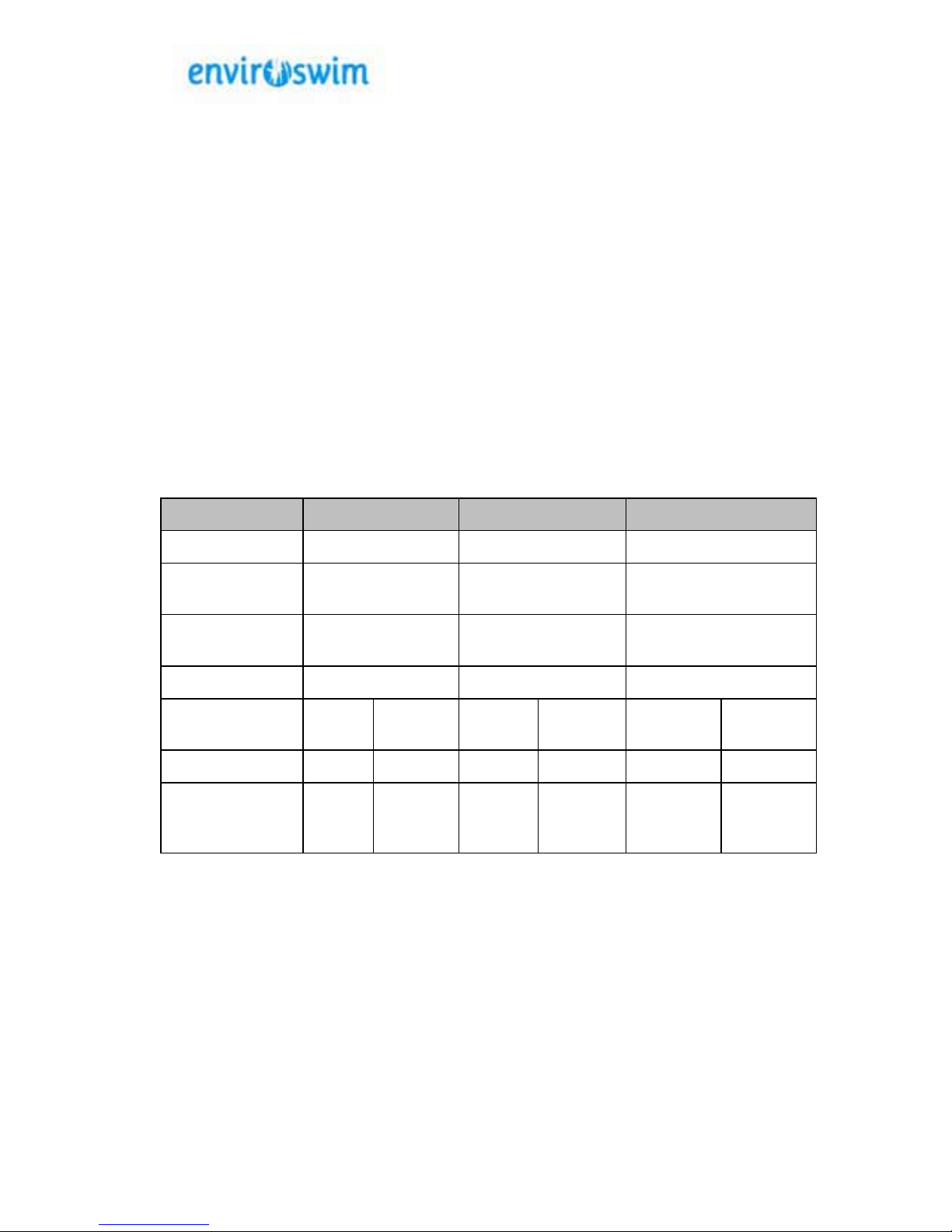
The table below shows the LSI calculation for the extremes of the recommended
Enviroswim ES-3 balance ranges at 20 and 27 degrees Celsius.
Element
Bottom of Range
Top of Range
Ideal
pH
7.0
7.5
7.2
Calcium
Hardness
200 250 200
Total Dissolved
Solids
1000 1500 1000
Alkalinity 80 150 100
Temperature
(
o
C)
20 27 20 27 20 27
LSI
-0.24
-0.14
+0.47
+0.57
-0.04
+0.05
Analysis Ideal Ideal Some
Faint
Coating
Some
Faint
Coating
Near
Balanced
Near
Balanced
Page 25
© Enviroswim 2014
AUS Rev 3.1Page 25 of 28
6 Specifications, Warranty and
Contacts
6.1 Standards
Type
Standard
Electrical
AS/NZS 3136
Electrical Equipment for Spa and Swimming Pools
EN 55014-2
EN 61000-3-2
EN 61000-3-3
Electromagnetic Compatibility
Chemical
APVMA
Australian Pesticides and Veterinary Medicines
Authority Approval no. 58847
Efficacy
NSF/ANSI 50
Approved as a hybrid system by the National
Science Foundation (US) Cert # 4D640-02
NZS5826
New Zealand Pool Water Quality Standards
HSO New Zealand Drinking Water Standards 2005
6.2 Warranty Information
The Enviroswim system has a two (2) year replacement warranty on the control box.
6.3 Contact Information
Watertech Services International
P O Box 5835
GCMC Bundall
Queensland 9726
Phone : 1300 888 457
Calls from outside Australia : +61 7 5546 7366
Email : [email protected]
Outside Australia email [email protected]
Page 26

7. Winterise Your Enviroswim Pool
Winterising your Enviroswim treated pool is an area where large savings can be made.
Once the water becomes too cold for bathing the daily run time of the pump/enviroswim
can be reduced to save on electricity which is one of the highest pool running costs. The
nal winterised run time depends on the pools surrounding environment as the pump
will need to run long enough for the lter to remove dirt and organic material that enter
the pool. Many pools owners can reduce the run time to a few hours a week, others
surrounded by falling leaves or dust require longer to oxidise and lter the rubbish.
The residual copper & silver will take care of algae and bacteria as they continue to
work 24/7 regardless of the pump run time. This is because unlike chlorine they do not
evaporate and maintain their residual level in the pool water for weeks even months
when there are minimal levels of bacteria or algaes for them to control. Therefore, it
is important to continue to balance the pH & check copper levels regularly during the
winter to ensure maximum efciency of the ions and avoid possible overdose of copper/
silver resulting in premature wear of the electrodes. The ioniser output should be
reduced or even turned off for a while if copper levels start to increase above 0.3 ppm.
Research has shown that many enviroswim owners fail to monitor or adjust the copper
& pH levels during the winter months, instead they rely on a visual look at the water
believing everything is OK because the water is crystal clear. This is a mistake and
can result in high ion levels and in severe cases copper dropping out of solution by the
end of the winter. The analogy we use is it is a bit like dissolving sugar in tea or coffee,
there is a point where the sugar level gets so high it cannot remain soluble. Cooler
water and zero bathers equals less copper/silver demands. All it takes is a few minutes
of testing each month to make sure you pool is kept in good shape for the summer.
Always run the oxidiser on maximum (15) during winterisation as the oxidiser is required to
treat suspended solids that enter the water. Vacuum the pool as & when required to avoid
sediment building up which can stain and cause extra demand and runtime of the system
Reminder: To ensure an accurate copper reading the pool water pH must be
below 7.6 preferably 7.3 when the test sample is taken. High pH water will
cause a false (lower than actual) copper reading. Follow these guidelines and
you will save money and have a great pool ready for the coming summer.
© Enviroswim 2014
AUS Rev 3.1Page 26 of 28
Page 27
For more detailed information on water balancing and getting
the best out of your system please visit our pool school site
www.enviroswimpoolschool.com
Page 28

 Loading...