

Page 1
®
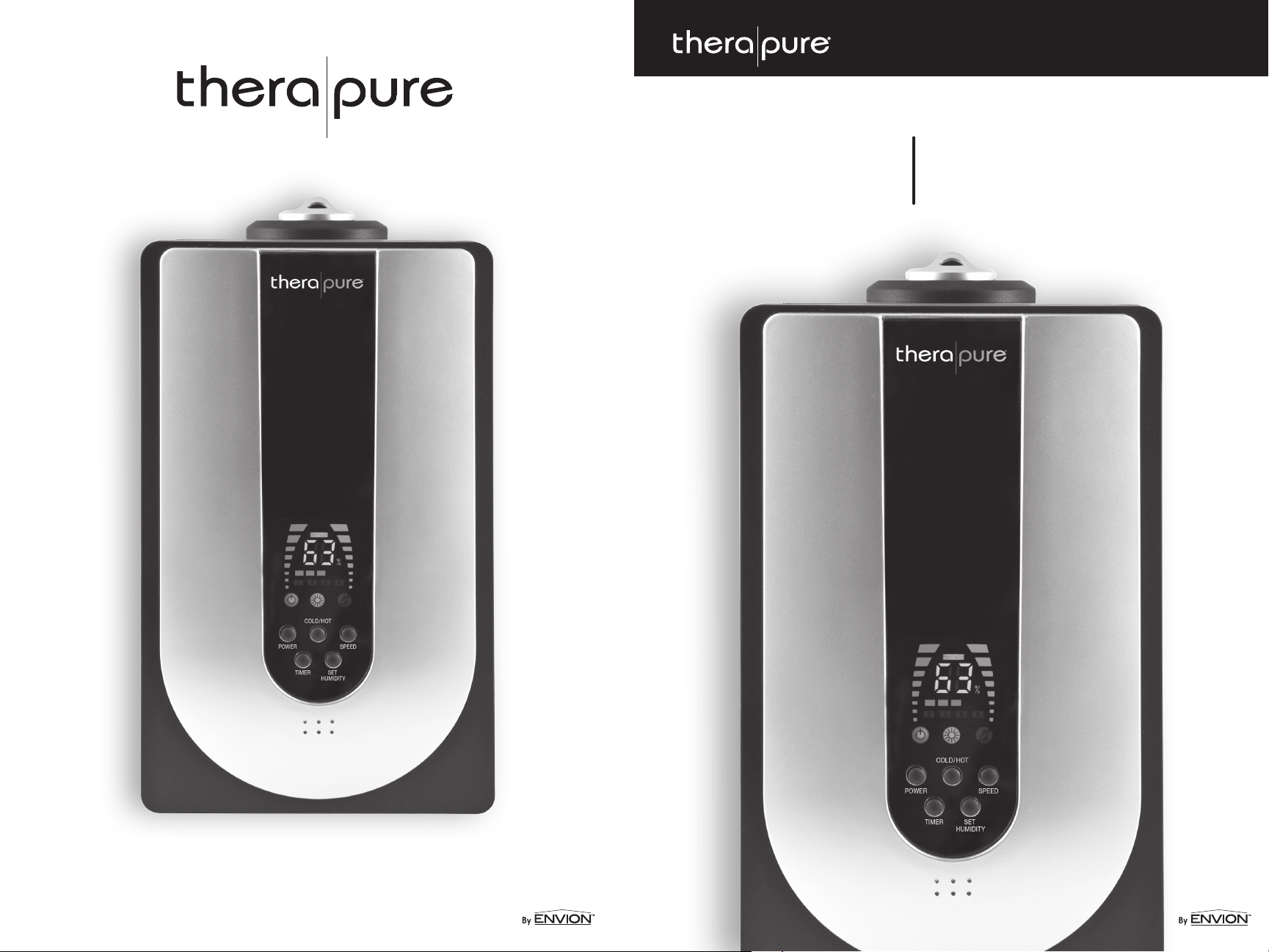
humidifier
TPH100 User Manual
TPH100–0712
www.envionproducts.com
©2012 Envion, LLC. All rights reser ved.
Page 2
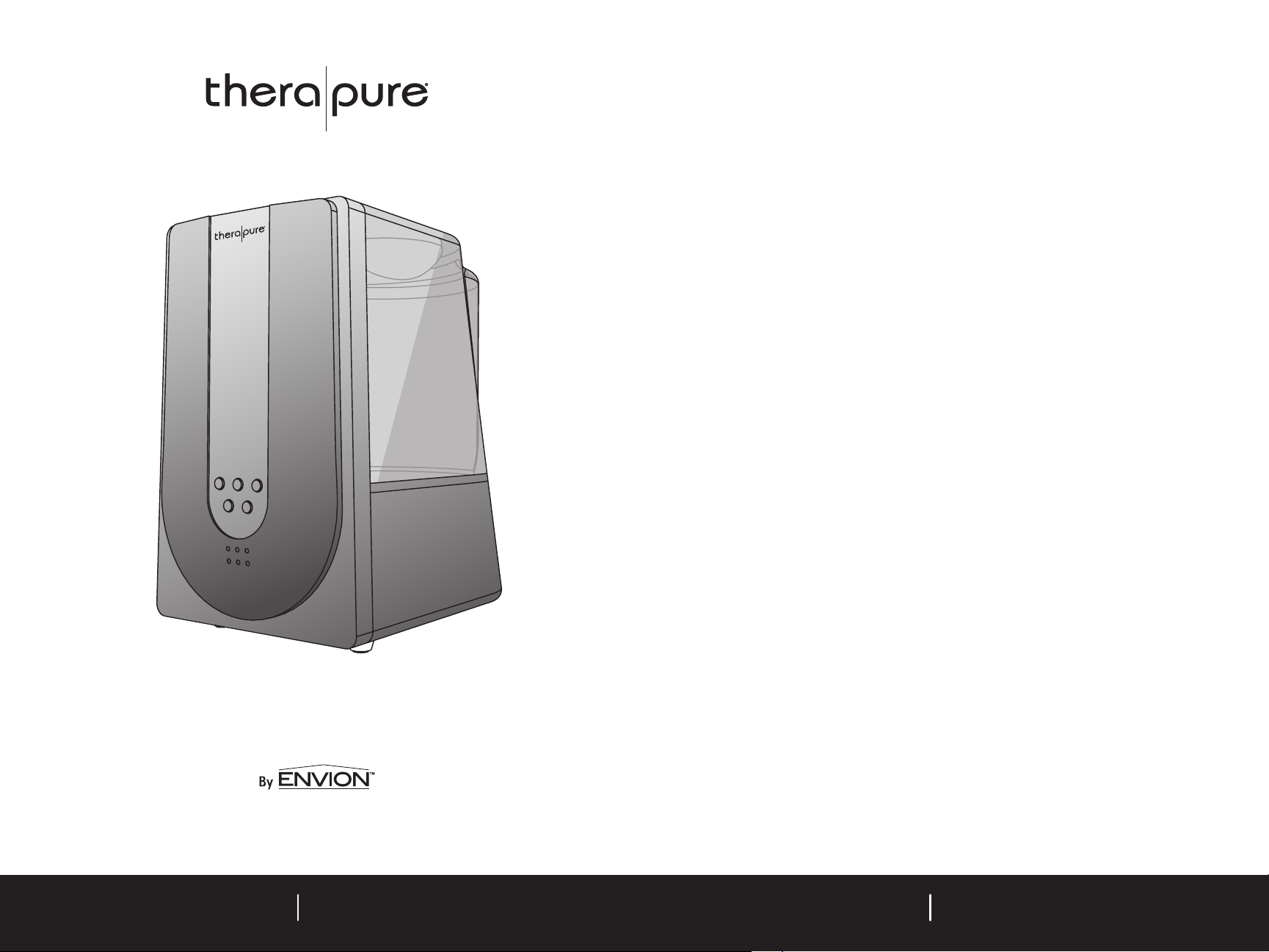
TABLE OF CONTENTS
SAFETY INSTRUCTIONS 2
IMPORTANT WARNINGS 2
MAIN PARTS 3
OPERATING THE TPH100 HUMIDIFIER 4
Filling the Water Tank 4
Low Water Alert 5
Controls / Settings 5
Control Panel 6
CLEANING and MAINTENANCE 6
Cleaning the Unit Base 6
www.envionproducts.com
Cleaning the Water Tank 7
Demineralization Filter Replacement 7
Storage 7
TROUBLESHOOTING 8
TECHNICAL SPECIFICATIONS 9
ONE-YEAR LIMITED WARRANTY 10
ARBITRATION AGREEMENT 11
TPH100 User ManualTPH100 User Manual
Page 3
2
3
SAFETY INSTRUCTIONS
READ AND SAVE THESE IMPORTANT INSTRUCTIONS
WARNING: RISK OF ELECTRICAL SHOCK
This product should be used only in accordance with the specifications outlined in this manual.
Any use other than what is specified in these instructions may result in serious injury.
POLARIZED APPLIANCE CONNECTIONS
To reduce the risk of electric shock, this appliance has a polarized plug (one blade is wider than the
other). This plug will fit into the polarized wall outlet only one way. If the plug does not fit fully into
the wall outlet, reverse the plug. If the plug still does not fit, contact a qualified electrician to install
the proper wall outlet. Do not change the equipment plug.
READ ALL INSTRUCTIONS BEFORE OPERATING THE HUMIDIFIER
The humidifier should be placed away from any heat source (such as a stove or fireplace), other
appliance or electronic device. Avoid direct sunlight on the unit.
Disassembly or repair of the unit by any unauthorized person, including yourself, will void the
warranty and may result in serious harm.
Do not operate the unit if room temperature is lower than 41° (5°C) or higher than 104°F (40°C),
or if relative humidity is higher than 80% .
Do not operate the unit with a damaged cord or plug or after malfunctions,
or if the unit has been dropped or damaged in any manner.
Keep this product out of the reach of children and pets.
Do not move the unit or remove the tank while the unit is on.
When disconnecting the unit, first turn unit off, then remove plug from outlet.
Always turn off the unit and unplug the power cord before filling the water tank.
Do not fill the water tank with hot or boiling water.
Do not use the unit if the water tank becomes cracked or damaged.
Do not immerse the unit base in water, or pour water into the mist spout.
Always turn off the unit and unplug the power cord from outlet before removing, attaching
or cleaning the water tank on the unit.
Avoid placing this unit where the mist spout is pointed directly at an object.
Do not clean the water tank with detergents or chemicals of any kind.
Do not cover the humidity opening at any time during use.
Always plug and unplug the unit with dry hands.
Do not add any medication into the nozzle, base or water tank.
Do not turn on or use the unit without water.
Do not scrape the ultrasonic nebulizer with sharp items.
If there is any strange noise or smell when operating, turn off the machine and unplug
the power cord immediately.
Do not touch the water or parts in the water flume when operating.
The humidifier requires regular cleaning. Refer to the instructions in the user manual.
Do not attempt to replace the power cable.
UNIT PLACEMENT:
To keep the unit steady, set it on a firm, flat and level waterproof surface.
The humidifier should be placed far away from any heat source, such as a stove or fireplace.
Avoid direct sunlight on the unit.
Set the unit far away from other electronic appliances.
To help prevent water vapor damage, position the rotatable mist spout so that the mist will spray
away from any furniture or electrical appliances.
To avoid air saturation and condensation on walls and furniture, the humidifier should not be
left unattended in a closed room.
MAIN PARTS
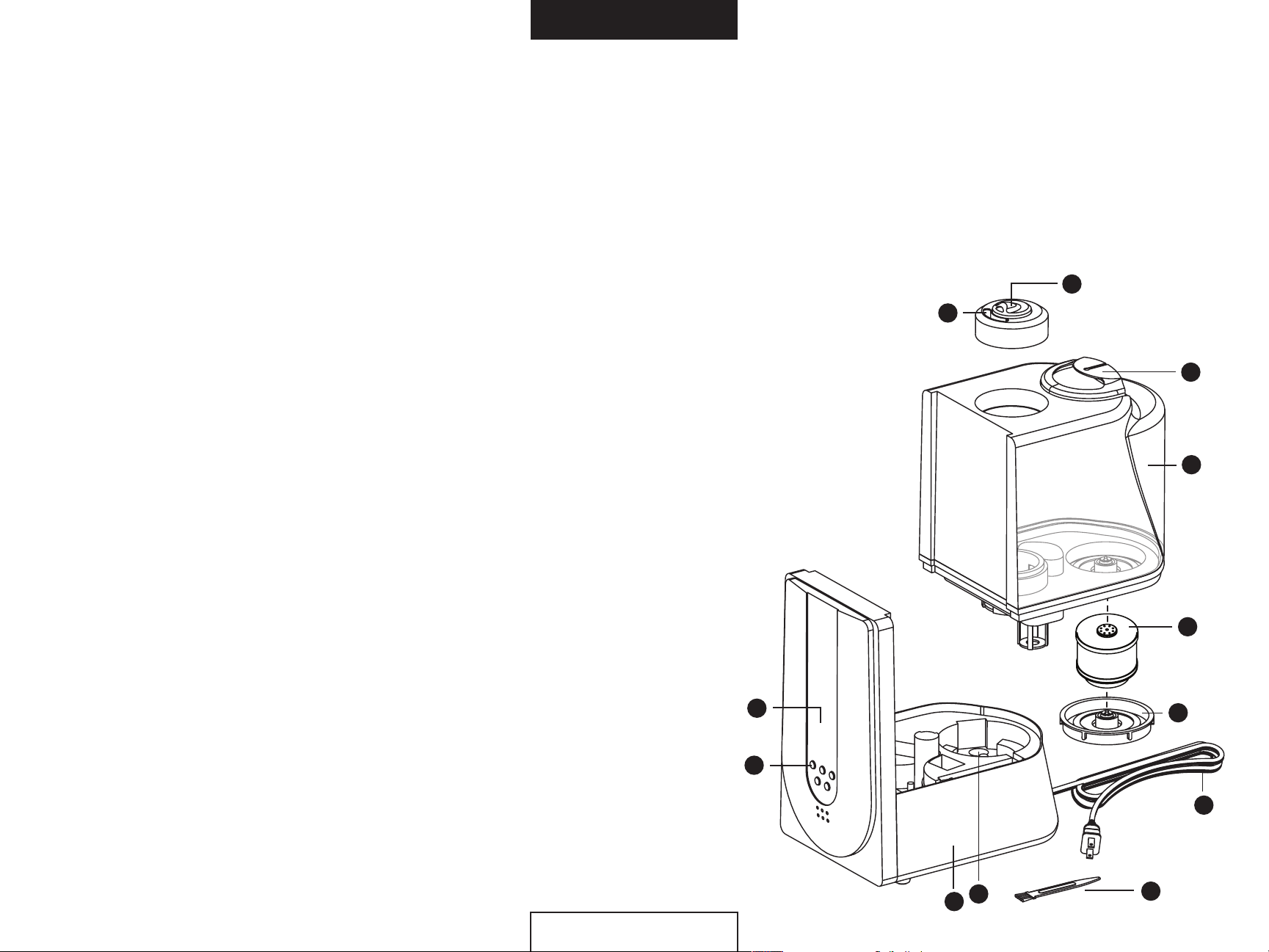
1. Main mist spout (mouth 1)
2. Rotatable mist spout (mouth 2)
3. Handle
4. Water tank body
5. Demineralization filter
6. Water tank lid
7. Control panel
8. Control buttons
9. Unit base
10. Ultrasonic nebulizer
11. Power cord
12. Cleaning brush
7
8
1
10
9
2
3
4
5
6
11
12
TPH100
TPH100
Page 4
4
5
OPERATING THE TPH100 HUMIDIFIER
Filling the Water Tank:
Always place humidifier on a firm, flat and level waterproof surface. Keep cord away from heated
surfaces or where it could be stepped on or tripped over.
Position the rotatable mist spout so that the mist will spray away from any furniture or electrical
appliance to avoid water vapor damage.
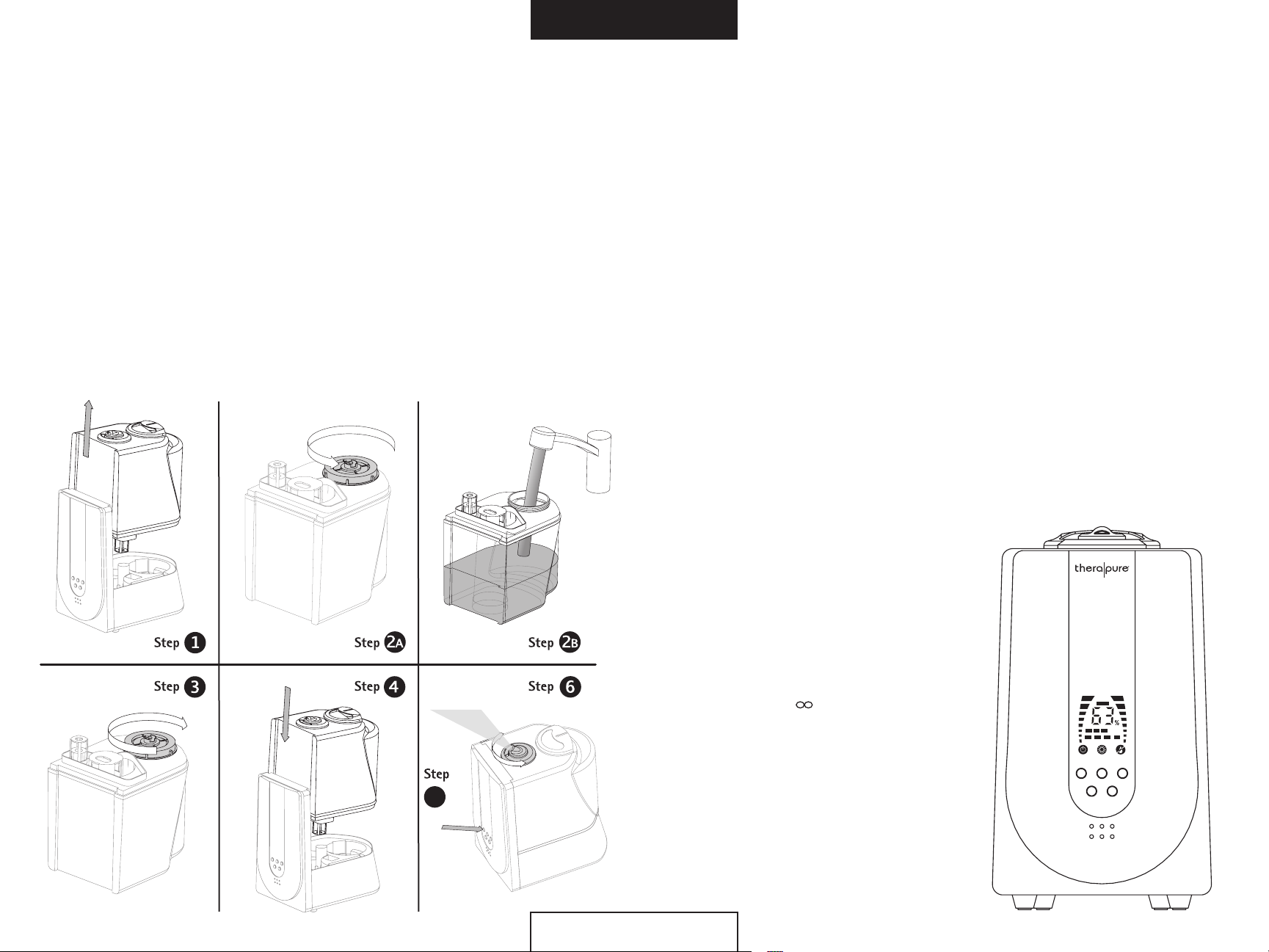
Step 1 — ENSURE THE UNIT IS TURNED OFF AND UNPLUGGED.
Take the water tank out from the humidifier.
Step 2 — Lift the tank lid counterclockwise to open, and fill with clean, cold water.
Step 3 — Twist the tank lid clockwise to close the tank, and then invert the tank and check for
any leaks.
Step 4 — Lower the water tank back onto the humidifier base.
Step 5 — Plug in the power cord, and press the POWER button to turn on the humidifier.
Step 6 — Adjust the rotatable mist spout to the desired direction.
OPERATING THE TPH100 HUMIDIFIER
Low Water Alert Feature:
The Therapure® Humidifier has a built-in low water alarm system. Whenever the water tank is about to
empty, a beeping alarm will sound, and the unit will also automatically shut off operation. The alarm
will continue sounding until either the unit is turned off via the “Power” button or the water tank is
refilled with water.
Controls/Settings:
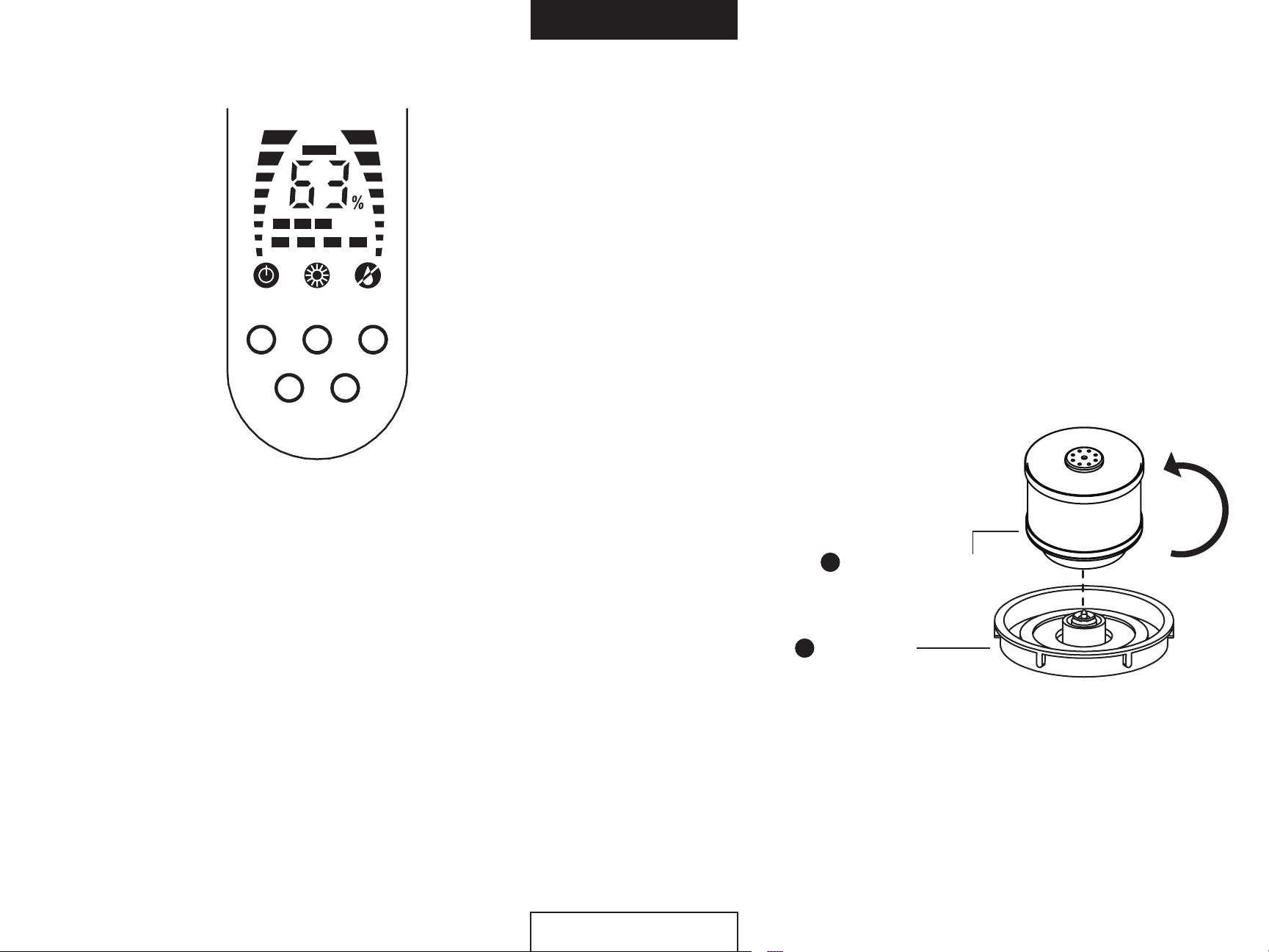
Power – Press the “Power” button to turn the unit on and off.
Speed Setting – The Therapure® Humidifier has 3 mist settings: LOW, MED, and HIGH. Press the
“Speed” button to cycle through the settings and select your desired setting. The mist setting will be
shown on the LED display of the control panel.
Timer – The Therapure® Humidifier can be programmed to turn off after a preset amount of time.
Press the “Timer” button to program the timer. Each press of the button will add 2 hours, reaching
a maximum of 8 hours. After 8 hours the timer control menu will cycle back to 2 hours. The timer
setting will be shown on the LED display of the control panel.
Warm Mist Setting – The Therapure® Humidifier is equipped with a warm mist feature. To activate
this feature, press the “Cold/Hot” button once. A warm mist indicator will light up in the control panel,
indicating this feature is on. Press the “Cold/Hot” button again to turn off the warm mist feature.
Humidity Control* – To adjust the humidity level,
press the “Set Humidity” button. Each press of
the button will add 5% humidity. While setting,
the control panel will flash the setting value. Keep
pressing the button until the desired level is reached.
The display screen will stop flashing after 4 seconds
and your humidity level is set.
The humidity settings start at 40% and can be set up
to an 80% humidity level. After 80%, the next level
will be “infinite” level (
), which means the unit will
produce mist continually until shut off.
*Note — The working environment for the humidifier is 41° F to
104° F (5-40° C) , and with a relative surrounding humidity of
5
TPH100
80% RH or lower.
*Note — Scientific research has shown a humidity level of 40% to
60% can reduce flu viruses in the air and on surfaces.
TPH100
POWER
COLD/HOT
TIMER SET
HUMIDITY
SPEED
Page 5
CONTROL PANEL
COLD/HOT
6
7
CLEANING THE WATER TANK
1. Pour out all the water in the tank.
2. Rinse the water tank with clean, warm water.
3. If the tank has hard water deposits, add a small amount of white vinegar into the tank
and fill half the tank with warm water. Tighten the tank lid, and shake the tank several
times before emptying the water. Rinse the tank with warm, clean water again before using.
DEMINERALIZATION FILTER REPLACEMENT
To keep the Therapure® Humidifier functioning at maximum performance, it is recommended to
replace the demineralization filter cartridge once every 30–40 fillings under normal use, or when the
humidifier has not been operated for an extended period of time. NOTE: Operating the humidifier
without a demineralization filter cartridge will require more frequent cleaning of the unit base.
POWER
TIMERS ET
CONTROL PANEL
SPEED
HUMIDITY
CLEANING & MAINTENANCE
To keep the Therapure® Humidifier functioning properly and at maximum performance,
it is recommended to clean the unit once a week.
Always turn off and unplug the unit first before doing any maintenance.
Do not submerse the unit in water or allow water to enter inside the unit.
CAUTION: Water inside the unit may be hot. Allow the unit to cool
down for 5 minutes before performing any maintenance.
CLEANING THE UNIT BASE
1. Pour out all the water in the unit base.
2. Wipe the outer surface of the unit with a soft damp cloth.
3. Rinse out and wipe down the inside of the base with clean water by using the cleaning brush
included and a soft cloth, if needed.
4. If there are hard water deposits inside the ultrasonic nebulizer, add a solution of 50% white
vinegar and 50% water to the ultrasonic nebulizer. Let the water soak for 5 minutes. Clean the
ultrasonic nebulizer with the cleaning brush until the scale is removed. Rinse the ultrasonic
nebulizer with clean water.
To replace the
first remove the water tank lid (2.) from
the unit. Then remove demineralization
filter from the water tank lid by turning
it counter-clockwise. Replace with a new
demineralization
water tank lid in a clock-wise direction.
Then place both pieces back on unit to
complete filter replacement process.
To purchase demineralization filter replacement cartridges please visit
www.envionproducts.com or call 1.800.554.6168 | Part# TPH1000F
STORAGE
1. Always empty and clean the unit before storage (see Cleaning and Maintenance).
2. Use a soft cloth to wipe dry the entire unit, including inside the water tank.
3. Pack into the original box and store in a cool, dry place.
demineralization
filter and attach onto the
2
filter, (1.)
1
Demineralization filter
Water tank lid
TPH100
TPH100
Page 6
8
9
TROUBLESHOOTING TECHNICAL SPECIFICATIONS
Model — TPH100
PROBLEM REASON SOLUTION
No mist
The plug is not connected
properly.
The power is off.
Insert the plug correctly.
Turn on the power.
Voltage — 120 VAC ~ 60Hz
Power Usage — 130W
Maximum Humidity Capacity — 2.5 gallons per day (warm mist), 1.9 gallons per day (cool mist)
Tank Size — 1.6 gallons
There is an unpleasant
smell in the mist
There is a strange noise
Mist is spraying from
around the mist mouth
No or too little water in
the tank.
1st time running.
Water is not clean, or was
left in the tank for a long
time.
Water tank is not properly
placed on the base.
Water level in the tank is
too low.
Mist spout is not properly
placed on the tank.
Fill water tank.
Rinse the water tank with
clean water.
Clean the water tank; refill
with clean water.
Set the water tank properly.
Add water.
Re-seat the mist spout.
TPH100
TPH100
Page 7

10
11
LIMITED WARRANTY
ONE-YEAR LIMITED WARRANTY
Your Therapure® TPH100 Humidifier is warranted to be free from defects in materials and workmanship
for one year from the original purchase date. Should the product have a defect in materials or
workmanship, we will repair or replace it without charge to you (a shipping and processing fee
will apply). To obtain service under warranty, simply call our customer service center toll-free at
1.800.554.6168.
This warranty does not cover damage caused by accident, misuse or any use other than as intended
and described in this product manual, or damage resulting from failure to maintain and clean this
product as specified in this product manual. This warranty applies only to the original purchaser of the
Therapure® TPH100 Humidifier.
ALL EXPRESS AND IMPLIED WARRANTIES FOR THIS PRODUCT, INCLUDING IMPLIED WARRANTIES OF
MERCHANTABILITY AND FITNESS FOR A PARTICULAR PURPOSE, ARE LIMITED IN DURATION TO THE
WARRANTY PERIOD, AND NO WARRANTIES, WHETHER EXPRESS OR IMPLIED, WILL APPLY AFTER THIS
PERIOD.
Some states do not allow limitations on the duration of implied warranties, so the above limitation
may not apply to you. While this warranty gives you specific legal rights, you may also have other
rights which may vary from state to state.
Contact Info for Warranty Service:
Therapure® by Envion, LLC
P.O. Box 9169 | Van Nuys, CA | 91409-8291
1.800.554.6168 | www.envionproducts.com
©2011 Envion, LLC. All rights reserved.
Patents pending.
ARBITRATION AGREEMENT
PLEASE READ THIS AGREEMENT CAREFULLY. YOU ACCEPT THE TERMS OF THIS AGREEMENT BY RETAINING THE
PRODUCT(S) SHIPPED IN CONNECTION WITH THIS AGREEMENT (THE “PRODUCTS”) FOR MORE THAN THIRTY
(30) DAYS AFTER RECEIPT. IF YOU DO NOT AGREE TO THE TERMS OF THIS AGREEMENT, YOU MAY RETURN THE
PRODUCT TO COMPANY WITHIN THIRTY (30) DAYS OF RECEIPT FOR A FULL REFUND.
THIS ARBITRATION AGREEMENT (“AGREEMENT”) AFFECTS YOUR LEGAL RIGHTS AND REMEDIES BY PROVIDING
THAT DISPUTES BETWEEN YOU AND THE MANUFACTURER, DISTRIBUTOR AND/OR SELLER OF THIS PRODUCT
(COLLECTIVELY, “COMPANY”) MUST BE RESOLVED THROUGH BINDING ARBITRATION AND NOT IN COURT. IT ALSO
PROVIDES THAT ANY DISPUTE CANNOT BE RESOLVED IN A CLASS ACTION OR OTHER PROCEEDING WHERE YOU
REPRESENT OTHER PERSONS OR OTHER PERSONS REPRESENT YOU, AND THAT NO CLASS OR REPRESENTATIVE
ARBITRATIONS ARE PERMITTED. PLEASE CAREFULLY READ ALL TERMS IN THIS AGREEMENT.
1. RESOLUTION OF CLAIMS OR DISPUTES.
Any claim or dispute between you and Company (or any of Company’s subsidiaries or affiliates) arising out of or
relating in any way to the Product or this Agreement shall be resolved through final, binding arbitration. This
arbitration obligation is reciprocally binding on both you and the Company and applies regardless of whether the
claim or dispute involves a tort, fraud, misrepresentation, product liability, negligence, violation of a statute or any
other legal theory. Both you and Company specifically acknowledge and agree that you waive your right to bring a
lawsuit based on such claims or disputes and to have such lawsuit resolved by a judge or jury.
2. LIMITATION OF LEGAL REMEDIES.
All arbitrations under this Agreement shall be conducted on an individual (and not a class-wide) basis, and an
arbitrator shall have no authority to award class-wide relief. You acknowledge and agree that this Agreement
specifically prohibits you and the Company from commencing arbitration proceedings as a representative of
others or joining in any arbitration proceedings brought by any other person. The parties agree that no class or
representative actions of any type are permitted.
3. ARBITRATION PROCEDURES.
a. Before instituting an arbitration, if you have any dispute, we strongly encourage you to contact the Company to try
to resolve the matter by calling 800-218-3560, although you are not required to do so.
b. The arbitration of any claim or dispute under this Agreement shall be conducted in accordance with the expedited
procedures set forth in the JAMS Comprehensive Arbitration Rules and Procedures as those Rules exist on the date
you receive the Product, including Rules 16.1 and 16.2 of those Rules. These rules and procedures are available
by calling JAMS or by visiting its web site at www.jamsadr.com. The arbitration of any claim or dispute under this
Agreement shall be conducted by an arbitrator who has at least five years of experience conducting arbitrations.
c. The arbitration of any claim or dispute under this Agreement shall be conducted in the State of California or
the location in which you received this Agreement. For claims of $10,000 or less, you may choose whether the
arbitration proceeds in person, by telephone, or based only on submissions.
d. The Company shall pay costs for the arbitration of claims, including any JAMS Case Management Fee and all
professional fees for the arbitrator’s services. The Company shall pay the fees and costs of its own counsel, experts
and witnesses and shall not be able to recoup them from you even if you do not prevail in the arbitration. Unless
otherwise provided by law, you acknowledge and agree that you shall pay the fees and costs of your own counsel,
experts and witnesses.
TPH100
4. CHOICE OF LAW.
The arbitration provisions of this Agreement and any arbitration conducted pursuant to the terms of this
Agreement shall be governed by the Federal Arbitration Act (9 U.S.C. Secs. 1-16). In this respect, the parties
acknowledge that this Agreement involves a transaction conducted in interstate commerce. Otherwise, this
Agreement and the rights of the parties hereunder shall be governed by and construed in accordance with the laws
of the State of California, exclusive of conflict or choice of law rules.
5. SEVERABILITY.
If any provision of this Agreement is declared or found to be unlawful, unenforceable or void, such provision
will be ineffective only to the extent that it is found unlawful, unenforceable or void, and the remainder of the
provision and all other provisions shall remain fully enforceable.
TPH100
Page 8

12
13
TPH100
TPH100
 Loading...