

Page 1

Owner’s Guide
CA200
By
CA200_ENV_050511.indd 1-2 5/10/11 10:08 AM
Page 2
TABLE OF CONTENTS
Thank you for purchasing the Ionic Pro® Compact ionic air purifier and
congratulations on taking this important step in improving the quality of air in your home,
office or other indoor environments. Customer satisfaction is our number one goal. Your
Ionic Pro® Compact ionic air purifier is a premium air purifying appliance which comes with
a limited one-year warranty.
Enjoy your Ionic Pro® Compact ionic air purifier and visit our website for more
exciting quality products and upgrades at www.envionproducts.com.
Safety Instructions 1
Important Warnings 3
Main Parts 3
Operating the Ionic Pro® Compact Ionic Air Purifier 5
Getting Ready 5
Controls/Settings 6
Operation 7
Cleaning & Maintenance 8
To Clean the Collection Blades 9
To Clean the Internal Ionizing Wires 10
Deep Cleaning 11
Cleaning External Surfaces 11
Trouble-Shooting 12
More Things You Should Know 13
Ozone and Your Health 13
Warranty 14
Arbitration Agreement 15
TABLE OF CONTENTS
By
CA200_ENV_050511.indd 3-4 5/10/11 10:08 AM
Page 3

1 2
SAFETY INSTRUCTIONS
EXTREMELY IMPORTANT INFORMATION: Safety precautions should always be used when
operating this or any electrical appliance. Decrease the risk of electrocution, electric
shock, injury or fire by reading and following all the warnings below:
m Use only as described in this Ionic Pro
®
Compact ionic air purier manual. To reduce the
risk of electric shock, do not attempt to service the product in any way other than in the
manner described in the Cleaning and Maintenance section of this manual.
m Do not use the Ionic Pro
®
Compact ionic air purier outdoors.
m Do not use the Ionic Pro
®
Compact ionic air purier in bathrooms or other humid environments, near replaces or in areas where ammable or combustible vapors or products
may exist.
m Ionic Pro
®
Compact ionic air purier operates at 120v AC and 60Hz only.
m To reduce the risk of electric shock, this product has a polarized plug (one blade is wider
than the other). is plug will t into a polarized outlet only one way. If the plug does not
t into the outlet, contact qualied service personnel to install the proper outlet. Do not
alter the plug in any way.
m Always turn o all controls before unplugging the Ionic Pro
®
Compact ionic air purier
from outlet.
m Always turn o and unplug this product from outlet before cleaning the collection blades.
m Always turn o this product when not in use.
m Never touch the internal parts, such as electrodes, ionizing wires, or any internal part
within the Ionic Pro® Compact ionic air purier with any object.
m Do not open the outer casing of the Ionic Pro
®
Compact ionic air purier. Attempting to
open the unit will cause the warranty to be voided and could cause serious personal injury
to the user and/or result in considerable damage to the unit.
m Do not place the Ionic Pro
®
Compact ionic air purier’s cord near a heated surface.
m Never operate the Ionic Pro
®
Compact ionic air purier if the plug or cord is damaged
or appears damaged. Only qualied service personnel should ever replace or attempt to
replace a damaged power cord.
m Never use the power cord to pick up, carry, drag, pull, or lift the Ionic Pro
®
Compact
ionic air purier. Do not pull the cord against or around sharp corners and edges. is
could result in injury to the user or damage to the cord.
m Always remove the plug from its power outlet by holding onto the plug itself and
pulling gently.
m Never pull on the cord itself to unplug it from its power outlet.
m Use care when operating the Ionic Pro
®
Compact ionic air purier by keeping all ngers,
body parts, hair, loose clothing and jewelry away from openings.
m Never touch the Ionic Pro
®
Compact ionic air purier or its plug when your hands
are wet.
m e Ionic Pro
®
Compact ionic air purier is an electrical appliance. Adult supervision is
required when operating the Ionic Pro® Compact ionic air purier in the presence
of children.
m Do not touch the metal blades until after discharging residual electricity by touching
blades to an electrical ground such as a water pipe or metal faucet.
m e collection blades should be inspected frequently and cleaned regularly to prevent
excessive accumulation that may result in an electrical ashover or risk of re.
SAFETY INSTRUCTIONSSAFETY INSTRUCTIONS
CA200_ENV_050511.indd 1-2 5/10/11 10:08 AM
Page 4
3 4
IMPORTANT WARNINGS
Before using your Ionic Pro® Compact ionic air
purifier, please read the following
important information.
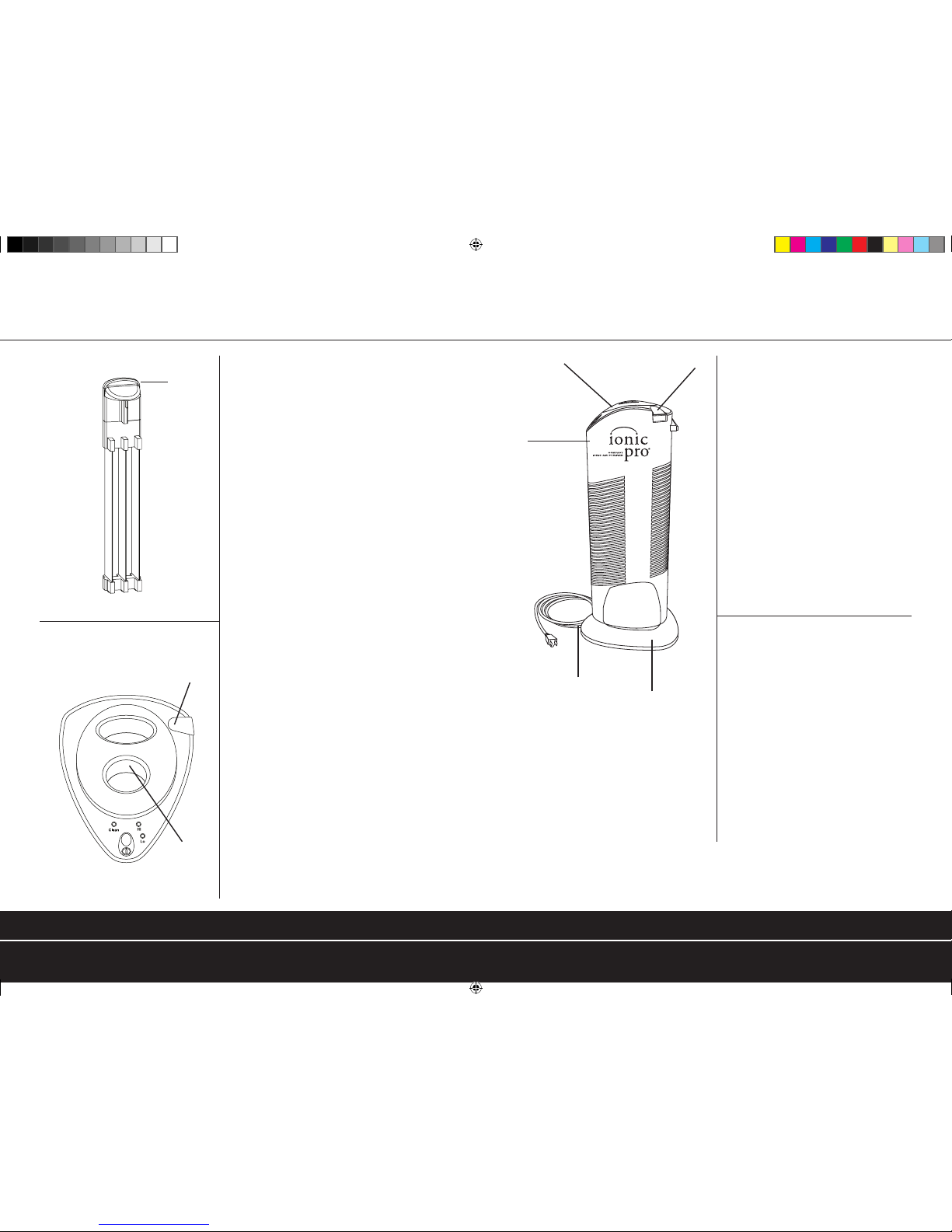
First, please look at the “Main Parts”
diagram and locate the part labeled A.
ese are the collection blades and are a
vital part of this amazing ionic air purifying
system.
e collection blades are where unhealthy
pollutants, allergens and irritants are trapped
when the Ionic Pro® Compact ionic air
purier is in proper working condition and
in use.
e Ionic Pro® Compact ionic air purier
is designed to run quietly and requires very
little time and eort to maintain in proper
working condition. If you hear excessive
noise or static coming from your Ionic
Pro® Compact ionic air purier, it generally
indicates that the product needs to be
cleaned. Turn o your Ionic Pro® Compact
ionic air purier, unplug the cord and
carefully follow the cleaning instructions in
the “CLEANING & MAINTENANCE”
section of this manual.
If the product is still making excessive
noise after cleaning and thoroughly drying
the collection blades and re-inserting
them as described in the “CLEANING &
MAINTENANCE” section of this manual,
turn o and unplug the unit. After you have
turned o and unplugged the unit,
see Diagram B or F for the location of
the Wire Cleaning Mechanism. Lift and
lower the Wire Cleaning Mechanism
three to four times to thoroughly
clean the internal ionizing wires (see
Diagram H in the “CLEANING &
MAINTENANCE” section). is
movement helps to scrape free particles
from the internal ionizing wires. To
keep your Ionic Pro® Compact ionic
air purier working properly, it will
be necessary to clean the collection
blades after every month of use and
the internal ionizing wires after every
two weeks of use (see “CLEANING
& MAINTENANCE” and “DEEP
CLEANING” section of this manual for
the proper techniques).
WARNING: After cleaning the collection blades (see
“cleaning and maintenance” section) with soap
and water, allow at least 24 hours for the collection
blades to dry thoroughly before inserting them back
into the unit. Water can easily get trapped along
the collection blades’ many surfaces and edges and
damage could result if there is any moisture on the
collection blades.
You will need to clean your Ionic Pro® Compact
ionic air purifier more often if it has been exposed
to heavy pollution.
C.
A. COLLECTION BLADES
B. OPERATING PANEL
TOP OF COLLECTION BLADES
G.
Collection
Blades’ Handle
WIRE CLEANING
MECHANISM
REMOVABLE
CAP
See A for view of
collection blades alone.
Main Parts
D.
E.
F.
C. OUTER CASE HOUSING
D. AC CORD
E. BASE
F. WIRE CLEANING MECHANISM
G. REMOVABLE CAP
Do not place Ionic Pro® Compact ionic air purifier near a fireplace. Even if a fireplace is not in use, chimney dust and soot may
circulate through the Ionic Pro® Compact ionic air purifier and then re-circulate and leave a residue on the unit and surrounding areas.
We recommend not placing the Ionic Pro® Compact ionic air purifier anywhere near candles or oil lamps. If you intend to use candles
or oil lamps near the Ionic Pro® Compact ionic air purifier despite this warning, make sure that the wicks are cut to no more than a
quarter inch to cut down on smoke production.
IMPORTANT WARNINGSIMPORTANT WARNINGS
CA200_ENV_050511.indd 3-4 5/10/11 10:08 AM
Page 5
5 6
OPERATING THE IONIC PRO® COMPACT
IONIC AIR PURIFIER
Getting Ready
Locate a level surface on which to place your Ionic Pro® Compact ionic air purier and a
grounded 120v outlet (follow warnings described in the “SAFETY INSTRUCTIONS”
section of this manual). Position your Ionic Pro® Compact ionic air purier at least one foot
(12 inches) from the wall.
Plug in the unit. You are now ready to turn on your Ionic Pro® Compact ionic
air purier!
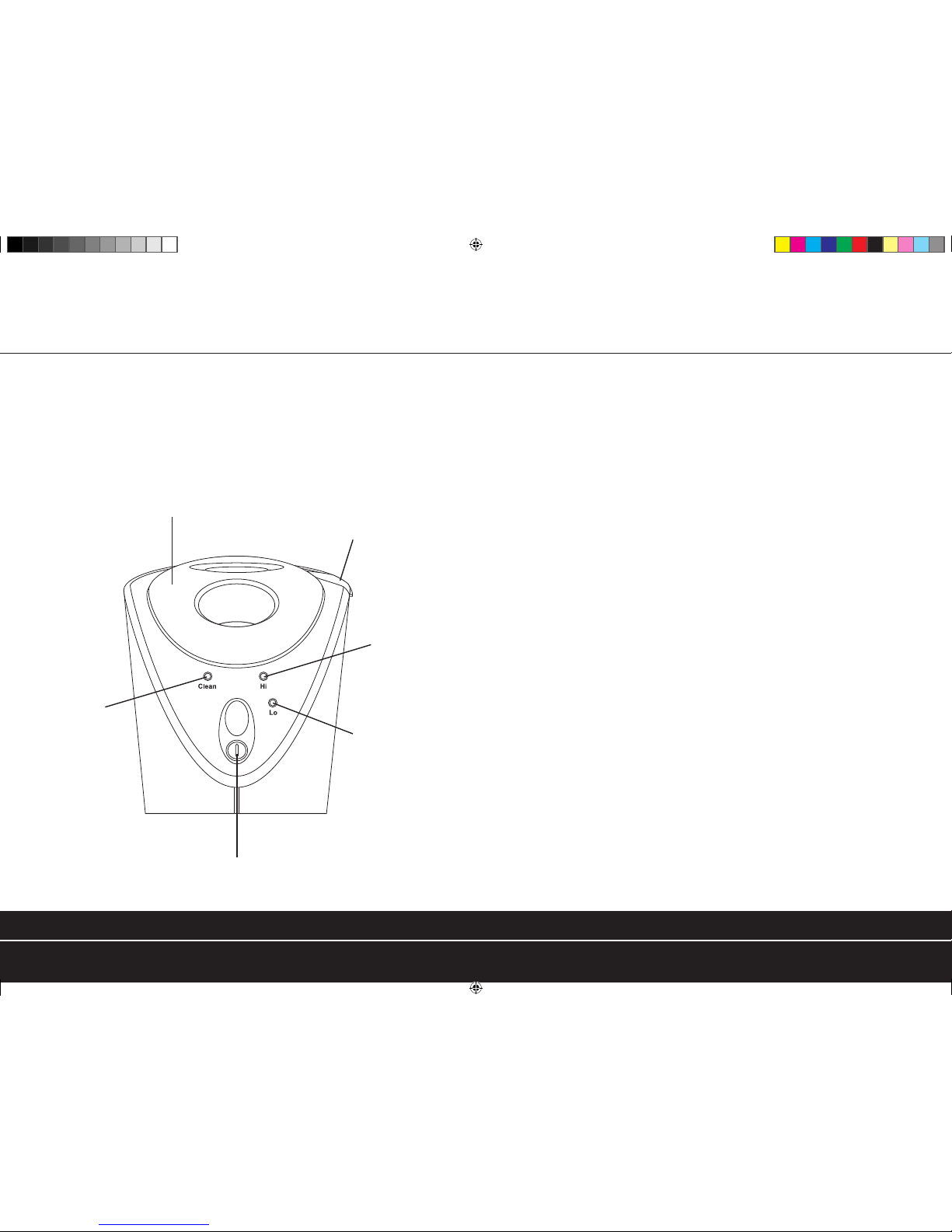
Controls/Settings
1. ON/OFF BUTTON Turns unit on and o.
2. LO At this setting, the unit will cycle ON and
(low output indication light) OFF. It will cycle ON for approximately 25
seconds, and then rest for 25 seconds. is
cycling will continue as long as the unit is in
LO mode.
3. HI At this setting, the unit stays ON continuously.
(high output indication light)
4. CLEAN is red light goes on when your Ionic Pro®
(indication light) Compact ionic air purier needs to be cleaned,
or the unit is experiencing some other problem.
See the “CLEANING & MAINTENANCE”
and “TROUBLE-SHOOTING” sections.
5. WIRE CLEANING MECHANISM is is used to clean the internal ionizing wires.
See “CLEANING & MAINTENANCE” for
full details.
6. REMOVABLE CAP Lift o the Removable Cap to locate collection
blades for cleaning (as described in
“CLEANING & MAINTENANCE” section).
6. REMOVABLE CAP
5. WIRE CLEANING
MECHANISM
3. HIGH OUTPUT
INDICATION
LIGHT
2. LOW OUTPUT
INDICATION
LIGHTS
1. ON/OFF BUTTON
4. CLEAN INDICATION
LIGHT
OPERATING THE IONIC PRO® COMPACT IONIC AIR PURIFIER OPERATING THE IONIC PRO® COMPACT IONIC AIR PURIFIER
CA200_ENV_050511.indd 5-6 5/10/11 10:08 AM
Page 6
7 8
Operation
Set up the Ionic Pro® Compact ionic air purifier as described in “Getting Ready”. Press the
ON/OFF button to activate your ionic air purifier and get ready to enjoy clean, ionized air
that cycles through pre-programmed run/rest intervals according to the setting you select.
The Ionic Pro® Compact ionic air purifier automatically defaults to the HI (high/maximum
output) setting whenever the unit is turned on.
Press the ON/OFF button one more time to select the LO (low) output setting
to enjoy intermittent run/rest periods.
Press the ON/OFF button a third time to turn the unit off.
The indicator LEDs light up to indicate your current setting (LO, HI).
Clean Light:
The red CLEAN light will turn on and the unit
will shut down if cleaning is overdue.
The Ionic Pro® Compact ionic air purifier’s
collection blades must be cleaned after month of
use and the internal ionizing wires must be cleaned
after every two weeks of use (see “CLEANING &
MAINTENANCE” for full directions). Once the
collection blades are properly cleaned, thoroughly
dried and re-inserted into your Ionic Pro® Compact
ionic air purifier and the internal ionizing wires
are properly cleaned, normal operations should
continue. If not, see “DEEP CLEANING” and
“TROUBLE-SHOOTING.”
CLEANING & MAINTENANCE
UNIT
With very little effort, the Ionic Pro® Compact ionic air purifier delivers cleaner, fresher,
healthier air to your indoor environments.
Keep your Ionic Pro® Compact ionic air purifier functioning properly by cleaning the
collection blades after every month of use as recommended. The internal ionizing wires
are an important part of the Ionic Pro
®
air purifying system and need to be cleaned after
every two weeks of use or if your unit starts to make a buzzing noise (see “TO CLEAN
IONIZING WIRES” and “DEEP CLEANING” sections).
More frequent cleaning is often required if your Ionic Pro® Compact ionic air purifier is
new or if you place it in a different location. Exposing your Ionic Pro® Compact ionic air
purifier to candle/oil lamp/fireplace soot and smoke is not recommended and will require the
collection blades to be cleaned after every exposure (see “IMPORTANT WARNINGS”).
OPERATING THE IONIC PRO® COMPACT IONIC AIR PURIFIER CLEANING & MAINTENANCE
CA200_ENV_050511.indd 7-8 5/10/11 10:08 AM
Page 7
9 10
Helpful Tips: Remember to clean your Ionic Pro® Compact ionic
air purifier every month and any time the red CLEAN/FAULT
light comes on or whenever you hear your unit begin to make
excessive noise.
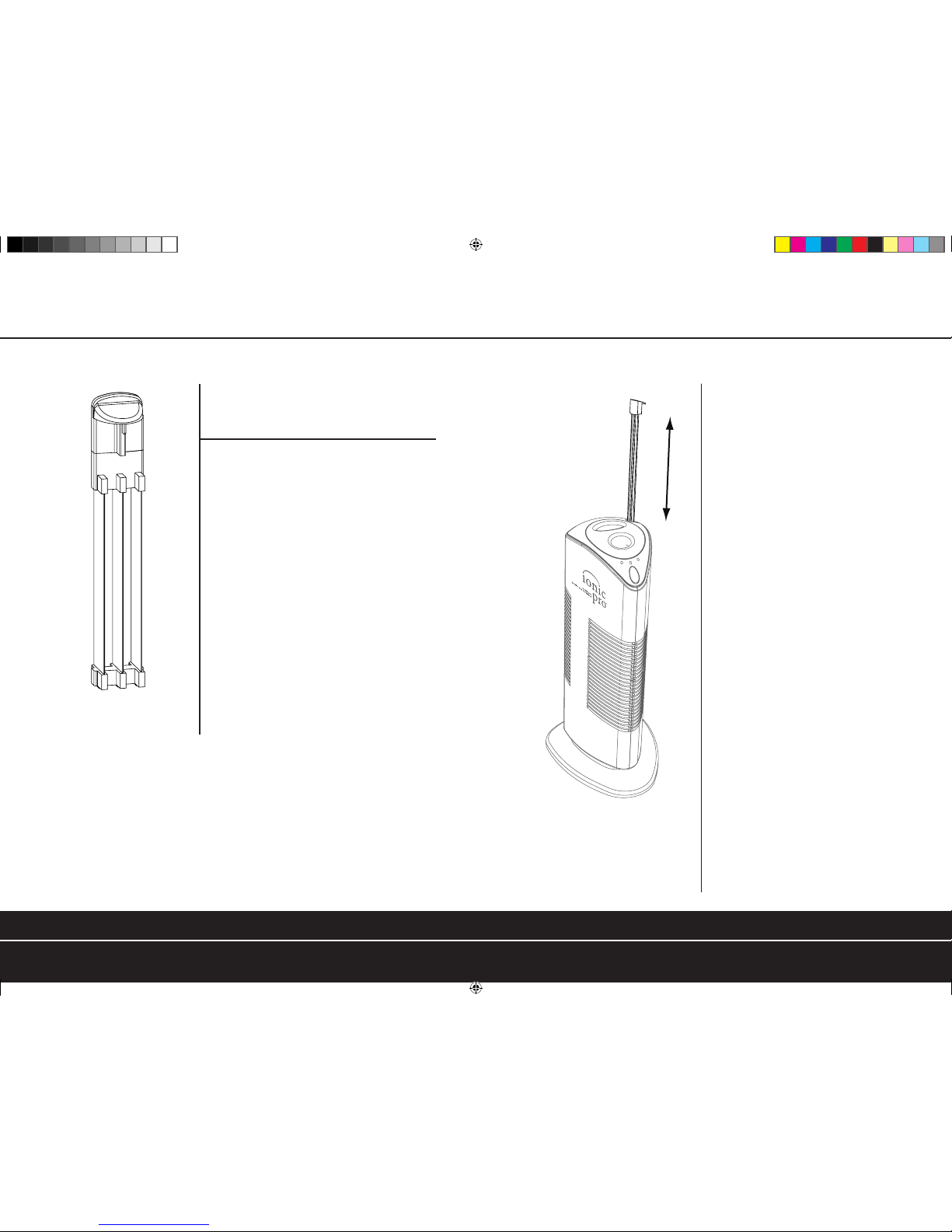
To Clean the Collection Blades
Turn o and unplug your Ionic Pro® Compact air
purier. Let the unit rest a minute.
Next, lift o the removable cap and pull up on
the collection blades’ handle to slide the collection
blades out of the top of your Ionic Pro® ionic
air purier.
Do not touch the metal blades until after
discharging residual electricity by touching blades
to an electrical ground such as a water pipe or metal
faucet. Wipe away the trapped particles collected
on the three blades with a slightly damp sponge or
cloth. If you use a slightly damp cloth to clean the
blades, it is possible the collection blades will be
completely dry within two to three hours. Always
allow the collection blades to dry thoroughly before
resuming use.
IMPORTANT: To avoid damaging your Ionic Pro® Compact ionic air purier, make sure
the collection blades are completely dry and free of all moisture and that your Ionic Pro®
Compact ionic air purier is turned o and unplugged before attempting to re-insert the
collection blades.
If you have used soap and water to clean the collection blades, wait at least 24 hours to
ensure that they are thoroughly dry before re-inserting them into your Ionic Pro® Compact
ionic air purier.
COLLECTION BLADES
H. CLEANING WIRES
To Clean the Ionizing Wires
e internal ionizing wires need to
be cleaned after every two weeks of use. ere
is a Wire Cleaning Mechanism used to clean
the internal ionizing wires which you slide up
and down to scrape o particle residue, (see
Diagram B of the Operating Panel to locate
the Wire Cleaning Mechanism). Lift and
lower the Wire Cleaning Mechanism three or
four times to thoroughly clean the ionizing
wires (see Diagram H).
REMEMBER TO ALWAYS RETURN THE WIRE CLEANING
MECHANISM TO ITS ORIGINAL POSITION BEFORE ATTEMPTING
TO RESUME USE OR THE UNIT WILL NOT FUNCTION
CLEANING & MAINTENANCECLEANING & MAINTENANCE
CA200_ENV_050511.indd 9-10 5/10/11 10:08 AM
Page 8
11 12
TROUBLE-SHOOTING
Deep Cleaning
Noisy functioning (audible loud buzzing sound) is a sign that your Ionic Pro® Compact
ionic air purifier is overdue for a complete clean-up of the collection blades and the internal
ionizing wires. The internal ionizing wires must be kept clean to ensure silent and normal
operation.
For deep cleaning, follow both the “TO CLEAN THE COLLECTION BLADES”
& “TO CLEAN IONIZING WIRES” sections.
IMPORTANT: MAKE SURE THE THOROUGHLY CLEANED AND DRIED COLLECTION BLADES ARE PROPERLY INSERTED, THE
REMOVABLE CAP IS BACK IN ITS ORIGINAL POSITION, AND THE WIRE CLEANING MECHANISM IS BACK IN ITS ORIGINAL
POSITION BEFORE RESUMING USE—OR THE UNIT WILL NOT FUNCTION.
Cleaning External Surfaces
Over time, some particles and dust may accumulate on the external surfaces of your Ionic
Pro® Compact ionic air purifier. If this happens, turn off and unplug the unit. Mix one
ounce of laundry bleach with five ounces of water and apply sparingly with a sponge to wipe
the outer case surfaces. Do not allow water to slip into the internal parts of the Ionic Pro®
Compact ionic air purifier as this could damage its functioning and may result in injury to
you. Allow the unit to dry for at least 24 hours before resuming use.
TROUBLE
Indication/Setting light
not on
Red CLEAN light is on
Excessive noise
generated*
Collection blades do not
go back in
Indication light does not
go on
*See “Cleaning & Maintenance” section
Machine is unplugged. ON/OFF
button has not been pressed.
Too much dust has
accumulated.
Too much dust has
accumulated or internal parts
are wet.
Improper orientation.
Collection blades are not
completely inserted.
Wire Cleaning Mechanism is not
completely inserted.
Collection blades are jarred or
removed suddenly.
Red light may go on if the unit
just needs to be “reset”.
Check to see if plug is
loose. Press the ON/OFF
button.
Turn off, unplug and clean using
instructions from the “Deep
Cleaning” section.
Clean and dry blades and
ionizing wires thoroughly*.
Keep the machine dry.
Reverse blade orientation.
Check to see that the blades are
completely seated in housing.
Check to see that Wire Cleaning
Mechanism is completely
seated in housing.
Remove and re-insert
collection blades and press
“on” button to reset.
Press “on” button to reset.
REASON TROUBLE-SHOOTING
TROUBLE SHOOTINGCLEANING & MAINTENANCE
CA200_ENV_050511.indd 11-12 5/10/11 10:08 AM
Page 9
13 14
LIMITED ONE YEAR WARRANTYMORE THINGS YOU SHOULD KNOW
Ozone and Your Health
After you activate your Ionic Pro® Compact ionic air purifier, you may notice a
new clean scent.
Ozone is the scent you are smelling. Ozone is a combination of three oxygen atoms.
The Ionic Pro® Compact air purifying system utilizes an ionizing process which results in
very low ozone emission.
The Ionic Pro® Compact ionic air purifier complies with U.S. safety requirements for low
ozone emission (less than 50 parts per billion) and meets the UL867 standard for consumer
products. UL867 is the U.L. standard for safety for electro-static air cleaners.
Individuals with a history of respiratory disease, asthma, heart disease, lung disease, breathing
problems or concerns about ozone should ask their doctor whether the concentrations of
ozone generated by this or other commercial ionic air purifiers are appropriate for their
specific health needs.
Your Ionic Pro
®
Compact ionic air purifier is warranted to be free from defects in materials
and workmanship for one year from the original purchase date. Should the product have a
defect in materials or workmanship, we will repair or replace it without charge to you
(a shipping and processing fee may apply). To obtain service under warranty, simply call our
Customer Service Center toll-free at 1.800.875.8577.
This warranty does not cover damage caused by accident, misuse or any use other than as
intended and described in this product manual, or damage resulting from failure to maintain
and clean this product as specified in this product manual.
This warranty applies only to the original purchaser of the Ionic Pro® Compact ionic
air purifier.
Contact Info for Warranty Service:
Ionic Pro® by Envion
™
P.O. Box 9159
Van Nuys, CA 91409
1.800.875.8577
www.envionproducts.com
© 2009 Envion, LLC. All Rights Reserved.
U.S. Patent Nos. D495,042; D505,488; D522,116; 6,855,190; 6,946,103; and 6,977,008.
Chinese Patent No. ZL03353322.9; ZL200420006826.0; ZL200420077199.X, and ZL200620004930.5.
Hong Kong Patent Nos. HK1063973; HK1066437; and HK1082896.
LIMITED ONE YEAR WARRANTYMORE THINGS YOU SHOULD KNOW
By
CA200_ENV_050511.indd 13-14 5/10/11 10:08 AM
Page 10
15 16
ARBITRATION AGREEMENT NOTES
THIS ARBITRATION AGREEMENT (THE “AGREEMENT”) AFFECTS YOUR LEGAL RIGHTS AND REMEDIES BY
PROVIDING THAT DISPUTES BETWEEN YOU AND THE SELLER OF THIS PRODUCT (“COMPANY”), MUST BE
RESOLVED THROUGH BINDING ARBITRATION, RATHER THAN IN A COURT. PLEASE READ THIS AGREEMENT
CAREFULLY. YOU ACCEPT THE TERMS OF THIS AGREEMENT BY RETAINING THE PRODUCT(S) SHIPPED IN
CONNECTION WITH THIS AGREEMENT (THE “PRODUCT”) FOR MORE THAN FOURTEEN (14) DAYS AFTER RECEIPT. IF
YOU DO NOT AGREE TO THE TERMS OF THIS AGREEMENT, YOU MAY RETURN THE PRODUCT TO COMPANY WITHIN
FOURTEEN (14) DAYS OF RECEIPT AT NO COST TO YOU.
1. RESOLUTION OF CLAIMS OR DISPUTES. Any claim or dispute between you and Company (or any of Company’s
subsidiaries or affiliates) arising out of or relating in any way to the Product or this Agreement shall be resolved through
final, binding arbitration. This arbitration obligation applies regardless of whether the claim or dispute involves a tort, fraud,
misrepresentation, product liability, negligence, violation of a statute, or any other legal theory. Both you and Company
specifically acknowledge and agree that you waive your right to bring a lawsuit based on such claims or disputes and to
have such lawsuit resolved by a judge or jury.
2. LIMITATION OF LEGAL REMEDIES. All arbitrations under this Agreement shall be conducted on an individual (and not
a class-wide) basis, and an arbitrator shall have no authority to award class-wide relief. You acknowledge and agree that
this Agreement specifically prohibits you from commencing arbitration proceedings as a representative of others or joining
in any arbitration proceedings brought by any other person.
3. ARBITRATION PROCEDURES.
a. Before commencing any arbitration proceedings under this Agreement, you must first present the claim or dispute
to Company by calling 818.217.2500 and asking for the Legal Department and allowing Company the oppor tunity to
resolve the claim or dispute. If your claim or dispute is not resolved within sixty (60) days, you may commence arbitration
proceedings in accordance with the terms of this Agreement.
b. The arbitration of any claim or dispute under this Agreement shall be conducted pursuant to the American Arbitration
Association’s (“AAA”) United States Commercial Dispute Resolution Procedures and Supplementary Procedures for
Consumer-Related Disputes. These rules and procedures are available by calling the AAA or by visiting its web site at
www.adr.org.
c. The arbitration of any claim or dispute under this Agreement shall be conducted in the State of California or the location
in which you received this Agreement.
d. All administrative expenses of arbitration proceedings commenced under this Agreement shall be divided equally
between you and Company, except that: (a) if the claim or dispute that is the subject of the arbitration proceedings is
less than ten thousand dollars (US$10,000), you will be responsible for no more than one hundred twenty-five dollars
(US$125) in administrative expenses; (b) if the claim or dispute that is the subject of the arbitration proceedings is more
than ten thousand dollars (US$10,000) but less than seventy-five thousand dollars (US$75,000), you will be responsible
for no more than three hundred seventy-five dollars (US$375) in administrative expenses; and (c) if the claim or dispute
that is the subject of the arbitration proceedings is more than seventy-five thousand dollars (US$75,000), then you will
be responsible for administrative expenses in accordance with the Commercial Fee Schedule provided by the AAA. You
acknowledge and agree that each party shall pay the fees and costs of its own counsel, exper ts and witnesses.
4. CHOICE OF LAW. This Agreement shall be governed by the United States Federal Arbitration Act and the laws of the
state of California.
5. SEVERABILITY. If any provision of this Agreement is declared or found to be unlawful, unenforceable or void, such
provision will be ineffective only to the extent that it is found unlawful, unenforceable or void, and the remainder of the
provision and all other provisions shall remain fully enforceable.
ARBITRATION AGREEMENT NOTES
CA200_ENV_050511.indd 15-16 5/10/11 10:08 AM
 Loading...