

Page 1
Registered in England. Company Registration Number: 10729379 VAT Registration Number: 268 3290 80
P0084EN Rev.03
www.envairlab.co.uk
+44 (0) 1706 228416
OPERATING & MAINTENANCE
MANUAL
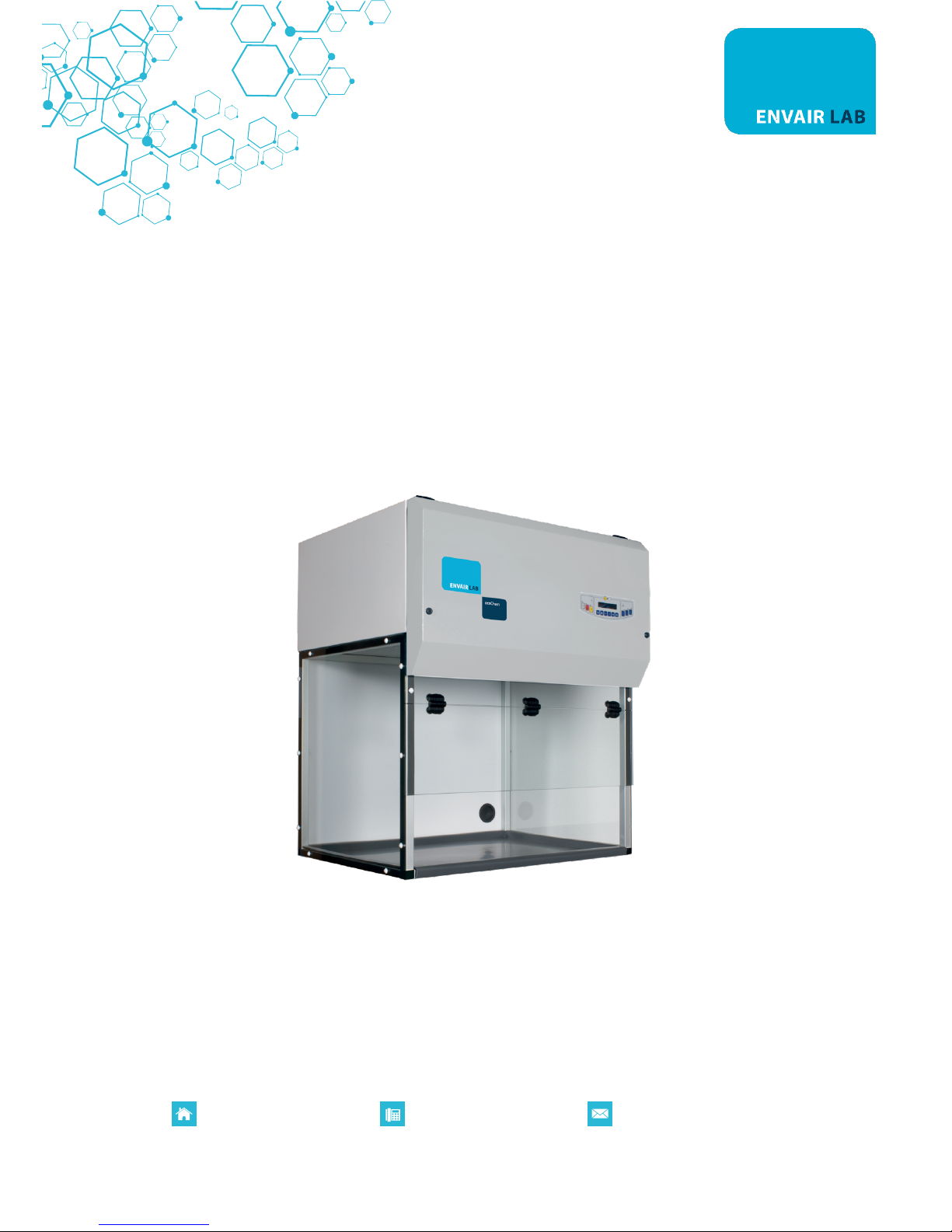
EcoChem
Recirculating Fume Cupboard
Page 2

Registered in England. Company Registration Number: 10729379 VAT Registration Number: 268 3290 80
P0084EN Rev.03
www.envairlab.co.uk
+44 (0) 1706 228416
CONTENTS
1. GENERAL 3
2. INSTALLATION 5
2A. INSTRUCTIONS AND CHECKS ON DELIVERY 5
2B. INSTALLATION REQUIREMENTS 5
2C. ELECTRICAL/GAS CONNECTION 6
2D. POSITIONING OF THE CABINET ON THE SUPPORTING TABLE 6
3. OPERATION PRINCIPLES 8
4. OPERATION 9
4A. SCOPE 9
4B. SYSTEM AND PERFORMANCE CONTROLS 9
4C. REMOTE SIGNALS (OPTIONAL AVAIBLE FOR ECOCHEM M)
10
4D. SYMBOLS OF CONTROL BOARD
11
4E. OPERATOR MENU (ONLY FOR ECOCHEM M) 14
5. HOUR COUNTER / UV TIMER (ECOCHEM S) 18
5A. Hours counter 18
5B. Energy save 18
5C. DISPOSAL OF WASTES AND CONTAMINATED MATERIALS 19
5D. ERGONOMICS 19
6. LIMITATIONS 20
7. OPERATING PROCEDURES 21
7A. GENERAL OPERATING INSTRUCTIONS 21
7B. FUME CUPBOARD SWITCHING ON 21
7C. FUME CUPBOARD SWITCHING OFF 21
8. MAINTENANCE 23
8A. INSTRUCTIONS FOR SIX-MONTH CLEANING (By The User) 23
8B. CONTROL AND MONITORING PROCEDURES 23
8C. PREFILTER REPLACEMENT (by the user) 25
8D. ACTIVATED CHARCOAL FILTER REPLACEMENT (By The User) 25
8E. FLUORESCENT LAMPS REPLACEMENT (by the user) 25
8F. MOTOR FAN REPLACEMENT (by the technical assistance staff) 26
8G. GAS SENSOR REPLACEMENT (for Elite-vesion if installed - by the technical assistance staff) 26
9. SPARE PARTS LIST 27
10. ACTIVATED CHARCOAL FILTERS AND PREFILTERS LIST 29
11. TROUBLESHOOTING 32
12. TRANSPORT, PACKING, STORAGE INSTRUCTIONS 33
13. ADDITIONAL INFORMATION 35
13A.GUARANTEE 35
13B.MAINTENANCE SERVICE ADDRESS 35
14. DRAWINGS AND DIAGRAMS 36
14A.MAINTENANCE OPERATIONS DIAGRAM 37
Page 3

Registered in England. Company Registration Number: 10729379 VAT Registration Number: 268 3290 80
P0084EN Rev.03
www.envairlab.co.uk
+44 (0) 1706 228416
14B.FRONT DIAGRAM 38
14C.SIDE DIAGRAM 39
15. ASSEMBLY DIAGRAM FOR SUPPORT TABLE 40
16. SENSORS LIST 43
17. WIRING DIAGRAMS 44
18. DECLARATION OF CONFORMITY 46
Page 4

Registered in England. Company Registration Number: 10729379 VAT Registration Number: 268 3290 80
P0084EN Rev.03
www.envairlab.co.uk
+44 (0) 1706 228416
1. GENERAL
The fume cupboards operating with molecular filtration system ECOCHEM are designed to meet all safety
requirements of operator and environment whenever vapours, aerosols and chemicals are used in the
routine work in laboratories.
They must not be used when large quantities of solvents are evaporated, in acid digestion procedures or
when working with unknown chemicals.
Especially suitable for applications such as:
- Chemicals handling
- Practice in schools
- Cytology
- Hematology/Pathology
- Sterilization of endoscopes
- Ria test
- Manipulation of radioactive labelled compounds
- Assembly of medical devices
The performances of the cabinets are detailed in the TESTING CERTIFICATE below, in compliance with the
requirements of:
- BS 7258-1: Laboratory Fume Cupboards Part 1: Specification for safety and performance
The fume cupboards ECOCHEM fulfil the harmonized standards EN 61010-1 as well as EN 61326 according to
the applicable European directives regarding the CE marking.
The fume cupboards ECOCHEM comply with the above-mentioned Directives ONLY if the instrumentation
that is eventually connected to the electric socket positioned inside the work chamber are "CE” marked or in
any case meets the standards mentioned in the above directives aiming to avoid any electromagnetic
interference.
All cabinets are provided with high insertion loss filters.
Page 5

Registered in England. Company Registration Number: 10729379 VAT Registration Number: 268 3290 80
P0084EN Rev.03
www.envairlab.co.uk
+44 (0) 1706 228416
ENVAIR Lab LTD. disclaims any responsibilities for malfunctions, damages to people or properties due to noncompliance, omitted or poor maintenance, and improper use of the equipment.
Attention: The ECOCHEM is not suitable for working in sterility and cannot be used either as biosafety
cabinet or for cytotoxic drugs.
Page 6

Registered in England. Company Registration Number: 10729379 VAT Registration Number: 268 3290 80
P0084EN Rev.03
www.envairlab.co.uk
+44 (0) 1706 228416
2. INSTALLATION
2A. INSTRUCTIONS AND CHECKS ON DELIVERY
Installation plays an important role for ECOCHEM cupboards, whose use is sometimes critical; therefore they
should always operate under their best conditions.
The fume cupboards ECOCHEM are located on a pallet, wrapped into a stretchable film and placed inside a
multilayer strapped cardboard package.
For a general check, place the unit in its working place, open the package and remove the stretchable film,
then check if the unit has suffered from any dents or scratches due to transportation or incorrect handling.
In case of transportation, packaging and stocking by the user after a first period of use (i.e. Laboratory or
plant change), contact the technical service or the distributor in order to obtain accurate and precise
directions or to ask for the intervention of qualified technicians.
ECOCHEM fume cupboards - with or without packages - must always be sheltered from rain.
2B. INSTALLATION REQUIREMENTS
During installation, the unit shall be protected from draughts and heat sources (radiators, fan convectors) in
order to create the best working conditions.
- The clearance around the work opening shall measure at least XXXX mm.
- The front distance between the work openings of two cupboards used by one single operator shall
measure at least XXXXmm.
- No walls or obstacles should affect the air flow within XXXX mm from the work opening.
- No cupboard shall be installed where it could be disturbed by another equipment and/or unit.
- The distance between the work opening and any air source shall be at least XXXXmm.
- The distance between the front opening and the door or any other entrance way shall be at least
XXXXmm.
- The distance from the exhaust to the ceiling shall be at least XXXXmm.
Min. temperature 5 °C
Max. temperature: 40 °C
Max. Humidity: 80% at 31°C, linear drop in relative humidity down to 50% relative humidity
at 40°C.
Before connecting the fume cupboard to the main power supply, check the voltage and power on the label
next to the power cable. The room must be grounded, connected to the gas and/or vacuum network, if
required, and fitted with an air exhausting duct outside the building where the unit is to be installed (if air
shall be discharged outside, rather than recirculated in the environment).
The unit is always installed by authorized staff.
Page 7

Registered in England. Company Registration Number: 10729379 VAT Registration Number: 268 3290 80
P0084EN Rev.03
www.envairlab.co.uk
+44 (0) 1706 228416
2C. ELECTRICAL/GAS CONNECTION
The electrical connection of the fume cupboard ECOCHEM is carried out by connecting the power cable
located on the upper of the right side of the cabinet to a suitable power point (see technical table). When
the cabinet is connected, the green light on the control panel switches on (see section 4D).
If provided by the laws in force, insert an automatic protection switch (at its maximum power) upstream on
the power input line. The switch shall be fitted with a differential relay with operating current rate not
exceeding 30 mA.
Any instrument with a heat source shall be located at a distance of at least 150 mm from the bottom and
side walls. Moreover we recommend not to use a flame at less than 300 mm from the adsorbing filter.
2D. POSITIONING OF THE CABINET ON THE SUPPORTING TABLE
ECOCHEM cupboards can be supplied with the relevant supporting table, which they have to be fixed to.
After assembling the supporting table (see instructions at section. 14) put the supporting table on a flat non
sloping floor and be sure that all the parts of the cabinet, that can be opened (control board panel and
window) are locked. Then position the cabinet on the table.
Page 8
Registered in England. Company Registration Number: 10729379 VAT Registration Number: 268 3290 80
P0084EN Rev.03
www.envairlab.co.uk
+44 (0) 1706 228416
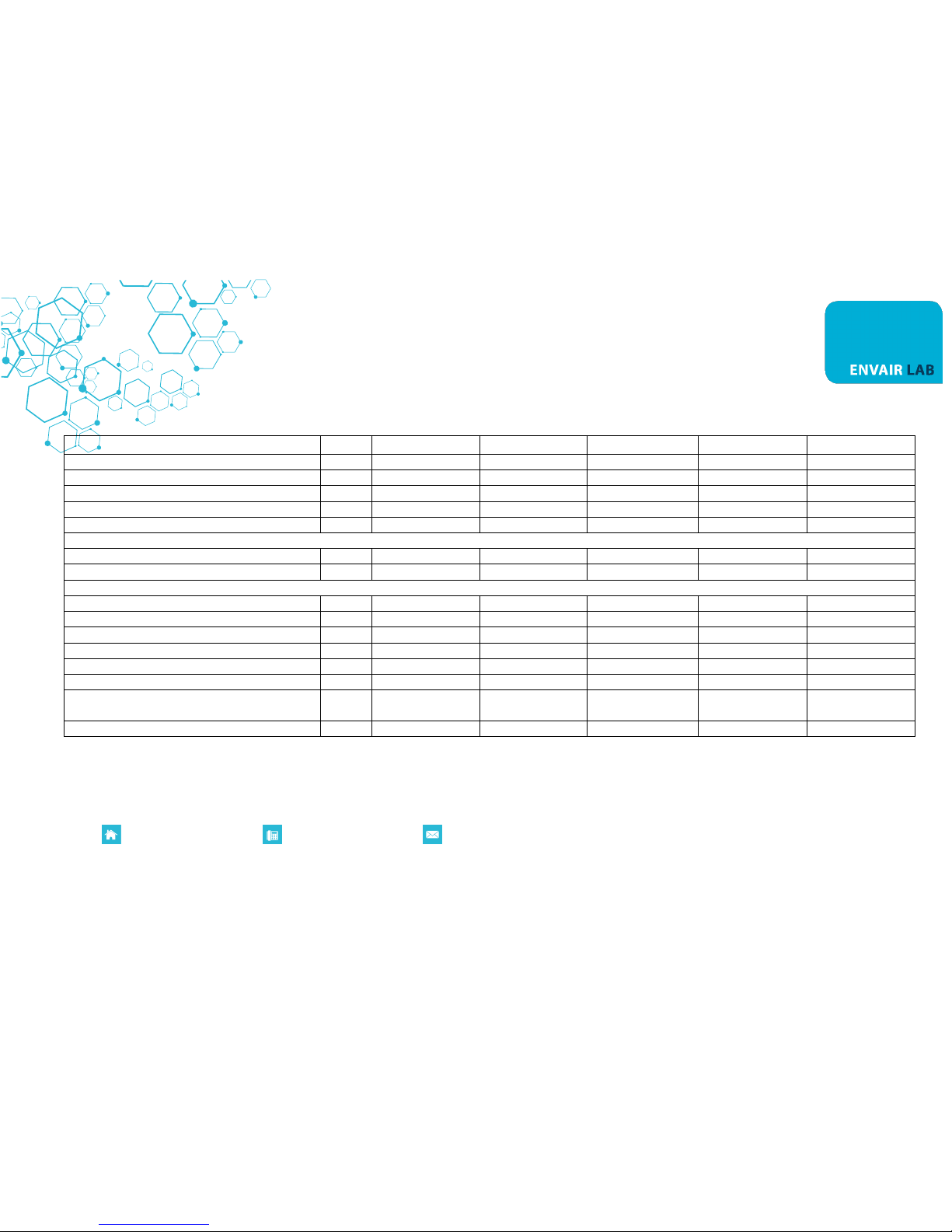
Technical Features Table
Description
Unit
ECOCHEM 60
ECOCHEM 90
ECOCHEM 120
ECOCHEM 150
ECOCHEM 180
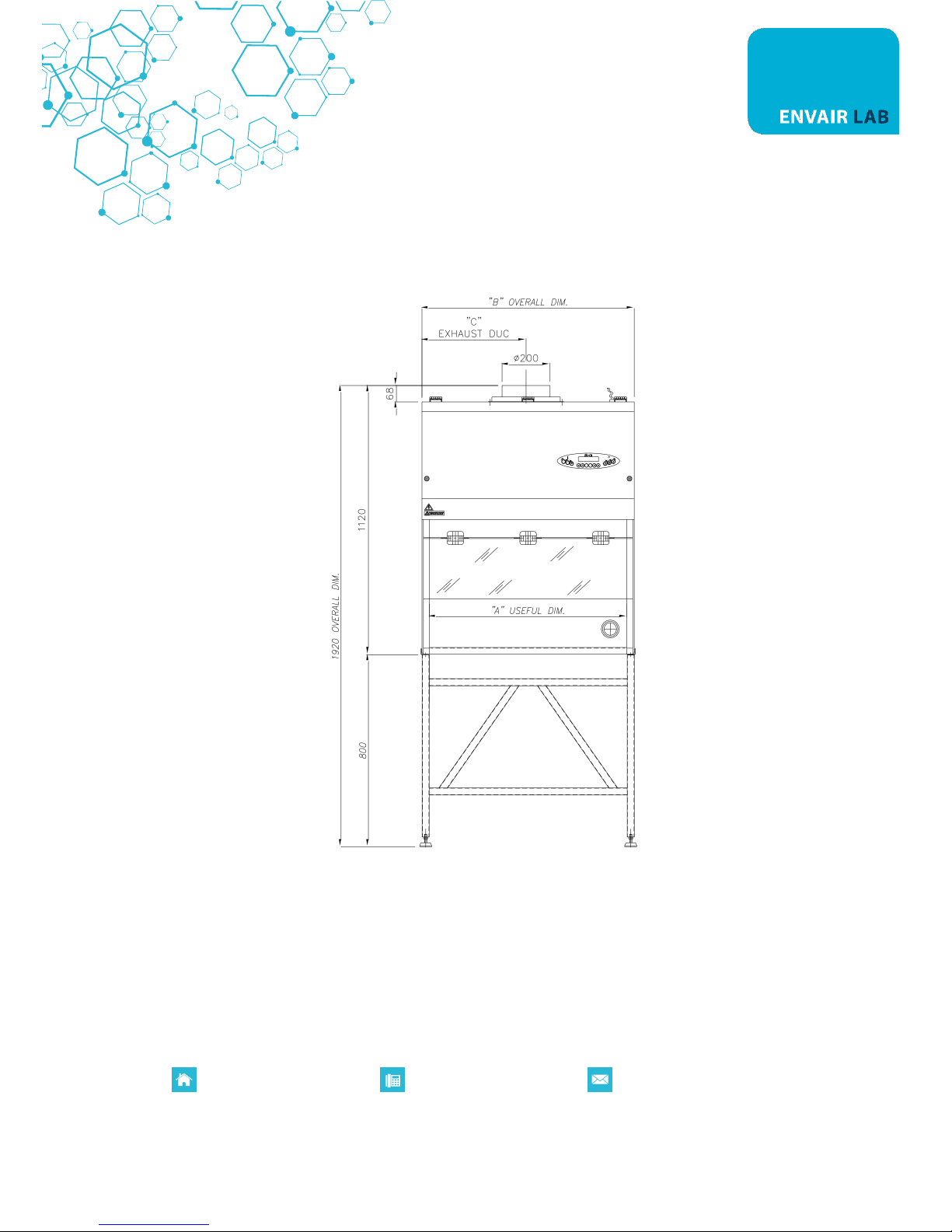
Overall Dimensions (L x H x P)
mm
595x1120x760
885x1120x760
1185x1120x760
1500x1120x760
1800x1120x760
Usefull dimensions (L x H x P)
mm
553x660x600
823x660x600
1123x660x600
1438x660x600
1738x660x600
Maximum front aperture
mm
455
455
455
455
455
Working aperture
mm
200
200
200
200
200
Weigh
Kg
70
85
100
115
130
Noise level
dB (A)
52
52
52
52
52
Lighting level
Lux
>1000
>1000
>1000
>1000
>1000
Main voltage
V
230V AC 2P+T
230V AC 2P+T
230V AC 2P+T
230V AC 2P+T
230V AC 2P+T
Frequency
Hz
50
50
50
50
50
Power consumption (measured at 0.55m/s)
W
88
122
207
210
Current (measured at 0.55m/s)
A
0.527
0.665
1.06
1,23
Electrical class
1 1 1 1
1
Protection level
IP20
IP20
IP20
IP20
IP20
Internal outlet (maximum current for all the
sockets: 4A)
2P+T 230V 4A
2P+T 230V 4A
2P+T 230V 4A
2P+T 230V 4A
2P+T 230V 4A
Fluorescent lamps
W
2x15
2x18
2x30
2x36
2x58
Page 9
Registered in England. Company Registration Number: 10729379 VAT Registration Number: 268 3290 80
P0084EN Rev.03
www.envairlab.co.uk
+44 (0) 1706 228416
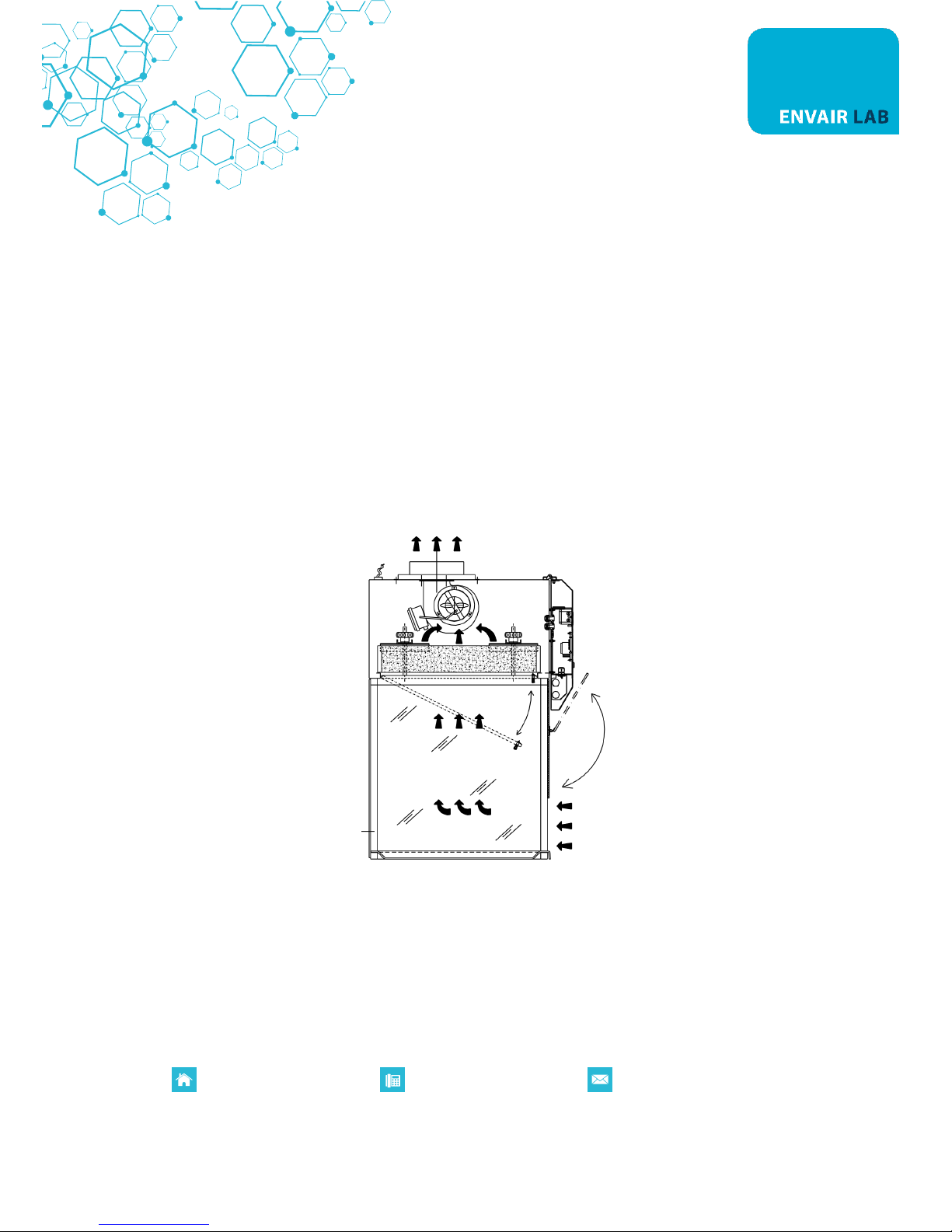
3. OPERATION PRINCIPLES
The working process for the ECOCHEM is the following:
- Air is taken from outside through the front opening; the contaminant is removed at work surface level
and is carried upwards into the upper part or head of the fume cupboard, with an air flow.
- inside the fume cupboard head, air goes through a prefilter which cleans the air from particles and
aerosol or mist; then air goes through an activated charcoal filter (standard type and chemisorption
type) where the physical, chemical-physical and chemical reactions to remove the contaminant from
the air flow take place. The air is then exhausted outside the fume cupboard and recirculated in the
environment.
Page 10

Registered in England. Company Registration Number: 10729379 VAT Registration Number: 268 3290 80
P0084EN Rev.03
www.envairlab.co.uk
+44 (0) 1706 228416
4. OPERATION
4A. SCOPE
The fume cupboards ECOCHEM are designed to protect the operator and the environment from fumes,
vapours and smells produced during routine laboratory operations whenever chemicals, reagents etc. are
used.
Their use is NOT recommended for particular workings which do not belong to laboratory routines, such as
those generating large quantities of evaporated solvents, acid digestions and the use with solvents whose
nature, structure and chemical formula are unknown.
4B. SYSTEM AND PERFORMANCE CONTROLS
The fume cupboards ECOCHEM are fitted with regulator in order to keep the airflow speed constant with the
progressive clogging/saturation of the main activated charcoal filter and prefilter.
The control panel is fitted with various controls, such as:
ECOCHEM-S
- manual regulation for airflow speed
- hours counter monitoring the real operation time of the fume cupboard
ECOCHEM-M
- microprocessor for air speed, prefilter and main filter efficiency automatic control
- alarm devices for low/high airflow speed, device monitoring possible explosive concentrations, motor
fan malfunctioning and gas sensor control
- hours counter monitoring the real operation time of the fume cupboard and the activated charcoal filter
Page 11

Registered in England. Company Registration Number: 10729379 VAT Registration Number: 268 3290 80
P0084EN Rev.03
www.envairlab.co.uk
+44 (0) 1706 228416
4C. REMOTE SIGNALS (OPTIONAL AVAIBLE FOR ECOCHEM M)
The electronic control board can be improved with an output signal: it is possible to obtain a 12 Vdc output
to connect a LED light or alternatively a Normally Open voltage free contact to be connected to an external
circuit. This signal can be set in three different modes:
Motor ON:
The signal starts when ventilation is turned ON and stops when ventilation is OFF.
Alarm:
That signal is ON in case of any flow alarm and it is OFF when air flow rate is in the correct range.
AIR FLOW OK:
That signal is ON when air flow rate is in the correct range and it is OFF in case of any flow alarm.
Page 12
Registered in England. Company Registration Number: 10729379 VAT Registration Number: 268 3290 80
P0084EN Rev.03
www.envairlab.co.uk
+44 (0) 1706 228416
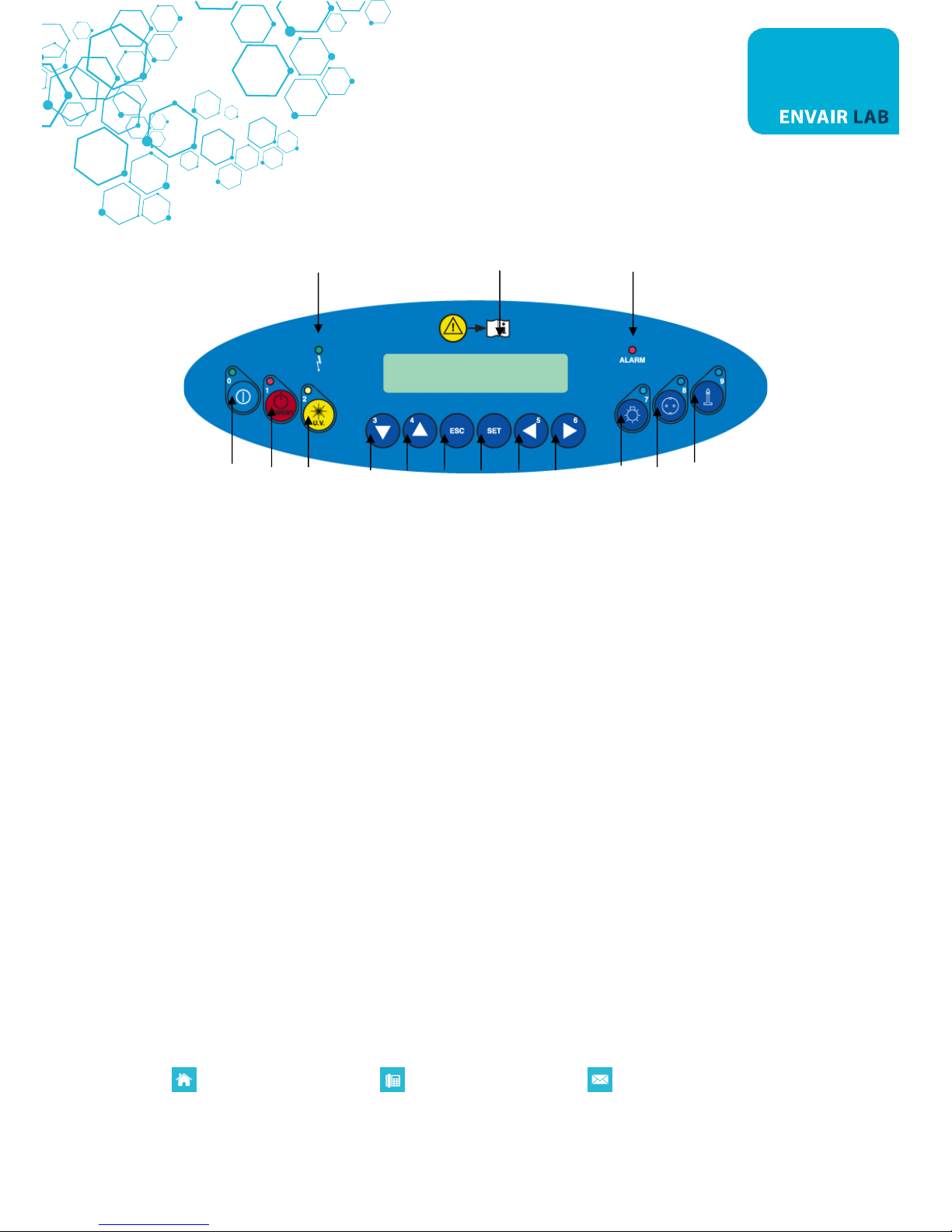
4D. SYMBOLS OF CONTROL BOARD
List and description of all the symbols and controls of the control board:
4 15 11
1 2 3 5 6 7 8 9 10 12 13 14
1 MAIN SWITCH:
Position "OFF" in the "OFF" position, the green light of the mains voltage is on (4); the LCD
displays the model name. In this position the operator can activate only the
fluorescent light (12), the U.V. lamp (3) and the power outlet (13) (with plug
installed) and can activate the data stored in the microprocessor by
pressing the “Right Arrows” key (9-10).
Position "ON" Press the key "ON" [1], insert the password using the small numbers in the
right lower corner of the keys and press SET. Default password is 5 [9] – 4
[6]. When the password is typed in the green led of the switch lights up and
the cabinet starts operating, the motor-blower is powered and first "CHECK
PANEL" then "STAND-BY" appears on the display till the air flow reaches the
pre-set value. In addition, an audible alarm will sound intermittently during
this stand-by period, alerting the operator not to start working yet. When
the audible alarm stops and the message "STAND-BY" disappears from the
display. The air velocity is displayed.
NOTE: In any case, it is advisable to wait 5-10 minutes before starting work.
Page 13

Registered in England. Company Registration Number: 10729379 VAT Registration Number: 268 3290 80
P0084EN Rev.03
www.envairlab.co.uk
+44 (0) 1706 228416
2 STAND BY
(Speed reduction) Not available:
3 U.V. Not available
4 LINE The green mains light switches on if the unit is connected to the mains and
the line is live
5-6UP/DOWN ARROWS Use the arrow keys to scroll through the menu, to program changing
parameters and to put in the password. Two passwords are programmed:
1) to start the cabinet and to enter the operator menu
2) to enter the main menu to change the data input (only allowed to be
authorized by technical staff and service because unsuitable interventions
can cause troubles and incorrect operation of the cabinet).
The same keys are also used to change the airflow speed within the
minimum and maximum set limits.
7 ESC ESC key deletes the operation of data input and goes back to the starting
condition.
When an alarm condition occurs, which is shown also by the message
appearing on the LCD. By pushing "ESC" the alarm stops sounding (only if
enabled). If the cause of the alarm is not resolved after 2 minutes the
buzzer starts to sound again.
8 SET SET key lets you enter the different functions or confirm the data input
going back to the upper level.
9-10LEFT/RIGHT ARROWS
(ONLY ECOCHEM M) Use the arrow keys to scroll through the menu: if pressed the following
data will appear on the display:
GAS concentration:
1, 2, Residual lifetime of filters: it is the operation time of the filters
installed in the cabinet that can be programmed by the user.
The LCD will display (for example)" RES. TIME FILTER 1=XXXX:XX h:min".
When such time is over, the message "CHECK FILTER (i.e.) 1". Will appear on
the line below.
The filters installed in the cabinet follow the numbering listed below
TYPE of FILTER
NUMBER
Page 14

Registered in England. Company Registration Number: 10729379 VAT Registration Number: 268 3290 80
P0084EN Rev.03
www.envairlab.co.uk
+44 (0) 1706 228416
MAIN FILTER (CARBON OR HEPA)
1
SAFETY FILTER (CARBON OR HEPA)
2
LAF Power: it is shown indirectly by the power supply voltage of the motor,
expressed as percentage of max. Load voltage displayed also in proportion by a bar.
The display shows the notice (es.): "MOT.LAF = XX % " (max.100%).
Operating Time: Shows the operating time of the cabinet from the moment
when the main switch is positioned on "I"
The LCD will display (for example) "WORK TIME=XXXXXh”. This value cannot
be reset.
11 ALARM When an alarm occurs the red LED lights up.
12 LIGHT This switches on the fluorescent light; when enabled, the display shows
"Light on". Switching on the fluorescent light automatically the U.V. lamp
switches off.
13 SOCKET This supplies voltage; when enabled, if the PCB for the automatic regulation
is installed the display shows "POWER ON". The global current for all the
sockets installed on the cabinet is 4 Amps.
14 GAS Not available
15 DISPLAY ECOCHEM M: Rear light liquid crystal "LCD" display composed of 2 lines of
20 characters each showing the operating parameters and alarms.
ECOCHEM S: Rear light liquid crystal “LCD” display; it show the operating
time of the cabinet.
Page 15
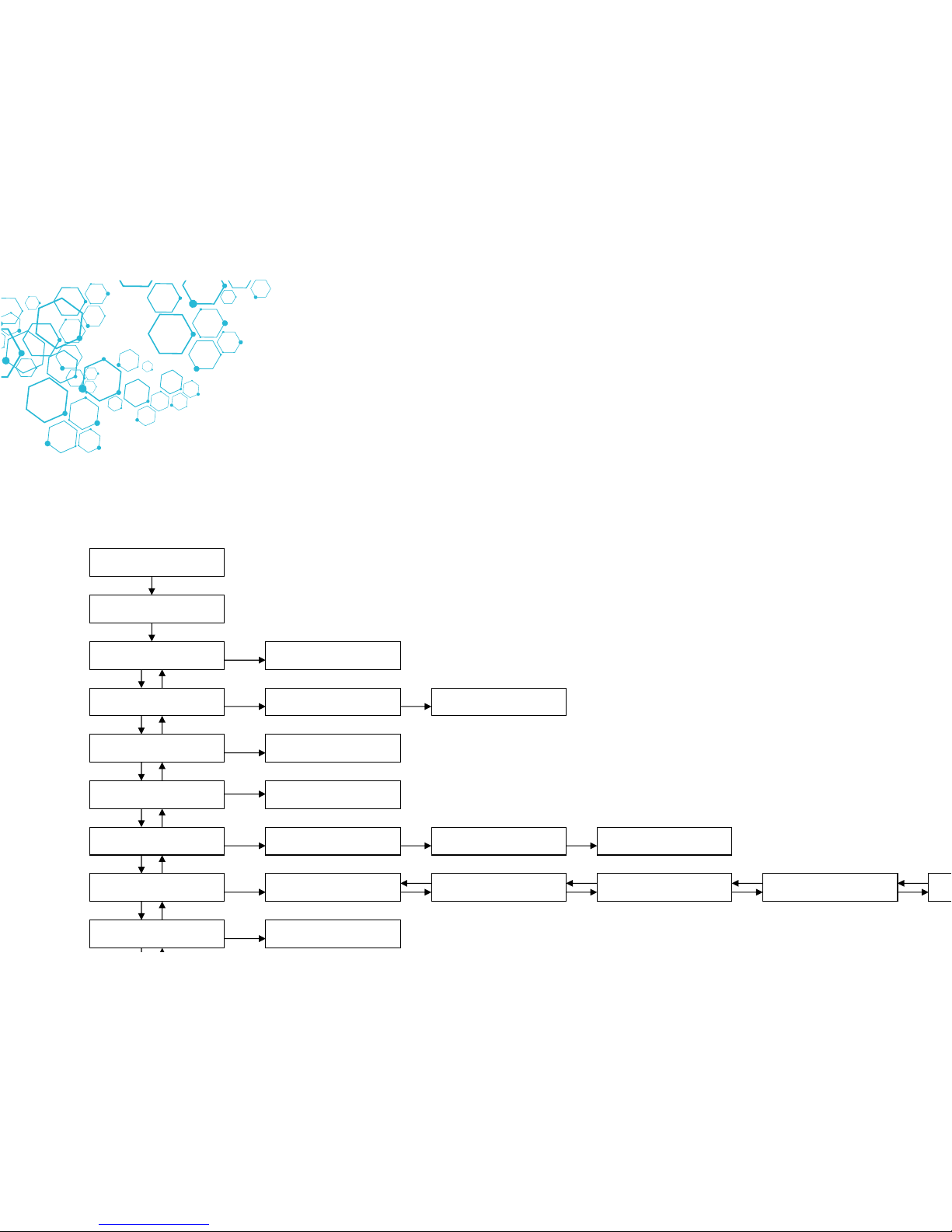
4E. OPERATOR MENU (ONLY FOR ECOCHEM M)
It’s possible enter the operator menu, with the cabinet in stand-by mode and when the cabinet is switched on, by pressing at the same time the keys “ESC” (7) and “ARROW UP” (6).
Entering the operator menu while the ventilation is running it’s possible to set only the “ALARM CLOCK” and the “TIMER”.
OPERATOR MENU
Filter residual time
OPERATOR MENU
Language
OPERATOR MENU
Set up the clock
OPERATOR MENU
UV resid. time
STAND-BY MODE
PASSWORD
ESC + UP arrow
OPERATOR MENU
Set timer
OPERATOR MENU
Set alarm clock
OPERATOR MENU
UV program
SET TIMER
Set up hh:mm
SET ALARM CLOCK
Enable YES/NO
SET ALARM CLOCK
Date and hour
FILTER 1 LIFETIME
Set XXXX
UNAVAIBLE
FILTER 2 LIFETIME
Set XXXX
FILTER 3 LIFETIME
Set XXXX
LANGUAGE
Italiano
LANGUAGE
English
LANGUAGE
Francais
LANGUAGE
Deutsch
LANGUAGE
Espanol
SET UP THE CLOCK
Date and hour
UV LAMP
Set up 5000
Page 16

Registered in England. Company Registration Number: 10729379 VAT Registration Number: 268 3290 80
P0084EN Rev.03
www.envairlab.co.uk
+44 (0) 1706 228416
FILTERS RESIDUAL LIFETIME:
• Use “UP/DOWN arrow" keys [5/6] to choose the desired menu.
• select “FILTERS RESIDUAL LIFETIME.” and press "SET" [8] key; the display will show:
FILTER 1 RESIDUAL LIFETIME
Set XXXX
Where XXXX shows the number of the hours set for lifetime of the FILTER 1.
• Use the “up and down arrow” keys to adjust the hour’s parameter.
• Then press the "SET" key [8] to confirm the data and pass to filter 2 and so on up to filter 5 (as
for relation between number and type of filter see table section. 4C).
• To conclude programming, press ESC” [7] key.
LANGUAGE SELECTION
• use "UP/DOWN arrow" keys [5/6] to choose the desired menu
• select “LANGUAGE” and press the “SET” key and the following message will be shown on the display:
LANGUAGE
English
• With the “up and down arrow” keys select the desired language (Italian, English, French, German,
and Spanish).
• Press the “SET” key to confirm and exit the “LANGUAGE” menu.
• Press “ESC” [7] key to go out.
Page 17

Registered in England. Company Registration Number: 10729379 VAT Registration Number: 268 3290 80
P0084EN Rev.03
www.envairlab.co.uk
+44 (0) 1706 228416
SET UP THE CLOCK
• use "UP/DOWN arrow" keys [5/6] to choose the desired menu
• select “SET UP THE CLOCK.” and press "SET" [8] key; the display will show:
SET UP THE CLOCK
Set XXXX
• Use the “left and right arrow” keys to select the desired parameter and set it using the “up and down
arrow” keys
• Then press the "SET" key to confirm the data and/or go back to previous menu
• To conclude programming, press ESC” [7] key.
PASSWORD CHANGE
• use "UP/DOWN arrow" keys [5/6] to choose the desired menu
• select “PASSWORD CHANGE” and press "SET" [8] key; the display will show:
CURRENT
PSW:
• digit the present Password then press “SET” key
SET UP PASSWORD
PSW:
• digit the new Password then press “SET” key
VERIFY PASSWORD
PSW:
• digit the password again and then press “SET” key to confirm the data and/or go back to previous menu
• To conclude programming, press ESC” [7] key.
DISPLAY OF HISTORICAL FILES
• use "UP/DOWN arrow" keys [5/6] to choose the desired menu
• select “ALARMS DISPLAY ” and press "SET" [8] key;
• Use “UP/DOWN arrow" keys to scroll through the list of the possible problems that have happened.
The list is in chronological order and contains up to 64 voices.
• To conclude programming, press ESC” [7] key.
Page 18

Registered in England. Company Registration Number: 10729379 VAT Registration Number: 268 3290 80
P0084EN Rev.03
www.envairlab.co.uk
+44 (0) 1706 228416
ALARM CLOCK
• use "UP/DOWN arrow" keys [5/6] to choose the desired menu
• select “ALARM CLOCK” and press "SET" [8] key; the display will show:
Alarm clock set up
Set up XXXX
• Use the “left and right arrow” keys to select the desired parameter and set it using the “up and down
arrow” keys
• Then press the "SET" key to confirm the data and/or go back to previous menu
• Press “ESC” to abort the procedure
• When the set time is reached the buzzer start to ring and the display show this message
ALARM CLOCK
ALARM
• Press the “ESC” key to silence the acoustic signal
TIMER SET UP
• use "UP/DOWN arrow" keys [5/6] to choose the desired menu
• select “TIMER SET UP” and press "SET" [8] key; the display will show:
Timer set up
Set up XXXX
• Use the “left and right arrow” keys to select the desired parameter and set it using the “up and down
arrow” keys
• Then press the "SET" key to confirm the data and/or go back to previous menu
• Press “ESC” to abort the procedure
• At the end of the countdown the buzzer start to ring and the display will show this message:
TIMER
ALARM
• Press the “ESC” key to silence the acoustic signal
Page 19

Registered in England. Company Registration Number: 10729379 VAT Registration Number: 268 3290 80
P0084EN Rev.03
www.envairlab.co.uk
+44 (0) 1706 228416
5. HOUR COUNTER / UV TIMER (ECOCHEM S)
Available only in English language.
5A. Hours counter
During the standard operating of the cabinet the display shows:
* CABINET LIFETIME *
0:00:42
The hour counter starts when the ventilation is switched ON and stop when the ventilation is turned OFF
It is possible RESET the hour counter pressing in sequence the following keys:
ESC – Arrow down – Arrow up – SET
After this the display will show this message:
WORKTIME RESET
Confirm? No
Change the answer with the arrow keys and press SET
5B. Energy save
The hour’s counter/UV timer PCB has the function: Energy save:
When the cabinet is in Stand by mode, after few minutes the display switch OFF (only the green LED
still remains lit).
To switch on the display it is necessary press any key
The functions of this PCB are available only in English language.
Page 20
Registered in England. Company Registration Number: 10729379 VAT Registration Number: 268 3290 80
P0084EN Rev.03
www.envairlab.co.uk
+44 (0) 1706 228416
5C. DISPOSAL OF WASTES AND CONTAMINATED MATERIALS
DISPOSAL OF ELECTRIC AND ELETTRONIC DEVICES (AEE)
INFORMATION FOR EUROPEAN UNION USER
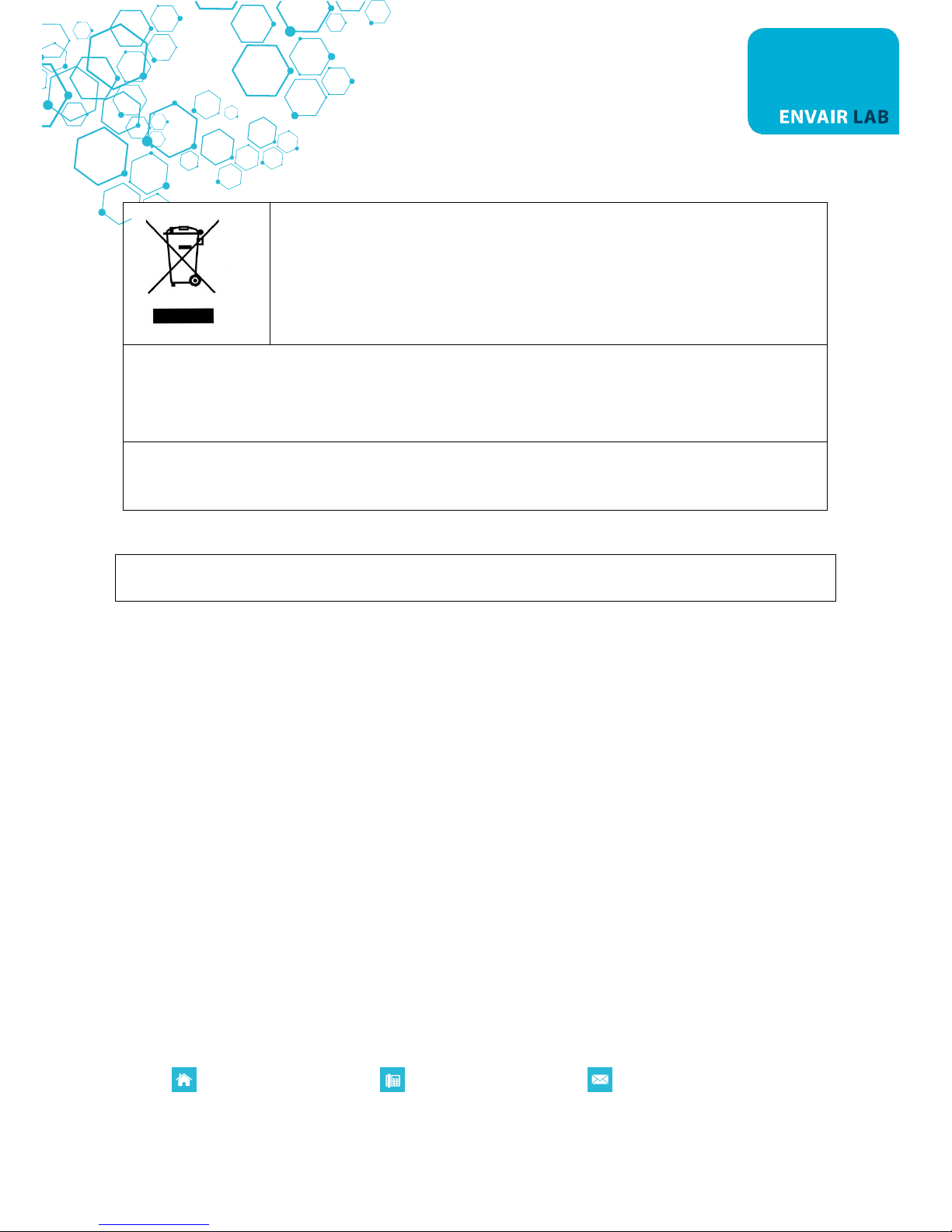
This symbol on the device means that when it needs to be disposed, it must be
handled separately from urban waste.
At the moment of the disposal, contact the dealer, to receive information about
the collect and disposal in accordance with the laws in force in the country.
Appropriate disposal of this product will help to prevent potential negative effects on health and the
environment and promotes re-use and / or recycling of materials of the equipment.
The improper disposal of the product by holder involves the application of sanctions in accordance with
the regulations in their own country.
INFORMATION FOR USERS OUTSIDE THE EUROPEAN UNION
This symbol is valid only in the European Union If you want to dispose this product, contact your local
authorities or dealer and ask for the correct method of disposal.
ATTENTION: Before disposal, the cabinet where contaminants and pathogens have been manipulated, must be
sterilized
The materials replaced during maintenance operations are activated charcoal filters and pre-filters.
Obviously, these materials are not toxic when they are new; they become toxic after using them, since they
absorb a number of contaminant agents (generally speaking chemical substances).The above materials shall
be considered just like the substances used in the fume cupboard. Therefore, for their disposal and
treatment, it is necessary to comply with the relevant local regulations and ministerial decrees.
5D. ERGONOMICS
This cabinet has been designed and manufactured according to the general directions on the ergonomics
provided for by the EN ISO 14738 standard.
Furthermore all maintenance operations are assured to be carried out in safety by merely following the
instructions given in this manual at section 7.
Page 21

Registered in England. Company Registration Number: 10729379 VAT Registration Number: 268 3290 80
P0084EN Rev.03
www.envairlab.co.uk
+44 (0) 1706 228416
6. LIMITATIONS
Conditions for a correct use of the fume cupboard.
We list below the most important conditions and the substances to avoid for a correct use of the fume
cupboard:
- DO NOT use manipulations/reactions generating large quantities of solvents and/or industrial
quantities.
- AVOID operations such as acid digestions, operations with radioactive compounds in potentially
hazardous quantities, avoid the use with substances having an unknown formula, nature and origin.
- DO NOT use the fume cupboard for manipulations/operations if the activated charcoal filter installed is
not adequate.
- DO NOT use the fume cupboard if the pre-filter is clogged and/or the activated charcoal filter is
saturated.
- DO NOT use the fume cupboard if the front side is totally open, since this could create a drastic reduction
in the airflow speed and in efficiency.
- AVOID high concentrations of smokes, for instance in case of an accidental leakage of chemicals, since
this could create a temporary block of the main filter. Therefore, immediately remove/clean the spillage
(preferably by using adsorbent granules). The use of adsorbent papers or fabrics could worsen the
evaporation process. In case of several spillages, it is necessary to remove the filter and replace it with
a new one. The old filter, once stabilized after a few days, can be used again if not saturated.
Page 22

Registered in England. Company Registration Number: 10729379 VAT Registration Number: 268 3290 80
P0084EN Rev.03
www.envairlab.co.uk
+44 (0) 1706 228416
7. OPERATING PROCEDURES
7A. GENERAL OPERATING INSTRUCTIONS
Before carrying out any type of action, the operator shall check the following conditions:
- That the cabinet power cable is connected to a power point at a suitable voltage and frequency as per
instructions shown on the label stuck near the electric cable
- The fume cupboard can work in an efficient way if the filter installed was correctly selected according to
the type of application.
- Periodically check the efficiency of the activated charcoal filter and pre-filter.
- When you use the fume cupboard, the front door shall ALWAYS be completely lowered in order to obtain
the maximum airflow speed.
- For information purposes, reduced airflow speeds (<0,4 m/s) indicate reduced toxic vapours
containment capacities. Therefore, we recommend to work at speeds higher than 0.5 m/s, except for
the storage of reagents bottles or when low toxicity compounds are handled.
- We recommend to replace the pre-filter each time you replace the activated charcoal filter. A spare filter
should always be kept available, in case of emergency.
7B. FUME CUPBOARD SWITCHING ON
To start the cabinet, proceed as indicated below:
1. turn on the light by pushing the blue button [10]
2. Press the main key I/0 (see section 4D.) and enter the password to switch on the cabinet (5 – 4 – SET).
At first the display shows “CHECK PANEL” and the corresponding control LED’s of the keyboard light up.
Then the message "STAND-BY" is displayed for about 40 seconds and the hour-counter starts operating
3. After 40 seconds of stand-by, the cabinet is ready for work. "STAND-BY" disappears from the screen and
the LAF velocity are displayed
4. Adjust the airflow speed by means of the HIGH/LOW ARROW keys of the keyboard, according to the type
of process to carry out.
7C. FUME CUPBOARD SWITCHING OFF
Once the process is over, carry out the following actions:
1. Remove any waste material from the work chamber.
2. Clean the work surface and the inner chamber walls as described under "Cleaning instructions" (section
7A).
3. If the lamp is on, switch it off by pressing the keyboard key.
Page 23

Registered in England. Company Registration Number: 10729379 VAT Registration Number: 268 3290 80
P0084EN Rev.03
www.envairlab.co.uk
+44 (0) 1706 228416
4. Press “I/0” key switch and enter the password for switching off the cabinet (5 – 4 – SET).
Page 24

Registered in England. Company Registration Number: 10729379 VAT Registration Number: 268 3290 80
P0084EN Rev.03
www.envairlab.co.uk
+44 (0) 1706 228416
8. MAINTENANCE
ATTENTION: Disconnect the fume cupboard from the main power supply before carrying out the
operations described below.
8A. INSTRUCTIONS FOR SIX-MONTH CLEANING (By the User)
- Remove and clean the work surface and the side walls, the bottom and the front door with a diluted
detergent solution. This should be a non-corrosive solution for the fume cupboard structure.
- Control the side walls, the bottom and the front door in order to check if there are corrosive actions and
damage/breakage to the structure.
- Control the hinged doors for corrosion; if necessary adjust the hinge friction by acting on the central
adjusting screw.
- Remove the prefilter/s and filter/s and control the head inside and the fan assembly for correct
operation.
8B. CONTROL AND MONITORING PROCEDURES
The monitoring of the fume cupboard ECOCHEM operating parameters aims at assuring an efficient
operation.
In particular: the use of fume cupboards with clogged prefilter/s implies a reduction in the airflow speed and
therefore a non-removal of the contaminant. Their use with saturated activated charcoal filter/s implies the
non-removal of the contaminant.
With ECOCHEM-M fume cupboards, the microprocessor monitors the airflow speed; therefore there is no
need for the operator to check the prefilter. With ECOCHEM-S fume cupboards, which are not fitted with an
airflow speed control system, the prefilter must be controlled manually every month or every three month,
according to the amount of work carried out, by the user or by a service company with adequate monitoring
devices.
Cupboards like the ECOCHEM-M (fitted with an optional gas detector), a gas detector constantly monitors
the exhaust air and is able to signal possible concentrations of explosive gases.
NOTE: We remind that the smell of some compounds (e.g. H2S or NH3) is very strong. Therefore the presence
of smells does not automatically imply a higher concentration of solvent in the air than that allowed.
AIRFLOW SPEED MEASUREMENT (carried out on a monthly basis by the user)
The airflow speed is measured by means of an anemometer which can be a hot-wire, fan, vane anemometer
or others.
Start the fume cupboard and wait at least 5 minutes to balance the airflow speed.
Minimum three readings should be taken across the working opening; note these data in the "ECOCHEM
monitoring card". If the average airflow is lower than 0.5 m/sec, REPLACE THE PREFILTER/S.
Page 25

Registered in England. Company Registration Number: 10729379 VAT Registration Number: 268 3290 80
P0084EN Rev.03
www.envairlab.co.uk
+44 (0) 1706 228416
MANUAL MEASUREMENT OF THE CHARCOAL FILTER SATURATION DEGREE (carried out on a monthly or
quarterly basis by the user)
The test is executed by means of a sampling device (Gastec or Draeger or Kittigawa type). Select the sampling
tube for the substances used in the laboratory routine (e.g. alcohol or toluene or trichloroethylene).
Place 6 ml of the selected solvent into a beaker; with a hotplate let it boil for two minutes.
This operation gives a solvent concentration equal to 100-200ppm.
Sample the outlet airstream from the unit, following the instructions of the gas sampling tube supplier.
Read the detected concentration. If higher than TLV, REPLACE THE CHARCOAL FILTER/S. If lower, note the
value read on the "ECOCHEM MONITORING CARD".
Example:
ECOCHEM MONITORING CARD
Model:.............................................................
Serial number :.................................................
Installed filter type/code :.................................. Facsimile
Filter installation date :......................................
Pre-filter installation date :................................
Used chemicals :.................................................
PRE-FILTER CONTROL
Date Speed (m/s) Replaced Pre-filter Signature
FILTER CONTROL
Date Used Solvent CONC(PPM) Replaced Filter Signature
Page 26
Registered in England. Company Registration Number: 10729379 VAT Registration Number: 268 3290 80
P0084EN Rev.03
www.envairlab.co.uk
+44 (0) 1706 228416
8C. PREFILTER REPLACEMENT (by the user)
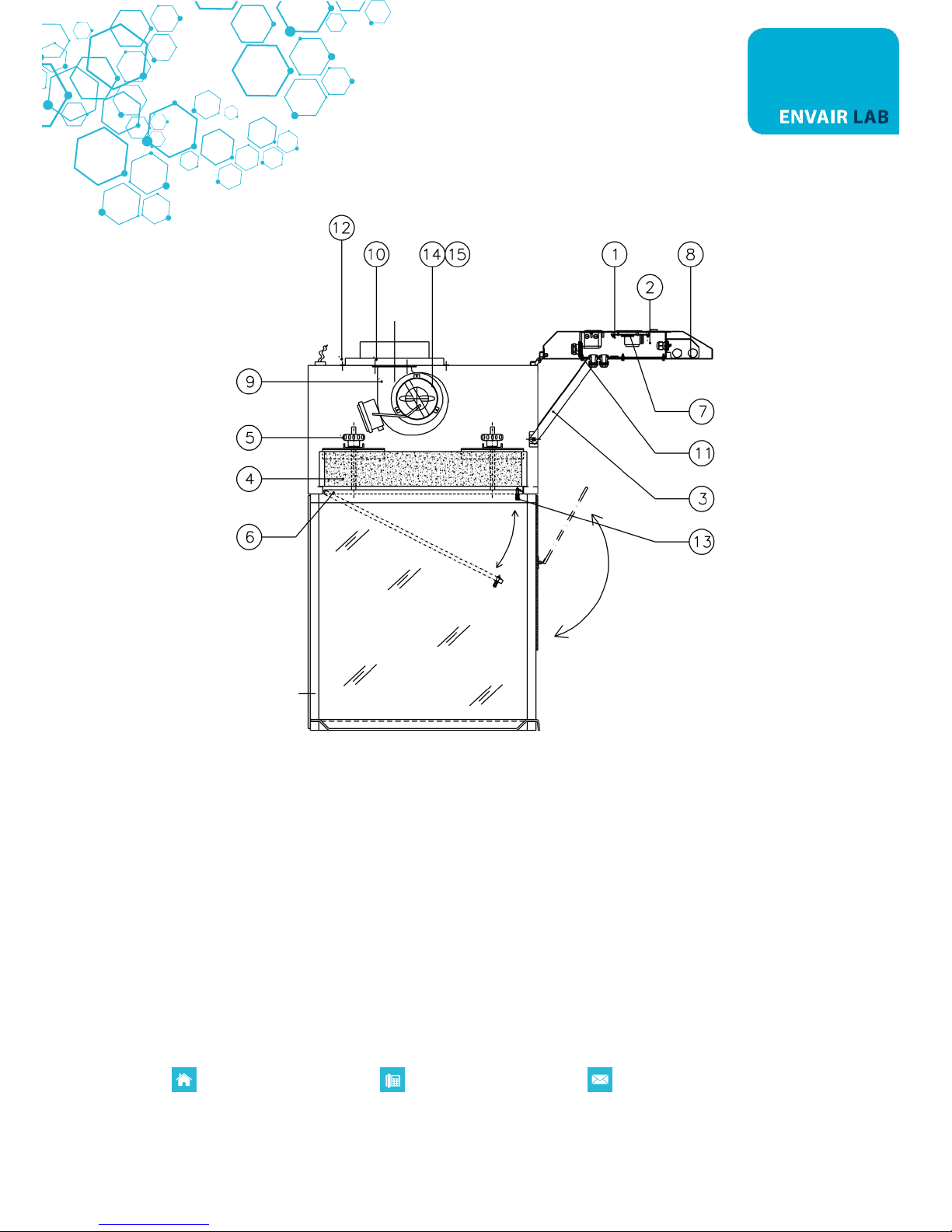
- Open the front control panel, rotate and unlock the tightening lock (13), then lower the pre-filter case
(6).
- Remove the prefilter from the relevant case
- Insert the new prefilter in its seat.
- Close the prefilter case (6) and fix it with the tightening lock (13)
8D. ACTIVATED CHARCOAL FILTER REPLACEMENT (By the User)
ATTENTION: For safety and environmental reasons, the worn-out activated charcoal filter/s shall be
handled with rubber gloves and deposited in polyethylene bags
- Open the front control panel (1) unscrewing the fastening socket head screws (2) and block it with the
correct bracket (3) located on the right side of the panel.
- Raise the activated charcoal filters (4) by unscrewing the correct knobs (5) for a few centimetres.
- Remove the activated charcoal filter (4) from its slide guide.
- Insert the new activated charcoal filter/s (4) into the relevant slide guides so that it correctly leans on
the structure.
- Turn the knobs (5) of the filter group and block the activated charcoal filter (4).
- Close the control panel (1) and fix it with the correct screws.
- When you switch on the fume cupboard again, set the installation date (only for the "M" version).
8E. FLUORESCENT LAMPS REPLACEMENT (by the user)
- Open the front control panel (1) unscrewing the fastening socket head screws (2)
- And block it with the correct bracket (3) located on the right side of the panel.
- Turn the fluorescent tube (8) by 90° and remove it.
- Put the new fluorescent tube (8) into the lamp holder and turn it of 90°.
- Close the front control panel (1) and fix it with the correct screws.
Page 27

Registered in England. Company Registration Number: 10729379 VAT Registration Number: 268 3290 80
P0084EN Rev.03
www.envairlab.co.uk
+44 (0) 1706 228416
8F. MOTOR FAN REPLACEMENT (by the technical assistance staff)
- Disconnect the cabinet from the main
- Open the front control panel (1) unscrewing the fastening socket head screws (2) and block it with the
correct bracket (3) located on the right side of the panel.
- Disconnect the electric connectors of the motor fan terminal board (9).
- Unscrew the fixing screws (10) of the motor fan (9).
- Remove the motor fan (9) without damaging the activated charcoal filter (4).
- Install the new motor fan (9) and fix it with the correct screws and washers (10).
- Reconnect the electric connectors to the terminal board of the new motor fan (9).
- Close the control panel (1) and fix it with the correct screws.
8G. GAS SENSOR REPLACEMENT (for M-version if installed - by the technical assistance staff)
- Open the front control panel (1) unscrewing the fastening socket head screws (2) and block it with the
correct bracket (3) located on the right side of the panel.
- Loosen the cable press of the gas sensor (11) located on the control box (7) inside the front panel (1).
- Remove the gas sensor (11) from the cable press and from the base on which it is mounted.
- Place the new gas sensor (11) on the previous base and block it in the cable press of the control box (7).
- Close the control panel (1) and fix it with the correct screws.
Page 28
Registered in England. Company Registration Number: 10729379 VAT Registration Number: 268 3290 80
P0084EN Rev.03
www.envairlab.co.uk
+44 (0) 1706 228416
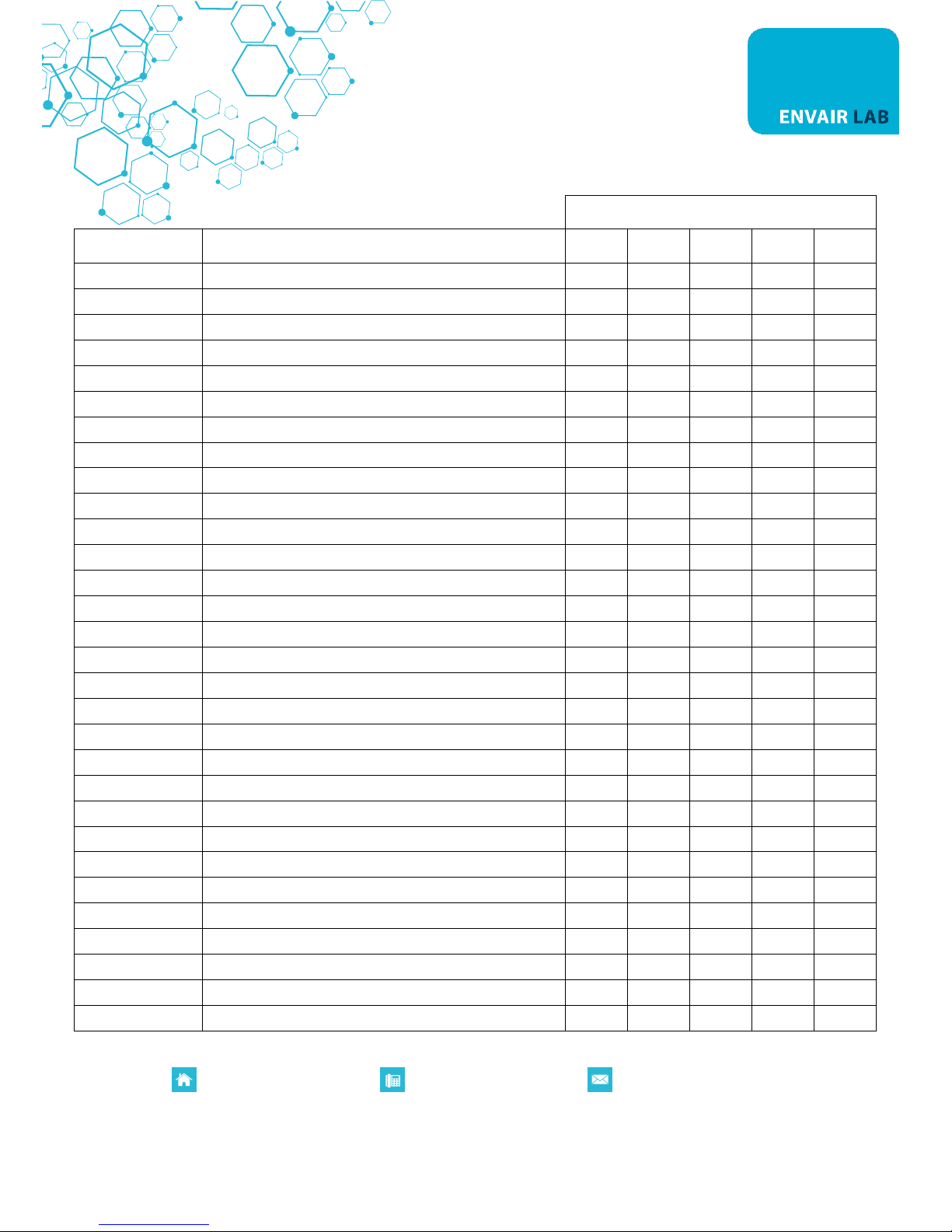
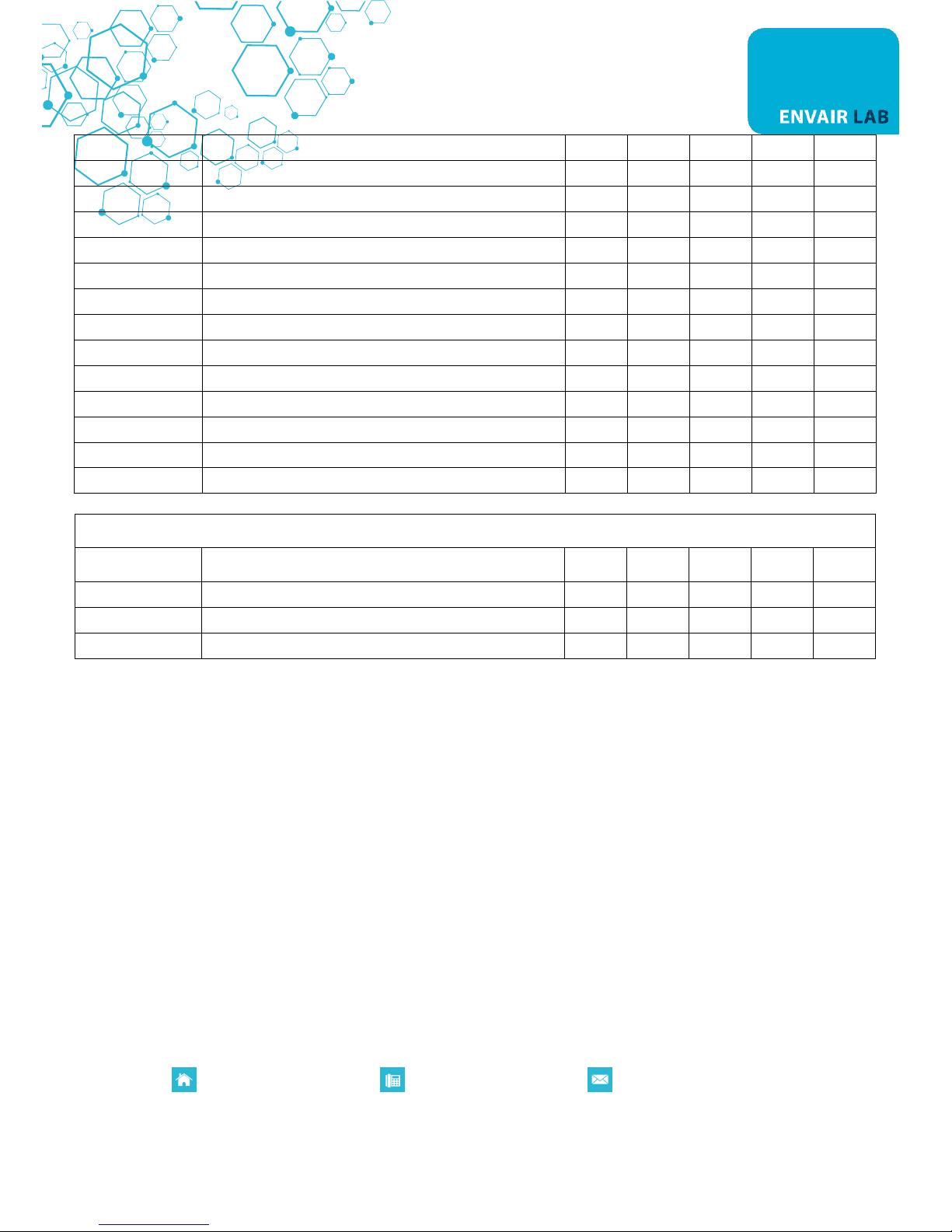
9. SPARE PARTS LIST
ECOCHEM
ITEM
DESCRIPTION
60
90
120
150
180
K60008330100
PVC Basin
1
K60008430100
PVC Basin
1
K60008530100
PVC Basin
1
K60008611500
AISI-316 Basin
1
K60008711500
AISI-316 Basin
1
V50000105520
MF 50 Prefilter wool (m2)
0.3
0.4
0.6
0.75
0.75
V50000000010
RF2C-133/190 K097 DSF Motor-fan
1 1 1 2 2
V50000000080
6102AZ DDM 146/190 Motor fan (optional)
1 1 1 2 2
K60008431000
side glass
2 2 2 2 2
K60008331100
lower front glass ECOCHEM 60
1
K60008431100
upper front glass ECOCHEM 90
1
K60008531100
upper front glass ECOCHEM 120
1
K60008631100
upper front glass ECOCHEM 150
1
K60008731100
upper front glass ECOCHEM 180
1
K60008331200
lower front glass ECOCHEM 60
1
K60008431200
lower front glass ECOCHEM 90
1
K60008531200
lower front glass ECOCHEM 120
1
K60008631200
lower front glass ECOCHEM 150
1
K60008731200
lower front glass ECOCHEM 180
1
K60008310400
back panel ECOCHEM 60
1
K60008410400
back panel ECOCHEM 90
1
K60008510400
back panel ECOCHEM 120
1
K60008610400
back panel ECOCHEM 150
1
K60008710400
back panel ECOCHEM 180
1
V40000003140
VB/60 6 lobes wheel M-12
4 6 6 9 9
V40000003190
Snap-hinge
4 4 4 6 6
V20000005990
15 W/86 fluorescent lamp
2
V20000006020
18 W/84 fluorescent lamp
2
V20000006030
30 W/84 fluorescent lamp
2
V20000006040
36 W/84 fluorescent lamp
2
Page 29
Registered in England. Company Registration Number: 10729379 VAT Registration Number: 268 3290 80
P0084EN Rev.03
www.envairlab.co.uk
+44 (0) 1706 228416
V20000006050
58 W/84 fluorescent lamp
2
V20000006340
2x15W lampholder
1
V20000006330
2x18W lampholder
1
V20000006350
2x30W lampholder
1
V20000006360
2x36W lampholder
1
V20000006370
2x58W lampholder
V20000006900
FN2070A-10-06 net filter
1 1 1 1 1
V30000000030
SP-31 gas sensor (only ECOCHEM M)
1 1 1 1 1
V30000000090
Proximity NAMUR AEG 8/2 (only ECOCHEM M)
1 1 1 1 1
V30000008150
Microprocessor control card (only ECOCHEM M)
1 1 1 1 1
V30000008300
Hour counter card (only ECOCHEM S)
1 1 1 1 1
V30000008000
Power card
1 1 1 1 1
V30000008200
Flat cable (only ECOCHEM M)
1 1 1 1 1
V30000005200
Keyboard
1 1 1 1 1
OPTIONALS
ITEM
DESCRIPTION
6 9 12
15
18
V01000017050
Gas cock with safety release 3/8”
1 1 1 1 1
V20000003380
Box for interlocked socket
1 1 1 1 1
V20000003390
16A 2P+T interlocked socket
1 1 1 1 1
Page 30
Registered in England. Company Registration Number: 10729379 VAT Registration Number: 268 3290 80
P0084EN Rev.03
www.envairlab.co.uk
+44 (0) 1706 228416
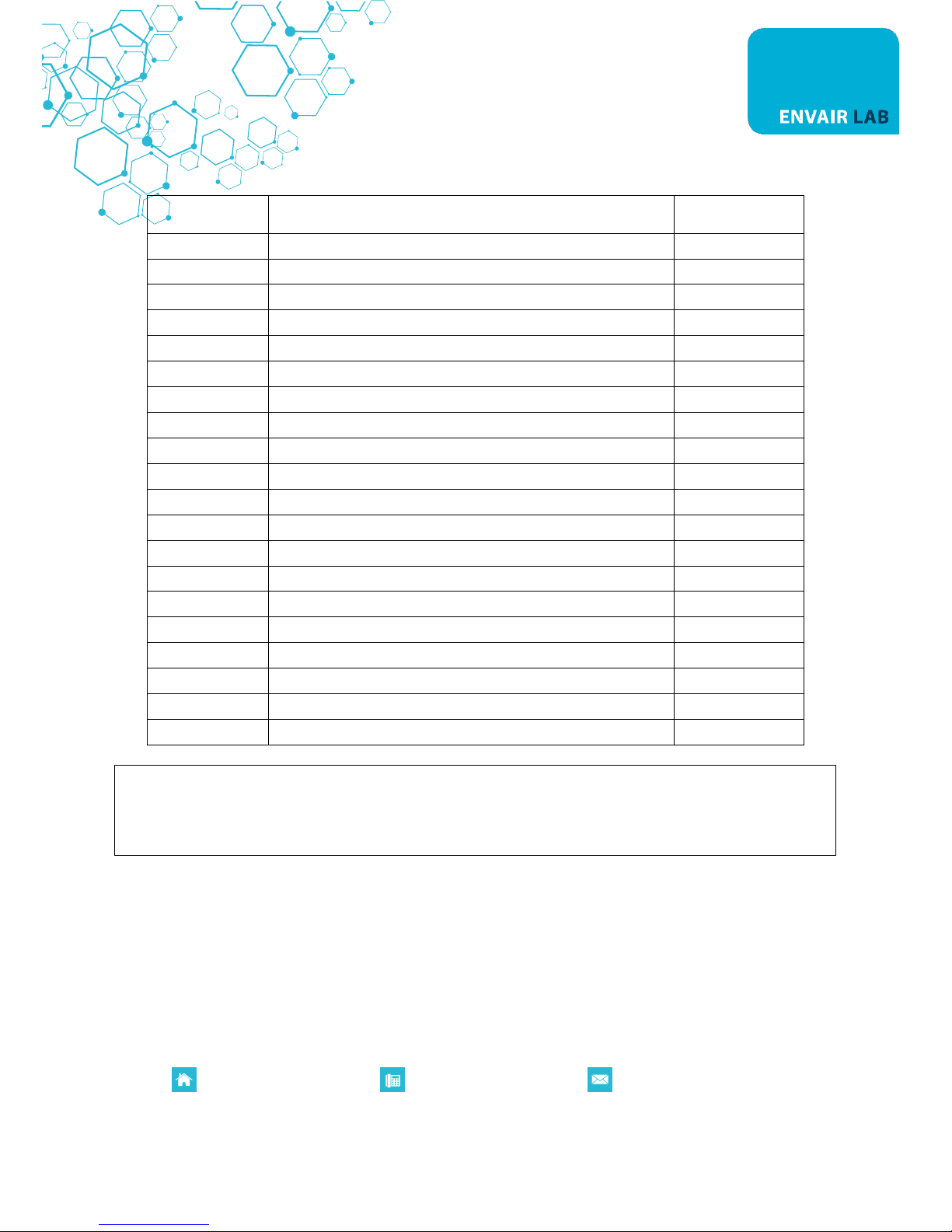
10. ACTIVATED CHARCOAL FILTERS AND PREFILTERS LIST
ITEM
DESCRIPTION
QUANTITY
FX0000854010
A/C filter for ECOCHEM 60/120/150(2)
13.0 kg
FX0000854020
SULF filter for ECOCHEM 60/120/150(2)
15.5 kg
FX0000854030
UR filter for ECOCHEM 60/120/150(2)
5.5 kg
FX0000854040
AM filter for ECOCHEM 60/120/150(2)
21.5 kg
FX0000854050
CYAN filter for ECOCHEM 60/120/150(2)
15.5 kg
FX0000854060
MER filter for ECOCHEM 60/120/150(2)
15.5 kg
FX0000854070
ACR filter for ECOCHEM 60/120/150(2)
16.0 kg
FX0000854080
FOR filter for ECOCHEM 60/120/150(2)
18.0 kg
FX0000854090
HEPA FILTER FOR ECOCHEM 60/120/150(2)
FX0000844010
A/C filter for ECOCHEM 90/150(1)/180
9.0 kg
FX0000844020
SULF filter for ECOCHEM 90/150(1)/180
10.0 kg
FX0000844030
UR filter for ECOCHEM 90/150(1)/180
10.0 kg
FX0000844040
AM filter for ECOCHEM 90/150(1)/180
14.4 kg
FX0000844050
CYAN filter for ECOCHEM 90/150(1)/180
10.0 kg
FX0000844060
MER filter for ECOCHEM 90/150(1)/180
10.0 kg
FX0000844070
ACR filter for ECOCHEM 90/150(1)/180
10.5 kg
FX0000844080
FOR filter for ECOCHEM -90/150(1)/180
11.5 kg
FX0000844090
HEPA FILTER FOR ECOCHEM 90/150(1)/180
FX0000854000
PREFILTER FOR ECOCHEM 90/150/180 S-M (10 pos.)
Pack of 10 pcs.
FX0000844000
PREFILTER FOR ECOCHEM 60/120/150 S-M (10 pos.)
Pack of 10 pcs.
ATTENTION: ECOCHEM 60 is fitted with no.1 suitable filter
ECOCHEM 90 and 120 are fitted with no. 2 suitable filters.
ECOCHEM 150 are fitted with no. 2+1 suitable filters
ECOCHEM 180 are fitted with no. 4 suitable filters
PREFILTERS
High performance prefilters are designed to remove particulates from the air stream. The filter material is
based on electrets, which are permanently charged di-electrics. They remove particulates from polluted air
by strong electrostatic forces generated by the fibres of which they are made. The combination of strong
electric charges and open structure provides a filter with high efficiency, low airflow resistance and high
loading capacity.
Prefilter efficiency is equal to 75-85 dust weight arrestance (ASHRAE).
Page 31
Registered in England. Company Registration Number: 10729379 VAT Registration Number: 268 3290 80
P0084EN Rev.03
www.envairlab.co.uk
+44 (0) 1706 228416
MAIN FILTERS
Three types of filter media are available.
Most of these are impregnated activated charcoal, to provide a higher filter capacity for lower molecular
weight organic compounds and inorganic gases and vapours.
A number of filter efficiency studies have been carried out and all results using single bed filters show
efficiencies very close to 100%.
1. A/C FILTER
The A/C filter is the most widely used filtering the range and is used primarily for solvent fume removal. It is
manufactured from coco-nut shell based activated charcoal of 4 x 8 USS mesh size and surface area up to
1050m2/gm.
Filtration is achieved by the physical adsorption of molecules in the pores of the activated charcoal by Van
der Waals forces.
2. ACR FILTER
This filter is impregnated with halide salts and is used for the high efficiency removal of iodine and methyl
iodine. It is frequently used for iodination reactions with low-level radioactive iodine and efficiencies in
excess of 99.99% have been measured
3. FORM FILTER
This filter is impregnated with an oxidizing agent to oxidize formaldehyde to formate salts.
It is widely used in hospital pathology laboratories and suitable for use with formalin, gluteraldehyde and
aldehydes in general.
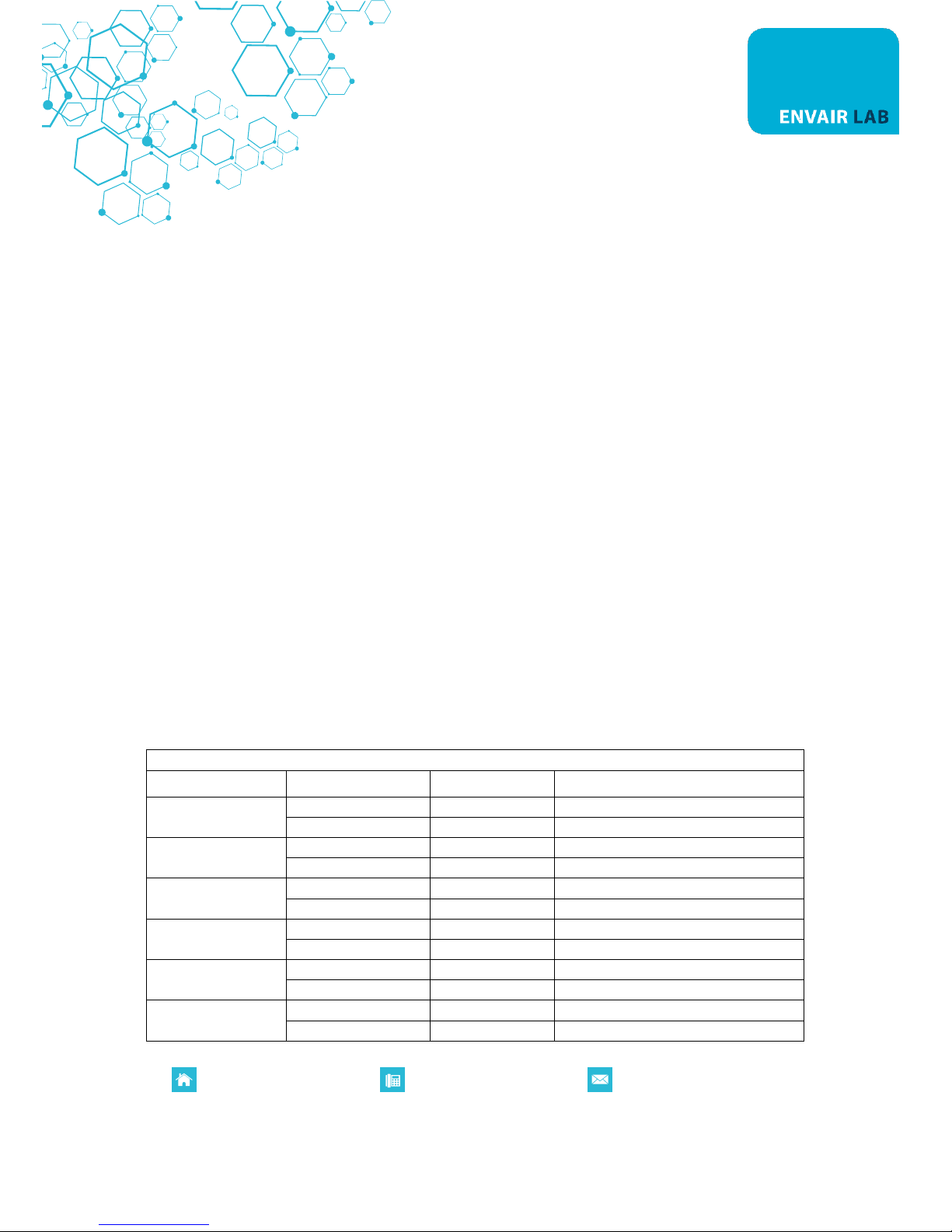
ECOCHEM EXH. FILTER (OPTIONAL)
Filter Type
Code
Dimension
Cabinet Model
Sulfuric acid
FX0000834840
450x300x30
60
FX0000854840
610x610x30
90 – 120 – 150 – 180
Ammonia
FX0000834850
450x300x30
60
FX0000854850
610x610x30
90 – 120 – 150 – 180
Cyanides
FX0000834820
450x300x30
60
FX0000854820
610x610x30
90 – 120 – 150 – 180
Formaldehyde
FX0000834870
450x300x30
60
FX0000854870
610x610x30
90 – 120 – 150 – 180
Generic
FX0000834800
450x300x30
60
FX0000854800
610x610x30
90 – 120 – 150 – 180
Iodine
FX0000834830
450x300x30
60
FX0000854830
610x610x30
90 – 120 – 150 – 180
Page 32

Registered in England. Company Registration Number: 10729379 VAT Registration Number: 268 3290 80
P0084EN Rev.03
www.envairlab.co.uk
+44 (0) 1706 228416
Mercury
FX0000834860
450x300x30
60
FX0000854860
610x610x30
90 – 120 – 150 – 180
Urines
FX0000834810
450x300x30
60
FX0000854810
610x610x30
90 – 120 – 150 – 180
HEPA filter
FX0000834880
457x610x69
60
FX0000854880
610x610x69
90 – 120 – 150 – 180
Page 33
Registered in England. Company Registration Number: 10729379 VAT Registration Number: 268 3290 80
P0084EN Rev.03
www.envairlab.co.uk
+44 (0) 1706 228416
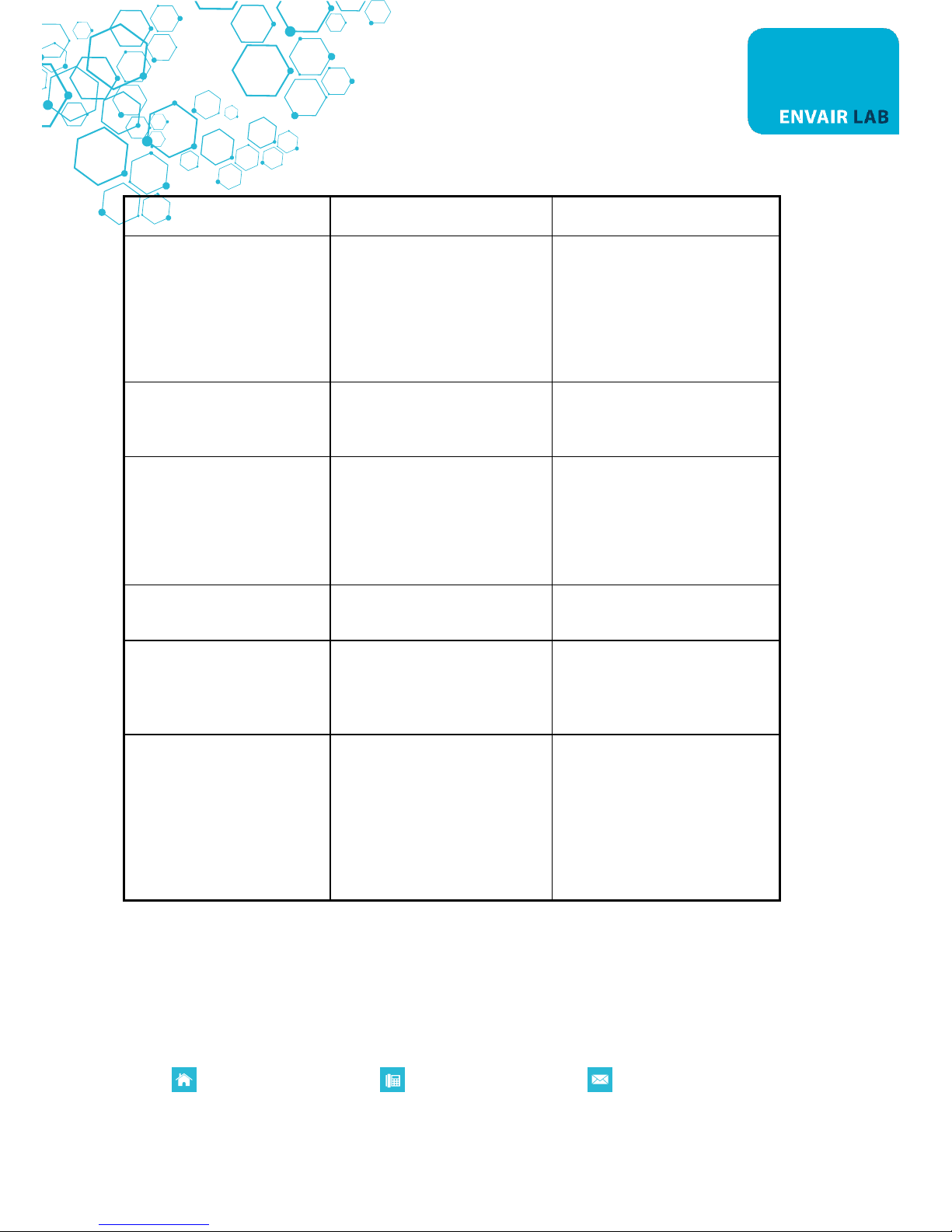
11. TROUBLESHOOTING
DEFECT
CAUSE
REMEDY
Nothing works
Power cut off before the
equipment
PCB out of order
Fuses are interrupted.
Check if power reaches the
equipment
Replace PCB located in the control
panel
Replace the fuses.
"GAS DETECTOR" pre-alarm.
(for ECOCHEM M)
Gradual clogging/saturation of the
activated charcoal filter (pre-alarm
threshold value)
Reduce the quantity of solvent used
under the cupboard.
"GAS DETECTOR" alarm
(for ECOCHEM M)
The charcoal filter is completely
saturated
"Gas sensor” broken, if you are not
working under the cupboard.
Replace the activated charcoal
filter
Replace the "Gas sensor"
Total absence of airflow in the
work area
The motor fan does not work.
Replace the motor fan
Low airflow speed in the work
area.
The exhaust duct is obstructed (if
present)
The prefilter is clogged
Check if the exhaust duct is
obstructed (if present)
Replace the prefilter
Unsteady reading of the speed
displayed (only for
ECOCHEM M)
Anomalies in the fan anemometer
The exhaust duct is obstructed (if
present)
Loss of calibration values in the
PCB
Check/replace the fan anemometer
Check the exhaust duct (if existing)
Reset the calibration values of the
PCB
Page 34

Registered in England. Company Registration Number: 10729379 VAT Registration Number: 268 3290 80
P0084EN Rev.03
www.envairlab.co.uk
+44 (0) 1706 228416
12. TRANSPORT, PACKING, STORAGE INSTRUCTIONS
ATTENTION: Disconnect the unit from the main power supply before doing any of the following
operations
Following indications are of the essence in case the end user has to transport, pack and storage the fume
cupboard after a first period of routine operation (e.g. laboratory/ plant moving):
- Disconnect the inlet tubes of gas/vacuum.
- If the fume cupboard exhausts to the outside of the building or is connected to the exhaust duct of the
conditioning system, remove the connection tube cabinet/outside - cabinet/conditioning system duct,
paying attention not to damage or to cover with dust (or any other material) the exhaust duct of the
fume cupboard.
- In case the fume cupboard is moved from a laboratory to another in the same building:
- By means of table with wheels: it is sufficient to put the cabinet on the table avoiding to turn it on a side
or on the back panel.
- By means of a forklift: put the cabinet on a pallet to ensure good conditions of stability and to prevent
the spill tray in the lower part of the fume cupboard from damages for transport.
- Pay attention not to damage the fume cupboard when passing through doors/windows
- If the cabinet is to be kept temporarily unused at the final destination, cover the cabinet itself with a
protective film (pluriball or expandable films).
- On the contrary, we recommend extreme caution on long-distance moving’s carried out by forwarding
agents (e.g. change of address): we suggest to use the same packages supplied by the manufacturer
with the cabinet made as follows :
Wooden pallets of the following dimensions:
ECOCHEM 60 : 111 x 90 x 12 cm
ECOCHEM 90 : 111 x 90 x 12 cm
ECOCHEM 120 : 147 x 90 x 12 cm
ECOCHEM 150 : 202 x 90 x 12 cm
ECOCHEM 180 : 202 x 90 x 12 cm
Carton basement to be laid on the pallet of the following dimensions:
ECOCHEM 60 : 108 x 79.5 x 1 cm
ECOCHEM 90 : 108 x 79.5 x 1 cm
ECOCHEM 120 : 138.5 x 83.5 x 1 cm
ECOCHEM 150 : 147 x 90 x 1 cm
ECOCHEM 180 : 147 x 90 x 1 cm
Pluriball to wrap and protect the cabinet from dust
Package in carton of the following dimension:
ECOCHEM 60 : 111 x 90 x 128 cm (1cm thick)
ECOCHEM 90 : 111 x 90 x 128 cm (1cm thick)
Page 35

Registered in England. Company Registration Number: 10729379 VAT Registration Number: 268 3290 80
P0084EN Rev.03
www.envairlab.co.uk
+44 (0) 1706 228416
ECOCHEM 120 : 147 x 90 x 128 cm (1cm thick)
ECOCHEM 150 : 202 x 90 x 128 cm (1cm thick)
ECOCHEM 180 : 202 x 90 x 128 cm (1cm thick)
Steel strap and clips
During transport pay attention to maintain the package in vertical position (i.e. the pallet at the bottom)
The cabinet (with or without the package) must be kept in a place ensuring following environmental
conditions:
- Min. temperature: 0°C
- Max. temperature: 60°C
- Max. humidity: 95%
Page 36
Registered in England. Company Registration Number: 10729379 VAT Registration Number: 268 3290 80
P0084EN Rev.03
www.envairlab.co.uk
+44 (0) 1706 228416
13. ADDITIONAL INFORMATION
13A. GUARANTEE
The guarantee for fume cupboards ECOCHEM is 24 months from invoice date.
The limitations of the guarantee established concern, besides the cases indicated in Section 5 relating to
improper use of the fume cupboard by user, also several contra-indications in the instruction manual,
among which the following are reminded:
- installation in a place not conforming to instructions
- wrong feed voltage
- poor earthing
- utilization of chlorine or its derivatives, incompatible with stainless steels, for cleaning the cabinet,
- tampering or changes made by the client
- tampering cupboard with any type of tool
- wrong connection between electric intake and feed cable, wrong connection between gas cock or
electro-valve and gas mains
13B. MAINTENANCE SERVICE ADDRESS
Company......................................................................................................................
Address................................................................................................................….....
Tel ........................................................
Fax...........................................................
Contact.........................................................................................................................
Page 37
Registered in England. Company Registration Number: 10729379 VAT Registration Number: 268 3290 80
P0084EN Rev.03
www.envairlab.co.uk
+44 (0) 1706 228416
14. DRAWINGS AND DIAGRAMS
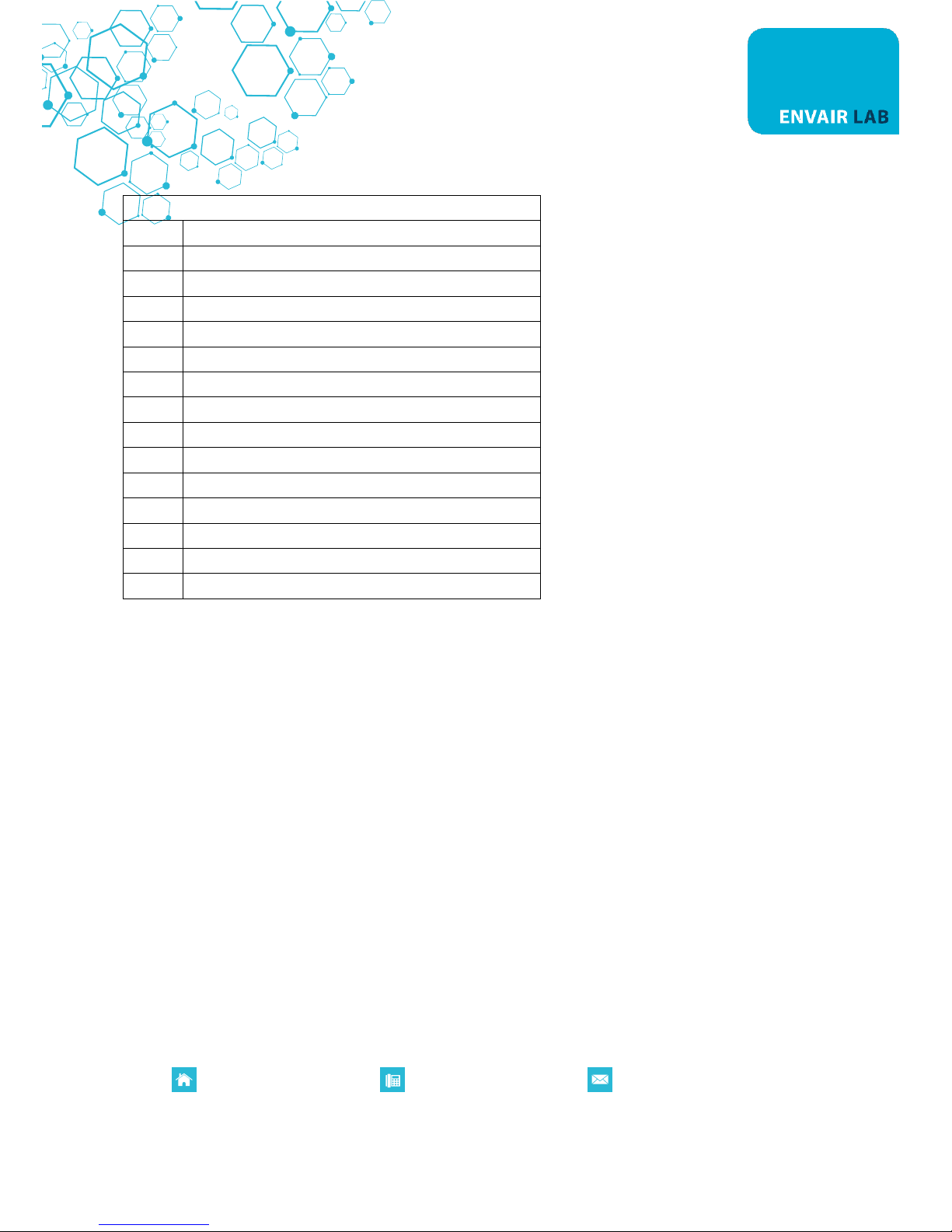
LEGEND
1
Control panel
2
Fastening socket head screws
3
Bracket
4
Charcoal filter
5
Knobs
6
Pre-filter case
7
Control box
8
Lamps
9
Motor fan
10
Screws of motor fan
11
GAS sensor
12
Screws
13
Lock of pre-filter case
14
Air flow sensor
15
Fan
Page 38
Registered in England. Company Registration Number: 10729379 VAT Registration Number: 268 3290 80
P0084EN Rev.03
www.envairlab.co.uk
+44 (0) 1706 228416
14A. MAINTENANCE OPERATIONS DIAGRAM
Page 39
Registered in England. Company Registration Number: 10729379 VAT Registration Number: 268 3290 80
P0084EN Rev.03
www.envairlab.co.uk
+44 (0) 1706 228416
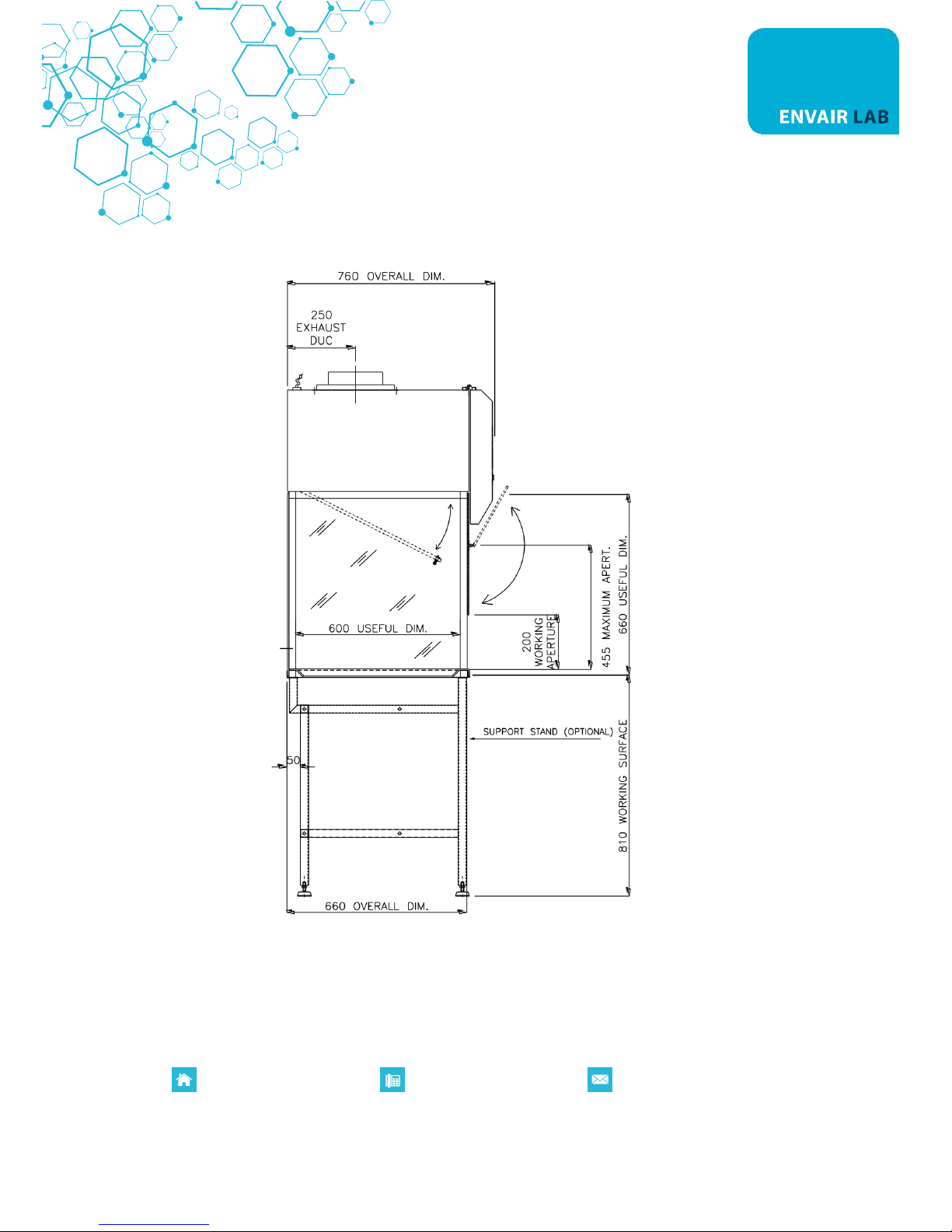
14B. FRONT DIAGRAM
14C.
Page 40
Registered in England. Company Registration Number: 10729379 VAT Registration Number: 268 3290 80
P0084EN Rev.03
www.envairlab.co.uk
+44 (0) 1706 228416
SIDE DIAGRAM
15.
Page 41
Registered in England. Company Registration Number: 10729379 VAT Registration Number: 268 3290 80
P0084EN Rev.03
www.envairlab.co.uk
+44 (0) 1706 228416
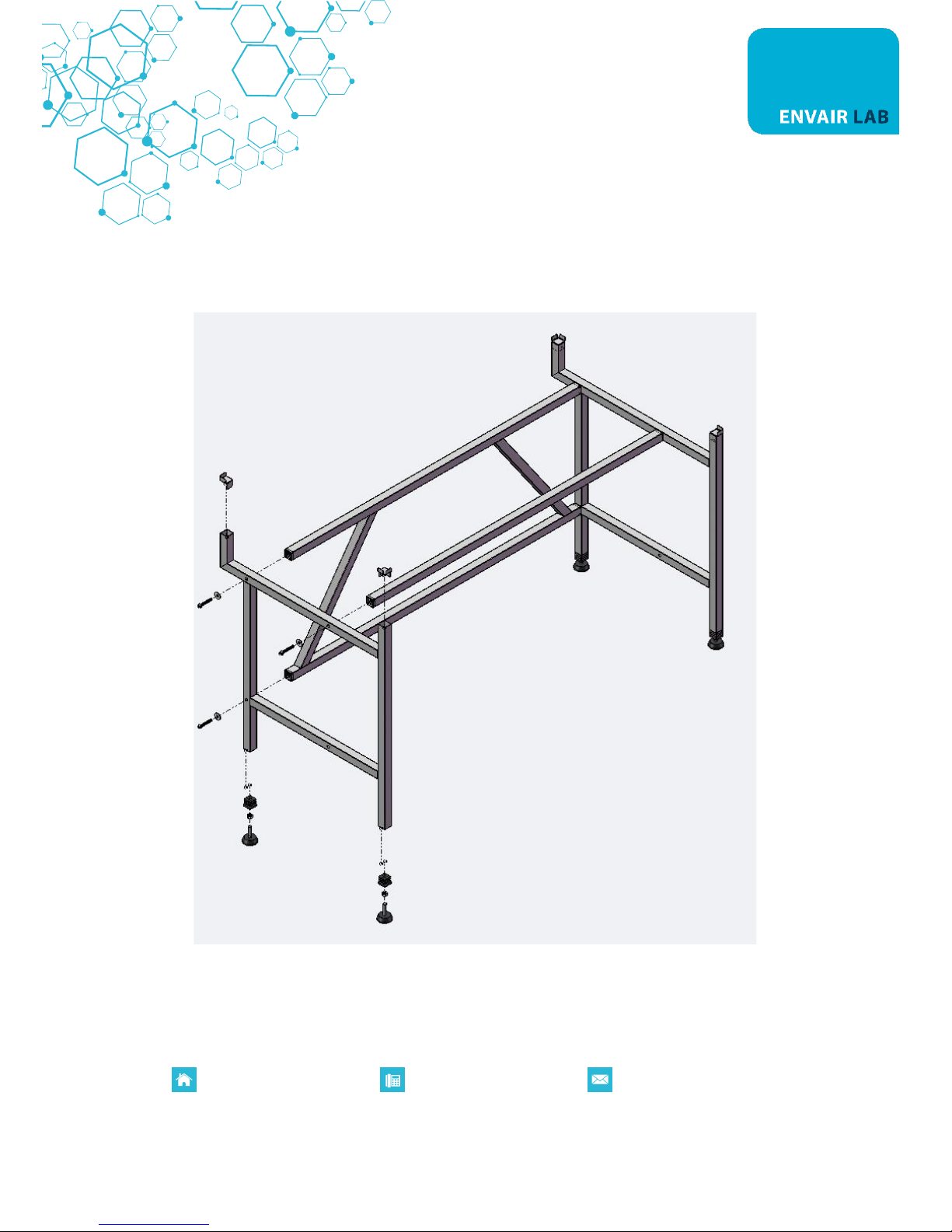
ASSEMBLY DIAGRAM FOR SUPPORT TABLE
The supporting stand is supplied not assembled, with the kit of screws and the feet.
Page 42
Registered in England. Company Registration Number: 10729379 VAT Registration Number: 268 3290 80
P0084EN Rev.03
www.envairlab.co.uk
+44 (0) 1706 228416
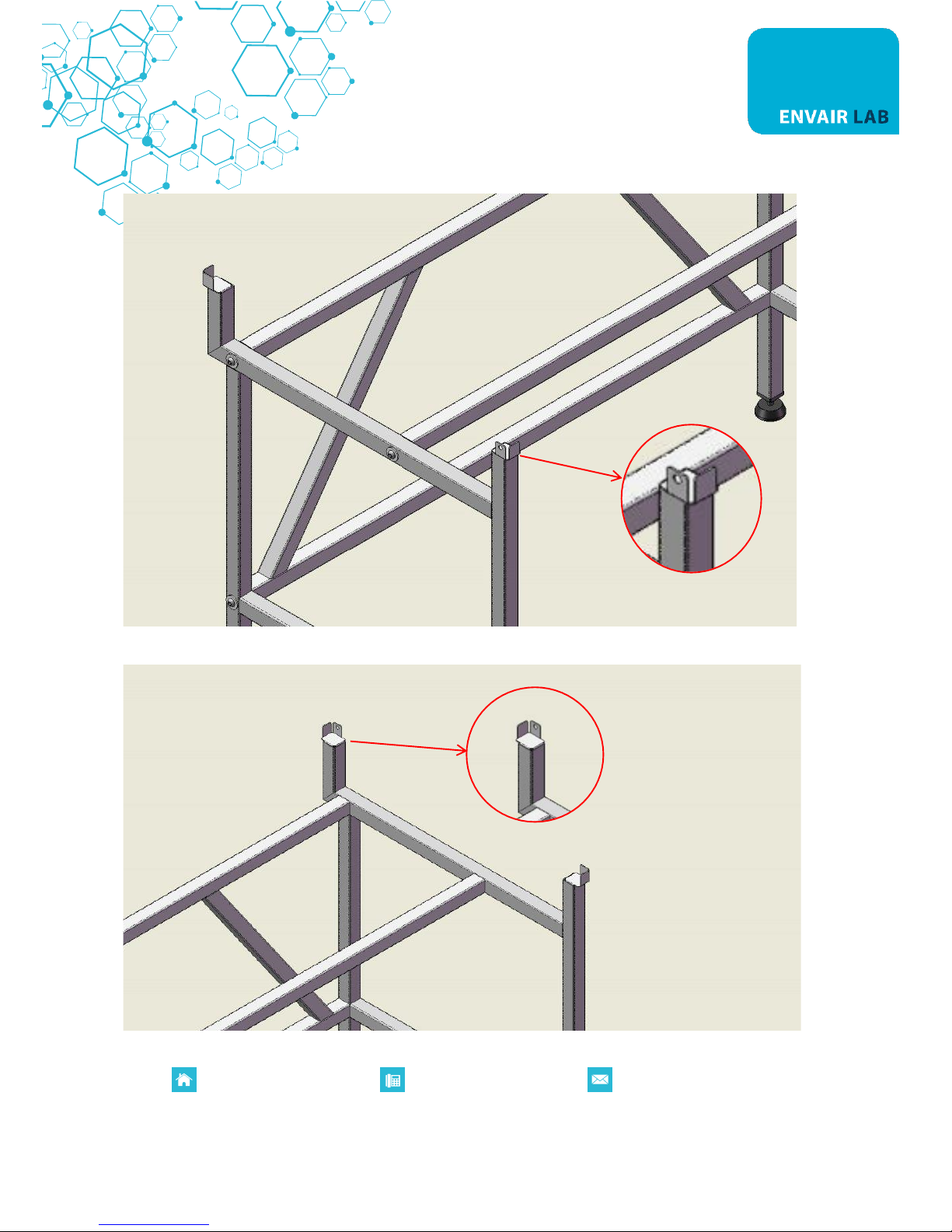
The 4 stand brackets must be installed as follow. 1 bracket with hole in the left front leg
1 bracket with hole in the right back leg
Page 43

Registered in England. Company Registration Number: 10729379 VAT Registration Number: 268 3290 80
P0084EN Rev.03
www.envairlab.co.uk
+44 (0) 1706 228416
The other 2 brackets (left back leg and right front back) upside down
Page 44
Registered in England. Company Registration Number: 10729379 VAT Registration Number: 268 3290 80
P0084EN Rev.03
www.envairlab.co.uk
+44 (0) 1706 228416
16. SENSORS LIST
PCB PLUG
SOFTWARE NAME OF
THE SENSOR
DESCRIPTION
PLUG
Software name
Description
J9 – CPULAF - GAS SENSOR
J4 - CPULAF
S0
Air flow sensor (only ECOCHEM M)
J3 - CPULAF
S1
Window sensor (only ECOCHEM M)
J2 - CPULAF
S2
J3 - PWLAF
S3
Not used
J2 - PWLAF
S4
Not used
Page 45
Registered in England. Company Registration Number: 10729379 VAT Registration Number: 268 3290 80
P0084EN Rev.03
www.envairlab.co.uk
+44 (0) 1706 228416
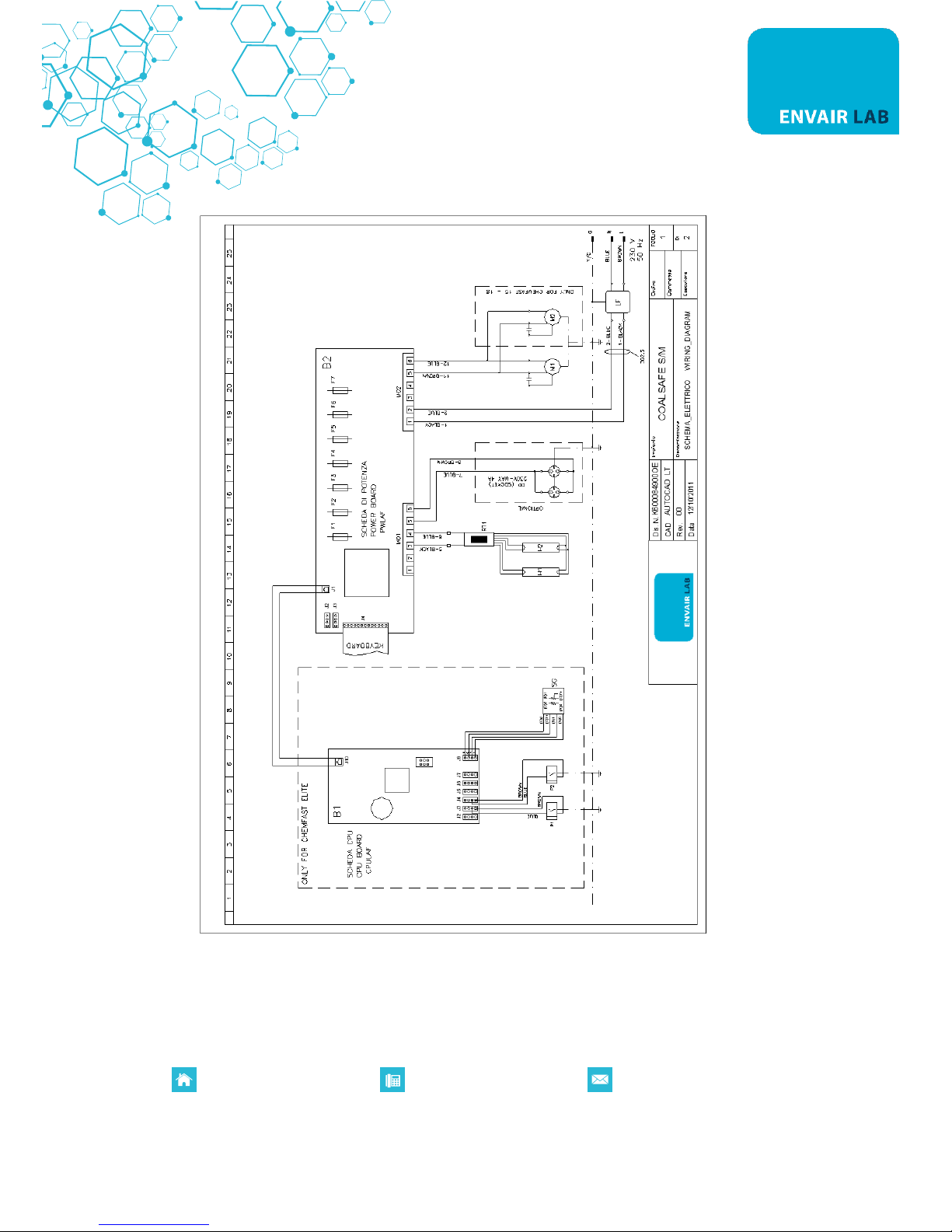
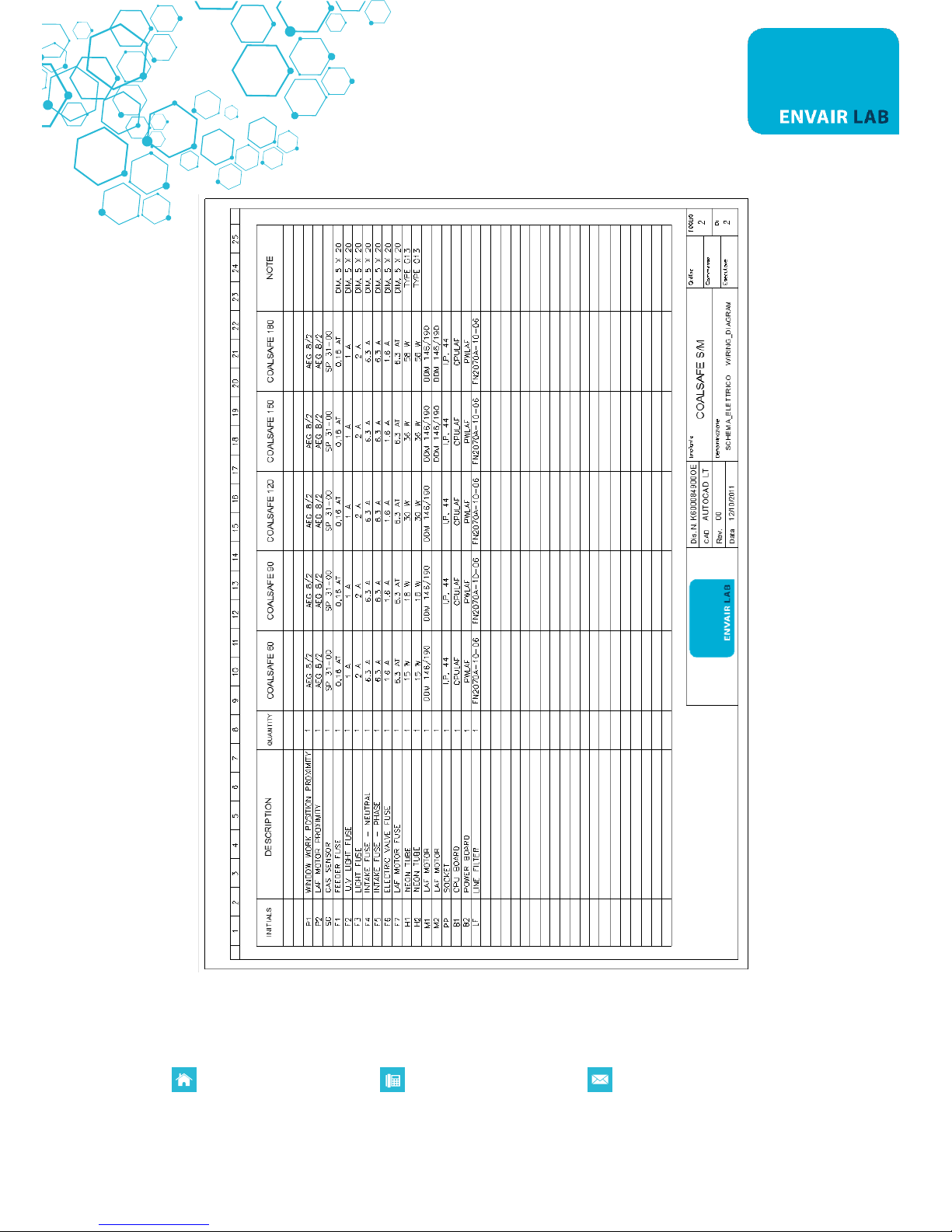
17. WIRING DIAGRAMS
Page 46
Registered in England. Company Registration Number: 10729379 VAT Registration Number: 268 3290 80
P0084EN Rev.03
www.envairlab.co.uk
+44 (0) 1706 228416
Page 47

Registered in England. Company Registration Number: 10729379 VAT Registration Number: 268 3290 80
P0084EN Rev.03
www.envairlab.co.uk
+44 (0) 1706 228416
18. DECLARATION OF CONFORMITY
The undersigned legal representative of the company ENVAIR Lab LTD. hereby declares that the follow
products:
ECOCHEM M/S
Envair Lab Ltd hereby declare that the above product(s) have been designed and manufactured to comply
with the relevant sections of the following standards and directives:
2006/42/EC Directive of the European Parliament and of the Council on machinery
2014/30/UE Directive of the European Parliament and of the Council on the approximation of
the laws of the Member States relating to electromagnetic compatibility
2014/35/UE Directive of the European Parliament and of the Council on the harmonisation of
the laws of Member States relating to electrical equipment designed for use within
certain voltage limits
2011/65/EU Restriction of the use of certain hazardous substances in electronic equipment
2009/125/EU Establishing a framework for the setting of ecodesign requirements for energy-
related products
EN 12469 Biotechnology: performance criteria for microbiological safety cabinets
EN 61010-1 Safety requirements for electrical equipment for measurement, control and
laboratory use Part 1: general requirements
EN 61326-1 Electrical equipment for measurement, control and laboratory use EMC
requirements
Laura Jones
Managing Director
 Loading...