

Page 1
Bluetooth Hands-free BHF2000S
Model Name: BHF2000S
User Manual ver 1.0
BTNetworks Co., LTD 2005 08.24 Ver 3.0
Sample User Guide and not for Commercial
Page 2

Contents
1. OVER VIEW .................................................................................... 3
1.1 ABOUT YOUR DEVICE.................................................................................... 3
1.2 Specifications...................................................................................................
1.3 Box Contents .................................................................................................... 4
2. GETTING STARTED ...................................................................... 5
2.1 CHARGE YOUR DEVICE ................................................................................ 5
2.2 TURING YOUR DEVICE ON AND OFF........................................................... 6
2.3 PAIRING DEVICE WITH YOUR PHONE ......................................................... 7
2.4 CONNECTING WITH YOUR PHONE .............................................................. 8
3. PLACE THE BHF2000S IN YOUR CAR .......................................... 8
4. HOW TO ........................................................................................... 8
4.1 Switch proximity(Gesture sensing)/touch mode ............................................. 8
4.2 Answer/End a call ............................................................................................. 9
4.3 Make a call ....................................................................................................... 9
4.4 Volume control.................................................................................................. 9
4.5 Mute on/off...................................................................................................... 11
4.6 Transfer call .................................................................................................... 12
4.7 Play music*..................................................................................................... 12
4.8 Setting............................................................................................................. 12
5. ADDITIONAL FEATURES .............................................................. 13
5.1 Using your DEVICE with TWO mobile devices .............................................. 13
5.2 FM transmit..................................................................................................... 14
5.3 Download phonebook and caller ID* .............................................................. 14
5.4 Voice Trigger................................................................................................... 12
5.5 Firmware upgrade .......................................................................................... 12
6. VOICE COMMAND......................................................................... 15
7. TROUBLESHOOTING & FAQ........................................................ 17
8. FOR MORE HELP .......................................................................... 19
9. SAFETY and GENERAL INFORMATION .................................... 19
10. CERTIFICATION and SAFETY APPROVALS ............................. 19
11. WARRANTY ................................................................................. 19
www.driventalks.com
Contact: [email protected]
BHF 2000S User Manual v1.0
T . +82.70.7547.7502 F. +82.2.501.1851
2
Page 3
!NOTE: Before using you r new DEVICE, charge and pair it with your selected Bluetooth
wireless technology enabled device.
1. OVER VIEW
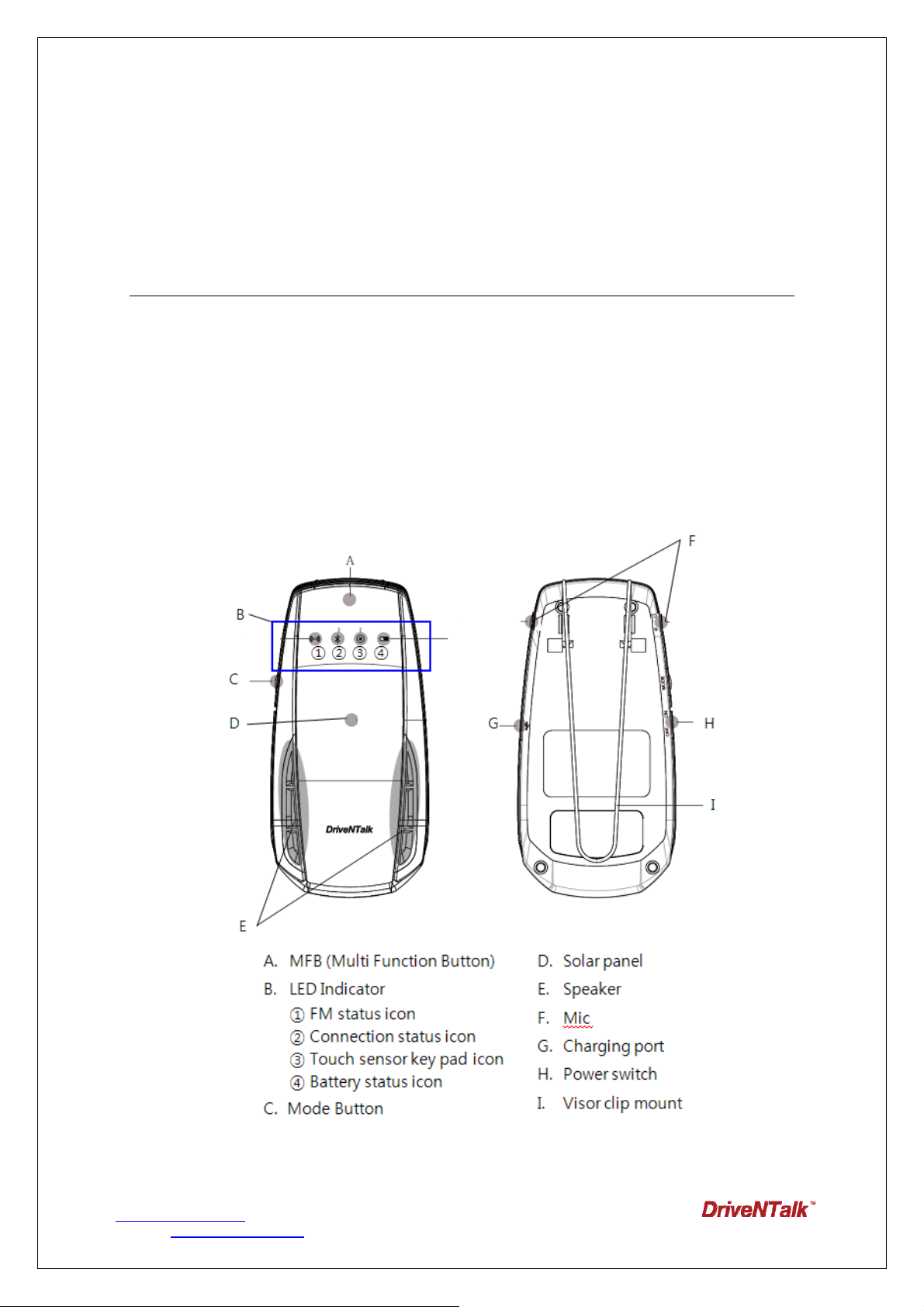
BHF2000S, a sleek style Bluetooth hands-free car kit, realizes a true definition of
‘Bluetooth wireless hands-free’. Its features such as Voice, Sensing, Solar, make
it unnecessary for users to physically touch the unit.
1.1 ABOUT BHF2000S
www.driventalks.com
Contact: [email protected]
BHF 2000S User Manual v1.0
T . +82.70.7547.7502 F. +82.2.501.1851
3
Page 4
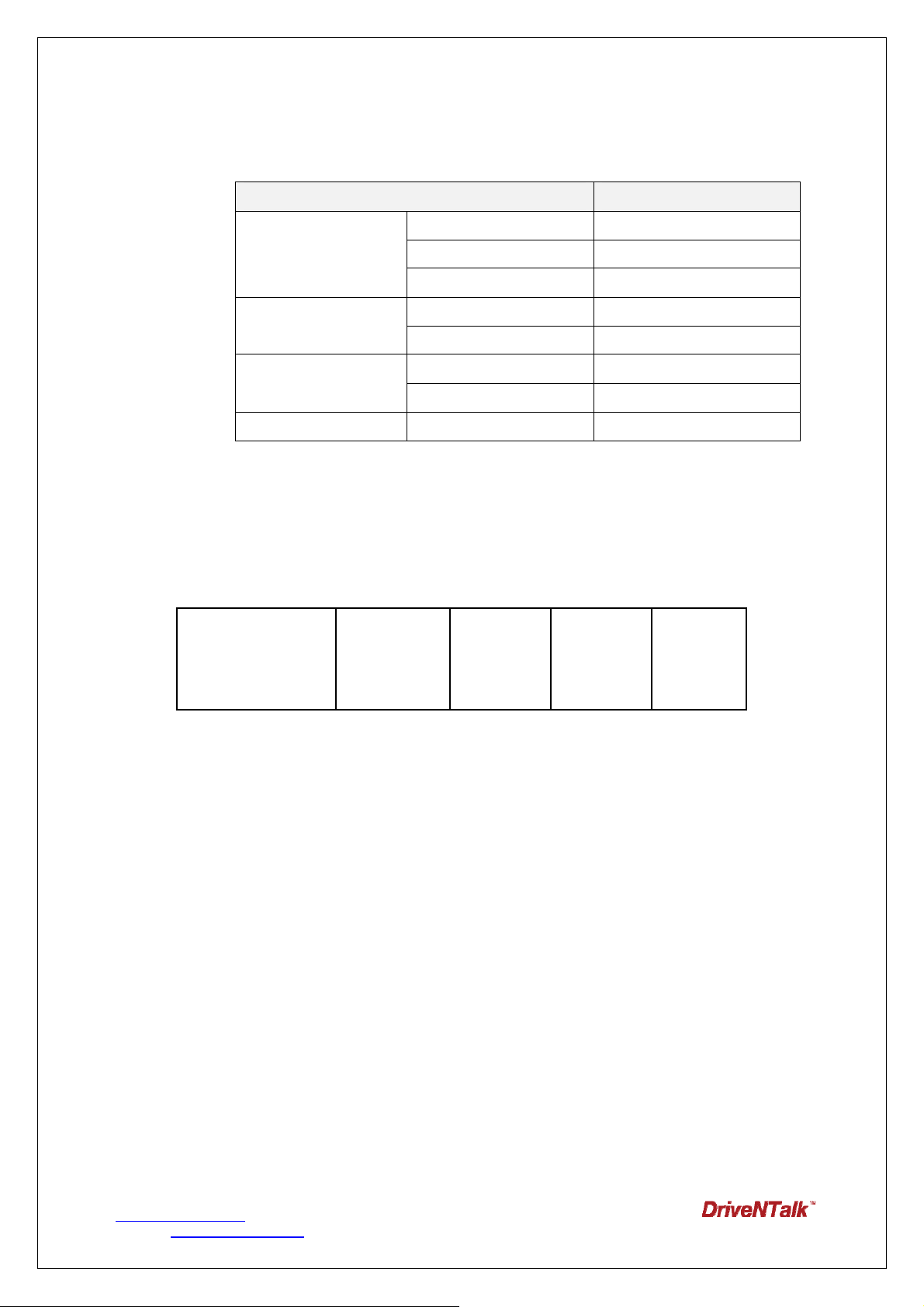
WHAT THE LIGHTS MEAN
LED Indicator BHF2000S Status
Flashes rapidly Pairing mode
Connection satus icon
1.2 Box Contents
Bluetooth hands-free
Car Kit
Solid blue Connected
Flashes every 2 seconds Standby/Idle
Solid blue Touch mode Touch/Gesture sensing
mode
FM status icon
Battery status icon Flashes every 3 second Low battery
USB Cable
Off Gesture sensing mode
Solid red FM mode
Sun visor
clip
Car charger
User Manual
www.driventalks.com
Contact: [email protected]
BHF 2000S User Manual v1.0
T . +82.70.7547.7502 F. +82.2.501.1851
4
Page 5
2. GETTING STARTED
You should follow three steps before using your DEVICE, BHF2000S:
1. Charge your DEVICE.
2. Activate Bluetooth function on your mobile phone (refer to the manual for your
mobile phone)
3. Pair your DEVICE to your mobile phone.
The buttons on the DE VICE perform different f unctions depending on how long you
press it.
Instruction Duration of press
Tap Press briefly (0~1.5 sec)
Double Tap 2 quickly repeated taps
(max 0.5 sec interval between taps)
Press Approx. 1.5~3.0 seconds (1 beep)
Long Press Approx. 3~5 seconds (2 beeps)
Very long Press More than 5 seconds
2.1 CHARGING YOUR DEVICE
Make sure that your DEVICE is fully charged for two ho urs before you start using
.
it
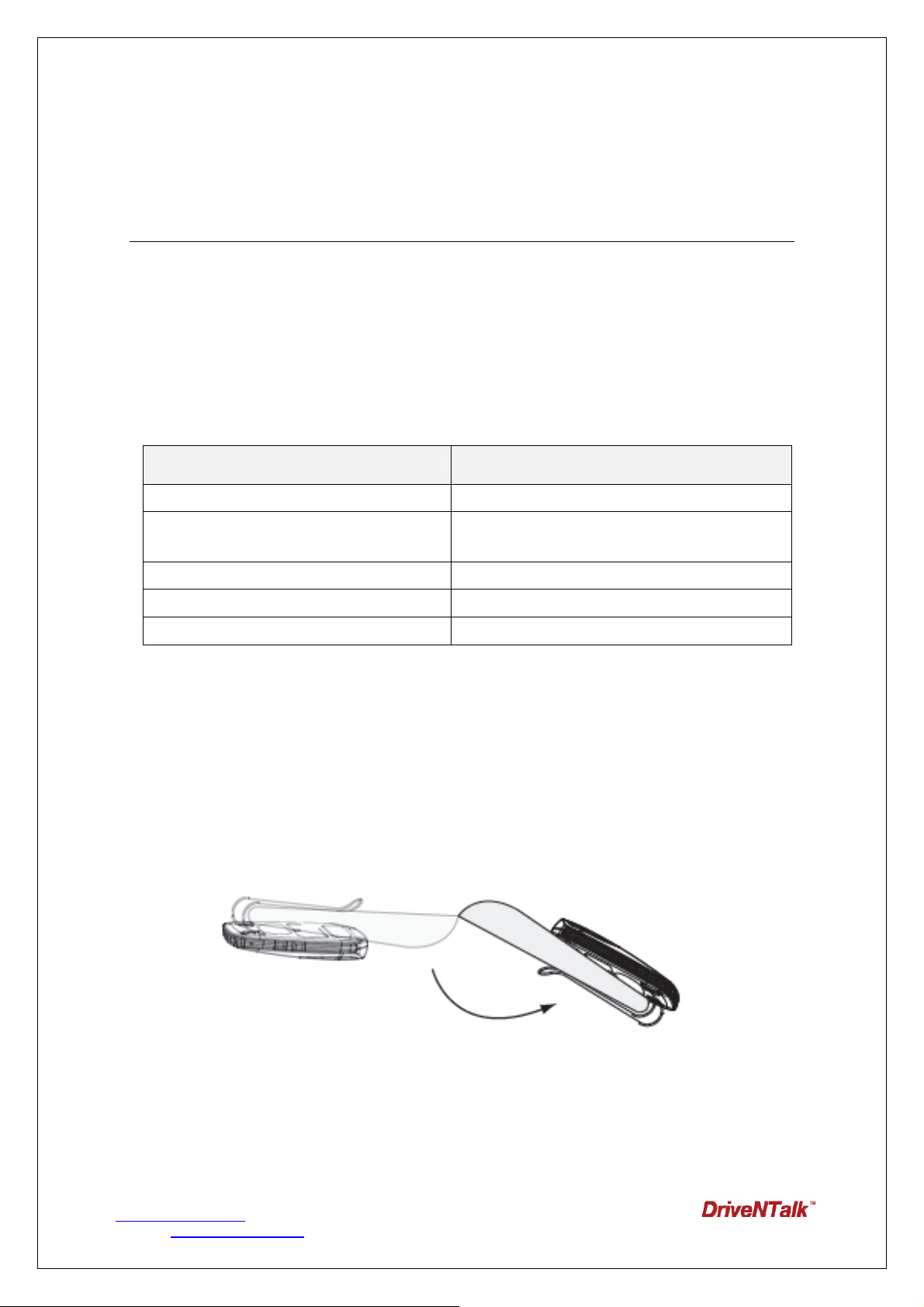
1) Solar Recharging
Sun visor in stallation: Flip the sun visor toward the sun when you get out of your
vehicle.
2) USB Charging
www.driventalks.com
Contact: [email protected]
BHF 2000S User Manual v1.0
T . +82.70.7547.7502 F. +82.2.501.1851
5
Page 6
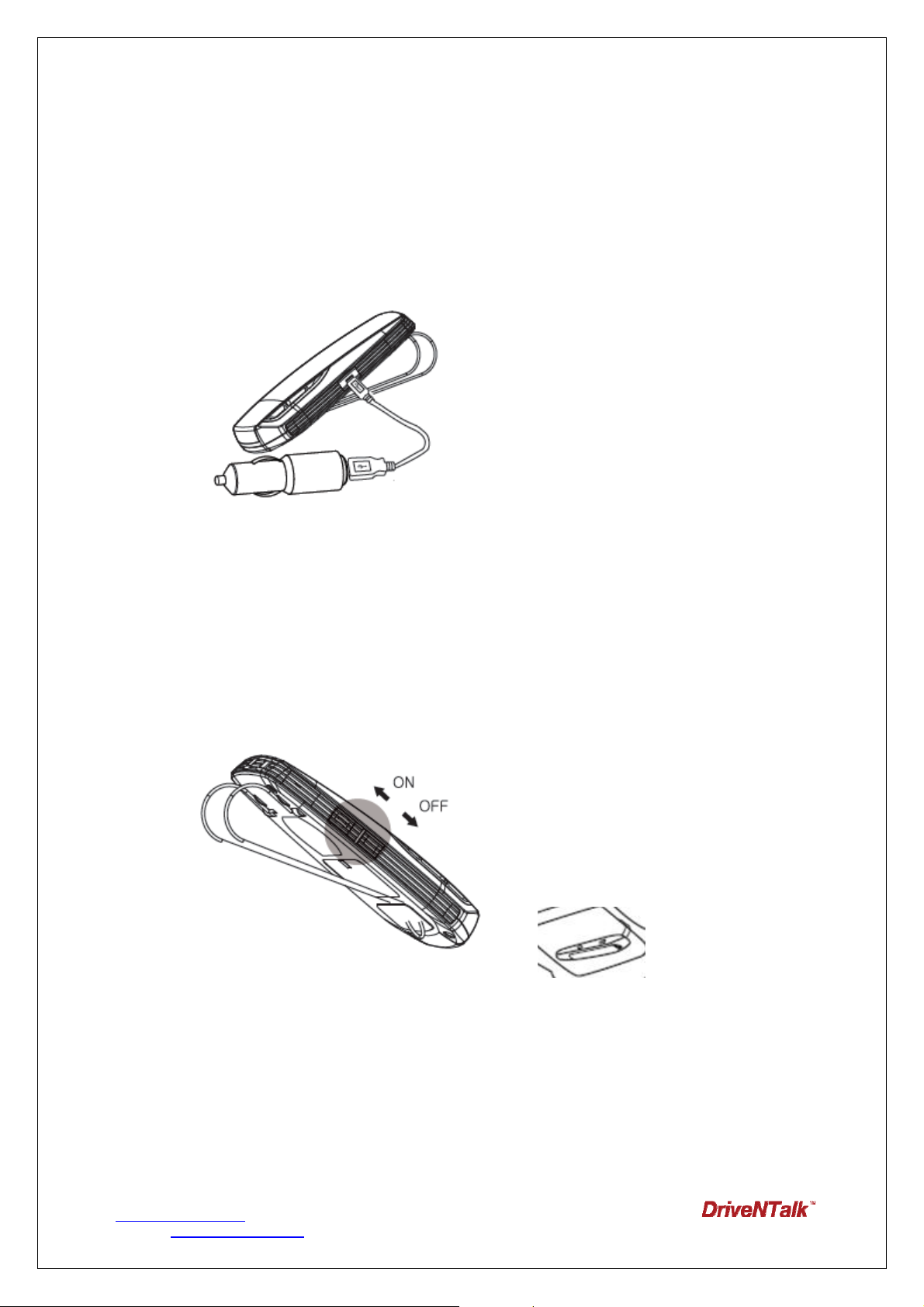
Use the USB cable to con nect the DE VICE to the car charger. Plug the ca r cha rger
into your car ’s power outlet. The Battery st atus i con will light up red while charging.
When fully charg ed the Battery st atus icon will turn green. It t akes app roximately 2
hours 30 minutes to fully recharge the DEVICE.
Do not use chargers from any other devices as this may damage your DEVICE.
※When the DEVICE batt ery is l ow, Battery status icon on th e DEVICE wil l blink,
indicating that it needs to be recharged.
2.2 TURNING YOUR DEVICE ON AND OFF
->
!NOTE:
When disco nnected from your mobil e phon e, T he DEVICE will automatically turn into sle ep
mode af ter 1 minutes. O r you can turn of f t he power switch manually wh en not usi ng the
DEVICE.
www.driventalks.com
Contact: [email protected]
C oming ba ck i nto your ve hicle, with i mpact fro m cl osing your ve hicle d oor, th e D EVICE will
BHF 2000S User Manual v1.0
T . +82.70.7547.7502 F. +82.2.501.1851
6
Page 7
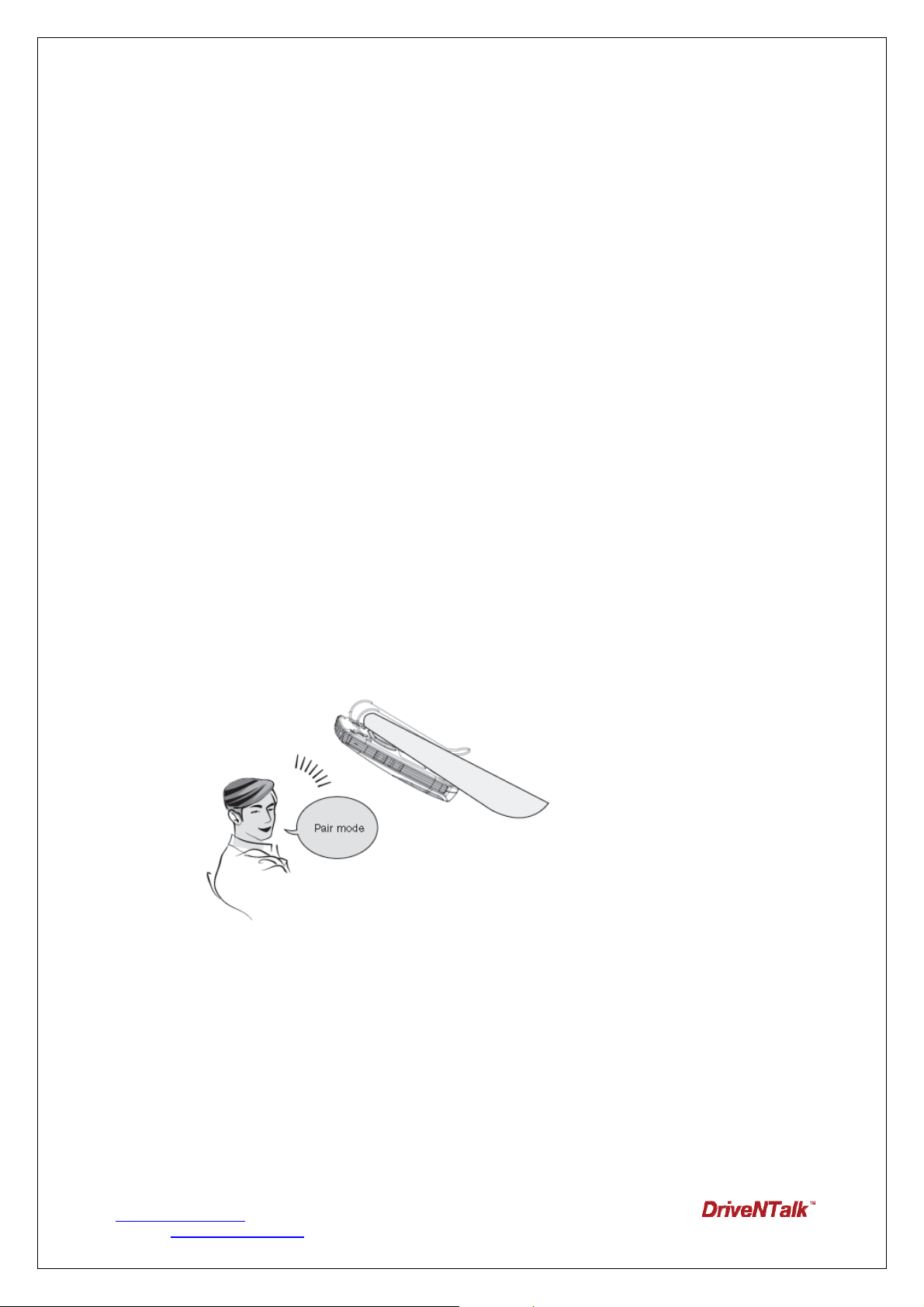
automatically turn on if the DEVICE power switch is on.
2.3 PAIRING THE DEVICE WITH YOUR MOBILE PHONE
Speakerphones are conn ected to mobile phone s usi ng a proced ure call ed ‘p airing’. By
following a few simple steps, a p hone can be paired with a speakerphone in a matter of
minutes.
1. a) First time pairing:
When you turn on your DEVICE for first time, it will be in pairing mode.
B) Enter pairing mode:
Turn the DEVICE on.
1) Pre ss a nd hold the MFB until you hear the an nouncement “Pair mod e” and the
Connection status icon will begin to flash.
2) Tap the M FB or say “Hello, Drive NTalk (drive and talk)” when the voice trigger is o n.
When you hear “Say a comma nd” anno uncement, say “Pai r mode. ” Th en, the
Connection status icon will begin to flash.
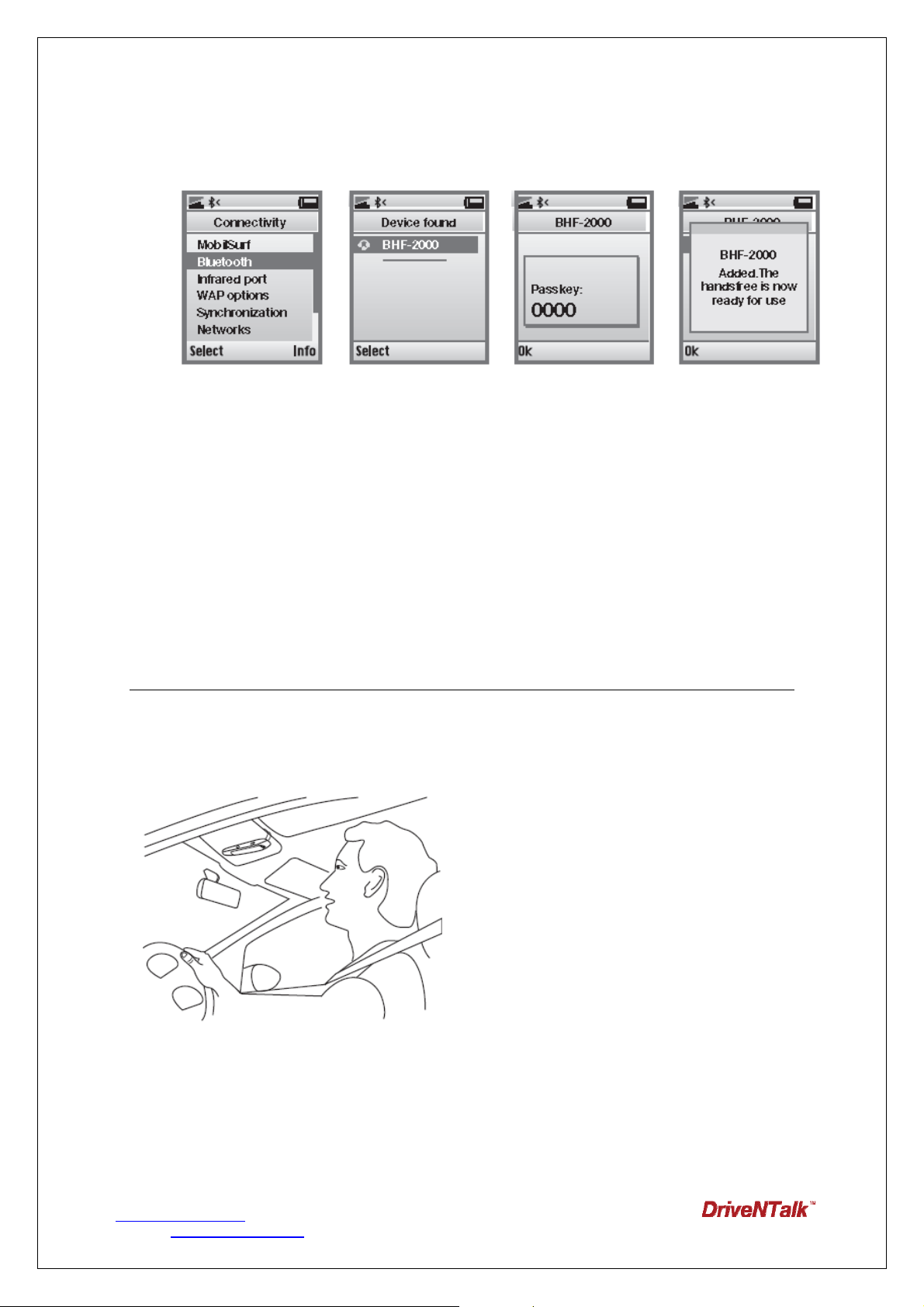
2. Activate Bluetooth function on your m obile pho ne. Then set your mobile phone to
search for Bluetooth enabled devices and select ‘BHF2000S’ on the list.
3. Press ‘OK’ on the phone and if you are asked for a PIN code, enter the PIN code ‘0000’
(4 zeros).
!Note:
Latest mo bile phon es such a s sm artphone may not ask to e nter PIN co de and connect
www.driventalks.com
Contact: [email protected]
BHF 2000S User Manual v1.0
T . +82.70.7547.7502 F. +82.2.501.1851
7
Page 8
automatically.
2.4 CONNECTING WITH YOUR MOBILE PHONE
Once the DEVICE and phone have been paired, they will automatically connect when the
DEVICE is on and Bluetooth is activated on your mobile phone. The DEVICE can be used
when it is “conne cted” to the phone. The D EVICEs are p aired, but if not immediately
connected, tap the MFB.
3. PLACE THE DEVICE IN YOUR CAR
The DEVEICE sits discreetly and conveniently on the sun visor using the att ached clip.
For optimal sound quality, place the DEVICE right in front of you and sp eak directly to
the DEVICE.
<
4. HOW TO
4.1 Switch Gesture sensing /Touch mode
www.driventalks.com
Contact: [email protected]
BHF 2000S User Manual v1.0
T . +82.70.7547.7502 F. +82.2.501.1851
8
Page 9

Default is touch mode. The Touch sensor key p ad icon will be turned on when Touch
mode. In order to switch gesture sensing mode, press the MFB and the Mode button
together for 3 seconds. You will hear th e announcement “Gesture sensing mode”, and
it will change mode. The DEVICE will remem ber it s last setting mode wh en turnin g
back on.
4.2 Answering/Ending a call
Answer a call: Tap the MFB on your DEVICE to answer a call.
End a call: Press the MFB on your DEVICE to end an active call.
4.3 Making a call
Using your mobile phone
Call will automatically transfer to your DEVICE*. If it does n ot, please press and hold the MFB for 5
seconds on the DEVICE.
Via your DEVICE
You can place a call with the DEVICE in following ways:
1) Call favorite
Tab the MF B or sa y “H ello, DriveNTalk” when th e vo ice trigger is on. When ‘S ay a command’
message is heard, say any Call favorite. You can choose amongst 7 Call favorites ‘Call home, call
office, Call favorite 1~5”. The DEVICE will dial the number saved on each Call favorite numbers.
!NOTE Refer to ‘4.8 Setting’. You can save numbers you want on each call favorite numbers.
2) Redial last number
• With the DEVICE
Press and hold the MFB for 3 seconds When the DEVICE is connected to your mobile phone.
• Us ing Voice Command
Tab the MF B or sa y “H ello, DriveNT alk” when vo ice trig ger is on. W hen ‘Sa y a co mmand’ i s
heard, say ‘Redial’. The DEVICE will redial the last outgoing number.
4.4 Volume control
4.4.1 Volume Up
1. Slide your finger to the right on the touchpad.
www.driventalks.com
Contact: [email protected]
BHF 2000S User Manual v1.0
T . +82.70.7547.7502 F. +82.2.501.1851
9
Page 10

2. You can v olume up by using gesture sen sing. Move your hand to the right way in
front of the DEVICE.
4.4.2 Volume Down
1. Slide your finger to the left on the touchpad.
www.driventalks.com
Contact: [email protected]
BHF 2000S User Manual v1.0
T . +82.70.7547.7502 F. +82.2.501.1851
10
Page 11

2. You can volume down by using gestu re sensing. Move your hand to the left way in
front of the DEVICE.
!NOTE: For smooth gesture sensing operation, keep 3cm distance from the DEVICE
to your finger
!NOTE: In FM mode, volume adjustment only controlled by your vehicle’s stereo.
4.5 Mute on/off
Double t ap the Mod e butt on to mute y our mi crophone an d ag ain to turn mute of f. The
mute beep tone will be heard every 5 seconds.
www.driventalks.com
Contact: [email protected]
BHF 2000S User Manual v1.0
T . +82.70.7547.7502 F. +82.2.501.1851
11
Page 12

4.6 Transfer call
1) Press and hold the MFB until you hear two beeps to transfer a call from the DEVICE to
the mobile phone.
2) Press an d h old the MFB until you hea r two bee ps to transfe r a call from the mobile
phone to the DEVICE.
4.7 Play music*
If your mobile phon e su pports A2DP audio streaming then you can tran sfer music from
your mobile phon e to the DEVICE. Musi c streaming can be con trolled from your mobil e
phone.
4.8 Setting
Entering Setting Menu
1. Tap the MFB or say “Hello, DriveNTalk” when the voice trigger is on.
2. After ‘Say a command’ message is heard, say ‘Settings menu’.
3. The DEVICE will announce ‘Settings menu, you can say incoming call
announcement, save favorite or cancel’. Say what you want to do or cancel to
exit setting.
Incoming Call Announcement
Enable or disable incoming call announcement at Settings Menu.
1. Say ‘Incoming call announcement’.
2. According to the current setting, the DEVICE will announce ,
‘The incoming call announcement is on. Do you want to turn it off?’
or ‘The incoming call announcement is off. Do you want to turn it on?’
3. Say ‘yes’ or ‘no’.
4. According to your answer, the DEVICE will announce ‘The incoming call
announcement is on’ or ‘The incoming call announcement is off’ and exit
setting.
www.driventalks.com
Contact: [email protected]
BHF 2000S User Manual v1.0
T . +82.70.7547.7502 F. +82.2.501.1851
12
Page 13

How to save Call Favorite
• Under settings menu, you can save a phone number on the DEVICE.
1. Say ‘Save favorite’.
2. The DEVICE will announce ,
‘A phone number can be saved as a favorite after you have received an
incoming call from X-X-X-X-X’.
‘Tell which favorite you want me to save it as.’
‘You can say, Call Home, Call Office, Call Favorite followed by number 1
to 5 or cancel’.
3. Say what you want to save or cancel to exit setting.
4. If you say ‘Call home’, the DEVICE will announce ‘Phone number saved as
call home’ and ‘Is that right?’ for your confirmation.
5. If you say ‘yes’, the DEVICE will announce ‘Phone number saved’ and exit
setting. If you say ‘no’, the DEVICE exit settings without saving.
• Quick Voice Dial Editor
Visit DriveNTalk website (www.driventalks.com) and download Quick Voice
Dial Editor from ‘Support & Download’ menu. You can manually pre-install
numbers of ‘Favorite 1~5’, ‘Office’, ‘Home’ and service numbers of ‘Call
Information’ and ‘Text Message’.
!Note
This progra m can only run in Microsof t Windows X P and Windows V ista,
Windows 7 (32bit).
5. ADDITIONAL FEATURES
5.1 Using your DEVICE with TWO mobile devices
The DEVICE is ca pable of having two m obile ph ones (o r oth er Bluetooth device s)
connected to the DEVICE at the same time. This will give you the freedom of having only
one DEVICE to operate both of your mobile phones. Please note that Last Number Redial
will call numbers from the primary phone (last connected phone).
If the DEVICE is connected to two phones, pl ease note that the musi c will play from the
www.driventalks.com
Contact: [email protected]
BHF 2000S User Manual v1.0
T . +82.70.7547.7502 F. +82.2.501.1851
13
Page 14

primary phone(last connected AVRC profile).
5.2 FM transmitter
You can tran smit calls an d music from your mobile phone to your vehicle’ s stereo using
the DEVICE. Press and hold the Mo de button for 5 se c and set your ra dio to the
announced frequency.
If you need to chan ge fre quency, slide your finger to the right/lef t on the touch key p ad.
For scan ning freque ncy, press the mode button for 3 sec. The FM transmit will
automatically turn off after 1 minutes if the function is not used.
5.3 Download phonebook and caller ID*
The DEVICE supports PBAP function; you can download your contacts to the DEVICE up
to 2,000 cont acts. The first time you conne ct your DEVICE to yo ur mobile ph one, your
contacts will be transferred automatically to the DEVICE.
!NOTE: B HF2000S support multi-p oint function, th e DEVICE can save up to 1,000
contacts per connected phone.
If you add contacts to your mo bile phon e an d need to update you r downloaded
phonebook, you can start manual update by very long press on the Mode butt on when
the DEVICE is turned on and connected to your mobile phone.
5.4 Voice Trigger
You can simply activate the DEVICE by saying ‘Hello DriveNTalk(drive and talk)’
To activate the voice trigger mode on/off, tab the mode button. Battery standby
time is about 65hours when the voice trigger is on, about 270 hours when the
voice trigger is off.
5.5 Firmware upgrade
Download latest firmware and user guide fro m ‘www .driventalks.com’, refer to
Technical S upport if re quired. Once latest firmware is do wnloaded to your PC,
www.driventalks.com
Contact: [email protected]
BHF 2000S User Manual v1.0
T . +82.70.7547.7502 F. +82.2.501.1851
14
Page 15

use our USB cable to d ownload to your DEVICE. For firmware downloa d mode,
turn your DEVICE on as pressing the Mode button.
!Note
This program can onlyrun in Microsoft Windows XP and Windows Vista, Windows
7 (32bit).
6. VOICE COMMAND
You can simply activate voice command mode by saying ‘Hello DriveNTalk(drive and
talk)’ and the DEVICE will be ready to receive your voice commands.
You can use “What can I say” command to listen to available commands. Following is the list
of the available commands.
Voice commands Proceed this way
What Can I Say?
Pair Mode
Am I Connected?
Phone Command
Redial
Call Information
Call Favorite 1~5 Call number preset a s ` C a l l f a v o r i t e s 1~5’2)
Call Office Call number preset as `Call O f f ic e’
Call Home Call number preset a s ` C a l l Home’
Text Message Connect to voice to text services3)
Settings Menu Enter to settings menu
Cancel Cancel the commands
Tell you all available commands
Enter the pairing mode
Tell you if connected to a phone
Enter voice recognition function (if mobile phone support)
Dial the last dialed number
1)
Connect to Microsoft’s Bing Search Center
Yes Answer “yes” for yes/no question
No Answer “no” for yes/no question
www.driventalks.com
Contact: [email protected]
BHF 2000S User Manual v1.0
T . +82.70.7547.7502 F. +82.2.501.1851
15
Page 16

Answer Answer the incoming call
Check Battery Check the battery status
Ignore Reject the incoming call
1) Bing will only provide US based information. If you are calling outside of US,
long distance charges may apply.
2) Say “Settings menu” to save the last incoming call number, or download ‘Quick
oice Dial Editor’ for easy storing at www.driventalks.com. If there is no last
incoming call, or you do not set the numbers, it will not activate.
3) To use this service, you need to register voucher code at
www.driventalks.com , “Voice to Text, Dial2Do”. Please read section 5
‘Special features to access services in USA / Canada’ and check the service
number before you using.
* Phone dependant
7. Specifications
Bluetooth
RF Power
Profile
Acoustic Quality
Advanced UI
FM Transmitter
Power
Talk Time
V 2.1 / EDR compliant
Class 2
HFP, HSP, PBAP, A2DP
Noise suppression / Echo cancellation
Dual Mic. (Broadside)
Voice Command, TTS, Voice prompt
Gesture Sensing / Touch sensor keypad
G sensor: Auto power-on & re-connecting
Solar recharging, Li-poly battery
13 hrs
Stand by Time
Etc.
www.driventalks.com
Contact: [email protected]
BHF 2000S User Manual v1.0
15 days(Voice trigger mode: 65 hrs)
Multi connection, Micro USB I/O
T . +82.70.7547.7502 F. +82.2.501.1851
16
Page 17

8. TROUBLESHOOTING & FAQ
►
Is my phone compatible?
If your mobile phone has a Bluetooth feature, it is compatible with DriveNTalk
hands-free. Refer to the user’s guide of your mobile phone.
►
I am having pairing problems.
To pair your mobile phone correctly, please refer to our user guide at Support &
Download.
If you still have problem connecting your mobile phone, please erase DEVICE that
appears on the Bluetooth search and try once again or contact our info for support.
►
What is the pin number for a Bluetooth connection?
The pin number is 0000 (4 zeros).
►
My phone has been paired, should I pair it every time I use?
Once it has been paired, BHF2000S will automatically connect to your mobile
phone. You can have paired links with up to 8 phones.
►
I have more than 2 mobile phones. Can I connect both phones to
BHF2000S at the same time?
BHF2000S supports multi point function. Up to two phones can be connected. It
also supports paired links with up to 8 phones.
►
How can I know my phone is connected?
- When your mobile phone is connected to a Bluetooth device, the Bluetooth symbol
on your mobile phone will change a bit to indicate that this is the case. According to
the manufacturers, some phones show a headset or a car symbol.
- You can also use the Voice command of BHF2000S. Tab the MFB or say “Hello,
DriveNTalk” and ask “Am I connected?”, then it will answer “Your phone is
connected” or “No phone found”.
►
How to transfer the call from speaker to my phone?
www.driventalks.com
Contact: [email protected]
BHF 2000S User Manual v1.0
T . +82.70.7547.7502 F. +82.2.501.1851
17
Page 18

During a call, press the CALL button and will transfer to the phone, but do not do
this while you are driving.
►
If there is a second call while I am on the phone, how can I handle
it?
st
1) 1
call on hold, 2nd call answer
Press the MFB to accept the second incoming call, then the 1st call will be
automatically put on hold. If you want to switch back the call, press the CALL
button again.
st
2) 1
call end, 2nd call answer
Tap the MFB, then you can answer the second call. 1
nd
3) 2
call reject
Press and hold the MFB, then you can reject the 2
st
call will be terminated.
nd
call and keep the 1st call.
► I want to save my call favorite numbers through the ‘Settings
menu’ Voice command. However, it seems not working.
You can only save the call favorite numbers by your voice when there is a last
incoming call number. For easier storing, visit our website download ‘Quick Voice
Dial Editor’.
►
How can I update my BHF2000S?
Download our latest firmware from Support & Download menu to your PC; use our
USB cable to connect BHF2000S.
DEVICE on as pressing the Mode button.
To go to firmware download mode, turn you r
►
►
I cannot hear anything from my DEVICE.
Increase the volume in the DEVICE. Ensure that the DEVICE is paired to a device
that is playing. Make sure your mobile phone is connected to the DEVICE by
tapping the MFB button.
www.driventalks.com
Contact: [email protected]
BHF 2000S User Manual v1.0
T . +82.70.7547.7502 F. +82.2.501.1851
18
Page 19

8. FOR MORE HELP
8.1 Customer care
If you are having trouble getting the BHF2000S to work, please visit our website
www.driventalks.com
BHF2000S to a store and we will help you through any difficulty you may have.
for help and support. Please contact us before returning the
www.driventalks.com
8.2 Special features to access services in USA /
Canada
1. Call information
You can say ‘Call information’ to search for local and business listings with Bing™
411. Find news, directions, restaurant locations, weather forecasts, movie show
times, and more.
For more information, visit to the following web-site,
http://www.discoverbing.com/mobile/411/
! Note
Bing is a free US based information service. Long distance charges may apply when
using this service outside a US calling area.
2. Text message (Voice to Text Service)
You can say ‘Text message’ to use voice to text service. Send SMS, e-mail and
more by using your voice. DriveNTalk provides a 90 days free voucher card of the
voice to text service to its users which voucher codes need to be registered before
using this service. All rights and responsibilities of the services are belonging with
Dial2Do service provider. For more information, please go to www.driventalks.com
and search Voice to Text, Dial2Do.
! Note
Before you use this service, please check if a proper service number is stored in
your BHF2000S according to where you are. You can set the 'Text message' number
through Quick Voice Dial Editor program. Please visit at www.driventalks.com to
download the program.
www.driventalks.com
Contact: [email protected]
BHF 2000S User Manual v1.0
T . +82.70.7547.7502 F. +82.2.501.1851
19
Page 20

[Dial2Do Service No.]
* USA
65 03600959
* Canada
Ont ario: 4168002218
Quebec: 5149073174
Albert a: 7806281814
C algary, Alberta: 4037751217
V ancouver, British Columbia: 6044841955
9. Safety and General Information
This safety and general information should be followed to safely use your BHF2000S.
- DriveNTalk is not respon sible for any consequ ences arisi ng from insubordinations of this
safety information.
。Use only p rovided chargers spe cifically desig ned for your DEVICE. Incom patible chargers
can cause serious injuries or damage to your DEVICE.
。Keep your DEVICE away from small children and pet s. Small p arts may cau se chocking or
serious injury if swallowed.
。Never place your DEVICE on or in heating dev ices, Such as microw ave ovens, stoves, or
radiators. Battery may explode when overheated.
。Do not allo w your DEVICE to get w et. Liquid and moisture can cau se serious dam age to
electric devices.
。Do not separate, repair nor remodel the DEVICE arbitrarily. If repair is needed, please contact
us or your dealer.
。Do not use any chemica l solvents o r detergent. The use of che micals on the DEVICE ma y
cause damage to the DEVICE. Turn the DEVICE off and use a soft dry cloth to clean the phone.
。Danger of explosion if battery is inco rrectly re placed. Repl ace only wit h the same or
equivalent type.
www.driventalks.com
Contact: [email protected]
BHF 2000S User Manual v1.0
T . +82.70.7547.7502 F. +82.2.501.1851
20
Page 21

Declaration of Exemption
- Manufacturer , Dealers, Retailers ar e not respo nsible for an y l oss caus ed b y operation that does no t
follow instructions in this manual.
- The explanations and specifications in this guide are for current version of BHF2000S. A later version of
this guide might be available in electronic format at DriveNTalk’s website at www.driventalks.com.
- We reserve the right of improvin g and changing the product reliability, features and appearance design
without notice in advance.
10. Certification and Safety approvals
FCC Information to User
This equipment has bee n tested and found to compl y with the lim its for a Class B di gital device, pursuant
to Part 15 of the F CC Rules. These limits are desig ned to provide reas onable protecti on against harmful
interference in a residential in stallation. This equipment ge nerates, uses and can radi ate radio frequency
energy a nd, if not inst alled a nd used i n accordance with the instructio ns, may cause ha rmful interference
to radi o comm unications. H owever, there is no g uarantee that interfere nce will not occ ur in a particular
installation. If this equipment does cause harmful interference to radio or television reception, which can be
determined by turning the equipment off and on, the user is encouraged to try to correct the interference by
one of the following measures:
• Reorient or relocate the receiving antenna.
• Increase the separation between the equipment and receiver.
• Connect the equipment into an outlet on a circuit different from that to which the receiver is con-nected.
• Consult the dealer or an experienced radio/TV technician for help.
Caution
Modifications not express ly approved b y t he p arty r esponsible for co mpliance co uld void the us er’s
authority to operate the equipment.
FCC Compliance Information : This device complies with Part 15 of the FCC Rules. Operation is
subject to the following t wo conditions: (1) T his dev ice ma y n ot cause harmful interfe rence, an d (2) this
device must accept any interference received, including interference that may cause undesired operation
www.driventalks.com
Contact: [email protected]
BHF 2000S User Manual v1.0
T . +82.70.7547.7502 F. +82.2.501.1851
21
Page 22

11. W arranty
Limited One (1) Year Warranty
DriveNTalk (“DNT”) warrant s this p roduct to b e free from defect s in materials a nd
workmanship (subject to the terms set forth below) for a period of one (1 ) year from the
date of purchase (“Warranty Period”).
During the Warranty Period, DNT will repair or replace (at DNT’ s sole discretion) this
product or any defective parts (“Warranty Service”).
If repair or replacement is not commercially practicable or cannot be timely made, DNT
may choose to refund to you the purchase price paid for the affected product. Repair or
replacement under the terms of this Warranty does not give right to any e xtension or a
new beginning of the period of warranty.
Claims under the Warranty
To obt ain W arranty Service, please cont act the DNT’ s dealer from which you
purchased t his product. You will need to return the product to the dealer in either it s
original packaging or packaging affording an equal degree of protection.
The following information must b e presente d to obt ain W arranty Service: (a) the
product, (b) proof of pu rchase, which clear ly in dicates the name and address of t he
dealer, the date of purchase and the product type, and (c) reason for return.
As part of DNT’s efforts to reduce environmental waste you understand that the product
may consist of recondit ioned equip ment that cont ains use d component s, some of
which have been rewo rked. The u sed compo nents all live up to DN T’s h igh qu ality
standards and comply with DNT’s product performance and reliability specifications.
You understand that replaced parts or components will become the property of DNT.
Limitation of Warranty
This W arranty is only valid for the original purchaser and will automatically terminate
prior to expiration, if this product is sold or othe rwise transferred to another p arty. T he
warranty provided by DNT in this statement applies only to products purchased for use,
www.driventalks.com
Contact: [email protected]
BHF 2000S User Manual v1.0
T . +82.70.7547.7502 F. +82.2.501.1851
22
Page 23

and not for resale. It does not apply t o open box purchases, which are sold “as is” and
without any warranty.
Specifically e xempt from warranty are limit ed-life consumable compon ents subje ct to normal
wear and tear, such as cables, mount, clip, tapes, cushions, modular plugs, decorative finishes,
batteries, and other accessories.
This Warranty is invalid if the factory-a pplied serial number, date code label, or pro duct label
has been altered or removed from the product.
This Warranty does not cover defects or damages that result from: (a) improper storage, misuse
or abuse, accident or neglect, such as physical damage (cracks, scratches, etc.) to the surface
of the product resulting fro m misuse; (b ) contact with water, extreme humidity, sand, dirt o r the
like or extreme heat; (c) use of the produ ct or acce ssories for commercial purposes or
subjecting the product or accessories to abnormal usage or conditions; or (d) other acts which
are not the fault of DNT.
Furthermore, this Warranty does not cover da mage due to improper operation, maintenance or
installation, or attempted rep air by anyone other than DNT or a DNT’ s deale r whi ch is
authorized to do DNT warranty wo rk. Any unautho rized re pairs will void this W arranty. Neith er
does this Warranty cover defects o r damages that result from th e use of n on-DNT brand ed or
certified products, accessories, or oth er peripheral equipment, nor does this Warranty apply to
products which have not been charged for six (6) months.
DNT does not offer any warranty for such performance.
REPAIRS OR REPLACEME NTS AS PROVIDED UNDE R T HIS W ARRANTY ARE THE EXCLUS IVE
REMEDY OF THE BUYER. DNT SHALL NOT BE LIABLE FOR ANY INCIDENTAL OR CONSEQUENTIAL
DAMAGES FOR BREACH OF ANY EXPRESS OR IMPLIED WARRANTY ON THIS PRODUCT.
EXCEPT TO THE EXTENT PROHIBITED BY LAW, THIS WARRANTY IS EXCLUSIVE AND IN LIEU OF
ALL OTHER EXPRESS AND IMPLIED W ARRANTIES WHATSOEVER, INCLUDING B UT NOT LIMITE D
TO THE WARRANTY OF MERCHANTABILITY AND FITNESS FOR A PRACTICAL PURPOSE.
! NOTE
This W arranty gives you sp ecific leg al rig hts. Y ou ma y have oth er rig hts which var y from location to
location. Some jurisdictions do not allow the exclusion or limitation of incidental or consequential damages
www.driventalks.com
Contact: [email protected]
BHF 2000S User Manual v1.0
T . +82.70.7547.7502 F. +82.2.501.1851
23
Page 24

or impl ied warranties, so th e above e xclusions may not apply to you. This Warranty does not af fect your
legal statutory rights under your applicable national or local laws.
© 2011 Enustech Inc. The driventalk logo and driventalk are registered trademarks of Enustech
Inc. All rights reserved.
www.driventalks.com
Contact: [email protected]
BHF 2000S User Manual v1.0
T . +82.70.7547.7502 F. +82.2.501.1851
24
 Loading...