

Page 1

EA12
EARPIECE MICROPHONE WITH IN-LINE PTT
Quick Start User Guide
V1.1
Desig ned in t he Uni ted Kingdom
Page 2

Quick Start User Guide V1.1
EA12
Thank you for purchasing the Entel earpiece microphone. With care, this product
should provide years of trouble free use.
FITTING
Place the D-shaped shell comfortably and
securely over your left ear. The combination
microphone/PTT button should be attached
around the lapel area about 10cm from
your mouth.
OPERATING INSTRUCTIONS
• Press the PTT button to transmit and
release to receive.
• Speak normally, do not shout directly into
the microphone.
IMPORTANT
Always switch the radio off before attaching an audio accessory. Models that
are certied to ATEX & IECEx have been
clearly labelled. Should, in the course of
use, any labels be removed or become
illegible please return the accessory to
Entel for relabelling.
SPECIFICATIONS
EARPIECE MICROPHONE
Mic. element Electret condenser
Speaker impedance 16 ohm
Output sound pressure level <85 dBA
Weight 60g
Page 3
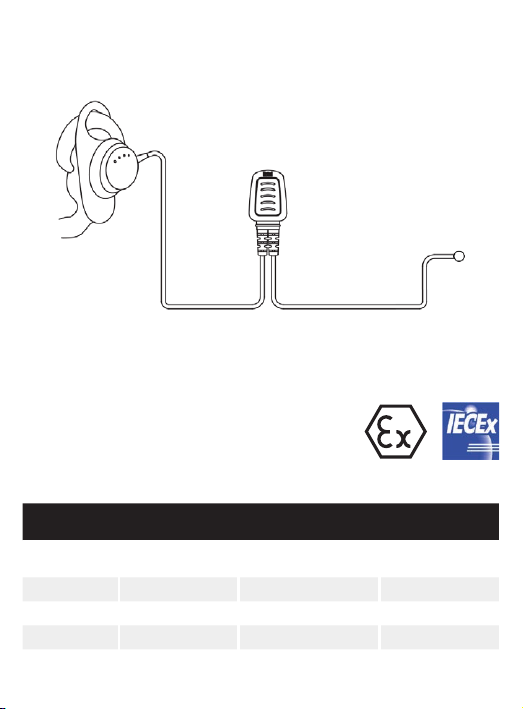
D-SHAPE EARPIECE
PTT UNIT
Above approvals apply to specic models only
CONNECT
TO RADIO
Model Series
EA12/950 HT500,
EA12/750 HT700 None None
EA12/450 HX None None
EA12/DX DX, DN None None
EA12/DT9 DT500
HT800, HT900
DT800, DT900
Intrinsically safe
cert. no.
IECEx SIR 10.0097X
Sira 10ATEX2066X
IECEx BAS 18.0094X
Baseefa18ATEX0152X
Approval
IECEx
ATEX
IECEx
ATEX
Page 4

Contact
For more information about our products please contact us:
+44 (0)20 8236 0 032
All Rights Reserved. Copyright Entel UK Ltd.
[email protected] entel.co.uk
 Loading...