

Page 1
SWEEPER
USER MANUAL
Page 2
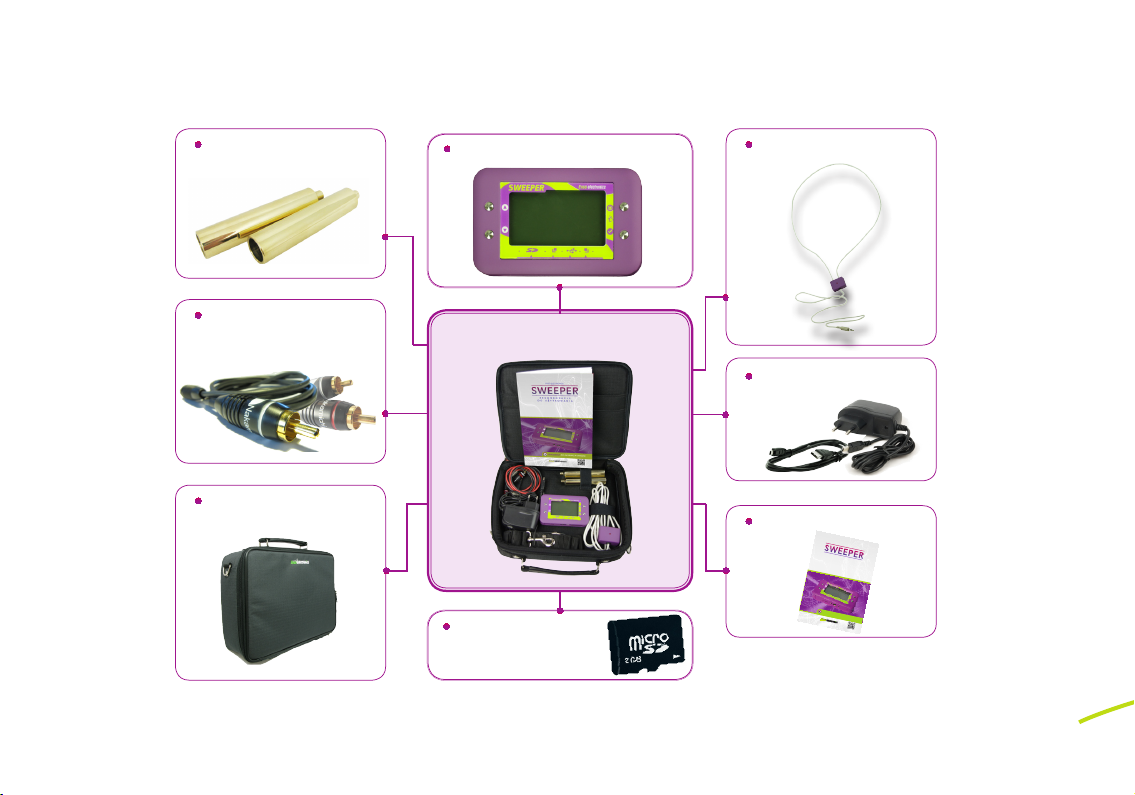
Cables for electrodes
REKOMENDACJE
SUPLEMENT DO INSTRUKCJI OBSŁUGI
SUPLEMENT DO INSTRUKCJI OBSŁUGI
RE KO ME ND A CJ E
DO U ŻY TK OW A NI A
ENSO ELECTRONICS
SWEEPER
QR CODE
Wygenerowano na www.qr-online.pl
Transport bag
SWEEPER Device
Sweeper Set
Induction loopHand electrodes
Battery charger and USB
Operating Manual
SD Card with programs
Page 3
SWEEPER
SWEEPER OPERATING MANUAL
I. DESCRIPTION OF THE DEVICE
1.
OVERVIEW
Sweeper (hereinafter referred to as the „device”) is a mobile, electronic, programmable instrument for generating electromagnetic frequencies of small intensity and an inductive field.
It includes two independent generators:
- generator with output electrodes (range from 1 to 3,000,000 Hz) and
a modulation option;
- generator of an electromagnetic field of small intensity with an output inductor
(induction loop, range from 1 to 100,000 Hz, including from 25,000 Hz to 100,000 Hz
harmonically).
The device can generate frequencies both using one of the generators and two at the same
time, with independent frequency settings within their ranges.
Every generator has an option of regulating amplitude of pulse oscillation and „pulsating”
frequencies within the limits set by the user.
Built-in device memory is divided into a read-only memory that stores factory programs generating frequencies and a rewritable memory for programs created by the user using an appropriate software. User can manually enter and save the frequencies in Hz and kHz.
NOTE: According to Article 2 item 38 of the Act of 20 May 2010 on Medical Devices,
SWEEPER is not a medical device.
3
Page 4
SWEEPER OPERATING MANUAL
SWEEPER
Programs stored in „Composition” Menu using buttons controlling the device are stored separately from the „Personal Programs”. Menu programs that includes programs transferred by
USB port with software installed on the computer.
The device includes a microSD slot and is compatible with cards up to 2GB which significantly
increases a number of programs you can save. The device has sockets for electrodes and external inductor. Built-in battery can be charged using miniUSB slot, the same you use to connect
it to the computer.
2.
SPECIFICATION
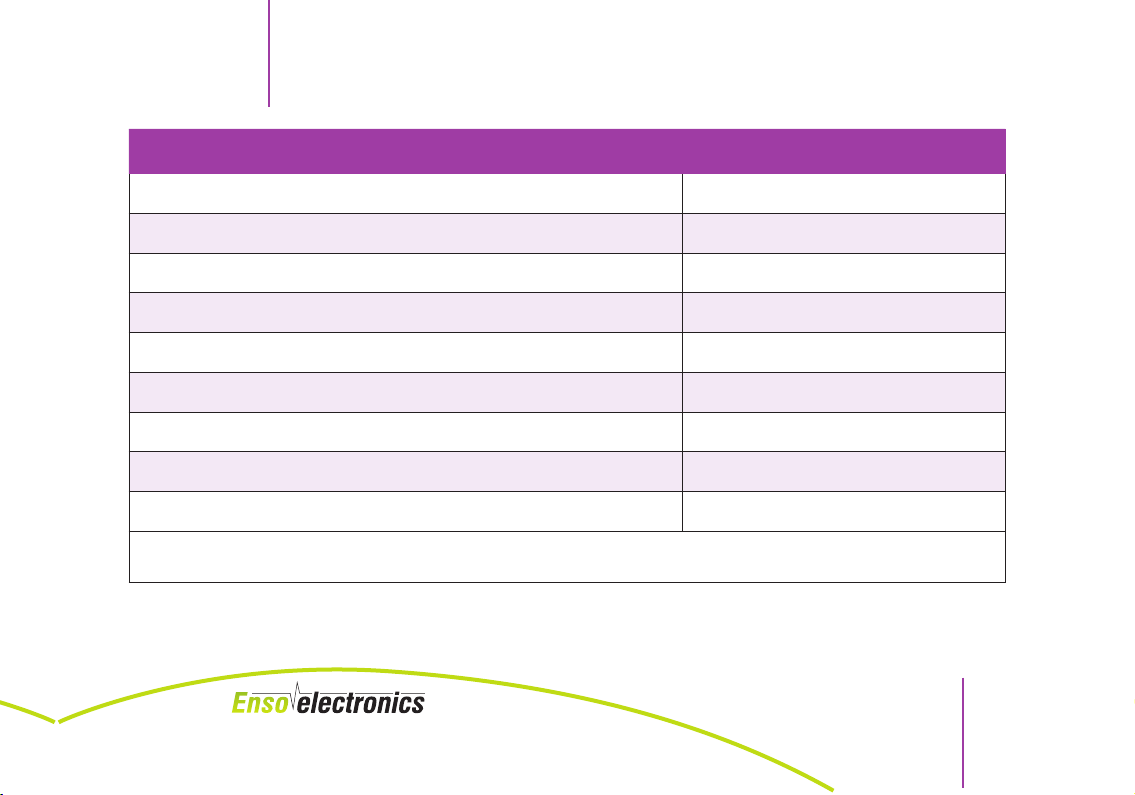
PARAMETER VALUE
Used electric current, at most 20 mA
Range of generated frequencies 1 to 3 000 000 Hz
Regulating amplitude of generators output To 18 V
Regulating signal intensity of electrodes generator 10 levels
Regulating signal intensity of inductor generator 4 levels
Modulation (for the generator of electrodes) To 100 000 Hz
NOTE: According to Article 2 item 38 of the Act of 20 May 2010 on Medical Devices,
4
SWEEPER is not a medical device.
Page 5
SWEEPER
PARAMETER VALUE
SWEEPER OPERATING MANUAL
Pulse range 1 to 3 000 000 Hz
Display resolution 128 x 64 px
Compatibility with microSD cards to 2 GB Incompatible with SDHC
Size 105 x 65 x 19 mm
Weight without the package, at most 0,112 kg
Weight of the set with package 1,382 kg
How long the device can run continously* 8 hours
Power supply from the built-in battery (of NOKIA BL-4B type) Volume - 700 mAh voltage - 3,7 V
Charging battery via USB
* With normal intensity level that does not exceed an average and normal distribution of frequencies under standard load (50-100 kQ).
NOTE: According to Article 2 item 38 of the Act of 20 May 2010 on Medical Devices,
SWEEPER is not a medical device.
5
Page 6
SWEEPER OPERATING MANUAL
3.
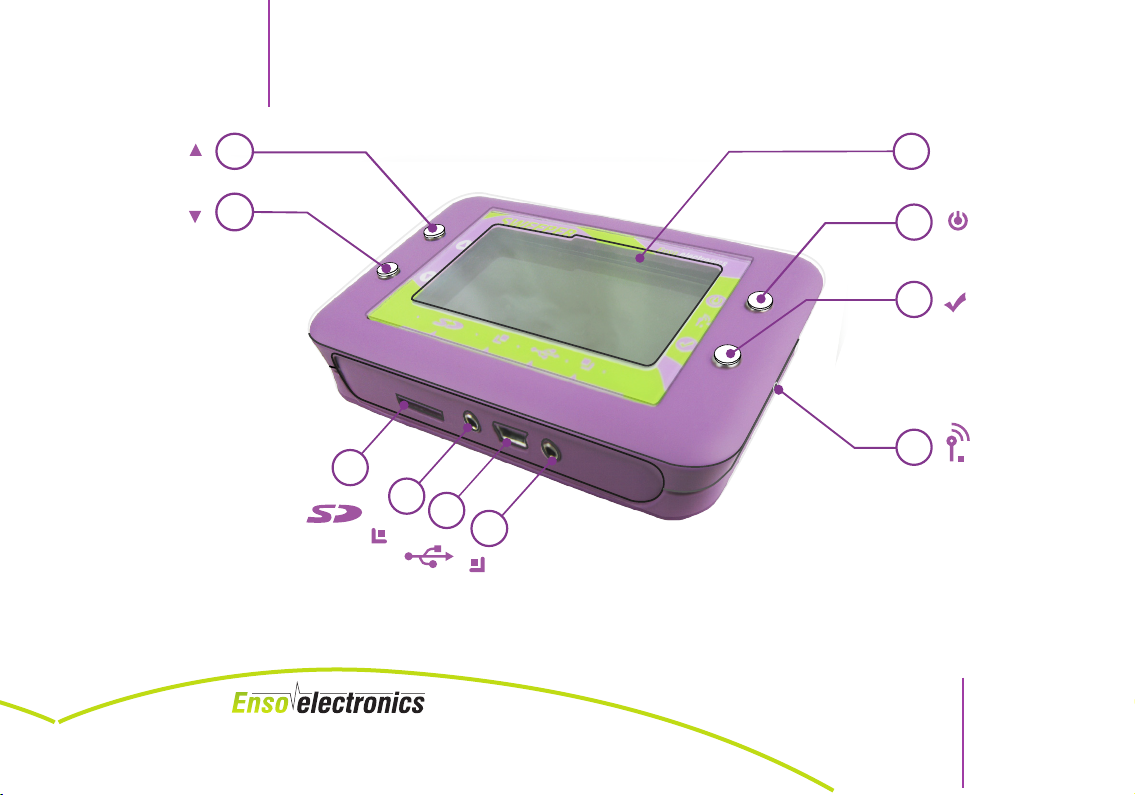
DEVICE STRUCTURE
LEGEND:
1 – Display
2 – On and off button
3 – Select button
4 – Menu navigation buttons - „up”
5 – Menu navigation buttons - „down”
6 – microSD card slot
7 – slot for connecting left manual electrode
8 – USB power slot
9 – slot for connecting right manual electrode
10 – socket for an external inductor (induction loop)
SWEEPER
NOTE: According to Article 2 item 38 of the Act of 20 May 2010 on Medical Devices,
6
SWEEPER is not a medical device.
Page 7
SWEEPER
SWEEPER OPERATING MANUAL
4
5
1
2
3
10
6
7
8
9
Fig 1 Device structure
The Producer reserves the right to change the configuration of the front panel in a way that
does not lower the quality or convenience of operation of the device.
NOTE: According to Article 2 item 38 of the Act of 20 May 2010 on Medical Devices,
SWEEPER is not a medical device.
7
Page 8
SWEEPER OPERATING MANUAL
4.
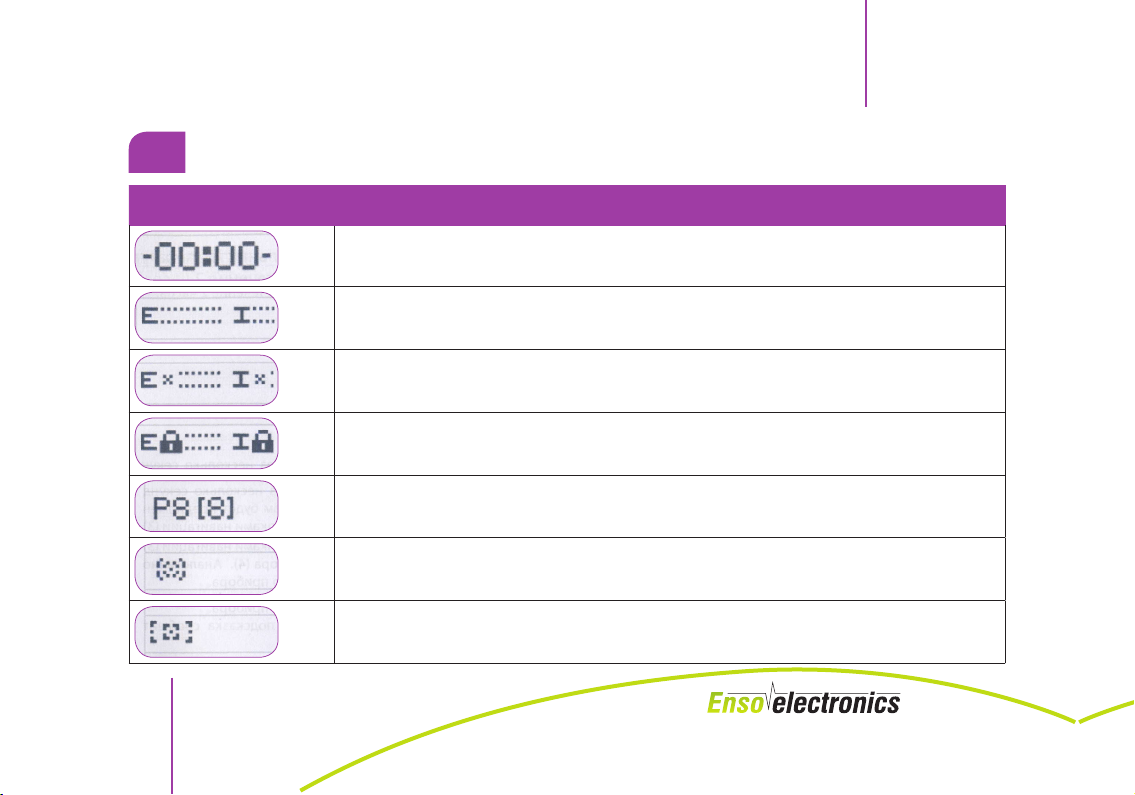
SYMBOLS THAT APPEAR ON THE DISPLAY
SYMBOL DESCRIPTION
Displaying time on the internal clock in 24-hour mode
Marks the intensity of generators: electrodes (E) and inductor (I)
Sensor of interruption of generators’ circuit: electrodes (E) and inductor (I)
Sensor of device lock: electrodes (E) and inductor (I)
Only in the „Composition” mode. From left: number of the program and cell number
Sensor of program execution
Sensor of a group of programs execution
SWEEPER
NOTE: According to Article 2 item 38 of the Act of 20 May 2010 on Medical Devices,
8
SWEEPER is not a medical device.
Page 9
SWEEPER
SYMBOL DESCRIPTION
SWEEPER OPERATING MANUAL
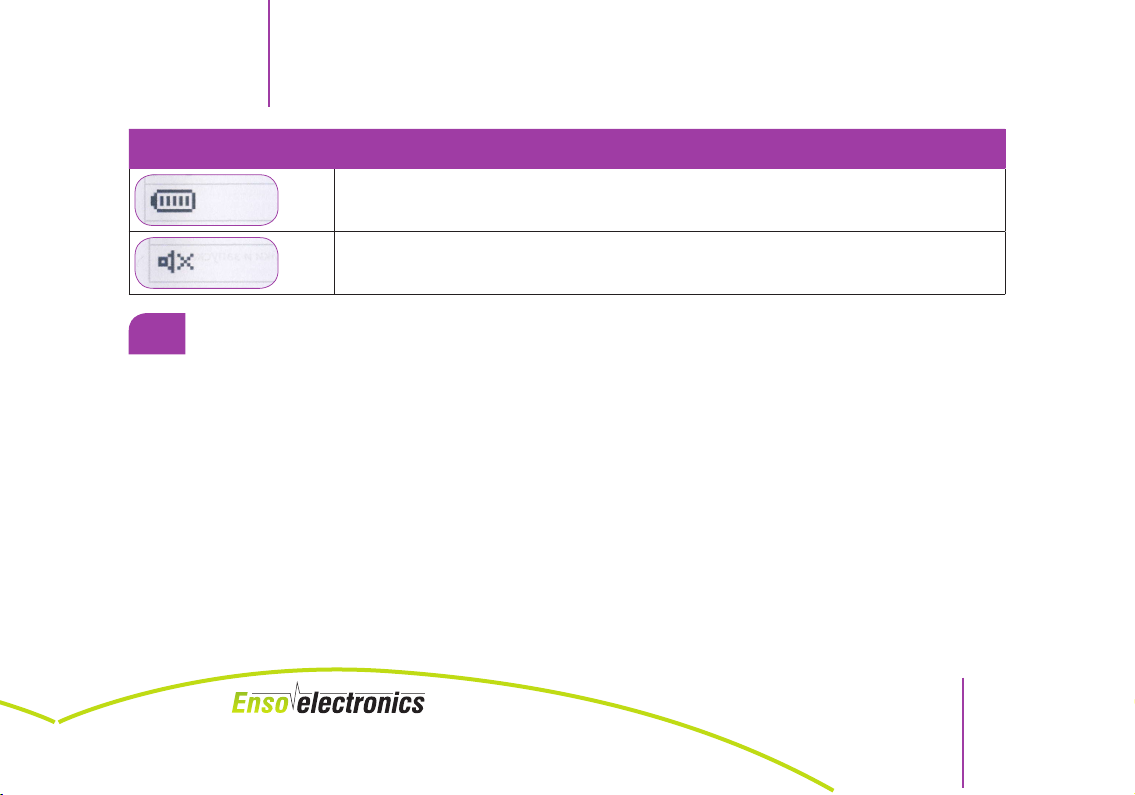
Sensor of charged battery
Sensor of disabled sound
5.
CONTRAINDICATIONS
If a patient has an internal pacemaker, they absolutely cannot use the device.
The relative contraindications (unless the specialist recommends otherwise) include:
– malignant and benign cancers;
– epilepsy;
– pregnancy;
– acute coronary syndromes and acute cerebral blood flow disorders
– bleeding disorders;
– personal hypersensitivity to the influence of electromagnetic effect
– injured skin and skin diseases where skin touches the electrodes
– acute psychic agitation or inebriation
NOTE: According to Article 2 item 38 of the Act of 20 May 2010 on Medical Devices,
SWEEPER is not a medical device.
9
Page 10
SWEEPER OPERATING MANUAL
6.
PRECAUTIONS
WARNING
If the device signals the need for charging the internal battery, you should charge the device and
you cannot try to turn it on multiple time when doing so. This can damage the battery.
When the generator runs on frequencies higher than 200 kHz, power input is increased and consequently, the operating time of the device after a full charge is shortened. You absolutely cannot
use the device during charging.
You cannot use the electric output of the generator for a long work with an external load of resistance exceeding 10 kQ, for example with a vessel or fluid.
- The device is constructed according to the requirements for products with an
external power source (IEC 601-1-88).
- If you detect any irregularities in the operation of the device, you have to shut it down
immediately.
- Do not use the device that has visible external damage (broken frame, broken
display).
- Do not place the device close to open fire source.
- Do not expose the device to direct sunlight.
- Keep the device in a place where children cannot reach it.
SWEEPER
NOTE: According to Article 2 item 38 of the Act of 20 May 2010 on Medical Devices,
10
SWEEPER is not a medical device.
Page 11
SWEEPER
- Do not use the device in the bathroom and humid rooms.
- Children can use the device only if supervised by an adult.
- Do not place the device in a microwave.
- Do not disassemble the device.
- Do not immerse the device in water.
- Prevent the device from falling down.
- Prevent other objects from falling down on the device.
- Do not pull out cords rapidly from the device sockets.
- Protect the device against sudden changes of temperature.
7.
PREPARING FOR WORK
After taking the device out of the package please check it for mechanical damage.
After transport or storage in low temperature, the device cannot be switched on for at least
two hours of keeping in a room temperature.
SWEEPER OPERATING MANUAL
NOTE: According to Article 2 item 38 of the Act of 20 May 2010 on Medical Devices,
SWEEPER is not a medical device.
11
Page 12
8.
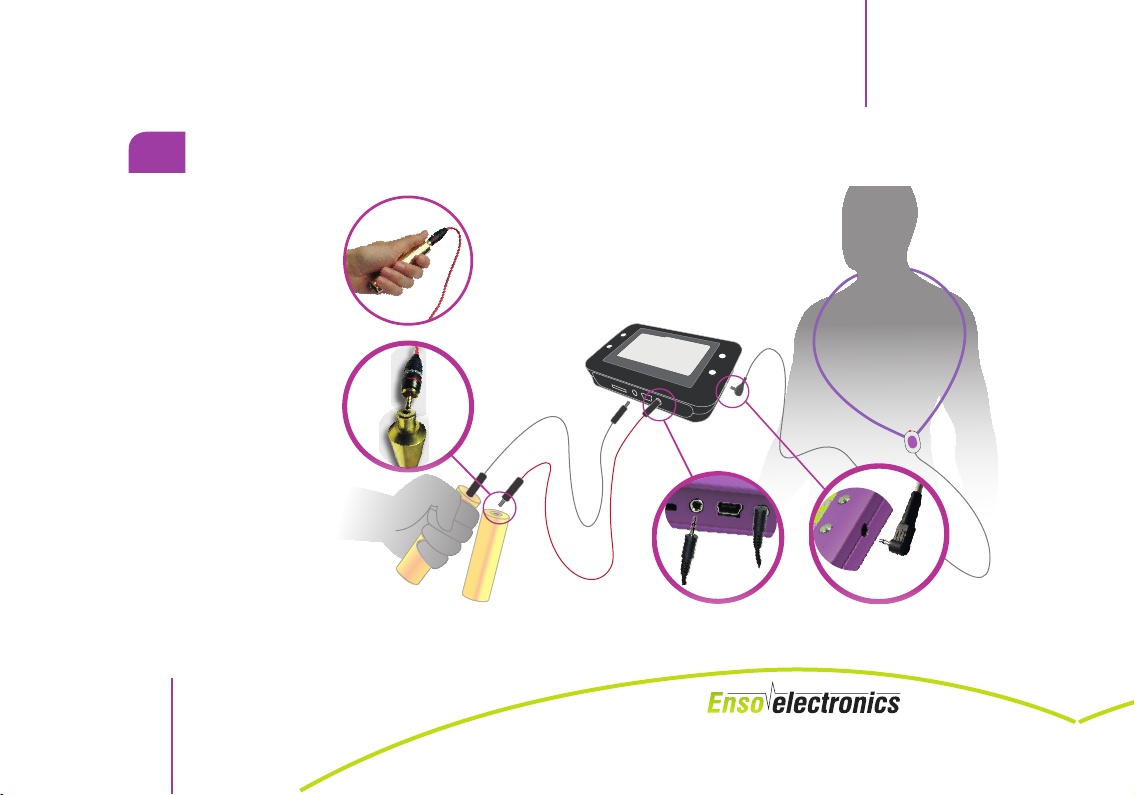
CONNECTING THE DEVICE
You should hold manual electrodes in your
hands. You can also
place them under you
feet if you have problem with your low-er
limbs.
Place the induction
loop close to the afflicted area. You can put
it around your neck,
hang over your shoulder, place on your hips,
joints, etc.
SWEEPER OPERATING MANUAL
SWEEPER
NOTE: According to Article 2 item 38 of the Act of 20 May 2010 on Medical Devices,
12
SWEEPER is not a medical device.
Page 13
SWEEPER
SWEEPER OPERATING MANUAL
II. WORK WITH THE DEVICE
1.
TURNING ON AND OFF
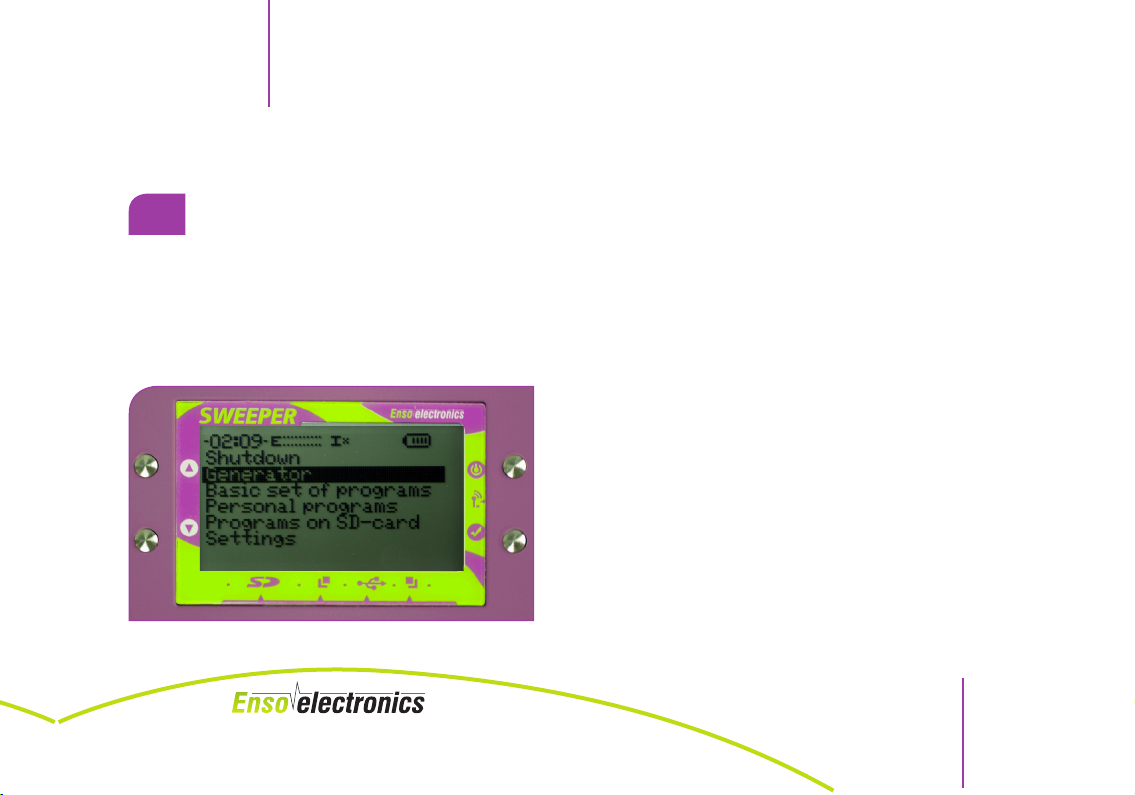
You will see a welcome screen on the display and after a few seconds the device will go to a
language selection mode. You will see a list of available languages. Use „up” and „down” buttons to move up and down in a menu and select a language by pressing a selection button
„OK”. This is also how you generally move in all
the menus of the device.
You will see main menu on the display and a voice message will inform you that the device is ready for use.
FIG. 1 Main menu
NOTE: According to Article 2 item 38 of the Act of 20 May 2010 on Medical Devices,
SWEEPER is not a medical device.
13
Page 14
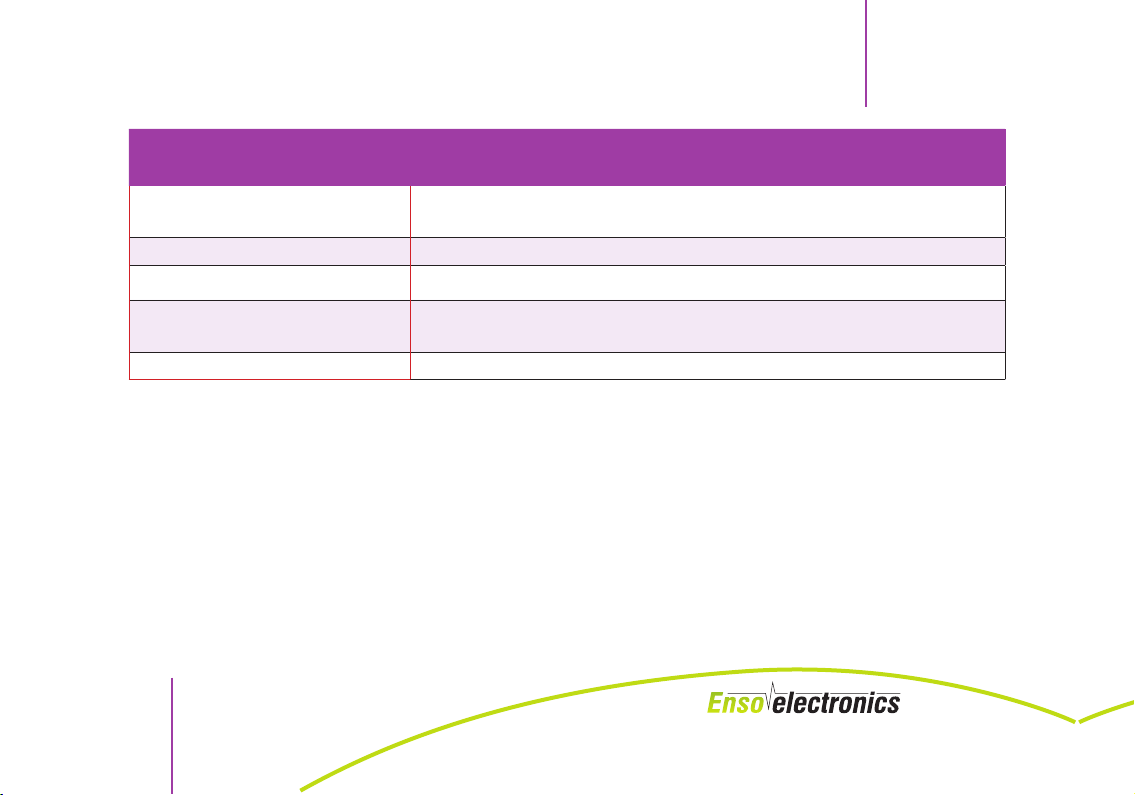
MAIN MENU EXPLANATIONS
SWEEPER OPERATING MANUAL
SWEEPER
Generator
Basic set of programs Includes 3 producer’s programs
Personal programs
Programs on SD-card
Settings Includes submenu for settings of the device
Includes submenu for settings and starting the frequency generators
Includes submenu for launching programs saved via USB port
Includes submenu for launching program from the inserted SD
card
You turn off the device by pressing and holding the „on/off” button . If the device is in the
program execution mode, you have to stop the program first.
The device will turn off automatically if you won’t press any buttons for a period of time set in the
„
Settings
” menu, „Auto shutdown” option and no correct program is selected. You turn off the device by pressing and holding the „on/off” button. If the device is in the program execution mode,
you have to stop the program first.
The device will turn off automatically if you won’t press any buttons for a period of time set in the
„
Settings
14
” menu, „Auto shutdown” option.
NOTE: According to Article 2 item 38 of the Act of 20 May 2010 on Medical Devices,
SWEEPER is not a medical device.
Page 15
SWEEPER
2.
WORKING WITH THE GENERATOR
SWEEPER OPERATING MANUAL
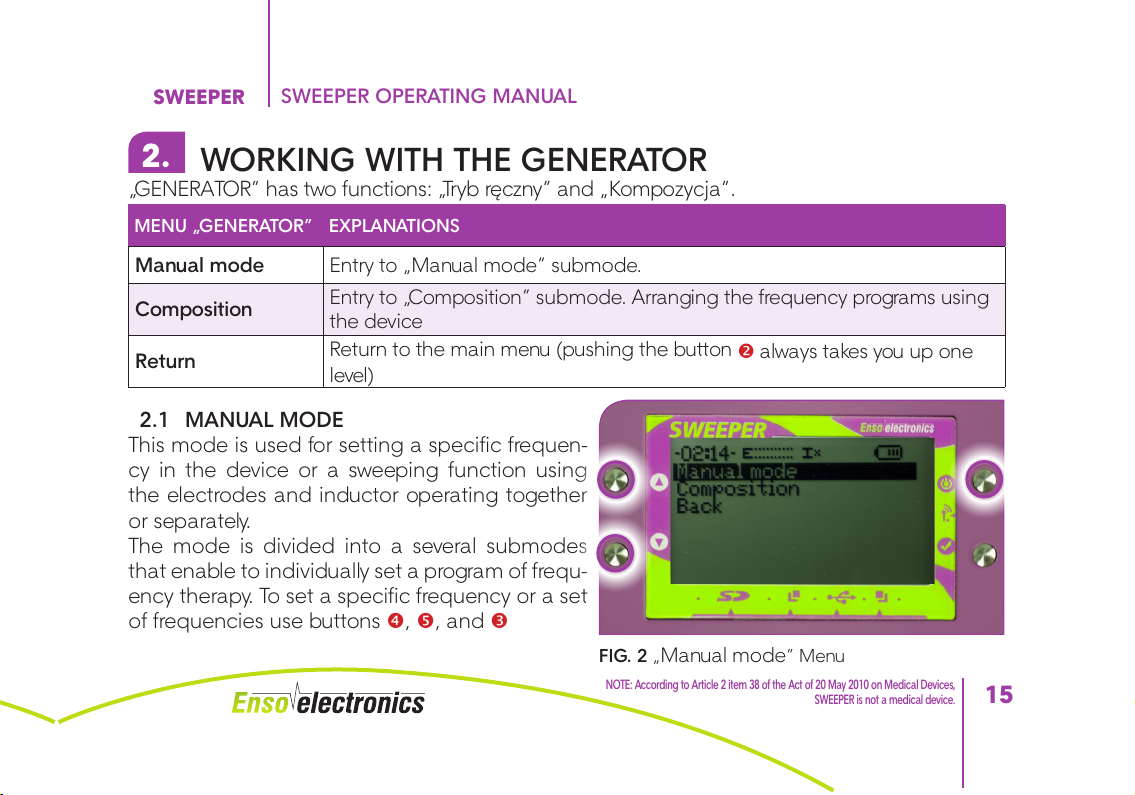
„GENERATOR” has two functions: „Tryb ręczny” and „Kompozycja”.
MENU „GENERATOR” EXPLANATIONS
Manual mode Entry to „Manual mode” submode.
Composition
Return
Entry to „Composition” submode. Arranging the frequency programs using
the device
Return to the main menu (pushing the button
level)
2.1 MANUAL MODE
This mode is used for setting a specific frequen-
cy in the device or a sweeping function using
the electrodes and inductor operating together
or separately.
The mode is divided into a several submodes
that enable to individually set a program of frequ-
ency therapy. To set a specific frequency or a set
of frequencies use buttons , , and
FIG. 2 „Manual mode” Menu
NOTE: According to Article 2 item 38 of the Act of 20 May 2010 on Medical Devices,
always takes you up one
SWEEPER is not a medical device.
15
Page 16
SWEEPER OPERATING MANUAL
SWEEPER
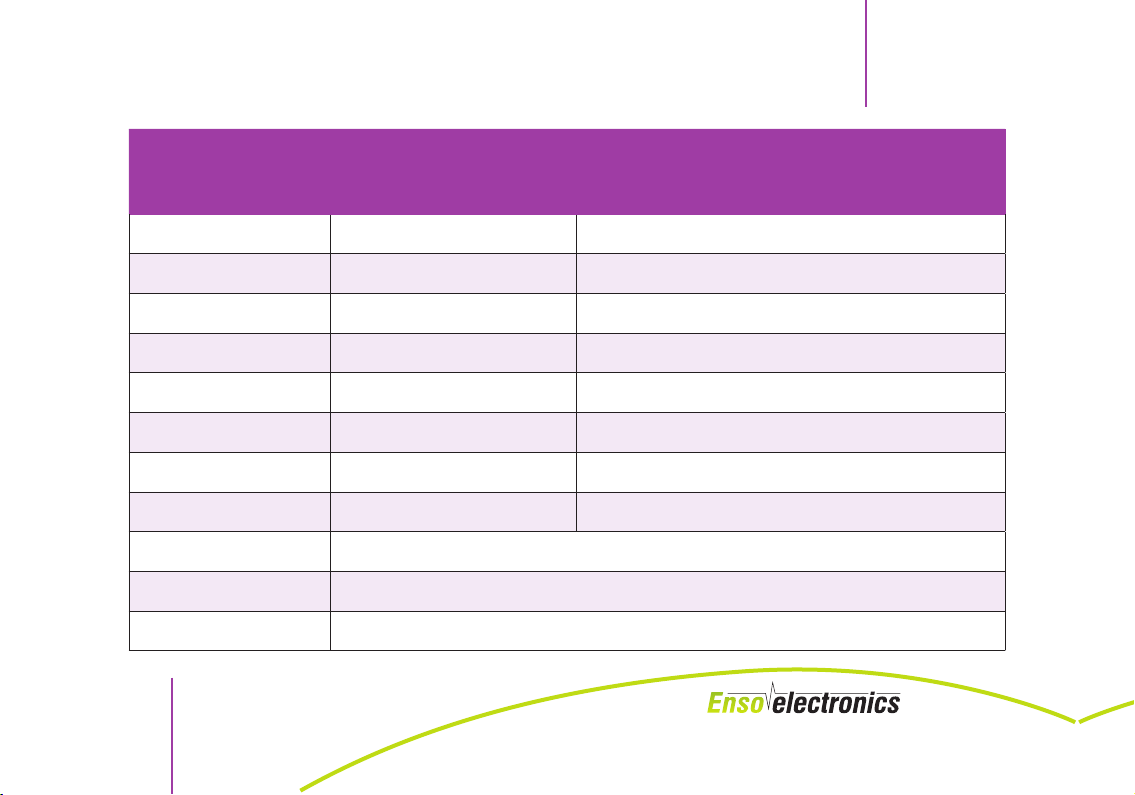
„MANUAL MODE”
SUBMENU
Electrodes
Frequency
Slide to
Modulation
Inductor
Frequency
Slide to
Duration
Run
Save As
Back
NOTE: According to Article 2 item 38 of the Act of 20 May 2010 on Medical Devices,
16
SWEEPER is not a medical device.
on/off Turning on/off output electrodes
0,00 – 3 000 000,00 Hz Generator 1 frequency value
0,00 – 3 000 000,00 Hz Generator 1 final value
0,00 – 100 000,00 Hz Modulation frequency
on/off Turning on/off output inductorr
0,00 – 25 000,00 Hz Generator 2 frequency value
0,00 – 25 000,00 Hz Generator 2 final frequency value
00:01 – 59:59 Program duration (MM:SS)
Starting generating program
Saving the parameters in the „compositions” program compartment
Up one level
EXPLANATIONS
Page 17
SWEEPER
SWEEPER OPERATING MANUAL
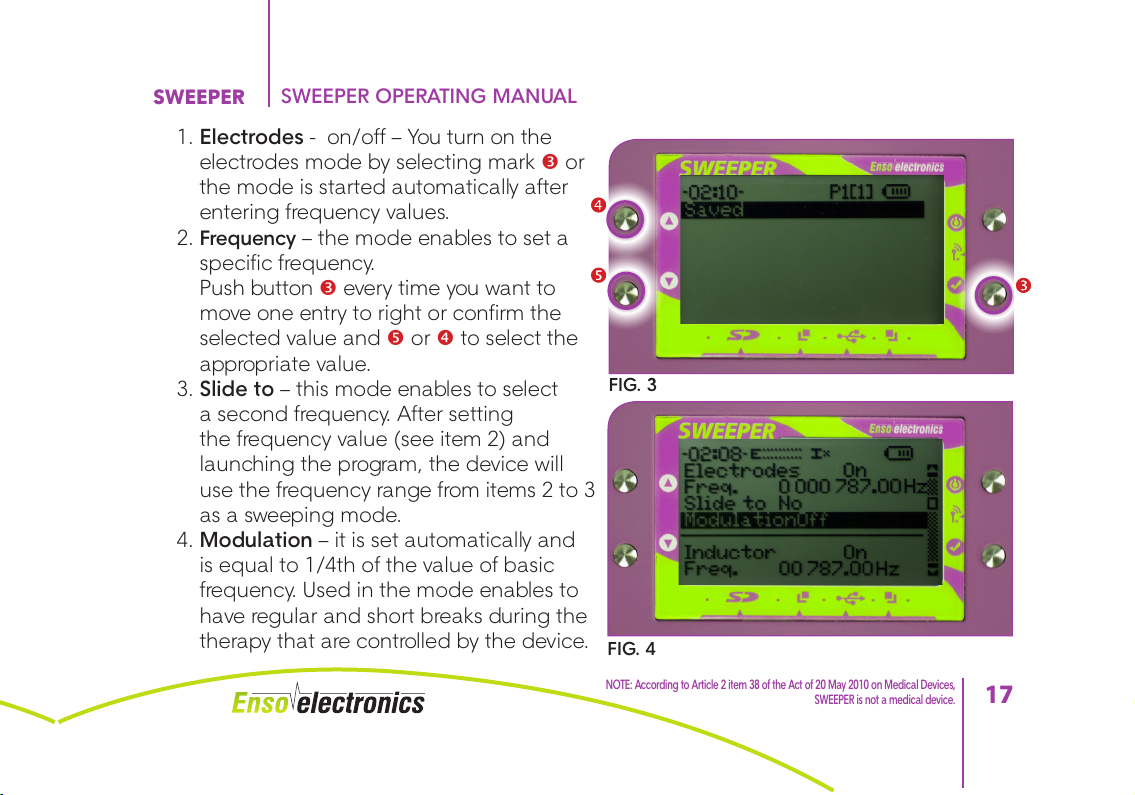
1. Electrodes - on/off – You turn on the
electrodes mode by selecting mark or
the mode is started automatically after
entering frequency values.
2. Frequency – the mode enables to set a
specific frequency.
Push button every time you want to
move one entry to right or confirm the
selected value and or to select the
appropriate value.
3. Slide to – this mode enables to select
a second frequency. After setting
the frequency value (see item 2) and
launching the program, the device will
use the frequency range from items 2 to 3
as a sweeping mode.
4. Modulation – it is set automatically and
is equal to 1/4th of the value of basic
frequency. Used in the mode enables to
have regular and short breaks during the
therapy that are controlled by the device.
FIG. 3
FIG. 4
NOTE: According to Article 2 item 38 of the Act of 20 May 2010 on Medical Devices,
SWEEPER is not a medical device.
17
Page 18
SWEEPER OPERATING MANUAL
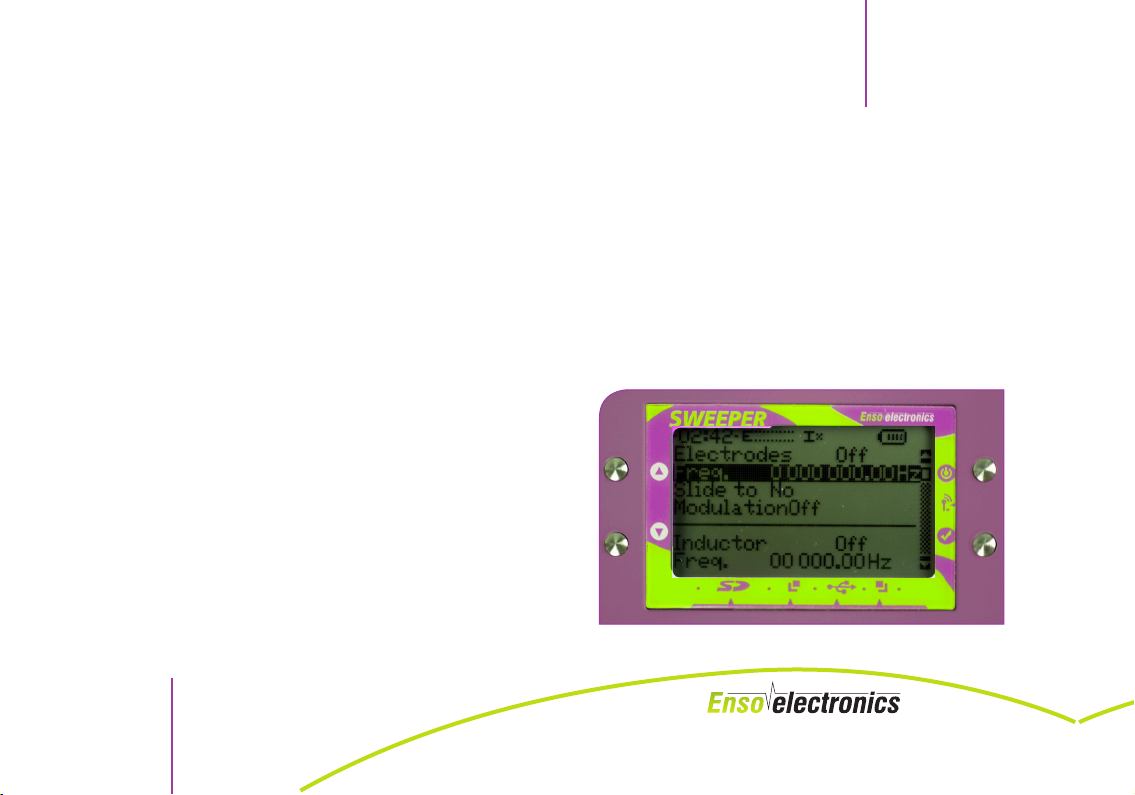
It is also possible to set modulation individually if one knows the rules of physics.
5. Inductor (induction loop) - You turn on the inductor mode by selecting mark or
the mode is started automatically after entering frequency values.
6. Frequency – the mode enables to set a specific frequency.
Push button every time you want to move one entry to right or confirm the
selected value and or to select the appropriate value.
7. Slide to – this mode enables to select a second frequency. After setting the
frequency value (see item 2) and launching the program, the device will use the
frequency range from items 2 to 3 as a sweeping mode
8. Duration – or will enable you to select the appropriate value and button will
enable you to confirm the option.
9. Run – starts the manually set program.
10. Save as – saves in the device memory
set frequency by adding it to the list of
programs in the “Compositions” part (in
the cell of your choice).
2.2 COMBINATIONS OF FREQUENCIES
„Compositions” submode includes a list of nine
programs. Each of them has nine programma-
FIG. 5
SWEEPER
NOTE: According to Article 2 item 38 of the Act of 20 May 2010 on Medical Devices,
18
SWEEPER is not a medical device.
Page 19
SWEEPER
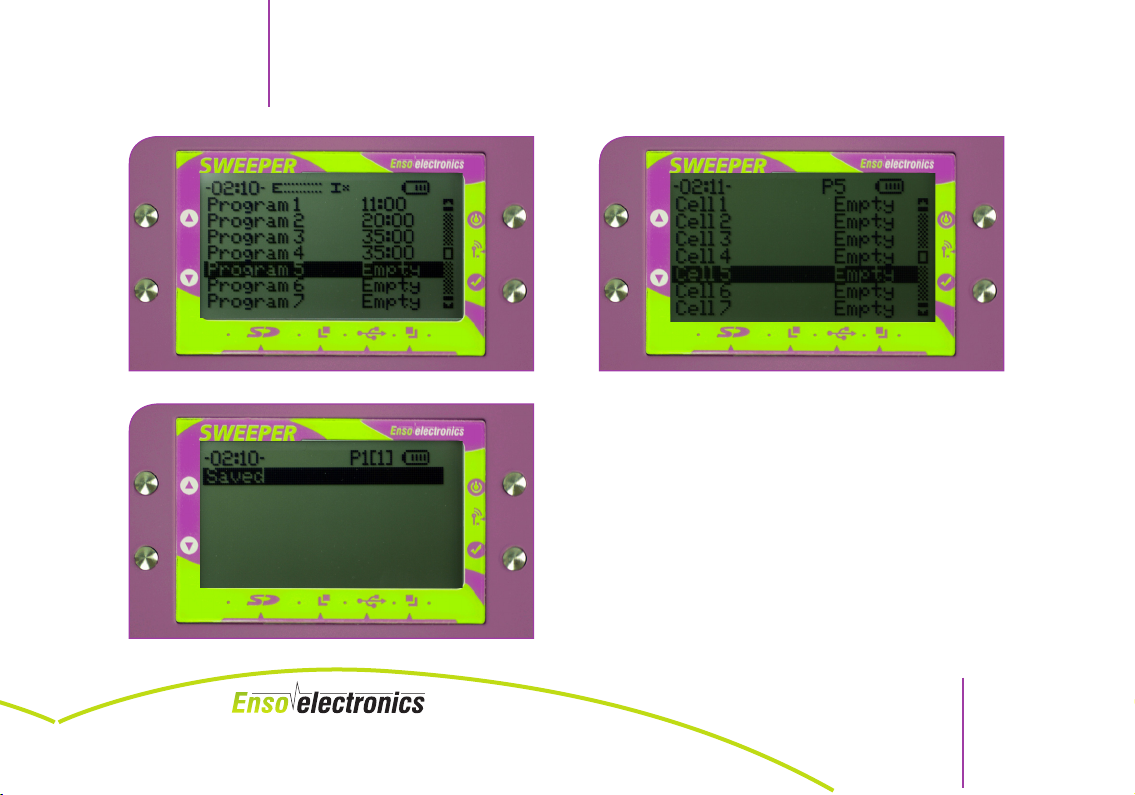
FIG. 6 List of programs FIG. 7 List of cells
SWEEPER OPERATING MANUAL
ble cells. You program the cells using a menu
similar to „Tryb ręczny” menu. The only difference
between the menu settings in the manual mode
and menu settings in the cell mode consists in
the „Zapisz” line. After its selection a current cell
is saved if there were changes in settings of generators’ parameters. „Kompozycja” enables to
include several specialist frequencies in one program, e.g. Program 1:
FIG. 8 „Save” screen
– (Cell 1) 7 Hz,
NOTE: According to Article 2 item 38 of the Act of 20 May 2010 on Medical Devices,
SWEEPER is not a medical device.
19
Page 20
SWEEPER OPERATING MANUAL
– (Cell 2) 222-224 Hz,
– (Cell 3) 10 kH
and launch them in one integrated mode („run all” option).
„Cell” 1 - 9 - names the detailed program the frequency of which can be set manually as in
item 2.1. „manual mode”.
3.
FREQUENCY PULSE
Smooth change of frequencies takes place within a scope between amounts of the first and
second value. If there is no „Przesuń” value entered, generation of frequencies will be constant.
After entering your generators values eneter the duration of the generation program and launch
the program. You will see a line of program’s progress and the remaining time on screen
3.1 BLOCKING / UNLOCKING / PAUSE
During the program device’s buttons are locked to avoid accidental pushing. To unlock press
simultaneously button and without pausing or stopping the program. The program will
be paused. You will see a submenu on the screen.
SWEEPER
NOTE: According to Article 2 item 38 of the Act of 20 May 2010 on Medical Devices,
20
SWEEPER is not a medical device.
Page 21
SWEEPER
SUBMENU EXPLANATIONS
Continue Remove the cause of break and continue the program
Connect the electrodes or inductor If required, connect the output
Abort Abort the program
SWEEPER OPERATING MANUAL
The same submenu will be displayed if you interrupt the circuit. Program stops working and
informs about the problem.
Perform necessary actions.
After the program is completed, you will see „Zakończono” information and hear a sound
signal.
If you press button twice, the device will resume the program with the same settings. If you
press button or , you will go back to the menu of „Tryb ręczny” submode. Program with
its settings can be saved in the „Kompozycje” program compartment for further use of the
device memory..
3.2 REGULATING AMPLITUDE
Amplitude of the electrodes has a 10-unit scale. It is situated in the top part of the screen next
to E sign and displayed as lines. When increasing amplitude units you can have tingling sensation on your hand skin. You can regulate the amplitude of pulses on electrodes output with
NOTE: According to Article 2 item 38 of the Act of 20 May 2010 on Medical Devices,
SWEEPER is not a medical device.
21
Page 22
SWEEPER OPERATING MANUAL
buttons and . You have set the amplitude in a way that does not cause any discomfort on
your hands during the execution of the program.
Amplitude of the inductor (induction loop) has a 4-unit scale. It is situated in the top part of
the screen next to I sign and displayed as lines. You can regulate the fluctuations of the inductor output with buttons , when simultaneously pressing button 3.
Every user will have a different hand sensitivity to the device working on electrodes. Operation
of electrodes can be disrupted („Severing the electrodes” information) if the electrodes touch
dry or worn hand skin or a thicker epidermis. If so, you have to lightly wet your hands with water
and increase the amplitude by an appropriate number of units. Do not use the electrodes on
damaged skin.
4.
BASIC PROGRAMS
„Basic programs” chapter includes the list of frequencies of programs supplied by the producer.
Programs are divided into groups.
Programs stored in the internal device memory cannot be edited or deleted. If you work with
such frequency programs, you select them and start - that’s it. In the group menu there is a
line „Uruchom wszystko” and after the selection of this item all programs from the given group
start one by one.
After you enter the basic programs, „Complex No. 1” starts, where there are
SWEEPER
NOTE: According to Article 2 item 38 of the Act of 20 May 2010 on Medical Devices,
22
SWEEPER is not a medical device.
Page 23
SWEEPER
3 BASIC PROGRAMS:
– Program 1 – used before starting the therapy once before the whole session or every
time if your body has an intense reaction to the treatment.
– Program 2 – detox
– Program 3 – drainage.
5.
PERSONAL PROGRAMS
Programs created with a special software can be stored in the internal memory of the device.
They will be displayed in „Programy osobiste” menu.
To save the frequencies moved from the computer software to the personal programs
you have to remove microSD card.
6.
PROGRAMS ON SD CARD
The device is compatible with microSD cards up to 2GB. After connecting the memory card via slot
, „Programy na karcie SD” menu will display a list of programs of frequencies saved on the card.
When saving session/program from Life Commander software on the device, sessions/programs are
by default saved on microSD card. They are visible in the device as the last entry in „Programy na
karcie SD”.
SWEEPER OPERATING MANUAL
NOTE: According to Article 2 item 38 of the Act of 20 May 2010 on Medical Devices,
SWEEPER is not a medical device.
23
Page 24
7.
„SETTINGS” MENU
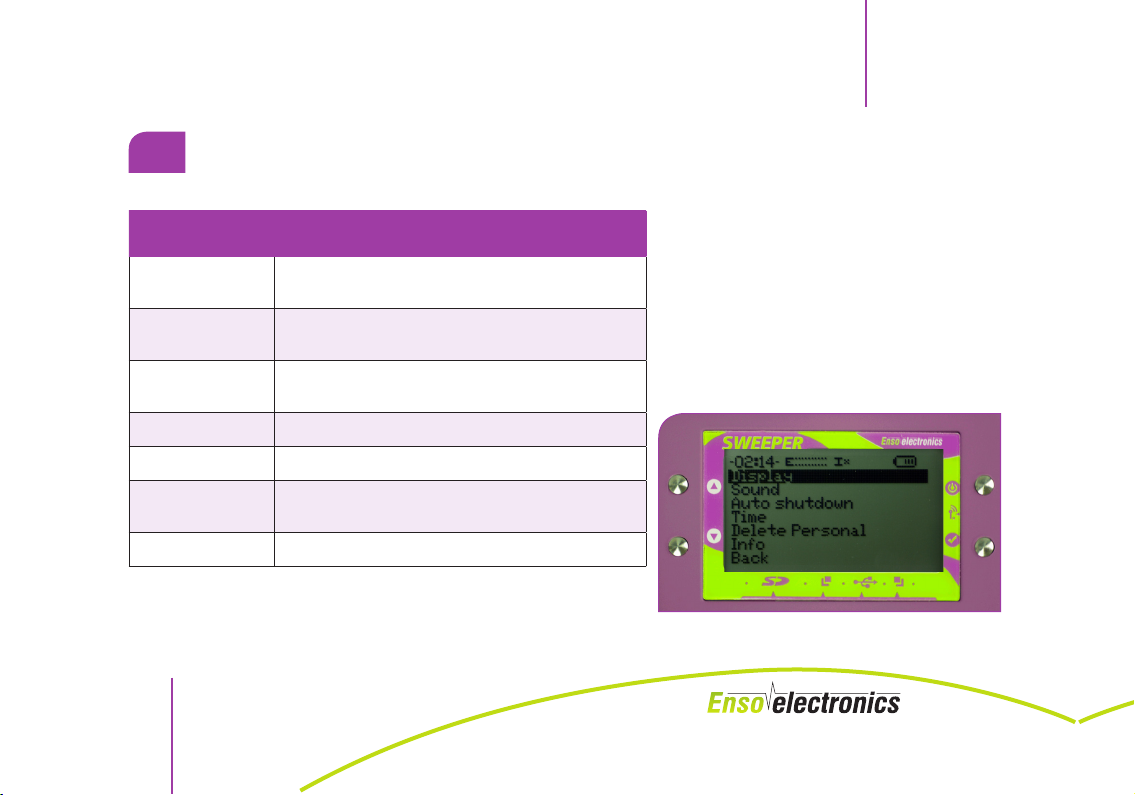
Set up the device according to your own needs.
SUBMENU
„SETTINGS”
Display
Sound
Auto shutdown
Time
Delete Personal
Info
Back
EXPLANATIONS
Settings of contrast, brightness, and duration of
display highlight.
Settings of volume of sound signals and voice suggestions that can also be disabled.
Setting time after which the device will be turned
off if inactive
Settings of the internal clock.
Restore to factory settings.
Displaying serial number of the device, version of
the software, and sub-assemblies
Up one level
SWEEPER OPERATING MANUAL
RYS. 9 „Parameters” menu
SWEEPER
NOTE: According to Article 2 item 38 of the Act of 20 May 2010 on Medical Devices,
24
SWEEPER is not a medical device.
Page 25
SWEEPER
SWEEPER OPERATING MANUAL
III. GENERAL CONDITIONS
1.
POWER SUPPLY
The device has an internal battery that has to be recharged every once in a while. If the voltage drops below the acceptable norm, the device will loudly inform about it and, if nothing
is done, get disconnected.
If the battery charge reaches low level, the device won’t turn on. You have to connect the
charger or, using USB cable, connect the device to a computer. You will see text on the screen
and battery charging progress.
FORMATTING BATTERY: New battery is not full charged. The first three cycles of charging
should take 16 hours each. The battery has to be used until the complete discharge. After
the first three cycles of charging, you can charge the battery in any cycles.
2.
MAINTENANCE
When cleaning the external elements, you should not use solvents or abrasive materials.
You have to disinfect the electrodes with products for manual disinfections of medical devices.
Brass electrodes, if used frequently and disinfected, will oxidixe and darken. You can remove a
NOTE: According to Article 2 item 38 of the Act of 20 May 2010 on Medical Devices,
SWEEPER is not a medical device.
25
Page 26
SWEEPER OPERATING MANUAL
grey coating with product for metal. Remember about disinfecting the electordes after using
product for metal.
3.
CLIMATIC CONDITIONS DURING OPERATION
Recommended air temperature is between +10 degree of Celsius and +30oC.
The highest air humidity in which the device can operate is 80% with +25oC.
Atmospheric pressure in which the device can operate is between 620 - 800mmHg (84-106.7
MPa).
SWEEPER
NOTE: According to Article 2 item 38 of the Act of 20 May 2010 on Medical Devices,
26
SWEEPER is not a medical device.
Page 27
SWEEPER
SWEEPER OPERATING MANUAL
IV. FREQUENTLY ASKED QUESTIONS
1. Why is there a break during the program action and the device asks for resuming the
program?
– The device has a built-in automatic check of conductivity. If at any time the
conductivity drops or the surface of the body becomes to dry, the program will be
stopped.
a) you have to check if the cables are properly connected to the device and resume
the program
b) you have to wet your hands lightly and resume the program
c) you have to increase amplitude for electrodes and resume the program
2. How should I use the induction loop?
– Induction loop affects the whole body regardless of its location but to intensify its
impact you can place it in an area affected by a disease or from where pain radiates.
3. What frequencies are in the available programs?
– We have used entire spectra of possibilities from scientific research of Rife, Clark, and
other scientists.
4. Will the General Program work on everyone?
– Every program includes a wide frequency spectrum which enables to defeat burden
NOTE: According to Article 2 item 38 of the Act of 20 May 2010 on Medical Devices,
SWEEPER is not a medical device.
27
Page 28
SWEEPER OPERATING MANUAL
at most people.
5. Does the Sweeper require foot electrodes?
– In devices such as zapper, where electric current is used for treatment, electrodes are
necessary due to the increase of possibility of flow of current in the body. Using the
Sweeper, you have access to two methods: electric current and electromagnetic induction
thanks to which the frequencies penetrate through an entire body and current from hand
electrodes can easily reach many areas.
6. What can be the reason for ineffective treatment?
– If you have been using the device for a while and the results are no satisfactory, it
can be caused e.g. by maintaining wrong diet that is an essential elements during
the Sweeper sessions or by improperly, independently selected programs. In such
situation we advise you to visit a specialist/naturotherapist using Volla method or
Vega test who will be able to conduct the electroacupuncture test and select the
therapy adjusted to your individual needs.
7. How many procedures a day can I have using the Sweeper?
– A number of procedures depends mostly on the wellbeing and vitality of the person
undergoing the treatment.
It is necessary to use agents supporting body cleaning and removal of toxins
produced during the therapy. Regardless of a sense of well-being, one should not
SWEEPER
NOTE: According to Article 2 item 38 of the Act of 20 May 2010 on Medical Devices,
28
SWEEPER is not a medical device.
Page 29
SWEEPER
SWEEPER OPERATING MANUAL
exceed 4 programs for pathogens daily. We do not include here programs such as:
detox, drainage, supporting organs, etc.
8. Can the therapy be used at children?
– Yes. However, you should remember that children are more sensitive to bioresonance
and thus, a number of procedures should be decreased and conducted under
specialist’s supervision.
9. In what order should I conduct health therapies?
– Order should be established by a specialist or a therapist.
10. Can the device change our polarity?
– Very long usage of the device can have a small influence on change of polarity at a
person. However, people with health problems usually start the treatment with their
polarities changed by pathogens.
If you are still anxious, you can swap electrodes once in a while, e.g. put a red one
in your left hand and a black one in your right hand and then return to the original
settings.
11. Does the device work similarly to a zapper?
– -Current-using part is based on the rules of operation of Hulda Clark’s zapper.
However, its mechanism is improved as it mostly uses a selective frequency range
that does not harm a natural microflora.
NOTE: According to Article 2 item 38 of the Act of 20 May 2010 on Medical Devices,
SWEEPER is not a medical device.
29
Page 30
SWEEPER OPERATING MANUAL
SWEEPER
If you have any remarks or other questions not inlcuded in the manual, please contact us:
NOTE: According to Article 2 item 38 of the Act of 20 May 2010 on Medical Devices,
30
SWEEPER is not a medical device.
Page 31
SWEEPER
SWEEPER OPERATING MANUAL
V. CONDITIONS
OF THE FACTORY WARRANTY
1.
FACTORY WARRANTY
1. Company manufacturing the device guarantees that it meets the technical
requirements provided that the user mets the conditions of operation, transport, and
storage.
2. The device comes with a warranty period of 24 months (as of the date of purchase).
3. During the warranty period the manufacturer replaces the device with new or repairs
the damaged device provided the warranty card is presented.
4. The warranty does not cover mechanical damage.
5. The warranty does not cover power supply elements and external cabling.
WARRANTY CARD is enclosed with the booklet.
2.
COMPLAINT INFORMATION
In case of malfunction of the Device in the warranty period, you should describe the type of
damage, add warranty card, and copy of the purchase receipt and send the device together
with the assortment in a package well secured against damage (as filling material we suggest
NOTE: According to Article 2 item 38 of the Act of 20 May 2010 on Medical Devices,
SWEEPER is not a medical device.
31
Page 32
SWEEPER OPERATING MANUAL
SWEEPER
bubble wrap, sponge, polystyrene, etc.) to the address of the service department by registered
mail or courier.
Ship-to address:
Enso Electronics Sp. z o.o. (UK) Ltd.
299 Patriotow str., 04-767 Warsaw
with adnotation: SERVICE DEPARTMENT
NOTE: According to Article 2 item 38 of the Act of 20 May 2010 on Medical Devices,
32
SWEEPER is not a medical device.
Page 33
SWEEPER
SWEEPER OPERATING MANUAL
VI. LEGAL
NOTICES
1.
INTELLECTUAL PROPERTY
SWEEPER Device distributed by Electronics sp. z o.o., designed and built based on the expe-
-rience and according to the recommendations of inventors and engineers of Enso Electronics sp. z o.o. Thus, it is strictly forbidden to copy, modify, improve, or use the program or use
the current look of the device for individual or commercial manufacture or usage. The above
prohibition does not apply to the non-commercial personal usage.
Trade name, SWEEPER devices, or other labels used in the manual, including Enso Electronics, or on the website www.ensoel.pl are the registered trademarks subject to the protection
on principles provided for in the provisions of the Act of 30 June 2000 on Industrial Property
Law (Journal of Laws No. 49 item 508, as amended). General rules of using the device are in
the materials published on the website www.ensoel.pl. The ones in this manual are strictly of
informative and educational nature. Using SWEEPER requires reading the instruction manual
added to every device. Enso Electronics reserves the right to making changes and amending
information included on the website or in this instruction manual, in any time and scope,
without prior notice.
NOTE: According to Article 2 item 38 of the Act of 20 May 2010 on Medical Devices,
SWEEPER is not a medical device.
33
Page 34
SWEEPER OPERATING MANUAL
2.
RESPONSIBILITY
Enso Electronics is not responsible for the effects related to the usage of electronic SWEEPER
device. By purchasing the above-mentioned device, the customer decides automatically on
every possible consequences of its usage and assumes full responsibility. Only the personnel
who read and understood this instruction manual can operate the device.
3.
MARKING ACCORDING TO THE EUROPEAN DIRECTIVE
Information for users about the disposal of electrical and electronic equipment (for households).
The device is marked in accordance with the Directive 2002/96/EC of the European Parliament and Polish Act on Used Electric and Electronic Equipment With a Sign of a Crossed-out
Waste Contai-ner. Symbol on the products or documents attached to them informs that you
cannot dispose of malfunctioning electric and electronic equipment together with community waste.
Correct procedure in case of a need for utilization, re-use, or recycling of subassemblies consist in handing the device over to the specialized collection point where it will be accepted
free of charge. In some countries you can give the product to the local distributor when purchasing another device.
SWEEPER
NOTE: According to Article 2 item 38 of the Act of 20 May 2010 on Medical Devices,
34
SWEEPER is not a medical device.
Page 35
SWEEPER
Appropriate utilization of the device enables to preserve precious resources and avoid negative impact on health and environment that can be endangered by inappropriate dealing
with waste. You can obtain detailed information about the nearest collection point at local
authorities.
Incorrect waste utilization is punished with penalties provided for in applicable local regulations. If you have to dispose of electric or electronic equipment, please contact the nearest
sale point or a supplier as they will provide additional information.
4.
ECO-FRIENDLY COMPANY
SWEEPER OPERATING MANUAL
As a company interested in the environment and its protection,
we received the Eco-Friendly Company Certificate. We participate
in a program of eco-responsibiliy of companies.
5.
RELIABLE COMPANY
The company has a certificate of reliability („Rzetelna Firma”) obtained in a program run under the patronage of
Polish National Debt Register.
NOTE: According to Article 2 item 38 of the Act of 20 May 2010 on Medical Devices,
SWEEPER is not a medical device.
35
Page 36
SWEEPER OPERATING MANUAL
ENSO ELECTRONICS SP. Z O.O. (UK) LTD.
299 Patriotow str, 04-767 Warsaw
+48 22 382 55 50 (51), +48 796 104 230
[email protected]; www.ensoel.pl
Service and production:
299 Patriotow str., 04-767 Warsaw
Opening hours: mon-fri 8:30 - 16:30
+48 22 201-94-50
6.
DECLARATION OF CONFORMITY
Enso Electronics hereby declares that SWEEPER is compliant with the
require-ments of the Act of 13 April 2007 on electromagnetic compatibility (Journal of Laws 07.82.556) and with the provisions of the Directive
EMC 2004/108/ EC - you can find a copy of the Declaration of Confor-
SWEEPER
NOTE: According to Article 2 item 38 of the Act of 20 May 2010 on Medical Devices,
36
SWEEPER is not a medical device.
Page 37
SWEEPER
SWEEPER OPERATING MANUAL
mity at the website www.ensoel.pl.
NOTE: According to Article 2 item 38 of the Act of 20 May 2010 on Medical Devices,
SWEEPER is not a medical device.
37
Page 38

AB 053
NR 06/2014
DEKLARACJA ZGODNOŚCI
Ja niżej podpisany, reprezentujący producenta:
Firmę “ENSO Electronics” sp. z o.o.
deklaruję z pełną odpowiedzialnością, że wyrób:
SWEEPER
jest zgodny z wymaganiami Ustawy z dnia 13 kwietnia 2007 roku o kompatybilności
elektromagnetycznej (Dz. U. 07.82.556) wdrażającego postanowienia dyrektywy
EMC 2004/108/WE.
Do oceny zgodności zastosowano normy zharmonizowane:
EN 55022:1998 + A1:2000 + A2:2003
EN 61000-4-2:2009
EN 61000-4-3:2006
Badanie przeprowadzono w laboratorium:
INSTYTUT LOGISTYKI I MAGAZYNOWANIA W POZNANIU
ul. Estkowskiego 6, 61-755 Poznań
N
S
O
E
s
E
c
l
i
e
n
c
o
t
r
r
t
o
c
n
e
i
l
c
-
4
3
E
s
0
1
O
E
,
2
N
S
2
1
/
O
.
l
u
N
E
-
n
o
r
t
c
e
Podpis
S
O
m
E
l
.
e
c
t
W
r
o
n
i
a
c
s
r
E
N
s
S
O
z
E
a
l
e
tel. +48 (0) 22 382 55 51
c
w
t
tel. +48 (0) 22 382 55 50
r
o
a
n
i
,
c
s
P
E
N
o
S
l
O
s
-
k
E
a
s
l
e
c
t
r
o
n
l
i
E
c
s
O
E
S
N
N
E
s
c
i
n
7
o
r
t
2
c
e
l
E
a
O
k
S
N
s
E
s
w
c
i
n
o
o
r
s
t
c
e
l
E
O
S
Tel: 061 850 48 90, fax: 061 852 63 76
Warszawa 10.10.2014 .........................
Page 39

TABLE OF CONTENTS
I. DESCRIPTION OF THE DEVICE
1.
OVERVIEW ........................................................................................................................3
2.
SPECIFICATION ................................................................................................................4
3.
DEVICE STRUCTURE .........................................................................................................6
4.
SYMBOLS THAT APPEAR ON THE DISPLAY ......................................................................8
5.
CONTRAINDICATIONS ..................................................................................................... 9
6.
PRECAUTIONS ................................................................................................................ 10
7.
PREPARING FOR WORK ................................................................................................. 11
8.
CONNECTING THE DEVICE ...........................................................................................12
Page 40
SWEEPER OPERATING MANUAL
SWEEPER
II. WORK WITH THE DEVICE
1.
TURNING ON AND OFF .................................................................................................13
2.
WORKING WITH THE GENERATOR ................................................................................15
2.1 MANUAL MODE .............................................................................................................................15
2.2 COMBINATIONS OF FREQUENCIES .............................................................................................18
3.
FREQUENCY PULSE ........................................................................................................20
3.1 BLOCKING / UNLOCKING / PAUSE ..............................................................................................20
3.2 REGULATING AMPLITUDE..............................................................................................................21
4.
BASIC PROGRAMS .........................................................................................................22
5.
PERSONAL PROGRAMS .................................................................................................23
6.
PROGRAMS ON SD CARD .............................................................................................23
7.
„SETTINGS” MENU .........................................................................................................24
NOTE: According to Article 2 item 38 of the Act of 20 May 2010 on Medical Devices,
40
SWEEPER is not a medical device.
Page 41
SWEEPER
SWEEPER OPERATING MANUAL
III. GENERAL CONDITIONS
1.
POWER SUPPLY ..............................................................................................................25
2.
MAINTENANCE ..............................................................................................................25
3.
CLIMATIC CONDITIONS DURING OPERATION .............................................................. 26
IV. FREQUENTLY ASKED QUESTIONS ..............................................................27
V. CONDITIONS
OF THE FACTORY WARRANTY
1.
FACTORY WARRANTY.....................................................................................................31
2.
COMPLAINT INFORMATION ..........................................................................................31
VI. LEGAL
NOTICES
NOTE: According to Article 2 item 38 of the Act of 20 May 2010 on Medical Devices,
SWEEPER is not a medical device.
41
Page 42
SWEEPER OPERATING MANUAL
1.
INTELLECTUAL PROPERTY ..............................................................................................33
2.
RESPONSIBILITY .............................................................................................................34
3.
MARKING ACCORDING TO THE EUROPEAN DIRECTIVE ....................................................34
4.
ECO-FRIENDLY COMPANY .............................................................................................35
5.
RELIABLE COMPANY ......................................................................................................35
SWEEPER
NOTE: According to Article 2 item 38 of the Act of 20 May 2010 on Medical Devices,
42
SWEEPER is not a medical device.
Page 43
Warranty Card
Device name: ..........................................................................
Type/Model: ............................................................................
Serial number:...........................................................................
Bill/invoice number: ................................................................
Date of sale: ............................................................................
Seal and signature of the seller
Date of application
Without the proof of purchase and seller’s stamp, name, type, model, serial number, and date of sale, the warranty card
is INVALID! Detailed warranty conditions are specified above.
Date of repair Details of repair Employee signature
Page 44

 Loading...