

Page 1

Ensitech Pty Ltd
www.tigbrush.com
Stainless Steel Weld Cleaning System
TBE-160CM
TBE-160CM Instruction Manual
Oct 2013 (USA)
Operation, Safety and
Maintenance Manual
Page 2

TBE-160CM Instruction Manual
Oct 2013 (USA)
2
FOREWORD
This manual is a very important tool! Keep it
with the machine at all times.
The purpose of this manual is to provide users
with the necessary operating procedures and
precautions, essential for the safe and proper
operation of the TIG Brush.
Due to continuous improvements, Ensitech Pty
Ltd reserves the right to make specification
changes.
© 2012 Ensitech Pty Ltd
FOREWORD
Page 3
Ensitech Pty Ltd
www.tigbrush.com
3
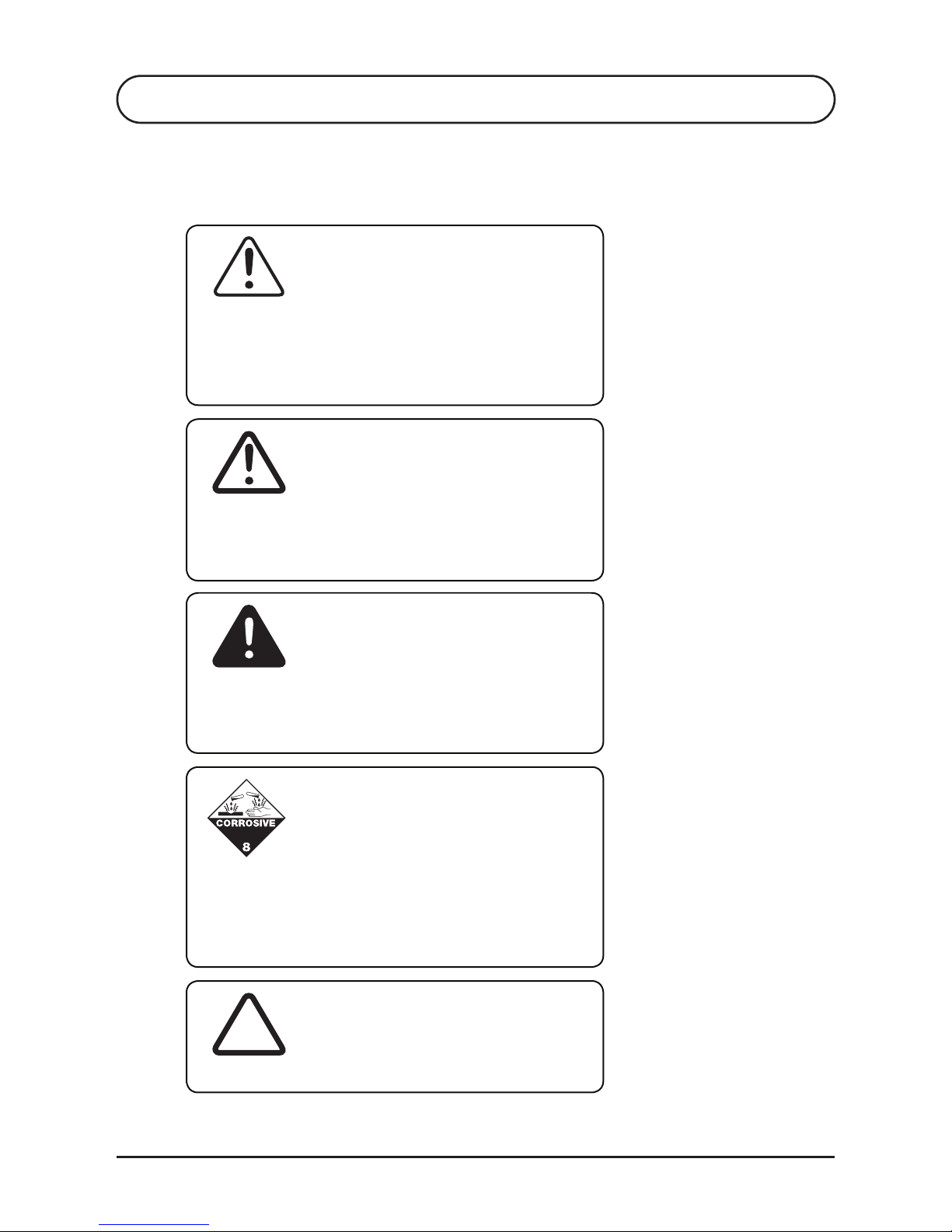
INDICATES AN IMMEDIATELY HAZARDOUS SITUATION. IF NOT
AVOIDED, MAY RESULT IN MINOR OR MODERATE INJURY. IT
MAY ALSO ALERT AGAINST UNSAFE PRACTICES.
DANGER
THIS IS THE SAFETY ALERT SYMBOL. IT IS USED TO ALERT
YOU TO THE POTENTIAL PERSONAL INJURY HAZARDS. OBEY
ALL SAFETY MESSAGES THAT FOLLOW THIS SYMBOL TO
AVOID POSSIBLE INJURY.
WARNING
SYMBOL FOR “VOID WARRANTY” OR “DAMAGED WORK”
V
INDICATES AN IMMEDIATELY HAZARDOUS SITUATION. IF NOT
AVOIDED, MAY RESULT IN MINOR OR MODERATE INJURY. IT
MAY ALSO ALERT AGAINST UNSAFE PRACTICES.
CAUTION
FOREWORD
THIS SYMBOL INDICATES AN IMMEDIATELY HAZARDOUS
SITUATION WHICH SHOWS ENSITECH’S PROVISIONS FOR THE
MILD ACID. IF PRECAUTIONS ARE NOT TAKEN, MAY RESULT
IN MINOR OR MODERATE INJURY.
SAFETY ALERT SYMBOLS AND SAFETY SIGNAL WORDS
Page 4

TBE-160CM Instruction Manual
Oct 2013 (USA)
4
FOREWORD
CONTACT
FOR:
• Accident reporting
• Product safety publications
• Current owner updates
• Questions regarding product safety
• Standards and regulations compliance information
• Questions regarding special product applications
• Questions regarding product modifications
Ensitech Pty Ltd
Unit 1/144 Old Bathurst Road
Emu Plains NSW 2750
Australia
Phone: +61 2 4735 7700
Email: [email protected]
Your local TIG Brush distributor.
www.tigbrush.com
Page 5

Ensitech Pty Ltd
www.tigbrush.com
5
REVISIONS LOG
REVISIONS LOG
Revised Issue of Manual: October 2013
Revised Issue of Manual: December 2012
Original Issue of Manual: November 2012
Page 6

TBE-160CM Instruction Manual
Oct 2013 (USA)
6
INTRODUCTION
SAFETY PRECAUTIONS
DESCRIPTION OF APPARATUS
OPERATION
4.1 Preparation
4.2 Assembly
4.3 Cleaning Fluid
4.4 Operation (Cleaning)
4.5 Operation (Marking)
OPERATING MODES
MAINTENANCE
CONSUMABLES
7.1 Brushes
7.2 Insulating Shroud
7.3 Cleaning Fluids
7.4 Neutralizing Fluids
7.5 Other Fluids
7.6 Marking Consumables
TROUBLESHOOTING
8.1 On/Off Switch Not Illuminated
8.2 On/Off Switch Illuminated & Unit Not Operating
8.3 On/Off Switch Illuminated, Circuit Breaker Pressed In
& Unit Not Operating
8.4 Unit Operating In Clean Mode Only
7
8
10
12
12
12
12
14
14
15
16
17
17
17
17
17
17
17
18
18
18
19
19
CONTENTS
S1
S2
S3
S4
S5
S6
S7
S8
Page 7

Ensitech Pty Ltd
www.tigbrush.com
7
S1 INTRODUCTION
The TIG Brush is a metal cleaning and finishing machine. It
uses the action of an electric current along with a fluid to
remove heat marks and other surface imperfections from
metal surfaces. This model has been specifically designed to
clean heat marks left by TIG welding stainless steel, and to
indelibly mark (etch) stainless steel surfaces
Several cleaning solutions are available, each suited to
different applications. Contact Ensitech for more information,
or visit our website www.tigbrush.com
INTRODUCTION
Page 8

TBE-160CM Instruction Manual
Oct 2013 (USA)
8
S2 SAFETY PRECAUTIONS
Protect yourself and others by observing all safety
information, warnings and cautions. Failure to comply with
instructions could result in personal injury and/or damage to
the product or property.
Read this documentation carefully before operating the
equipment. Please retain these instructions for
future reference.
Before using the TIG Brush, make sure the work environment
is well ventilated and away from any combustible
substances. Ensure that all required equipment is available.
Do not use the TIG Brush for any purpose other than that
described in this manual. Failure to observe this warning
may result in permanent damage to the TIG Brush, cause
damage to the workpiece, cause injury to the operator and
void the warranty.
The TIG Brush is one of the safest appliance in its class.
However some precautions must be taken with the use of
the TIG Brush, as with any electro-cleaner.
• The TIG Brush uses mild acids; gloves should be used to
avoid prolonged contact with any of the fluids.
• Goggles should be worn to prevent fluid being splashed
in the eyes.
SAFETY PRECAUTIONS
SAFETY INFORMATION
WARNING
Page 9

Ensitech Pty Ltd
www.tigbrush.com
9
S2 SAFETY PRECAUTIONS
CAUTION
• Fluid spilled on the skin should be washed off as soon
as practical.
• Material Safety Data Sheet is available for all chemicals
and should be read before use.
• The brush gets extremely hot, around 392°F degrees
Fahrenheit. Be very careful touching the brush. Do not
place the brush near any flammable materials.
• The TIG Brush produces an electric current which may
generate small sparks between the brush and the metal
being cleaned.
• Hydrogen gas may also be generated (which is an
invisible but explosive gas). Always use the apparatus
in a well ventilated area. Do not use near flammable
substances, or in areas where dense flammable gases
(such as petrol vapor) may accumulate.
• The TIG Brush TBE-160CM uses 110V AC only. Do
not use with any other voltage. If the power cord is
damaged or if the TIG Brush has been dropped from a
height and damaged, do not use the unit. Contact your
TIG Brush supplier to have the TIG Brush inspected
and repaired.
• Do not short out the terminals, or use the TIG Brush with
a damaged wand or cables. Doing so may permanently
damage the TIG Brush and cause damage to the
workpiece being cleaned. The high currents involved
may also cause intense heating of the shorted or
damaged part, which could result in burns to
the operator.
• Ensure that the TIG Brush is located where it cannot
easily fall and cause injury. Ensure that the cables do
not present a trip hazard.
Page 10
TBE-160CM Instruction Manual
Oct 2013 (USA)
10
S3 DESCRIPTION OF APPARATUS
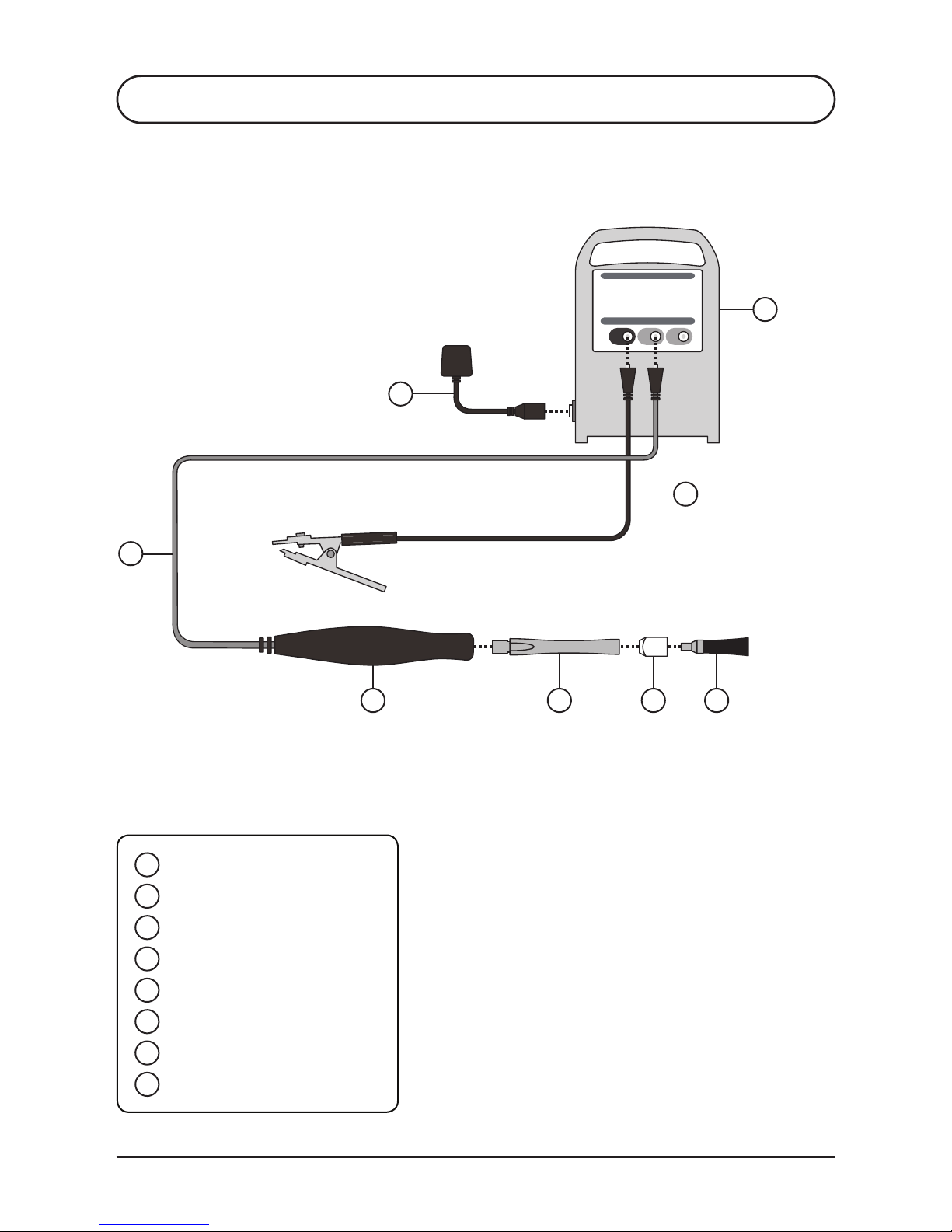
1
2
4 5 6 7
8
3
1
2
3
4
5
6
7
8
TIG Brush Control Unit
Clamp Cable
Handle Cable
Handle
Wand
Shroud
Brush
Power Cord
Page 11
Ensitech Pty Ltd
www.tigbrush.com
11
®
S3 DESCRIPTION OF APPARATUS
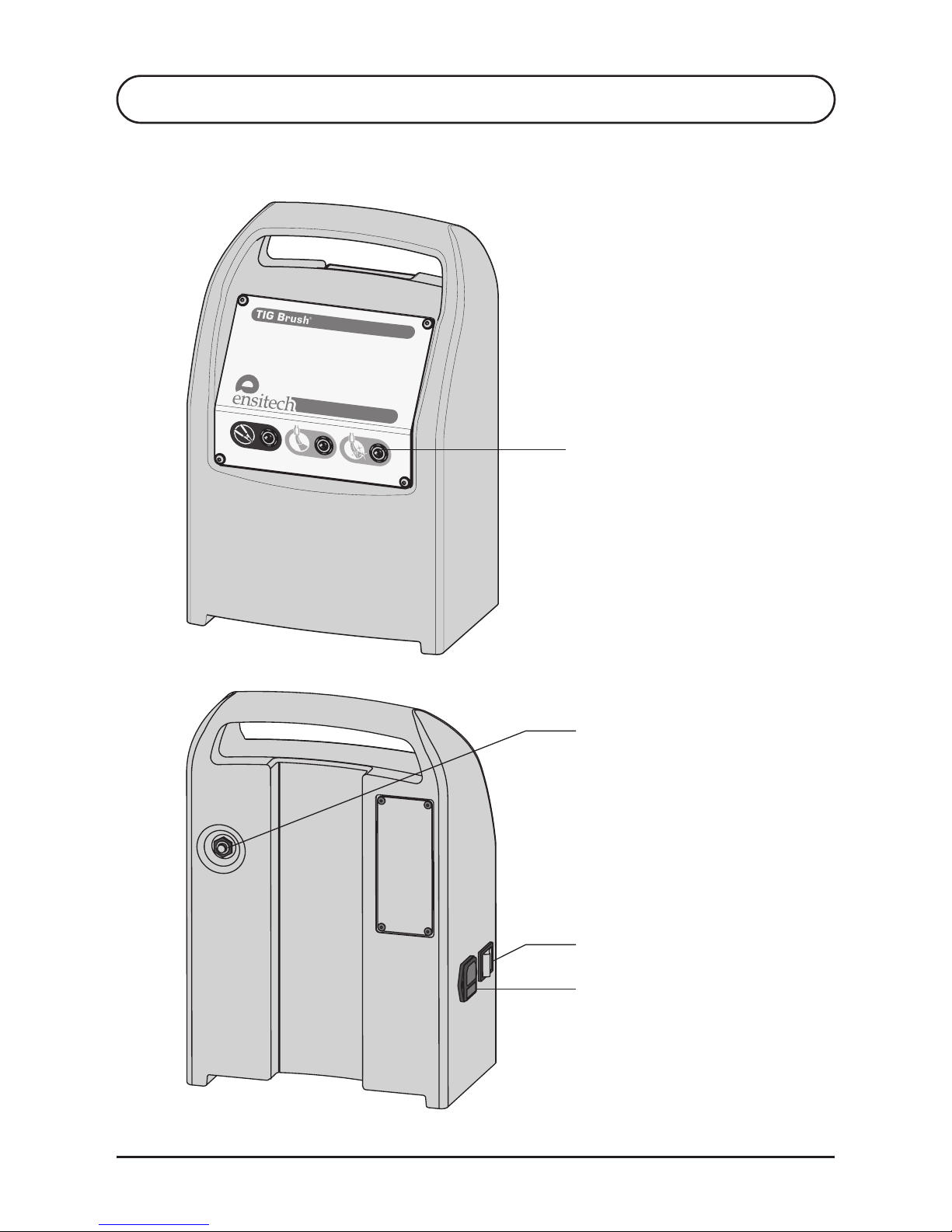
Cable Sockets
Reset Button
On/Off Switch
Mains Socket
TBE-160CM
Page 12

TBE-160CM Instruction Manual
Oct 2013 (USA)
12
S4 OPERATION
PREPARATION
ASSEMBLY
4.1
4.2
4.3
1. Inspect unit and all cables for damage before use.
2. Ensure the unit is dry.
3. Ensure the work environment is well ventilated and
away from any combustible substances.
4. Ensure that cables do not present a trip hazard.
5. If the items to be cleaned are small, place the parts in a
plastic container that can hold acidic fluids safely.
6. Parts will need to be sprayed with the recommended
Ensitech neutralizer or washed down with water after
cleaning. Ensure there is ready access to water and a
suitable place for washing.
7. Wear suitable personal protective equipment as
recommended in the MSDS. The minimum requirement
is for gloves to protect hands from the fluid, and goggles
to prevent fluid splashing into the eyes.
CLEANING FLUID
Pour a small quantity of the Cleaning Fluid into a shallow
bowl. Place the container close to the work because the tip
will be dipped into the fluid regularly during operation.
Refer to illustration on page 10.
1. Attach connector of black cable to black socket of
TIG Brush Unit.
2. Screw wand into handle.
3. Place shroud on brush and screw into wand.
4. Attach connector of red cable to red socket of
TIG Brush Unit to provide required operating mode.
Refer to section 5.
5. Attach power cord to mains outlet and TIG Brush Unit.
6. Attach clamp to workpiece.
Page 13
Ensitech Pty Ltd
www.tigbrush.com
13
S4 OPERATION
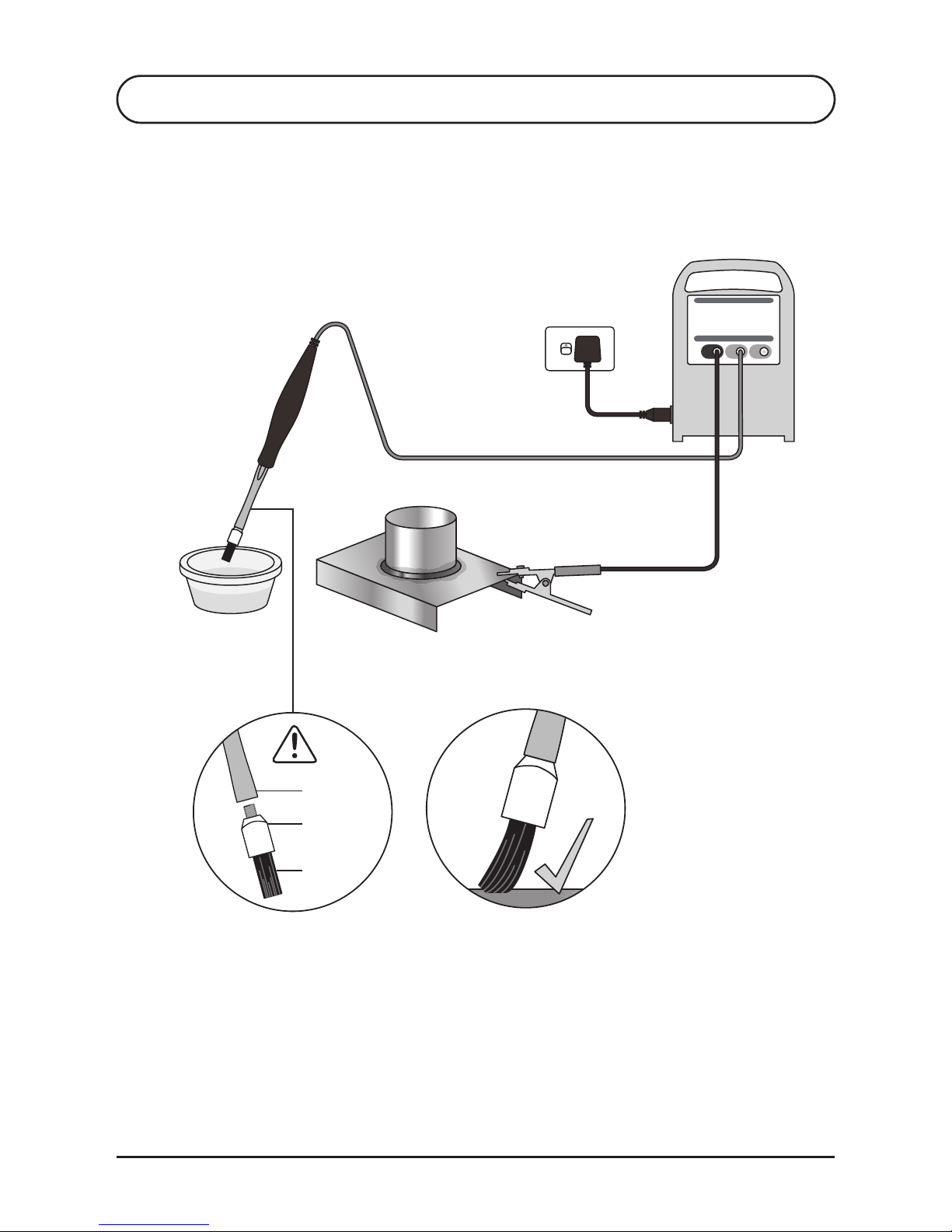
Workpiece
For best performance
use tip of brush only
Wand
Brush
Shroud
Insulating shroud
must be used
Page 14

TBE-160CM Instruction Manual
Oct 2013 (USA)
14
1. Ensure the power cord is connected to a suitable 110V AC
power outlet, and the red cable to the “Clean” socket.
2. Make sure the brush tip has its insulating shroud and the
insulation on the wand is undamaged.
3. Turn the On/Off switch to ON. The On/Off switch should
immediately be illuminated. If this does not occur, refer to
the “Troubleshooting” section.
4. Dip brush in cleaning fluid and apply brush tip to weld area
to be cleaned. Use only recommended cleaning fluids, see
S7.2.
5. Ensure brush and work area remain wet with fluid
during cleaning.
6. Apply brush only for as long as necessary to remove
discoloration. Prolonged application may affect
surface quality.
7. Some light sparking may occur where brush tip contacts
workpiece, this is normal. Excessive sparking for a
prolonged time in one area may cause surface pitting.
8. When desired surface finish is achieved, turn the On/Off
switch to OFF.
9. After use put the brush down on a non-flammable surface
as it may be very hot.
10. Be careful touching the work as it may be hot.
11. Rinse thoroughly with clean water to remove all traces of
cleaning fluid. To ensure acidic residue is removed, use the
recommended Ensitech neutralizing fluid, see S7.3.
S4 OPERATION
OPERATION (CLEANING)4.4
1. Assemble marking head and felt, in accordance with
supplied instructions.
2. Ensure red cable is connected to the “Mark” socket.
3. Secure marking stencil on workpiece using adhesive tape.
4. Saturate marking felt with marking fluid and rub
the marking head firmly and steadily across stencil.
(Experiment on an offcut of similar metal to determine
optimum pressure and speed.)
OPERATION (MARKING)4.5
Refer to illustrations on pages 13 and 15.
Page 15
Ensitech Pty Ltd
www.tigbrush.com
15
S5 OPERATING MODES
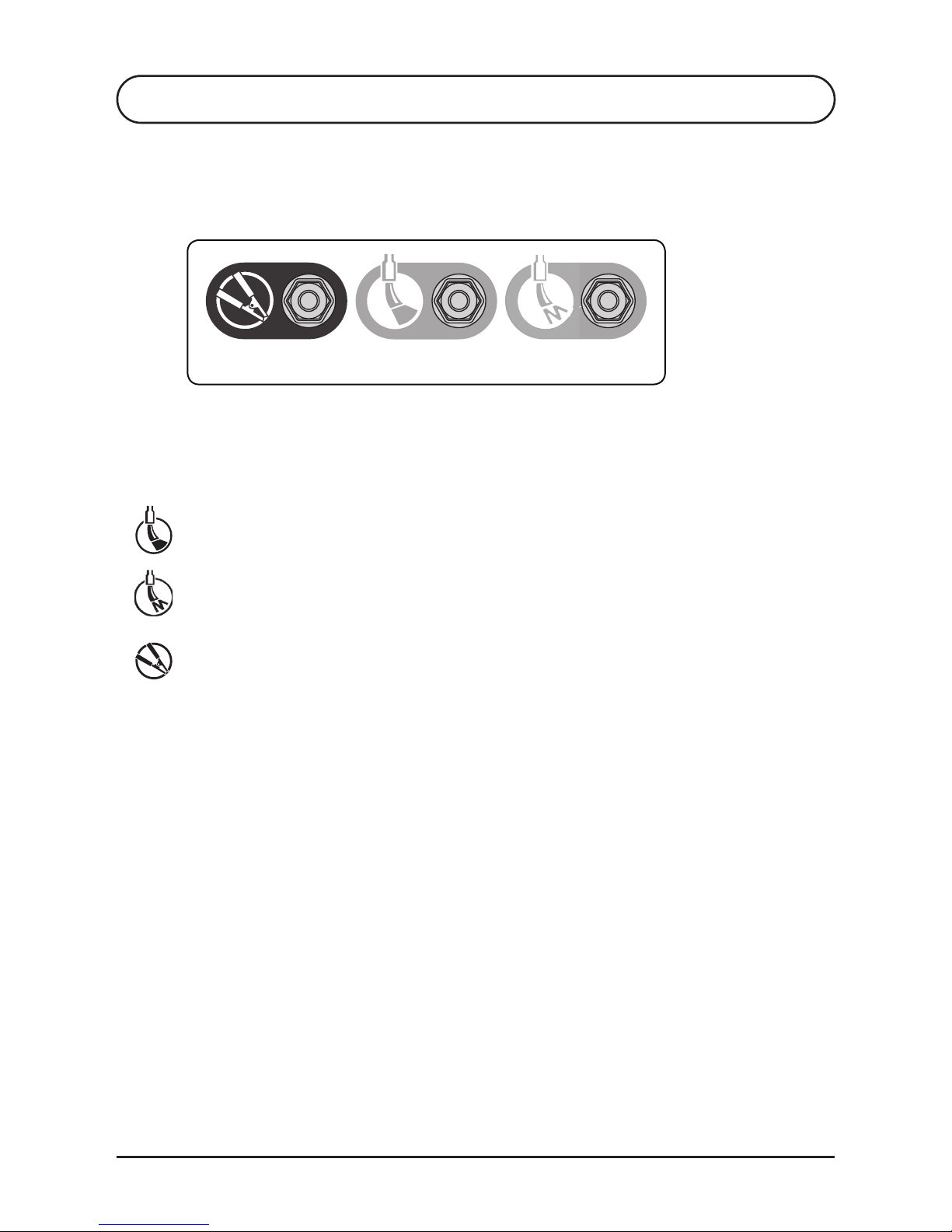
CLAMP CLEAN MARK
OPERATING MODES5.1
Choose the type of operation required by connecting the red
cable to the appropriate socket.
CLEAN - This mode is for weld cleaning and heat tint removal.
MARK - This mode provides indelible marking, for application
of logos or other product identification.
CLAMP - Attach black clamp cable.
Page 16
TBE-160CM Instruction Manual
Oct 2013 (USA)
16
S6 MAINTENANCE
MAINTENANCE
• When not in use, ensure the On/Off switch is OFF. The
green power light on the front panel and the On/Off
switch should not be illuminated.
• Rinse brush or marking head and felt with water to
remove excess cleaning fluid.
• At completion of a work shift, unscrew brush from
wand.
• After using the TIG Brush for cleaning, remove the brush
from the insulating shroud and rinse brush, shroud and
end of wand with water to remove cleaning fluid.
• After using the TIG Brush for marking, remove the felt
and marking head from the marking head adapter and
rinse with water to remove marking fluid.
• Allow parts to dry before re-assembling.
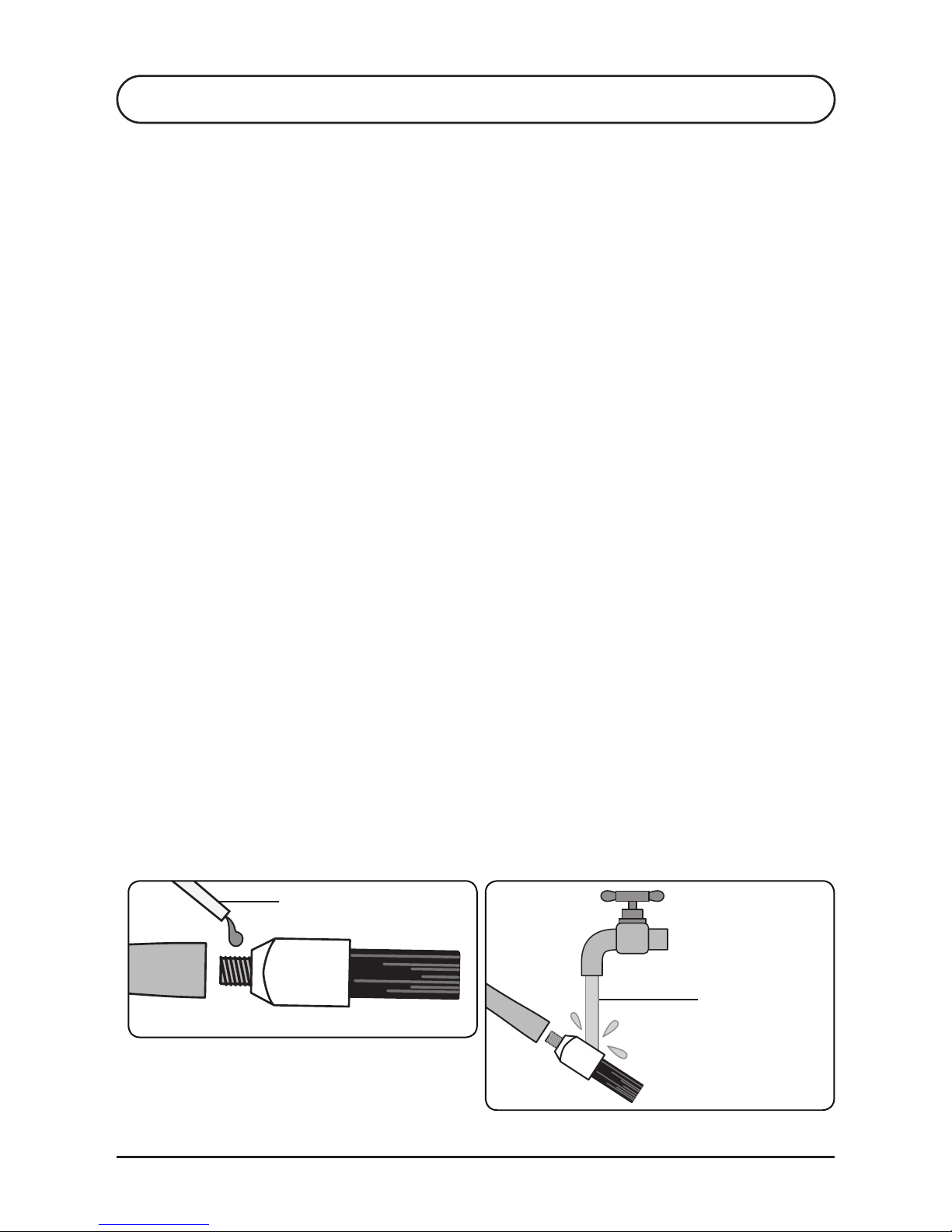
• Before assembling the brush or marking head adapter
to the wand, coat threads with copper filled anti-seize
compound. This will exclude the acidic solution from the
joints and prevent corrosion.
• Rinse clamp with water to remove solution and
prevent corrosion.
• Use a wet cloth to wipe fluid splashes off the TIG Brush
control unit. After some time splashes and marks may
accumulate and become difficult to remove.
Rinse brush
components
after use
Wand Brush
Anti-seize compound
6.1
Page 17

Ensitech Pty Ltd
www.tigbrush.com
17
S7 CONSUMABLES
BRUSHES
INSULATING SHROUD
CLEANING FLUIDS
7.1
7.2
7.3
The brush will wear down with use and need replacing
before the bristles reach the insulating shroud.
Consumable supplies are available from authorized TIG
Brush distributors.
The insulating shroud may become damaged or heat
affected. Replacement shrouds may be purchased.
A range of cleaning fluids is available including:
• TB-21ND Weld Cleaning Fluid: for cleaning & polishing.
• TB-25 Weld Cleaning Fluid: for cleaning & polishing.
• TB-30ND Weld Cleaning Fluid: biodegradable for
cleaning only.
• TB-31ND Neutral Weld Cleaning Fluid
NEUTRALIZING FLUIDS7.4
Neutralizing fluids, to remove cleaning fluid residue:
• TB-40 Neutralizing Fluid for TB-21ND and TB-25.
• TB-41 Neutralizing Fluid for TB-30ND.
OTHER FLUIDS7.5
• TB-01 Pre-Weld Cleaning Fluid: removes dirt and oil prior
to welding to minimize contamination during welding.
• TB-02 Decontaminating Fluid: removes grease and organic
compounds
• TB-50 Finishing Fluid: provides a clean mark-free finish.
• TB-90 Marking Fluid: for indelible marking of logos or other
product identification
MARKING CONSUMABLES (for optional marking kit)7.6
• Marking Fluid (see section 7.5)
• Felt
• O-rings
• Stencils
• Tape
Page 18

TBE-160CM Instruction Manual
Oct 2013 (USA)
18
S8 TROUBLESHOOTING
ON/OFF SWITCH NOT ILLUMINATED
ON/OFF SWITCH ILLUMINATED & UNIT NOT OPERATING
• Ensure the power switch is ON (with the “I” symbol on
the switch pressed in).
• Ensure the power cable is pushed completely into the
socket on the side of the TIG Brush.
• Ensure power is present at the power point (possibly by
plugging in another appliance, such as an
inspection light).
• Check the fuse located below the mains socket. Using a
small screwdriver, place the tip in the indentation under
the plastic fuse drawer and pull out the drawer. If the
fuse at the end of the drawer is broken replace with a
fuse of the same specification (8 amp slow blow fuse,
size M205).
• If the fuse blows again, contact your TIG Brush Supplier.
• Check the circuit breaker on the back of the unit. If a
current overload has occured the button will
be extended.
• Ensure that the brush and wand are not touching the
work piece.
• Switch the On/Off switch to OFF.
• Press the circuit breaker button in.
• Switch the TIG Brush unit ON and commence
working again.
8.1
8.2
If the TIG Brush is not operating correctly, please refer to the
following trouble shooting guide before contacting your TIG
Brush distributor.
Page 19

Ensitech Pty Ltd
www.tigbrush.com
19
ON/OFF SWITCH ILLUMINATED, CIRCUIT BREAKER
PRESSED IN & UNIT NOT OPERATING
UNIT OPERATING IN CLEAN MODE ONLY
• Ensure the TIG Brush circuit breaker is reset (it should
be pressed in – see back of unit).
• Ensure the cables are securely plugged into the front of
the TIG Brush.
• Ensure the clamp is gripping the work securely.
Sometimes the clamp position may need adjusting to
make a good contact. If dirt or debris has built up on the
clamp, clean it as this may prevent a good contact
being made.
• Ensure the brush or marking head is wet with fluid.
• Ensure that the work is conductive. If the metal has a
plastic film or a thick layer of oxide, the current cannot
flow through the work. A mechanical or chemical
method may need to be used to remove any insulating
film before the TIG Brush can be used.
• Examine all cables for damage and ensure all the cables
are properly connected.
• Ensure the brush or marking head adapter is securely
screwed into the wand. NOTE: Be careful when
checking, as a loose connection may be extremely hot.
• Check screw threads on the handle, wand, brush or
marking head adapter for dirt and contamination in the
screw threads and clean if required.
• The unit is faulty. Return the unit to your local Ensitech
supplier for servicing.
S8 TROUBLESHOOTING
8.3
8.4
Contact your TIG Brush distributor or visit the website for
more help www.tigbrush.com
Page 20

WARRANTY
This warranty is given by Ensitech Pty Ltd of Unit 1, 144, Old Bathurst Road, Emu Plains NSW 2750,
Australia, Tel: +61 2 4735 7700, Email: [email protected]. The benefits given by each warranty set out in
this document are in addition to any other rights and remedies you may have under a law in relation to the
services or goods to which the warranty relates. Our goods come with guarantees that cannot be excluded
under the Australian Consumer Law. You are entitled to a replacement or refund for a major failure and for
compensation for any other reasonably foreseeable loss or damage. You are also entitled to have the goods
repaired or replaced if the goods fail to be of acceptable quality and the failure does not amount to a major
failure. Unless otherwise stated you will bear the cost of claiming the warranty.
What this warranty covers
This warranty applies to any defects in the goods that appears within 24 months from the date of delivery
of the goods to you. To claim under this warranty, the defects must be notified to Ensitech and the goods
returned to Ensitech within two weeks of their appearance. Ensitech will, at its option, replace or repair
the goods within a reasonable time of receiving a valid warranty claim. Ensitech will pay for the repair or
replacement but you must pay all other costs including all transport costs of returning the defective goods to
Ensitech and Ensitech delivering the repaired or replacement part back to you.
How to make a claim
If you want to make a claim under your warranty, please contact Ensitech Pty Ltd in writing by sending a
pre-paid letter to Ensitech Pty Ltd, PO Box 179, Springwood NSW 2777, Australia, or email to info@tigbrush.
com. You must include your full name, address and contact telephone number and the details of the defect in
relation to which you make your claim. Ensitech will tell you whether you need to return the goods to Ensitech
Pty Ltd or the approved local distributor. You will need to return the goods together with all accessories and
parts for a full assessment and report.
Additional limitations, exclusions and requirements
This warranty does not extend to:
• consumables such as the brush, insulating shroud and wand;
• any defect caused by normal wear and tear or incidental or inconsequential damage;
• any defect caused by misuse, negligence or other abuse of the goods;
• any defect caused by accidents or alterations;
• goods that have not been cleaned and maintained in accordance with the user’s manual supplied with the
goods;
• loss or damage, including consequential loss or damage, to your work or facilities arising out of or in
connection with the use of the TIG Brush; or
• unless otherwise expressly stated, any right to be reimbursed or compensated for physical or financial
injury, loss, damage, expense, time or inconvenience (whether direct or indirect) arising out of the
occurrence of the defect in the product or your inability to use the product.
Model: TBE-160CM Serial No.
Purchased from:
Date of Purchase:
TIG Brush TBE-160CM Instruction Manual Oct 2013 (USA)
Ensitech Pty Ltd Unit 1/144 Old Bathurst Road, Emu Plains NSW 2750, Australia
Phone: +61 2 4735 7700 Email: [email protected]
 Loading...