

Page 1
TA-8830+TA8300 Installation Manual
Last Revised: 3/26/12
16
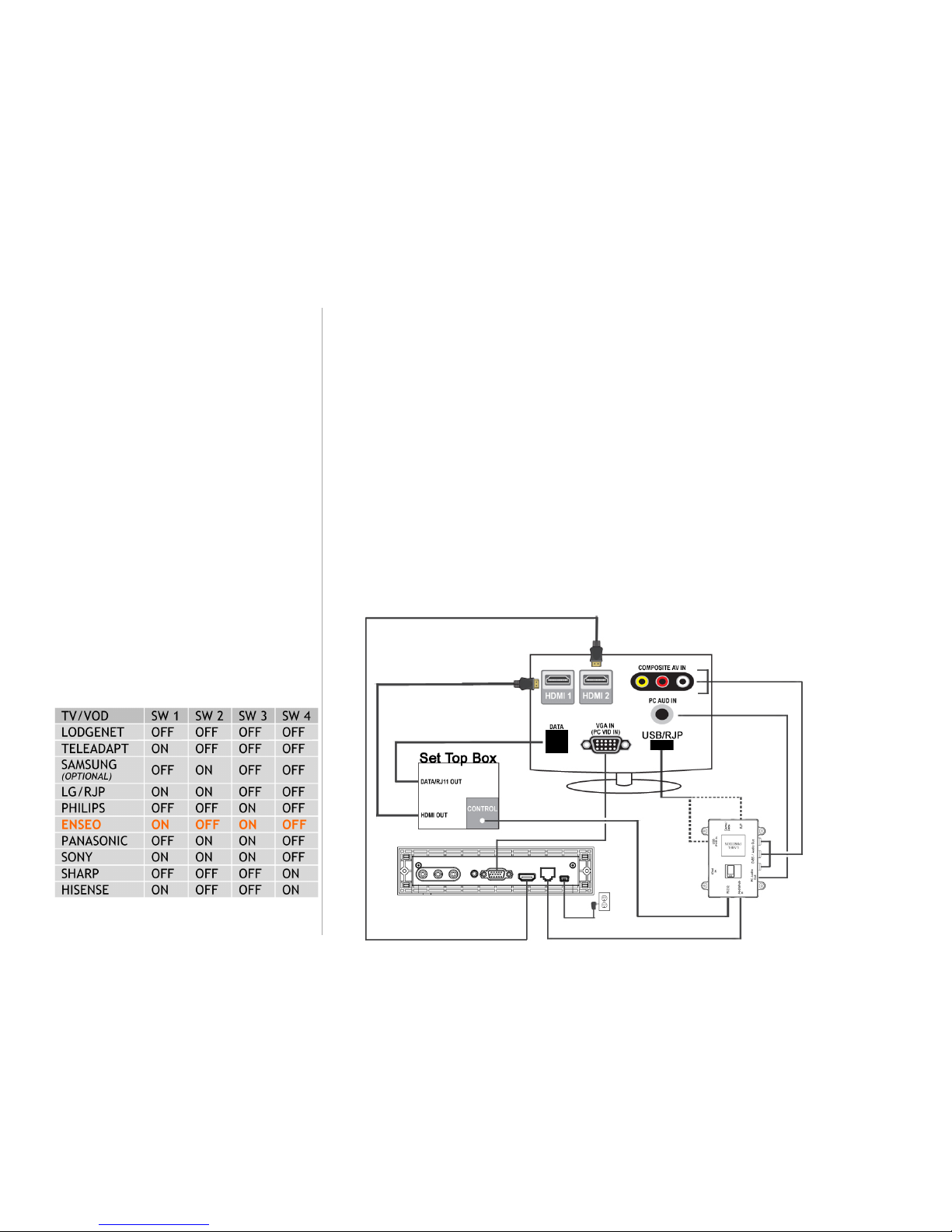
Enseo Set Top Box (with ANY TV)
1 |
Ensure the DIP Switch Settings on ASM are in the appropriate positions according to the
installation choices below.
2 | Connect the cables between the MediaHub SL, ASM and TV and STB according to schematic
shown for your installation choice.
3 |
Plug the power supply into a wall power socket using the correct plug for your country.
4 | Power ON the TV and
configure the TV settings according to the
model-specific requirements below.
5| After all menu settings and AV connections are done, power cycle the TV to lock
in settings.
For Enseo HD3000 STB firmware v.2.12.04+ / HD2000 STB firmware v.2.10.29.17+
Follow the cable connection diagram below.
ASM DIP Mode: UP-DWN-UP-DWN
Configure Enseo STB: Press <Channel Up>, <Right Arrow>, <Left Arrow>, <MUTE>
to enter set-up screen. Go to Control Options and AUX panel. Set BAUD Rate to
115200.
Configure TV Menu Settings according to the TV make/model listed.
Special Notes:
The ASM Installation Kit contains an RS232
3.5mm control cable. Use this cable for the
Control connection to the Enseo STB.
For Enseo HD2000, use the RS232 Male control
cable included in the ASM installation kit.
If your hospitality TV has a built-in LodgeNet
terminal (internal terminal card), plug the
Game/Data cable into the TV’s DATA port.
The Enseo Control port does not draw any power
for the ASM. Therefore, a power connection is
required for the ASM’s USB Power In. The TV’s
USB port can supply power to the ASM, even if it
is labeled “Service Only.”
Be sure the ASM DIP Switches are set to the
appropriate positions:
Page 2

TA-8830+TA8300 Installation Manual
Last Revised: 3/26/12
17
Panasonic North America Series 20/12 + Enseo HD2000/3000
Configure TV: Go into HOTEL MODE (<MENU>, <G>, <Y>, <0>), set
MODE=ON, TA Control=EXTERNAL, BUTTON LOCK is OFF.
LG North America + Enseo HD2000/3000
Configure TV: Plug in DATA jack to TV’s DATA port. TV will automatically
power off and enter Enseo Mode after 3 minutes of inactivity.
Philips North America, Sharp North America +
Enseo HD2000/3000
No TV configuration needed.
Any Samsung North America Model + Enseo HD2000/3000
Connect STB RJ11 to TV’s DATA port using Samsung’s BN3900865B
RJ11 cable.
Configure TV: Turn power ON. With Samsung remote control,
enter the menu by pressing <INFO>, <MENU>, <0>, <1>,
<EXIT>. Ensure the following is selected:
Hotel Mode is ON (or Interactive)
Music Mode (AV) is ON
Music Mode (PC) is ON
RJP Priority AV, PC and HDMI is 1, 2, and 3, respectively
RJP AV Option is AV1
RJP HDMI Option is HDMI2
Set SI Vendor to ENSEO
 Loading...