

Page 1
EnPointe Wireless Fencing Set
EP-P01, EP-R01 User Manual
Page 2

Page 3

Fencing Setup
The Pocket Boxes
. Plugging in
. Orientation in the pocket
The Relay Box
. Connecting to the scoring machine
. Touching on
. Switching off
Batteries and Power
. Battery life
. Battery indicator lights
. Replacing the batteries
Timing and Updates
. Downloading an update
. Updating the Relay Box
Troubleshooting and Warning lights
. General errors
. Equipment errors
FAQs
Important Information
. Wireless specs
. Disclaimer
. Safety message
. Compliance
The EnPointe Wireless Fencing System
1
2
-
-
-
-
3
-
4
-
-
-
5
-
-
6 - 9
-
-
10
11
-
-
-
12
Page 4
The EnPointe Wireless Fencing System
This set includes two Pocket Boxes that plug into body wires, and a Relay Box that plugs into
an existing scoring machine. A scoring machine is not included with this set.
This system behaves as a wired (reels) system would, without a grounded metallic piste.
A piste attachment can be added to this set for hit cancellation on metallic pistes.
For more information about the system, the piste attachment, features or setup, please see
our website www.enpointefencing.com or contact us at: [email protected].
Included in this set:
1 x Relay Box (EP-R01)
2 x Pocket Box (EP-P01)
1 x Carry Case
1 x Manual
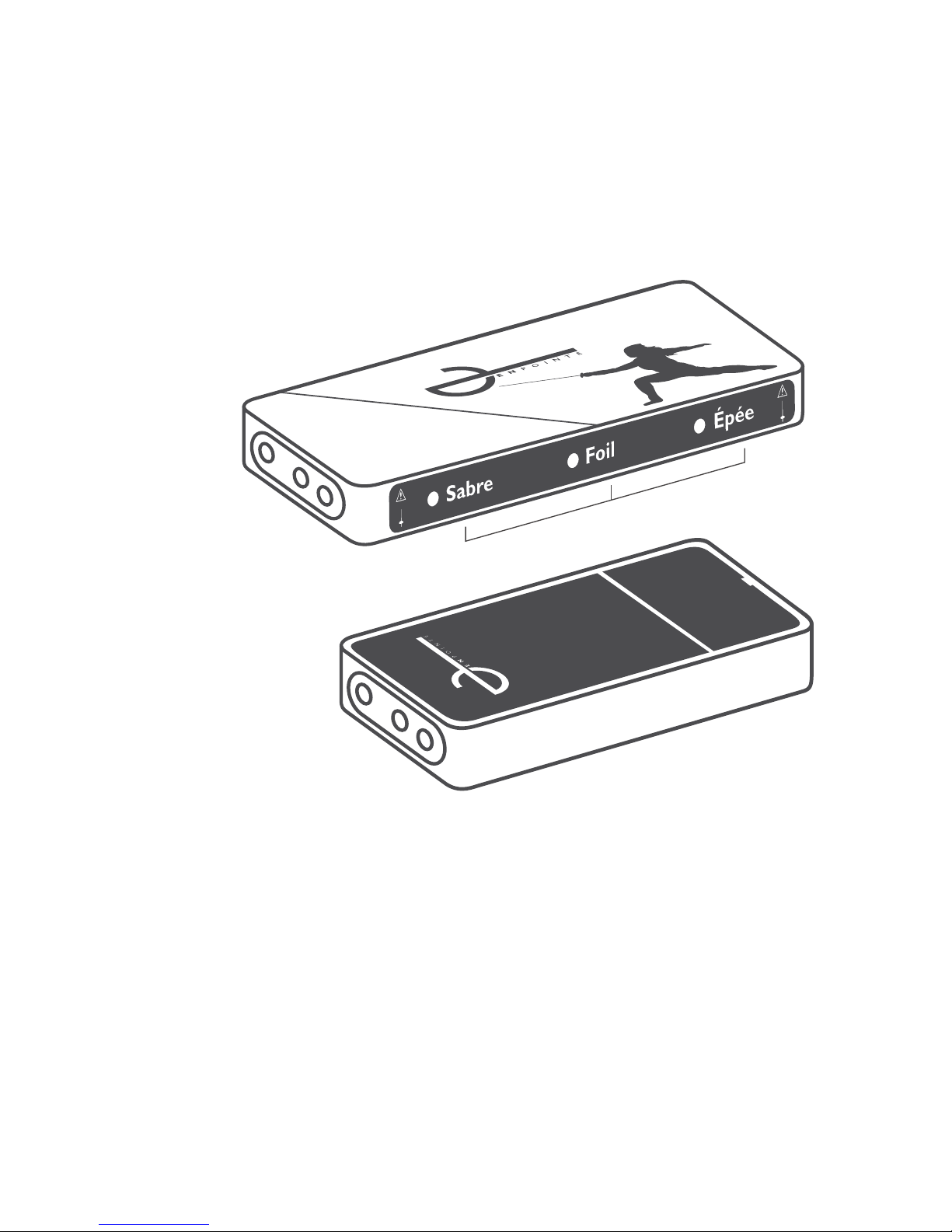
A. Weapon select menu
B. Socket for connector cables
C. Connectivity error light
D. Equipment error light
E. Socket for body wire
F. Battery compartment
G. EnPointe logo,
faces outward from body
Fencing setup | 1
Bi.Relay Box
Pocket Box
E.
Bii.
C.
A.
D.
F.
G.
Page 5

Fencing setup | 2
The Pocket Box:
To begin using your system, place two AAA batteries in the battery compartment of each
pocket box, shown in [F], in the direction indicated.
In order to begin fencing with the pocket boxes, simply plug your three-pronged bodywire into
the plug at the top of the box, shown in the picture above [E].
There is no need to switch the pocket box ‘on’, it will automatically turn on when you begin
fencing. It will turn itself off once you have nished, and the relay box has been switched off.
It is important that you place the pocket box into the pocket so that the silhouette of the
fencer faces you (fencer-to-fencer), and the ‘EnPointe’ logo faces outward. This ensures that the
box has continuous contact with the body, and that the wireless antenna is unobstructed.
Reminder: The boxes are designed to sit in the pocket of standard fencing breeches.
They can be used in normal sweatpants, so long as the box remains snug in the pocket.
Extremely loose clothing, in which the boxes would rattle around, may reduce the reliability
of the pocket boxes.
The Relay Box:
To set up the Relay Box for wireless fencing, place four AAA batteries in the Relay Box battery
compartment shown in [H]. Place them in the compartment in the orientation
indicated on the device.
Attach the connector cords from the scoring machine to the relay box, as shown in [B].
Attach the other ends of the cords where reels or cables would otherwise plug into
the scoring machine. If you did not purchase connector cords, standard Épée wires
can be used instead.
It is important that the cord for the left-hand side of the piste (as indicated on the scoring
machine), is connected to the left of the relay box [Bi], and that the cord for the right side
of the piste is connected to the right of the relay box [Bii] when the box is facing you.
Page 6
Touching On:
Firstly, place your scoring machine in the mode of weapon you will be fencing in.
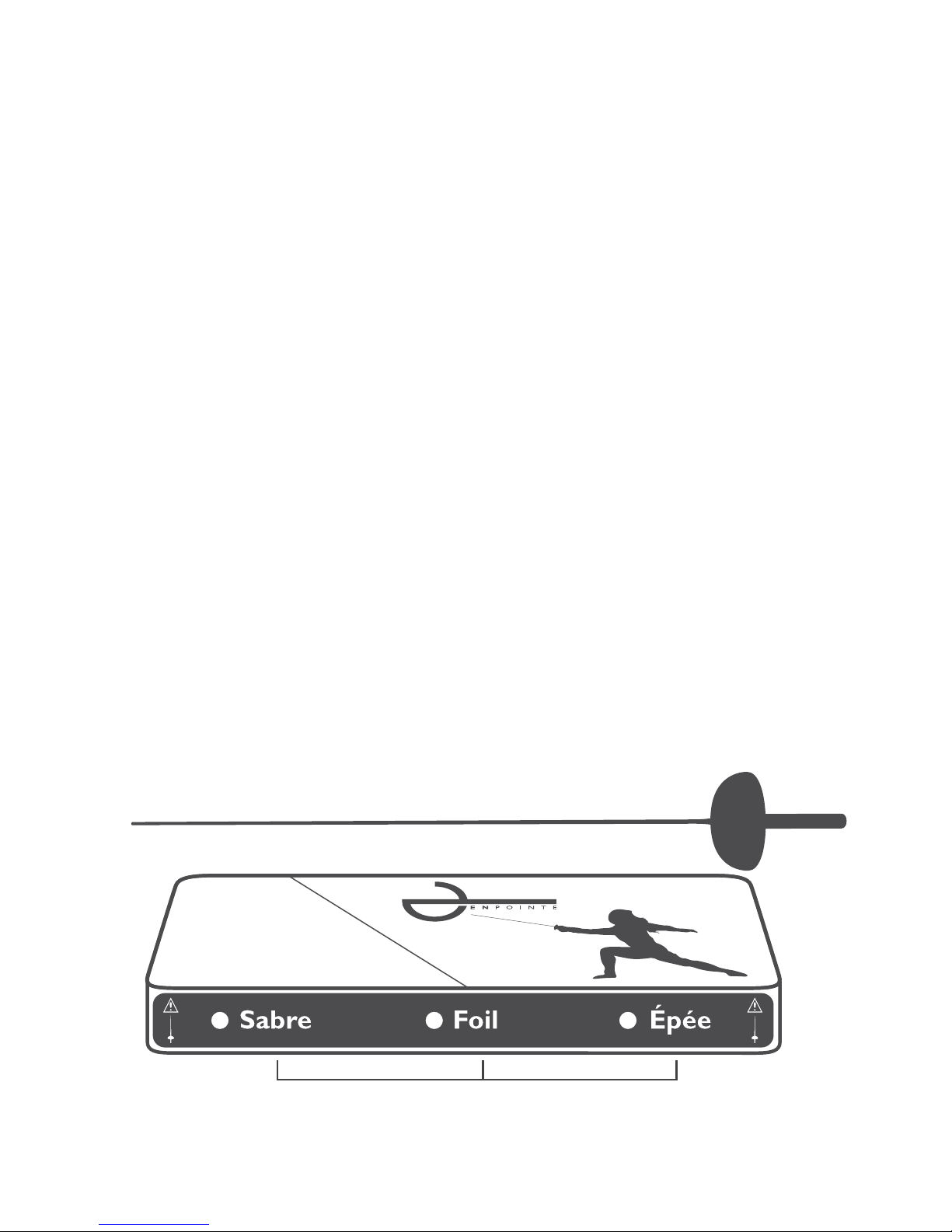
Now choose the weapon you wish to fence with by pressing the ‘Sabre’, ‘Épée’ or ‘Foil’ buttons,
as shown in [A]. This will switch on your relay box.
If your weapon is plugged in and your body wire is plugged into the pocket box and attached to
the lamé, you can register to the piste by touching the top of the relay box with your weapon.
This process should take less than a second.
All four error lights [C and D, on both sides of the box] will be lit while no-one is ‘touched on’.
Once a fencer has touched on, the lights on that fencer’s side of the piste will turn off.
The rst fencer to touch on is allocated to the right hand side of the piste.
You can switch weapons or wires with no need to re-register.
Now you are ready to fence! There is no calibration routine or syncing required.
Switching off:
To switch off your system, simply press the same button on the relay box of the weapon you
selected, so that the green light turns off, as shown in [A]. This also switches off any touched-on
pocket boxes.
If no-one is touched on with their weapon connected for more than one minute, or if no hit of
any kind has been made for more than 15 minutes, the system will automatically switch itself
off to preserve battery.
Fencing setup | 3
A.
Page 7
Batteries and Power:
The Pocket Boxes use two standard AAA batteries, and last for 90 hours of continuous fencing,
or approximately three months worth of regular club use.
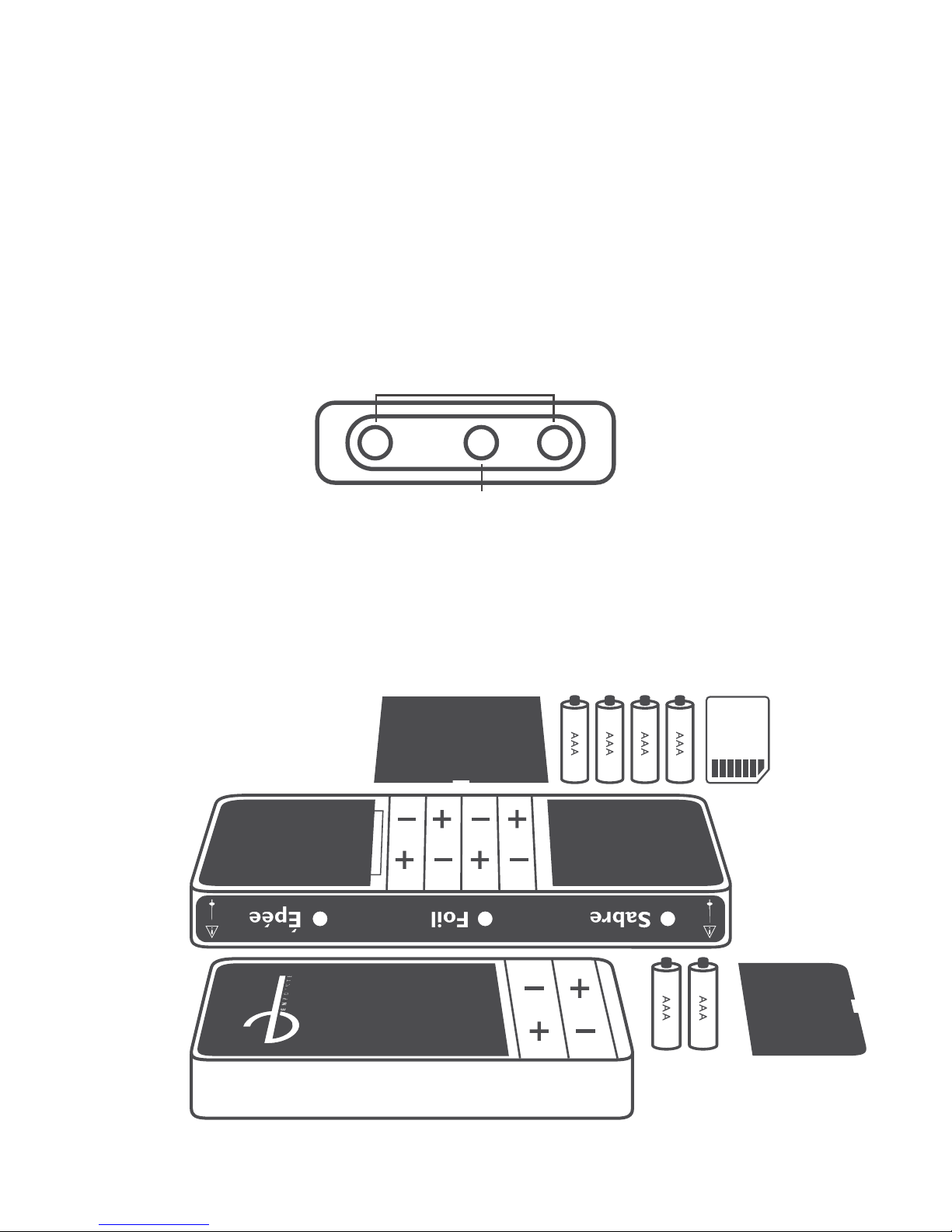
The pocket box batteries can be replaced by pulling on the lift-tab shown in [F].
The battery level can be viewed by touching the two outer pins on the pocket box. The middle
pin will glow green (high battery), or fade to yellow (medium battery) or red (low battery,
around 20% charge).
While fencing, pocket box low battery is indicated by ashing the warning light [C] once every
second, on that fencer’s side of the piste.
The Relay Box uses four standard AAA batteries, and has a battery life of 120 hours of
continuous fencing, or four months of club use.
The relay box batteries can be replaced by opening the compartment shown in [H].
Low battery is indicated by all four yellow error lights ashing ve times when you turn on
your relay box. This will occur when approximately 20% of the battery charge is left.
Batteries and power | 4
H.
I.
Light
Outer pins
F.
Page 8

Timing and Updates
Please note that the information listed in this manual is for the initial release software, and
additional updates may change the behaviour of the system. Please refer to the version release
notes available at www.enpointefencing.com/downloads for more information.
Any new EnPointe system will come pre-installed with the latest update.
In the event of rule changes, or if we have made any changes to our system that we think will
improve the wireless experience, we will provide free updates to download from our website.
These les can be loaded onto a MultiMediaCard (MMC) (like those used in digital cameras),
and then plugged into the relay box.
Simply download the le from our website at www.enpointefencing.com/downloads and drag
and drop the le from your ‘downloads’ folder onto the MMC. Many laptops and computers
have MMC slots, or MMC to USB adaptors can be purchased from most stationery and
electronics stores.
Once the le is loaded onto the card, open the battery case on the relay box, shown in [H],
and insert the MMC underneath the batteries, into the slot shown in [I]. Push the card in until
it clicks, then replace the batteries. To remove the card again, push it in, and it will spring out.
Once all the error lights and weapon select menu lights have ashed on and off, the system has
been updated. You can then take the MMC out or leave it in the relay box for the next update.
If an update has failed, all the error lights will ash ve times once the batteries have been
reinserted.
Timing and updates | 5
Page 9

Troubleshooting and Warning Lights
General Connection Errors are shown by the warning lights. They indicate that the relay
box is not communicating with a pocket box on that side of the piste.
Personal equipment errors are shown by the equipment light, and indicate there is an
issue with an individual fencer’s equipment, including lamé, weapon, body wire or pocket box.
Troubleshooting Guide
The yellow error lights on the relay box
(both general and equipment lights) for both
sides of the pistes are lit.
Error
I cannot touch on.
These lights are lit when the system detects
that no pocket boxes have been touched on.
Once you are plugged in and touch the box
with your weapon, the lights should turn off.
Solution
Check that:
1. Your pocket box has sufcient battery.
You can do this by touching the outer pins
and looking through the middle pin for the
battery indicator light.
2. Your weapon and lamé are plugged in.
3. Your pocket box is sitting snug in the
back pocket and making continuous contact
with the body.
Troubleshooting and warning lights | 6
The equipment error light ( ) for my side of
the piste is lit.
This light indicates there is a problem with
the fencer’s equipment.
Check:
1. Is your lamé connected in foil and sabre?
2. Has your button grounded out to your
guard in Épée?
If you have completed this checklist and your
equipment light has not turned off, you may
have a body wire or weapon that is faulty.
Page 10

The connectivity error light ( ) is ashing
continuously on one side of the piste.
The equipment error light ( ) for my side of
the piste is ashing.
The relay box error lights ( ), and
equipment error lights ( ) ash ve times
when I rst turn on the system.
The off-target light(s) on the scoring machine
are ashing.
Hits are not being registered correctly.
This indicates that the fencer touched-on to
that side of the piste has low battery in their
pocket box. You can still fence with this error.
This indicates there is a problem with that
fencer’s pocket box.
Check:
1. Do you have the pocket box oriented in
your pocket correctly? (Fencer silhouette
facing you, EnPointe logo facing outward.)
2. Is the pocket box able to properly sense
the fencer? For best performance, the pocket
box must be close to the body and snug in
the pocket. Very loose clothing may cause the
box to hang off the body or rattle around.
3. Has it been more than 5 seconds since
any of the above has occurred? The light will
ash for 5 seconds after it records any of the
above scenarios.
You can still fence with this light ashing,
but in extreme circumstances, system
performance may be impacted.
This indicates that the batteries in the relay
box are very low (20% battery life) and will
need to be replaced soon. You are still able
to fence with the system while this error is
present.
As in the wired system, you may be fencing
with a body wire that needs replacing.
Check that the connector cords, or épée
wires, are not broken at any point and are
properly connecting the relay box to the
scoring machine.
Troubleshooting and warning lights | 7
Page 11

The connectivity error lights ( ) on the
relay box ash, then extinguish. The off target
lights on the scoring machine ash when this
happens.
This indicates that a wireless connection
cannot be sustained between the pocket
boxes and the relay box. The relay box will
attempt to reconnect, and the off-target
lights will display if the box is disconnected
for a long enough period of time, that a hit
could have occured.
First check that the wireless antenna on the
relay box is unobstructed.
See that:
1. No large metal objects are placed on top
of the relay box, blocking the antenna.
2. The relay box is not placed in a location
where it is closely surrounded by metal
on all sides.
If this does not solve the issue, check that the
wireless signals are not failing to reach the
relay box. This may occur if you are fencing
in an place where signals are absorbed, or
dissipate into the environment.
This may be:
1. An environment where signals are
absorbed, like in a sound-proofed room
with foam on the walls.
2. A wide open space where the signal
dissipates outwards without reecting
off any objects, like a wide open eld.
If you encounter wireless connectivity
problems in these environments, try moving
the location and orientation of the relay
box. Try moving the pocket box into a side
or front pocket of the fencer, or if using a
belt clip, try moving it to the front of the
fencer’s uniform. This should eliminate any
connectivity issues.
Troubleshooting and warning lights | 8
Page 12

The off-target lights on the scoring machine
are continuously ashing and will not allow
us to fence. All the error lights on the relay
box are lit.
This indicates that the system is unable to
establish a connection between the relay box
and pocket boxes. Firstly;
1. Does your pocket box have enough
battery? Check by touching the outer pins
of your box, and looking through the centre
pin for the battery indicator light.
2. Have the batteries in the pocket box
come loose? Check that the batteries are
placed securely in their compartment.
If you have sufcient battery, and have
tried to improve the wireless connectivity
using the steps above, you should not have
this issue. If you are still experiencing this,
it is possible that your wireless box is
encountering unprecedented amounts
of interference.
No amount of interference from wireless
systems (including Wi-Fi and Bluetooth
devices) should cause this. It is possible
you are fencing in close proximity to noncompliant wireless emitters. Please contact
us at [email protected] for
more specic help with this issue.
Troubleshooting and warning lights | 9
Page 13

Important Information:
Technical Specications:
Power Supply
Size and Weight of entire set (including carry
case)
Battery Life (of one set of batteries)
Radio Transmission frequency
Size and Weight (inc. batteries)
Encryption Protocol
Operating Temperature Range
Relay box: four (4) x AAA batteries
Pocket boxes: two(2) x AAA batteries
per box
Size: 20.7cm x 17.5cm x 5.0 cm
Weight: 575g
Relay box: approximately 120 hours
Pocket Box: approximately 90 hours
2.4GHz ISM band
Relay box size: 13.5cm x 6cm x 1.6cm
Weight: 165g
Pocket Box size: 10cm x 6cm x 1.5cm
Weight: 111g
AES-128 authenticated encryption
0-50 degrees celsius
FAQ | 10
Frequently Asked Questions (FAQs):
Q - Will the wireless system behave any differently from a wired system?
A - We have made every effort to ensure that the EnPointe system behaves in the same manner
as the currently-used wired systems. In normal use, the EnPointe system follows the same
timing and light decisions of standard reels in all three weapons. It adheres to all FIE guidelines
on wireless scoring as outlined in their wireless 2016 test protocol.
Q - Will the system encounter interference?
A - No, the system’s performance should not be reduced by interference from other wireless
fencing systems, or from other forms of wireless technology like Wi-Fi or Bluetooth.
Q - How durable is the pocket box? Will it break if I fall on it?
A - The pocket boxes are made from aluminium and exible breglass. It would be highly
unlikely that one could be broken in the process of normal fencing, even if you were to drop it,
fall directly onto it, or step on it accidentally. That being said, we recommend that fencers treat
the pocket boxes with care, the same as you would with any other expensive technology.
Page 14

Warranty:
The warranty is valid for twelve months from the date of purchase. It includes free repair for
any defects in materials or assembly. It does not include international shipping costs.
If the consumer encounters a major fault or defective system, they must stop using the system,
and contact the manufacturer immediately. This ensures they are eligible for a warranty claim.
You can contact [email protected] to make a claim, or contact us through our
business address: EnPointe Fencing, 5a Hartnett Close, Mulgrave 3170, Victoria, Australia.
Our goods come with guarantees that cannot be excluded under Australian Consumer Law. You are
entitled to a replacement or refund for a major failure and compensation for any other reasonably
foreseeable loss or damage. You are also entitled to have the goods repaired or replaced if the goods fail
to be of acceptable quality and the failure does not amount to a major failure.
The intended use for this product is for fencing, under safe conditions and in accordance
with health and safety guidelines. We cannot take responsibility for damage that results from
improper use of the system, or use of the system in a manner outside of its intended purpose.
Disclaimer and Safety Message
This wireless fencing system has been designed for fencing under normal conditions, and to
the FIE rules and scoring specications. If fencers use the system under non-standard or unsafe
fencing conditions (for example, not wearing shoes, or not wearing a glove on the weapon
hand) we cannot guarantee the reliability of the system.
We encourage all fencers to keep their protective gear and equipment up to date with
regulatory safety standards, and to only fence in conditions and environments that adhere to
health and safety guidelines.
We hope you enjoy your EnPointe Wireless Fencing set.
For more information about our products, updates or innovations, please visit our website at
www.enpointefencing.com or email us at [email protected]. Allez!
Warranty | 11
Page 15

CE Compliance Notice:
The EnPointe Wireless fencing set (EP-P01, EP-R01) meets the minimum requirements for
safety and electromagnetic compatibility of electronic devices, and conforms with the relevant
European Union directives and recommendations:
Directive 2011/65/EU
Directive 2014/53/EU
Directive 2014/30/EU
Council Recommendation 1999/519/EC of 12th July 1999
More information about our compliance, including the relevant harmonised standards, can be
found in our declaration of conformity, available at www.enpointefencing.com/downloads.
FCC Compliance Notice:
Contains FCC ID: SQGBL652
This device complies with part 15 of the FCC Rules. Operation is subject to the following two
conditions: (1) This device may not cause harmful interference, and (2) this device must accept
any interference received, including interference that may cause undesired operation.
This equipment has been tested and found to comply with the limits for a Class B digital
device, pursuant to part 15 of the FCC Rules. These limits are designed to provide reasonable
protection against harmful interference in a residential installation. This equipment generates,
uses and can radiate radio frequency energy and, if not installed and used in accordance with
the instructions, may cause harmful interference to radio communications. However, there is
no guarantee that interference will not occur in a particular installation. If this equipment does
cause harmful interference to radio or television reception, which can be determined by turning
the equipment off and on, the user is encouraged to try to correct the interference by one or
more of the following measures:
—Reorient or relocate the relay box.
—Increase the separation between the equipment and system.
—Move or shorten the length of the connector cables.
—Consult the dealer or an experienced technician for help.
Note: The system is intended to be used with an FCC compliant scoring machine. If the scoring
machine is not compliant, the system as a whole may not be. Connector cables of up to 1.8m in
length were tested with this system and found to comply.
Pacemaker Notice: This product contains strong magnets and utilises wireless technology.
Consult with a medical professional before using.
Contains small parts. Keep out of reach of children.
All companies and products referenced herein are trademarks or registered
trademarks of their respective holders.
The ‘EnPointe’ logo is a registered trademark.
Patent Pending. ID: 2017902406
Made in Australia.
Important Information | 12
Page 16

 Loading...