

Page 1

eS440A Sound Level Meter
User Manual
Features:
Sound Level Range: 30 to 130 dB (Auto Ranging)
Frequency weighting: A/C
Fast/Slow time weighting selection
Max Hold function
High accuracy
Bar graph display
AC/DC analog outputs
White Backlight
Over-range / Under-range indicator
Time and date
Auto-off feature
Low Battery Alert
Tripod Mount (Tripod not included)
Important Notes:
Wind blowing across the microphone can cause additional extraneous noise. When using the
instrument in the presence of wind please cover the microphone with the supplied foam ball.
Do not store or operate the instrument at high temperatures or in a high humidity environment.
Keep the microphone dry and avoid severe vibrations.
If the meter will be out of use for a prolonged period remove the batteries.
Calibration is recommended before operation if the instrument has been out of use for an extended
duration or has been stored in extreme conditions (i.e. extreme heat, moisture, vibration, etc.)
Page 2
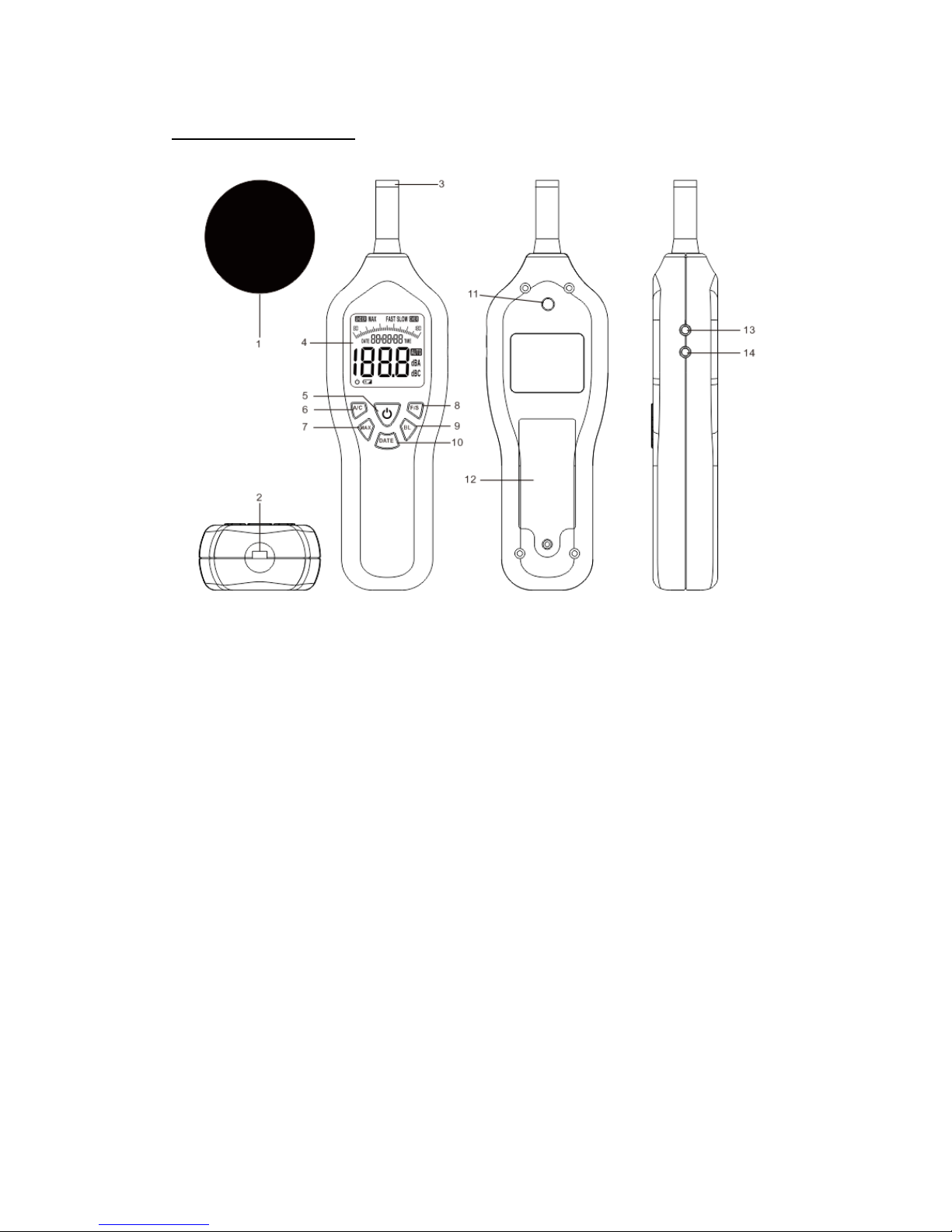
Product Description:
1. Foam ball microphone cover (mandatory for outdoor use to prevent wind noise from
affecting the measurement)
2. USB socket (for optional external power adapter)
3. Condenser microphone
4. LCD display with backlight
5. Power on/off button
6. A/C frequency weighting selection button
7. Max button
8. FAST/SLOW button
9. Backlight button
10. Time/Date button
11. Tripod mounting thread
12. Battery cover
13. AC output jack (for analog output)
14. DC output jack (for analog output)
Page 3
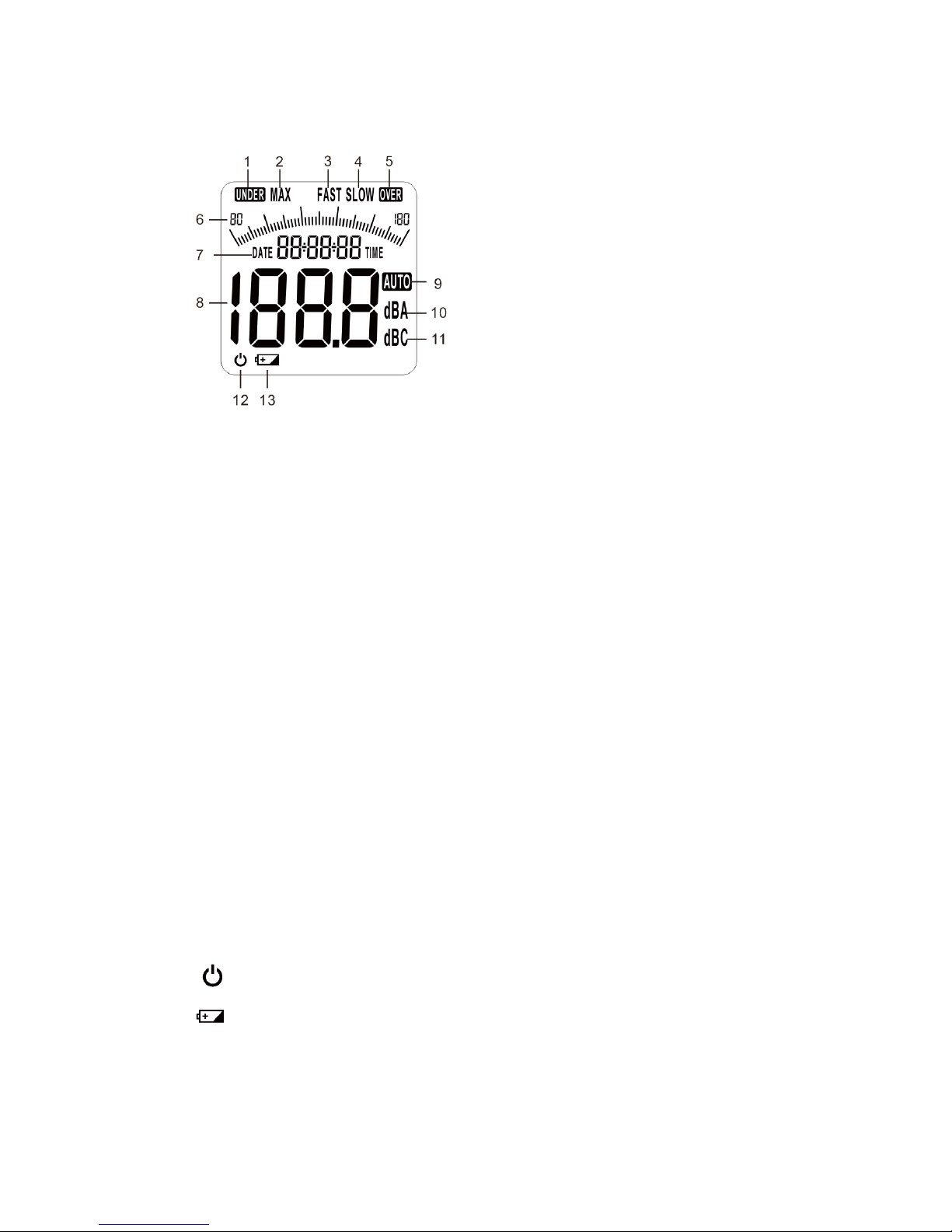
LCD display
1. UNDER: Under-range alert symbol, will be displayed if the reading is below the lowest
detectable sound level.
2. MAX: When in this mode only the highest sound level reading will be displayed.
3. FAST: Fast time weighting (refer to response speed)
4. SLOW: Slow time weighting (refer to response speed)
5. OVER: Over-range alert symbol, will be displayed if the reading is above the maximum
measurable sound level.
6. Bar Graph: Displays sound levels as an easy to track bar graph in addition to the digital
display (see 8).
7. Date and Time Display (displays current date and time)
8. Digital Sound Level Display
9. AUTO: Permanently displayed to indicate the meter is auto ranging
10. dBA: A-weighted decibels
11. dBC: C-weighted decibels
12. Power symbol (Auto-shutdown disabled)
13. Low battery warning symbol
Page 4

Operation:
1. Turning the Sound Level Meter On and Off
Press the Power button to turn the meter on. Press it again to turn it off.
After 5 minutes without any operation the meter will automatically power off. To disable the
Auto-Power-Off hold the F/S button down while turning the unit on, then let go of the F/S button.
You will see the Power Symbol appear on the LCD, indicating that the auto-power-off feature is
disabled.
2. A/C Frequency Weighting Selection
Press the A/C button to select frequency weighting A or C (your selection will be displayed to the
right of the sound level value as dBA or dBC). When you turn the meter on it will be in
A-weighting mode.
A-Weighting causes the meter to replicate the frequency filtering process of the human ear. In
A-weighting mode, the sound level meter is less sensitive to very high and very low frequencies.
Applications include environmental measurements, law enforcement and workplace design.
C-Weighting is suitable for flat response measurements with no attenuation of amplitude over the
frequency spectrum. Applications include the sound level analysis of machinery and engines.
3. MAX Value Measurement Function
When measuring sound levels press the MAX button to capture the maximum sound level value.
The reading will remain unchanged until a higher reading is detected. Note that the bar graph will
continue to display the current reading. Press the MAX button again to exit this mode.
4. FAST/SLOW Response Speed Function
When you turn the meter on it will be in fast response mode. Press the F/S button to toggle
between Fast (500ms per reading) and Slow mode (1sec per reading).
5. Backlight
Press the Backlight button to turn the backlight on or off.
6. Date and Time
Press the Date and Time button to switch between date and time display.
To Set Date and Time: Start by turning the meter off. Hold down the A/C button, then briefly
press the Power button and release both Power and A/C buttons at about the same time. This
Page 5

will cause the meter to enter date and time setup mode. Only the time will appear on the display
and the first digit will flash. Use the A/C button (left) and F/S button (right) to choose the digit
to set. Use the Max button (-) and Backlight button (+) to adjust the value. You can set both time
and date this way. When done, press the Time button to store the time and date you have selected.
Battery Replacement:
If the meter does not power on properly or the low battery icon appears on the LCD display,
replace the batteries as soon as possible. Use a screwdriver to unscrew the battery compartment
cover on the back of the unit and insert four new 1.5V AA batteries. Make sure the polarity is
correct (match the positive and negative terminals according to the diagram inside the battery
compartment.) Reinstall the battery cover.
Please make sure to properly recycle the old batteries in an environmentally friendly manner.
External Power:
The unit can be powered with a USB cable (not included), connected to a standard USB power
adapter or port.
Tripod Mount:
Mounting the sound meter on a camera tripod (not supplied) will increase the stability and
accuracy of the meter by eliminating any sound generated by the user.
Specifications:
Standard applied: IEC651 type 2, ANSI S1.4 type 2
Calibration sound source: 94 dB @ 1 kHz
Measurement range: 30~130 dBA
Accuracy: +1.5 dB (reference sound pressure standard 94dB@1KHz)
Frequency response: 31.5~8.5KHz
Resolution: 0.1dB
Frequency weighting: A/C
Analog bar graph: 2dB / 1 bar
Display update time: 2 times/second (FAST), 1 time/second (SLOW)
AC signal output: 4Vrms/ full barograph, output impedance approximately 600 ohms
DC signal output: 33mV/dB
Sampling rate: FAST: 125ms, SLOW: 1s
Power supply: 6V (4x 1.5V AA battery)
Page 6

Dimensions: 9.5”x2.5”x1.5” (240*65*38 mm)
Weight: 9.5 oz (270 g), batteries included
Sound Level Meter ennoLogic eS440A
Made in China
User Manual Version 1.1. Revised 10/5/2016.
© 2016 ennoLogic®. All rights reserved.
PO Box 25207, Eugene, OR 97402 U.S.A.
http://ennologic.com
 Loading...