

Page 1
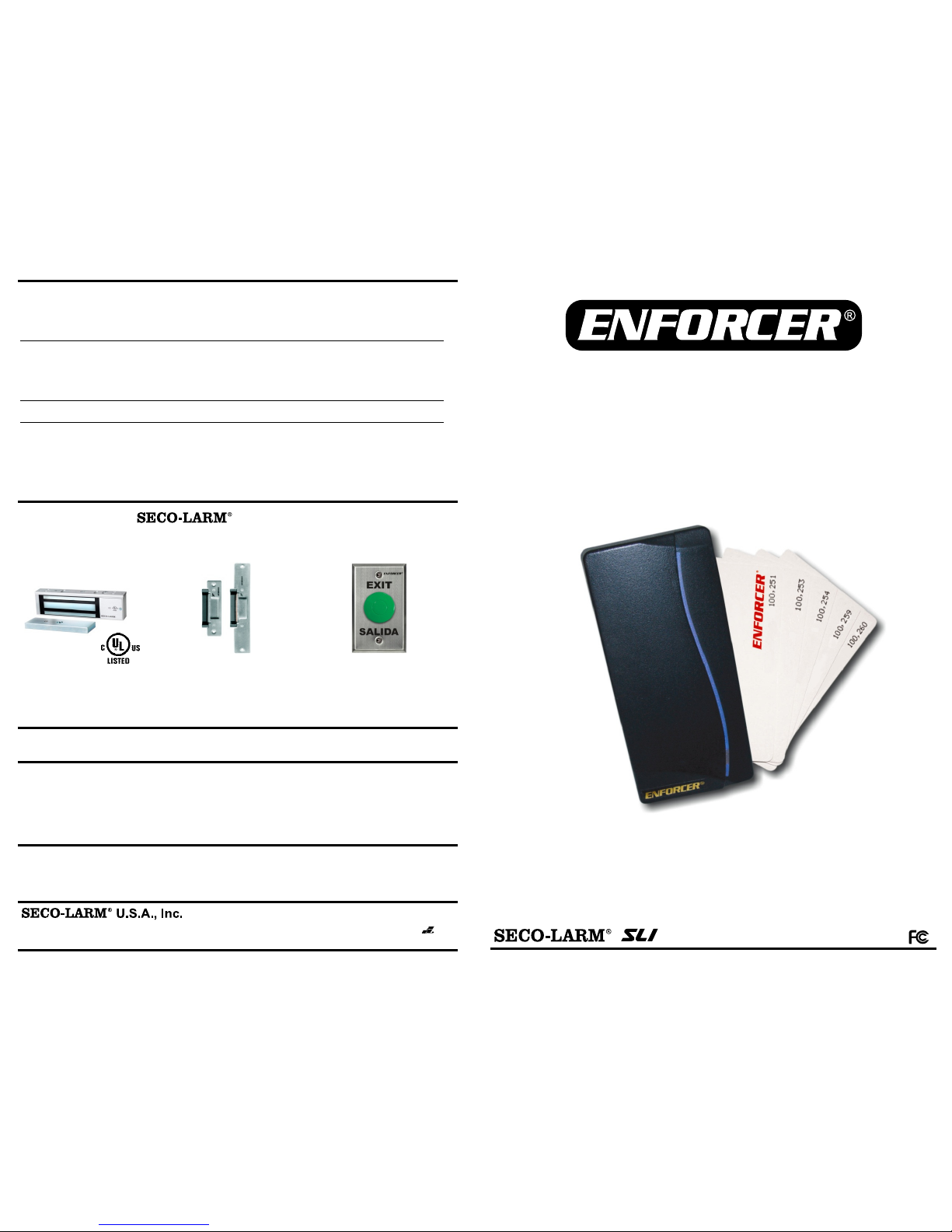
ENFORCER Proximity Card Reader
12 SECO-LARM U.S.A., Inc.
WARNING
: Incorrect mounting which leads to exposure to rain or moisture inside the enclosure could cause a dangerous electric shock, damage the device,
and void the warranty. Do not open the case of this device, as there are no field-serviceable components inside.
WARRANTY
: This SECO-LARM product is warranted against defects in material and workmanship while used in normal service for a period of one (1) year
from the date of sale to the original consumer customer. SECO-LARM’s obligation is limited to the repair or replacement of any defective part if the unit is returned,
transportation prepaid, to SECO-LARM.
This Warranty is void if damage is caused by or attributed to acts of God, physical or electrical misuse or abuse, neglect, repair, or alteration, improper or abnormal
usage, or faulty installation, or if for any other reason SECO-LARM determines that such equipment is not operating properly as a result of causes other than
defects in material and workmanship.
The sole obligation of SECO-LARM, and the purchaser’s exclusive remedy, shall be limited to replacement or repair only, at SECO-LARM’s option. In no event
shall SECO-LARM be liable for any special, collateral, incidental, or consequential personal or property damages of any kind to the purchaser or anyone else.
NOTICE
: The information and specifications printed in this manual are current at the time of publication. However, the SECO-LARM policy is one of continual
development and improvement. For this reason, SECO-LARM reserves the right to change specifications without notice. SECO-LARM is also not responsible for
misprints or typographical errors.
Copyright © 2014 SECO-LARM U.S.A., Inc. All rights reserved. This material may not be reproduced or copied, in whole or in part, without the written permission of
SECO-LARM.
Troubleshooting:
16842 Millikan Avenue, Irvine, CA 92606
Tel:
800-662-0800 / 949
-
261-2999
PICGN1
MiPR-112S-A_1406.docx
Website: www.seco
-
larm.com
E-mail: sales@seco
-
larm.com
The LED does not light
• Check the power connection
• Check the power supply
The relay does not activate
• Make sure you are using a valid user card
• Make sure the relay is not in toggle mode
• Make sure the correct relay output is being used
(either N.O. or N.C.)
The relay time is too short
• Set a longer door-release time
Egress button not working
• Make sure you are using a N.O. switch
• Double-check the door-release time
• Double-check the relay toggle mode
Also Available from
:
Electromagnetic Locks
Electric Door Strikes
Request
-to-
Exit Plates
80, 300, 600, and 1,200
-
lb
Holding force available
Different sizes and
applications available
Different sizes and
button types available
•
Stand-alone operation
• Sealed and weatherproof (IP67)
• Tri-color LED status bar
•
Up to 100 user cards
• Up to 5 master cards
• 10 Cards included
PR-112S-A
Proximity Card Reader
Manual
Page 2
ENFORCER Proximity Card Reader
2 SECO-LARM U.S.A., Inc.
Introduction
................................
..............
2
Specifications .......................................... 2
Parts List.................................................. 2
Features .................................................. 3
Dimensions .............................................. 3
Installation Instructions ............................ 4
Wire Coding ............................................. 4
Sample Installation .................................. 4
Table of Contents:
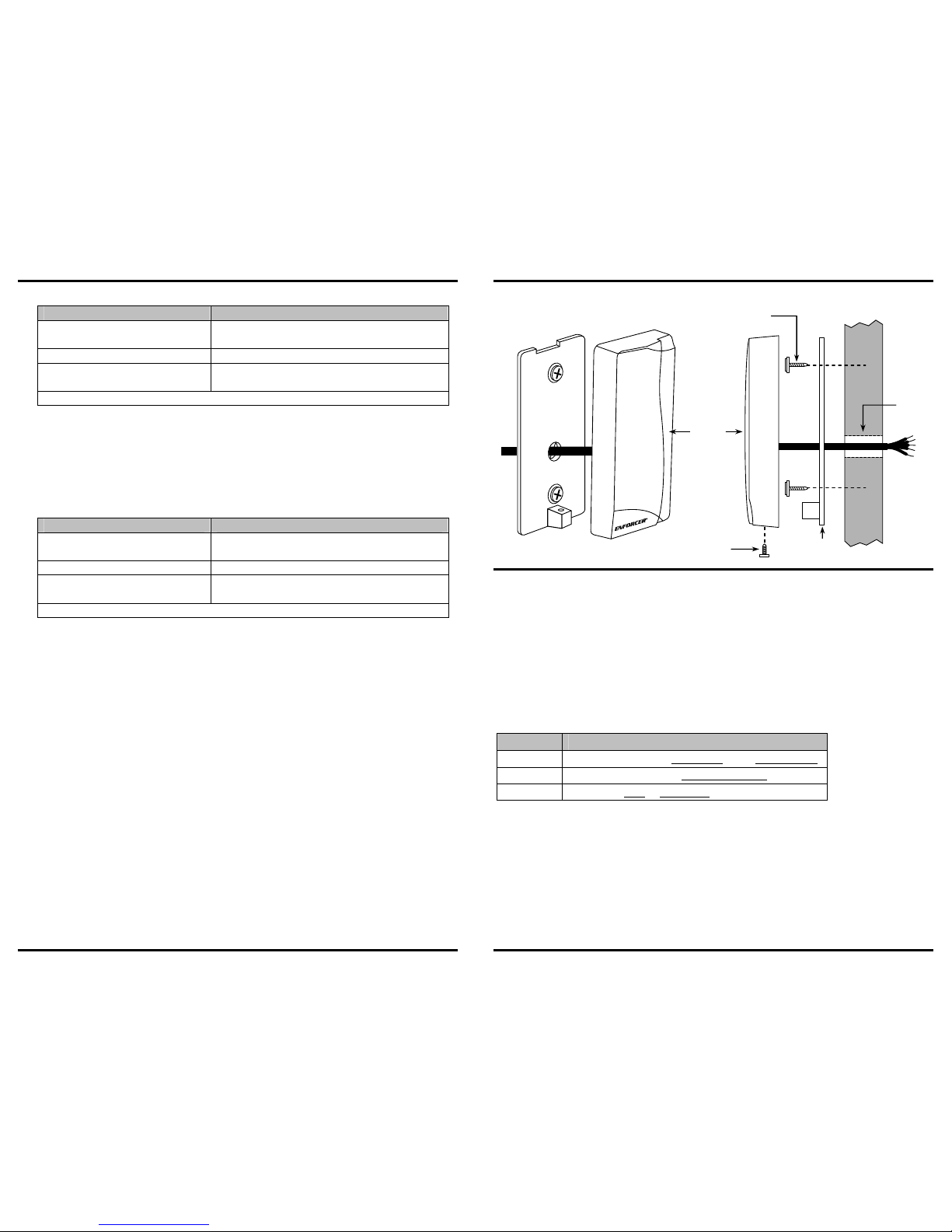
Mounting Diagram
................................
... 5
Getting Started ........................................ 5
Programming ........................................ 6-8
Operating Instructions.............................. 9
System Reset ........................................ 10
User List ................................................ 11
Troubleshooting ..................................... 12
Introduction:
The ENFORCER PR
-
112S-A Proximity Card Reader provides a flexible solution for
securing controlled access. The stylish case and small size make it ideal for use in most
residential, commercial, and industrial sites. The wave-shaped LED status bar accents
the case design. Simple installation, quick programming, high reliability, and attractive
design are all combined in the PR-112S-A.
Specifications:
Power input
12VDC
Current draw
Standby: 80mA@12VDC
Active: 200mA@12VDC
Max. read distance
6” (15cm)
User card limit
100 cards
Master card limit
5 cards
Transmit frequency
125kHz
Outputs 1 relay (N
O/NC/
COM)
Contact rating
1A@30V
Relay time delay
1~180 secs/
Toggle mode
Temperature
-4°~158° F (-20°~70° C)
Enclosure rating
IP67
Dimensions
33/4”x13/4”x3/4” (95x44x1
9
mm)
Parts List:
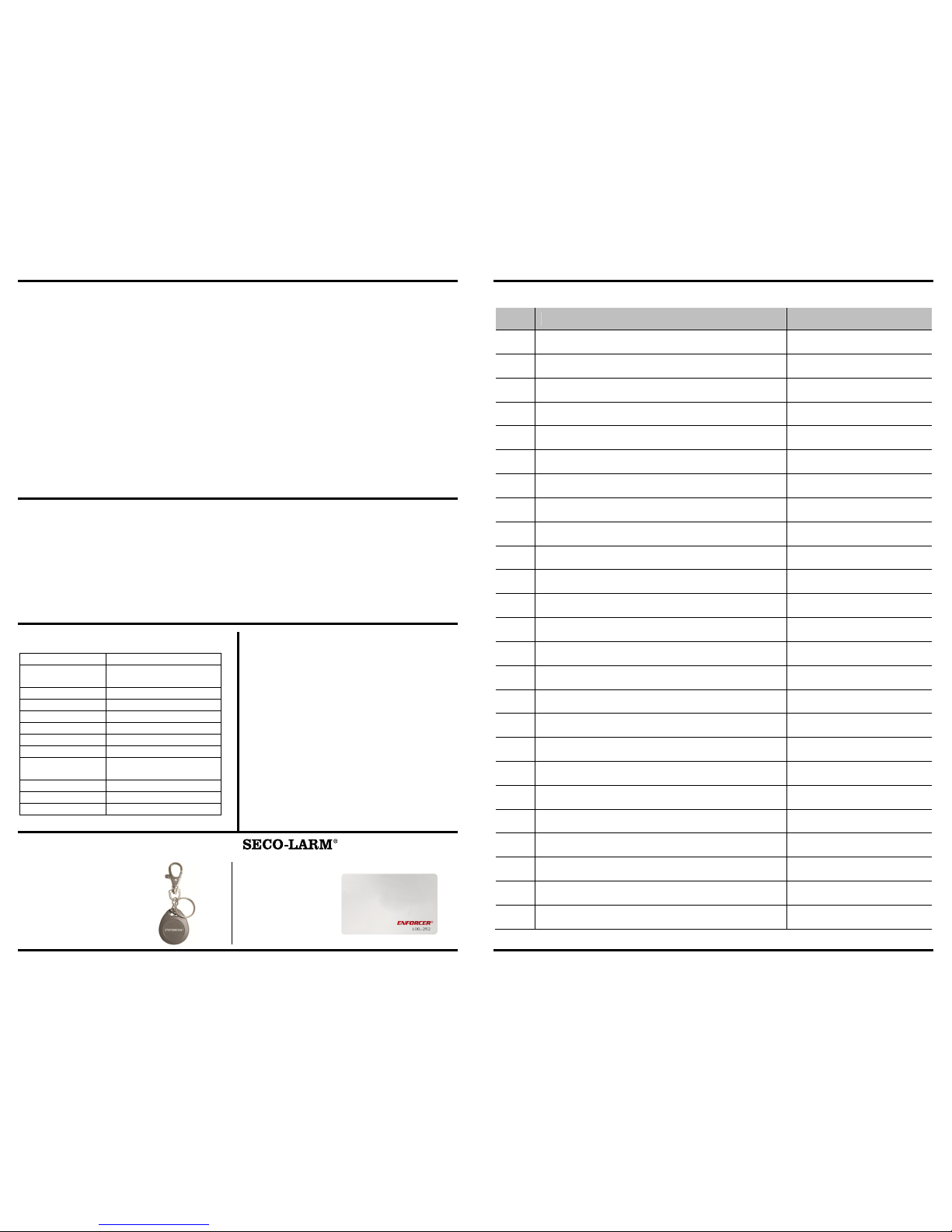
1x Prox
imity card reader
10x Proximity cards
(1 Pre-programmed master card; 9 blank cards)
1x Manual
Additional Accessories Available
from
:
PR-K1K1-AQ PR-K1S1-A
Proximity key fobs
(sold in packs of 10)
Proximity cards
(sold in packs of 10)
ENFORCER Proximity Card Reader
SECO-LARM U.S.A., Inc. 11
User List:
User User Name Card #
1
2
3
4
5
6
7
8
9
10
11
12
13
14
15
16
17
18
19
20
21
22
23
24
25
NOTE –
Please make and use a copy of the chart and store the original in a
safe place.
Page 3
ENFORCER Proximity Card Reader
10 SECO-LARM U.S.A., Inc.
System Reset:
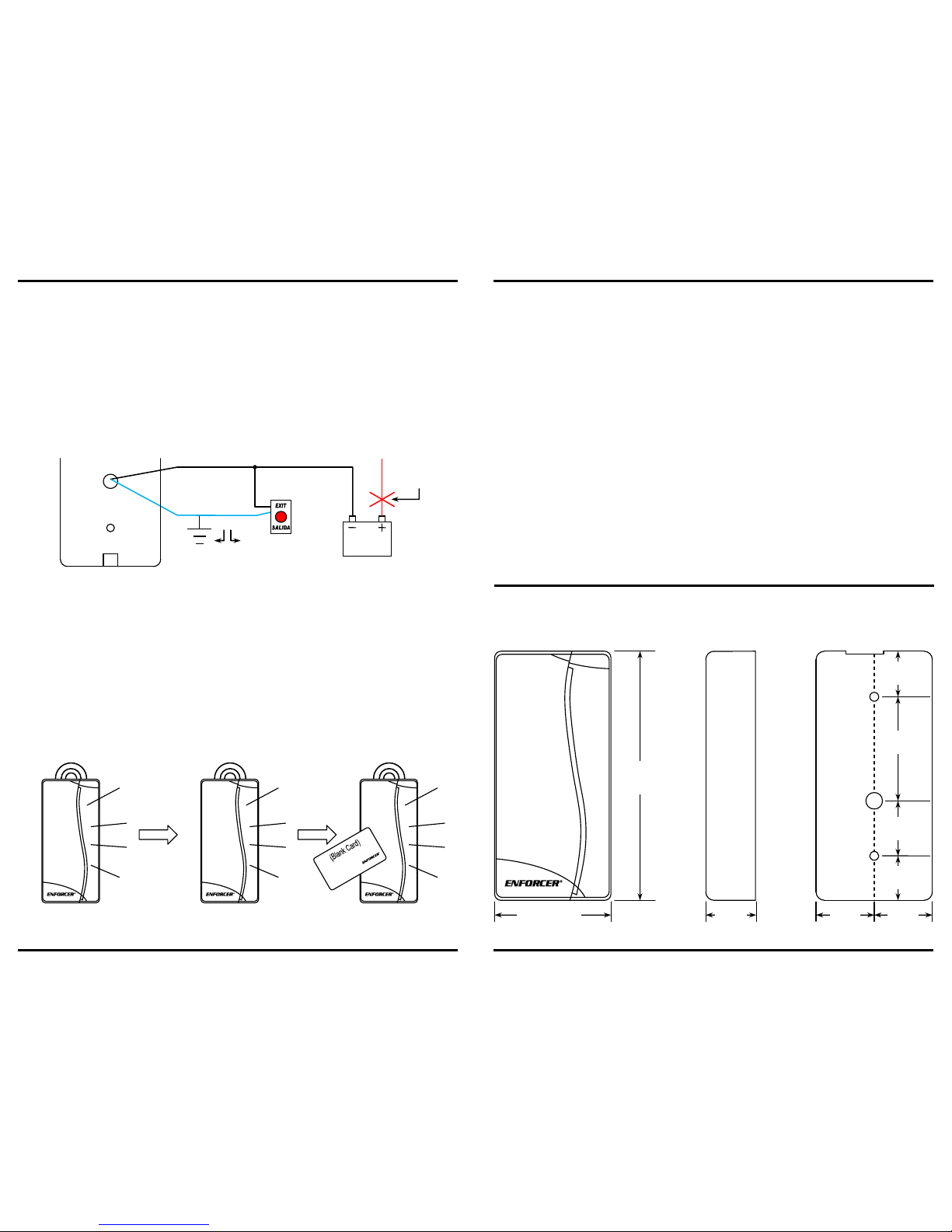
Should it be necessary to completely reset the proximity reader, follow this procedure:
1.
Disconnect power to the proximity reader.
2.
Ground the BLUE wire:
a. If the egress button is connected, DO NOT open the case. Just press and hold the
egress button.
b. If the egress button is not connected, you must unscrew the proximity reader from the
wall, and ground the BLUE wire.
3.
While either pressing the egress button or grounding the BLUE wire, reconnect power. The
LED will start to blink GREEN. Continue pressing the egress button or grounding the BLUE
wire.
4.
After about 3 seconds, the proximity reader should sound two long beeps. At this point,
release the egress button or unground the BLUE wire.
NOTE – If a mistake is made, just restart this process from step 2 above.
5.
After a few seconds, the proximity reader will sound 3 beeps and the LED will start flashing
GREEN rapidly. After about 5 seconds, the LED will flash more slowly. At this point, tap any
card to the proximity reader. This is now the first master card.
NOTE – After a system reset, all cards except the new master card are now considered to be
blank cards.
Flash Flash
5 sec.
BLUE: Egress input
BLACK: Ground
12VDC
Power
N.O. Egress Switch
Or
Cut
power
ENFORCER Proximity Card Reader
SECO-LARM U.S.A., Inc. 3
Features:
•
Stand-alone operation.
• Use in small businesses, homes, parking structures, apartments, and other locations.
• Sealed and weatherproof (IP67).
• Mounts easily to interior and exterior walls.
• Attractive tri-color wave-shaped LED status bar indicates proximity reader’s mode and status.
BLUE
: On/valid card indicator
GREEN
: Programming mode
RED: Invalid card
•
Relay output can be programmed for timed (1~180 seconds) or toggle mode.
•
Egress input for simple egress of the protected area.
•
Buzzer is programmable for audible confirmation or silent mode.
•
Up to 100 user cards can be programmed.
•
User cards are easily deleted.
•
Up to 5 master cards can be programmed.
•
Proximity cards – When placed within 6” (15cm) of the proximity card reader, a valid card will
grant access to the protected area. 10 Cards included.
(Additional cards available. Model #: PR-K1S1-A. Sold in packages of 10.)
Dimensions:
Front
Back
(Mounting Plate)
Side
13/4” (44mm)
33/4”
(95mm)
3
/4”
(19mm)
13
/16”
(21mm)
13
/16”
(21mm)
11
/16”
(17mm)
13
/16”
(21mm)
19/16”
(40mm)
5
/8”
(16mm)
Page 4
ENFORCER Proximity Card Reader
4 SECO-LARM U.S.A., Inc.
Installation
Instructions:
1. Unpack the unit and familiarize yourself with the proximity reader and the included parts.
2. Test the mounting location for fit.
3. Using a T-10 Torx driver (not included), remove the screw from the bottom of the proximity
reader and separate the outside case from the base.
4. Place the base on the mounting location, and then mark the two mounting holes and the
wire-harness hole.
5. Drill a
1
/2” hole for the proximity reader’s wire harness.
6. Permanently screw the base into the mounting location.
7. Run the wires from the power supply, egress button, and door unlock device through the
hole to connect to the wire harness.
8. Connect the wires to the proximity reader’s wire harness. Solder or crimp the connections
and carefully insulate them.
9. Reattach the outside case to the base.
10. The preliminary installation is done. Now program the proximity reader.
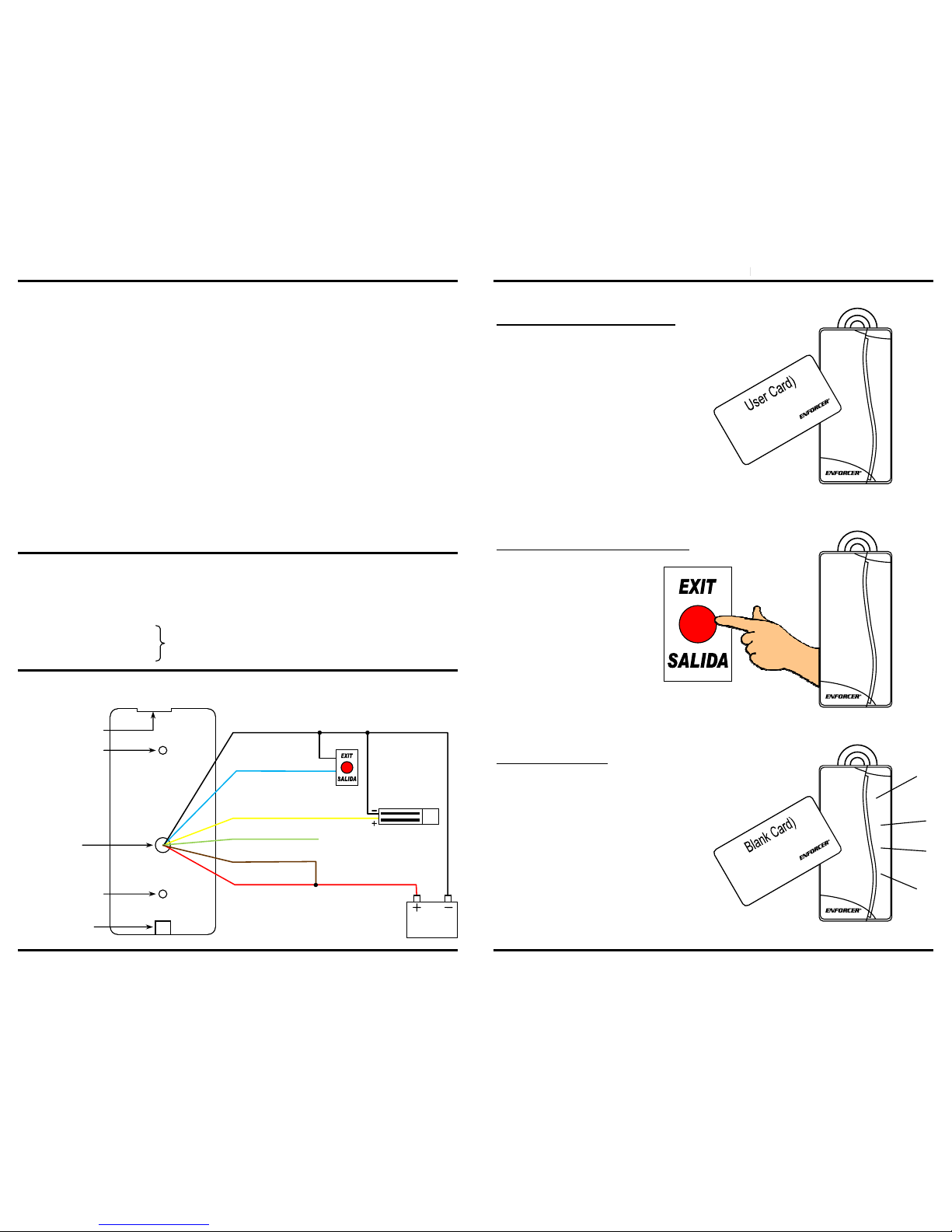
Wire Coding:
RED — (+) 12VDC
BLACK
— (–
) GND
BLUE — Egress input (N.O., ground)
YELLOW
—
N.C. Output
Relay,
1A@30VDC
GREEN
—
N.O. Output
BROWN
—
COM
Sample Installation:
Key notch for
attaching unit to base
Screw mounting hole
Wiring
harness
access hole
Screw mounting hole
Nut for base
attachment screw
Back
BLUE: Egress input
(N.O., ground)
BLACK: Ground
BROWN: COM
YELLOW: N.C. (output)
RED: 12VDC
12VDC
Power
Electromagnetic
lock
GREEN: N.O. (output)
Egress
switch
ENFORCER
SECO-LARM U.S.A., Inc.
Operating Instructions
:
Entering the Premises
– User Card
To enter a protected premise, tap the proximity
reader one time with a user card. The LED
turns off momentarily, the proximity reader
sounds one short beep, and the relay output
engages for the programmed time.
Exiting the Premises
– Egress Button
To exit a protected premise,
press the egress button
once. The LED turns off
momentarily, the proximity
reader sounds one short
beep, and the relay output
engages for the
programmed time.
Using an Invalid Card
If the proximity reader is tapped using a blank
or invalid card, the LED flashes RED and the
proximity reader sounds one long beep.
Proximity Card Reader
9
Beep
Beep
B…e…e…p!
Page 5
ENFORCER Proximity Card Reader
8 SECO-LARM U.S.A., Inc.
8. Set the relay toggle mode
(Timed output or toggle; default: timed output)
:
Action Reaction
Tap a master card 8 times
2 Beeps after first tap, 1 more beep after each
subsequent tap, LED flashes GREEN
Wait 3 seconds
8 Beeps,
GREEN
flashes continue
Wait a second, and the mode
changes automatically
Beeps 1 time = normal mode
Beeps 2 times = toggle mode
Exit –
The unit
automatically exits to standby mode
Normal mode – Use a user card to unlock the door, the door automatically locks after the
timer has expired.
Toggle mode – Use a user card to unlock the door, then use a user card to relock the door.
9. Please note
that tapping the master card 9 times will have no effect.
10. Set the beeper mode
(ON or OFF; default: ON)
:
Action Reaction
Tap a master card 10 times
2 Beeps after first tap, 1 more beep after each
subsequent tap, LED flashes GREEN
Wait 3 seconds
10 Beeps,
GREEN
flashes continue
Wait a second, and the mode
changes automatically
Beeps 1 time = beeper OFF
Beeps 2 times = beeper ON
Exit –
The unit automatically exits to standby mode
NOTE – When the beeping is programmed OFF, the proximity reader will still beep during the
programming mode.
ENFORCER Proximity Card Reader
SECO-LARM U.S.A., Inc. 5
Mounting Diagram:
Getting Started:
Card Types
:
There are three basic types of cards used by the proximity reader:
• Master card – Used for programming only. It does not give access to the protected premises.
• User card – Used for access only.
• Blank card – A card that has not yet been programmed into the proximity reader. Considered
to be an invalid card.
NOTE – The proximity reader can learn up to 5 master cards and 100 user cards.
LED Color Indicators:
LED Color Status Indicated
BLUE The proximity reader is
powered on
and in
standby mode
GREEN
The proximity reader is in
programming mode
RED
Indicates an
error or
invalid card
First-Time Power Up:
1. After connecting power, the unit should beep once and the LED should be BLUE – The
proximity reader is ready to be programmed using the included pre-programmed master card
(marked with a red sticker).
2. If after connecting power for the first time the LED is flashing GREEN, you must program a
master card by tapping any blank card to the reader.
3. This will be followed by 2 short beeps and the LED should turn BLUE.
4. The proximity reader is ready to be programmed using the master card you just created.
Included
case screw
Mounting
plate
Proximity
card
reader
Screw for mounting
plate to surface
Through
hole for
cables
Page 6
ENFORCER Proximity Card Reader
6 SECO-LARM U.S.A., Inc.
Programming:
1. Add a new user card:
Action Reaction
Tap a master card 1 time
2 Beeps, LED flashes
GREEN
Wait 3 seconds
1 Beep,
GREEN
flashes continue
Tap a blank card 1 time
1 Beep, the card
is now a user card
Tap more blank cards 1 time each to
create more user cards
1 Beep for each new user card
Exit –
To exit programming mode, tap a master card 1 time or wait 15 seconds
NOTE – Attempting to add a previously-learned user card or master card will cause the unit to
beep twice and the LED to flash RED.
2. Delete the user card following this user card
:
Use this to delete a missing user card.
Action Reaction
Tap a master card 2 times
2 Beeps after first tap, 1 more beep after second
tap, LED flashes GREEN
Wait 3 seconds
2 Beeps,
GREEN
flashes continue
Tap the user card that was added
just before the card to be deleted
2 Beeps, the desired user card is deleted
Exit –
To exit programming mode, tap a master card 1 time or wait 15 seconds
NOTE – Attempting to delete a blank card or a master card will cause the unit to beep twice
and the LED to flash RED.
3. Delete this user card:
Use this to delete a user card that is in your possession.
Action Reaction
Tap a master card 3 times
2 Beeps after first tap, 1 more beep after each
subsequent tap, LED flashes GREEN
Wait 3 seconds
3 Beeps,
GREEN
flashes continue
Tap the user card to be deleted
3 Beeps, the user card is deleted
Exit –
To exit programming mode, tap a master card 1 time
or wait 15 seconds
NOTE – Attempting to delete a blank card or a master card will cause the unit to beep twice
and the LED to flash RED.
4. Delete all user cards:
Action Reaction
Tap a master card 4 times
2 Beeps after first tap, 1 more beep after each
subsequent tap, LED flashes GREEN
Wait 3 seconds
4 Beeps,
GREEN
flashes continue
WITHIN 3 SECONDS, tap the
master card again.
4 Quick beeps, all user cards are deleted
Exit –
The unit automatically exits
to standby mode
ENFORCER Proximity Card Reader
SECO-LARM U.S.A., Inc. 7
5. Add a new master card
(
WARNING
– Master cards cannot be deleted.
See pg. 10,
System Reset for instructions on clearing all cards from memory.):
Action Reaction
Tap a master card 5 times
2 Beeps after first tap, 1 more beep after each
subsequent tap, LED flashes GREEN
Wait 3 seconds
5 Beeps,
GREEN
flashes continue
Tap a blank or user card
2 Beeps, the card is now a master card
Tap more blank or user cards 1 time
each to create more master cards
2 Beeps for each new master card
Exit –
To exit programming mode, tap a master card 1 time or wait 15 seconds
6. Set the door
-
release timer
(Default: 5 seconds):
Action Reaction
Tap a master card 6 times
2 Beeps after first tap, 1 more beep after each
subsequent tap, LED flashes GREEN
Wait 3 seconds
6 Beeps,
GREEN
flashes continue
Count the beeps
1 Beep = 1 second for the door release timer
Tap the master card to stop the
beeps at the desired time
The timer is now set for the number of seconds
Exit –
The unit automatically exits to standby mode
7. Show how many user cards have been programmed:
Action Reaction
Tap a master card 7 times
2 Beeps after first tap, 1 more beeps after each
subsequent tap, LED flashes GREEN
Wait 3 seconds
7 Beeps,
GREEN
flashes continue
Wait 1.5 seconds
Silence
Count beeps for the first digit
Long beep = 0 or 1 beep = 1
Wait 1 second
Silence
Count beeps
for the second digit
Long beep = 0 or 1~9 beeps = 1~9
Wait 1 second
Silence
Count beeps for the third digit
Long beep = 0 or 1~9 beeps = 1~9
Exit –
The unit automatically exits to standby mode
Counting the beeps
–
The number of beeps indicates the value of each digit. All three digits
together give the number of user cards that have already been programmed.
Some examples:
Number of user cards
Beep sequence
13 Long beep / 1 beep / 3 beeps
24 Long beep / 2
beeps / 4 beeps
7 Long beep / Long beep / 7 beeps
100 1 Beep / Long beep / Long beep
 Loading...