

Page 1
ENel
Sp. z o. o. - WROCŁAW
DESIGN AND MANUFACTURE OF POWER
ELECTRONIC DEVICES
INVERTER WELDING MACHINE
ENEL150AC
USER MANUAL
DEALER:
Page 2

2
1. INTRODUCTION
This manual contains information that will allow to take full advantage of
ENEL150AC welding machine operation values and enable its safe use.
All users are encouraged to read the user manual.
2. APPLICATION
ENEL150AC welding machine is a modern direct and alternating current
source designed mainly for TIG welding and with coated electrodes (MMA) of
all types (ER-, EA-, EB-, ES-, ...) with diameters from ∅1.6 to ∅3.2. Due to
the high open circuit voltage (95V) and very good welding properties, the
device also allows welding with cellulose coated electrodes which are used,
among others, for pipelines welding.
When equipped with appropriate TIG welding torch it is possible to weld steel
and its alloys and copper and its alloys using TIG welding (welding with a
non-consumable electrode - mostly tungsten electrode in an inert gas shield,
such as argon). The ignition of the arc is non-contact (HF) or contact by
scratch. The remote control of the welding current is possible in all operating
modes.
A microprocessor controller ensures precision welding, repeatable setting of
many parameters, and simple usage.
Due to the small dimensions and weight, and resistance to large voltage
fluctuations, the ENEL150AC welder is particularly useful for operation in
difficult field conditions when installing any type of welded structures,
pipelines, tanks, etc.
The device is designed for operation at ambient temperature from -10°C up
to +40°C and relative humidity up to 90% at temperature of + 20°C.
3. DESCRIPTION
ENEL150AC welding machine is an inverter direct current source operating in
the frequency range above the audio frequency. This current source is
characterised by good dynamics and a smooth and stable arc. It is
lightweight, of small dimensions, resistant to large fluctuations of the mains
voltage. The connecting, control and indicating elements are located on the
front panel. On the rear panel there are: the power switch, the power cord,
the fan, the rating plate and the gas valve connection used to supply
shielding gas from the cylinder.
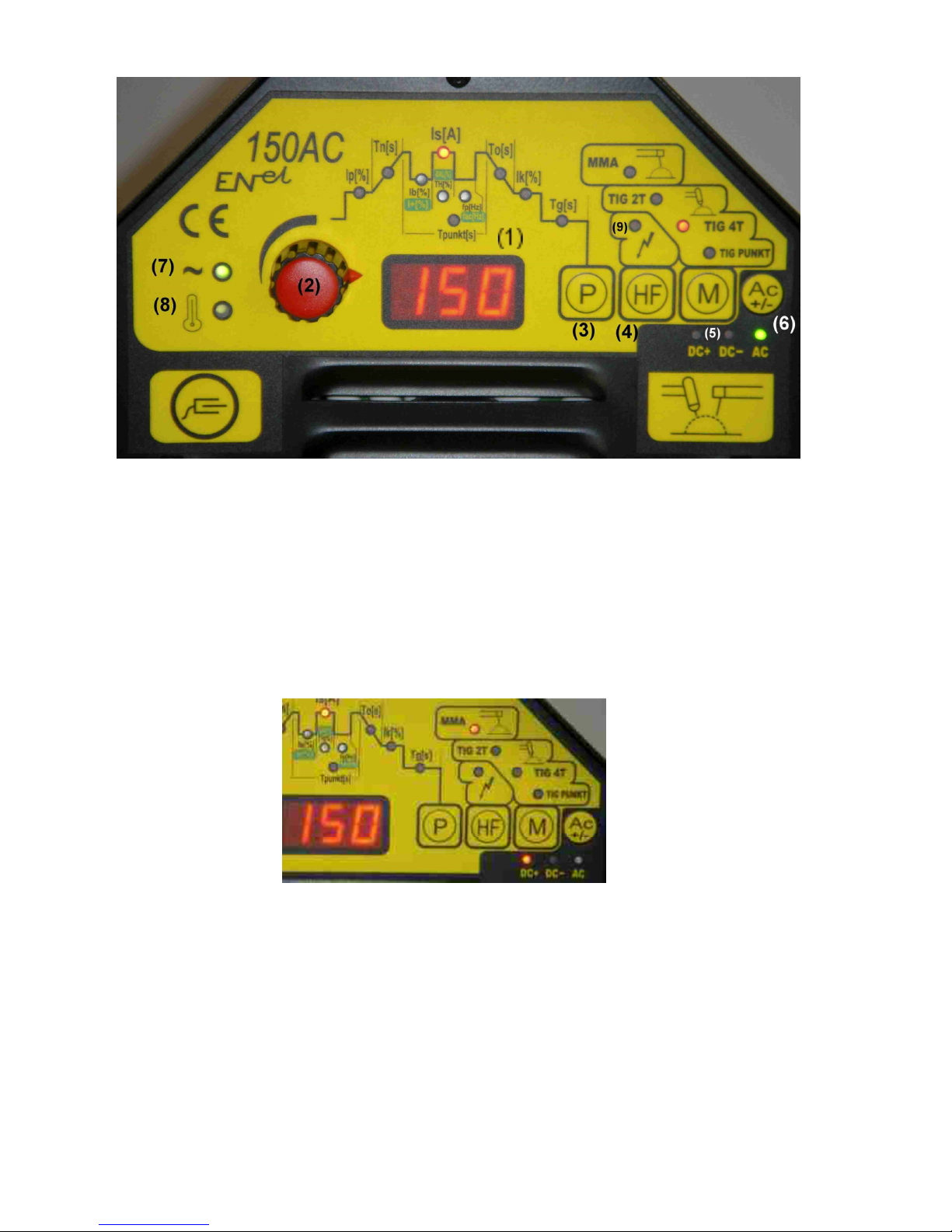
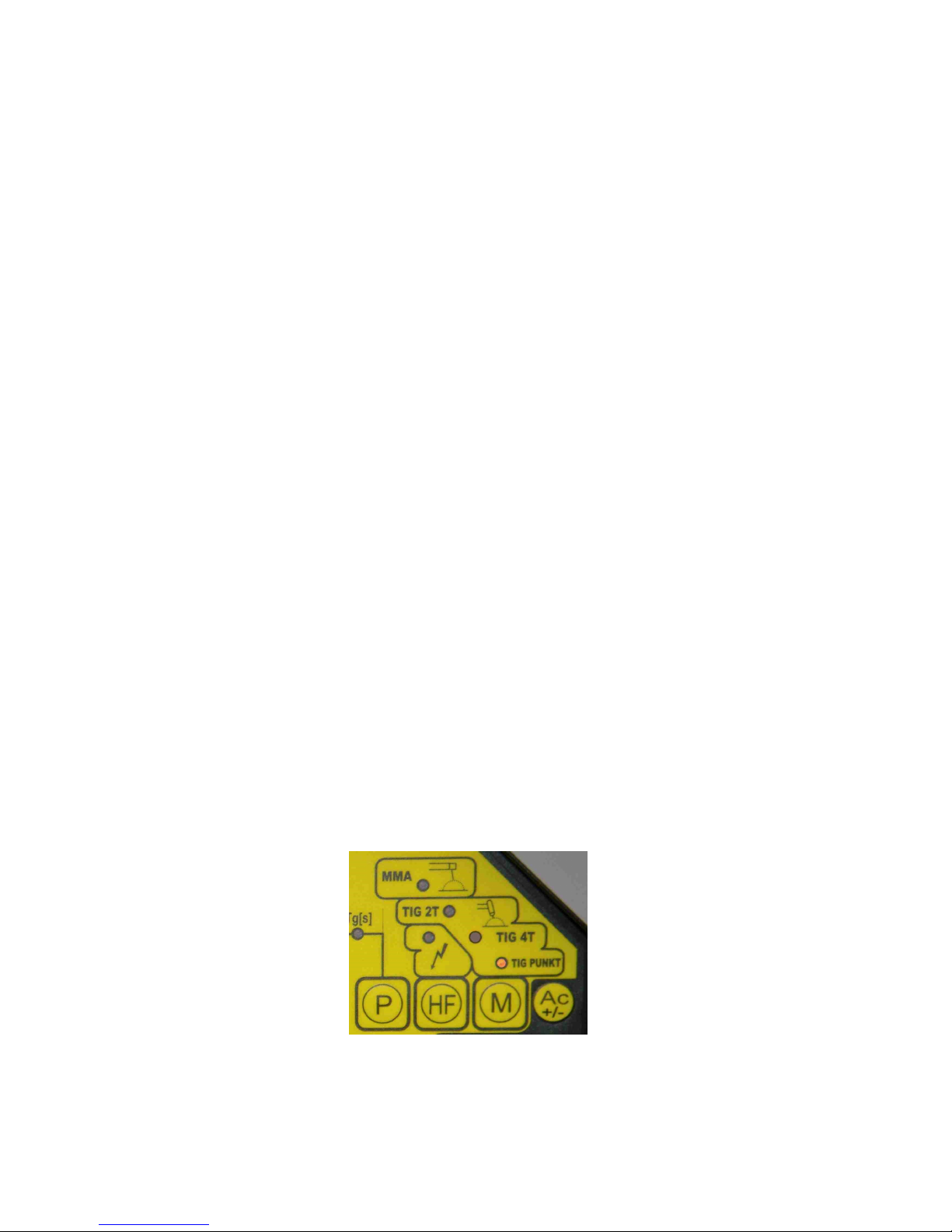
Control and indicating elements of the welder are shown in Fig. 1.
Page 3
3
Figure1
The welder is equipped with a digital display (1), indicating the values of set
parameters, a knob to adjust parameter values(2), operating mode switch (5),
parameters switch (3), ignition mode switch (4), selector of direct current or
alternating current polarity ( 6), and indicators.
There are four operation modes available to select with the button (5) (Fig. 1):
1) welding with coated electrodes (MMA) - the red light should indicate
The welding current is adjustable in the range of 5 to 130A with a
resolution of 1A. The rectifier is provided with the ANTISTICK feature
facilitating electrode unsticking when it adheres to the works being welded
(when the electrode adheres to elements being welded longer than 1.5
seconds, the welding current is automatically switched off, so electrode
detaching is not difficult).
The voltage polarity (DC+ or DC-) of an electrode we can select with a button
(6).
Page 4
4
There are possible two operation modes:
a) with an automatic open circuit voltage reduction to the safe value of
approx. 12V. This mode is automatically set when the power is turned on
and after changing from another mode to MMA mode - it is signalled by
continuous illumination of the LED indicating welding current Is.
b) without automatic open circuit voltage reduction. Open circuit voltage is
sustained at a level of 95V. This operation mode can be selected by
pressing the parameters switch button (3). It is indicated by blinking of the
LED indicating welding current Is. Press the button (3) again to return to
the operation with automatic open circuit voltage reduction.
When the welding machine is equipped with a remote control module, it is
possible to remotely change the welding current during performing the weld.
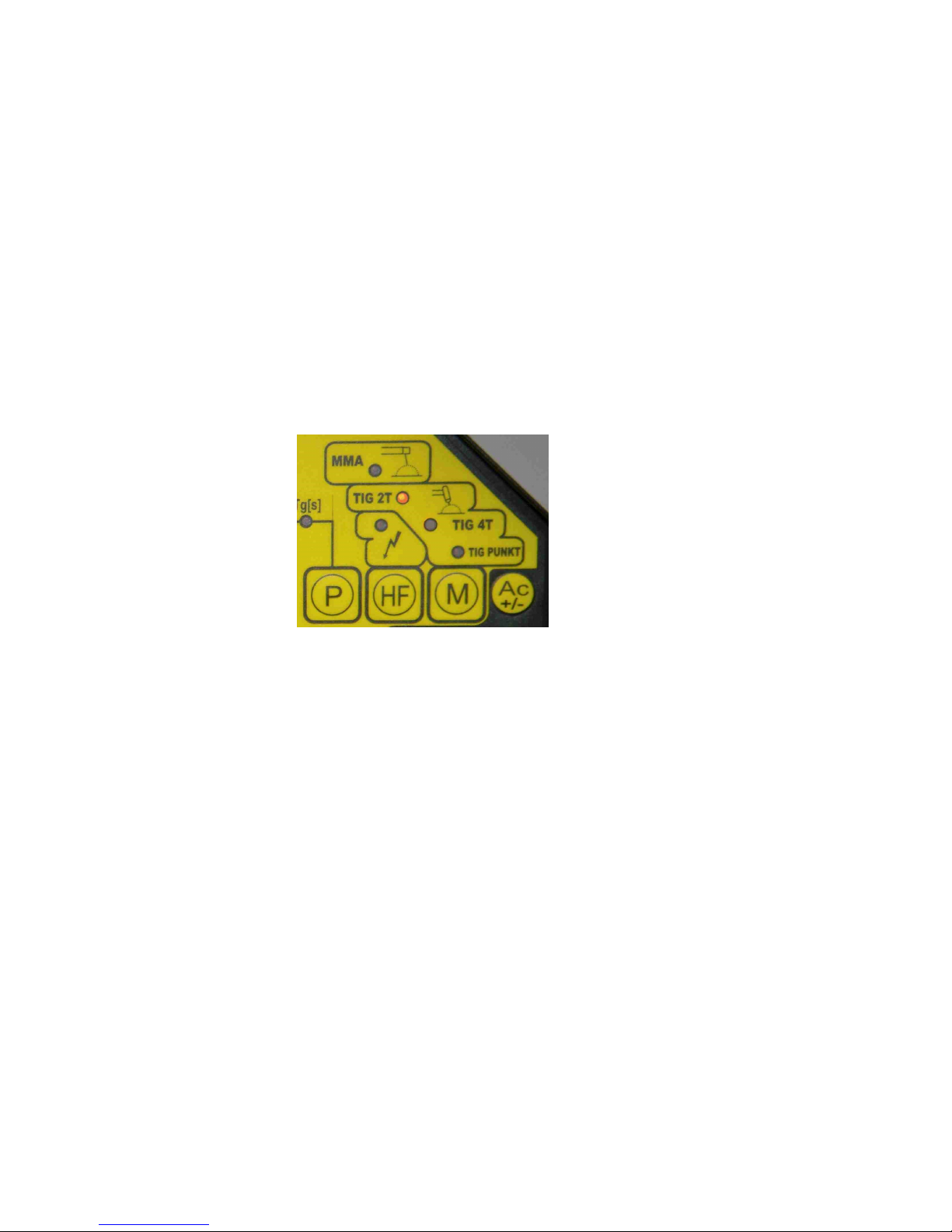
2) TIG 2T welding with direct current (DC-) (2 Step trigger) - the red light
should indicate
The following parameters can be set within given ranges:
• Is[A] - welding current in amperes adjustable in the range of 5-150A with a
resolution of 1A
• Tn[s] - welding current rise time in seconds adjustable in the range 0.1-5s
with a resolution of 0.1s
• To[s] - welding current fall time in seconds adjustable in the range 0.1-20s
with a resolution of 0.1s
• Ib[%] - base current adjustable as a percentage of the welding current Is
within the range 10-100% with a resolution of 1%. If the value of the basic
current is set to 100%, the welding current will have a constant value
equal to the set value of Is. If the value of the basic current is different
from 100%, we get pulsating current with the following parameters:
welding current will pulsate with the frequency fp and the duty cycle TH[%]
(see below)
• TH[%] - duration of current pulses of the value Is as a percentage of the
signal pulse period within the range 1-99%. TH parameter is adjustable
only when the set value of the base current Ib is different from 100%
• fp[Hz] - the welding current pulse frequency in Hz, adjustable in the range
0.1-50Hz. fp parameter is adjustable only when the set value of the
base current Ib is different from 100%
Page 5

5
• Tg[s] - time of gas flow after the arc extinction in seconds, adjustable in
the range 1-25s with the resolution of 1s
Examples of pulsating current signals for different settings of fp, Ib, TH
You can select the method of ignition using HF button (4):
CONTACT IGNITION - LAMP (9) IS OFF
The welding process is initiated by pressing a control button on the grip.
When the button is pressed the gas valve is opened. After releasing the
button (while welding don't hold the button pressed!) you can ignite
the arc by touching the workpiece and slightly lifting an electrode (the arc
ignition occurs at the moment of lifting an electrode).
NON-CONTACT IGNITION - LAMP (9) IS ON
The welding process is initiated by pressing a control button on the grip.
When the button is pressed the gas valve is opened. Releasing the button
starts the ionizer - spark-over between an electrode and a workpiece
should initiate ignition of the arc. If ignition of the arc does not occur within
2.5s ionizer is turned off and ignition process must be repeated.
Following the arc ignition the welding current increases during the set
rise time Tn from minimum value (5A) to the set value of Is. Short
pressing (and releasing) the control button starts the process of
decreasing the welding current from the Is value to the minimum value
(during the set fall time To). If the control button is pressed briefly during
the current fall phase, welding current again will increase to the Is value.
When the current reaches the minimum value, welding current is turned
off and the arc is extinguished. Shielding gas flows still during the set time
Tg, then the gas valve is being closed. The welding process has been
completed.
Is
Ib=50
%
TH=20 %
Tp=1/fp
Tp=1/fp
Ib=10
%
Is
TH=80 %
Page 6
6
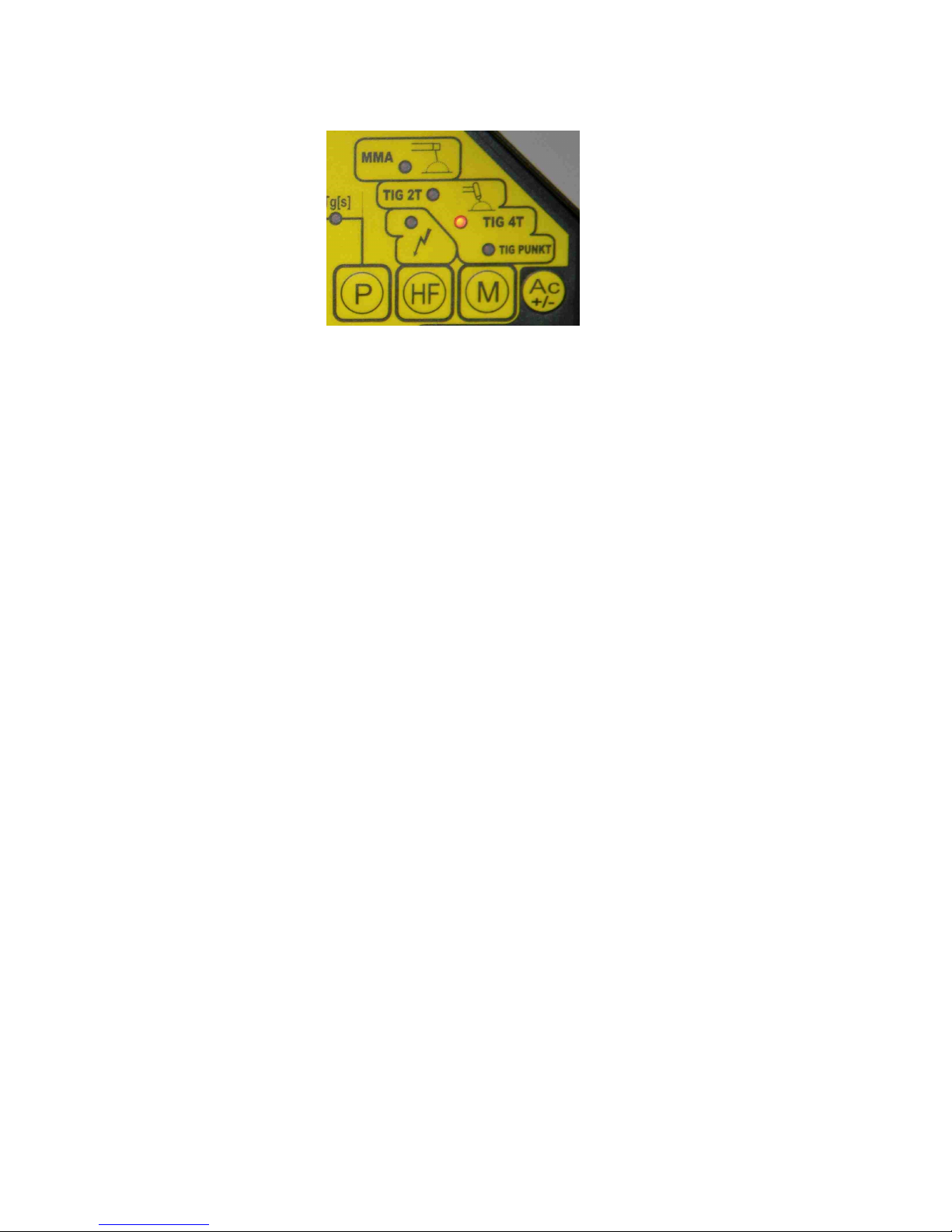
3) TIG 4T welding with direct current (DC-) (4 Step trigger) - the red light
should indicate
The following parameters can be set within given ranges:
• Is[A] - welding current in amperes adjustable in the range of 5-150A with a
resolution of 1A
• Ip[%] - initial current adjustable as a percentage of the welding current Is
within the range 5-50% with a resolution of 1%.
• Tn[s] - welding current rise time in seconds adjustable in the range 0.1-5s
with a resolution of 0.1s
• To[s] - welding current fall time in seconds adjustable in the range 0.1-20s
with a resolution of 0.1s
• Ib[%] - base current adjustable as a percentage of the welding current Is
within the range 10-100% with a resolution of 1%. If the value of the basic
current is set to 100%, the welding current will have a constant value
equal to the set value of Is. If the value of the basic current is different
from 100%, we get pulsating current with the following parameters:
welding current will pulsate with the frequency fp and the duty cycle TH[%]
(see below)
• TH[%] - the duration of current pulses of the value Is as a percentage of
the signal pulse period within the range 1-99%. TH parameter is
adjustable only when the set value of the base current Ib is different
from 100%
• fp[Hz] - the welding current pulse frequency in Hz, adjustable in the range
0.1-50Hz. fp parameter is adjustable only when the set value of the
base current Ib is different from 100%
• Ik[%] - final current adjustable as a percentage of the welding current Is
within the range 5-50% with a resolution of 1%.
• Tg[s] - time of gas flow after the arc extinction in seconds, adjustable in
the range 1-25s with the resolution of 1s
You can select the method of ignition using HF button (4):
CONTACT IGNITION - LAMP (8) IS OFF
The welding process is initiated by pressing (and releasing) a control
button on the grip. When the button is pressed the gas valve is opened.
After releasing the button (while welding don't hold the button
Page 7
7
pressed!) you can ignite the arc by touching the workpiece and slightly
lifting an electrode (the arc ignition occurs at the moment of lifting an
electrode).
NON-CONTACT IGNITION - LAMP (9) IS ON
The welding process is initiated by pressing a control button on the grip.
When the button is pressed the gas valve is opened. Releasing the button
starts the ionizer - spark-over between an electrode and a workpiece
should initiate ignition of the arc. If ignition of the arc does not occur within
2.5s ionizer is turned off and ignition process must be repeated.
The arc ignites with the current Ip. Pressing again (and releasing) the
control button starts the process of increasing the welding current from the
Ip value to the set welding current Is (during the time Tn). Pressing once
again (and releasing) the control button starts the process of decreasing
the welding current from the Is value to the Ik value (during the set time
To). The last fourth pressing (and releasing) the control button causes the
arc extinguish. If the control button is pressed briefly during the current fall
phase, welding current again will increase to the Is value. Shielding Gas
flows still during the set time Tg, then the gas valve is being closed. The
welding process has been completed.
4) REMOTE CONTROL WHILE TIG 2T AND 4T WELDING
If the TIG welding torch is equipped with 2 buttons, it is possible to change
the welding current during performing the weld. One of the buttons is for
increasing and the second for decreasing of current setting (you can
freely assign buttons). Holding down one of these buttons changes the
welding current during welding. Changes of welding current are reflected
on the welder display (1). The welding current could be changed by 1A
within the range from 5 to 50A, and within the range 50-150A by 5A. The
change of welding current made during welding is stored and the next
cycle of welding will be done using the new settings.
5) TIG PUNKT welding with direct current (DC-) - the red light should
indicate
Page 8

8
The following parameters can be set within given ranges:
• Is[A] - welding current in amperes adjustable in the range of 5-150A with a
resolution of 1A
• Tn[s] - welding current rise time in seconds adjustable in the range 0.1-5s
with a resolution of 0.1s
• To[s] - welding current fall time in seconds adjustable in the range 0.1-20s
with a resolution of 0.1s
• Tpunkt[s] - duration of spot welding in seconds adjustable in the range
0.01 - 10s with a resolution of 0.01s
• Tg[s] - time of gas flow after the arc extinction in seconds, adjustable in
the range 1-25s with the resolution of 1s
You can select the method of ignition using HF button (4):
CONTACT IGNITION - LAMP (9) IS OFF
The welding process is initiated by pressing (and releasing) a control
button on the grip. When the button is pressed the gas valve is opened.
After releasing the button (while welding don't hold the button
pressed!) you can ignite the arc by touching the workpiece and slightly
lifting an electrode (the arc ignition occurs at the moment of lifting an
electrode).
NON-CONTACT IGNITION - LAMP (9) IS ON
The welding process is initiated by pressing a control button on the grip.
When the button is pressed the gas valve is opened. Releasing the button
starts the ionizer - spark-over between an electrode and a workpiece
should initiate ignition of the arc. If ignition of the arc does not occur within
2.5s ionizer is turned off and ignition process must be repeated.
Following the arc ignition the welding current increases during the set
rise time Tn from minimum value (5A) to the set value of spot welding
current Is. The current Is flows during the set time Tpunkt and then
automatically starts the process of decreasing the welding current from
the Is value to the minimum value (during the set time To). When the
current reaches the minimum value, welding current is turned off and the
arc is extinguished. Shielding gas flows still during the set time Tg, then
the gas valve is being closed. When the gas flows (after extinction of the
arc), it is possible to initiate the next spot welding process.
Page 9

9
6) TIG 2T and 4T welding with alternating current (AC) - the green light
should indicate
AC welding is possible only for TIG welding. Select AC. Using the knob (2)
(Fig. 1) select the diameter of the electrode E1.6, E2.4 or E3.2.
The following parameters can be set for AC within given ranges:
• fac[Hz] - frequency of the alternating current adjustable in the range 50 to
200 Hz with a resolution of 1 Hz
• BAL[%] - balance, the relationship between the positive and negative half
of current signal, adjustable in the range from -70 to +70% with resolution
of 1%. A value of 0% means that positive and negative current half
durations are equal. The balance allows you to control the heat flow
between tungsten electrode and a workpiece material. If the balance is
positive, it means that the positive part of the cycle lasts longer than the
negative one and more heat emits from an electrode than welded
material.
• I+[%] - current of the positive part of the cycle adjustable as a percentage
of the welding current Is within the range 10-100% with a resolution of 1%.
The lights indicating selection of these parameters illuminate in green.
Examples of alternating current signals for different settings of fac, BAL, I+
Every welding mode has its own independent set of parameters
stored in the memory of the control circuit. After the welding machine
is turned on all automatically memorized sets of parameters as well
as the last used operating mode are restored.
The main switch of welding machine (green) is located on the rear panel backlight of the key indicates that the power cord is connected to the mains.
After the welding machine is turned on, the green indicator (7) (Fig. 1), digital
display and the red light indicating the last selected operating mode light up.
Is
I+=100 %
Tac=1/fac
BAL=-50 %
Tac=1/fac
BAL=0 %
I+=50 %
Is
Page 10

10
A welder has a thermal protection to protect certain components against
excessive overheating. Activation of this protection is indicated by the lamp
(8) (Fig. 1) shining yellow.
7) PROTECTION AGAINST UNAUTHORIZED USER
There is a possibility of a securing a welding machine against unauthorized
user with a PIN code. After enabling this function, each time the power is
turned on a welding machine requires entering a proper three-digit PIN code.
After entering the correct code device switches to the normal operation. If you
enter a wrong code, the device waits for entering the correct code.
Entering three times of incorrect code disables the welding machine unlocking is possible only in the ENEL service center.
To enable the security function, follow these steps:
⇒ When you turn the power on, press and hold the P and HF buttons until
"HLP" symbol turns off (approx. 2 seconds) and you will see the firmware
version number. After releasing the buttons the display will show "P.0 0".
⇒ Press P button - the display shows "0 - -", set the first digit with the knob
and accept it with P button; the display shows "- 0 -", set the second digit
with the knob and accept it with P button; the display shows "- - 0", set
the third digit with the knob and accept it with P button.
⇒ You see "P.0 0" on the display - when you press M button, the device
starts normal operation.
The PIN code was introduced - every time the power is on you must enter the
code in the following way:
⇒ The display shows "0 - -", set the first digit with the knob and accept it
with P button; the display shows "- 0 -", set the second digit with the
knob and accept it with P button; the display shows "- - 0", set the third
digit with the knob and accept it with P button.
To disable the security function, follow these steps:
⇒ When you turn the power on press and hold the P and HF buttons until
"HLP" symbol turns off (approx. 2 seconds) and you will see the firmware
version number. After releasing the buttons you have to enter the correct
PIN code.
⇒ When the correct code is entered the display shows "P.0 0".
⇒ Press P button - the first digit of the code is displayed, set 0 with the
knob and accept it with P button; the second digit of the code is
displayed, set 0 with the knob and accept it with P button; the third digit
of the code is displayed, set 0 with the knob and accept it with P button the display shows "P.0 0" - when you press M button, the device starts
normal operation.
Page 11

11
4. TECHNICAL SPECIFICATIONS
Table 1
Ite
m
Parameter Unit Value
1 2 3 4
1.
2.
3.
3.
4.
5.
6.
7.
8.
9.
10.
11.
12.
13.
14.
15.
16.
17.
18.
19.
Power supply (single-phase)
Frequency
MMA
Current adjustment range
Welding current: P30%
P60%
P100%
Input current: P30%
P60%
P100%
Output Power: P30%
P60%
P100%
TIG
Current adjustment range
Welding current: P40%
P60%
P100%
Input current: P40%
P60%
P100%
Output Power: P40%
P60%
P100%
Power factor cosφ (150A)
Open Circuit Voltage
Power cable cross-section
Case Enclosure Class
Insulation class
Dimensions: Length
Width
Height
Weight
Compliance with Standard
V
Hz
A
A
A
A
A
A
A
kVA
kVA
kVA
A
A
A
A
A
A
A
kVA
kVA
kVA
V
mm
2
mm
mm
mm
kg
230V
50/60
5-130
130
100
80
33.0
25.0
21.0
7.6
5.8
4.8
5-150
150
120
100
28.0
23.0
19.0
6.4
5.3
4.4
0.6
95
3x2.5
IP22
F
282
222
365
15.0
EN60974-1
Page 12
12
5. OPTIONAL ACCESSORY
(Can be supplied with rectifier for an extra fee)
1. 3m welding cable 1x25mm2 terminated with an electrode holder K-160.1)
2. 3m welding cable 1x25mm2 terminated with an electric clamp ZBK35.1)
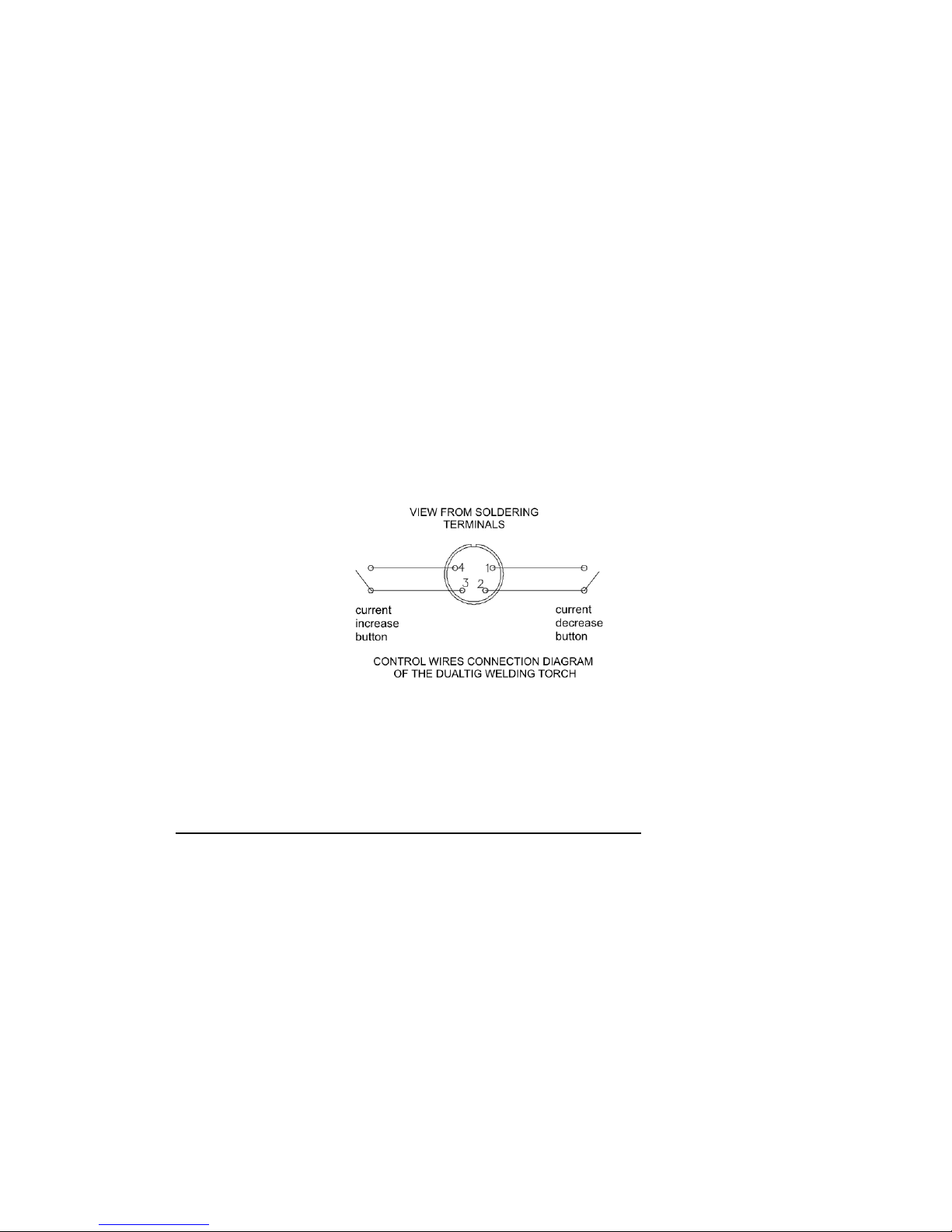
3. Welding cable with a DUALTIG 26/4 welding torch with dual control button
of TRAFIMET.
6. OPERATING INSTRUCTIONS
6.1. PREPARATION THE WELDING MACHINE TO OPERATION
Figure 2
1. ENEL150AC welder is manufactured as a protection class I device and
because of users safety should be connected only to the electrical socket
provided with the protective (earth) conductor. Electrical supply circuit
should be protected with a time-delayed fuse rated at 20A or automatic
circuit breaker, e.g. S191B20 of FAEL production.
2. After connecting the electrical plug to a power socket, the welding
machine switch located on the rear panel should be lit.
3. The rectifier should be placed in a dry place, so that free inflow and
outflow of cooling air is allowed. It is not permitted to cover the ventilation
openings.
4. Select the operation mode with M button (5) (Fig. 1)
5. Preparation the rectifier for MMA welding:
1 )
Other length cables are available on request.
Page 13
13
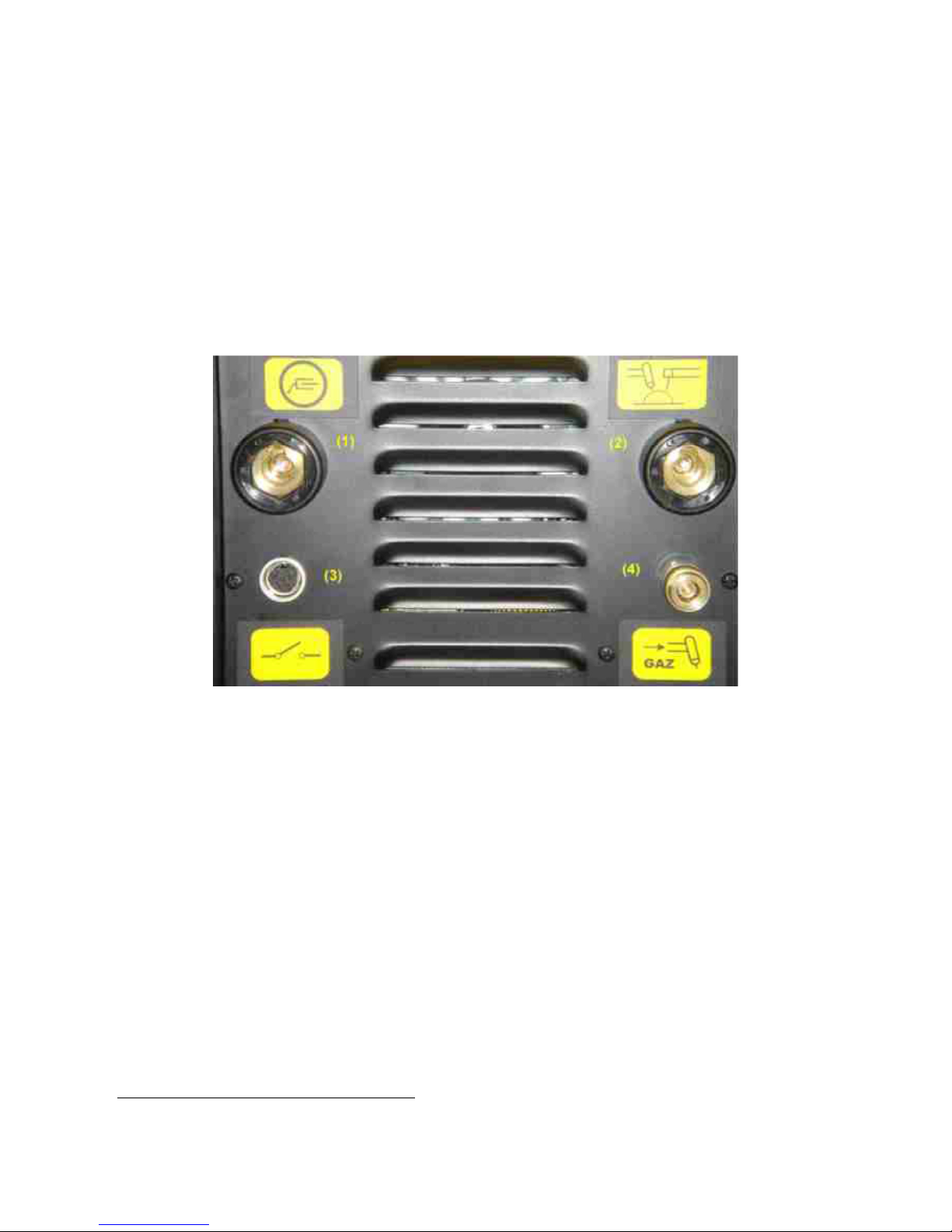
• Connect the earth cable with an electric clamp to the earth terminal (1)
Fig. 2
• Connect the cable with electrode holder to the terminal (2) Fig. 2
Using button (6) (Fig. 1) select the polarity of an electrode cable (DC- or
DC+) in accordance with the instructions given on the electrode
packaging. For most of the electrodes being used, the welding cable with
electrode holder should be positive polarity (DC+).
6. Preparation the rectifier for TIG welding:
• Connect the cable with an electric clamp to the earth terminal (1) Fig. 2
• Connect the cable of TIG welding torch to the terminal (2) Fig. 2
• Connect a gas hose from pressure regulator mounted on a shielding gas
cylinder to a gas valve connection located on the welder's rear panel.
• Connect a gas hose connector of TIG welding torch to the quick coupler
located on the front panel of the welder (4) Fig. 2
• Connect the control cable of a TIG torch, equipped with the appropriate
connector (C091 of Amphenol, Cat. No. T3300 001) to the socket (3)
Fig. 2
6.2. OPERATION OF THE RECTIFIER
Prior to welding, ensure that all safety precautions and instructions specified
in section 7.1 have been observed.
6.2.1. MMA WELDING (WITH COATED ELECTRODES)
1) Connect the welding cable with the electric clamp to the work to be
welded.
2) Turn on the power switch at position ON (ZAŁ). After a while there should
illuminate the indicator (7) (Fig. 1), the digital display and the lights
indicating the last selected operation mode. The cooling fan should turn
on immediately.
3) Using button (5) select the welding with coated electrodes - the indicator
should indicate the operation mode marked with MMA. With the knob (2)
Fig. 1 set the appropriate welding current.
4) Pressing button (3) select the operating mode with automatic open circuit
voltage reduction (the LED indicating welding current Is illuminates
Page 14

14
continuously) or without automatic open circuit voltage reduction (the LED
begins to blink).
5) Fit an electrode in the electrode holder.
6) After the welding is completed, the rectifier should be left connected to the
mains for some time (approx. 3 minutes). This is recommended for
cooling down the heated components.
7) If during welding, the rectifier has been overloaded by exceeding the
allowed temperature, the welding current cuts-off and the indicator (8)
(Fig. 1).lights up. In such case wait until this indicator turns off, and then
you can continue the welding.
8) When the electrode adheres to elements being welded longer than 1.5
seconds, the welding current is automatically switched off, so electrode
detaching is not difficult).
6.2.2. TIG WELDING WITH DIRECT CURRENT (DC-)
1) Connect the welding cable with the electric clamp (connected to the
output terminal (1) Fig. 2) to the work to be welded.
2) Fit an appropriate tungsten electrode in the TIG welding torch recommended electrode WC20 (grey).
3) Set the power switch in the position ON (ZAŁ).
4) Using button (5) (Fig. 1) select one of the three modes of TIG welding.
5) Pressing button (6) (Fig. 1) select DC- polarity.
6) Depending on the requirements set the appropriate values of parameters.
Selection of the parameter is done by pressing P button (3), currently
selected parameter is highlighted with a red light, and the value of the
parameter is adjusted using the knob (2).
7) Set the proper gas (argon) flow using a pressure regulator on the gas
cylinder.
8) Select the method of arc ignition using HF button (4).
CONTACT IGNITION - LAMP (9) IS OFF
The welding process is initiated by pressing (and releasing) a control
button on the grip. When the button is pressed the gas valve is opened.
After releasing the button (while welding don't hold the button
pressed!) you can ignite the arc by touching the workpiece and slightly
lifting an electrode (the arc ignition occurs at the moment of lifting an
electrode).
Page 15

15
SPARK IGNITION - LAMP (9) IS ON
The welding process is initiated by pressing a control button on the grip.
When the button is pressed the gas valve is opened. Releasing the button
starts the ionizer - spark-over between an electrode and a workpiece
should initiate ignition of the arc. If ignition of the arc does not occur within
2.5s ionizer is turned off and ignition process must be repeated.
9) After the welding is completed, the rectifier should be left connected to the
mains for some time (approx. 3 minutes). This is recommended for
cooling down the heated components.
10) If during welding, the rectifier has been overloaded by exceeding the
permitted duty cycle of 35% or 60% at currents given in Table 1, the
temperature limiter can operate. This cuts-off the welding current and
lights up the indicator (8) (Fig. 1). In such case wait until this indicator
turns off, and then you can continue the welding.
6.2.3. TIG WELDING WITH ALTERNATING CURRENT (AC)
1) Connect the welding cable with the electric clamp (connected to the
output terminal (1) Fig. 2) to the work to be welded.
2) Fit an appropriate tungsten electrode in the TIG welding torch recommended electrode WC20 (grey) or pure tungsten (green).
3) Set the power switch in the position ON (ZAŁ).
4) Using button (5) (Fig. 1) select one of the two modes of TIG welding - 2T
or 4T.
5) Pressing button (6) (Fig. 1) select AC.
6) Using the knob (2) (Fig. 1) select the diameter of the electrode E1.6, E2.4
or E3.2.
7) Depending on the requirements set the appropriate values of parameters.
Selection of the parameter is done by pressing P button (3), currently
selected parameter is highlighted with a red or green light, the value of the
parameter is adjusted using the knob (2). The parameters relating to the
alternating current are green illuminated only.
8) Set the proper gas (argon) flow using a pressure regulator on the gas
cylinder.
9) Select the method of arc ignition using HF button (4).
Electrode
Welding current [A]
Gas nozzle
Gas flow
WC20 Ø [mm]
min
max
No.
Ø [mm]
Argon [l / min]
1.6
15 90
4/5/6
6.5/8.0/9.5
6...7
2.4
20
150
6/7
9.5/11
7...8
3.2
30
200
7/8/10
11.0/12.5/16
8...10
Page 16

16
7. MAINTENANCE
CAUTION: Before performing any inspection and maintenance unplug
the power cord from the mains.
7.1. ONGOING MAINTENANCE
1) Check the condition of the power cord and insulation of welding cables.
Any damages should be fixed immediately.
2) Ensure that welding cables connections, the electric clamp and isolated
jaws of the welding holder are operational. Any worn or damaged parts
should be replaced.
7.2. PERIODIC MAINTENANCE
Depending on the operating conditions of rectifier but not less frequently than
once every three months, proceed with the following:
1) remove any dust from the internal and external parts using a soft brush
and a vacuum cleaner or compressed air under pressure of ca. 3bar.
2) check the condition and electrical connections, including cables
connected to the protective terminal. All connections should be correct.
3) check if all bolts are firmly tightened.
8. REPAIRS
Any repairs may be performed ONLY by persons authorized and trained by
the manufacturer.
9. DANGERS DURING WELDING
Prior to welding, authorized persons should thoroughly read this manual and
strictly observe all given instructions.
Non-compliance with these instructions may result in, among others,
following dangerous consequences.
9.1. FIRE, EXPLOSION
Observe fire regulations in force at the welding stand. Remove any
flammable materials in the vicinity of the welding stand. Prepare the
appropriate fire-fighting equipment. Keep in mind that due to sparks and
welding arc high temperature, there is a fire hazard even after a certain
period after welding is completed. Be especially careful when welding tanks
used to store flammable or combustible materials. If improperly cleaned
before welding, may result in explosion.
Argon used for TIG welding is an inert gas and it can remove oxygen from the
atmosphere resulting in suffocation.
Often inspect gas cylinder, pressure regulator and gas hose. All joints should
be tight. Do not connect the gas cylinder directly to the gas hose without a
Page 17

17
pressure regulator designed for argon. Do not use gas cylinders of which
content is uncertain.
The gas cylinder should always be secured in an upright position to a wall or
a specially designed cylinder rack. After welding always turn off the cylinder
valve. Handling of gas cylinders must always be done in accordance with the
manufacturer's instructions.
WARNING: Gas cylinder may explode if dropped or fallen over.
9.2. BURNS
A welder must be fitted with a suitable non-flammable clothing, welding
gloves, suitable footwear and welding mask. High temperature of the arc,
welding splatter and ultraviolet radiation can cause dangerous injuries.
9.3. HARMFUL FACTORS
Welding process causes emission of vapours harmful to your health. Welding
stand should be provided with efficiently operating ventilation. If the
ventilation is not sufficient, use appropriate protective masks.
Without appropriate gas masks do not weld metals containing lithium,
cadmium, zinc, and beryllium.
When welding with alternating current there is emitted noise with
considerable intensity depending on the value and frequency of welding
current.
9.4. ELECTRIC SHOCK
Do not touch live electrical parts. Do not work in damp places and do not
place the power supply on wet surfaces. Keep your clothing and body dry. Do
not operate the rectifier without housing covers. Inspect the power cords,
plugs and sockets, and the condition of the insulation of all current
conducting wires and welding holders.
CAUTION! HIGH VOLTAGE OF IONIZER OPERATION.
Don't press the welding torch switch when working in TIG mode using noncontact ignition (with ionizer), if the torch is not directed towards the welded
workpiece. Do not use wet nor highly damaged welding torches.
Any repairs and inspections must be carried out by qualified and
authorized persons.
Do not use the equipment to defrosting of sewerage pipes!
Page 18
18
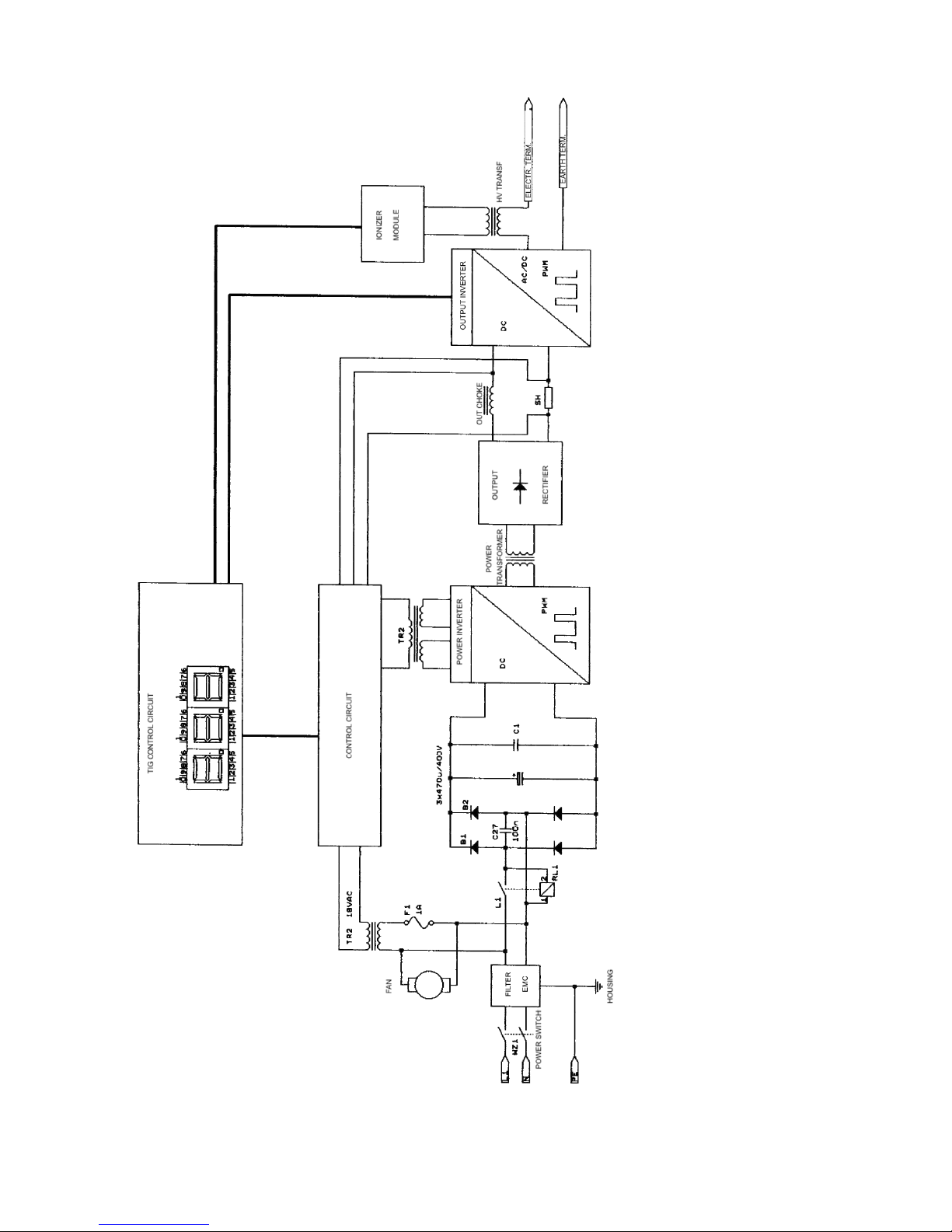
Figure 3 General electric diagram
Page 19

19
10. SPARE PARTS LIST
Specification of main components is given in Table 2
Table 2
Item Description Pieces
1 2 3
1.
2.
3.
4.
5.
6.
7.
8.
9.
10.
11.
12.
13.
14.
15.
16.
17.
18.
19.
20.
21.
22.
23.
24.
25.
26.
Handle
Strap catch
Thermal switch 70°C
Thermal switch 90°C
Bridge Rectifier
Power transformer
AC transformer 220/18V
High Voltage transformer
Control circuit
IGBT transistor
Capacitor 470μF/400V
Electronic kit uP16v.2
Ionizer module
Output socket
Output choke
Socket of TIG welding torch switch
Fan protective grille
Gas quick coupler
Knob
Switch
Gas valve
Power cord
Cable bushing
Fan
Housing base
Housing cover
1
2
3
1
2
1
1
1
1
4
3
1
1
2
1
1
2
1
1
1
1
1
1
2
1
1
 Loading...