

Page 1
LED Wi-Fi
OR
Wall Mount Eave Mount
JUNCTION BOX
L
K
F
G
D
J
FRONT
H
E
I
FE
A
B C D
x2 x2 x2
x1
x1
x1
JUNCTION BOX
FRONT
3/8″-7/ 1 6 ″
Exposed
wire
Insulated
wire
JUNCTION BOX
FRONT
FRONT
FRONT
Install smart
security light
Turn on electricity
at the main circuit
breaker or fuse box
Install the smart device
the Enbrighten app.
Thank you for your purchase!
Instructions made easy
SETTING UP INSTALLATION
Before installing your Enbrighten security light, it is important to
read the entire manual, all safety instructions and ensure all parts
are present. Save this user manual for later use.
INSIDE THE BOX
WARNING: Ensure electricity is TURNED OFF at the main circuit
breaker or fuse box. DO NOT ATTEMPT TO INSTALL FIXTURE WITH
THE POWER ON. Verify that power is OFF at the junction box using
the AC voltage tester before installation.
Smart Security & Accent Light
Your Enbrighten LED Wi-Fi Smart Security Light features motion-sensing
activation, scheduling, dimming and more to keep your home safely lit — all using
the free Enbrighten Wi-Fi app.
Models:
58242, 58243, 58244, 58245
*These instructions apply for the
two- and three-head security light
Read instructions or
watch easy-to-follow
video. Scan code or visit
byjasco.com/58242i
For additional Enbrighten
products, visit our website.
enbrightenwifi.com.
For deals, to register
your purchase and to
tell us how we’re
doing, simply scan
the code or visit
byjasco.com/deals
Like our product?
Leave a review
on amazon.com
Having problems?
Let us know how
we can help.
1-800-654-8483
between 7AM-8PM,
M-F, Central Time.
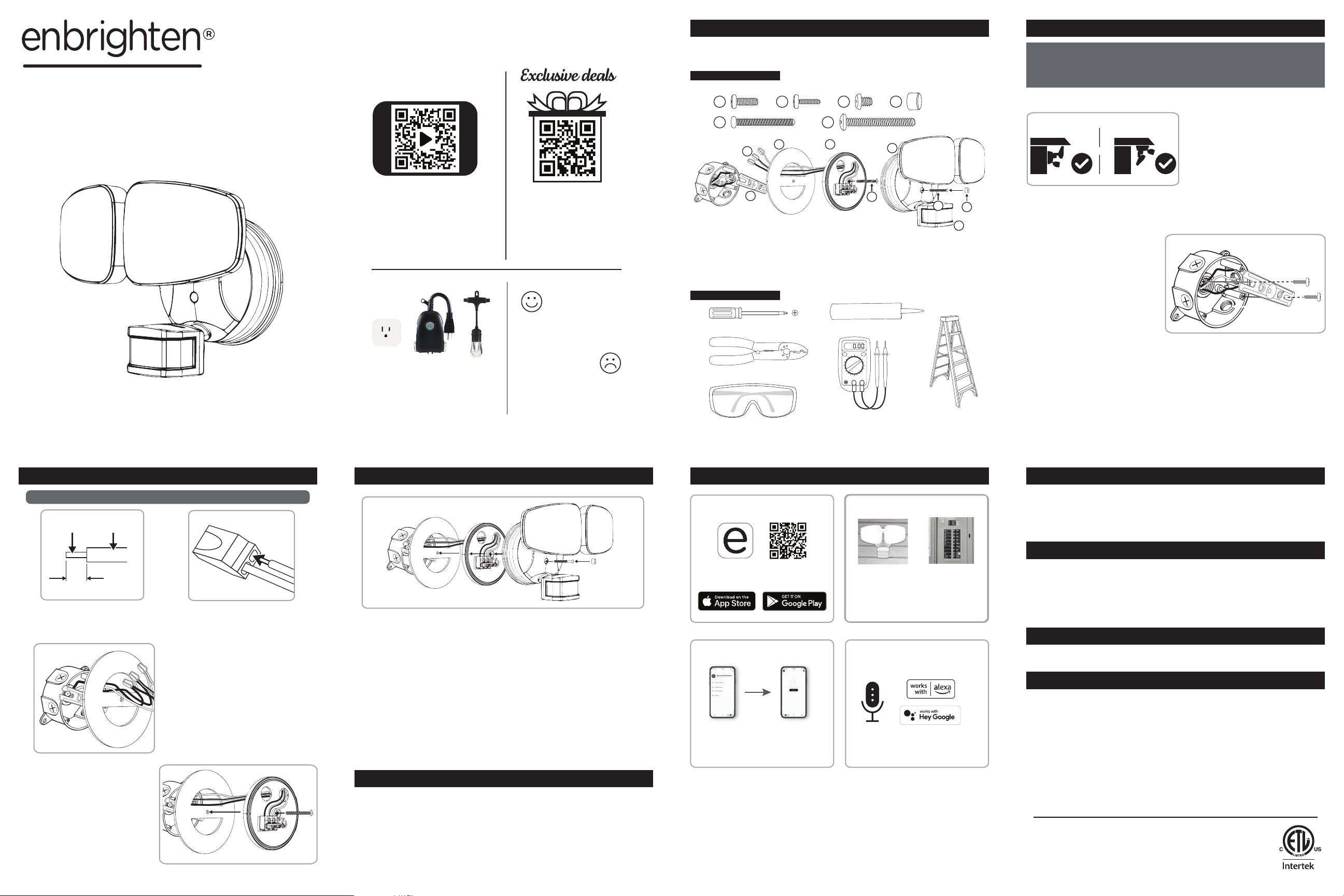
A, B, C. Mounting bracket screws
D. Rubber plug
E. Fixture bolt
F. Mounting plate bolt
G. Mounting bracket
H. Gasket
TOOLS NEEDED
Phillips-head screwdriver
Wire strippers/cutters
Safety goggles
I. Light fixture
J. Motion sensor
K. Mounting plate
L. Push-in connectors
Silicone caulk sealant
AC voltage tester
Ladder
Step 1: Choose mounting location
Select a round, waterproof
surface-mount or recessed
electrical junction box hardwired
to 120VAC — ideal height is 8ft.
above ground.
Step 2: Remove mounting plate
Use the two holes on the mounting plate to gently remove it from the
back of the light fixture.
Note: You only need to use the
mounting bracket screws that
match your junction box.
Step 3: Install mounting bracket
With the “FRONT” side facing you, use the mounting bracket screws
(A, B or C) to install the bracket to the junction box.
Step 4: Route wires
Hold the mounting plate over the mounting bracket with the
directional arrow for wall or eave mount in the indicated direction.
Route wires through the hole not blocked by mounting bracket.
IMPORTANT: Do not screw into place or install wires yet
INSTALLATION (CONT.) INSTALLATION (CONT.) CONNECTION SETUP
WARNING: BE SURE POWER IS OFF BEFORE WIRING
Download the app
Scan the QR code above or search
Enbrighten on the App Store or on
Google Play.
Step 5: Make electrical connections
Use wire strippers to strip the house AC power supply wires to
expose 3/8in. of wire.
Step 6: Install mounting plate
Align the mounting plate with
the gasket and mounting
bracket noting the indicator
arrow. Insert the mounting
plate bolt through the
mounting plate, through the
gasket and into the mounting
bracket.
Step 5: Make electrical
connections (cont.)
Route the wires through the
gasket and push the house AC
supply wires into the connectors
with matching colors — black,
white, green/yellow. Neatly
arrange them inside the
junction box.
Step 7: Mount light fixture
Using the keyed center post as a guide, firmly push the light fixture
onto the mounting plate. Tighten the fixture bolt to the mounting
plate. Place the rubber plug over the hole and remove the protective
film from motion sensor.
Step 8: Waterproofing
Apply exterior use waterproof caulk sealant to any gaps behind the
mounting plate and wall/eave.
OPERATION
Remotely operate your security light with the easy-to-use
Enbrighten app. Follow the in-app instructions and available
resources to set up your smart device.
Note: Requires 2.4GHz Wi-Fi connection.
Set up account
1. 2.
Create an account in
the Enbrighten app
Default settings:
Before adjustements are made in the app, the flood light will
automatically activate when motion is detected in low-light
conditions. The accent light will turn on and stay lit while in low-light
conditions. To override these default settings, you can use the app
to activate preset timers, create custom schedules and more.
Follow the on-screen
instructions to add
devices, create
schedules and control
the smart security light
from anywhere
Voice control
Compatible with Amazon
Alexa and Google Assistant
Follow the steps in the Amazon Alexa or
Google Assistant app to connect the
Enbrighten app or select “Support” in
WARRANTY
Jasco Products Company warrants this product to be free from manufacturing defects for five years from the original
date of consumer purchase. This warranty is limited to the repair or replacement of this product only and does not extend
to consequential or incidental damage to other products that may be used with this product. This warranty is in lieu of
all other warranties, expressed or implied. Some states do not allow limitations on how long an implied warranty lasts or
permit the exclusion or limitation of incidental or consequential damage, so the above limitations may not apply to you.
This warranty gives you specific rights and you may also have other rights which vary from state to state. Please contact
our U.S.-based Consumer Care at 1-800-654-8483 (option 1) between 7AM – 8PM, M-F, Central Time or www.byjasco.com
if the unit should prove defective within the warranty period.
SPECIFICATIONS
Two-head Security light:
Model #: AWL1017-I-036-W
Power requirements – 120VAC, 60Hz
Electrical load – 32W
Operating modes – Test, motion, manual, schedule
Flood light lumens – 2589.6lm
Flood light color temperature – Cool white (4000K)
Accent ring lumens – 363.6lm
Accent ring color temperature – Amber light (2200K)
Sensing angle – Up to 210°
Range – High, medium, low; adjustable up to 70ft.
Dimming – 10%-100% with Enbrighten app
Three-head Security light:
Model #: AWL1017-I-046-W
Power requirements – 120VAC, 60Hz
Electrical load – 38W
Operating modes – Test, motion, manual, schedule
Flood light lumens – 3401.9lm
Flood light color temperature – Cool white (4000K)
Accent ring lumens – 427.1lm
Accent ring color temperature – Amber light (2200K)
Sensing angle – Up to 210°
Range – High, medium, low; adjustable up to 70ft.
Dimming – 10%-100% with Enbrighten app
CARE AND CLEANING
• DO NOT spray the light fixture with a hose or power washer.
• DO NOT use paints, solvents or other chemicals on this light fixture.
• To prolong the original appearance, clean only with clean water and a soft, damp cloth.
SAFETY INSTRUCTIONS
WARNINGS TO REDUCE THE RISK OF ELECTRIC SHOCK, FIRE OR INJURY:
1. Read all SAFETY INSTRUCTIONS and USER MANUAL before attempting to install or operate.
2. Install in accordance with all local and national electrical codes. Consult a local licensed electrician or
electrical contractor if you are not sure about the installation.
3. For use only in a circuit protected by a fuse or circuit breaker.
4. Must be properly grounded.
5. DO NOT ATTEMPT TO INSTALL FIXTURE WITH THE POWER ON. Ensure electricity is TURNED OFF
at the main circuit breaker or fuse box. All wiring connections must be made with the POWER OFF to
avoid personal injury and/or damage to the fixture. Verify power is OFF at the junction box using AC
voltage tester before installation.
6. Double-check all connections to be sure they are tight and correct and no wires are pinched.
7. Account for small parts and destroy packaging material, as these may be hazardous to children.
8. If installed OUTDOORS, mount to a WATERPROOF surface mount or recessed electrical junction box
with a 120 VAC power source. Seal all gaps behind mounting plate with waterproof caulk.
9. NOTICE: DO NOT connect Wi-Fi product to a dimmer switch or timer.
10. Wear well-fitted safety glasses during the entire installation procedure.
MADE IN VIETNAM/HECHO EN VIETNAM
Distributed by Jasco Products Company LLC,
10 E. Memorial Rd., Oklahoma City, OK 73114.
©JASCO 2022 | 58242, 58243, 58244, 58245 |
12/16/21 v3
App store is a service mark of Apple
Inc., Google and Google Play are
trademarks of Google LLC. Amazon,
Alexa and all related logos are
trademarks of Amazon.com, Inc. or
its aliates.
Page 2
LED wifi
estándar del centro.
O
Montaje en pared Montaje en alero
CAJA DE CONEXIONES
L
K
F
G
D
J
FRONT
H
E
I
FE
A
B C D
x2 x2 x2
x1
x1
x1
CAJA DE CONEXIONES
FRONT
1 a 1,1 cm
Cable
expuesto
Cable
aislado
CAJA DE CONEXIONES
FRONT
FRONT
FRONT
Escanee el código QR arriba o busque
Enbrighten en el App Store o en
Google Play.
Descargue la app
Descargue en la
ACTÍVELA
1. 2.
Instale la luz
de seguridad
inteligente
Conecte la
electricidad en el
disyuntor principal
o la caja de fusibles.
desde cualquier lugar
¡Gracias por su compra!
Instrucciones fáciles
Ofertas exclusivas
PREPARACIÓN INSTALACIÓN
Antes de instalar la luz de seguridad Enbrighten, es importante leer el manual
completo, todas las instrucciones de seguridad y asegurarse de que estén
todas las piezas. Guarde este manual del usuario para su uso posterior.
DENTRO DE LA CAJA
ADVERTENCIA: Asegúrese de que la electricidad esté DESCONECTADA
en el disyuntor principal o la caja de fusibles. NO INTENTE INSTALAR
LA LÁMPARA CON LA ELECTRICIDAD CONECTADA. Compruebe que
la electricidad esté DESCONECTADA en la caja de conexiones con un
voltímetro de CA antes de la instalación.
Luz de seguridad y ambiental
inteligente
Su luz de seguridad inteligente LED wifi Enbrighten cuenta con activación por detección
de movimiento, programación, regulación de la luminosidad y más para mantener su
casa iluminada de manera segura; y todo lo puede hacer desde la app gratuita wifi de
Enbrighten.
Modelos:
58242, 58243, 58244, 58245
*Estas instrucciones se aplican a la luz
de seguridad de dos y tres cabezas
Lea las instrucciones o
mire el video con el paso
a paso. Escanee el
código o visite
byjasco.com/58242i
Para ver más productos
Enbrighten, visite nuestro
sitio web: enbrightenwifi.com.
Para acceder a ofertas,
registrar su compra
y darnos su opinión
sobre nosotros, tan
solo escanee el
código o visite
byjasco.com/deals
¿Le gusta nuestro
producto?
Déjenos una reseña
en amazon.com
¿Tiene algún
problema?
Díganos cómo
podemos ayudar.
1-800-654-8483,
de lunes a viernes, de
7 a. m. a 8 p. m., hora
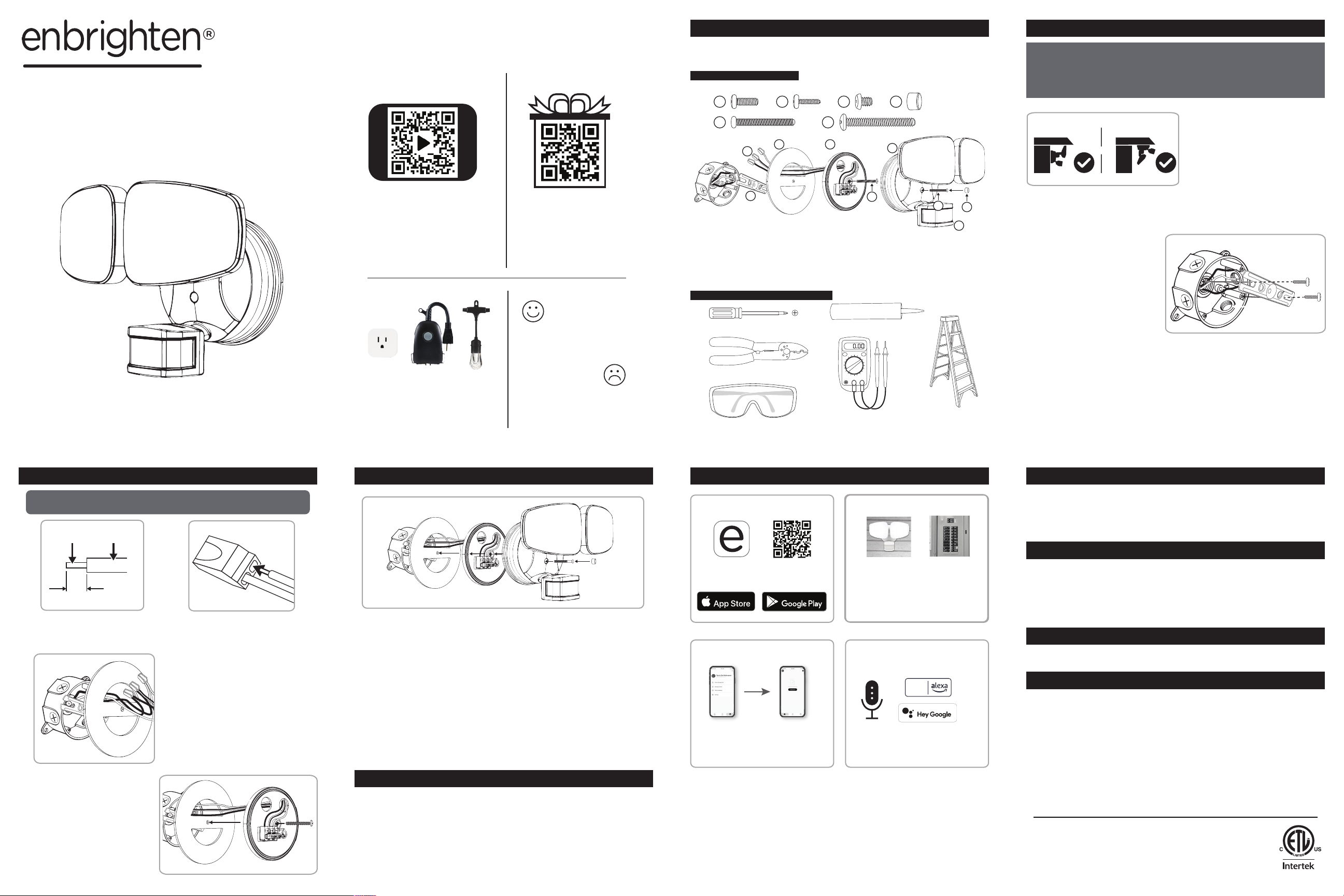
A, B, C. Tornillos del soporte de montaje
D. Tapón de goma
E. Perno de la lámpara
F. Perno de la placa de montaje
G. Soporte de montaje
H. Junta
HERRAMIENTAS NECESARIAS
Destornillador Phillips
Cortacables/pelacables
Gafas de seguridad
I. Lámpara
J. Sensor de movimiento
K. Placa de montaje
L. Conectores enchufables
Sellador de silicona
Voltímetro de CA
Escalera
Paso 1: Elija el lugar de montaje
Seleccione una caja de
conexiones eléctricas de montaje
en la superficie o empotrada
cableada a 120VCA. La altura
ideal es de 2,45m (8 pies) sobre
el nivel del suelo.
Paso 2: Retire la placa de montaje
Use los dos orificios en la placa de montaje para extraerla con cuidado
de la parte posterior de la lámpara.
Nota: Solo debe usar los
tornillos para el soporte de
montaje que coincidan con su
caja de conexiones.
Paso 3: Instale el soporte de montaje
Con el lado del “FRENTE” hacia usted, use los tornillos para el soporte
de montaje (A, B o C) para instalar el soporte de la caja de conexiones.
Paso 4: Encamine los cables
Sostenga la placa de montaje sobre el soporte de montaje con
la flecha de dirección para montaje en una pared o un alero en la
dirección indicada. Pase los cables a través del orificio que no está
bloqueado por el soporte de montaje.
IMPORTANTE: No lo atornille en su lugar ni instale los cables todavía.
INSTALACIÓN (CONT.) INSTALACIÓN (CONT.) PREPARAR LA CONEXIÓN
ADVERTENCIA: ASEGÚRESE DE QUE LA ELECTRICIDAD ESTÉ
DESCONECTADA ANTES DE INSTALAR EL CABLEADO
Paso 5: Haga las conexiones eléctricas
Use los pelacables para dejar al descubierto 1 cm (3/8") del cable
de alimentación de CA de la casa.
Paso 6: Instale la placa de
montaje
Alinee la placa de montaje con
la junta y el soporte de montaje
teniendo en cuenta la flecha
indicadora. Inserte el perno de
la placa de montaje através
de la placa de montaje, la junta
yen el soporte de montaje.
Paso 5: Haga las conexiones
eléctricas (cont.)
Pase los cables a través de la
junta y empuje los cables de
alimentación de CA de la casa
enlos conectores con los mismos
colores: negro, blanco, verde/
amarillo. Ordénelos bien dentro
de la caja de conexiones.
Paso 7: Monte la lámpara
Con el orificio central como guía, presione firmemente la lámpara
en la placa de montaje. Apriete el perno de la lámpara en la placa
de montaje. Coloque el tapón de goma sobre el orificio y retire la
película protectora del sensor de movimiento.
Paso 8: Impermeabilización
Aplique un sellador impermeabilizante para uso en exteriores en los
huecos detrás de la placa de montaje y la pared o el alero.
FUNCIONAMIENTO
Opere de forma remota la luz de seguridad con la app Enbrighten
fácil de usar. Siga las instrucciones en la app y los recursos
disponibles para configurar su dispositivo inteligente.
Nota: Requiere conexión wifi de 2,4GHz.
Cree una cuenta
1. 2.
Cree una cuenta en
la app Enbrighten
Siga las instrucciones
en pantalla para agregar
dispositivos, crear
programas de horarios
y controlar la luz de
seguridad inteligente
Configuración predeterminada:
Antes de realizar los ajustes en la app, la luz de reflector se activará
automáticamente cuando se detecte movimiento en condiciones
con poca iluminación. La luz ambiental se encenderá y permanecerá
encendida cuando en condiciones de poca luz. Para anular esta
configuración predeterminada, puede usar la app para activar los
temporizadores predeterminados, crear programas de horarios
personalizados y mucho más.
Control por voz
Compatible con Amazon
Alexa y el Asistente de Google
funciona
con
funciona con
Siga los pasos en la app de Amazon Alexa
o del Asistente de Google para conectar
la app Enbrighten o seleccione “Support”
(Asistencia) en la app Enbrighten.
GARANTÍA
Jasco Products Company garantiza que este producto estará libre de defectos de fabricación durante cinco años a partir
de la fecha de compra original del consumidor. Esta garantía se limita a la reparación o el reemplazo solo de este producto
y no se extiende a daños consecuentes o incidentales a otros productos que puedan usarse con este producto. Esta
garantía se otorga en lugar de todas las demás garantías expresas o implícitas. Algunos estados no permiten limitaciones
a la duración de una garantía implícita ni permiten la exclusión de daños incidentales o consecuentes, por lo que las limitaciones anteriores pueden no aplicarse a usted. Esta garantía le otorga derechos específicos y posiblemente tiene otros
derechos que pueden variar de un estado a otro. Comuníquese con nuestro Servicio al Consumidor con sede en EE.UU.
al 1-800-654-8483 (opción 1) entre las 7a.m. y las 8p.m., hora estándar del centro, o en www.byjasco.com si la unidad
resulta defectuosa dentro del período de garantía.
ESPECIFICACIONES
Luz de seguridad de dos cabezas:
Modelo n.º: AWL1017-I-036-W
Requisitos de energía: 120VCA, 60Hz
Carga eléctrica: 32W
Modos de operación: prueba, movimiento, manual, programado
Lúmenes de la luz de reflector: 2589,6lm
Temperatura del color de la luz de reflector: blanca fría (4000K)
Lúmenes del anillo de luz ambiental: 363,6lm
Temperatura del color del anillo de luz ambiental: luz ámbar (2200K)
Ángulo de detección: hasta 210°
Rango: alto, medio, bajo; ajustable a un máximo de 21,3m (70 pies)
Regulación: 10% a 100% con la app Enbrighten
Luz de seguridad de tres cabezas:
Modelo n.º: AWL1017-I-046-W
Requisitos de energía: 120VCA, 60Hz
Carga eléctrica: 38W
Modos de operación: prueba, movimiento, manual, programado
Lúmenes de la luz de reflector: 3401,9lm
Temperatura del color de la luz de reflector: blanca fría (4000K)
Lúmenes del anillo de luz ambiental: 427,1lm
Temperatura del color del anillo de luz ambiental: luz ámbar (2200K)
Ángulo de detección: hasta 210°
Rango: alto, medio, bajo; ajustable a un máximo de 21,3m (70 pies)
Regulación: 10% a 100% con la app Enbrighten
CUIDADO Y LIMPIEZA
• NO rocíe la lámpara con una manguera o una máquina de lavado de alta presión.
• NO use pinturas, solventes u otras sustancias químicas en esta lámpara.
• A fin de prolongar la apariencia original, limpie solamente con agua limpia y un paño suave humedecido.
INSTRUCCIONES DE SEGURIDAD
ADVERTENCIAS PARA REDUCIR EL RIESGO DE DESCARGA ELÉCTRICA,
INCENDIO O LESIONES:
1. Lea todas las INSTRUCCIONES DE SEGURIDAD y el MANUAL DEL USUARIO antes de la instalación u operación.
2. Instale de acuerdo con todos los códigos eléctricos locales y nacionales. Consulte a un electricista profesional
local o contratista electricista local si no está seguro de la instalación.
3. Para uso exclusivo en un circuito protegido por un fusible o disyuntor.
4. Debe estar conectado a tierra adecuadamente.
5. NO INTENTE INSTALAR LA LÁMPARA CON LA ELECTRICIDAD CONECTADA. Asegúrese de que la electricidad
esté DESCONECTADA en el disyuntor principal o la caja de fusibles. Todas las conexiones de los cables deben
hacerse con la ELECTRICIDAD DESCONECTADA para evitar lesiones personales o daños a la lámpara. Compruebe que la electricidad esté APAGADA en la caja de conexiones con un voltímetro de CA antes de la instalación.
6. Verifique todas las conexiones para asegurarse de que estén ajustadas y correctas, sin cables pellizcados.
7. Contabilice las piezas pequeñas y destruya el material de empaque, ya que pueden ser peligrosos para los niños.
8. Si hace la instalación en el EXTERIOR, monte en una superficie IMPERMEABLE o en una caja de conexiones
empotrada con una fuente de alimentación de 120VCA. Selle todos los huecos detrás de la placa de montaje con
sellador resistente al agua.
9. AVISO: NO conecte un producto wifi a un interruptor regulador de intensidad o un temporizador.
10. Use gafas de seguridad que le ajusten bien durante el procedimiento de instalación completo.
MADE IN VIETNAM/HECHO EN VIETNAM
Distribuido por Jasco Products Company LLC,
10 E. Memorial Rd., Oklahoma City, OK 73114.
©JASCO 2022 | 58242, 58243, 58244, 58245 |
12/16/21 v3
App store es una marca de servicio
de Apple Inc., Google y Google Play
son marcas de registradas de Google
LLC. Amazon, Alexa y todos los
logotipos relacionados son marcas
registradas de Amazon.com, Inc.
osus filiales.
 Loading...