

Page 1
For Technical Support:
Call our Technical Service Department
Monday through Friday, 9 a.m. to 5 p.m. (EST)
1-800-TEC-TOYS or 1-800-832-8697
MP3 Control Center #9540
USER’S GUIDE
50 Broadway
Hawthorne, NY 10532
Tel. 914.747.3070 / Fax 914.747.3480
Toll Free 800.832.8697
www.enablingdevices.com
Page 2

Easy-touch buttons!
Download your music onto a micro SD card (included), insert the card
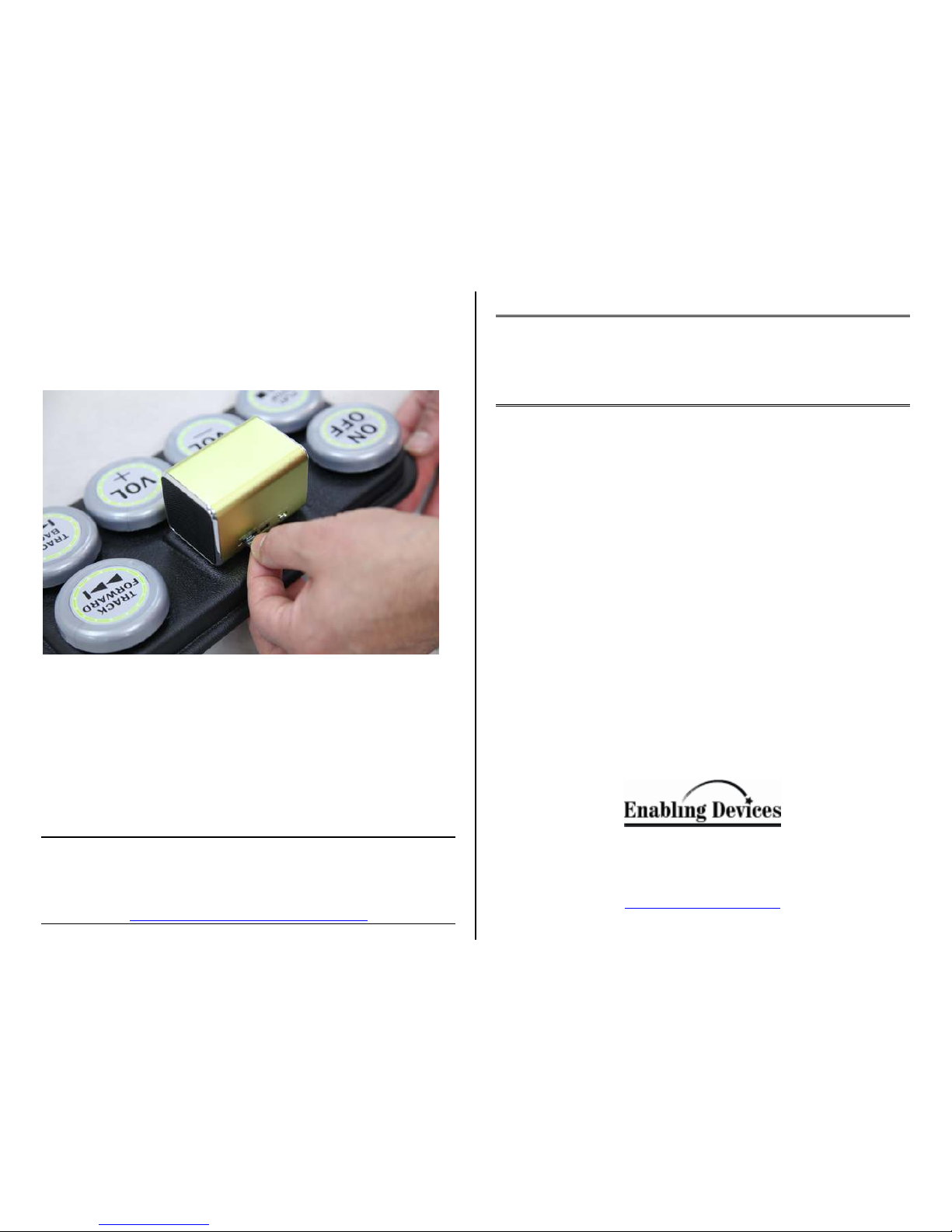
into the slot on the speaker, and control your songs with our six easytouch switches: On/Off, Play/Stop, Volume Up and Down, Track Back
and Forward. Center charges via USB (cord included).
Size: 11"L x 6"W x 3½"H. Weight: 1¼ lbs.
Please Note: Computer required to download music to Micro/SD card.
Operation:
1. The MP3 Control Center has a built in rechargeable battery, which
is charged through your computer via the included USB cable or
using the included cable with any Tablet or Smartphone wall
charger for faster charging. You can use the MP3 Control Center
during charging.
2. To charge your MP3 Control Center, plug it into a USB port on
your computer while the computer is on or using the USB cable
with a Table or Smartphone wall charger. The LED light will glow
red while charging with the power OFF or glow pink with the
power ON. When charging completes, the light will go OFF with
the power OFF or glow blue with the power ON.
3. To listen to music stored on a MicroSD/TF card included, insert
the card into the slot on the back of the MP3 Control Center (See
Photo on back of guide). Turn on the MP3 Control Center’s
On/Off switch On. Press the big “Play” switch on the base. Press it
again to pause the music. Press the “Track Forward” or “Track
Backward” switches to skip between songs. To adjust volume, use
the “Vol +” or “Vol –“switches.
4. When you are finished using the MP3 Control Center make sure to
press the big button ON/OFF switch on the base and also turn the
small ON/OFF switch on the back of the MP3 Control Center to
prevent the battery from draining down all the way. If not and the
battery drains out and left in this state could cause damage to the
battery.
Please Note: Some features or functions listed in the original
manufactures instructions may not work due to switch adaption.
Troubleshooting:
Problem: MP3 Control Center does not work.
Action #1: Make sure you have charged the MP3 Control Center.
Action #2: Make sure that there is nothing inhibiting the depression of
the button switches or holding any of the button switches down.
Action #3: Try reloading your music on the MicroSD/TF card or try a
different MicroSD/TF card to rule this out as the issue.
Care & Maintenance:
1. Keep the MP3 Control Center clean by wiping it with a slightly
damp cloth when needed. It can be wiped clean with any household
multi-purpose cleaner and disinfectant. We recommend Simple Green,
which is a non toxic biodegradable all-purpose cleaner.
2. Keep the MP3 Control Center out of direct sunlight and away from
any direct heat source.
3. Do not drop the MP3 Control Center on a hard surface and do not
expose it to moisture or immerse it in water.
Rev 7/22/15
 Loading...