

Page 1

RJ Cooper & Associates
Assistive Technology Specialist
1-800-RJCooper
Internet: <www.rjcooper.com> Email: <[email protected]>
((HH--22)
)
CCoorrddlleessss SSuuppeerr--SSwwiittcch
h
TThhee ppuurrppoossee ooff tthhee CCoorrddlleessss SSuuppeerr--SSwwiittcchh iiss ttoo ffuunnccttiioonn aass aa mmoouussee--cclliicckk ffoorr ssppeecciiaall ssooffwwaarree,,
oorr ttoo aallllooww ootthheerr sswwiittcchheess ttoo ddoo tthhee ssaammee.. 22 sswwiittcchh iinnppuuttss aalloonngg iittss ssiiddee aallllooww ccoonnnneeccttiioonn ooff
ootthheerr sswwiittcchh((eess)) ttoo ppeerrffoorrmm jjuusstt aabboouutt aannyy aaccttiioonn ffoorr aannyy ssooffttwwaarree ((ddeeffaauulltt iiss lleefftt//rriigghhtt cclliicckk ffoorr
WWiinnddoowwss,, lleefftt//ccoonnttrrooll--cclliicckk ffoorr MMaacc)).. AAllssoo,, tthhee SSuuppeerr--SSwwiittcchh ffuunnccttiioonnss aass aa rreegguullaarr sswwiittcchh ffoorr
aaddaapptteedd ttooyyss aanndd aapppplliiaanncceess!!
IIff yyoouu''rree uussiinngg ootthheerr ssooffttwwaarree tthhaann oouurrss,, iitt iiss vveerryy iimmppoorrttaanntt tthhaatt yyoouu ccoonnffiirrmm wwhhaatt iitt iiss aaccttuuaallllyy
**llooookkiinngg** ffoorr,, wwhheenn iitt rreeffeerrss ttoo ""sswwiittcchh.."" AAllll oouur
ttoo aa ""sswwiittcchh.."" SSeeee SSooffttwwaarree IInnssttaallllaattiioonn bbeellooww iiff yyoouurr ssooffttwwaarree iiss llooookkiinngg ffoorr ssoommeetthhiinngg eellssee.
HHaarrddwwaarree IInnssttaallllaattiioonn ffoorr WWiinnddoowwss
r
ssooffttwwaarree llooookkss ffoorr mmoouusseecclliicckkss wwhheenn wwee rreeffeerr
.
PPlluugg tthhee rreecceeiivveerr iinnttoo aannyy aavvaaiillaabbllee UUSSBB ppoorrtt,, wwhhiillee yyoouurr ccoommppuutteerr iiss oonn.. WWiinnddoowwss
22000000//MMEE//XXPP//VViissttaa sshhoouulldd ddeetteecctt iitt aanndd iinnssttaallll wwiitthhoouutt aannyy hheellpp ffrroomm yyoouu.. WWiinnddoowwss 9988
((SSeeccoonndd EEddiittiioonn)) wwiillll pprroobbaabbllyy aasskk yyoouu ttoo ppuutt iinn yyoouurr WWiinnddoowwss CCDD ((tthhee oonnee tthhaatt ccaammee wwiitthh
yyoouurr ccoommppuutteerr)).. DDoo ssoo aanndd wwaaiitt aabboouutt 1100 sseeccoonnddss ffoorr tthhee CCDD ttoo ''mmoouunntt'',, tthheenn cclliicckk OOKK..
HHaarrddwwaarree IInnssttaallllaattiioonn ffoorr MMaacciinnttoosshh
YYoouu ccaann pplluugg tthhee ssmmaallll rreecceeiivveerr iinnttoo aannyy aavvaaiillaabbllee UUSSBB ppoorrtt,, eeiitthheerr ddiirreeccttllyy iinn tthhee ccoommppuutteerr oorr
iinn tthhee kkeeyybbooaarrdd,, aatt aannyy ttiimmee.. WWiinnddoowwss 22000000,, XXPP,, && VViissttaa wwiillll ttaakkee aa mmoommeenntt ttoo aauuttoo--iinnssttaallll
tthhee nneecceessssaarryy ddrriivveerrss.. NNoo aaccttiioonn oonn yyoouurr ppaarrtt sshhoouulldd bbee nneecceessssaarryy..
OOnn tthhee bboottttoomm ooff tthhee SSuuppeerr--SSwwiittcchh aarree 22 hhoolleess.. TThhee oonnee cclloosseesstt ttoo tthhee eeddggee iiss aann ooffff//oonn sslliiddee
sswwiittcchh,, aanndd ttoowwaarrddss tthhee ddoott iiss OONN ((yyoouu''llll nneeeedd ttoo uussee aa ppeenn//ppeenncciill ppooiinntt ttoo rreeaacchh iitt,, aanndd ##22
bbeellooww))..
TTuunniinngg tthhee RReecceeiivveerr ttoo tthhee TTrraannssmmiitttteerr
MMyy SSuuppeerr--SSwwiittcchh ccoommeess wwiitthh tthhee AAAAAA bbaatttteerryy iinnssttaalllleedd ffoorr yyoouu,, bbuutt yyoouu mmiigghhtt nneeeedd ttoo ''ttuunnee''
tthhee rreecceeiivveerr ttoo tthhee ttrraannssmmiitttteerr..
11)) WWiitthh yyoouurr ccoommppuutteerr OONN aanndd tthhee SSuuppeerr--SSwwiittcchh OONN,, aanndd tthhee lliittttllee rreecceeiivveerr pplluuggggeedd iinnttoo aa
UUSSBB ppoorrtt,, pprreessss tthhee lliittttllee bbuuttttoonn aatt tthhee eenndd ooff tthhee rreecceeiivveerr aanndd aa lliigghhtt wwiillll ssttaarrtt ttoo bblliinnkk sslloowwllyy..
22)) OOnn tthhee bboottttoomm ooff tthhee SSuuppeerr--SSwwiittcchh,, pprreessss//rreelleeaassee tthhee rreecceesssseedd,, ssmmaallll bbrroowwnn bbuuttttoonn..
33)) TThhee lliigghhtt ffrroomm ##22 sshhoouulldd ssttoopp bblliinnkkiinngg..
NNooww yyoouurr CCoorrddlleessss SSuuppeerr--SSwwiittcchh sshhoouulldd ffuunnccttiioonn aass aa mmoouusseecclliicckk.. TThhee eeaassiieesstt wwaayy ttoo tteesstt
tthhiiss iiss ssiimmppllyy ttoo uussee yyoouurr mmoouussee ttoo ppooiinntt ttoo tthhee SSttaarrtt bbuuttttoonn ((iinn WWiinnddoowwss)) oorr tthhee AAppppllee mmeennuu
((oonn aa MMaacc)) aanndd pprreessss tthhee sswwiittcchh.. TThhee mmeennuu sshhoouulldd aappppeeaarr//ddiissaappppeeaarr wwiitthh eeaacchh sswwiittcchh
aaccttiivvaattiioonn..
TTuurrnn tthhee SSuuppeerr--SSwwiittcchh OOFFFF ffoorr ttooyy//aapppplliiaannccee uussee..
Page 2

SSooffttwwaarree ffoorr PPrrooggrraammss TThhaatt DDoonn''tt LLooookk ffoorr aa MMoouusseeCClliicckk
RReemmeemmbbeerr,, ttoo ccoonnttrrooll ootthheerr ccoommppaannyy''ss ssppeecciiaall nneeeeddss ssooffttwwaarree,, yyoouu nneeeedd ttoo kknnooww wwhhaatt tthhaatt
ssooffttwwaarree iiss eexxppeeccttiinngg aass tthhee ""sswwiittcchh.."" UUssee oouurr ffrreeee SSwwiittcchhHHooppppeerr ((WWiinnddoowwss oorr MMaacc OOSS 99)) oorr
SSAAMM--XX ((MMaacc OOSS XX)) ssooffttwwaarree tthhaatt iiss oonn oouurr CCDD oorr oouurr wweebbssiittee,, ttoo sseett uupp tthhee CCoorrddlleessss SSuuppeerr-
-
SSwwiittcchh ffoorr tthhoossee pprrooggrraammss tthhaatt aarree llooookkiinngg ffoorr aa <<ssppaaccee>> oorr <<ccoonnttrrooll--eenntteerr>> oorr <<wwhhaatteevveerr>> iinn
tthheeiirr sswwiittcchh ssooffttwwaarree.. TThhee CCoorrddlleessss SSuuppeerr--SSwwiittcchh ccaann bbee sseett ttoo ''sseenndd'' aannyy kkeeyyssttrrookkee//kkeeyyccoommbbiinnaattiioonn oorr mmoouussee bbuuttttoonn aaccttiioonn ttoo yyoouurr ccoommppuutteerr..
FFoorr rreettuurrnnss//rreeppaaiirr,, yyoouu mmuusstt ccoonnttaacctt uuss aanndd oobbttaaiinn aann RRMMAA!
!
-
Page 3

Gum Ball Switches #782R, B, G, Y, P
USER’S GUIDE
Page 4

A high quality and dependable switch. Meets most needs of switch
users. It features a 2½ inch activation surface and is recommended for
all who can access a smaller target area. Provides extraordinary tactile
and audible feedback. Base has three holes for easy mounting. We have
also made the mounting plate detachable since many users do not need
the plate. Available in 5 colors. Size: 3¼" Base x ¾" High.
Operation:
1. The Gum Ball Switch does not require any batteries to operate.
2. The Gum Ball Switches come with a removable base. To remove
the base turn the switch over and unscrew the two Phillips Head
screws. Next pull the base ring off the switch.
3. Plug the Gum Ball Switch into the jack on your switch-adapted
toy/device.
4. If it is necessary for you to use an adapter, make sure that you use a
MONO adapter, not a STEREO adapter.
5. Make sure that the connection between the Gum Ball Switch and
your toy/device is tight. There should be no gaps.
6. Simply press anywhere on the Gum Ball Switch’s colored top to
activate your toy/device.
7. The toy/device will only remain activated while the Gum Ball
Switch continues to be actuated. Once you release the switch, the
toy/device will turn off.
Troubleshooting:
Problem: The Gum Ball Switch does not activate your toy/device.
Action #1: Make sure that the connection between the Gum Ball Switch
and your toy/device is tight. There should be no gaps. This is a
common error and an easy fix.
Action #2: Try a different switch with your toy/device to rule out the
toy/device as the source of the problem.
Action #3: Try a different adapter (if applicable) to rule this out as the
source of the problem.
Care of Unit:
The Gum Ball Switch can be wiped clean with any household multipurpose cleaner and disinfectant. We recommend Simple Green, which
is a non toxic biodegradable all-purpose cleaner.
Do not submerge the unit, as it will damage the contents and the
electrical components.
Do not use abrasive cleaners, as they will scratch the surface of the
unit.
Rev 9/27/06
Page 5

Single Switch Mouse #7753
USER’S GUIDE
Page 6
We’ve made it easy for you to operate your computer cursor with a
capability switch (Not included). Plug the Single Switch Mouse into
your computer and attach any capability switch. Push and hold the
switch for a ½ of a second and release it and the cursor will go up, hit
it again to stop. Repeat these steps to move the cursor right, then
down, then left. When you get to your destination, activate the switch
twice and you will open the window. PC Compatible Only. Requires
USB port, Windows 98 or higher. Size: 4 1/2"L x 2 1/2"W x 1"H.
Operation:
1. Once you have plugged in the Single Switch Mouse into your USB
port, depending on which operating system you are running you
may see a small pop up in the lower right hand corner of the screen
saying (Detected New Hardware). If this happens wait until it says
Hardware installed before plugging your capability switch (Not
included) into the jack on the Single Switch Mouse.
4. The default speed setting at which the cursor moves can be
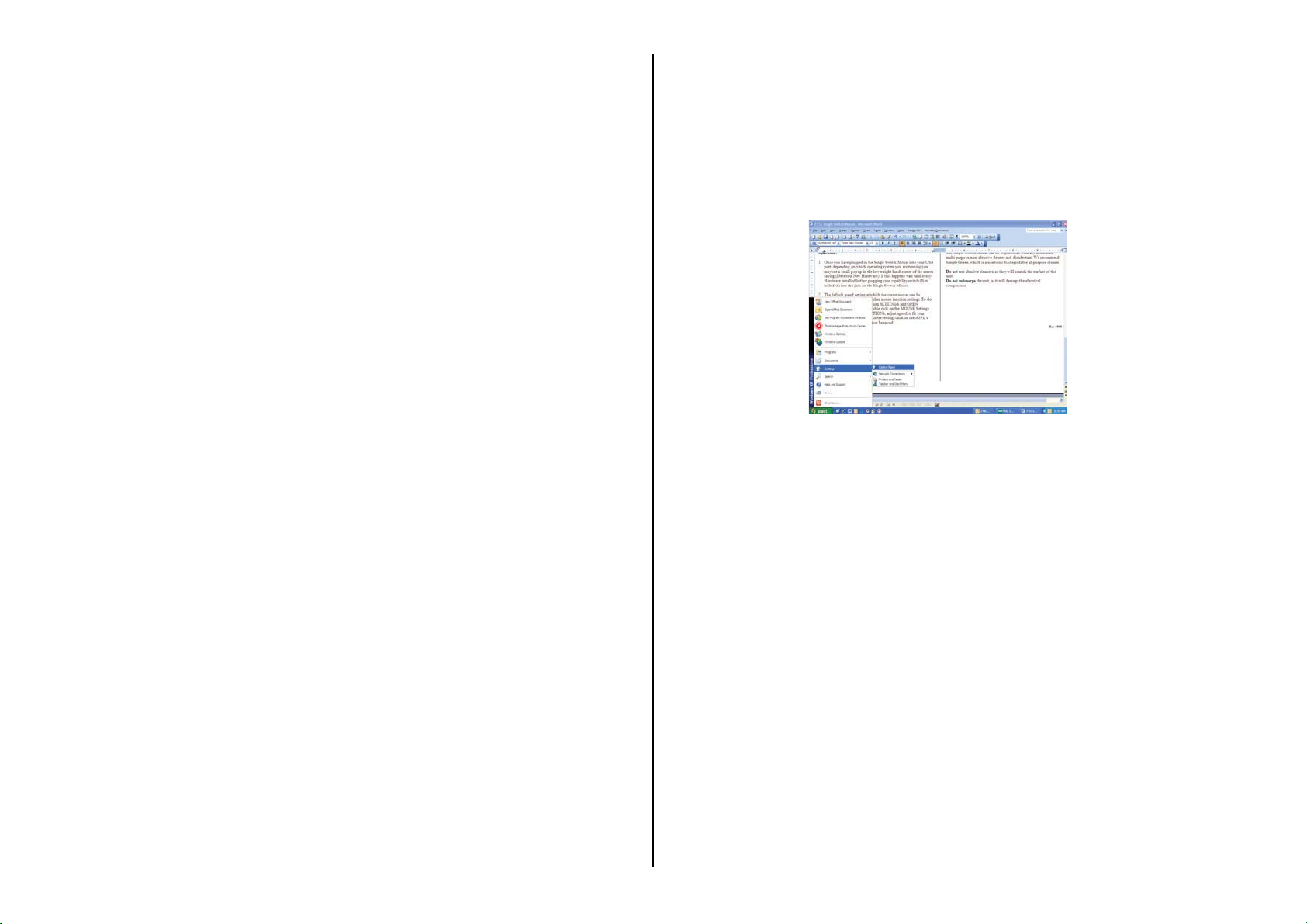
changed if needed as well as other mouse function settings. To do
this go to the Windows START Menu, then SETTINGS then open
“CONTROL PANEL”. Next double click on the MOUSE Settings
and then select POINTER OPTIONS, adjust speed to fit your
needs. When finished to save these settings click on the APPLY
button. If not the change will not take effect or be saved.
2. Connect any external capability switch via the 1/8" jacks. If you need to
use a ¼ " to 1/8" adapter for your switch, it must be a mono adapter, not
stereo. Make sure that the connections between the external capability
switch and the adapter (if applicable) and the jack are tight, there should
be no gaps.
3. To activate and hold your switch between ½ to 1 second, then
release. The cursor will start to move upward slowly then increases
speed, activate your switch again to stop the cursor. If you activate
your switch and then hold as before when you release your switch
the cursor will now move to the Right. If you repeat this again it
will move Down. One more time it will move to the Left. The
control works in a clockwise direction. When you reach your target
a double click will open the target.
Troubleshooting:
Problem: The mouse fails to operate, or operates incorrectly.
Action #1: Shutdown your computer before plugging in the Single
Switch Mouse.
Action #2: Make sure that you have your mouse plugged in to your
computer properly, and your capability switch is plugged into the
mouse all the way, there should be no gaps in the connection.
Care of the Unit:
The Single Switch Mouse can be wiped clean with any household
multi-purpose, non-abrasive cleaner and disinfectant. We recommend
Simple Green, which is a non toxic biodegradable all-purpose cleaner.
Do not use abrasive cleaners, as they will scratch the surface of the
unit.
Do not submerge the unit, as it will damage the electrical
components.
Rev 5/9/08
 Loading...