

Page 1
For Technical Support:
Call our Technical Service Department
Monday through Friday, 9 a.m. to 5 p.m. (EST)
1-800-TEC-TOYS or 1-800-832-8697
MP3 Player #595
USER’S GUIDE
385 Warburton Avenue
Hastings-on-Hudson, NY 10706
Tel. 914.478.0960 / Fax 914.478.7030
www.enablingdevices.com
Page 2
Holds up to 125 songs!
The Sansa Shaker is an easy to use and fun MP3 Player. We have adapted it by adding two
jacks. You can use one capability switch to turn the unit on or off or pause and a second
switch to advance. It has a built-in speaker or ear buds for listening to 10 hours of your
music. Ear buds, USB Cable and 512 MB SD Card are included. Size: 2 3/4"H x 1 1/2"D.
Requires 1 AAA Battery.
Operation:
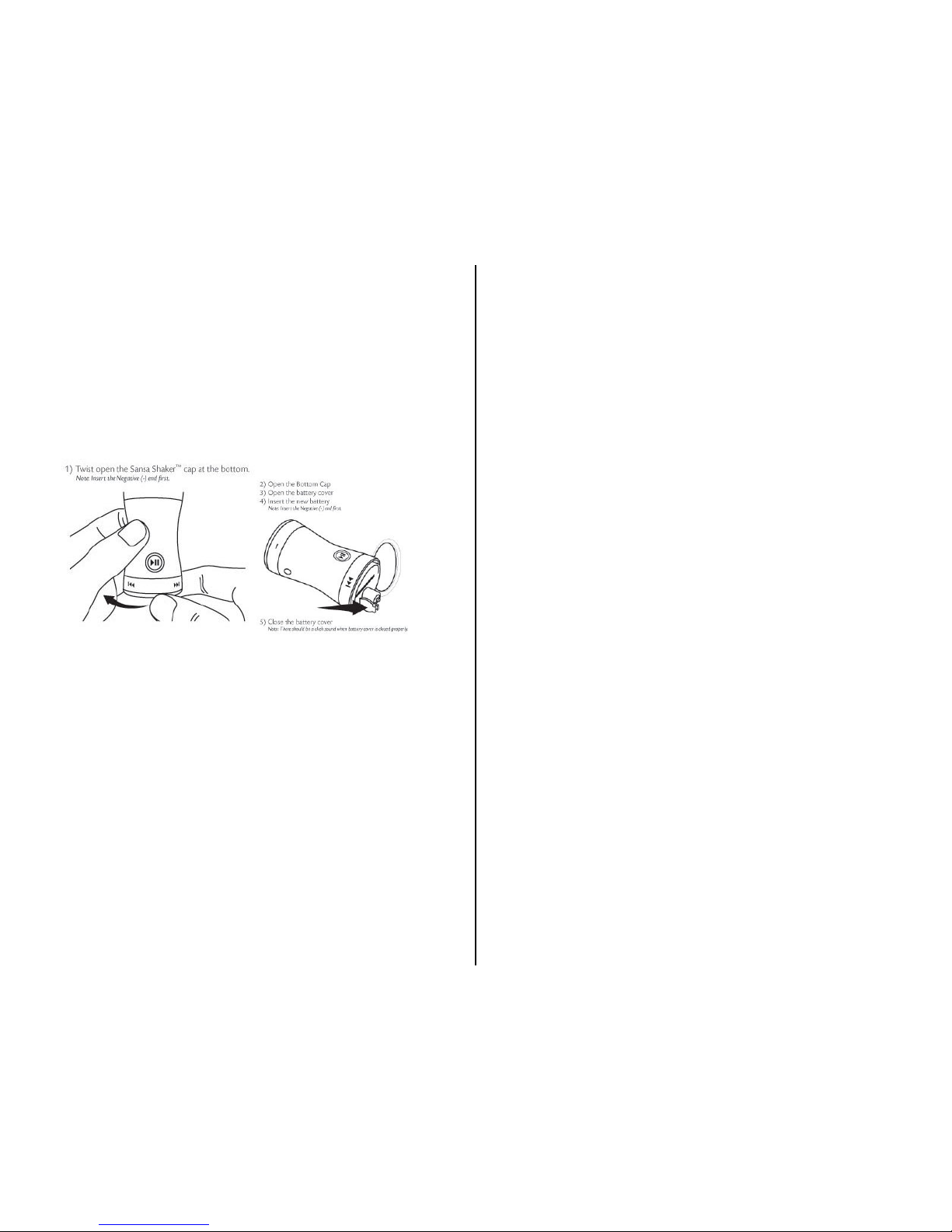
1. The MP3 Player requires 1 “AAA” battery (included) to operate. Use alkaline
batteries only (e.g. Duracell or Energizer brand). Do not use rechargeable batteries or
any other type of batteries because they supply lower voltage and the unit will not
perform properly. Follow the illustrations below for installing the AAA battery,
making sure to follow proper (+) & (-) battery polarity. Replace cover.
2.
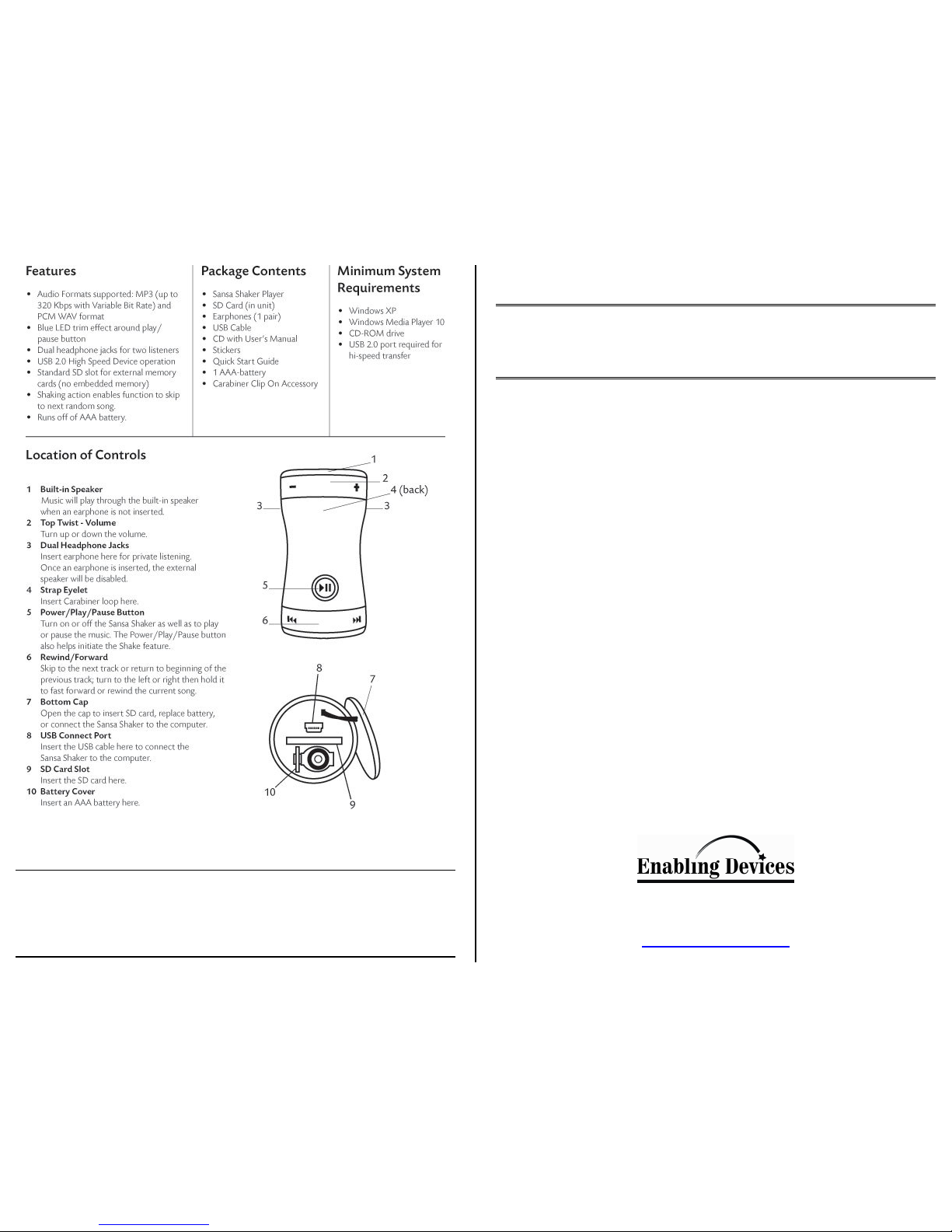
2. We adapted the MP3 player by adding two 1/8" cord jacks. One is used to turn the
unit On/Off or it can be used to Pause the Track. The second cord jack is used to
advances the Track.
3. Plug your Earphones into one of the two jacks marked “Headphones” for private
listing. Once Earphones are inserted the external speaker will be disabled. Adjust the
Volume to an audible level. To turn up the Volume, turn the Top Twist to the right.
To turn the volume up fast, turn the Top Twist to the right and hold it.
4. There are two adapted switch input cord jacks on the unit. One is marked On/Off the
other, Track/Advance. Insert any capability switch with a 1/8" plug into the On/Off
input jack. Make sure the connection is flush with no gaps. Please Note: Switches
with Latch/Timer modes can only be used in Momentary mode with this MP3 player.
Latch/Timer functions will not work.
5. To turn on the MP3 Player, press and hold your switch, or pressing the
Power/Pause/Play button for approximately 2 seconds or until you hear a ‘Drum Roll
Up’ sound.
6. To turn Off the MP3 Player, press and hold your switch or the Power/Play/Pause
button for approximately 5 seconds or until hear a short ‘Drum Roll Down’ sound.
7. To Pause, press or switch or the Power/Play/Pause button once. The LCD will blink
twice approximately every 3 seconds while the music is paused. The player will turn
off automatically after approximately 3 minutes in pause.
8. Skipping Track to skip to the next song, Press your switch plugged into the
Track/Advance once or turning the Bottom Twist to the right. To fast forward the
current song, Press and hold your switch or turn the Bottom Twist to the right and
hold it.
9. Please refer the manufactures instructions for information on the MP3 Player’s
Additional functions and features.
Tips, FAQ, and Troubleshooting:
Question: What audio format does the MP3 Player support?
Answer: Supports MP3 and PCM WAV formats.
Question: I can’t turn on my MP3 Player. Nothing happens when I press and hold the
Power/Play/Pause Button for more than 2seconds. Why?
Answer: The battery is either not inserted or needs to be replaced. To check if the battery
is present, open the MP3 Player Cap then open the Battery Cover. Insert a fresh AAA
battery and try to power on again.
Question: What will happen if I pull the SD card out while the music is playing?
Answer: You will hear an ‘uh-oh’ sound. The music will play when you re-insert the SD
card.
Question: What bit-rates does the MP3 Player support?
Answer: The MP3 Player supports MP3 format with variable bit-rate up to 320 Kbps.
Question: Can the MP3 Player play without an SD card?
Answer: No, you need to insert an SD card with music files loaded.
Question: Does the MP3 Player support SDHC cards?
Answer: The MP3 Player will support SD cards up to 2Gbytes in capacity. It does not
support SDHC cards at this time.
Question: How can I tell if the battery in my MP3 Player is low?
Answer: When the MP3 Player is playing or idle, and the battery level is low, the UH-OH
sound will play first before SHUTDOWN sound will be heard and device will blink 5
times then shut off.
Rev 7/15/08
 Loading...