

Page 1
Tube Tracker #5061
USER’S GUIDE
For Technical Support:
Call our Technical Service Department
Monday through Friday, 9 a.m. to 5 p.m. (EST)
1-800-832-8697
customer_support@enablingdevices.com
Tel. 914.747.3070 / Fax 914.747.3480
50 Broadway
Hawthorne, NY 10532
Toll Free 800.832.8697
www.enablingdevices.com
Page 2

Have tons of fun while promoting eye tracking and developing
switch access skills. The brightly colored balls move upward on a
cushion of air when you activate and hold your switch. Create
hundreds of different games. For example, put marks on the tube
at various heights and give points for reaching each mark.
Includes six colored ping pong balls. Size: 11"L x 11"W x 34"H.
Requires 6 C Batteries. Weight: 2¾ lbs.
Operation:
1. Tube Tracker requires 6 C batteries (Not included). Use
alkaline batteries only (e.g. Duracell or Energizer brand). Do
not use rechargeable batteries or any other type of batteries
because they supply lower voltage and the unit will not
perform properly. Never mix old and new batteries together or
different brands or types together.
2. The battery compartments are located on the bottom of the
base unit. To remove the battery compartment covers,
unscrew the small Phillips Head screw from each
compartment, then slide the covers back and off. Install new
batteries, being careful to observe proper (+) & (-) battery
polarity. Replace covers and screws.
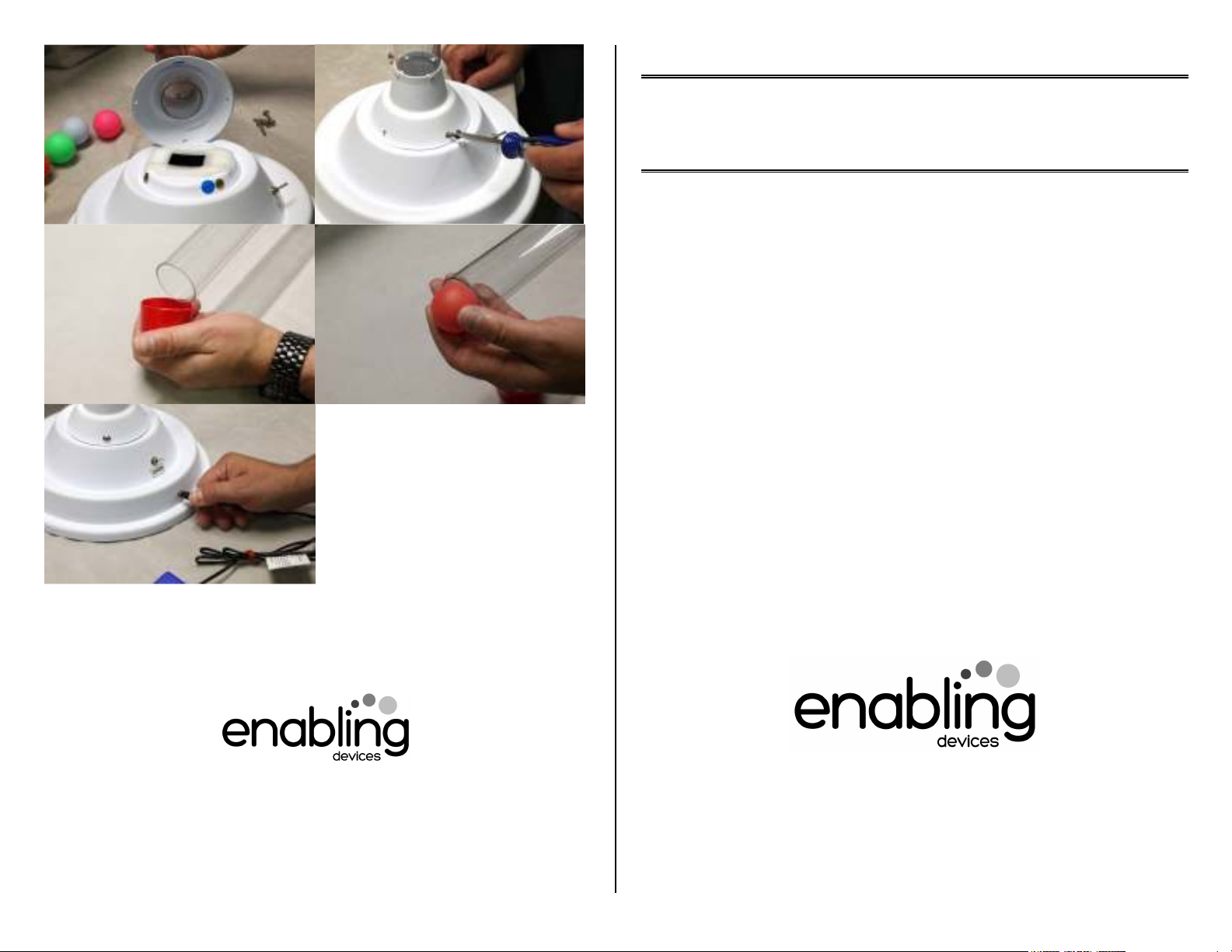
3. The Tube is attached to the base unit by 4 Philips head
screws (included). On the base and the underside of the
tube’s white base there will be a Blue dot on each (See
photos on back page of guide). Line both dots up when
placing the tube onto the base so the screw holes will line up
properly. Next install each screw and tighten just enough for a
snug fit. Please Note: Do not over-tighten the screws, doing
so can crack the tube base and damage the unit.
4. Turn the ON/OFF switch located on the side of the unit to the
ON position. Connect the unit to any external capability switch
via the 1/8" jack, also located on the side of the unit. If you
need to use a ¼ " to 1/8" adapter for your switch, it must be a
mono adapter, not stereo like our item #1170.
5. Make sure that the connections between the external
capability switch and the jack on the Tube Tracker is plugged
in all the way. There should be no gaps.
6. Load only one or two supplied balls into the Tube Tracker at
once (See photos on back of guide). The top Vinyl cap on the
tube is removable. Replace the Vinyl cap when finished
loading the balls. Begin play by activating your external
capability switch. The brightly colored balls move upward on a
cushion of air when you activate and hold your switch. Once
you release your switch the balls will fall back down the tube.
Troubleshooting:
Problem: The Tube Tracker does not work.
Action #1: Do not put more than two balls at a time in the Tube
Tracker.
Action #2: Check or replace the 6 C batteries with fresh new
batteries. Never mix different brands or old and new batteries.
Action #3: Make sure the Tube Tracker is on a flat level surface
and that nothing is restricting any of the balls. Use only the balls
included with Tube Tracker, other balls will not work with this
product.
Action #4: Try a different switch that you know works with other
toys/devices to rule out the Tube Tracker as the source of the
problem.
Care of Unit:
The Tube Tracker can be wiped clean with any household multipurpose cleaner and disinfectant.
Do not submerge the unit, as it will damage the contents and the
electrical components.
Do not use abrasive cleaners, as they will scratch the surface
of the unit. Rev 9/7/17
 Loading...