

Page 1
Tail Light Switch Say-It-Play-it
Touch its rim ever so lightly and hear your pre-recorded message while
vibrating and lighting stimuli go into action. Plug in your toy or device
and it will start when edge is touched. Can be used on a tabletop or
mounted on a door or wall. Wall mounting bracket sold separately. See
item #466 below. Size: Size: 7 3/4"W x 2 1/2"H. Requires 4 AA
Batteries (Not included).
Operation:
1. Carefully turn over unit and remove the battery case covers to reveal
battery compartments. Observing polarity, install four AA size
batteries (Not included) into the holders. Alkaline batteries are
recommended because they last longer. Do not use rechargeable
batteries because they supply lower voltage and the unit may not
perform as well.
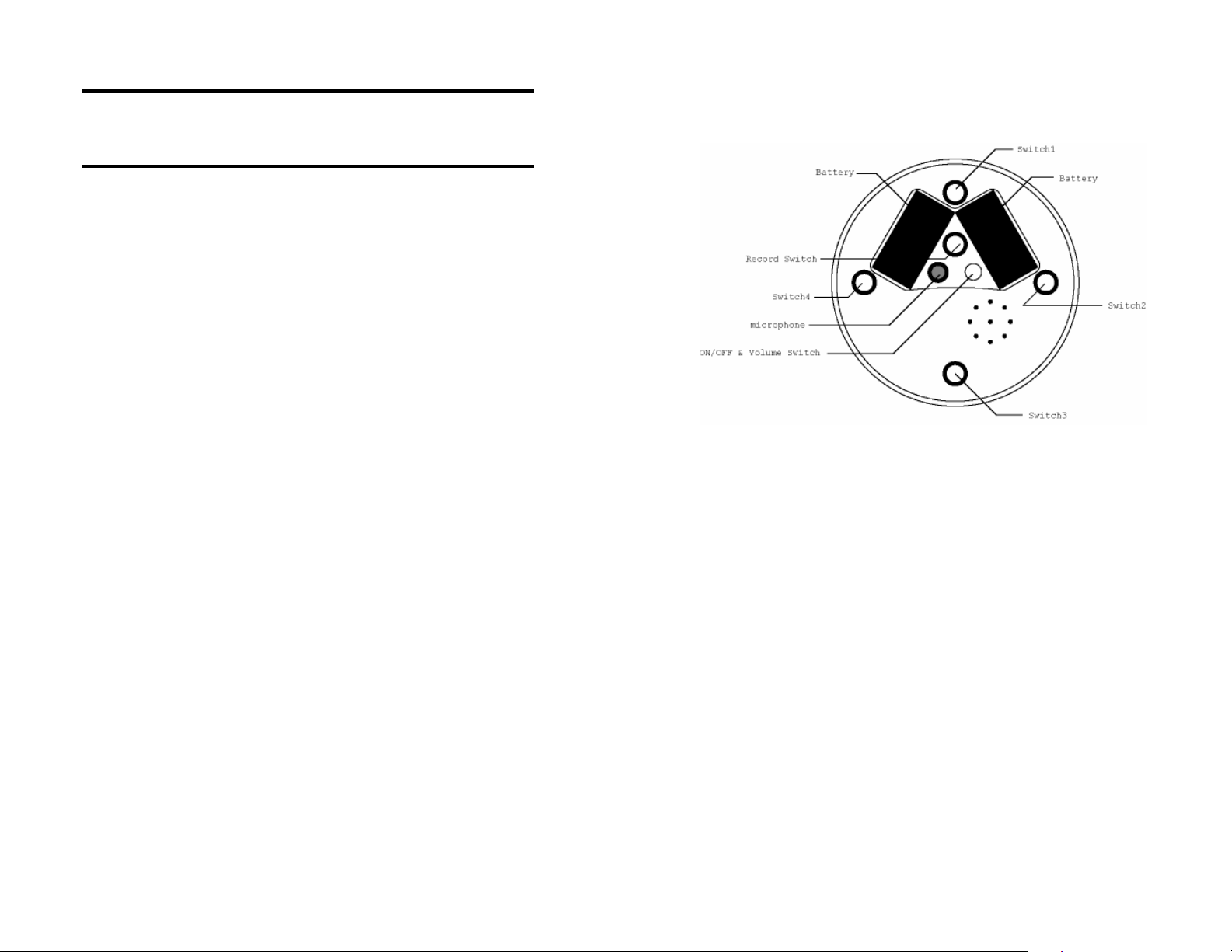
2. The microphone and the red "RECORD" button are located on the
back panel of the unit. To record, first depress and hold the red
"RECORD" button. Then while holding the "RECORD" button,
depress the No.2 or No.4 padded buttons (see illustration) and speak
into the microphone. Release both the padded button and the recording
button when the recording is over. Place the Tail Light on a flat surface,
or use the optional wall mount. Press anywhere on the Tail Light and
your message will play, along with lights and vibration.
3. The unit will retain recorded information indefinitely, even if the
battery is disconnected. Previously stored information will be
erased only when a new recording is performed.
4. Playback volume can be adjusted using the "ON/OFF/VOLUME"
control knob located on the back panel of the unit.
5. To use as a switch, plug one end of the supplied double ended 1/8"
to 1/8" cord into the jack located on the side of the Tail Light. Next
plug the other end into your switch adapted toy/device. Press
anywhere on the Tail light, and your toy/device will activate along
with your pre-recorded message, lights and vibration. Once you
release the Tail Light your toy/device will shut off.
Important Notes:
1. The memory of this unit is capable of holding up to a total of 20
seconds of speech information. If message length exceeds available
memory amount (e.g., 20 seconds), it will wrap around over itself at its
beginning.
2. The Tail Light Switch will shut off automatically after playback, to
preserve battery life. However, the device still drains a very small
current in this "sleep" mode. Therefore, if the unit is not going to be
used for a few days, it is recommended that the unit be turned off, to
extend overall battery life. This can be done by turning the
“ON/OFF/VOLUME” switch counterclockwise, until it "clicks" off.
Page 2

Troubleshooting:
Problem: The unit fails to operate, or operates incorrectly.
Action #1: Make sure that you are using the Tail Light on a flat
surface.
Action #2: Disconnect the power, by removing one of the batteries
from each compartment for 20 seconds, to reset the unit. Reconnect the
battery. If the unit still does not work correctly, replace all batteries.
Action # 3: Make sure all connections between the Tail Light, cord and
toy/device. There should be no gaps.
Care of Unit:
The Tail Light Say-It-Play-It can be wiped clean with any household
multi-purpose cleaner and disinfectant.
Do not submerge the unit as it will damage the electrical components.
Do not use abrasive cleaners as they will scratch the surface of the
unit.
Tail Light Switch
Say-It-Play-It
Catalog #464
User’s Guide
 Loading...