

Page 1
Basic Talk #4047, 4047-B
USER’S GUIDE
Page 2

Activate by pressing one of four light touch message squares. Device has
easy to use slide in overlays, optimal ergonomic angle, and is portable and
lightweight. Record time is 5 seconds per message for a total of 20
seconds. Size: 11"L x 4"W x 2¾"H. Requires 4 AA Batteries.
BATTERY INSTALLATION:
Make sure unit is in the OFF position by rotating the ON-OFF-VOLUME
control counter clockwise until a "click" is heard. Remove each screw in
both battery compartments and install two brand new “AA” alkaline
batteries into each - four batteries total. Replace both battery covers and
screws.
RECORDING MESSAGES:
Using one hand, press and hold the Record button on the underside of the
unit. Using your other hand, press the icon you wish to record on and
speak into the microphone. Your mouth should be 8” – 12” from the
microphone when you make your recording. If you are going to record
more than one message, you may press and hold the record button while
pressing the appropriate icons to record your messages. Maximum record
time per message is 5 seconds. Total record time for the unit is 20
seconds. Please Note: You can not use more than 5 seconds of record
time per message.
PAPER ICON INSERTS:
The Basic Talk 4 uses paper icon inserts that you print from your
computer. You can download the PDF file for the Icon template from our
website. Each icon template sheet makes three inserts. Cut along the
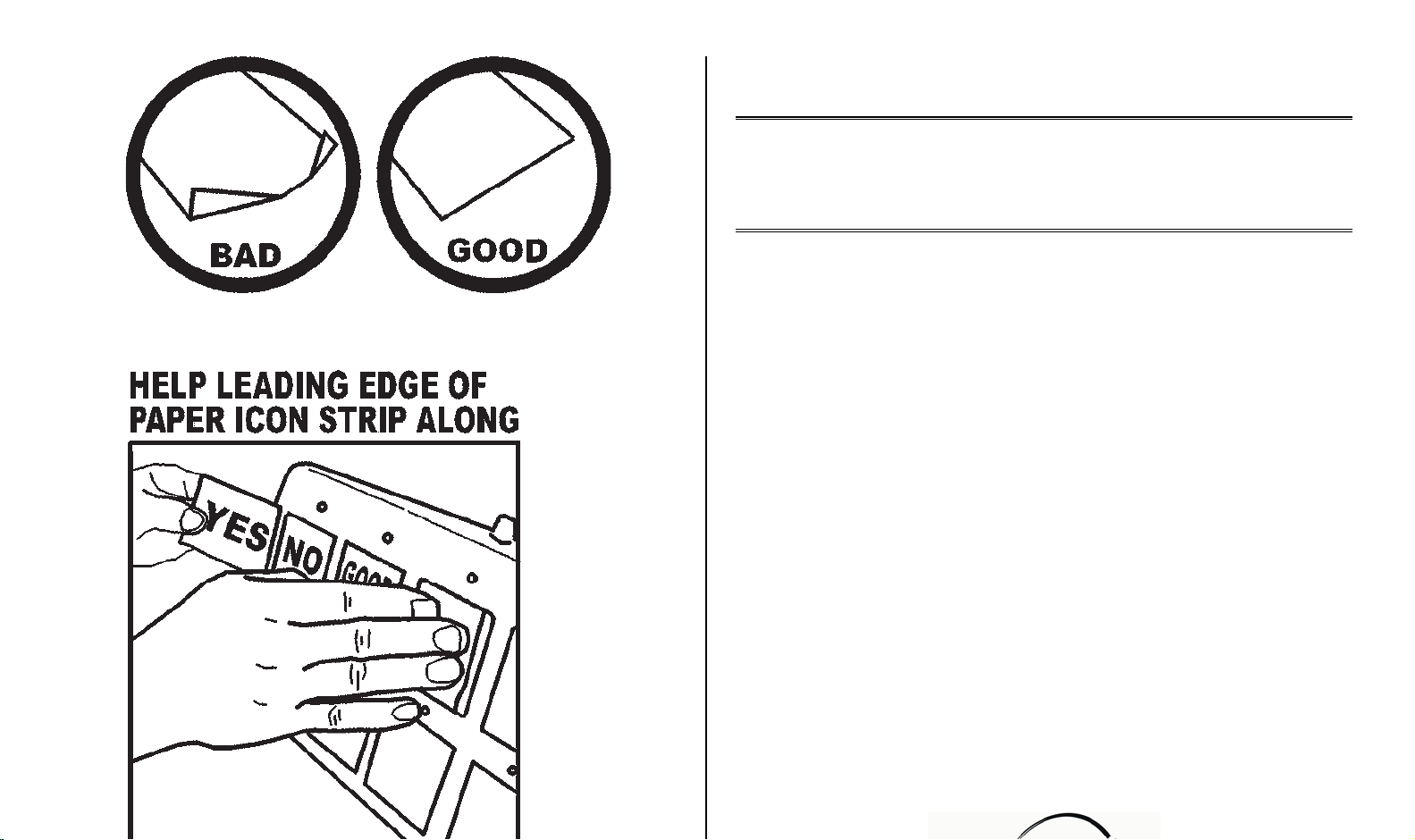
dotted lines using scissors or a paper cutter. It is important to cut
accurately along the dotted line so the icon insert will slide into the Talk 4
icon slot properly. If the insert is cut too large it will get stuck. (See
illustrations on back page) Draw you picture or word on the icon insert
before sliding into the Talk 4 slot. Never draw on the icon insert after it
has been inserted into the Talk 4 as a pen can permanently damage
the surface of the cell.
If you are going to use stickers on your icon insert sheet, they must lay
completely flat otherwise they will get stuck. When sliding the paper icon
insert into the Talk 4 slot, make sure you gently press down the leading
edge of the paper so it will not get stuck on the cell dividers. A small
piece of tape may be used to hold the icon sheet from sliding out of the
slot if the Talk 4 will be moved around. Simply tape the left edge of the
insert to the Talk 4 body using a 1” long piece of tape. If you are
laminating your paper icon insert, use a light laminate such as “Magic
Cover” self-adhesive vinyl covering. A very heavy laminate will decrease
the sensitivity of the switch cells.
The leading edge of the icon sheet should not be “rabbit eared” or torn. If
you have Mayer Johnson Boardmaker, you can download the Talk 4
template from their website.
REPLACING BATTERIES:
Replace batteries regularly. Weak batteries will cause the Talk 4 to act
erratically, such as shutting off while playing messages.
Use brand name ALKALINE batteries ONLY (e.g. Duracell or Eveready
Energizer).
Do NOT use rechargeable batteries.
Do NOT mix new and old batteries.
Do NOT over tighten the battery compartment screws.
To extend battery life, always shut the Basic Talk 4 OFF when not in use.
Always remove batteries when the unit will not be used for extended
periods of time. Dead batteries often leak acid and can cause permanent
damage to the communicator.
CARRYING STRAP:
For safety purposes, the Carrying Strap has thumbscrews with a selflocking nut to prevent them from being removed from the strap. To prevent
a Choking Hazard, NEVER remove the self-locking nuts.
When attaching the carrying strap, tighten the thumbscrews finger-tight
only.
DO NOT OVERTIGHTEN.
The Carrying Strap was designed to carry the Talk 4 from the shoulder
only.
NEVER carry the communicator from the neck.
PRECAUTIONS:
Never hit the icon surface with a hard object or permanent damage can
result.
Never tape or affix anything directly to the icon switch surface.
Always keep a paper insert installed in the Talk 4 to protect the icons.
Always keep liquids far away from the communicator to prevent
permanent damage to
the internal circuitry from spillage.
Rev 7/27/10
 Loading...