

Page 1
Ultimate Switch #1671, 1552 & 1551
USER’S GUIDE
For Technical Support:
For Technical Support:
For Technical Support:For Technical Support:
Call our Technical Service Department
Monday through Friday, 9 a.m. to 5 p.m. (EST)
1-800-832-8697
customer_support@enablingdevices.com
50 Broadway
Hawthorne, NY 10532
Tel. 914.747.3070 / Fax 914.747.3480
Toll Free 800.832.8697
www.enablingdevices.com
Page 2

OOOOur #1 best selling S
ur #1 best selling Switch!
ur #1 best selling Sur #1 best selling S
witch!
witch!witch!
Our exclusive Ultimate Switch is THE most universal, versatile, multifaceted switch. It’s designed to be used by even the most profoundly
challenged or neurologically impaired individuals. It requires only the
slightest touch for activation (10 grams of force), yet can easily
withstand the abuse of gross body movements or severe blows. 19"
Gooseneck and universal clamp included. Weight: 2½ lbs.
Operation:
Operation:
Operation:Operation:
1. Using the mounting clamp, attach the Ultimate Switch to a Wheel
Chair, Table or Desk. Tighten the clamp enough to hold the
Ultimate Switch securely, but do not over-Tighten the clamp. (See
Photos).
2. Plug the Ultimate Switch into your switch adapted toy/device.
Make sure that the connection is tight. There should be NO gaps.
If you use an adapter for devices with ¼ inch jacks, make sure
that it is a MONO adapter, not stereo.
3. Actuate the Ultimate switch in order to turn on your toy/device.
Your toy/device will only remain activated while you hold the
Ultimate switch in the actuated position. Once you release
pressure on the Ultimate switch, the toy/device will turn off.
Troubleshooting:
Troubleshooting:
Troubleshooting:Troubleshooting:
Problem #1:
Problem #1: The toy/device is not activating.
Problem #1: Problem #1:
Action #1
Action #1:::: Make sure that the connection to the toy/device is very
Action #1Action #1
tight. There should be NO gaps. Make sure that you are using a
MONO adapter, if applicable.
Action #2
Action #2:::: Try using your toy/device with a different switch in order
Action #2Action #2
to rule out the toy/device as the source of the problem. You may
need to change the batteries in the toy/device.
Care of Unit:
Care of Unit:
Care of Unit:Care of Unit:
The Ultimate Switch can be wiped clean with any household multipurpose cleaner and disinfectant. We recommend Simple Green,
which is a non toxic biodegradable all-purpose cleaner.
Do not submerge
Do not submerge the unit, as it will damage the electrical
Do not submergeDo not submerge
components.
Do not use abrasive cleaners
Do not use abrasive cleaners, as they will scratch the surface of
Do not use abrasive cleanersDo not use abrasive cleaners
the unit.
Page 3
1. Clamping Options:
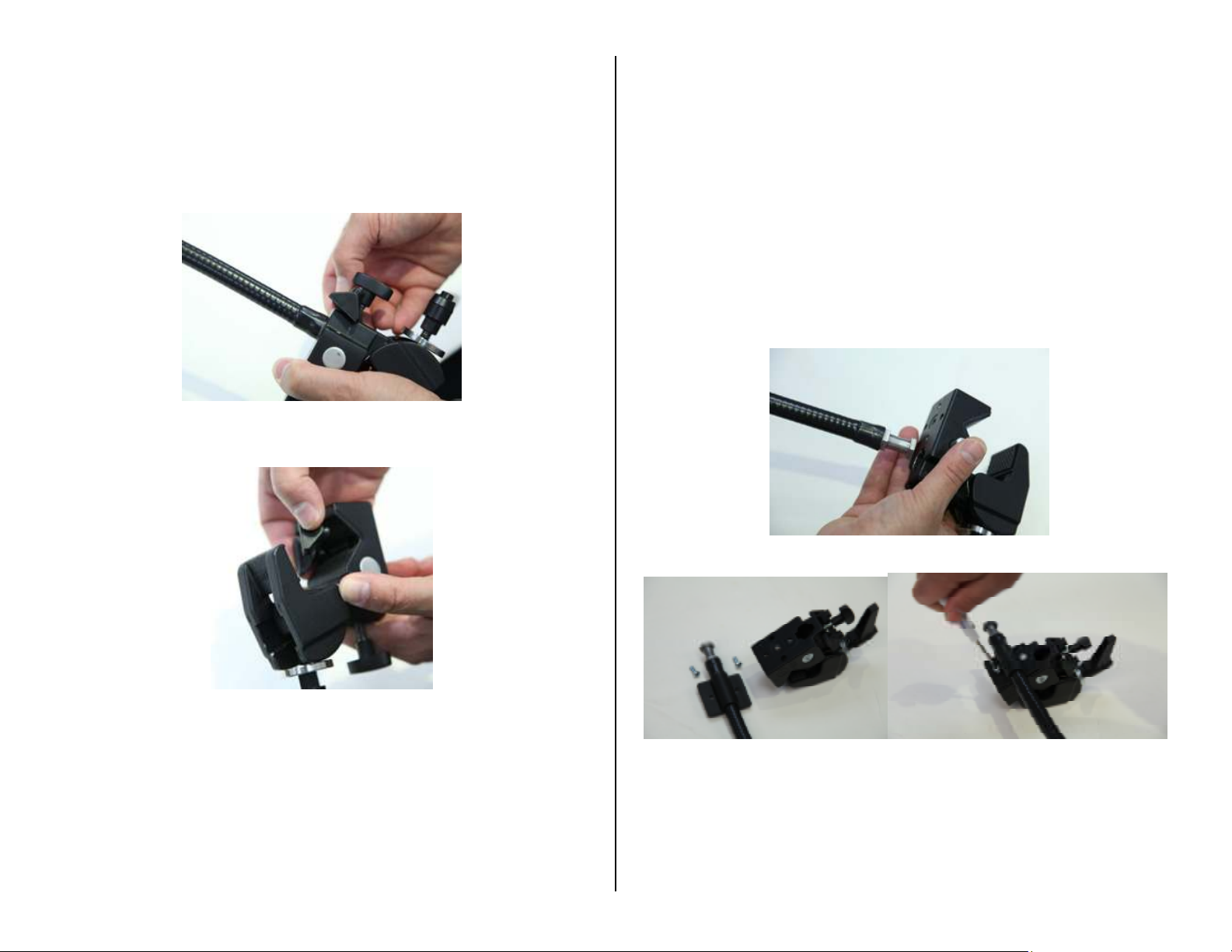
Clamping Options: Our mounting clamp is designed for
Clamping Options: Clamping Options:
mounting to tubular (wheelchair, bedrail, walker, etc.) or flat
surfaces such as a table top or desk. For flat surface mounting
use the included wedge insert shoe stored in front of the locking
knob on the clamp (see Fig.1 & 2) Loosen locking knob slightly to
remove wedge, tighten knob once wedge has been removed.
Fig.1
Fig.1
Fig.1Fig.1
3. For some mounting applications the clamp will need to be
mounted horizontally, we have included a Gooseneck clamp
mount adapter for this use. To use the adapter you first must
remove the Gooseneck from the clamp, do this by loosening the
set knob on the back of the clamp. This is the same knob that
holds the clamp wedge (shown in Fig.1). Next depress the spring
loaded pin on the side of the clamp and pull the Gooseneck from
the clamp (see Fig.3). Attach the adapter to the Gooseneck and
secure with the included mounting screws as shown in (Fig. 4 &
5).
Fig. 2
Fig. 2
Fig. 2Fig. 2
2. Using the mounting clamp, attach the Ultimate Switch to a Wheel
Chair, Table or Desk. Tighten the clamp enough to hold the
Ultimate Switch securely, but do not over-Tighten the clamp.
Fig.3
Fig.4 Fig.5
Fig.4 Fig.5
Fig.4 Fig.5Fig.4 Fig.5
Rev 3
Rev 3////30
30/1
Rev 3Rev 3
3030
/17777
/1/1
 Loading...