

Page 1
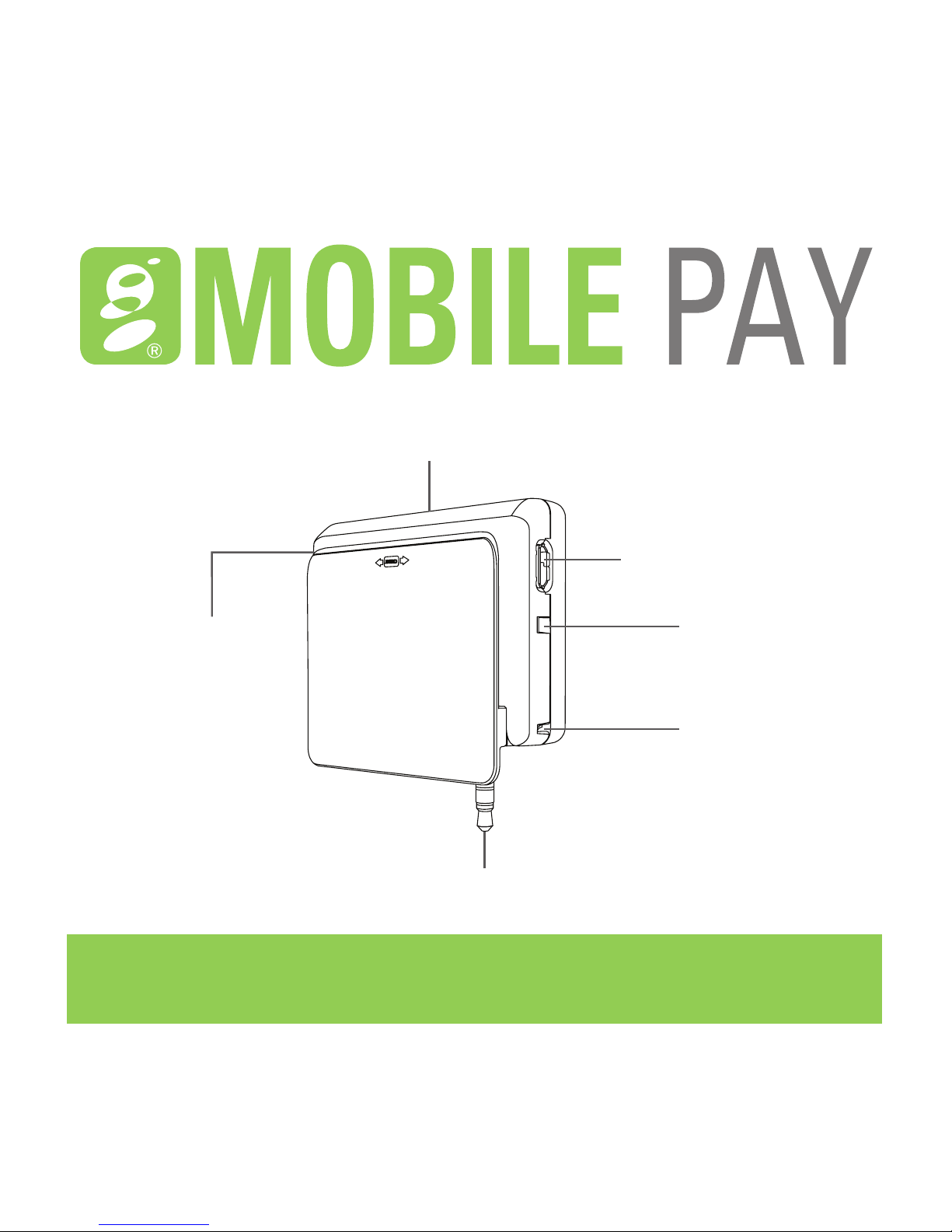
For EMV Card Reading
3.5mm Audio Jack
LED Indicator
Lanyard Hole
Micro USB Port
for Charging
For Magstripe
Card Reading
QUICK REFERENCE GUIDE
Page 2

HOW TO GET STARTED
Charge the reader using the enclosed charging cable. You can connect
the cable to a USB port. A full charge will be obtained in approximately
2 hours. For more details on charging your device visit
www.globalmpos.com/getstarted.
1. Set Up a Global Payments Merchant Account
Visit www.globalmpos.com/getstarted and click Get Started to complete the
application. Upon approval, you will receive a welcome email with a 5 digit
activation code.
2. Download and Install the Mobile Pay App
Download the app from the link included in your welcome email or using the
following links. For Android™ smartphones and tablets, download the app
at https://globalmpos.com/android. For Apple® smartphones and tablets,
download the app at http://globalmpos.com/ios. You may also search for
‘Mobile Pay by Global Payments’ in the App Store® or Google Play™ and
download the app.
3. Activate Account
Open the Mobile Pay app and click ‘Activate Account.’ Here you will enter the 5
digit activation code you received via email and complete the activation process.
Page 3

4. Plug in the Reader
Plug the reader into the audio jack of your smartphone or tablet. You may need
to remove any added protective case from your phone or tablet if it prevents
the reader from being properly plugged into the audio jack. A rubber stabilizer
is enclosed in case the reader moves when swiping or inserting cards. To use
the stabilizer:
a. Remove the existing small rubber pad from the bottom
of the reader.
b. Remove the tape coverings on the larger stabilizer.
c. Line up the holes on the reader with the rubber knobs on the
bottom of the stabilizer.
d. Press down firmly on the stabilizer.
Note: You may need to maximize the media volume or other audio settings on
your phone to make the card reader work properly.
5. Accept Payments
Swipe or insert the card when prompted by the Mobile Pay app. For more
details on accepting payments visit www.globalmpos.com/getstarted.
NOTE: For EMV® transactions, leave the card in the reader until the payment
application prompts you to remove the card.
Page 4

WHAT’S IN THE BOX
• EMV® chip card reader
• EMV chip card reader charger
• Stabilizer
YOU WILL ALSO NEED
• Global Payments merchant account www.globalmpos.com/getstarted
• Smartphone or tablet with data plan or WiFi access*
• Mobile Pay app
SUPPORT
24/7 via 866.716.0521 or [email protected]
*Supported Devices: Android requires OS version 4.1 and above. iOS
requires OS version 7 and above.
EMV® is a registered trademark of EMVCo.
 Loading...